brake fluid CHEVROLET DYNASTY 1993 Manual Online
[x] Cancel search | Manufacturer: CHEVROLET, Model Year: 1993, Model line: DYNASTY, Model: CHEVROLET DYNASTY 1993Pages: 2438, PDF Size: 74.98 MB
Page 312 of 2438
BENDIX ANTILOCK 4 MODULATOR ASSEMBLY BLEEDING PROCEDURE
(1) Assemble and install all brake system compo-
nents on the vehicle, making sure all hydraulic fluid
lines are installed and properly torqued. (2) Bleed the base brake system, using ONLYthe
bleeding procedure outlined in the Service Adjust-
ments section of this service manual supplement. To perform the bleeding procedure on the ABS modu-
lator assembly, the battery, battery tray and acid shield
must be removed from vehicle. Then reconnect the
vehicle's battery to vehicle's battery cables, using
ONLY approved battery jumper cables. (3) Connect the DRB Diagnostics Tester to the vehi-
cle's diagnostics connector. The vehicle diagnostic con-
nector is located behind the fuse panel access cover on
the lower section of the dash panel left of the steering
column. The diagnostic connector is a blue 6 way
connector. (4) Using the DRB check to make sure the CAB does
not have any stored fault codes. If it does, remove them
using the DRB.
WARNING: WHEN BLEEDING THE MODULATOR AS-
SEMBLY WEAR SAFETY GLASSES. A CLEAR BLEED
TUBE MUST BE ATTACHED TO THE MODULATOR
BLEED SCREWS AND SUBMERGED IN A CLEAR
CONTAINER FILLED PART WAY WITH FRESH CLEAN
BRAKE FLUID. DIRECT THE FLOW OF BRAKE FLUID
AWAY FROM THE PAINTED SURFACES OF THE VE-
HICLE. BRAKE FLUID AT HIGH PRESSURE MAY
COME OUT OF THE BLEEDER SCREWS, WHEN
OPENED.
When bleeding Antilock modulator assembly, the
following bleeding sequence MUSTbe followed to
insure a complete bleeding of all air from the Antilock
brake, and base brake hydraulic systems. The modu-
lator assembly can ONLY be bled using a manual
bleeding procedure to pressurize the hydraulic
system.
MODULATOR ASSEMBLY CIRCUIT BLEEDING PROCEDURE AND SEQUENCE
1 MODULATOR PRIMARY CHECK VALVE CIRCUIT
Note: To bleed hydraulic circuits of the Bendix
Antilock 4 Brake System modulator assembly,
the aid of a second mechanic or helper will be
required to pump the brake pedal. (1) Install a clear bleed tube (such as Tygon) on
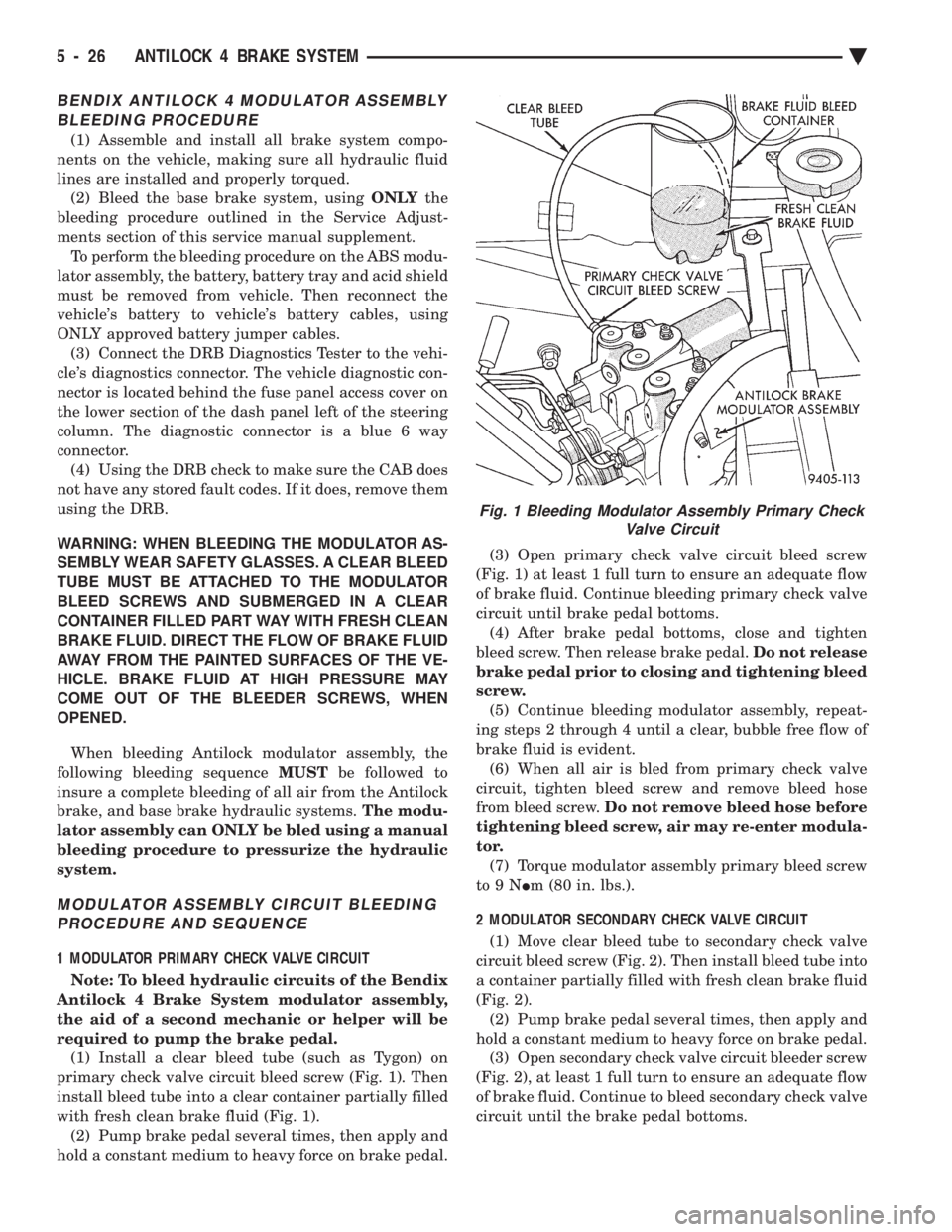
primary check valve circuit bleed screw (Fig. 1). Then
install bleed tube into a clear container partially filled
with fresh clean brake fluid (Fig. 1). (2) Pump brake pedal several times, then apply and
hold a constant medium to heavy force on brake pedal. (3) Open primary check valve circuit bleed screw
(Fig. 1) at least 1 full turn to ensure an adequate flow
of brake fluid. Continue bleeding primary check valve
circuit until brake pedal bottoms. (4) After brake pedal bottoms, close and tighten
bleed screw. Then release brake pedal. Do not release
brake pedal prior to closing and tightening bleed
screw. (5) Continue bleeding modulator assembly, repeat-
ing steps 2 through 4 until a clear, bubble free flow of
brake fluid is evident. (6) When all air is bled from primary check valve
circuit, tighten bleed screw and remove bleed hose
from bleed screw. Do not remove bleed hose before
tightening bleed screw, air may re-enter modula-
tor. (7) Torque modulator assembly primary bleed screw
to9N Im (80 in. lbs.).
2 MODULATOR SECONDARY CHECK VALVE CIRCUIT (1) Move clear bleed tube to secondary check valve
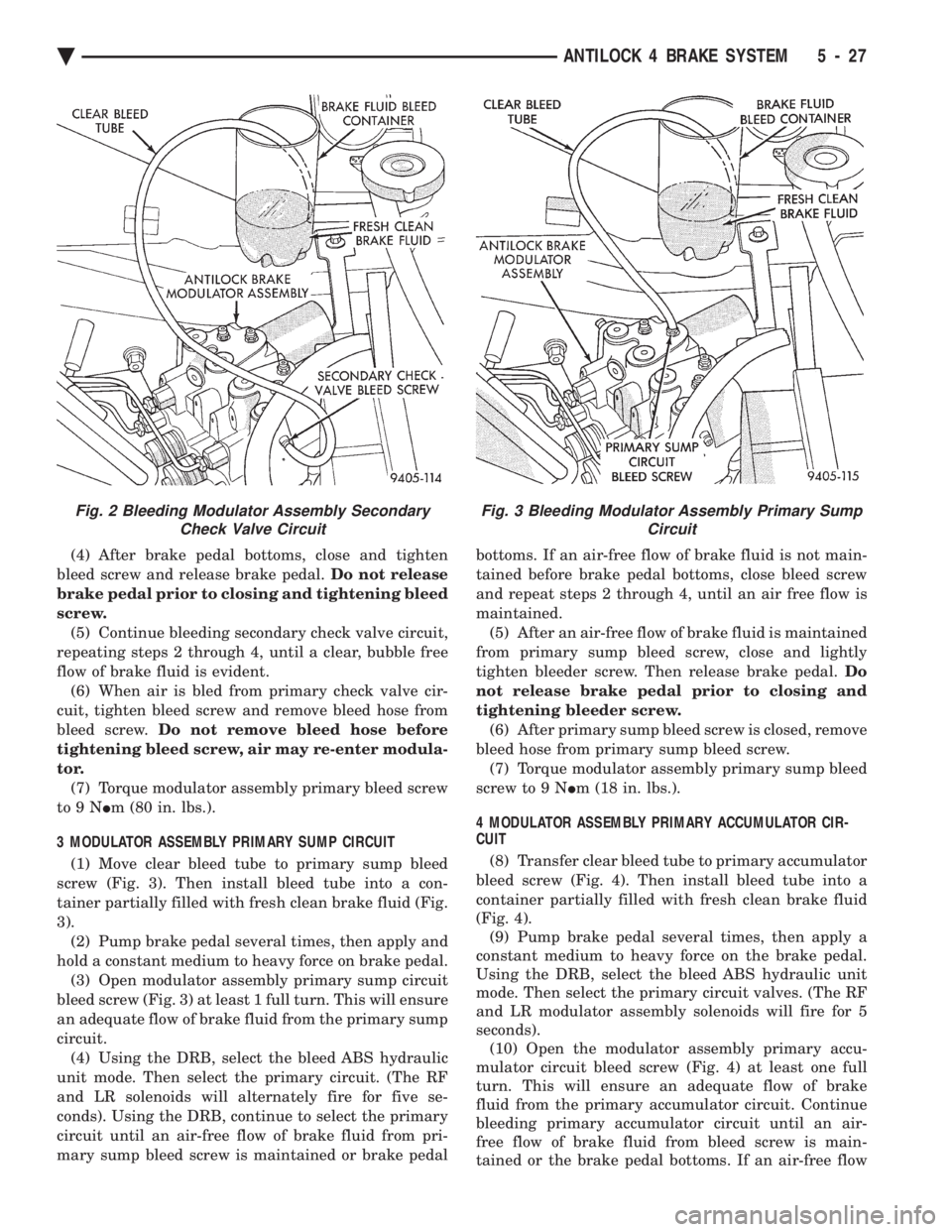
circuit bleed screw (Fig. 2). Then install bleed tube into
a container partially filled with fresh clean brake fluid
(Fig. 2). (2) Pump brake pedal several times, then apply and
hold a constant medium to heavy force on brake pedal. (3) Open secondary check valve circuit bleeder screw
(Fig. 2), at least 1 full turn to ensure an adequate flow
of brake fluid. Continue to bleed secondary check valve
circuit until the brake pedal bottoms.
Fig. 1 Bleeding Modulator Assembly Primary Check Valve Circuit
5 - 26 ANTILOCK 4 BRAKE SYSTEM Ä
Page 313 of 2438
(4) After brake pedal bottoms, close and tighten
bleed screw and release brake pedal. Do not release
brake pedal prior to closing and tightening bleed
screw. (5) Continue bleeding secondary check valve circuit,
repeating steps 2 through 4, until a clear, bubble free
flow of brake fluid is evident. (6) When air is bled from primary check valve cir-
cuit, tighten bleed screw and remove bleed hose from
bleed screw. Do not remove bleed hose before
tightening bleed screw, air may re-enter modula-
tor. (7) Torque modulator assembly primary bleed screw
to9N Im (80 in. lbs.).
3 MODULATOR ASSEMBLY PRIMARY SUMP CIRCUIT (1) Move clear bleed tube to primary sump bleed
screw (Fig. 3). Then install bleed tube into a con-
tainer partially filled with fresh clean brake fluid (Fig.
3). (2) Pump brake pedal several times, then apply and
hold a constant medium to heavy force on brake pedal. (3) Open modulator assembly primary sump circuit
bleed screw (Fig. 3) at least 1 full turn. This will ensure
an adequate flow of brake fluid from the primary sump
circuit. (4) Using the DRB, select the bleed ABS hydraulic
unit mode. Then select the primary circuit. (The RF
and LR solenoids will alternately fire for five se-
conds). Using the DRB, continue to select the primary
circuit until an air-free flow of brake fluid from pri-
mary sump bleed screw is maintained or brake pedal bottoms. If an air-free flow of brake fluid is not main-
tained before brake pedal bottoms, close bleed screw
and repeat steps 2 through 4, until an air free flow is
maintained.
(5) After an air-free flow of brake fluid is maintained
from primary sump bleed screw, close and lightly
tighten bleeder screw. Then release brake pedal. Do
not release brake pedal prior to closing and
tightening bleeder screw. (6) After primary sump bleed screw is closed, remove
bleed hose from primary sump bleed screw. (7) Torque modulator assembly primary sump bleed
screw to 9 N Im (18 in. lbs.).
4 MODULATOR ASSEMBLY PRIMARY ACCUMULATOR CIR-
CUIT
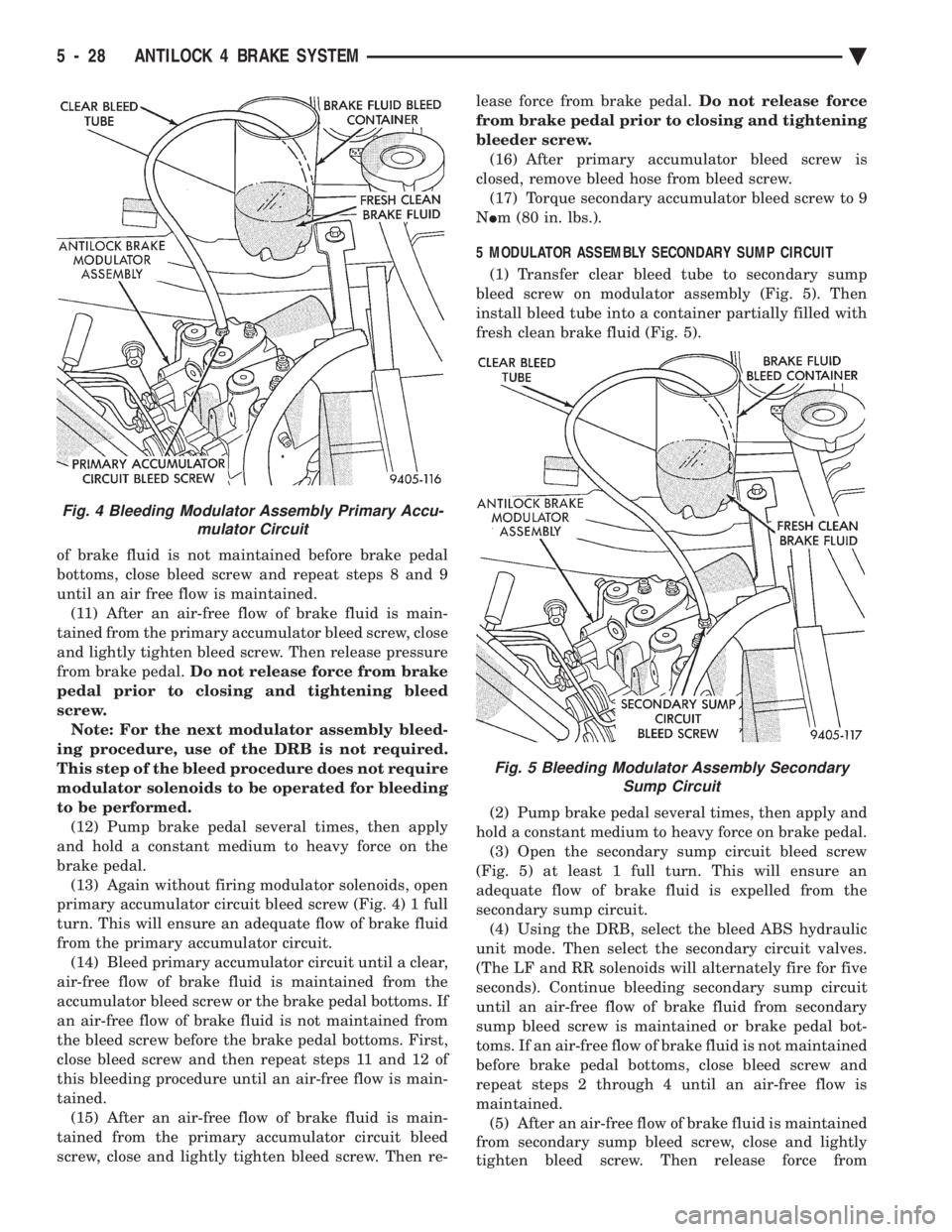
(8) Transfer clear bleed tube to primary accumulator
bleed screw (Fig. 4). Then install bleed tube into a
container partially filled with fresh clean brake fluid
(Fig. 4). (9) Pump brake pedal several times, then apply a
constant medium to heavy force on the brake pedal.
Using the DRB, select the bleed ABS hydraulic unit
mode. Then select the primary circuit valves. (The RF
and LR modulator assembly solenoids will fire for 5
seconds). (10) Open the modulator assembly primary accu-
mulator circuit bleed screw (Fig. 4) at least one full
turn. This will ensure an adequate flow of brake
fluid from the primary accumulator circuit. Continue
bleeding primary accumulator circuit until an air-
free flow of brake fluid from bleed screw is main-
tained or the brake pedal bottoms. If an air-free flow
Fig. 3 Bleeding Modulator Assembly Primary Sump CircuitFig. 2 Bleeding Modulator Assembly SecondaryCheck Valve Circuit
Ä ANTILOCK 4 BRAKE SYSTEM 5 - 27
Page 314 of 2438
of brake fluid is not maintained before brake pedal
bottoms, close bleed screw and repeat steps 8 and 9
until an air free flow is maintained.(11) After an air-free flow of brake fluid is main-
tained from the primary accumulator bleed screw, close
and lightly tighten bleed screw. Then release pressure
from brake pedal. Do not release force from brake
pedal prior to closing and tightening bleed
screw. Note: For the next modulator assembly bleed-
ing procedure, use of the DRB is not required.
This step of the bleed procedure does not require
modulator solenoids to be operated for bleeding
to be performed. (12) Pump brake pedal several times, then apply
and hold a constant medium to heavy force on the
brake pedal. (13) Again without firing modulator solenoids, open
primary accumulator circuit bleed screw (Fig. 4) 1 full
turn. This will ensure an adequate flow of brake fluid
from the primary accumulator circuit. (14) Bleed primary accumulator circuit until a clear,
air-free flow of brake fluid is maintained from the
accumulator bleed screw or the brake pedal bottoms. If
an air-free flow of brake fluid is not maintained from
the bleed screw before the brake pedal bottoms. First,
close bleed screw and then repeat steps 11 and 12 of
this bleeding procedure until an air-free flow is main-
tained. (15) After an air-free flow of brake fluid is main-
tained from the primary accumulator circuit bleed
screw, close and lightly tighten bleed screw. Then re- lease force from brake pedal.
Do not release force
from brake pedal prior to closing and tightening
bleeder screw. (16) After primary accumulator bleed screw is
closed, remove bleed hose from bleed screw. (17) Torque secondary accumulator bleed screw to 9
N Im (80 in. lbs.).
5 MODULATOR ASSEMBLY SECONDARY SUMP CIRCUIT (1) Transfer clear bleed tube to secondary sump
bleed screw on modulator assembly (Fig. 5). Then
install bleed tube into a container partially filled with
fresh clean brake fluid (Fig. 5).
(2) Pump brake pedal several times, then apply and
hold a constant medium to heavy force on brake pedal. (3) Open the secondary sump circuit bleed screw
(Fig. 5) at least 1 full turn. This will ensure an
adequate flow of brake fluid is expelled from the
secondary sump circuit. (4) Using the DRB, select the bleed ABS hydraulic
unit mode. Then select the secondary circuit valves.
(The LF and RR solenoids will alternately fire for five
seconds). Continue bleeding secondary sump circuit
until an air-free flow of brake fluid from secondary
sump bleed screw is maintained or brake pedal bot-
toms. If an air-free flow of brake fluid is not maintained
before brake pedal bottoms, close bleed screw and
repeat steps 2 through 4 until an air-free flow is
maintained. (5) After an air-free flow of brake fluid is maintained
from secondary sump bleed screw, close and lightly
tighten bleed screw. Then release force from
Fig. 4 Bleeding Modulator Assembly Primary Accu- mulator Circuit
Fig. 5 Bleeding Modulator Assembly SecondarySump Circuit
5 - 28 ANTILOCK 4 BRAKE SYSTEM Ä
Page 315 of 2438
brake pedal. Do not release brake pedal prior to
closing and tightening bleeder screw. (6) After secondary sump bleed screw is closed, re-
move bleed hose from bleed screw. (7) Torque secondary sump bleed screw to 9 N Im (80
in. lbs.).
6 MODULATOR ASSEMBLY SECONDARY ACCUMULATOR
CIRCUIT
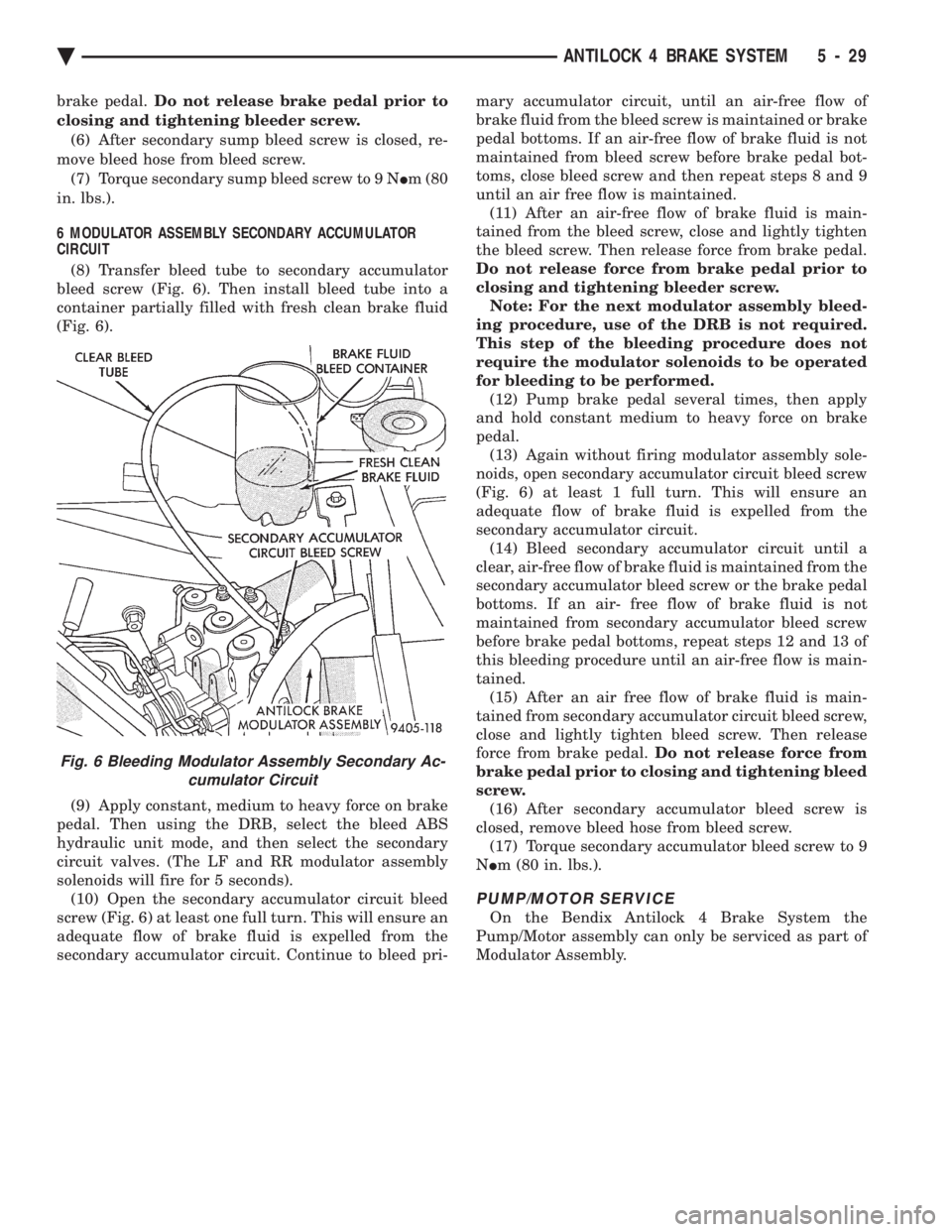
(8) Transfer bleed tube to secondary accumulator
bleed screw (Fig. 6). Then install bleed tube into a
container partially filled with fresh clean brake fluid
(Fig. 6).
(9) Apply constant, medium to heavy force on brake
pedal. Then using the DRB, select the bleed ABS
hydraulic unit mode, and then select the secondary
circuit valves. (The LF and RR modulator assembly
solenoids will fire for 5 seconds). (10) Open the secondary accumulator circuit bleed
screw (Fig. 6) at least one full turn. This will ensure an
adequate flow of brake fluid is expelled from the
secondary accumulator circuit. Continue to bleed pri- mary accumulator circuit, until an air-free flow of
brake fluid from the bleed screw is maintained or brake
pedal bottoms. If an air-free flow of brake fluid is not
maintained from bleed screw before brake pedal bot-
toms, close bleed screw and then repeat steps 8 and 9
until an air free flow is maintained. (11) After an air-free flow of brake fluid is main-
tained from the bleed screw, close and lightly tighten
the bleed screw. Then release force from brake pedal.
Do not release force from brake pedal prior to
closing and tightening bleeder screw. Note: For the next modulator assembly bleed-
ing procedure, use of the DRB is not required.
This step of the bleeding procedure does not
require the modulator solenoids to be operated
for bleeding to be performed. (12) Pump brake pedal several times, then apply
and hold constant medium to heavy force on brake
pedal. (13) Again without firing modulator assembly sole-
noids, open secondary accumulator circuit bleed screw
(Fig. 6) at least 1 full turn. This will ensure an
adequate flow of brake fluid is expelled from the
secondary accumulator circuit. (14) Bleed secondary accumulator circuit until a
clear, air-free flow of brake fluid is maintained from the
secondary accumulator bleed screw or the brake pedal
bottoms. If an air- free flow of brake fluid is not
maintained from secondary accumulator bleed screw
before brake pedal bottoms, repeat steps 12 and 13 of
this bleeding procedure until an air-free flow is main-
tained. (15) After an air free flow of brake fluid is main-
tained from secondary accumulator circuit bleed screw,
close and lightly tighten bleed screw. Then release
force from brake pedal. Do not release force from
brake pedal prior to closing and tightening bleed
screw. (16) After secondary accumulator bleed screw is
closed, remove bleed hose from bleed screw. (17) Torque secondary accumulator bleed screw to 9
N Im (80 in. lbs.).
PUMP/MOTOR SERVICE
On the Bendix Antilock 4 Brake System the
Pump/Motor assembly can only be serviced as part of
Modulator Assembly.
Fig. 6 Bleeding Modulator Assembly Secondary Ac- cumulator Circuit
Ä ANTILOCK 4 BRAKE SYSTEM 5 - 29
Page 325 of 2438
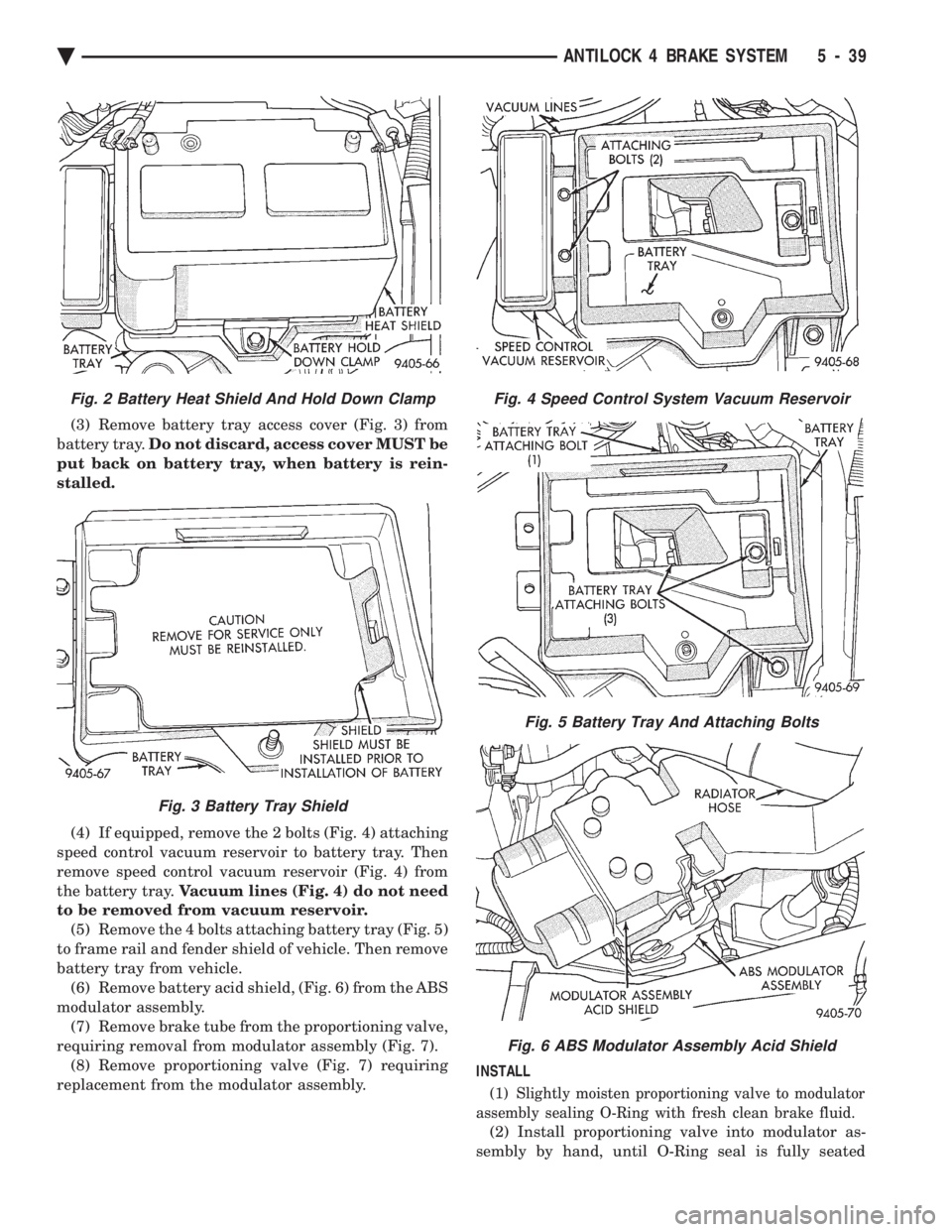
(3) Remove battery tray access cover (Fig. 3) from
battery tray. Do not discard, access cover MUST be
put back on battery tray, when battery is rein-
stalled.
(4) If equipped, remove the 2 bolts (Fig. 4) attaching
speed control vacuum reservoir to battery tray. Then
remove speed control vacuum reservoir (Fig. 4) from
the battery tray. Vacuum lines (Fig. 4) do not need
to be removed from vacuum reservoir. (5) Remove the 4 bolts attaching battery tray (Fig. 5)
to frame rail and fender shield of vehicle. Then remove
battery tray from vehicle. (6) Remove battery acid shield, (Fig. 6) from the ABS
modulator assembly. (7) Remove brake tube from the proportioning valve,
requiring removal from modulator assembly (Fig. 7). (8) Remove proportioning valve (Fig. 7) requiring
replacement from the modulator assembly. INSTALL
(1) Slightly moisten proportioning valve to modulator
assembly sealing O-Ring with fresh clean brake fluid.
(2) Install proportioning valve into modulator as-
sembly by hand, until O-Ring seal is fully seated
Fig. 4 Speed Control System Vacuum Reservoir
Fig. 5 Battery Tray And Attaching Bolts
Fig. 6 ABS Modulator Assembly Acid Shield
Fig. 2 Battery Heat Shield And Hold Down Clamp
Fig. 3 Battery Tray Shield
Ä ANTILOCK 4 BRAKE SYSTEM 5 - 39
Page 423 of 2438
² To set DAY of WEEK, press TIME button. An ar-
row will appear on the display and point to the Day.
Press and hold the SET button to move the day for-
ward or INFO button to move it backward.
² To set DAY of MONTH, press TIME button. The
arrow will point to Date. Press and hold the SET
button to advance the date or INFO button to move
it backwards.
² To set MONTH of YEAR, press TIME button. The
arrow will point to the Month. Press and hold the
SET button to advance the Month forward or INFO
button to move backward. TEMP button, pressing the Temp button will dis-
play:
² The temperature outside the vehicle
² Vehicle direction define by an eight point compass
If Compass has lost calibration or not receiving
good information from the engine compartment node,
an asterisk (*) will flash on the display and the word
calibrate will appear. Refer to Compass Calibration. FUEL BUTTON, WILL DISPLAY:
² Pressing FUEL button the first time will show, the
estimated number of miles that can be driven with
the remaining fuel. The destination to empty indica-
tion will vary every few seconds as the amount of
fuel and fuel efficiency is calculated. This function
can not be reset.
² Pressing the FUEL button second time; will dis-
play the fuel consumed.
²
Pressing the FUEL button third time; will display
the average fuel economy in miles per gallon since last
reset. The display will be updated every 16 seconds.
² Pressing the FUEL button forth time, the current
fuel economy will be displayed. The current fuel
economy will be up updated every two seconds.
² To reset Fuel consumed, press SET button until
the fuel consumed message is displayed and then
within five seconds press SET button.
² To reset AVERAGE FUEL ECONOMY, press the
FUEL button until average fuel economy is displayed
and within five seconds press SET button. TRIP RESET, press FUEL button and wait four
seconds press the SET button twice. This clears all
trip information and the message Trip Reset will be
displayed. This will occur only if a reset function is
currently being displayed. The reset functions:
² Fuel consumed
² Average fuel economy message
INFO button, will active a MONITORED SYS-
TEMS OK message on display if all monitored sys-
tems are operating properly. If a problem is detected,
the appropriate message will be displayed. SET button, will clear the various functions after
they have been displayed. It is used to enter the
clock set or compass variance modes. This button is
also used to reset certain trip computer functions and
the maintenance reminder message.
The EVIC display may be turned off by pressing the
TIME and SET buttons at the same time. Pressing the
buttons a second time will restore the display.
EVIC INFORMATION SOURCES
The EVIC monitors information provided by the
body controller, engine compartment node and pow-
ertrain control module. Refer to Body Diagnostic Test
Procedure Manual for test procedures. The Body Controller is a micro-controller unit
which, informs the EVIC overhead console via the
CCD bus of:
² Time of day
² Day of week
² Day of month
² Month of year
² Fuel range
² Fuel consumed
² Fuel efficiency
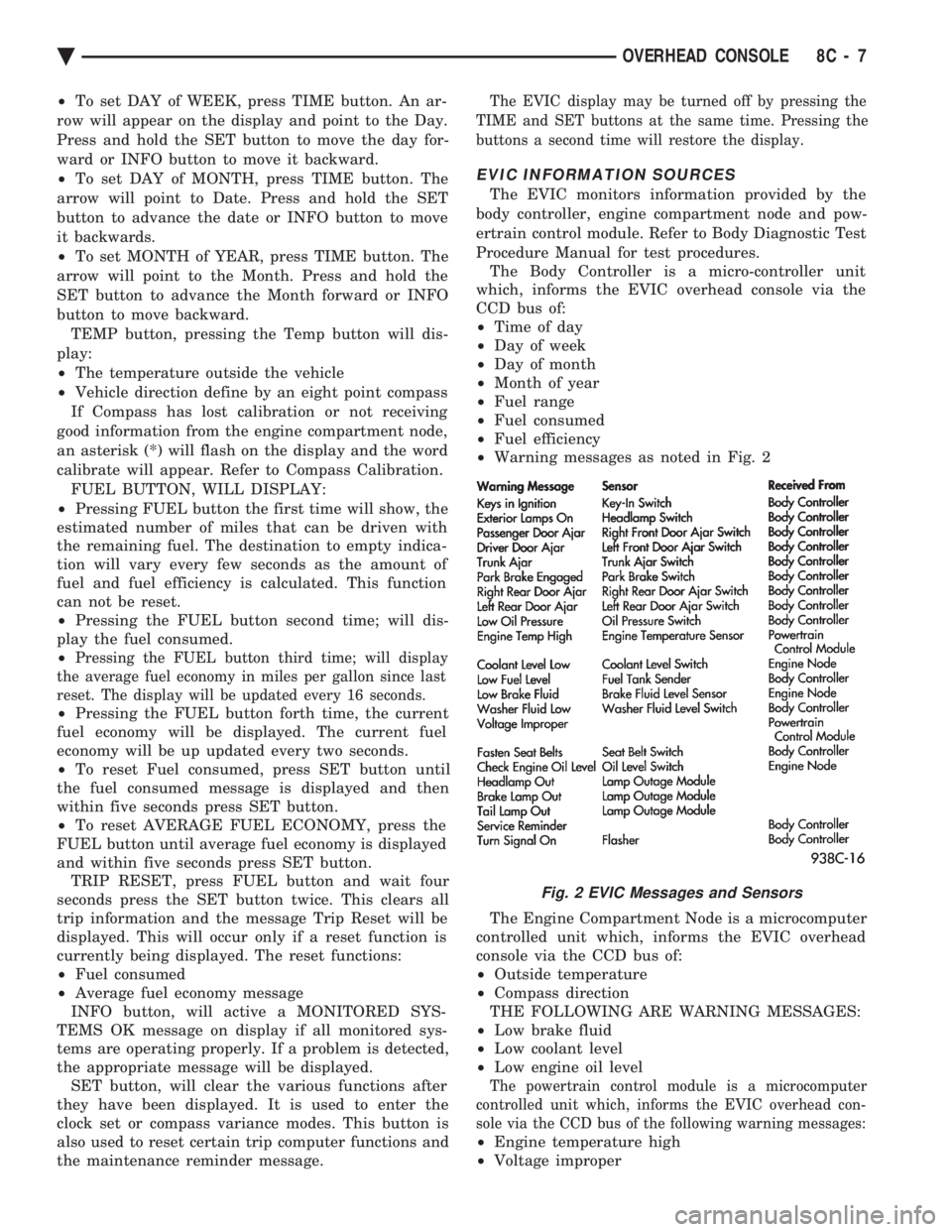
² Warning messages as noted in Fig. 2
The Engine Compartment Node is a microcomputer
controlled unit which, informs the EVIC overhead
console via the CCD bus of:
² Outside temperature
² Compass direction
THE FOLLOWING ARE WARNING MESSAGES:
² Low brake fluid
² Low coolant level
² Low engine oil level
The powertrain control module is a microcomputer
controlled unit which, informs the EVIC overhead con-
sole via the CCD bus of the following warning messages:
² Engine temperature high
² Voltage improper
Fig. 2 EVIC Messages and Sensors
Ä OVERHEAD CONSOLE 8C - 7
Page 424 of 2438
VISUAL MESSAGES
Following are the visual messages and the condi-
tions under which, the messages will be given:
² Keys in ignition
² Exterior lamps on
These messages will appear if the conditions are
present and the driver's door is open while the igni-
tion switch is in the OFF, LOCK, or ACC positions.
A tone will sound until the condition is corrected or
the door is closed.
² Passenger door ajar
² Driver door ajar
² Trunk ajar
² Park brake engaged
² Right rear door ajar
² Left rear door ajar
These messages will appear if a condition is de-
tected after the vehicle is in motion. When the con-
dition is corrected, a short tone will sound to
acknowledge the action. LOW OIL PRESSURE
If this message is displayed while the vehicle is at
cruising speeds, immediate attention is required. If
this message appears at idle speed, increase the idle
speed and the message should go off. If the message
remains on, immediate attention is required. ENGINE TEMP CRITICAL
This message appears when a sensor has determined
that the engine coolant is overheating. If this message
comes on and stays on, immediate action is required.
COOLANT LEVEL LOW
LOW FUEL LEVEL
LOW BRAKE FLUID
WASHER FLUID LOW
These messages will appear if a continuous warn-
ing condition is detected while the engine is running.
Inspection is required. To clear this message from
the display, after the condition is corrected, the igni-
tion switch must be turned OFF. CHECK TRANS
This message will appear if a continuous warning
condition is detected while the engine is running. Im-
mediate attention is recommended. To clear this mes-
sage from the display, after the condition has been
corrected, the ignition switch must be turned OFF. VOLTAGE IMPROPER
This message will appear if a continuous warning
condition is detected. Immediate attention is re-
quired. To clear this message from the display, after
the condition has been corrected, the ignition switch
must be turned OFF. TURN SIGNAL ON
This message will appear if the turn signal is left
on while vehicle speed is over 15 mph and the vehi-
cle has traveled over one-half mile. FASTEN SEAT BELTS An intermittent chime tone will sound for several
seconds if the seat belt is not fastened. CHK ENGINE OIL LEVEL
If this message is delivered, a check of the engine
oil dipstick is suggested. To clear this message, after
the condition is corrected, the ignition switch must
be turned OFF. HEADLAMP OUT
BRAKE LAMP OUT
TAIL LAMP OUT
These conditions are monitored only when the lamps
are on. The message will remain, even after the lamp is
replaced, until the lamp is turned on and operates.
SERVICE REMINDER
The maintenance reminder statement is programmed
to provide general information only. Refer to Group 0,
Lubrication & Maintenance for specific vehicle require-
ments.
The service reminder message is displayed at 7,500
miles or 12 months intervals, which ever comes first. MONITORED SYSTEMS OK
If there is no warning condition to report, the mes-
sage Monitored Systems OK is displayed (Fig. 2).
AUTOMATIC CALIBRATION SET PROCEDURE
The engine compartment node will continuously
and automatically recalibrate the compass under nor-
mal driving conditions. As long as the vehicle is
turning, the engine compartment node will record
new compass data. This new data will be used to
recalibrate the compass at a rate of at least once per
full (360 degree) turn of the vehicle. Automatic cali-
bration does not require operator interface.
MANUAL CALIBRATION SET PROCEDURE
Manual compass calibration has been replaced by
automatic calibration set procedure. The manual cal-
ibration set procedure is available, but no longer
serves any useful purpose.
EVIC SELF CHECK DIAGNOSTICS
Ignition switch ON, the EVIC not displaying any
message, may imply a system failure and not an
EVIC failure. Turn the ignition OFF, close all vehi-
cle doors and wait at least 60 seconds before begin-
ning test. Turn ignition switch to the ON position.
Pressing the TEMP, FUEL and INFO buttons at the
same time shall provide the visual message MOD-
ULE SELF CHECK for two seconds. Following at
two second interval there will be messages:
² E2-0 SELF CHECK
² E3-0 SELF CHECK
² END OF SELF CHECK
Showing the microcomputer is working properly.
When the self check mode and message shows:
² E2-1
² E3-2
This would show a fault exists in the EVIC's micro-
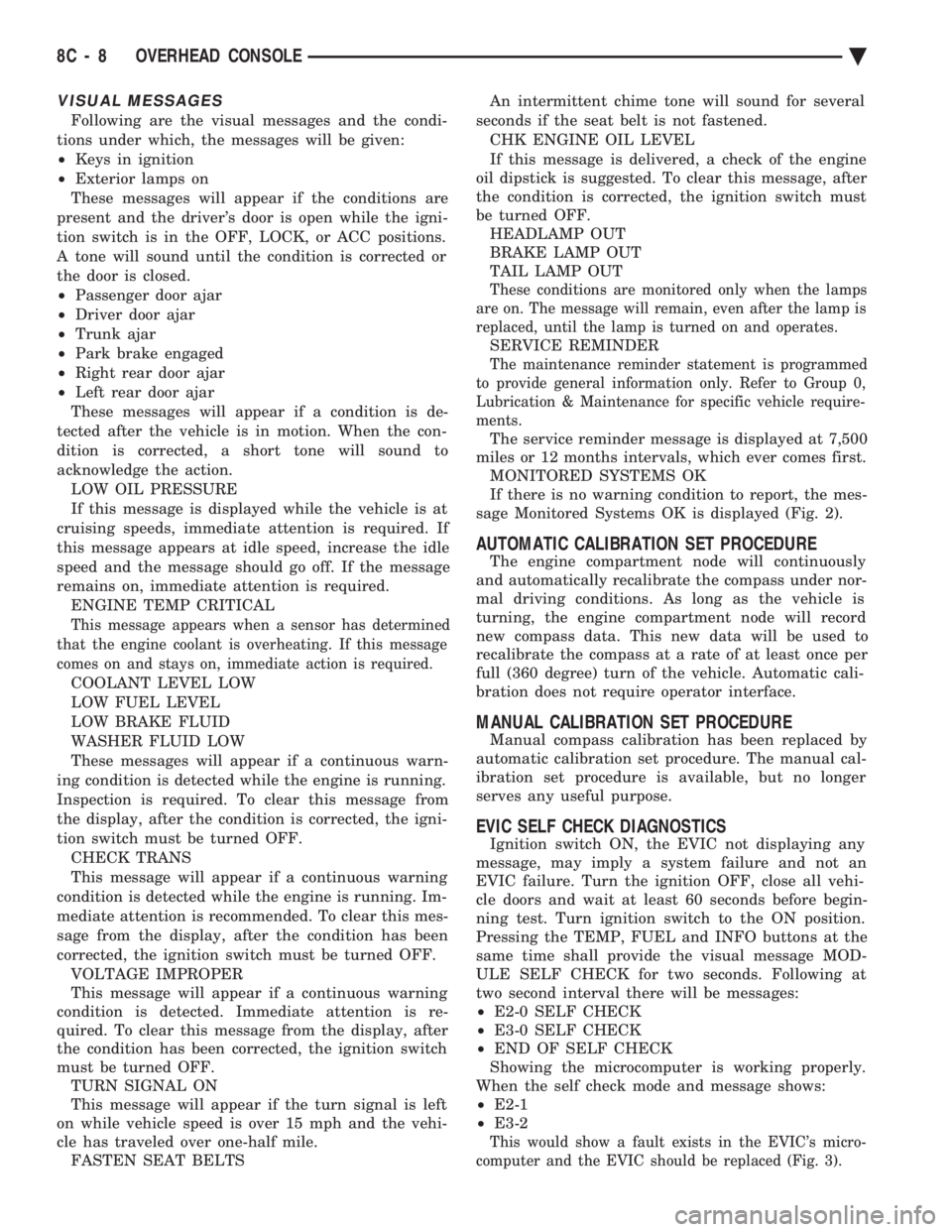
computer and the EVIC should be replaced (Fig. 3).
8C - 8 OVERHEAD CONSOLE Ä
Page 430 of 2438
dition exists. These messages are displayed on the
center of the instrument panel.For complete EVIC operating instructions, refer to
the Owners Manual provided with the vehicle.
EVIC BUTTON FUNCTIONS
TIME button will display:
² Time of day
² Day of week
² Day of month
² Month of year
² To set HOURS, press TIME button and within four
seconds press the SET button. An arrow will appear
on the display and point to the hours. Press and hold
the SET button to advance the hours or INFO button
to set back the hours.
² To set MINUTES, press TIME button. The arrow
will point to the minutes. Press and hold the SET
button to advance the minutes or INFO button to set
back the minutes.
² To set DAY of WEEK, press TIME button. An ar-
row will appear on the display and point to the Day.
Press and hold the SET button to move the day for-
ward or INFO button to move it backward.
² To set DAY of MONTH, press TIME button. The
arrow will point to Date. Press and hold the SET
button to advance the date or INFO button to move
it backwards.
² To set MONTH of YEAR, press TIME button. The
arrow will point to the Month. Press and hold the
SET button to advance the Month forward or INFO
button to move backward. TEMP button, pressing the Temp button will dis-
play:
² The temperature outside the vehicle
² Vehicle direction define by an eight point compass
If Compass has lost calibration or not receiving
good information from the engine compartment node,
an asterisk (*) will flash on the display and the word
calibrate will appear. Refer to Compass Calibration. FUEL BUTTON, WILL DISPLAY:
² Pressing FUEL button the first time will show, the
estimated number of miles that can be driven with
the remaining fuel. The destination to empty indica-
tion will vary every few seconds as the amount of
fuel and fuel efficiency is calculated. This function
can not be reset.
² Pressing the FUEL button second time; will dis-
play the fuel consumed.
² Pressing the FUEL button third time; will display
the average fuel economy in miles per gallon since
last reset. The display will be updated every 16 sec-
onds.
² Pressing the FUEL button forth time, the current
fuel economy will be displayed. The current fuel
economy will be up updated every two seconds. ²
To reset Fuel consumed, press SET button until
the fuel consumed message is displayed and then
within five seconds press SET button.
² To reset AVERAGE FUEL ECONOMY, press the
FUEL button until average fuel economy is displayed
and within five seconds press SET button. TRIP RESET, press FUEL button and wait four
seconds press the SET button twice. This clears all
trip information and the message Trip Reset will be
displayed. This will occur only if a reset function is
currently being displayed. The reset functions:
² Fuel consumed
² Average fuel economy message
INFO button, will active a MONITORED SYS-
TEMS OK message on display if all monitored sys-
tems are operating properly. If a problem is detected,
the appropriate message will be displayed. SET button, will clear the various functions after
they have been displayed. It is used to enter the
clock set or compass variance modes. This button is
also used to reset certain trip computer functions and
the maintenance reminder message. The EVIC display may be turned off by pressing
the TIME and SET buttons at the same time. Press-
ing the buttons a second time will restore the dis-
play.
EVIC INFORMATION SOURCES
The EVIC monitors information provided by the
body controller, engine compartment node and pow-
ertrain control module. Refer to Body Diagnostic Test
Procedure Manual for test procedures. The Body Controller is a micro-controller unit
which, informs the EVIC via the CCD bus of:
² Time of day
² Day of week
² Day of month
² Month of year
² Fuel range
² Fuel consumed
² Fuel efficiency
² Warning messages as noted in Fig. 3.
The Engine Compartment Node is a microcomputer
controlled unit which, informs the EVIC via the CCD
bus of:
² Outside temperature
² Compass direction
THE FOLLOWING ARE WARNING MESSAGES:
² Low brake fluid
² Low coolant level
² Low engine oil level
The powertrain control module is a microcomputer
controlled unit which, informs the EVIC via the CCD
bus of the following warning messages:
² Engine temperature high
² Voltage improper
8C - 14 OVERHEAD CONSOLE Ä
Page 431 of 2438
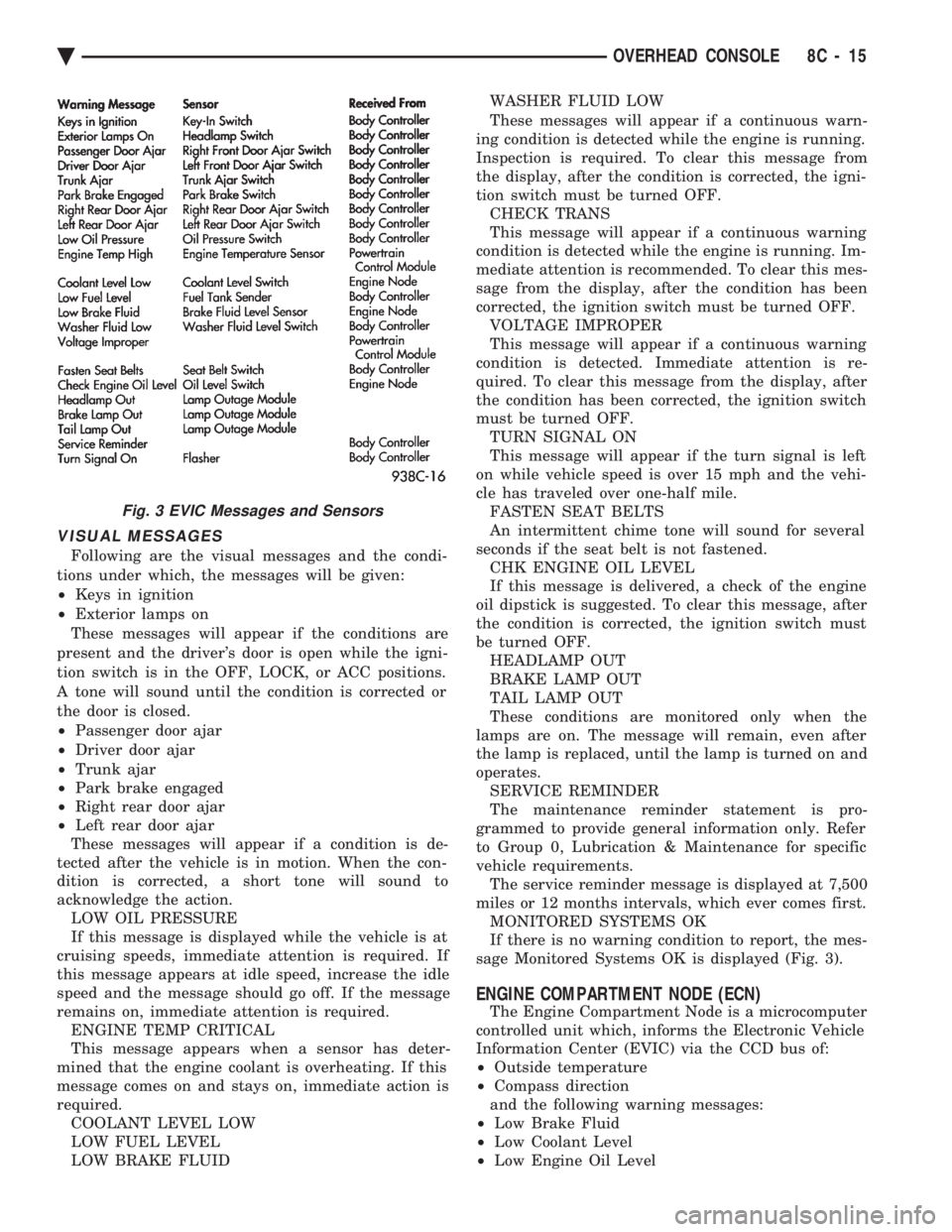
VISUAL MESSAGES
Following are the visual messages and the condi-
tions under which, the messages will be given:
² Keys in ignition
² Exterior lamps on
These messages will appear if the conditions are
present and the driver's door is open while the igni-
tion switch is in the OFF, LOCK, or ACC positions.
A tone will sound until the condition is corrected or
the door is closed.
² Passenger door ajar
² Driver door ajar
² Trunk ajar
² Park brake engaged
² Right rear door ajar
² Left rear door ajar
These messages will appear if a condition is de-
tected after the vehicle is in motion. When the con-
dition is corrected, a short tone will sound to
acknowledge the action. LOW OIL PRESSURE
If this message is displayed while the vehicle is at
cruising speeds, immediate attention is required. If
this message appears at idle speed, increase the idle
speed and the message should go off. If the message
remains on, immediate attention is required. ENGINE TEMP CRITICAL
This message appears when a sensor has deter-
mined that the engine coolant is overheating. If this
message comes on and stays on, immediate action is
required. COOLANT LEVEL LOW
LOW FUEL LEVEL
LOW BRAKE FLUID WASHER FLUID LOW
These messages will appear if a continuous warn-
ing condition is detected while the engine is running.
Inspection is required. To clear this message from
the display, after the condition is corrected, the igni-
tion switch must be turned OFF. CHECK TRANS
This message will appear if a continuous warning
condition is detected while the engine is running. Im-
mediate attention is recommended. To clear this mes-
sage from the display, after the condition has been
corrected, the ignition switch must be turned OFF. VOLTAGE IMPROPER
This message will appear if a continuous warning
condition is detected. Immediate attention is re-
quired. To clear this message from the display, after
the condition has been corrected, the ignition switch
must be turned OFF. TURN SIGNAL ON
This message will appear if the turn signal is left
on while vehicle speed is over 15 mph and the vehi-
cle has traveled over one-half mile. FASTEN SEAT BELTS
An intermittent chime tone will sound for several
seconds if the seat belt is not fastened. CHK ENGINE OIL LEVEL
If this message is delivered, a check of the engine
oil dipstick is suggested. To clear this message, after
the condition is corrected, the ignition switch must
be turned OFF. HEADLAMP OUT
BRAKE LAMP OUT
TAIL LAMP OUT
These conditions are monitored only when the
lamps are on. The message will remain, even after
the lamp is replaced, until the lamp is turned on and
operates. SERVICE REMINDER
The maintenance reminder statement is pro-
grammed to provide general information only. Refer
to Group 0, Lubrication & Maintenance for specific
vehicle requirements. The service reminder message is displayed at 7,500
miles or 12 months intervals, which ever comes first. MONITORED SYSTEMS OK
If there is no warning condition to report, the mes-
sage Monitored Systems OK is displayed (Fig. 3).
ENGINE COMPARTMENT NODE (ECN)
The Engine Compartment Node is a microcomputer
controlled unit which, informs the Electronic Vehicle
Information Center (EVIC) via the CCD bus of:
² Outside temperature
² Compass direction
and the following warning messages:
² Low Brake Fluid
² Low Coolant Level
² Low Engine Oil Level
Fig. 3 EVIC Messages and Sensors
Ä OVERHEAD CONSOLE 8C - 15
Page 494 of 2438
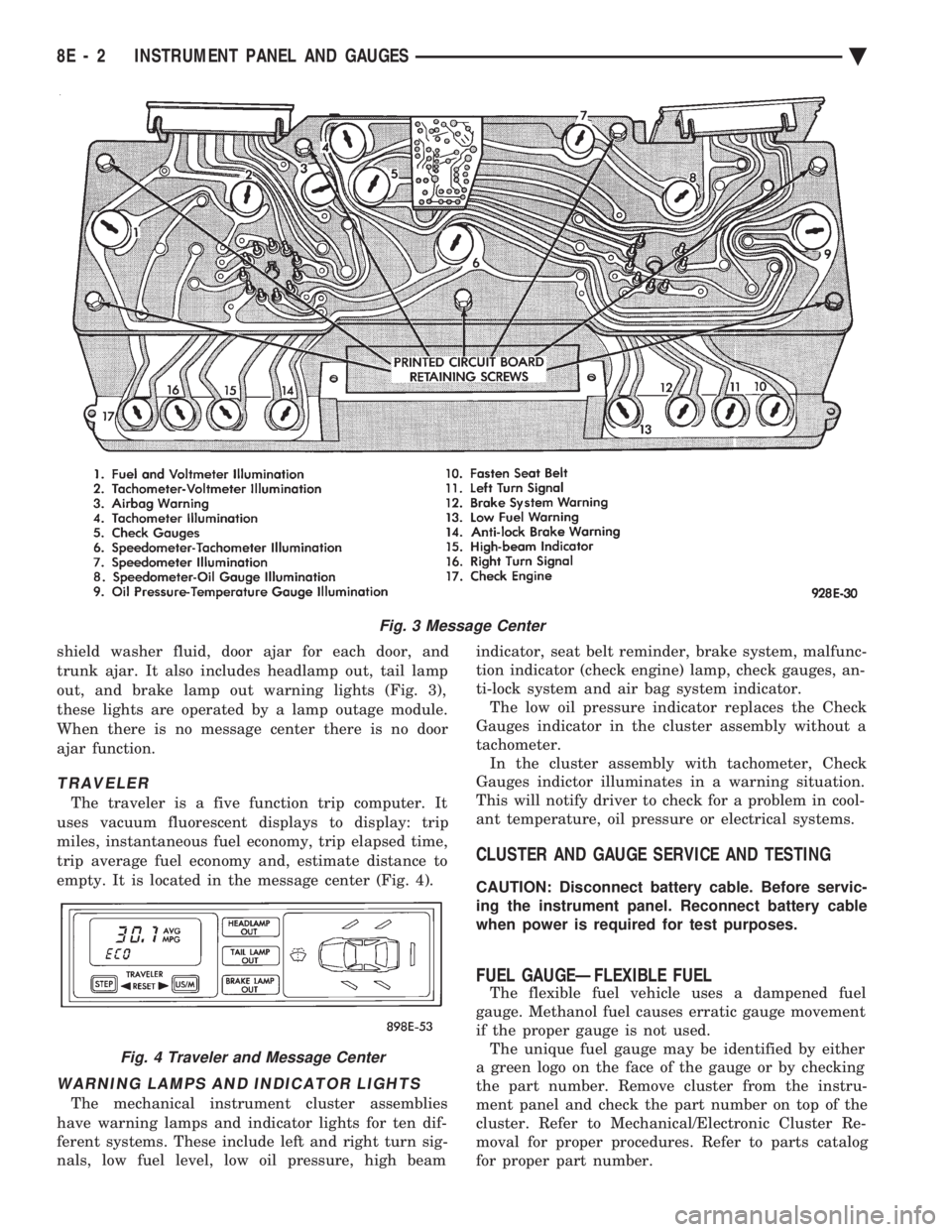
shield washer fluid, door ajar for each door, and
trunk ajar. It also includes headlamp out, tail lamp
out, and brake lamp out warning lights (Fig. 3),
these lights are operated by a lamp outage module.
When there is no message center there is no door
ajar function.
TRAVELER
The traveler is a five function trip computer. It
uses vacuum fluorescent displays to display: trip
miles, instantaneous fuel economy, trip elapsed time,
trip average fuel economy and, estimate distance to
empty. It is located in the message center (Fig. 4).
WARNING LAMPS AND INDICATOR LIGHTS
The mechanical instrument cluster assemblies
have warning lamps and indicator lights for ten dif-
ferent systems. These include left and right turn sig-
nals, low fuel level, low oil pressure, high beam indicator, seat belt reminder, brake system, malfunc-
tion indicator (check engine) lamp, check gauges, an-
ti-lock system and air bag system indicator. The low oil pressure indicator replaces the Check
Gauges indicator in the cluster assembly without a
tachometer. In the cluster assembly with tachometer, Check
Gauges indictor illuminates in a warning situation.
This will notify driver to check for a problem in cool-
ant temperature, oil pressure or electrical systems.
CLUSTER AND GAUGE SERVICE AND TESTING
CAUTION: Disconnect battery cable. Before servic-
ing the instrument panel. Reconnect battery cable
when power is required for test purposes.
FUEL GAUGEÐFLEXIBLE FUEL
The flexible fuel vehicle uses a dampened fuel
gauge. Methanol fuel causes erratic gauge movement
if the proper gauge is not used. The unique fuel gauge may be identified by either
a green logo on the face of the gauge or by checking
the part number. Remove cluster from the instru-
ment panel and check the part number on top of the
cluster. Refer to Mechanical/Electronic Cluster Re-
moval for proper procedures. Refer to parts catalog
for proper part number.
Fig. 3 Message Center
Fig. 4 Traveler and Message Center
8E - 2 INSTRUMENT PANEL AND GAUGES Ä