light CHEVROLET VOLT 2011 Workshop Manual
[x] Cancel search | Manufacturer: CHEVROLET, Model Year: 2011, Model line: VOLT, Model: CHEVROLET VOLT 2011Pages: 516, PDF Size: 6.61 MB
Page 172 of 516
Black plate (52,1)Chevrolet Volt Owner Manual - 2011
5-52 Instruments and Controls
SERVICE POWER STEERING
This message displays if there is a
problem with the power steering
system. Take the vehicle to your
dealer for service.
SERVICE VEHICLE SOON
This message displays if there is a
problem with the vehicle. Take the
vehicle to your dealer for service.
Depending on the severity of a
crash, this message may come
on along with the airbag readiness
light.
Starting the Vehicle
Messages
PRESS BRAKE TO START
VEHICLE
This message displays when
attempting to start the vehicle
without first pressing the brake
pedal.
PRESS BUTTON AGAIN TO
TURN OFF
This message displays as a
reminder to press the POWER
O
button to turn the vehicle off when
an attempt is made to turn off the
vehicle while it is in motion.
Tire Messages
SERVICE TIRE MONITOR
SYSTEM
This message displays if there is
a problem with the Tire Pressure
Monitor System (TPMS). SeeTire
Pressure Monitor Operation on
page 10‑57 for more information.
TIRE LEARNING ACTIVE
This message displays when
the system is learning new tires.
SeeTire Pressure Monitor
Operation on page 10‑57 for
more information.
TIRE LOW ADD AIR TO TIRE
This message displays when the
pressure in one or more of the tires
is low.
This message also displays
LEFT FRONT, RIGHT FRONT,
LEFT REAR, or RIGHT REAR to
indicate the location of the low tire.
The low tire pressure warning
light will also come on. See Tire
Pressure Light on page 5‑27.
If a tire pressure message appears
on the DIC, stop as soon as you
can. Inflate the tires by adding air
until the tire pressure is equal to
the values shown on the Tire and
Loading Information label. See Tires
on page 10‑48, Vehicle Load Limits
on page 9‑14, and Tire Pressure on
page 10‑54.
You can receive more than one
tire pressure message at a time.
The DIC also shows the tire
pressure values. See Driver
Information Center (DIC) on
page 5‑43.
Page 173 of 516
Black plate (53,1)Chevrolet Volt Owner Manual - 2011
Instruments and Controls 5-53
Vehicle Speed Messages
SPEED LIMITED TO XXX
This message displays when the
vehicle speed is limited.
Washer Fluid Messages
WASHER FLUID LOW ADD
FLUID
This message displays when
the washer fluid level is low.
For information on filling the
washer fluid, seeWasher Fluid on
page 10‑24.
Vehicle
Personalization
The Vehicle Personalization
features can be accessed by using
either the infotainment controls or
the touch screen in the center stack
display. See Overview on page 7‑3
under “Infotainment System” for
more information.
Using the Infotainment
Controls
Use the CONFIG, TUNE/MENU
knob, and
}BACK buttons
on the center stack to select
personalization features.
CONFIG (Configuration): Press to
scroll through the available menus
across the top of the touch screen
display. TUNE/MENU Knob
.Press to enter, select, or activate
a highlighted menu option.
.Turn to highlight a menu option.
.Press to turn a system setting on
or off.
}BACK
.Press to exit a menu.
.Press to return to a previous
screen.
Submenus
An arrow on the right‐hand edge
of the menu indicates that it has a
submenu with other options.
Selecting a Menu Option
1. Turn the TUNE/MENU knob to highlight the function.
2. Press the TUNE/MENU knob to select the highlighted option.
A checkmark next to the option
indicates the selected option.
Page 174 of 516
Black plate (54,1)Chevrolet Volt Owner Manual - 2011
5-54 Instruments and Controls
Turning a Function On or Off
1. Turn the TUNE/MENU knob tohighlight the function.
2. Press the TUNE/MENU knob to turn the function on or off.
A checkmark next to the function
indicates that the function is on.
Using the Touch Screen
Use the touch screen icons and
menus on the center stack display
to select personalization features.
w:Touch to scroll up.
x:Touch to scroll down.
Back: Touch Back in the upper
right corner of the display to return
to the previous menu. Submenus
An arrow on the right‐hand edge
of the menu indicates that it has a
submenu with other options.
Selecting a Menu Option
Touch any one of the available
menu options on the touch screen
to select the option. A checkmark
next to the option indicates the
selected option.
Turning a Function On or Off
Touch the screen where the
available function is listed to turn it
on or off. A checkmark next to the
function indicates that the function
is on.
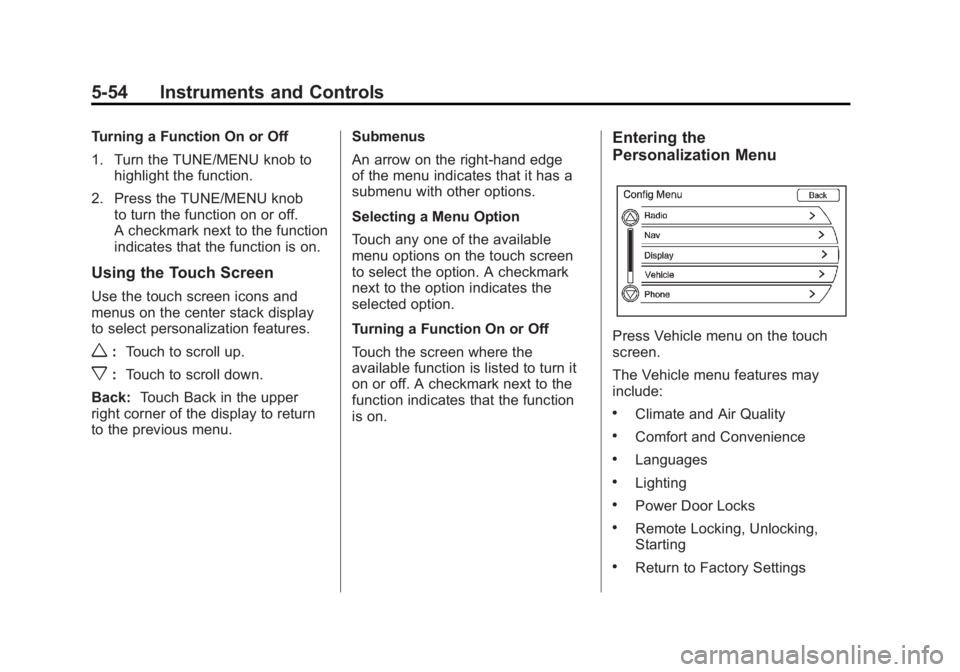
Entering the
Personalization Menu
Press Vehicle menu on the touch
screen.
The Vehicle menu features may
include:
.Climate and Air Quality
.Comfort and Convenience
.Languages
.Lighting
.Power Door Locks
.Remote Locking, Unlocking,
Starting
.Return to Factory Settings
Page 175 of 516
Black plate (55,1)Chevrolet Volt Owner Manual - 2011
Instruments and Controls 5-55
Climate and Air Quality
Select the Climate and Air Quality
menu to display:
.Auto Fan Speed
.Auto Heated Seats
.Remote Start Auto Heat Seats
.Auto Defog
Auto Fan Speed
This feature sets the automatic
fan speed to maintain the desired
interior tempurature. This selection
is available on vehicles with the
Automatic Climate Control system.
Choose a blower setting:
High: Increased speed.
Medium: Moderate speed.
Low: Reduced speed.
To select the auto fan speed:
1. Press the Vehicle menu.
2. Select Climate and Air Quality. 3. Select Auto Fan Speed.
4. Select the fan speed.
5. Press Back to return to the
previous menu.
Auto Heated Seats
When enabled, the auto heated
seat buttons on the touch screen
will be highlighted. This feature will
automatically activate heated seats
at the level required by the interior
temperature. The auto heated seats
can be turned off by using the
heated seat buttons on the center
stack.
To turn the auto heated seats on
or off:
1. Press the Vehicle menu.
2. Select Climate and Air Quality.
3. Turn the auto heated seats feature on or off.
4. Press Back to return to the previous menu. Remote Start Auto Heat Seats
When on, this feature will turn the
heated seats on when using remote
start.
To turn the remote start auto heat
seats on or off:
1. Press the Vehicle menu.
2. Select Climate and Air Quality.
3. Turn the remote start auto heat
seats feature on or off.
4. Press Back to return to the previous menu.
Auto Defog
When on and high humidity is
detected, the Climate Control
system will adjust the outside air,
air conditioner, or heat to decrease
fogging. The fan speed may
increase. When high humidity is
no longer detected, the system
will return to previous operation.
Page 177 of 516

Black plate (57,1)Chevrolet Volt Owner Manual - 2011
Instruments and Controls 5-57
Languages
This allows the selection of a
language:
1. Press the Vehicle menu.
2. Select Languages.
3. Select English, French,or Spanish.
4. Press Back to return to the previous menu.
Lighting
Select the Lighting menu and the
following will be displayed:
.Exit Lighting
.Vehicle Locator Lights Exit Lighting
This allows the selection of how
long the exterior headlamps stay on
when leaving the vehicle and it is
dark outside.
The available options are:
.OFF
.30 seconds
.1 minute
.2 minutes
To select the length of time the
exterior lamps will remain on:
1. Press the Vehicle menu.
2. Select Lighting.
3. Select Exit Lighting.
4. Select the length of time the exterior lamps will remain on.
5. Press Back to return to the previous menu. Vehicle Locator Lights
This allows the vehicle locator lights
to be turned on or off. When on, the
headlamps, parklamps, taillamps,
license plate lamps, and back-up
lamps will illuminate when
Kis
pressed on the RKE transmitter.
To turn the vehicle locator lights on
or off:
1. Press the Vehicle menu.
2. Select Lighting.
3. Turn the vehicle locator lights on or off.
4. Press Back to return to the previous menu.
Power Door Locks
Select Power Door Locks and the
following will be displayed:
.Auto Door Unlock
.Unlocked Door Anti Lock Out
.Delayed Door Lock
Page 178 of 516
Black plate (58,1)Chevrolet Volt Owner Manual - 2011
5-58 Instruments and Controls
Auto Door Unlock
This allows selection of which doors
will automatically unlock when the
vehicle is shifted into P (Park).
The available options are:
.All Doors
.Driver Door
.OFF
To select how the doors will
automatically unlock:
1. Press the Vehicle menu.
2. Select Power Door Locks.
3. Select Auto Door Unlock.
4. Select how the doors will automatically unlock.
5. Press Back to return to the previous menu. Unlocked Door Anti Lock Out
When on, this feature will keep the
driver door from locking until the
door is closed. If this feature is
turned on, the Delayed Door Lock
menu will not be available.
To turn the unlocked door anti lock
out feature on or off:
1. Press the Vehicle menu.
2. Select Unlocked Door Anti
Lock Out.
3. Turn the unlocked door anti lock out feature on or off.
4. Press Back to return to the previous menu.
Delayed Door Lock
When on, this feature will delay the
locking of the doors. To override the
delay, press the power door lock
switch on the center stack. To turn the delayed door lock
feature on or off:
1. Press the Vehicle menu.
2. Select Power Door Locks.
3. Turn the delayed door lock
feature on or off.
4. Press Back to return to the previous menu.
Remote Locking, Unlocking,
Starting
Select Remote Locking, Unlocking,
Starting and the following will be
displayed:
.Remote Lock Feedback
.Remote Unlock Light Feedback
.Door Unlock or Remote Door
Unlock
.Remote Left in Vehicle Reminder
Page 179 of 516
Black plate (59,1)Chevrolet Volt Owner Manual - 2011
Instruments and Controls 5-59
Remote Lock Feedback
This allows selection of what
feedback is provided when
unlocking the vehicle with
the RKE transmitter.
The available options are:
.Lights and Horn
.Lights Only
.Horn Only
.OFF
To select the remote lock feedback:
1. Press the Vehicle menu.
2. Select Remote Locking, Unlocking, Starting.
3. Select Remote Lock Feedback.
4. Select the remote feedback.
5. Press Back to return to the previous menu. Remote Unlock Light Feedback
When on, the exterior lamps will
flash when unlocking the vehicle
with the RKE transmitter.
To turn the remote unlock light
feedback feature on or off:
1. Press the Vehicle menu.
2. Select Remote Locking,
Unlocking, Starting.
3. Turn the remote unlock light feedback feature on or off.
4. Press Back to return to the previous menu.
Door Unlock or Remote Door
Unlock
This allows selection of which doors
will unlock when pressing
Kon the
RKE transmitter.
The available options are:
.All Doors
.Driver Door If All Doors is selected, all doors will
be unlocked.
If Driver Door is selected, only the
driver door will be unlocked on the
first press of
K. All doors will be
unlocked on the second press
of
Kwithin five seconds of the
prior press.
To select how the doors will unlock
with the RKE transmitter:
1. Press the Vehicle menu.
2. Select Remote Locking, Unlocking, Starting.
3. Select Door Unlock or Remote Door Unlock.
4. Select how the doors will unlock.
5. Press Back to return to the previous menu.
Page 181 of 516
Black plate (61,1)Chevrolet Volt Owner Manual - 2011
Instruments and Controls 5-61
Keep the original hand-held
transmitter for use in other vehicles
as well as for future Universal
Remote system programming.
It is also recommended that
upon the sale of the vehicle, the
programmed Universal Remote
system buttons be erased for
security purposes. See“Erasing
Universal Remote System Buttons”
later in this section.
When programming a garage door,
park outside of the garage. Park
directly in line with and facing the
garage door opener motor-head
or gate motor-head. Be sure that
people and objects are clear of
the garage door or gate being
programmed.
It is recommended that a new
battery be installed in the hand-held
transmitter for quicker and more
accurate transmission of the
radio-frequency signal.Programming the Universal
Remote System
For questions or help programming
the Universal Remote system,
call 1‐800‐355‐3515 or go to
www.homelink.com.
Programming a garage door opener
involves time-sensitive actions, so
read the entire procedure before
starting. Otherwise, the device will
time out and the procedure will have
to be repeated.
To program up to three devices:
1. Hold the end of the hand-held transmitter about 3 to 8 cm
(1 to 3 in) away from the
Universal Remote system
buttons while keeping
the indicator light in view.
The hand-held transmitter was
supplied by the manufacturer
of the garage door opener
receiver (motor-head unit). 2. At the same time, press
and hold both the hand-held
transmitter button and one
of the three Universal Remote
system buttons to be used to
operate the garage door. Do not
release the Universal Remote
system button or the hand-held
transmitter button until the
indicator light changes from a
slowly to a rapidly flashing light.
You now may release both
buttons.
Some entry gates and garage
door openers may require
substitution of Step 2 with
the procedure noted in “Gate
Operator and Canadian
Programming” later in this
section.
Page 182 of 516
Black plate (62,1)Chevrolet Volt Owner Manual - 2011
5-62 Instruments and Controls
3. Press and hold for five secondsthe newly trained Universal
Remote system button (the
button selected in Step 2) while
observing the indicator light and
garage door activation.
.If the indicator light stays on
continuously or the garage
door starts to move when
the Universal Remote
system button is pressed
and released, then the
programming is complete.
There is no need to
continue programming
Steps 4 through 6.
.If the Universal Remote
system indicator light blinks
rapidly for two seconds,
then turns to a constant
light and the garage door
does not move, continue
with programming Steps 4
through 6. It may be helpful to have
another person assist with
the remaining Steps 4
through 6.
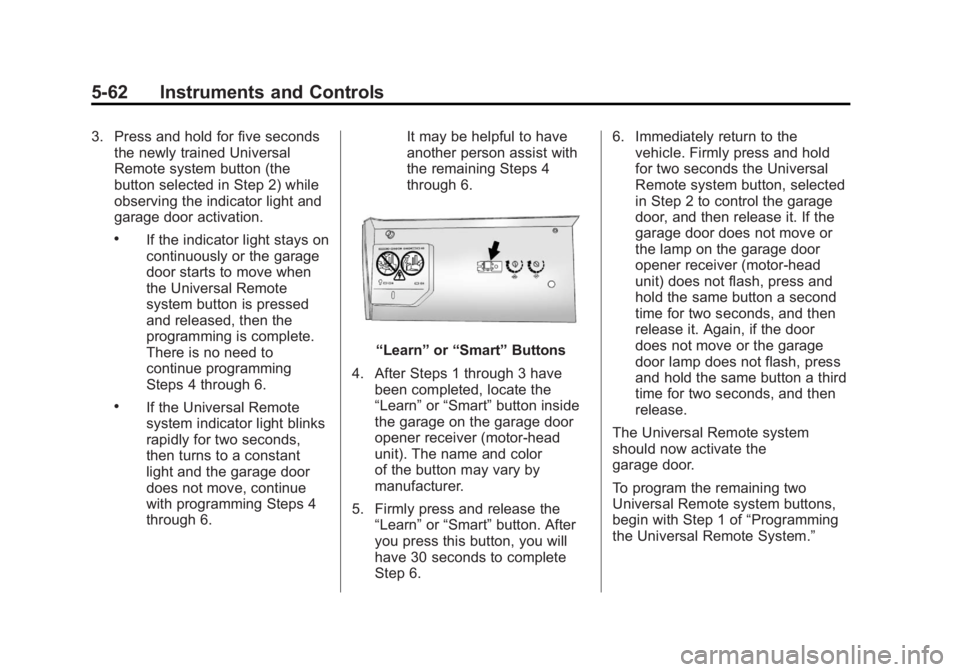
“Learn”
or“Smart” Buttons
4. After Steps 1 through 3 have been completed, locate the
“Learn” or“Smart” button inside
the garage on the garage door
opener receiver (motor-head
unit). The name and color
of the button may vary by
manufacturer.
5. Firmly press and release the “Learn” or“Smart” button. After
you press this button, you will
have 30 seconds to complete
Step 6. 6. Immediately return to the
vehicle. Firmly press and hold
for two seconds the Universal
Remote system button, selected
in Step 2 to control the garage
door, and then release it. If the
garage door does not move or
the lamp on the garage door
opener receiver (motor-head
unit) does not flash, press and
hold the same button a second
time for two seconds, and then
release it. Again, if the door
does not move or the garage
door lamp does not flash, press
and hold the same button a third
time for two seconds, and then
release.
The Universal Remote system
should now activate the
garage door.
To program the remaining two
Universal Remote system buttons,
begin with Step 1 of “Programming
the Universal Remote System.”
Page 183 of 516

Black plate (63,1)Chevrolet Volt Owner Manual - 2011
Instruments and Controls 5-63
Gate Operator and Canadian
Programming
If you have questions or need help
programming the Universal Remote
system, call 1‐800‐355‐3515 or go
to www.homelink.com.
Canadian radio-frequency laws
require transmitter signals to time
out or quit after several seconds of
transmission. This may not be long
enough for the Universal Remote
system to pick up the signal during
programming. Similarly, some U.S.
gate operators are manufactured to
time out in the same manner.If you live in Canada, or you are
having difficulty programming a
gate operator or garage door
opener by using the
“Programming
the Universal Remote System”
procedures, regardless of where
you live, replace Step 2 under
“Programming the Universal Remote
System” with the following:
Continue to press and hold
the Universal Remote system
button while you press and
release every two seconds (cycle)
the hand-held transmitter button
until the frequency signal has
been successfully accepted by
the Universal Remote system.
The Universal Remote system
indicator light will flash slowly at
first and then rapidly. Proceed with
Step 3 under “Programming the
Universal Remote System” to
complete.
Universal Remote System
Operation
Using the Universal Remote
System
Press and hold the appropriate
Universal Remote system
button for at least half of a second.
The indicator light will come on
while the signal is being transmitted.
Erasing Universal Remote
System Buttons
All programmed buttons should be
erased when the vehicle is sold or
the lease ends.
To erase all programmed buttons
on the Universal Remote system
device:
1. Press and hold down the two outside buttons until the
indicator light begins to flash.
This should take about
10 seconds.
2. Release both buttons.