light CHRYSLER VOYAGER 2001 Service Manual
[x] Cancel search | Manufacturer: CHRYSLER, Model Year: 2001, Model line: VOYAGER, Model: CHRYSLER VOYAGER 2001Pages: 4284, PDF Size: 83.53 MB
Page 4053 of 4284
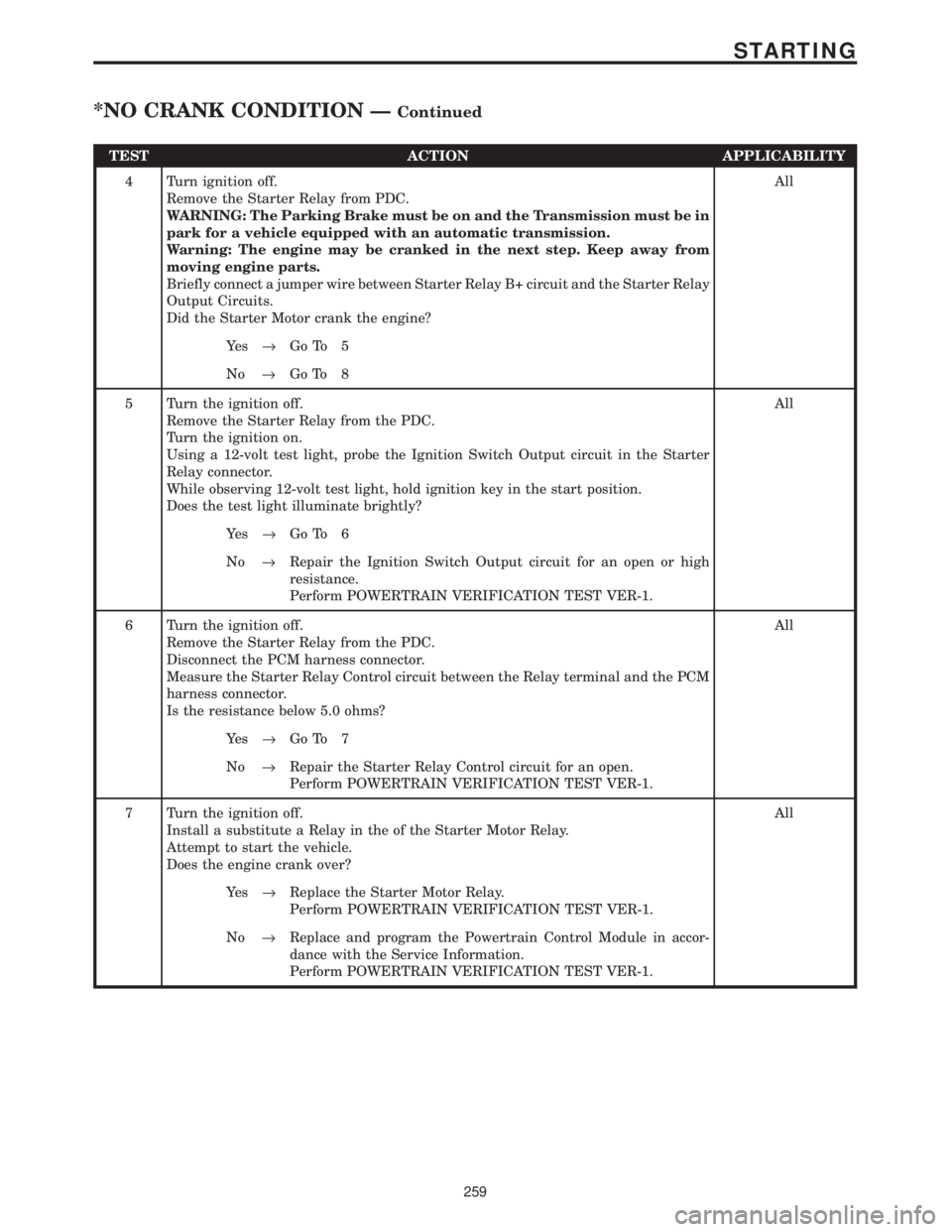
TEST ACTION APPLICABILITY
4 Turn ignition off.
Remove the Starter Relay from PDC.
WARNING: The Parking Brake must be on and the Transmission must be in
park for a vehicle equipped with an automatic transmission.
Warning: The engine may be cranked in the next step. Keep away from
moving engine parts.
Briefly connect a jumper wire between Starter Relay B+ circuit and the Starter Relay
Output Circuits.
Did the Starter Motor crank the engine?All
Ye s®Go To 5
No®Go To 8
5 Turn the ignition off.
Remove the Starter Relay from the PDC.
Turn the ignition on.
Using a 12-volt test light, probe the Ignition Switch Output circuit in the Starter
Relay connector.
While observing 12-volt test light, hold ignition key in the start position.
Does the test light illuminate brightly?All
Ye s®Go To 6
No®Repair the Ignition Switch Output circuit for an open or high
resistance.
Perform POWERTRAIN VERIFICATION TEST VER-1.
6 Turn the ignition off.
Remove the Starter Relay from the PDC.
Disconnect the PCM harness connector.
Measure the Starter Relay Control circuit between the Relay terminal and the PCM
harness connector.
Is the resistance below 5.0 ohms?All
Ye s®Go To 7
No®Repair the Starter Relay Control circuit for an open.
Perform POWERTRAIN VERIFICATION TEST VER-1.
7 Turn the ignition off.
Install a substitute a Relay in the of the Starter Motor Relay.
Attempt to start the vehicle.
Does the engine crank over?All
Ye s®Replace the Starter Motor Relay.
Perform POWERTRAIN VERIFICATION TEST VER-1.
No®Replace and program the Powertrain Control Module in accor-
dance with the Service Information.
Perform POWERTRAIN VERIFICATION TEST VER-1.
259
STARTING
*NO CRANK CONDITION ÐContinued
Page 4054 of 4284
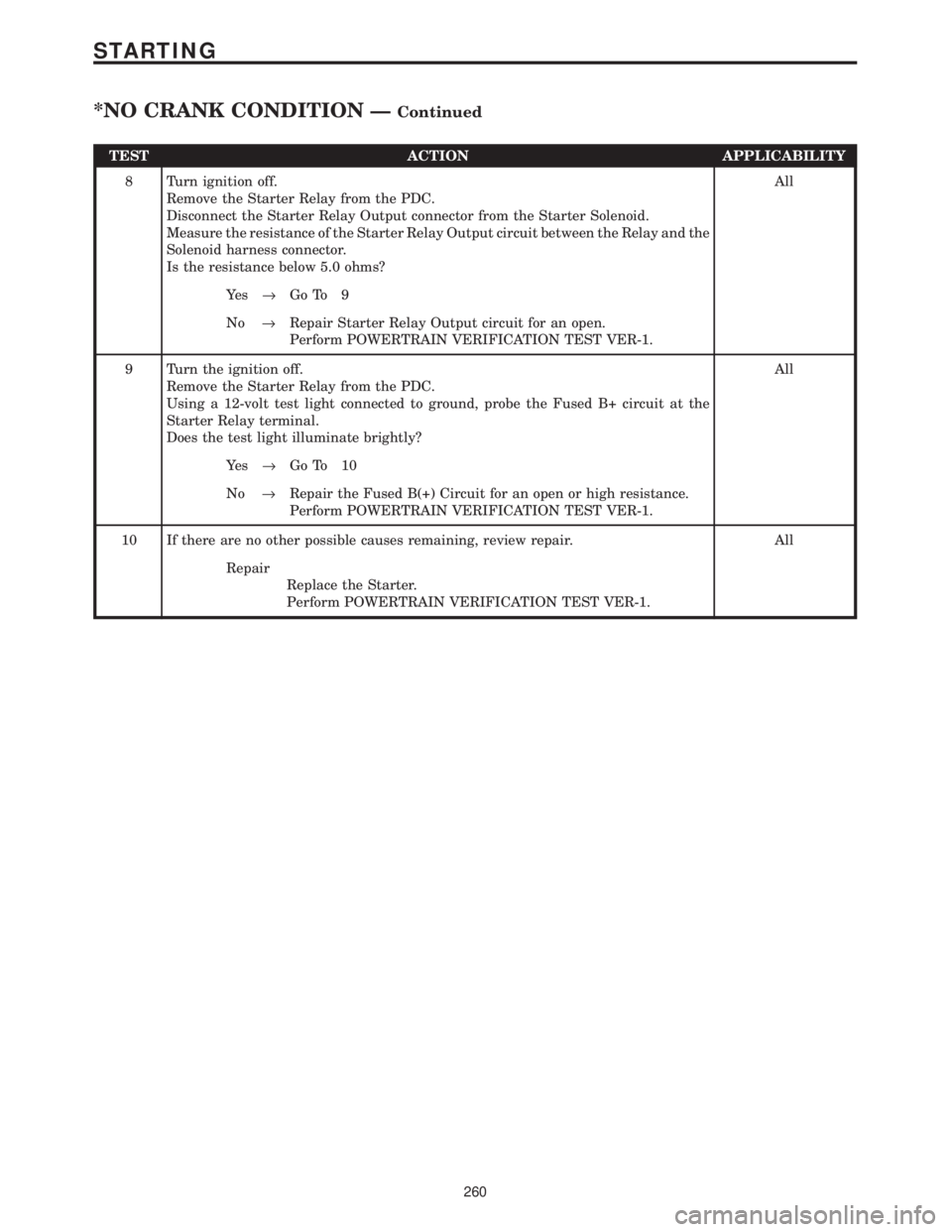
TEST ACTION APPLICABILITY
8 Turn ignition off.
Remove the Starter Relay from the PDC.
Disconnect the Starter Relay Output connector from the Starter Solenoid.
Measure the resistance of the Starter Relay Output circuit between the Relay and the
Solenoid harness connector.
Is the resistance below 5.0 ohms?All
Ye s®Go To 9
No®Repair Starter Relay Output circuit for an open.
Perform POWERTRAIN VERIFICATION TEST VER-1.
9 Turn the ignition off.
Remove the Starter Relay from the PDC.
Using a 12-volt test light connected to ground, probe the Fused B+ circuit at the
Starter Relay terminal.
Does the test light illuminate brightly?All
Ye s®Go To 10
No®Repair the Fused B(+) Circuit for an open or high resistance.
Perform POWERTRAIN VERIFICATION TEST VER-1.
10 If there are no other possible causes remaining, review repair. All
Repair
Replace the Starter.
Perform POWERTRAIN VERIFICATION TEST VER-1.
260
STARTING
*NO CRANK CONDITION ÐContinued
Page 4055 of 4284
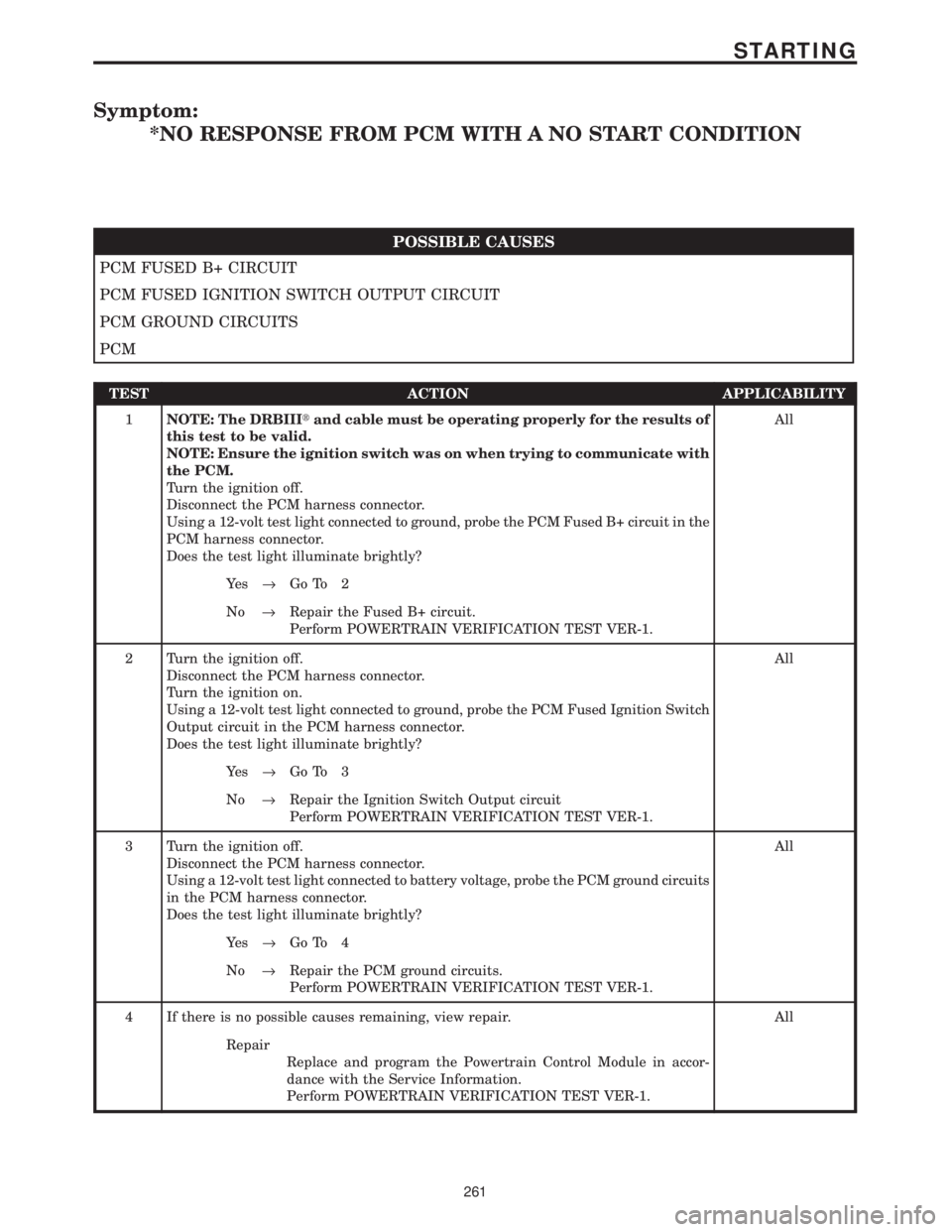
Symptom:
*NO RESPONSE FROM PCM WITH A NO START CONDITION
POSSIBLE CAUSES
PCM FUSED B+ CIRCUIT
PCM FUSED IGNITION SWITCH OUTPUT CIRCUIT
PCM GROUND CIRCUITS
PCM
TEST ACTION APPLICABILITY
1NOTE: The DRBIIItand cable must be operating properly for the results of
this test to be valid.
NOTE: Ensure the ignition switch was on when trying to communicate with
the PCM.
Turn the ignition off.
Disconnect the PCM harness connector.
Using a 12-volt test light connected to ground, probe the PCM Fused B+ circuit in the
PCM harness connector.
Does the test light illuminate brightly?All
Ye s®Go To 2
No®Repair the Fused B+ circuit.
Perform POWERTRAIN VERIFICATION TEST VER-1.
2 Turn the ignition off.
Disconnect the PCM harness connector.
Turn the ignition on.
Using a 12-volt test light connected to ground, probe the PCM Fused Ignition Switch
Output circuit in the PCM harness connector.
Does the test light illuminate brightly?All
Ye s®Go To 3
No®Repair the Ignition Switch Output circuit
Perform POWERTRAIN VERIFICATION TEST VER-1.
3 Turn the ignition off.
Disconnect the PCM harness connector.
Using a 12-volt test light connected to battery voltage, probe the PCM ground circuits
in the PCM harness connector.
Does the test light illuminate brightly?All
Ye s®Go To 4
No®Repair the PCM ground circuits.
Perform POWERTRAIN VERIFICATION TEST VER-1.
4 If there is no possible causes remaining, view repair. All
Repair
Replace and program the Powertrain Control Module in accor-
dance with the Service Information.
Perform POWERTRAIN VERIFICATION TEST VER-1.
261
STARTING
Page 4069 of 4284

VERIFICATION TESTS
31TH TRANSMISSION VERIFICATION TEST - VER 1. APPLICABILITY
1. Connect the DRBIIItto the Data Link Connector (DLC).
2. Reconnect any disconnected components.
3. With the DRBIIIt, erase the PCM DTC's.
4. Check the transmission fluid and adjust if necessary. Refer to the Service information for the
Fluid Fill procedure.
5. Road test the vehicle. With the DRBIIIt, monitor the engine RPM. Make 15 to 20 1-2, 2-3
upshifts. Perform these shifts from a standing start to 45 MPH with a constant throttle opening
of 20 to 25 degrees.
6. Below 25 MPH, make 5 to 8 wide open throttle kickdowns to 1st gear. Allow at least 5 seconds
each in 2nd and 3rd gear between each kickdown.
7. For a specific DTC, drive the vehicle to the Symptom's When Monitored/When Set conditions
to verify the DTC repair.
8. Check for Diagnostic Trouble Codes (DTC's) during the road test. If a DTC sets during the
road test , return to the Symptom list and follow the path.
Were any Trouble Codes set during the road test?All
Ye s®Refer to the Symptom List for appropriate diagnostic tests.
No®Repair is complete.
41TE TRANSMISSION VERIFICATION TEST - VER 1. APPLICABILITY
1. Connect the DRBIIItto the Data Link Connector (DLC).
2. Reconnect any disconnected components.
3. With the DRBIIIt, erase all Transmission DTC's, also erase the PCM DTC's.
4. With the DRBIIIt, display transmission temperature. Start and run the engine until the
transmission temperature is HOT (above 110 deg. F).
5. Check the transmission fluid and adjust if necessary. Refer to the Service information for the
Fluid Fill procedure.
6. NOTE: If the Transmission Control Module or torque converter has been replaced
or if the transmission has been repaired or replaced it is necessary to perform the
DRBIIItQuick Learn Procedure and reset the(Pinion Factor(
7. Road test the vehicle. With the DRBIIIt, monitor the engine RPM. Make 15 to 20 1-2, 2-3,
3-4 upshifts. Perform these shifts from a standing start to 45 MPH with a constant throttle
opening of 20 to 25 degrees.
8. Below 25 MPH, make 5 to 8 wide open throttle kickdowns to 1st gear. Allow at least 5 seconds
each in 2nd and 3rd gear between each kickdown.
9. For a specific DTC, drive the vehicle to the Symptom's When Monitored/When Set conditions
to verify the DTC repair.
10. Check for Diagnostic Trouble Codes (DTC's) during the road test. If a DTC sets during the
road test , return to the Symptom list and follow the path.
11. NOTE: Erase P0700 DTC in the PCM to turn the MIL light off after making
transmission repairs. This will turn the MIL off.
Were any Trouble Codes set during the road test?All
Ye s®Refer to the Symptom List for appropriate diagnostic tests.
No®Repair is complete.
275
VERIFICATION TESTS
Page 4072 of 4284
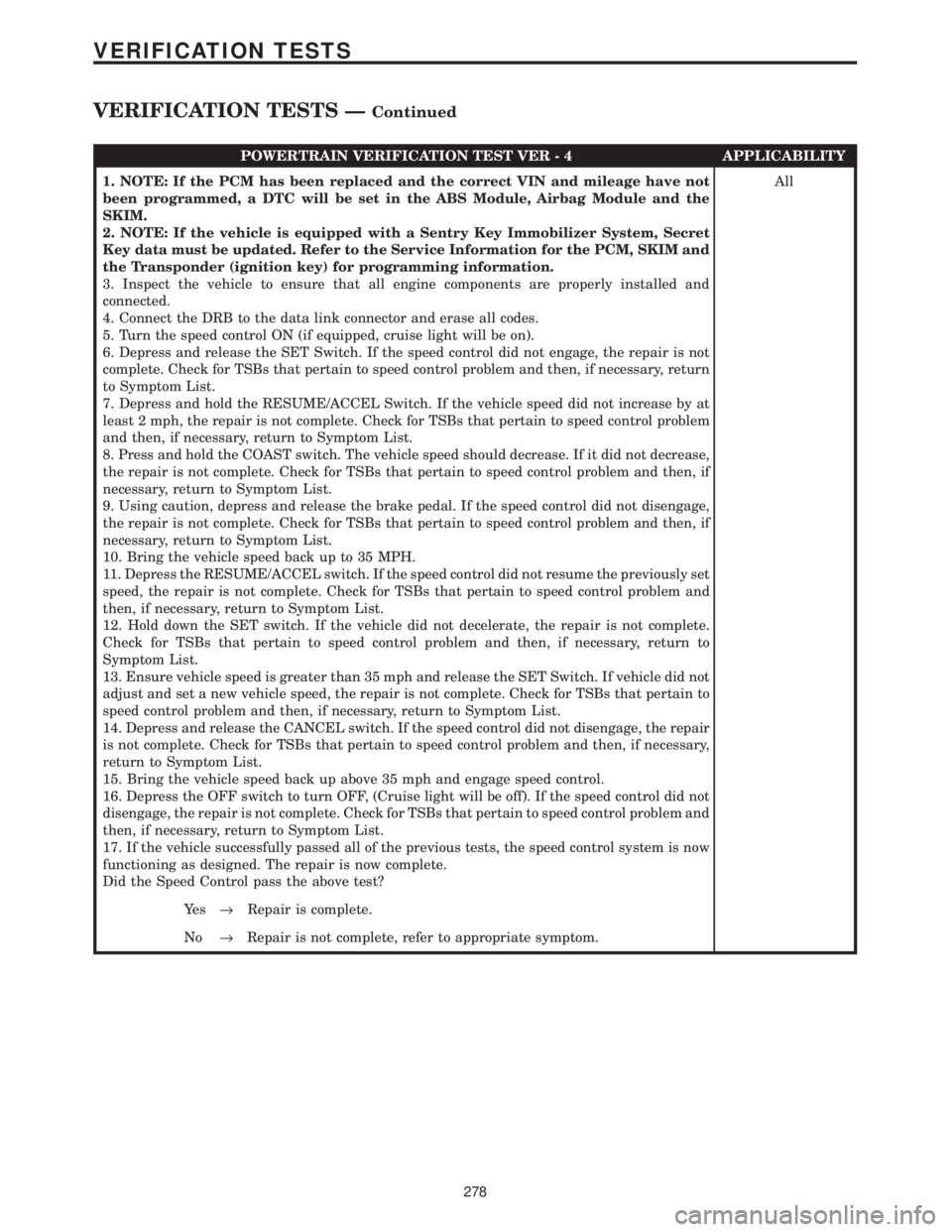
POWERTRAIN VERIFICATION TEST VER - 4 APPLICABILITY
1. NOTE: If the PCM has been replaced and the correct VIN and mileage have not
been programmed, a DTC will be set in the ABS Module, Airbag Module and the
SKIM.
2. NOTE: If the vehicle is equipped with a Sentry Key Immobilizer System, Secret
Key data must be updated. Refer to the Service Information for the PCM, SKIM and
the Transponder (ignition key) for programming information.
3. Inspect the vehicle to ensure that all engine components are properly installed and
connected.
4. Connect the DRB to the data link connector and erase all codes.
5. Turn the speed control ON (if equipped, cruise light will be on).
6. Depress and release the SET Switch. If the speed control did not engage, the repair is not
complete. Check for TSBs that pertain to speed control problem and then, if necessary, return
to Symptom List.
7. Depress and hold the RESUME/ACCEL Switch. If the vehicle speed did not increase by at
least 2 mph, the repair is not complete. Check for TSBs that pertain to speed control problem
and then, if necessary, return to Symptom List.
8. Press and hold the COAST switch. The vehicle speed should decrease. If it did not decrease,
the repair is not complete. Check for TSBs that pertain to speed control problem and then, if
necessary, return to Symptom List.
9. Using caution, depress and release the brake pedal. If the speed control did not disengage,
the repair is not complete. Check for TSBs that pertain to speed control problem and then, if
necessary, return to Symptom List.
10. Bring the vehicle speed back up to 35 MPH.
11. Depress the RESUME/ACCEL switch. If the speed control did not resume the previously set
speed, the repair is not complete. Check for TSBs that pertain to speed control problem and
then, if necessary, return to Symptom List.
12. Hold down the SET switch. If the vehicle did not decelerate, the repair is not complete.
Check for TSBs that pertain to speed control problem and then, if necessary, return to
Symptom List.
13. Ensure vehicle speed is greater than 35 mph and release the SET Switch. If vehicle did not
adjust and set a new vehicle speed, the repair is not complete. Check for TSBs that pertain to
speed control problem and then, if necessary, return to Symptom List.
14. Depress and release the CANCEL switch. If the speed control did not disengage, the repair
is not complete. Check for TSBs that pertain to speed control problem and then, if necessary,
return to Symptom List.
15. Bring the vehicle speed back up above 35 mph and engage speed control.
16. Depress the OFF switch to turn OFF, (Cruise light will be off). If the speed control did not
disengage, the repair is not complete. Check for TSBs that pertain to speed control problem and
then, if necessary, return to Symptom List.
17. If the vehicle successfully passed all of the previous tests, the speed control system is now
functioning as designed. The repair is now complete.
Did the Speed Control pass the above test?All
Ye s®Repair is complete.
No®Repair is not complete, refer to appropriate symptom.
278
VERIFICATION TESTS
VERIFICATION TESTS ÐContinued
Page 4106 of 4284
3.2.2 TRANSMISSION OPERATION AND
SHIFT SCHEDULING AT VARIOUS
OIL TEMPERATURES.
The transmission covered in this manual has
unique shift schedules depending on the tempera-
ture of the transmission oil. The shift schedule is
modified to extend the life of the transmission while
operating under extreme conditions.
The oil temperature is measured with a Temper-
ature Sensor on the 41TE/AE transmission. The
Temperature Sensor is an integral component of the
Transmission Range Sensor (TRS). If the Tempera-
ture Sensor is faulty, (DTC P1799(74)) the trans-
mission will default to a calculated oil temperature.
Oil temperature will then be calculated through a
complex heat transfer equation which uses engine
coolant temperature, battery/ambient temperature,
and engine off time from the Body Control Module
(BCM). These inputs are received from the PCI bus
periodically and used to initialize the oil tempera-
ture at start up. Once the engine is started, the
TCM updates the transmission oil temperature
based on torque converter slip speed, vehicle speed,
gear, and engine coolant temperature to determine
an estimated oil temperature during vehicle opera-
tion. Vehicles using a calculated oil temperature
track oil temperature reasonably accurate during
normal operation. However, if a transmission is
overfilled, a transmission oil cooler becomes re-
stricted, or if a customer drives aggressively in low
gear, the calculated oil temperature will be inaccu-
rate. Consequently the shift schedule selected may
be inappropriate for the current conditions. The key
highlights of the various shift schedules are as
follows:
Extreme Cold:Oil temperature at start up below
-26.6C (-16ÉF)
> Goes to a Cold schedule above -24C (-12ÉF) oil
temperature
> Park, Reverse, Neutral and 2nd gear only (pre-
vents shifting which may fail a clutch with fre-
quent shifts)
Cold:Oil temperature at start up above -24C
(-12ÉF) and below 2.2C (36ÉF)
> Goes to a Warm schedule above 4.4C (40ÉF) oil
temperature
> Delayed 2-3 upshift approximately 35-50 Km/h
(22-31 MPH)
> Delayed 3-4 upshift 72-85 Km/h (45-53 MPH)
> Early 4-3 coastdown shift approximately 48
Km/h (30 MPH)
> Early 3-2 coastdown shift approximately 27
Km/h (17 MPH)> High speed 4-2, 3-2, 2-1 kickdown shifts are
prevented
> No EMCC
Warm:Oil temperature at start up above 2.2C
(36ÉF) and below 27C (80ÉF)
> Goes to a Hot schedule above 27C (80ÉF) oil
temperature
> Normal operation (upshifts, kickdowns, and
coastdowns)
> No EMCC
Hot:Oil temperature at start up above 27C (80ÉF)
> Goes to a Overheat schedule above 115C (240ÉF)
oil temperature
> Normal operation (upshifts, kickdowns, and
coastdowns)
> Full EMCC, No PEMCC except to engage
FEMCC
(Except at closed throttle at speeds above 113-133
Km/h (70 - 83 MPH)
Overheat:Oil temperature above 115C (240ÉF) or
engine coolant temperature above 118C (244ÉF)
> Goes to a Hot below 110C (230ÉF) oil temperature
or a Super Overheat above 115C (240ÉF) oil
temperature
> Delayed 2-3 upshift 40-51 Km/h (25-32 MPH)
> Delayed 3-4 upshift 66-77 Km/h (41-48 MPH)
> 3rd gear FEMCC from 48-77 Km/h (30-48 MPH)
> 3rd gear PEMCC from 43-50 Km/h (27-31 MPH)
Super Overheat:Oil temperature above 127C
(260ÉF)
> Goes back to a Overheat below 115C (240ÉF) oil
temperature
> All a Overheat shift schedules features apply
> 2nd gear PEMCC above 35 Km/h (22 MPH)
> Above 35 Km/h (22 MPH) the torque converter
will not unlock unless the throttle is closed (i.e. at
80 Km/h (50 MPH) a 4th FEMCC to 3rd FEMCC
shift will be made during a part throttle kick-
down or a 4th FEMCC to 2nd PEMCC shift will
be made at wide open throttle) or if a wide open
throttle 2nd PEMCC to 1 kickdown is made.
Causes for operation in the wrong tempera-
ture shift schedule:
Extreme Cold or Cold shift schedule at start up:
> Temperature Sensor circuit.
Overheat or Super Overheat shift schedule after
extended operation:
> Operation in city traffic or stop and go traffic
> Engine idle speed too high
> Aggressive driving in low gear
2
GENERAL INFORMATION
Page 4113 of 4284
Transmission Effects and possible causes:
Scenario 1)- All PRNDL lights stay illuminated
indefinitely in Park following a Key start.
> Wrong Part Number TCM for application
> TRS connector not plugged in
> C1 through C4 (T1, T3, T41, or T42) circuits are
either open, shorted to ground, or shorted to 12
volts.
> PCI bus failure (Open or shorted resulting in no
communication to BCM or Cluster)
> TRS
> TCM
> BCM
Scenario 2)-9P9is indicated following a key start
but all PRNDL lights illuminate in9N9following a
shift from9R9to9N9. If PRNDL lights illuminate in
9N9and shifter is moved directly into939or9L9
position without pausing in9OD9, then the9OD9
position shift schedule and electronic display will
indicate9OD9until the shifter is shifted into the
9OD9position and held for at least 3 seconds.
> Worn Manual Lever (Rooster Comb). Check for
heavy wearing by TRS switch contacts
> Intermittent C1 through C4 (T1, T3, T41 or T42)
circuits. Check for corrosion, terminal push-outs
or spread terminals at 60-way and/or TRS switch
10-way connector
> TRS
> TCM
> BCM
Scenario 3)- If the invalid code happened while
operating in the939or9L9position, then the939or
9L9shift schedule and electronic display will be
frozen (regardless of whether9OD9,939or9L9is
selected) until the shifter is moved to the9N9
position (all PRNDL lights will illuminate) and
then back to the9OD9position and held there for at
least 3 seconds in order to resume the normal9OD9
shift schedule and electronic display.
> Intermittent C1 through C4 (T1, T3, T41 or T42)
circuits. Check for corrosion, terminal push-outs
or spread terminals at 60-way and/or TRS con-
nector
> TRS
> TCM
> BCM
These same symptoms may occur without the
code P0705(28) getting set. It is possible that the
invalid code that was sensed by the TCM only
occurred once or twice during the given ignition key
start and/or did not last for longer than 0.1 second.Name of code:P0120(29) - Throttle Position Sen-
sor Signal
When monitored:Whenever the engine is run-
ning.
Set condition:This code is set if the throttle angle
goes out of range or if throttle angle changes
abruptly (ie: faster than the throttle body motion
could occur)
Theory of operation:The Transmission Control
Module (TCM) receives the throttle position signal
from the Throttle Position Sensor (TPS) through a
wire spliced into the TPS circuit to the PCM. The
TPS has a 5-volt pull up supplied from the Power-
train Control Module (PCM). The signal is checked
for out-of-range as well as an intermittent (exces-
sive signal changes).
Transmission Effects:Extremely erratic trans-
mission shifting with an intermittent TPS signal
just prior to setting the code. If the intermittent
does not last long enough to set the code, the
customer will say that the transmission violently
hunts between gears. The TCM will use a calcu-
lated throttle angle supplied by the PCM over the
PCI bus. If the PCI bus is unavailable, the TCM will
use a default throttle angle of 24 degrees for the key
start in which the code was set. The TCM will try to
use the TPS signal again on the next key start.
Possible causes:
> Open or shorted TPS signal and/or ground cir-
cuits
> TCM connector problems
> TPS or TPS connector (Check PCM DTC's)
> PCM
> TCM
Name of code:P1787(31) - OD Hydraulic Pressure
Test Failure
P1788(32) - 2-4 Hydraulic Pressure Test Failure
P1789(33) - OD/2-4 Hydraulic Pressure Test Failure
When monitored:In 1st, 2nd, or 3rd gear with
engine speed above 1000 RPM shortly after a shift
and every minute thereafter.
Set condition:Immediately after a shift into 1st,
2nd, or 3rd gear, with engine speed above 1000
RPM, the TCM momentarily turns on element
pressure to the 2-4 and/or OD clutch circuits to
identify that the appropriate pressure switch
closes. If the pressure switch does not close it is
tested again. If the switch does not close the second
time, the appropriate code is set.
Theory of operation:The Transmission Control
Module (TCM) tests the OD and 2-4 pressure
switches when they are off (OD and 2-4 are tested in
1st gear, OD in 2nd gear, and 2-4 in 3rd gear). The
test verifies that the switches are operational. The
TCM verifies that the switch closes when the cor-
9
GENERAL INFORMATION
Page 4122 of 4284
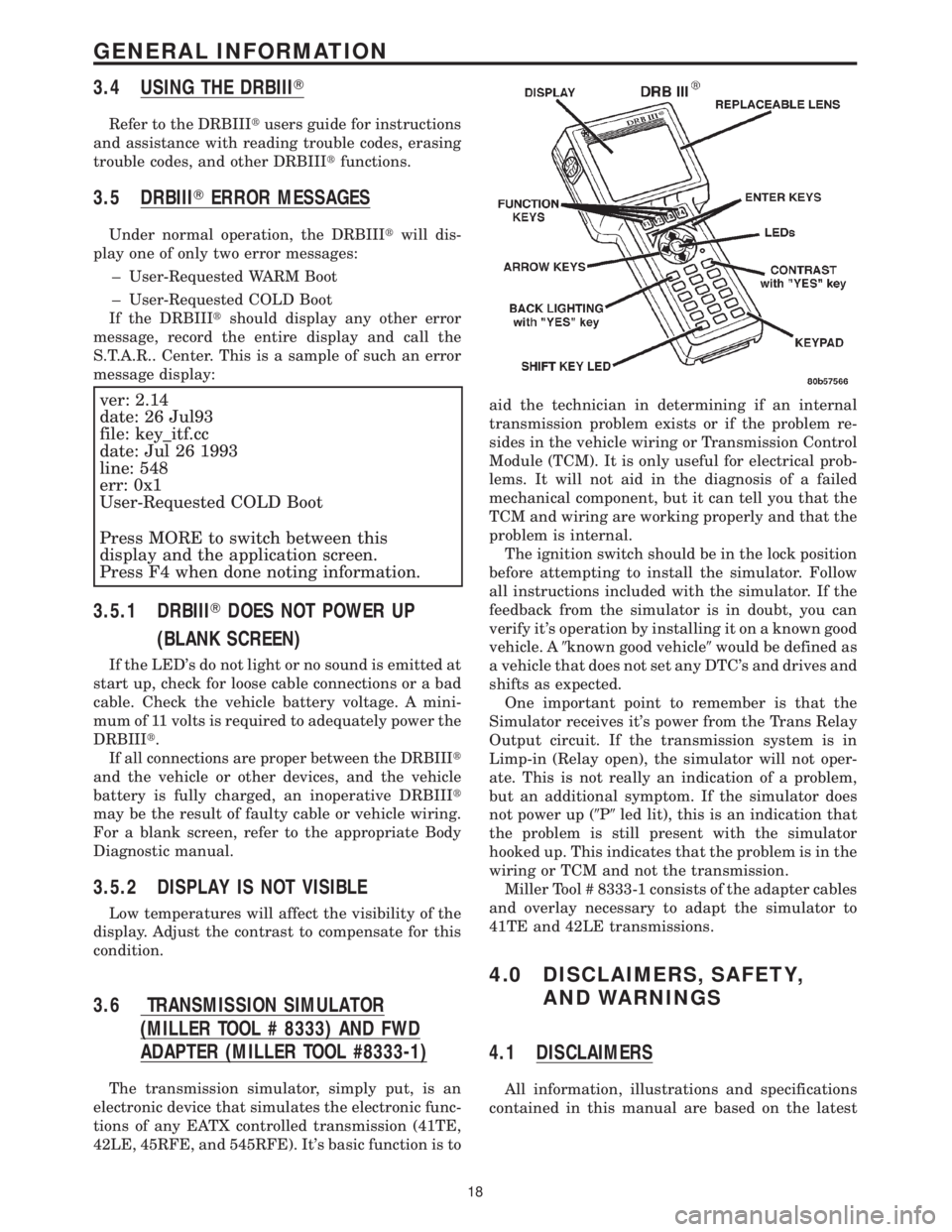
3.4 USING THE DRBIIIT
Refer to the DRBIIItusers guide for instructions
and assistance with reading trouble codes, erasing
trouble codes, and other DRBIIItfunctions.
3.5 DRBIIITERROR MESSAGES
Under normal operation, the DRBIIItwill dis-
play one of only two error messages:
± User-Requested WARM Boot
± User-Requested COLD Boot
If the DRBIIItshould display any other error
message, record the entire display and call the
S.T.A.R.. Center. This is a sample of such an error
message display:
ver: 2.14
date: 26 Jul93
file: key_itf.cc
date: Jul 26 1993
line: 548
err: 0x1
User-Requested COLD Boot
Press MORE to switch between this
display and the application screen.
Press F4 when done noting information.
3.5.1 DRBIIITDOES NOT POWER UP
(BLANK SCREEN)
If the LED's do not light or no sound is emitted at
start up, check for loose cable connections or a bad
cable. Check the vehicle battery voltage. A mini-
mum of 11 volts is required to adequately power the
DRBIIIt.
If all connections are proper between the DRBIIIt
and the vehicle or other devices, and the vehicle
battery is fully charged, an inoperative DRBIIIt
may be the result of faulty cable or vehicle wiring.
For a blank screen, refer to the appropriate Body
Diagnostic manual.
3.5.2 DISPLAY IS NOT VISIBLE
Low temperatures will affect the visibility of the
display. Adjust the contrast to compensate for this
condition.
3.6 TRANSMISSION SIMULATOR
(MILLER TOOL # 8333) AND FWD
ADAPTER (MILLER TOOL #8333-1)
The transmission simulator, simply put, is an
electronic device that simulates the electronic func-
tions of any EATX controlled transmission (41TE,
42LE, 45RFE, and 545RFE). It's basic function is toaid the technician in determining if an internal
transmission problem exists or if the problem re-
sides in the vehicle wiring or Transmission Control
Module (TCM). It is only useful for electrical prob-
lems. It will not aid in the diagnosis of a failed
mechanical component, but it can tell you that the
TCM and wiring are working properly and that the
problem is internal.
The ignition switch should be in the lock position
before attempting to install the simulator. Follow
all instructions included with the simulator. If the
feedback from the simulator is in doubt, you can
verify it's operation by installing it on a known good
vehicle. A9known good vehicle9would be defined as
a vehicle that does not set any DTC's and drives and
shifts as expected.
One important point to remember is that the
Simulator receives it's power from the Trans Relay
Output circuit. If the transmission system is in
Limp-in (Relay open), the simulator will not oper-
ate. This is not really an indication of a problem,
but an additional symptom. If the simulator does
not power up (9P9led lit), this is an indication that
the problem is still present with the simulator
hooked up. This indicates that the problem is in the
wiring or TCM and not the transmission.
Miller Tool # 8333-1 consists of the adapter cables
and overlay necessary to adapt the simulator to
41TE and 42LE transmissions.
4.0 DISCLAIMERS, SAFETY,
AND WARNINGS
4.1 DISCLAIMERS
All information, illustrations and specifications
contained in this manual are based on the latest
18
GENERAL INFORMATION
Page 4125 of 4284
> Transmission Simulator (Miller # 8333)
> Transmission Simulator (Miller # 8333-1)
Adapter harness kit and panel overlay for FWD
vehicles.
> Jumper wires
> Test Light (minimum of 25 ohms of resistance)
> Ohmmeter
> Voltmeter
> Pressure gauge (0-300 PSI)
6.0 GLOSSARY OF TERMS
6.1 ACRONYMS
BCMBody Control Module
CKTCircuit
CVIClutch Volume Index
DLCData Link Connector
DRBIIItDiagnostic Readout Box
DTCDiagnostic Trouble Code
EATXElectronic Automatic Transaxle
EMCCElectronically Modulated Converter
Clutch
FCMFront Control Module (part of the
IPM system)
IODIgnition off-draw
IPMIntelligent Power Module
IRTIntelligent Recovery Timer
ISSInput Speed Sensor
LEDLight Emitting Diode
LRLow/reverse Clutch or Pressure
Switch
LULockupMICMechanical Instrument Cluster
MILMalfunction Indicator Lamp
OBDIIOn Board Diagnostics
ODOverdrive Clutch or Pressure
Switch
OSSOutput Speed Sensor
PCMPowertrain Control Module
PEMCCPartial Electronically Modulated
Converter Clutch
PLUPartial Lockup
REVReverse Clutch
SLPKSolenoid Pack
SSVSolenoid Switch Valve
SWSwitch
TCCTorque Converter Clutch
TCMTransmission Control Module
TPThrottle Position
TRDTorque Reduction
TRSTransmission Range Sensor
UDUnderdrive Clutch
2-42nd and 4th gear Clutch or Pres-
sure Switch
6.2 DEFINITIONS
OBDII (EURO STAGE III OBD) Trip - A vehicle
start and drive cycle such that all once per trip
diagnostic monitors have run.
Key Start - A vehicle start and run cycle of at least
20 seconds.
Warm-up Cycle - A vehicle start and run cycle
such that the engine coolant must rise to at least
71C (160ÉF) and must rise by at least 4.4C (40ÉF)
from initial start up. To count as a warm-up cycle,
no DTC may occur during the cycle.
21
GENERAL INFORMATION
Page 4130 of 4284
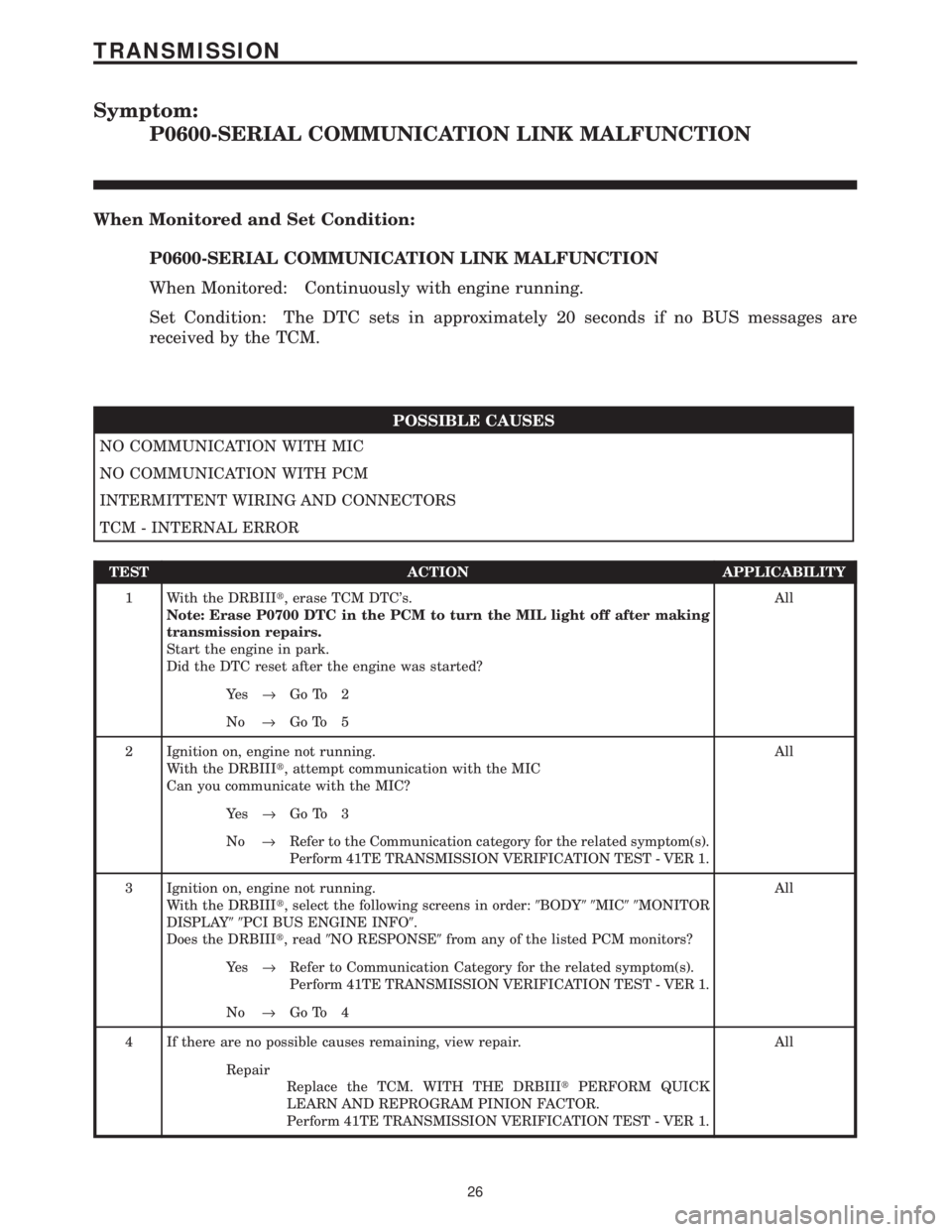
Symptom:
P0600-SERIAL COMMUNICATION LINK MALFUNCTION
When Monitored and Set Condition:
P0600-SERIAL COMMUNICATION LINK MALFUNCTION
When Monitored: Continuously with engine running.
Set Condition: The DTC sets in approximately 20 seconds if no BUS messages are
received by the TCM.
POSSIBLE CAUSES
NO COMMUNICATION WITH MIC
NO COMMUNICATION WITH PCM
INTERMITTENT WIRING AND CONNECTORS
TCM - INTERNAL ERROR
TEST ACTION APPLICABILITY
1 With the DRBIIIt, erase TCM DTC's.
Note: Erase P0700 DTC in the PCM to turn the MIL light off after making
transmission repairs.
Start the engine in park.
Did the DTC reset after the engine was started?All
Ye s®Go To 2
No®Go To 5
2 Ignition on, engine not running.
With the DRBIIIt, attempt communication with the MIC
Can you communicate with the MIC?All
Ye s®Go To 3
No®Refer to the Communication category for the related symptom(s).
Perform 41TE TRANSMISSION VERIFICATION TEST - VER 1.
3 Ignition on, engine not running.
With the DRBIIIt, select the following screens in order:9BODY99MIC99MONITOR
DISPLAY99PCI BUS ENGINE INFO9.
Does the DRBIIIt, read9NO RESPONSE9from any of the listed PCM monitors?All
Ye s®Refer to Communication Category for the related symptom(s).
Perform 41TE TRANSMISSION VERIFICATION TEST - VER 1.
No®Go To 4
4 If there are no possible causes remaining, view repair. All
Repair
Replace the TCM. WITH THE DRBIIItPERFORM QUICK
LEARN AND REPROGRAM PINION FACTOR.
Perform 41TE TRANSMISSION VERIFICATION TEST - VER 1.
26
TRANSMISSION