oil DATSUN 210 1979 Service Manual
[x] Cancel search | Manufacturer: DATSUN, Model Year: 1979, Model line: 210, Model: DATSUN 210 1979Pages: 548, PDF Size: 28.66 MB
Page 512 of 548

Air
Conditioning
6
Loosen
the
connection
at
the
center
fitting
of
manifold
gauge
for
a
Clockwise
few
seconds
to
purge
air
inside
charg
ing
hose
See
Fig
AC
14
Counterclockwise
j
3
@
I
Can
tap
handle
2
ChlcginS
hose
3
Needle
4
Refrigerant
can
AC246
Fig
AC
13
Can
Top
Purging
air
R
12
To
L9w
pressure
service
valve
AC247
Fig
AC
14
Purging
Air
Ta
High
pressure
service
valve
f
r
AC181A
Fig
AC
15
Discharging
System
AC
ll
DISCHARGING
SYSTEM
The
pressurized
refrigerant
gas
in
side
system
must
be
discharged
to
a
pressure
approaching
atmospheric
pressure
prior
to
evacuating
refrigerant
inside
system
This
operation
should
be
also
made
to
pennit
safe
removal
when
replacing
system
components
A
Close
high
and
low
pressure
valves
of
manifold
gauge
fully
2
Connect
two
charging
hoses
of
manifold
gauge
to
their
respective
service
valves
WARNING
Securely
connect
high
pressure
dis
charge
service
valve
to
that
of
manifold
gauge
with
a
hose
also
connect
low
pressure
suction
serv
ice
valve
to
that
of
manifold
gauge
For
locations
of
high
and
low
pres
sure
discharge
and
suction
service
valves
see
Fig
AC
29
3
Open
both
manifold
gauge
valves
slightly
and
slowly
discharge
refriger
ant
from
system
See
Fig
AC
15
WARNING
Protect
fingers
with
cloth
against
frostbite
by
refrigerant
when
con
necting
the
charging
hose
to
the
service
valve
or
disconnecting
it
therefrom
Nole
Do
not
allow
refrigerant
to
rush
out
Otherwise
compressor
oil
will
be
discharged
along
with
refriger
ant
EVACUATING
SYSTEM
I
Connect
high
and
low
pressure
charging
hoses
of
manifold
gauge
to
their
respective
service
valves
of
sys
tem
and
discharge
refrigerant
from
system
Refer
to
Discharging
System
WARNING
Securely
connect
high
pressure
dis
charge
service
valve
to
that
of
manifold
gauge
with
a
hose
also
connect
low
pressure
suction
servo
ice
valve
to
that
of
manifold
gauge
For
locations
of
high
and
low
pres
sure
discharge
and
wction
service
valves
see
Fig
AC
29
Page 515 of 548

4
Wfefrlgerant
charging
speed
slows
down
charge
it
while
running
the
compressor
for
ease
of
charging
After
having
taken
the
steps
up
to
3
above
proceed
with
charging
in
the
following
order
1
Shut
off
high
pressure
valve
of
manifold
gauge
2
Run
the
engine
at
idling
speeds
below
1
500
rpm
3
Set
the
Temperature
lever
and
Fan
switch
at
maximum
cool
and
maximum
speed
respectively
To
Lpw
pressure
service
valve
t
Air
Conditioning
4
Charge
efiigerani
while
con
trolling
low
pressure
gauge
reading
at
2
8
kg
cm2
40
psi
or
less
by
turning
in
or
out
low
pressure
valve
of
mani
fold
gauge
See
Fig
A
20
WARNING
Never
charge
refrigerant
through
high
pressure
side
discharge
side
of
system
since
this
will
force
re
frigerant
back
into
refrigerant
can
and
can
may
explode
To
High
pressure
service
valve
A
5
When
refrigerant
can
is
empty
fully
close
both
valves
of
manifold
gauge
and
replace
refrigerant
can
with
a
new
ot
e
Before
opening
manifold
gauge
valve
to
charge
refrigerant
from
new
can
be
sure
to
purge
air
from
inside
charging
hose
6
Charge
the
specified
amount
of
refrigerant
into
system
by
weighing
charged
refrigerant
with
scale
Over
charging
wiU
cause
discharge
pressure
to
rise
AC380A
Fig
AC
20
Charging
Refrigeront
Measure
the
amount
of
charged
refrigerant
with
a
scale
Make
a
note
of
the
amount
charged
from
can
AC252
Fig
AC
21
Chorging
Refrigeront
Refrigerant
capacity
Unit
kg
lb
Refrigerarit
Minimum
Maximum
R
12
0
8
1
8
1
0
2
2
AC14
Note
The
p
Ce
of
btibble
hi
sight
glass
of
receiver
drier
is
an
unsuitable
method
of
checking
the
amount
of
refrigerant
charged
in
system
The
state
of
the
bubbles
iJt
sight
glass
should
only
be
used
ior
checking
whether
the
amount
of
charged
refrigerant
is
small
or
not
The
amount
of
charged
refrigerani
can
be
correcdy
judged
by
means
of
discharge
pressure
Refer
to
Re
frigerant
Level
Check
7
After
the
specified
amount
of
refrigerant
has
been
charged
intosys
tern
close
manifold
gauge
valves
Then
detach
charging
hoses
from
service
valves
of
system
Be
sure
to
install
valve
cap
to
service
valve
8
Confirm
that
there
are
no
leaks
in
system
by
checking
with
a
leak
detec
tor
Refer
to
Checking
for
Leaks
Note
Conducting
8
performance
test
prior
to
removing
manifold
gauge
is
8
good
service
operation
Refer
to
Performance
Test
CHECKING
FOR
LEAKS
Conduct
a
leak
t
st
whenever
leak
age
of
refrigerant
is
suspected
and
when
conducting
service
operations
which
are
accompanied
by
disassembly
or
loosening
of
connection
fittings
Refrigerant
is
a
colorless
odorless
gas
and
leakage
from
system
is
diffi
cult
to
detect
Accordingly
the
use
of
a
leak
detector
facilitates
check
for
leaks
Two
methods
of
checking
are
available
one
employs
a
halide
leak
detector
which
bums
propane
gas
or
butane
gas
and
the
other
is
an
electric
type
leak
detector
If
any
trace
of
oil
is
noted
at
and
around
connection
fittings
it
is
a
sure
indication
that
refrigerant
is
leaking
This
condition
can
be
corrected
easily
by
retightening
the
joints
If
any
joint
on
line
is
suspected
of
small
amount
of
leakage
use
a
leak
detector
to
locate
leaking
points
Page 518 of 548
COMPRESSOR
OIL
LEVEL
CHECK
The
oil
used
to
lubricate
compres
sor
circulates
into
system
from
the
oil
sump
while
compressor
is
operating
Therefore
to
correctly
measure
com
pressor
oil
the
amount
of
oil
flowing
to
system
must
be
considered
If
a
considerable
amount
of
leakage
of
refrigerant
gas
happens
the
leakage
of
compressor
oil
is
also
considered
There
will
be
no
compressor
oil
leak
age
from
a
completely
sealed
system
When
system
operates
under
satisfying
condition
the
compressor
oil
level
check
is
unnecessary
When
checking
the
level
of
com
pressor
oil
or
when
replacing
any
component
part
of
the
system
use
the
following
service
procedure
This
facio
litates
to
return
oil
to
compressor
1
Operate
compressor
at
engine
idling
speed
I
OOO
rpm
or
below
with
controls
set
for
maximum
cooling
and
high
blower
speed
for
10
to
15
minutes
in
order
to
return
com
pressor
oil
to
compressor
2
Stop
the
engine
and
discharge
refrigerant
of
system
and
then
remove
compressor
from
the
car
3
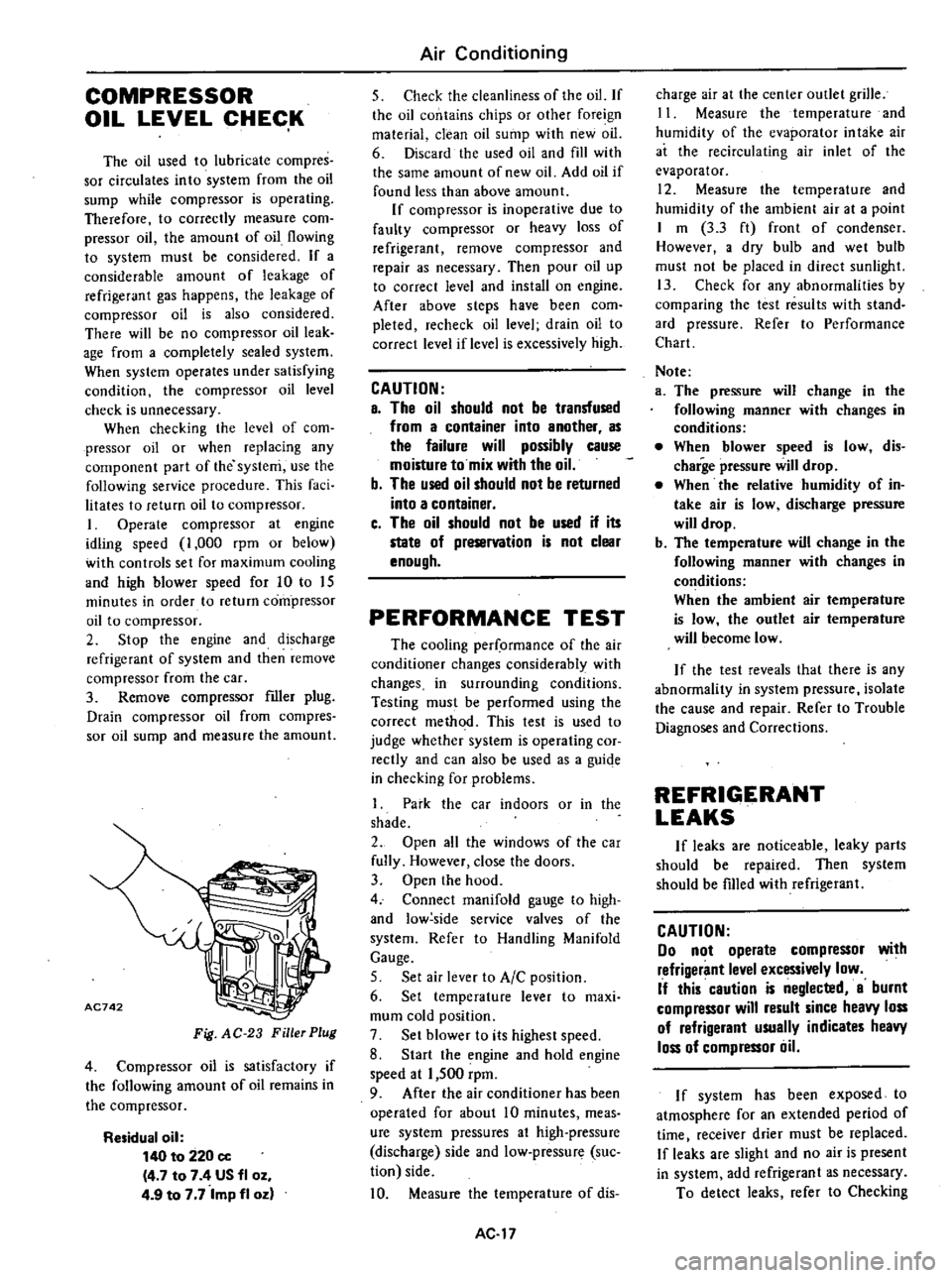
Remove
compressor
filler
plug
Drain
compressor
oil
from
compres
sor
oil
sump
and
measure
the
amount
AC742
Fig
AC
23
Filler
Plug
4
Compressor
oil
is
satisfactory
if
the
following
amount
of
oil
remains
in
the
compressor
Residual
oil
140
to
220
cc
4
7
to
7
4
US
fl
oz
4
9
to
7
7
Imp
fl
oz
Air
Conditioning
5
Check
the
cleanliness
of
the
oil
If
the
oil
contains
chips
or
other
foreign
material
clean
oil
sump
with
new
oil
6
Discard
the
used
oil
and
fill
with
the
same
amount
of
new
oil
Add
oil
if
found
less
than
above
amount
If
compressor
is
inoperative
due
to
faulty
compressor
or
heavy
loss
of
refrigerant
remove
compressor
and
repair
as
necessary
Then
pour
oil
up
to
correct
level
and
install
on
engine
After
above
steps
have
been
com
pleted
recheck
oil
level
drain
oil
to
correct
level
if
level
is
excessively
high
CAUTION
a
The
oil
should
not
be
transfused
from
a
container
into
another
as
the
failure
will
possibly
cause
moisture
to
mix
with
the
oil
b
The
used
oil
should
not
be
returned
into
a
container
c
The
oil
should
not
be
used
if
its
state
of
preservation
is
not
clear
enough
PERFORMANCE
TEST
The
cooling
per
ormance
of
the
air
conditioner
changes
considerably
with
changes
in
surrounding
conditions
Testing
must
be
performed
using
the
correct
method
This
test
is
used
to
judge
whether
system
is
operating
cor
rectly
and
can
also
be
used
as
a
guiqe
in
checking
for
problems
1
Park
the
car
indoors
or
in
the
shade
2
Open
all
the
windows
of
the
car
fully
However
close
the
doors
3
Open
the
hood
4
Connect
manifold
gauge
to
high
and
low
side
service
valves
of
the
system
Refer
to
Handling
Manifold
Gauge
5
Set
air
lever
to
AIC
position
6
Set
temperature
lever
to
maxi
mum
cold
position
7
Set
blower
to
its
highest
speed
8
Start
the
engine
and
hold
engine
speed
at
1
500
rpm
9
After
the
air
conditioner
has
been
operated
for
about
10
minutes
meas
ure
system
pressures
at
high
pressure
discharge
side
and
low
pressure
suc
tion
side
10
Measure
the
temperature
of
dis
AC
17
charge
air
at
the
center
outlet
grille
11
Measure
the
temperature
and
humidity
of
the
evaporator
in
take
air
at
the
recirculating
air
inlet
of
the
evaporator
12
Measure
the
temperature
and
humidity
of
the
ambient
air
at
a
point
I
m
3
3
ft
front
of
condenser
However
a
dry
bulb
and
wet
bulb
must
not
be
placed
in
direct
sunlight
13
Check
for
any
abnormalities
by
comparing
the
test
results
with
stand
ard
pressure
Refer
to
Performance
Chart
Note
a
The
pressure
will
change
in
the
following
manner
with
changes
in
conditions
When
blower
speed
is
low
dis
charge
pressure
will
drop
When
the
relative
humidity
of
in
take
air
is
low
discharge
pressure
will
drop
b
The
temperature
will
change
in
the
following
manner
with
changes
in
conditions
When
the
ambient
air
temperature
is
low
the
outlet
air
temperature
will
become
low
If
the
test
reveals
that
there
is
any
abnormality
in
system
pressure
isolate
the
cause
and
repair
Refer
to
Trouble
Diagnoses
and
Corrections
REFRIGERANT
LEAKS
If
leaks
are
noticeable
leaky
parts
should
be
repaired
Then
system
should
be
fIlled
with
refrigerant
CAUTION
00
not
operate
compressor
with
refrigerant
level
excessively
low
If
this
caution
is
neglected
a
burnt
compressor
will
result
since
heavy
loss
of
refrigerant
usually
indicates
heavy
loss
of
compressor
liil
I
f
system
has
been
exposed
to
atmosphere
for
an
extended
period
of
time
I
receiver
drier
must
be
replaced
If
leaks
are
slight
and
no
air
is
present
in
system
add
refrigerant
as
necessary
To
detect
leaks
refer
to
Checking
Page 519 of 548
for
Leaks
Here
is
how
leaks
are
stopped
I
Check
torque
on
the
connection
fitting
and
if
too
loose
tighten
to
the
proper
lorque
Check
for
gas
leakage
with
a
leak
detector
Air
Conditioning
2
If
leakage
continues
ven
after
the
fitting
has
been
retightened
dis
charge
refrigerant
from
system
disc
on
net
the
fittings
and
check
its
seating
face
for
damage
Always
replace
even
if
damage
is
slight
J
Check
compressor
6il
and
add
oil
if
required
4
Charge
refrigerant
and
recheck
for
gas
leaks
If
no
leaks
are
found
evacuate
and
charge
system
SERVICE
PROCEDURES
FAST
IDLE
ACTUATOR
ADJUSTMENT
OF
IDLE
SPEED
Engine
model
Transmission
When
A
C
is
OFF
When
A
C
is
ON
F
LCD
is
actuated
Manual
700
rpm
800
rpm
A14
A15
Automatic
650
rpm
800
rpm
at
D
position
at
N
position
The
fast
idle
control
device
is
used
on
cars
equipped
with
an
air
condi
tioner
to
raise
the
idle
speed
auto
matically
Use
the
following
procedures
when
adjusting
1
Run
engine
until
it
reaches
oper
ating
temperature
2
With
air
conditioner
in
OFF
when
compressor
is
not
operated
make
sure
that
clearance
e
between
levers
A
and
8
is
more
than
J
mm
0
12
in
If
clearance
C
is
less
than
J
mm
0
12
in
loosen
cable
lock
screw
and
push
down
on
lever
A
so
that
clearance
C
is
more
than
J
mm
0
12
in
3
Make
sure
that
engine
is
at
cor
rect
idle
speed
4
With
air
conditioner
in
ON
when
F
LC
D
is
actuated
set
engine
speed
to
800
rpm
using
following
procedures
as
a
guide
I
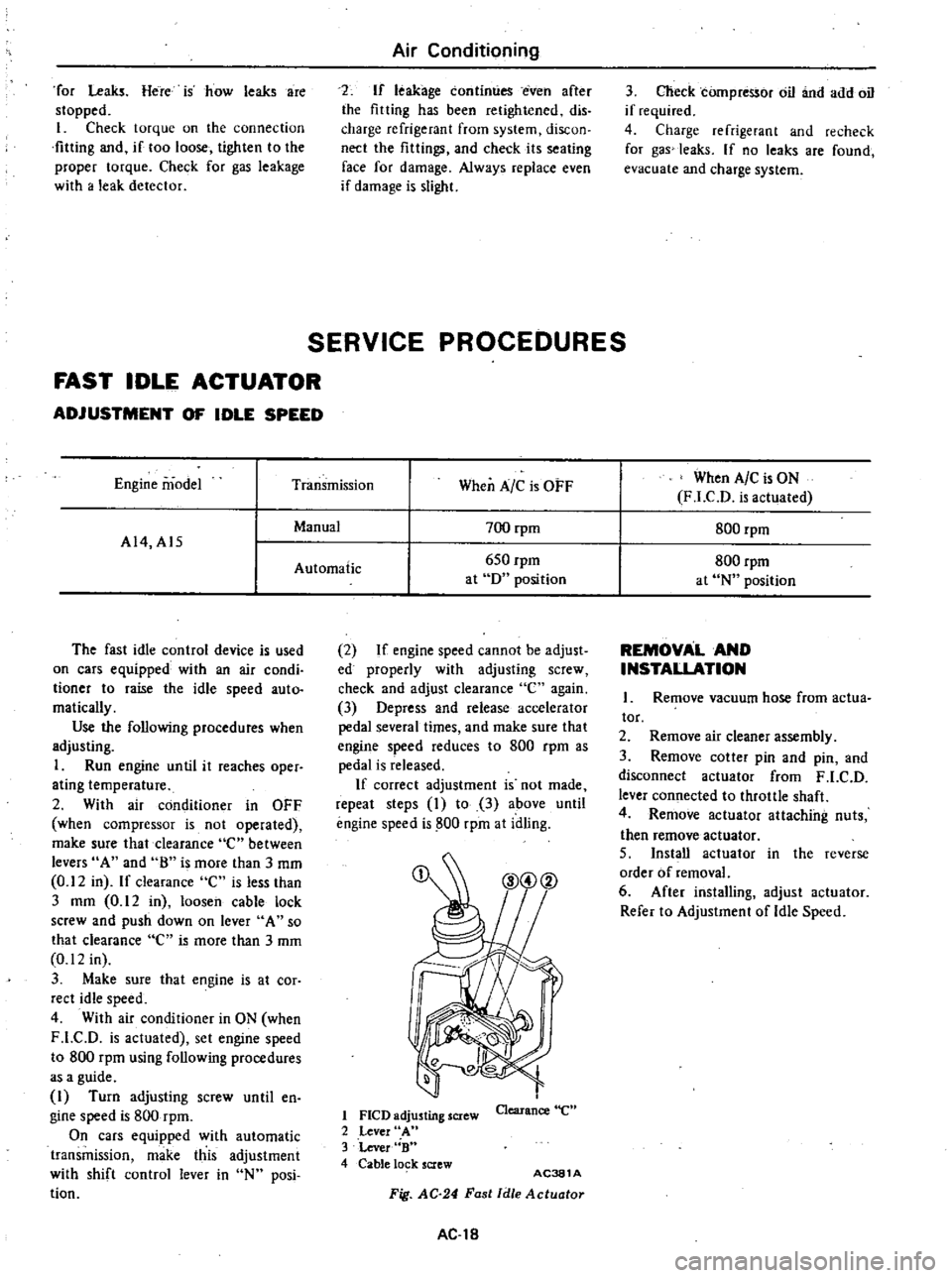
Turn
adjusting
screw
until
en
gine
speed
is
800
rpm
On
cars
equipped
with
automatic
transmission
make
this
adjustment
with
shift
control
lever
in
N
posi
tion
2
If
engine
speed
cannot
be
adjust
ed
properly
with
adjusting
screw
check
and
adjust
clearance
e
again
3
Depress
and
release
accelerator
pedal
several
times
and
make
sure
that
engine
speed
reduces
to
800
rpm
as
pedal
is
released
If
correct
adjustment
is
not
made
repeat
steps
I
to
3
above
until
engine
speed
is
800
rpm
at
idling
1
FlCD
adjusting
screw
2
Lever
A
3
Lever
B
4
Cable
lo
k
screw
Clearance
e
AC381
A
Fig
AC
24
Fast
Idle
Actuotor
AC
18
REMOVAL
AND
INSTALLATION
Remove
vacuum
hose
from
actua
tor
2
Remove
air
cleaner
assembly
3
Remove
cotter
pin
and
pin
and
disconnect
actuator
from
F
LC
D
lever
connected
to
throttle
shaft
4
Remove
actuator
attaching
nuts
then
remove
actuator
5
Install
actuator
in
the
reverse
order
of
removal
6
After
installing
adjust
actuator
Refer
to
Adjustment
of
Idle
Speed
Page 520 of 548

Air
Conditioning
IDLER
PULLEY
AND
COMPRESSOR
DRIVE
BELT
ADJ
USTMENT
OF
BELT
TENSION
Idler
pulley
Alternator
Crankshaft
pulley
Unit
mm
in
Idler
pulley
Fig
AC
25
Belt
Tension
Specified
compressor
belt
tension
is
8
to
12
mm
0
31
to
0
47
in
when
thumb
pressure
of
10
kg
22
Ib
is
applied
midway
between
idler
pulley
and
compressor
pulley
1
Loosen
idler
pulley
lock
nut
and
then
adjust
pulley
by
turning
adjusting
bolt
2
After
adjustment
tighten
idler
pulley
lock
nut
bolt
3
Remove
idler
pulley
4
Install
pulley
in
the
reverse
order
of
removal
5
Adjust
compressor
belt
tension
REMOVAL
AND
INSTALLATION
1
Jack
up
front
of
car
and
remove
under
cover
2
Remove
idler
pulley
lock
nut
and
loosen
belt
tension
adjusting
Fig
AC26
AC382A
Idler
Pulley
TIghtening
torque
@
3
7
to
5
1
kg
m
27
to
37
ft
lb
AC383A
Fig
AC
27
Compressor
and
Bracket
AC
19
REMOVAL
I
Operate
compressor
if
possible
at
engine
idling
speed
with
air
condi
tioner
controls
set
for
maximum
cool
ing
and
high
blower
speed
for20
to
30
minutes
with
all
windows
open
to
return
oil
into
compressor
2
Disconnect
battery
ground
cables
and
compressor
lead
wire
at
con
nector
3
Discharge
refrigerant
from
cool
ing
system
Refer
to
Discharging
Sys
tem
4
Jack
up
front
of
car
and
remove
under
cover
5
Loosen
idler
pulley
lock
nut
and
loosen
tension
adjusting
bolt
fully
Remove
compressor
drive
belt
See
Fig
AC
26
6
Remove
high
and
low
flexible
hoses
from
compressor
WARNING
Gradually
loosen
discharge
side
hose
fitting
and
remove
it
after
remaining
pressure
has
been
re
leased
CAUTION
Be
sure
to
immediately
put
plug
in
flexible
hose
and
compressor
open
ings
7
Remove
bolts
securing
lower
part
of
compressor
8
Remove
bolts
securing
upper
part
of
compressor
Hold
compressor
with
one
hand
when
removing
bolts
and
then
remove
compressor
With
compressor
clutch
up
lift
compressor
out
with
both
hands
CAUTION
00
not
attempt
to
leave
the
com
pressor
on
its
side
or
upside
down
for
more
than
10
minutes
as
the
compressor
oil
will
enter
the
low
pressure
chambers
If
under
that
condition
compressor
should
be
oper
ated
suddenly
internal
damage
would
result
To
expel
oil
from
chambers
hand
crank
compressor
several
times
in
its
installed
condition
Page 521 of 548
INSTA
L1ATION
InstaU
in
the
reverse
order
of
removal
observing
the
following
I
When
installing
add
required
amount
Of
compressor
oil
Refer
to
Compressor
Oil
Level
Check
2
Apply
a
coat
of
fresh
compressor
oil
to
sealing
surfaces
of
pipe
joints
3
Check
tightening
torque
of
com
pressor
mounting
bolts
compressor
mounting
bracket
mounting
bolts
and
refrigerant
line
See
Figs
AC
27
and
AC
29
4
DO
not
remove
plugs
from
com
pressor
and
flexible
hose
before
connecting
hoses
S
Turn
compressor
several
times
before
installing
6
Adjust
compressor
drive
belt
tension
See
Fig
AC
2S
7
Evacuate
and
recharge
system
Refer
to
General
Service
for
evacuating
system
and
charging
re
frigerant
8
Conduct
leak
test
and
make
sure
that
there
is
no
leak
from
connections
CONDE
NSER
REMOVAL
Disconnect
battery
ground
cable
2
Discharge
system
Refer
to
Gen
eral
Service
for
discharging
system
3
Remove
radiator
grille
4
Remove
center
stay
5
Disconnect
refrigerant
lines
from
condenser
CAUTION
8
Use
wrench
to
fix
union
on
con
denser
and
then
loosen
flare
nut
of
refrigerant
line
with
another
wrench
b
Plug
up
all
openings
in
condenser
and
system
Air
COl1ditioning
6
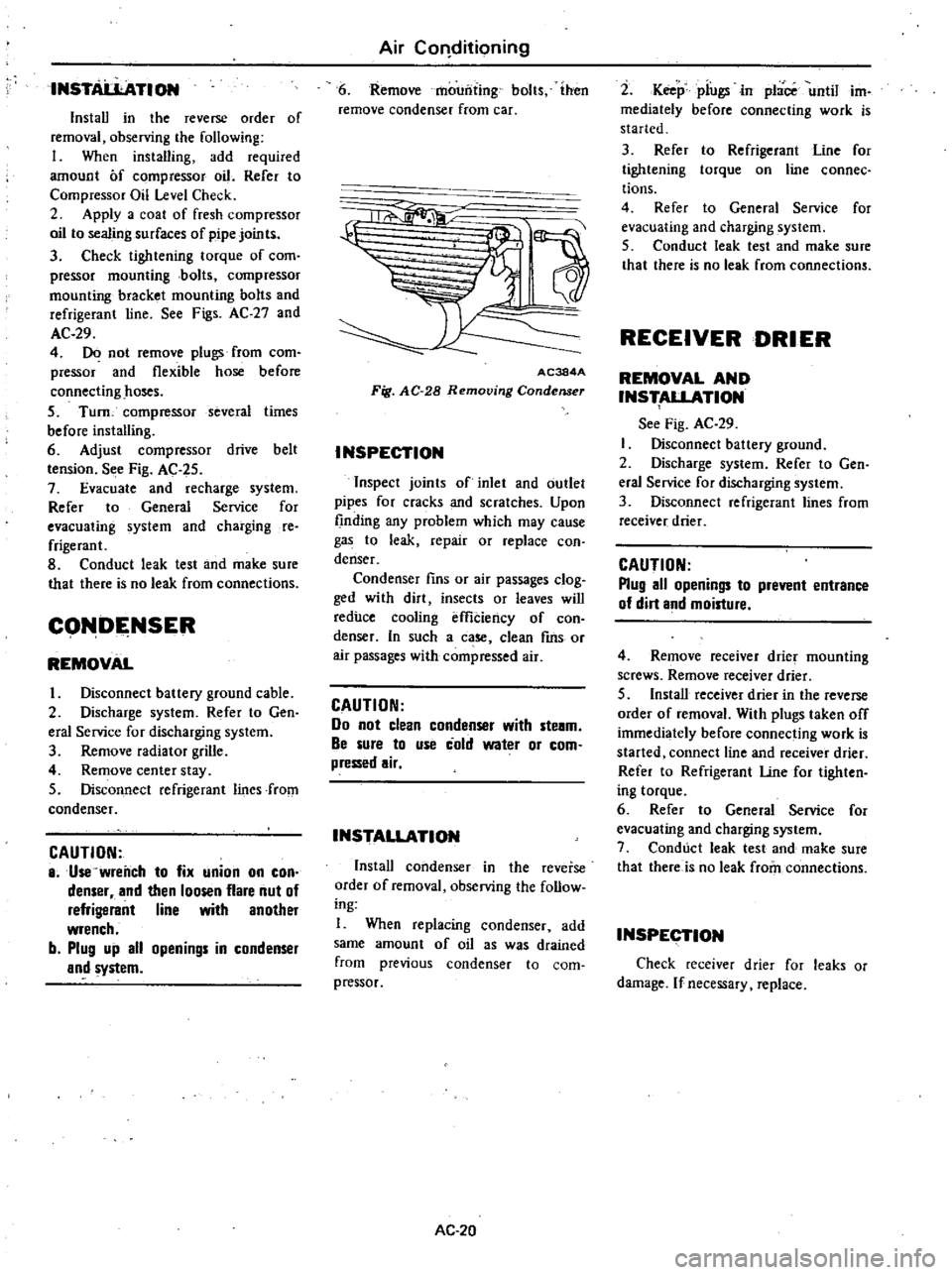
Remove
mounting
bolts
ihen
remove
condenser
from
car
1a
11
AC384A
Fig
AC
28
Removing
Condenser
INSPECTION
Inspect
joints
of
inlet
and
outlet
pipes
for
cracks
and
scratches
Upon
finding
any
problem
which
may
cause
gas
to
leak
repair
or
replace
con
denser
Condenser
fins
or
air
passages
clog
ged
with
dirt
insects
or
leaves
will
reduce
cooling
effiCiency
of
con
denser
In
such
a
case
clean
fms
or
air
passages
with
compressed
air
CAUTION
Do
not
clean
condenser
with
ste8m
Be
sure
to
use
cold
water
or
com
pressed
air
INSTALLATION
Install
condenser
in
the
reverse
order
of
removal
observing
Ihe
follow
ing
I
When
replacing
condenser
add
same
amount
of
oil
as
was
drained
from
previous
condenser
to
com
pressor
AC
20
2
Keep
piugsin
place
until
im
mediately
before
connecting
work
is
started
3
Refer
to
Refrigerant
Line
for
tightening
torque
on
line
connec
tions
4
Refer
to
General
Service
for
evacuating
and
charging
system
5
Conduct
leak
test
and
make
sure
that
there
is
no
leak
from
connections
RECEIVER
DRIER
REMOVAL
AND
INS
ALLATION
See
Fig
AC
29
Disconnect
battery
ground
2
Discharge
system
Refer
to
Gen
eral
Service
for
discharging
system
3
Disconnect
refrigerant
lines
from
receiver
drier
CAUTION
Plug
all
openings
to
prevent
entrance
of
dirt
and
moisture
4
Remove
receiver
drier
mounting
screws
Remove
receiver
drier
5
Install
receiver
drier
in
the
reverse
order
of
removal
With
plugs
taken
off
immediately
before
connecting
work
is
started
connect
line
and
receiver
drier
Refer
to
Refrigerant
Une
for
tighten
ing
torque
6
Refer
to
General
Service
for
evacuating
and
charging
system
7
Conduct
leak
test
and
make
sure
that
there
is
no
leak
from
connections
INSPECTION
Check
receiver
drier
for
leaks
or
damage
If
necessary
replace
Page 522 of 548
REFRIGERANT
LINES
Air
Conditioning
@
I
J
L
S
r
Z
S
t
@
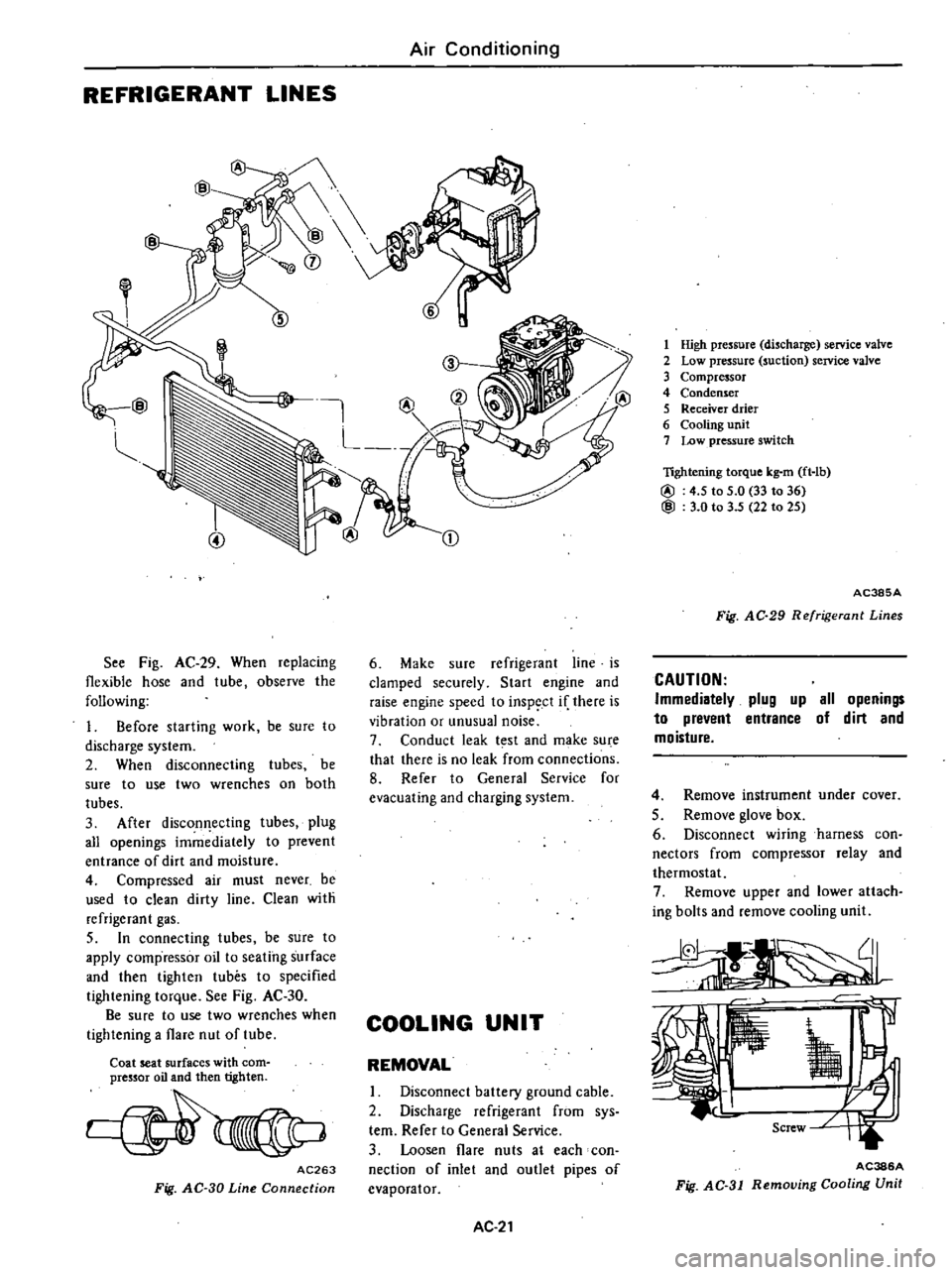
See
Fig
AC
29
When
replacing
flexible
hose
and
tube
observe
the
following
1
Before
starting
work
be
sure
to
discharge
system
2
When
disconnecting
tubes
be
sure
to
use
two
wrenches
on
both
tubes
3
After
discon
ecting
tubes
plug
all
openings
immediately
to
prevent
entrance
of
dirt
and
moisture
4
Compressed
air
must
never
be
used
to
clean
dirty
line
Clean
with
refrigerant
gas
5
In
connecting
tubes
be
sure
to
apply
compressor
oil
to
seating
surface
and
then
tighten
tubes
to
specified
tightening
torque
See
Fig
AC
30
Be
sure
to
use
two
wrenches
when
tightening
a
flare
nut
of
tube
Coat
seat
surfaces
with
com
pressor
oil
and
then
tighten
AC263
Fig
AC
30
Line
Connection
CD
6
Make
sure
refrigerant
line
is
clamped
securely
Start
engine
and
raise
engine
speed
to
inspect
if
there
is
vibration
or
unusual
noise
7
Conduct
leak
t
st
and
make
su
e
that
there
is
no
leak
from
connections
8
Refer
to
General
Service
for
evacuating
and
charging
system
COOLING
UNIT
REMOVAL
I
Disconnect
battery
ground
cable
2
Discharge
refrigerant
from
sys
tern
Refer
to
General
Service
3
Loosen
flare
nuts
at
each
con
nection
of
inlet
and
outlet
pipes
of
evaporator
AC
21
1
High
pressure
discharge
service
valve
2
Low
pressure
suction
service
valve
3
Compressor
4
Condenser
5
Receiver
drier
6
Cooling
unit
7
Low
pressure
switch
lightening
torque
kg
m
ft
lb
@
4
5
to
5
0
33
to
36
@
3
0
to
3
5
22
to
25
AC385A
Fig
AC
29
Refrigerant
Lines
CAUTION
Immediatelv
plug
up
all
openings
to
prevent
entrance
of
dirt
and
moisture
4
Remove
instrument
under
cover
5
Remove
glove
box
6
Disconnect
wiring
harness
con
nectors
from
compressor
relay
and
thermostat
7
Remove
upper
and
lower
attach
ing
bolts
and
remove
cooling
unit
AC386A
Fig
AC
31
Removing
Cooling
Unit
Page 523 of 548
to
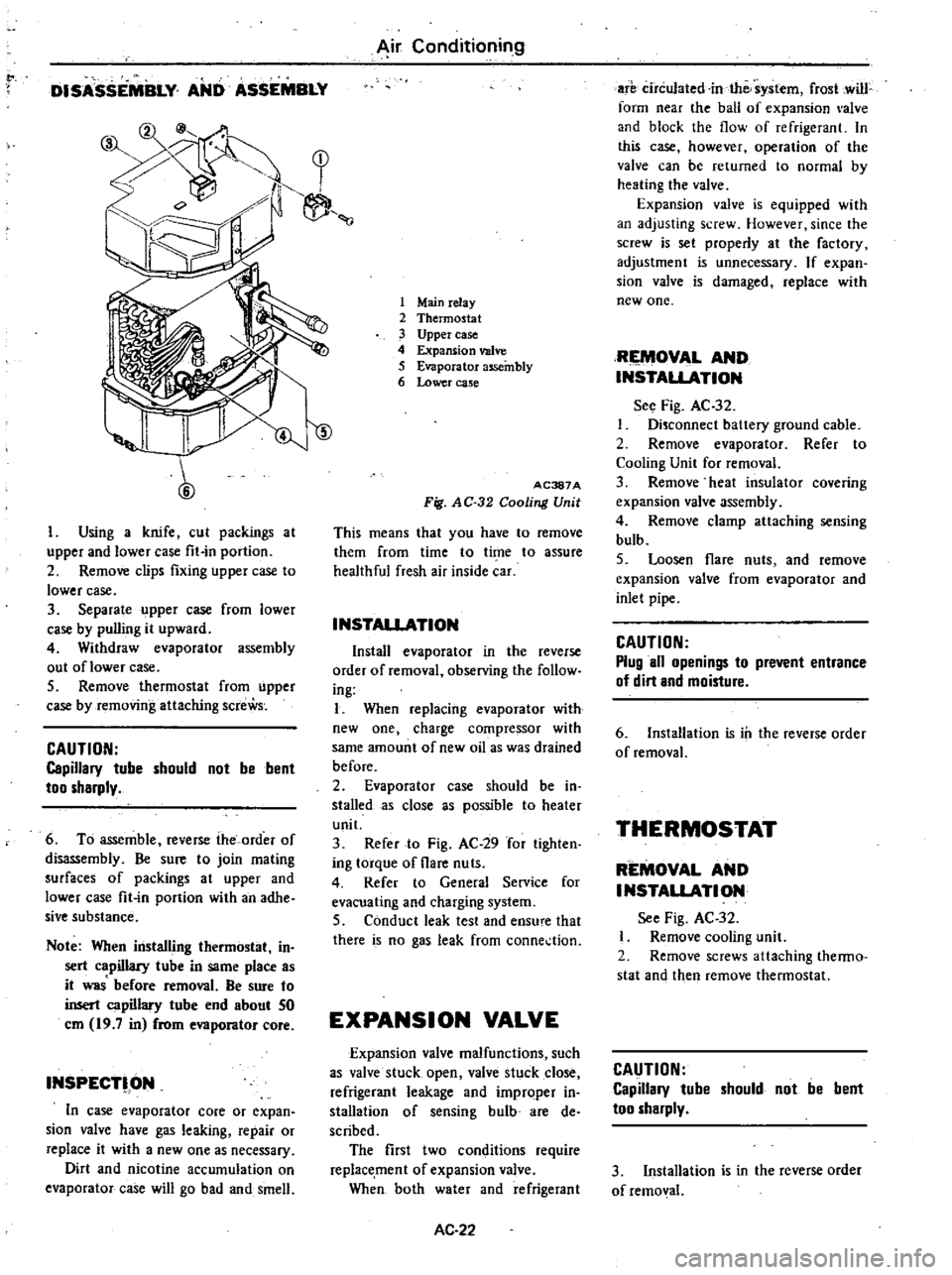
DISASSEMBLY
AND
ASSEMBLY
y
1
7
1
r
II
l
1
Using
a
knife
cut
packings
at
upper
and
lower
case
fit
in
portion
2
Remove
clips
fixing
upper
case
to
lower
case
3
Separate
upper
case
from
lower
case
by
pulling
it
upward
4
Withdraw
evaporator
assembly
out
oflower
case
5
Remove
thermostat
from
upper
case
by
removing
attaching
screWs
CAUTION
Capillary
tube
should
not
be
bent
too
sharply
6
To
assemble
reverse
the
order
of
disassembly
Be
sure
to
join
mating
surfaces
of
packings
at
upper
and
lower
case
fit
in
portion
with
an
adhe
sive
substance
Note
When
installing
thermostat
in
sert
capillary
tube
in
same
place
as
it
was
before
removal
Be
sure
to
insert
capillary
tube
end
about
50
em
19
7
in
from
evaporator
core
INSPECT
ON
In
case
evaporator
core
or
expan
sion
valve
have
gas
leaking
repair
or
replace
it
with
a
new
one
as
necessary
Dirt
and
nicotine
accumulation
on
evaporator
case
will
go
b
d
and
smell
Air
Conditioning
1
Mainrelay
2
Thermostat
3
Upper
case
4
Expansion
valve
5
Evaporator
assembly
6
Lower
case
ID
AC387A
Fig
AC
32
Cooling
Unit
This
means
that
you
have
to
remove
them
from
time
to
time
to
assure
healthful
fresh
air
inside
car
INSTAllATION
Install
evaporator
in
the
reverse
order
of
removal
observing
the
follow
ing
I
When
replacing
evaporator
with
new
one
charge
compressor
with
same
amount
of
new
oil
as
was
drained
before
2
Evaporator
case
should
be
in
stalled
as
close
s
possible
to
heater
unit
3
Refer
to
Fig
AC
29
for
tighten
ing
torque
of
flare
nuts
4
Refer
to
General
Service
for
evacuating
and
charging
system
5
Conduct
leak
test
and
ensu
e
that
there
is
no
gas
leak
from
conne
tion
EXPANSION
VALVE
Expansion
valve
malfunctions
such
as
valve
stuck
open
valve
stuck
close
refrigerant
leakage
and
improper
in
stall
tion
of
sensing
bulb
are
de
scribed
The
first
two
conditions
require
replacement
of
expansion
valve
When
both
water
and
refrigerant
AC
22
are
circulated
in
the
system
frost
cwill
form
near
the
ball
of
expansion
alve
and
block
the
flow
of
refrigerant
In
this
case
however
operation
of
the
valve
can
be
returned
to
normal
by
heating
the
valve
Expansion
valve
is
equipped
with
an
adjusting
screw
However
since
the
screw
is
set
properly
at
the
factory
adjustment
is
unnecessary
If
expan
sion
valve
is
damaged
replace
with
new
one
RIEMOV
L
AND
INSTALlATION
See
Fig
AC
32
Disconnect
baltery
ground
cable
2
Remove
ev
porator
Refer
to
Cooling
Unit
for
removal
3
Remove
heat
insulator
covering
expansion
valve
assembly
4
Remove
clamp
attaching
sensing
bulb
5
Loosen
flare
nuts
and
remove
expansion
valve
from
evaporator
and
inlet
pipe
CAUTION
Plug
all
openings
to
prevent
entrance
of
dirt
and
moisture
6
Installation
is
ill
the
reverse
order
of
removal
THERMOSTAT
REMOVAL
AND
INSTALlATION
See
Fig
AC
32
Remove
cooling
unit
2
Remove
screws
attaching
thenno
stat
and
then
remove
thermostat
CAUTION
Capillary
tube
should
not
be
bent
too
sharply
3
Installation
is
in
the
reverse
order
of
removal
Page 527 of 548
0
@
o
s
xl
m
u
U
0
0
xJ
l
1
I
9
0
I
K
s
0
0
en
o
o
l
me
0
r
U
0
I
@
0
0
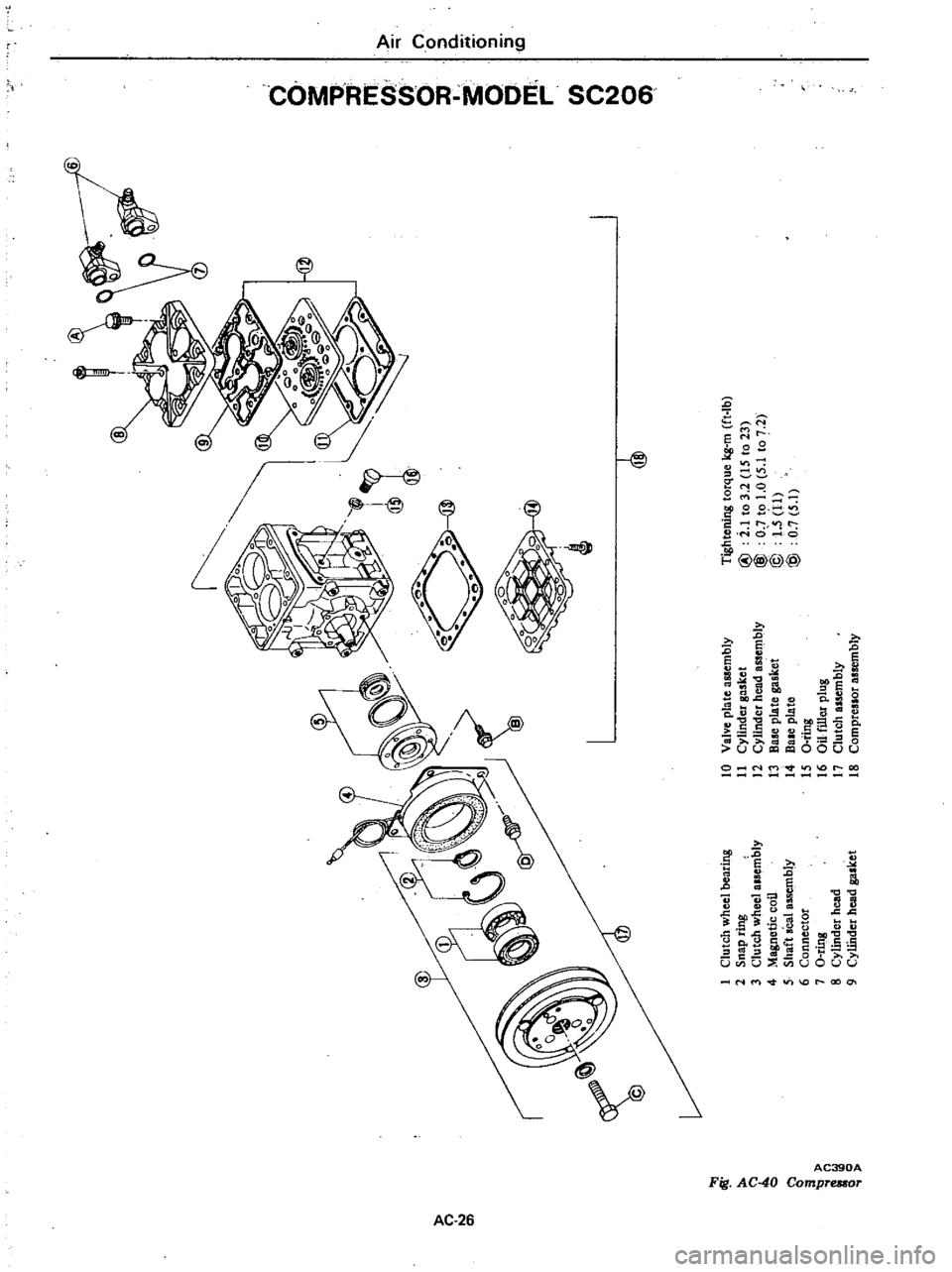
Tightening
torque
kg
m
ft
Ib
I
Clutch
wheel
bearing
10
Valve
pla
te
assembly
2
Snap
ring
11
Cylinder
gasket
@
i
1
to
3
2
IS
to
23
C
l
3
Clutch
wheel
alsembly
12
Cylinder
head
assembly
@
O
to
1
0
5
1
to
7
2
0
4
Magnetic
coil
13
B
plate
gasket
@
1
5
11
5
Shaft
seal
assembly
14
Bale
plate
@
0
7
5
1
6
Connector
IS
a
ting
7
O
ring
16
au
filler
plug
i
8
Cylindet
head
17
Clutch
assembly
o
Q
9
CyUhder
head
gasket
18
Compreslor
assembly
Page 528 of 548
PRELIMINARY
CLEANING
Before
starting
work
remove
dirt
from
outside
the
detached
compressor
Clean
the
workbench
tool
and
your
hands
COMPRESSOR
CLUTCH
The
most
likely
source
of
problem
is
clutch
slippage
Factors
are
listed
here
Exercise
ample
care
1
Clearance
between
clutch
hub
and
pulley
should
be
0
4
to
0
6
mm
0
016
to
0
024
in
at
aU
peripheral
points
2
Make
sure
that
there
is
no
oil
or
dirt
on
friction
surfaces
of
clutch
disc
clutch
hub
and
pulley
Remove
oil
or
dirt
with
clean
lint
free
cloth
3
Make
sure
that
terminal
voltage
at
magnetic
coil
is
above
10
5V
REMOVAL
I
Using
Clutch
Spanner
Wrench
hold
clutch
hub
With
suitable
socket
wrench
remove
bolt
retaining
clutch
hub
to
crankshaft
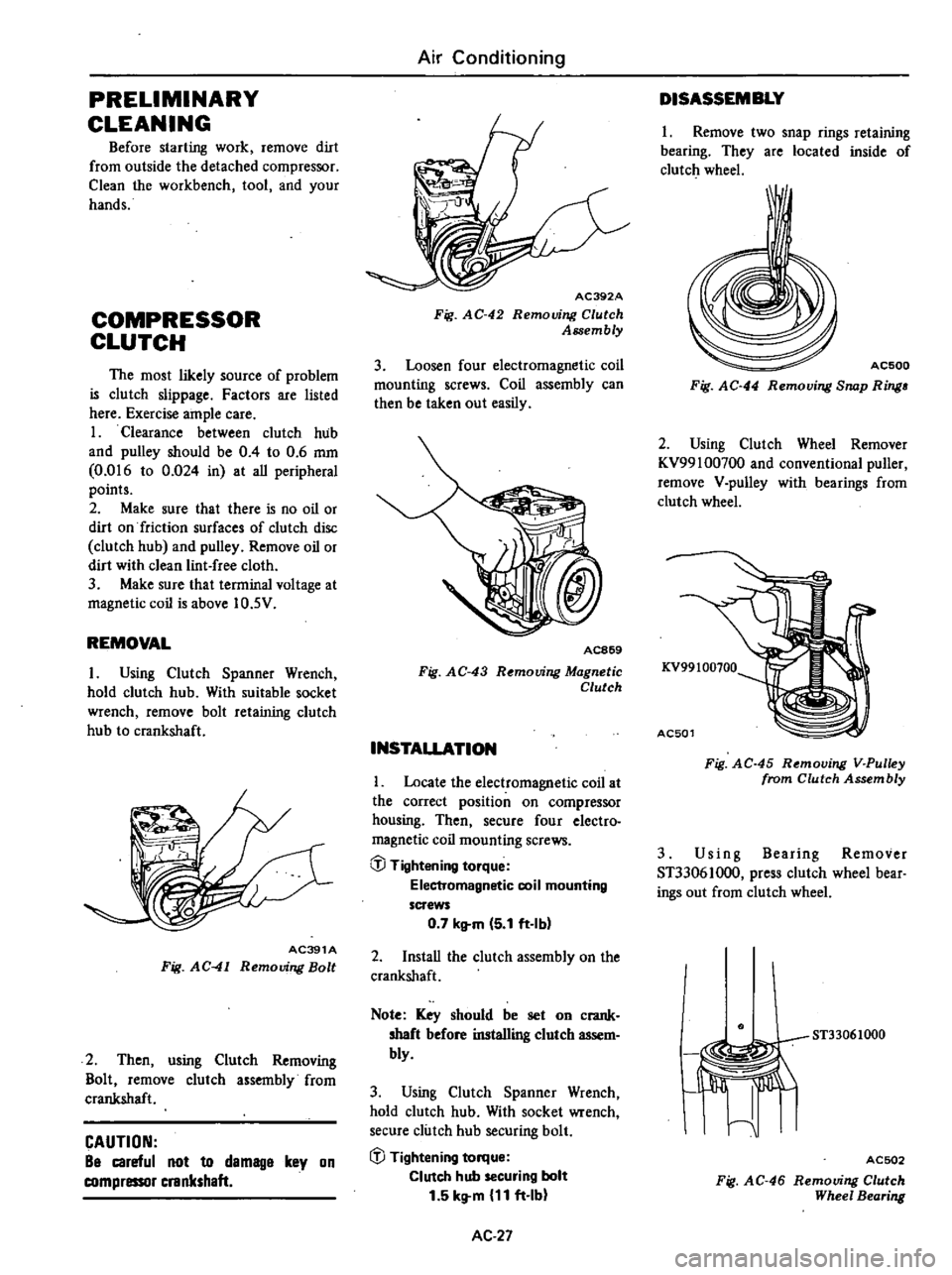
AC391A
Fig
AC
41
Removing
Bolt
2
Then
using
Clutch
Removing
Bolt
remove
clutch
assembly
from
crankshaft
CAUTION
Be
careful
not
to
demage
key
on
compressor
crankshaft
Air
Conditioning
AC392A
Fig
AC
42
Removing
Clutch
Assembly
3
Loosen
four
electromagnetic
coil
mounting
screws
Coil
assembly
can
then
be
taken
out
easily
AC869
Fig
AC
43
R
mouing
Magnetic
Clutch
INSTALLATION
Locate
the
electromagnetic
coil
at
the
correct
position
on
compressor
housing
Then
secure
four
electro
magnetic
coil
mounting
screws
@
Tightening
torque
Electromagnetic
coil
mounting
screws
0
7
kltm
5
1
ft
Ibl
2
InstaU
the
clutch
assembly
on
the
crankshaft
Note
Key
should
be
set
on
crank
shaft
before
installing
clutch
assem
bly
3
Using
Clutch
Spanner
Wrench
hold
clutch
hub
With
socket
wrench
secure
clutch
hub
securing
bolt
iJJ
Tightening
torque
Clutch
hub
securing
bolt
1
5
kg
m
11
ft
Ib
AC
27
DISASSEMBLY
1
Remove
two
snap
rings
retaining
bearing
They
are
located
inside
of
clutch
wheel
I
AC500
Fig
AC
44
Removing
Snap
Ring
2
Using
Clutch
Wheel
Remover
KV99100700
and
conventional
puller
remove
V
pulley
with
bearings
from
clutch
wheel
KV99100100
AC501
Fig
AC
45
Removing
V
Pulley
from
Clutch
Assembly
3
Us
i
n
g
Bearing
Remover
ST33061000
press
clutch
wheel
bear
ings
out
from
clutch
wheel
ST33061000
I
Jiffi
I
ACSD2
Fig
AC
46
Removing
Clutch
Wheel
Bearing