change time DODGE DURANGO 2020 Owner's Manual
[x] Cancel search | Manufacturer: DODGE, Model Year: 2020, Model line: DURANGO, Model: DODGE DURANGO 2020Pages: 464, PDF Size: 22.14 MB
Page 137 of 464

SAFETY135
Whenever a turn signal and detected object are
present on the same side at the same time,
both the visual and audible alerts will be issued.
In addition to the audible alert the radio (if on)
will also be muted.
NOTE:
Whenever an audible alert is requested by the
BSM system, the radio is also muted.
When the system is in RCP, the system shall
respond with both visual and audible alerts
when a detected object is present. Whenever
an audible alert is requested, the radio is also
muted. Turn/hazard signal status is ignored;
the RCP state always requests the chime.
Blind Spot Alert Off
When the BSM system is turned off there will be
no visual or audible alerts from either the BSM
or RCP systems.
NOTE:
The BSM system will store the current operating
mode when the vehicle is shut off. Each time
the vehicle is started the previously stored
mode will be recalled and used.General Information
The following regulatory statement applies to all
Radio Frequency (RF) devices equipped in this
vehicle:
This device complies with Part 15 of the FCC
Rules and with Innovation, Science and
Economic Development Canada license-exempt
RSS standard(s). Operation is subject to the
following two conditions:
1. This device may not cause harmful
interference, and
2. This device must accept any interference received, including interference that may
cause undesired operation.
Le présent appareil est conforme aux CNR
d`Innovation, Science and Economic
Development applicables aux appareils radio
exempts de licence. L'exploitation est autorisée aux deux conditions
suivantes:
1. l'appareil ne doit pas produire de
brouillage, et
2. l'utilisateur de l'appareil doit accepter tout brouillage radioélectrique subi, même si le
brouillage est susceptible d'en compro -
mettre le fonctionnement.
La operación de este equipo está sujeta a las
siguientes dos condiciones:
1. es posible que este equipo o dispositivo no cause interferencia perjudicial y
2. este equipo o dispositivo debe aceptar cualquier interferencia, incluyendo la que
pueda causar su operación no deseada.
NOTE:
Changes or modifications not expressly
approved by the party responsible for compli -
ance could void the user’s authority to operate
the equipment.
4
20_WD_OM_EN_USC_t.book Page 135
Page 183 of 464
SAFETY181
The best protection against carbon monoxide
entry into the vehicle body is a properly
maintained engine exhaust system.
Whenever a change is noticed in the sound of
the exhaust system, when exhaust fumes can
be detected inside the vehicle, or when the
underside or rear of the vehicle is damaged,
have a competent mechanic inspect the
complete exhaust system and adjacent body
areas for broken, damaged, deteriorated, or
mispositioned parts. Open seams or loose
connections could permit exhaust fumes to
seep into the passenger compartment. In
addition, inspect the exhaust system each time
the vehicle is raised for lubrication or oil
change. Replace as required.
SAFETY CHECKS YOU SHOULD MAKE
I
NSIDE THE VEHICLE
Seat Belts
Inspect the seat belt system periodically,
checking for cuts, frays, and loose parts.
Damaged parts must be replaced immediately.
Do not disassemble or modify the system.
Front seat belt assemblies must be replaced
after a collision. Rear seat belt assemblies must
be replaced after a collision if they have been
damaged (i.e., bent retractor, torn webbing,
etc.). If there is any question regarding seat belt
or retractor condition, replace the seat belt.
Air Bag Warning Light
The Air Bag warning light will turn on for four
to eight seconds as a bulb check when the
ignition switch is first turned to ON/RUN. If the
light is either not on during starting, stays on, or
turns on while driving, have the system
inspected at an authorized dealer as soon as
possible. After the bulb check, this light will
illuminate with a single chime when a fault with
the Air Bag System has been detected. It will
stay on until the fault is removed. If the light comes on intermittently or remains
on while driving, have an authorized dealer
service the vehicle immediately.
Refer to “Occupant Restraint Systems” in this
section for further information.
Defroster
Check operation by selecting the defrost mode
and place the blower control on high speed. You
should be able to feel the air directed against
the windshield. See an authorized dealer for
service if your defroster is inoperable.
Floor Mat Safety Information
Always use floor mats designed to fit your
vehicle. Only use a floor mat that does not
interfere with the operation of the accelerator,
brake or clutch pedals. Only use a floor mat that
is securely attached using the floor mat
fasteners so it cannot slip out of position and
interfere with the accelerator, brake or clutch
pedals or impair safe operation of your vehicle
in other ways.
If it is necessary to sit in a parked vehicle
with the engine running, adjust your
heating or cooling controls to force outside
air into the vehicle. Set the blower at high
speed.
WARNING!
(Continued)
4
20_WD_OM_EN_USC_t.book Page 181
Page 187 of 464

STARTING AND OPERATING185
NORMAL STARTING
To Turn On The Engine Using The ENGINE
START/STOP Button
1. The transmission must be in PARK (P).
2. Press and hold the brake pedal while
pushing the ENGINE START/STOP button
once.
3. The system takes over and attempts to start the vehicle. If the vehicle fails to start, the
starter will disengage automatically after
10 seconds.
4. If you wish to stop the cranking of the engine prior to the engine starting, push the
ENGINE START/STOP button again.
NOTE:
Normal starting of either a cold or a warm
engine is obtained without pumping or pressing
the accelerator pedal. To Turn Off The Engine Using ENGINE START/
STOP Button
1. Place the gear selector in PARK, then push
and release the ENGINE START/STOP
button.
2. The ignition will return to the OFF mode.
3. If the gear selector is not in PARK, the ENGINE START/STOP button must be held
for two seconds or three short pushes in a
row with the vehicle speed above 5 mph
(8 km/h) before the engine will shut off. The
ignition will remain in the ACC mode until
the gear selector is in PARK and the button
is pushed twice to the OFF mode.
4. If the gear selector is not in PARK and the ENGINE START/STOP button is pushed
once with the vehicle speed above 5 mph
(8 km/h), the instrument cluster will display
a “Vehicle Not In Park ” message and the
engine will remain running. Never leave
a vehicle out of the PARK position, or it
could roll. NOTE:
If the gear selector is not in PARK, and the
ENGINE START/STOP button is pushed once
with the vehicle speed below 5 mph (8 km/h),
the engine will shut off and the ignition will
remain in the ACC position. If vehicle speed
drops below 1.2 mph (1.9 km/h), the vehicle
will AutoPark. See AutoPark section for further
details.
ENGINE START/STOP Button Functions — With
Driver’s Foot OFF The Brake Pedal (In PARK Or
NEUTRAL Position)
The ENGINE START/STOP button operates
similar to an ignition switch. It has three modes:
OFF, ACC, and RUN. To change the ignition
modes without starting the vehicle and use the
accessories, follow these directions:
1. Start with the ignition in the OFF mode.
2. Push the ENGINE START/STOP button once
to place the ignition to the ACC mode.
3. Push the ENGINE START/STOP button a second time to place the ignition to the RUN
mode.
5
20_WD_OM_EN_USC_t.book Page 185
Page 188 of 464

186STARTING AND OPERATING
4. Push the ENGINE START/STOP button a
third time to return the ignition to the OFF
mode.
NOTE:
Only press one pedal at a time while driving the
vehicle. Torque performance of the vehicle
could be reduced if both pedals are pressed at
the same time. If pressure is detected on both
pedals simultaneously, a warning message will
display in the instrument cluster. For further
information, refer to “Instrument Cluster
Display” in “Getting To Know Your Instrument
Panel”.
AutoPark
AutoPark is a supplemental feature to assist in
placing the vehicle in PARK (P) should the
situations on the following pages occur. It is a
backup system and should not be relied upon
as the primary method by which the driver shifts
the vehicle into PARK.
The conditions under which AutoPark will
engage are outlined on the following pages. If the vehicle is not in PARK and the driver turns
off the engine, the vehicle may AutoPark.
AutoPark will engage when all of these
conditions are met:
Vehicle is equipped with an eight-speed
transmission
Vehicle is not in PARK
Vehicle speed is 1.2 mph (1.9 km/h) or less
Ignition switched from RUN to ACC
NOTE:
For Keyless Enter-N-Go equipped vehicles, the
engine will turn off and the ignition switch will
change to ACC mode.
If the vehicle is not in PARK and the driver exits
the vehicle with the engine running, the vehicle
may AutoPark.
AutoPark will engage when all of these
conditions are met:
Vehicle is equipped with an eight-speed
transmission
Vehicle is not in PARK
Vehicle speed is 1.2 mph (1.9 km/h) or less
Driver’s seat belt is unbuckled
Driver’s door is ajar
Brake pedal is not depressed
The MESSAGE “ AutoPark Engaged Shift to P
then Shift to Gear ” will display in the instrument
cluster.
WARNING!
Driver inattention could lead to failure to
place the vehicle in PARK. ALWAYS DO A
VISUAL CHECK that your vehicle is in PARK
by verifying that a solid (not blinking) “P” is
indicated in the instrument cluster display
and on the gear selector. If the "P" indicator
is blinking, your vehicle is not in PARK. As
an added precaution, always apply the
parking brake when exiting the vehicle.
AutoPark is a supplemental feature. It is not
designed to replace the need to shift your
vehicle into PARK. It is a backup system
and should not be relied upon as the
primary method by which the driver shifts
the vehicle into PARK.
20_WD_OM_EN_USC_t.book Page 186
Page 190 of 464
188STARTING AND OPERATING
COLD WEATHER OPERATION (BELOW
–22°F O
R −30°C)
To ensure reliable starting at these
temperatures, use of an externally powered
electric engine block heater (available from an
authorized dealer) is recommended.
AFTER STARTING
The idle speed is controlled automatically, and
it will decrease as the engine warms up.
ENGINE BLOCK HEATER — IF EQUIPPED
The engine block heater warms the engine, and
permits quicker starts in cold weather. Connect
the cord to a standard 110-115 Volt AC
electrical outlet with a grounded, three-wire
extension cord.
The engine block heater must be plugged in at
least one hour to have an adequate warming
effect on the engine. The engine block heater cord is located:
3.6L Engine — Coiled and strapped to the
engine oil dipstick tube.
5.7L Engine — Bundled and fastened to the
injector harness.
ENGINE BREAK-IN RECOMMENDATIONS –
NON-SRT
A long break-in period is not required for the
engine and drivetrain (transmission and axle) in
your vehicle.
Drive moderately during the first 300 miles
(500 km). After the initial 60 miles (100 km),
speeds up to 50 or 55 mph (80 or 90 km/h) are
desirable.
While cruising, brief full-throttle acceleration
within the limits of local traffic laws contributes
to a good break-in.
Wide-open throttle acceleration in low gear can
be detrimental and should be avoided.
The engine oil installed in the engine at the
factory is a high-quality energy conserving type
lubricant. Oil changes should be consistent with
anticipated climate conditions under which
vehicle operations will occur. For the
recommended viscosity and quality grades,
refer to “Dealer Service” in “Servicing And
Maintenance”.
NOTE:
A new engine may consume some oil during its
first few thousand miles (kilometers) of opera
-
tion. This should be considered a normal part of
the break-in and not interpreted as a problem.
Please check your oil level with the engine oil
indicator often during the break-in period. Add
oil as required.
CAUTION!
To prevent damage to the starter, do not
continuously crank the engine for more than
25 seconds at a time. Wait 60 seconds
before trying again.
WARNING!
Remember to disconnect the engine block
heater cord before driving. Damage to the
110-115 Volt electrical cord could cause
electrocution.
CAUTION!
Never use Non-Detergent Oil or Straight
Mineral Oil in the engine or damage may
result.
20_WD_OM_EN_USC_t.book Page 188
Page 191 of 464

STARTING AND OPERATING189
ENGINE BREAK-IN RECOMMENDATIONS –
SRT
The following tips will be helpful in obtaining
optimum performance and maximum durability
for your new SRT Vehicle.
Despite modern technology and World Class
manufacturing methods, the moving parts of
the vehicle still require wear in with one
another. This wearing in occurs mainly during
the first 500 miles (805 km) and continues
through the first oil change interval.
It is recommended that the operator observe
the following driving behaviors during the new
vehicle break-in period:
0 to 100 miles (0 to 161 km):
Do not allow the engine to operate at idle for
an extended period of time.
Depress the accelerator pedal slowly and
not more than halfway to avoid rapid
acceleration.
Avoid aggressive braking.
Drive with the engine speed less than
3,500 RPM.
Maintain vehicle speed below 55 mph
(88 km/h) and observe local speed limits.
100 to 300 miles (161 to 483 km):
Depress the accelerator pedal slowly and not
more than halfway to avoid rapid accelera -
tion in lower gears (FIRST to THIRD gears).
Avoid aggressive braking.
Drive with the engine speed less than
5,000 RPM.
Maintain vehicle speed below 70 mph
(112 km/h) and observe local speed limits. 300 to 500 miles (483 to 805 km):
Exercise the full engine RPM range, shifting
manually (paddles or gear shift) at higher
RPM when possible.
Do not perform sustained operation with the
accelerator pedal at wide open throttle.
Maintain vehicle speed below 85 mph
(136 km/h) and observe local speed limits.
For the first 1,500 miles (2,414 km):
Do not participate in track events, sport
driving schools, or similar activities during
the first 1,500 miles (2,414 km).
NOTE:
Check engine oil with every refueling and add if
necessary. Oil and fuel consumption may be
higher through the first oil change interval.
Running the engine with an oil level below the
add mark can cause severe engine damage.5
20_WD_OM_EN_USC_t.book Page 189
Page 215 of 464
STARTING AND OPERATING213
The ACC system applies the brake down to a
full stop when following a target vehicle. If an
ACC host vehicle follows a target vehicle to a
standstill, the host vehicle will release the
vehicle brakes two seconds after coming to a
full stop.
The ACC system maintains set speed when
driving uphill and downhill. However, a slight
speed change on moderate hills is normal. In
addition, downshifting may occur while
climbing uphill or descending downhill. This
is normal operation and necessary to main -
tain set speed. When driving uphill and down -
hill, the ACC system will cancel if the braking
temperature exceeds normal range (over -
heated).
SETTING THE FOLLOWING DISTANCE IN
ACC
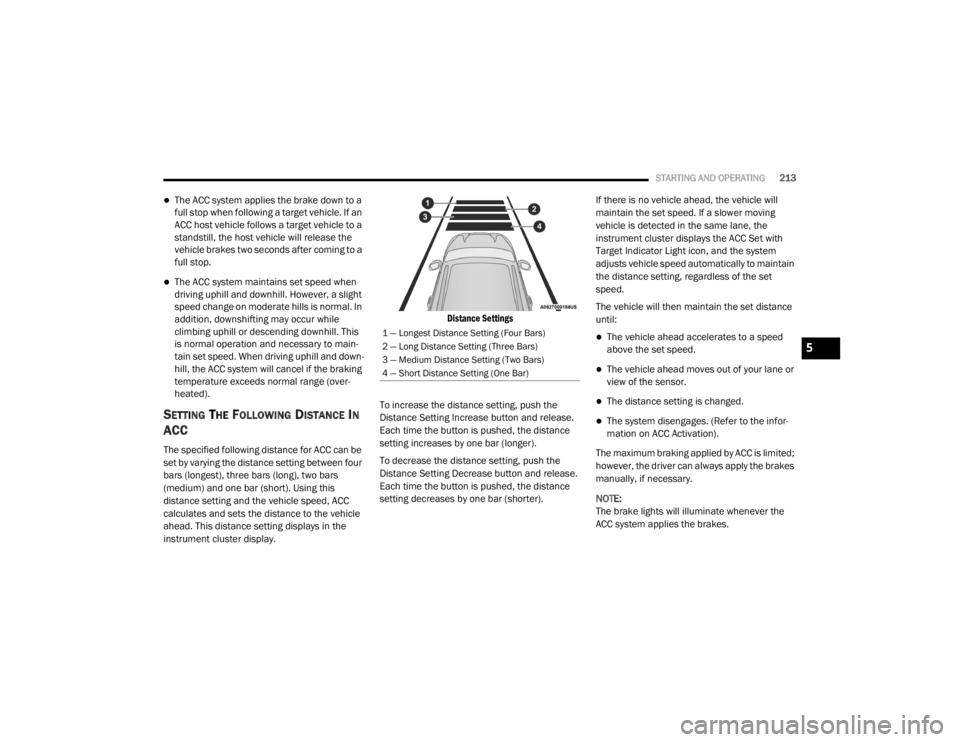
The specified following distance for ACC can be
set by varying the distance setting between four
bars (longest), three bars (long), two bars
(medium) and one bar (short). Using this
distance setting and the vehicle speed, ACC
calculates and sets the distance to the vehicle
ahead. This distance setting displays in the
instrument cluster display.
Distance Settings
To increase the distance setting, push the
Distance Setting Increase button and release.
Each time the button is pushed, the distance
setting increases by one bar (longer).
To decrease the distance setting, push the
Distance Setting Decrease button and release.
Each time the button is pushed, the distance
setting decreases by one bar (shorter). If there is no vehicle ahead, the vehicle will
maintain the set speed. If a slower moving
vehicle is detected in the same lane, the
instrument cluster displays the ACC Set with
Target Indicator Light icon, and the system
adjusts vehicle speed automatically to maintain
the distance setting, regardless of the set
speed.
The vehicle will then maintain the set distance
until:
The vehicle ahead accelerates to a speed
above the set speed.
The vehicle ahead moves out of your lane or
view of the sensor.
The distance setting is changed.
The system disengages. (Refer to the infor
-
mation on ACC Activation).
The maximum braking applied by ACC is limited;
however, the driver can always apply the brakes
manually, if necessary.
NOTE:
The brake lights will illuminate whenever the
ACC system applies the brakes.
1 — Longest Distance Setting (Four Bars)
2 — Long Distance Setting (Three Bars)
3 — Medium Distance Setting (Two Bars)
4 — Short Distance Setting (One Bar)
5
20_WD_OM_EN_USC_t.book Page 213
Page 238 of 464
236STARTING AND OPERATING
NOTE:
The LaneSense system operates with similar
behavior for a right lane departure when only
the right lane marking has been detected.
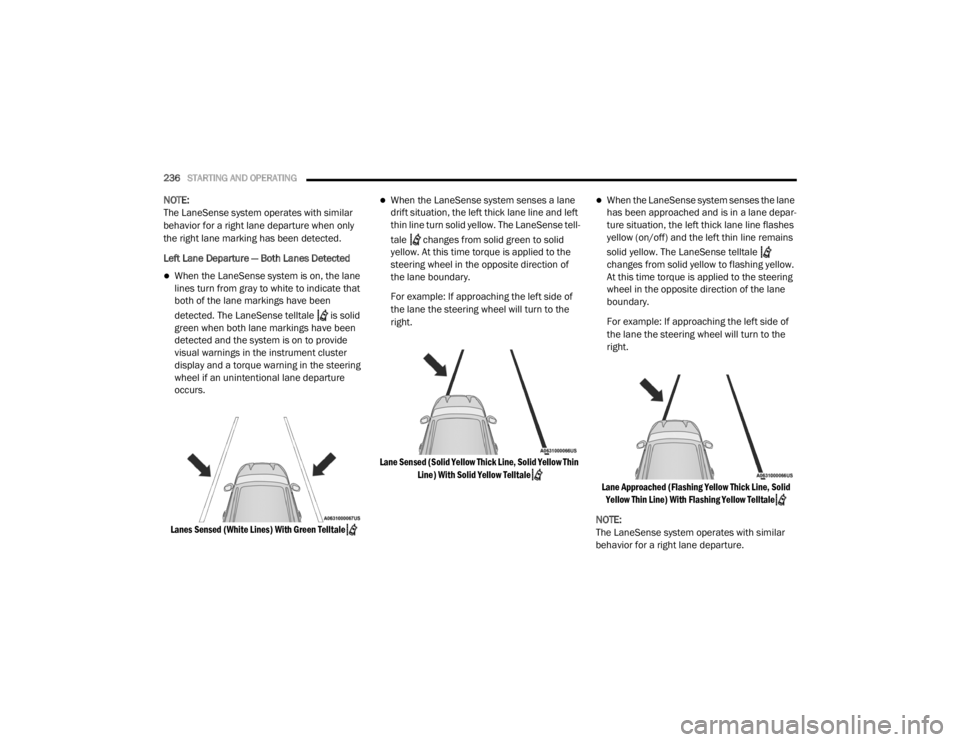
Left Lane Departure — Both Lanes Detected
When the LaneSense system is on, the lane
lines turn from gray to white to indicate that
both of the lane markings have been
detected. The LaneSense telltale is solid
green when both lane markings have been
detected and the system is on to provide
visual warnings in the instrument cluster
display and a torque warning in the steering
wheel if an unintentional lane departure
occurs.
Lanes Sensed (White Lines) With Green Telltale
When the LaneSense system senses a lane
drift situation, the left thick lane line and left
thin line turn solid yellow. The LaneSense tell -
tale changes from solid green to solid
yellow. At this time torque is applied to the
steering wheel in the opposite direction of
the lane boundary.
For example: If approaching the left side of
the lane the steering wheel will turn to the
right.
Lane Sensed (Solid Yellow Thick Line, Solid Yellow Thin Line) With Solid Yellow Telltale
When the LaneSense system senses the lane
has been approached and is in a lane depar -
ture situation, the left thick lane line flashes
yellow (on/off) and the left thin line remains
solid yellow. The LaneSense telltale
changes from solid yellow to flashing yellow.
At this time torque is applied to the steering
wheel in the opposite direction of the lane
boundary.
For example: If approaching the left side of
the lane the steering wheel will turn to the
right.
Lane Approached (Flashing Yellow Thick Line, Solid Yellow Thin Line) With Flashing Yellow Telltale
NOTE:
The LaneSense system operates with similar
behavior for a right lane departure.
20_WD_OM_EN_USC_t.book Page 236
Page 260 of 464
258STARTING AND OPERATING
OFF-ROAD DRIVING TIPS
When To Use 4WD LOW — If Equipped
When off-road driving, shift to 4WD LOW for
additional traction. This range should be limited
to extreme situations such as deep snow, mud,
or sand where additional low speed pulling
power is needed. Vehicle speeds in excess of
25 mph (40 km/h) should be avoided when in
4WD LOW.
Driving Through Water
Although your vehicle is capable of driving
through water, there are a number of
precautions that must be considered before
entering the water.
Driving through water more than a few inches/
centimeters deep will require extra caution to
ensure safety and prevent damage to your
vehicle. If you must drive through water, try to
determine the depth and the bottom condition
(and location of any obstacles) prior to entering.
Proceed with caution and maintain a steady
controlled speed less than 5 mph (8 km/h) in
deep water to minimize wave effects. Flowing Water
If the water is swift flowing and rising (as in
storm run-off), avoid crossing until the water
level recedes and/or the flow rate is reduced. If
you must cross flowing water avoid depths in
excess of 9 inches (23 cm). The flowing water
can erode the streambed, causing your vehicle
to sink into deeper water. Determine exit
point(s) that are downstream of your entry point
to allow for drifting.
Standing Water
Avoid driving in standing water deeper than
20 inches (51 cm), and reduce speed
appropriately to minimize wave effects.
Maximum speed in 20 inches (51 cm) of water
is less than 5 mph (8 km/h).
Maintenance
After driving through deep water, inspect your
vehicle fluids and lubricants (engine oil,
transmission oil, axle, transfer case) to ensure
the fluids have not been contaminated.
Contaminated fluid (milky, foamy in
appearance) should be flushed/changed as
soon as possible to prevent component
damage.
WARNING!
Do not drive in 4WD LOW on dry pavement;
driveline damage may result. 4WD LOW locks
front and rear drivelines together and does
not allow for differential action between the
front to rear driveshafts. Driving in 4WD LOW
on pavement will cause driveline binding; use
only on wet or slippery surfaces.
CAUTION!
When driving through water, do not exceed
5 mph (8 km/h). Always check water depth
before entering as a precaution, and check all
fluids afterward. Driving through water may
cause damage that may not be covered by
the New Vehicle Limited Warranty.
20_WD_OM_EN_USC_t.book Page 258
Page 296 of 464
294
SERVICING AND MAINTENANCE
SCHEDULED SERVICING — NON-SRT
Your vehicle is equipped with an automatic oil
change indicator system. The oil change
indicator system will remind you that it is time to
take your vehicle in for scheduled maintenance.
Based on engine operation conditions, the oil
change indicator message will illuminate. This
means that service is required for your vehicle.
Operating conditions such as frequent
short-trips, trailer tow, extremely hot or cold
ambient temperatures, and E85 fuel usage will
influence when the “Oil Change Required”
message is displayed. Severe Operating
Conditions can cause the change oil message
to illuminate as early as 3,500 miles
(5,600 km) since last reset. Have your vehicle
serviced as soon as possible, within the next
500 miles (805 km).An authorized dealer will reset the oil change
indicator message after completing the
scheduled oil change.
NOTE:
Under no circumstances should oil change
intervals exceed 10,000 miles (16,000 km),
12 months or 350 hours of engine run time,
whichever comes first. The 350 hours of engine
run or idle time is generally only a concern for
fleet customers.
Severe Duty All Models
Change Engine Oil at 4,000 miles (6,500 km) or
350 hours of engine run time if the vehicle is
operated in a dusty and off road environment or
is operated predominately at idle or only very
low engine RPM. This type of vehicle use is
considered Severe Duty.
Once A Month Or Before A Long Trip:Check engine oil level
Check windshield washer fluid level
Check the tire inflation pressures and look
for unusual wear or damage
Check the fluid levels of the coolant reservoir,
brake master cylinder and fill as needed.
Check function of all interior and exterior
lights
MAINTENANCE PLAN — NON-SRT
Required Maintenance
Refer to the Maintenance Plans on the following
pages for required maintenance.
20_WD_OM_EN_USC_t.book Page 294