audio DODGE DURANGO 2020 Owner's Guide
[x] Cancel search | Manufacturer: DODGE, Model Year: 2020, Model line: DURANGO, Model: DODGE DURANGO 2020Pages: 464, PDF Size: 22.14 MB
Page 422 of 464
420MULTIMEDIA
These can be accessed by pressing the recent
calls button on the Phone main screen.
You can also push the VR button on your
steering wheel and say “Show my incoming
calls” from any screen and the incoming calls
will be displayed.
NOTE:
Incoming can also be replaced with “Outgoing,”
“Recent”, or “Missed.”
Answer Or Ignore An Incoming Call — No Call
Currently In Progress
When you receive a call on your mobile phone,
the Uconnect Phone will interrupt the vehicle
audio system. Push the Phone button on the
steering wheel to accept the call. You can also
press the Answer button on the touchscreen or
press the caller ID box.
Answer Or Ignore An Incoming Call — Call
Currently In Progress
If a call is currently in progress and you have
another incoming call, you will hear the same
network tones for call waiting that you normally
hear when using your mobile phone. Press the Uconnect Phone button on the
steering wheel, answer button on the
touchscreen or caller ID box to place the current
call on hold and answer the incoming call.
NOTE:
The Uconnect Phone compatible phones in the
market today do not support rejecting an
incoming call when another call is in progress.
Therefore, the user can only answer an
incoming call or ignore it.
Do Not Disturb
With Do Not Disturb, you can disable
notifications from incoming calls and texts,
allowing you to keep your eyes on the road and
hands on the wheel. For your convenience,
there is a counter display to keep track of your
missed calls and text messages while you were
using Do Not Disturb.
Do Not Disturb can automatically reply with a
text message, a call, or both when declining an
incoming call and send it to voicemail.
Automatic reply messages can be:
“I am driving right now, I will get back to you
shortly.”
Create a custom auto reply message up to
160 characters.
NOTE:
Only the first 25 characters can be seen on the
touchscreen while typing a custom message.
While in Do Not Disturb, Conference Call can be
selected so you can still place a second call
without being interrupted by incoming calls.
NOTE:
Reply with text message is not compatible
with iPhones®.
Auto reply with text message is only available
on phones that support Bluetooth® MAP.
Place/Retrieve A Call From Hold
During an active call, press the Hold button on
the Phone main screen.
20_WD_OM_EN_USC_t.book Page 420
Page 423 of 464
MULTIMEDIA421
Making A Second Call While Current Call Is In
Progress
You can place a call on hold by pressing the
Hold button on the Phone main screen, then
dial a number from the dialpad, recent calls,
SMS Inbox or from the phonebooks. To go back
to the first call, refer to “Toggling Between Calls”
in this section. To combine two calls, refer to
“Join Calls” in this section.
Toggling Between Calls
If two calls are in progress (one active and one
on hold), press the Swap button on the Phone
main screen. Only one call can be placed on
hold at a time.
You can also press the Phone button on the
touchscreen to toggle between the active and
held phone call.
Join Calls
When two calls are in progress (one active and
one on hold), press the Join Calls button on the
Phone main screen to combine all calls into a
Conference Call. Call Termination
To end a call in progress, momentarily press the
Phone End button on the touchscreen or push
the Phone End button on the steering wheel.
Only the active call(s) will be terminated and if
there is a call on hold, it will become the new
active call.
Redial
Press the Redial button on the touchscreen, or
push the VR button and after the “Listening”
prompt and the following beep, say “Redial.”
The Uconnect Phone will call the last number
that was dialed from your mobile phone.
Call Continuation
Call continuation is the progression of a phone
call on the Uconnect Phone after the vehicle
ignition has been switched to OFF.
NOTE:
The call will remain within the vehicle audio
system until the phone becomes out of range
for the Bluetooth® connection. It is recom
-mended to press the Transfer button on the
touchscreen when leaving the vehicle.
Browsing SMS
Using the steering wheel commands, you can
view and manage the last 10 SMS messages
received on the instrument panel. To use this
function, the mobile phone must support the
SMS exchange function through Bluetooth®.
Select the PHONE button on the instrument
panel menu, and then select “SMS Reader”
using the arrow keys on the steering wheel
controls.
The “SMS Reader” submenu allows the last 10
SMS messages to be displayed.
Advanced Phone Connectivity
Transfer Call To And From Mobile Phone
The Uconnect Phone allows ongoing calls to be
transferred from your mobile phone to the
Uconnect Phone without terminating the call. To
transfer an ongoing call from your connected
mobile phone to the Uconnect Phone or vice
versa, press the Transfer button on the Phone
main screen.
9
20_WD_OM_EN_USC_t.book Page 421
Page 424 of 464
422MULTIMEDIA
Connect Or Disconnect Link Between The
Uconnect Phone And Mobile Phone
If you would like to connect or disconnect the
Bluetooth® connection between a Uconnect
Phone paired mobile phone and the Uconnect
Phone, follow the instructions described in your
mobile phone User's Manual.
Things You Should Know About Your
Uconnect Phone
Voice Command
For the best performance:
Adjust the rearview mirror to provide at least
½-inch (1 cm) gap between the overhead
console (if equipped) and the mirror.
Always wait for the beep before speaking.
Speak normally, without pausing, just as you
would speak to a person sitting a few feet/
meters away from you.
Ensure that no one other than you is
speaking during a voice command period. Performance is maximized under:
Low-To-Medium Blower Setting
Low-To-Medium Vehicle Speed
Low Road Noise
Smooth Road Surface
Fully Closed Windows
Dry Weather Conditions
Even though the system is designed for many
languages and accents, the system may not
always work for some. NOTE:
It is recommended that you do not store names
in your favorites phonebook while the vehicle is
in motion.
Phonebook (Mobile and Favorites) name
recognition rate is optimized when the entries
are not similar. You can say “O” (letter “O”) for
“0” (zero).
Even though international dialing for most
number combinations is supported, some
shortcut dialing number combinations may not
be supported.
Far End Audio Performance
Audio quality is maximized under:
Low-To-Medium Blower Setting
Low-To-Medium Vehicle Speed
Low Road Noise
Smooth Road Surface
Fully Closed Windows
Dry Weather Conditions
Operation From The Driver's Seat
WARNING!
ALWAYS drive safely with your hands on the
wheel. You have full responsibility and
assume all risks related to the use of the
Uconnect features and applications in this
vehicle. Only use Uconnect when it is safe to
do so. Failure to do so may result in an
accident involving serious injury or death.
20_WD_OM_EN_USC_t.book Page 422
Page 425 of 464
MULTIMEDIA423
Performance such as audio clarity, echo, and
loudness to a large degree rely on the phone
and network, and not the Uconnect Phone.
Echo at the far end can sometimes be reduced
by lowering the in-vehicle audio volume.
Bluetooth® Communication Link
Mobile phones have been found to lose
connection to the Uconnect Phone. When this
happens, the connection can generally be
re-established by switching the mobile phone
OFF/ON. Your mobile phone is recommended to
remain in Bluetooth® ON mode.
Power-Up
After switching the ignition key from OFF to
either the ON/RUN or ACC position, or after a
language change, you must wait at least
15 seconds prior to using the system.
STEERING WHEEL AUDIO CONTROLS
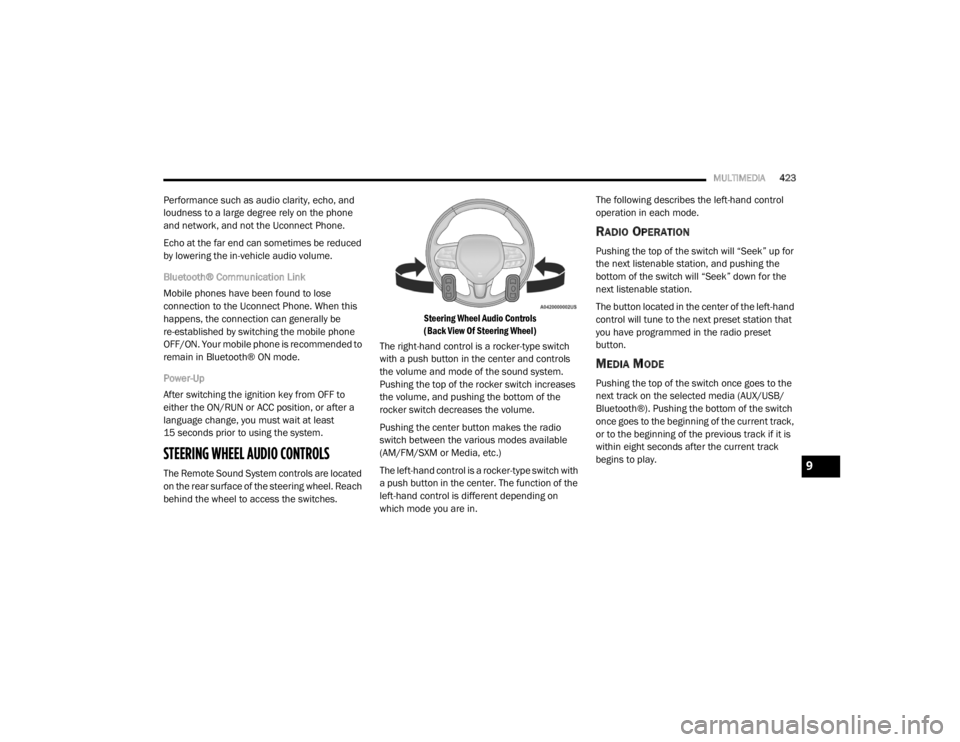
The Remote Sound System controls are located
on the rear surface of the steering wheel. Reach
behind the wheel to access the switches.
Steering Wheel Audio Controls
(Back View Of Steering Wheel)
The right-hand control is a rocker-type switch
with a push button in the center and controls
the volume and mode of the sound system.
Pushing the top of the rocker switch increases
the volume, and pushing the bottom of the
rocker switch decreases the volume.
Pushing the center button makes the radio
switch between the various modes available
(AM/FM/SXM or Media, etc.)
The left-hand control is a rocker-type switch with
a push button in the center. The function of the
left-hand control is different depending on
which mode you are in. The following describes the left-hand control
operation in each mode.
RADIO OPERATION
Pushing the top of the switch will “Seek” up for
the next listenable station, and pushing the
bottom of the switch will “Seek” down for the
next listenable station.
The button located in the center of the left-hand
control will tune to the next preset station that
you have programmed in the radio preset
button.
MEDIA MODE
Pushing the top of the switch once goes to the
next track on the selected media (AUX/USB/
Bluetooth®). Pushing the bottom of the switch
once goes to the beginning of the current track,
or to the beginning of the previous track if it is
within eight seconds after the current track
begins to play.
9
20_WD_OM_EN_USC_t.book Page 423
Page 426 of 464
424MULTIMEDIA
IPOD®/USB/MP3 CONTROL — IF EQUIPPED
This feature allows an iPod® or external USB
device to be plugged into the USB port, located
inside the storage area on the center stack of
the instrument panel.
Plugging in a smartphone device to a USB Port
may activate Android Auto™ or Apple CarPlay®
features, if equipped. For further information,
refer to “Android Auto™” or “Apple CarPlay®” in
the Owner’s Manual Supplement.
iPod® control supports Mini, 4G, Photo, iPod
nano®, 5G iPod® and iPhone® devices. Some
iPod® software versions may not fully support
the iPod® control features. Please visit
Apple’s® website for software updates.
For further information, refer to the Uconnect
Owner’s Manual Supplement.
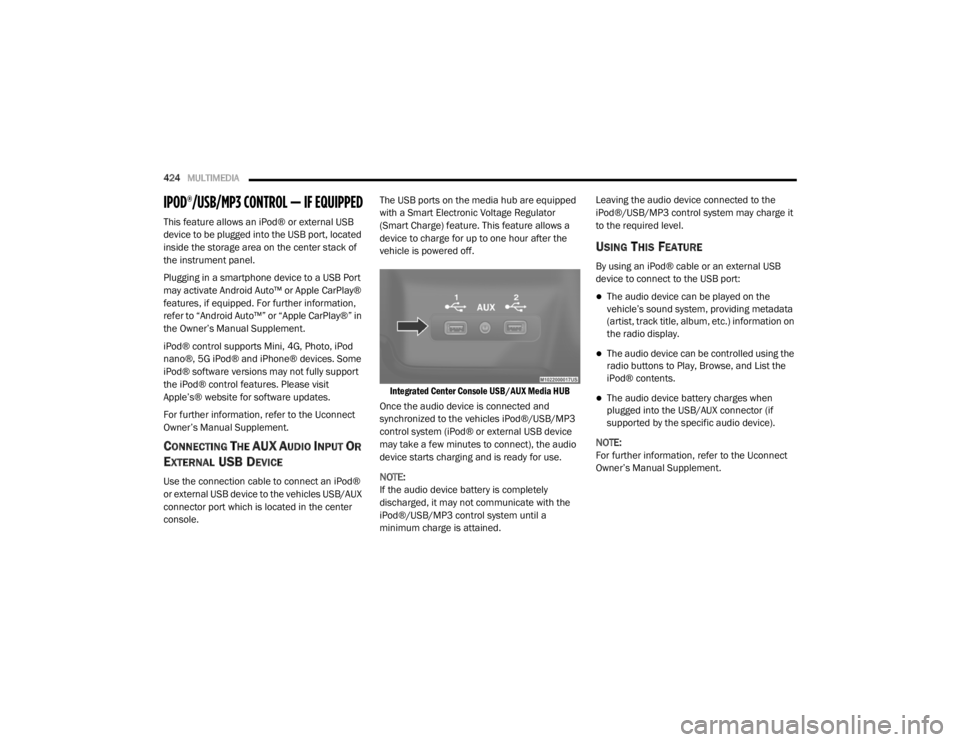
CONNECTING THE AU X AUDIO INPUT OR
E
XTERNAL USB DEVICE
Use the connection cable to connect an iPod®
or external USB device to the vehicles USB/AUX
connector port which is located in the center
console. The USB ports on the media hub are equipped
with a Smart Electronic Voltage Regulator
(Smart Charge) feature. This feature allows a
device to charge for up to one hour after the
vehicle is powered off.
Integrated Center Console USB/AUX Media HUB
Once the audio device is connected and
synchronized to the vehicles iPod®/USB/MP3
control system (iPod® or external USB device
may take a few minutes to connect), the audio
device starts charging and is ready for use.
NOTE:
If the audio device battery is completely
discharged, it may not communicate with the
iPod®/USB/MP3 control system until a
minimum charge is attained. Leaving the audio device connected to the
iPod®/USB/MP3 control system may charge it
to the required level.
USING THIS FEATURE
By using an iPod® cable or an external USB
device to connect to the USB port:
The audio device can be played on the
vehicle’s sound system, providing metadata
(artist, track title, album, etc.) information on
the radio display.
The audio device can be controlled using the
radio buttons to Play, Browse, and List the
iPod® contents.
The audio device battery charges when
plugged into the USB/AUX connector (if
supported by the specific audio device).
NOTE:
For further information, refer to the Uconnect
Owner’s Manual Supplement.
20_WD_OM_EN_USC_t.book Page 424
Page 427 of 464
MULTIMEDIA425
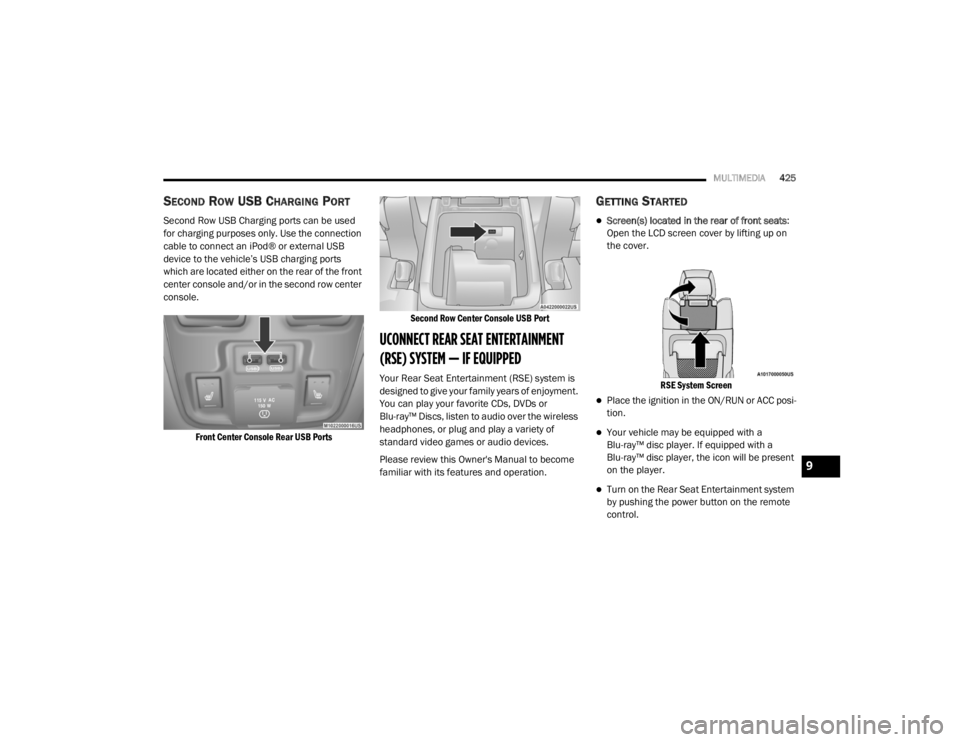
SECOND ROW USB CHARGING PORT
Second Row USB Charging ports can be used
for charging purposes only. Use the connection
cable to connect an iPod® or external USB
device to the vehicle’s USB charging ports
which are located either on the rear of the front
center console and/or in the second row center
console.
Front Center Console Rear USB Ports Second Row Center Console USB Port
UCONNECT REAR SEAT ENTERTAINMENT
(RSE) SYSTEM — IF EQUIPPED
Your Rear Seat Entertainment (RSE) system is
designed to give your family years of enjoyment.
You can play your favorite CDs, DVDs or
Blu-ray™ Discs, listen to audio over the wireless
headphones, or plug and play a variety of
standard video games or audio devices.
Please review this Owner's Manual to become
familiar with its features and operation.
GETTING STARTED
Screen(s) located in the rear of front seats
:
Open the LCD screen cover by lifting up on
the cover.
RSE System Screen
Place the ignition in the ON/RUN or ACC posi -
tion.
Your vehicle may be equipped with a
Blu-ray™ disc player. If equipped with a
Blu-ray™ disc player, the icon will be present
on the player.
Turn on the Rear Seat Entertainment system
by pushing the power button on the remote
control.
9
20_WD_OM_EN_USC_t.book Page 425
Page 430 of 464
428MULTIMEDIA
6. Radio Full Screen Mode
Select this button to change to Full Screen
Mode.
7. Cabin Audio Mode Select this button to change the cabin audio
to the rear entertainment source currently
shown on the rear media control screen.
8. RSE Mode Select this button to change the source for
the active (highlighted) rear Screen/Chan -
nel on the rear media control screen.
Press the Media button on the touchscreen,
and then press the rear media button on the
touchscreen.
Press the OK button on the touchscreen to
begin playing the Blu-ray™ disc on the touch -
screen radio.
Using The Remote Control
Select an audio channel (Rear 1 for driver’s
side rear screen and Rear 2 for passenger’s
side rear screen), and then press the source
key. Using the Up and Down arrows, highlight
disc from the menu and press the OK button.
Press the POPUP/MENU key to navigate the
disc menu and options.
PLAY VIDEO GAMES
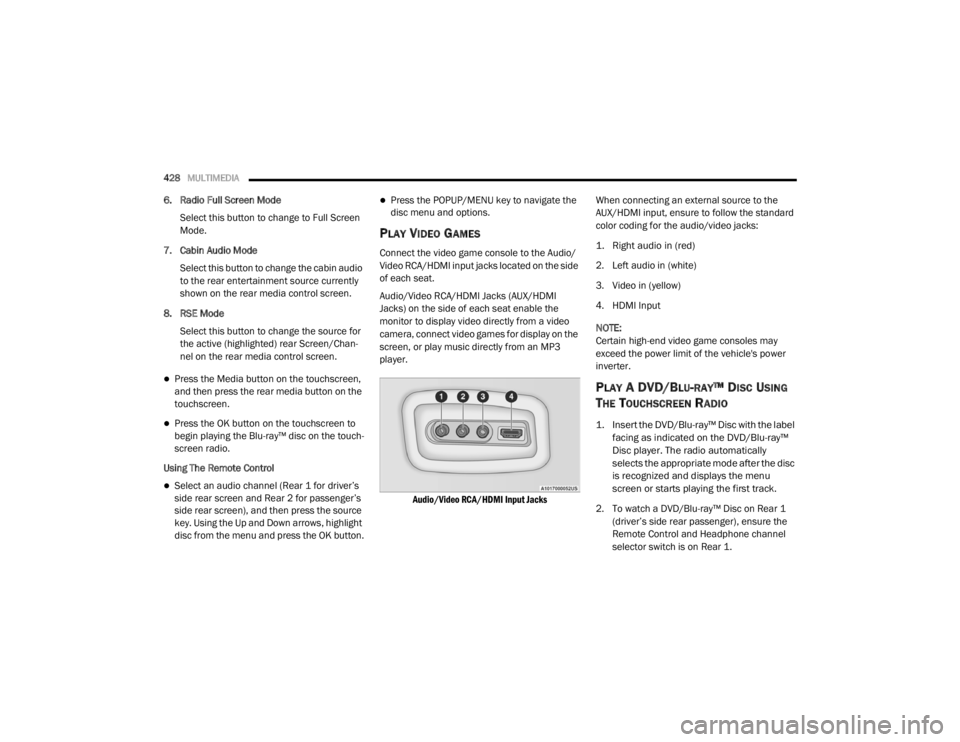
Connect the video game console to the Audio/
Video RCA/HDMI input jacks located on the side
of each seat.
Audio/Video RCA/HDMI Jacks (AUX/HDMI
Jacks) on the side of each seat enable the
monitor to display video directly from a video
camera, connect video games for display on the
screen, or play music directly from an MP3
player.
Audio/Video RCA/HDMI Input Jacks
When connecting an external source to the
AUX/HDMI input, ensure to follow the standard
color coding for the audio/video jacks:
1. Right audio in (red)
2. Left audio in (white)
3. Video in (yellow)
4. HDMI Input
NOTE:
Certain high-end video game consoles may
exceed the power limit of the vehicle's power
inverter.
PLAY A DVD/BLU-RAY™ DISC USING
T
HE TOUCHSCREEN RADIO
1. Insert the DVD/Blu-ray™ Disc with the label
facing as indicated on the DVD/Blu-ray™
Disc player. The radio automatically
selects the appropriate mode after the disc
is recognized and displays the menu
screen or starts playing the first track.
2. To watch a DVD/Blu-ray™ Disc on Rear 1 (driver’s side rear passenger), ensure the
Remote Control and Headphone channel
selector switch is on Rear 1.
20_WD_OM_EN_USC_t.book Page 428
Page 432 of 464
430MULTIMEDIA
IMPORTANT NOTES FOR DUAL VIDEO
S
CREEN SYSTEM
The Rear Seat Entertainment system is able
to transmit two channels of stereo audio and
video simultaneously.
The Blu-ray™ Disc Player can play CDs, DVDs,
and Blu-ray™ Discs.
Selecting a video source on Rear 1, the video
source will display on Rear 1 and can be
heard on Rear 1.
Selecting a video source on Rear 2, the video
source will display on Rear 2 and can be
heard on Rear 2.
Audio can be heard through the headphones
even when the screen(s) are closed.
BLU-RAY™ DISC PLAYER REMOTE
C
ONTROL — IF EQUIPPED
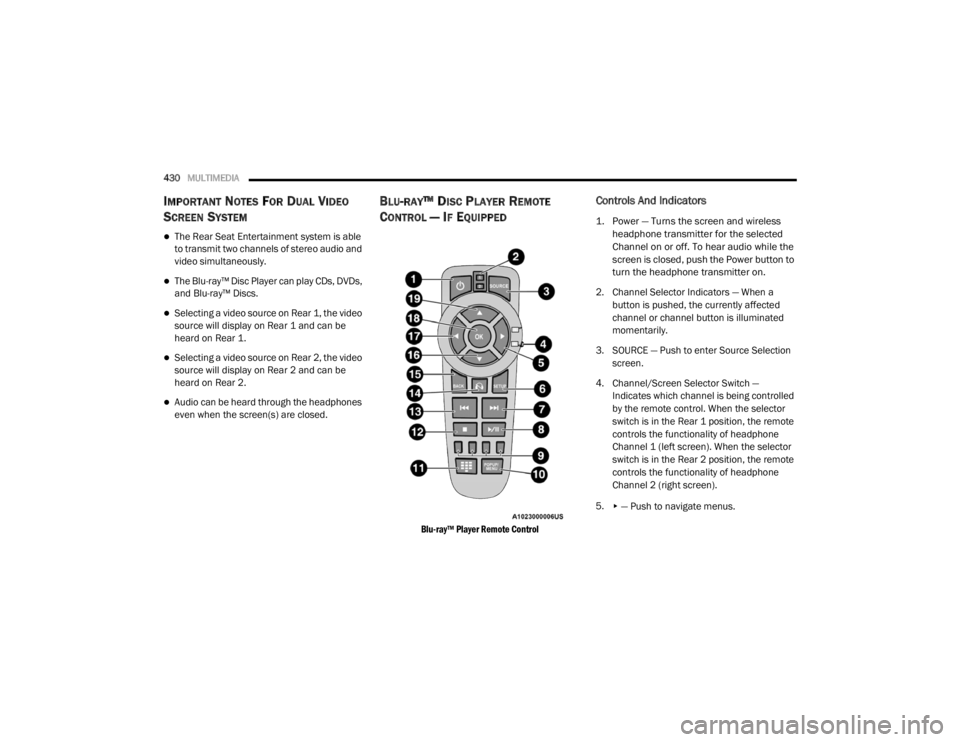
Blu-ray™ Player Remote Control
Controls And Indicators
1. Power — Turns the screen and wireless
headphone transmitter for the selected
Channel on or off. To hear audio while the
screen is closed, push the Power button to
turn the headphone transmitter on.
2. Channel Selector Indicators — When a button is pushed, the currently affected
channel or channel button is illuminated
momentarily.
3. SOURCE — Push to enter Source Selection screen.
4. Channel/Screen Selector Switch — Indicates which channel is being controlled
by the remote control. When the selector
switch is in the Rear 1 position, the remote
controls the functionality of headphone
Channel 1 (left screen). When the selector
switch is in the Rear 2 position, the remote
controls the functionality of headphone
Channel 2 (right screen).
5.
▸ — Push to navigate menus.
20_WD_OM_EN_USC_t.book Page 430
Page 433 of 464
MULTIMEDIA431
6. SETUP — Push to access the screen settings
menu.
7.
▸▸׀ — Push and hold to fast forward through
the current audio track or video chapter.
8.
▸ / ‖ (Play/Pause) — Begin/resume or
pause disc play.
9. Four Colored Buttons — Push to access Blu-ray™ Disc features.
10. POPUP/MENU — Push to bring up repeat and shuffle options, the Blu-ray™ Disc
pop-up menu, the DVD title menu, or to
access disc menus.
11. Keypad — Push to navigate chapters or titles.
12. (Stop) — Stops disc play.
13.
׀◂◂ — Push and hold to fast rewind through
the current audio track or video chapter. 14. — Mutes headphone audio.
15. BACK — Push to exit out of menus or return
to source selection screen.
16.
▾ — Push to navigate menus.
17.
◂ — Push to navigate menus.
18. OK— Push to select the highlighted option in a menu.
19.
▴ — Push to navigate menus.
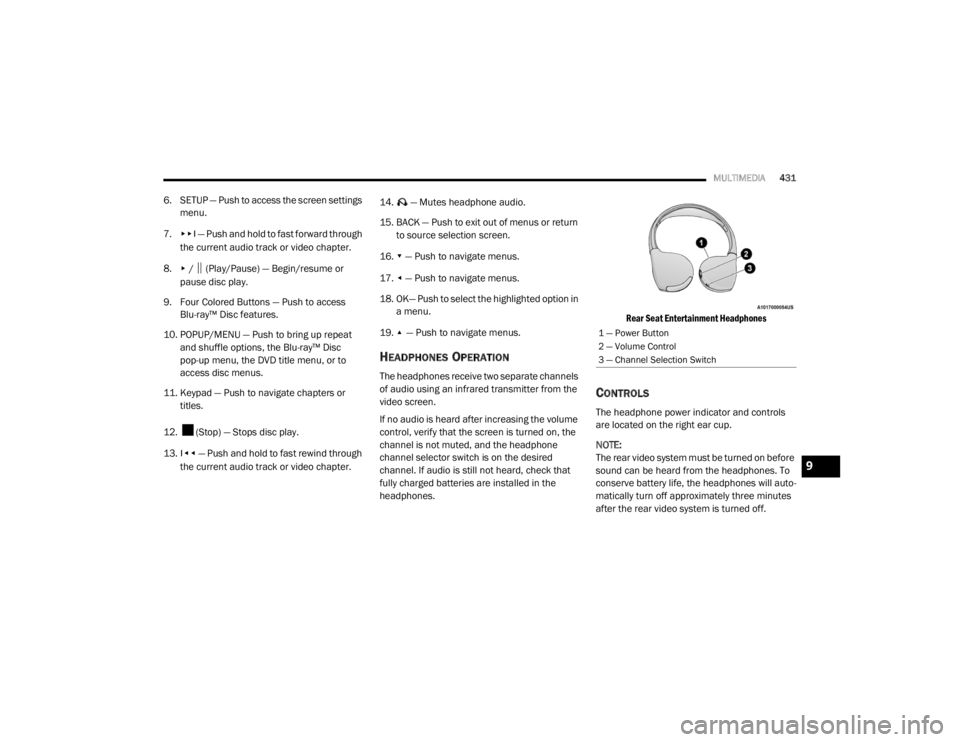
HEADPHONES OPERATION
The headphones receive two separate channels
of audio using an infrared transmitter from the
video screen.
If no audio is heard after increasing the volume
control, verify that the screen is turned on, the
channel is not muted, and the headphone
channel selector switch is on the desired
channel. If audio is still not heard, check that
fully charged batteries are installed in the
headphones.
Rear Seat Entertainment Headphones
CONTROLS
The headphone power indicator and controls
are located on the right ear cup.
NOTE:
The rear video system must be turned on before
sound can be heard from the headphones. To
conserve battery life, the headphones will auto
-
matically turn off approximately three minutes
after the rear video system is turned off.
1 — Power Button
2 — Volume Control
3 — Channel Selection Switch
9
20_WD_OM_EN_USC_t.book Page 431
Page 434 of 464

432MULTIMEDIA
Changing the Audio Mode for Headphones
1. Ensure the Remote Control channel/
screen selector switch is in the same
position as the headphone selector switch.
NOTE:
When both the headphone and the remote
control channel selector switches are on
Channel 1, the Remote is controlling Channel
1 and the headphones are tuned to the audio
on Channel 1.
When both the headphone and the remote
control channel selector switches are on
Channel 2, the Remote is controlling Channel
2 and the headphones are tuned to the audio
on Channel 2.
2. Push the SOURCE button on the remote control.
3. Pushing the SOURCE button will advance to the next mode. 4. When the Mode Selection menu appears on
screen, use the cursor buttons on the
remote control to navigate to the available
modes and push the OK button to select the
new mode.
5. To cancel out of the Mode Selection menu, push the BACK button on the remote
control.
REPLACING THE HEADPHONE
B
ATTERIES
Each set of headphones requires two AAA
batteries for operation. To replace the batteries:
1. Locate the battery compartment on the left
ear cup of the headphones, and then slide
the battery cover downward.
2. Replace the batteries, making sure to orient them according to the polarity diagram
shown.
3. Replace the battery compartment cover.
ACCESSIBILITY — IF EQUIPPED
Accessibility is a feature of the DVD/Blu-ray™
system that announces a function prior to
performing the action. For further information
refer to “Uconnect Settings” in this section.
STEREO HEADPHONE LIFETIME LIMITED
W
ARRANTY
Who Does This Warranty Cover? This warranty
covers the initial user or purchaser ("you" or
"your") of this particular Aptiv PLC (“Aptiv”)
wireless headphone ("Product"). The warranty is
not transferable.
How Long Does the Coverage Last? This
warranty lasts as long as you own the Product.
What Does This Warranty Cover? Except as
specified below, this warranty covers any
Product that in normal use is defective in
workmanship or materials.
What Does This Warranty Not Cover? This
warranty does not cover any damage or defect
that results from misuse, abuse, or modification
of the Product other than by Aptiv.
20_WD_OM_EN_USC_t.book Page 432