phone DODGE JOURNEY 2020 Service Manual
[x] Cancel search | Manufacturer: DODGE, Model Year: 2020, Model line: JOURNEY, Model: DODGE JOURNEY 2020Pages: 396, PDF Size: 25.53 MB
Page 337 of 396
MULTIMEDIA 335
Roadside Assistance/Towing Assistance
If you need roadside/towing assistance:
1. Push the Phone
button to begin.
2. A fter the “Listening” prompt and the
f
ollowing beep, say “Roadside Assistance”
or say “Towing Assistance.”
NOTE:
The roadside/towing assistance number dialed
i s
based on the country where the vehicle is
purchased (1-800-521-2779 for the U.S.,
1-800-363-4869 for Canada, 55-14-3454 for
Mexico City, and 1-800-712-3040 for outside
Mexico City in Mexico). Please refer to the FCA
US LLC 24-Hour “Roadside Assistance”
coverage details in the Warranty Information
Booklet. Working With Automated Systems
This method is used in instances where one
g
e
nerally has to push numbers on the mobile
phone keypad while navigating through an
automated telephone system.
You can use your Uconnect Phone to access a
v o
ice mail system or an automated service,
such as a paging service or automated
customer service line. Some services require
immediate response selection. In some
instances, that may be too quick for use of the
Uconnect Phone.
When calling a number with your Uconnect
P h
one that normally requires you to enter in a
touch-tone sequence on your mobile phone
keypad, you can utilize the touchscreen or push
the Voice Command button and say the word
“Send” then the sequence you wish to enter.
F o
r example, if required to enter your PIN
followed with a pound, (3 7 4 6 #), you can push
the Voice Command button and say, “Send
3 7 4 6 #.” Saying “Send” followed by a number,
o r
sequence of numbers, is also to be used for
navigating through an automated customer
service center menu structure, and to leave a
number on a pager.
You can also send stored mobile phonebook
e
n
tries as tones for fast and easy access to voice
mail and pager entries. For example, if you
previously created a Phonebook entry with First
and/or Last Name as “Voicemail Password”, then
if you push the Voice Command button and
say “Send Voicemail Password” the Uconnect
P h
one will then send the corresponding phone
number associated with the phonebook entry, as
tones over the phone.
NOTE:
The first number encountered for that
contact will be sent. All other numbers
entered for that contact will be ignored.
You may not hear all of the tones due to
mobile phone network configurations.
This is normal.
Some paging and voice mail systems have
system time-out settings that are too short
and may not allow the use of this feature.
Pauses, wait or other characters that are
supported by some phones are not
supported over Bluetooth®. These additional
symbols will be ignored in the dialing a
numbered sequence.
WARNING!
Your phone must be turned on and connected
to the Uconnect Phone to allow use of this
vehicle feature in emergency situations, when
the mobile phone has network coverage and
stays connected to the Uconnect Phone.
9
Page 338 of 396
336 MULTIMEDIA
Barge In — Overriding Prompts
The Voice Recognition button can be used
when you wish to skip part of a prompt and
i s
sue your voice command immediately.
For example, if a prompt is asking “There are
t w
o numbers with the name John. Say the full
name” you could push the Voice Recognition
button and say, “John Smith” to select that
option without having to listen to the rest of the
v o
ice prompt.
Voice Response Length
It is possible for you to choose between Brief
a n
d Detailed Voice Response Length.
1. P ress the Settings button on the
t
ouchscreen.
2. P ress the Voice button on the touchscreen,
t
hen scroll down to Voice Response Length.
3. S elect either “Brief” or “Detailed” by
p
ressing the box next to the selection.
A check mark will appear to indicate your
s e
lection. Phone And Network Status Indicators
Uconnect Phone will provide notification to
i
n
form you of your phone and network status
when you are attempting to make a phone call
using Uconnect Phone. The status is given for
network signal strength and phone battery
strength.
Dialing Using The Mobile Phone Keypad
You can dial a phone number with your mobile
p h
one keypad and still use the Uconnect Phone
(while dialing via the mobile phone keypad,
the user must exercise caution and take
p r
ecautionary safety measures). By dialing a
number with your connected Bluetooth® mobile
phone, the audio will be played through your
vehicle's audio system. The Uconnect Phone will
work the same as if you dial the number using a
voice command.
NOTE:
Certain brands of mobile phones do not send the
d i
al ring to the Uconnect Phone to play it on the
vehicle audio system, so you will not hear it.
Under this situation, after successfully dialing a
number the user may feel that the call did not go
through even though the call is in progress. Once
your call is answered, you will hear the audio.
Mute/Un-Mute (Mute ON/OFF)
When you mute the Uconnect Phone, you will
s
t
ill be able to hear the conversation coming
from the other party, but the other party will not
be able to hear you. To mute the Uconnect
Phone simply, press the Mute button on the
Phone main screen.
Advanced Phone Connectivity
Transfer Call To And From Mobile Phone
The Uconnect Phone allows ongoing calls to be
t r
ansferred from your mobile phone to the
Uconnect Phone without terminating the call.
To transfer an ongoing call from your connected
m o
bile phone to the Uconnect Phone or vice
versa, press the Transfer button on the Phone
main screen.
Connect Or Disconnect Link Between The
U c
onnect Phone And Mobile Phone
If you would like to connect or disconnect the
B l
uetooth® connection between a Uconnect
Phone paired mobile phone and the Uconnect
system, follow the instructions described in your
mobile phone User's Manual.
Page 339 of 396
MULTIMEDIA 337
Things You Should Know About Your
Uconnect Phone
Voice Command
For the best performance:
Adjust the rearview mirror to provide at least
½-inch (1 cm) gap between the overhead
console (if equipped) and the mirror.
Always wait for the beep before speaking.
Speak normally, without pausing, just as you
would speak to a person sitting a few feet/
meters away from you.
Ensure that no one other than you is
speaking during a voice command period.
Performance is maximized under:
Low-To-Medium Blower Setting
Low-To-Medium Vehicle Speed
Low Road Noise
Smooth Road Surface
Fully Closed Windows
Dry Weather Condition Even though the system is designed for many
l
a
nguages and accents, the system may not
always work for some.
NOTE:
It is recommended that you do not store names
in
your favorites phonebook while the vehicle is
in motion.
Phonebook (Mobile and Favorites) name
r e
cognition rate is optimized when the entries
are not similar. You can say “O” (letter “O”) for
“0” (zero). Even though international dialing for most
nu
mber combinations is supported, some
shortcut dialing number combinations may not
be supported.
Far End Audio Performance
Audio quality is maximized under:
Low-To-Medium Blower Setting
Low-To-Medium Vehicle Speed
Low Road Noise
Smooth Road Surface
Fully Closed Windows
Dry Weather Conditions
Operation From The Driver's Seat
Performance such as audio clarity, echo, and
l o
udness to a large degree relies on the phone
and network, and not the Uconnect Phone.
Echo at the far end can sometimes be reduced
b y
lowering the in-vehicle audio volume.
In a convertible vehicle, system performance
m a
y be compromised with the convertible top
down.
WARNING!
ALWAYS drive safely with your hands on the
steering wheel. You have full responsibility
and assume all risks related to the use of the
Uconnect features and applications in this
vehicle. Only use Uconnect when it is safe to
do so. Failure to do so may result in an acci -
dent involving serious injury or death.
ALWAYS follow the law! Failure to follow
traffic laws may result in serious injury or
death.
9
Page 340 of 396
338 MULTIMEDIA
Voice Text Reply
Uconnect Phone can read or send new
me
ssages on your phone.
Your phone must support SMS over Bluetooth®
t o
use this feature. If the Uconnect Phone
determines your phone is not compatible
with SMS messaging over Bluetooth®, the
M e
ssaging button will be grayed out and the
feature will not be available for use.
NOTE:
Uconnect Phone SMS is only available when the
ve
hicle is not moving.
Read Messages:
If you receive a new text message while your
p h
one is connected to Uconnect Phone, an
announcement will be made to notify you that
you have a new text message.
Once a message is received and viewed or
l i
stened to, you will have the following options:
Send a Reply
Forward
Call
Send Messages Using Buttons On The Touchscreen:
You can send messages using Uconnect Phone.
T
o
send a new message:
1. P ress the Phone button on the
t
ouchscreen.
2. P ress the Messaging button on the
t
ouchscreen then “New Message.”
3. P ress one of the 18 preset messages and the
p
erson you wish to send the message to.
4. I f multiple numbers are available for the
c
ontact, select which number you would like
to have the message sent.
5. P ress “Send” or “Cancel.”
S
end Messages Using Voice Commands:
1. P ush the Phone
button.
2. A fter the “Listening” prompt and the
f
ollowing beep, say “Send message to John
Smith mobile.”
3. A fter the system prompts you for what
m
essage you want to send, say the
message you wish to send or say “List.”
There are 18 preset messages. While the list of defined messages are being
re
ad, you can interrupt the system by pushing
the Voice Command button and saying the
message you want to send.
After the system confirms that you want to send
y o
ur message to John Smith, your message will
be sent.
List of Preset Messages:
1. Y es.
2
. N o.
3
. O kay.
4
. I can't talk right now.
5
. C all me.
6
. I 'll call you later.
7
. I 'm on my way.
8
. T hanks.
9
. I 'll be late.
1
0. I will be
1
1. S ee you in
1
2. S tuck in traffic.
Page 341 of 396
MULTIMEDIA 339
13. Start without me.
14. Where are you?
1
5. A re you there yet?
1
6. I need directions.
1
7. I 'm lost.
1
8. S ee you later.
B
luetooth® Communication Link
Mobile phones have been found to lose
c o
nnection to the Uconnect Phone. When this
happens, the connection can generally be
re-established by switching the mobile phone
OFF/ON. Your mobile phone is recommended to
remain in Bluetooth® On mode.
NAVIGATION MODE — IF EQUIPPED
Safety Precautions And Important
Information
Warning
Read this information carefully before starting
t o
operate the navigation system and follow the
instructions in this manual. Neither the FCA US
LLC nor Garmin® shall be liable for problems or
accidents resulting from failure to observe the
instructions in this manual. Failure to avoid the following potentially
h
a
zardous situations could result in an accident
or collision resulting in death or serious injury.
Always drive safely. Only use the navigation
features in this vehicle when it is safe to do
so. You accept full responsibility for the use
of the features in this vehicle.
When navigating, carefully compare informa -
tion displayed on the navigation system to all
a v
ailable navigation sources, including road
signs, road closures, road conditions, traffic
congestion, weather conditions, and other
factors that may affect safety while driving.
For safety, always resolve any discrepancies
before continuing navigation, and defer to
posted road signs and road conditions.
The navigation system is designed to provide
route suggestions. It is not a replacement for
driver attentiveness and good judgment.
Do not follow route suggestions if they suggest
a n
unsafe or illegal maneuver or would place the
vehicle in an unsafe situation.
WARNING!
ALWAYS drive safely with your hands on the
steering wheel. You have full responsibility
and assume all risks related to the use of the
Uconnect features and applications in this
vehicle. Only use Uconnect when it is safe to
do so. Failure to do so may result in an acci -
dent involving serious injury or death.
ALWAYS follow the law! Failure to follow
traffic laws may result in serious injury or
death.
9
Page 344 of 396
342 MULTIMEDIA
Stopping The Route
1. While navigating a route, press .
2
. F rom the main menu, press S
top.
Finding Locations
The Where To? menu provides several different
categories you can use to search for locations.
To perform a simple search, see the “Getting
Started” section.
Finding An Address
NOTE:
Depending on the version of the built-in map
d a
ta on your navigation system, the button
names and the order of steps could be different
than the steps below.
1. From the main menu, press
W
here To? >
Address
.
2. I f necessary, change the state, the country,
o
r the province.
3. P ress Spell City .
4
. E nter the city/postal code. N
OTE:
If you are unsure of the city/postal code, press
S e
arch All .
5. P ress Done .
6
. I f necessary, select the city/postal code.
N
OTE:
Not all map data provides postal code
s e
arching.
7. E nter the number of the address.
8
. P ress Done .
9
. E nter the street name.
1
0. P ress Done .
1
1. I f necessary, select the street.
1
2. I f necessary, select the address. U
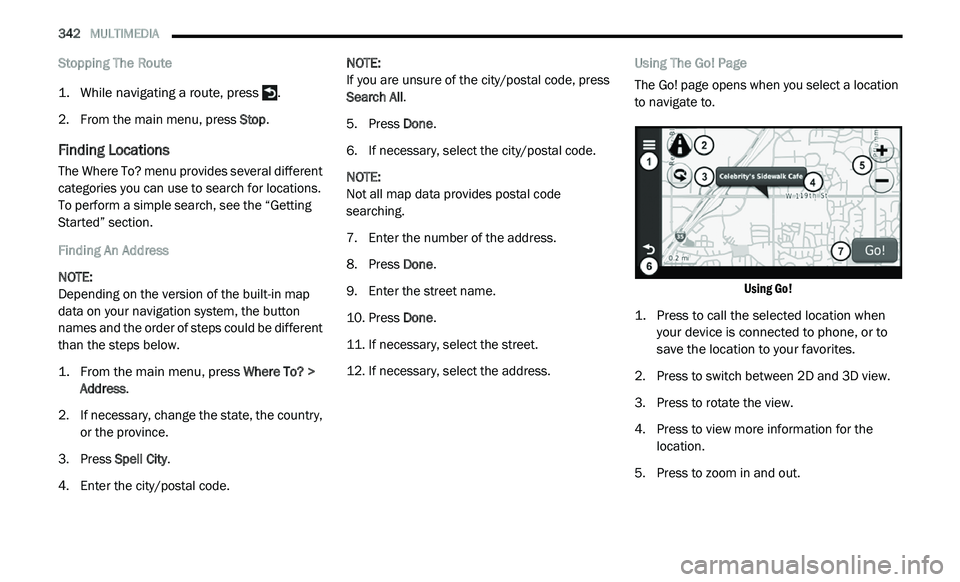
sing The Go! Page
The Go! page opens when you select a location
t o
navigate to.
Using Go!
1. P ress to call the selected location when
y
our device is connected to phone, or to
save the location to your favorites.
2. P ress to switch between 2D and 3D view.
3
. P ress to rotate the view.
4
. P ress to view more information for the
l
ocation.
5. P ress to zoom in and out.
Page 346 of 396
344 MULTIMEDIA
3. Select a favorite.
4. Press the information box.
5
. P ress
> Edit.
6. S elect an option:
Name
Phone Number
Categories
Change Map Symbol
7. E dit the information.
8
. P ress Done .
P
lanning A Trip
You can use Trip Planner to create and save a
t r
ip with multiple destinations.
1. Fr om the main menu, press
W
here
To? > Trip Planner
.
2. P ress .
3
. P ress Select Start Location .
4
. S earch for a location.
5
. P ress Select . 6
. P
ress
to add an additional location.
7. P ress Select .
8
. R epeat steps 4-6 to add additional
l
ocations to your trip.
9. P ress Next .
1
0. E nter a name.
1
1. P ress Done .
N
avigating To A Saved Trip
1. Fr om the main menu, press
W
here
To? > Trip Planner
.
2. S elect a saved trip.
3
. P ress Go!
E
diting A Saved Trip
1. Fr om the main menu, press
W
here
To? > Trip Planner
.
2. S elect a saved trip.
3
. Press 4
. S
elect an option:
Press Rename Trip to edit the trip name.
Press Edit Destinations to add or delete
locations.
Press Delete Trip to delete the entire trip.
Press Optimize Order to arrange your trip
locations in the most efficient order.
Using The Map Buttons
1. Fr om the main menu, press
W
here
To? > Browse Map
.
2. P ress anywhere on the map.
Press and to zoom in and out.
Press to switch between 2D and 3D
views.
Press to rotate the view.
Page 348 of 396
346 MULTIMEDIA
About Icons And Tones
The navigation system sounds two tones
when it enters and exits voice recognition
mode.
A red icon appears in the upper-right
corner of the screen when the navigation
s y
stem is not ready for your command.
Wait until the icon is green to speak your
command.
Tips for Using Voice Commands
Speak in a normal voice directed at the navi -
gation system.
Speak commands as they appear on the
screen.
Respond to voice prompts from the naviga -
tion system as needed.
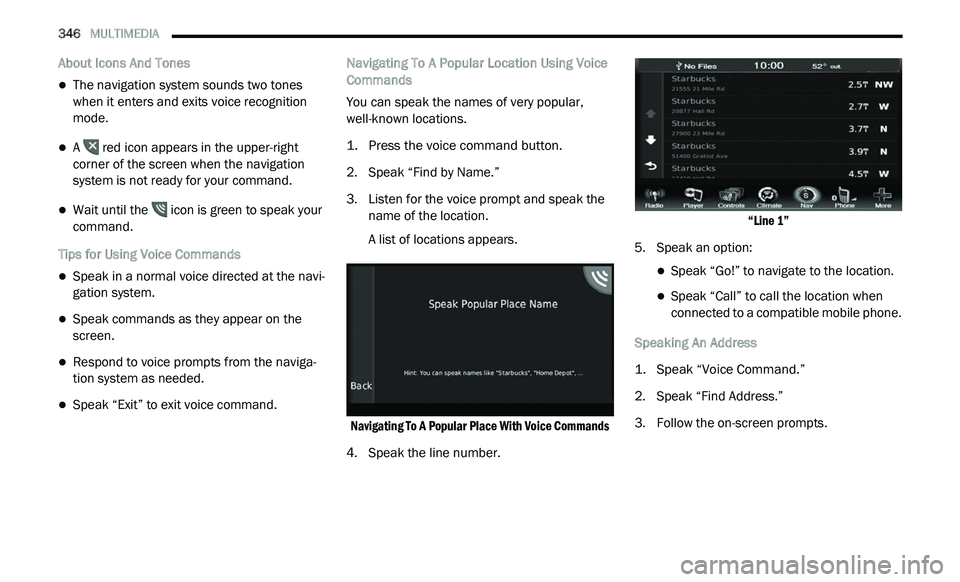
Speak “Exit” to exit voice command. Navigating To A Popular Location Using Voice
C
o
mmands
You can speak the names of very popular,
w e
ll-known locations.
1. P ress the voice command button.
2
. S peak “Find by Name.”
3
. Li sten for the voice prompt and speak the
n
ame of the location.
A list of locations appears.
Navigating To A Popular Place With Voice Commands
4. Speak the line number.
“
Line 1”
5. S peak an option:
Speak “Go!” to navigate to the location.
Speak “Call” to call the location when
connected to a compatible mobile phone.
Speaking An Address
1. S peak “Voice Command.”
2
. S peak “Find Address.”
3
. F ollow the on-screen prompts.
Page 364 of 396
362 MULTIMEDIA
Garmin® is a trademark of Garmin® Ltd. or its
subsidiaries, registered in the USA and other
countries. These trademarks may not be used
without the express permission of Garmin®.
HERE is a trademark in the U.S. and other
co
untries. All other company names and
trademarks mentioned or referenced in this
documentation are the properties of their
respective owners. All rights reserved.
Additional Terms and Privacy Policy for Location
Pl
atform Services
If your Application is provided access to
Lo c
ation Platform Services, by accessing such
Location Platform Services you agree to
application of the Nokia Terms of Service at
legal.here.com/en-gb/terms and the Nokia
Privacy Policy at www.nokia.com/en_us/
phones/all-phones
Traffic Service End User Agreement
The Traffic Service Provider holds the rights to the
t r
affic incident data (the “Traffic Service Data”)
and, if you receive RDS/TMC traffic, the RDS/
TMC network through which it is delivered. You
may not modify, copy, scan, or use any other
method to reproduce, duplicate, republish,
transmit, or distribute in any way any portion of
Traffic Service Data. You agree to indemnify, defend, and hold harmless the Traffic Service
Provider (and its affiliates) and Garmin® Ltd.
(and its subsidiaries) (collectively, “Garmin®”)
against any and all claims, damages, costs, or
other expenses that arise directly or indirectly out
of (a) your unauthorized use of the Traffic Service
Data or the RDS/TMC network, (b) your violation
of this Traffic Service End User Subscriber
Agreement and/or (c) any unauthorized or
unlawful activities by you in connection herewith.
The Traffic Service Data is informational only.
Y
o
u assume all risk of use. The Traffic Service
Provider, Garmin®, and their suppliers make no
representations about content, traffic and road
conditions, route usability, or speed.
Garmin® and its Traffic Service Provider(s) make
no
warranty of fitness or compatibility of the
Traffic Service Data with the Garmin® software
application you have chosen to download to your
device and no warranty that the Traffic Service
Data will operate properly as integrated and
interfaced with your device. In addition, Garmin®
and its Traffic Service Provider(s) make no
warranty with regard to the reliability, accuracy,
exhaustiveness and completeness of the Traffic
Service Data, which may contain inaccuracies
and/or errors from time to time. To the maximum extent permitted by applicable law, any and all
warranties of any kind whatsoever with regard to
the Traffic Service Data are hereby expressly
waived and excluded, including, but not limited
to, those of merchantability, fitness for a
particular purpose, accuracy or completeness of
the Traffic Service Data, and/or a lack of viruses.
Garmin® and its Traffic Service Provider(s)
d
i
sclaim all liability for any loss, injury, or
damage resulting from use of or inability to
use the Traffic Service Data as a result of
w e
ather difficulties, the destruction of
transmitters and/or other broadcasting
infrastructures, a natural disaster, and/or a
lack of reliability, completeness or accuracy of
the Traffic Service Data. In no event shall
Garmin® or its Traffic Service Provider(s)
be liable to you or any other party for any
co
mpensatory, indirect, incidental, special, or
consequential damages (including, without
limitation, indirect, direct, special, punitive, or
exemplary damages for loss of business, loss of
profits, business interruption, or loss of
business information) arising out of the use of
or inability to use the Traffic Service Data, even
if Garmin® has been advised of the possibility
of such damages.
Page 366 of 396
364 MULTIMEDIA
The left-hand control is a rocker-type switch with
a push button in the center. The function of the
left-hand control is different depending on
which mode you are in.
The following describes the left-hand control
op
eration in each mode:
RADIO OPERATION
Pushing the top of the switch will “Seek” up for
the next listenable station and pushing the
bottom of the switch will “Seek” down for the
next listenable station.
The button located in the center of the left-hand
co
ntrol will tune to the next preset station that
you have programmed in the radio preset
button.
MEDIA MODE
Pushing the top of the switch once goes to the
next track on the selected media (AUX/USB/
Bluetooth®). Pushing the bottom of the switch
once goes to the beginning of the current track,
or to the beginning of the previous track if it is
within eight seconds after the current track
begins to play.
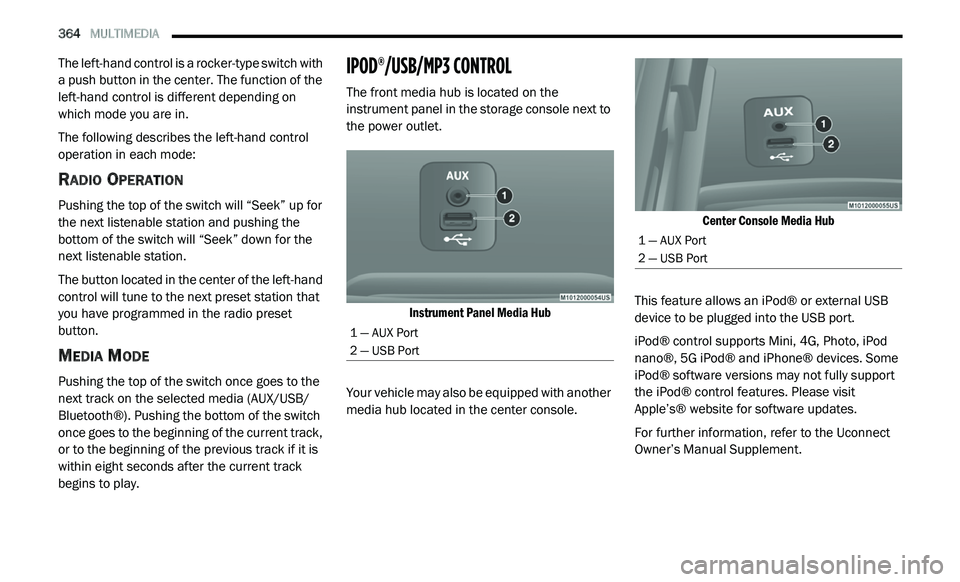
IPOD®/USB/MP3 CONTROL
The front media hub is located on the
instrument panel in the storage console next to
the power outlet.
Instrument Panel Media Hub
Your vehicle may also be equipped with another
me
dia hub located in the center console.
Center Console Media Hub
This feature allows an iPod® or external USB
d e
vice to be plugged into the USB port.
iPod® control supports Mini, 4G, Photo, iPod
n a
no®, 5G iPod® and iPhone® devices. Some
iPod® software versions may not fully support
the iPod® control features. Please visit
Apple’s® website for software updates.
For further information, refer to the Uconnect
Ow
ner’s Manual Supplement.
1 — AUX Port
2 — USB Port
1 — AUX Port
2 — USB Port