lock DODGE MAGNUM SRT 2007 1.G Service Manual
[x] Cancel search | Manufacturer: DODGE, Model Year: 2007, Model line: MAGNUM SRT, Model: DODGE MAGNUM SRT 2007 1.GPages: 380, PDF Size: 6.63 MB
Page 127 of 380
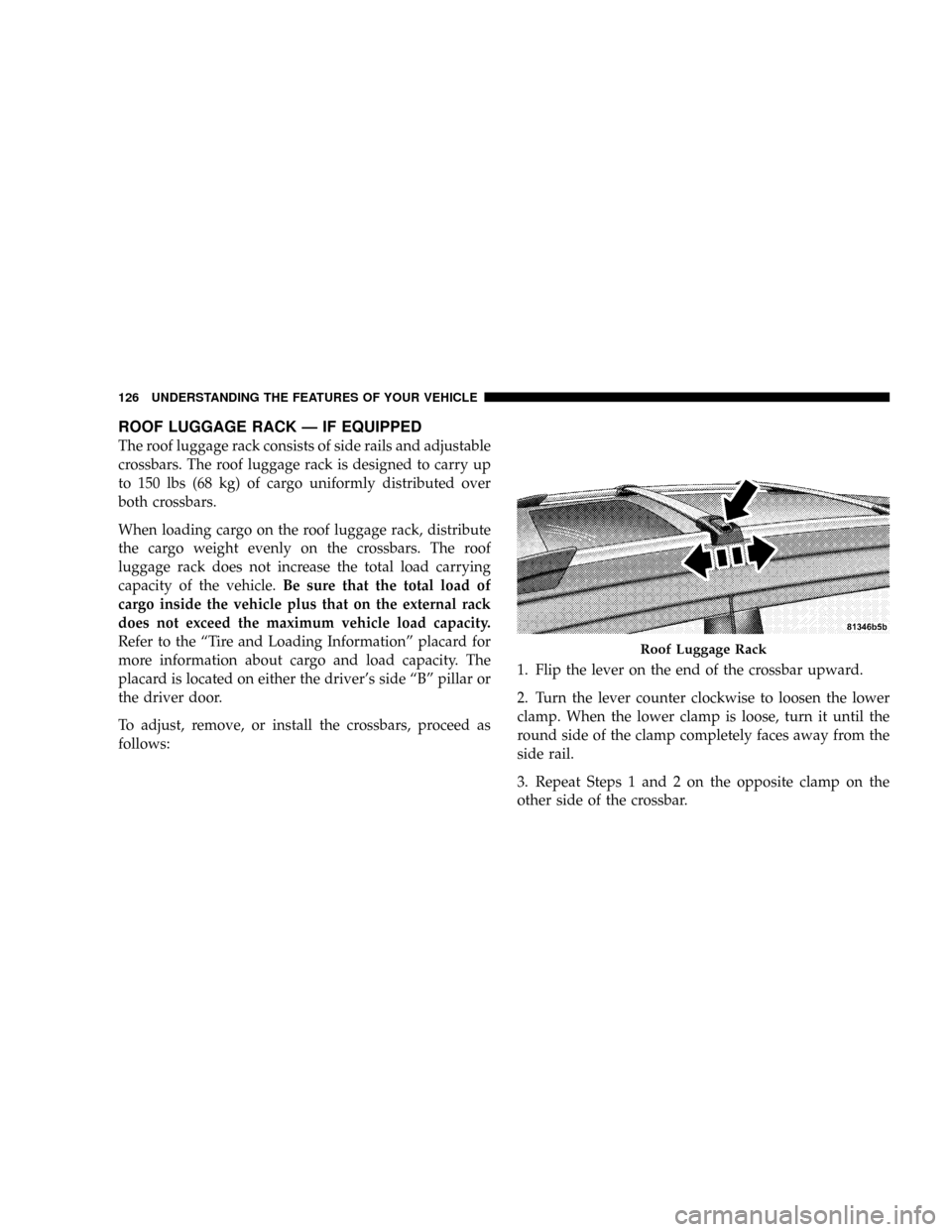
ROOF LUGGAGE RACK Ð IF EQUIPPED
The roof luggage rack consists of side rails and adjustable
crossbars. The roof luggage rack is designed to carry up
to 150 lbs (68 kg) of cargo uniformly distributed over
both crossbars.
When loading cargo on the roof luggage rack, distribute
the cargo weight evenly on the crossbars. The roof
luggage rack does not increase the total load carrying
capacity of the vehicle.Be sure that the total load of
cargo inside the vehicle plus that on the external rack
does not exceed the maximum vehicle load capacity.
Refer to the ªTire and Loading Informationº placard for
more information about cargo and load capacity. The
placard is located on either the driver's side ªBº pillar or
the driver door.
To adjust, remove, or install the crossbars, proceed as
follows:1. Flip the lever on the end of the crossbar upward.
2. Turn the lever counter clockwise to loosen the lower
clamp. When the lower clamp is loose, turn it until the
round side of the clamp completely faces away from the
side rail.
3. Repeat Steps 1 and 2 on the opposite clamp on the
other side of the crossbar.
Roof Luggage Rack
126 UNDERSTANDING THE FEATURES OF YOUR VEHICLE
Page 128 of 380
4. Pick up the crossbar and move it to the desired
location. Do not place the crossbar directly over the
sunroof glass (if equipped).
5. Turn the lower clamp until the round side of the clamp
completely faces the side rail.
6. Turn the lever clockwise to tighten the lower clamp to
the side rail. When tight, flip the lever downward.
7. Repeat Steps 5 and 6 on the opposite clamp on the
other side of the crossbar.
8. Attempt to move the crossbar to ensure that it is
locked in position.
NOTE:To reduce the amount of wind noise when the
crossbars are not in use, remove both crossbars from the
side rails and place them inside the vehicle.
CAUTION!
²To avoid damage to the roof rack and vehicle, do
not exceed the maximum roof rack load capacity
of 150 lbs (68 kg). Always distribute heavy loads
as evenly as possible and secure the load appro-
priately.
²Long loads, which extend over the windshield,
such as wood panels or surfboards, or loads with
large frontal area should be secured to both the
front and rear of the vehicle.
²Travel at reduced speeds and turn corners care-
fully when carrying large or heavy loads on the
roof rack. Wind forces, due to natural causes or
nearby truck traffic, can add sudden upward
loads. This is especially true on large flat loads
and may result in damage to the cargo or your
vehicle.
²Do not use the pop-up feature of the sliding /
pop-up roof when positioning or placing luggage
above it, to prevent damage to the sliding / pop-up
roof panel.
UNDERSTANDING THE FEATURES OF YOUR VEHICLE 127
3
Page 131 of 380
NOperating Instructions - Radio Mode.......156
NOperation Instructions - CD Mode.........159
NOperation Instructions - Auxiliary Mode.....160
NOperating Instructions - Hands Free Phone Ð If
Equipped...........................161
NOperating Instructions - Satellite Radio Ð If
Equipped...........................161
mSales Code RAK ± AM/FM/Cassette/CD (6-Disc)
Radio With Optional Satellite Radio, Hands Free
Phone, Video, MP3, And WMA Capabilities
. . 162
NOperating Instructions - Radio Mode.......162
NOperating Instructions Ð Tape Player.......165
NSeek Button.........................166
NFast Forward (FF).....................166
NRewind (RW)........................166
NTape Eject...........................166
NScan Button.........................166NChanging Tape Direction................166
NMetal Tape Selection...................166
NPinch Roller Release...................166
NNoise Reduction......................167
NOperation Instructions - (CD Mode For CD
Audio Play).........................167
NLoad/Eject Button (CD Mode For CD
Audio Play).........................168
NNotes On Playing MP3 Files.............169
NOperation Instructions - (CD Mode For MP3
And WMA Audio Play).................171
NLoad/Eject Button (CD Mode For MP3 And
WMA Play).........................171
mSales Code REC Ð AM/FM/CD (6±Disc) Radio
With Navigation System
.................173
NOperating Instructions Ð Satellite Radio (If
Equipped)..........................174
NREC Setting The Clock.................174
130 UNDERSTANDING YOUR INSTRUMENT PANEL
Page 132 of 380
NAudio Clock Display...................176
mVideo Entertainment System (Sales Code XRV) Ð
If Equipped
..........................177
NKicker Mobile Surround (Kms1)...........179
mSatellite Radio Ð If Equipped.............179
NSystem Activation.....................179
NElectronic Serial Number/Sirius Identification
Number (ESN/SID)....................180
NSelecting Satellite Mode In REF, RAQ, And
RAK Radios.........................180
NSelecting a Channel....................181
NStoring And Selecting Pre-Set Channels......181
NUsing The PTY (Program Type) Button (If
Equipped)..........................181
NPTY Button9Scan9.....................181
NPTY Button9Seek9.....................182
NSatellite Antenna......................182NReception Quality.....................182
mRemote Sound System Controls...........183
NRadio Operation......................184
NTape Player Operation..................184
NCD Player Operation...................184
NSatellite Radio Operation................185
mCassette Tape And Player Maintenance......185
mCD/DVD Disc Maintenance..............186
mRadio Operation And Cellular Phones.......186
mClimate Controls......................186
NManual Air Conditioning And Heating
System.............................187
NAutomatic Temperature Control Ð If
Equipped...........................189
NOperating Tips.......................194
mRear Window Features..................197
UNDERSTANDING YOUR INSTRUMENT PANEL 131
4
Page 140 of 380
Loose Fuel Filler Cap
If the vehicle diagnostic system determines that the fuel
filler cap is loose, improperly installed, or damaged, a
ªCheck Gascapº message will display in the Electronic
Vehicle Information Center (EVIC). Tighten the fuel filler
cap properly and press the odometer reset button to turn
off the message. If the problem continues, the message
will appear the next time the vehicle is started.
A loose, improperly installed, or damaged fuel filler cap
may also turn on the Malfunction Indicator Light (MIL).
(See page 292 for more information.)
20. Brake System Warning Light
This light monitors various brake functions,
including brake fluid level and parking
brake application. If the brake light turns on,
it may indicate that the parking brake is
applied, that the brake fluid level is low, or that there
is a problem with the anti-lock brake system.
The dual brake system provides a reserve braking capac-
ity to a portion of the hydraulic system in the event of a
failure. Failure of either half of the dual brake system isindicated by the Brake Warning Light, which will turn on
when the brake fluid level in the master cylinder drops
below a specified level.
The light will remain on until the cause is corrected.
NOTE:The light may flash momentarily during sharp
cornering maneuvers, which change fluid level condi-
tions. The vehicle should have service performed, and
the brake fluid level checked.
Immediate repair is necessary if brake failure is indicated.
WARNING!
Driving a vehicle with the brake light on is danger-
ous. Part of the brake system may have failed. It will
take longer to stop the vehicle. You could have an
accident. Have the vehicle checked immediately.
Vehicles equipped with Anti-Lock brakes (ABS) are also
equipped with Electronic Brake Force Distribution (EBD).
Both the Brake Warning Light and the ABS Light will
UNDERSTANDING YOUR INSTRUMENT PANEL 139
4
Page 143 of 380
23. Anti-Lock Brake Light
This light monitors the Anti-Lock Brake System.
The light will turn on when the ignition switch
is turned to the ON position and may stay on for as
long as four seconds.
If the ABS light remains on or turns on while driving,
then the Anti-Lock portion of the brake system is not
functioning and service is required. However, the con-
ventional brake system will continue to operate normally
if the BRAKE warning light is not on.
If the ABS light is on, the brake system should be serviced
as soon as possible to restore the benefits of Anti-Lock
brakes. If the ABS light does not turn on when the
Ignition switch is turned to the ON position, have the
light inspected by an authorized dealer. (See page 219 for
more information.)
24. Low Fuel Indicator Light
This light will turn on and a single chime will
sound when the fuel level drops to 1/8 tank. (See
page 257 for more information.)25. Malfunction Indicator Light
This light is part of an onboard diagnostic
system called OBD. The OBD system monitors
engine and automatic transmission control sys-
tems. The light will turn on when the key is in the ON
position before engine start. If the light does not come
on when turning the key from OFF to ON, have the
condition checked promptly.
Certain conditions such as a loose or missing gas cap,
poor fuel quality, etc. may illuminate the light after
engine start. The vehicle should be serviced if the light
stays on through several of your typical driving cycles. In
most situations, the vehicle will drive normally and will
not require towing.
The Malfunction Indicator Light flashes to alert you to
serious conditions that could lead to immediate loss of
power or severe catalytic converter damage. The vehicle
should be serviced as soon as possible if this occurs. (See
page 292 for more information.)
142 UNDERSTANDING YOUR INSTRUMENT PANEL
Page 153 of 380
Use the SCROLL button to display one of the following
choices:
ªLanguageº
When in this display you may select one of five lan-
guages for all display nomenclature, including the trip
functions and the navigation system (if equipped). Press
the FUNCTION SELECT button while in this display to
select English, Espanol, Deutsch, Italiano, or Francais.
Then, as you continue, the information will display in the
selected language.
NOTE:The EVIC will not change the UConnectŸ
language selection. Please refer to ªLanguage Selectionº
in the HANDS±FREE COMMUNICATION (UConnectŸ)
section of this manual for details.
ªLock Doors Automatically at 15 mph (24 Km/h)º
When ON is selected, all doors will lock automatically
when the vehicle reaches a speed of 15 mph (24 km/h).
To make your selection, press and release the FUNC-
TION SELECT button until ªONº or ªOFFº appears.
ªUnlock Doors Automatically on Exitº
When ON is selected, all doors will unlock when the
vehicle is stopped and the transmission is in the P (Park)
or N (Neutral) position and the driver's door is opened.
To make your selection, press and release the FUNC-
TION SELECT button until ªONº or ªOFFº appears.
ªRemote Key Unlockº
WhenDriver Door 1st Pressis selected, only the driver's
door will unlock on the first press of the remote keyless
entry unlock button. When Driver Door 1st Press is
selected, you must press of the remote keyless entry
unlock button twice to unlock the passenger's doors.
WhenAll Doors 1st Pressis selected, all of the doors will
unlock on the first press of the remote keyless entry
unlock button. To make your selection, press and release
the FUNCTION SELECT button until ªDriver Door 1st
Pressº or ªAll Doors 1st Pressº appears.
ªSound Horn with Remote Key Lockº
When ON is selected, a short horn sound will occur when
the remote keyless entry ªLockº button is pressed. This
feature may be selected with or without the flash lights
152 UNDERSTANDING YOUR INSTRUMENT PANEL
Page 154 of 380
on lock/unlock feature. To make your selection, press
and release the FUNCTION SELECT button until ªONº
or ªOFFº appears.
ªFlash Lights with Remote Key Lockº
When ON is selected, the front and rear turn signals will
flash when the doors are locked or unlocked with the
remote keyless entry transmitter. This feature may be
selected with or without the sound horn on lock feature
selected. To make your selection, press and release the
FUNCTION SELECT button until ªONº or ªOFFº ap-
pears.
ªHeadlights On with Wipersº (Available with Auto
Headlights Only)
When ON is selected, and the headlight switch is in the
AUTO position, the headlights will turn on approxi-
mately 10 seconds after the wipers are turned on. The
headlights will also turn off when the wipers are turned
off if they were turned on by this feature. To make your
selection, press and release the FUNCTION SELECT
button until ªONº or ªOFFº appears.
NOTE:Turning the headlights on during the daytime
causes the instrument panel lights to dim. To increase the
brightness, refer to ªLightsº in Section 3 of this manual.
ªDelay Turning Headlights Offº
When this feature is selected, the driver can choose to
have the headlights remain on for 0, 30, 60, or 90 seconds
when exiting the vehicle. To make your selection, press
and release the FUNCTION SELECT button until ª0,º
ª30,º ª60,º or ª90º appears.
ªTurn Headlights On with Remote Key Unlockº
When this feature is selected, the headlights will activate
and remain on for up to 90 seconds when the doors are
unlocked with the remote keyless entry transmitter. To
make your selection, press and release the FUNCTION
SELECT button until ªOFF,º ª30 sec.,º ª60 sec.,º or ª90
sec.º appears.
ªDelay Power Off to Accessories Until Exitº
When this feature is selected, the power window
switches, radio, hands±free system (if equipped), DVD
video system (if equipped), power sunroof (if equipped),
and power outlets will remain active for up to 60 minutes
after the ignition switch is turned off. Opening a vehicle
UNDERSTANDING YOUR INSTRUMENT PANEL 153
4
Page 158 of 380
(if equipped) frequencies, pausing for 5 seconds at each
listenable station before continuing to the next. To stop
the search, press SCAN a second time.
PSCAN Button (Radio Mode)
Pressing the PSCAN button causes the tuner to scan
through preset stations in either, AM, FM, or Satellite (if
equipped) frequencies, pausing for 5 seconds at each
preset station before continuing to the next. To stop the
search, press PSCAN a second time.
Time Button
Press the time button and the time of day will display for
5 seconds.
Clock Setting Procedure
1. Press and hold the time button until the hours blink.
2. Adjust the hours by turning the right side Tune/
Audio control.
3. After the hours are adjusted, press the right side
Tune/Audio control to set the minutes. The minutes will
begin to blink.4. Adjust the minutes using the right side Tune/Audio
control.
5. To exit, press any button/knob or wait 5 seconds.
RW/FF (Radio Mode)
Pressing the rewind/fast forward button causes the tuner
to search for the next frequency in the direction of the
arrows. This feature operates in either AM, FM or Satel-
lite (if equipped) frequencies.
TUNE Control (Radio Mode)
Turn the right side rotary control clockwise to increase or
counter-clockwise to decrease the frequency.
AM/FM Button (Radio Mode)
Press the button to select AM or FM Modes.
Setting the Tone, Balance, and Fade
Press the rotary TUNE control and BASS will display.
Turn the TUNE control to the right or left to increase or
decrease the Bass tones.
Press the rotary TUNE control a second time and MID
will display. Turn the TUNE control to the right or left to
increase or decrease the Mid Range tones.
UNDERSTANDING YOUR INSTRUMENT PANEL 157
4
Page 159 of 380
Press the rotary TUNE control a third time and TREB will
display. Turn the TUNE control to the right or left to
increase or decrease the Treble tones.
Press the rotary TUNE control a fourth time and BAL will
display. Turn the TUNE control to the right or left to
adjust the sound level from the right or left side speakers.
Press the rotary TUNE control a fifth time and FADE will
display. Turn the TUNE control to the left or right to
adjust the sound level between the front and rear speak-
ers.
Press the tune control again or wait 5 seconds to exit
setting tone, balance, and fade.
RND/SET Button (Radio Mode) To SET The
Push-Button Memory
When you are receiving a station that you wish to
commit to push-button memory, press the SET button.
The symbol SET 1 will now show in the display window.
Select the button (1-6) you wish to lock onto this station
and press and release that button. If a button is notselected within 5 seconds after pressing the SET button,
the station will continue to play but will not be stored
into push-button memory.
You may add a second station to each push-button by
repeating the above procedure with this exception: Press
the SET button twice and SET 2 will show in the display
window. Each button can be set for SET 1 and SET 2 in
both AM and FM. This allows a total of 12 AM, 12 FM,
and 12 Satellite (if equipped) stations to be stored into
push-button memory. The stations stored in SET 2
memory can be selected by pressing the push-button
twice.
Every time a preset button is used, a corresponding
button number will display.Preset Buttons1-6(Radio Mode)
These buttons tune the Radio to the stations that you
commit to push-button memory {12 AM, 12 FM, and 12
Satellite (if equipped) stations}.
158 UNDERSTANDING YOUR INSTRUMENT PANEL