group 19 DODGE RAM 2002 Service Owner's Guide
[x] Cancel search | Manufacturer: DODGE, Model Year: 2002, Model line: RAM, Model: DODGE RAM 2002Pages: 2255, PDF Size: 62.07 MB
Page 563 of 2255
will return to the last function being displayed before
the ignition was turned to the Off position. With the
ignition switch in the On position, momentarily
depressing and releasing the Step push button switch
will cause the compass-mini-trip computer to change
its mode of operation, and momentarily depressing
and releasing the U.S./Metric push button will cause
the unit to toggle between U.S. and Metric measure-
ments. While in either compass mode, depressing the
U.S./Metric push button for more than ten seconds
will toggle the display between the compass/temper-
ature and the compass/compass in degrees modes.
This compass mini-trip computer features several
functions that can be reset. If both the Step and U.S./
Metric push buttons are depressed at the same time
with the ignition switch in the On position, the trip
computer information that can be reset is reset.
Depressing and releasing the Step and U.S./Metric
push buttons at the same time for more than 100
milliseconds, but not more than one second while in
any display mode (except the compass/temperature
mode) will cause a local reset. A local reset affects
only the function currently displayed. See the Reset
Chart below for more information on this feature.
Performing a local reset while in the compass/tem-
perature mode enters the module into the compass
variance setting mode.
Depressing and releasing the Step and U.S./Metric
push buttons at the same time for more than two
seconds while in any display mode (except the com-
pass/temperature mode) will cause a global reset. A
global reset changes all of the trip computer func-
tions that can be reset.
For more information on the features and control
functions of the compass mini-trip computer, see the
owner's manual in the vehicle glove box.
DIAGNOSIS AND TESTING - COMPASS
MINI-TRIP COMPUTER
If the problem with the compass mini-trip com-
puter module is an inoperative security indicator
lamp, refer toSecurity Indicator Lampin Vehicle
Theft/Security Systems. If the problem with the com-
pass mini-trip computer module is an ªOCº or ªSCº in
the compass/thermometer display, refer toAmbient
Temperature Sensorin this section. If the problem
with the compass mini-trip computer module is an
inaccurate or scrambled display, refer toCMTC Self-
Diagnostic Testin this section. If the problem with
the compass mini-trip computer module is incorrect
Vacuum Fluorescent Display (VFD) dimming levels,
use a DRBtscan tool and the proper Diagnostic Pro-
cedures manual to test for the correct dimming mes-
sage inputs being received from the instrument
cluster over the Chrysler Collision Detection (CCD)
data bus. If the problem is a no-display condition,use the following procedures. For complete circuit
diagrams, refer toOverhead Consolein the Con-
tents of Wiring Diagrams.
(1) Check the fused B(+) fuse in the junction block.
If OK, go to Step 2. If not OK, repair the shorted cir-
cuit or component as required and replace the faulty
fuse.
(2) Check for battery voltage at the fused B(+) fuse
in the junction block. If OK, go to Step 3. If not OK,
repair the open fused B(+) circuit to the battery as
required.
(3) Check the fused ignition switch output (run/
start) fuse in the junction block. If OK, go to Step 4.
If not OK, repair the shorted circuit or component as
required and replace the faulty fuse.
(4) Turn the ignition switch to the On position.
Check for battery voltage at the fused ignition switch
output (run/start) fuse in the junction block. If OK,
go to Step 5. If not OK, repair the open fused ignition
switch output (run/start) circuit to the ignition switch
as required.
(5) Turn the ignition switch to the Off position.
Disconnect and isolate the battery negative cable.
Remove the overhead console. Check for continuity
between the ground circuit cavities of the roof wire
harness connector for the overhead console and a
good ground. There should be continuity. If OK, go to
Step 6. If not OK, repair the open ground circuit to
ground as required.
(6) Connect the battery negative cable. Check for
battery voltage at the fused B(+) circuit cavity of the
roof wire harness connector for the overhead console.
If OK, go to Step 7. If not OK, repair the open fused
B(+) circuit to the junction block fuse as required.
(7) Turn the ignition switch to the On position.
Check for battery voltage at the fused ignition switch
output (run/start) circuit cavity of the roof wire har-
ness connector for the overhead console. If OK, refer
toSelf-Diagnostic Testin the Diagnosis and Test-
ing section of this group for further diagnosis of the
compass mini-trip computer module and the CCD
data bus. If not OK, repair the open fused ignition
switch output (run/start) circuit to the junction block
fuse as required.
CMTC SELF-DIAGNOSTIC TEST
A self-diagnostic test is used to determine that the
compass mini-trip computer module is operating
properly electrically. Initiate the self-diagnostic test
as follows:
(1) With the ignition switch in the Off position,
simultaneously depress and hold the Step button and
the U.S./Metric button.
(2) Turn the ignition switch to the On position.
(3) Continue to hold both buttons depressed until
the compass mini-trip computer module enters the
8M - 10 MESSAGE SYSTEMSBR/BE
COMPASS/MINI-TRIP COMPUTER (Continued)
Page 564 of 2255
display segment test. In this test, all of the Vacuum
Fluorescent Display (VFD) segments are lighted
while the compass mini-trip computer module per-
forms the following checks:
²Microprocessor RAM read/write test
²Non-volatile memory read/write test
²Microprocessor ROM verification test
²CCD communications test.
(4) Following completion of these tests, the com-
pass mini-trip computer will display one of three
messages: ªPASS,º ªFAIL,º or ªCCd.º Respond to the
respective test results as follows:
²If the ªPASSº message is displayed, but compass
mini-trip computer operation is still improper, the
use of a DRB scan tool and the proper Diagnostic
Procedures manual are required for further diagno-
sis.
²If the ªFAILº message is displayed, the compass
mini-trip computer module is faulty and must be
replaced.
²If the ªCCdº message is displayed, the use of a
DRBtscan tool and the proper Diagnostic Proce-
dures manual are required for further diagnosis.
²If any VFD segment should fail to light during
the display segment test, the compass mini-trip com-
puter module is faulty and must be replaced.
(5) If all tests are passed, or if the ignition switch
is turned to the Off position, the compass mini-trip
computer module will automatically return to normal
operation.
NOTE: If the compass functions, but accuracy is
suspect, it may be necessary to perform a variation
adjustment. This procedure allows the compass
unit to accommodate variations in the earth's mag-
netic field strength, based on geographic location.
Refer to Compass Variation Adjustment in the Ser-
vice Procedures section of this group.
NOTE: If the compass reading has blanked out, and
only ªCALº appears in the display, demagnetizing
may be necessary to remove excessive residual
magnetic fields from the vehicle. Refer to Compass
Demagnetizing in the Service Procedures section of
this group.
REMOVAL
(1) Disconnect and isolate the battery negative
cable.
(2) Remove the overhead console from the head-
liner (Refer to 8 - ELECTRICAL/OVERHEAD CON-
SOLE - REMOVAL).
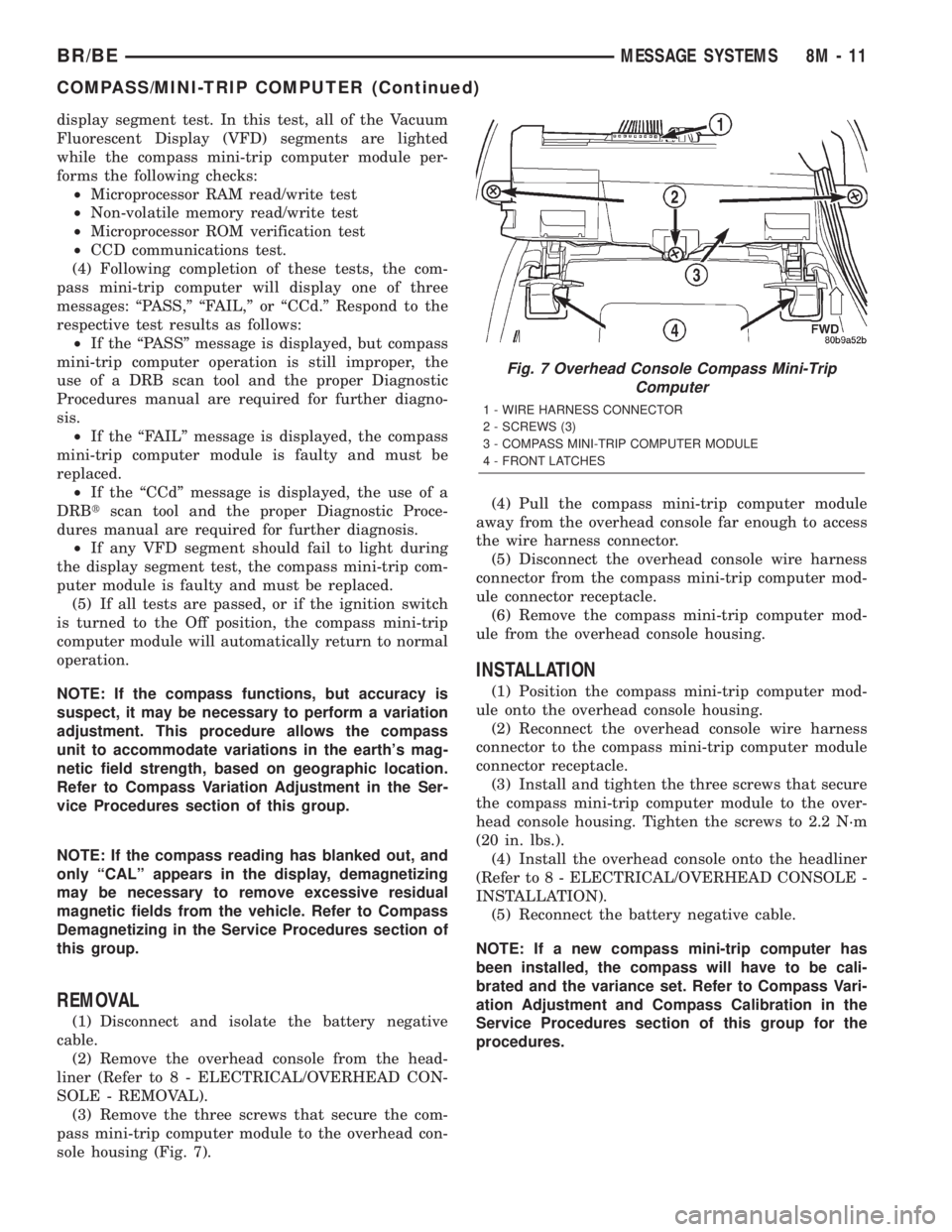
(3) Remove the three screws that secure the com-
pass mini-trip computer module to the overhead con-
sole housing (Fig. 7).(4) Pull the compass mini-trip computer module
away from the overhead console far enough to access
the wire harness connector.
(5) Disconnect the overhead console wire harness
connector from the compass mini-trip computer mod-
ule connector receptacle.
(6) Remove the compass mini-trip computer mod-
ule from the overhead console housing.
INSTALLATION
(1) Position the compass mini-trip computer mod-
ule onto the overhead console housing.
(2) Reconnect the overhead console wire harness
connector to the compass mini-trip computer module
connector receptacle.
(3) Install and tighten the three screws that secure
the compass mini-trip computer module to the over-
head console housing. Tighten the screws to 2.2 N´m
(20 in. lbs.).
(4) Install the overhead console onto the headliner
(Refer to 8 - ELECTRICAL/OVERHEAD CONSOLE -
INSTALLATION).
(5) Reconnect the battery negative cable.
NOTE: If a new compass mini-trip computer has
been installed, the compass will have to be cali-
brated and the variance set. Refer to Compass Vari-
ation Adjustment and Compass Calibration in the
Service Procedures section of this group for the
procedures.
Fig. 7 Overhead Console Compass Mini-Trip
Computer
1 - WIRE HARNESS CONNECTOR
2 - SCREWS (3)
3 - COMPASS MINI-TRIP COMPUTER MODULE
4 - FRONT LATCHES
BR/BEMESSAGE SYSTEMS 8M - 11
COMPASS/MINI-TRIP COMPUTER (Continued)
Page 584 of 2255
DRIVER POWER SEAT SWITCH
DESCRIPTION
The power seat in standard cab models can be
adjusted in eight different directions, up, down, front
up, front down, rear up, rear down, rearward and for-
ward. The power seat switch for quad cab models has
an additional switch knob for adjusting the power
lumbar support. The switch is located on the lower
outboard side of the seat cushion on the seat cushion
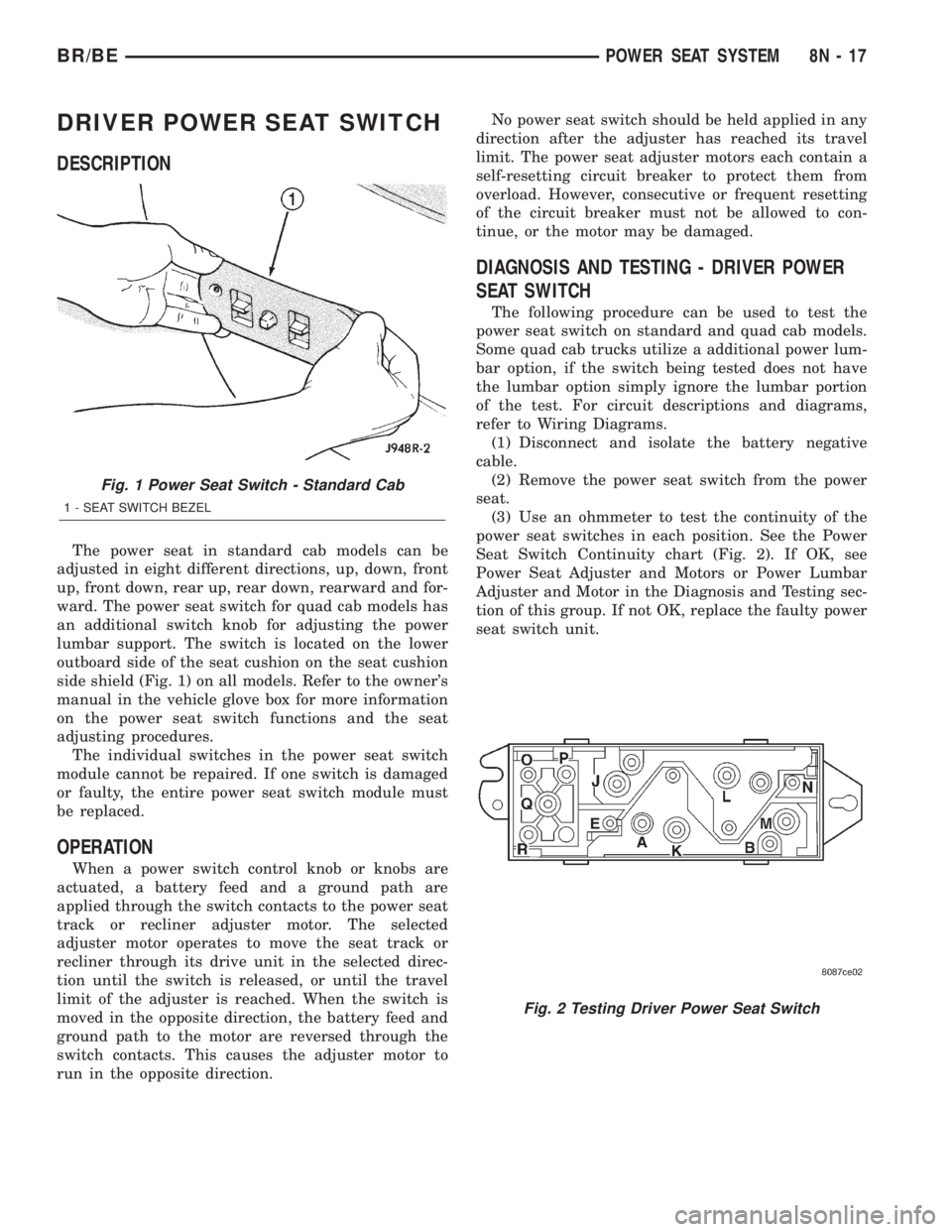
side shield (Fig. 1) on all models. Refer to the owner's
manual in the vehicle glove box for more information
on the power seat switch functions and the seat
adjusting procedures.
The individual switches in the power seat switch
module cannot be repaired. If one switch is damaged
or faulty, the entire power seat switch module must
be replaced.
OPERATION
When a power switch control knob or knobs are
actuated, a battery feed and a ground path are
applied through the switch contacts to the power seat
track or recliner adjuster motor. The selected
adjuster motor operates to move the seat track or
recliner through its drive unit in the selected direc-
tion until the switch is released, or until the travel
limit of the adjuster is reached. When the switch is
moved in the opposite direction, the battery feed and
ground path to the motor are reversed through the
switch contacts. This causes the adjuster motor to
run in the opposite direction.No power seat switch should be held applied in any
direction after the adjuster has reached its travel
limit. The power seat adjuster motors each contain a
self-resetting circuit breaker to protect them from
overload. However, consecutive or frequent resetting
of the circuit breaker must not be allowed to con-
tinue, or the motor may be damaged.
DIAGNOSIS AND TESTING - DRIVER POWER
SEAT SWITCH
The following procedure can be used to test the
power seat switch on standard and quad cab models.
Some quad cab trucks utilize a additional power lum-
bar option, if the switch being tested does not have
the lumbar option simply ignore the lumbar portion
of the test. For circuit descriptions and diagrams,
refer to Wiring Diagrams.
(1) Disconnect and isolate the battery negative
cable.
(2) Remove the power seat switch from the power
seat.
(3) Use an ohmmeter to test the continuity of the
power seat switches in each position. See the Power
Seat Switch Continuity chart (Fig. 2). If OK, see
Power Seat Adjuster and Motors or Power Lumbar
Adjuster and Motor in the Diagnosis and Testing sec-
tion of this group. If not OK, replace the faulty power
seat switch unit.
Fig. 1 Power Seat Switch - Standard Cab
1 - SEAT SWITCH BEZEL
Fig. 2 Testing Driver Power Seat Switch
BR/BEPOWER SEAT SYSTEM 8N - 17
Page 587 of 2255
PASSENGER POWER SEAT
SWITCH
DESCRIPTION
The power seat in standard cab models can be
adjusted in eight different directions, up, down, front
up, front down, rear up, rear down, rearward and for-
ward. The power seat switch for quad cab models has
an additional switch knob for adjusting the power
lumbar support. The switch is located on the lower
outboard side of the seat cushion on the seat cushion
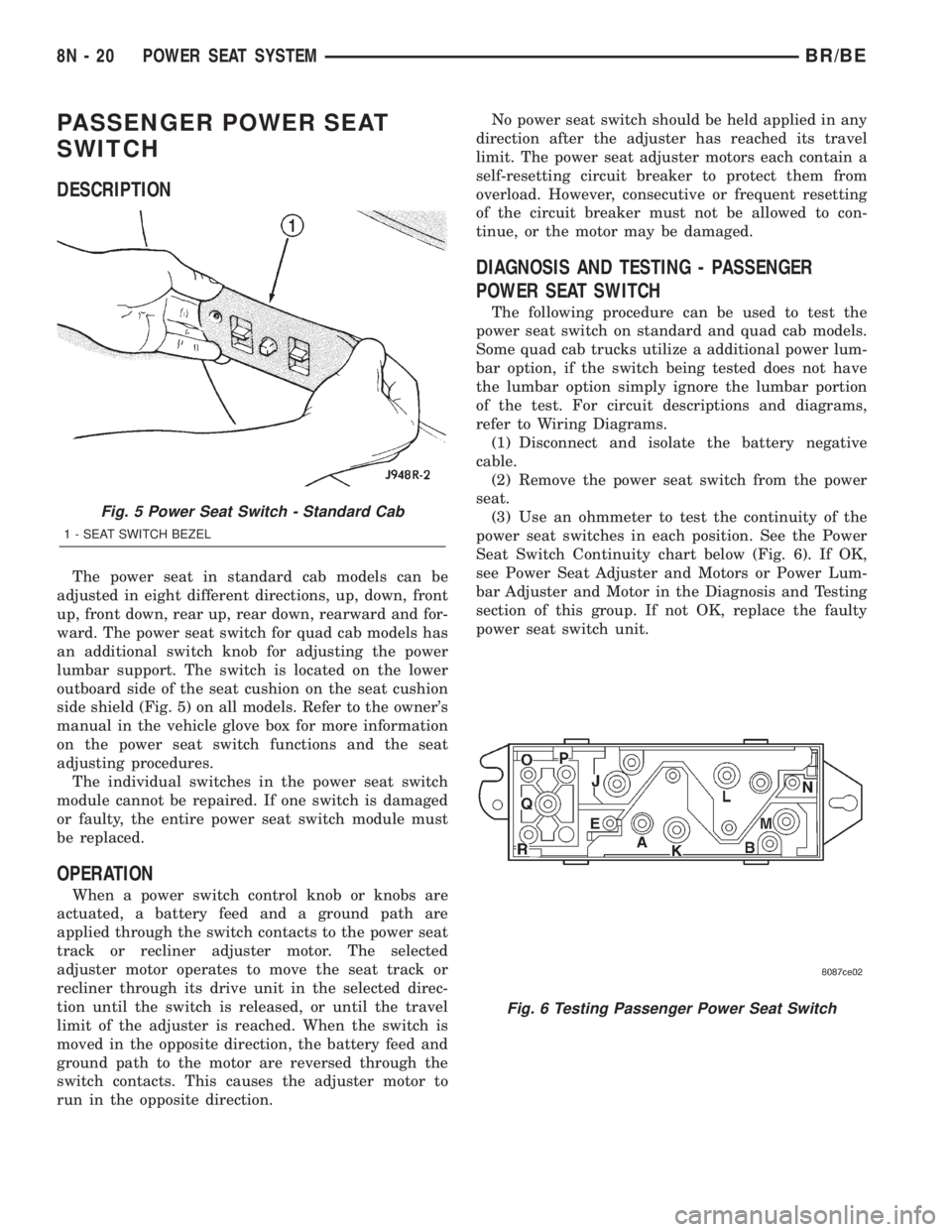
side shield (Fig. 5) on all models. Refer to the owner's
manual in the vehicle glove box for more information
on the power seat switch functions and the seat
adjusting procedures.
The individual switches in the power seat switch
module cannot be repaired. If one switch is damaged
or faulty, the entire power seat switch module must
be replaced.
OPERATION
When a power switch control knob or knobs are
actuated, a battery feed and a ground path are
applied through the switch contacts to the power seat
track or recliner adjuster motor. The selected
adjuster motor operates to move the seat track or
recliner through its drive unit in the selected direc-
tion until the switch is released, or until the travel
limit of the adjuster is reached. When the switch is
moved in the opposite direction, the battery feed and
ground path to the motor are reversed through the
switch contacts. This causes the adjuster motor to
run in the opposite direction.No power seat switch should be held applied in any
direction after the adjuster has reached its travel
limit. The power seat adjuster motors each contain a
self-resetting circuit breaker to protect them from
overload. However, consecutive or frequent resetting
of the circuit breaker must not be allowed to con-
tinue, or the motor may be damaged.
DIAGNOSIS AND TESTING - PASSENGER
POWER SEAT SWITCH
The following procedure can be used to test the
power seat switch on standard and quad cab models.
Some quad cab trucks utilize a additional power lum-
bar option, if the switch being tested does not have
the lumbar option simply ignore the lumbar portion
of the test. For circuit descriptions and diagrams,
refer to Wiring Diagrams.
(1) Disconnect and isolate the battery negative
cable.
(2) Remove the power seat switch from the power
seat.
(3) Use an ohmmeter to test the continuity of the
power seat switches in each position. See the Power
Seat Switch Continuity chart below (Fig. 6). If OK,
see Power Seat Adjuster and Motors or Power Lum-
bar Adjuster and Motor in the Diagnosis and Testing
section of this group. If not OK, replace the faulty
power seat switch unit.
Fig. 5 Power Seat Switch - Standard Cab
1 - SEAT SWITCH BEZEL
Fig. 6 Testing Passenger Power Seat Switch
8N - 20 POWER SEAT SYSTEMBR/BE
Page 589 of 2255
Each motor contains a self-resetting circuit breaker
to protect it from overload. Consecutive or frequent
resetting of the circuit breakers must not be allowed
to continue, or the motors may be damaged.
The power seat adjuster and motors cannot be
repaired, and are serviced only as a complete unit. If
any component in this unit is faulty or damaged, the
entire power seat adjuster and motors assembly must
be replaced.
OPERATION
When a power seat switch is actuated, a battery
feed and a ground path are applied through the
power seat switch contacts to the appropriate motor
or motors. The motor and drive unit operate to move
the seat in the selected direction until the switch is
released, or until the travel limit of the power seat
track is reached. When the switch is moved in the
opposite direction, the battery feed and ground path
to the motor is reversed through the switch contacts.
This causes the motor to run in the opposite direc-
tion.
DIAGNOSIS AND TESTING - POWER SEAT
TRACK
For complete power seat circuit descriptions and
diagrams, refer to Wiring Diagrams.
Operate the power seat switch to move all three
seat motors in each direction. The seat should move
in each of the selected directions. If the power seat
track fails to operate in only one direction, move the
seat track a short distance in the opposite direction
and test again to be certain that the track is not at
its travel limit. If the power seat track still fails to
operate in only one direction, refer to Diagnosis and
Testing of the Power Seat Switch in this section. If
the power seat track fails to operate in more than
one direction, proceed as follows:
(1) Check the power seat fuse in the power distri-
bution center. If OK, go to Step 2. If not OK, replace
the faulty fuse.
(2) Remove the power seat switch from the seat.
Check for battery voltage at the fused B(+) circuit
cavity of the power seat switch wire harness connec-
tor. If OK, go to Step 3. If not OK, repair the open
circuit to the power distribution center as required.(3) Check for continuity between the ground cir-
cuit cavity of the power seat switch wire harness con-
nector and a good ground. There should be
continuity. If OK, go to Step 4. If not OK, repair the
open circuit to ground as required.
(4) Test the power seat switch as described in this
group. If the switch tests OK, check the wire harness
between the power seat switch and the motor for
shorts or opens. If the circuits check OK, replace the
faulty power seat track (adjuster) assembly. If the
circuits are not OK, repair the wire harness as
required.
REMOVAL
(1) Disconnect and isolate the battery negative
cable.
(2) Remove the seat, power seat track from the
vehicle as a unit (Refer to 23 - BODY/SEATS/SEAT -
REMOVAL).
(3) Unplug the power seat wire harness connectors
at each of the three power seat motors.
(4) Release the power seat wire harness retainers
from the seat track.
(5) Remove the fasteners that secure the center
seat cushion section to the brackets on the power
seat track.
(6) Remove the screws that secure the power seat
track assembly to the seat cushion frame.
(7) Remove the power seat track assembly from
the seat cushion frame.
INSTALLATION
(1) Position the power seat track assembly on the
seat cushion frame.
(2) Install the fasteners that secure the center seat
cushion section to the brackets on the power seat
adjuster.
(3) Install the screws that secure the power seat
track assembly to the seat cushion frame.
(4) Connect the power seat wire harness connec-
tors at each of the three power seat motors.
(5) Install the power seat wire harness retainers
on the seat track assembly.
(6) Install the seat, power seat track as a unit
(Refer to 23 - BODY/SEATS/SEAT - INSTALLA-
TION).
(7) Connect the battery negative cable.
8N - 22 POWER SEAT SYSTEMBR/BE
POWER SEAT TRACK (Continued)
Page 590 of 2255
POWER WINDOWS
TABLE OF CONTENTS
page page
POWER WINDOWS
DESCRIPTION.........................23
OPERATION...........................23
DIAGNOSIS AND TESTING - POWER
WINDOWS...........................23
POWER WINDOW SWITCH
DESCRIPTION.........................24
OPERATION...........................24
DIAGNOSIS AND TESTING - POWER
WINDOW SWITCH.....................24REMOVAL.............................25
INSTALLATION.........................26
WINDOW MOTOR
DESCRIPTION.........................26
DIAGNOSIS AND TESTING - WINDOW
MOTOR .............................26
REMOVAL.............................26
POWER WINDOWS
DESCRIPTION
Power windows are available as factory-installed
optional equipment on this model. The power lock
system is included on vehicles equipped with the
power window option.
OPERATION
The power window system allows each of the front
door windows to be raised and lowered electrically by
actuating a switch on the trim panel of each respec-
tive door. Additionally, the master switch on the
driver side door trim panel allows the driver to raise
or lower the passenger side front door window. The
power window system receives battery feed through a
circuit breaker in the junction block, only when the
ignition switch is in the On position.
The power window system includes the power win-
dow switches on each front door trim panel, the cir-
cuit breaker in the junction block, and the power
window motors inside each front door. This group
covers diagnosis and service of only the electrical
components in the power window system. For service
of mechanical components, such as the regulator, lift
plate, window tracks, or glass refer to Group 23 -
Body.
Refer to the owner's manual in the vehicle glove
box for more information on the features, use and
operation of the power window system.
DIAGNOSIS AND TESTING - POWER
WINDOWS
For circuit descriptions and diagrams, refer to the
appropriate wiring information. The wiring informa-
tion includes wiring diagrams, proper wire and con-
nector repair procedures, details of wire harnessrouting and retention, connector pin-out information
and location views for the various wire harness con-
nectors, splices and grounds.
ALL WINDOWS INOPERATIVE
(1) Check the circuit breaker in the junction block.
If OK, go to Step 2. If not OK, replace the faulty cir-
cuit breaker.
(2) Disconnect and isolate the battery negative
cable. Remove the power window and lock switch and
bezel unit from the driver side front door trim panel.
Unplug the wire harness connector from the switch
and bezel unit.
(3) Check for continuity between the ground cir-
cuit cavity of the switch and bezel unit wire harness
connector and a good ground. If OK, (Refer to 8 -
ELECTRICAL/POWER WINDOWS/POWER WIN-
DOW SWITCH - DIAGNOSIS AND TESTING). If not
OK, repair the circuit to ground as required.
ONE WINDOW INOPERATIVE
The window glass must be free to slide up and
down for the power window motor to function prop-
erly. If the glass is not free to move up and down, the
motor will overload and trip the integral circuit
breaker. To determine if the glass is free, disconnect
the regulator plate from the glass. Then slide the
window up and down by hand.
There is an alternate method to check if the glass
is free. Position the glass between the up and down
stops. Then, shake the glass in the door. Check that
the glass can be moved slightly from side to side,
front to rear, and up and down. Then check that the
glass is not bound tight in the tracks. If the glass is
free, proceed with the diagnosis that follows. If the
glass is not free, (Refer to 23 - BODY/DOOR -
FRONT/DOOR GLASS - REMOVAL).
BR/BEPOWER WINDOWS 8N - 23
Page 591 of 2255
(1) Disconnect and isolate the battery negative
cable. Remove the power window and lock switch and
bezel unit from the door trim panel on the side of the
vehicle with the inoperative window. Unplug the wire
harness connector from the switch and bezel unit.
(2) Connect the battery negative cable. Turn the
ignition switch to the On position. Check for battery
voltage at the fused ignition switch output (run) cir-
cuit cavity in the body half of the switch and bezel
unit wire harness connector. If OK, and the inopera-
tive power window is on the driver side, go to Step 4.
If OK, and the inoperative power window is on the
passenger side, go to Step 3. If not OK, repair the
open circuit to the junction block as required.
(3) Disconnect and isolate the battery negative
cable. Check for continuity between each of the two
master window switch right up/down control circuit
cavities in the body half of the passenger side switch
and bezel unit wire harness connector and a good
ground. In each case, there should be continuity. If
OK, go to Step 4. If not OK, repair the open circuit to
the driver side switch and bezel unit as required.
(4) Test the power window switch continuity.
(Refer to 8 - ELECTRICAL/POWER WINDOWS/
POWER WINDOW SWITCH - DIAGNOSIS AND
TESTING). If OK, go to Step 5. If not OK, replace
the faulty power window and lock switch and bezel
unit.
(5) Refer to the appropriate wiring information.
The wiring information includes wiring diagrams,
proper wire and connector repair procedures, details
of wire harness routing and retention, connector pin-
out information and location views for the various
wire harness connectors, splices and grounds. Check
the continuity in each circuit between the inoperative
power window and lock switch and bezel unit wire
harness connector cavities and the corresponding
power window motor wire harness connector cavities.
If OK, (Refer to 8 - ELECTRICAL/POWER WIN-
DOWS/WINDOW MOTOR - DIAGNOSIS AND TEST-
ING). If not OK, repair the open circuit(s) as
required.
NOTE: The passenger side power window switch
receives the ground feed for operating the passen-
ger side power window motor through the driver
side power window switch and wire harness con-
nector.
POWER WINDOW SWITCH
DESCRIPTION
The power windows are controlled by two-way
switches integral to the power window and lock
switch and bezel unit on the trim panel of each frontdoor. A second power window switch in the driver
side switch and bezel unit allows the driver to control
the passenger side window. A Light-Emitting Diode
(LED) in the paddle of each switch is illuminated
whenever the ignition switch is in the On position.
OPERATION
The power window switch for the driver side front
door has an Auto label on it. This switch has a sec-
ond detent position beyond the normal Down position
that provides an automatic one-touch window down
feature. This feature is controlled by an electronic
circuit and a relay that are integral to the driver side
front door power window and lock switch unit.
The power window switches control the battery
and ground feeds to the power window motors. The
passenger side power window switch receives a
ground feed through the driver side power window
switch for operating the passenger side power win-
dow motor.
The power window and lock switch and bezel unit
cannot be repaired and, if faulty or damaged, the
entire switch and bezel unit must be replaced.
DIAGNOSIS AND TESTING - POWER WINDOW
SWITCH
The auto down feature of the driver side power
window switch is controlled by an electronic circuit
within the switch unit. The auto down circuitry is
activated when the driver side power window switch
is moved to the second detent in the Down direction.
The outputs from the auto down circuitry are carried
through the same switch pins that provide the nor-
mal down function. The auto down circuit cannot be
tested. If the driver side power window switch conti-
nuity tests are passed, but the auto down feature is
inoperative, replace the faulty driver side power win-
dow switch unit.
The Light-Emitting Diode (LED) illumination
lamps for all of the power window and lock switch
and bezel unit switch paddles receive battery current
through the power window circuit breaker in the
junction block. If all of the LEDs are inoperative in
either or both power window and lock switch and
bezel units and the power windows are inoperative,
perform the diagnosis for Power Window System in
this group. If the power windows operate, but any or
all of the LEDs are inoperative, the power window
and lock switch and bezel unit with the inoperative
LED(s) is faulty and must be replaced. For circuit
descriptions and diagrams, refer to the appropriate
wiring information. The wiring information includes
wiring diagrams, proper wire and connector repair
procedures, details of wire harness routing and
retention, connector pin-out information and location
8N - 24 POWER WINDOWSBR/BE
POWER WINDOWS (Continued)
Page 626 of 2255
Once the speed control has been disengaged,
depressing the RES/ACCEL switch (when speed is
greater than 30 mph) restores the vehicle to the tar-
get speed that was stored in the ECM.
While the speed control is engaged, the driver can
increase the vehicle speed by depressing the RES/AC-
CEL switch. The new target speed is stored in the
ECM when the RES/ACCEL is released. The ECM
also has a9tap-up9feature in which vehicle speed
increases at a rate of approximately 2 mph for each
momentary switch activation of the RES/ACCEL
switch.
A ªtap downº feature is used to decelerate without
disengaging the speed control system. To decelerate
from an existing recorded target speed, momentarily
depress the COAST switch. For each switch activa-
tion, speed will be lowered approximately 1 mph.
DIAGNOSIS AND TESTING
DIAGNOSIS AND TESTING - VACUUM SUPPLY
TEST
Gas Powered Engines
On gasoline powered engines: actual engine vac-
uum, a vacuum reservoir, a one-way check valve and
vacuum lines are used to supply vacuum to the speed
control servo.
(1) Disconnect vacuum hose at speed control servo
and install a vacuum gauge into the disconnected
hose.
(2) Start engine and observe gauge at idle. Vac-
uum gauge should read at least ten inches of mer-
cury.
(3) If vacuum is less than ten inches of mercury,
determine source of leak. Check vacuum line to
engine for leaks. Also check actual engine intake
manifold vacuum. If manifold vacuum does not meet
this requirement, check for poor engine performance
and repair as necessary.
(4) If vacuum line to engine is not leaking, check
for leak at vacuum reservoir. To locate and gain
access to reservoir, refer to Vacuum Reservoir Remov-
al/Installation in this group. Disconnect vacuum line
at reservoir and connect a hand-operated vacuum
pump to reservoir fitting. Apply vacuum. Reservoir
vacuum should not bleed off. If vacuum is being lost,
replace reservoir.
(5) Verify operation of one-way check valve and
check it for leaks.
(a) Locate one-way check valve. The valve is
located in vacuum line between vacuum reservoirand engine vacuum source. Disconnect vacuum
hoses (lines) at each end of valve.
(b) Connect a hand-operated vacuum pump to
reservoir end of check valve. Apply vacuum. Vac-
uum should not bleed off. If vacuum is being lost,
replace one-way check valve.
(c) Connect a hand-operated vacuum pump to
vacuum source end of check valve. Apply vacuum.
Vacuum should flow through valve. If vacuum is
not flowing, replace one-way check valve. Seal the
fitting at opposite end of valve with a finger and
apply vacuum. If vacuum will not hold, diaphragm
within check valve has ruptured. Replace valve.
Diesel Engines With Automatic Trans.
On diesel powered engines equipped with an auto-
matic transmission: an engine driven vacuum pump,
a one-way check valve and vacuum lines are used to
supply vacuum to the speed control servo. A vacuum
reservoir is not used.
(1) Disconnect vacuum hose at speed control servo
and install a vacuum gauge into the disconnected
hose.
(2) Start engine and observe gauge at idle. For
vacuum testing and vacuum specifications, refer to
Vacuum Pump OutputÐDiesel Engine in 9, Engines.
(3) If vacuum pump output is OK, determine other
source of leak. Check all vacuum lines to: speed con-
trol servo, engine vacuum pump and heating/air con-
ditioning system for leaks.
(4) Verify operation of one-way check valve and
check it for leaks.
(a) Locate one-way check valve. The valve is
located in vacuum line between speed control servo
and engine vacuum pump. Disconnect vacuum
hoses (lines) at each end of valve.
(b) Connect a hand-operated vacuum pump to
reservoir end of check valve. Apply vacuum. Vac-
uum should not bleed off. If vacuum is being lost,
replace one-way check valve.
(c) Connect a hand-operated vacuum pump to
vacuum source end of check valve. Apply vacuum.
Vacuum should flow through valve. If vacuum is
not flowing, replace one-way check valve. Seal the
fitting at opposite end of valve with a finger and
apply vacuum. If vacuum will not hold, diaphragm
within check valve has ruptured. Replace valve.
Diesel Engine With Manual Trans.
Vacuum is not used for any part of the speed con-
trol system if equipped with a diesel engine and a
manual transmission.
BR/BESPEED CONTROL 8P - 3
SPEED CONTROL (Continued)
Page 628 of 2255
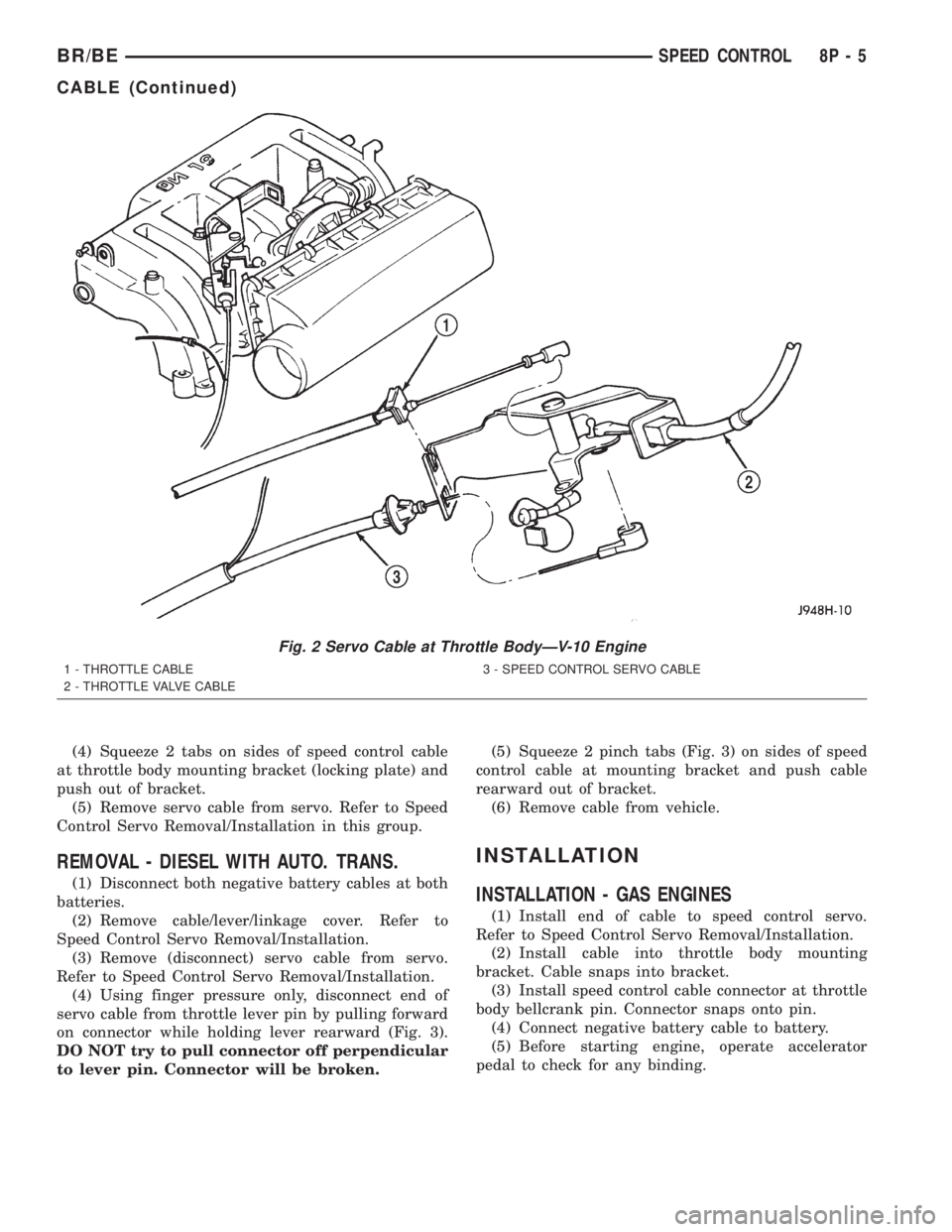
(4) Squeeze 2 tabs on sides of speed control cable
at throttle body mounting bracket (locking plate) and
push out of bracket.
(5) Remove servo cable from servo. Refer to Speed
Control Servo Removal/Installation in this group.
REMOVAL - DIESEL WITH AUTO. TRANS.
(1) Disconnect both negative battery cables at both
batteries.
(2) Remove cable/lever/linkage cover. Refer to
Speed Control Servo Removal/Installation.
(3) Remove (disconnect) servo cable from servo.
Refer to Speed Control Servo Removal/Installation.
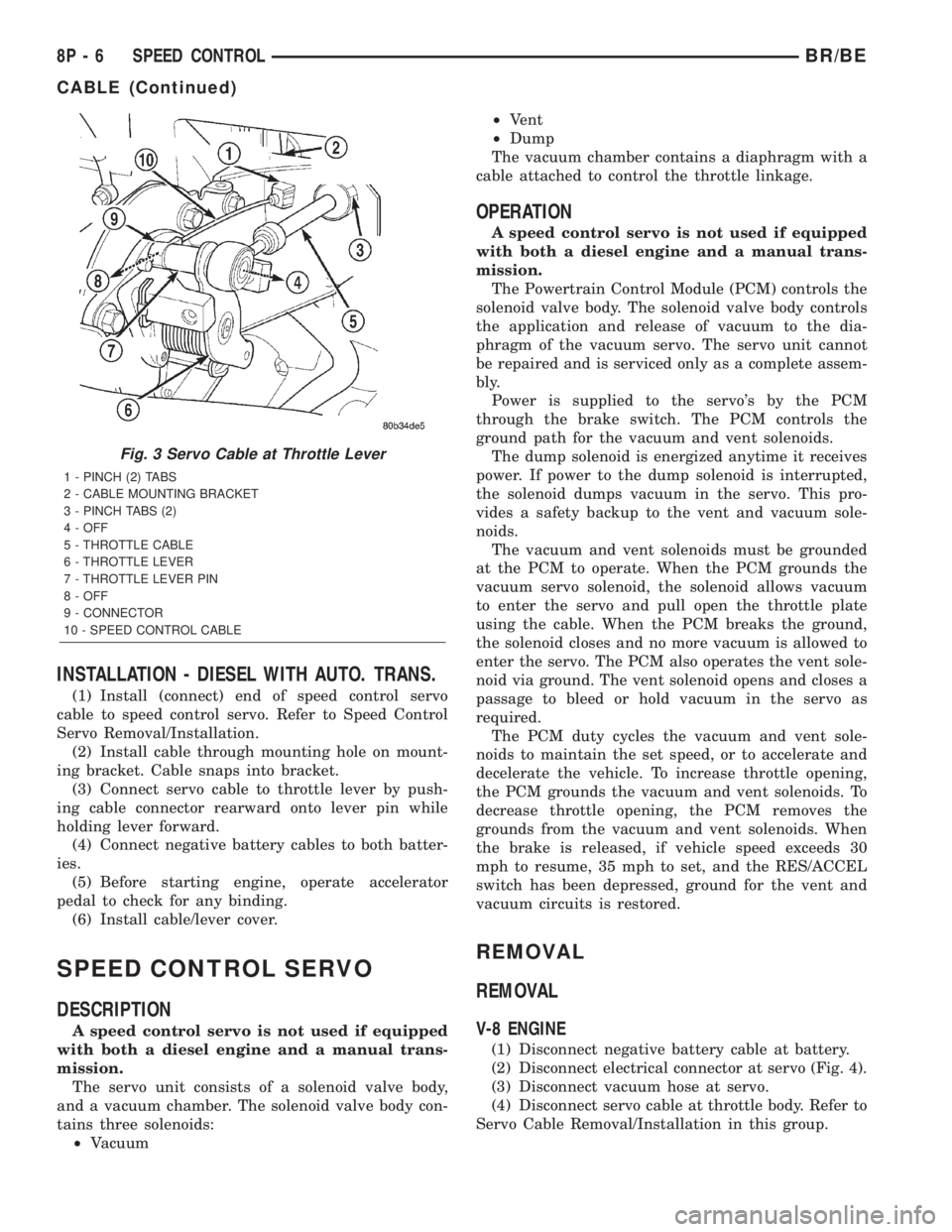
(4) Using finger pressure only, disconnect end of
servo cable from throttle lever pin by pulling forward
on connector while holding lever rearward (Fig. 3).
DO NOT try to pull connector off perpendicular
to lever pin. Connector will be broken.(5) Squeeze 2 pinch tabs (Fig. 3) on sides of speed
control cable at mounting bracket and push cable
rearward out of bracket.
(6) Remove cable from vehicle.
INSTALLATION
INSTALLATION - GAS ENGINES
(1) Install end of cable to speed control servo.
Refer to Speed Control Servo Removal/Installation.
(2) Install cable into throttle body mounting
bracket. Cable snaps into bracket.
(3) Install speed control cable connector at throttle
body bellcrank pin. Connector snaps onto pin.
(4) Connect negative battery cable to battery.
(5) Before starting engine, operate accelerator
pedal to check for any binding.
Fig. 2 Servo Cable at Throttle BodyÐV-10 Engine
1 - THROTTLE CABLE
2 - THROTTLE VALVE CABLE3 - SPEED CONTROL SERVO CABLE
BR/BESPEED CONTROL 8P - 5
CABLE (Continued)
Page 629 of 2255
INSTALLATION - DIESEL WITH AUTO. TRANS.
(1) Install (connect) end of speed control servo
cable to speed control servo. Refer to Speed Control
Servo Removal/Installation.
(2) Install cable through mounting hole on mount-
ing bracket. Cable snaps into bracket.
(3) Connect servo cable to throttle lever by push-
ing cable connector rearward onto lever pin while
holding lever forward.
(4) Connect negative battery cables to both batter-
ies.
(5) Before starting engine, operate accelerator
pedal to check for any binding.
(6) Install cable/lever cover.
SPEED CONTROL SERVO
DESCRIPTION
A speed control servo is not used if equipped
with both a diesel engine and a manual trans-
mission.
The servo unit consists of a solenoid valve body,
and a vacuum chamber. The solenoid valve body con-
tains three solenoids:
²Vacuum²Vent
²Dump
The vacuum chamber contains a diaphragm with a
cable attached to control the throttle linkage.
OPERATION
A speed control servo is not used if equipped
with both a diesel engine and a manual trans-
mission.
The Powertrain Control Module (PCM) controls the
solenoid valve body. The solenoid valve body controls
the application and release of vacuum to the dia-
phragm of the vacuum servo. The servo unit cannot
be repaired and is serviced only as a complete assem-
bly.
Power is supplied to the servo's by the PCM
through the brake switch. The PCM controls the
ground path for the vacuum and vent solenoids.
The dump solenoid is energized anytime it receives
power. If power to the dump solenoid is interrupted,
the solenoid dumps vacuum in the servo. This pro-
vides a safety backup to the vent and vacuum sole-
noids.
The vacuum and vent solenoids must be grounded
at the PCM to operate. When the PCM grounds the
vacuum servo solenoid, the solenoid allows vacuum
to enter the servo and pull open the throttle plate
using the cable. When the PCM breaks the ground,
the solenoid closes and no more vacuum is allowed to
enter the servo. The PCM also operates the vent sole-
noid via ground. The vent solenoid opens and closes a
passage to bleed or hold vacuum in the servo as
required.
The PCM duty cycles the vacuum and vent sole-
noids to maintain the set speed, or to accelerate and
decelerate the vehicle. To increase throttle opening,
the PCM grounds the vacuum and vent solenoids. To
decrease throttle opening, the PCM removes the
grounds from the vacuum and vent solenoids. When
the brake is released, if vehicle speed exceeds 30
mph to resume, 35 mph to set, and the RES/ACCEL
switch has been depressed, ground for the vent and
vacuum circuits is restored.
REMOVAL
REMOVAL
V-8 ENGINE
(1) Disconnect negative battery cable at battery.
(2) Disconnect electrical connector at servo (Fig. 4).
(3) Disconnect vacuum hose at servo.
(4) Disconnect servo cable at throttle body. Refer to
Servo Cable Removal/Installation in this group.
Fig. 3 Servo Cable at Throttle Lever
1 - PINCH (2) TABS
2 - CABLE MOUNTING BRACKET
3 - PINCH TABS (2)
4 - OFF
5 - THROTTLE CABLE
6 - THROTTLE LEVER
7 - THROTTLE LEVER PIN
8 - OFF
9 - CONNECTOR
10 - SPEED CONTROL CABLE
8P - 6 SPEED CONTROLBR/BE
CABLE (Continued)