warning DODGE RAM SRT-10 2006 Service Repair Manual
[x] Cancel search | Manufacturer: DODGE, Model Year: 2006, Model line: RAM SRT-10, Model: DODGE RAM SRT-10 2006Pages: 5267, PDF Size: 68.7 MB
Page 4503 of 5267
INSTRUMENT PANEL DRIVER SIDE BEZEL
REMOVAL
WARNING: On vehicles equipped with airbags, disable the airbag system before attempting any steering
wheel, steering column, seat belt tensioner, or instrument panel component diagnosis or service. Discon-
nect and isolate the battery negative (ground) cable, then wait two minutes for the airbag system capacitor
to discharge before performing further diagnosis or service. This is the only sure way to disable the airbag
system. Failure to take the proper precautions could result in accidentalairbag deployment and possible
personal injury or death.
1. Disconnect and isolate the negative battery cable.
2. Using a trim stick C-4755 or equivalent, from the
notch on the bottom, remove the left instrument
panel side cover.
3. Remove the left cowl trim panel (Refer to 23 -
BODY/INTERIOR/COWL TRIM - REMOVAL).
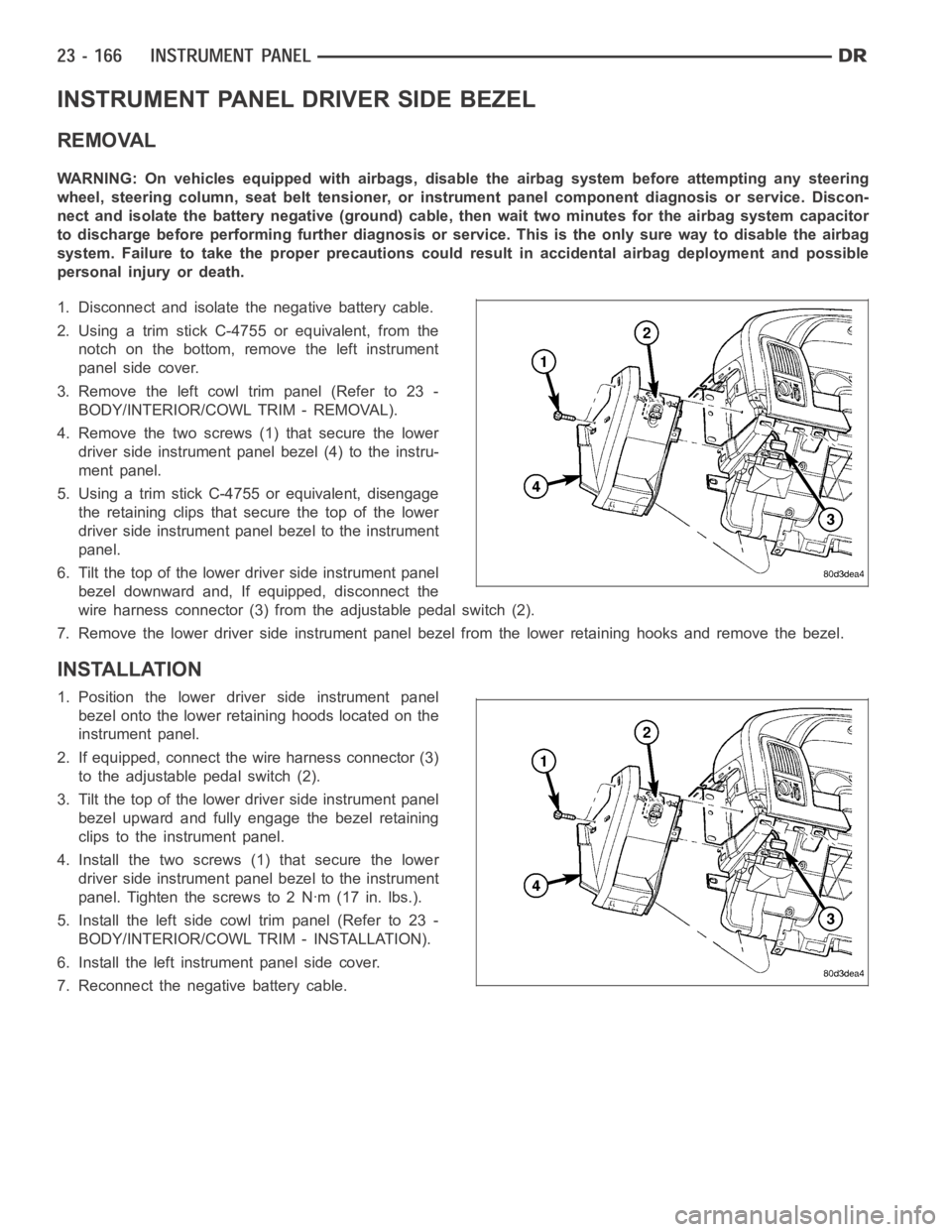
4. Remove the two screws (1) that secure the lower
driver side instrument panel bezel (4) to the instru-
ment panel.
5. Using a trim stick C-4755 or equivalent, disengage
the retaining clips that secure the top of the lower
driver side instrument panel bezel to the instrument
panel.
6. Tilt the top of the lower driver side instrument panel
bezel downward and, If equipped, disconnect the
wire harness connector (3) from the adjustable pedal switch (2).
7. Remove the lower driver side instrument panel bezel from the lower retaining hooks and remove the bezel.
INSTALLATION
1. Position the lower driver side instrument panel
bezel onto the lower retaining hoods located on the
instrument panel.
2. If equipped, connect the wire harness connector (3)
to the adjustable pedal switch (2).
3. Tilt the top of the lower driver side instrument panel
bezel upward and fully engage the bezel retaining
clips to the instrument panel.
4. Install the two screws (1) that secure the lower
driver side instrument panel bezel to the instrument
panel. Tighten the screws to 2 Nꞏm (17 in. lbs.).
5. Install the left side cowl trim panel (Refer to 23 -
BODY/INTERIOR/COWL TRIM - INSTALLATION).
6. Install the left instrument panel side cover.
7. Reconnect the negative battery cable.
Page 4504 of 5267
INSTRUMENT PANEL LOWER SURROUND
REMOVAL
WARNING: On vehicles equipped with airbags, disable the airbag system before attempting any steering
wheel, steering column, seat belt tensioner, or instrument panel component diagnosis or service. Discon-
nect and isolate the battery negative (ground) cable, then wait two minutes for the airbag system capacitor
to discharge before performing further diagnosis or service. This is the only sure way to disable the airbag
system. Failure to take the proper precautions could result in accidentalairbag deployment and possible
personal injury or death.
1. Disconnect and isolate the negative battery cable.
2. Using a trim stick C-4755 or equivalent, from the
notch on the bottom, remove the right instrument
panel side cover.
3. Remove the right side cowl trim panel (Refer to 23
- BODY/INTERIOR/COWL TRIM - REMOVAL).
4. Remove the glove box (Refer to 23 - BODY/IN-
STRUMENT PANEL/GLOVE BOX - REMOVAL).
5. Remove the cup holder or storage bin (depending
on application) (Refer to 23 - BODY/INSTRUMENT
PANEL/CUPHOLDER-REMOVAL)or(Referto23
- BODY/INSTRUMENT PANEL/STORAGE BIN -
REMOVAL).
6. Remove the ash receiver (Refer to 23 - BODY/IN-
STRUMENT PANEL/ASH RECEIVER -
REMOVAL).
7. Remove the steering column opening cover (Refer
to 23 - BODY/INSTRUMENT PANEL/STEERING
COLUMN OPENING COVER - REMOVAL).
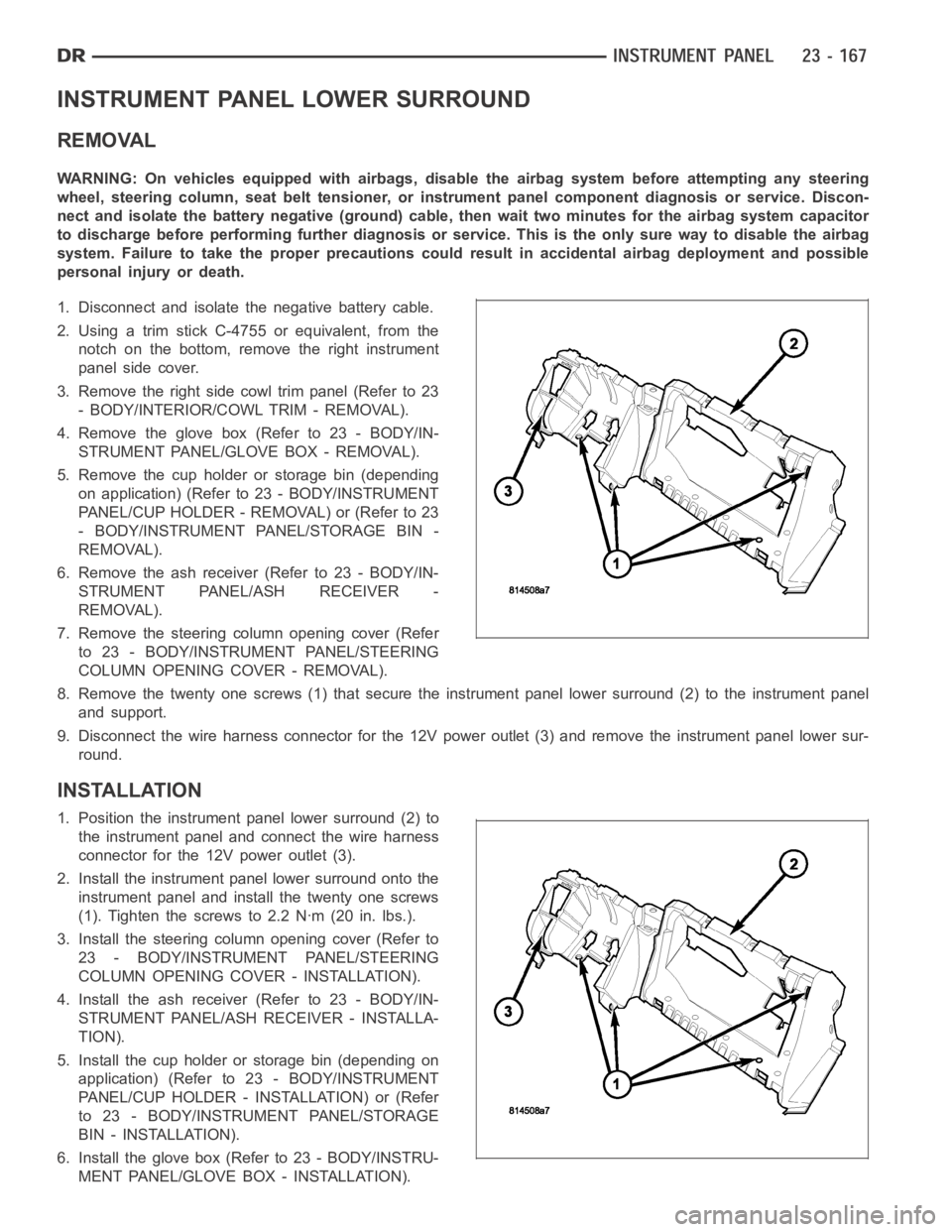
8. Remove the twenty one screws (1) that secure the instrument panel lower surround (2) to the instrument panel
and support.
9. Disconnect the wire harness connector for the 12V power outlet (3) and remove the instrument panel lower sur-
round.
INSTALLATION
1. Position the instrument panel lower surround (2) to
the instrument panel and connect the wire harness
connector for the 12V power outlet (3).
2. Install the instrument panel lower surround onto the
instrument panel and install the twenty one screws
(1). Tighten the screws to 2.2 Nꞏm (20 in. lbs.).
3. Install the steering column opening cover (Refer to
23 - BODY/INSTRUMENT PANEL/STEERING
COLUMN OPENING COVER - INSTALLATION).
4. Install the ash receiver (Refer to 23 - BODY/IN-
STRUMENT PANEL/ASH RECEIVER - INSTALLA-
TION).
5. Install the cup holder or storage bin (depending on
application) (Refer to 23 - BODY/INSTRUMENT
PANEL/CUP HOLDER - INSTALLATION) or (Refer
to 23 - BODY/INSTRUMENT PANEL/STORAGE
BIN - INSTALLATION).
6. Install the glove box (Refer to 23 - BODY/INSTRU-
MENT PANEL/GLOVE BOX - INSTALLATION).
Page 4512 of 5267
STORAGE BIN
REMOVAL
WARNING: On vehicles equipped with airbags, disable the airbag system before attempting any steering
wheel, steering column, seat belt tensioner, or instrument panel component diagnosis or service. Discon-
nect and isolate the battery negative (ground) cable, then wait two minutes for the airbag system capacitor
to discharge before performing further diagnosis or service. This is the only sure way to disable the airbag
system. Failure to take the proper precautions could result in accidentalairbag deployment and possible
personal injury or death.
NOTE: A storage bin replaces the cup holder in
the instrument panel when the vehicle is equipped
with a floor console.
1. Remove the instrument panel center bezel (Refer
to 23 - BODY/INSTRUMENT PANEL/INSTRU-
MENT PANEL CENTER BEZEL - REMOVAL).
2. Removethefloorconsole(Referto23-BODY/IN-
TERIOR/FLOOR CONSOLE - REMOVAL).
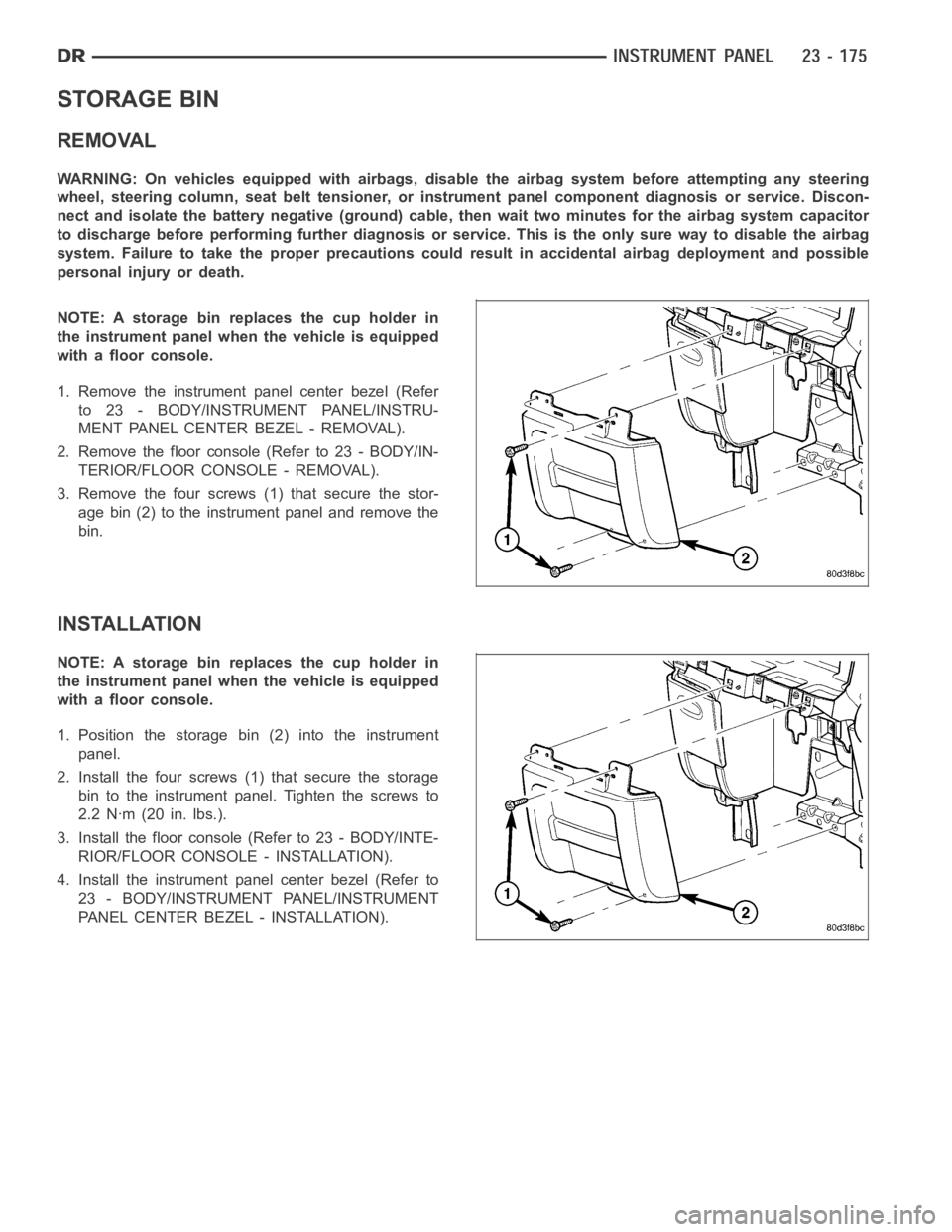
3. Remove the four screws (1) that secure the stor-
age bin (2) to the instrument panel and remove the
bin.
INSTALLATION
NOTE: A storage bin replaces the cup holder in
the instrument panel when the vehicle is equipped
with a floor console.
1. Position the storage bin (2) into the instrument
panel.
2. Install the four screws (1) that secure the storage
bin to the instrument panel. Tighten the screws to
2.2 Nꞏm (20 in. lbs.).
3. Install the floor console (Refer to 23 - BODY/INTE-
RIOR/FLOOR CONSOLE - INSTALLATION).
4. Install the instrument panel center bezel (Refer to
23 - BODY/INSTRUMENT PANEL/INSTRUMENT
PANEL CENTER BEZEL - INSTALLATION).
Page 4534 of 5267
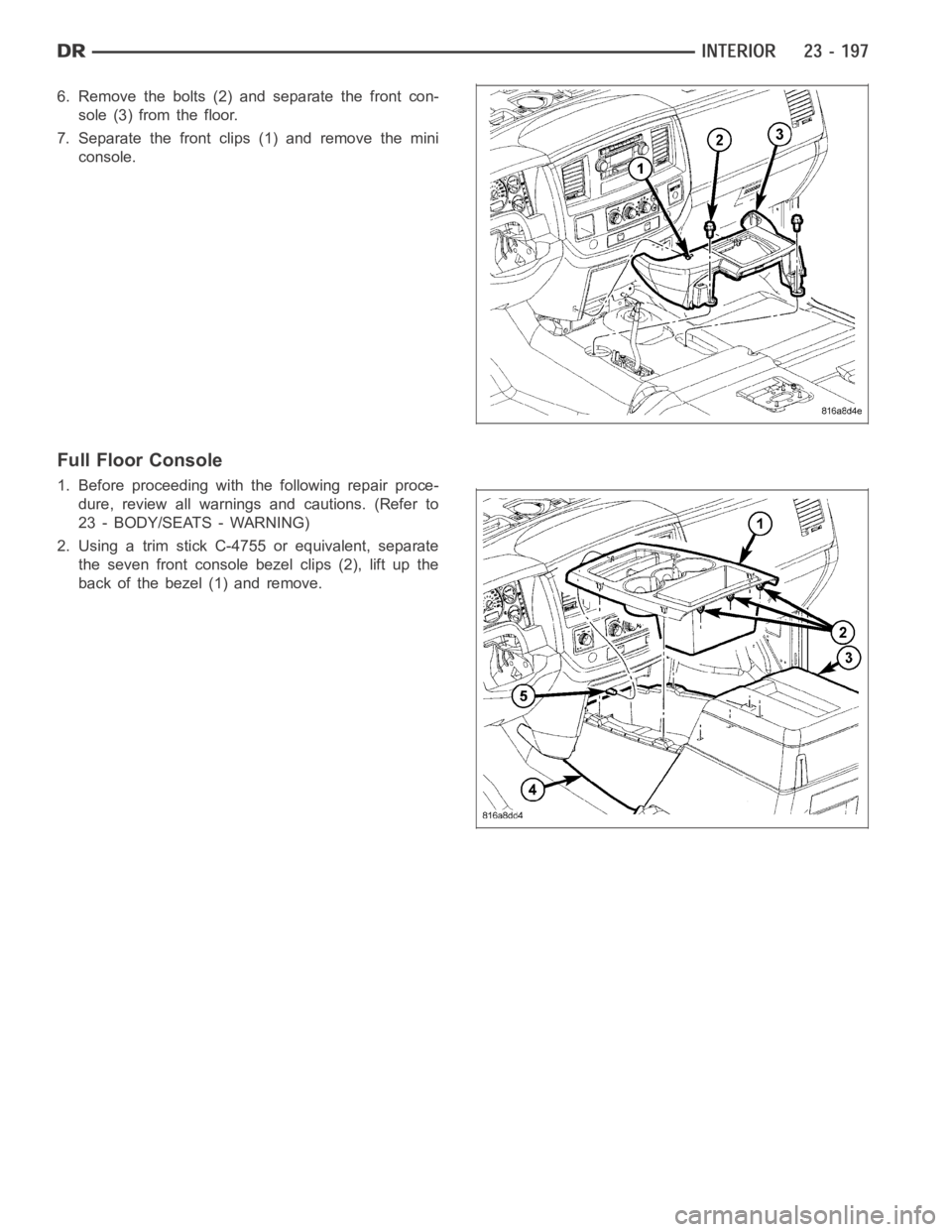
6. Remove the bolts (2) and separate the front con-
sole (3) from the floor.
7. Separate the front clips (1) and remove the mini
console.
Full Floor Console
1. Before proceeding with the following repair proce-
dure, review all warnings and cautions. (Refer to
23 - BODY/SEATS - WARNING)
2. Using a trim stick C-4755 or equivalent, separate
the seven front console bezel clips (2), lift up the
back of the bezel (1) and remove.
Page 4538 of 5267
Full Floor Console
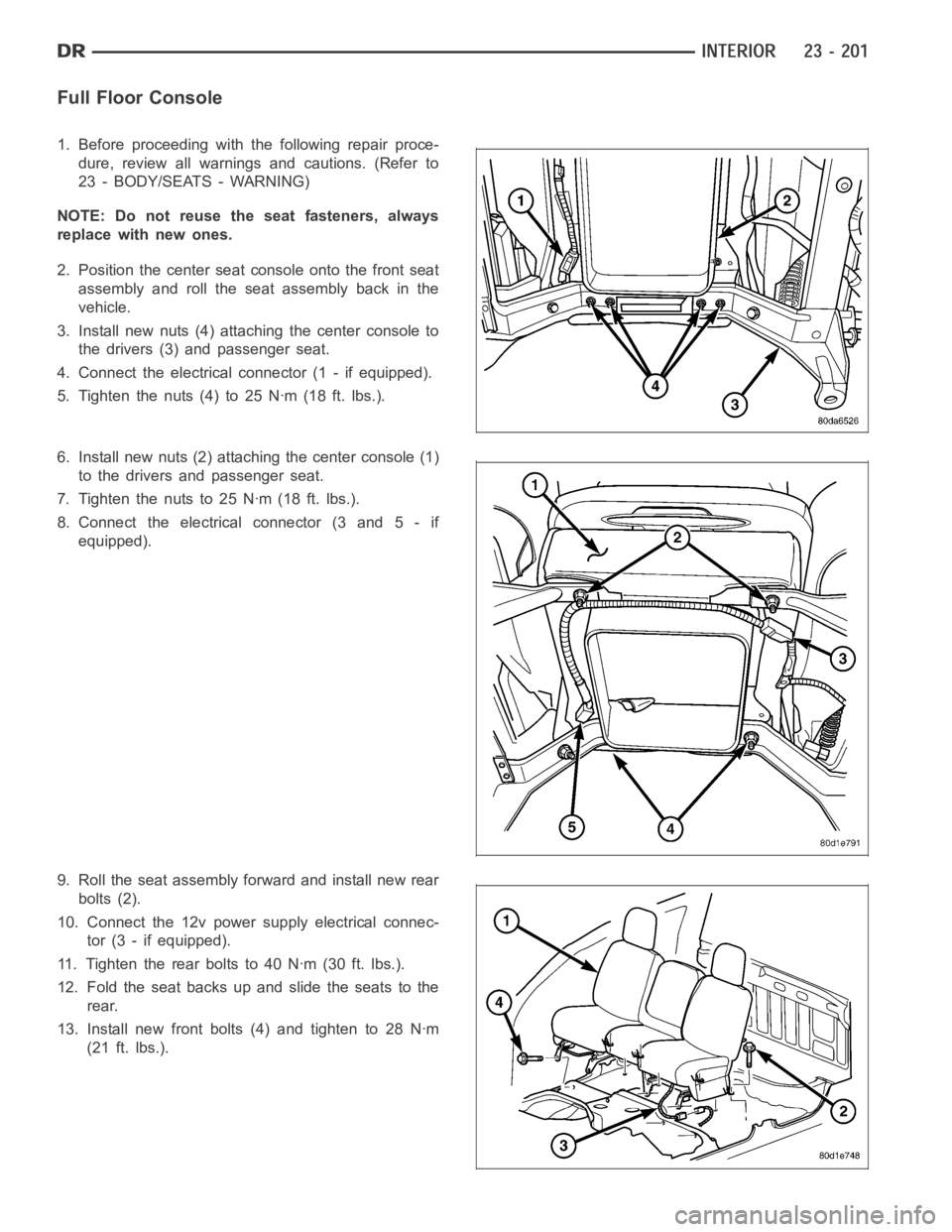
1. Before proceeding with the following repair proce-
dure, review all warnings and cautions. (Refer to
23 - BODY/SEATS - WARNING)
NOTE: Do not reuse the seat fasteners, always
replace with new ones.
2. Position the center seat console onto the front seat
assembly and roll the seat assembly back in the
vehicle.
3. Install new nuts (4) attaching the center console to
the drivers (3) and passenger seat.
4. Connect the electrical connector (1 - if equipped).
5. Tighten the nuts (4) to 25 Nꞏm (18 ft. lbs.).
6. Install new nuts (2) attaching the center console (1)
to the drivers and passenger seat.
7. Tightenthenutsto25Nꞏm(18ft.lbs.).
8. Connect the electrical connector (3 and 5 - if
equipped).
9. Roll the seat assembly forward and install new rear
bolts (2).
10. Connect the 12v power supply electrical connec-
tor (3 - if equipped).
11. Tighten the rear bolts to 40 Nꞏm (30 ft. lbs.).
12. Fold the seat backs up and slide the seats to the
rear.
13. Install new front bolts (4) and tighten to 28 Nꞏm
(21 ft. lbs.).
Page 4556 of 5267
PA I N T T O U C H - U P
DESCRIPTION
If the painted metal surface of a vehicle becomes scratched or chipped, it should be touched-up as soon as pos-
sible to avoid corrosion.
WARNING: Use an OSHA approved respirator and safety glasses when sprayingpaint or solvents in a con-
fined area. Failure to follow this warning may result in possible personalinjury or death.
When repairing painted metal surfaces, for best results, use MOPAR
Scratch Filler/Primer, Touch-Up Paints and
Clear Top Coat (Refer to VEHICLE DATA/VEHICLE INFORMATION/BODY CODE PLATE - DESCRIPTION) for
Body Code Plate information.
STANDARD PROCEDURE
PA I N T T O U C H - U P
1. Scrape any loose paint and corrosion from inside the scratch or chip.
WARNING: Avoid prolonged skin contact with petroleum or alcohol–based cleaning solvents. Failure to fol-
low this warning can result in possible personal injury or death.
2. Clean affected area with MOPAR
Tar/Road Oil Remover or equivalent, and allow to dry.
3. Fill the inside of the scratch or chip with a coat of filler/primer. Do notoverlap primer onto good surface finish.
The applicator brush should be wet enough to puddle-fill the scratch or chip without running. Do not stroke brush
applicator on body surface. Allow the filler/primer to dry hard.
4. Cover the filler/primer with color touch-up paint. Do not overlap touch-up color onto the original color coat around
the scratch or chip. Butt the new color to the original color, if possible. Do not stroke applicator brush on body
surface. Allow touch-up paint to dry hard.
5. On vehicles without clearcoat, the touch-up color can be lightly finesse sanded (1500 grit) and polished with
rubbing compound.
6. On vehicles with clearcoat, apply clear top coat to touch-up paint with the same technique as described in Step
4. Allow clear top coat to dry hard. If desired, the clearcoat can be lightlyfinesse sanded (1500 grit) and polished
with rubbing compound.
Page 4558 of 5267
page page
SEATS
WARNING
WARNINGS - RESTRAINT SYSTEM . . ....... 222
CENTER SEAT
REMOVAL ................................... 223
INSTALLATION .............................. 224
CENTER ARMREST / SEAT BACK
REMOVAL ................................... 225
INSTALLATION .............................. 225
CENTER SEAT BACK INERTIA HINGE COVER
REMOVAL ................................... 226
INSTALLATION .............................. 227
CENTER SEAT BACK HINGE
REMOVAL ................................... 228
INSTALLATION .............................. 230
CENTER SEAT BACK LID
REMOVAL ................................... 232
INSTALLATION .............................. 232
CENTER SEAT CUSHION
REMOVAL ................................... 233
INSTALLATION .............................. 233
CENTER SEAT CUSHION COVER
REMOVAL ................................... 234
INSTALLATION .............................. 234
HEADREST
REMOVAL ................................... 235
INSTALLATION .............................. 235
HEADREST SLEEVE
REMOVAL ................................... 236
INSTALLATION .............................. 236
SEAT - FRONT
REMOVAL ................................... 237
INSTALLATION .............................. 238
SEAT BACK CUSHION / COVER - FRONT
REMOVAL ................................... 240
INSTALLATION .............................. 240
LUMBAR SUPPORT HANDLE/BEZEL
REMOVAL ................................... 241INSTALLATION .............................. 241
SEAT CUSHION / COVER - FRONT
REMOVAL ................................... 243
INSTALLATION .............................. 243
SEAT RISER - FRONT
REMOVAL ................................... 244
INSTALLATION .............................. 244
SEAT - REAR
REMOVAL ................................... 245
INSTALLATION .............................. 246
SEAT BACK - REAR
REMOVAL ................................... 247
INSTALLATION .............................. 247
SEAT BACK CUSHION / COVER - REAR
REMOVAL ................................... 248
INSTALLATION .............................. 248
SEAT CUSHION / COVER - REAR
REMOVAL ................................... 249
INSTALLATION .............................. 249
SEAT CUSHION FRAME - REAR
REMOVAL ................................... 250
INSTALLATION .............................. 250
UNDER SEAT STORAGE BIN LID
REMOVAL ................................... 251
INSTALLATION .............................. 251
UNDER SEAT STORAGE BIN
REMOVAL ................................... 252
INSTALLATION .............................. 252
UNDER SEAT STORAGE BIN COVERING
REMOVAL ................................... 253
INSTALLATION .............................. 253
UNDER SEAT STORAGE BIN LATCH
REMOVAL ................................... 254
INSTALLATION .............................. 254
SEAT BACK REAR - FOOTMANS LOOP
BRACKETS
REMOVAL ................................... 255
INSTALLATION .............................. 255
Page 4559 of 5267
SEATS
WARNING
WARNINGS - RESTRAINT SYSTEM
WARNING: To avoid personal injury or death, during and following any seat beltorchildrestraintanchor
service, carefully inspect all seat belts, buckles, mounting hardware, retractors, tether straps, and anchors
for proper installation, operation, or damage. Replace any belt that is cut, frayed, or torn. Straighten any
belt that is twisted. Tighten any loose fasteners. Replace any belt that has a damaged or ineffective buckle
or retractor. Replace any belt that has a bent or damaged latch plate or anchor plate. Replace any child
restraint anchor or the unit to which the anchor is integral that has been bent or damaged. Never attempt to
repair a seat belt or child restraint component. Always replace damaged orineffective seat belt and child
restraint components with the correct, new and unused replacement parts listed in the DaimlerChrysler
Mopar
Parts Catalog.
WARNING: To avoid personal injury or death, on vehicles equipped with airbags, disable the supplemental
restraint system before attempting any steering wheel, steering column,airbag, seat belt tensioner, impact
sensor, or instrument panel component diagnosis or service. Disconnect and isolate the battery negative
(ground) cable, then wait two minutes for the system capacitor to discharge before performing further diag-
nosis or service. This is the only sure way to disable the supplemental restraint system. Failure to take the
proper precautions could result in accidental airbag deployment.
WARNING: To avoid personal injury or death on vehicles equipped with airbags, before performing any
welding operations disconnect and isolate the battery negative (ground)cable and disconnect all wire har-
ness connectors from the Occupant Restraint Controller (ORC). Failure totake the proper precautions could
result in accidental airbag deployment and other possible damage to the supplemental restraint system cir-
cuits and components.
WARNING: To avoid personal injury or death, do not attempt to dismantle an airbag unit or tamper with its
inflator. Do not puncture, incinerate, or bring into contact with electricity. Do not store at temperatures
exceeding 93° C (200° F). An airbag inflator unit may contain sodium azide and potassium nitrate. These
materials are poisonous and extremely flammable. Contact with acid, water, or heavy metals may produce
harmful and irritating gases (sodium hydroxide is formed in the presence of moisture) or combustible com-
pounds. An airbag inflator unit may also contain a gas canister pressurizedtoover2500psi.
WARNING: To avoid personal injury or death, when handling a seat belt tensioner retractor, proper care
should be exercised to keep fingers out from under the retractor cover and away from the seat belt webbing
where it exits from the retractor cover.
WARNING: To avoid personal injury or death, replace all restraint system components only with parts spec-
ified in the DaimlerChrysler Mopar
Parts Catalog. Substitute parts may appear interchangeable, but internal
differences may result in inferior occupant protection.
WARNING: To avoid personal injury or death, the fasteners, screws, and bolts originally used for the
restraint system components must never be replaced with any substitutes.These fasteners have special
coatings and are specifically designed for the restraint system. Any timea new fastener is needed, replace
it with the correct fasteners provided in the service package or specifiedin the DaimlerChrysler Mopar
Parts Catalog.
WARNING: To avoid personal injury or death, when a steering column has an airbag unit attached, never
place the column on the floor or any other surface with the steering wheel orairbag unit face down.
Page 4560 of 5267
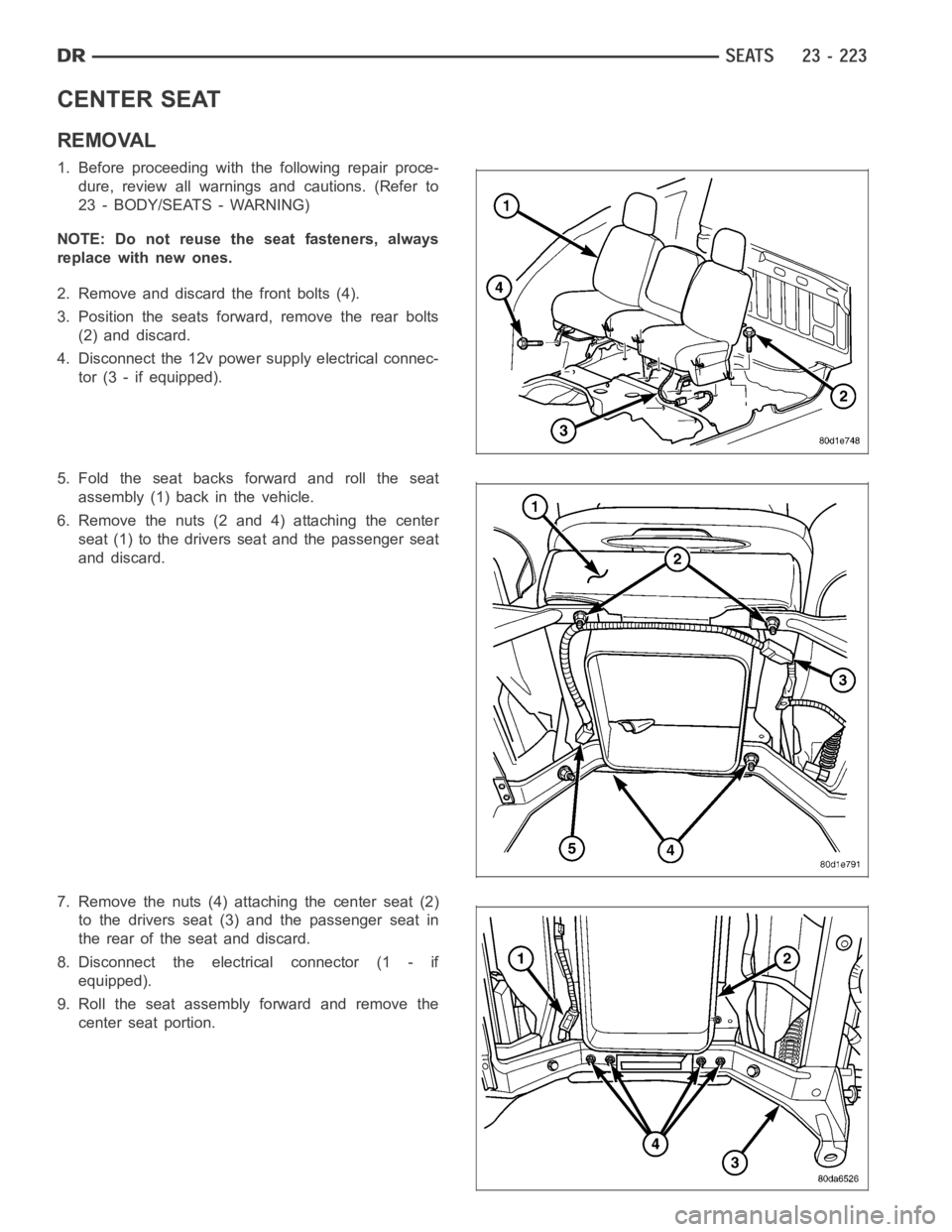
CENTER SEAT
REMOVAL
1. Before proceeding with the following repair proce-
dure, review all warnings and cautions. (Refer to
23 - BODY/SEATS - WARNING)
NOTE: Do not reuse the seat fasteners, always
replace with new ones.
2. Remove and discard the front bolts (4).
3. Position the seats forward, remove the rear bolts
(2) and discard.
4. Disconnect the 12v power supply electrical connec-
tor (3 - if equipped).
5. Fold the seat backs forward and roll the seat
assembly (1) back in the vehicle.
6. Remove the nuts (2 and 4) attaching the center
seat (1) to the drivers seat and the passenger seat
and discard.
7. Remove the nuts (4) attaching the center seat (2)
to the drivers seat (3) and the passenger seat in
the rear of the seat and discard.
8. Disconnect the electrical connector (1 - if
equipped).
9. Roll the seat assembly forward and remove the
center seat portion.
Page 4561 of 5267
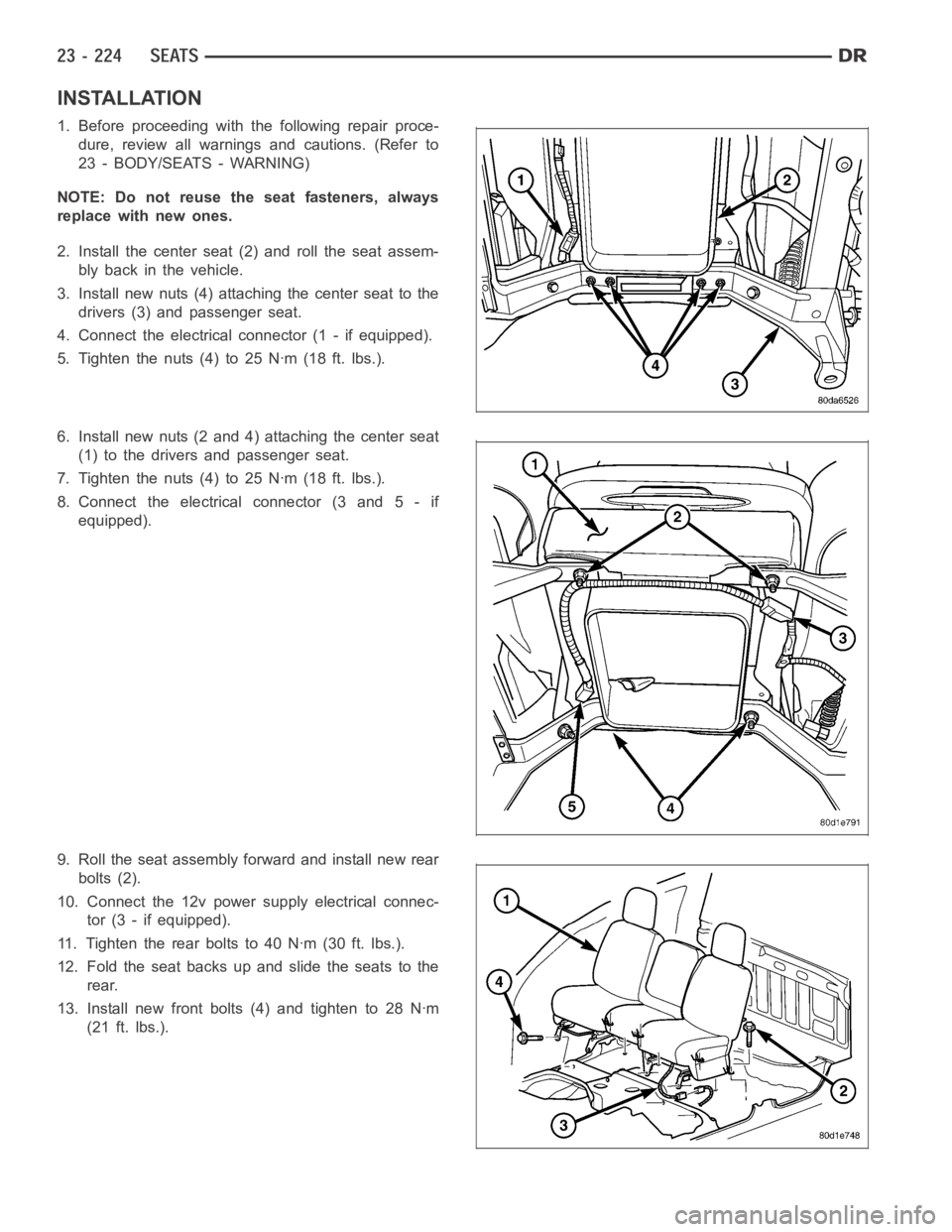
INSTALLATION
1. Before proceeding with the following repair proce-
dure, review all warnings and cautions. (Refer to
23 - BODY/SEATS - WARNING)
NOTE: Do not reuse the seat fasteners, always
replace with new ones.
2. Install the center seat (2) and roll the seat assem-
bly back in the vehicle.
3. Install new nuts (4) attaching the center seat to the
drivers (3) and passenger seat.
4. Connect the electrical connector (1 - if equipped).
5. Tighten the nuts (4) to 25 Nꞏm (18 ft. lbs.).
6. Install new nuts (2 and 4) attaching the center seat
(1) to the drivers and passenger seat.
7. Tighten the nuts (4) to 25 Nꞏm (18 ft. lbs.).
8. Connect the electrical connector (3 and 5 - if
equipped).
9. Roll the seat assembly forward and install new rear
bolts (2).
10. Connect the 12v power supply electrical connec-
tor (3 - if equipped).
11. Tighten the rear bolts to 40 Nꞏm (30 ft. lbs.).
12. Fold the seat backs up and slide the seats to the
rear.
13. Install new front bolts (4) and tighten to 28 Nꞏm
(21 ft. lbs.).