light DODGE SPRINTER 2007 2.G Owner's Manual
[x] Cancel search | Manufacturer: DODGE, Model Year: 2007, Model line: SPRINTER, Model: DODGE SPRINTER 2007 2.GPages: 393, PDF Size: 7.61 MB
Page 68 of 393
67 Controls in detail
Key positions
3
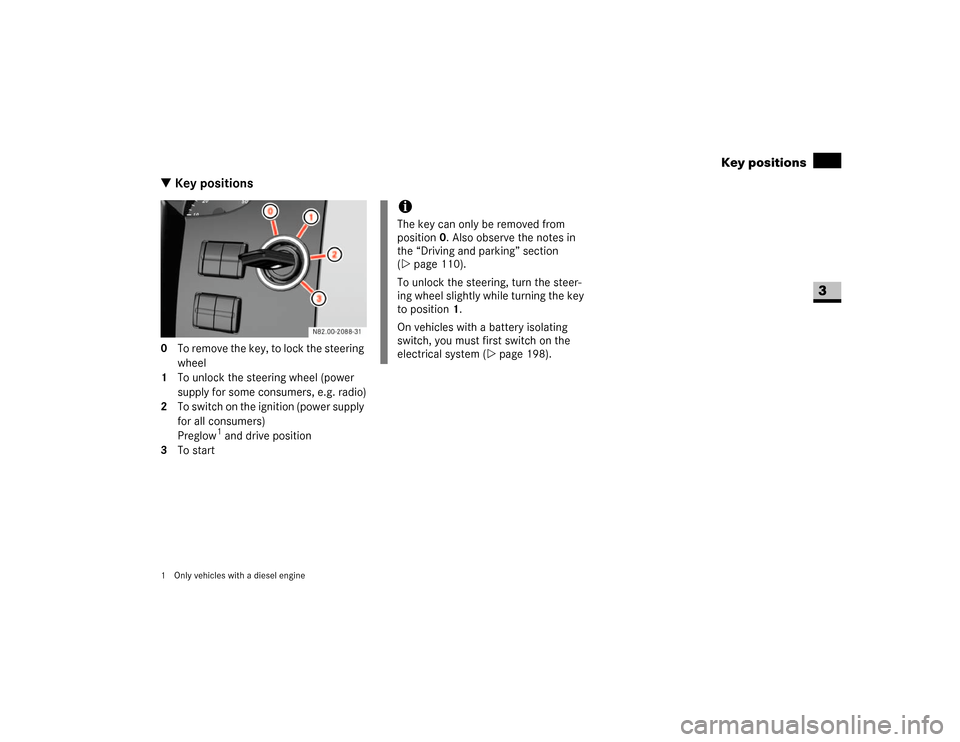
\3 Key positions0 To remove the key, to lock the steering
wheel
1 To unlock the steering wheel (power
supply for some consumers, e.g. radio)
2 To switch on the ignition (power supply
for all consumers)
Preglow
1 and drive position
3 To start
1 Only vehicles with a diesel engine
iThe key can only be removed from
position0. Also observe the notes in
the “Driving and parking” section
(\2page 110).
To unlock the steering, turn the steer-
ing wheel slightly while turning the key
to position 1.
On vehicles with a battery isolating
switch, you must first switch on the
electrical system (\2page 198).
Page 69 of 393
68 Controls in detailSeats
3
Driver’s and co-driver’s seatsWarning
G
Only adjust the seats when the vehicle is
stationary and the handbrake is applied. You
could otherwise lose control of the vehicle
as a result of the seat moving and cause an
accident.Warning
G
Make sure that nobody can become trapped
as the seat is adjusted. Never place your
hands under the seat or near to moving
parts.
Your seat must be adjusted in such a way
that you can wear the seat belt correctly
(\2page 27).
Observe the following points:
\4Position the backrest as vertically as
possible and sit upright.
\4Avoid seat positions that do not allow
the seat belt to be routed correctly. The
shoulder section of the seat belt must
be routed across the middle of your
shoulder and must fit closely across
your chest. The lap section of the belt
must be routed as low as possible
across your pelvic area, i.e. across your
hip joints. Never drive with the backrest
tilted too far back.
\4Your arms should be slightly bent when
you are holding the steering wheel.
\4The distance from the pedals should be
such that you can depress them fully.
\4Adjust the head restraint in such a way
that the upper edge of the head restraint
is level with your head.
\4Make sure that you hear the seat en-
gage. Otherwise, the seat is not correct-
ly locked in place.
Injuries may be caused if these notes are
not observed.Warning
G
Avoid seat positions in which you cannot
wear your seat belt correctly. They are a
safety hazard and must therefore be
avoided.
Page 70 of 393
69 Controls in detail
Seats
3
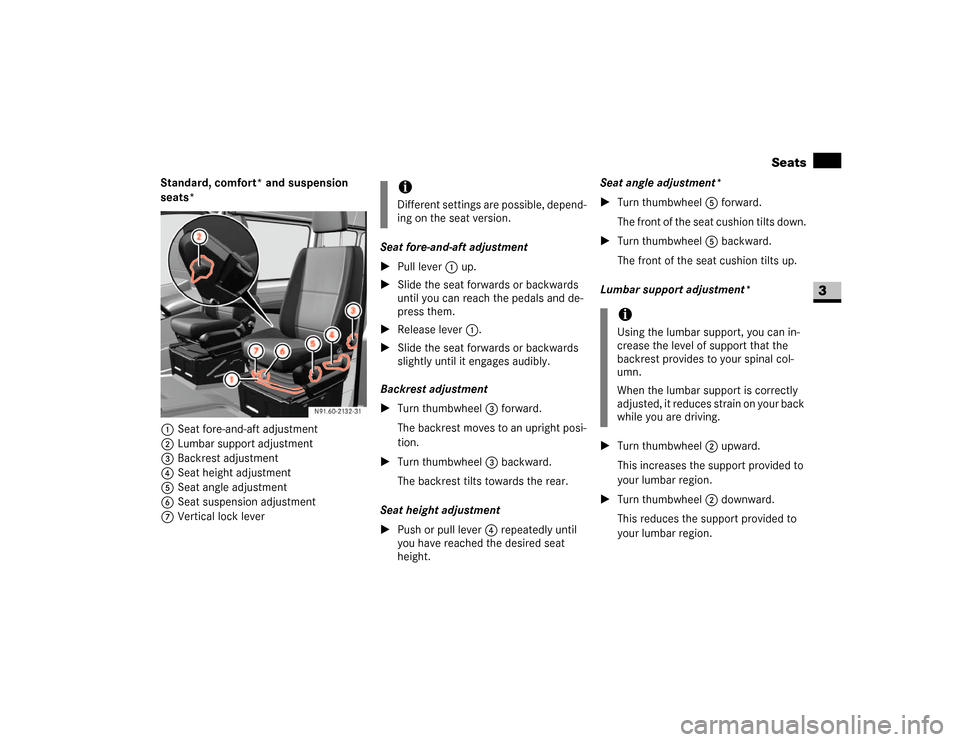
Standard, comfort* and suspension
seats*
1Seat fore-and-aft adjustment
2Lumbar support adjustment
3Backrest adjustment
4Seat height adjustment
5Seat angle adjustment
6Seat suspension adjustment
7Vertical lock leverSeat fore-and-aft adjustment
\1Pull lever 1 up.
\1Slide the seat forwards or backwards
until you can reach the pedals and de-
press them.
\1Release lever1.
\1Slide the seat forwards or backwards
slightly until it engages audibly.
Backrest adjustment
\1Turn thumbwheel3 forward.
The backrest moves to an upright posi-
tion.
\1Turn thumbwheel3 backward.
The backrest tilts towards the rear.
Seat height adjustment
\1Push or pull lever4 repeatedly until
you have reached the desired seat
height.Seat angle adjustment*
\1Turn thumbwheel5 forward.
The front of the seat cushion tilts down.
\1Turn thumbwheel5 backward.
The front of the seat cushion tilts up.
Lumbar support adjustment*
\1Turn thumbwheel2 upward.
This increases the support provided to
your lumbar region.
\1Turn thumbwheel2 downward.
This reduces the support provided to
your lumbar region.
iDifferent settings are possible, depend-
ing on the seat version.
iUsing the lumbar support, you can in-
crease the level of support that the
backrest provides to your spinal col-
umn.
When the lumbar support is correctly
adjusted, it reduces strain on your back
while you are driving.
Page 72 of 393
71 Controls in detail
Seats
3
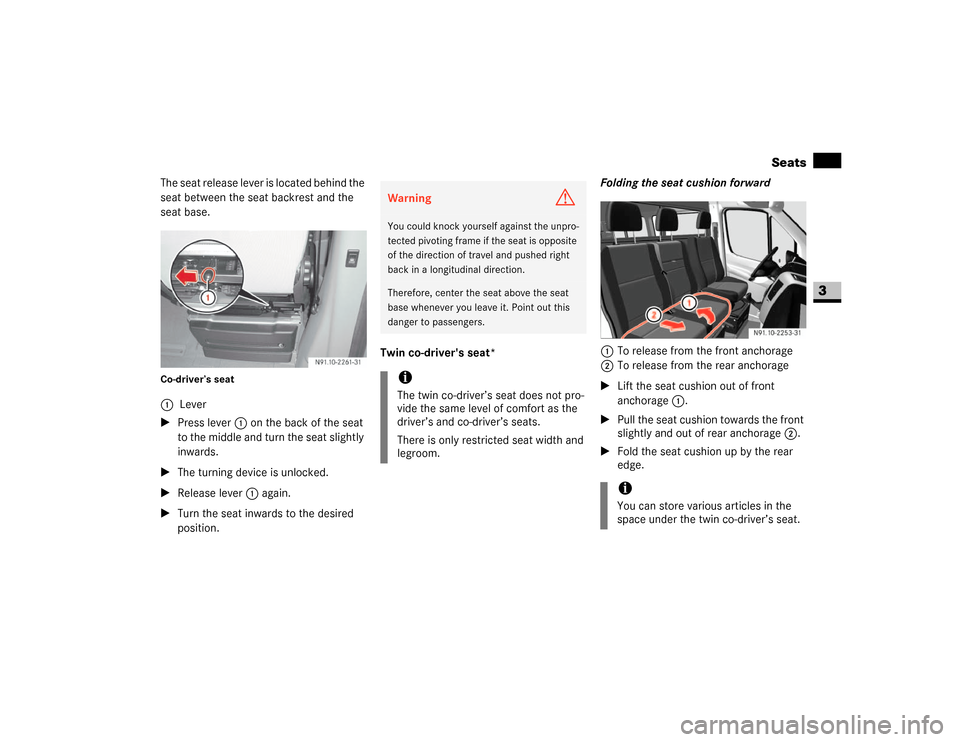
The seat release lever is located behind the
seat between the seat backrest and the
seat base.Co-driver’s seat\1Press lever 1 on the back of the seat
to the middle and turn the seat slightly
inwards.
\1The turning device is unlocked.
\1Release lever 1 again.
\1Turn the seat inwards to the desired
position.Twin co-driver's seat*Folding the seat cushion forward
1To release from the front anchorage
2To release from the rear anchorage
\1Lift the seat cushion out of front
anchorage1.
\1Pull the seat cushion towards the front
slightly and out of rear anchorage2.
\1Fold the seat cushion up by the rear
edge. 1Lever
Warning
G
You could knock yourself against the unpro-
tected pivoting frame if the seat is opposite
of the direction of travel and pushed right
back in a longitudinal direction.Therefore, center the seat above the seat
base whenever you leave it. Point out this
danger to passengers.iThe twin co-driver’s seat does not pro-
vide the same level of comfort as the
driver’s and co-driver’s seats.
There is only restricted seat width and
legroom.
iYou can store various articles in the
space under the twin co-driver’s seat.
Page 78 of 393
77 Controls in detail
Lighting
3
Legal requirements may impose variations
in certain countries.
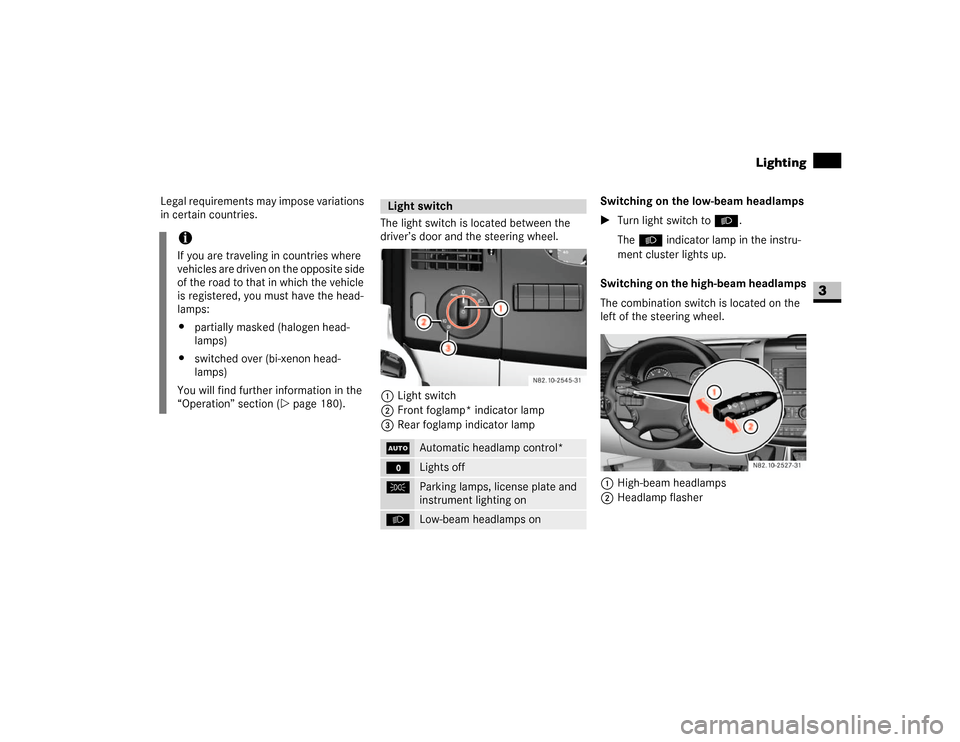
The light switch is located between the
driver’s door and the steering wheel.
1Light switch
2Front foglamp* indicator lamp
3Rear foglamp indicator lampSwitching on the low-beam headlamps
\1Turn light switch to B.
TheB indicator lamp in the instru-
ment cluster lights up.
Switching on the high-beam headlamps
The combination switch is located on the
left of the steering wheel.
1High-beam headlamps
2Headlamp flasher
iIf you are traveling in countries where
vehicles are driven on the opposite side
of the road to that in which the vehicle
is registered, you must have the head-
lamps:
\4partially masked (halogen head-
lamps)
\4switched over (bi-xenon head-
lamps)
You will find further information in the
“Operation” section (\2page 180).
Light switchU
Automatic headlamp control*
M
Lights off
C
Parking lamps, license plate and
instrument lighting on
B
Low-beam headlamps on
N82.10-2527-31
Page 79 of 393
78 Controls in detailLighting
3
\1Turn key to position1 in ignition lock
(\2page 67).
\1Turn light switch to B.
\1Press combination switch forward 1.
The indicator lampA in the instru-
ment cluster lights up.
Headlamp flasher
\1Turn key to position1 in ignition lock
(\2page 67).
\1Pull combination switch briefly in
direction2.
Constant headlamp mode*
On vehicles with steering wheel buttons,
you can set constant headlamp mode
(\2page 102). This does not apply to coun-
tries in which there is a legal requirement
to use constant headlamp mode.\1Turn light switch to M.
The low-beam headlamps, parking
lamps and license plate lamp are
switched on when the engine is
running.
TheB indicator lamp in the instru-
ment cluster lights up.
Automatic headlamp control*
The parking lamps, low-beam headlamps
and license plate lamp are switched on au-
tomatically when the brightness of ambi-
ent light falls below a predetermined level.\1Turn light switch toU.
The parking lamps are switched on / off
automatically when the key is in posi-
tion 1 (\2page 67) in the ignition lock.
The parking lamps, low-beam head-
lamps and license plate lamp are
switched on / off automatically when
the engine is running, depending on the
ambient light conditions.
Only use manual headlamp mode when
you are driving in countries where driving
with the low-beam headlamps switched on
is required by law.
\1In this case, turn the light switch to
B.
Warning
G
If the light switch is atU:
\4the headlamps could switch off tempo-
rarily due to extreme glare, e.g. from on-
coming traffic
\4the lights do not switch on automatically
in foggy conditions
Set the light switch to B. Otherwise you
are endangering yourself and others.
If it is dark, only turn the light switch from
U toB when the vehicle is stationary.
You could otherwise cause an accident if the
headlamps were to switch off briefly.
Automatic headlamp mode is only a driving
aid. You are responsible for the vehicle’s
lighting at all times.
Page 80 of 393
79 Controls in detail
Lighting
3
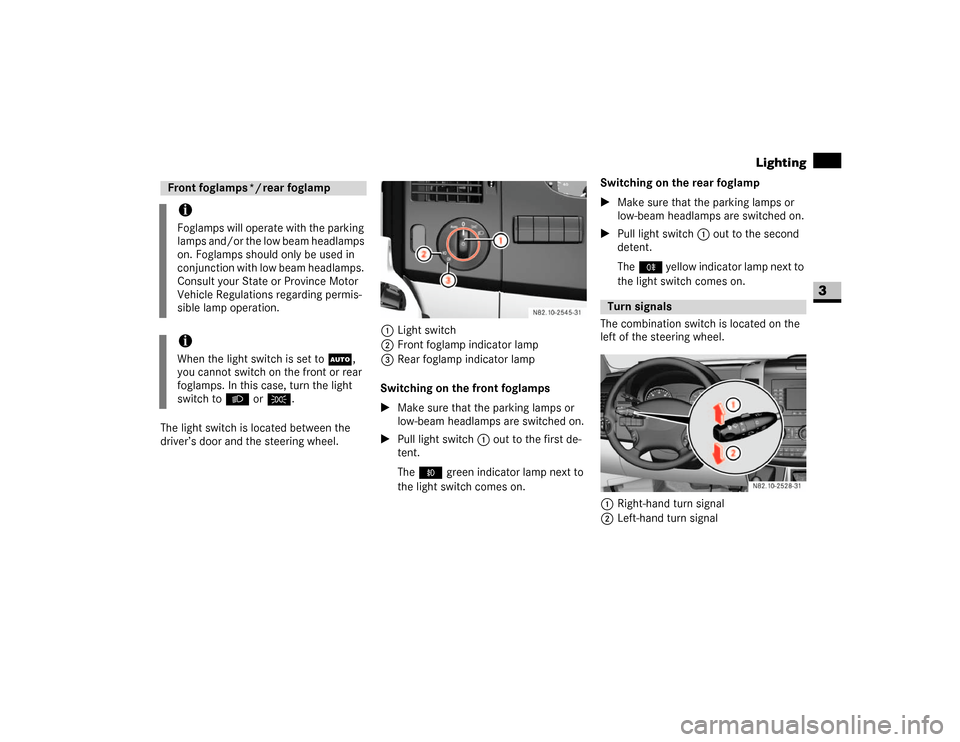
The light switch is located between the
driver’s door and the steering wheel.1Light switch
2Front foglamp indicator lamp
3Rear foglamp indicator lamp
Switching on the front foglamps
\1Make sure that the parking lamps or
low-beam headlamps are switched on.
\1Pull light switch1 out to the first de-
tent.
The‡ green indicator lamp next to
the light switch comes on.Switching on the rear foglamp
\1Make sure that the parking lamps or
low-beam headlamps are switched on.
\1Pull light switch1 out to the second
detent.
The† yellow indicator lamp next to
the light switch comes on.
The combination switch is located on the
left of the steering wheel.
1Right-hand turn signal
2Left-hand turn signalFront foglamps */ rear foglampiFoglamps will operate with the parking
lamps and/or the low beam headlamps
on. Foglamps should only be used in
conjunction with low beam headlamps.
Consult your State or Province Motor
Vehicle Regulations regarding permis-
sible lamp operation.iWhen the light switch is set toU,
you cannot switch on the front or rear
foglamps. In this case, turn the light
switch to B orC.
Turn signals
N82.10-2528-31
Page 81 of 393
80 Controls in detailLighting
3
\1Push combination switch up1 or
down 2 until it engages.
The combination switch moves back
automatically if the steering wheel is
turned sufficiently.The hazard warning lamps still operate if
the ignition is switched off and the key is
removed.
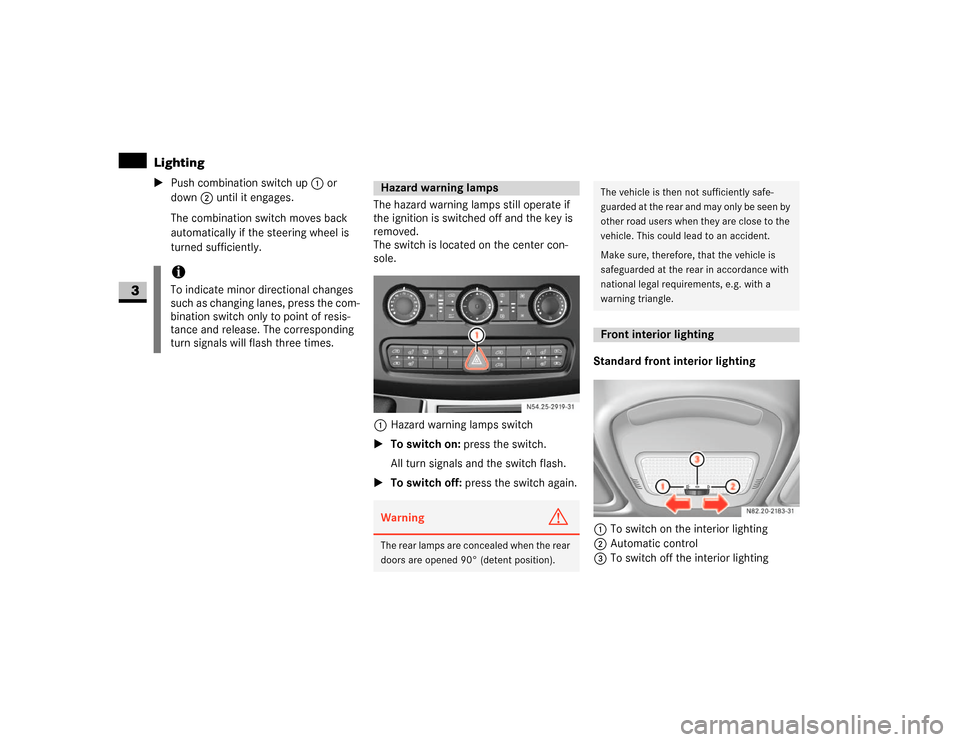
The switch is located on the center con-
sole.
1Hazard warning lamps switch
\1To switch on: press the switch.
All turn signals and the switch flash.
\1To switch off: press the switch again.Standard front interior lighting
1To switch on the interior lighting
2Automatic control
3To switch off the interior lighting
iTo indicate minor directional changes
such as changing lanes, press the com-
bination switch only to point of resis-
tance and release. The corresponding
turn signals will flash three times.
Hazard warning lampsWarning
G
The rear lamps are concealed when the rear
doors are opened 90° (detent position).
N54.25-2919-31
The vehicle is then not sufficiently safe-
guarded at the rear and may only be seen by
other road users when they are close to the
vehicle. This could lead to an accident.
Make sure, therefore, that the vehicle is
safeguarded at the rear in accordance with
national legal requirements, e.g. with a
warning triangle.Front interior lighting
Page 82 of 393
81 Controls in detail
Lighting
3
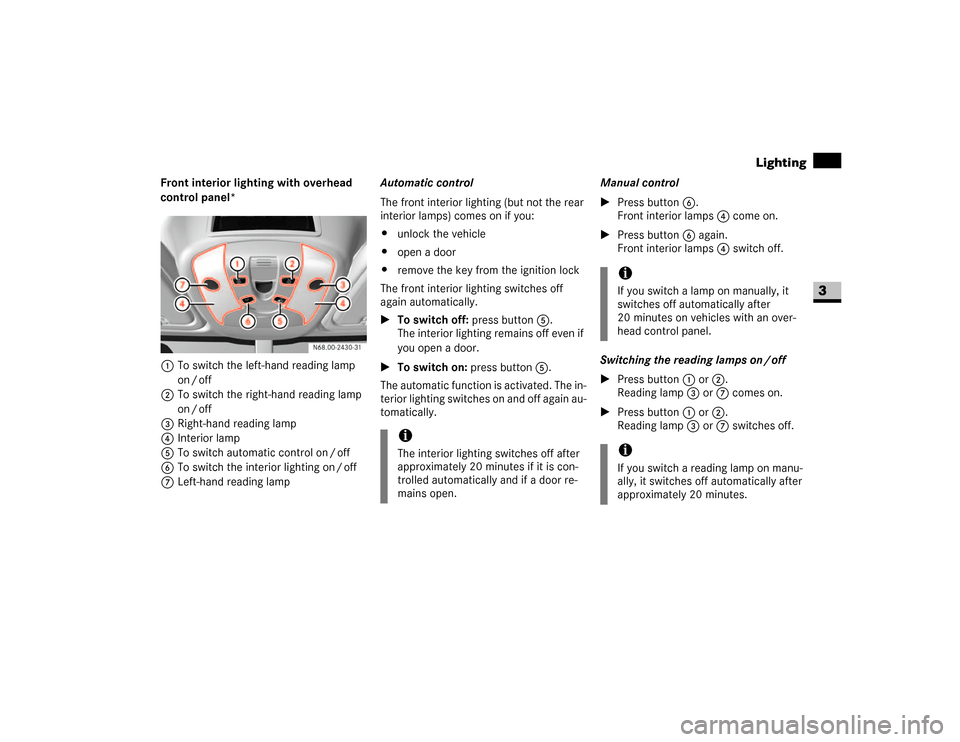
Front interior lighting with overhead
control panel*
1To switch the left-hand reading lamp
on / off
2To switch the right-hand reading lamp
on / off
3Right-hand reading lamp
4Interior lamp
5To switch automatic control on / off
6To switch the interior lighting on / off
7Left-hand reading lampAutomatic control
The front interior lighting (but not the rear
interior lamps) comes on if you:
\4unlock the vehicle
\4open a door
\4remove the key from the ignition lock
The front interior lighting switches off
again automatically.
\1To switch off: press button5.
The interior lighting remains off even if
you open a door.
\1To switch on: press button5.
The automatic function is activated. The in-
terior lighting switches on and off again au-
tomatically.Manual control
\1Press button6.
Front interior lamps 4 come on.
\1Press button6 again.
Front interior lamps 4 switch off.
Switching the reading lamps on / off
\1Press button1 or2.
Reading lamp3 or7 comes on.
\1Press button1 or2.
Reading lamp3 or7 switches off.
iThe interior lighting switches off after
approximately 20 minutes if it is con-
trolled automatically and if a door re-
mains open.
iIf you switch a lamp on manually, it
switches off automatically after
20 minutes on vehicles with an over-
head control panel.iIf you switch a reading lamp on manu-
ally, it switches off automatically after
approximately 20 minutes.
Page 83 of 393
82 Controls in detailLighting
3
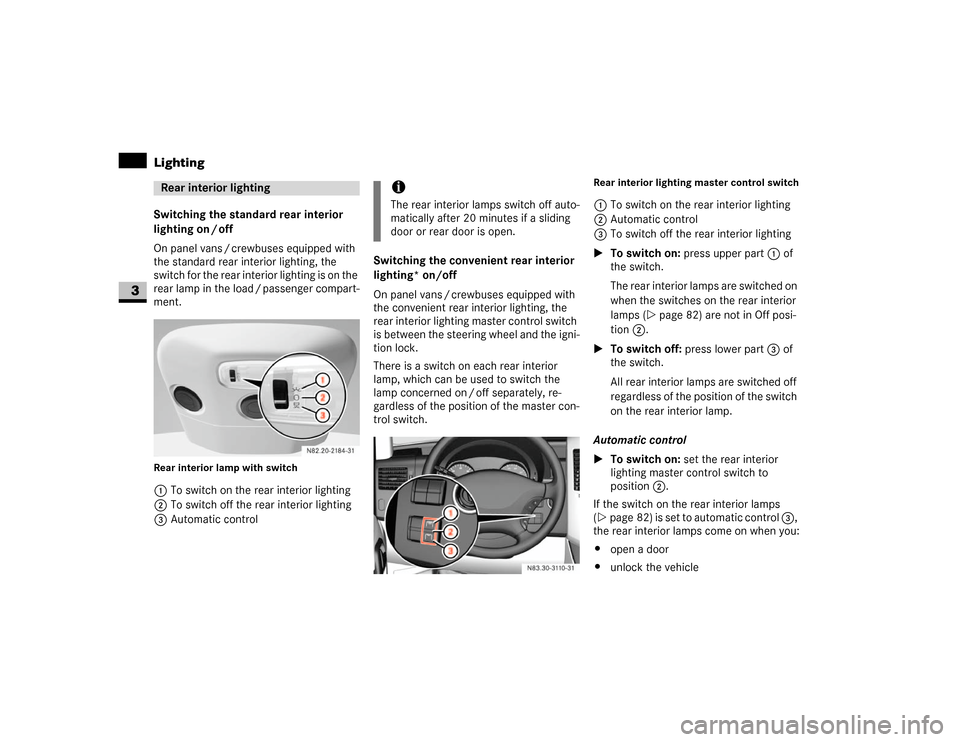
Switching the standard rear interior
lighting on / off
On panel vans / crewbuses equipped with
the standard rear interior lighting, the
switch for the rear interior lighting is on the
rear lamp in the load / passenger compart-
ment.Rear interior lamp with switch1To switch on the rear interior lighting
2To switch off the rear interior lighting
3Automatic controlSwitching the convenient rear interior
lighting* on/off
On panel vans / crewbuses equipped with
the convenient rear interior lighting, the
rear interior lighting master control switch
is between the steering wheel and the igni-
tion lock.
There is a switch on each rear interior
lamp, which can be used to switch the
lamp concerned on / off separately, re-
gardless of the position of the master con-
trol switch.
Rear interior lighting master control switch1To switch on the rear interior lighting
2Automatic control
3To switch off the rear interior lighting
\1To switch on: press upper part 1 of
the switch.
The rear interior lamps are switched on
when the switches on the rear interior
lamps (\2page 82) are not in Off posi-
tion 2.
\1To switch off: press lower part3 of
the switch.
All rear interior lamps are switched off
regardless of the position of the switch
on the rear interior lamp.
Automatic control
\1To switch on: set the rear interior
lighting master control switch to
position2.
If the switch on the rear interior lamps
(\2page 82) is set to automatic control 3,
the rear interior lamps come on when you:
\4open a door
\4unlock the vehicle
Rear interior lighting
iThe rear interior lamps switch off auto-
matically after 20 minutes if a sliding
door or rear door is open.
N83.30-3110-31