steering wheel DODGE SPRINTER 2007 2.G Manual PDF
[x] Cancel search | Manufacturer: DODGE, Model Year: 2007, Model line: SPRINTER, Model: DODGE SPRINTER 2007 2.GPages: 393, PDF Size: 7.61 MB
Page 232 of 393
231 Operation
Tires and wheels
4
TWR (T
ongue W
eight R
ating)
Maximum permissible weight on the trailer
tongue.
Uniform tire quality grading standards
A tire information system that provides
consumers with ratings for a tire’s traction,
temperature and treadwear. Ratings are
determined by tire manufacturers using
government testing procedures. The rat-
ings are molded into the side wall of the
tire.
Vehicle capacity weight
Rated cargo and luggage load plus
68 kilograms (150 lbs) times the vehicle’s
designated seating capacity.
Vehicle maximum load on the tire
Load on an individual tire that is deter-
mined by distributing to each axle its share
of the maximum loaded vehicle weight and
dividing it by two.
Tires on the front and rear axles of vehicles
operate at different loads and perform dif-
ferent steering, driving and braking func-
tions. For these reasons, they wear at unequal rates, and develop irregular wear
patterns. These effects can be reduced by
timely rotation of tires.
The benefits of rotation are especially
worthwhile with aggressive tread designs
such as those on On/Off Road type tires.
Rotation will increase tread life, help to
maintain mud, snow, and wet traction lev-
els, and contribute to a smooth ride.
If applicable to your vehicle’s tire configu-
ration, tires can be rotated according to
the tire manufacturer’s recommended in-
tervals in the tire manufacturer’s warranty
pamphlet located in your vehicle literature
portfolio. If none is available, tires should
be rotated every 10,000 miles
(16,000 km), or sooner if necessary, ac-
cording to the degree of tire wear.
The same rotation (spinning) direction
must be maintained when mounted, see
"Direction of rotation" (\2page 204).
Rotate tires before the characteristic tire
wear pattern becomes visible (shoulder
wear on front tires and tread center wear
on rear tires).
Rotating tiresWarning
G
Rotate front and rear wheels only if they are
of the same dimension.
Changing the tire dimension for an axle
\4could cause the tire to come into con-
tact with the vehicle body or axle parts.
Damage to the tire or the vehicle may be
the result.
\4could result in changes to steering, han-
dling, and braking of your Sprinter vehi-
cle. This can cause unpredictable
handling and stress to steering and sus-
pension components. You could lose
control and have an accident resulting in
serious injury or death.
\4could result in tire overloading and fail-
ure, if the tires' load index are not iden-
tical. You could lose control and have an
accident.
Page 236 of 393
235 Operation
Winter driving
4
Drive with particular care on icy roads.
Avoid sudden acceleration, steering move-
ments and braking.If it seems likely that the vehicle is about to
enter a skid or cannot be stopped at a low
speed:
\4Move the selector lever to position N.
\4Try to maintain control of the vehicle
using light corrective steering.
Road salt may adversely affect braking ef-
ficiency. It may therefore be necessary to
apply the brakes more forcefully in order to
achieve the same braking force as normal.
Apply the brakes regularly when making
longer journeys on gritted or salted roads.
This will have the effect of restoring the
brakes to their normal level of perfor-
mance.
When stopping the vehicle after traveling
on roads that have been salted, check that
the brakes are fully functional before pro-
ceeding further.
Warning
G
If you use your spare tire when winter tires
are fitted on the other wheels, be aware that
the difference in tire characteristics may im-
pair turning stability and overall driving sta-
bility may be reduced. Adapt your driving
style accordingly.
Have the spare tire replaced with a winter
tire at the nearest authorized Sprinter Deal-
er.iWhen they have been removed, store
wheels and tires in a cool, dry, and if
possible dark place. Protect the tires
from oil, grease, and gasoline / diesel.
Driving in winterWarning
G
Downshifting to brake could cause the drive
wheels to lose grip on a slippery surface due
to the increased difference in speed be-
tween the engine and the drive wheels at
this time.
Do not downshift for additional engine brak-
ing on a slippery surface. Use the service
brake in accordance with road conditions.
Only downshift to a lower gear when travel-
ing at a low engine speed.
Page 239 of 393
238 OperationMaintenance and servicing
4
ASSYST, the A
ctive S
ervice Syst
em, in-
forms you when the next service is due.
A service that is due is displayed about a
month or 1900 miles (3000 km) in ad-
vance. A message is then displayed while
the vehicle is in motion or the ignition is
switched on.
Service due date display
Vehicles with steering wheel buttons
The following messages may be displayed:
\49
Service A in .. days
\49
Service A in .. miles
(km)
\49
Service A due now
The letters
A or
B indicate the type of ser-
vice that is due.
Warning
G
If handled incorrectly, service products can
constitute a health risk for people and an en-
vironmental hazard.
Always observe relevant guidelines for han-
dling, storing and disposing of service prod-
ucts.
Active Service System (ASSYST)*!
CAUTION
Periods when the battery is disconnect-
ed will not be recorded by ASSYST. To
make sure that you have the vehicle
serviced at the correct time, you should
therefore subtract periods when the
battery is disconnected from the days
shown.
The service indicator does not provide
information about the engine oil level.
The service indicator should not, there-
fore, be confused with theP engine
oil level display.
iThe service due date is displayed in
days or kilometers, depending on the
total distance driven.
The time between the individual service
due dates depends on your style of
driving. You can increase this by:
\4driving with care and at a moderate
engine speed
\4avoiding short journeys where the
engine does not reach the operat-
ing temperature
Page 240 of 393
239 Operation
Maintenance and servicing
4
Vehicles without steering wheel buttons
The following messages may be displayed:
\49 for service A
\4´ for service B
The following are also shown, depending
on the style of driving:
\4the remaining distance in kilometers,
e.g.
1900 miles
(3000 km
)
\4the remaining time in days, e.g.
30 days
.
Missing the service due date
An authorized Sprinter Dealer, can reset
the service indicator when the service has
been carried out.Vehicles with steering wheel buttons*
If you have missed the service due date,
one of the following messages appears in
the display:
\49
Service A overdue by .. days
\49
Service A overdue by .. miles
(km)
A signal also sounds.
Vehicles without steering wheel buttons
If you have missed the service due date,
the following symbol flashes in the display
for 10 seconds after the ignition is
switched on:
\49 for service A
\4´ for service B
You will also see a minus sign before the
service due date.Calling up the service due date
\1Switch on the ignition (\2page 67).
The display is activated.
Vehicles with steering wheel buttons*
\1Press the è or ÿ button on the
steering wheel repeatedly until you see
the standard display (\2page 89) .
\1Press the j or k button on the
steering wheel repeatedly until you see
the following in the display, for exam-
ple:
\49
Service A in .. days
\49
Service A in .. miles
(km)
The letters
A or
B indicate the type of
service that is due.
!
CAUTION
If you fail to have the specified service
carried out, you could be in breach of
relevant regulations and warranty and
goodwill settlements could be invali-
dated.
\2\2
Page 241 of 393
240 OperationMaintenance and servicing
4
Vehicles without steering wheel buttons
\1Press the menu button on the in-
strument cluster repeatedly until you
see the following in the display:
\49 for service A
\4´ for service B
The following are also shown, depend-
ing on the style of driving:
\4the remaining distance in miles (kilo-
meters)
\4the remaining time in daysAn increased amount of sand or dust may
collect in the air cleaner when you drive on
dusty or sandy roads.
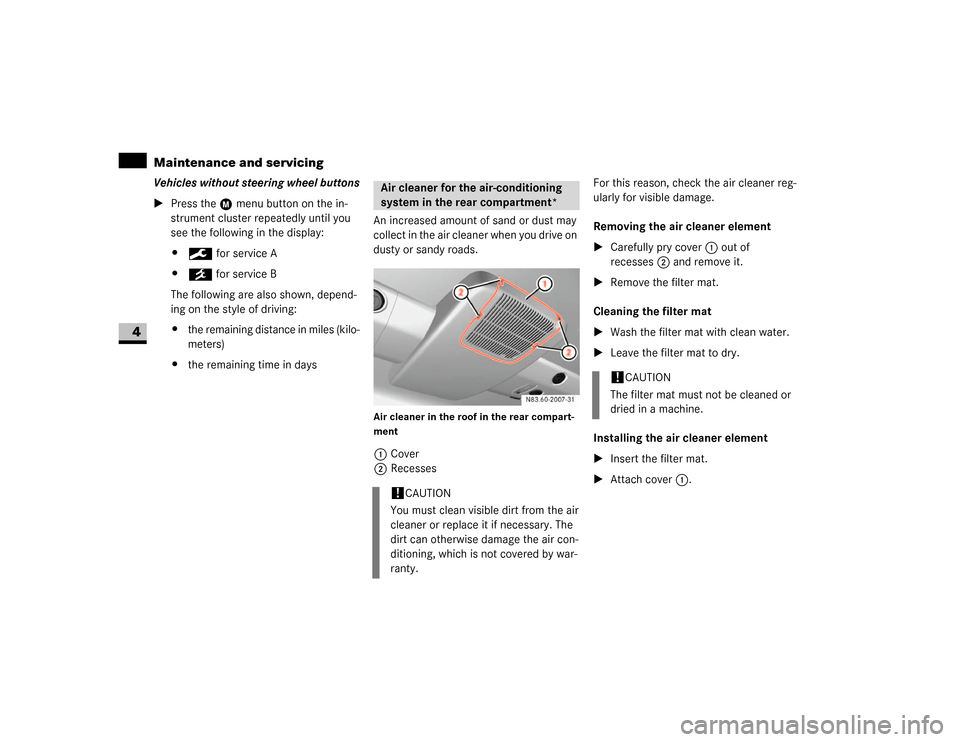
Air cleaner in the roof in the rear compart-
ment1Cover
2RecessesFor this reason, check the air cleaner reg-
ularly for visible damage.
Removing the air cleaner element
\1Carefully pry cover1 out of
recesses2 and remove it.
\1Remove the filter mat.
Cleaning the filter mat
\1Wash the filter mat with clean water.
\1Leave the filter mat to dry.
Installing the air cleaner element
\1Insert the filter mat.
\1Attach cover1.Air cleaner for the air-conditioning
system in the rear compartment*!
CAUTION
You must clean visible dirt from the air
cleaner or replace it if necessary. The
dirt can otherwise damage the air con-
ditioning, which is not covered by war-
ranty.
!
CAUTION
The filter mat must not be cleaned or
dried in a machine.
Page 246 of 393
245 Operation
Cleaning and care of the vehicle
4
\1Clean the camera lens 1 using water
and a soft cloth only.
Be careful not to apply wax to the camera
lens 1 when waxing the vehicle. If neces-
sary, remove the wax using shampoo with
plenty of water.!
Do not use dry, coarse or hard cloths
and aggressive cleaning agents. Do not
scrub or use high pressure. You will other-
wise scratch or damage the lens or the ca-
mera.
If you clean the vehicle with a high-pressu-
re cleaner or steam cleaner, maintain a mi-
nimum distance of 1.6 ft (50 cm) to the
rear view camera. To prevent damage, do
not aim directly at the rear view camera or
at the microphone openings on the under-
side of the rear view camera.
Plastic trimsLight soiling
\1Wipe plastic parts with a damp, lint-
free cloth (e.g. a micro-fiber cloth).
Heavy soiling
\1Wipe plastic parts with a damp, lint-
free cloth (e.g. a micro-fiber cloth). Dashboard and padded boss of the
steering wheel
\1Moisten a clean and lint-free cloth with
water and clean the plastic parts and
the dashboard.
\1Use a mild soap solution for particularly
stubborn dirt.!
CAUTION
Do not use dry, coarse or hard cloths
and do not scrub. You will otherwise
scratch or damage the surfaces.
!
CAUTION
Use a low-foaming grease solvent (e.g.
washing-up liquid) diluted in water as a
cleaning agent.
The surface color may temporarily
change shade during cleaning. Simply
wait for the surface to dry.
!
CAUTION
Use a solvent-free and non-caustic
cleaning agent. The manufacturer
recommends that you use a
Mercedes-Benz product.
The surface color may temporarily
change shade during cleaning. Simply
wait for the surface to dry.
Warning
G
Do not use cleaners or cockpit care sprays
containing solvents to clean the dashboard
or the padded boss of the steering wheel.
Cleaners containing solvents can make the
surface porous, which could lead to serious
injuries if plastic parts were to come loose
when an airbag is triggered.
Page 264 of 393

263 Practical hints
What to do if ...
5
The speed cannot be set with cruise con-
trol* activated
1.
The display is showing a message of high pri-
ority and cannot therefore show a change in
speed.
\1Proceed as instructed by the mes-
sage in the display.
\1Deactivate cruise control* if neces-
sary.
1Only on vehicles with steering wheel buttons.Problem
Possible cause / result
Suggested solutions
Page 269 of 393
268 Practical hintsWhat to do if ...
5
Indicator and warning lamps in the
instrument clusterWarning
G
Always have maintenance work carried out
at an authorized Sprinter Dealer which has
the necessary specialist knowledge and
tools to carry out the work required.
The manufacturer recommends that you use
an authorized Sprinter Dealer for this pur-
pose.
In particular, work relevant to safety or on
safety-related systems must be carried out
at an authorized Sprinter Dealer. There is a
risk of an accident and injury if this work is
carried out incorrectly.
Problem
Possible cause / result
Suggested solutions
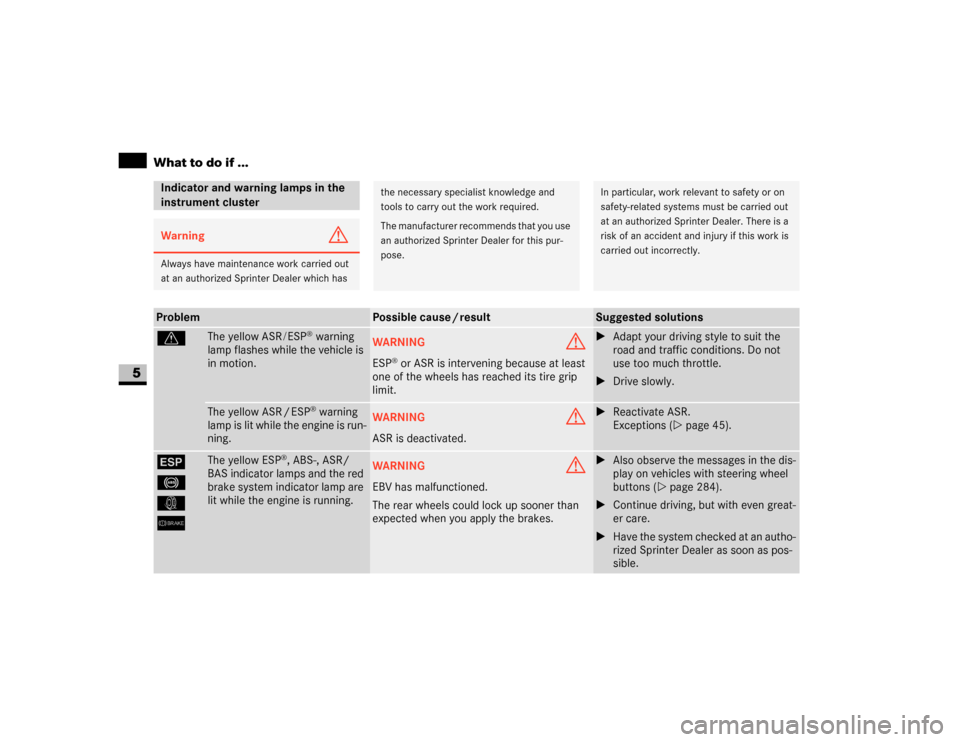
v
The yellow ASR/ESP
® warning
lamp flashes while the vehicle is
in motion.
WARNING
G
ESP
® or ASR is intervening because at least
one of the wheels has reached its tire grip
limit.
\1Adapt your driving style to suit the
road and traffic conditions. Do not
use too much throttle.
\1Drive slowly.
The yellow ASR / ESP
® warning
lamp is lit while the engine is run-
ning.
WARNING
G
ASR is deactivated.
\1Reactivate ASR.
Exceptions (\2page 45).
#
-
k
6
The yellow ESP
®, ABS-, ASR/
BAS indicator lamps and the red
brake system indicator lamp are
lit while the engine is running.
WARNING
G
EBV has malfunctioned.
The rear wheels could lock up sooner than
expected when you apply the brakes.
\1Also observe the messages in the dis-
play on vehicles with steering wheel
buttons (\2page 284).
\1Continue driving, but with even great-
er care.
\1Have the system checked at an autho-
rized Sprinter Dealer as soon as pos-
sible.
Page 270 of 393
269 Practical hints
What to do if ...
5
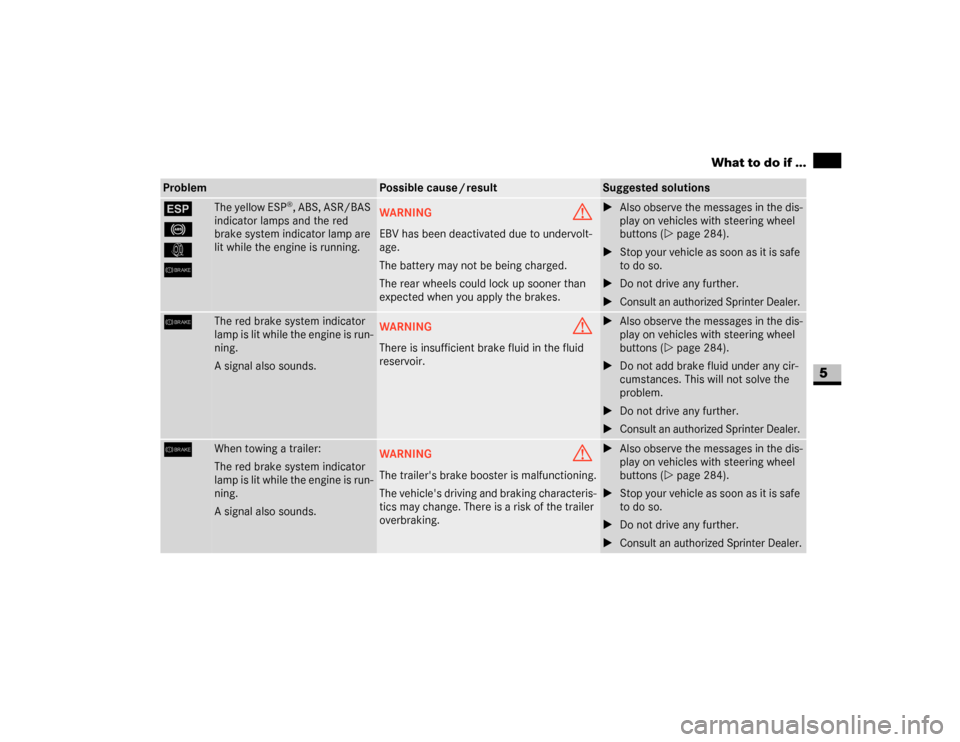
#
-
k
6
The yellow ESP
®, ABS, ASR/BAS
indicator lamps and the red
brake system indicator lamp are
lit while the engine is running.
WARNING
G
EBV has been deactivated due to undervolt-
age.
The battery may not be being charged.
The rear wheels could lock up sooner than
expected when you apply the brakes.
\1Also observe the messages in the dis-
play on vehicles with steering wheel
buttons (\2page 284).
\1Stop your vehicle as soon as it is safe
to do so.
\1Do not drive any further.
\1Consult an authorized Sprinter Dealer.
6
The red brake system indicator
lamp is lit while the engine is run-
ning.
A signal also sounds.
WARNING
G
There is insufficient brake fluid in the fluid
reservoir.
\1Also observe the messages in the dis-
play on vehicles with steering wheel
buttons (\2page 284).
\1Do not add brake fluid under any cir-
cumstances. This will not solve the
problem.
\1Do not drive any further.
\1Consult an authorized Sprinter Dealer.
6
When towing a trailer:
The red brake system indicator
lamp is lit while the engine is run-
ning.
A signal also sounds.
WARNING
G
The trailer's brake booster is malfunctioning.
The vehicle's driving and braking characteris-
tics may change. There is a risk of the trailer
overbraking.
\1Also observe the messages in the dis-
play on vehicles with steering wheel
buttons (\2page 284).
\1Stop your vehicle as soon as it is safe
to do so.
\1Do not drive any further.
\1Consult an authorized Sprinter Dealer.
Problem
Possible cause / result
Suggested solutions
Page 272 of 393
271 Practical hints
What to do if ...
5
-
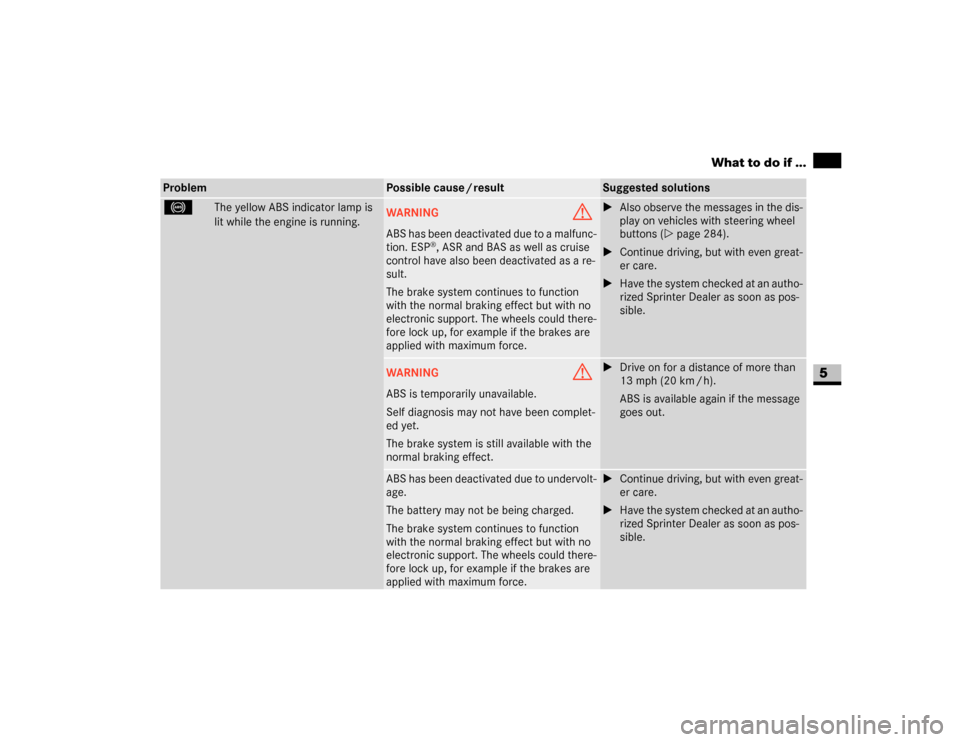
The yellow ABS indicator lamp is
lit while the engine is running.
WARNING
G
ABS has been deactivated due to a malfunc-
tion. ESP
®, ASR and BAS as well as cruise
control have also been deactivated as a re-
sult.
The brake system continues to function
with the normal braking effect but with no
electronic support. The wheels could there-
fore lock up, for example if the brakes are
applied with maximum force.
\1Also observe the messages in the dis-
play on vehicles with steering wheel
buttons (\2page 284).
\1Continue driving, but with even great-
er care.
\1Have the system checked at an autho-
rized Sprinter Dealer as soon as pos-
sible.
WARNING
G
ABS is temporarily unavailable.
Self diagnosis may not have been complet-
ed yet.
The brake system is still available with the
normal braking effect.
\1Drive on for a distance of more than
13 mph (20 km / h).
ABS is available again if the message
goes out.
ABS has been deactivated due to undervolt-
age.
The battery may not be being charged.
The brake system continues to function
with the normal braking effect but with no
electronic support. The wheels could there-
fore lock up, for example if the brakes are
applied with maximum force.
\1Continue driving, but with even great-
er care.
\1Have the system checked at an autho-
rized Sprinter Dealer as soon as pos-
sible.
Problem
Possible cause / result
Suggested solutions