lock DODGE SPRINTER 2008 2.G Workshop Manual
[x] Cancel search | Manufacturer: DODGE, Model Year: 2008, Model line: SPRINTER, Model: DODGE SPRINTER 2008 2.GPages: 666, PDF Size: 14.11 MB
Page 133 of 666
131 Controls in detail
Lighting
3
Switching on the low-beam head-
lamps
\1
Turn light switch to
B
.
The
B
indicator lamp in the in-
strument cluster lights up.
Switching on the high-beam head-
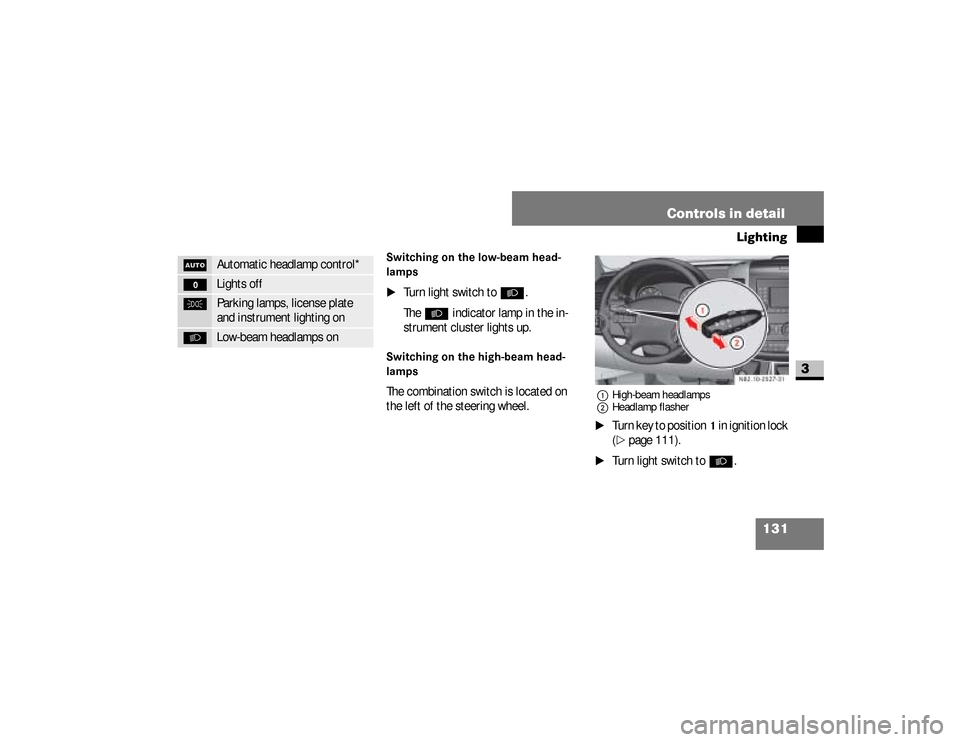
lampsThe combination switch is located on
the left of the steering wheel.
1High-beam headlamps
2Headlamp flasher\1
Turn key to position
1 in ignition lock
(
\2
page 111).
\1
Turn light switch to
B
.
U
Automatic headlamp control*
M
Lights off
C
Parking lamps, license plate
and instrument lighting on
B
Low-beam headlamps on
N82.10-2527-31
nf_BA.book Page 131 Friday, January 25, 2008 3:53 PM
Page 134 of 666
132 Controls in detailLighting
3
\1
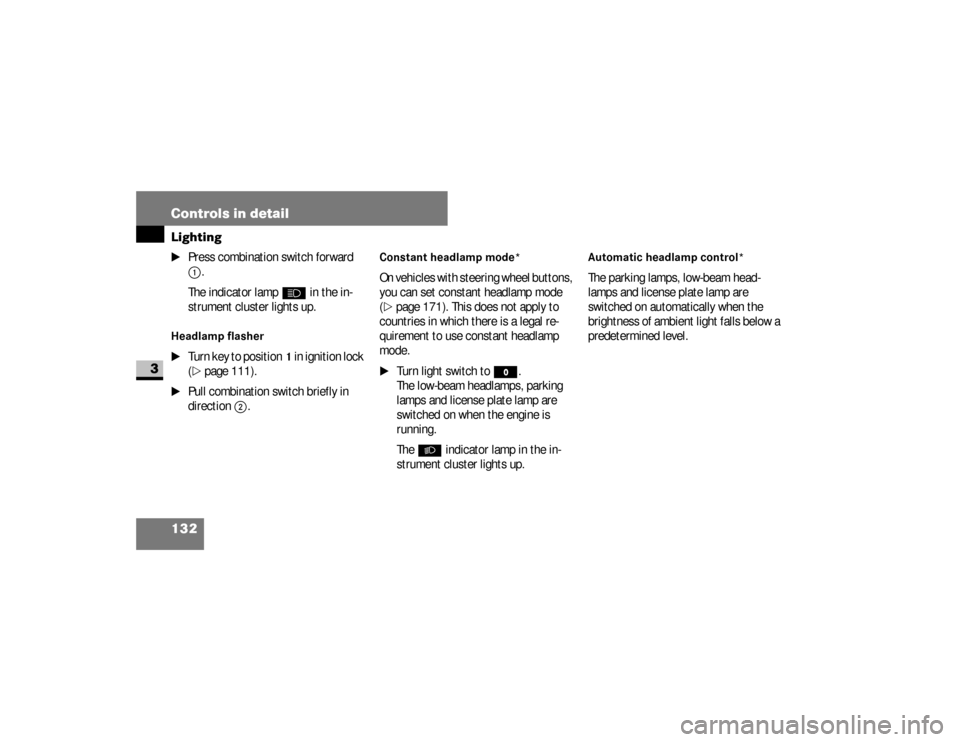
Press combination switch forward 1
.
The indicator lamp
A
in the in-
strument cluster lights up.
Headlamp flasher
\1
Turn key to position
1 in ignition lock
(
\2
page 111).
\1
Pull combination switch briefly in
direction
2
.
Constant headlamp mode*On vehicles with steering wheel buttons,
you can set constant headlamp mode
(\2
page 171). This does not apply to
countries in which there is a legal re-
quirement to use constant headlamp
mode.
\1
Turn light switch to
M
.
The low-beam headlamps, parking
lamps and license plate lamp are
switched on when the engine is
running.
The
B
indicator lamp in the in-
strument cluster lights up.
Automatic headlamp control*The parking lamps, low-beam head-
lamps and license plate lamp are
switched on automatically when the
brightness of ambient light falls below a
predetermined level.
nf_BA.book Page 132 Friday, January 25, 2008 3:53 PM
Page 135 of 666
133 Controls in detail
Lighting
3
\1
Turn light switch to
U
.The parking lamps are switched on /
off automatically when the key is in
position
1 (\2
page 111) in the igni-
tion lock.
The parking lamps, low-beam head-
lamps and license plate lamp are
switched on / off automatically when
the engine is running, depending on
the ambient light conditions.
Only use manual headlamp mode when
you are driving in countries where driv-
ing with the low-beam headlamps
switched on is required by law.
\1
In this case, turn the light switch to B
.
Warning
G
If the light switch is atU:
\4the headlamps could switch off tem-
porarily due to extreme glare, e.g.
from oncoming traffic
\4the lights do not switch on automati-
cally in foggy conditions
Set the light switch to B. Otherwise
you are endangering yourself and others.
Continued
Warning (Continued)
G
If it is dark, only turn the light switch from
U toB when the vehicle is station-
ary. You could otherwise cause an acci-
dent if the headlamps were to switch off
briefly.
Automatic headlamp mode is only a driv-
ing aid. You are responsible for the vehi-
cle’s lighting at all times.
nf_BA.book Page 133 Friday, January 25, 2008 3:53 PM
Page 139 of 666
137 Controls in detail
Lighting
3
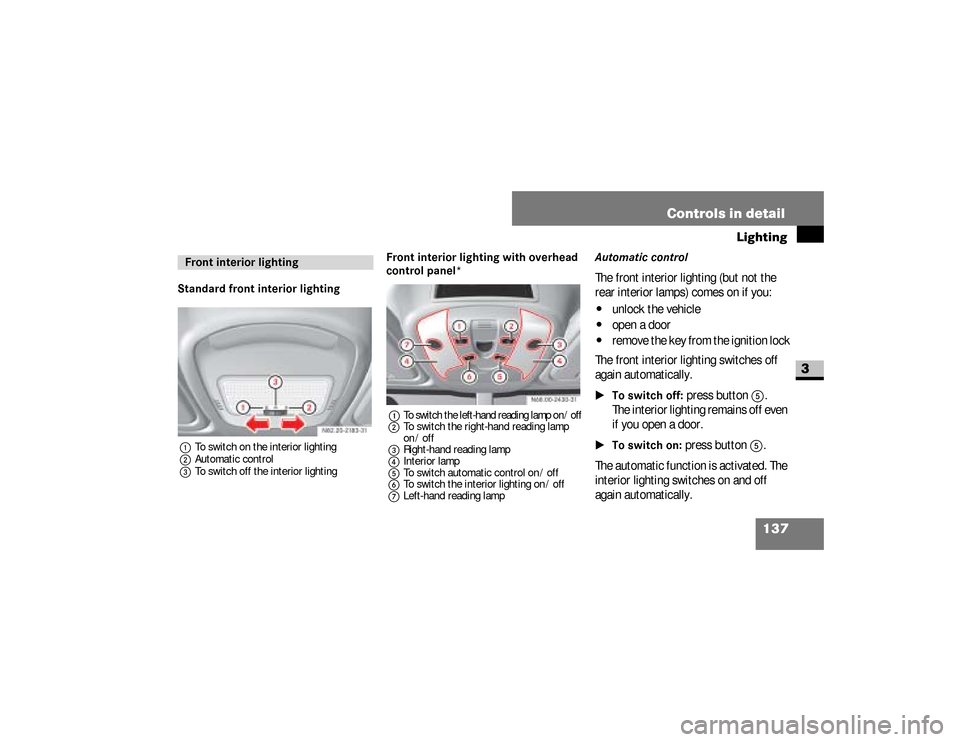
Standard front interior lighting1To switch on the interior lighting
2Automatic control
3To switch off the interior lighting
Front interior lighting with overhead
control panel*1
To switch the left-hand reading lamp on / off
2To switch the right-hand reading lamp
on / off
3Right-hand reading lamp
4Interior lamp
5To switch automatic control on / off
6To switch the interior lighting on / off
7Left-hand reading lamp
Automatic controlThe front interior lighting (but not the
rear interior lamps) comes on if you:\4
unlock the vehicle
\4
open a door
\4
remove the key from the ignition lock
The front interior lighting switches off
again automatically.
\1To switch off:
press button
5
.
The interior lighting remains off even
if you open a door.
\1To switch on:
press button
5
.
The automatic function is activated. The
interior lighting switches on and off
again automatically.
Front interior lighting
nf_BA.book Page 137 Friday, January 25, 2008 3:53 PM
Page 141 of 666
139 Controls in detail
Lighting
3
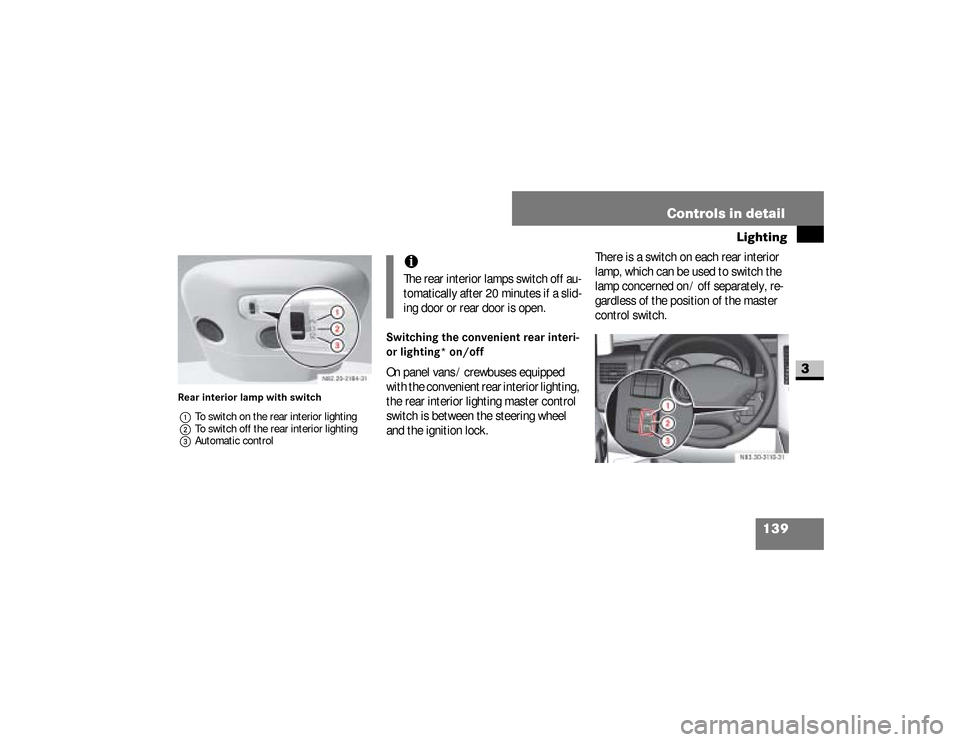
Rear interior lamp with switch
1To switch on the rear interior lighting
2To switch off the rear interior lighting
3Automatic control
Switching the convenient rear interi-
or lighting* on/offOn panel vans / crewbuses equipped
with the convenient rear interior lighting,
the rear interior lighting master control
switch is between the steering wheel
and the ignition lock.There is a switch on each rear interior
lamp, which can be used to switch the
lamp concerned on / off separately, re-
gardless of the position of the master
control switch.
iThe rear interior lamps switch off au-
tomatically after 20 minutes if a slid-
ing door or rear door is open.
N83.30-3110-31
nf_BA.book Page 139 Friday, January 25, 2008 3:53 PM
Page 142 of 666
140 Controls in detailLighting
3
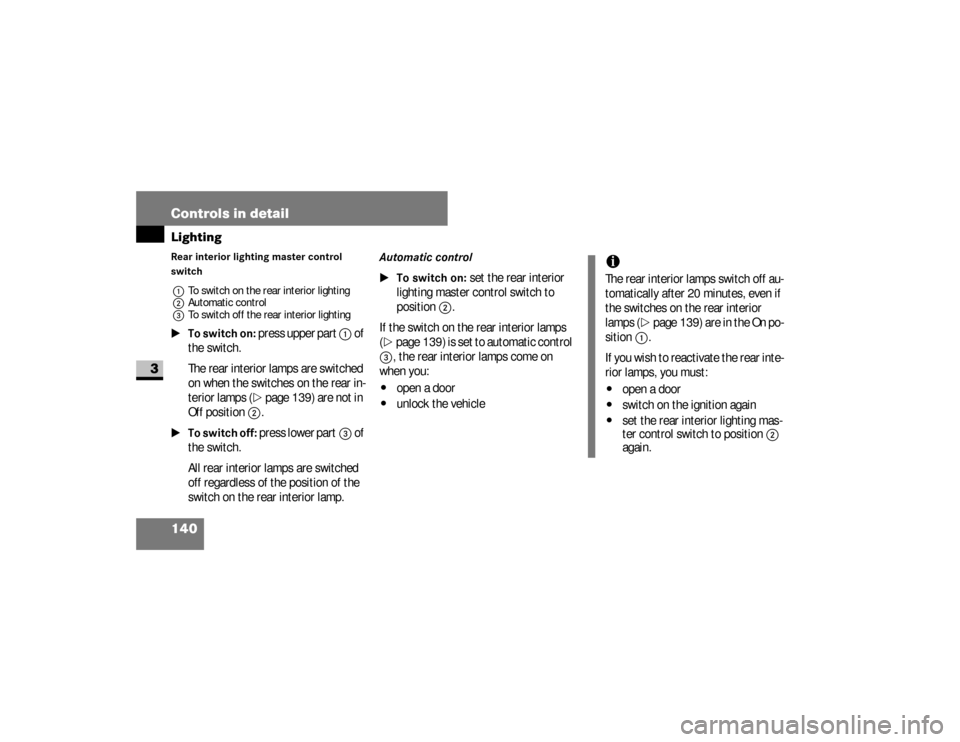
Rear interior lighting master control
switch
1To switch on the rear interior lighting
2Automatic control
3To switch off the rear interior lighting\1To switch on:
press upper part
1
of
the switch.
The rear interior lamps are switched
on when the switches on the rear in-
terior lamps (
\2
page 139) are not in
Off
position
2
.
\1To switch off:
press lower part
3
of
the switch.
All rear interior lamps are switched
off regardless of the position of the
switch on the rear interior lamp.
Automatic control
\1To switch on:
set the rear interior
lighting master control switch to
position
2
.
If the switch on the rear interior lamps
(
\2
page 139) is set to automatic control
3
, the rear interior lamps come on
when you:
\4
open a door
\4
unlock the vehicle
iThe rear interior lamps switch off au-
tomatically after 20 minutes, even if
the switches on the rear interior
lamps (
\2
page 139) are in the On po-
sition
1
.
If you wish to reactivate the rear inte-
rior lamps, you must:
\4
open a door
\4
switch on the ignition again
\4
set the rear interior lighting mas-
ter control switch to position
2
again.
nf_BA.book Page 140 Friday, January 25, 2008 3:53 PM
Page 143 of 666
141 Controls in detail
Lighting
3
Load compartment motion detector*On panel vans equipped with a motion
detector in the load compartment, the
rear interior lighting may also switch on
if motion is detected.
The rear interior lighting can be switched
on by the motion detector with a delay of
no more than 4 seconds if:
\4
the switch on the rear interior lamp
(\2
page 139) is set to “automatic
control”
\4
the vehicle is stationary, the hand-
brake is applied and the service
brake is not applied
or
\4
the selector lever is in position
P and
the service brake is not applied
\4
the vehicle has not been locked from
the outside using the key
Warning
G
Motion detectors work with invisible in-
frared beams emitted by LEDs (Light
Emitting Diodes).
Do not view invisible infrared radiation, la-
ser class 1M, directly using optical instru-
ments.
Your eyes could otherwise be injured.
iIf the motion detector detects move-
ment in the load compartment when
the vehicle is stationary, the rear in-
terior lighting switches on for ap-
proximately 2 minutes. If new
movements are detected, the dura-
tion resumes from the beginning and
the rear interior lighting remains
switched on.
iThe motion detector switches off auto-
matically if no change is detected in the
vehicle for several hours, e.g. door
opened, ignition key turned, etc.This prevents the battery from dis-
charging.
nf_BA.book Page 141 Friday, January 25, 2008 3:53 PM
Page 145 of 666
143 Controls in detail
Instrument cluster
3
The display in the instrument cluster is
activated when you:\4
open the driver’s door
\4
switch on the ignition
\4
press the reset button
\4
switch on the lights
The display switches off automatically
after approximately 30 seconds if:
\4
there is no vehicle lighting switched
on
\4
the key is in position
0 in the ignition
lock
(\2
page 111)
Warning
G
No messages can be displayed if the in-
strument cluster and / or the display is
malfunctioning.You will not then be able to see informa-
tion about the vehicle status, such as
speed and outside temperature, warning
and indicator lamps, malfunction and
warning messages or the malfunction of
systems. Handling characteristics may be
affected.
Continued
Warning (Continued)
G
Contact a qualified specialist workshop
immediately which has the necessary spe-
cialist knowledge and tools to carry out
the work required.The manufacturer recommends that you
use an authorized Sprinter Dealer for this
purpose. In particular, work relevant to
safety or on safety-related systems must
be carried out at a qualified specialist
workshop.
Continued
nf_BA.book Page 143 Friday, January 25, 2008 3:53 PM
Page 157 of 666
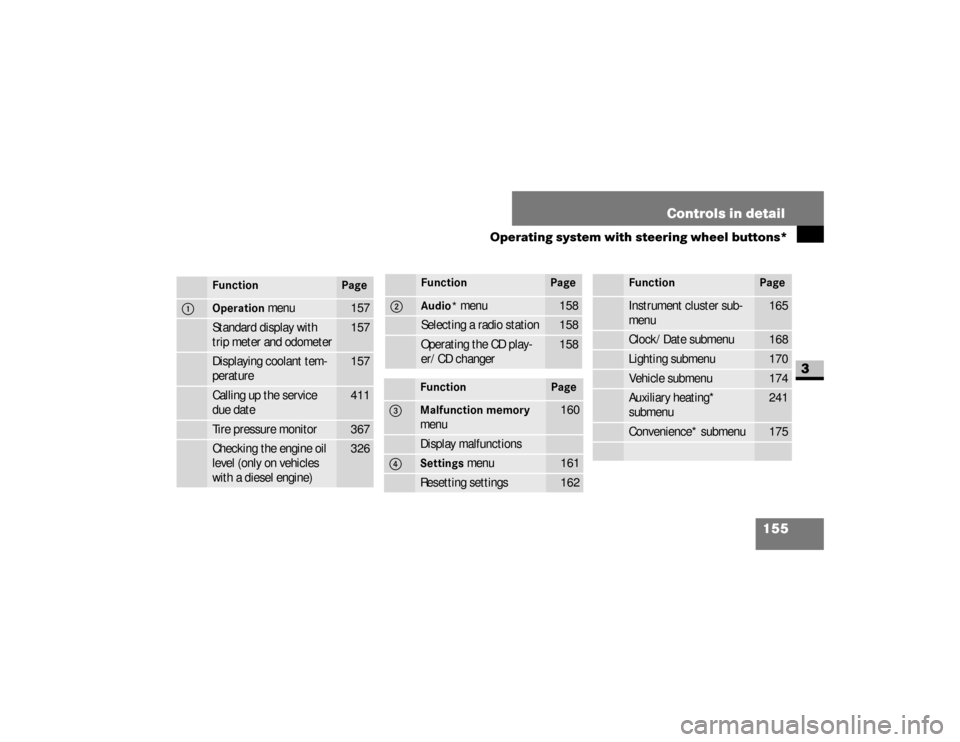
155 Controls in detail
Operating system with steering wheel buttons*
3
Function
Page
1
Operation
menu
157
Standard display with
trip meter and odometer
157
Displaying coolant tem-
perature
157
Calling up the service
due date
411
Tire pressure monitor
367
Checking the engine oil
level (only on vehicles
with a diesel engine)
326
2
Audio*
menu
158
Selecting a radio station
158
Operating the CD play-
er/CD changer
158
Function
Page
3
Malfunction memory
menu
160
Display malfunctions
4
Settings
menu
161
Resetting settings
162
Function
Page
Instrument cluster sub-
menu
165
Clock/Date submenu
168
Lighting submenu
170
Vehicle submenu
174
Auxiliary heating*
submenu
241
Convenience* submenu
175
Function
Page
nf_BA.book Page 155 Friday, January 25, 2008 3:53 PM
Page 163 of 666
161 Controls in detail
Operating system with steering wheel buttons*
3
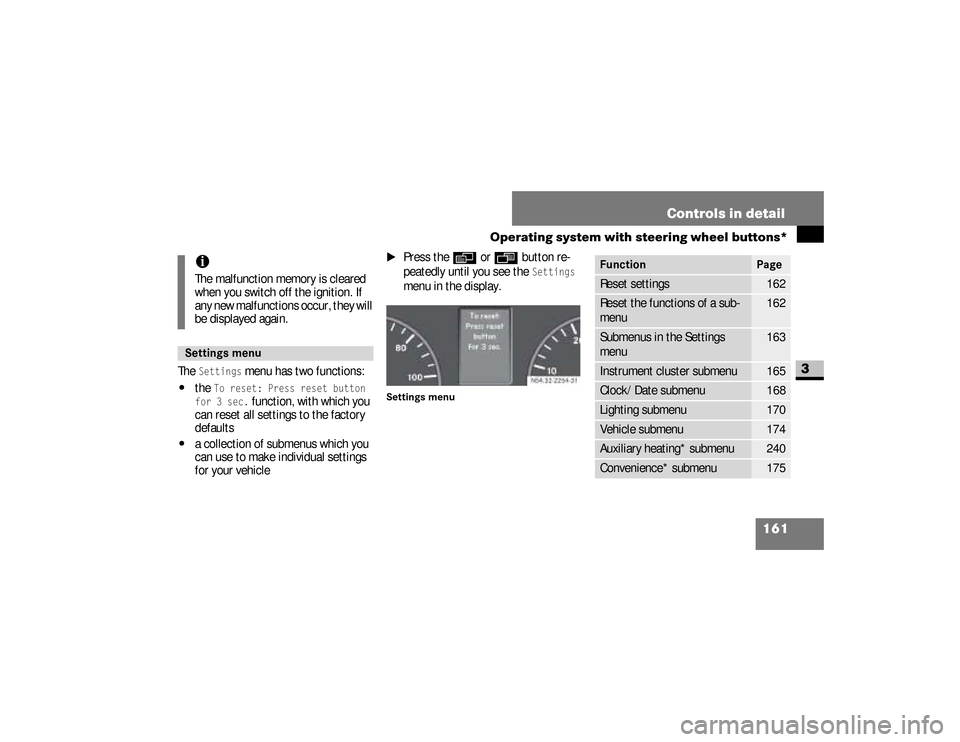
The
Settings
menu has two functions:
\4
the
To reset: Press reset button
for 3 sec.
function, with which you
can reset all settings to the factory
defaults
\4
a collection of submenus which you
can use to make individual settings
for your vehicle
\1
Press the
è
or
ÿ
button re-
peatedly until you see the
Settings
menu in the display.
Settings menu
iThe malfunction memory is cleared
when you switch off the ignition. If
any new malfunctions occur, they will
be displayed again.Settings menu
N54.32-2254-31
Function
Page
Reset settings
162
Reset the functions of a sub-
menu
162
Submenus in the Settings
menu
163
Instrument cluster submenu
165
Clock/Date submenu
168
Lighting submenu
170
Vehicle submenu
174
Auxiliary heating* submenu
240
Convenience* submenu
175
nf_BA.book Page 161 Friday, January 25, 2008 3:53 PM