lock DODGE SPRINTER 2008 2.G Manual Online
[x] Cancel search | Manufacturer: DODGE, Model Year: 2008, Model line: SPRINTER, Model: DODGE SPRINTER 2008 2.GPages: 666, PDF Size: 14.11 MB
Page 236 of 666
234 Controls in detailAir conditioning
3
\1To increase:
turn the temperature
selector control clockwise.
\1To reduce:
turn the temperature se-
lector control counterclockwise.
The fuel-fired heater booster system
heats the vehicle interior as quickly as
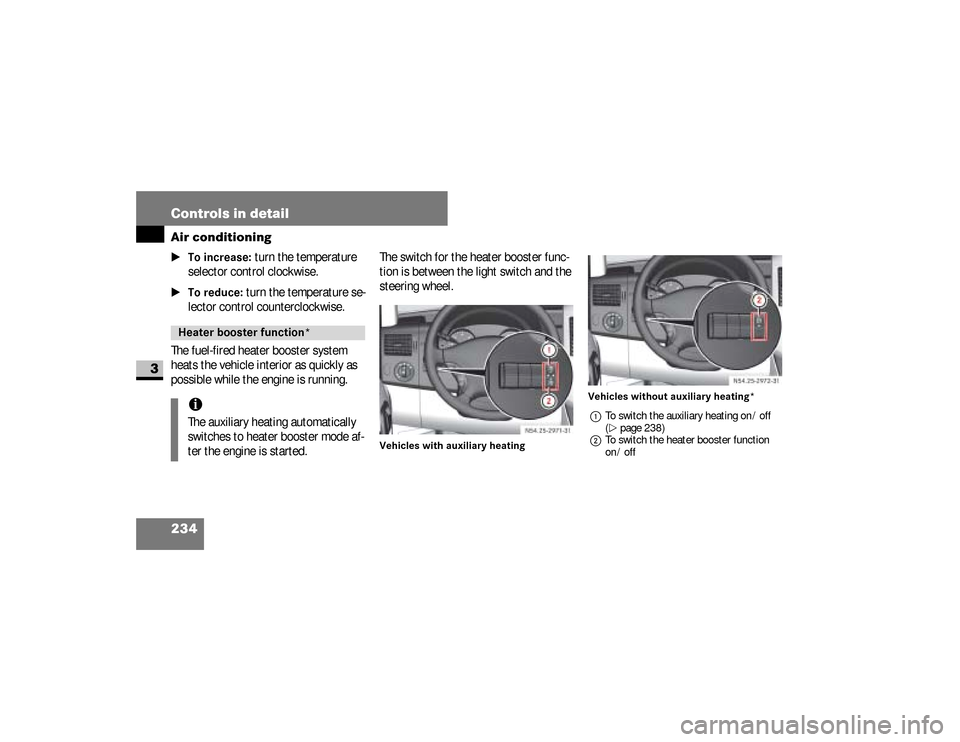
possible while the engine is running.The switch for the heater booster func-
tion is between the light switch and the
steering wheel.
Vehicles with auxiliary heatingVehicles without auxiliary heating*
1To switch the auxiliary heating on / off
(\2page 238)
2To switch the heater booster function
on / off
Heater booster function* iThe auxiliary heating automatically
switches to heater booster mode af-
ter the engine is started.
N54.25-2926-31
N54.25-2927-31
nf_BA.book Page 234 Friday, January 25, 2008 3:53 PM
Page 241 of 666
239 Controls in detail
Auxiliary heating/ventilation*
3
\1To switch the auxiliary heating
off:
press the
ö
switch.
or
\1
Turn the key to position
0 in the igni-
tion lock (
\2
page 111).
The red indicator lamp in the switch
goes out.The auxiliary heating operates for
around a further 2 minutes and then
switches off automatically.
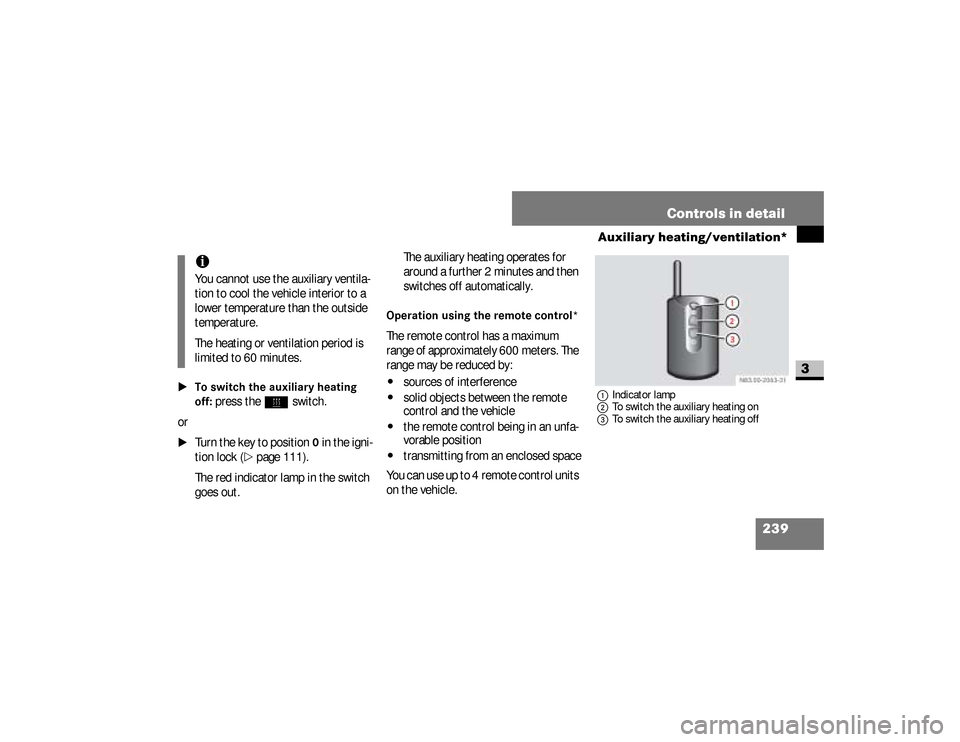
Operation using the remote control*The remote control has a maximum
range of approximately 600 meters. The
range may be reduced by:\4
sources of interference
\4
solid objects between the remote
control and the vehicle
\4
the remote control being in an unfa-
vorable position
\4
transmitting from an enclosed space
You can use up to 4 remote control units
on the vehicle.
1Indicator lamp
2To switch the auxiliary heating on
3To switch the auxiliary heating off
iYou cannot use the auxiliary ventila-
tion to cool the vehicle interior to a
lower temperature than the outside
temperature.
The heating or ventilation period is
limited to 60 minutes.
nf_BA.book Page 239 Friday, January 25, 2008 3:53 PM
Page 242 of 666
240 Controls in detailAuxiliary heating/ventilation*
3
\1To switch the auxiliary heating on:
press button
2
.
Indicator lamp1
lights up briefly.
\1To switch the auxiliary heating
off:
press button
3
.
Indicator lamp
1
lights up briefly.
The auxiliary heating operates for
around a further 2 minutes and then
switches off automatically.
Synchronizing the remote control
\1
Press and hold the
ö
switch for
more than 10 seconds:
The red indicator lamp in the
ö
switch remains lit until it is released.
Afterward, the red indicator lamp in
the
ö
switch flashes. The system
is activated for synchronizing.
\1
Press button
2
on the remote con-
trol.
The indicator lamp in the
ö
switch stops flashing and goes out.
The remote control and the control
panel are synchronized.
Selecting a switch-on timeYou can use the operating system to de-
fine up to 3 switch-on times, one of
which can be selected to switch on the
auxiliary heating / ventilation.
iChange the batteries immediately if
indicator lamp
1
does not
light up
briefly each time a button is pressed
(
\2
page 541).
iIf you press button
3
on the remote
control during the first 3 seconds of
synchronization process, only this re-
mote control will be synchronized
with the clock.
Any other remote control units that
were synchronized will be cleared.
nf_BA.book Page 240 Friday, January 25, 2008 3:53 PM
Page 243 of 666
241 Controls in detail
Auxiliary heating/ventilation*
3
Operating system without steering
wheel buttons
\1
Switch on the ignition (
\2
page 111).
\1
Press the
ö
switch.
The
ö
symbol in the display flashes.
or \1
Press the
menu button on the
in-
strument cluster repeatedly until the
ö
symbol in the display flashes.
\1
Use the or button on the
in-
strument cluster to select desired
switch-on time
1 to
3.
The switch-on time selected is dis-
played.
\1
Wait 10 seconds for the standard
display to appear.The switch-on time is selected.
The yellow indicator lamp in
the
ö
switch comes on.
If you have not selected a switch-on time
and
--:--
appears in the display, the au-
tomatic switch-on is deactivated. The
yellow indicator lamp in the
ö
switch
goes out.
Operating system with steering wheel
buttons*
\1
Switch on the ignition (
\2
page 111).
\1
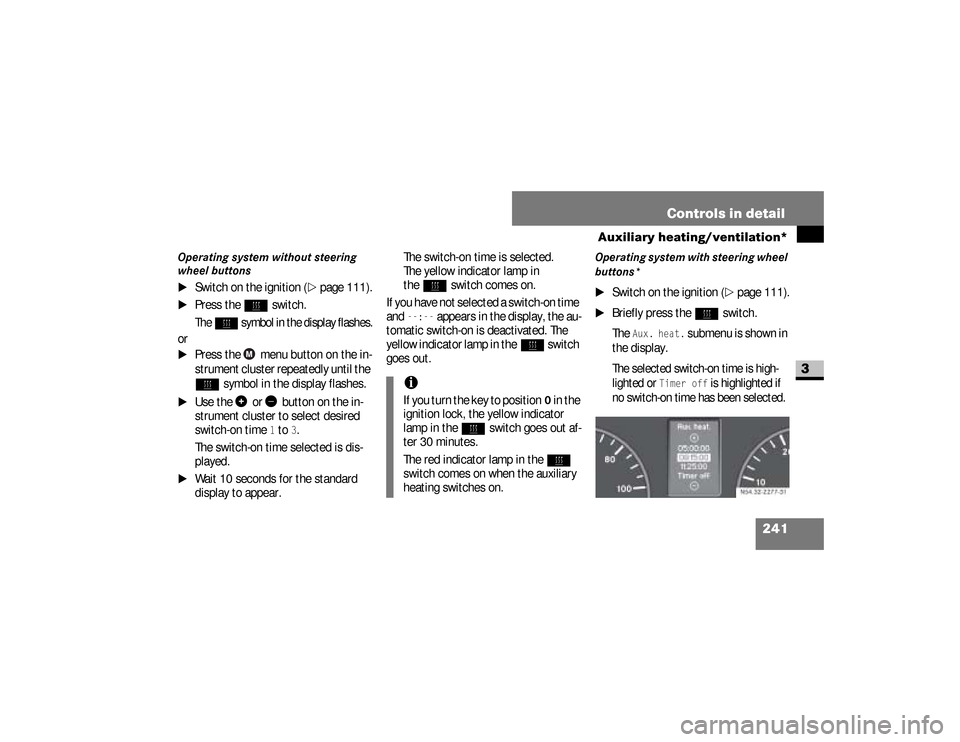
Briefly press the
ö
switch.
The
Aux. heat.
submenu is shown in
the display.
The selected switch-on time is high-
lighted or
Timer off
is highlighted if
no switch-on time has been selected.
iIf you turn the key to position
0 in the
ignition lock, the yellow indicator
lamp in the
ö
switch goes out af-
ter 30 minutes.
The red indicator lamp in the
ö
switch comes on when the auxiliary
heating switches on.
N54.32-2277-31
nf_BA.book Page 241 Friday, January 25, 2008 3:53 PM
Page 244 of 666
242 Controls in detailAuxiliary heating/ventilation*
3
\1
Press the
æ
or
ç
button to se-
lect the desired switch-on time. The
automatic switch-on is deactivated if
the
Timer off
setting is selected.
\1
Press the
è
button.
The switch-on time is selected.
The yellow indicator lamp in
the
ö
switch comes on.
Setting the switch-on time
Operating system without steering
wheel buttons
\1
Select a switch-on time as described
under “Selecting a switch-on time”
(\2
page 240).
\1
Press the reset button on the
in-
strument cluster to set the selected
switch-on time.
The hours figure flashes and
the
”
symbol appears in the dis-
play.
\1
Set the hours using the or
am
button on the
instrument cluster.
\1
Press the reset button.
The minute display flashes.
\1
Set the minutes using the
or button.
iYou can reach the
Aux. heat.
sub-
menu via the
Settings
menu
(
\2
page 161).
iIf you turn the key to position
0 in the
ignition lock, the yellow indicator
lamp in the
ö
switch goes out af-
ter 30 minutes.
The red indicator lamp in the
ö
switch comes on when the auxiliary
heating switches on.
nf_BA.book Page 242 Friday, January 25, 2008 3:53 PM
Page 246 of 666
244 Controls in detailOpen air
3
\3 Open airYou can open and close the side win-
dows electrically.
The switches for all side windows are lo-
cated on the door control panel.
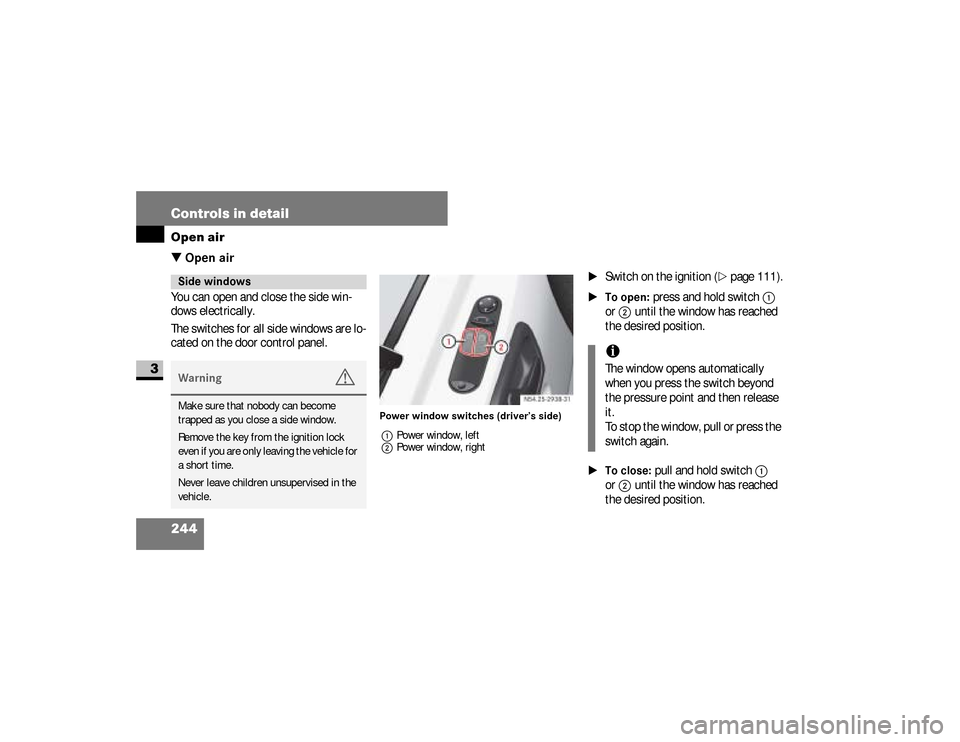
Power window switches (driver’s side)
1Power window, left
2Power window, right
\1
Switch on the ignition (
\2
page 111).
\1To open:
press and hold switch
1
or
2
until the window has reached
the desired position.
\1To close:
pull and hold switch
1
or
2
until the window has reached
the desired position.
Side windowsWarning
G
Make sure that nobody can become
trapped as you close a side window.
Remove the key from the ignition lock
even if you are only leaving the vehicle for
a short time.
Never leave children unsupervised in the
vehicle.
iThe window opens automatically
when you press the switch beyond
the pressure point and then release
it.
To stop the window, pull or press the
switch again.
nf_BA.book Page 244 Friday, January 25, 2008 3:53 PM
Page 247 of 666
245 Controls in detail
Open air
3
Resetting the side windowsThe side windows must be reset if the
battery has been disconnected:\1
Pull the two power window switches
until the side windows are closed.
\1
Hold the switches in this position for
about 1 second.
The side windows are reset.
Sliding sunroof*Warning
G
Make sure that nobody can become
trapped as you close the sliding sunroof.The glass may shatter in the event of an
accident.If you or other occupants are not wearing
your seat belt, there is a risk of being
thrown out of the opening in the event of
the vehicle overturning. Therefore, always
wear a seat belt to reduce the risk of inju-
ries.
Continued
Warning (Continued)
G
In accidents in which the vehicle over-
turns, there is an increased risk of injury
even for occupants who have fastened
their seat belts correctly, as their head or
limbs could be thrust through the open-
ing.Remove the key from the ignition lock
even if you are only leaving the vehicle for
a short time.
nf_BA.book Page 245 Friday, January 25, 2008 3:53 PM
Page 282 of 666
280 Controls in detailTransporting
3
As the driver of the vehicle, you are re-
sponsible for ensuring that the load is
secured against slipping, tipping over,
rolling or falling down, whether driving in
normal traffic situations or on poor road
surfaces or as a result of having to
swerve to avoid an obstacle or applying
the brakes fully.
Failing to secure the load in accordance
with relevant requirements and sound
practice may be a punishable offense,
depending on national legislation and
the consequences that arise.
For this reason, observe the legal re-
quirements in all countries concerned.Before each journey and at regular inter-
vals during longer journeys, check
whether the load is secure and take ad-
ditional action to improve any incorrect
or inadequate safety measures.
\1
Fill up any empty spaces between
the load and the load compartment
walls or wheel arches in a form-fit-ting manner. For this purpose, use
solid transport aids, such as chocks,
wooden blocks or storage cushions.
\1
Secure tilt and tip-resistant loads in
all directions by using the lashing
points or lashing eyes and load rails
in the load compartment or on the
load surface, according to your vehi-
cle's equipment.
Only use lashing materials that have
been tested according to valid stan-
dards, such as lashing nets and
straps.
Securing a load
iInformation about how to secure a
load correctly can be obtained from
the manufacturers of transport aids
or lashing materials for securing
loads.
nf_BA.book Page 280 Friday, January 25, 2008 3:53 PM
Page 284 of 666
282 Controls in detailTransporting
3
\1
Always attach the lashing net or
tarps to all available lashing points.
While doing so, make sure that the
mounting hooks cannot open unin-
tentionally.
Warning
G
Do not carry out any modifications or repairs
to the lashing points, the lashing eyes or the
lashing materials. The load or the lashing
points could accidentally come loose and
cause serious injury to you or others as well
as damage to property.Distribute loads evenly between the lash-
ing points or lashing eyes.
Observe the loading guidelines.iLoose loads should be secured with
an approved lashing net or tarp.
!
CAUTION
Observe the data on the maximum
load-bearing capacity of the individu-
al lashing points
(\2
page 629).
During full-braking applications, for
example, forces can be involved that
are much greater than the weight
force of the load.
Always use several lashing points in
order to distribute force absorption,
and make sure that the lashing
points have an equal load.
iIf your vehicle has load rails in the
floor, you should position locking
rods immediately in front of and be-
hind the load. The locking rods ab-
sorb possible shifting forces directly.
nf_BA.book Page 282 Friday, January 25, 2008 3:53 PM
Page 285 of 666
283 Controls in detail
Transporting
3
Warning
G
If you tension the lashing straps between
the side walls or between a side wall and
the load compartment floor, the permissi-
ble load for the lashing rails, lashing
points or lashing eyes could be exceeded
in the event of strong braking, sudden
changes of direction or an accident.The load would no longer be secured,
which could result in serious injuries
caused by the load slipping.
Continued
Warning (Continued)
G
For this reason, do not tension a lashing
strap between the side walls or between a
side wall and the load compartment floor.
Only locking bars or rods may be installed
between the load rails near the side walls. Observe the operating instructions issued
by the locking bar or locking rod manufac-
turer.
iSecuring loads to the load compart-
ment floor is only recommended for
lightweight loads and should be rein-
forced by using anti-slip mats.Warning
G
Before releasing lashing straps, make
sure that the load is stable and would not
tip over even without being lashed down.
Otherwise, you or others could be injured
by a moving load.
nf_BA.book Page 283 Friday, January 25, 2008 3:53 PM