check engine DODGE TRUCK 1993 Service Owner's Manual
[x] Cancel search | Manufacturer: DODGE, Model Year: 1993, Model line: TRUCK, Model: DODGE TRUCK 1993Pages: 1502, PDF Size: 80.97 MB
Page 207 of 1502
5
- 20
BRAKES
•
POWER BRAKE BOOSTER—BRAKE PEDAL
INDEX
page
Brake Pedal
Installation
21
Brake Pedal Removal
21
General
Information
.......................
20
page
Power Brake Booster
Installation
.............
21
Power Brake Booster Removal
21
GENERAL
INFORMATION
Power brakes
are
standard
on all AD
models.
A
single
or
dual diaphragm, vacuum power brake
booster
is
used. AD
and W150
models
are
equipped with
a
single
diaphragm booster unit
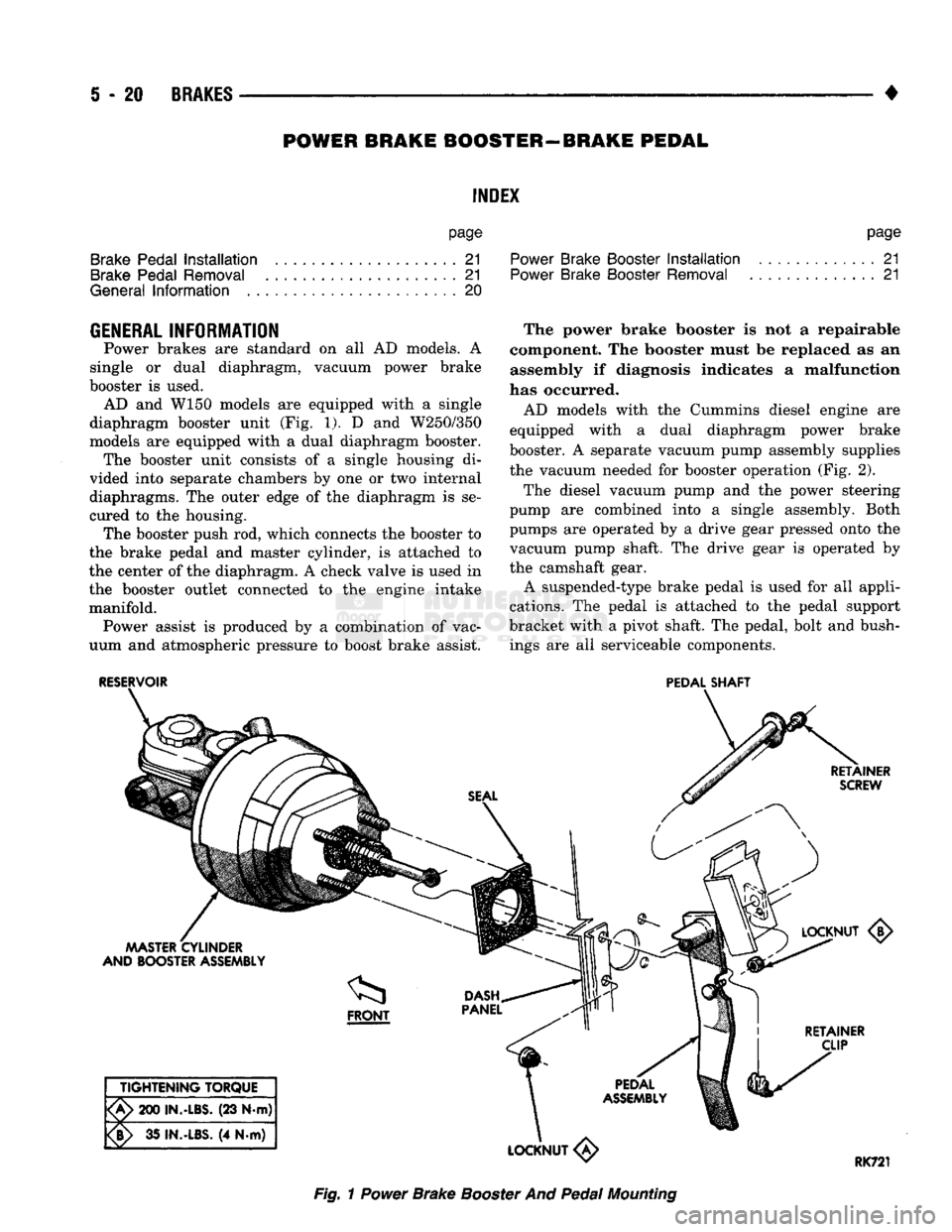
(Fig. 1). D and
W250/350
models
are
equipped with
a
dual diaphragm booster. The booster unit consists
of a
single housing
di
vided into separate chambers
by one or two
internal
diaphragms.
The
outer edge
of the
diaphragm
is se
cured
to the
housing. The booster push
rod,
which connects
the
booster
to
the brake pedal
and
master cylinder,
is
attached
to
the center
of the
diaphragm.
A
check valve
is
used
in
the booster outlet connected
to the
engine intake manifold. Power assist
is
produced
by a
combination
of
vac
uum
and
atmospheric pressure
to
boost brake assist. The power brake booster
is not a
repairable
component.
The
booster must
be
replaced
as an
assembly
if
diagnosis indicates
a
malfunction
has occurred.
AD models with
the
Cummins diesel engine
are
equipped with
a
dual diaphragm power brake
booster.
A
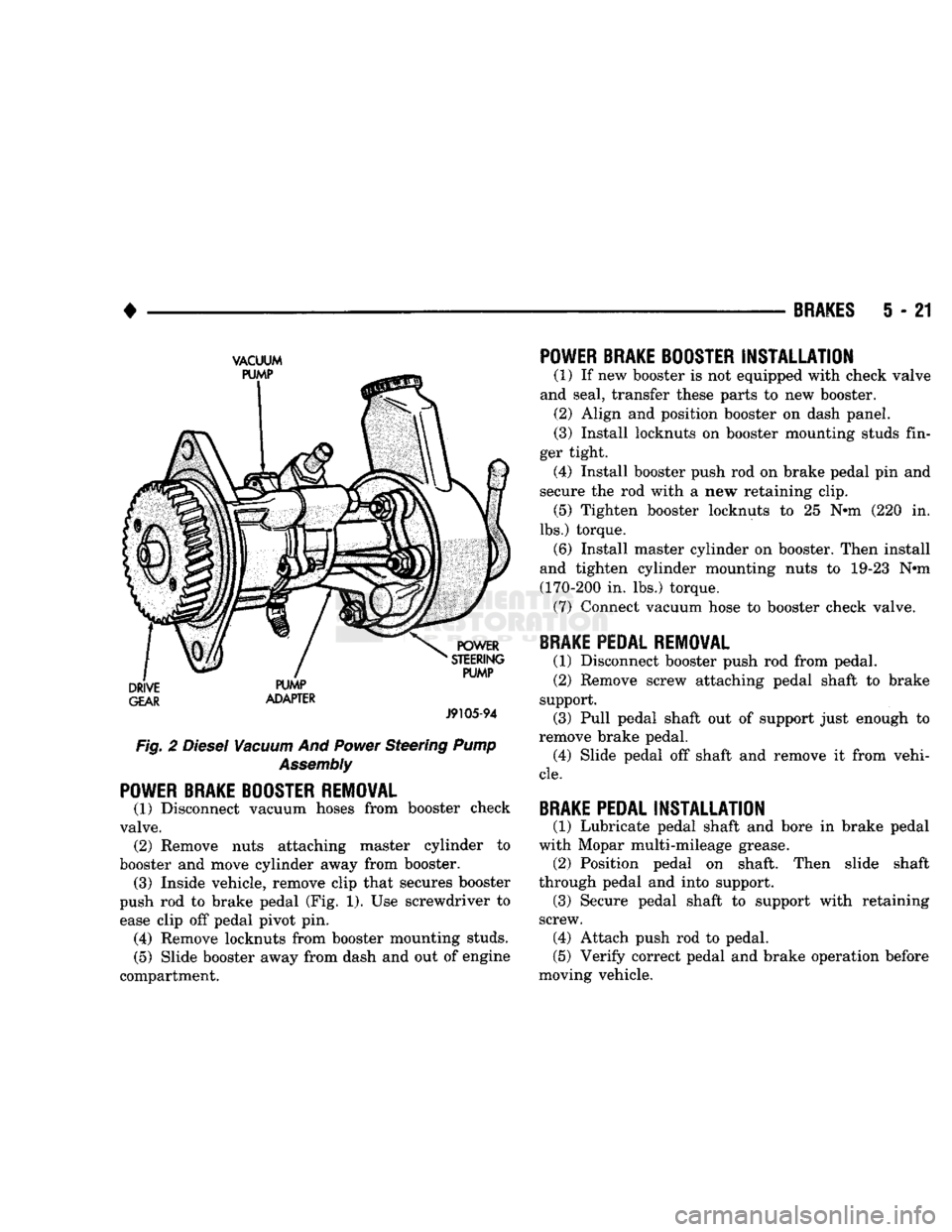
separate vacuum pump assembly supplies the vacuum needed
for
booster operation
(Fig. 2).
The diesel vacuum pump
and the
power steering
pump
are
combined into
a
single assembly. Both
pumps
are
operated
by a
drive gear pressed onto
the
vacuum pump shaft.
The
drive gear
is
operated
by
the camshaft gear. A suspended-type brake pedal
is
used
for all
appli
cations.
The
pedal
is
attached
to the
pedal support
bracket with
a
pivot shaft.
The
pedal, bolt
and
bush ings
are all
serviceable components.
RESERVOIR
PEDAL
SHAFT
RETAINER
SCREW
MASTER
CYLINDER
AND BOOSTER
ASSEMBLY <5>
I
RETAINER
CLIP
TIGHTENING
TORQUE
'A>
200
IN.-LBS.
(23 N-m)
¥>
35
IN.-LBS.
(4 N.m)
LOCKNUT
«
RK721
Fig.
1
Power
Brake
Booster
And
Pedal
Mounting
Page 208 of 1502
•
BRAKES
5 - 21
VACUUM
GEAR
ADAPTER
J9105-94
Fig. 2
Diesel
Vacuum
And
Power
Steering
Pump
Assembly
POWER BRAKE BOOSTER REMOVAL
(1) Disconnect vacuum hoses from booster check
valve. (2) Remove nuts attaching master cylinder to
booster and move cylinder away from booster. (3) Inside vehicle, remove clip that secures booster
push rod to brake pedal (Fig. 1). Use screwdriver to ease clip off pedal pivot pin. (4) Remove locknuts from booster mounting studs.
(5) Slide booster away from dash and out of engine
compartment.
POWER BRAKE BOOSTER
INSTALLATION
(1) If new booster is not equipped with check valve
and seal, transfer these parts to new booster. (2) Align and position booster on dash panel.
(3) Install locknuts on booster mounting studs fin
ger tight. (4) Install booster push rod on brake pedal pin and
secure the rod with a new retaining clip. (5) Tighten booster locknuts to 25 Nth (220 in.
lbs.) torque. (6) Install master cylinder on booster. Then install
and tighten cylinder mounting nuts to 19-23 Nnn
(170-200 in. lbs.) torque. (7) Connect vacuum hose to booster check valve.
BRAKE PEDAL REMOVAL
(1) Disconnect booster push rod from pedal. (2) Remove screw attaching pedal shaft to brake
support. (3) Pull pedal shaft out of support just enough to
remove brake pedal. (4) Slide pedal off shaft and remove it from vehi
cle.
BRAKE PEDAL
INSTALLATION
(1) Lubricate pedal shaft and bore in brake pedal
with Mopar multi-mileage grease. (2) Position pedal on shaft. Then slide shaft
through pedal and into support. (3) Secure pedal shaft to support with retaining
screw. (4) Attach push rod to pedal.
(5) Verify correct pedal and brake operation before
moving vehicle.
Page 210 of 1502
•
BRAKES
5 - 23
VACUUM PUMP OPERATION
Vacuum pump output is transmitted to the power
brake booster through a supply hose. The hose is con nected to an outlet port on the pump housing and to
the check valve in the power brake booster.
Pump output ranges from a minimum of 8.5 to 25
inches vacuum. The pump rotor and vanes are rotated by the pump
drive gear. The drive gear is operated by the cam
shaft gear. Booster vacuum level is monitored by a warning
switch (Fig. 2). The switch consists of a vacuum
chamber that measures vacuum level and a sensor in
circuit with the brake warning light. The vacuum chamber is connected to the booster
check valve by a vacuum supply hose. A wire har
ness connects the switch sensor to the brake warning
light. If booster vacuum falls below 8.5 inches for 8-10 seconds or more, the switch sensor completes
the circuit to the warning light causing it to illumi
nate.
VACUUM PUMP DIAGNOSIS
Vacuum pump diagnosis involves checking pump
output with a vacuum gauge. The low vacuum warn
ing switch can also be checked with a vacuum gauge.
Refer to the diagnosis procedure in this section. A standard vacuum gauge can be used to check
pump output when necessary. Simply disconnect the
pump supply hose and connect a vacuum gauge to
the outlet port for testing purposes. Vacuum should
hold steady in a range of approximately 8.5 to 25 inches at various engine speeds.
DIAGNOSING LOW VACUUM OUTPUT CONDITION A low booster vacuum condition or a faulty low
vacuum warning switch will cause the brake warn ing light to illuminate. If the light does go on and in
dicates the existence of a low vacuum condition,
check the vacuum pump, booster and warning switch
as follows:
(1) Check vacuum pump oil feed line. Verify that
line connections are secure and not leaking. If leak age is noted and pump is noisy, replace pump.
(2) Disconnect supply hose to booster. Connect vac
uum gauge to this hose and run engine at various
throttle openings. Output should range from 8.5 to 25 inches vacuum. If vacuum is consistently below
8.5 inches, problem is with vacuum hoses or pump
component. If output is within specified limits, con
tinue testing.
(3) Check booster operation as described in diagno
sis section. Replace check valve, vacuum hoses, or
booster if necessary. However, if booster operation is correct but warning light is still on, continue testing. (4) Disconnect vacuum hose at warning switch.
Plug hose and connect hand vacuum pump to switch. (5) Start and run engine.
(6) Apply 8.5 to 9 inches of vacuum to warning
switch and observe warning light. If light goes out,
switch vacuum hose is either loose or leaking. If
light remains on, leave engine running and continue
testing.
(7) Apply 20-25 inches vacuum to switch and ob
serve warning light operation. If light now goes out,
switch is at fault and should be replaced. If light re
mains on, continue testing.
(8) Reconnect vacuum hoses and replace original
warning switch with known good switch. Run engine and observe warning light operation. If light is now
off, old switch is faulty. If light remains on, problem
is in wiring between switch and warning light.
VACUUM-STEERING PUMP
ASSEMBLY
REMOVAL
(1) Disconnect battery negative cable.
(2) Position drain pan under power steering pump.
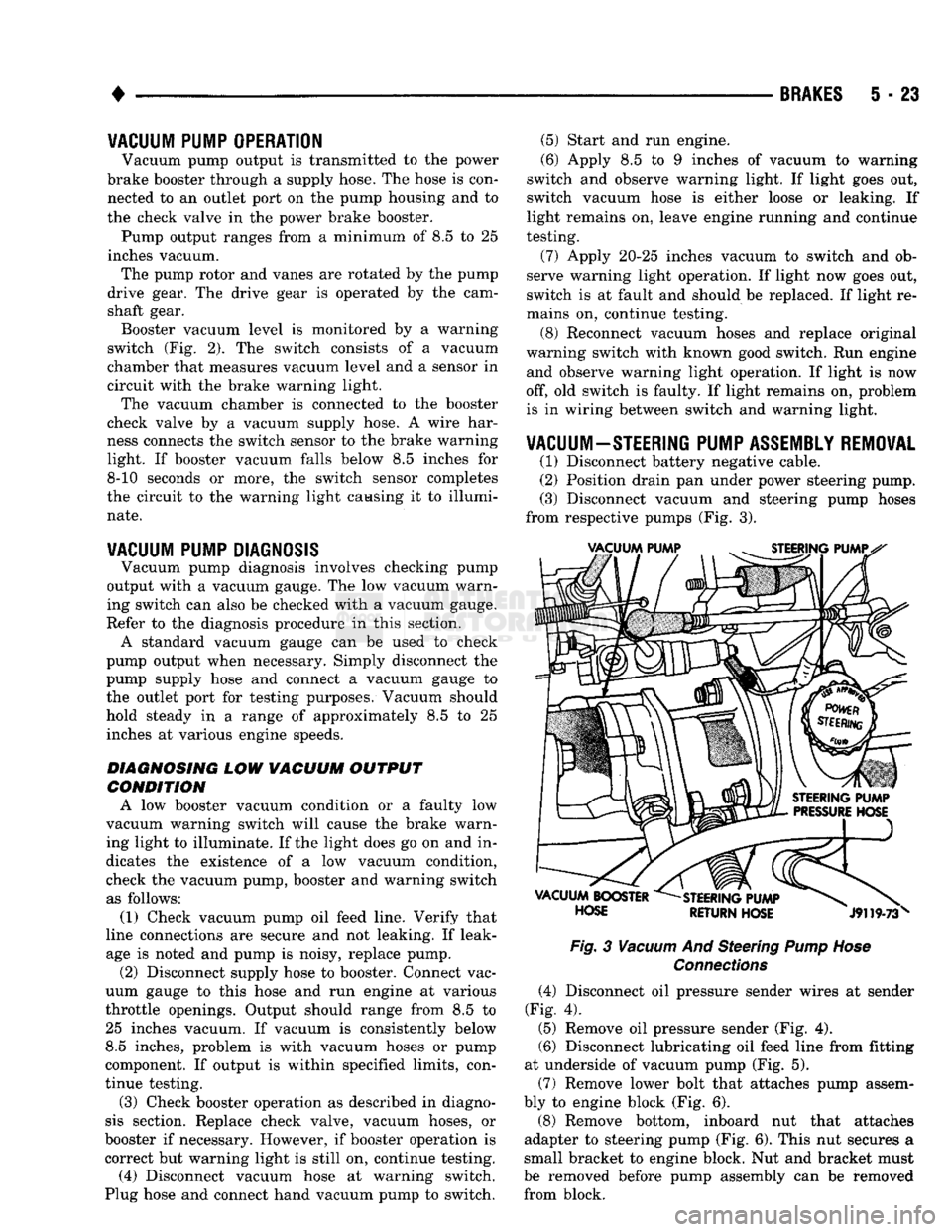
(3) Disconnect vacuum and steering pump hoses
from respective pumps (Fig. 3).
Fig.
3
Vacuum
And Steering
Pump Hose
Connections
(4) Disconnect oil pressure sender wires at sender
(Fig. 4).
(5) Remove oil pressure sender (Fig. 4).
(6) Disconnect lubricating oil feed line from fitting
at underside of vacuum pump (Fig. 5).
(7) Remove lower bolt that attaches pump assem
bly to engine block (Fig. 6).
(8) Remove bottom, inboard nut that attaches
adapter to steering pump (Fig. 6). This nut secures a
small bracket to engine block. Nut and bracket must
be removed before pump assembly can be removed from block.
Page 213 of 1502
5
- 26
BRAKES
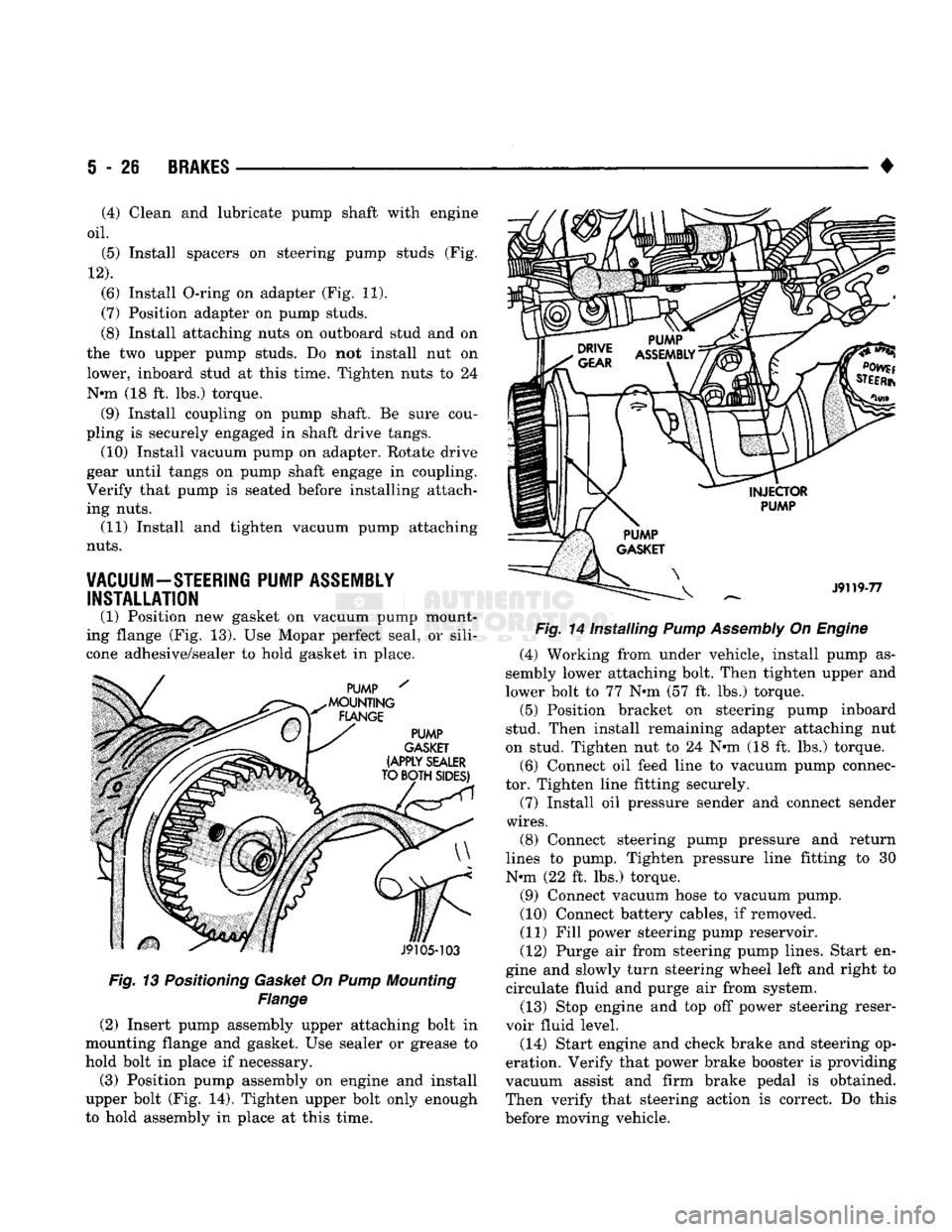
Fig. 13 Positioning Gasket On Pump Mounting
Flange
(2) Insert pump assembly upper attaching bolt in
mounting flange and gasket. Use sealer or grease to
hold bolt in place if necessary.
(3) Position pump assembly on engine and install
upper bolt (Fig. 14). Tighten upper bolt only enough
to hold assembly in place at this time. •
Fig. 14 Installing Pump Assembly On Engine (4) Working from under vehicle, install pump as
sembly lower attaching bolt. Then tighten upper and
lower bolt to 77 N»m (57 ft. lbs.) torque. (5) Position bracket on steering pump inboard
stud. Then install remaining adapter attaching nut
on stud. Tighten nut to 24 N«m (18 ft. lbs.) torque.
(6) Connect oil feed line to vacuum pump connec
tor. Tighten line fitting securely.
(7) Install oil pressure sender and connect sender
wires.
(8) Connect steering pump pressure and return
lines to pump. Tighten pressure line fitting to 30
N-m (22 ft. lbs.) torque.
(9) Connect vacuum hose to vacuum pump.
(10) Connect battery cables, if removed.
(11) Fill power steering pump reservoir.
(12) Purge air from steering pump lines. Start en
gine and slowly turn steering wheel left and right to circulate fluid and purge air from system.
(13) Stop engine and top off power steering reser
voir fluid level.
(14) Start engine and check brake and steering op
eration. Verify that power brake booster is providing
vacuum assist and firm brake pedal is obtained.
Then verify that steering action is correct. Do this
before moving vehicle.
(4) Clean and lubricate pump shaft with engine
oil.
(5) Install spacers on steering pump studs (Fig.
12).
(6) Install O-ring on adapter (Fig. 11).
(7) Position adapter on pump studs.
(8) Install attaching nuts on outboard stud and on
the two upper pump studs. Do not install nut on
lower, inboard stud at this time. Tighten nuts to 24
N-m (18 ft. lbs.) torque. (9) Install coupling on pump shaft. Be sure cou
pling is securely engaged in shaft drive tangs. (10) Install vacuum pump on adapter. Rotate drive
gear until tangs on pump shaft engage in coupling.
Verify that pump is seated before installing attach
ing nuts. (11) Install and tighten vacuum pump attaching
nuts.
VACUUM-STEERING PUMP ASSEMBLY INSTALLATION
(1) Position new gasket on vacuum pump mount
ing flange (Fig. 13). Use Mopar perfect seal, or sili
cone adhesive/sealer to hold gasket in place.
Page 256 of 1502
•
CLUTCH
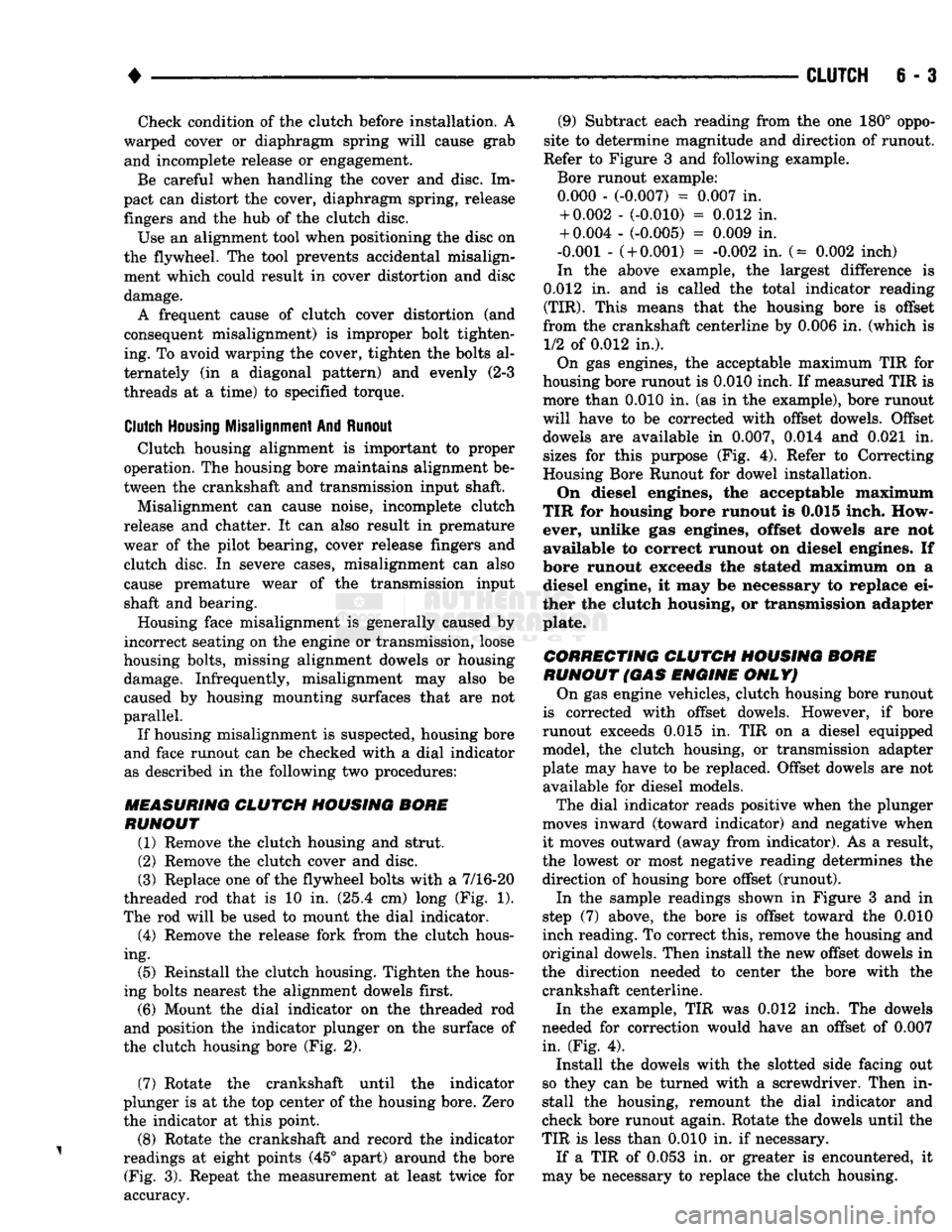
6 - 3 Check condition of the clutch before installation. A
warped cover or diaphragm spring will cause grab and incomplete release or engagement.
Be careful when handling the cover and disc. Im
pact can distort the cover, diaphragm spring, release
fingers and the hub of the clutch disc.
Use an alignment tool when positioning the disc on
the flywheel. The tool prevents accidental misalign ment which could result in cover distortion and disc
damage.
A frequent cause of clutch cover distortion (and
consequent misalignment) is improper bolt tighten
ing. To avoid warping the cover, tighten the bolts al
ternately (in a diagonal pattern) and evenly (2-3
threads at a time) to specified torque.
Clutch
Housing
Misalignment And Runout Clutch housing alignment is important to proper
operation. The housing bore maintains alignment be
tween the crankshaft and transmission input shaft.
Misalignment can cause noise, incomplete clutch
release and chatter. It can also result in premature
wear of the pilot bearing, cover release fingers and
clutch disc. In severe cases, misalignment can also cause premature wear of the transmission input
shaft and bearing.
Housing face misalignment is generally caused by
incorrect seating on the engine or transmission, loose
housing bolts, missing alignment dowels or housing damage. Infrequently, misalignment may also be
caused by housing mounting surfaces that are not
parallel. If housing misalignment is suspected, housing bore
and face runout can be checked with a dial indicator
as described in the following two procedures:
MEASURING
CLUTCH HOUSING BORE
RUNOUT
(1) Remove the clutch housing and strut.
(2) Remove the clutch cover and disc.
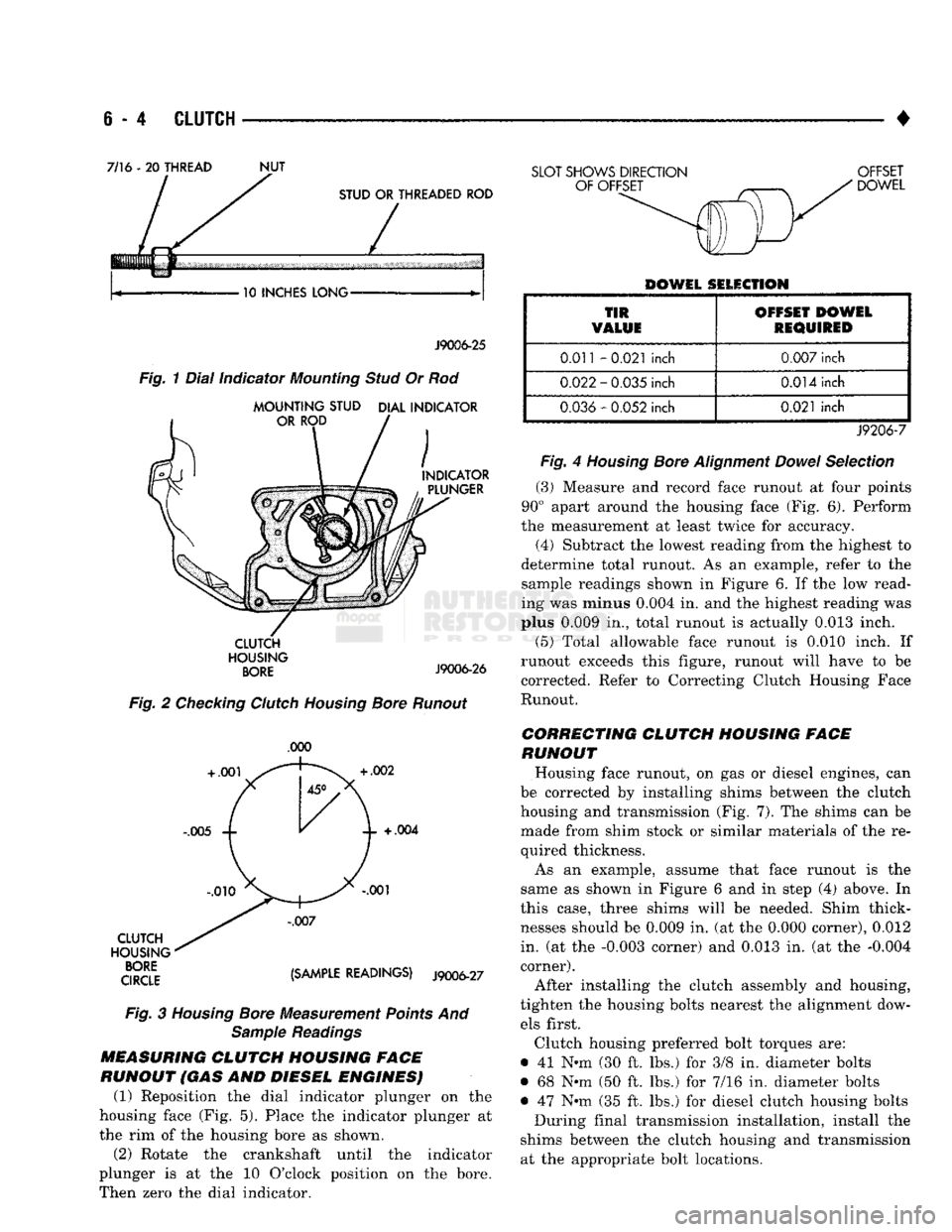
(3) Replace one of the flywheel bolts with a 7/16-20
threaded rod that is 10 in. (25.4 cm) long (Fig. 1).
The rod will be used to mount the dial indicator.
(4) Remove the release fork from the clutch hous
ing. (5) Reinstall the clutch housing. Tighten the hous
ing bolts nearest the alignment dowels first. (6) Mount the dial indicator on the threaded rod
and position the indicator plunger on the surface of
the clutch housing bore (Fig. 2).
(7) Rotate the crankshaft until the indicator
plunger is at the top center of the housing bore. Zero the indicator at this point.
(8) Rotate the crankshaft and record the indicator
readings at eight points (45° apart) around the bore (Fig. 3). Repeat the measurement at least twice for
accuracy. (9) Subtract each reading from the one 180° oppo
site to determine magnitude and direction of runout.
Refer to Figure 3 and following example.
Bore runout example: 0.000 - (-0.007) = 0.007 in. + 0.002 - (-0.010) = 0.012 in.
+ 0.004 - (-0.005) = 0.009 in.
-0.001 -
(
+ 0.001) = -0.002 in. (= 0.002 inch)
In the above example, the largest difference is
0.012 in. and is called the total indicator reading
(TIR).
This means that the housing bore is offset
from the crankshaft centerline by 0.006 in. (which is 1/2 of 0.012 in.).
On gas engines, the acceptable maximum TIR for
housing bore runout is 0.010 inch. If measured TIR is more than 0.010 in. (as in the example), bore runout
will have to be corrected with offset dowels. Offset dowels are available in 0.007, 0.014 and 0.021 in.
sizes for this purpose (Fig. 4). Refer to Correcting
Housing Bore Runout for dowel installation.
On diesel engines, the acceptable maximum
TIR for housing bore runout is 0.015 inch. How
ever, unlike gas engines, offset dowels are not available to correct runout on diesel engines. If
bore runout exceeds the stated maximum on a diesel engine, it may be necessary to replace ei
ther the clutch housing, or transmission adapter
plate.
CORRECTING CLUTCH HOUSING BORE
RUNOUT
(GAS
ENGINE
ONLY)
On gas engine vehicles, clutch housing bore runout
is corrected with offset dowels. However, if bore
runout exceeds 0.015 in. TIR on a diesel equipped model, the clutch housing, or transmission adapter
plate may have to be replaced. Offset dowels are not available for diesel models.
The dial indicator reads positive when the plunger
moves inward (toward indicator) and negative when it moves outward (away from indicator). As a result,
the lowest or most negative reading determines the
direction of housing bore offset (runout).
In the sample readings shown in Figure 3 and in
step (7) above, the bore is offset toward the 0.010
inch reading. To correct this, remove the housing and
original dowels. Then install the new offset dowels in
the direction needed to center the bore with the crankshaft centerline.
In the example, TIR was 0.012 inch. The dowels
needed for correction would have an offset of 0.007
in. (Fig. 4).
Install the dowels with the slotted side facing out
so they can be turned with a screwdriver. Then in
stall the housing, remount the dial indicator and
check bore runout again. Rotate the dowels until the
TIR is less than 0.010 in. if necessary.
If a TIR of 0.053 in. or greater is encountered, it
may be necessary to replace the clutch housing.
Page 257 of 1502
e - 4
CLUTCH
•
7/16 - 20
THREAD
NUT
10 INCHES LONG J9006-25
CLUTCH
HOUSING
BORE
J9006-26
Fig.
2 Checking Clutch Housing Bore Runout
.000
CLUTCH
HOUSING
qroe {Smm READINGS) J9006-27
Fig.
3
Housing
Bore Measurement Points And Sample Readings
MEASURING
CLUTCH
HOUSING FACE
RUNOUT (GAS AND DIESEL ENGINES) (1) Reposition the dial indicator plunger on the
housing face (Fig. 5). Place the indicator plunger at
the rim of the housing bore as shown.
(2) Rotate the crankshaft until the indicator
plunger is at the 10 O'clock position on the bore.
Then zero the dial indicator.
SLOT SHOWS DIRECTION OFFSET
DOWEL
DOWEL SELECTION
TIR
VALUE OFFSET DOWEL
REQUIRED
0.011
-0.021
inch
0.007
inch
0.022
-
0.035
inch
0.014
inch
0.036
-
0.052
inch
0.021
inch
J9206-7
Fig.
4
Housing
Bore
Alignment
Dowel
Selection
(3)
Measure and record face runout at four points
90° apart around the housing face (Fig. 6). Perform
the measurement at least twice for accuracy.
(4)
Subtract the lowest reading from the highest to
determine total runout. As an example, refer to the
sample readings shown in Figure 6. If the low read
ing was minus
0.004
in. and the highest reading was
plus
0.009
in., total runout is actually
0.013
inch.
(5)
Total allowable face runout is 0.010 inch. If
runout exceeds this figure, runout will have to be
corrected. Refer to Correcting Clutch Housing Face
Runout.
CORRECTING CLUTCH HOUSING FACE
RUNOUT
Housing face runout, on gas or diesel engines, can
be corrected by installing shims between the clutch
housing and transmission (Fig. 7). The shims can be made from shim stock or similar materials of the re
quired thickness.
As an example, assume that face runout is the
same as shown in Figure 6 and in step (4) above. In
this case, three shims will be needed. Shim thick
nesses should be
0.009
in. (at the
0.000
corner),
0.012
in. (at the
-0.003
corner) and
0.013
in. (at the
-0.004
corner).
After installing the clutch assembly and housing,
tighten the housing bolts nearest the alignment dow els first.
Clutch housing preferred bolt torques are:
• 41 N-m (30 ft. lbs.) for 3/8 in. diameter bolts
• 68 Nnn (50 ft. lbs.) for 7/16 in. diameter bolts
• 47 Nth (35 ft. lbs.) for diesel clutch housing bolts During final transmission installation, install the
shims between the clutch housing and transmission at the appropriate bolt locations.
Page 259 of 1502
6 - 6
CLUTCH
1
Check
clutch
housing bolts.
Tighten
if loose. Be sure
housing
is
fully
seated on engine block.
2 Check
flywheel
condition.
Scuff sand
flywheel
face
to remove glaze. Clean surface
with
a wax and
grease
remover afterward. Replace
flywheel
if
severely scored, worn or cracked. Secure
flywheel
with
new bolts (if removed). Do not reuse old bolts.
Use
Lock and Seal on bolts.
3
Tighten clutch cover bolts 2-3 threads at a
time,
alter
nately and evenly (in a diagonal
pattern)
to specified
torque. Failure to do so could warp the cover.
4 Check release fork. Replace fork if distorted or worn. Make sure ball stud and release bearing contact sur
faces
are lubricated.
5
Check release fork pivot. Be sure pivot is tight and ball end is lubricated.
6 Transmission input
shaft
bearing
will
cause noise,
chatter,
or improper release if
damaged.
Check
con
dition before installing transmission.
7 Inspect release bearing slide surface of trans,
front
bearing
retainer.
Surface should be smooth,
free
of
nicks,
scores.
Replace
retainer
if
necessary.
Lubricate slide surface before installing release bearing. 8 Check input shaft seal if clutch cover and
disc
were
oil covered. Replace seal if worn, or cut.
9 Do not replace release bearing
unless
actually
faulty.
Replace bearing only if seized, noisy, or damaged.
10 Check clutch cover diaphragm spring and release
fingers.
Replace cover if spring or fingers are bent, warped, broken, cracked. Do not tamper
with
fac
tory
clutch spring setting. Clutch problems
will
result.
11 Check condition of clutch cover. Replace clutch cover if
plate
surface is deeply scored, warped, worn, or
cracked. Be sure cover is correct size and properly
aligned on
disc
and flywheel.
12 Inspect clutch
housing.
Be sure alignment dowels are in position and bolts are tight. Replace housing if
cracked, or damaged. If clutch problems ocurred,
check runout, to be sure housing is square
with
flywheel
and transmission input shaft.
13
Verify
that
housing
alignment dowels are in position before installing
housing.
14 Clean engine block surface before installing clutch
housing.
Dirt, grime can produce misalignment.
15 Make sure side of clutch
disc
marked
"flywheel
side"
is
toward flywheel.
16 Check
rear
main seal if clutch
disc
and cover
were
oil covered. Replace seal if necessary.
17 Check crankshaft flange (if
flywheel
is removed). Be sure flange is clean and
flywheel
bolt threads are
in
good
condition.
18 Check pilot bearing. Replace bearing if dam
aged.
Lube
with
high temp. Grease before in
stallation.
19 Check transmission input shaft. Clutch
disc
must slide
freely
on shaft splines. Lightly grease
splines
before installation. Replace shaft if
splines
or pilot bearing hub are damaged.
20 Check
flywheel
bolt torque. If bolts are loose, replace them. Use Mopar Lock and Seal to secure
new bolts.
21 Check clutch
disc
facing. Replace
disc
if facing is charred, scored, flaking off, or worn.
Also
check runout of new
disc.
Runout should not ex
ceed 0.5 mm (0.02 in.).
J9206-9
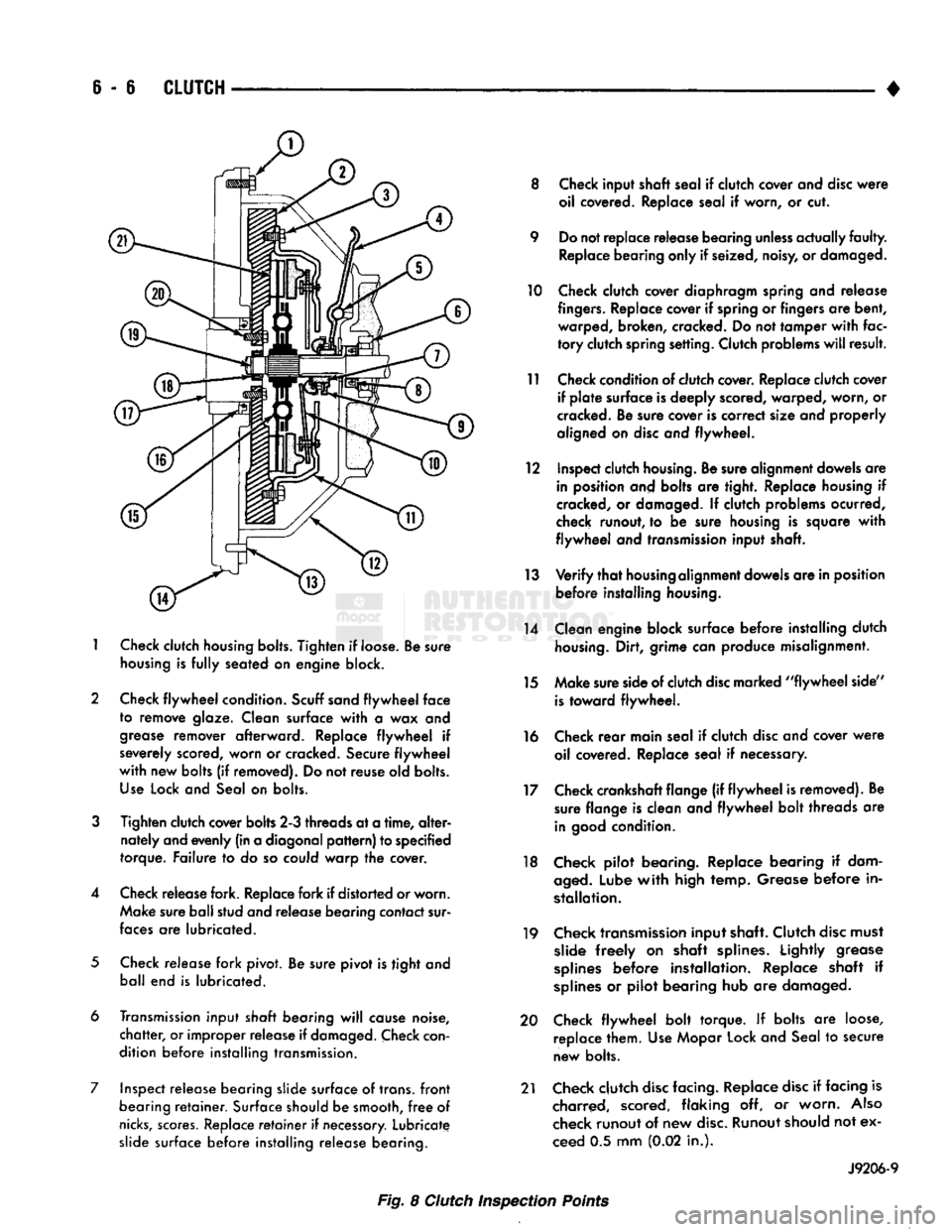
Fig. 8 Clutch Inspection Points
Page 262 of 1502
•
CLUTCH
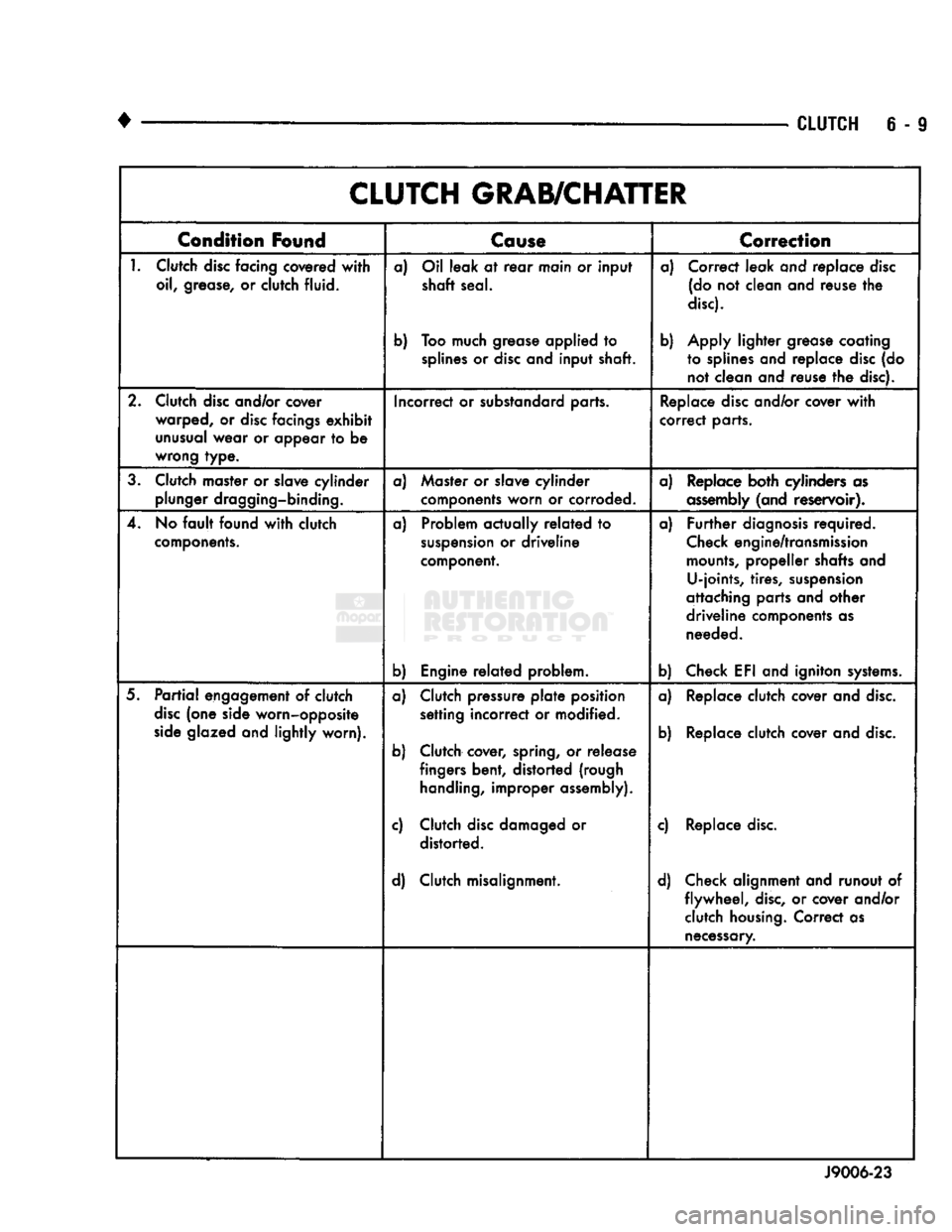
6 - 9 CLUTCH GRAB/CHATTER
Condition
Found
Cause
T
Correction
1.
Clutch
disc
facing covered
with
oil, grease, or clutch fluid. a) Oil leak at
rear
main or input
shaft seal.
b) Too much grease applied to
splines
or
disc
and input shaft. a) Correct leak and replace
disc
(do not clean and reuse the
disc).
b) Apply lighter grease coating to splines and replace
disc
(do not clean and reuse the disc).
2. Clutch
disc
and/or cover warped, or
disc
facings
exhibit
unusual
wear or appear to be
wrong type. Incorrect or substandard parts.
Replace
disc
and/or cover
with
correct parts.
3. Clutch master or slave cylinder plunger dragging-binding. a) Master or slave cylinder
components worn or corroded. a) Replace both cylinders as
assembly
(and reservoir).
4. No
fault
found
with
clutch
components.
a) Problem actually
related
to
suspension
or driveline
component.
b) Engine
related
problem. a)
Further
diagnosis
required.
Check
engine/transmission
mounts,
propeller shafts and U-joints, tires,
suspension
attaching parts and other
driveline components as needed.
b) Check EFI and igniton
systems.
5.
Partial
engagement of clutch
disc
(one side worn-opposite
side
glazed and lightly worn). a) Clutch pressure
plate
position
setting incorrect or modified.
b) Clutch cover, spring, or release fingers bent, distorted (rough
handling,
improper assembly).
c) Clutch
disc
damaged or distorted.
d) Clutch misalignment. a) Replace clutch cover and
disc.
b) Replace clutch cover and
disc.
c) Replace
disc.
d) Check alignment and runout of flywheel,
disc,
or cover and/or clutch
housing.
Correct as
necessary.
J9006-23
Page 264 of 1502
•
CLUTCH
S - 11
CLUTCH
SERVICE
INDEX
page
Clutch
Cover
and
Disc
Installation—All
11
Clutch
Cover
and
Disc
Removal—All
. 11
Clutch
Housing
Installation
13
Clutch
Housing
Removal
12
Clutch
Linkage
Service
14
CLUTCH
COVER
AND
DISC
REMOVAL—ALL
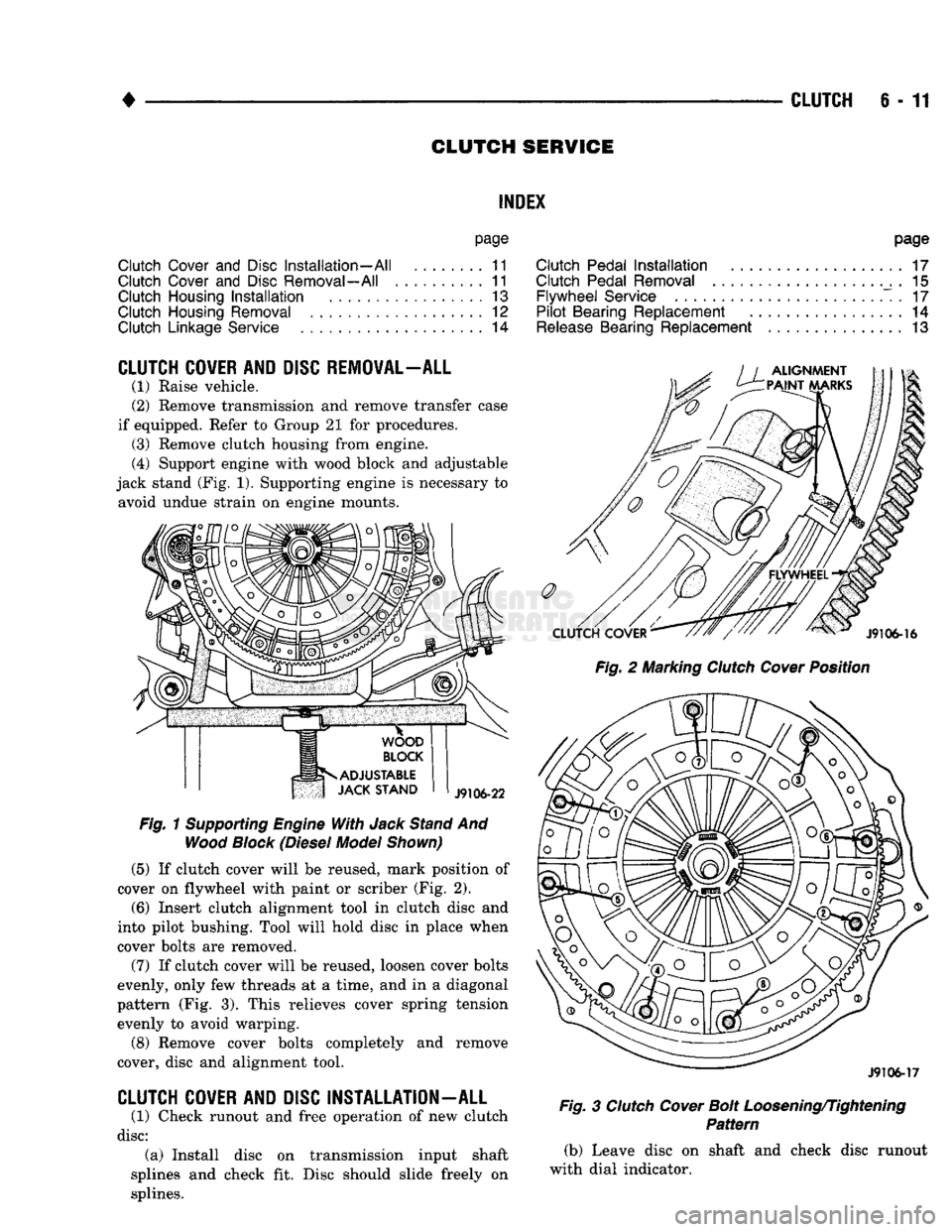
(1) Raise vehicle.
(2) Remove transmission and remove transfer case
if equipped. Refer to Group 21 for procedures. (3) Remove clutch housing from engine.
(4) Support engine with wood block and adjustable
jack stand (Fig. 1). Supporting engine is necessary to avoid undue strain on engine mounts.
Fig.
1
Supporting
Engine
With
Jack
Stand
And
Wood
Block
(Diesel
Model
Shown)
(5)
If clutch cover will be reused, mark position of
cover on flywheel with paint or scriber (Fig. 2).
(6)
Insert clutch alignment tool in clutch disc and
into pilot bushing. Tool will hold disc in place when
cover bolts are removed.
(7) If clutch cover will be reused, loosen cover bolts
evenly, only few threads at a time, and in a diagonal
pattern (Fig. 3). This relieves cover spring tension evenly to avoid warping.
(8) Remove cover bolts completely and remove
cover, disc and alignment tool.
CLUTCH
COVER
AND
DISC
INSTALLATION
-
ALL
(1) Check runout and free operation of new clutch
disc:
(a) Install disc on transmission input shaft
splines and check fit. Disc should slide freely on
splines.
page
Clutch
Pedal
Installation
17
Clutch
Pedal
Removal
. 15
Flywheel
Service
. 17
Pilot
Bearing
Replacement
14
Release
Bearing
Replacement
13
Fig.
2 Marking
Clutch
Cover
Position
J9106-17
Fig.
3
Clutch
Cover
Bolt
Loosening/Tightening
Pattern
(b) Leave disc on shaft and check disc runout
with dial indicator.
Page 265 of 1502
6-12
CLUTCH
(c) Position indicator plunger about 1/4 inch from
outer edge of disc facing.
(d) Runout should not exceed 0.5 mm (0.020 in.).
Obtain another clutch disc if runout exceeds this
limit.
(2) Lubricate crankshaft pilot bearing with Mopar
high temperature bearing grease.
(3) Insert clutch alignment tool in clutch disc hub,
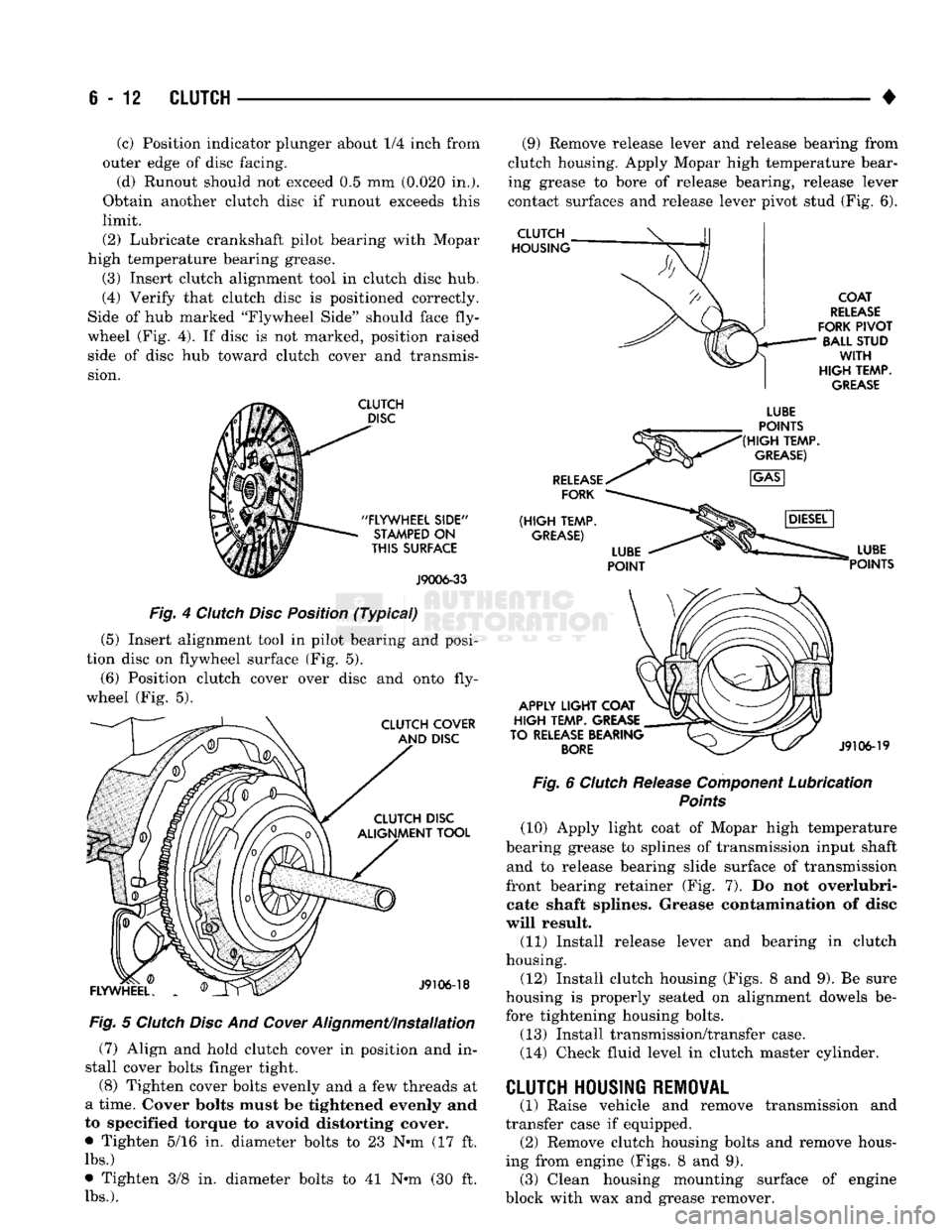
(4) Verify that clutch disc is positioned correctly.
Side of hub marked "Flywheel Side" should face fly
wheel (Fig. 4). If disc is not marked, position raised side of disc hub toward clutch cover and transmis
sion.
CLUTCH
DISC
"FLYWHEEL
SIDE"
STAMPED
ON
THIS
SURFACE
J9006-33
Fig. 4 Clutch Disc Position (Typical)
(5) Insert alignment tool in pilot bearing and posi
tion disc on flywheel surface (Fig. 5).
(6) Position clutch cover over disc and onto fly
wheel (Fig. 5).
CLUTCH COVER AND DISC CLUTCH DISC
ALIGNMENT TOOL
FLYWHEEL.
J9106-18
Fig. 5 Clutch Disc And
Cower
Alignment/installation (7) Align and hold clutch cover in position and in
stall cover bolts finger tight.
(8) Tighten cover bolts evenly and a few threads at
a time. Cover bolts must be tightened evenly and
to specified torque to avoid distorting cover.
• Tighten 5/16 in. diameter bolts to 23 N-m (17 ft.
lbs.)
• Tighten 3/8 in. diameter bolts to 41 N-m (30 ft.
lbs.).
(9) Remove release lever and release bearing from
clutch housing. Apply Mopar high temperature bear
ing grease to bore of release bearing, release lever
contact surfaces and release lever pivot stud (Fig. 6).
CLUTCH
HOUSING
COAT
RELEASE
FORK
PIVOT
BALL STUD
WITH
HIGH
TEMP.
GREASE
RELEASE
FORK
(HIGH
TEMP.
GREASE)
LUBE
POINTS
(HIGH
TEMP.
GREASE)
APPLY
LIGHT
COAT
HIGH
TEMP. GREASE
TO RELEASE BEARING
BORE
LUBE
POINTS
J9106-19
Fig. 6 Clutch Release Component Lubrication
Points
(10) Apply light coat of Mopar high temperature
bearing grease to splines of transmission input shaft and to release bearing slide surface of transmission
front bearing retainer (Fig. 7). Do not overlubri- cate shaft splines. Grease contamination of disc
will result. (11) Install release lever and bearing in clutch
housing.
(12) Install clutch housing (Figs. 8 and 9). Be sure
housing is properly seated on alignment dowels be fore tightening housing bolts.
(13) Install transmission/transfer case.
(14) Check fluid level in clutch master cylinder. transmission and
CLUTCH HOUSING REMOVAL
(1) Raise vehicle and remove
transfer case if equipped. (2) Remove clutch housing bolts and remove hous
ing from engine (Figs. 8 and 9). (3) Clean housing mounting surface of engine
block with wax and grease remover.