instrument panel DODGE VIPER 2015 VX / 3.G Repair Manual
[x] Cancel search | Manufacturer: DODGE, Model Year: 2015, Model line: VIPER, Model: DODGE VIPER 2015 VX / 3.GPages: 400, PDF Size: 9.59 MB
Page 174 of 400
•Oil Temperature
•Battery
•Coolant Temperature
•RIGHT Arrow Button
Restore To Defaults (Restores All Settings To Default
Settings)
Push and release the RIGHT arrow button to
confirm.
Digital Speed
•On
•Off
Tach. Peak Hold
When enabled, the Tach. Peak Hold function marks the
peak Revolutions Per Minute (RPM) on the tachometer
gauge for 3 seconds when the RPM is above 4000. Using
the UP and DOWN arrow switches on the left side of the
steering wheel, select the gauges icon from the menu on
the left side of the cluster (highlighted red is the active
menu item). Use the right arrow to enter the gauges setup
screen and the up down arrows to select Tach Peak from
the menu of gauge options.
172 UNDERSTANDING YOUR INSTRUMENT PANEL
Page 175 of 400
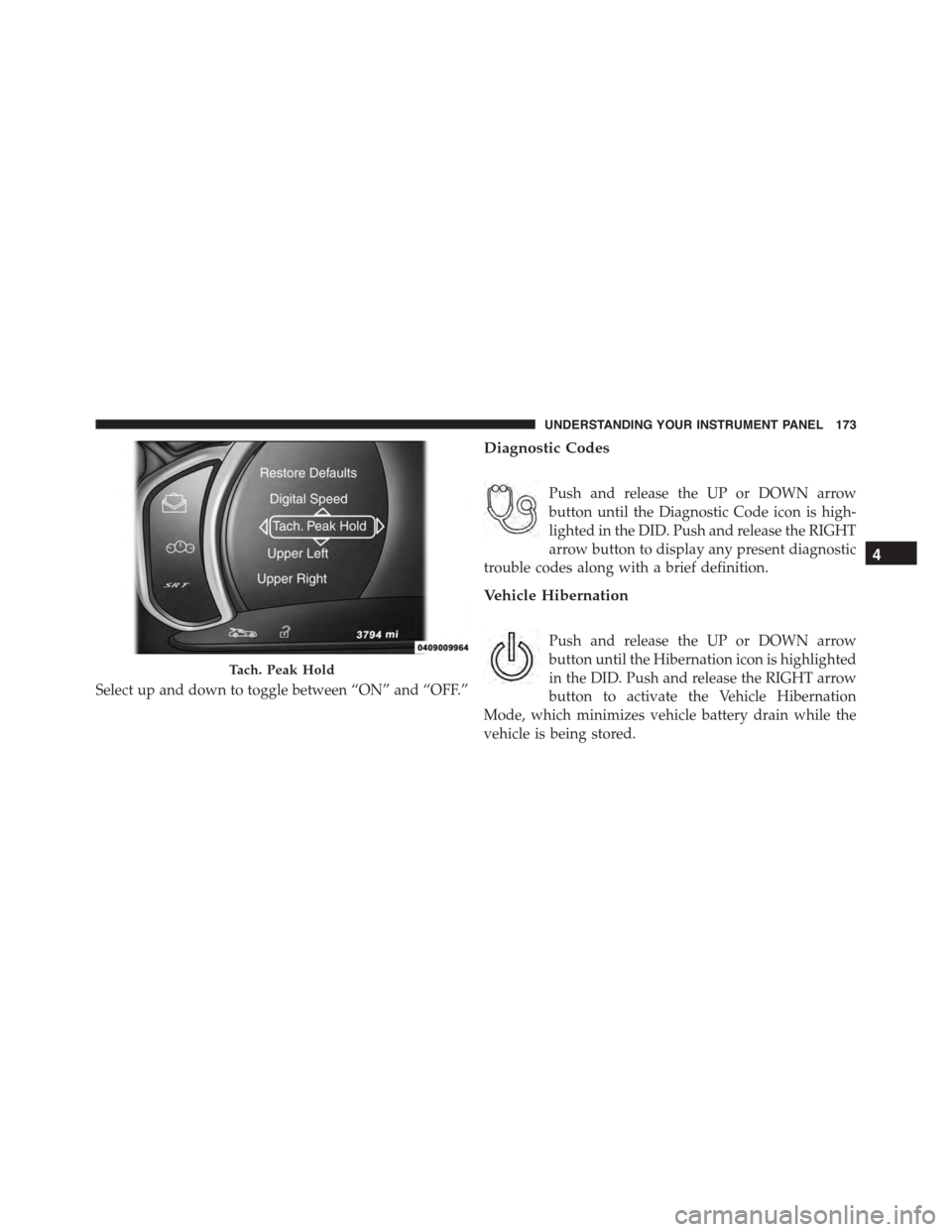
Select up and down to toggle between “ON” and “OFF.”
Diagnostic Codes
Push and release the UP or DOWN arrow
button until the Diagnostic Code icon is high-
lighted in the DID. Push and release the RIGHT
arrow button to display any present diagnostic
trouble codes along with a brief definition.
Vehicle Hibernation
Push and release the UP or DOWN arrow
button until the Hibernation icon is highlighted
in the DID. Push and release the RIGHT arrow
button to activate the Vehicle Hibernation
Mode, which minimizes vehicle battery drain while the
vehicle is being stored.
Tach. Peak Hold
4
UNDERSTANDING YOUR INSTRUMENT PANEL 173
Page 176 of 400
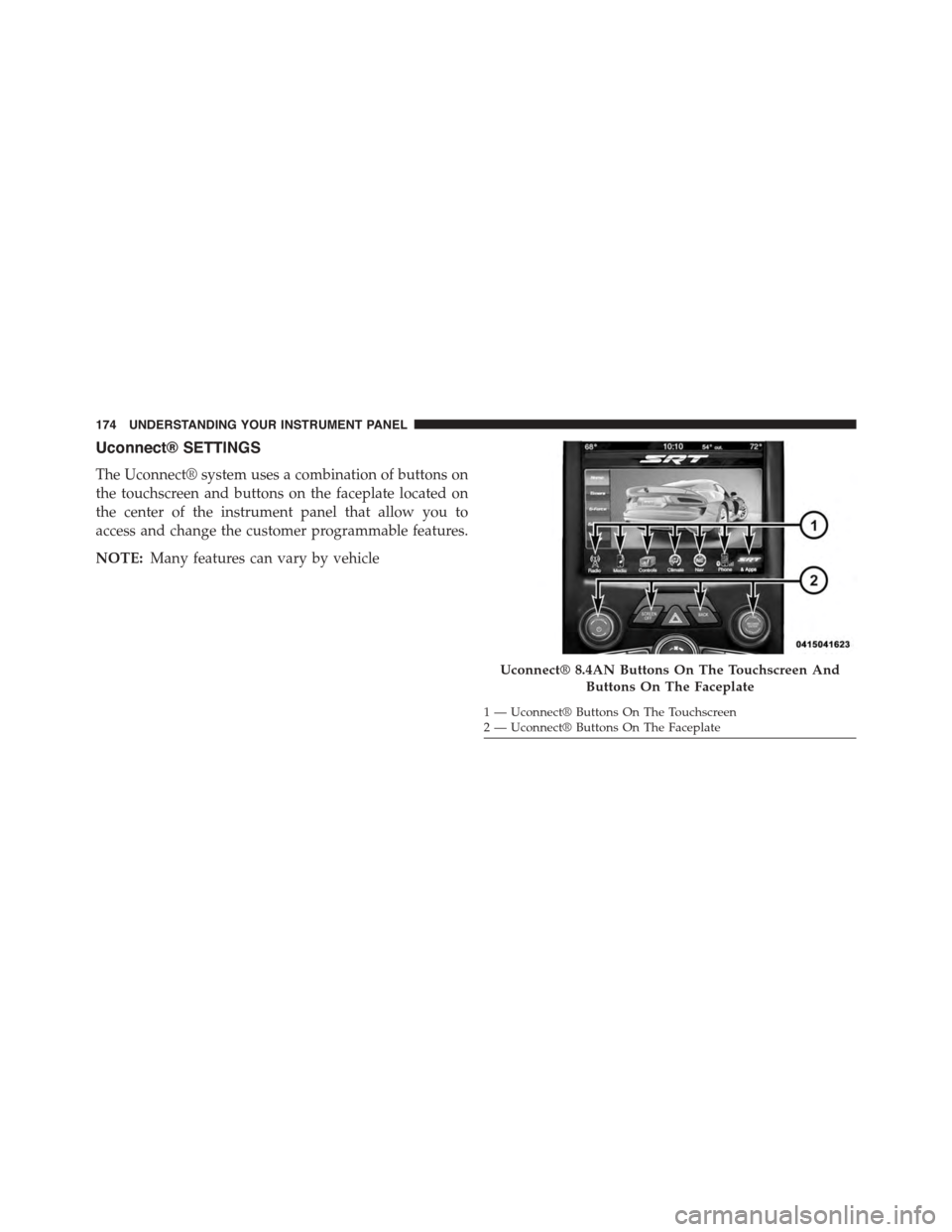
Uconnect® SETTINGS
The Uconnect® system uses a combination of buttons on
the touchscreen and buttons on the faceplate located on
the center of the instrument panel that allow you to
access and change the customer programmable features.
NOTE:Many features can vary by vehicle
Uconnect® 8.4AN Buttons On The Touchscreen And
Buttons On The Faceplate
1—Uconnect®ButtonsOnTheTouchscreen2—Uconnect®ButtonsOnTheFaceplate
174 UNDERSTANDING YOUR INSTRUMENT PANEL
Page 177 of 400
Buttons On the Faceplate
Buttons on the faceplate are located below the Uconnect®
system in the center of the instrument panel. In addition,
there is a Scroll/Enter control knob located on the right
side of the Climate Controls in the center of the instru-
ment panel. Turn the control knob to scroll through
menus and change settings (i.e., 30, 60, 90), push the
center of the control knob one or more times to select or
change a setting (i.e., ON, OFF).
Buttons On The Touchscreen
Buttons on the touchscreen are accessible on the
Uconnect® display.
Customer Programmable Features/Personal
Settings — Uconnect® 8.4 System Settings
Press the “SRT & Apps” button on the touchscreen, then
press the “Settings” button on the touchscreen to display
the menu setting screen. In this mode the Uconnect®
system allows you to access programmable features that
may be equipped such as Display, Voice, Clock, Safety &
Driving Assistance, Lights, Doors & Locks, Engine Off
Options, Audio, Phone/Bluetooth®, SiriusXM Setup, Re-
store Settings, Clear Personal Data, and System Informa-
tion.
NOTE:Only one category may be selected at a time.
To adjust the setting of a programmable feature, press the
desired setting option. Once in the desired setting option,
press and release the preferred setting until a check-mark
appears next to the setting, showing that the setting has
been selected.
Once the setting is complete, press the Back Arrow
button on the touchscreen to return to the previous menu
or press the X button on the touchscreen to close out of
the settings screen. Pressing the Up or Down Arrow
button on the right side of the screen will allow you to
toggle up or down through the list of available settings.
4
UNDERSTANDING YOUR INSTRUMENT PANEL 175
Page 178 of 400
Display
After pressing the Display button on the touchscreen the
following settings will be available.
•Display Mode
This feature will allow you to select one of the auto
display settings. To change Mode status, press and re-
lease the Auto or Manual button on the touchscreen.
Then press the arrow back button on the touchscreen, or
push the back button on the faceplate.
•Display Brightness With Headlights ON
This feature will allow you to select the display bright-
ness when the headlights are on. Adjust the brightness
with the “+” and “–” setting buttons on the touchscreen,
then press the arrow back button on the touchscreen, or
push the back button on the faceplate.
NOTE:The usage of the Parade Mode feature will cause
the radio to activate the “Display Brightness With Head-
lights OFF” control even though the headlights are on.
•Display Brightness With Headlights OFF
This feature will allow you to select the display bright-
ness when the headlights are off. Adjust the brightness
with the “+” and “–” setting buttons on the touchscreen,
then press the arrow back button on the touchscreen, or
push the back button on the faceplate.
•Set Theme — If Equipped
This feature will allow you to choose a theme for the
display screen. The theme will change the background
color, highlight color, and button color of the display
screen.
•Set Language
This feature will allow you to select one of the languages
for all display nomenclature, including the trip functions
176 UNDERSTANDING YOUR INSTRUMENT PANEL
Page 179 of 400
and the navigation system (if equipped). Press the Set
Language button on the touchscreen and then press the
desired language button on the touchscreen until a
check-mark appears next to the language, showing that
setting has been selected. Press the back arrow button on
the touchscreen to return to the previous menu, or push
the back button on the faceplate.
•Units
This feature will allow you to have the DID, odometer,
and navigation system (if equipped) changed between
US and Metric units of measure. Press US or Metric until
a check-mark appears next to the setting, showing that
setting has been selected. Press the back arrow button on
the touchscreen to return to the previous menu, or push
the back button on the faceplate.
•Touchscreen Beep
This feature will allow you to turn on or shut off the
sound heard when a touchscreen button is pressed. Press
the Touchscreen Beep button on the touchscreen until a
check-mark appears next to the setting, showing that
setting has been selected. Press the back arrow button on
the touchscreen to return to the previous menu, or push
the back button on the faceplate.
•Control Screen Time-Out — If Equipped
When this feature is selected, the Controls Screen will
stay open for five seconds before the screen times out.
With the feature deselected, the screen will stay open
until it is manually closed. Press the Control Screen
Time-Out button on the touchscreen until a check-mark
appears next to the setting, showing that setting has been
selected. Press the back arrow button on the touchscreen
to return to the previous menu, or push the back button
on the faceplate.
•Navigation Turn-By-Turn In Cluster — If Equipped
When this feature is selected, the turn-by-turn directions
will appear in the DID as the vehicle approaches a
4
UNDERSTANDING YOUR INSTRUMENT PANEL 177
Page 180 of 400
designated turn within a programmed route. To turn on
or enable, press the Navigation Turn-By-Turn In Cluster
button on the touchscreen, until a check-mark appears
next to the setting, showing that setting has been se-
lected. Press the back arrow button on the touchscreen to
return to the previous menu or push the back button on
the faceplate.
Voice
After pressing the “Voice” button on the touchscreen the
following settings will be available:
•Voice Response Length
When in this display, you may change the Voice Re-
sponse Length settings. To change the Voice Response
Length, press the “Brief” or “Detailed” button on the
touchscreen until a check-mark appears next to the
setting, showing that setting has been selected. Press the
back arrow button on the touchscreen to return to the
previous menu.
•Show Command List
When in this display, you may choose to Always, With
Help, or Never display the Teleprompter with possible
options while in a voice session. To change the Show
Command List settings, press the “Always,” “With
Help,” or “Never” button on the touchscreen until a
check-mark appears next to the setting, showing that
setting has been selected. Press the back arrow button on
the touchscreen to return to the previous menu.
Clock
After pressing the “Clock” button on the touchscreen the
following settings will be available:
•Sync Time With GPS
This feature will allow you to automatically have the
radio set the time. To change the Sync Time setting, press
the “Sync with GPS Time” button on the touchscreen
until a check-mark appears next to the setting, showing
178 UNDERSTANDING YOUR INSTRUMENT PANEL
Page 181 of 400
that setting has been selected. Press the back arrow
button on the touchscreen to return to the previous
menu, or push the back button on the faceplate.
•Set Time Hours
This feature will allow you to adjust the hours. The “Sync
with GPS Time” button on the touchscreen must be
unchecked. To make your selection, press the “+” or “–”
buttons on the touchscreen to adjust the hours up or
down. Press the back arrow button on the touchscreen to
return to the previous menu or press the” X” button on
the touchscreen to close out of the settings screen.
•Set Time Minutes
This feature will allow you to adjust the minutes. The
“Sync with GPS Time” button on the touchscreen must be
unchecked. To make your selection, press the “+” or “–”
buttons on the touchscreen to adjust the minutes up or
down. Press the back arrow button on the touchscreen to
return to the previous menu or press the “X” button on
the touchscreen to close out of the settings screen.
•Time Format
This feature will allow you to select the time format
display setting. Press the “Time Format” button on the
touchscreen until a check-mark appears next to the 12hrs
or 24hrs setting, showing that setting has been selected.
Press the back arrow button on the touchscreen to return
to the previous menu, or push the back button on the
faceplate.
Clock
After pressing the “Clock” button on the touchscreen the
following settings will be available:
•Sync Time With GPS
This feature will allow the radio to sync time with a GPS
signal. To change the Sync Time setting, press the “Sync
4
UNDERSTANDING YOUR INSTRUMENT PANEL 179
Page 182 of 400
time with GPS” button on the touchscreen until a check-
mark appears next to the setting, showing that setting has
been selected. Press the back arrow button on the touch-
screen to return to the previous menu.
•Set Time Hours
This feature will allow you to adjust the hours. The “Sync
time with GPS” button on the touchscreen must be
unchecked. To make your selection, press the “+” or “–”
buttons on the touchscreen to adjust the hours up or
down. Press the back arrow button on the touchscreen to
return to the previous menu.
•Set Time Minutes
This feature will allow you to adjust the minutes. The
“Sync time with GPS” button on the touchscreen must be
unchecked. To make your selection, press the “+” or “–”
buttons on the touchscreen to adjust the minutes up or
down. Press the back arrow button on the touchscreen to
return to the previous menu.
•Time Format
This feature will allow you to select the time format
display setting. Press the “Time Format” button on the
touchscreen until a check-mark appears next to the
“12hrs” or “24hrs” setting, showing that setting has been
selected. Press the back arrow button on the touchscreen
to return to the previous menu.
•Show Time In Status Bar — If Equipped
This feature will allow you to turn on or shut off the
digital clock in the status bar. To change the Show Time
Status setting press the “Show Time in Status Bar” button
on the touchscreen until a check-mark appears next to
setting, indicating that the setting has been selected. Press
the back arrow button on the touchscreen to return to the
previous menu.
180 UNDERSTANDING YOUR INSTRUMENT PANEL
Page 183 of 400
Safety & Driving Assistance — If Equipped
After pressing the Safety & Driving Assistance button on
the touchscreen the following settings will be available:
•ParkView® Backup Camera Delay
When the vehicle is shifted out of REVERSE (with camera
delay turned OFF), the rear camera mode is exited and
the previous screen appears again. When the vehicle is
shifted out of REVERSE (with camera delay turned ON),
the rear view image with dynamic grid lines will be
displayed for up to 10 seconds after shifting out of
“REVERSE” unless the forward vehicle speed exceeds
8 mph (12 km/h), the transmission is shifted into
“PARK” or the ignition is switched to the OFF position.
To set the ParkView® Backup Camera Delay press the
“settings” button, then the “Safety & Driving Assistance”
button on the touchscreen. Press the “Parkview Backup
camera Delay” button on the touchscreen to turn the
ParkView® Delay ON or OFF.
•Hill Start Assist — If Equipped
When this feature is selected, the Hill Start Assist (HSA)
system is active. To make your selection, press the “Hill
Start Assist” button on the touchscreen until a check-
mark appears next to setting, indicating that the setting
has been selected. Press the back arrow/Done button on
the touchscreen to return to the previous menu.
Lights
After pressing the Lights button on the touchscreen the
following settings will be available.
•Headlight Off Delay
When this feature is selected, the driver can choose to
have the headlights remain on for 0, 30, 60, or 90 seconds
when exiting the vehicle. To change the Headlight Off
Delay status, press the “+” or “-” button on the touch-
screen to select your desired time interval. Press the back
4
UNDERSTANDING YOUR INSTRUMENT PANEL 181