display FIAT 500L LIVING 2014 2.G Repair Manual
[x] Cancel search | Manufacturer: FIAT, Model Year: 2014, Model line: 500L LIVING, Model: FIAT 500L LIVING 2014 2.GPages: 420, PDF Size: 9.77 MB
Page 300 of 420
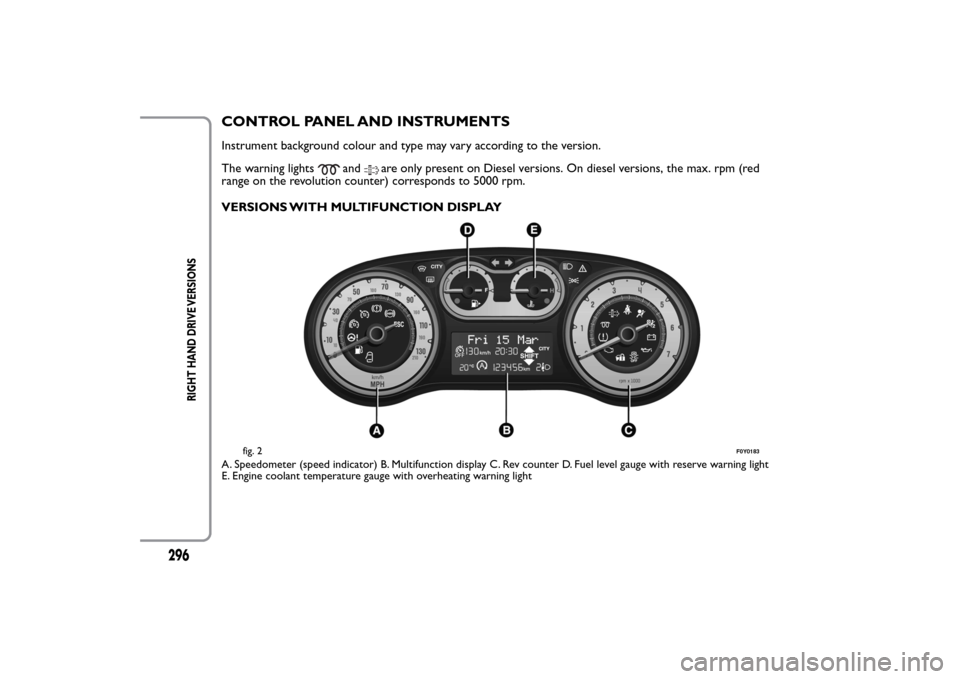
CONTROL PANEL AND INSTRUMENTSInstrument background colour and type may vary according to the version.
The warning lights
and
are only present on Diesel versions. On diesel versions, the max. rpm (red
range on the revolution counter) corresponds to 5000 rpm.
VERSIONS WITH MULTIFUNCTION DISPLAY
A. Speedometer (speed indicator) B. Multifunction display C. Rev counter D. Fuel level gauge with reserve warning light
E. Engine coolant temperature gauge with overheating warning light
fig. 2
F0Y0183
296
RIGHT HAND DRIVE VERSIONS
Page 301 of 420
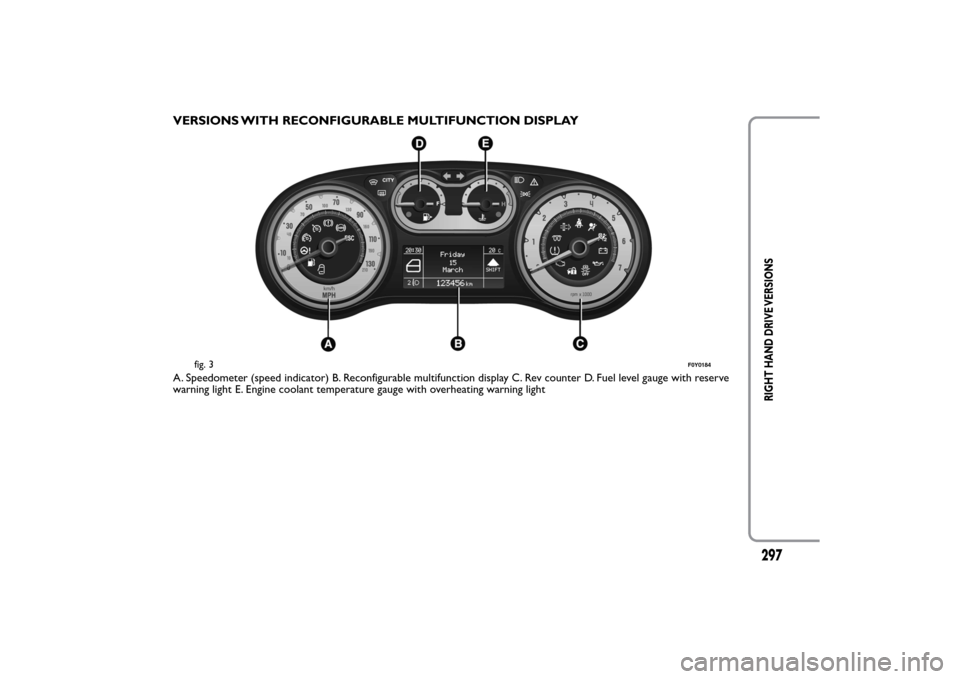
VERSIONS WITH RECONFIGURABLE MULTIFUNCTION DISPLAYA. Speedometer (speed indicator) B. Reconfigurable multifunction display C. Rev counter D. Fuel level gauge with reserve
warning light E. Engine coolant temperature gauge with overheating warning light
fig. 3
F0Y0184
297
RIGHT HAND DRIVE VERSIONS
Page 351 of 420
TABLE OF CONTENTS
INTRODUCTION ...................................................................349
TIPS, CONTROLS AND GENERAL INFORMATION ...350
TIPS ...........................................................................................350
MULTIMEDIA DEVICES: SUPPORTED AUDIO FILES
AND FORMATS.....................................................................352
NOTES ON TRADEMARKS...............................................352
EXTERNAL AUDIO SOURCES .........................................352
ANTI-THEFT PROTECTION .............................................353
SOFTWARE UPDATES ........................................................354
TECHNICAL SPECIFICATIONS........................................354
QUICK GUIDE .........................................................................355
CONTROLS ON FRONT PANEL ....................................355
FRONT PANEL CONTROL SUMMARY TABLE............356
STEERING WHEEL CONTROLS ........................................357
DESCRIPTION .......................................................................357
STEERING WHEEL CONTROL SUMMARY TABLE ....358
SWITCHING THE SYSTEM ON/OFF ................................359
RADIO (TUNER) MODE ....................................................359
RADIO MODE SELECTION ..............................................359
FREQUENCY BAND SELECTION...................................359
DISPLAYED INFORMATION .............................................360
RADIO STATION SELECTION .........................................360
PREVIOUS/NEXT RADIO STATION SEARCH ............361
PREVIOUS/NEXT RADIO STATION FAST SEARCH ..361
AM/FM RADIO STATION TUNING ................................361
DAB RADIO ...........................................................................362
SETTING THE PRESELECTIONS .....................................363
AUDIO .....................................................................................363
MEDIA MODE ..........................................................................366
TRACK CHANGE (previous/next) ...................................366TRACK FAST FORWARD/REWIND ...............................366
TRACK SELECTION (Browse) ..........................................366
AUDIO SOURCE SELECTION..........................................367
TRACK INFORMATION DISPLAY ...................................367
RANDOM TRACK REPRODUCTION ...........................367
TRACK REPETITION...........................................................367
CD PLAYER ...............................................................................368
LOADING/EJECTING A CD ..............................................368
Bluetooth
® SOURCE.........................................................369
PAIRING ABluetooth
® AUDIO DEVICE .................369
USB/iPod SUPPORT.................................................................370
AUX SUPPORT.........................................................................370
PHONE MODE ........................................................................371
PHONE MODE ACTIVATION ..........................................371
MAIN FUNCTIONS .............................................................371
DISPLAYED INFORMATION .............................................371
PAIRING A MOBILE PHONE.............................................372
STORING NAMES/NUMBERS IN THE MOBILE
PHONE PHONEBOOK ......................................................372
CONNECTION/DISCONNECTION OF A MOBILE
PHONE OR A
Bluetooth
® AUDIO DEVICE ...........373
DELETION OF A MOBILE PHONE OR A
Bluetooth
® AUDIO DEVICE ........................................373
SETTING A MOBILE PHONE OR A
Bluetooth
®
AUDIO DEVICE AS FAVOURITE .....................................374
DELETION OF PHONE DATA
(PHONEBOOK AND RECENT CALLS) ........................374
TRANSMISSION OF PHONE DATA
(PHONEBOOK AND RECENT CALLS) ........................374
347
Page 353 of 420
INTRODUCTIONThe car is equipped with an infotelematic system designed according to the specific characteristics of the
passenger compartment, with a customised design that matches the style of dashboard.
The system is installed in an ergonomic position for the driver and passenger, and controls can be quickly
located from the graphical display on the front, making the device easy to use.
To increase protection against theft, the system has a protection system that only allows it to be used on the
vehicle in which it was originally fitted.
The instructions for use are given below and we recommend you read them carefully and always keep them
to hand (for example, in the glove compartment).
Enjoy reading. Happy motoring!
The information in this publication is provided by way of example. Fiat Group
Automobiles S.p.A. can modify the specifications of the vehicle model described in this
publication at any time, for technical or marketing purposes. For further information,
contact a Fiat Dealership.
349
Page 354 of 420
TIPS, CONTROLS AND GENERAL
INFORMATIONTIPS
Road safety
Learn how to use the various system functions
before setting off.
Read the instructions for the system carefully before
setting off.
WARNING
If the volume is too loud this can be
dangerous. Adjust the volume so that you
can still hear background noises (e.g. horns,
ambulances, police vehicles, etc .).
Reception conditions
Reception conditions change constantly while driving.
Reception may be interfered with by the presence of
mountains, buildings or bridges, or when you are far
away from the broadcaster.
IMPORTANT The volume may be increased when
receiving traffic alerts and news.Care and maintenance
Observe the following precautions to ensure the
system is fully operational:
❒the display is sensitive to scratching, liquids and
detergents. The display should not come into
contact with pointed or rigid objects which could
damage its surface. Do not press on the display
when cleaning it.
❒prevent any liquid from entering the system: this
could be damaged beyond repair.
Only clean the front panel and the display
with a soft , clean, dry, anti-static cloth.
Cleaning and polishing products may
damage the surface. Do not use alcohol or similar
products to clean the panel or the display.
Important
In the event of a failure, the system should only be
checked and repaired at a Fiat Dealership.
If the temperature is particularly low, the display may
take a while to reach optimum brightness.
If the car is stopped for a while and the outside
temperature is very high, the system may go into
“thermal protection” mode, suspending operation
until the temperature in the passenger compartment
returns to acceptable levels.
350
Page 357 of 420
EXTERNAL AUDIO SOURCES
Other electronic devices (e.g. iPod, PDA, etc...) can
be used on the car.
Some of them can however cause electromagnetic
interference. Disconnect these devices if the system
performance worsens.
NOTE The system supports only FAT32-formatted
USB devices. The system does not support devices
with a capacity higher than 64 Gb.
ANTI-THEFT PROTECTION
uconnect™ is equipped with an anti-theft
protection system based on the exchange of
information with the electronic control unit (Body
Computer) on the car.
This guarantees maximum safety and prevents the
secret code from being entered after the power
supply has been disconnected.
If the check has a positive outcome, the system will
start to function, whereas if the comparison codes
are not the same or if the electronic control unit
(Body Computer) is replaced, the system will ask the
user to enter the secret code according to the
procedure described in the paragraph below.Entering the secret code
When the system is switched on, if the code is
requested, the display will show "Please enter Anti-
Theft Code" followed by the video page showing a
keypad to enter the secret code.
The secret code is made up of four digits, from 1 to
9: to insert the first number of the code press the
corresponding key on the display. Enter the other
code digits in the same way.
After entering the fourth figure,uconnect™ begins
operating.
If an incorrect code is entered, the system displays
"Incorrect Code. Please Try Again" to notify the user
of the need to enter the correct code.
After the 3 available attempts to enter the code, the
system displays "Incorrect Code. Radio locked. Please
wait 30 minutes": the waiting time is displayed. Once
the text has disappeared you can start the code
entering procedure again.
353
Page 360 of 420
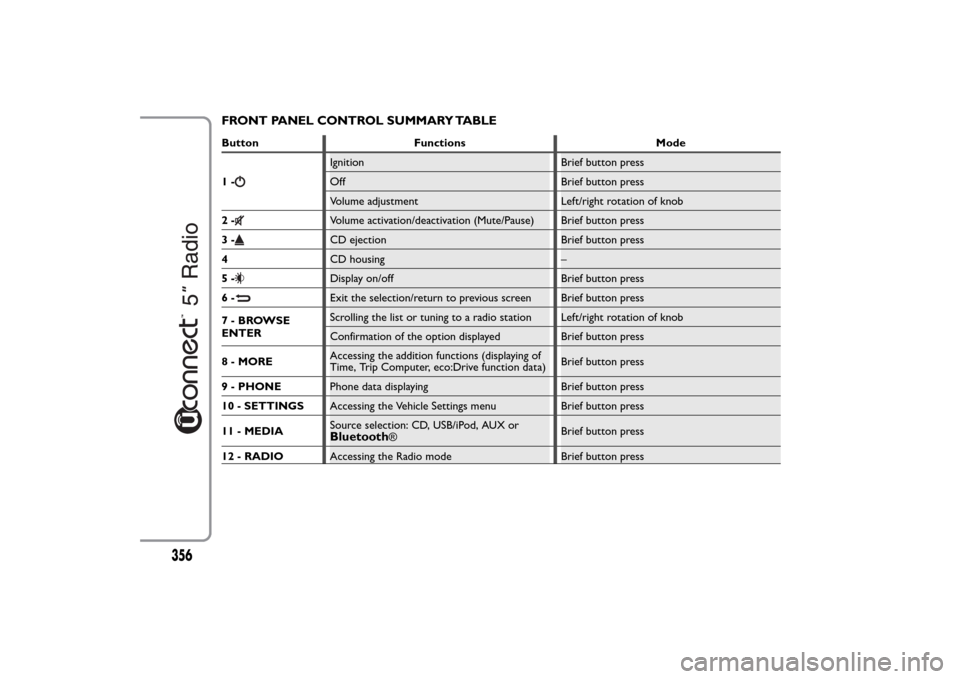
FRONT PANEL CONTROL SUMMARY TABLEButton Functions Mode
1-
Ignition Brief button press
Off Brief button press
Volume adjustment Left/right rotation of knob
2-Volume activation/deactivation (Mute/Pause) Brief button press
3-CD ejection Brief button press
4CD housing –
5-Display on/off Brief button press
6-Exit the selection/return to previous screen Brief button press
7-BROWSE
ENTERScrolling the list or tuning to a radio station Left/right rotation of knob
Confirmation of the option displayed Brief button press
8 - MOREAccessing the addition functions (displaying of
Time, Trip Computer, eco:Drive function data)Brief button press
9 - PHONEPhone data displaying Brief button press
10 - SETTINGSAccessing the Vehicle Settings menu Brief button press
11 - MEDIASource selection: CD, USB/iPod, AUX orBluetooth
®Brief button press
12 - RADIOAccessing the Radio mode Brief button press
356
Page 363 of 420
SWITCHING THE SYSTEM ON/OFFRADIO (TUNER) MODE
The system switches on/off when the button/knob
(ON/OFF) is pressed (1-fig. 1).
The electronic volume adjustment control rotates
continuously (360°) in both directions without stop
positions.
Turn the button/knob clockwise to increase the radio
volume or counterclockwise to decrease it.
The system has the following tuners: AM, FM and
DAB (for versions/markets, where provided).RADIO MODE SELECTION
Press the RADIO button (12-fig. 1) on the front
panel to activate the radio mode.
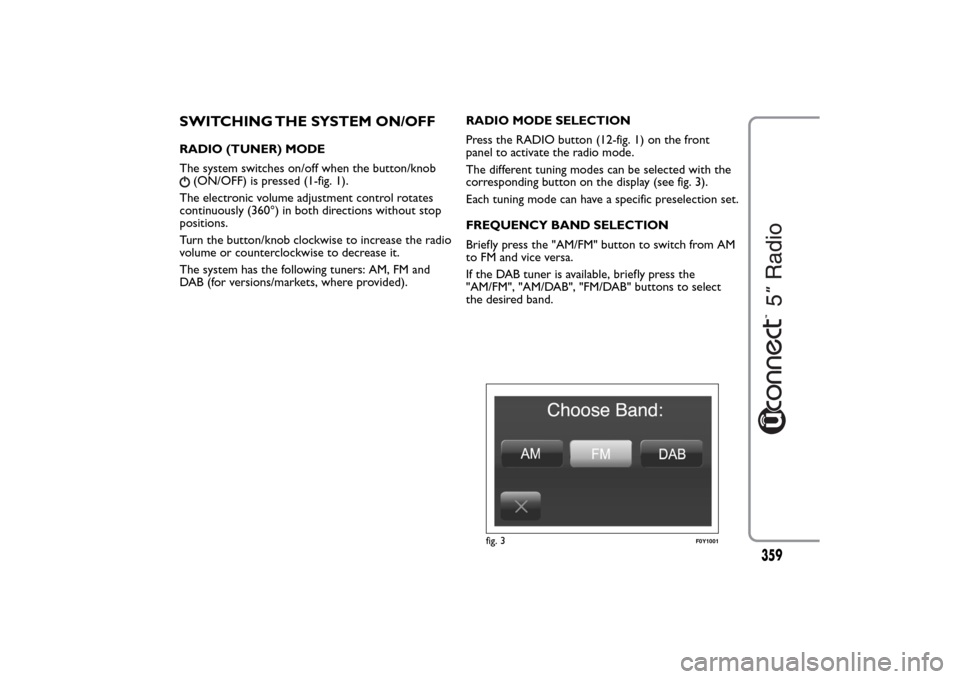
The different tuning modes can be selected with the
corresponding button on the display (see fig. 3).
Each tuning mode can have a specific preselection set.
FREQUENCY BAND SELECTION
Briefly press the "AM/FM" button to switch from AM
to FM and vice versa.
If the DAB tuner is available, briefly press the
"AM/FM", "AM/DAB", "FM/DAB" buttons to select
the desired band.
fig. 3
F0Y1001
359
Page 364 of 420
DISPLAYED INFORMATION
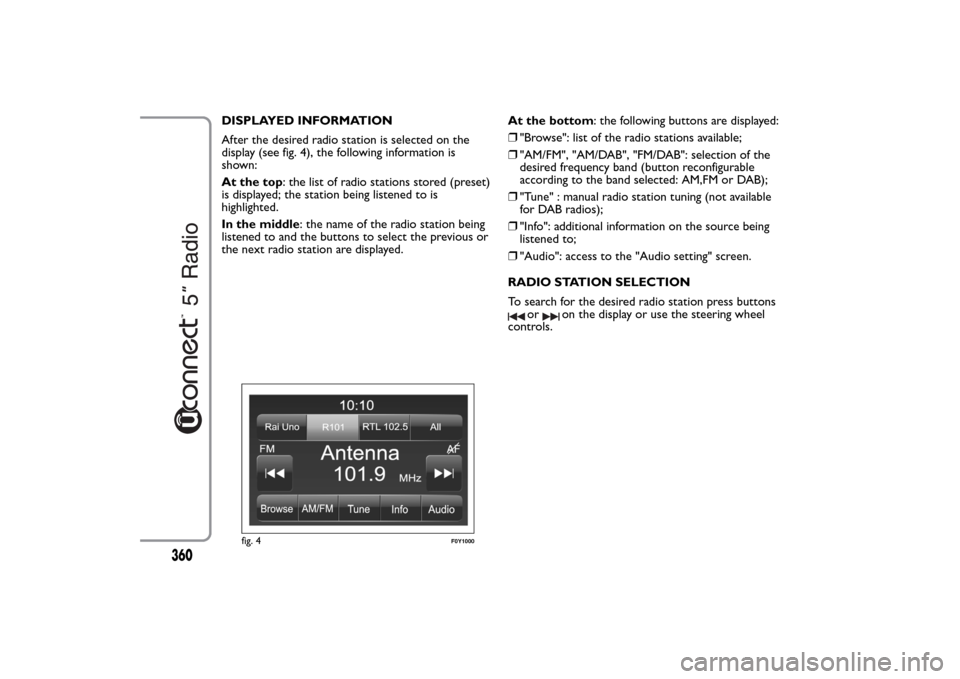
After the desired radio station is selected on the
display (see fig. 4), the following information is
shown:
At the top: the list of radio stations stored (preset)
is displayed; the station being listened to is
highlighted.
In the middle: the name of the radio station being
listened to and the buttons to select the previous or
the next radio station are displayed.At the bottom: the following buttons are displayed:
❒"Browse": list of the radio stations available;
❒"AM/FM", "AM/DAB", "FM/DAB": selection of the
desired frequency band (button reconfigurable
according to the band selected: AM,FM or DAB);
❒"Tune" : manual radio station tuning (not available
for DAB radios);
❒"Info": additional information on the source being
listened to;
❒"Audio": access to the "Audio setting" screen.
RADIO STATION SELECTION
To search for the desired radio station press buttons
or
on the display or use the steering wheel
controls.
fig. 4
F0Y1000
360
Page 365 of 420
PREVIOUS/NEXT RADIO STATION SEARCH
Briefly press buttons
or
on the display: when
the button is released the previous or the next radio
station is displayed.
When searching forwards, if the system reaches the
end of the band, it will automatically stop on the
station where the search has started from.
PREVIOUS/NEXT RADIO STATION FAST
SEARCH
Hold down buttons
or
on the display to start
the fast search: when the button is released, the first
tunable radio station can be heard.
AM/FM RADIO STATION TUNING
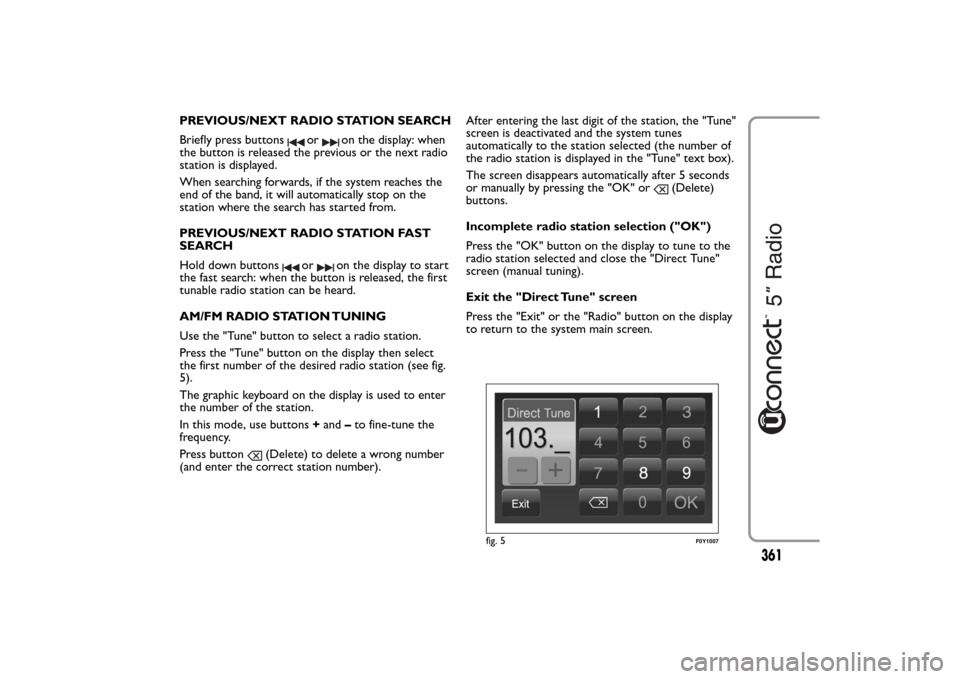
Use the "Tune" button to select a radio station.
Press the "Tune" button on the display then select
the first number of the desired radio station (see fig.
5).
The graphic keyboard on the display is used to enter
the number of the station.
In this mode, use buttons+and–to fine-tune the
frequency.
Press button
(Delete) to delete a wrong number
(and enter the correct station number).After entering the last digit of the station, the "Tune"
screen is deactivated and the system tunes
automatically to the station selected (the number of
the radio station is displayed in the "Tune" text box).
The screen disappears automatically after 5 seconds
or manually by pressing the "OK" or
(Delete)
buttons.
Incomplete radio station selection ("OK")
Press the "OK" button on the display to tune to the
radio station selected and close the "Direct Tune"
screen (manual tuning).
Exit the "Direct Tune" screen
Press the "Exit" or the "Radio" button on the display
to return to the system main screen.
fig. 5
F0Y1007
361