control FIAT DOBLO 2009 2.G User Guide
[x] Cancel search | Manufacturer: FIAT, Model Year: 2009, Model line: DOBLO, Model: FIAT DOBLO 2009 2.GPages: 274, PDF Size: 6.6 MB
Page 22 of 274
21
KNOW
YOUR
VEHICLE
SAFETY
STARTING
AND
DRIVING
WARNING
LIGHTS AND
MESSAGES
IN AN
EMERGENCY
SERVICING
AND
MAINTENANCE
TECHNICAL
SPECIFICATIONS
INDEXMENU FUNCTIONS
Adjusting the vehicle interior lighting
This function is available, with the dipped headlamps on
and at night, to adjust the brightness of the instrument
panel, buttons, radio display and automatic climate con-
trol display.
During the daytime, and with the dipped headlamps on,
the instrument panel, buttons and radio and automatic
climate control displays are set to maximum brightness.
Proceed as follows to adjust the brightness:
– press SET ESC: the previously set brightness level flash-
es in the display;
– press button ▲or ▼to adjust the brightness level;
– press the SET ESC button to go back to the menu screen
or hold the button down to go back to the standard screen
without saving.
Speed beep (Speed limit)
This function makes it possible to set the vehicle speed
limit (km/h or mph). When this limit is exceeded the dri-
ver is immediately alerted (see “Warning lights and mes-
sages” section).
To set the desired speed limit, proceed as follows:
– press the SET ESC button: the display shows the words
Speed Beep;
– press button ▲or ▼to select speed limit activation
(On) or deactivation (Off); – PASSENGER AIRBAG
– DAYTIME RUNNING LIGHTS
– EXIT MENU
Selecting an option from the main menu without a submenu:
– press SET ESC to select the main menu option you wish
to set;
– press ▲or ▼to select the new setting;
– press the SET ESC button to memorize the new set-
ting and go back to the previous main menu option.
Selecting an option from the main menu with a submenu:
– press the SET ESC button to display the first submenu
option;
– press ▲or ▼to scroll through all the submenu op-
tions;
– press the SET ESC button to select the displayed sub-
menu option and open the relevant setup menu;
– press ▲or ▼to select the new setting for this sub-
menu option;
– press the SET ESC button to memorize the new set-
ting and go back to the previous submenu option.
Page 30 of 274
29
KNOW
YOUR
VEHICLE
SAFETY
STARTING
AND
DRIVING
WARNING
LIGHTS AND
MESSAGES
IN AN
EMERGENCY
SERVICING
AND
MAINTENANCE
TECHNICAL
SPECIFICATIONS
INDEX
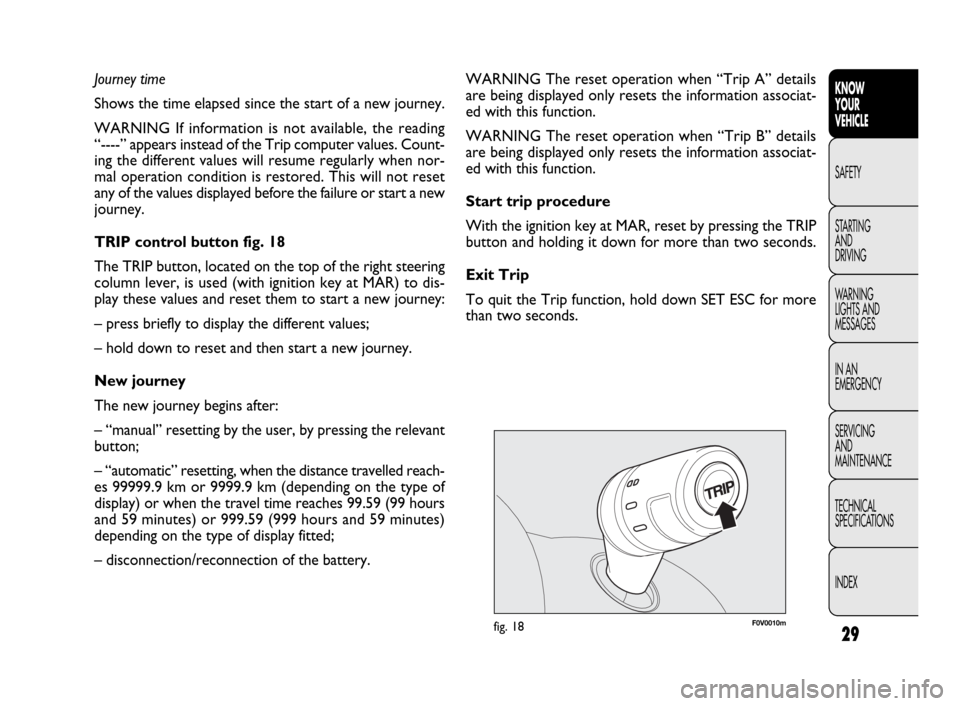
F0V0010mfig. 18
WARNING The reset operation when “Trip A” details
are being displayed only resets the information associat-
ed with this function.
WARNING The reset operation when “Trip B” details
are being displayed only resets the information associat-
ed with this function.
Start trip procedure
With the ignition key at MAR, reset by pressing the TRIP
button and holding it down for more than two seconds.
Exit Trip
To quit the Trip function, hold down SET ESC for more
than two seconds. Journey time
Shows the time elapsed since the start of a new journey.
WARNING If information is not available, the reading
“----” appears instead of the Trip computer values. Count-
ing the different values will resume regularly when nor-
mal operation condition is restored. This will not reset
any of the values displayed before the failure or start a new
journey.
TRIP control button fig. 18
The TRIP button, located on the top of the right steering
column lever, is used (with ignition key at MAR) to dis-
play these values and reset them to start a new journey:
– press briefly to display the different values;
– hold down to reset and then start a new journey.
New journey
The new journey begins after:
– “manual” resetting by the user, by pressing the relevant
button;
– “automatic” resetting, when the distance travelled reach-
es 99999.9 km or 9999.9 km (depending on the type of
display) or when the travel time reaches 99.59 (99 hours
and 59 minutes) or 999.59 (999 hours and 59 minutes)
depending on the type of display fitted;
– disconnection/reconnection of the battery.
Page 31 of 274
30
KNOW
YOUR
VEHICLE
SAFETY
STARTING
AND
DRIVING
WARNING
LIGHTS AND
MESSAGES
IN AN
EMERGENCY
SERVICING
AND
MAINTENANCE
TECHNICAL
SPECIFICATIONS
INDEX
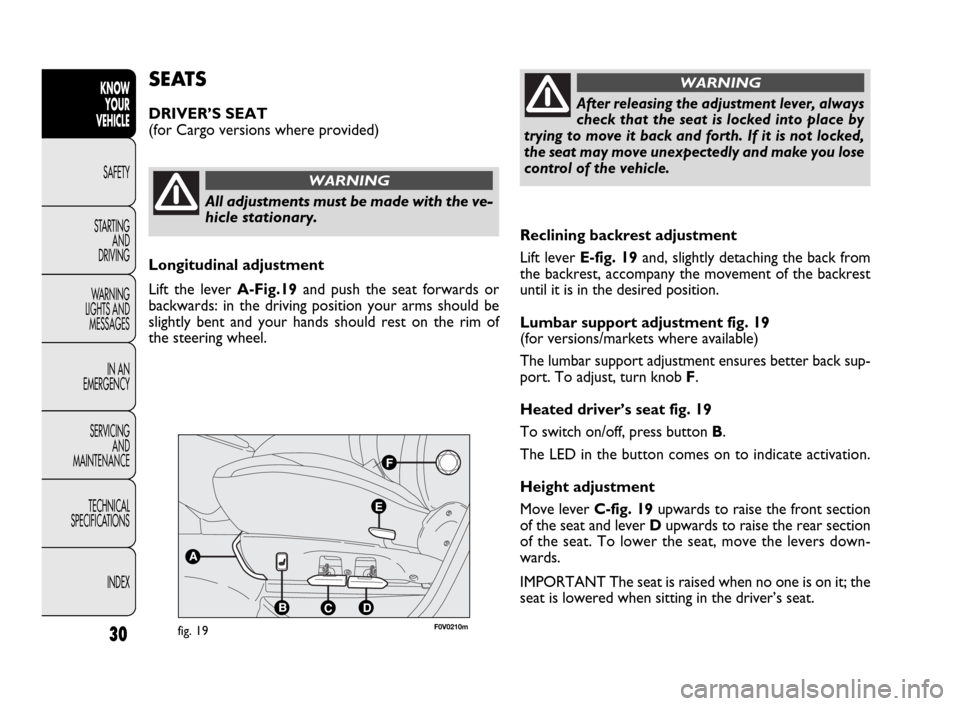
Reclining backrest adjustment
Lift lever E-fig. 19 and, slightly detaching the back from
the backrest, accompany the movement of the backrest
until it is in the desired position.
Lumbar support adjustment fig. 19
(for versions/markets where available)
The lumbar support adjustment ensures better back sup-
port. To adjust, turn knob F.
Heated driver’s seat fig. 19
To switch on/off, press button B.
The LED in the button comes on to indicate activation.
Height adjustment
Move lever C-fig. 19upwards to raise the front section
of the seat and lever Dupwards to raise the rear section
of the seat. To lower the seat, move the levers down-
wards.
IMPORTANT The seat is raised when no one is on it; the
seat is lowered when sitting in the driver’s seat.
SEATS
DRIVER’S SEAT
(for Cargo versions where provided)
All adjustments must be made with the ve-
hicle stationary.
WARNING
After releasing the adjustment lever, always
check that the seat is locked into place by
trying to move it back and forth. If it is not locked,
the seat may move unexpectedly and make you lose
control of the vehicle.
WARNING
Longitudinal adjustment
Lift the lever A-Fig.19and push the seat forwards or
backwards: in the driving position your arms should be
slightly bent and your hands should rest on the rim of
the steering wheel.
F
E
A
BCD
fig. 19F0V0210m
Page 32 of 274
31
KNOW
YOUR
VEHICLE
SAFETY
STARTING
AND
DRIVING
WARNING
LIGHTS AND
MESSAGES
IN AN
EMERGENCY
SERVICING
AND
MAINTENANCE
TECHNICAL
SPECIFICATIONS
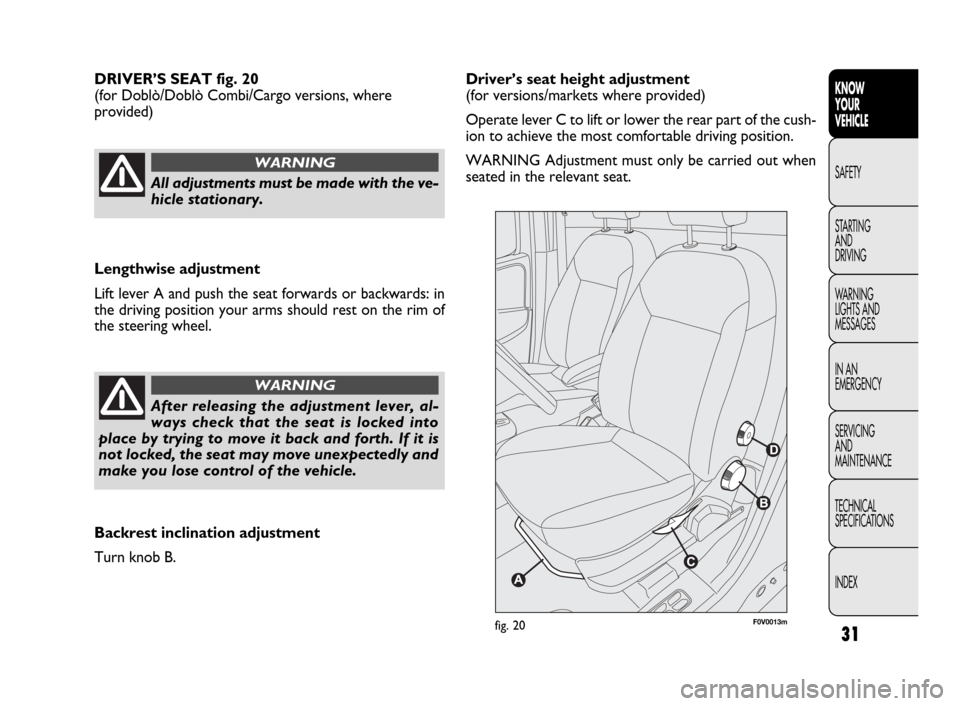
INDEXDriver’s seat height adjustment
(for versions/markets where provided)
Operate lever C to lift or lower the rear part of the cush-
ion to achieve the most comfortable driving position.
WARNING Adjustment must only be carried out when
seated in the relevant seat. DRIVER’S SEAT fig. 20
(for Doblò/Doblò Combi/Cargo versions, where
provided)
F0V0013mfig. 20
All adjustments must be made with the ve-
hicle stationary.
WARNING
Lengthwise adjustment
Lift lever A and push the seat forwards or backwards: in
the driving position your arms should rest on the rim of
the steering wheel.
After releasing the adjustment lever, al-
ways check that the seat is locked into
place by trying to move it back and forth. If it is
not locked, the seat may move unexpectedly and
make you lose control of the vehicle.
WARNING
Backrest inclination adjustment
Turn knob B.
Page 45 of 274
44
KNOW
YOUR
VEHICLE
SAFETY
STARTING
AND
DRIVING
WARNING
LIGHTS AND
MESSAGES
IN AN
EMERGENCY
SERVICING
AND
MAINTENANCE
TECHNICAL
SPECIFICATIONS
INDEX
HEATING AND VENTILATION
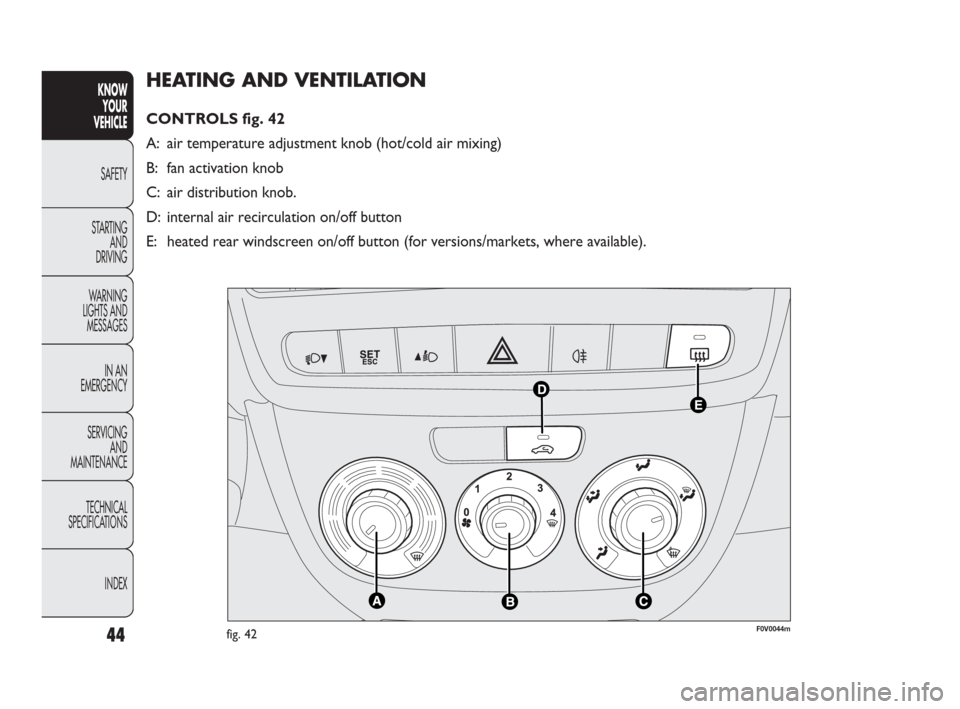
CONTROLS fig. 42
A: air temperature adjustment knob (hot/cold air mixing)
B: fan activation knob
C: air distribution knob.
D: internal air recirculation on/off button
E: heated rear windscreen on/off button (for versions/markets, where available).
F0V0044mfig. 42
Page 46 of 274
45
KNOW
YOUR
VEHICLE
SAFETY
STARTING
AND
DRIVING
WARNING
LIGHTS AND
MESSAGES
IN AN
EMERGENCY
SERVICING
AND
MAINTENANCE
TECHNICAL
SPECIFICATIONS
INDEX
FAST HEATING
Proceed as follows:
❒close all the diffusers in the dashboard;
❒turn knob A to -;
❒turn knob B to 4 -;
❒turn knob C to ©.
RAPID WINDSCREEN AND FRONT SIDE
WINDOWS DEMISTING/
DEFROSTING
(MAX-DEF function)
Proceed as follows:
❒turn knob A to -;
❒turn knob B to 4 -;
❒turn knob C to -;
❒turn off internal air recirculation (button D LED off).
After demisting/defrosting, operate the controls as nor-
mal to restore the required comfort. TEMPERATURE COMFORT
Knob C enables the air introduced into the vehicle to reach
all parts of the passenger compartment through five dis-
tribution options:
¶delivers air from central and side diffusers;
ßwarms the feet and keeps the face cool (bi-level func-
tion)
©warms up the passenger compartment more quickly;
®warms up the passenger compartment and, at the same
time, demists the windscreen;
-demists and defrosts the windscreen and front side win-
dows.
HEATING
Proceed as follows:
❒turn knob A fully to the right (to -);
❒turn knob B to the required speed;
❒turn knob C to:
®to warm the feet and, at the same time, demist the
windscreen;
ßto send air to the feet and introduce fresher air
from the central and dashboard diffusers;
©to warm up quickly.
Page 48 of 274
47
KNOW
YOUR
VEHICLE
SAFETY
STARTING
AND
DRIVING
WARNING
LIGHTS AND
MESSAGES
IN AN
EMERGENCY
SERVICING
AND
MAINTENANCE
TECHNICAL
SPECIFICATIONS
INDEX
MANUAL CLIMATE CONTROL (for versions/markets where provided)
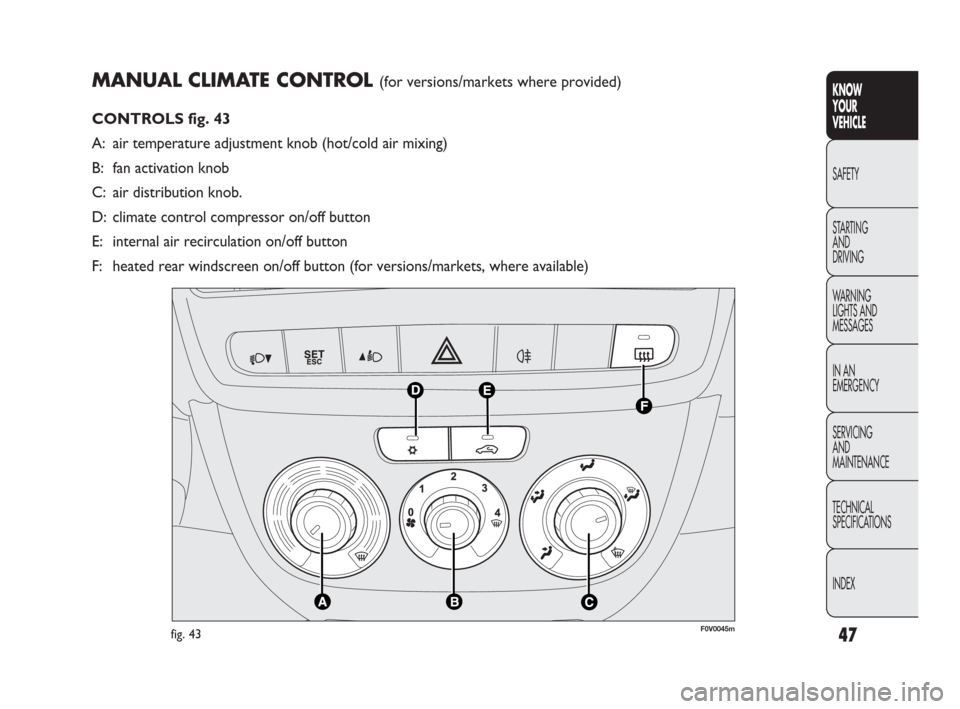
CONTROLS fig. 43
A: air temperature adjustment knob (hot/cold air mixing)
B: fan activation knob
C: air distribution knob.
D: climate control compressor on/off button
E: internal air recirculation on/off button
F: heated rear windscreen on/off button (for versions/markets, where available)
F0V0045mfig. 43
Page 49 of 274
48
KNOW
YOUR
VEHICLE
SAFETY
STARTING
AND
DRIVING
WARNING
LIGHTS AND
MESSAGES
IN AN
EMERGENCY
SERVICING
AND
MAINTENANCE
TECHNICAL
SPECIFICATIONS
INDEX
Once the demisting/defrosting is complete, use the con-
trols as normal to maintain optimum visibility.
Window demisting
In the event of considerable external moisture and/or rain
and/or large differences in temperature inside and outside
the passenger compartment, perform the following pre-
ventive window demisting procedure:
❒press button ❄;
❒turn off internal air recirculation (button E LED off);
❒turn knob A to the red section;
❒turn knob B to the second speed level;
❒turn knob C to -or to ®if there is no sign of the
windows steaming up.
The climate control system is very useful for demisting the
windows more quickly: just carry out the above procedure
and activate the system by pressing
❄. PASSENGER COMPARTMENT HEATING
Proceed as follows:
❒turn knob A to the red section;
❒turn knob B to the required speed;
❒turn knob C to:
®to warm the feet and, at the same time, demist the
windscreen
ßto warm the feet and keep the face cool (bi-level func-
tion)
©to warm the feet of those in the front and rear seats.
❒to turn off internal air recirculation (button E LED off);
FAST FRONT DOOR WINDOW GLASSES
DEMISTING/DEFROSTING
Proceed as follows:
❒press button ❄;
❒turn knob A fully to the right;
❒turn knob B to -;
❒turn knob C to -;
❒turn off internal air recirculation (button E LED off).
Page 50 of 274
49
KNOW
YOUR
VEHICLE
SAFETY
STARTING
AND
DRIVING
WARNING
LIGHTS AND
MESSAGES
IN AN
EMERGENCY
SERVICING
AND
MAINTENANCE
TECHNICAL
SPECIFICATIONS
INDEX
INTERNAL AIR RECIRCULATION
ACTIVATION
Press button E: when the function is on, the button LED
lights up.
It is advisable to switch the internal air recirculation on
while standing in queues or in tunnels to prevent the in-
troduction of polluted air. Do not use the function for a
long time, particularly if there are many passengers on
board, to prevent the windows from misting up.
WARNING The air recirculation system makes it possi-
ble to reach the required heating or cooling conditions
faster. It is not advisable to switch the air recirculation
on when it is rainy/cold or the windows might steam up,
especially if the climate control system is not turned on.
CLIMATE CONTROL (cooling)
Proceed as follows:
❒turn knob A to the blue section;
❒turn knob B to the required speed;
❒turn knob C to ¶;
❒press buttons ❄and E (button LEDs on). HEATED REAR WINDSCREEN AND DOOR
MIRRORS DEMISTING/DEFROSTING
(for versions/markets where provided)
Press button F (to activate; when this function is on, the
LED on button F (lights up.
This function is timed and will turn off automatically after
20 minutes. Press button F (again to switch it off before
20 minutes elapse.
WARNING Do not apply stickers to the inside of the heat-
ed rear windscreen over the heating filaments to avoid
damage that might cause it to stop working properly.
REGULATING THE FAN SPEED
To ventilate the passenger compartment properly, pro-
ceed as follows:
❒fully open the central and side air diffusers;
❒turn knob A to the blue section;
❒turn knob B to the required speed;
❒turn knob C to ¶;
❒turn off internal air recirculation (button E LED off).
Page 51 of 274
50
KNOW
YOUR
VEHICLE
SAFETY
STARTING
AND
DRIVING
WARNING
LIGHTS AND
MESSAGES
IN AN
EMERGENCY
SERVICING
AND
MAINTENANCE
TECHNICAL
SPECIFICATIONS
INDEX
SYSTEM MAINTENANCE
Run the climate control system for at least 10 minutes
every month during the winter. Have the system inspect-
ed at the Fiat Service Network before the summer. Adjusting cooling
Proceed as follows:
❒turn off internal air recirculation by pressing button E
(button LED off);
❒turn knob A to the right to increase the temperature;
❒turn knob B to the left to reduce the fan speed.
SUPPLEMENTARY HEATER
(for versions/markets where provided)
This device warms up the passenger compartment more
quickly when it is very cold and the engine coolant tem-
perature is low.
The supplementary heater comes on automatically when
the engine is started, if knob A is turned to the last red
sector and the fan (knob B) is at least at the first speed lev-
el.
The supplementary heater turns off automatically after
reaching the required comfort conditions.
WARNING The heater will not turn on if the battery volt-
age is too low.