ECO mode FIAT FIORINO 2018 Owner handbook (in English)
[x] Cancel search | Manufacturer: FIAT, Model Year: 2018, Model line: FIORINO, Model: FIAT FIORINO 2018Pages: 196, PDF Size: 4.99 MB
Page 3 of 196
Dear Customer,
We would like to congratulate and thank you for choosing a Fiat Fiorino.
We have written this handbook to help you get to know all the features of your vehicle and use it in the best possible way.
Here you will find information, advice and important warnings regarding vehicle use and how to achieve the best performance from the
technical features of your Fiat Fiorino.
You are advised to read it right through before taking to the road for the first time, to become familiar with the controls and above all
with those concerning brakes, steering and transmission; at the same time, you can understand the vehicle behaviour on different road
surfaces.
This document also provides a description of special features and tips, as well as essential information for the safe driving, care and
servicing of your Fiat Fiorino over time.
After reading it, you are advised to keep the handbook inside the vehicle, for an easy reference and for making sure it remains on
board the vehicle should it be sold.
In the attached Warranty Booklet you will also find a description of the Services that Fiat offers to its customers, the Warranty
Certificate, the detail of the terms and conditions for maintaining its validity and the range of additional services available to Fiat
Customers.
We are sure that these will help you to get in touch with and appreciate your new vehicle and the service provided by the people at
Fiat.
Enjoy reading. Happy motoring!
WARNING
This Owner Handbook describes all Fiat Fiorino versions. As a consequence, you should only consider the information
related to the trim level, engine and version that you have purchased. All data contained in this publication are purely
indicative. FCA Italy S.p.A. can modify the specifications of the vehicle model described in this publication at any time, for
technical or marketing purposes. For further information, contact a Fiat Dealership.
Page 27 of 196
With the twist switch at, the
windscreen wiper will automatically
adapt to the speed of the vehicle.
With the windscreen wipers
operational, if reverse gear is engaged,
the rear window wiper is automatically
activated.
3)
“Smart washing” function
Pull the stalk towards the steering
wheel (unstable position) to operate the
windscreen washer.
Keeping the stalk pulled for more than
half a second, with just one movement
it is possible to operate the washer
jet and the wiper at the same time.
The windscreen wiper stops working
three strokes after the stalk is released.
A further stroke after approx. 6 seconds
completes the wiping cycle.
REAR WINDOW
WIPER/WASHER
(for versions/markets, where provided)
This operates only with the ignition
key turned to MAR.
Activation
Turn the ring nut to
to operate the
rear window wiper:
in intermittent mode when the
windscreen wiper is not operating;
in synchronous mode (at half the
speed of the windscreen wiper) when
the windscreen wiper is operating;
in continuous mode with reverse
gear engaged and the control active.
With the windscreen wiper on and
reverse gear engaged, rear window
wiping will be continuous.
Pushing the stalk towards the
dashboard (rocking position) will
activate the rear window washer jet.
Keep the stalk pushed for more than
half a second to activate the rear
window wiper as well. Releasing the
stalk will activate the smart washing
function, as described for the
windscreen wiper.
Deactivation
The function stops when the stalk is
released.
4)
WARNING
3)Do not use the windscreen wiper to
remove layers of snow or ice from the
windscreen. In such conditions, the
windscreen wiper may be subjected to
excessive stress and the motor cut-out
switch, which prevents operation for a few
seconds, may intervene. If operation is
not restored, contact a Fiat Dealership.4)Do not use the rear window wiper to
remove layers of snow or ice. In such
conditions, the screen wiper may be
subjected to excessive stress and the
motor cut-out switch, which prevents
operation for a few seconds, may
intervene. If operation is not restored,
contact a Fiat Dealership.
25
Page 29 of 196
IMPORTANT The heater will not turn on
if the battery voltage is too low.
WARNING
2)The air conditioning system uses R134a
or R1234yf refrigerant compatible with
the regulations in force in the countries
where the vehicle is sold. When charging,
only use the gas indicated on the
dedicated plate in the engine
compartment. The use of other coolants
affects the efficiency and condition of
the system. The lubricant used for the
compressor is also strictly linked to the
type of cooling gas, please refer to a Fiat
Dealership.
ELECTRIC WINDOWS
ELECTRIC FRONT
WINDOWS
(for versions/markets, where provided)
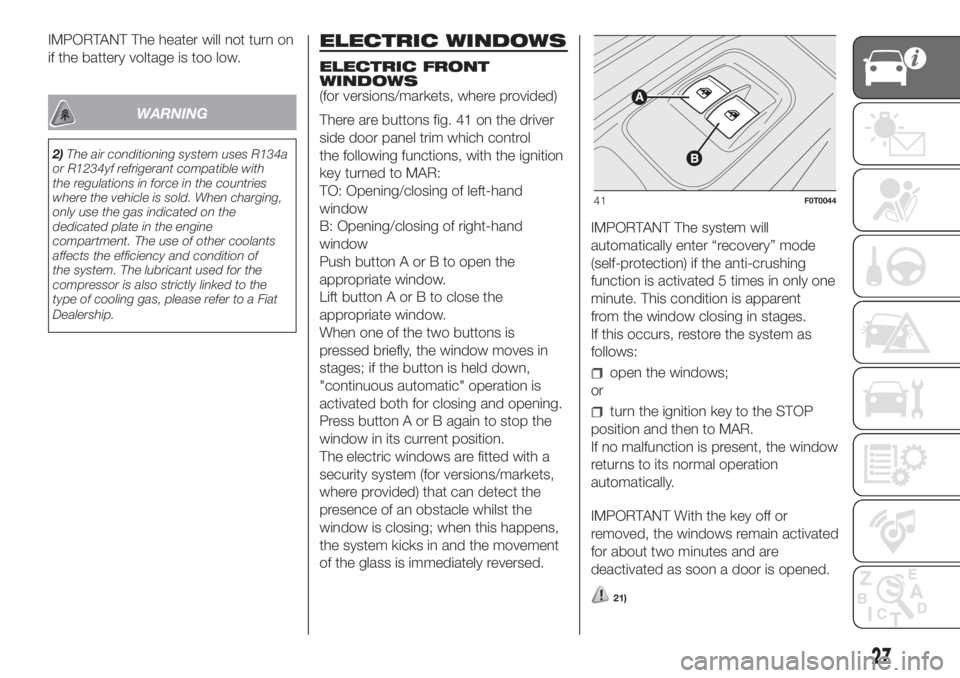
There are buttons fig. 41 on the driver
side door panel trim which control
the following functions, with the ignition
key turned to MAR:
TO: Opening/closing of left-hand
window
B: Opening/closing of right-hand
window
Push button A or B to open the
appropriate window.
Lift button A or B to close the
appropriate window.
When one of the two buttons is
pressed briefly, the window moves in
stages; if the button is held down,
"continuous automatic" operation is
activated both for closing and opening.
Press button A or B again to stop the
window in its current position.
The electric windows are fitted with a
security system (for versions/markets,
where provided) that can detect the
presence of an obstacle whilst the
window is closing; when this happens,
the system kicks in and the movement
of the glass is immediately reversed.IMPORTANT The system will
automatically enter “recovery” mode
(self-protection) if the anti-crushing
function is activated 5 times in only one
minute. This condition is apparent
from the window closing in stages.
If this occurs, restore the system as
follows:
open the windows;
or
turn the ignition key to the STOP
position and then to MAR.
If no malfunction is present, the window
returns to its normal operation
automatically.
IMPORTANT With the key off or
removed, the windows remain activated
for about two minutes and are
deactivated as soon a door is opened.
21)
41F0T0044
27
Page 37 of 196
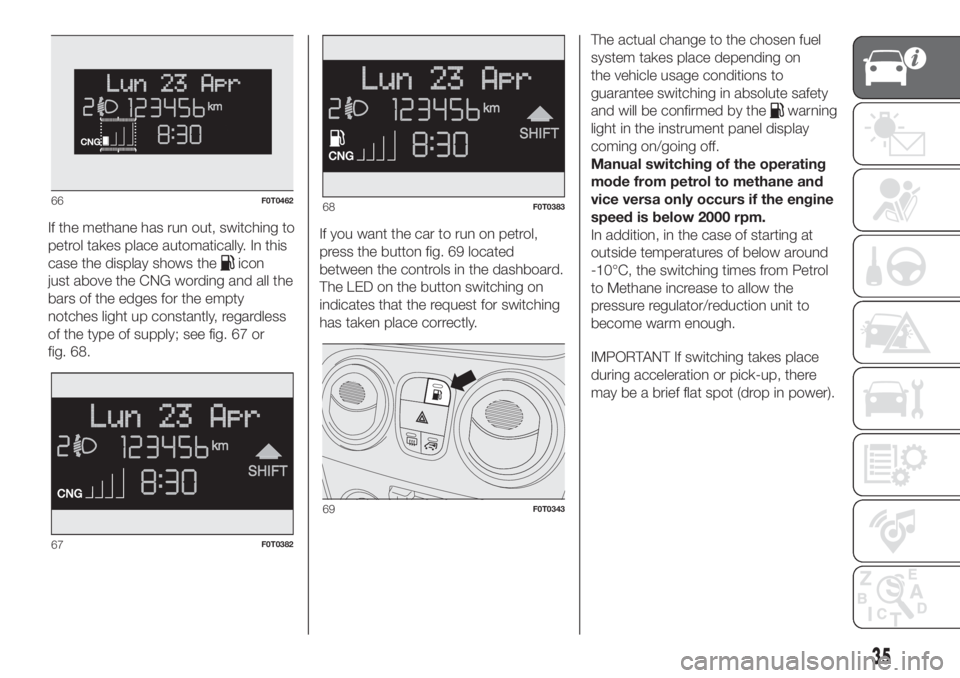
If the methane has run out, switching to
petrol takes place automatically. In this
case the display shows the
icon
just above the CNG wording and all the
bars of the edges for the empty
notches light up constantly, regardless
of the type of supply; see fig. 67 or
fig. 68.If you want the car to run on petrol,
press the button fig. 69 located
between the controls in the dashboard.
The LED on the button switching on
indicates that the request for switching
has taken place correctly.The actual change to the chosen fuel
system takes place depending on
the vehicle usage conditions to
guarantee switching in absolute safety
and will be confirmed by the
warning
light in the instrument panel display
coming on/going off.
Manual switching of the operating
mode from petrol to methane and
vice versa only occurs if the engine
speed is below 2000 rpm.
In addition, in the case of starting at
outside temperatures of below around
-10°C, the switching times from Petrol
to Methane increase to allow the
pressure regulator/reduction unit to
become warm enough.
IMPORTANT If switching takes place
during acceleration or pick-up, there
may be a brief flat spot (drop in power).
66F0T0462
67F0T0382
68F0T0383
69F0T0343
35
Page 45 of 196
Management modes differ according to
the characteristic of the option
selected.
The menu includes the following items:
ILLU
SPEEd
Hour
bUZZ
Unit
BAG P (for versions/markets, where
provided)
NOTE Only the short menu can be
accessed while the vehicle is moving
for reasons of safety ("SPEEd" setting).
Stop the vehicle to access the full
menu.
MULTIFUNCTION
DISPLAY
The vehicle may be equipped with a
multifunction display that gives the
driver useful information depending on
the previous settings.
STANDARD SCREEN
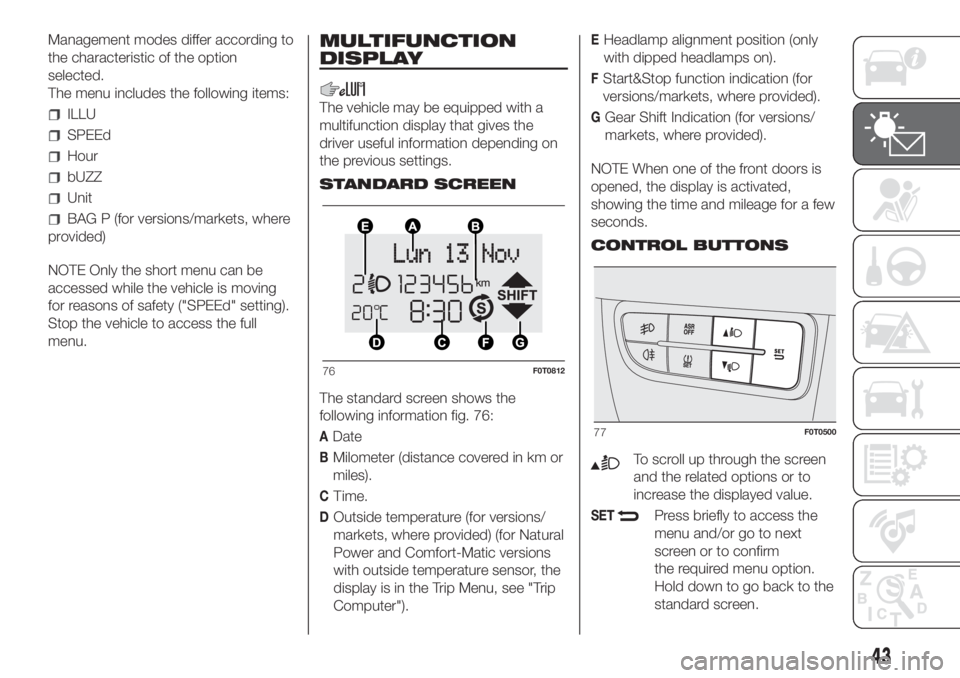
The standard screen shows the
following information fig. 76:
ADate
BMilometer (distance covered in km or
miles).
CTime.
DOutside temperature (for versions/
markets, where provided) (for Natural
Power and Comfort-Matic versions
with outside temperature sensor, the
display is in the Trip Menu, see "Trip
Computer").
EHeadlamp alignment position (only
with dipped headlamps on).
FStart&Stop function indication (for
versions/markets, where provided).
GGear Shift Indication (for versions/
markets, where provided).
NOTE When one of the front doors is
opened, the display is activated,
showing the time and mileage for a few
seconds.
CONTROL BUTTONS
To scroll up through the screen
and the related options or to
increase the displayed value.
SETPress briefly to access the
menu and/or go to next
screen or to confirm
the required menu option.
Hold down to go back to the
standard screen.
76F0T0812
77F0T0500
43
Page 55 of 196
What it means What to do
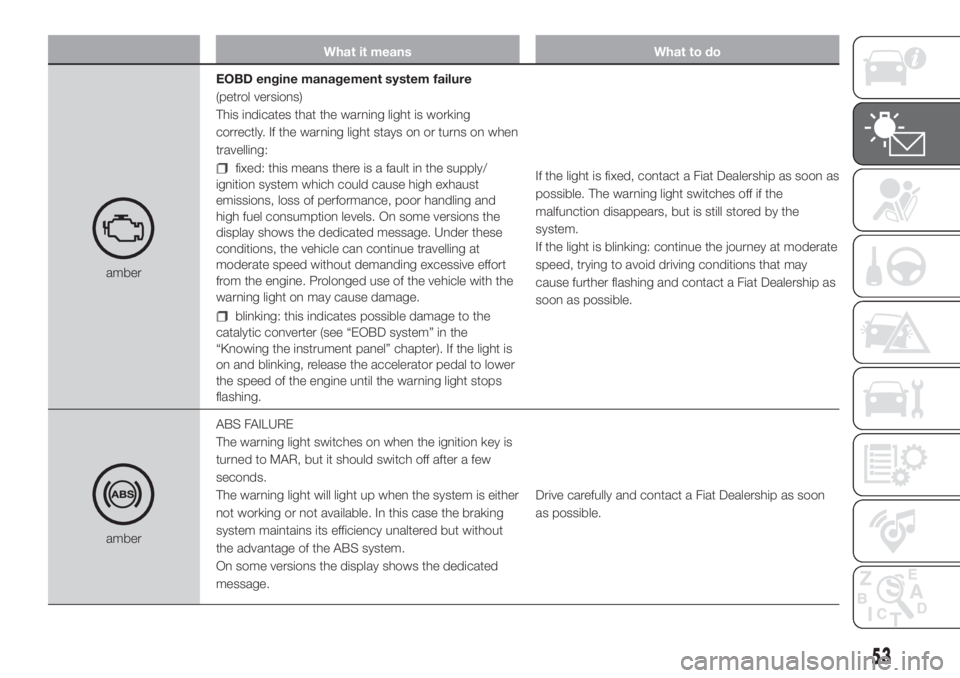
amberEOBD engine management system failure
(petrol versions)
This indicates that the warning light is working
correctly. If the warning light stays on or turns on when
travelling:
fixed: this means there is a fault in the supply/
ignition system which could cause high exhaust
emissions, loss of performance, poor handling and
high fuel consumption levels. On some versions the
display shows the dedicated message. Under these
conditions, the vehicle can continue travelling at
moderate speed without demanding excessive effort
from the engine. Prolonged use of the vehicle with the
warning light on may cause damage.
blinking: this indicates possible damage to the
catalytic converter (see “EOBD system” in the
“Knowing the instrument panel” chapter). If the light is
on and blinking, release the accelerator pedal to lower
the speed of the engine until the warning light stops
flashing.If the light is fixed, contact a Fiat Dealership as soon as
possible. The warning light switches off if the
malfunction disappears, but is still stored by the
system.
If the light is blinking: continue the journey at moderate
speed, trying to avoid driving conditions that may
cause further flashing and contact a Fiat Dealership as
soon as possible.
amberABS FAILURE
The warning light switches on when the ignition key is
turned to MAR, but it should switch off after a few
seconds.
The warning light will light up when the system is either
not working or not available. In this case the braking
system maintains its efficiency unaltered but without
the advantage of the ABS system.
On some versions the display shows the dedicated
message.Drive carefully and contact a Fiat Dealership as soon
as possible.
53
Page 94 of 196
STARTING THE
ENGINE
The vehicle is fitted with an electronic
engine lock device: if the engine fails to
start, see the paragraph “The Fiat
CODE system” in section “Know your
vehicle”.
90) 91)
22) 23) 27) 28)
PROCEDURE FOR
PETROL VERSIONS
Proceed as follows:
engage the handbrake;
put the gear lever into neutral;
fully depress the clutch pedal
without touching the accelerator;
turn the ignition key to AVV and
release it as soon as the engine starts.
PROCEDURE FOR DIESEL
VERSIONS
Proceed as follows:
engage the handbrake;
put the gear lever into neutral;
turn the ignition key to MAR
position: the
warning light will light
up on instrument panel;
wait for the warning lightsand
to turn off, which will happen faster
the warmer the engine is;
fully depress the clutch pedal
without touching the accelerator;
turn the ignition key to the AVV
position as soon as the warning light
turns off. Waiting too long will waste
the heating work carried out by the
plugs.
Release the key as soon as the engine
starts.
With cold engine, the accelerator must
be entirely released when turning the
ignition key to position AVV.
24)
PROCEDURE FOR
NATURAL POWER
VERSIONS
The engine always starts up on petrol
independently of the previously
selected mode.
25)
PROCEDURE FOR
VERSIONS WITH
COMFORT-MATIC
TRANSMISSION
The system allows the engine to be
started both with a gear engaged and
with the transmission in neutral (N).
Always press the brake pedal with the
gear engaged.It is advisable to place the gear lever in
neutral (N) before starting the engine.
26)
IMPORTANT If the engine does not
start at the first attempt, return the
ignition key to STOP before repeating
the starting procedure. If the warning
light remains on together with warning
light
when the ignition key is at
MAR, turn the key to STOP and then
back to MAR; if the warning light stays
on, try with the other keys provided
with the vehicle. If you still cannot start
the engine, perform an emergency
start (see “Emergency starting” in the
“In an emergency” section) and go to a
Fiat Dealership.
IMPORTANT If start-up is requested
with the gearbox faulty, carry out the
"Delayed start-up" procedure (see
associated messages): turn the key to
the AVV position for at least 7 seconds
with the brake depressed and the
engine will start. The system will be in
recovery mode (maximum permitted
gear: 3
rd, Automatic mode not
available). If the engine does not start,
contact a Fiat Dealership.
92
STARTING AND DRIVING
Page 98 of 196
“COMFORT-MATIC”
TRANSMISSION
The vehicle is equipped with an
electronically controlled manual
gearbox known as COMFORT-MATIC
that has two operating modes:
MANUALandAUTO.
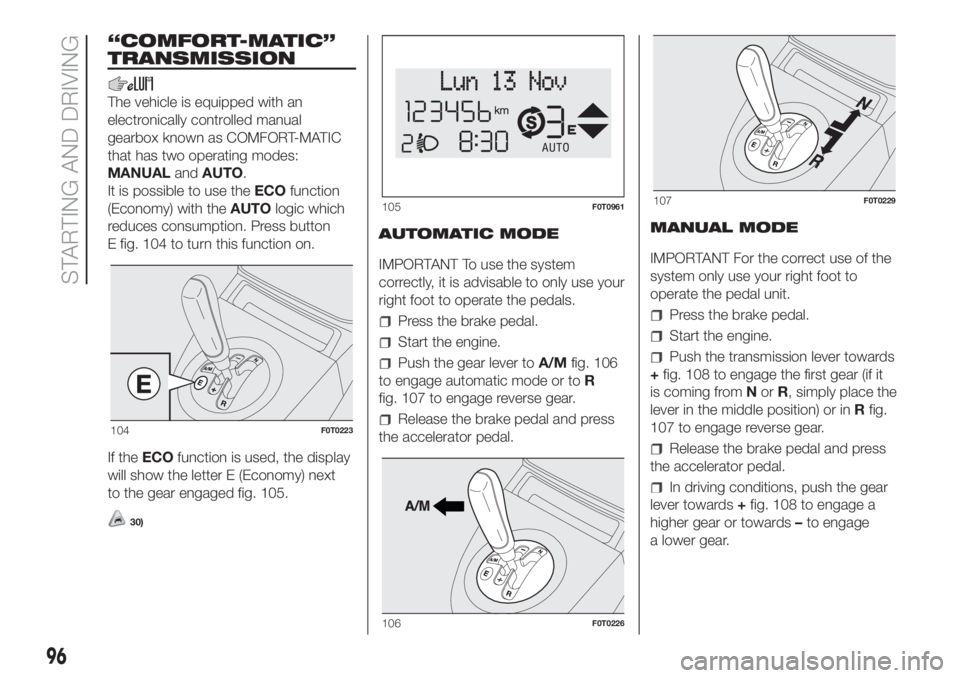
It is possible to use theECOfunction
(Economy) with theAUTOlogic which
reduces consumption. Press button
E fig. 104 to turn this function on.
If theECOfunction is used, the display
will show the letter E (Economy) next
to the gear engaged fig. 105.
30)
AUTOMATIC MODE
IMPORTANT To use the system
correctly, it is advisable to only use your
right foot to operate the pedals.
Press the brake pedal.
Start the engine.
Push the gear lever toA/Mfig. 106
to engage automatic mode or toR
fig. 107 to engage reverse gear.
Release the brake pedal and press
the accelerator pedal.MANUAL MODE
IMPORTANT For the correct use of the
system only use your right foot to
operate the pedal unit.
Press the brake pedal.
Start the engine.
Push the transmission lever towards
+fig. 108 to engage the first gear (if it
is coming fromNorR, simply place the
lever in the middle position) or inRfig.
107 to engage reverse gear.
Release the brake pedal and press
the accelerator pedal.
In driving conditions, push the gear
lever towards+fig. 108 to engage a
higher gear or towards–to engage
a lower gear.
104F0T0223
105F0T0961
106F0T0226
107F0T0229
96
STARTING AND DRIVING
Page 99 of 196
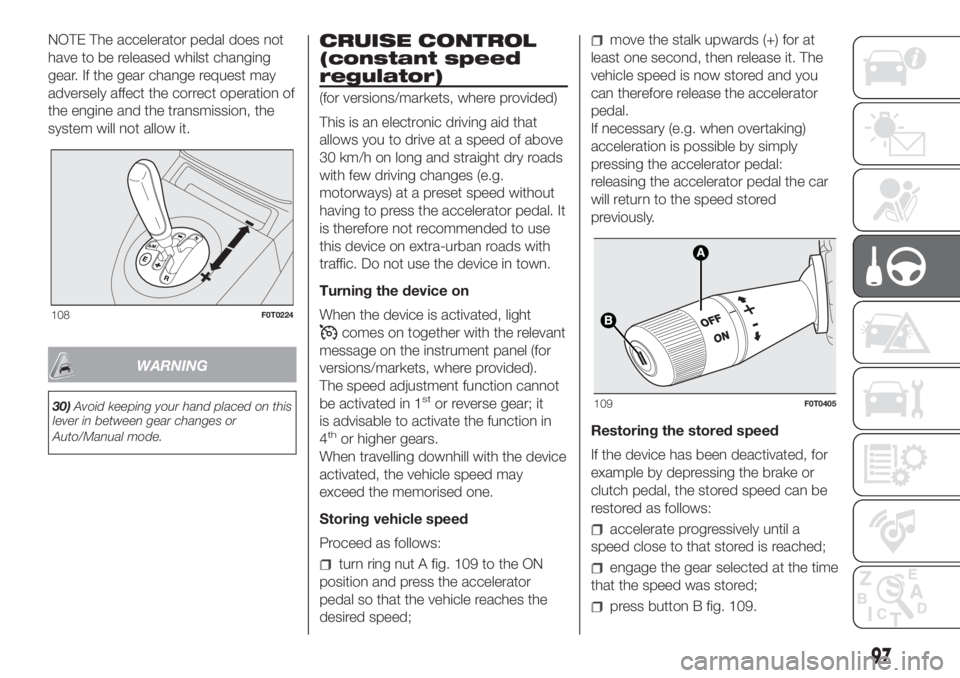
NOTE The accelerator pedal does not
have to be released whilst changing
gear. If the gear change request may
adversely affect the correct operation of
the engine and the transmission, the
system will not allow it.
WARNING
30)Avoid keeping your hand placed on this
lever in between gear changes or
Auto/Manual mode.
CRUISE CONTROL
(constant speed
regulator)
(for versions/markets, where provided)
This is an electronic driving aid that
allows you to drive at a speed of above
30 km/h on long and straight dry roads
with few driving changes (e.g.
motorways) at a preset speed without
having to press the accelerator pedal. It
is therefore not recommended to use
this device on extra-urban roads with
traffic. Do not use the device in town.
Turning the device on
When the device is activated, light
comes on together with the relevant
message on the instrument panel (for
versions/markets, where provided).
The speed adjustment function cannot
be activated in 1
stor reverse gear; it
is advisable to activate the function in
4
thor higher gears.
When travelling downhill with the device
activated, the vehicle speed may
exceed the memorised one.
Storing vehicle speed
Proceed as follows:
turn ring nut A fig. 109 to the ON
position and press the accelerator
pedal so that the vehicle reaches the
desired speed;
move the stalk upwards (+) for at
least one second, then release it. The
vehicle speed is now stored and you
can therefore release the accelerator
pedal.
If necessary (e.g. when overtaking)
acceleration is possible by simply
pressing the accelerator pedal:
releasing the accelerator pedal the car
will return to the speed stored
previously.
Restoring the stored speed
If the device has been deactivated, for
example by depressing the brake or
clutch pedal, the stored speed can be
restored as follows:
accelerate progressively until a
speed close to that stored is reached;
engage the gear selected at the time
that the speed was stored;
press button B fig. 109.
108F0T0224
109F0T0405
97
Page 112 of 196
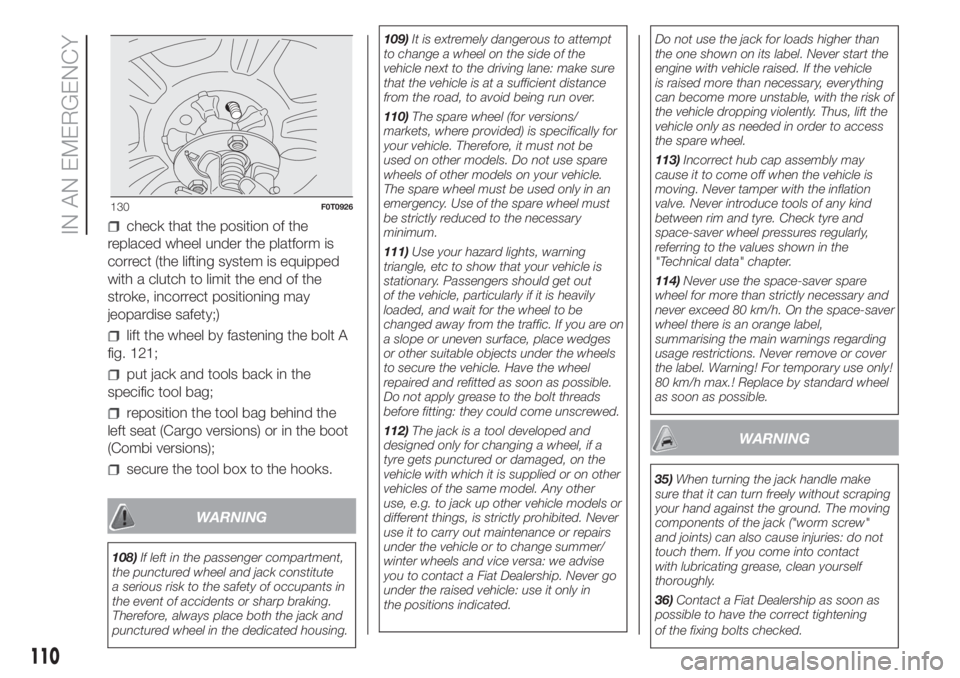
check that the position of the
replaced wheel under the platform is
correct (the lifting system is equipped
with a clutch to limit the end of the
stroke, incorrect positioning may
jeopardise safety;)
lift the wheel by fastening the bolt A
fig. 121;
put jack and tools back in the
specific tool bag;
reposition the tool bag behind the
left seat (Cargo versions) or in the boot
(Combi versions);
secure the tool box to the hooks.
WARNING
108)If left in the passenger compartment,
the punctured wheel and jack constitute
a serious risk to the safety of occupants in
the event of accidents or sharp braking.
Therefore, always place both the jack and
punctured wheel in the dedicated housing.109)It is extremely dangerous to attempt
to change a wheel on the side of the
vehicle next to the driving lane: make sure
that the vehicle is at a sufficient distance
from the road, to avoid being run over.
110)The spare wheel (for versions/
markets, where provided) is specifically for
your vehicle. Therefore, it must not be
used on other models. Do not use spare
wheels of other models on your vehicle.
The spare wheel must be used only in an
emergency. Use of the spare wheel must
be strictly reduced to the necessary
minimum.
111)Use your hazard lights, warning
triangle, etc to show that your vehicle is
stationary. Passengers should get out
of the vehicle, particularly if it is heavily
loaded, and wait for the wheel to be
changed away from the traffic. If you are on
a slope or uneven surface, place wedges
or other suitable objects under the wheels
to secure the vehicle. Have the wheel
repaired and refitted as soon as possible.
Do not apply grease to the bolt threads
before fitting: they could come unscrewed.
112)The jack is a tool developed and
designed only for changing a wheel, if a
tyre gets punctured or damaged, on the
vehicle with which it is supplied or on other
vehicles of the same model. Any other
use, e.g. to jack up other vehicle models or
different things, is strictly prohibited. Never
use it to carry out maintenance or repairs
under the vehicle or to change summer/
winter wheels and vice versa: we advise
you to contact a Fiat Dealership. Never go
under the raised vehicle: use it only in
the positions indicated.Do not use the jack for loads higher than
the one shown on its label. Never start the
engine with vehicle raised. If the vehicle
is raised more than necessary, everything
can become more unstable, with the risk of
the vehicle dropping violently. Thus, lift the
vehicle only as needed in order to access
the spare wheel.
113)Incorrect hub cap assembly may
cause it to come off when the vehicle is
moving. Never tamper with the inflation
valve. Never introduce tools of any kind
between rim and tyre. Check tyre and
space-saver wheel pressures regularly,
referring to the values shown in the
"Technical data" chapter.
114)Never use the space-saver spare
wheel for more than strictly necessary and
never exceed 80 km/h. On the space-saver
wheel there is an orange label,
summarising the main warnings regarding
usage restrictions. Never remove or cover
the label. Warning! For temporary use only!
80 km/h max.! Replace by standard wheel
as soon as possible.
WARNING
35)When turning the jack handle make
sure that it can turn freely without scraping
your hand against the ground. The moving
components of the jack ("worm screw"
and joints) can also cause injuries: do not
touch them. If you come into contact
with lubricating grease, clean yourself
thoroughly.
36)Contact a Fiat Dealership as soon as
possible to have the correct tightening
of the fixing bolts checked.
130F0T0926
110
IN AN EMERGENCY