lock FIAT FULLBACK 2017 Owner handbook (in English)
[x] Cancel search | Manufacturer: FIAT, Model Year: 2017, Model line: FULLBACK, Model: FIAT FULLBACK 2017Pages: 312, PDF Size: 12.31 MB
Page 152 of 312
STARTING AND
STOPPING THE
ENGINE
225)
89) 90) 91) 92) 93) 94) 95) 96) 97) 98) 99)
Tips for starting
Except for vehicles equipped with
the keyless operation system
Do not operate the starter motor
continuously longer than 10 seconds;
doing so could run down the battery. If
the engine does not start, turn the
ignition switch back to “LOCK”, wait a
few seconds, and then try again. Trying
repeatedly with the starter motor still
turning will damage the starter
mechanism.
For vehicles equipped with the
keyless operation system
The operation mode can be in any
mode to start the engine.
The starter motor will be turning for up
to approximately 15 seconds if the
engine switch is released at once.
Pressing the engine switch again while
the starter motor is still turning will stop
the starter motor. The starter motor will
be turning for up to approximately
30 seconds while the engine switch is
pressed. If the engine does not start,
wait for a while and then attempt to
start the engine again. Trying repeatedly
with the starter motor still turning will
damage the starter mechanism.Starting the engine
Except for vehicles equipped with
the keyless operation system
1. Insert the ignition key and fasten the
seat belt.
2. Make sure the parking brake is
applied.
3. Press and hold the brake pedal
down firmly with your right foot.
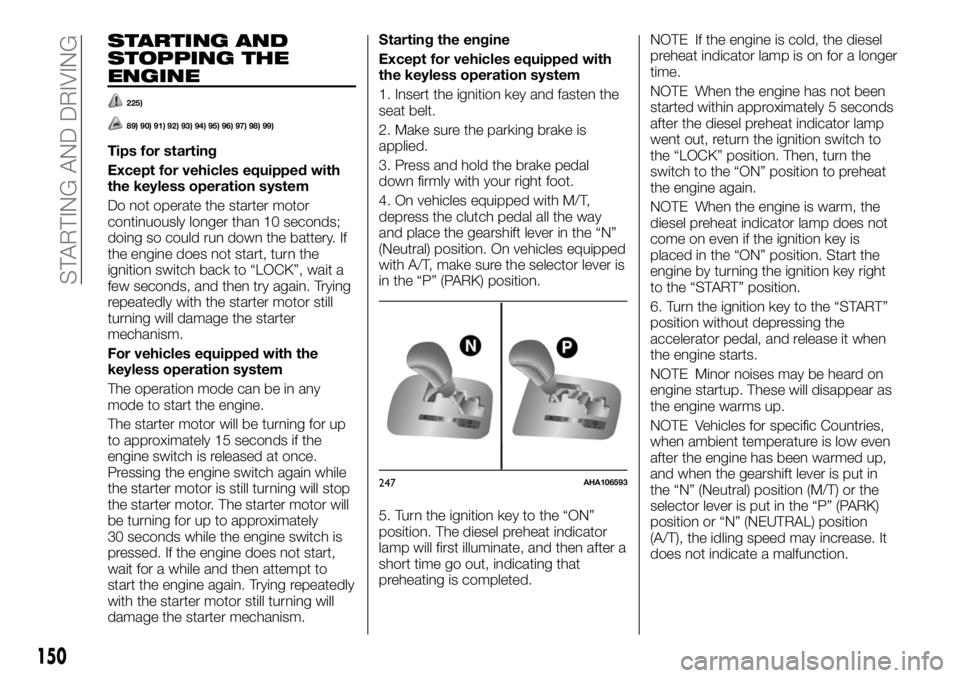
4. On vehicles equipped with M/T,
depress the clutch pedal all the way
and place the gearshift lever in the “N”
(Neutral) position. On vehicles equipped
with A/T, make sure the selector lever is
in the “P” (PARK) position.
5. Turn the ignition key to the “ON”
position. The diesel preheat indicator
lamp will first illuminate, and then after a
short time go out, indicating that
preheating is completed.NOTE If the engine is cold, the diesel
preheat indicator lamp is on for a longer
time.
NOTE When the engine has not been
started within approximately 5 seconds
after the diesel preheat indicator lamp
went out, return the ignition switch to
the “LOCK” position. Then, turn the
switch to the “ON” position to preheat
the engine again.
NOTE When the engine is warm, the
diesel preheat indicator lamp does not
come on even if the ignition key is
placed in the “ON” position. Start the
engine by turning the ignition key right
to the “START” position.
6. Turn the ignition key to the “START”
position without depressing the
accelerator pedal, and release it when
the engine starts.
NOTE Minor noises may be heard on
engine startup. These will disappear as
the engine warms up.
NOTE Vehicles for specific Countries,
when ambient temperature is low even
after the engine has been warmed up,
and when the gearshift lever is put in
the “N” (Neutral) position (M/T) or the
selector lever is put in the “P” (PARK)
position or “N” (NEUTRAL) position
(A/T), the idling speed may increase. It
does not indicate a malfunction.
247AHA106593
150
STARTING AND DRIVING
Page 153 of 312
For vehicles equipped with the
keyless operation system
1. Fasten the seat belt.
2. Make sure the parking brake is
applied.
3. Press and hold the brake pedal
down firmly with your right foot.
NOTE When the engine is not started,
it may become hard to depress the
brake pedal and the vehicle may not be
able to detect the pedal operation.
Therefore the engine may not be
started. In such a case, depress the
brake pedal more firmly than usual.
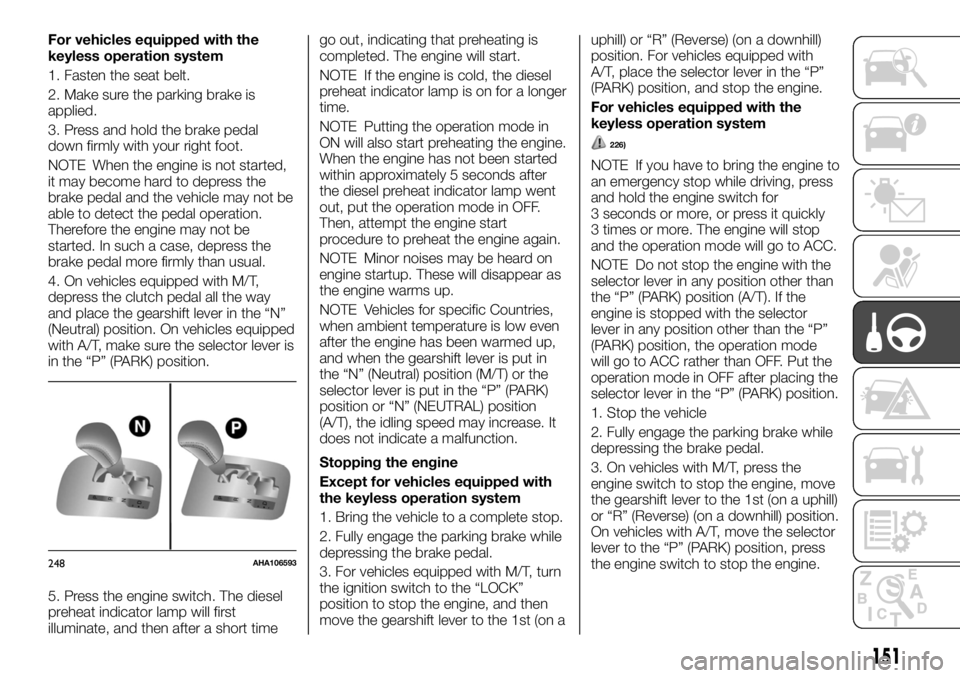
4. On vehicles equipped with M/T,
depress the clutch pedal all the way
and place the gearshift lever in the “N”
(Neutral) position. On vehicles equipped
with A/T, make sure the selector lever is
in the “P” (PARK) position.
5. Press the engine switch. The diesel
preheat indicator lamp will first
illuminate, and then after a short timego out, indicating that preheating is
completed. The engine will start.
NOTE If the engine is cold, the diesel
preheat indicator lamp is on for a longer
time.
NOTE Putting the operation mode in
ON will also start preheating the engine.
When the engine has not been started
within approximately 5 seconds after
the diesel preheat indicator lamp went
out, put the operation mode in OFF.
Then, attempt the engine start
procedure to preheat the engine again.
NOTE Minor noises may be heard on
engine startup. These will disappear as
the engine warms up.
NOTE Vehicles for specific Countries,
when ambient temperature is low even
after the engine has been warmed up,
and when the gearshift lever is put in
the “N” (Neutral) position (M/T) or the
selector lever is put in the “P” (PARK)
position or “N” (NEUTRAL) position
(A/T), the idling speed may increase. It
does not indicate a malfunction.
Stopping the engine
Except for vehicles equipped with
the keyless operation system
1. Bring the vehicle to a complete stop.
2. Fully engage the parking brake while
depressing the brake pedal.
3. For vehicles equipped with M/T, turn
the ignition switch to the “LOCK”
position to stop the engine, and then
move the gearshift lever to the 1st (on auphill) or “R” (Reverse) (on a downhill)
position. For vehicles equipped with
A/T, place the selector lever in the “P”
(PARK) position, and stop the engine.
For vehicles equipped with the
keyless operation system
226)
NOTE If you have to bring the engine to
an emergency stop while driving, press
and hold the engine switch for
3 seconds or more, or press it quickly
3 times or more. The engine will stop
and the operation mode will go to ACC.
NOTE Do not stop the engine with the
selector lever in any position other than
the “P” (PARK) position (A/T). If the
engine is stopped with the selector
lever in any position other than the “P”
(PARK) position, the operation mode
will go to ACC rather than OFF. Put the
operation mode in OFF after placing the
selector lever in the “P” (PARK) position.
1. Stop the vehicle
2. Fully engage the parking brake while
depressing the brake pedal.
3. On vehicles with M/T, press the
engine switch to stop the engine, move
the gearshift lever to the 1st (on a uphill)
or “R” (Reverse) (on a downhill) position.
On vehicles with A/T, move the selector
lever to the “P” (PARK) position, press
the engine switch to stop the engine.
248AHA106593
151
Page 161 of 312
AUTOMATIC
TRANSMISSION
SPORTS MODE 5A/T
(where provided)
During running-in period or immediately
after reconnection of the battery cable,
there may be a case where gear shifts
are not made smoothly. This does not
indicate a faulty transmission. Gear
shifts will become smooth after the
transmission has been shifted several
times by the electronic control system.
Selector lever operation
The transmission has 5 forward gears
and 1 reverse gear.
The individual gears are selected
automatically, depending on the speed
of the vehicle and the position of the
accelerator pedal.
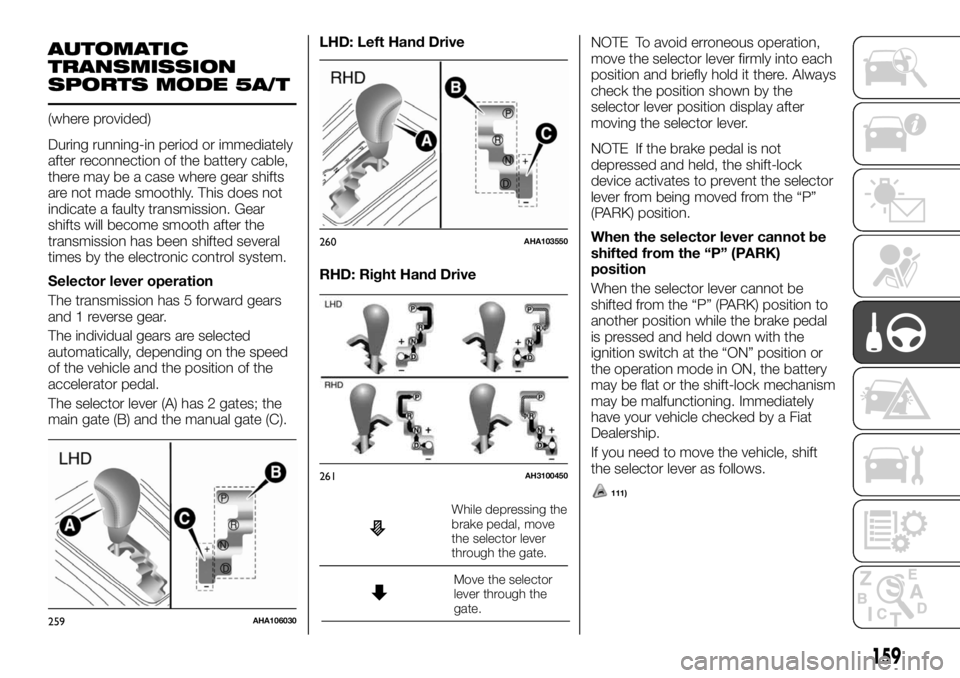
The selector lever (A) has 2 gates; the
main gate (B) and the manual gate (C).LHD: Left Hand Drive
RHD: Right Hand Drive
While depressing the
brake pedal, move
the selector lever
through the gate.
Move the selector
lever through the
gate.
111)
NOTE To avoid erroneous operation,
move the selector lever firmly into each
position and briefly hold it there. Always
check the position shown by the
selector lever position display after
moving the selector lever.
NOTE If the brake pedal is not
depressed and held, the shift-lock
device activates to prevent the selector
lever from being moved from the “P”
(PARK) position.
When the selector lever cannot be
shifted from the “P” (PARK)
position
When the selector lever cannot be
shifted from the “P” (PARK) position to
another position while the brake pedal
is pressed and held down with the
ignition switch at the “ON” position or
the operation mode in ON, the battery
may be flat or the shift-lock mechanism
may be malfunctioning. Immediately
have your vehicle checked by a Fiat
Dealership.
If you need to move the vehicle, shift
the selector lever as follows.
259AHA106030
260AHA103550
261AH3100450
159
Page 162 of 312
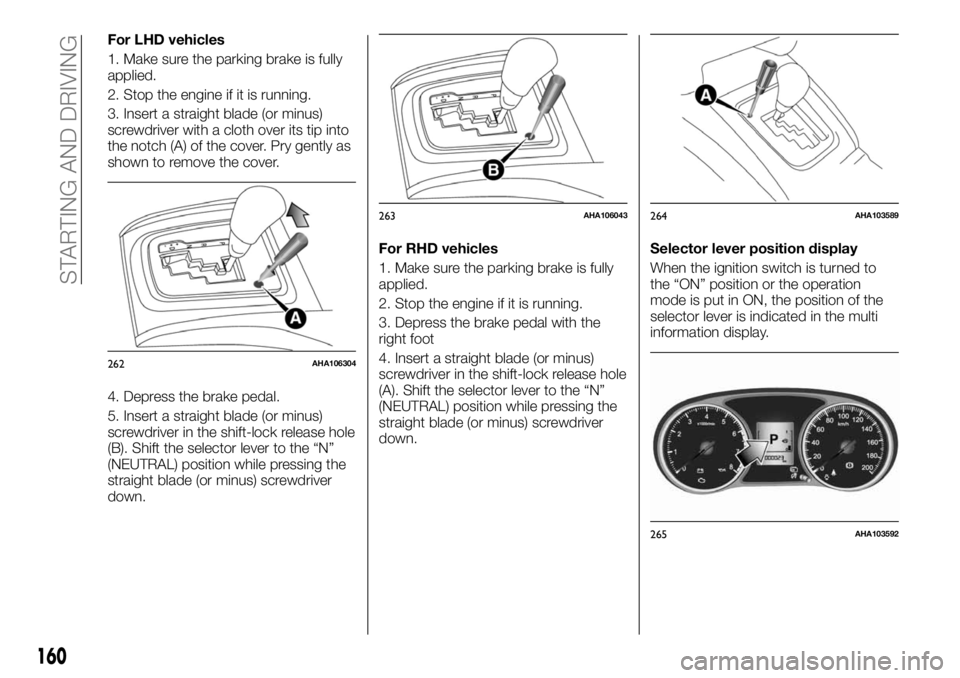
For LHD vehicles
1. Make sure the parking brake is fully
applied.
2. Stop the engine if it is running.
3. Insert a straight blade (or minus)
screwdriver with a cloth over its tip into
the notch (A) of the cover. Pry gently as
shown to remove the cover.
4. Depress the brake pedal.
5. Insert a straight blade (or minus)
screwdriver in the shift-lock release hole
(B). Shift the selector lever to the “N”
(NEUTRAL) position while pressing the
straight blade (or minus) screwdriver
down.For RHD vehicles
1. Make sure the parking brake is fully
applied.
2. Stop the engine if it is running.
3. Depress the brake pedal with the
right foot
4. Insert a straight blade (or minus)
screwdriver in the shift-lock release hole
(A). Shift the selector lever to the “N”
(NEUTRAL) position while pressing the
straight blade (or minus) screwdriver
down.Selector lever position display
When the ignition switch is turned to
the “ON” position or the operation
mode is put in ON, the position of the
selector lever is indicated in the multi
information display.
262AHA106304
263AHA106043264AHA103589
265AHA103592
160
STARTING AND DRIVING
Page 163 of 312
Selector lever positions
“P” PARK
This position locks the transmission to
prevent the vehicle from moving. The
engine can be started in this position.
“R” REVERSE
This position is to back up.
112)
“N” NEUTRAL
At this position the transmission is
disengaged. It is the same as the
neutral position on a manual
transmission, and should only be used
when the vehicle is stationary for an
extended length of time during driving,
such as in a traffic jam.
113) 114) 115)
“D” DRIVE
This position is used for most city and
highway driving. The transmission will
automatically change its gear
depending on road and driving
conditions.
116)
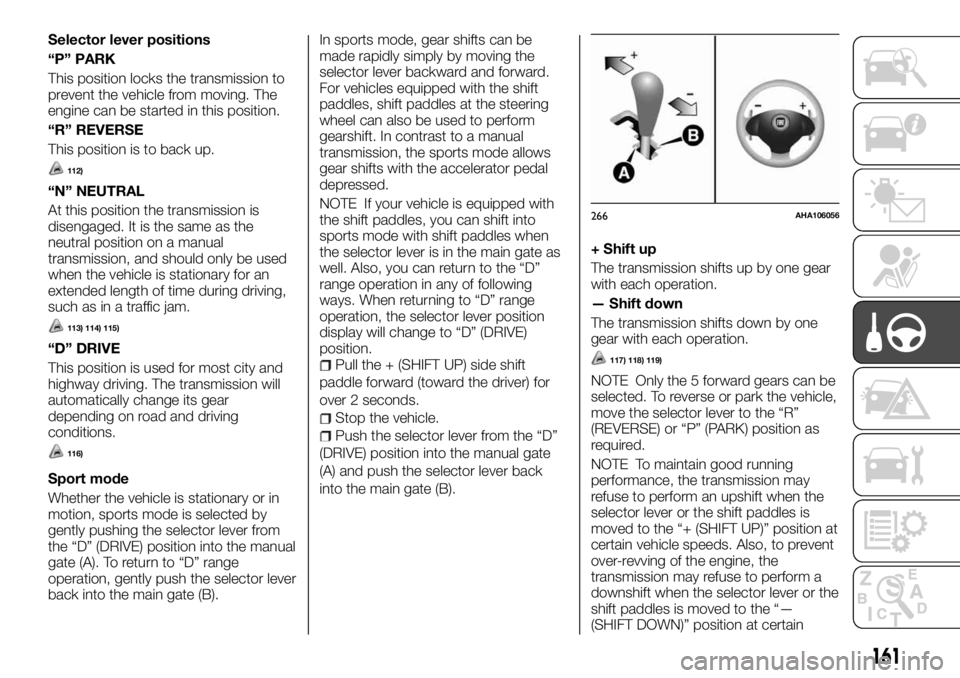
Sport mode
Whether the vehicle is stationary or in
motion, sports mode is selected by
gently pushing the selector lever from
the “D” (DRIVE) position into the manual
gate (A). To return to “D” range
operation, gently push the selector lever
back into the main gate (B).In sports mode, gear shifts can be
made rapidly simply by moving the
selector lever backward and forward.
For vehicles equipped with the shift
paddles, shift paddles at the steering
wheel can also be used to perform
gearshift. In contrast to a manual
transmission, the sports mode allows
gear shifts with the accelerator pedal
depressed.
NOTE If your vehicle is equipped with
the shift paddles, you can shift into
sports mode with shift paddles when
the selector lever is in the main gate as
well. Also, you can return to the “D”
range operation in any of following
ways. When returning to “D” range
operation, the selector lever position
display will change to “D” (DRIVE)
position.
Pull the + (SHIFT UP) side shift
paddle forward (toward the driver) for
over 2 seconds.
Stop the vehicle.
Push the selector lever from the “D”
(DRIVE) position into the manual gate
(A) and push the selector lever back
into the main gate (B).
+ Shift up
The transmission shifts up by one gear
with each operation.
— Shift down
The transmission shifts down by one
gear with each operation.
117) 118) 119)
NOTE Only the 5 forward gears can be
selected. To reverse or park the vehicle,
move the selector lever to the “R”
(REVERSE) or “P” (PARK) position as
required.
NOTE To maintain good running
performance, the transmission may
refuse to perform an upshift when the
selector lever or the shift paddles is
moved to the “+ (SHIFT UP)” position at
certain vehicle speeds. Also, to prevent
over-revving of the engine, the
transmission may refuse to perform a
downshift when the selector lever or the
shift paddles is moved to the “—
(SHIFT DOWN)” position at certain
266AHA106056
161
Page 171 of 312
131)Do not operate the drive
mode-selector while the rear wheels of the
vehicle are slipping on snow or ice.
132)If a problem is detected in the transfer
system, a safety device will activate. The
2WD/4WD operation indicator blinks (twice
per second), and transfer shifting will
become impossible. Park your vehicle in a
safe place, turn off the engine for a few
moments. Restart the engine. The lamp
should resume normal operation. If the
lamp continue to blink, have the vehicle
checked by a Fiat Dealership as soon as
possible.SUPER SELECT 4WD
II
(where provided)
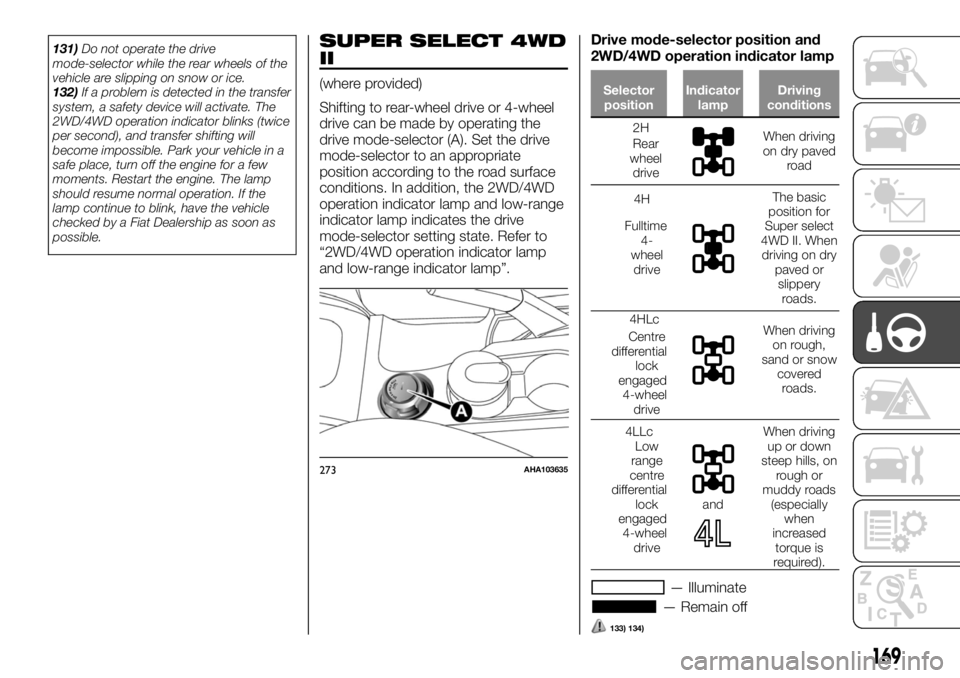
Shifting to rear-wheel drive or 4-wheel
drive can be made by operating the
drive mode-selector (A). Set the drive
mode-selector to an appropriate
position according to the road surface
conditions. In addition, the 2WD/4WD
operation indicator lamp and low-range
indicator lamp indicates the drive
mode-selector setting state. Refer to
“2WD/4WD operation indicator lamp
and low-range indicator lamp”.Drive mode-selector position and
2WD/4WD operation indicator lampSelector
positionIndicator
lampDriving
conditions
2H
Rear
wheel
driveWhen driving
on dry paved
road
4H
Fulltime
4-
wheel
drive
The basic
position for
Super select
4WD II. When
driving on dry
paved or
slippery
roads.
4HLc
Centre
differential
lock
engaged
4-wheel
drive
When driving
on rough,
sand or snow
covered
roads.
4LLc
Low
range
centre
differential
lock
engaged
4-wheel
drive
and
When driving
up or down
steep hills, on
rough or
muddy roads
(especially
when
increased
torque is
required).
— Illuminate
— Remain off
133) 134)
273AHA103635
169
Page 174 of 312
2WD/4WD operation indicator lamp
and low-range indicator lamp
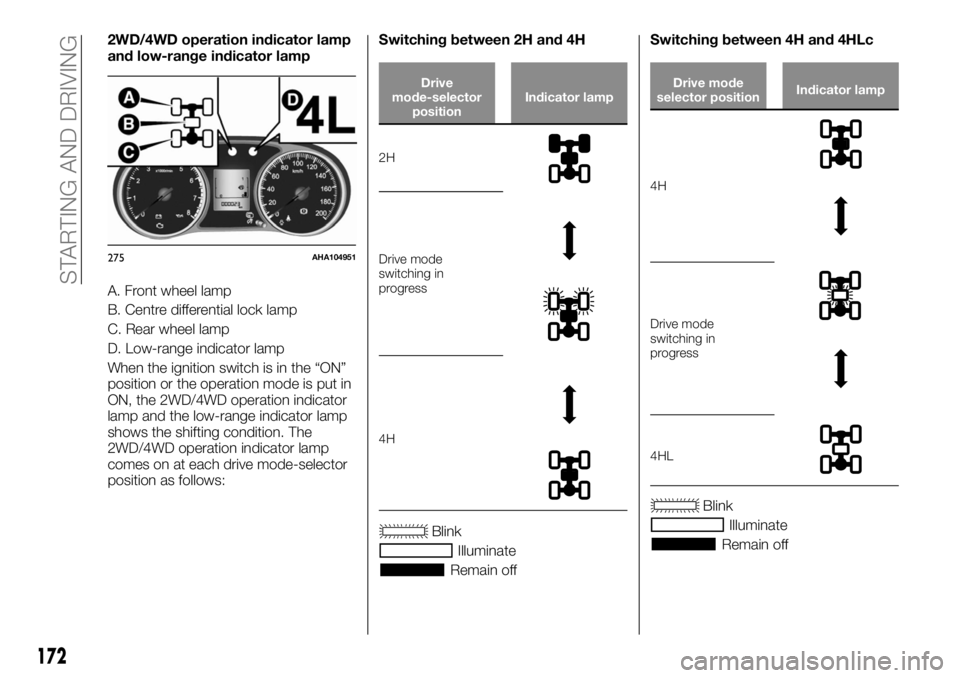
A. Front wheel lamp
B. Centre differential lock lamp
C. Rear wheel lamp
D. Low-range indicator lamp
When the ignition switch is in the “ON”
position or the operation mode is put in
ON, the 2WD/4WD operation indicator
lamp and the low-range indicator lamp
shows the shifting condition. The
2WD/4WD operation indicator lamp
comes on at each drive mode-selector
position as follows:Switching between 2H and 4H
Drive
mode-selector
positionIndicator lamp
2H
Drive mode
switching in
progress
4H
Blink
Illuminate
Remain offSwitching between 4H and 4HLc
Drive mode
selector positionIndicator lamp
4H
Drive mode
switching in
progress
4HL
Blink
Illuminate
Remain off
275AHA104951
172
STARTING AND DRIVING
Page 175 of 312
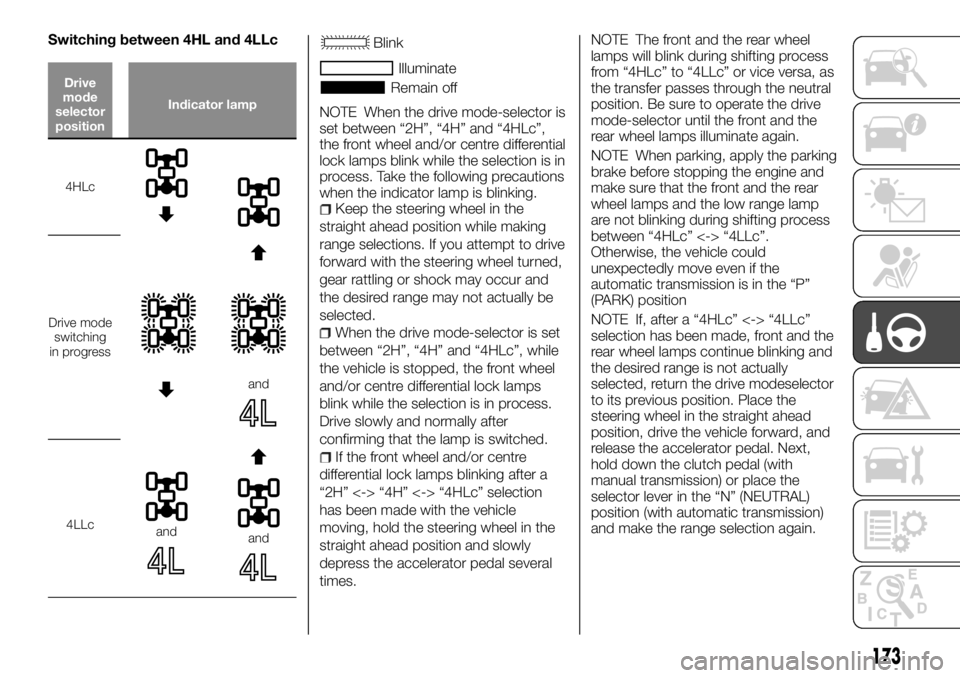
Switching between 4HL and 4LLc
Drive
mode
selector
positionIndicator lamp
4HLc
Drive mode
switching
in progress
and
4LLcandand
Blink
Illuminate
Remain off
NOTE When the drive mode-selector is
set between “2H”, “4H” and “4HLc”,
the front wheel and/or centre differential
lock lamps blink while the selection is in
process. Take the following precautions
when the indicator lamp is blinking.
Keep the steering wheel in the
straight ahead position while making
range selections. If you attempt to drive
forward with the steering wheel turned,
gear rattling or shock may occur and
the desired range may not actually be
selected.
When the drive mode-selector is set
between “2H”, “4H” and “4HLc”, while
the vehicle is stopped, the front wheel
and/or centre differential lock lamps
blink while the selection is in process.
Drive slowly and normally after
confirming that the lamp is switched.
If the front wheel and/or centre
differential lock lamps blinking after a
“2H” <-> “4H” <-> “4HLc” selection
has been made with the vehicle
moving, hold the steering wheel in the
straight ahead position and slowly
depress the accelerator pedal several
times.
NOTE The front and the rear wheel
lamps will blink during shifting process
from “4HLc” to “4LLc” or vice versa, as
the transfer passes through the neutral
position. Be sure to operate the drive
mode-selector until the front and the
rear wheel lamps illuminate again.
NOTE When parking, apply the parking
brake before stopping the engine and
make sure that the front and the rear
wheel lamps and the low range lamp
are not blinking during shifting process
between “4HLc” <-> “4LLc”.
Otherwise, the vehicle could
unexpectedly move even if the
automatic transmission is in the “P”
(PARK) position
NOTE If, after a “4HLc” <-> “4LLc”
selection has been made, front and the
rear wheel lamps continue blinking and
the desired range is not actually
selected, return the drive modeselector
to its previous position. Place the
steering wheel in the straight ahead
position, drive the vehicle forward, and
release the accelerator pedal. Next,
hold down the clutch pedal (with
manual transmission) or place the
selector lever in the “N” (NEUTRAL)
position (with automatic transmission)
and make the range selection again.
173
Page 176 of 312
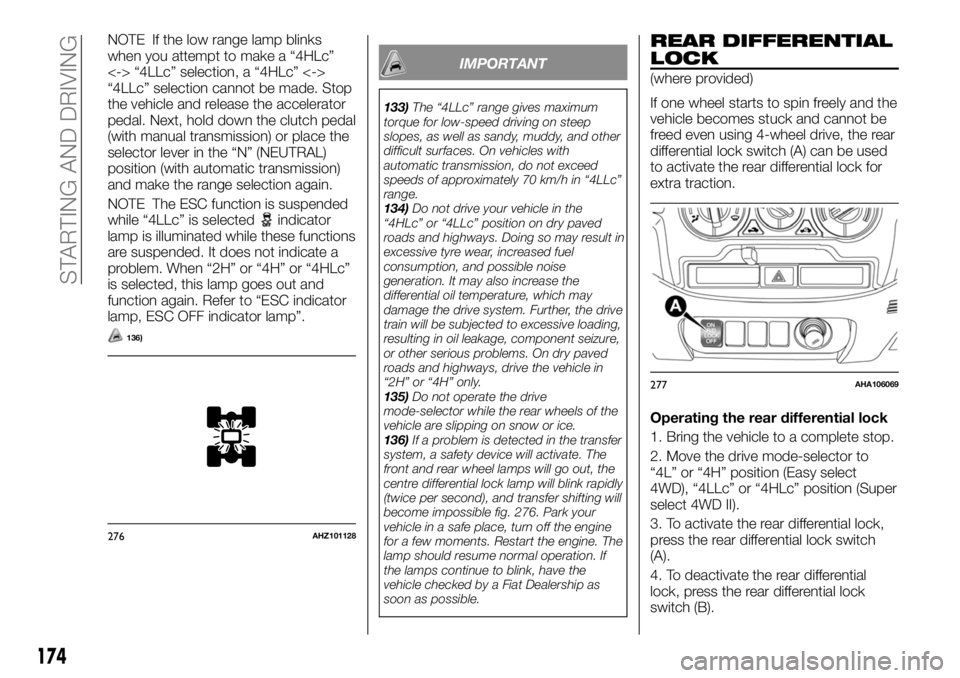
NOTE If the low range lamp blinks
when you attempt to make a “4HLc”
<-> “4LLc” selection, a “4HLc” <->
“4LLc” selection cannot be made. Stop
the vehicle and release the accelerator
pedal. Next, hold down the clutch pedal
(with manual transmission) or place the
selector lever in the “N” (NEUTRAL)
position (with automatic transmission)
and make the range selection again.
NOTE The ESC function is suspended
while “4LLc” is selected
indicator
lamp is illuminated while these functions
are suspended. It does not indicate a
problem. When “2H” or “4H” or “4HLc”
is selected, this lamp goes out and
function again. Refer to “ESC indicator
lamp, ESC OFF indicator lamp”.
136)
IMPORTANT
133)The “4LLc” range gives maximum
torque for low-speed driving on steep
slopes, as well as sandy, muddy, and other
difficult surfaces. On vehicles with
automatic transmission, do not exceed
speeds of approximately 70 km/h in “4LLc”
range.
134)Do not drive your vehicle in the
“4HLc” or “4LLc” position on dry paved
roads and highways. Doing so may result in
excessive tyre wear, increased fuel
consumption, and possible noise
generation. It may also increase the
differential oil temperature, which may
damage the drive system. Further, the drive
train will be subjected to excessive loading,
resulting in oil leakage, component seizure,
or other serious problems. On dry paved
roads and highways, drive the vehicle in
“2H” or “4H” only.
135)Do not operate the drive
mode-selector while the rear wheels of the
vehicle are slipping on snow or ice.
136)If a problem is detected in the transfer
system, a safety device will activate. The
front and rear wheel lamps will go out, the
centre differential lock lamp will blink rapidly
(twice per second), and transfer shifting will
become impossible fig. 276. Park your
vehicle in a safe place, turn off the engine
for a few moments. Restart the engine. The
lamp should resume normal operation. If
the lamps continue to blink, have the
vehicle checked by a Fiat Dealership as
soon as possible.
REAR DIFFERENTIAL
LOCK
(where provided)
If one wheel starts to spin freely and the
vehicle becomes stuck and cannot be
freed even using 4-wheel drive, the rear
differential lock switch (A) can be used
to activate the rear differential lock for
extra traction.
Operating the rear differential lock
1. Bring the vehicle to a complete stop.
2. Move the drive mode-selector to
“4L” or “4H” position (Easy select
4WD), “4LLc” or “4HLc” position (Super
select 4WD II).
3. To activate the rear differential lock,
press the rear differential lock switch
(A).
4. To deactivate the rear differential
lock, press the rear differential lock
switch (B).
276AHZ101128
277AHA106069
174
STARTING AND DRIVING
Page 177 of 312
137)
The rear differential lock does not
operate when the drive mode-selector
is in “2H” position (Easy select 4WD),
“2H” or “4H” position (Super select
4WD II).
When the rear differential is locked with
the drive mode-selector in “4L” or “4H”
position (Easy select 4WD), “4LLc” or
“4HLc” position (Super select 4WD II)
changing the drive mode-selector to
“2H” position (Easy select 4WD), “2H”
or “4H” position (Super select 4WD II)
makes the rear differential unlock
automatically.
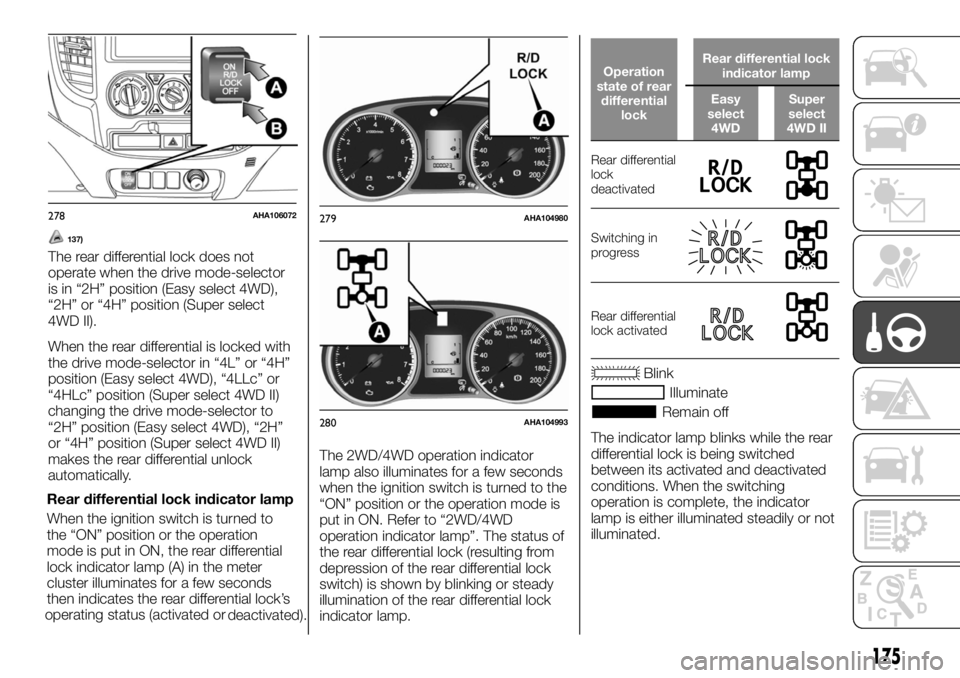
Rear differential lock indicator lamp
When the ignition switch is turned to
the “ON” position or the operation
mode is put in ON, the rear differential
lock indicator lamp (A) in the meter
cluster illuminates for a few seconds
then indicates the rear differential lock’s
operating status (activated or
deactivated).The 2WD/4WD operation indicator
lamp also illuminates for a few seconds
when the ignition switch is turned to the
“ON” position or the operation mode is
put in ON. Refer to “2WD/4WD
operation indicator lamp”. The status of
the rear differential lock (resulting from
depression of the rear differential lock
switch) is shown by blinking or steady
illumination of the rear differential lock
indicator lamp.
Operation
state of rear
differential
lockRear differential lock
indicator lamp
Easy
select
4WDSuper
select
4WD II
Rear differential
lock
deactivated
Switching in
progress
Rear differential
lock activated
Blink
Illuminate
Remain off
The indicator lamp blinks while the rear
differential lock is being switched
between its activated and deactivated
conditions. When the switching
operation is complete, the indicator
lamp is either illuminated steadily or not
illuminated.
278AHA106072279AHA104980
280AHA104993
175