fuel FORD BRONCO 2023 User Guide
[x] Cancel search | Manufacturer: FORD, Model Year: 2023, Model line: BRONCO, Model: FORD BRONCO 2023Pages: 642, PDF Size: 14.71 MB
Page 119 of 642
INTERIOR MIRROR
PRECAUTIONS
WARNING: Do not adjust themirrors when your vehicle is moving. Thiscould result in the loss of control of yourvehicle, serious personal injury or death.
Note:Do not clean the mirror housing orglass with harsh abrasives, fuel or otherpetroleum-based cleaning products.
MANUALLY DIMMING THE
INTERIOR MIRROR
Pull the tab below the mirror toward youto reduce glare at night.
AUTO-DIMMING INTERIOR
MIRROR (IF EQUIPPED)
WHAT IS THE AUTO-DIMMINGINTERIOR MIRROR
The mirror dims to reduce the effect ofbright light from behind. It returns tonormal when the bright light from behindis no longer present or if you shift intoreverse (R), to make sure you have a clearview when backing up.
AUTO-DIMMING INTERIORMIRROR LIMITATIONS
Do not block the sensors on the front andback of the mirror.
Note:A rear center passenger or raised rearcenter head restraint could prevent lightfrom reaching the sensor.
115
2023 Bronco (TG1) Canada/United States of America, enUSA, Edition date: 202208, DOMInterior Mirror
Page 121 of 642
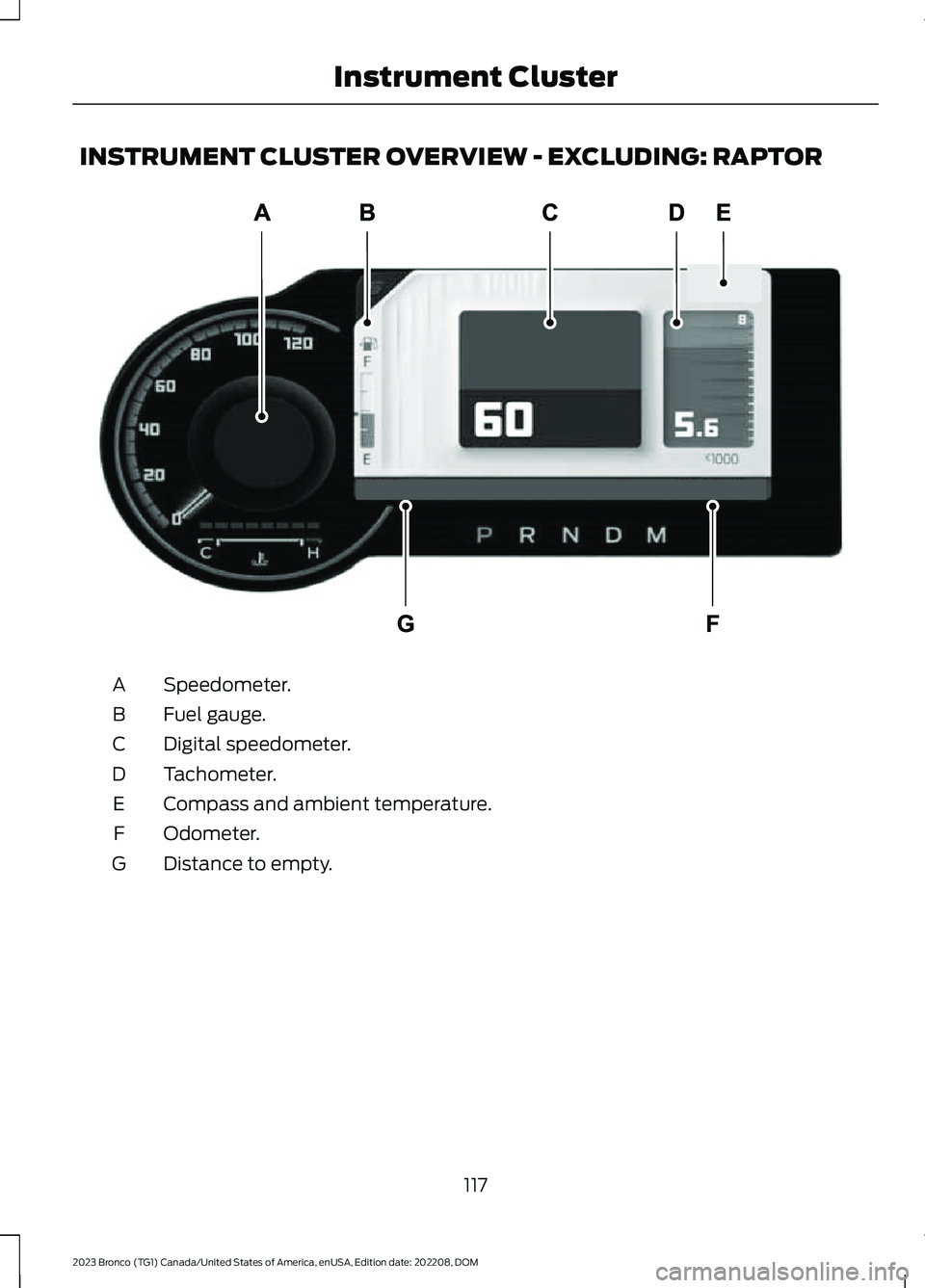
INSTRUMENT CLUSTER OVERVIEW - EXCLUDING: RAPTOR
Speedometer.A
Fuel gauge.B
Digital speedometer.C
Tachometer.D
Compass and ambient temperature.E
Odometer.F
Distance to empty.G
117
2023 Bronco (TG1) Canada/United States of America, enUSA, Edition date: 202208, DOMInstrument ClusterE328319
Page 122 of 642
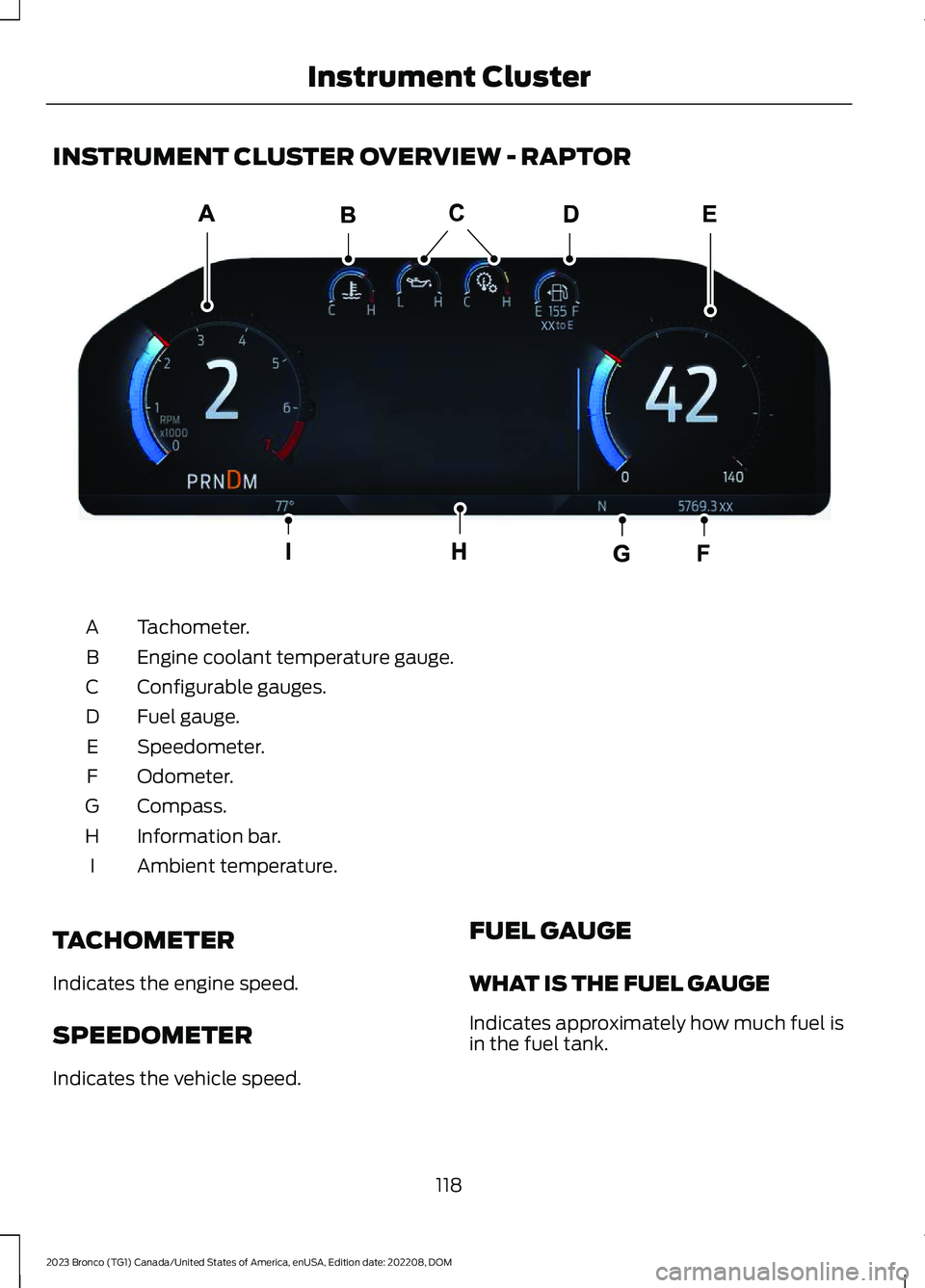
INSTRUMENT CLUSTER OVERVIEW - RAPTOR
Tachometer.A
Engine coolant temperature gauge.B
Configurable gauges.C
Fuel gauge.D
Speedometer.E
Odometer.F
Compass.G
Information bar.H
Ambient temperature.I
TACHOMETER
Indicates the engine speed.
SPEEDOMETER
Indicates the vehicle speed.
FUEL GAUGE
WHAT IS THE FUEL GAUGE
Indicates approximately how much fuel isin the fuel tank.
118
2023 Bronco (TG1) Canada/United States of America, enUSA, Edition date: 202208, DOMInstrument ClusterE367073
Page 123 of 642
FUEL GAUGE LIMITATIONS
The fuel gauge may not provide anaccurate reading when your vehicle is onan incline.
LOCATING THE FUEL FILLERDOOR
The arrow adjacent to the fuel pumpsymbol indicates on which side of yourvehicle the fuel filler door is located.
WHAT IS THE LOW FUELREMINDER
A low fuel level reminder displays andsounds when the distance to emptyreaches 75 mi (120 km) to empty forMyKey, and at 50 mi (80 km),25 mi(40 km),12 mi (20 km) and 0 mi (0 km)for all vehicle keys.
Note:The low fuel reminder can appear atdifferent fuel gauge positions depending onfuel economy conditions. This variation isnormal.
WHAT IS DISTANCE TO EMPTY
Indicates the approximate distance yourvehicle can travel on the fuel remaining inthe tank. Changes in driving pattern cancause the value to not only decrease butalso increase or stay constant for periodsof time.
ENGINE COOLANT
TEMPERATURE GAUGE
Indicates the engine coolant temperature.
TRANSMISSION FLUID
TEMPERATURE GAUGE
Indicates the transmission fluidtemperature.
Special operating conditions can causehigher than normal operatingtemperatures. See Special OperatingConditions Scheduled Maintenance(page 533).
Note:This is a configurable gauge.
TURBO BOOST GAUGE - 2.3L
ECOBOOST™
Indicates the amount of manifold airpressure in the engine.
Note:This is a configurable gauge.
WHAT IS THE INFORMATION
BAR
Displays information for navigation, outsideair temperature, odometer and distanceto empty.
WHAT ARE THE INSTRUMENT
CLUSTER WARNING LAMPS
Warning lamps alert you to a vehiclecondition that could become serious.Some lamps illuminate when you startyour vehicle to make sure they work. If anylamps remain on after starting your vehicle,refer to the respective system warninglamp for further information.
119
2023 Bronco (TG1) Canada/United States of America, enUSA, Edition date: 202208, DOMInstrument Cluster
Page 124 of 642
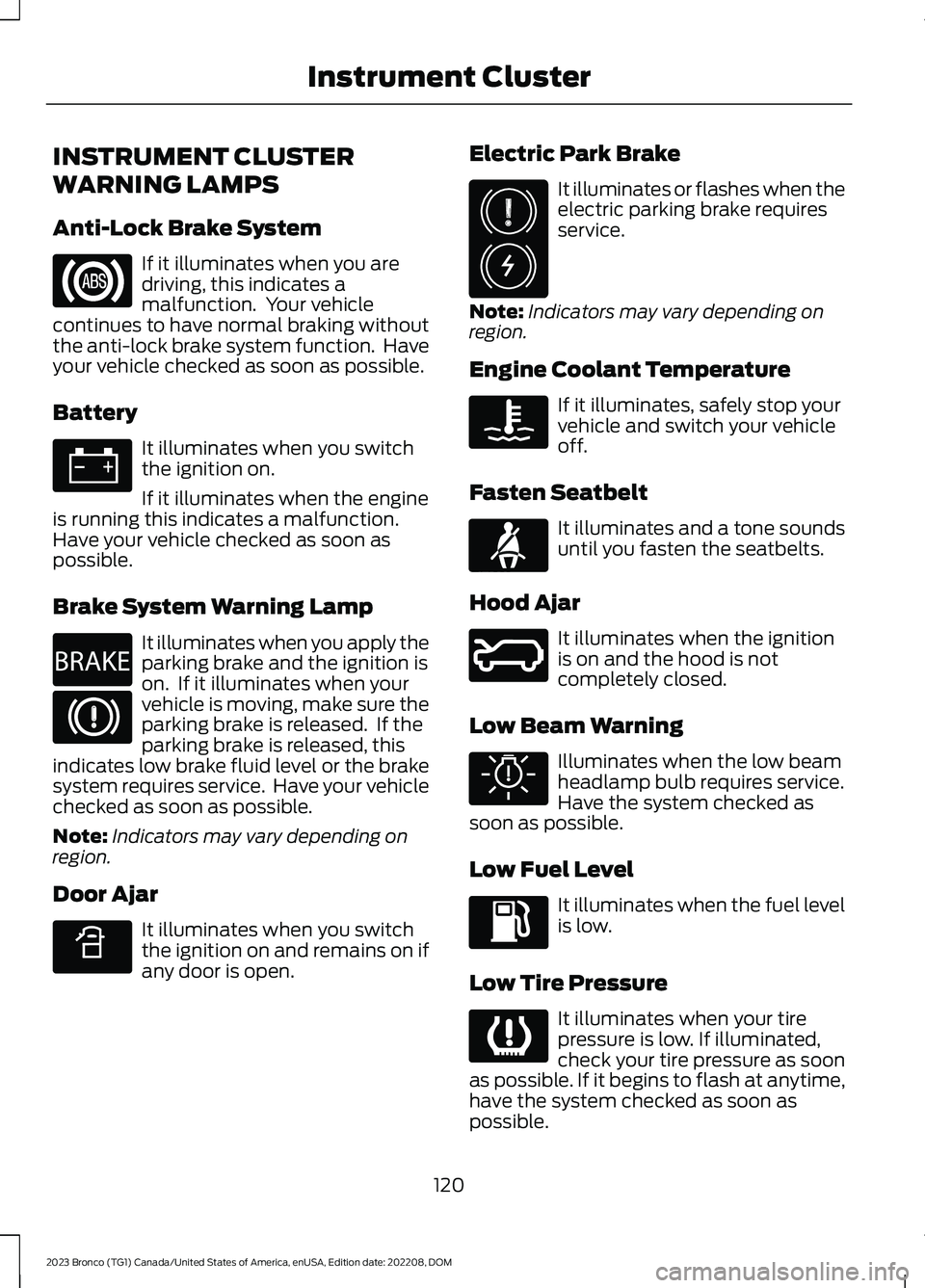
INSTRUMENT CLUSTER
WARNING LAMPS
Anti-Lock Brake System
If it illuminates when you aredriving, this indicates amalfunction. Your vehiclecontinues to have normal braking withoutthe anti-lock brake system function. Haveyour vehicle checked as soon as possible.
Battery
It illuminates when you switchthe ignition on.
If it illuminates when the engineis running this indicates a malfunction.Have your vehicle checked as soon aspossible.
Brake System Warning Lamp
It illuminates when you apply theparking brake and the ignition ison. If it illuminates when yourvehicle is moving, make sure theparking brake is released. If theparking brake is released, thisindicates low brake fluid level or the brakesystem requires service. Have your vehiclechecked as soon as possible.
Note:Indicators may vary depending onregion.
Door Ajar
It illuminates when you switchthe ignition on and remains on ifany door is open.
Electric Park Brake
It illuminates or flashes when theelectric parking brake requiresservice.
Note:Indicators may vary depending onregion.
Engine Coolant Temperature
If it illuminates, safely stop yourvehicle and switch your vehicleoff.
Fasten Seatbelt
It illuminates and a tone soundsuntil you fasten the seatbelts.
Hood Ajar
It illuminates when the ignitionis on and the hood is notcompletely closed.
Low Beam Warning
Illuminates when the low beamheadlamp bulb requires service.Have the system checked assoon as possible.
Low Fuel Level
It illuminates when the fuel levelis low.
Low Tire Pressure
It illuminates when your tirepressure is low. If illuminated,check your tire pressure as soonas possible. If it begins to flash at anytime,have the system checked as soon aspossible.
120
2023 Bronco (TG1) Canada/United States of America, enUSA, Edition date: 202208, DOMInstrument ClusterE67020 E67021 E270480 E67024 E340898 E325775 E103308 E71880 E324249 E325579 E139232
Page 130 of 642
USING THE INSTRUMENT
CLUSTER DISPLAY CONTROLS
WARNING: Driving while distractedcan result in loss of vehicle control, crashand injury. We strongly recommend thatyou use extreme caution when using anydevice that may take your focus off theroad. Your primary responsibility is thesafe operation of your vehicle. Werecommend against the use of anyhand-held device while driving andencourage the use of voice-operatedsystems when possible. Make sure youare aware of all applicable local lawsthat may affect the use of electronicdevices while driving.
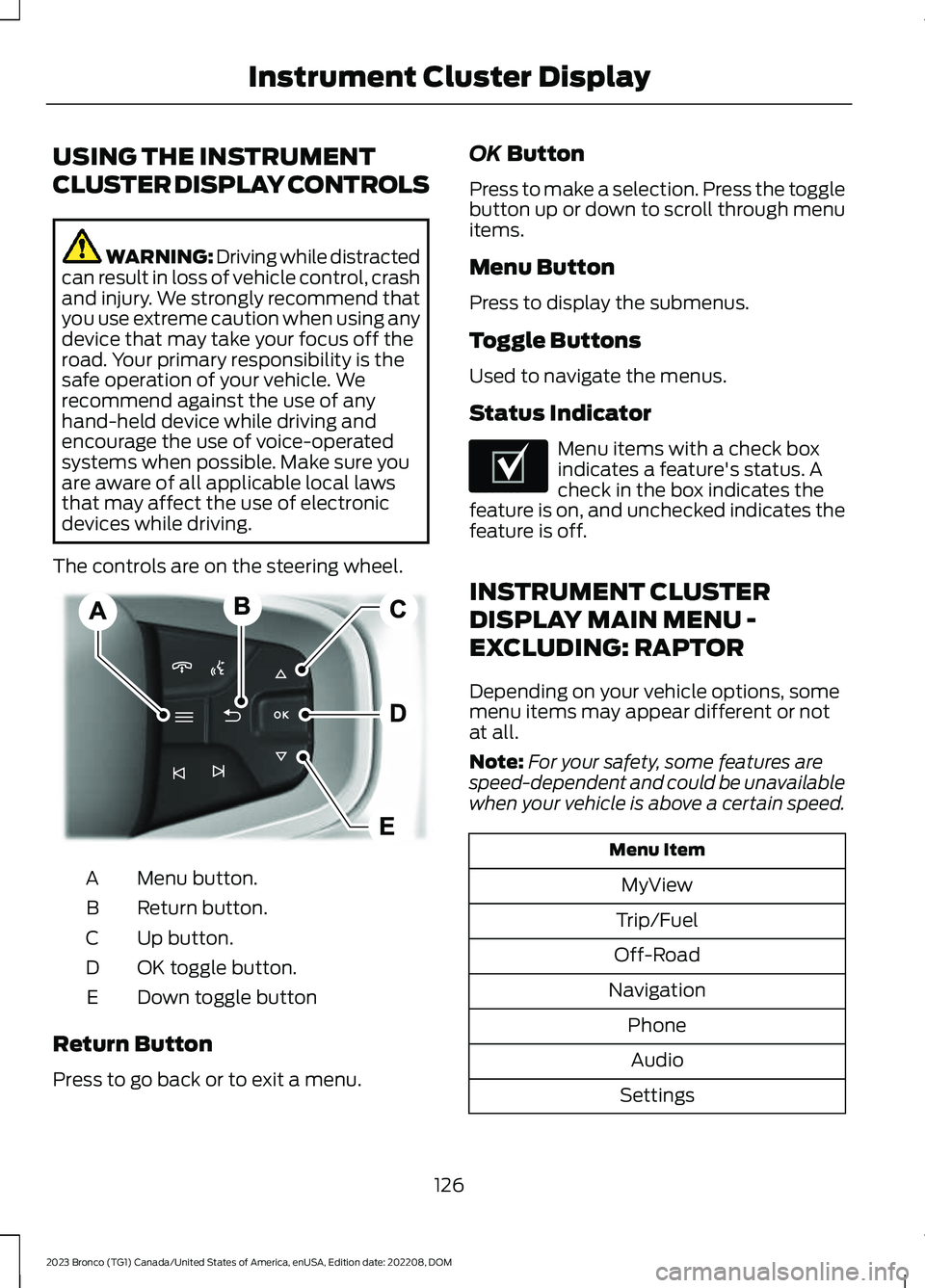
The controls are on the steering wheel.
Menu button.A
Return button.B
Up button.C
OK toggle button.D
Down toggle buttonE
Return Button
Press to go back or to exit a menu.
OK Button
Press to make a selection. Press the togglebutton up or down to scroll through menuitems.
Menu Button
Press to display the submenus.
Toggle Buttons
Used to navigate the menus.
Status Indicator
Menu items with a check boxindicates a feature's status. Acheck in the box indicates thefeature is on, and unchecked indicates thefeature is off.
INSTRUMENT CLUSTER
DISPLAY MAIN MENU -
EXCLUDING: RAPTOR
Depending on your vehicle options, somemenu items may appear different or notat all.
Note:For your safety, some features arespeed-dependent and could be unavailablewhen your vehicle is above a certain speed.
Menu Item
MyView
Trip/Fuel
Off-Road
Navigation
Phone
Audio
Settings
126
2023 Bronco (TG1) Canada/United States of America, enUSA, Edition date: 202208, DOMInstrument Cluster DisplayE326969 E204495
Page 131 of 642
INSTRUMENT CLUSTER
DISPLAY MAIN MENU -
RAPTOR
Depending on your vehicle options, somemenu items can appear different or not atall.
Note:For your safety, some features arespeed-dependent and could be unavailablewhen your vehicle is above a certain speed.
Menu Item
MyView
Trip/Fuel
Raptor Information
Navigation
Phone
Audio
Settings
TRIP COMPUTER
ACCESSING THE TRIP COMPUTER
1.Select Trip/Fuel.
2.Select Fuel Economy,Trip 1 or Trip 2.
RESETTING THE TRIP COMPUTER
1.Select Trip/Fuel.
2.Press and hold the OK button for a fewseconds.
RESETTING THE INDIVIDUAL TRIPVALUES
1.Select Trip/Fuel.
2.Select Trip 1 or Trip 2.
3.Press and hold the OK button for a fewseconds.
CUSTOMIZING THE
INSTRUMENT CLUSTER
DISPLAY
Adding Screens Using MyView
1.Using the information display controlson the steering wheel, select MyView.
2.Select Configure MyView.
3.Select a screen.
4.Press the OK button.
Note:The number of screens you can addis limited. If the selected screen does notappear you must deselect screens from theMyView menu.
Adding Screens Using SelectScreens
1.Select Select Screens.
2.Use the controls on the steering wheelto highlight a screen to add.
3.Press the OK button.
Note:The number of screens you can addis limited. If the selected screen does notappear you must deselect screens from theSelect Screens menu.
Configuring Gauges
1.Select Settings.
2.Select Configure Gauges.
3.Select to swap or change left-handside and right-hand side gauges.
127
2023 Bronco (TG1) Canada/United States of America, enUSA, Edition date: 202208, DOMInstrument Cluster Display
Page 133 of 642
WHAT IS REMOTE START
Remote Start System
The system allows you to remotely startyour vehicle and to adjust the interiortemperature according to the settings thatyou chose.
REMOTE START
PRECAUTIONS
WARNING: Do not start the enginein a closed garage or in other enclosedareas. Exhaust fumes are toxic. Alwaysopen the garage door before you startthe engine. Failure to follow thisinstruction could result in personal injuryor death.
REMOTE START LIMITATIONS
Remote start does not work under thefollowing conditions:
•The alarm horn is sounding.
•The hood is open.
•The transmission is not in park (P).
•The ignition is on.
•The battery voltage is below theminimum operating voltage.
•Remote start is not enabled.
Note:Do not use remote start if the fuellevel is low.
ENABLING REMOTE START
1.Press Settings on the touchscreen.
2.Press Vehicle.
3.Press Remote Start Setup.
4.Switch Remote Start on or off.
Note:To remote start with FordPass, makesure that the modem is enabled. SeeConnecting FordPass to the Modem(page 483).
REMOTELY STARTING AND
STOPPING THE VEHICLE
Remotely Starting the Vehicle
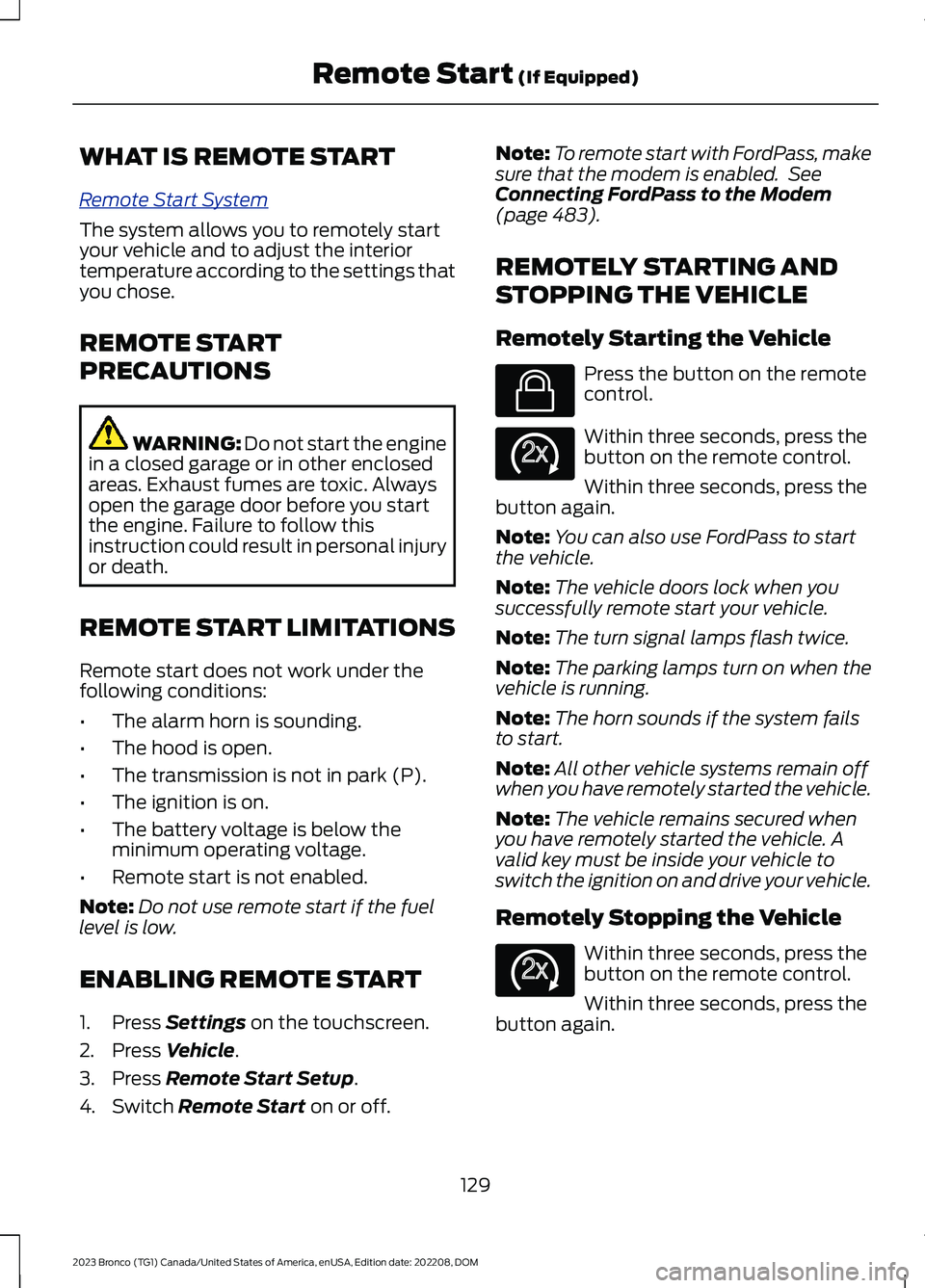
Press the button on the remotecontrol.
Within three seconds, press thebutton on the remote control.
Within three seconds, press thebutton again.
Note:You can also use FordPass to startthe vehicle.
Note:The vehicle doors lock when yousuccessfully remote start your vehicle.
Note:The turn signal lamps flash twice.
Note:The parking lamps turn on when thevehicle is running.
Note:The horn sounds if the system failsto start.
Note:All other vehicle systems remain offwhen you have remotely started the vehicle.
Note:The vehicle remains secured whenyou have remotely started the vehicle. Avalid key must be inside your vehicle toswitch the ignition on and drive your vehicle.
Remotely Stopping the Vehicle
Within three seconds, press thebutton on the remote control.
Within three seconds, press thebutton again.
129
2023 Bronco (TG1) Canada/United States of America, enUSA, Edition date: 202208, DOMRemote Start (If Equipped)E138623 E138625 E138625
Page 172 of 642
1.Press and hold the push button ignitionswitch until the engine stops, or pressit three times within two seconds.
2.Shift into neutral and use the brakes tobring your vehicle to a safe stop.
3.Apply the parking brake.
STOPPING THE ENGINE WHENYOUR VEHICLE IS MOVING -AUTOMATIC TRANSMISSION
WARNING: Switching off theengine when your vehicle is still movingresults in a significant decrease inbraking assistance. Higher effort isrequired to apply the brakes and to stopyour vehicle. A significant decrease insteering assistance could also occur. Thesteering does not lock, but higher effortcould be required to steer your vehicle.When you switch the ignition off, someelectrical circuits, for example airbags,also turn off. If you unintentionally switchthe ignition off, shift into neutral (N) andrestart the engine.
1.Press and hold the push button ignitionswitch until the engine stops, or pressit three times within two seconds.
2.Shift into neutral (N) and use thebrakes to bring your vehicle to a safestop.
3.Shift into park (P).
4.Apply the parking brake.
AUTOMATIC ENGINE STOP
WHAT IS AUTOMATIC ENGINESTOP
Automatic engine stop switches the engineoff if it has been idling for an extendedperiod to help you save fuel.
HOW DOES AUTOMATIC ENGINESTOP WORK
Automatic engine stop turns the engineoff. The ignition also turns off to savebattery power. Before the engine shutsdown, a message appears in theinstrument cluster display showing a timercounting down. If you do not intervenewithin 30 seconds, the engine shuts down.Another message appears in theinstrument cluster display to inform youthat the engine has shut down to save fuel.Start your vehicle as you normally do.
168
2023 Bronco (TG1) Canada/United States of America, enUSA, Edition date: 202208, DOMStarting and Stopping the EngineE340581 E340581
Page 175 of 642
STARTING AND STOPPING THEENGINE – FREQUENTLY ASKEDQUESTIONS
Why is the engine idle speed high whenI am starting the engine?
The speed at which the engine idlesimmediately after starting is optimizedto minimize vehicle emissions andmaximize cabin comfort and fueleconomy.
Why does the engine not crank?
You can only attempt to start theengine for a limited amount of timebefore the starting system temporarilydisables. If you exceed the startingtime limit, a message may appear andyou cannot attempt to start the enginefor at least 15 minutes.
Why do I experience different drivingcharacteristics?
If you disconnect the battery, yourvehicle may exhibit some unusualdriving characteristics for about 5 mi(8 km) after you reconnect it. This isbecause the engine managementsystem must realign itself with theengine. You can disregard any unusualdriving characteristics during thisperiod.
Why can I not start the engine?
If you cannot start the engine afterthree attempts, wait 10 seconds anddo the following:
1.Fully press the brake pedal or theclutch pedal.
Note:Make sure the parking brake isapplied.
Note:Make sure the transmission is in park(P) or neutral (N).
2.Fully press the accelerator pedal andhold it there.
3.Press the push button ignition switch.
Note:The engine cranks for a short periodof time and then it stops.
4.Release the accelerator pedal.
5.Press the push button ignition switch.
Why does the system not detect apassive key?
If the system does not detect a passivekey and you are unable to start theengine, insert the passive key into thebackup position and press the pushbutton ignition switch to start theengine. See Accessing the PassiveKey Backup Position (page 169).
171
2023 Bronco (TG1) Canada/United States of America, enUSA, Edition date: 202208, DOMStarting and Stopping the EngineE340581