reset FORD EXPEDITION EL 2009 User Guide
[x] Cancel search | Manufacturer: FORD, Model Year: 2009, Model line: EXPEDITION EL, Model: FORD EXPEDITION EL 2009Pages: 415, PDF Size: 5.4 MB
Page 38 of 415
11. REW (Rewind): In radio mode,
press REW to manually reverse in a
track.
In DVD mode (if equipped), press to reverse within the current chapter.
12. Memory presets: To set a
station, select the desired frequency
band, AM, FM1 or FM2. Tune to the
desired station. Press and hold a preset button until sound returns and
PRESET # SAVED appears in the display. You can save up to 18 stations,
six in AM, six in FM1 and FM2.
In satellite radio mode (if equipped), there are 18 available presets,
six each for SAT1, SAT2 and SAT3. To save satellite channels in your
memory presets, tune to the desired channel then press and hold a
preset control until sound returns.
Satellite radio is available only with a valid SIRIUS subscription.
Check with your authorized dealer for availability.
13. TEXT/SCAN: In radio and
CD/MP3 mode, press and hold to
hear a brief sampling of radio
stations or CD tracks. Press again to stop.
In MP3 mode, press and release to display song title, artist name, and
album title.
In satellite radio mode (if equipped), press and release to enter
TEXT MODE and display the current song title. While in TEXT MODE,
press again to scroll through the current song title, artist, channel
category and the SIRIUS long channel name.
In TEXT MODE, sometimes the display requires additional text to be
displayed. When the “>” indicator is active, press TEXT/SCAN and then
SEEK
to view the additional display text. When the “<” indicator is
active, press TEXT/SCAN and then SEEK to view the previous
display text.
Press and hold to hear a brief sampling of the next channels. Press again
to stop.
In CATEGORY MODE, press SCAN to hear a brief sampling of
channels in the selected category. Press again to stop.
Satellite radio is available only with a valid SIRIUS subscription.
Check with your authorized dealer for availability.
2009 Expedition (exd)
Owners Guide, 2nd Printing
USA (fus)Entertainment Systems
38
Page 39 of 415
14. AM/FM: Press to select
AM/FM1/FM2 frequency band.
15. ON/OFF/Volume: Press to turn
ON/OFF. Turn to increase/decrease
volume.
Note: If the volume is set above a
certain level and the ignition is
turned off, the volume will come back on at a “nominal” listening level
when the ignition switch is turned back on.
16. CD: Press to enter CD/MP3
mode. If a CD/MP3 is already loaded
into the system, CD/MP3 play will
begin where it ended last.
17. LOAD: Toloadadiscintothe
system, press LOAD. Select a slot
number using memory presets 1–6.
When the display reads LOAD CD#,
load the desired disc, label side up.
If you do not choose a slot within 5 seconds, the system will choose for
you. Once loaded, the first track will begin to play.
To auto load up to 6 discs, press and hold LOAD until the display
reads AUTOLOAD#. Load the desired disc, label side up. The system will
prompt you to load discs for the remaining available slots. Insert the
discs, one at a time, label side up, when prompted. Once loaded, the last
disc loaded will begin to play.
Note: An MP3 disc with folders will show F001 (folder #) T001 (track #)
in the display. An MP3 disc without folders will show T001 (track#) in
the display. Refer to MP3 folder structure later in this chapter for
further information.
18.
(CD eject): To eject a disc
from the system, press . Select
the correct slot number using
memory presets 1–6. When ready, the system will eject the disc and the
display will read REMOVE CD. If the disc is not removed in 15 seconds,
the system will reload the disc.
To auto eject up to 6 CDs, press and hold until the system begins
ejecting all loaded discs. If the discs are not removed, the system will
reload the discs.
2009 Expedition (exd)
Owners Guide, 2nd Printing
USA (fus) Entertainment Systems
39
Page 43 of 415
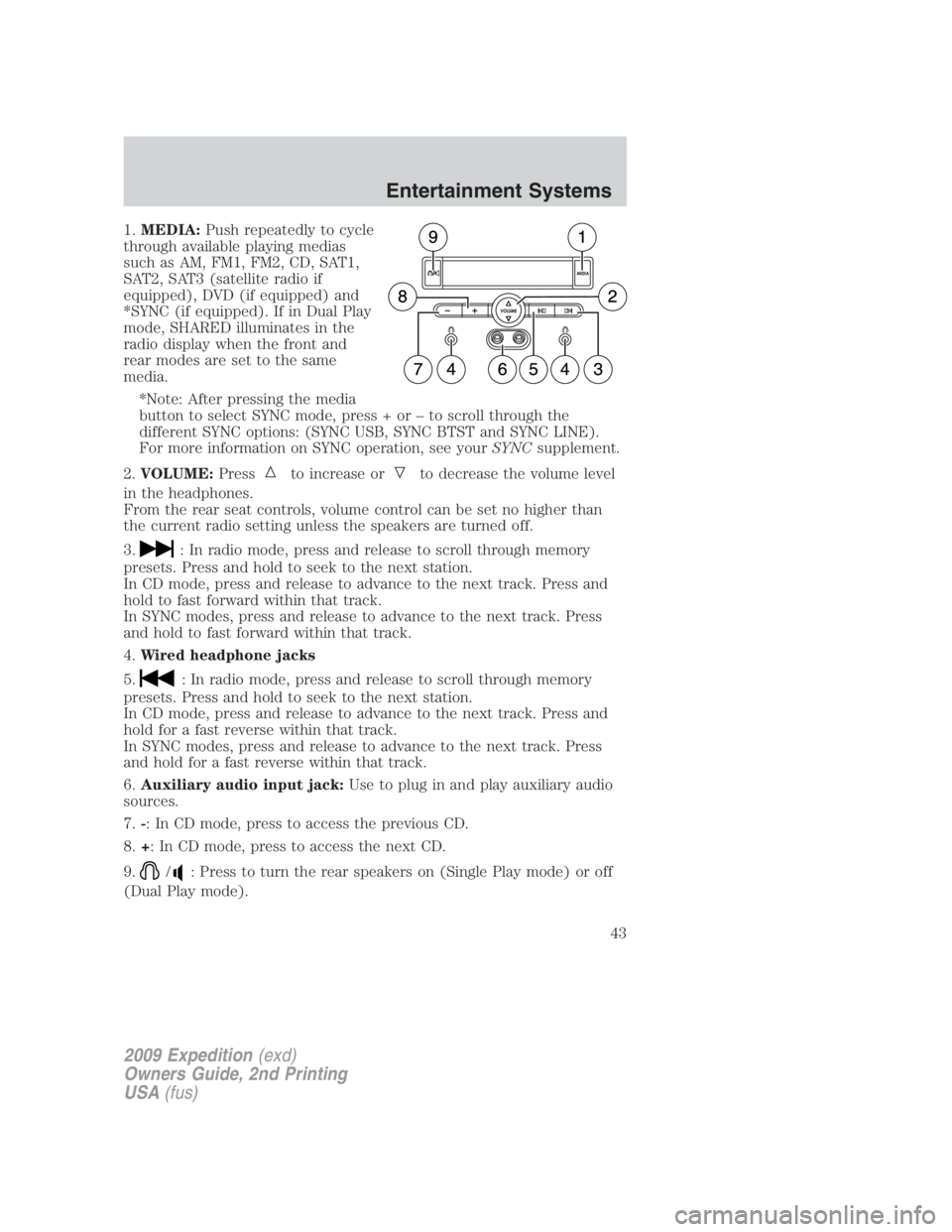
1. MEDIA: Push repeatedly to cycle
through available playing medias
such as AM, FM1, FM2, CD, SAT1,
SAT2, SAT3 (satellite radio if
equipped), DVD (if equipped) and
*SYNC (if equipped). If in Dual Play
mode, SHARED illuminates in the
radio display when the front and
rear modes are set to the same
media.
*Note: After pressing the media
button to select SYNC mode, press + or – to scroll through the
different SYNC options: (SYNC USB, SYNC BTST and SYNC LINE).
For more information on SYNC operation, see your SYNC supplement.
2. VOLUME: Press to increase or to decrease the volume level
in the headphones.
From the rear seat controls, volume control can be set no higher than
the current radio setting unless the speakers are turned off.
3. : In radio mode, press and release to scroll through memory
presets. Press and hold to seek to the next station.
In CD mode, press and release to advance to the next track. Press and
hold to fast forward within that track.
In SYNC modes, press and release to advance to the next track. Press
and hold to fast forward within that track.
4. Wired headphone jacks
5. : In radio mode, press and release to scroll through memory
presets. Press and hold to seek to the next station.
In CD mode, press and release to advance to the next track. Press and
hold for a fast reverse within that track.
In SYNC modes, press and release to advance to the next track. Press
and hold for a fast reverse within that track.
6. Auxiliary audio input jack: Use to plug in and play auxiliary audio
sources.
7. - : In CD mode, press to access the previous CD.
8. + : In CD mode, press to access the next CD.
9. / : Press to turn the rear speakers on (Single Play mode) or off
(Dual Play mode).
2009 Expedition (exd)
Owners Guide, 2nd Printing
USA (fus) Entertainment Systems
43
Page 44 of 415
Parental control
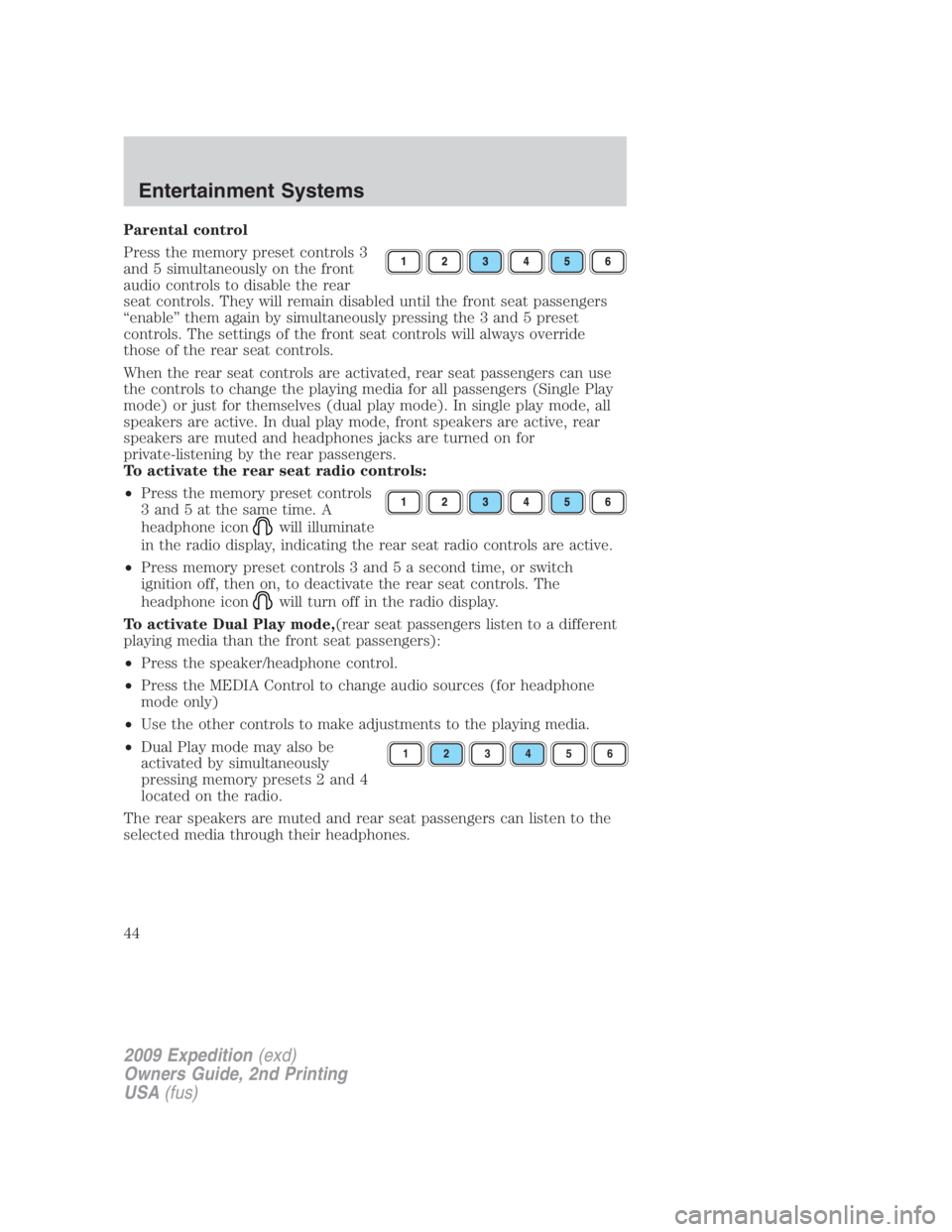
Press the memory preset controls 3
and 5 simultaneously on the front
audio controls to disable the rear
seat controls. They will remain disabled until the front seat passengers
“enable” them again by simultaneously pressing the 3 and 5 preset
controls. The settings of the front seat controls will always override
those of the rear seat controls.
When the rear seat controls are activated, rear seat passengers can use
the controls to change the playing media for all passengers (Single Play
mode) or just for themselves (dual play mode). In single play mode, all
speakers are active. In dual play mode, front speakers are active, rear
speakers are muted and headphones jacks are turned on for
private-listening by the rear passengers.
To activate the rear seat radio controls:
• Press the memory preset controls
3 and 5 at the same time. A
headphone icon will illuminate
in the radio display, indicating the rear seat radio controls are active.
• Press memory preset controls 3 and 5 a second time, or switch
ignition off, then on, to deactivate the rear seat controls. The
headphone icon will turn off in the radio display.
To activate Dual Play mode, (rear seat passengers listen to a different
playing media than the front seat passengers):
• Press the speaker/headphone control.
• Press the MEDIA Control to change audio sources (for headphone
mode only)
• Use the other controls to make adjustments to the playing media.
• Dual Play mode may also be
activated by simultaneously
pressing memory presets 2 and 4
located on the radio.
The rear speakers are muted and rear seat passengers can listen to the
selected media through their headphones. 1 2 3 4 5 6
2009 Expedition (exd)
Owners Guide, 2nd Printing
USA (fus)Entertainment Systems
44
Page 45 of 415
Using headphones/Dual Play mode
WARNING: Do not leave children unattended in the vehicle and
do not let children operate the system while unsupervised. If
wired headphones or auxiliary systems are used, children may become
entangled in the cords and seriously injure themselves.
Plug a 3.5 mm headphone (not included) into the jack. Press the
speaker button, or the 2/4 preset buttons simultaneously on the radio to
activate the headphones. The words DUAL PLAY will illuminate on the
radio display, sound will no longer be heard from the rear speakers and
the fade control will be disabled, signaling that Dual Play has been
activated.
The front speakers remain playing for the front passengers. Press the
speaker button, or the 2/4 preset buttons simultaneously on the radio
again to deactivate the headphones and dual play mode. The words
SINGLE PLAY will illuminate on the radio display and fade control and
sound from rear speakers will be restored, signaling that Dual Play mode
has been deactivated.
To use any rear controls, whether in single or dual play mode, the rear
seat controls must be active. To enable Dual Play, the rear seat controls
must be active and illuminated in the radio display. See To activate
the rear seat radio controls previously.
GENERAL AUDIO INFORMATION
Radio frequencies:
AM and FM frequencies are established by the Federal Communications
Commission (FCC) and the Canadian Radio and Telecommunications
Commission (CRTC). Those frequencies are:
AM: 530, 540–1700, 1710 kHz
FM: 87.7, 87.9–107.7, 107.9 MHz
Radio reception factors:
There are three factors that can affect radio reception:
• Distance/strength: The further you travel from an FM station, the
weaker the signal and the weaker the reception.
• Terrain: Hills, mountains, tall buildings, power lines, electric fences,
traffic lights and thunderstorms can interfere with your reception.
• Station overload: When you pass a broadcast tower, a stronger signal
may overtake a weaker one and play while the weak station frequency
is displayed.
2009 Expedition (exd)
Owners Guide, 2nd Printing
USA (fus) Entertainment Systems
45
Page 49 of 415
• Terrain: Hills, mountains, tall buildings, bridges, tunnels, freeway
overpasses, parking garages, dense tree foliage and thunderstorms can
interfere with your reception.
• Station overload: When you pass a ground based broadcast repeating
tower, a stronger signal may overtake a weaker one and result in an
audio mute.
Unlike AM/FM audible static, you will hear an audio mute when there is
a satellite radio signal interference. Your radio display may display NO
SIGNAL to indicate the interference.
SIRIUS satellite radio service: SIRIUS Satellite Radio is a subscription
based satellite radio service that broadcasts music, sports, news and
entertainment programming. A service fee is required in order to receive
SIRIUS service. Vehicles that are equipped with a factory installed
SIRIUS Satellite Radio system include:
• Hardware and limited subscription term, which begins on the date of
sale or lease of the vehicle.
• Use of online media player providing access to all SIRIUS music
channels over the internet using any computer connected to the
internet (U.S. customers only).
For information on extended subscription terms, contact SIRIUS at
1–888–539–7474.
Note: SIRIUS reserves the unrestricted right to change, rearrange, add
or delete programming including canceling, moving or adding particular
channels, and its prices, at any time, with or without notice to you. Ford
Motor Company shall not be responsible for any such programming
changes.
Satellite Radio Electronic Serial Number (ESN): This 12–digit
Satellite Serial Number is needed to activate, modify or track your
satellite radio account. You will need this number when communicating
with SIRIUS. While in Satellite Radio mode, you can view this number on
the radio display by pressing AUX and Preset 1 control simultaneously.
2009 Expedition (exd)
Owners Guide, 2nd Printing
USA (fus) Entertainment Systems
49
Page 50 of 415
Radio Display Condition Action Required
ACQUIRING Radio requires more
than two seconds to
produce audio for the
selected channel. No action required. This
message should
disappear shortly.
SAT FAULT Internal module or
system failure present. If this message does not
clear within a short
period of time, or with
an ignition key cycle,
your receiver may have a
fault. See your
authorized dealer for
service.
INVALID CHNL Channel no longer
available. This previously available
channel is no longer
available. Tune to
another channel. If the
channel was one of your
presets, you may choose
another channel for that
preset button.
UNSUBSCRIBED Subscription not
available for this
channel. Contact SIRIUS at
1–888–539–7474 to
subscribe to the channel
or tune to another
channel.
NO TEXT Artist information not
available. Artist information not
available at this time on
this channel. The system
is working properly.
NO TEXT Song title information
not available. Song title information
not available at this time
on this channel. The
system is working
properly.
2009 Expedition (exd)
Owners Guide, 2nd Printing
USA (fus)Entertainment Systems
50
Page 55 of 415
from the auxiliary source, the screen will remain black. If the video
source is set to DVD-AUX, the display will automatically turn on if a
video signal is detected.
To listen to audio over the headphones— Dual play mode
(Navigation-based radio systems only):
You may listen to channels A and B over wired or wireless headphones.
Refer to Using the infrared wireless headphones and Using wired
headphones for further information.
• Black (4) — wired headphone output (wired headphones not
included)
There are two ways to get into dual
play mode:
1. After initially switching ignition
on, when a is disc inserted, the FES immediately switches to dual-play
mode.
2. Press the headphone/speaker / button on the DVD player or
navigation radio touch screen.
3. Press the 2 and 4 memory presets on the radio at the same time.
Repeating each of these actions will switch back to single play mode, all
speakers playing and headphones off.
A green light will illuminate next to either the A or B Headphone Control
Button to indicate which channel is active (able to be controlled).
4. Press MEDIA to change the audio source of the active channel (A or
B). The audio source will be shown on the display. You may change the
active channel by pressing the A or B headphone control button.
Note: Channel A can access any possible media source (AM, FM1, FM2,
SAT (if equipped), CD, DVD, AUX). Channel B can only access DVD and
AUX sources.
Note: Refer to Single play/Dual play for more information.
To listen to audio over the headphones— Dual play mode
(Non-navigation based radio systems):
You may listen to channels A and B over wired or wireless headphones.
Refer to Using the infrared wireless headphones and Using wired
headphones for further information.
• Black (4) — wired headphone output (wired headphones not
included)
2009 Expedition (exd)
Owners Guide, 2nd Printing
USA (fus) Entertainment Systems
55
Page 56 of 415
1. Press the headphone/
speaker / button on the DVD
player or press the 2 and 4 memory
presets on the radio at the same time.
A green light will illuminate next to either the A or B Headphone Control
Button to indicate which channel is active (able to be controlled).
2. Press MEDIA to change the audio source of the active channel (A or
B). The audio source will be shown on the display. You may change the
active channel by pressing the A or B headphone control button.
Note: Channel A can access any possible media source (AM, FM1, FM2,
SAT (if equipped), CD, DVD, AUX). Channel B can only access DVD and
AUX sources.
Note: Refer to Single play/Dual play for more information.
Using the infrared (IR) wireless headphones:
1. Press the power control on the earpiece to turn the headphones ON.
2. Select Channel A or B for each set of wireless headphones by using
the A/B control on the ear piece.
3. Adjust the headphone volume using the rotary dial on the earpiece.
Using wired headphones (not included):
WARNING: Do not leave children unattended in the vehicle and
do not let children operate the system while unsupervised. If
wired headphones or auxiliary systems are used, children may become
entangled in the cords and seriously injure themselves.
1. Connect the wired headphones in to the headphone jacks on either
side of the DVD system. Each side is labeled Aor B. Headphones
plugged into jack A will listen to Channel A and headphones plugged into
jack B will listen to Channel B.
2. Adjust the volume levels using
the volume controls on the DVD
system.
2009 Expedition (exd)
Owners Guide, 2nd Printing
USA (fus)Entertainment Systems
56
Page 59 of 415
10. Volume: When in single play
mode, press to increase ( )or
decrease ( ) the volume over all
speakers. When in Dual Play, press
to increase ( ) or decrease ( )
the volume for the wired headphones. (Wireless headphone volume is
controlled with the rotary dial on the right ear piece.)
11.
/ (Headphones/Speakers): Press once for Dual Play
(Headphone mode- the rear speakers are muted) and press again for
Single Play (same media playing through all speakers). You can also
press the 2 and 4 memory preset buttons on the audio system at the
same time to perform the same function. For further interaction
information, refer to Single Play/Dual play under Operation later in
this section.
12. MEDIA: Press repeatedly to
select from the various possible
playing media sources (AM, FM1,
FM2, SAT (if equipped), CD, DVD, DVD-AUX). The media will show in
the status display on the top of the screen when in Dual Play mode.
When in Single Play mode, the media source will be displayed on the
radio.
Note: Channel A can access any possible media source (AM, FM1, FM2,
SAT (if equipped), CD, DVD, DVD-AUX). Channel B can only access
DVD and DVD-AUX sources.
13. RETURN: Press to return to the
playing media or to resume
playback.
14. MENU: When playing a DVD,
press MENU once to enter the DVD
disc menu (if available) and press
twice to enter the system set-up menu. From the set-up menu, you may
select from Angle, Aspect Ratio, Language, Subtitles, Disc resume,
Compression, Restore Defaults and Back. For more detailed information,
refer to Menu mode.
15. ENTER: Press to select/confirm
the current selection.
2009 Expedition (exd)
Owners Guide, 2nd Printing
USA (fus) Entertainment Systems
59