Def FORD F150 2023 Owner's Manual
[x] Cancel search | Manufacturer: FORD, Model Year: 2023, Model line: F150, Model: FORD F150 2023Pages: 786, PDF Size: 23.15 MB
Page 195 of 786
Directing Air to the Footwell AirVents
Press the button.
CLIMATE CONTROL HINTS
General Hints
•Prolonged use of recirculated air maycause the windows to fog up.
•You may feel a small amount of airfrom the footwell air vents regardlessof the air distribution setting.
•To reduce humidity build-up inside yourvehicle, do not drive with the systemswitched off or with recirculated airalways switched on.
•Do not place objects under the frontseats as this may interfere with theairflow to the rear seats.
•Remove any snow, ice or leaves fromthe air intake area at the base of thewindshield.
•To improve the time to reach acomfortable temperature in hotweather, drive with the windows openuntil you feel cold air through the airvents.
Quickly Heating the Interior
1.Adjust the blower motor speed to thehighest speed setting.
2.Adjust the temperature control to thehighest setting.
3.Direct air to the footwell air vents.
Recommended Settings forHeating
1.Adjust the blower motor speed to thecenter setting.
2.Adjust the temperature control to themidway point of the hot settings.
3.Direct air to the footwell air vents.
Quickly Cooling the Interior
1.Press MAX A/C.
2.Drive with the windows open for a shortperiod of time.
Recommended Settings forCooling
1.Adjust the blower motor speed to thecenter setting.
2.Adjust the temperature control to themidway point of the cold settings.
3.Direct air to the instrument panel airvents.
Defogging the Side Windows inCold Weather
1.Direct air to the instrument panel andwindshield air vents.
2.Press and release A/C.
3.Adjust the temperature control to thesetting you prefer.
4.Adjust the blower motor speed to thehighest setting.
5.Direct air toward the side windows.
6.Close the instrument panel air vents.
191
2023 F-150 (TFD) Canada/United States of America, enUSA, Edition date: 202206, DOMClimate Control - Vehicles With: Manual Temperature ControlE244098
Page 209 of 786
WHAT IS THE REAR
OCCUPANT ALERT SYSTEM
The rear occupant alert system monitorsvehicle conditions and notifies you to checkfor rear seat occupants when you switchthe ignition off.
HOW DOES THE REAR
OCCUPANT ALERT SYSTEM
WORK
The system monitors when rear doors havebeen opened and closed to indicate thepotential presence of an occupant in therear seat.
A message displays in the information andentertainment display screen and anaudible warning sounds when you switchthe ignition off after any of the followingconditions have been met:
•A rear door is opened or closed whilethe ignition is on.
•You switch the ignition on within 15minutes of a rear door opening andclosing.
•You switch the ignition on within 15minutes of the alert having displayedor sounded.
REAR OCCUPANT ALERT
SYSTEM PRECAUTIONS
WARNING: On hot days, thetemperature inside the vehicle can risevery quickly. Exposure of people oranimals to these high temperatures foreven a short time can cause death orserious heat related injuries, includingbrain damage. Small children areparticularly at risk.
WARNING: Do not leave childrenor pets unattended in your vehicle.Failure to follow this instruction couldresult in personal injury or death.
REAR OCCUPANT ALERT
SYSTEM LIMITATIONS
The system does not detect the presenceof objects or passengers in the rear seat.It monitors when rear doors are openedand closed.
Note:It is possible to receive an alert whenthere is no rear seat occupant, but alertconditions are met.
Note:It is possible to receive no alert whenthere is an occupant in the rear seat, if alertconditions are not met. For example, if a rearseat occupant does not enter the vehiclethrough a rear door.
Note:The audible warning does not soundwhen the front door is opened before youswitch the ignition off.
SWITCHING REAR OCCUPANT
ALERT SYSTEM ON AND OFF
1.Press Settings on the touchscreen.
2.Press Vehicle.
3.Switch Rear Occupant Alert on or off.
Note:The default setting is on.
Note:Performing a master reset causes thesystem to switch on again.
Semiannual Reminder (If Equipped)
When you switch the system off, amessage appears every six months as areminder that the system is off. You canswitch the system back on or leave it off.
205
2023 F-150 (TFD) Canada/United States of America, enUSA, Edition date: 202206, DOMRear Occupant Alert System (If Equipped)
Page 249 of 786
HYBRID ELECTRIC VEHICLE
INFORMATION –
TROUBLESHOOTING
HYBRID ELECTRIC VEHICLEINFORMATION – FREQUENTLYASKED QUESTIONS
What should I do if the vehicle runs outof fuel and the high voltage battery isout of charge?
Refuel and start your vehicle normally.The engine will recharge the highvoltage battery.
Why does the engine sometimes startat key-on?
The vehicle's computer determines ifan engine start is required at key-on.It starts the engine when necessary forcabin heating, windshield defrost, or ifthe outside temperature is low.
Can I put E15 or E85 in my vehicle, andhow will it affect my fuel economy?
Your hybrid vehicle can use E15 (15%ethanol, 85% gasoline) fuel, but youmay notice slightly reduced fueleconomy because ethanol containsless energy per gallon than gasoline.Your hybrid vehicle is not designed touse E85 (85% ethanol).
Why does it take a long time before theengine shuts down?
There are several reasons the enginestays on for an extended amount oftime when you first start it. Onecommon reason is to make sure thatthe emissions components are warmenough to minimize tailpipe emission.As the climate gets cooler, theengine-on time is extended.
Why does my engine stay on when it isextremely cold outside?
In order to make sure that the climatecontrol system can begin heating thecabin or defrosting the windshield assoon as a driver requests it, the enginecoolant temperature has to be keptsufficiently hot. Keeping the engine onis required to maintain the correctcoolant temperature.
POWER FLOW
WHAT IS POWER FLOW
The power flow shows how power is beingused in the vehicle and also displaysreasons for engine operation.
HOW DOES POWER FLOW WORK
The power flow information foryour hybrid vehicle is availablethrough the home screen orunder Apps.
Vehicle Operational States
Power flows to or from the front and rearwheels depending on the operational stateand the drive conditions.
•Idling: The vehicle is running and in park(P). The engine and/or the high voltagebattery are on.
•Electric driving: The vehicle is runningand in drive (D) or neutral (N). The highvoltage battery provides power to thewheels.
245
2023 F-150 (TFD) Canada/United States of America, enUSA, Edition date: 202206, DOMHybrid Electric Vehicle Information - Hybrid Electric Vehicle
(HEV)E260071
Page 254 of 786
AUTO-START-STOP –FREQUENTLY ASKED QUESTIONS
Why does the engine not alwaysstop when I expect it to?
The system is designed to work in a waythat complements other vehicle systems,allowing them to operate at optimumperformance.
The system does not stop the engine if:
•The driver door is open.
•Your vehicle is at high altitude.
•The heated windshield is on.
•The engine is warming up.
•The outside temperature is too low ortoo high.
•The battery charge is low.
•The battery temperature is outside theoptimal operating range.
•The engine is required to run tomaintain interior climate and reducefogging.
Why does the engine sometimesrestart when I do not expect it to?
The system is designed to work in a waythat complements other vehicle systems,allowing them to operate at optimumperformance.
The system restarts the engine if:
•You switch the heated windshield on.
•You switch maximum defrost on.
•Your vehicle starts to roll downhill inneutral.
•The engine is required to run tomaintain adequate brake systemassistance.
•The engine is required to run tomaintain interior climate and reducefogging.
Can I permanently switch thesystem off?
No. The system plays an important role inreducing the fuel consumption and the CO2emissions.
Will the frequent engine startscause parts to wear out?
Your vehicle has an enhanced battery andstarter motor that are designed for theincreased number of engine starts.
250
2023 F-150 (TFD) Canada/United States of America, enUSA, Edition date: 202206, DOMAuto-Start-Stop (If Equipped)
Page 284 of 786
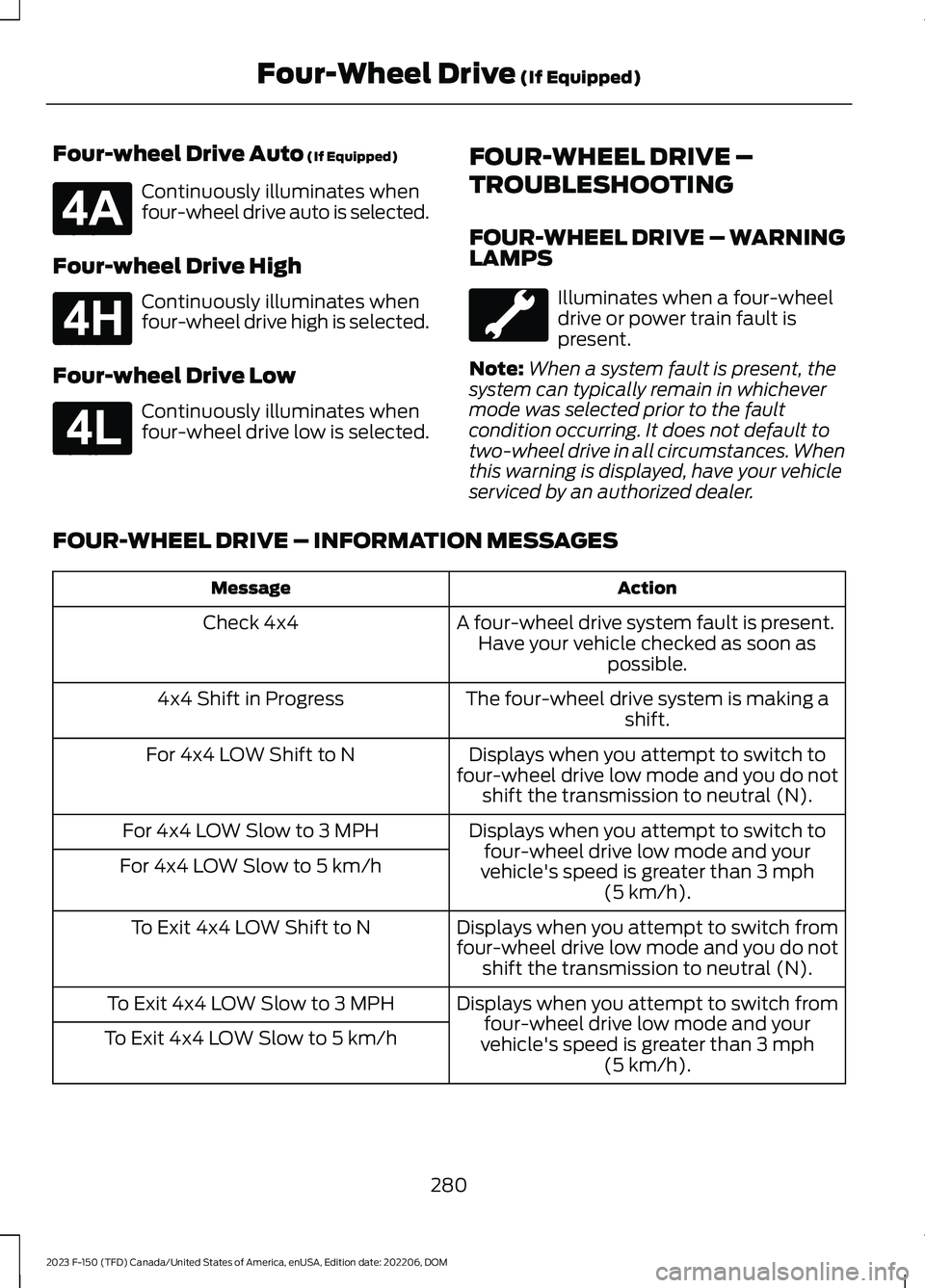
Four-wheel Drive Auto (If Equipped)
Continuously illuminates whenfour-wheel drive auto is selected.
Four-wheel Drive High
Continuously illuminates whenfour-wheel drive high is selected.
Four-wheel Drive Low
Continuously illuminates whenfour-wheel drive low is selected.
FOUR-WHEEL DRIVE –
TROUBLESHOOTING
FOUR-WHEEL DRIVE – WARNINGLAMPS
Illuminates when a four-wheeldrive or power train fault ispresent.
Note:When a system fault is present, thesystem can typically remain in whichevermode was selected prior to the faultcondition occurring. It does not default totwo-wheel drive in all circumstances. Whenthis warning is displayed, have your vehicleserviced by an authorized dealer.
FOUR-WHEEL DRIVE – INFORMATION MESSAGES
ActionMessage
A four-wheel drive system fault is present.Have your vehicle checked as soon aspossible.
Check 4x4
The four-wheel drive system is making ashift.4x4 Shift in Progress
Displays when you attempt to switch tofour-wheel drive low mode and you do notshift the transmission to neutral (N).
For 4x4 LOW Shift to N
Displays when you attempt to switch tofour-wheel drive low mode and yourvehicle's speed is greater than 3 mph(5 km/h).
For 4x4 LOW Slow to 3 MPH
For 4x4 LOW Slow to 5 km/h
Displays when you attempt to switch fromfour-wheel drive low mode and you do notshift the transmission to neutral (N).
To Exit 4x4 LOW Shift to N
Displays when you attempt to switch fromfour-wheel drive low mode and yourvehicle's speed is greater than 3 mph(5 km/h).
To Exit 4x4 LOW Slow to 3 MPH
To Exit 4x4 LOW Slow to 5 km/h
280
2023 F-150 (TFD) Canada/United States of America, enUSA, Edition date: 202206, DOMFour-Wheel Drive (If Equipped)E181781 E181779 E181780
Page 302 of 786
Note:The system does not react to smallor moving objects, particularly those closeto the ground.
Note:The system does not operate duringhard acceleration or steering.
Note:If your vehicle sustains damage tothe bumper or fascia leaving it misalignedor bent, it could alter the sensing zonecausing inaccurate measurement ofobstacles or false alerts.
Note:Vehicle loading and suspensionchanges can impact the angle of the sensorsand may change the normal detection zoneof the system resulting in inaccuratemeasurement of obstacles or false alerts.
Note:When you connect a trailer, thesystem may detect the trailer and providean alert, or the system turns off. If thesystem does not turn off, manually switchthe system off after you connect the trailer.
Note:You may experience reduced systemperformance on road surfaces that limitdeceleration. For example, roads with ice,loose gravel, mud or sand.
SWITCHING REVERSE
BRAKING ASSIST ON AND OFF
1.Press Features on the touchscreen.
2.Press Driver Assistance.
3.Switch Reverse Brake Assist on or off.
Note:The system is unavailable when therear parking aid, cross traffic alert or tractioncontrol is off.
Note:If your vehicle is not equipped withcross traffic alert the reverse braking assistrelies on input from the rear parking aid andrear camera sensors.
Note:The default setting is on in someregions.
OVERRIDING REVERSE
BRAKING ASSIST
There could be instances whenunexpected or unwanted braking occurs.Firmly pressing the accelerator pedal orswitching the feature off overrides thesystem.
REVERSE BRAKING ASSIST
INDICATORS
If the system determines that a collisionwith an obstacle may occur, full brakingmay apply.
A message and warningindicator appear when thesystem applies the brakes.
298
2023 F-150 (TFD) Canada/United States of America, enUSA, Edition date: 202206, DOMReverse Braking Assist (If Equipped)E293490
Page 313 of 786
HOW DOES STABILITY
CONTROL WORK
WARNING: Vehicle modificationsinvolving braking system, aftermarketroof racks, suspension, steering system,tire construction and wheel and tire sizemay change the handling characteristicsof your vehicle and may adversely affectthe performance of the electronicstability control system. In addition,installing any stereo speakers mayinterfere with and adversely affect theelectronic stability control system.Reducing the effectiveness of theelectronic stability control system couldlead to an increased risk of loss of vehiclecontrol, vehicle rollover, personal injuryand death.
WARNING: Remember that evenadvanced technology cannot defy thelaws of physics. It's always possible tolose control of a vehicle due toinappropriate driver input for theconditions. Aggressive driving on anyroad condition can cause you to losecontrol of your vehicle increasing the riskof personal injury or property damage.Activation of the electronic stabilitycontrol system is an indication that atleast some of the tires have exceededtheir ability to grip the road; this couldreduce the operator's ability to controlthe vehicle potentially resulting in a lossof vehicle control, vehicle rollover,personal injury and death.
WARNING: You are responsible forcontrolling your vehicle at all times. Thesystem is designed to be an aid and doesnot relieve you of your responsibility todrive with due care and attention. Failureto follow this instruction could result inthe loss of control of your vehicle,personal injury or death.
If a driving condition activates either thestability control or traction control you mayexperience the following conditions:
•The stability and traction control lightflashes.
•Your vehicle slows down.
•Reduced engine power.
The stability control system has severalfeatures built into it to help you maintaincontrol of your vehicle:
Electronic Stability Control
Electronic stability control enhances yourvehicle’s ability to prevent skids or lateralslides by applying brakes to one or moreof the wheels individually and, if necessary,reducing engine power.
Roll Stability Control
Roll stability control enhances yourvehicle’s ability to prevent rollovers bydetecting your vehicle’s roll motion andthe rate at which it changes by applyingthe brakes to one or more wheelsindividually.
Curve Control
Curve control enhances your vehicle’sability to follow the road when corneringseverely or avoiding objects in the roadway.Curve control operates by reducing enginepower and, if necessary, applying brakesto one or more of the wheels individually.
309
2023 F-150 (TFD) Canada/United States of America, enUSA, Edition date: 202206, DOMStability Control
Page 315 of 786
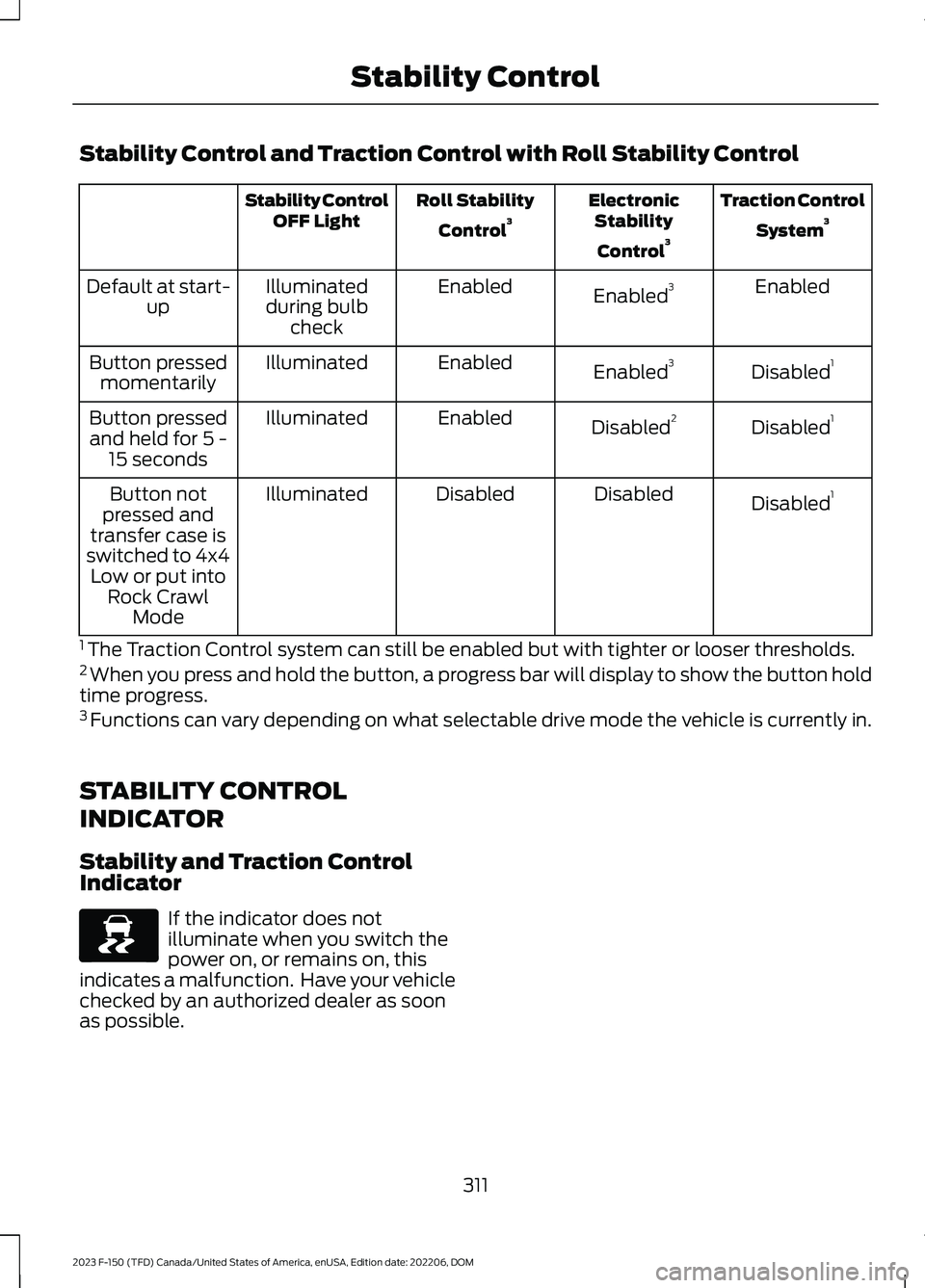
Stability Control and Traction Control with Roll Stability Control
Traction Control
System3ElectronicStability
Control3
Roll Stability
Control3Stability ControlOFF Light
EnabledEnabled3EnabledIlluminatedduring bulbcheck
Default at start-up
Disabled1Enabled3EnabledIlluminatedButton pressedmomentarily
Disabled1Disabled2EnabledIlluminatedButton pressedand held for 5 -15 seconds
Disabled1DisabledDisabledIlluminatedButton notpressed andtransfer case isswitched to 4x4Low or put intoRock CrawlMode
1 The Traction Control system can still be enabled but with tighter or looser thresholds.2 When you press and hold the button, a progress bar will display to show the button holdtime progress.3 Functions can vary depending on what selectable drive mode the vehicle is currently in.
STABILITY CONTROL
INDICATOR
Stability and Traction ControlIndicator
If the indicator does notilluminate when you switch thepower on, or remains on, thisindicates a malfunction. Have your vehiclechecked by an authorized dealer as soonas possible.
311
2023 F-150 (TFD) Canada/United States of America, enUSA, Edition date: 202206, DOMStability ControlE138639
Page 334 of 786
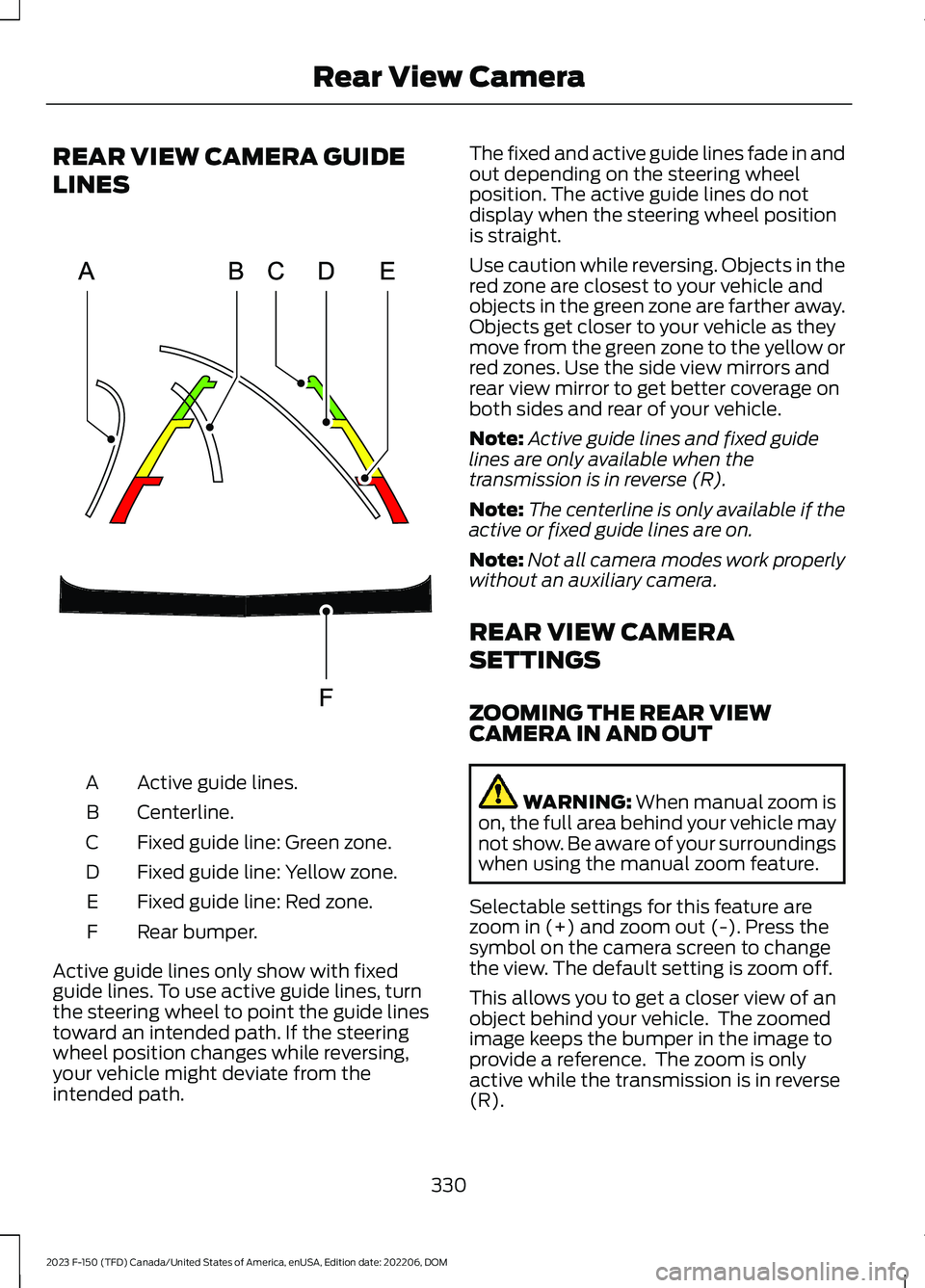
REAR VIEW CAMERA GUIDE
LINES
Active guide lines.A
Centerline.B
Fixed guide line: Green zone.C
Fixed guide line: Yellow zone.D
Fixed guide line: Red zone.E
Rear bumper.F
Active guide lines only show with fixedguide lines. To use active guide lines, turnthe steering wheel to point the guide linestoward an intended path. If the steeringwheel position changes while reversing,your vehicle might deviate from theintended path.
The fixed and active guide lines fade in andout depending on the steering wheelposition. The active guide lines do notdisplay when the steering wheel positionis straight.
Use caution while reversing. Objects in thered zone are closest to your vehicle andobjects in the green zone are farther away.Objects get closer to your vehicle as theymove from the green zone to the yellow orred zones. Use the side view mirrors andrear view mirror to get better coverage onboth sides and rear of your vehicle.
Note:Active guide lines and fixed guidelines are only available when thetransmission is in reverse (R).
Note:The centerline is only available if theactive or fixed guide lines are on.
Note:Not all camera modes work properlywithout an auxiliary camera.
REAR VIEW CAMERA
SETTINGS
ZOOMING THE REAR VIEWCAMERA IN AND OUT
WARNING: When manual zoom ison, the full area behind your vehicle maynot show. Be aware of your surroundingswhen using the manual zoom feature.
Selectable settings for this feature arezoom in (+) and zoom out (-). Press thesymbol on the camera screen to changethe view. The default setting is zoom off.
This allows you to get a closer view of anobject behind your vehicle. The zoomedimage keeps the bumper in the image toprovide a reference. The zoom is onlyactive while the transmission is in reverse(R).
330
2023 F-150 (TFD) Canada/United States of America, enUSA, Edition date: 202206, DOMRear View CameraE306774
Page 366 of 786
WHAT IS DRIVE MODE
CONTROL
Your vehicle has various drive modes thatyou can select for different drivingconditions. Depending on the drive modethat you select, the system adjusts variousvehicle settings.
HOW DOES DRIVE MODE
CONTROL WORK
Selectable drive modes change variouselectronic and mechanical settings withinyour vehicle to tailor its performance anddriving characteristics to on-road oroff-road driving conditions. Steering feeland effort, traction control, stabilitycontrol, chassis controls, powertrainresponse, transmissions shift points,four-wheel driveline setting, exhaust noiselevel and suspension dampening areautomatically altered to a pre-determinedsetting depending upon the drive modethat is selected.
Note:Your vehicle has diagnostic checksthat continuously monitor all systems forproper operation. If a drive mode isunavailable due to a system fault, yourvehicle defaults to normal mode and thedriveline remains in the four-wheel drivesetting that was last selected prior to thesystem fault.
Note:Your vehicle reverts to normal modeeach time it is started. If you shut yourvehicle off in a drive mode other thannormal mode, at startup the instrumentcluster screen displays a pop-up asking ifyou would like to return to your last useddrive mode. If you select yes to the pop-up,your vehicle returns to the last selected drivemode and the default four-wheel drivelinesetting associated with that drive mode. Ifyou select no, your vehicle remains in normalmode and the default four-wheel drivelinesetting associated with that drive mode. Ifyou do not select yes or no the pop upmessage times out, your vehicle remains innormal mode, and the four-wheel drivelinesetting remains in its last used setting.
HOW DOES DRIVE MODE
CONTROL WORK - RAPTOR
Selectable drive modes change variouselectronic and mechanical settings withinyour vehicle to tailor its performance anddriving characteristics to on-road oroff-road driving conditions. Steering feeland effort, traction control, stabilitycontrol, chassis controls, powertrainresponse, transmission shift points,four-wheel driveline settings, exhaust noiselevel and suspension dampening areautomatically altered to a pre-determinedsetting depending upon the drive modethat you select.
Note:Your vehicle has diagnostic checksthat continuously monitor all systems forproper operation. If a drive mode isunavailable due to a system fault, yourvehicle defaults to normal mode and thedriveline remains in the four-wheel drivesetting that you last selected prior to thesystem fault.
362
2023 F-150 (TFD) Canada/United States of America, enUSA, Edition date: 202206, DOMDrive Mode Control