display FORD F450 SUPER DUTY 2017 Workshop Manual
[x] Cancel search | Manufacturer: FORD, Model Year: 2017, Model line: F450 SUPER DUTY, Model: FORD F450 SUPER DUTY 2017Pages: 642, PDF Size: 12.35 MB
Page 140 of 642
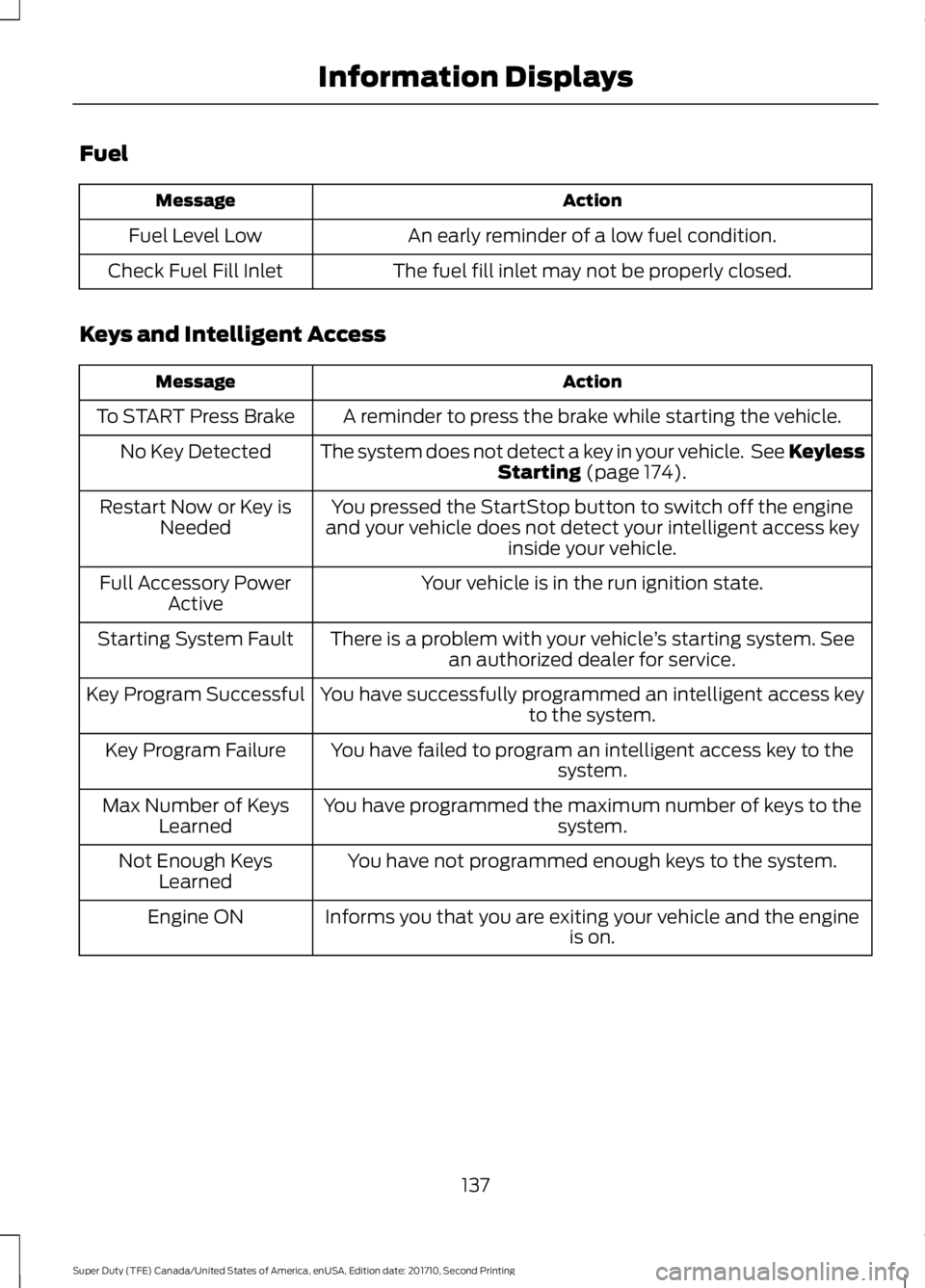
Fuel
ActionMessage
An early reminder of a low fuel condition.Fuel Level Low
The fuel fill inlet may not be properly closed.Check Fuel Fill Inlet
Keys and Intelligent Access
ActionMessage
A reminder to press the brake while starting the vehicle.To START Press Brake
The system does not detect a key in your vehicle. See KeylessStarting (page 174).No Key Detected
You pressed the StartStop button to switch off the engineand your vehicle does not detect your intelligent access keyinside your vehicle.
Restart Now or Key isNeeded
Your vehicle is in the run ignition state.Full Accessory PowerActive
There is a problem with your vehicle’s starting system. Seean authorized dealer for service.Starting System Fault
You have successfully programmed an intelligent access keyto the system.Key Program Successful
You have failed to program an intelligent access key to thesystem.Key Program Failure
You have programmed the maximum number of keys to thesystem.Max Number of KeysLearned
You have not programmed enough keys to the system.Not Enough KeysLearned
Informs you that you are exiting your vehicle and the engineis on.Engine ON
137
Super Duty (TFE) Canada/United States of America, enUSA, Edition date: 201710, Second Printing
Information Displays
Page 141 of 642
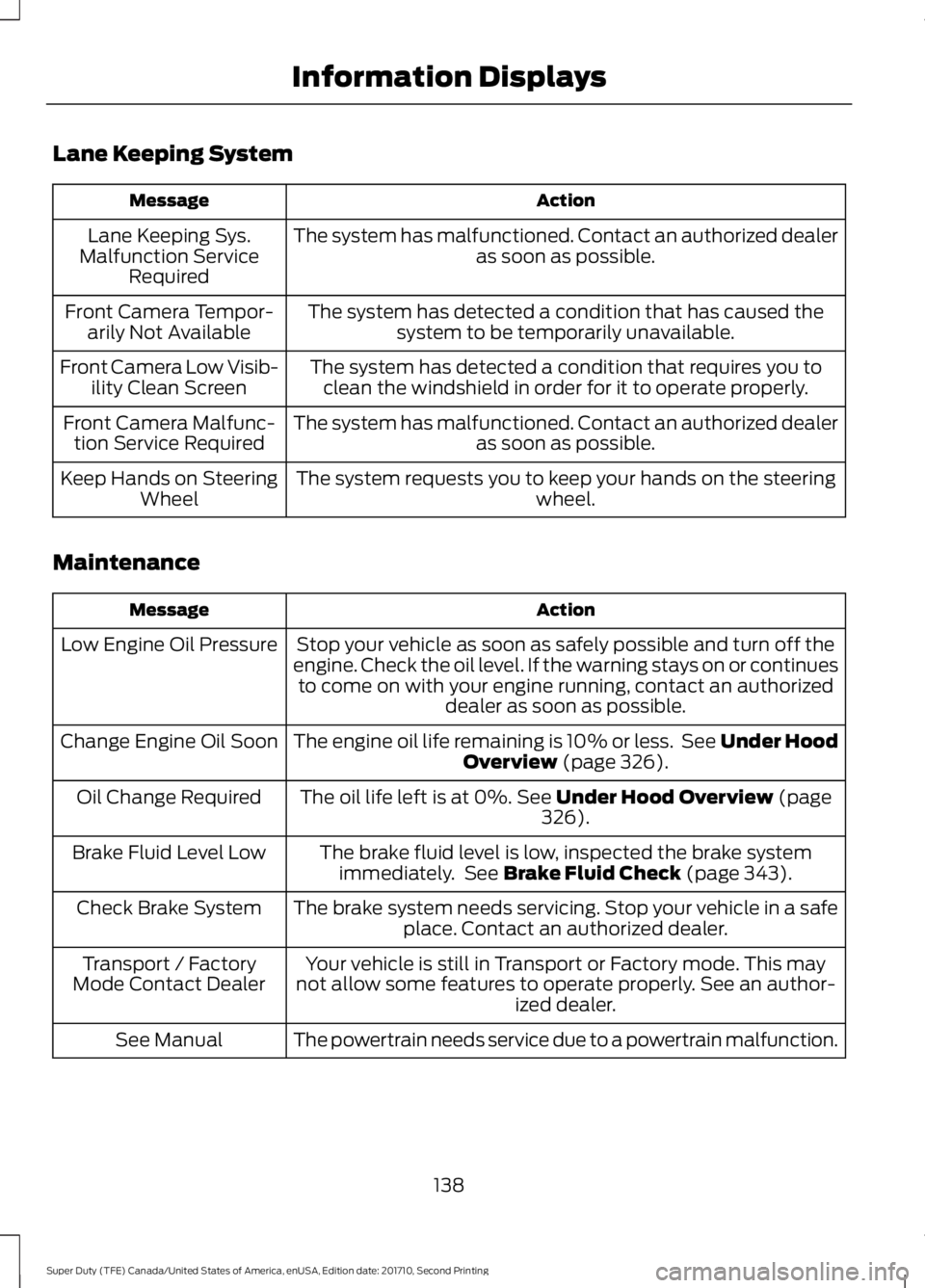
Lane Keeping System
ActionMessage
The system has malfunctioned. Contact an authorized dealeras soon as possible.Lane Keeping Sys.Malfunction ServiceRequired
The system has detected a condition that has caused thesystem to be temporarily unavailable.Front Camera Tempor-arily Not Available
The system has detected a condition that requires you toclean the windshield in order for it to operate properly.Front Camera Low Visib-ility Clean Screen
The system has malfunctioned. Contact an authorized dealeras soon as possible.Front Camera Malfunc-tion Service Required
The system requests you to keep your hands on the steeringwheel.Keep Hands on SteeringWheel
Maintenance
ActionMessage
Stop your vehicle as soon as safely possible and turn off theengine. Check the oil level. If the warning stays on or continuesto come on with your engine running, contact an authorizeddealer as soon as possible.
Low Engine Oil Pressure
The engine oil life remaining is 10% or less. See Under HoodOverview (page 326).Change Engine Oil Soon
The oil life left is at 0%. See Under Hood Overview (page326).Oil Change Required
The brake fluid level is low, inspected the brake systemimmediately. See Brake Fluid Check (page 343).Brake Fluid Level Low
The brake system needs servicing. Stop your vehicle in a safeplace. Contact an authorized dealer.Check Brake System
Your vehicle is still in Transport or Factory mode. This maynot allow some features to operate properly. See an author-ized dealer.
Transport / FactoryMode Contact Dealer
The powertrain needs service due to a powertrain malfunction.See Manual
138
Super Duty (TFE) Canada/United States of America, enUSA, Edition date: 201710, Second Printing
Information Displays
Page 142 of 642
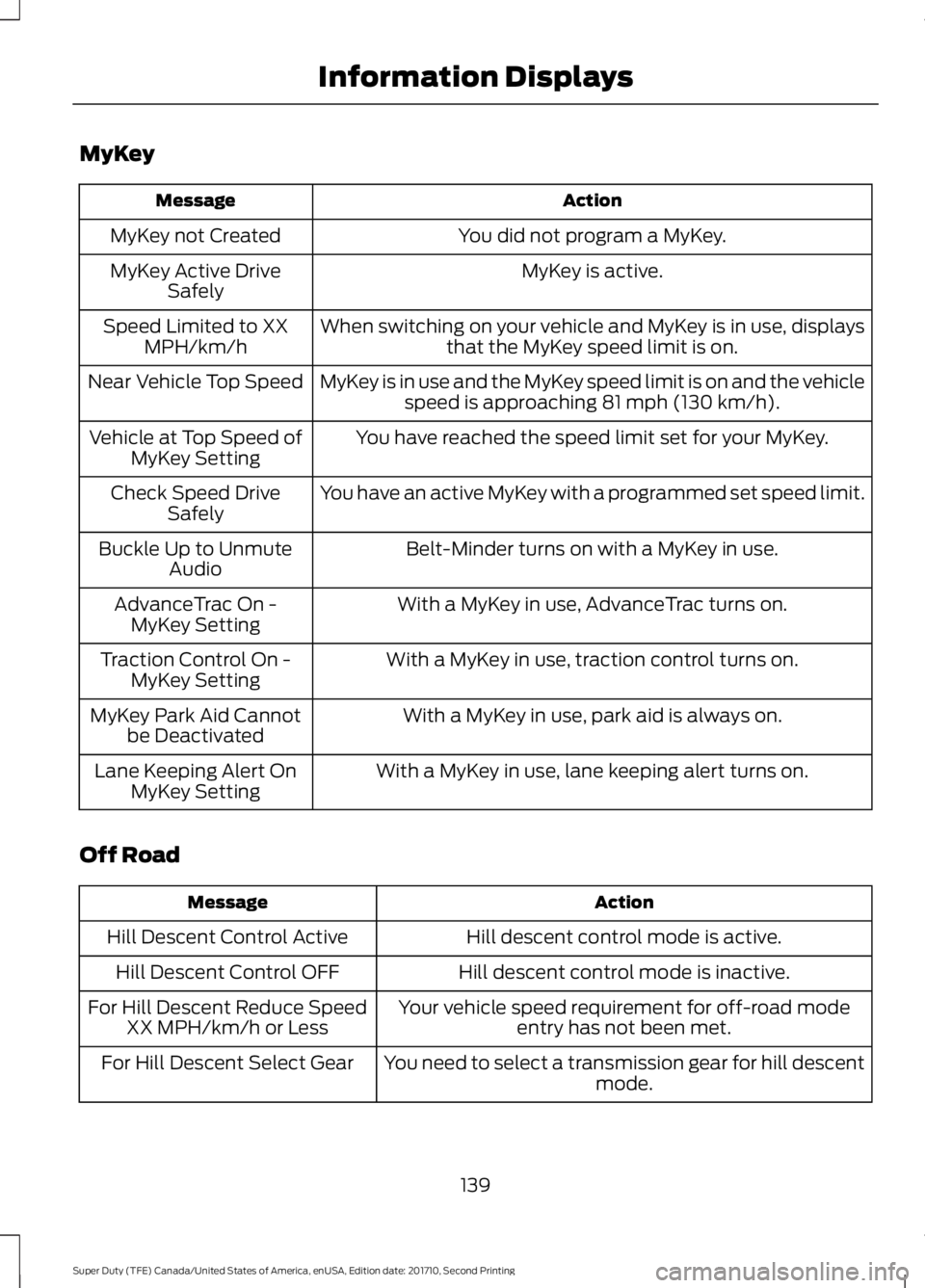
MyKey
ActionMessage
You did not program a MyKey.MyKey not Created
MyKey is active.MyKey Active DriveSafely
When switching on your vehicle and MyKey is in use, displaysthat the MyKey speed limit is on.Speed Limited to XXMPH/km/h
MyKey is in use and the MyKey speed limit is on and the vehiclespeed is approaching 81 mph (130 km/h).Near Vehicle Top Speed
You have reached the speed limit set for your MyKey.Vehicle at Top Speed ofMyKey Setting
You have an active MyKey with a programmed set speed limit.Check Speed DriveSafely
Belt-Minder turns on with a MyKey in use.Buckle Up to UnmuteAudio
With a MyKey in use, AdvanceTrac turns on.AdvanceTrac On -MyKey Setting
With a MyKey in use, traction control turns on.Traction Control On -MyKey Setting
With a MyKey in use, park aid is always on.MyKey Park Aid Cannotbe Deactivated
With a MyKey in use, lane keeping alert turns on.Lane Keeping Alert OnMyKey Setting
Off Road
ActionMessage
Hill descent control mode is active.Hill Descent Control Active
Hill descent control mode is inactive.Hill Descent Control OFF
Your vehicle speed requirement for off-road modeentry has not been met.For Hill Descent Reduce SpeedXX MPH/km/h or Less
You need to select a transmission gear for hill descentmode.For Hill Descent Select Gear
139
Super Duty (TFE) Canada/United States of America, enUSA, Edition date: 201710, Second Printing
Information Displays
Page 143 of 642
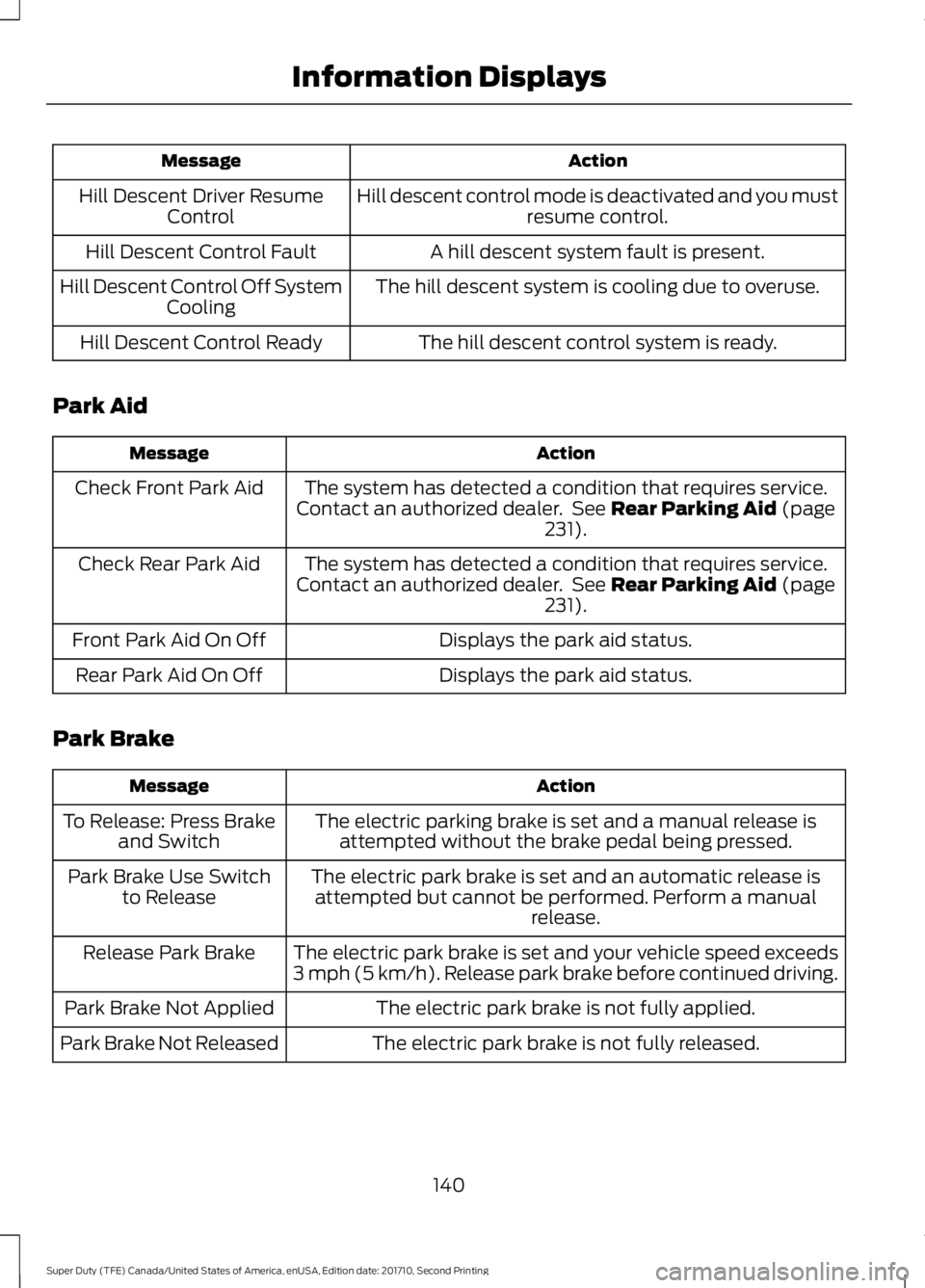
ActionMessage
Hill descent control mode is deactivated and you mustresume control.Hill Descent Driver ResumeControl
A hill descent system fault is present.Hill Descent Control Fault
The hill descent system is cooling due to overuse.Hill Descent Control Off SystemCooling
The hill descent control system is ready.Hill Descent Control Ready
Park Aid
ActionMessage
The system has detected a condition that requires service.Contact an authorized dealer. See Rear Parking Aid (page231).
Check Front Park Aid
The system has detected a condition that requires service.Contact an authorized dealer. See Rear Parking Aid (page231).
Check Rear Park Aid
Displays the park aid status.Front Park Aid On Off
Displays the park aid status.Rear Park Aid On Off
Park Brake
ActionMessage
The electric parking brake is set and a manual release isattempted without the brake pedal being pressed.To Release: Press Brakeand Switch
The electric park brake is set and an automatic release isattempted but cannot be performed. Perform a manualrelease.
Park Brake Use Switchto Release
The electric park brake is set and your vehicle speed exceeds3 mph (5 km/h). Release park brake before continued driving.Release Park Brake
The electric park brake is not fully applied.Park Brake Not Applied
The electric park brake is not fully released.Park Brake Not Released
140
Super Duty (TFE) Canada/United States of America, enUSA, Edition date: 201710, Second Printing
Information Displays
Page 144 of 642
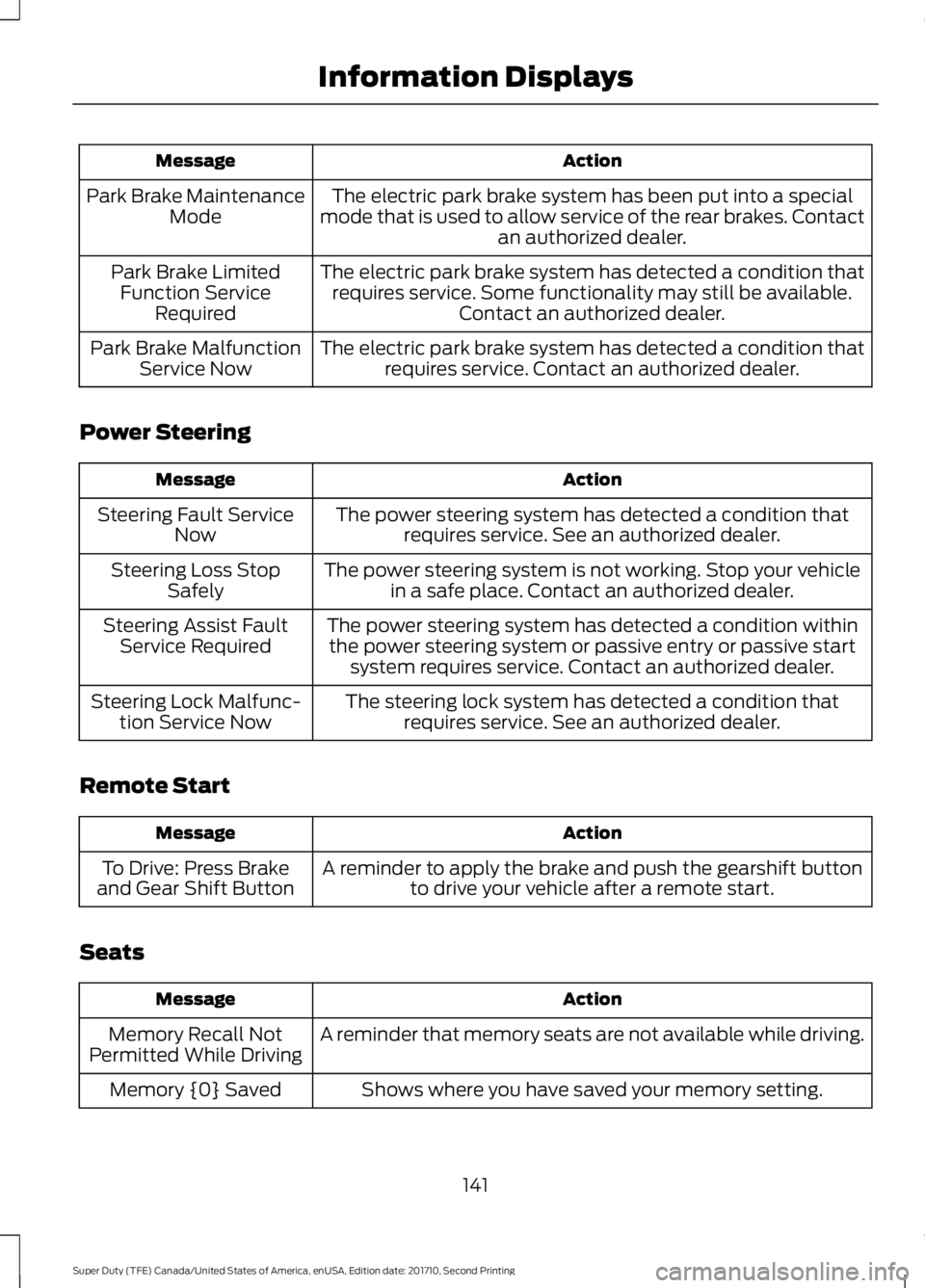
ActionMessage
The electric park brake system has been put into a specialmode that is used to allow service of the rear brakes. Contactan authorized dealer.
Park Brake MaintenanceMode
The electric park brake system has detected a condition thatrequires service. Some functionality may still be available.Contact an authorized dealer.
Park Brake LimitedFunction ServiceRequired
The electric park brake system has detected a condition thatrequires service. Contact an authorized dealer.Park Brake MalfunctionService Now
Power Steering
ActionMessage
The power steering system has detected a condition thatrequires service. See an authorized dealer.Steering Fault ServiceNow
The power steering system is not working. Stop your vehiclein a safe place. Contact an authorized dealer.Steering Loss StopSafely
The power steering system has detected a condition withinthe power steering system or passive entry or passive startsystem requires service. Contact an authorized dealer.
Steering Assist FaultService Required
The steering lock system has detected a condition thatrequires service. See an authorized dealer.Steering Lock Malfunc-tion Service Now
Remote Start
ActionMessage
A reminder to apply the brake and push the gearshift buttonto drive your vehicle after a remote start.To Drive: Press Brakeand Gear Shift Button
Seats
ActionMessage
A reminder that memory seats are not available while driving.Memory Recall NotPermitted While Driving
Shows where you have saved your memory setting.Memory {0} Saved
141
Super Duty (TFE) Canada/United States of America, enUSA, Edition date: 201710, Second Printing
Information Displays
Page 145 of 642
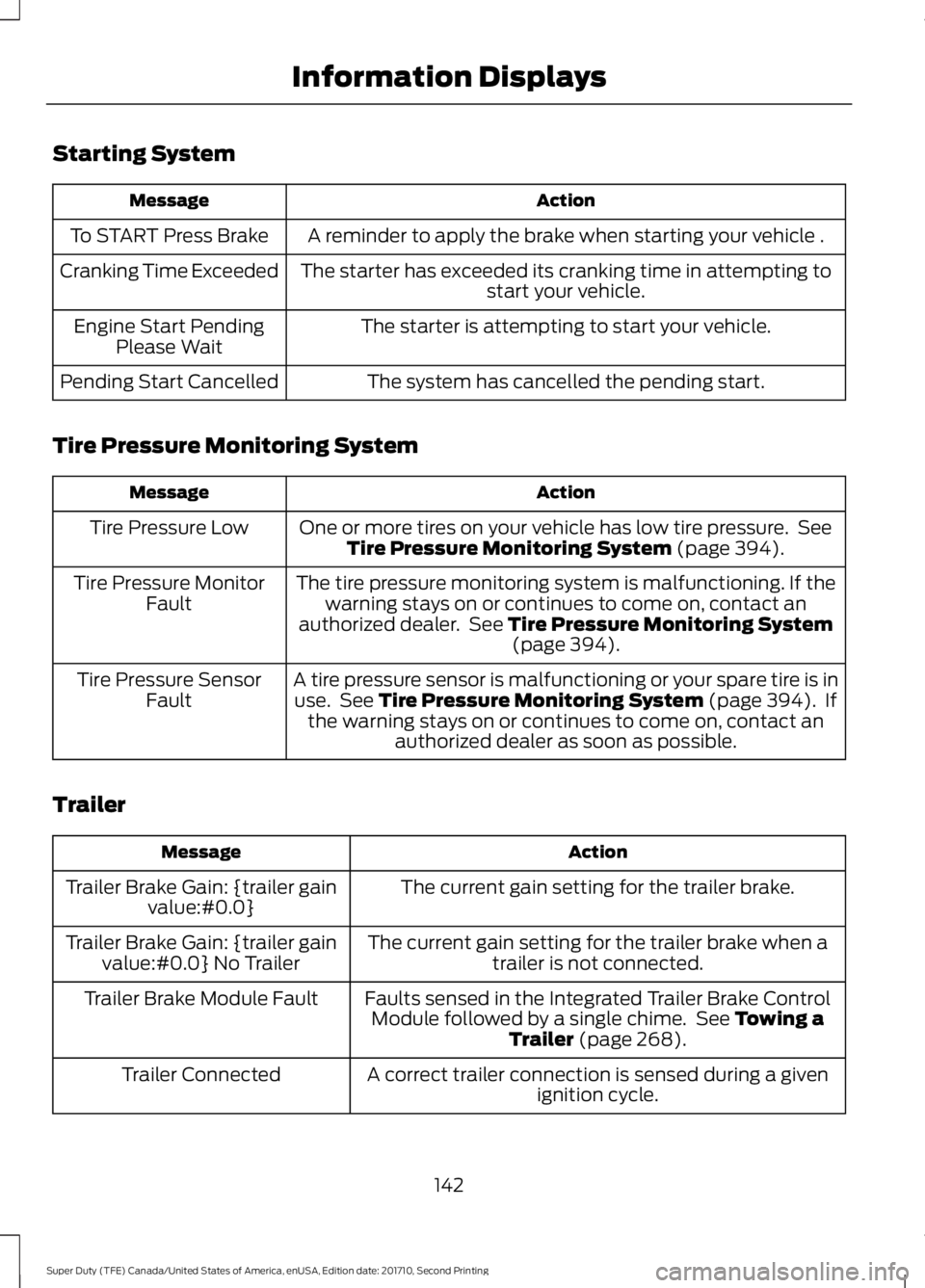
Starting System
ActionMessage
A reminder to apply the brake when starting your vehicle .To START Press Brake
The starter has exceeded its cranking time in attempting tostart your vehicle.Cranking Time Exceeded
The starter is attempting to start your vehicle.Engine Start PendingPlease Wait
The system has cancelled the pending start.Pending Start Cancelled
Tire Pressure Monitoring System
ActionMessage
One or more tires on your vehicle has low tire pressure. SeeTire Pressure Monitoring System (page 394).Tire Pressure Low
The tire pressure monitoring system is malfunctioning. If thewarning stays on or continues to come on, contact anauthorized dealer. See Tire Pressure Monitoring System(page 394).
Tire Pressure MonitorFault
A tire pressure sensor is malfunctioning or your spare tire is inuse. See Tire Pressure Monitoring System (page 394). Ifthe warning stays on or continues to come on, contact anauthorized dealer as soon as possible.
Tire Pressure SensorFault
Trailer
ActionMessage
The current gain setting for the trailer brake.Trailer Brake Gain: {trailer gainvalue:#0.0}
The current gain setting for the trailer brake when atrailer is not connected.Trailer Brake Gain: {trailer gainvalue:#0.0} No Trailer
Faults sensed in the Integrated Trailer Brake ControlModule followed by a single chime. See Towing aTrailer (page 268).
Trailer Brake Module Fault
A correct trailer connection is sensed during a givenignition cycle.Trailer Connected
142
Super Duty (TFE) Canada/United States of America, enUSA, Edition date: 201710, Second Printing
Information Displays
Page 146 of 642
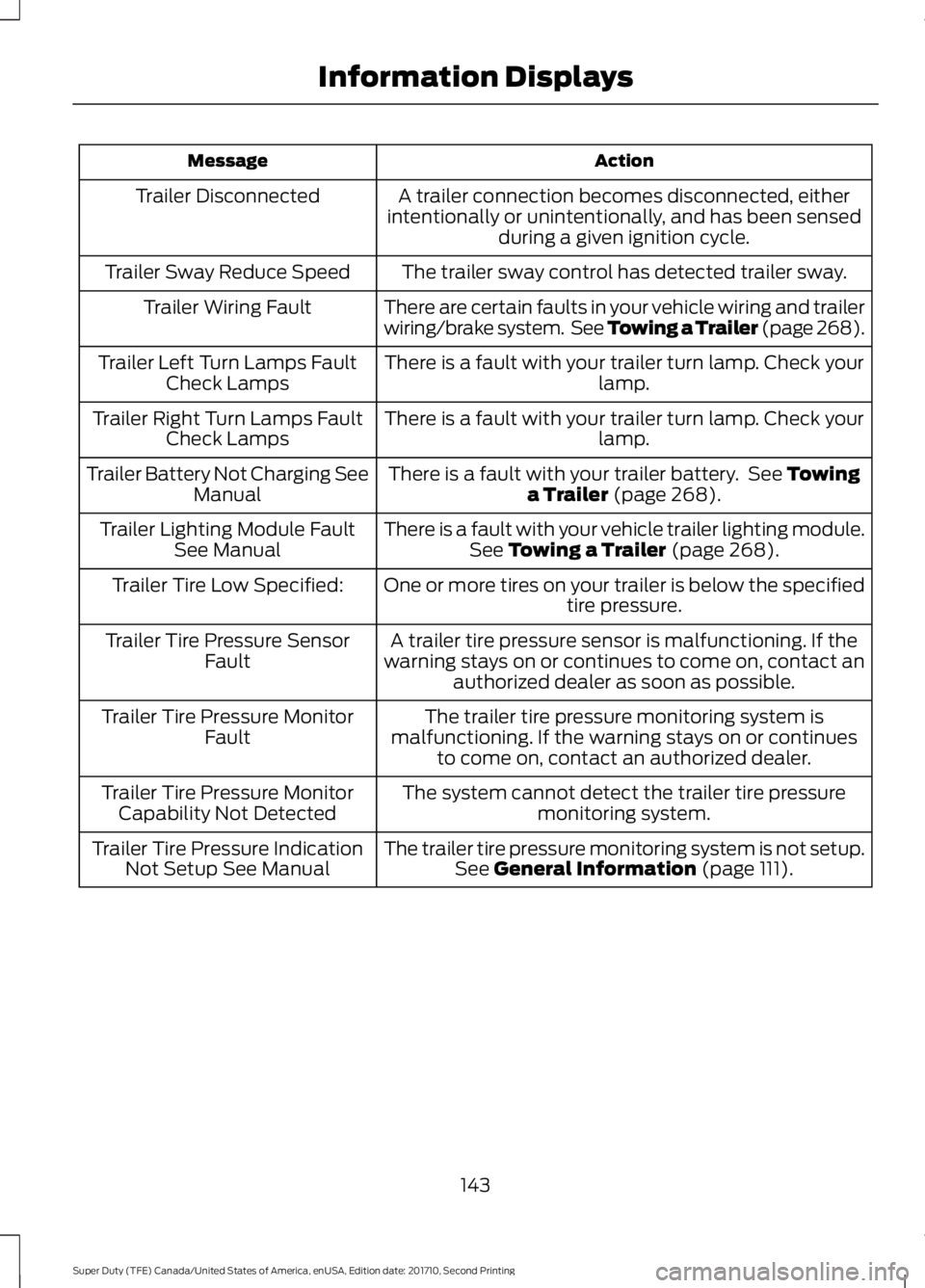
ActionMessage
A trailer connection becomes disconnected, eitherintentionally or unintentionally, and has been sensedduring a given ignition cycle.
Trailer Disconnected
The trailer sway control has detected trailer sway.Trailer Sway Reduce Speed
There are certain faults in your vehicle wiring and trailerwiring/brake system. See Towing a Trailer (page 268).Trailer Wiring Fault
There is a fault with your trailer turn lamp. Check yourlamp.Trailer Left Turn Lamps FaultCheck Lamps
There is a fault with your trailer turn lamp. Check yourlamp.Trailer Right Turn Lamps FaultCheck Lamps
There is a fault with your trailer battery. See Towinga Trailer (page 268).Trailer Battery Not Charging SeeManual
There is a fault with your vehicle trailer lighting module.See Towing a Trailer (page 268).Trailer Lighting Module FaultSee Manual
One or more tires on your trailer is below the specifiedtire pressure.Trailer Tire Low Specified:
A trailer tire pressure sensor is malfunctioning. If thewarning stays on or continues to come on, contact anauthorized dealer as soon as possible.
Trailer Tire Pressure SensorFault
The trailer tire pressure monitoring system ismalfunctioning. If the warning stays on or continuesto come on, contact an authorized dealer.
Trailer Tire Pressure MonitorFault
The system cannot detect the trailer tire pressuremonitoring system.Trailer Tire Pressure MonitorCapability Not Detected
The trailer tire pressure monitoring system is not setup.See General Information (page 111).Trailer Tire Pressure IndicationNot Setup See Manual
143
Super Duty (TFE) Canada/United States of America, enUSA, Edition date: 201710, Second Printing
Information Displays
Page 147 of 642
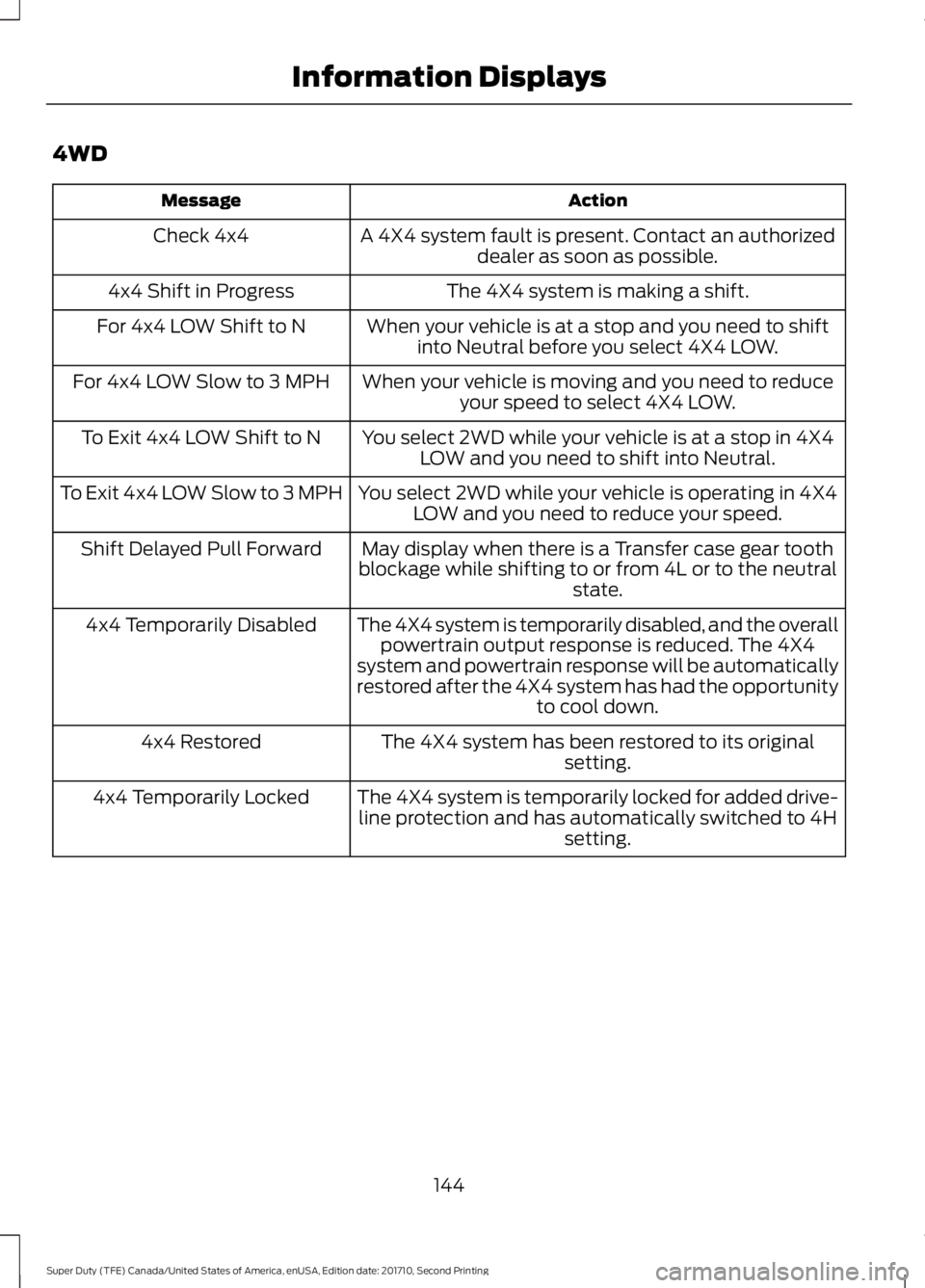
4WD
ActionMessage
A 4X4 system fault is present. Contact an authorizeddealer as soon as possible.Check 4x4
The 4X4 system is making a shift.4x4 Shift in Progress
When your vehicle is at a stop and you need to shiftinto Neutral before you select 4X4 LOW.For 4x4 LOW Shift to N
When your vehicle is moving and you need to reduceyour speed to select 4X4 LOW.For 4x4 LOW Slow to 3 MPH
You select 2WD while your vehicle is at a stop in 4X4LOW and you need to shift into Neutral.To Exit 4x4 LOW Shift to N
You select 2WD while your vehicle is operating in 4X4LOW and you need to reduce your speed.To Exit 4x4 LOW Slow to 3 MPH
May display when there is a Transfer case gear toothblockage while shifting to or from 4L or to the neutralstate.
Shift Delayed Pull Forward
The 4X4 system is temporarily disabled, and the overallpowertrain output response is reduced. The 4X4system and powertrain response will be automaticallyrestored after the 4X4 system has had the opportunityto cool down.
4x4 Temporarily Disabled
The 4X4 system has been restored to its originalsetting.4x4 Restored
The 4X4 system is temporarily locked for added drive-line protection and has automatically switched to 4Hsetting.
4x4 Temporarily Locked
144
Super Duty (TFE) Canada/United States of America, enUSA, Edition date: 201710, Second Printing
Information Displays
Page 154 of 642
Note:Do not clean the mirror housing orglass with harsh abrasives, fuel or otherpetroleum-based cleaning products.
HEATED EXTERIOR MIRRORS
Note:Do not remove ice from the mirrorswith a scraper or adjust the mirror glasswhen it is frozen in place.
Note:Do not clean the mirror housing orglass with harsh abrasives, fuel or otherpetroleum-based cleaning products.
The heated exterior mirrors will removeice, mist and fog.
CABIN AIR FILTER
Your vehicle is equipped with a cabin airfilter, which gives you and your passengersthe following benefits:
•It improves your driving comfort byreducing particle concentration.
•It improves the interior compartmentcleanliness.
•It protects the climate controlcomponents from particle deposits.
You can locate the cabin air filter behindthe glove box.
Note:Make sure you have a cabin air filterinstalled at all times. This prevents foreignobjects from entering the system. Runningthe system without a filter in place couldresult in degradation or damage to thesystem.
Replace the filter at regular intervals. SeeScheduled Maintenance (page 573).
For additional cabin air filter information,or to replace the filter, see an authorizeddealer.
REMOTE START (If Equipped)
You can switch this feature on or off andadjust the settings using the informationdisplay.
The system adjusts the interiortemperature depending on your chosensettings during remote start.
You cannot adjust the climate controlsetting during remote start operation.When you switch the ignition on, theclimate control system returns to theprevious settings. You can now makeadjustments.
You need to switch on certainvehicle-dependent features, such as:
•Heated seats.
•Cooled seats.
•Heated steering wheel.
•Heated mirrors.
•Heated rear window.
Automatic Settings
In hot weather, the system is set to 72°F(22°C). The cooled seats are set to high(if available, and selected to AUTO in theinformation display).
In moderate weather, the system eitherheats or cools (based on previoussettings). The rear defroster, heatedmirrors and heated or cooled seats do notautomatically turn on.
In cold weather, the system is set to 72°F(22°C). The heated seats are set to high(if available, and selected to AUTO in theinformation display). The heated rearwindow and heated mirrors automaticallyturn on.
151
Super Duty (TFE) Canada/United States of America, enUSA, Edition date: 201710, Second Printing
Climate Control
Page 160 of 642
Lumbar and bolster modeMassage mode
Upper lumbarBack massage intensityadjustmentA
Lumbar decreaseMassage intensity decrease
and off*B
Lower lumbar**Cushion massage intensityadjustmentC
Lumbar increaseMassage intensity increaseD
-On and offE
*The massage feature defaults to analternating massage mode with backmassage intensity adjustment. The lumbarand bolster feature defaults to the middlelumbar mode.**Press C a second time to adjust the backbolster. Press C a third time to adjust thecushion bolster.
You can also adjust this feature throughthe touchscreen. When switched on, thesystem displays directions for you to adjustthe lumbar settings in your seat or to setthe massage function. To access and makeadjustments to the lumbar setting:
1.Press the Menu Settings icon > Vehicle> Multi-contour Seat.
2. Choose the desired seat to adjust.
3. Press the + or - to adjust the lumbarintensity.
To access and make adjustments to themassage setting:
1.Press the Menu Settings icon > Vehicle>Multi-contour Seat.
2. Choose the desired seat to adjust.
3. Press Off, Low or High.
MEMORY FUNCTION (If Equipped)
WARNINGS
Before activating the memory seat,make sure that the area immediatelysurrounding the seat is clear ofobstructions and that all occupants areclear of moving parts.
Do not use the memory functionwhen your vehicle is moving.
This feature automatically recalls theposition of the following:
•Driver seat.
•Power mirrors.
•Optional adjustable pedals.
The memory control is on the driver door.
157
Super Duty (TFE) Canada/United States of America, enUSA, Edition date: 201710, Second Printing
Seats