display FORD F450 SUPER DUTY 2017 Owners Manual
[x] Cancel search | Manufacturer: FORD, Model Year: 2017, Model line: F450 SUPER DUTY, Model: FORD F450 SUPER DUTY 2017Pages: 642, PDF Size: 12.35 MB
Page 244 of 642
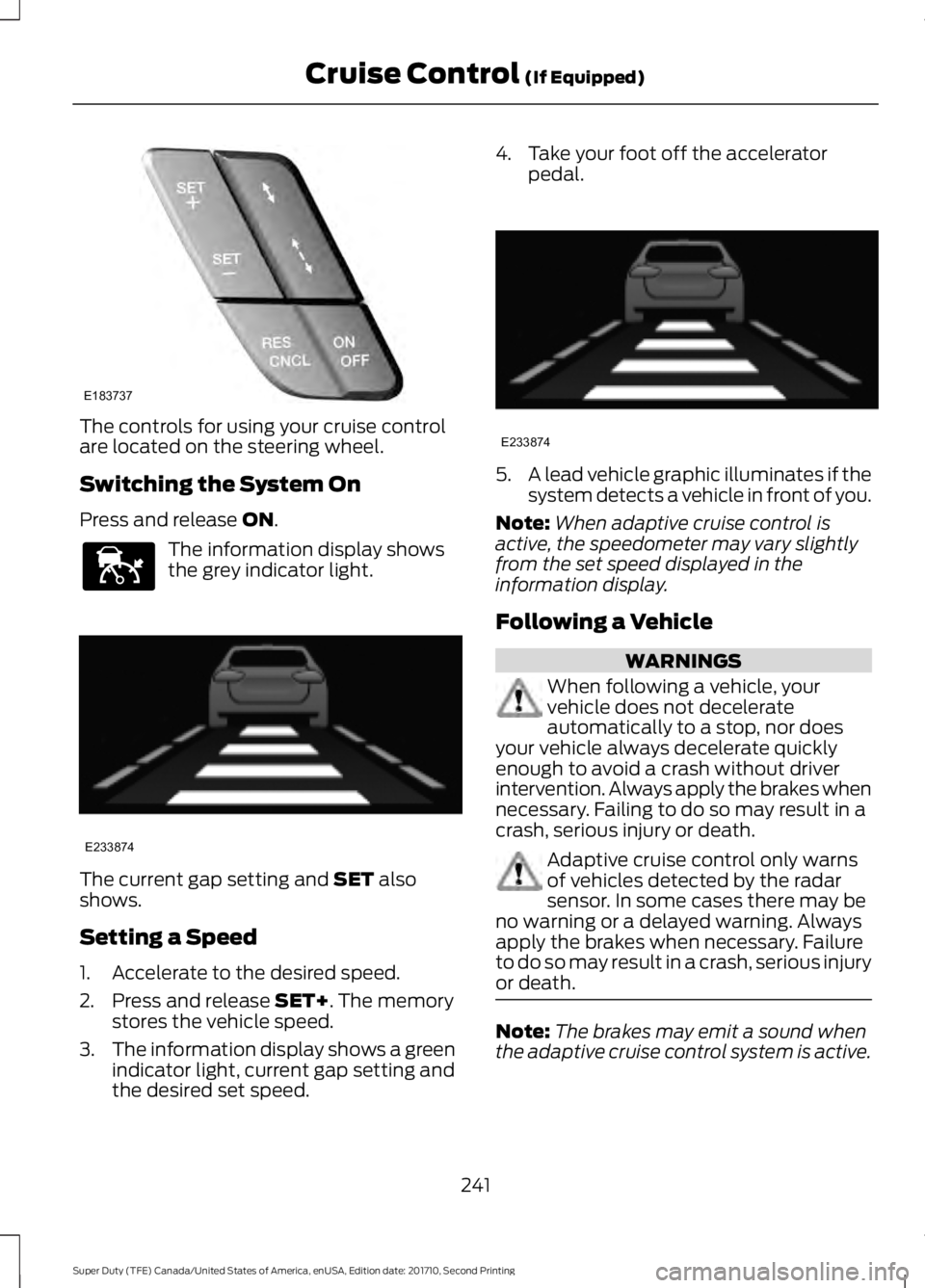
The controls for using your cruise controlare located on the steering wheel.
Switching the System On
Press and release ON.
The information display showsthe grey indicator light.
The current gap setting and SET alsoshows.
Setting a Speed
1. Accelerate to the desired speed.
2. Press and release SET+. The memorystores the vehicle speed.
3.The information display shows a greenindicator light, current gap setting andthe desired set speed.
4. Take your foot off the acceleratorpedal.
5.A lead vehicle graphic illuminates if thesystem detects a vehicle in front of you.
Note:When adaptive cruise control isactive, the speedometer may vary slightlyfrom the set speed displayed in theinformation display.
Following a Vehicle
WARNINGS
When following a vehicle, yourvehicle does not decelerateautomatically to a stop, nor doesyour vehicle always decelerate quicklyenough to avoid a crash without driverintervention. Always apply the brakes whennecessary. Failing to do so may result in acrash, serious injury or death.
Adaptive cruise control only warnsof vehicles detected by the radarsensor. In some cases there may beno warning or a delayed warning. Alwaysapply the brakes when necessary. Failureto do so may result in a crash, serious injuryor death.
Note:The brakes may emit a sound whenthe adaptive cruise control system is active.
241
Super Duty (TFE) Canada/United States of America, enUSA, Edition date: 201710, Second Printing
Cruise Control (If Equipped)E183737 E144529 E233874 E233874
Page 245 of 642
When a vehicle ahead of you enters thesame lane or a slower vehicle is ahead inthe same lane, the vehicle speed adjuststo maintain a preset gap distance. Thedistance setting is adjustable.
The lead vehicle graphic illuminates.
The vehicle maintains a constant distancefrom the vehicle ahead until:
•The vehicle in front of you acceleratesto a speed above the set speed.
•The vehicle in front of you moves outof your lane or out of view.
•The vehicle speed falls below 12 mph(20 km/h).
•You set a new gap distance.
The system applies the brakes to slow thevehicle to maintain a safe distance fromthe vehicle in front. The system appliesonly limited maximum braking. Press thebrake pedal to override the system.
If the system predicts that its maximumbraking level is insufficient, an audiblewarning sounds while the systemcontinues to brake. A red warning barappears on the windshield heads-updisplay. Take immediate action to slow orstop the vehicle.
The system may provide slight temporaryacceleration when you use your driver sidedirectional indicator while following a leadvehicle, to aid in passing the vehicle.
Setting the Gap Distance
Note:It is your responsibility to select a gapappropriate to the driving conditions.
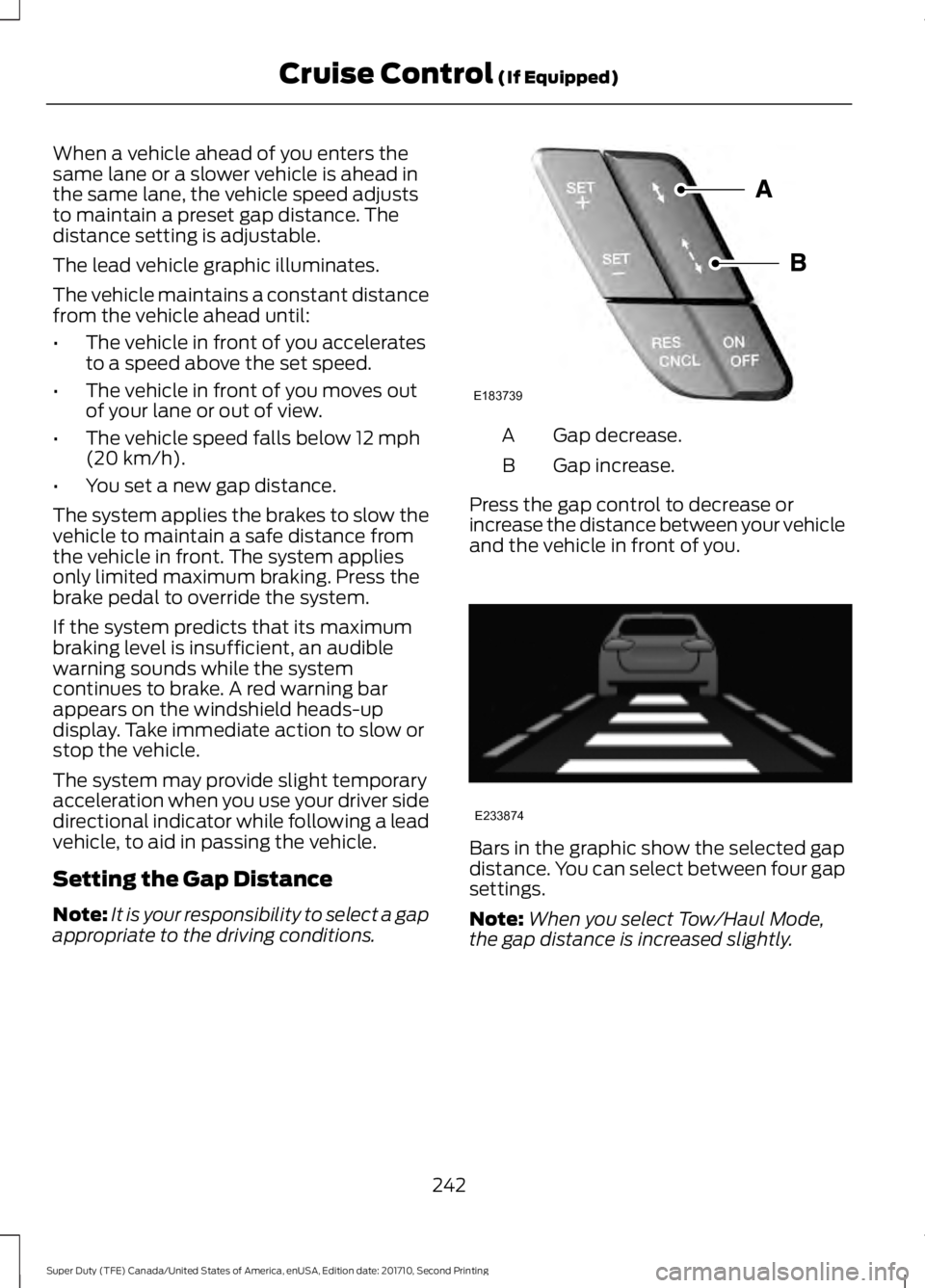
Gap decrease.A
Gap increase.B
Press the gap control to decrease orincrease the distance between your vehicleand the vehicle in front of you.
Bars in the graphic show the selected gapdistance. You can select between four gapsettings.
Note:When you select Tow/Haul Mode,the gap distance is increased slightly.
242
Super Duty (TFE) Canada/United States of America, enUSA, Edition date: 201710, Second Printing
Cruise Control (If Equipped)E183739 E233874
Page 246 of 642
Adaptive cruise control distance-between-vehicle settings
Dynamic beha-viorDistance gapTime gap,secondsGraphic display,bars indicatedbetweenvehicles
Set speed
yd (m)mph ( km/h)
Sport.37 (34)1.2162 (100)
Normal.49 (45)1.6262 (100)
Normal.55 (50)1.8362 (100)
Comfort.67 (61)2.2462 (100)
Each time you start the vehicle, the systemselects the last chosen gap for the currentdriver.
Disengaging the System
Press the brake pedal or press CNCL. Thelast set speed displays in grey but does noterase.
Overriding the System
WARNING
If you override the system by pressingthe accelerator pedal, it does notautomatically apply the brakes tomaintain a gap from any vehicle ahead.
When you press the accelerator pedal, youoverride the set speed and gap distance.
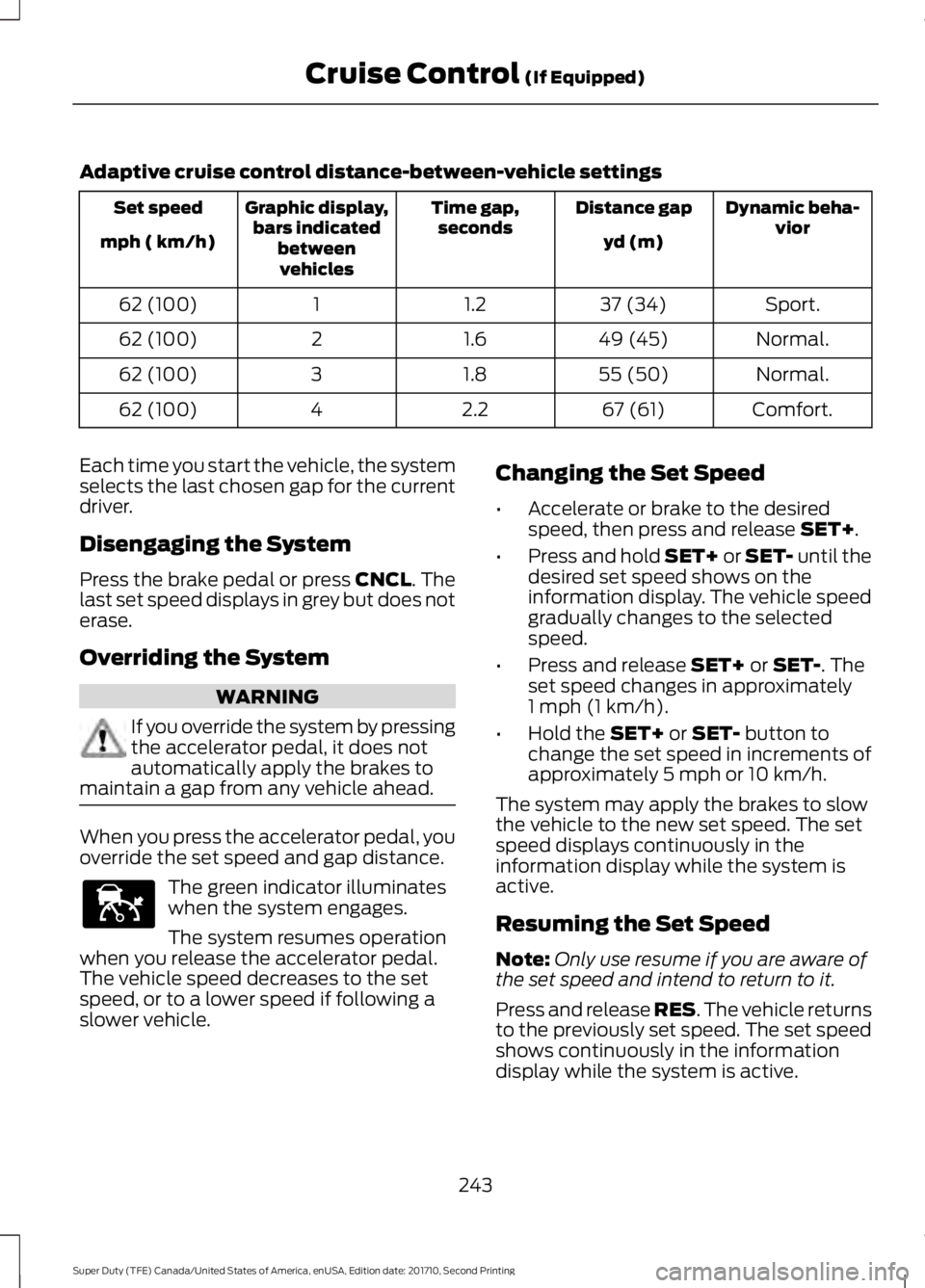
The green indicator illuminateswhen the system engages.
The system resumes operationwhen you release the accelerator pedal.The vehicle speed decreases to the setspeed, or to a lower speed if following aslower vehicle.
Changing the Set Speed
•Accelerate or brake to the desiredspeed, then press and release SET+.
•Press and hold SET+ or SET- until thedesired set speed shows on theinformation display. The vehicle speedgradually changes to the selectedspeed.
•Press and release SET+ or SET-. Theset speed changes in approximately1 mph (1 km/h).
•Hold the SET+ or SET- button tochange the set speed in increments ofapproximately 5 mph or 10 km/h.
The system may apply the brakes to slowthe vehicle to the new set speed. The setspeed displays continuously in theinformation display while the system isactive.
Resuming the Set Speed
Note:Only use resume if you are aware ofthe set speed and intend to return to it.
Press and release RES. The vehicle returnsto the previously set speed. The set speedshows continuously in the informationdisplay while the system is active.
243
Super Duty (TFE) Canada/United States of America, enUSA, Edition date: 201710, Second Printing
Cruise Control (If Equipped)E144529
Page 248 of 642
Detection issues can occur:
When driving on a different linethan the vehicle in front.A
With vehicles that edge into yourlane. The system can only detectthese vehicles once they movefully into your lane.
B
There may be issues with thedetection of vehicles in frontwhen driving into and coming outof a bend or curve in the road.
C
In these cases the system may brake lateor unexpectedly. Stay alert and take actionwhen necessary.
If something hits the front end of yourvehicle or damage occurs, theradar-sensing zone may change. This couldcause missed or false vehicle detections.Contact an authorized dealer to have themcheck for proper coverage and operation.
System Not Available
Conditions that can cause the system todeactivate or prevent the system fromactivating when requested include:
•A blocked sensor.
•High brake temperature.
•A failure in the system or a relatedsystem.
Note:If you disable electronic stabilitycontrol, adaptive cruise control is notavailable. See Using Stability Control(page 227).
Blocked Sensor
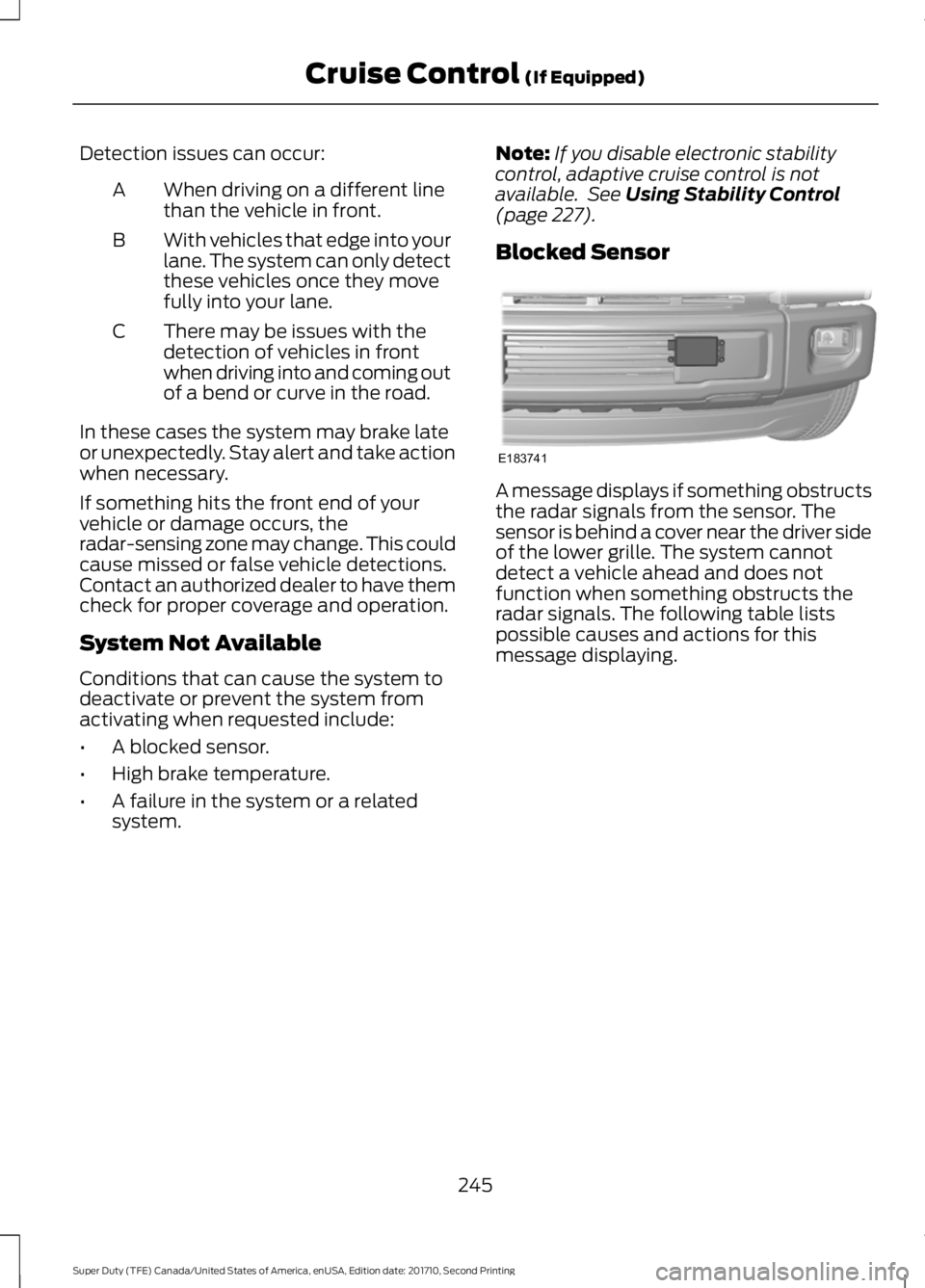
A message displays if something obstructsthe radar signals from the sensor. Thesensor is behind a cover near the driver sideof the lower grille. The system cannotdetect a vehicle ahead and does notfunction when something obstructs theradar signals. The following table listspossible causes and actions for thismessage displaying.
245
Super Duty (TFE) Canada/United States of America, enUSA, Edition date: 201710, Second Printing
Cruise Control (If Equipped)E183741
Page 249 of 642
ActionCause
Clean the grille surface in front of the radaror remove the object causing the obstruc-tion.
The surface of the radar in the grille is dirtyor obstructed in some way.
Wait a short time. It may take severalminutes for the radar to detect that it is freefrom obstruction.
The surface of the radar in the grille is cleanbut the message remains in the display.
Do not use the system in these conditionsbecause it may not detect any vehiclesahead.
Heavy rain or snow is interfering with theradar signals.
Do not use the system in these conditionsbecause it may not detect any vehiclesahead.
Swirling water, or snow or ice on the surfaceof the road may interfere with the radarsignals.
Wait a short time or switch to normal cruisecontrol.You are in a desert or remote area with noother vehicles and no roadside objects.
Due to the nature of radar technology, it ispossible to get a blockage warning and nothave a blockage. This can happen, forexample, when driving in sparse rural ordesert environments. A false blockedcondition either self clears or clears aftera key cycle.
Switching to Normal CruiseControl
WARNING
Normal cruise control will not brakewhen your vehicle is approachingslower vehicles. Always be aware ofwhich mode you have selected and applythe brakes when necessary.
You can manually change from adaptivecruise control to normal cruise controlthrough the information display. SeeInformation Messages (page 128).
The cruise control indicator lightreplaces the adaptive cruisecontrol indicator light if youselect normal cruise control. The gapsetting does not display, the system doesnot automatically respond to lead vehiclesand automatic braking remains active tomaintain set speed. The system recalls itslast setting when you start your vehicle.
246
Super Duty (TFE) Canada/United States of America, enUSA, Edition date: 201710, Second Printing
Cruise Control (If Equipped)E71340
Page 250 of 642
LANE KEEPING SYSTEM (If
Equipped)
WARNING
The system is designed to aid thedriver. It is not intended to replaceyour attention and judgment. You arestill responsible to drive with due care andattention.
Note:The system works as long as thecamera can detect one lane marking at aspeed above 40 mph (64 km/h).
Note:The system may not function if thecamera is blocked or there is damage to thewindshield.
The Lane Keeping System automaticallydetects and tracks the road lane markingsusing a camera mounted behind theinterior review view mirror. The systemnotifies you to stay in your lane when thefront camera detects an unintentional lanechange is likely to occur.
Switching the System On and Off
Note:The system on or off setting is storeduntil it is manually changed, unless a MyKeyis detected. If the system detects a MyKey,it defaults to on and the mode is set to alert.
Note:If a MyKey is detected, pressing thebutton will not affect the on or off status ofthe system. You can only change the modeand intensity settings.
Press the button located on thecenter console to switch thesystem on or off.
System Settings
The system sensitivity and intensity canbe adjusted through the display screen.See General Information (page 111). Thesystem remembers the last selection. Youdo not need to readjust the setting eachtime you turn on your vehicle.
Sensitivity: This setting allows you toselect where in the lane a warning isprovided. Increasing the sensitivity settingmoves the warning zones in closer to yourvehicle.
NormalA
IncreasedB
Note:The alert diagram illustrates generalzone coverage. It does not provide exactzone parameters.
Intensity: This setting affects the intensityof the steering wheel vibration. Increasingthe intensity causes a higher rate of hapticfeedback.
•High
•Normal
•Low
247
Super Duty (TFE) Canada/United States of America, enUSA, Edition date: 201710, Second Printing
Driving AidsE173233 E165517
Page 251 of 642
System Display
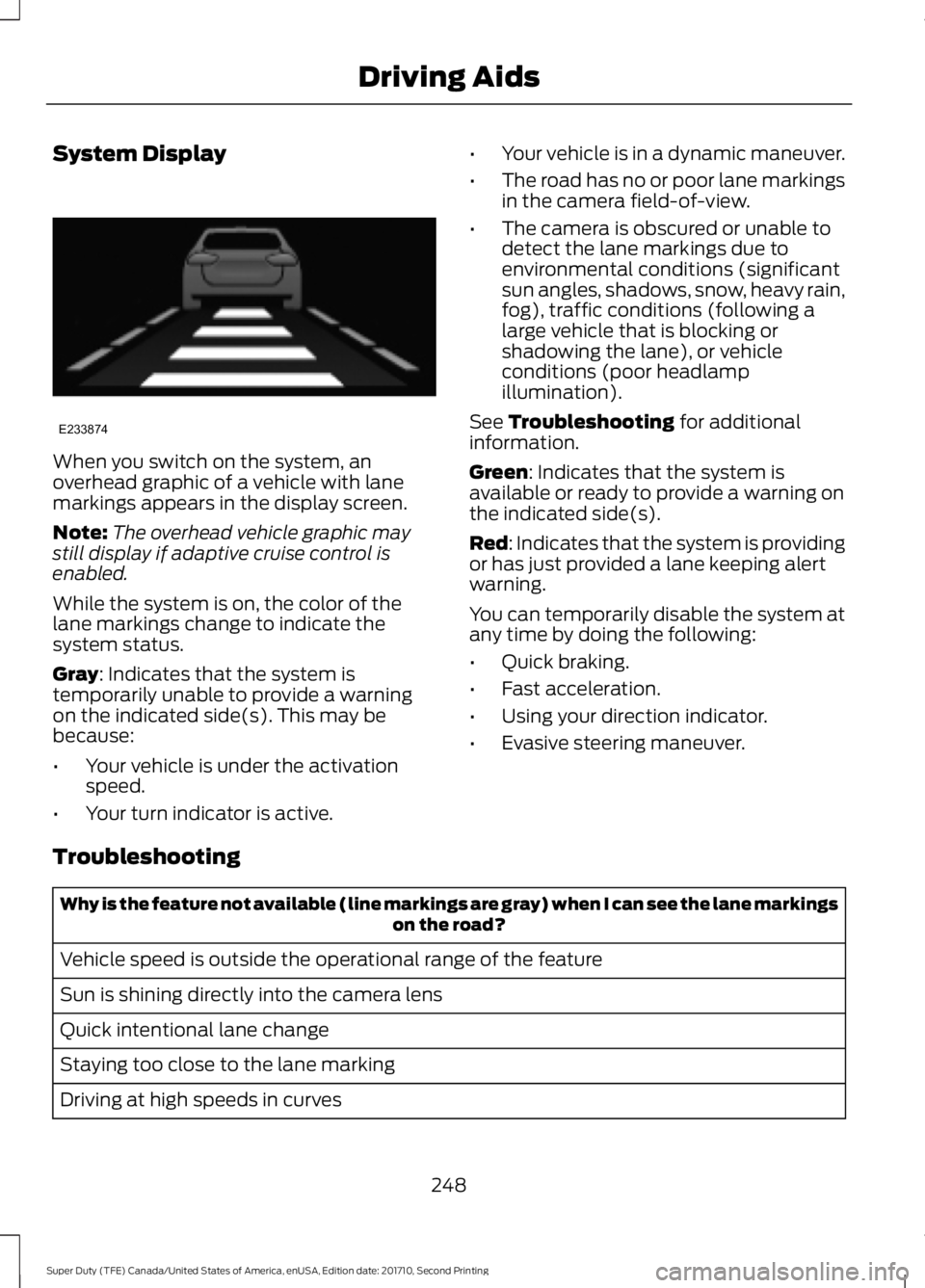
When you switch on the system, anoverhead graphic of a vehicle with lanemarkings appears in the display screen.
Note:The overhead vehicle graphic maystill display if adaptive cruise control isenabled.
While the system is on, the color of thelane markings change to indicate thesystem status.
Gray: Indicates that the system istemporarily unable to provide a warningon the indicated side(s). This may bebecause:
•Your vehicle is under the activationspeed.
•Your turn indicator is active.
•Your vehicle is in a dynamic maneuver.
•The road has no or poor lane markingsin the camera field-of-view.
•The camera is obscured or unable todetect the lane markings due toenvironmental conditions (significantsun angles, shadows, snow, heavy rain,fog), traffic conditions (following alarge vehicle that is blocking orshadowing the lane), or vehicleconditions (poor headlampillumination).
See Troubleshooting for additionalinformation.
Green: Indicates that the system isavailable or ready to provide a warning onthe indicated side(s).
Red: Indicates that the system is providingor has just provided a lane keeping alertwarning.
You can temporarily disable the system atany time by doing the following:
•Quick braking.
•Fast acceleration.
•Using your direction indicator.
•Evasive steering maneuver.
Troubleshooting
Why is the feature not available (line markings are gray) when I can see the lane markingson the road?
Vehicle speed is outside the operational range of the feature
Sun is shining directly into the camera lens
Quick intentional lane change
Staying too close to the lane marking
Driving at high speeds in curves
248
Super Duty (TFE) Canada/United States of America, enUSA, Edition date: 201710, Second Printing
Driving AidsE233874
Page 254 of 642
The system uses radar sensors that arelocated inside the tail lamp on each sideof your vehicle. Any dirt, mud and snow infront of the sensors or driving in heavy raincan cause system degradation. Also, othertypes of obstructions in front of the sensorcan cause system degradation. This isreferred to as a ‘blocked’ condition.
Note:Do not apply bumper stickers and/orrepair compound to these areas, this cancause degraded system performance.
If the system detects a degradedperformance condition, a message warningappears in the display screen. The alertindicators remain ON and the system willno longer provides any warnings. You canclear the warning but the alert indicatorsremain illuminated.
A "blocked" condition can be cleared intwo ways:
•After the blockage in front of thesensors is removed or therainfall/snowfall rate decreases orstops, drive for a few minutes in trafficto allow the sensors to detect passingvehicles.
•By cycling the ignition from ON to OFFand then back ON.
Note:If your vehicle has a tow bar with afactory equipped trailer tow module and itis towing a trailer, the sensors willautomatically turn the Blind SpotInformation System off. If your vehicle hasa tow bar but no factory equipped trailertow module, it is recommended to turn theBlind Spot Information System offmanually. Operating the Blind SpotInformation System without the Blind SpotTrailer Tow package and a trailer attachedwill cause poor system performance.
Blind Spot Information Systemwith Trailer Tow (If Equipped)
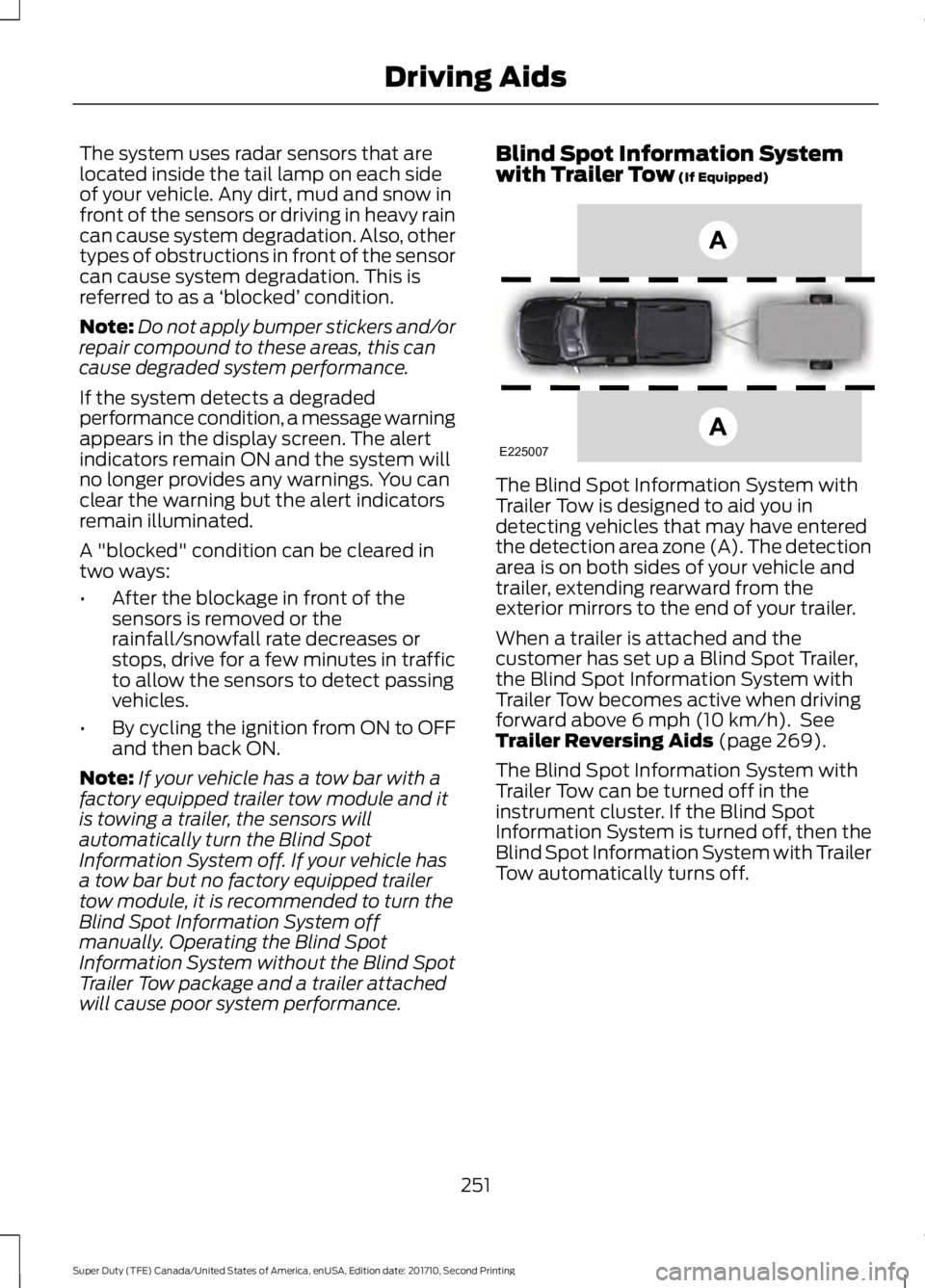
The Blind Spot Information System withTrailer Tow is designed to aid you indetecting vehicles that may have enteredthe detection area zone (A). The detectionarea is on both sides of your vehicle andtrailer, extending rearward from theexterior mirrors to the end of your trailer.
When a trailer is attached and thecustomer has set up a Blind Spot Trailer,the Blind Spot Information System withTrailer Tow becomes active when drivingforward above 6 mph (10 km/h). SeeTrailer Reversing Aids (page 269).
The Blind Spot Information System withTrailer Tow can be turned off in theinstrument cluster. If the Blind SpotInformation System is turned off, then theBlind Spot Information System with TrailerTow automatically turns off.
251
Super Duty (TFE) Canada/United States of America, enUSA, Edition date: 201710, Second Printing
Driving AidsE225007
Page 256 of 642
System Operation
If you select a trailer in the display screenprior to connecting the trailer, the systemwill load that configuration and theinformation cluster displays a messagewhen the trailer is connected. A secondmessage appears stating Cross TrafficAlert has been turned off; the Blind SpotInformation System with Trailer Tow stillfunctions normally when driving forward.
If no trailer has been set up and a trailer isconnected, the instrument cluster providesa message indicating a trailer is connectedfollowed by a message asking to select atrailer from the existing list of trailers or toadd a trailer. In order for the Blind SpotInformation System with Trailer Tow tofunction, an existing trailer must beselected or a new trailer must be added. Ifthe request is ignored or if you exit thescreen, a message appears prompting youthat the system has been turned off dueto a trailer connect. This message may notappear until your vehicle speed reaches22 mph (35 km/h).
The Blind Spot Information System withTrailer Tow activates when driving forwardfor that particular trailer set up. If theignition is cycled, the Blind SpotInformation System with Trailer Towcontinues to function using the last trailerselected.
Trailer Considerations
The Blind Spot Information System withTrailer Tow is designed to work with anytrailer whose front width is 8.5 ft (2.6 m)or less and total length from the trailerhitch ball to the rear of the trailer is 30 ft(9 m) or less. Different trailers may causea slight change in performance as outlinedbelow.
Large box trailers may cause false alertsto trigger when driving next to buildings ornear parking cars. A false alert may alsooccur while making a 90-degree turn.
Trailers that are 8.5 ft (2.6 m) wide at thefront and have a total length greater than20 ft (6 m) may have delayed alerts frompassing vehicles when the vehicle ispassing at high speed.
A box trailer whose front width is 8.5 ft(2.6 m) may cause early alerts when youare over taking a vehicle.
When towing a clam shell or V-Nose boxtrailer with a front width of 8.5 ft (2.6 m),delayed alerts on merging vehicles that aretraveling the same speed as your vehiclemay occur.
System Errors
If the system senses a problem with theleft or right sensor, the telltale illuminatesand a message appears in the displayscreen. See Information Messages(page 128).
Switching the System Off and On
You can temporarily switch the Blind SpotInformation System off in the displayscreen. See General Information (page111). When the Blind Spot InformationSystem switches off, you do not receivealerts and the display screen shows asystem off message. The telltale in thecluster also illuminates. When you switchthe Blind Spot Information System on oroff, the alert indicators flash twice.
Note:The Blind Spot Information Systemremembers the last selected on or offsetting.
You can also have the Blind SpotInformation System switched offpermanently at an authorized dealer. Onceswitched off permanently, the system canonly be switched back on at an authorizeddealer.
253
Super Duty (TFE) Canada/United States of America, enUSA, Edition date: 201710, Second Printing
Driving Aids
Page 258 of 642
System Lights, Messages andAudible Alerts
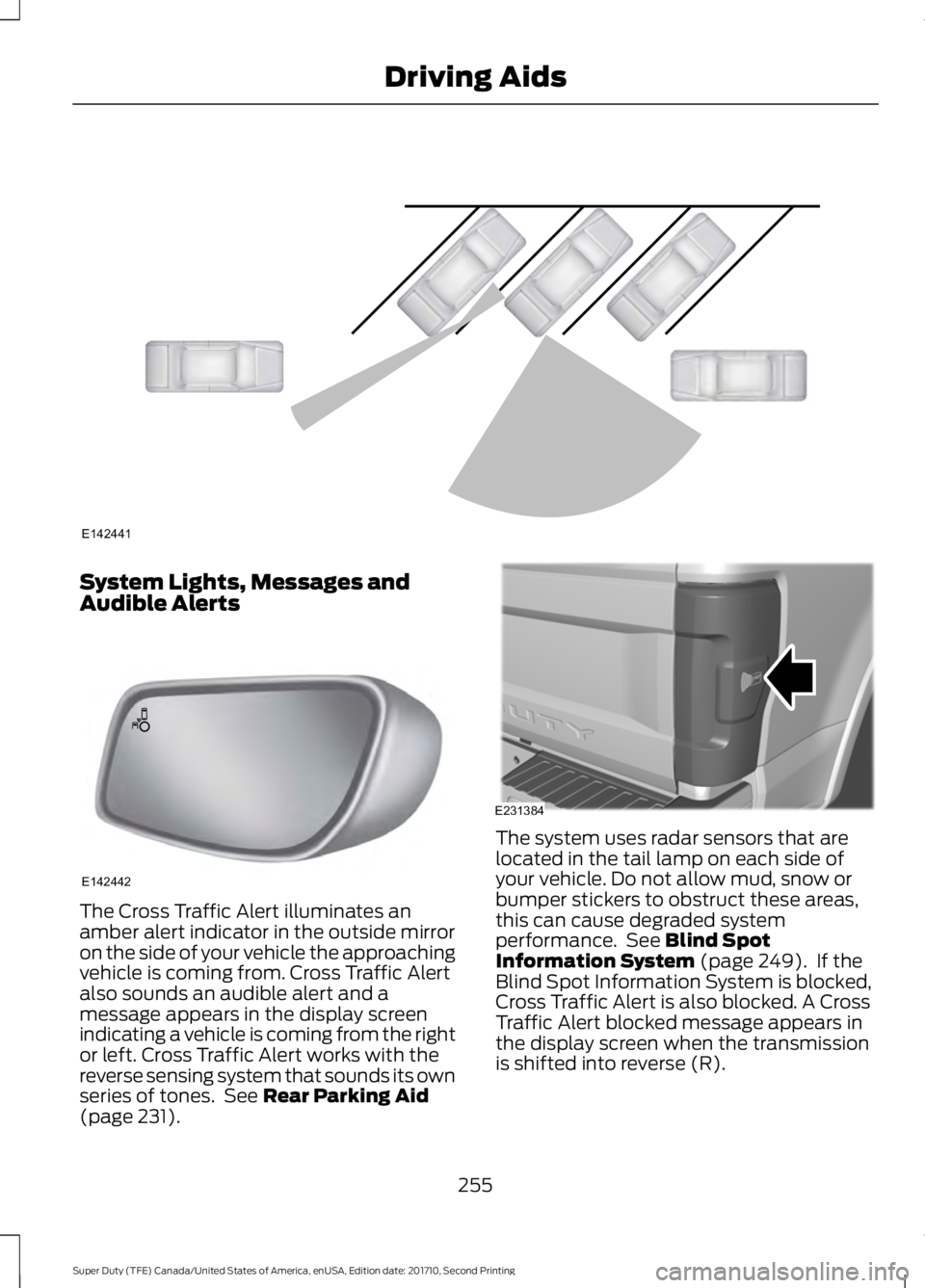
The Cross Traffic Alert illuminates anamber alert indicator in the outside mirroron the side of your vehicle the approachingvehicle is coming from. Cross Traffic Alertalso sounds an audible alert and amessage appears in the display screenindicating a vehicle is coming from the rightor left. Cross Traffic Alert works with thereverse sensing system that sounds its ownseries of tones. See Rear Parking Aid(page 231).
The system uses radar sensors that arelocated in the tail lamp on each side ofyour vehicle. Do not allow mud, snow orbumper stickers to obstruct these areas,this can cause degraded systemperformance. See Blind SpotInformation System (page 249). If theBlind Spot Information System is blocked,Cross Traffic Alert is also blocked. A CrossTraffic Alert blocked message appears inthe display screen when the transmissionis shifted into reverse (R).
255
Super Duty (TFE) Canada/United States of America, enUSA, Edition date: 201710, Second Printing
Driving AidsE142441 E142442 E231384