%27 FORD FESTIVA 1991 Owner's Manual
[x] Cancel search | Manufacturer: FORD, Model Year: 1991, Model line: FESTIVA, Model: FORD FESTIVA 1991Pages: 454, PDF Size: 9.53 MB
Page 163 of 454
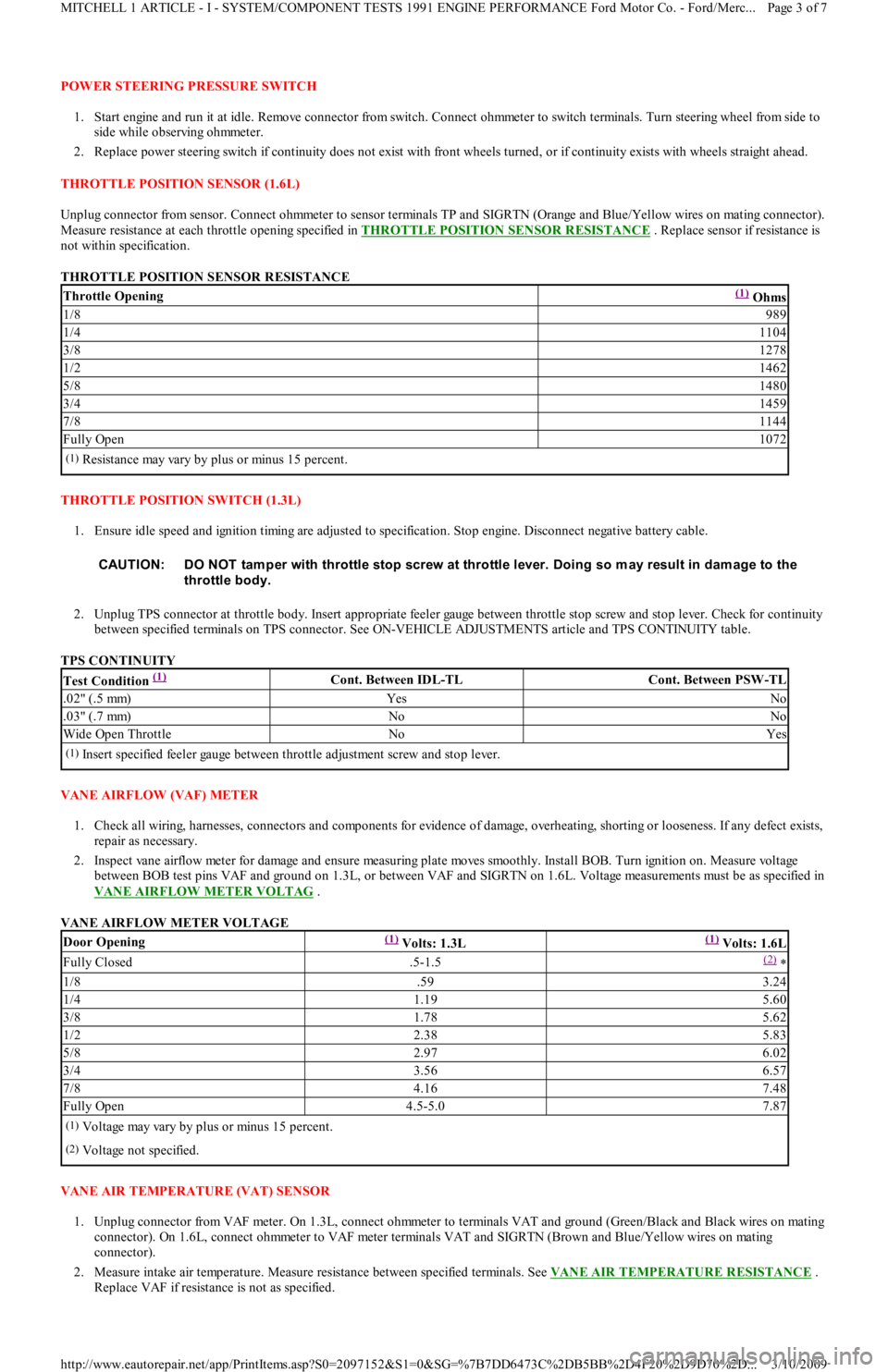
POWER STEERING PRESSURE SWITCH
1. Start engine and run it at idle. Remove connector from switch. Connect ohmmeter to switch terminals. Turn steering wheel from side to
side while observing ohmmeter.
2. Replace power steering switch if continuity does not exist with front wheels turned, or if continuity exists with wheels straight ahead.
THROTTLE POSITION SENSOR (1.6L)
Unplug connector from sensor. Connect ohmmeter to sensor terminals TP and SIGRTN (Orange and Blue/Yellow wires on mating connector).
Measure resistance at each throttle opening specified in THROTTLE POSITION SENSOR RESISTANCE
. Replace sensor if resistance is
not within specification.
THROTTLE POSITION SENSOR RESISTANCE
THROTTLE POSITION SWITCH (1.3L)
1. Ensure idle speed and ignition timing are adjusted to specification. Stop engine. Disconnect negative battery cable.
2. Unplug TPS connector at throttle body. Insert appropriate feeler gauge between throttle stop screw and stop lever. Check for continuity
between specified terminals on TPS connector. See ON-VEHICLE ADJUSTMENTS article and TPS CONTINUITY table.
TPS CONTINUITY
VANE AIRFLOW (VAF) METER
1. Check all wiring, harnesses, connectors and components for evidence of damage, overheating, shorting or looseness. If any defect exists,
repair as necessary.
2. Inspect vane airflow meter for damage and ensure measuring plate moves smoothly. Install BOB. Turn ignition on. Measure voltage
between BOB test pins VAF and ground on 1.3L, or between VAF and SIGRTN on 1.6L. Voltage measurements must be as specified in
VANE AIRFLOW METER VOLTAG
.
VANE AIRFLOW METER VOLTAGE
VANE AIR TEMPERATURE (VAT) SENSOR
1. Unplug connector from VAF meter. On 1.3L, connect ohmmeter to terminals VAT and ground (Green/Black and Black wires on mating
connector). On 1.6L, connect ohmmeter to VAF meter terminals VAT and SIGRTN (Brown and Blue/Yellow wires on mating
connector).
2. Measure intake air temperature. Measure resistance between specified terminals. See VANE AIR TEMPERATURE RESISTANCE
.
Replace VAF if resistance is not as specified.
Throttle Opening(1) Ohms
1/8989
1/41104
3/81278
1/21462
5/81480
3/41459
7/81144
Fully Open1072
(1)Resistance may vary by plus or minus 15 percent.
CAUT ION: DO NOT tam per with throttle stop screw at throttle lever. Doing so m ay result in dam age to the
throttle body.
Test Condition (1) Cont. Between IDL-TLCont. Between PSW-TL
.02" (.5 mm)YesNo
.03" (.7 mm)NoNo
Wide Open ThrottleNoYes
(1)Insert specified feeler gauge between throttle adjustment screw and stop lever.
Door Opening(1) Volts: 1.3L(1) Volts: 1.6L
Fully Closed.5-1.5(2) *
1/8.593.24
1/41.195.60
3/81.785.62
1/22.385.83
5/82.976.02
3/43.566.57
7/84.167.48
Fully Open4.5-5.07.87
(1)Voltage may vary by plus or minus 15 percent.
(2)Voltage not specified.
Page 3 of 7 MITCHELL 1 ARTICLE - I - SYSTEM/COMPONENT TESTS 1991 ENGINE PERFORMANCE Ford Motor Co. - Ford/Merc
...
3/10/2009 http://www.eautorepair.net/app/PrintItems.asp?S0=2097152&S1=0&SG=%7B7DD6473C%2DB5BB%2D4F20%2D9D70%2D
...
Page 167 of 454
Copyr ight 2009 Mitchell Repair Information Company, LLC. All Rights Reserved.
Article GUID: A00022700
Page 7 of 7 MITCHELL 1 ARTICLE - I - SYSTEM/COMPONENT TESTS 1991 ENGINE PERFORMANCE Ford Motor Co. - Ford/Merc
...
3/10/2009 http://www.eautorepair.net/app/PrintItems.asp?S0=2097152&S1=0&SG=%7B7DD6473C%2DB5BB%2D4F20%2D9D70%2D
...
Page 178 of 454
continuity exists, go to next step.
2. Install BOB. Connect ECT. Warm engine to normal operating temperature. Measure resistance between ECT test pin and SIGRTN pins.
If resistance is 500-1000 ohms, replace ECA. If resistance is not 500-1000 ohms, replace ECT sensor.
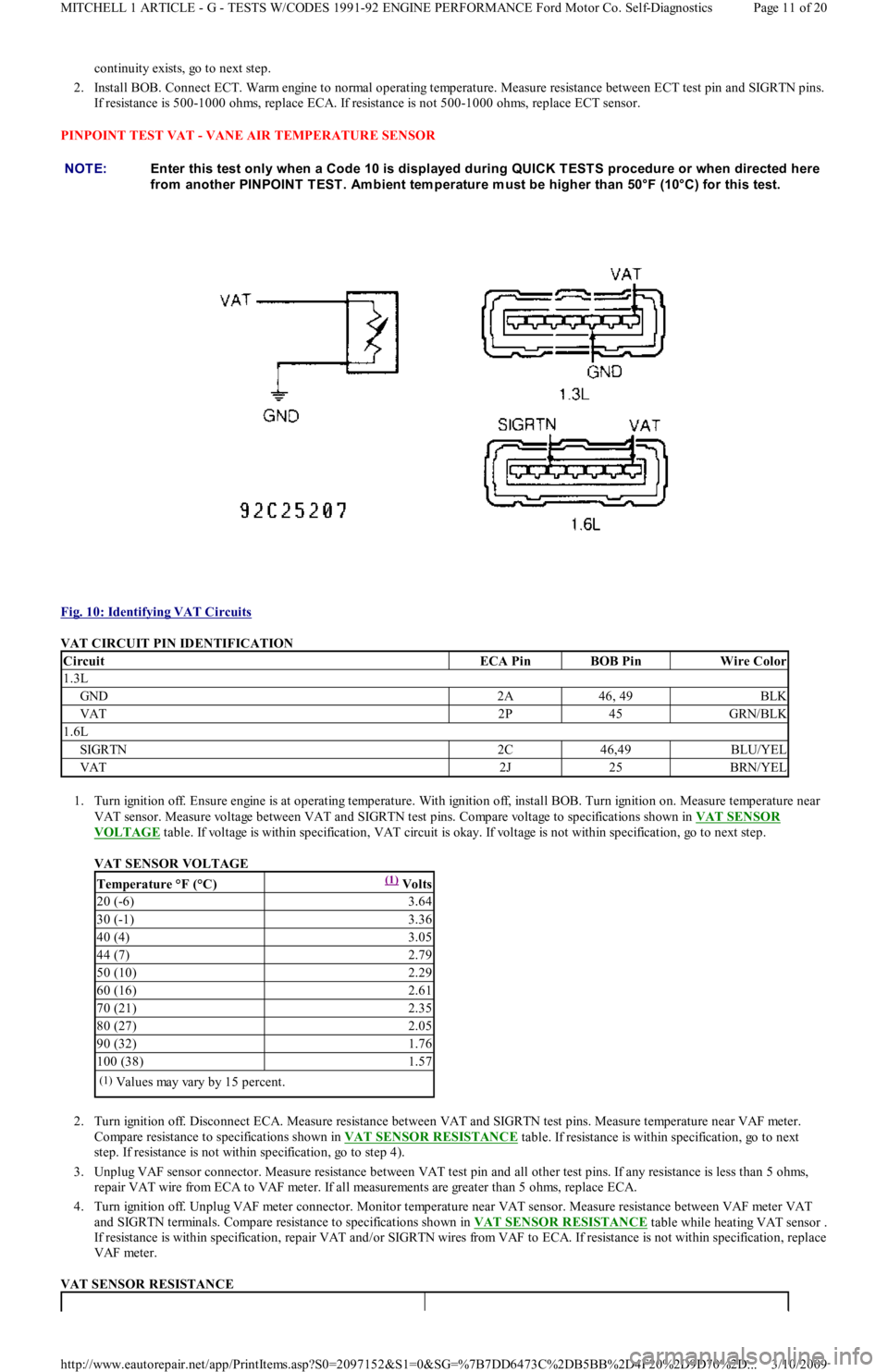
PINPOINT TEST VAT - VANE AIR TEMPERATURE SENSOR
Fig. 10: Identifying VAT Circuits
VAT CIRCUIT PIN IDENTIFICATION
1. Turn ignition off. Ensure engine is at operating temperature. With ignition off, install BOB. Turn ignition on. Measure temperature near
VAT sensor. Measure voltage between VAT and SIGRTN test pins. Compare voltage to specifications shown in VAT SENSOR
VOLTAGE table. If voltage is within specification, VAT circuit is okay. If voltage is not within specification, go to next step.
VAT SENSOR VOLTAGE
2. Turn ignition off. Disconnect ECA. Measure resistance between VAT and SIGRTN test pins. Measure temperature near VAF meter.
Compare resistance to specifications shown in VAT SENSOR RESISTANCE
table. If resistance is within specification, go to next
step. If resistance is not within specification, go to step 4).
3. Unplug VAF sensor connector. Measure resistance between VAT test pin and all other test pins. If any resistance is less than 5 ohms,
repair VAT wire from ECA to VAF meter. If all measurements are greater than 5 ohms, replace ECA.
4. Turn ignition off. Unplug VAF meter connector. Monitor temperature near VAT sensor. Measure resistance between VAF meter VAT
and SIGRTN terminals. Compare resistance to specifications shown in VAT SENSOR RESISTANCE
table while heating VAT sensor .
If resistance is within specification, repair VAT and/or SIGRTN wires from VAF to ECA. If resistance is not within specification, replace
VAF meter.
VAT SENSOR RESISTANCE NOTE:Enter this test only when a Code 10 is displayed during QUICK T EST S procedure or when directed here
from another PINPOINT T EST . Am bient tem perature m ust be higher than 50°F (10°C) for this test.
CircuitECA PinBOB PinWire Color
1.3L
GND2A46, 49BLK
VAT2P45GRN/BLK
1.6L
SIGRTN2C46,49BLU/YEL
VAT2J25BRN/YEL
Temperature °F (°C)(1) Volts
20 (-6)3.64
30 (-1)3.36
40 (4)3.05
44 (7)2.79
50 (10)2.29
60 (16)2.61
70 (21)2.35
80 (27)2.05
90 (32)1.76
100 (38)1.57
(1)Values may vary by 15 percent.
Page 11 of 20 MITCHELL 1 ARTICLE - G - TESTS W/CODES 1991-92 ENGINE PERFORMANCE Ford Motor Co. Self-Diagnostics
3/10/2009 http://www.eautorepair.net/app/PrintItems.asp?S0=2097152&S1=0&SG=%7B7DD6473C%2DB5BB%2D4F20%2D9D70%2D
...
Page 184 of 454
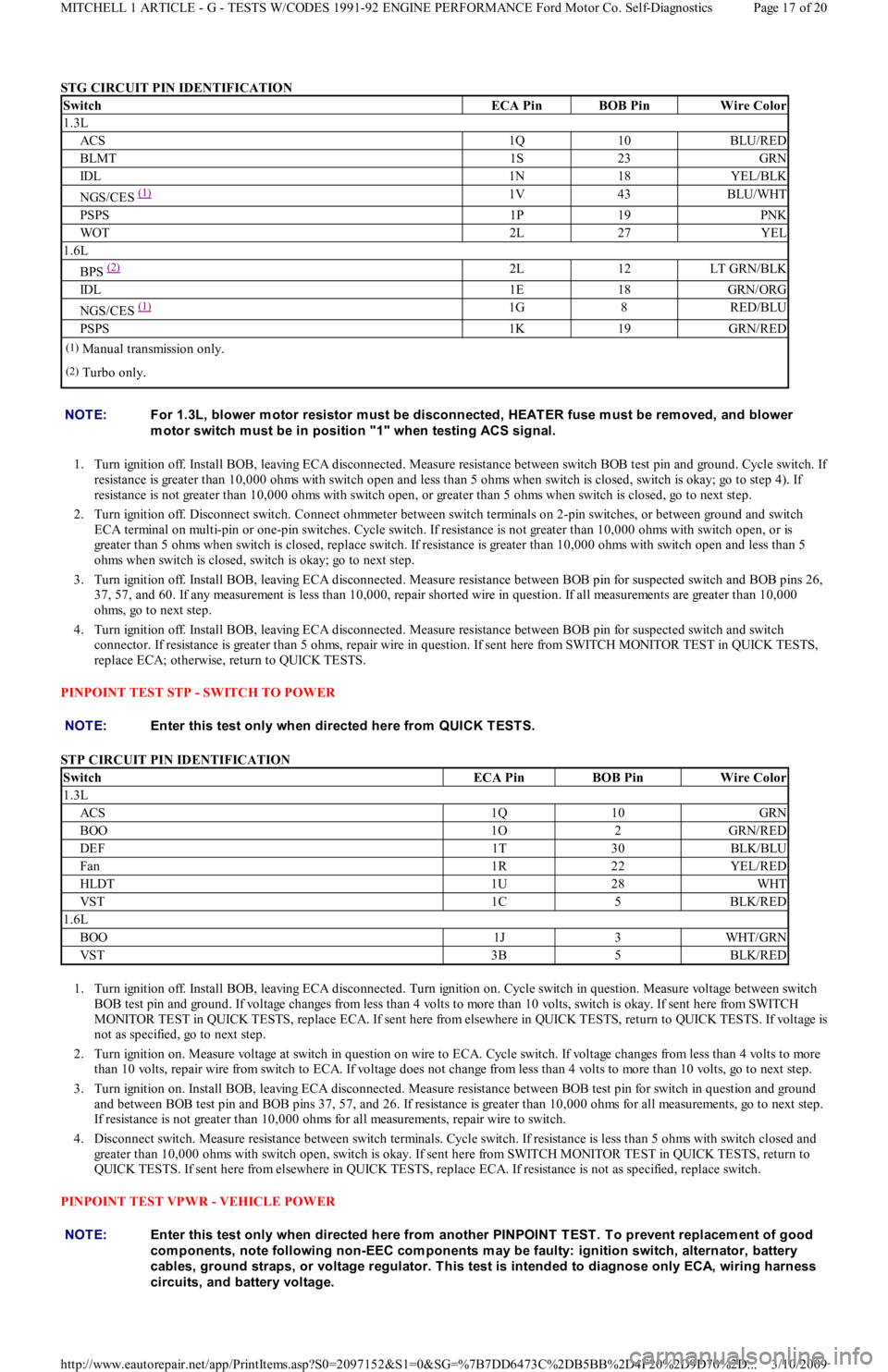
STG CIRCUIT PIN IDENTIFICATION
1. Turn ignition off. Install BOB, leaving ECA disconnected. Measure resistance between switch BOB test pin and ground. Cycle switch. I
f
resistance is greater than 10,000 ohms with switch open and less than 5 ohms when switch is closed, switch is okay; go to step 4). If
resistance is not greater than 10,000 ohms with switch open, or greater than 5 ohms when switch is closed, go to next step.
2. Turn ignition off. Disconnect switch. Connect ohmmeter between switch terminals on 2-pin switches, or between ground and switch
ECA terminal on multi-pin or one-pin switches. Cycle switch. If resistance is not greater than 10,000 ohms with switch open, or is
greater than 5 ohms when switch is closed, replace switch. If resistance is greater than 10,000 ohms with switch open and less than 5
ohms when switch is closed, switch is okay; go to next step.
3. Turn ignition off. Install BOB, leaving ECA disconnected. Measure resistance between BOB pin for suspected switch and BOB pins 26,
37, 57, and 60. If any measurement is less than 10,000, repair shorted wire in question. If all measurements are greater than 10,000
ohms, go to next step.
4. Turn ignition off. Install BOB, leaving ECA disconnected. Measure resistance between BOB pin for suspected switch and switch
connector. If resistance is greater than 5 ohms, repair wire in question. If sent here from SWITCH MONITOR TEST in QUICK TESTS,
replace ECA; otherwise, return to QUICK TESTS.
PINPOINT TEST STP - SWITCH TO POWER
STP CIRCUIT PIN IDENTIFICATION
1. Turn ignition off. Install BOB, leaving ECA disconnected. Turn ignition on. Cycle switch in question. Measure voltage between switch
BOB test pin and ground. If voltage changes from less than 4 volts to more than 10 volts, switch is okay. If sent here from SWITCH
MONITOR TEST in QUICK TESTS, replace ECA. If sent here from elsewhere in QUICK TESTS, return to QUICK TESTS. If voltage is
not as specified, go to next step.
2. Turn ignition on. Measure voltage at switch in question on wire to ECA. Cycle switch. If voltage changes from less than 4 volts to more
than 10 volts, repair wire from switch to ECA. If voltage does not change from less than 4 volts to more than 10 volts, go to next step.
3. Turn ignition on. Install BOB, leaving ECA disconnected. Measure resistance between BOB test pin for switch in question and ground
and between BOB test pin and BOB pins 37, 57, and 26. If resistance is greater than 10,000 ohms for all measurements, go to next step.
If resistance is not greater than 10,000 ohms for all measurements, repair wire to switch.
4. Disconnect switch. Measure resistance between switch terminals. Cycle switch. If resistance is less than 5 ohms with switch closed and
greater than 10,000 ohms with switch open, switch is okay. If sent here from SWITCH MONITOR TEST in QUICK TESTS, return to
QUICK TESTS. If sent here from elsewhere in QUICK TESTS, replace ECA. If resistance is not as specified, replace switch.
PINPOINT TEST VPWR - VEHICLE POWER
SwitchECA PinBOB PinWire Color
1.3L
ACS1Q10BLU/RED
BLMT1S23GRN
IDL1N18YEL/BLK
NGS/CES (1) 1V43BLU/WHT
PSPS1P19PNK
WOT2L27YEL
1.6L
BPS (2) 2L12LT GRN/BLK
IDL1E18GRN/ORG
NGS/CES (1) 1G8RED/BLU
PSPS1K19GRN/RED
(1)Manual transmission only.
(2)Turbo only.
NOTE:For 1.3L, blower m otor resistor m ust be disconnected, HEAT ER fuse m ust be rem oved, and blower
m otor switch m ust be in position "1" when testing ACS signal.
NOTE:Enter this test only when directed here from QUICK T EST S.
SwitchECA PinBOB PinWire Color
1.3L
ACS1Q10GRN
BOO1O2GRN/RED
DEF1T30BLK/BLU
Fan1R22YEL/RED
HLDT1U28WHT
VST1C5BLK/RED
1.6L
BOO1J3WHT/GRN
VST3B5BLK/RED
NOTE:Enter this test only when directed here from another PINPOINT T EST . T o prevent replacem ent of good
com ponents, note following non-EEC com ponents m ay be faulty: ignition switch, alternator, battery
cables, ground straps, or voltage regulator. T his test is intended to diagnose only ECA, wiring harness
circuits, and battery voltage.
Page 17 of 20 MITCHELL 1 ARTICLE - G - TESTS W/CODES 1991-92 ENGINE PERFORMANCE Ford Motor Co. Self-Diagnostics
3/10/2009 http://www.eautorepair.net/app/PrintItems.asp?S0=2097152&S1=0&SG=%7B7DD6473C%2DB5BB%2D4F20%2D9D70%2D
...
Page 187 of 454
If no hard codes, or only pass codes, are present, and driveability symptoms or intermittent codes still exist, proceed to TESTS W/O CODES
article in the ENGINE PERFORMANCE Section for diagnosis by symptom (i.e., ROUGH IDLE, NO START, etc.) or intermittent diagnostic
procedures.
Copyr ight 2009 Mitchell Repair Information Company, LLC. All Rights Reserved.
Article GUID: A00022768
Page 20 of 20 MITCHELL 1 ARTICLE - G - TESTS W/CODES 1991-92 ENGINE PERFORMANCE Ford Motor Co. Self-Diagnostics
3/10/2009 http://www.eautorepair.net/app/PrintItems.asp?S0=2097152&S1=0&SG=%7B7DD6473C%2DB5BB%2D4F20%2D9D70%2D
...
Page 240 of 454
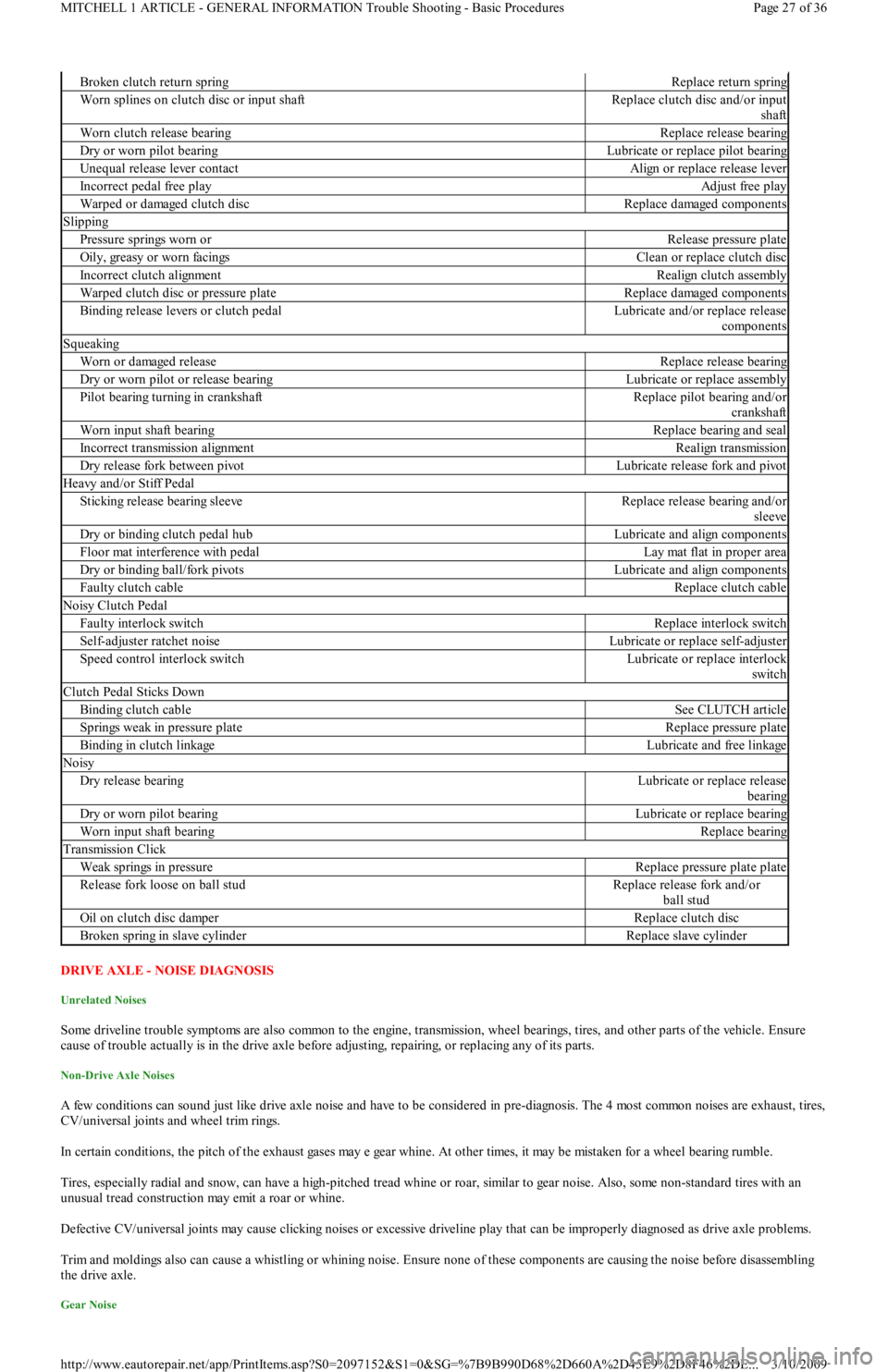
DRIVE AXLE - NOISE DIAGNOSIS
Unrelated Noises
Some driveline trouble symptoms are also common to the engine, transmission, wheel bearings, tires, and other parts of the vehicle. Ensure
cause of trouble actually is in the drive axle before adjusting, repairing, or replacing any of its parts.
Non-Drive Axle Noises
A few conditions can sound just like drive axle noise and have to be considered in pre-diagnosis. The 4 most common noises are exhaust, tires,
CV/universal joints and wheel trim rings.
In certain conditions, the pitch of the exhaust gases may e gear whine. At other times, it may be mistaken for a wheel bearing rumble.
Tires, especially radial and snow, can have a high-pitched tread whine or roar, similar to gear noise. Also, some non-standard tires with an
unusual tread construction may emit a roar or whine.
Defective CV/universal joints may cause clicking noises or excessive driveline play that can be improperly diagnosed as drive axle problems.
Trim and moldings also can cause a whistling or whining noise. Ensure none of these components are causing the noise before disassembling
the drive axle.
Gear Noise
Broken clutch return springReplace return spring
Worn splines on clutch disc or input shaftReplace clutch disc and/or input
shaft
Worn clutch release bearingReplace release bearing
Dry or worn pilot bearingLubricate or replace pilot bearing
Unequal release lever contactAlign or replace release lever
Incorrect pedal free playAdjust free play
Warped or damaged clutch discReplace damaged components
Slipping
Pressure springs worn orRelease pressure plate
Oily, greasy or worn facingsClean or replace clutch disc
Incorrect clutch alignmentRealign clutch assembly
Warped clutch disc or pressure plateReplace damaged components
Binding release levers or clutch pedalLubricate and/or replace release
components
Squeaking
Worn or damaged releaseReplace release bearing
Dry or worn pilot or release bearingLubricate or replace assembly
Pilot bearing turning in crankshaftReplace pilot bearing and/or
crankshaft
Worn input shaft bearingReplace bearing and seal
Incorrect transmission alignmentRealign transmission
Dry release fork between pivotLubricate release fork and pivot
Heavy and/or Stiff Pedal
Sticking release bearing sleeveReplace release bearing and/or
sleeve
Dry or binding clutch pedal hubLubricate and align components
Floor mat interference with pedalLay mat flat in proper area
Dry or binding ball/fork pivotsLubricate and align components
Faulty clutch cableReplace clutch cable
Noisy Clutch Pedal
Faulty interlock switchReplace interlock switch
Self-adjuster ratchet noiseLubricate or replace self-adjuster
Speed control interlock switchLubricate or replace interlock
switch
Clutch Pedal Sticks Down
Binding clutch cableSee CLUTCH article
Springs weak in pressure plateReplace pressure plate
Binding in clutch linkageLubricate and free linkage
Noisy
Dry release bearingLubricate or replace release
bearing
Dry or worn pilot bearingLubricate or replace bearing
Worn input shaft bearingReplace bearing
Transmission Click
Weak springs in pressureReplace pressure plate plate
Release fork loose on ball studReplace release fork and/or
ball stud
Oil on clutch disc damperReplace clutch disc
Broken spring in slave cylinderReplace slave cylinder
Page 27 of 36 MITCHELL 1 ARTICLE - GENERAL INFORMATION Trouble Shooting - Basic Procedures
3/10/2009 http://www.eautorepair.net/app/PrintItems.asp?S0=2097152&S1=0&SG=%7B9B990D68%2D660A%2D45E9%2D8F46%2DE
...
Page 249 of 454
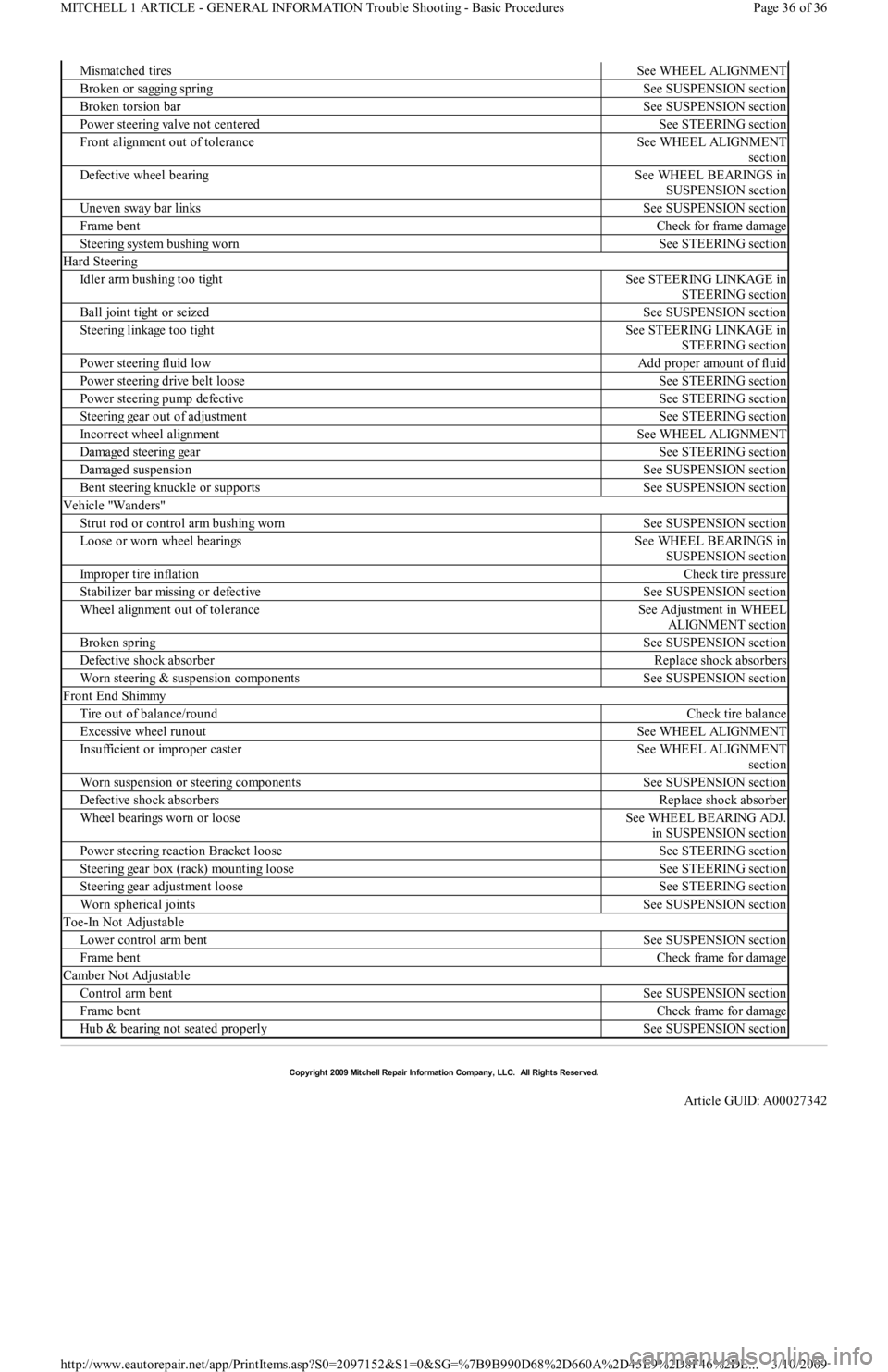
Mismatched tiresSee WHEEL ALIGNMENT
Broken or sagging springSee SUSPENSION section
Broken torsion barSee SUSPENSION section
Power steering valve not centeredSee STEERING section
Front alignment out of toleranceSee WHEEL ALIGNMENT
section
Defective wheel bearingSee WHEEL BEARINGS in
SUSPENSION section
Uneven sway bar linksSee SUSPENSION section
Frame bentCheck for frame damage
Steering system bushing wornSee STEERING section
Hard Steering
Idler arm bushing too tightSee STEERING LINKAGE in
STEERING section
Ball joint tight or seizedSee SUSPENSION section
Steering linkage too tightSee STEERING LINKAGE in
STEERING section
Power steering fluid lowAdd proper amount of fluid
Power steering drive belt looseSee STEERING section
Power steering pump defectiveSee STEERING section
Steering gear out of adjustmentSee STEERING section
Incorrect wheel alignmentSee WHEEL ALIGNMENT
Damaged steering gearSee STEERING section
Damaged suspensionSee SUSPENSION section
Bent steering knuckle or supportsSee SUSPENSION section
Vehicle "Wanders"
Strut rod or control arm bushing wornSee SUSPENSION section
Loose or worn wheel bearingsSee WHEEL BEARINGS in
SUSPENSION section
Improper tire inflationCheck tire pressure
Stabilizer bar missing or defectiveSee SUSPENSION section
Wheel alignment out of toleranceSee Adjustment in WHEEL
ALIGNMENT section
Broken springSee SUSPENSION section
Defective shock absorberReplace shock absorbers
Worn steering & suspension componentsSee SUSPENSION section
Front End Shimmy
Tire out of balance/roundCheck tire balance
Excessive wheel runoutSee WHEEL ALIGNMENT
Insufficient or improper casterSee WHEEL ALIGNMENT
section
Worn suspension or steering componentsSee SUSPENSION section
Defective shock absorbersReplace shock absorber
Wheel bearings worn or looseSee WHEEL BEARING ADJ.
in SUSPENSION section
Power steering reaction Bracket looseSee STEERING section
Steering gear box (rack) mounting looseSee STEERING section
Steering gear adjustment looseSee STEERING section
Worn spherical jointsSee SUSPENSION section
Toe-In Not Adjustable
Lower control arm bentSee SUSPENSION section
Frame bentCheck frame for damage
Camber Not Adjustable
Control arm bentSee SUSPENSION section
Frame bentCheck frame for damage
Hub & bearing not seated properlySee SUSPENSION section
Copyr ight 2009 Mitchell Repair Information Company, LLC. All Rights Reserved.
Article GUID: A00027342
Page 36 of 36 MITCHELL 1 ARTICLE - GENERAL INFORMATION Trouble Shooting - Basic Procedures
3/10/2009 http://www.eautorepair.net/app/PrintItems.asp?S0=2097152&S1=0&SG=%7B9B990D68%2D660A%2D45E9%2D8F46%2DE
...
Page 299 of 454
![FORD FESTIVA 1991 Owners Manual
Fig. 26: Single Injector
- Known Good - Voltage Pattern
EXAMPLE #8 - CURRENT CONTROLLED DRIVER
These two known-good waveform patterns are from a GM 2.0L In-Line 4 VIN [1]. Fig. Fig. 27
illustrat](/img/11/56935/w960_56935-298.png "FORD FESTIVA 1991 Owners Manual
Fig. 26: Single Injector
- Known Good - Voltage Pattern
EXAMPLE #8 - CURRENT CONTROLLED DRIVER
These two known-good waveform patterns are from a GM 2.0L In-Line 4 VIN [1]. Fig. Fig. 27
illustrat")
Fig. 26: Single Injector
- Known Good - Voltage Pattern
EXAMPLE #8 - CURRENT CONTROLLED DRIVER
These two known-good waveform patterns are from a GM 2.0L In-Line 4 VIN [1]. Fig. Fig. 27
illustrates the 78 volt inductive spike that
indicates a zener diode is not used. The second waveform, Fig. Fig. 28
, was taken during hot idle, closed loop, and no load.
Fig. 27: Single Injector
- Known Good - Voltage Pattern
Page 18 of 19 MITCHELL 1 ARTICLE - GENERAL INFORMATION Waveforms - Injector Pattern Tutorial
3/10/2009 http://www.eautorepair.net/app/PrintItems.asp?S0=2097152&S1=0&SG=%7B9B990D68%2D660A%2D45E9%2D8F46%2DE
...
Page 315 of 454
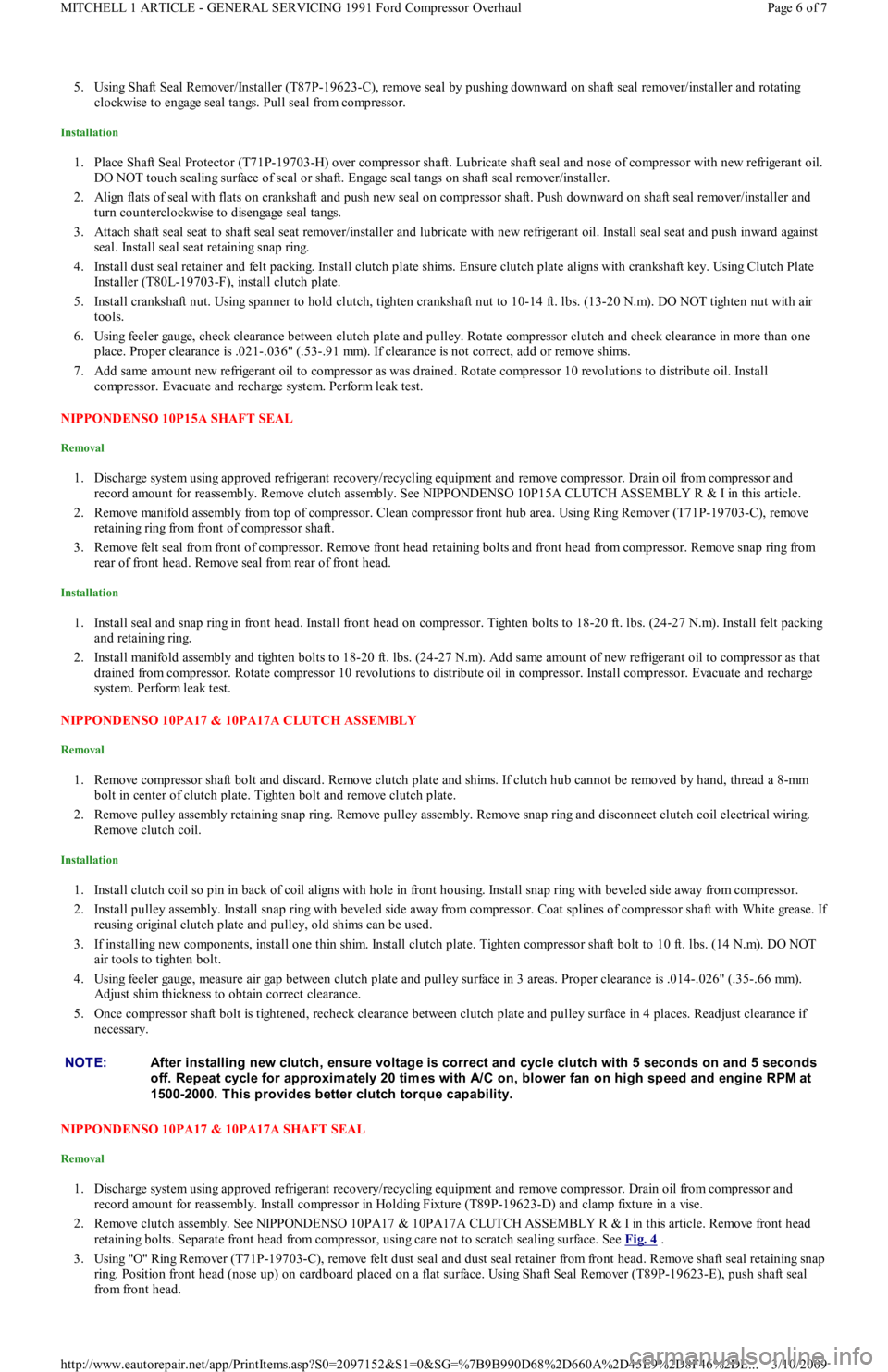
5. Using Shaft Seal Remover/Installer (T87P-19623-C), remove seal by pushing downward on shaft seal remover/installer and rotating
clockwise to engage seal tangs. Pull seal from compressor.
Installation
1. Place Shaft Seal Protector (T71P-19703-H) over compressor shaft. Lubricate shaft seal and nose of compressor with new refrigerant oil.
DO NOT touch sealing surface of seal or shaft. Engage seal tangs on shaft seal remover/installer.
2. Align flats of seal with flats on crankshaft and push new seal on compressor shaft. Push downward on shaft seal remover/installer and
turn counterclockwise to disengage seal tangs.
3. Attach shaft seal seat to shaft seal seat remover/installer and lubricate with new refrigerant oil. Install seal seat and push inward against
seal. Install seal seat retaining snap ring.
4. Install dust seal retainer and felt packing. Install clutch plate shims. Ensure clutch plate aligns with crankshaft key. Using Clutch Plate
Installer (T80L-19703-F), install clutch plate.
5. Install crankshaft nut. Using spanner to hold clutch, tighten crankshaft nut to 10-14 ft. lbs. (13-20 N.m). DO NOT tighten nut with air
tools.
6. Using feeler gauge, check clearance between clutch plate and pulley. Rotate compressor clutch and check clearance in more than one
place. Proper clearance is .021-.036" (.53-.91 mm). If clearance is not correct, add or remove shims.
7. Add same amount new refrigerant oil to compressor as was drained. Rotate compressor 10 revolutions to distribute oil. Install
compressor. Evacuate and recharge system. Perform leak test.
NIPPONDENSO 10P15A SHAFT SEAL
Removal
1. Discharge system using approved refrigerant recovery/recycling equipment and remove compressor. Drain oil from compressor and
record amount for reassembly. Remove clutch assembly. See NIPPONDENSO 10P15A CLUTCH ASSEMBLY R & I in this article.
2. Remove manifold assembly from top of compressor. Clean compressor front hub area. Using Ring Remover (T71P-19703-C), remove
retaining ring from front of compressor shaft.
3. Remove felt seal from front of compressor. Remove front head retaining bolts and front head from compressor. Remove snap ring fro m
rear of front head. Remove seal from rear of front head.
Installation
1. Install seal and snap ring in front head. Install front head on compressor. Tighten bolts to 18-20 ft. lbs. (24-27 N.m). Install felt packing
and retaining ring.
2. Install manifold assembly and tighten bolts to 18-20 ft. lbs. (24-27 N.m). Add same amount of new refrigerant oil to compressor as that
drained from compressor. Rotate compressor 10 revolutions to distribute oil in compressor. Install compressor. Evacuate and recharge
system. Perform leak test.
NIPPONDENSO 10PA17 & 10PA17A CLUTCH ASSEMBLY
Removal
1. Remove compressor shaft bolt and discard. Remove clutch plate and shims. If clutch hub cannot be removed by hand, thread a 8-mm
bolt in center of clutch plate. Tighten bolt and remove clutch plate.
2. Remove pulley assembly retaining snap ring. Remove pulley assembly. Remove snap ring and disconnect clutch coil electrical wiring.
Remove clutch coil.
Installation
1. Install clutch coil so pin in back of coil aligns with hole in front housing. Install snap ring with beveled side away from compressor.
2. Install pulley assembly. Install snap ring with beveled side away from compressor. Coat splines of compressor shaft with White grease. I
f
reusing original clutch plate and pulley, old shims can be used.
3. If installing new components, install one thin shim. Install clutch plate. Tighten compressor shaft bolt to 10 ft. lbs. (14 N.m). DO NOT
air tools to tighten bolt.
4. Using feeler gauge, measure air gap between clutch plate and pulley surface in 3 areas. Proper clearance is .014-.026" (.35-.66 mm).
Adjust shim thickness to obtain correct clearance.
5. Once compressor shaft bolt is tightened, recheck clearance between clutch plate and pulley surface in 4 places. Readjust clearance if
necessary.
NIPPONDENSO 10PA17 & 10PA17A SHAFT SEAL
Removal
1. Discharge system using approved refrigerant recovery/recycling equipment and remove compressor. Drain oil from compressor and
record amount for reassembly. Install compressor in Holding Fixture (T89P-19623-D) and clamp fixture in a vise.
2. Remove clutch assembly. See NIPPONDENSO 10PA17 & 10PA17A CLUTCH ASSEMBLY R & I in this article. Remove front head
retaining bolts. Separate front head from compressor, using care not to scratch sealing surface. See Fig. 4
.
3. Using "O" Ring Remover (T71P-19703-C), remove felt dust seal and dust seal retainer from front head. Remove shaft seal retaining snap
ring. Position front head (nose up) on cardboard placed on a flat surface. Using Shaft Seal Remover (T89P-19623-E), push shaft seal
from front head. NOTE:After installing new clutch, ensure voltage is correct and cycle clutch with 5 seconds on and 5 seconds
off. Repeat cycle for approxim ately 20 tim es with A/C on, blower fan on high speed and engine RPM at
1500-2000. T his provides better clutch torque capability.
Page 6 of 7 MITCHELL 1 ARTICLE - GENERAL SERVICING 1991 Ford Compressor Overhaul
3/10/2009 http://www.eautorepair.net/app/PrintItems.asp?S0=2097152&S1=0&SG=%7B9B990D68%2D660A%2D45E9%2D8F46%2DE
...
Page 323 of 454
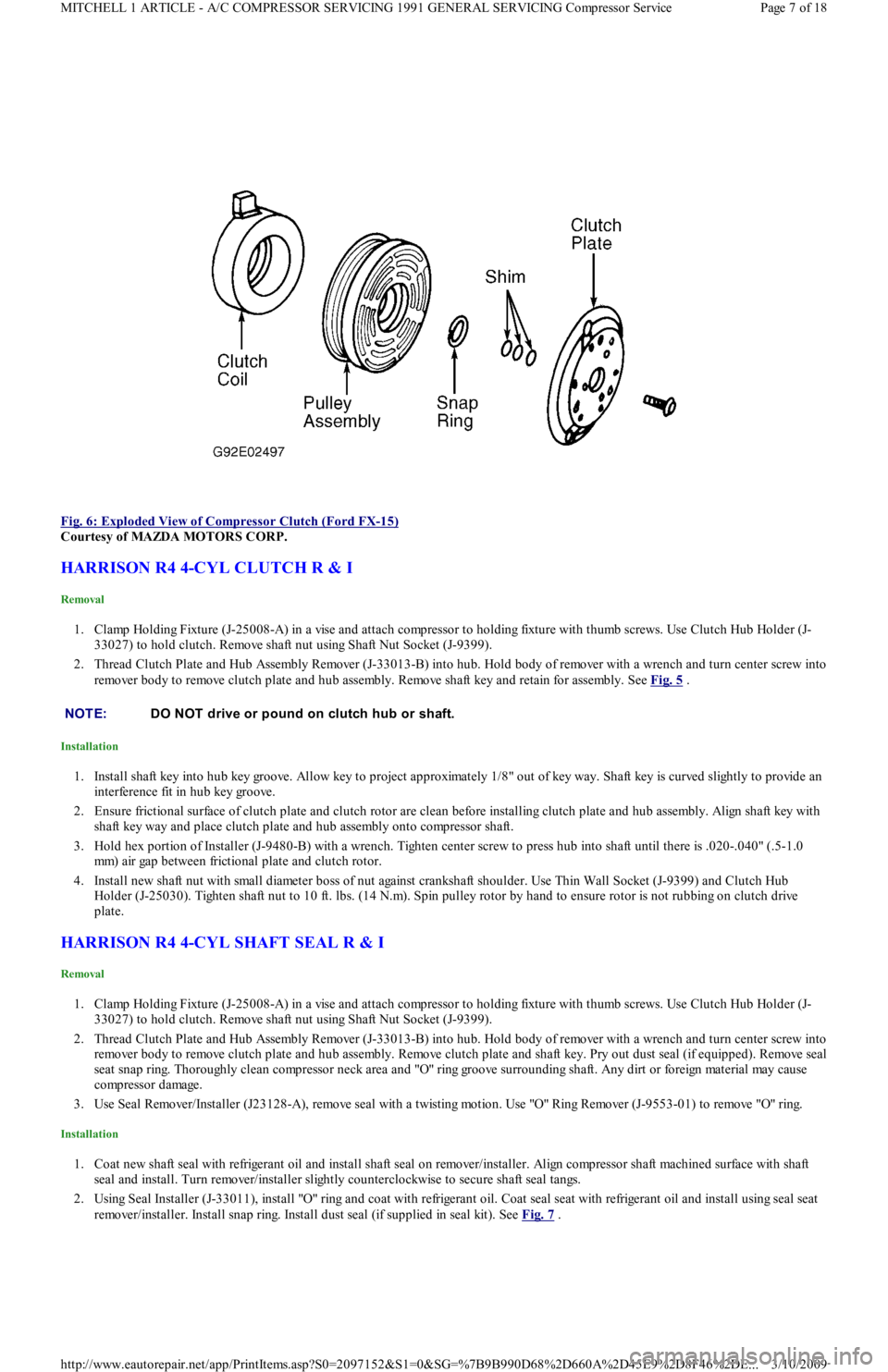
Fig. 6: Exploded View of Compressor Clutch (Ford FX
-15)
Courtesy of MAZDA MOTORS CORP.
HARRISON R4 4-CYL CLUTCH R & I
Removal
1. Clamp Holding Fixture (J-25008-A) in a vise and attach compressor to holding fixture with thumb screws. Use Clutch Hub Holder (J-
33027) to hold clutch. Remove shaft nut using Shaft Nut Socket (J-9399).
2. Thread Clutch Plate and Hub Assembly Remover (J-33013-B) into hub. Hold body of remover with a wrench and turn center screw into
remover body to remove clutch plate and hub assembly. Remove shaft key and retain for assembly. See Fig. 5
.
Installation
1. Install shaft key into hub key groove. Allow key to project approximately 1/8" out of key way. Shaft key is curved slightly to provide an
interference fit in hub key groove.
2. Ensure frictional surface of clutch plate and clutch rotor are clean before installing clutch plate and hub assembly. Align shaft key with
shaft key way and place clutch plate and hub assembly onto compressor shaft.
3. Hold hex portion of Installer (J-9480-B) with a wrench. Tighten center screw to press hub into shaft until there is .020-.040" (.5-1.0
mm) air gap between frictional plate and clutch rotor.
4. Install new shaft nut with small diameter boss of nut against crankshaft shoulder. Use Thin Wall Socket (J-9399) and Clutch Hub
Holder (J-25030). Tighten shaft nut to 10 ft. lbs. (14 N.m). Spin pulley rotor by hand to ensure rotor is not rubbing on clutch drive
plate.
HARRISON R4 4-CYL SHAFT SEAL R & I
Removal
1. Clamp Holding Fixture (J-25008-A) in a vise and attach compressor to holding fixture with thumb screws. Use Clutch Hub Holder (J-
33027) to hold clutch. Remove shaft nut using Shaft Nut Socket (J-9399).
2. Thread Clutch Plate and Hub Assembly Remover (J-33013-B) into hub. Hold body of remover with a wrench and turn center screw into
remover body to remove clutch plate and hub assembly. Remove clutch plate and shaft key. Pry out dust seal (if equipped). Remove seal
seat snap ring. Thoroughly clean compressor neck area and "O" ring groove surrounding shaft. Any dirt or foreign material may cause
compressor damage.
3. Use Seal Remover/Installer (J23128-A), remove seal with a twisting motion. Use "O" Ring Remover (J-9553-01) to remove "O" ring.
Installation
1. Coat new shaft seal with refrigerant oil and install shaft seal on remover/installer. Align compressor shaft machined surface with shaft
seal and install. Turn remover/installer slightly counterclockwise to secure shaft seal tangs.
2. Using Seal Installer (J-33011), install "O" ring and coat with refrigerant oil. Coat seal seat with refrigerant oil and install using seal seat
remover/installer. Install snap ring. Install dust seal (if supplied in seal kit). See Fig. 7
.
NOTE:DO NOT drive or pound on clutch hub or shaft.
Page 7 of 18 MITCHELL 1 ARTICLE - A/C COMPRESSOR SERVICING 1991 GENERAL SERVICING Compressor Service
3/10/2009 http://www.eautorepair.net/app/PrintItems.asp?S0=2097152&S1=0&SG=%7B9B990D68%2D660A%2D45E9%2D8F46%2DE
...