battery FORD MUSTANG 1969 Volume One Chassis
[x] Cancel search | Manufacturer: FORD, Model Year: 1969, Model line: MUSTANG, Model: FORD MUSTANG 1969Pages: 413, PDF Size: 75.81 MB
Page 122 of 413
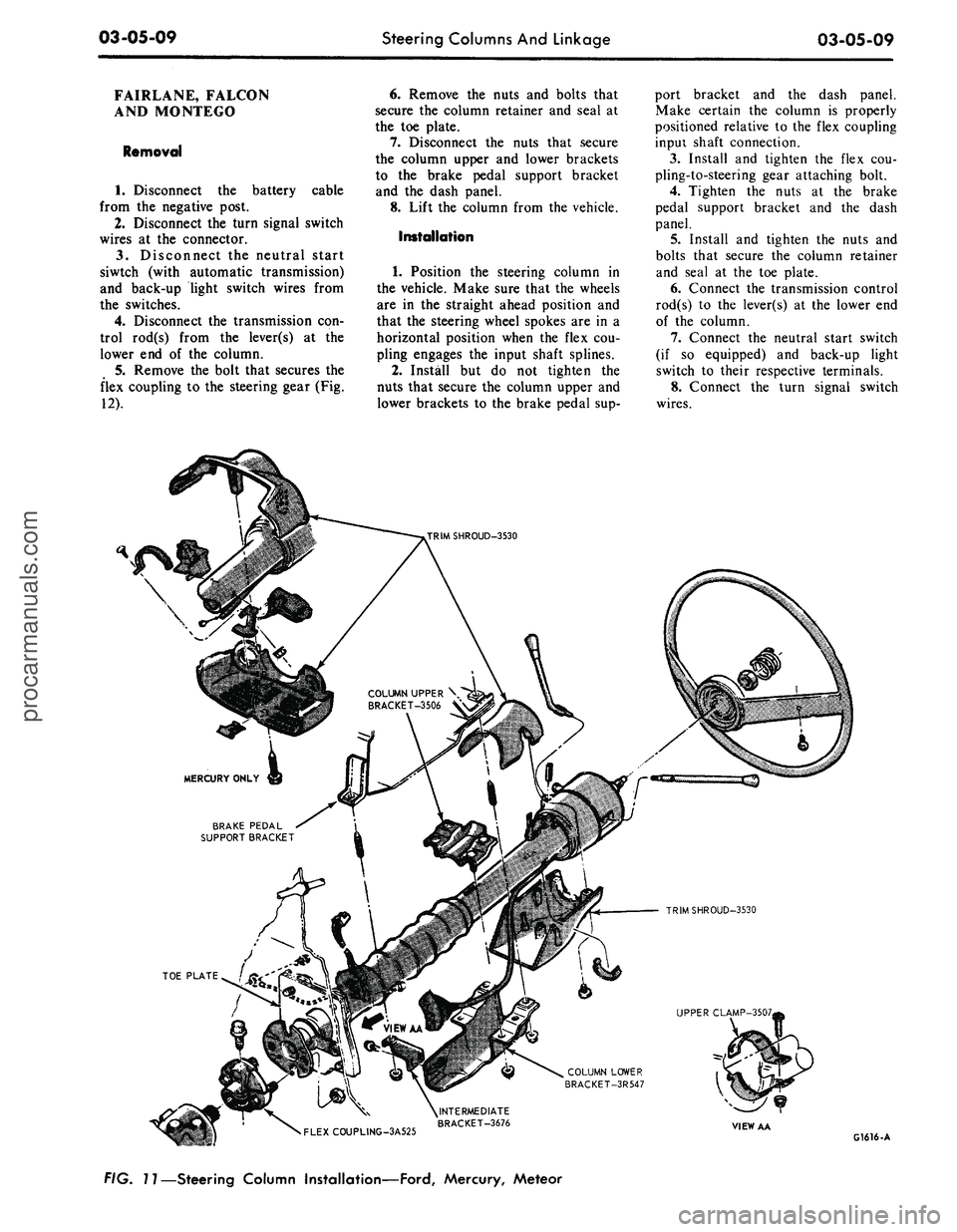
03-05-09
Steering Columns And Linkage
03-05-09
FAIRLANE, FALCON
AND MONTEGO
Removal
1.
Disconnect the battery cable
from the negative post.
2.
Disconnect the turn signal switch
wires at the connector.
3.
Disconnect the neutral start
siwtch (with automatic transmission)
and back-up light switch wires from
the switches.
4.
Disconnect the transmission con-
trol rod(s) from the lever(s) at the
lower end of the column.
5.
Remove the bolt that secures the
flex coupling to the steering gear (Fig.
12).
6. Remove the nuts and bolts that
secure the column retainer and seal at
the toe plate.
7.
Disconnect the nuts that secure
the column upper and lower brackets
to the brake pedal support bracket
and the dash panel.
8. Lift the column from the vehicle.
Installation
1.
Position the steering column in
the vehicle. Make sure that the wheels
are in the straight ahead position and
that the steering wheel spokes are in a
horizontal position when the flex cou-
pling engages the input shaft splines.
2.
Install but do not tighten the
nuts that secure the column upper and
lower brackets to the brake pedal sup-
port bracket and the dash panel.
Make certain the column is properly
positioned relative to the flex coupling
inpui shaft connection.
3.
Install and tighten the flex cou-
pling-to-steering gear attaching bolt.
4.
Tighten the nuts at the brake
pedal support bracket and the dash
panel.
5.
Install and tighten the nuts and
bolts that secure the column retainer
and seal at the toe plate.
6. Connect the transmission control
rod(s) to the lever(s) at the lower end
of the column.
7.
Connect the neutral start switch
(if so equipped) and back-up light
switch to their respective terminals.
8. Connect the turn signal switch
wires.
COLUMN UPPER \
BRACKET-3506 V
BRAKE PEDAL
SUPPORT BRACKET
TRIMSHROUD-3530
UPPER CLAMP-3507,
COLUMN LOWER
BRACKET-3R547
•
FLEXCOUPLING-3A525
^INTERMEDIATE
BRACKET-3676
VIEW AA
G1616-A
FIG. 11—Steering Column Installation—Ford, Mercury, Meteorprocarmanuals.com
Page 123 of 413
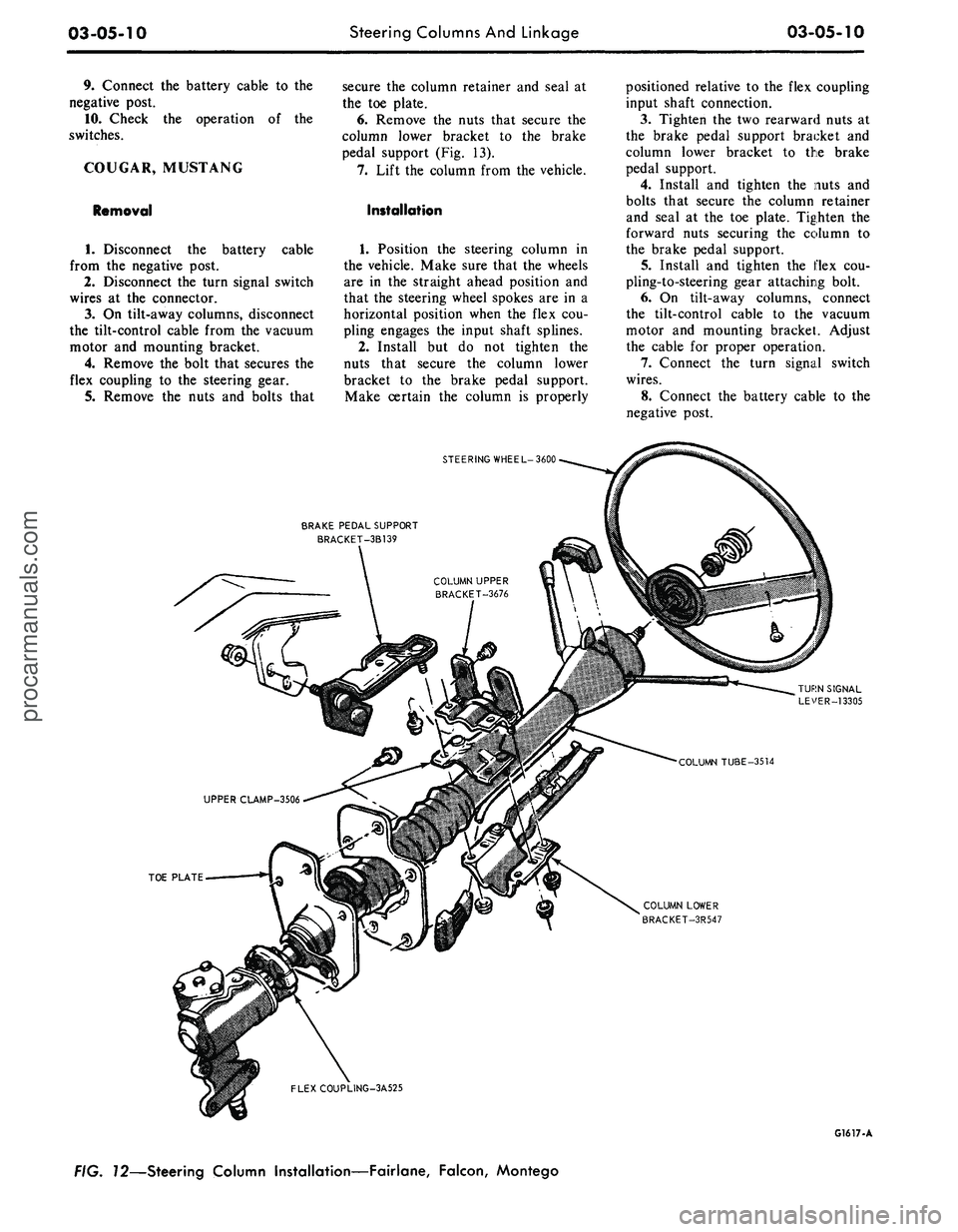
03-05-10
Steering Columns And Linkage
03-05-10
9. Connect the battery cable to the
negative post.
10.
Check the operation of the
switches.
COUGAR, MUSTANG
Removal
cable
1.
Disconnect the battery
from the negative post.
2.
Disconnect the turn signal switch
wires at the connector.
3.
On tilt-away columns, disconnect
the tilt-control cable from the vacuum
motor and mounting bracket.
4.
Remove the bolt that secures the
flex coupling to the steering gear.
5.
Remove the nuts and bolts that
secure the column retainer and seal at
the toe plate.
6. Remove the nuts that secure the
column lower bracket to the brake
pedal support (Fig. 13).
7.
Lift the column from the vehicle.
Installation
1.
Position the steering column in
the vehicle. Make sure that the wheels
are in the straight ahead position and
that the steering wheel spokes are in a
horizontal position when the flex cou-
pling engages the input shaft splines.
2.
Install but do not tighten the
nuts that secure the column lower
bracket to the brake pedal support.
Make certain the column is properly
positioned relative to the flex coupling
input shaft connection.
3.
Tighten the two rearward nuts at
the brake pedal support bracket and
column lower bracket to the brake
pedal support.
4.
Install and tighten the nuts and
bolts that secure the column retainer
and seal at the toe plate. Tighten the
forward nuts securing the column to
the brake pedal support.
5.
Install and tighten the flex cou-
pling-to-steering gear attaching bolt.
6. On tilt-away columns, connect
the tilt-control cable to the vacuum
motor and mounting bracket. Adjust
the cable for proper operation.
7.
Connect the turn signal switch
wires.
8. Connect the battery cable to the
negative post.
STEERING WHEEL-3600
BRAKE PEDAL SUPPORT
BRACKET-3B139
TOE PLATE
COLUMN LOWER
BRACKET-3R547
FLEXCOUPLING-3A525
G1617-A
FIG. 72—Steering Column Installation—Fairlane, Falcon, Montegoprocarmanuals.com
Page 124 of 413
03-05-11
Steering Columns
And
Linkage
03-05-11
9. Check
the
operation
of the
steer-
ing tilt mechanism
(if so
equipped)
and
the
switches.
THUNDERBIRD
AND
CONTINENTAL MARK
III
Removal
1.
Remove
the
instrument panel
lower outer finish panel, instrument
panel steering column plate
and
cover.
2.
Disconnect
the
negative cable
from
the
battery.
3.
Remove
the
bolt that attaches
the flexible coupling
to the
steering
shaft.
4.
Disconnect
the
shift
rod
from
the
lever
at the
lower
end of the
column.
5.
Remove
the
four screws that
at-
tach
the
column retainer
to the
dash
panel.
6. Working from
the
underside
of
the instrument panel disconnect
the
steering column tilt-control cable from
the vacuum motor
and
mounting
bracket
(if so
equipped)
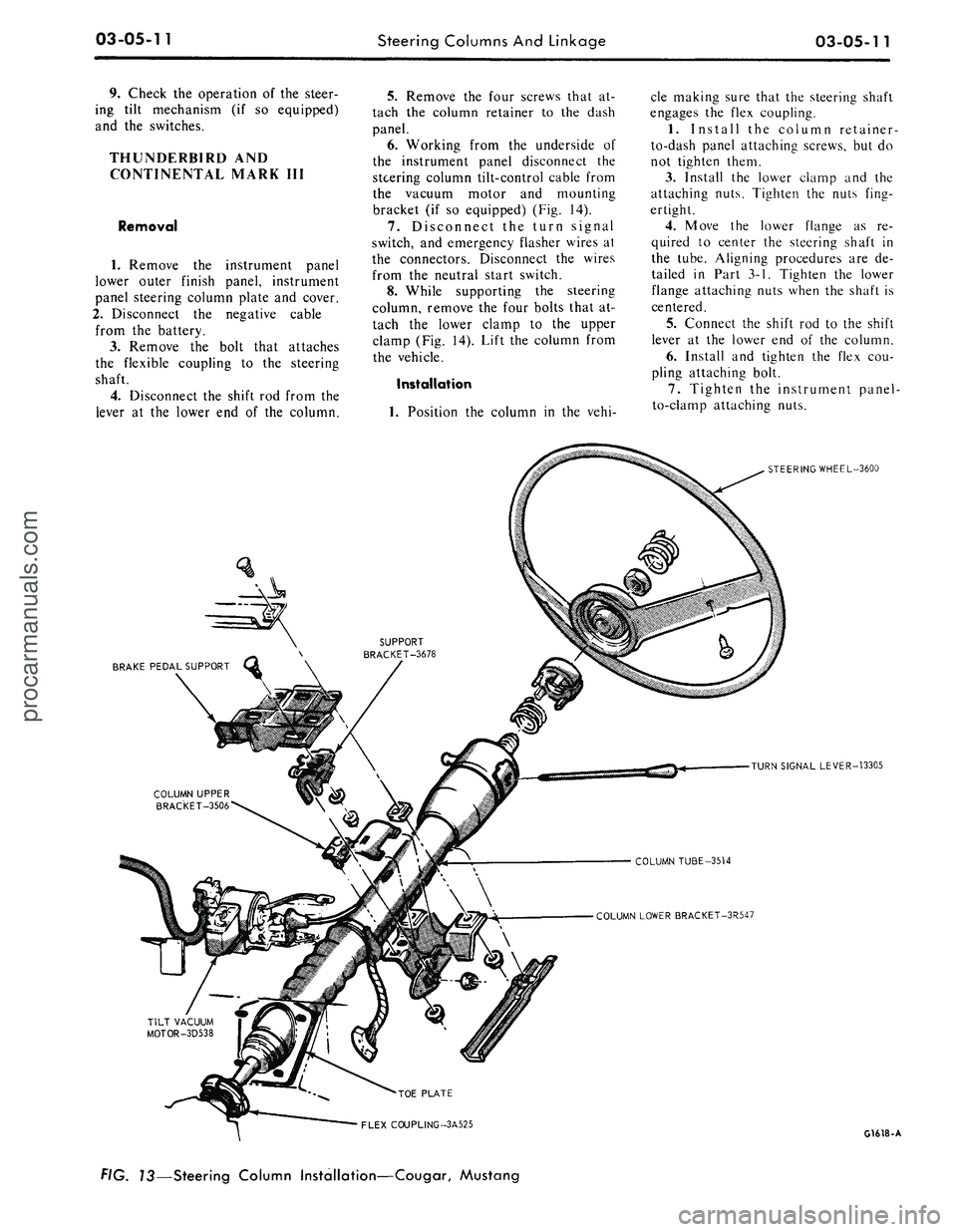
(Fig. 14).
7.
Disconnect
the
turn signal
switch,
and
emergency flasher wires
at
the connectors. Disconnect
the
wires
from
the
neutral start switch.
8. While supporting
the
steering
column, remove
the
four bolts that
at-
tach
the
lower clamp
to the
upper
clamp
(Fig. 14).
Lift
the
column from
the vehicle.
Installation
1.
Position
the
column
in the
vehi-
cle making sure that
the
steering shaft
engages
the
flex coupling.
1.
Install
the
column retainer-
to-dash panel attaching screws,
but do
not tighten them.
3.
Install
the
lower clamp
and the
attaching nuts. Tighten
the
nuts fing-
ertight.
4.
Move
the
lower flange
as re-
quired
to
center
the
steering shaft
in
the tube. Aligning procedures
are de-
tailed
in
Part
3-1.
Tighten
the
lower
flange attaching nuts when
the
shaft
is
centered.
5.
Connect
the
shift
rod to the
shift
lever
at the
lower
end of the
column.
6. Install
and
tighten
the
flex
cou-
pling attaching bolt.
7.
Tighten
the
instrument panel-
to-clamp attaching nuts.
BRAKE PEDAL SUPPORT
STEERING WHEEL-3600
TURN SIGNAL LEVER-13305
COLUMN TUBE-3514
COLUMN LOWER BRACKET-3R547
•TOE PLATE
FLEX COUPLING-3A525
G1618-A
f/G.
73—Steering Column Installation—Cougar, Mustangprocarmanuals.com
Page 127 of 413
03-05-14
Steering Columns And Linkage
03-05-14
8. Connect the turn signal and
emergency flasher switch wires at the
multiple connectors. Connect the wires
to the neutral start switch. Adjust-
ments for the neutral start switch are
detailed in Group 7 of this manual.
9. Connect the tilt-column control
cable to the release cable retainer and
vacuum motor (if so equipped). To re-
move cable slack, loosen the bracket
attaching screw and pull it slightly
toward the column, then tighten the
screw. If difficulty in adjusting this
control is experienced, the retainer
slot may be filed to gain additional
travel.
10.
Install the instrument panel
steering column plate and cover and
the instrument panel lower outer fin-
ish panel.
11.
Connect the negative cable to
the battery.
12.
Start the engine and check the
operation of the steering column and
switches.
LINCOLN CONTINENTAL
Removal
1.
Disconnect the battery.
2.
Disconnect the rod from the
lever at the lower end of the selector
tube.
Loosen the clamp bolt that locks
the flexible coupling to the steering
shaft.
3.
Working from the underside of
the steering wheel spoke, remove the
two screws that secure the crash pad.
Remove the pad. Do not use a ham-
mer or knock-off type wheel puller.
Striking the puller or shaft may cause
damage to the bearings and/or col-
lapsible column. Remove the steering
wheel as shown in Fig. 15.
4.
Remove the instrument panel
steering column finish plate.
5.
Remove the four screws that at-
tach the lower retainer to the dash
panel.
6. Disconnect the turn signal switch
and emergency flasher wires at the
connectors. Disconnect the wires from
the neutral start switch.
7.
While supporting the steering
column, remove the bolts that attach
the lower clamp to the upper bracket
(Fig. 15). Lift the column from the ve-
hicle.
Installation
1.
Position the column in the vehi-
cle,
making sure that the steering
shaft engages the flex coupling.
2.
Install the column retainer-
to-dash panel attaching screws, but do
not tighten them.
3.
Install the lower clamp and the
attaching nuts. Tighten the nuts fing-
ertight.
4.
Move the lower flange as re-
quired to center the steering shaft in
the tube. Aligning procedures are de-
tailed in Part 3-1. Tighten the lower
flange attaching nuts when the shaft is
centered.
5.
Connect the shift rod to the shift
lever at the lower end of the column.
6. Install and tighten the flex cou-
pling attaching bolt.
7.
Tighten the instrument panel-
to-clamp attaching nuts.
8. Connect the turn signal and
emergency flasher switch wirss at the
multiple connectors. Connect the wires
to the neutral start switch. Adjust-
ments for the neutral start switch are
detailed in Group 7 of this manual.
9. Install the instrument panel
steering column finish plate.
10.
Install the steering wheel and
crash pad.
MAJOR REPAIR OPERATIONS
STEERING COLUMN
SHIFT TUBE REPLACEMENT
STATIONARY COLUMN
WITH STANDARD
TRANSMISSION
Removal
1.
Working from the underside of
the steering wheel spoke, remove the
two screws that secure the crash pad.
Remove the pad. (On Continental
Mark III models, pry out the crash
pad insert and remove the two screws
that secure the crash pad. Remove the
crash pad. On models equipped with
steering wheel mounted speed con-
trols,
refer to Group 16 for removal
instructions).
2.
Remove the steering wheel from
the steering shaft with tool T67L-
3600-A (Fig. 1). Then, remove the
tool from the steering wheel. Do not
use a knock-off type steering Wheel
puller or strike the end of the steering
shaft with a hammer. Striking the
puller or shaft will damage the bear-
ing or the collapsible column.
3.
Remove the steering column
from the vehicle.
4.
Remove the selector lever from
the hub (Fig. 16).
5.
Remove the bearing upper snap
ring. It may be necessary to pull the
turn signal switch out to remove the
snap ring.
6. Remove the screws that attach
the shift tube bearing, shift arms, and
shift tube to the lower end of the
steering column.
7.
Slip the shift tube and steering
shaft from the lower end of the steer-
ing column tube. The upper bearing
has a slight press fit on the steering
shaft.
8. Remove the C-washer from the
upper end of the steering shaft, and
pull the shift tube from the steering
shaft.
9. Remove the shift tube bearing
from the lower end of the tube
Installation
1.
Position the shift tube bearing
(Fig. 16) on the tube and insert the
steering shaft in the shift tube.
2.
Install the C-washer on the
upper end of the steering shaft.
3.
Insert the shift tube and steering
shaft into the steerint column tube
and install the three attaching screws
at the lower end of the steering col-
umn tube.
4.
Position the bearing and insula-
tor on the shaft if it was disturbed
during removal. Work it down onto
the shaft as far as possible, then place
a piece of 3/4 ID x 2 1/8 inch pipe
over the end of shaft and install the
steering wheel attaching nut (Fig. 2).
5.
Tighten the nut until the bearing
is seated in the flange, then remove
the nut and pipe from the shaft.
6. Position the turn signal switch
on the flange and install the three at-
taching screws. Install the upper snap
ring.
7.
Install the selector lever and the
turn signal lever in the column.
8. Adjust and install the neutral
start switch as detailed in Group 7.
9. Install the steering column in the
vehicle.procarmanuals.com
Page 262 of 413
05-03-04
Clutch
05-03-04
bushings, position the clutch pedal and
bushings in the pedal support.
8. Install the retaining ring on the
clutch pedal shaft.
9. Position the assist spring in the
pedal support bracket and the assist
spring bracket. Rotate the assist
spring bracket clockwise until the
upper bolt holes line up and install the
bolt. Torque both the upper and lower
bolts to specification.
10.
Check the clutch pedal free
travel and adjust as required.
MUSTANG, COUGAR
1.
Disconnect the battery ground
cable.
2.
Remove the steering column.
Refer to Group 3 of this manual for
the procedure.
3.
Remove the two capscrews re-
taining the master cylinder or booster
to the dash panel. Then remove the
two capscrews retaining the pedal sup-
port bracket to the dash panel.
4.
Working inside the vehicle, dis-
connect the clutch pedal-to-equalizer
rod at the clutch pedal by removing
the retainer and bushing.
5.
Secure the clutch pedal against
the bumper stop with a small C-clamp
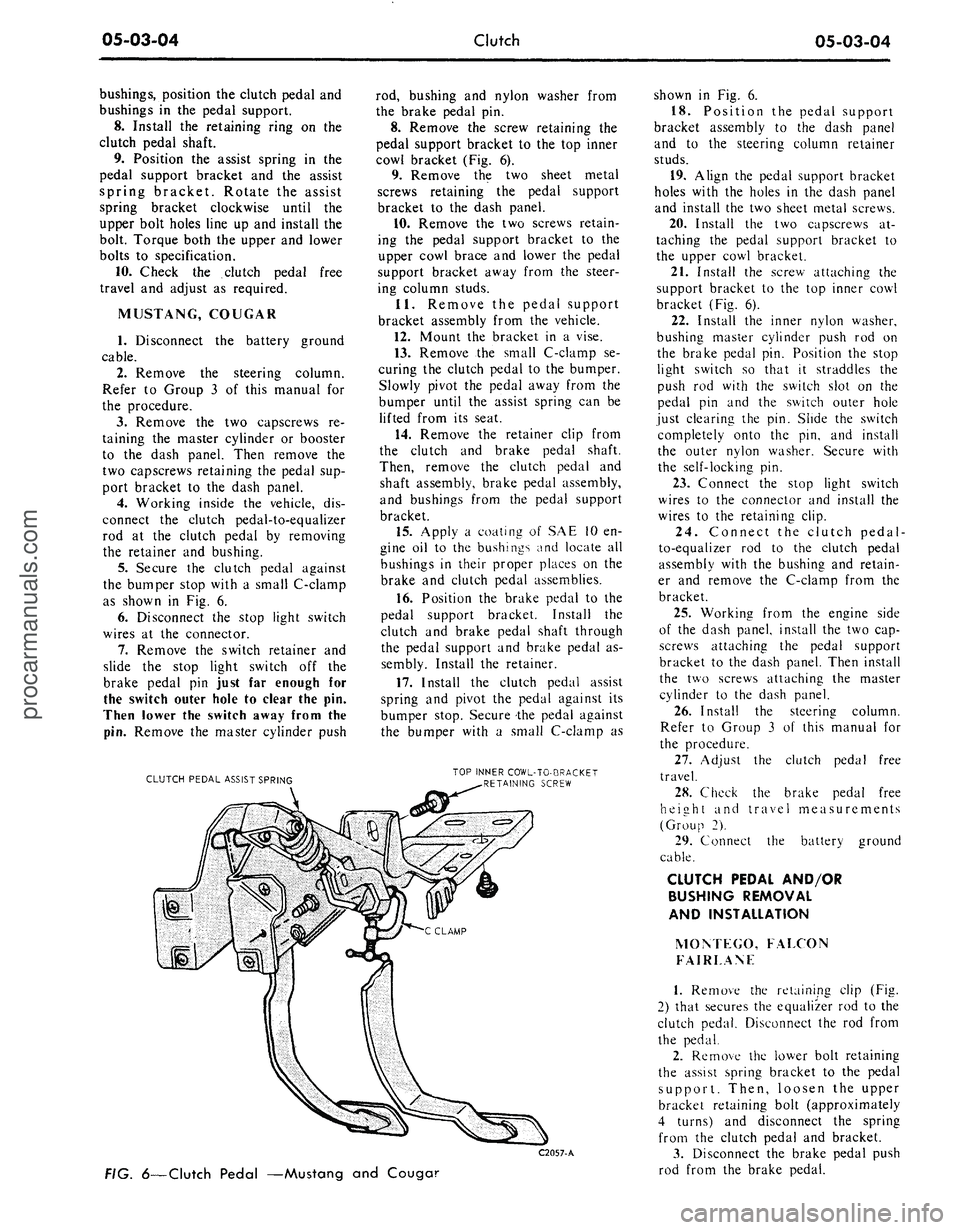
as shown in Fig. 6.
6. Disconnect the stop light switch
wires at the connector.
7.
Remove the switch retainer and
slide the stop light switch off the
brake pedal pin just far enough for
the switch outer hole to clear the pin.
Then lower the switch away from the
pin.
Remove the master cylinder push
CLUTCH PEDAL ASSIST SPRING
rod, bushing and nylon washer from
the brake pedal pin.
8. Remove the screw retaining the
pedal support bracket to the top inner
cowl bracket (Fig. 6).
9. Remove the two sheet metal
screws retaining the pedal support
bracket to the dash panel.
10.
Remove the two screws retain-
ing the pedal support bracket to the
upper cowl brace and lower the pedal
support bracket away from the steer-
ing column studs.
11.
Remove the pedal support
bracket assembly from the vehicle.
12.
Mount the bracket in a vise.
13.
Remove the small C-clamp se-
curing the clutch pedal to the bumper.
Slowly pivot the pedal away from the
bumper until the assist spring can be
lifted from its seat.
14.
Remove the retainer clip from
the clutch and brake pedal shaft.
Then, remove the clutch pedal and
shaft assembly, brake pedal assembly,
and bushings from the pedal support
bracket.
15.
Apply a coating of SAE 10 en-
gine oil to the bushings and locate all
bushings in their proper places on the
brake and clutch pedal assemblies.
16.
Position the brake pedal to the
pedal support bracket. Install the
clutch and brake pedal shaft through
the pedal support and brake pedal as-
sembly. Install the retainer.
17.
Install the clutch pedal assist
spring and pivot the pedal against its
bumper stop. Secure the pedal against
the bumper with a small C-clamp as
TOP INNER COWL-TO-BRACKET
RETAINING SCREW
C2057-A
FIG.
6—Clutch
Pedal —Mustang and Couga?
shown in Fig. 6.
18.
Position the pedal support
bracket assembly to the dash panel
and to the steering column retainer
studs.
19.
Align the pedal support bracket
holes with the holes in the dash panel
and install the two sheet metal screws.
20.
Install the two capscrews at-
taching the pedal support bracket to
the upper cowl bracket.
21.
Install the screw attaching the
support bracket to the top inner cowl
bracket (Fig. 6).
22.
Install the inner nylon washer,
bushing master cylinder push rod on
the brake pedal pin. Position the stop
light switch so that it straddles the
push rod with the switch slot on the
pedal pin and the switch outer hole
just clearing the pin. Slide the switch
completely onto the pin, and install
the outer nylon washer. Secure with
the self-locking pin.
23.
Connect the stop light switch
wires to the connector and install the
wires to the retaining clip.
24.
Connect the clutch pedal-
to-equalizer rod to the clutch pedal
assembly with the bushing and retain-
er and remove the C-clamp from the
bracket.
25.
Working from the engine side
of the dash panel, install the two cap-
screws attaching the pedal support
bracket to the dash panel. Then install
the two screws attaching the master
cylinder to the dash panel.
26.
Install the steering column.
Refer to Group 3 of this manual for
the procedure.
27.
Adjust the clutch pedal free
travel.
28.
Check the brake pedal free
height and travel measurements
(Group 2).
29.
Connect the battery ground
cable.
CLUTCH PEDAL AND/OR
BUSHING REMOVAL
AND INSTALLATION
MOM EGO, FALCON
FAIRLANF
1.
Remove the retaining clip (Fig.
2) that secures the equalizer rod to the
clutch pedal. Disconnect the rod from
the pedal.
2.
Remove the lower bolt retaining
the assist spring bracket to the pedal
support. Then, loosen the upper
bracket retaining bolt (approximately
4 turns) and disconnect the spring
from the clutch pedal and bracket.
3.
Disconnect the brake pedal push
rod from the brake pedal.procarmanuals.com