ECU FORD MUSTANG 1969 Volume One Chassis
[x] Cancel search | Manufacturer: FORD, Model Year: 1969, Model line: MUSTANG, Model: FORD MUSTANG 1969Pages: 413, PDF Size: 75.81 MB
Page 98 of 413
03-02-22
Suspension
03-02-22
washer and the nut on the upper stud
from the upper side of the spring
upper seat. Torque the nut to specifi-
cations.
6. Extend the shock absorber and
locate the lower stud in the hole in
mounting bracket on the rear axle
housing. Install a new self-locking at-
taching nut and torque to specifica-
tion.
MUSTANG AND COUGAR
Removal
1.
Disconnect the shock absorber
from the spring clip plate (Fig. 30).
2.
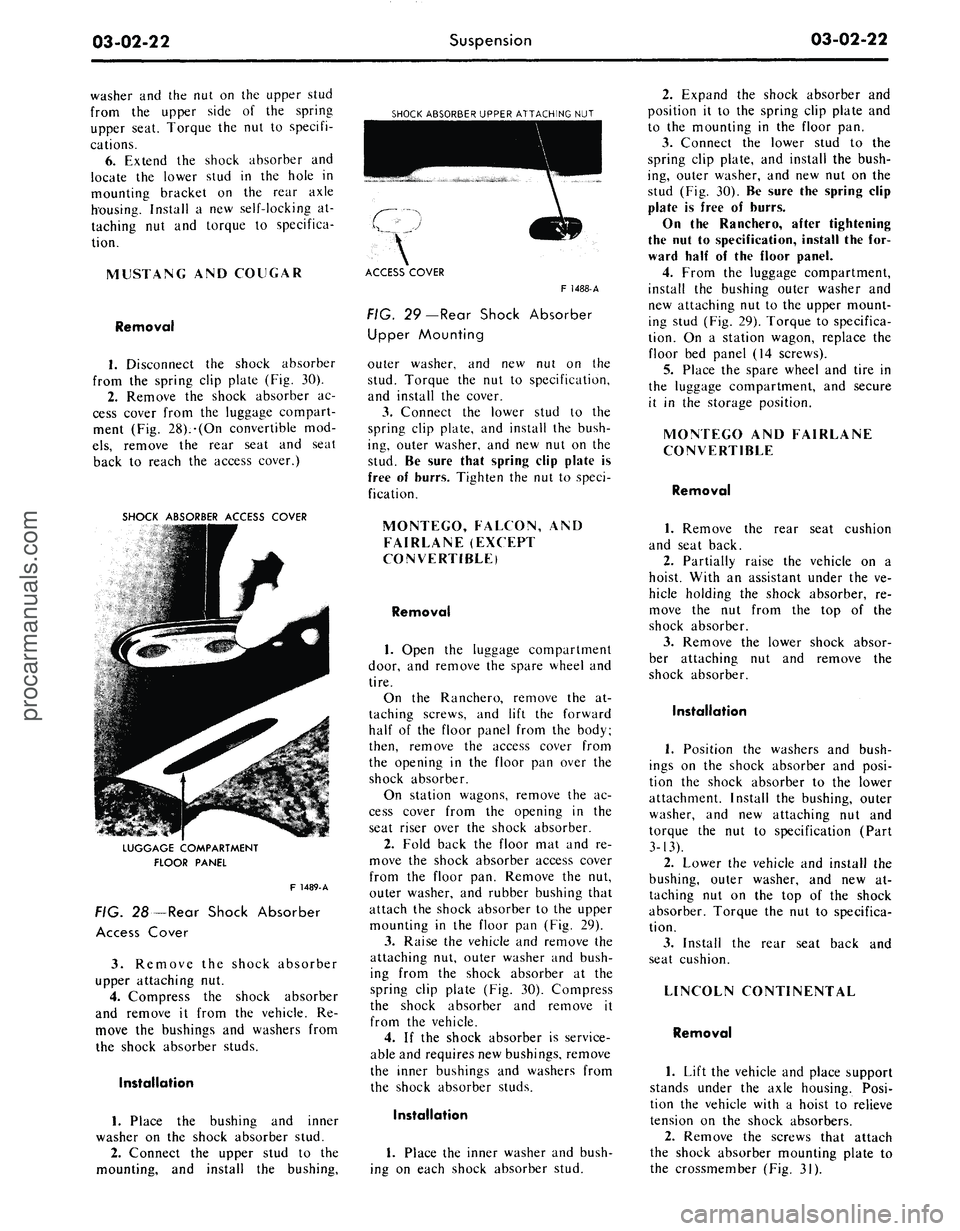
Remove the shock absorber ac-
cess cover from the luggage compart-
ment (Fig. 28).-(On convertible mod-
els,
remove the rear seat and seat
back to reach the access cover.)
SHOCK ABSORBER ACCESS COVER
SHOCK ABSORBER UPPER ATTACHING NUT
LUGGAGE COMPARTMENT
FLOOR PANEL
F 1489-A
FIG. 28—Rear Shock Absorber
Access Cover
3.
Remove the shock absorber
upper attaching nut.
4.
Compress the shock absorber
and remove it from the vehicle. Re-
move the bushings and washers from
the shock absorber studs.
Installation
1.
Place the bushing and inner
washer on the shock absorber stud.
2.
Connect the upper stud to the
mounting, and install the bushing,
ACCESS COVER
F 1488-A
FIG. 29—Rear Shock Absorber
Upper Mounting
outer washer, and new nut on the
stud. Torque the nut to specification,
and install the cover.
3.
Connect the lower stud to the
spring clip plate, and install the bush-
ing, outer washer, and new nut on the
stud. Be sure that spring clip plate is
free of burrs. Tighten the nut to speci-
fication.
MONTEGO, FALCON, AND
FAIRLANE (EXCEPT
CONVERTIBLE)
Removal
1.
Open the luggage compartment
door, and remove the spare wheel and
tire.
On the Ranchero, remove the at-
taching screws, and lift the forward
half of the floor panel from the body;
then, remove the access cover from
the opening in the floor pan over the
shock absorber.
On station wagons, remove the ac-
cess cover from the opening in the
seat riser over the shock absorber.
2.
Fold back the floor mat and re-
move the shock absorber access cover
from the floor pan. Remove the nut,
outer washer, and rubber bushing that
attach the shock absorber to the upper
mounting in the floor pan (Fig. 29).
3.
Raise the vehicle and remove the
attaching nut, outer washer and bush-
ing from the shock absorber at the
spring clip plate (Fig. 30). Compress
the shock absorber and remove it
from the vehicle.
4.
If the shock absorber is service-
able and requires new bushings, remove
the inner bushings and washers from
the shock absorber studs.
Installation
1.
Place the inner washer and bush-
ing on each shock absorber stud.
2.
Expand the shock absorber and
position it to the spring clip plate and
to the mounting in the floor pan.
3.
Connect the lower stud to the
spring clip plate, and install the bush-
ing, outer washer, and new nut on the
stud (Fig. 30). Be sure the spring clip
plate is free of burrs.
On the Ranchero, after tightening
the nut to specification, install the for-
ward half of the floor panel.
4.
From the luggage compartment,
install the bushing outer washer and
new attaching nut to the upper mount-
ing stud (Fig. 29). Torque to specifica-
tion. On a station wagon, replace the
floor bed panel (14 screws).
5.
Place the spare wheel and tire in
the luggage compartment, and secure
it in the storage position.
MONTEGO AND FAIRLANE
CONVERTIBLE
Removal
1.
Remove the rear seat cushion
and seat back.
2.
Partially raise the vehicle on a
hoist. With an assistant under the ve-
hicle holding the shock absorber, re-
move the nut from the top of the
shock absorber.
3.
Remove the lower shock absor-
ber attaching nut and remove the
shock absorber.
Installation
1.
Position the washers and bush-
ings on the shock absorber and posi-
tion the shock absorber to the lower
attachment. Install the bushing, outer
washer, and new attaching nut and
torque the nut to specification (Part
3-13).
2.
Lower the vehicle and install the
bushing, outer washer, and new at-
taching nut on the top of the shock
absorber. Torque the nut to specifica-
tion.
3.
Install the rear seat back and
seat cushion.
LINCOLN CONTINENTAL
Removal
1.
Lift the vehicle and place support
stands under the axle housing. Posi-
tion the vehicle with a hoist to relieve
tension on the shock absorbers.
2.
Remove the screws that attach
the shock absorber mounting plate to
the crossmember (Fig. 31).procarmanuals.com
Page 101 of 413
03-02-25
Suspension
03-02-25
pivot bolts and nuts to specification
(Part 3-13).
5.
Connect the track bar to the
frame bracket with a new nut and
bolt. Torque the nut to specification
(Part 3-13).
6. Remove the alignment spacers
and jack stands and lower the vehicle.
REAR SUSPENSION-
UPPER ARM
FORD, MERCURY,
METEOR, THUNDERBIRD,
CONTINENTAL MARK HI
Removal
1.
Raise the vehicle and support the
frame side rails with jack stands.
2.
Support the rear axle, then dis
connect the track bar from the frame
bracket.
3.
Lower the axle and support axle
under differential pinion nose, as well
as under axle.
4.
Remove the nut, bolt and two
washers that attach the upper arm to
the axle housing. Disconnect the arm
from the housing.
5.
Remove the nut and bolt that se-
cures the upper arm to the crossmem-
ber and remove the arm.
Installation
1.
Hold the upper arm in place on
the crossmember and install a new at-
taching bolt, a new lockwasher and a
new nut. Do not tighten the nut at this
time.
2.
Secure the upper arm to the axle
housing with a new attaching bolt,
two washers and a new nut. Do not
tighten the nut at this time.
3.
Install alignment spacers be-
tween the rear axle housing and
frame.
4.
Connect the track bar to the
frame bracket with a new nut and
bolt. Torque the nut to specifications.
5.
Torque the upper arm front nut
to specification. Remove the align-
ment spacers and the jack stands.
6. Adjust the pinion angle and tor-
que the rear nut to specification.
7.
Lower the vehicle.
TRACK BAR
FORD, MERCURY,
METEOR, THUNDERBIRD,
CONTINENTAL MARK HI
1.
Raise the vehicle on an axle con-
tact hoist.
FRONT PIVOT BOLT
LOWER ARM
REAR PIVOT BOLT NUT
F1439-A
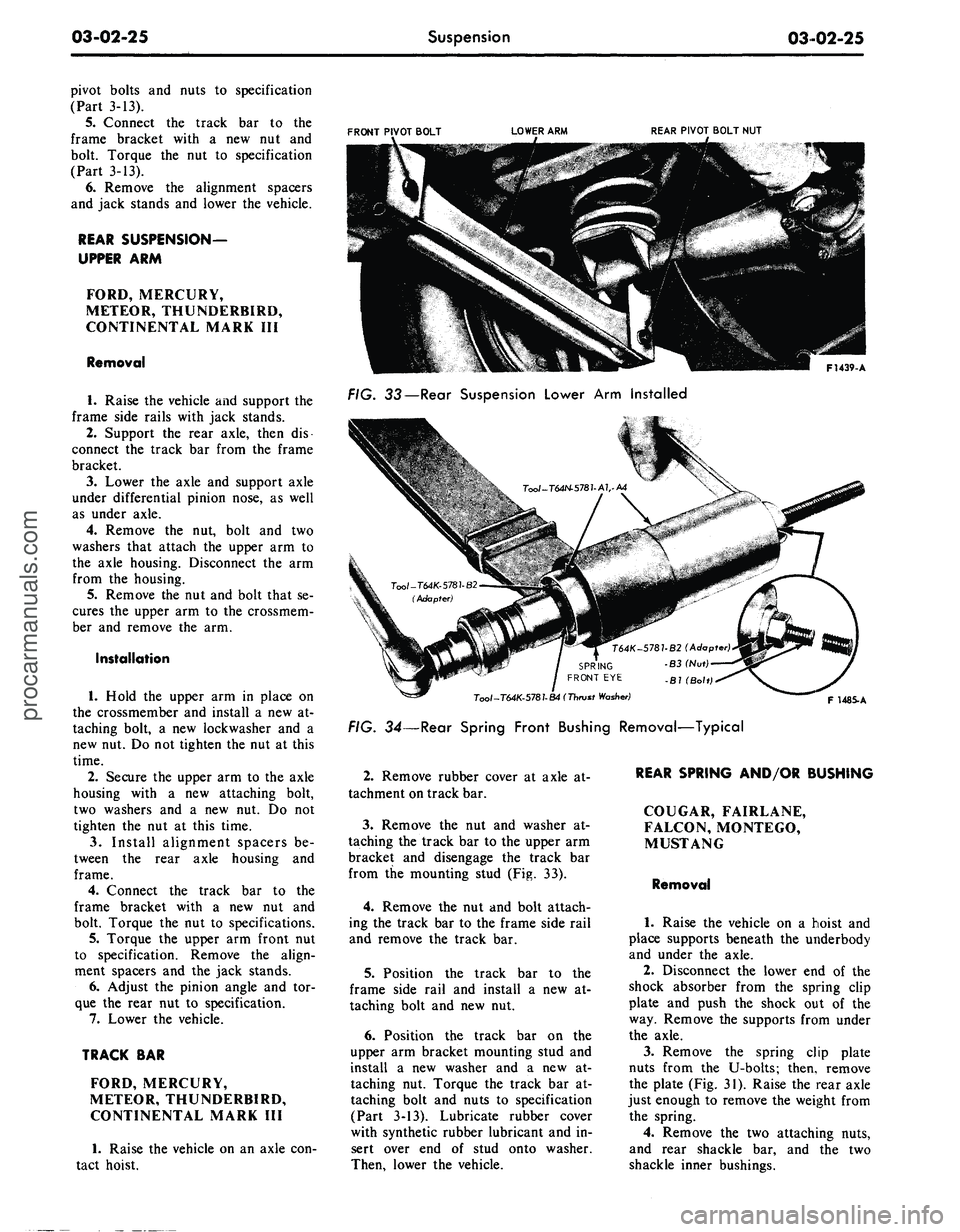
FIG. 33—Rear Suspension Lower Arm Installed
Tool-T64K-5781-B4 (Thrust
Washer)
FIG. 34—Rear Spring Front Bushing Removal—Typical
F 1485. A
2.
Remove rubber cover at axle at-
tachment on track bar.
3.
Remove the nut and washer at-
taching the track bar to the upper arm
bracket and disengage the track bar
from the mounting stud (Fig. 33).
4.
Remove the nut and bolt attach-
ing the track bar to the frame side rail
and remove the track bar.
5.
Position the track bar to the
frame side rail and install a new at-
taching bolt and new nut.
6. Position the track bar on the
upper arm bracket mounting stud and
install a new washer and a new at-
taching nut. Torque the track bar at-
taching bolt and nuts to specification
(Part 3-13). Lubricate rubber cover
with synthetic rubber lubricant and in-
sert over end of stud onto washer.
Then, lower the vehicle.
REAR SPRING AND/OR BUSHING
COUGAR, FAIRLANE,
FALCON, MONTEGO,
MUSTANG
Removal
1.
Raise the vehicle on a hoist and
place supports beneath the underbody
and under the axle.
2.
Disconnect the lower end of the
shock absorber from the spring clip
plate and push the shock out of the
way. Remove the supports from under
the axle.
3.
Remove the spring clip plate
nuts from the U-bolts; then, remove
the plate (Fig. 31). Raise the rear axle
just enough to remove the weight from
the spring.
4.
Remove the two attaching nuts,
and rear shackle bar, and the two
shackle inner bushings.procarmanuals.com
Page 113 of 413
03-04-04 Automatic Air Leveling System — Lincoln Continental 03-04-04
the cover and secure it with a snap down. Move the overtravel lever up vehicle. If delay is not within 4-18 sec-
ring, using snap ring pliers. and down for one minute to vent air onds, recheck the fluid level in the
8. Place the control valve vertically from the delay piston pin chamber. delay chamber. If the level is within
in a vise with the delay chamber Perform a time delay check off the specifications, replace the valve.
9. Install the height control valve.procarmanuals.com
Page 115 of 413
03-05-02
Steering Columns
And
Linkage
03-05-02
which also will shear away during
im-
pact.
TILT STEERING COLUMNS
The steering column
is of the col-
lapsible type
to
lessen
the
possibility
of injury
to the
driver
of the
vehicle
should
he
become involved
in an
acci-
dent.
The
lower
end of the
steering
column tube
at the
bellows area will
collapse approximately
six
inches
upon
a
hard impact.
The shift tube
and the
steering shaft
are provided with plastic dowels
and
will shear
and
allow them
to
collapse
in proportion
to the
outer tube upon
impact.
Once
the
steering column
has
been
collapsed,
a
complete
new
column
must
be
installed.
The tilt column features nine driv-
ing positions (four
up and
four down
from
a
center position).
The
.column
also features
a
turn signal switch with
a lane-changer position turn indicating
position
and
emergency warning flash-
er control.
TILT-AWAY STEERING COLUMNS
The tilt-away steering column
fea-
tures nine driving positions (four
up
and four down from
a
center position)
and
a
tilt-away position that
is
auto-
matically accomplished
on
Mustang
and Cougar models when
the
ignition
key
is
turned
to the
OFF
position
and
the left door
is
opened.
On
Thunder-
bird models,
the
tilt-away occurs when
the shift lever
is
placed
in
PARK
and
the driverns door
is
opened.
The steering column
is of the col-
lapsible type
to
lessen
the
possibility
of injury
to the
driver
of the
vehicle
should
he
become involved
in an
acci-
dent.
The
lower
end of the
steering
column tube
at the
bellows area will
collapse approximately
six
inches
upon
a
hard impact.
The shift tube
and the
steering shaft
are provided with plastic dowels
and
will shear
and
allow them
to
collapse
in proportion
to the
outer tube upon
impact.
Once
the
steering column
has
been
collapsed,
a
complete
new
column
must
be
installed along with mounting
brackets which will also shear away
during impact.
IN-VEHICLE ADJUSTMENTS
AND
REPAIRS
STEERING WHEEL SPOKE
POSITION ADJUSTMENT
When
the
steering gear
is on the
high point,
the
front wheels should
be
in
the
straight-ahead position
and the
steering wheel spokes should
be in
their normal position with
the
Pitman
arm pointing directly forward.
If the
spokes
are not in
their normal posi-
tion, they
can be
adjusted without
dis-
turbing
the
toe-in adjustment (Part
3-1).
STEERING WHEEL
REPLACEMENT
1.
Disconnect
the
negative cable
from
the
battery.
2.
Working from
the
underside
of
the steering wheel spoke, remove
the
crash
pad
attaching screws. Lift
the
crash
pad
from
the
wheel.
(On
Conti-
nental Mark
III
models,
pry out the
crash
pad
insert
and
remove
the two
screws that secure
the
crash
pad. Re-
move
the
crash
pad. On
models
equipped with steering wheel mounted
speed controls, refer
to
Group
16 for
removal instructions). Remove
the
horn ring
(if so
equipped)
by
turning
it counterclockwise.
3.
Remove
the
steering wheel
nut,
and then remove
the
steering wheel
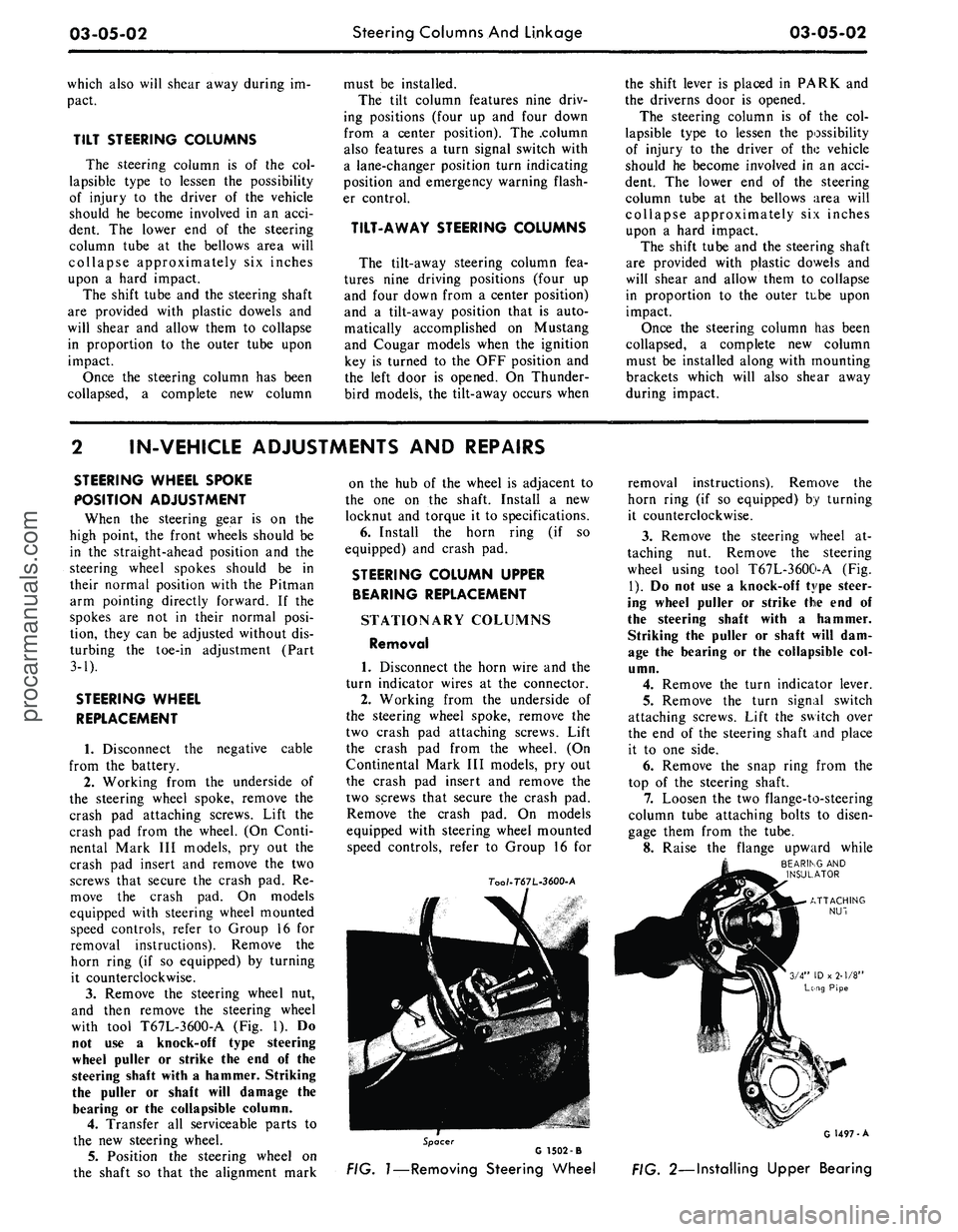
with tool T67L-3600-A
(Fig. 1). Do
not
use a
knock-off type steering
wheel puller
or
strike
the end of the
steering shaft with
a
hammer. Striking
the puller
or
shaft will damage
the
bearing
or the
collapsible column.
4.
Transfer
all
serviceable parts
to
the
new
steering wheel.
5.
Position
the
steering wheel
on
the shaft
so
that
the
alignment mark
on
the hub of the
wheel
is
adjacent
to
the
one on the
shaft. Install
a new
locknut
and
torque
it to
specifications.
6. Install
the
horn ring
(if so
equipped)
and
crash
pad.
STEERING COLUMN UPPER
BEARING REPLACEMENT
STATIONARY COLUMNS
Removal
1. Disconnect
the
horn wire
and the
turn indicator wires
at the
connector.
2.
Working from
the
underside
of
the steering wheel spoke, remove
the
two crash
pad
attaching screws. Lift
the crash
pad
from
the
wheel.
(On
Continental Mark
III
models,
pry out
the crash
pad
insert
and
remove
the
two screws that secure
the
crash
pad.
Remove
the
crash
pad. On
models
equipped with steering wheel mounted
speed controls, refer
to
Group
16 for
7oo/-T67L-3600-A
removal instructions). Remove
the
horn ring
(if so
equipped)
by
turning
it counterclockwise.
3.
Remove
the
steering wheel
at-
taching
nut.
Remove
the
steering
wheel using tool T67L-3600-A
(Fig.
1).
Do not use a
knock-off type steer-
ing wheel puller
or
strike
the end of
the steering shaft with
a
hammer.
Striking
the
puller
or
shaft will
dam-
age
the
bearing
or the
collapsible
col-
umn.
4.
Remove
the
turn indicator lever.
5.
Remove
the
turn signal switch
attaching screws. Lift
the
switch over
the
end of the
steering shaft
and
place
it
to one
side.
6. Remove
the
snap ring from
the
top
of the
steering shaft.
7.
Loosen
the two
flange-to-steering
column tube attaching bolts
to
disen-
gage them from
the
tube.
8. Raise
the
flange upward while
BEARING
AND
INSULATOR
Spacer
G 1502 -B
FIG.
1—Removing
Steering Wheel
G 1497-A
FIG. 2—Installing Upper Bearingprocarmanuals.com
Page 116 of 413
03-05-03
Steering Columns And Linkage
03-05-03
tapping the steering shaft lightly with
a plastic hammer to free the bearing
and flange from the shaft.
9. Remove the bearing and insula-
tor from the flange.
Installation
1.
Install flange bolts (square head)
in flange if they were removed. Turn
the nuts onto the bolts one complete
turn only.
2.
Position the flange onto the
steering column tube.
3.
Engage the two flange bolt heads
with the square holes in the column
tube,
then tighten the two attaching
nuts to specification.
4.
Position the bearing and insula-
tor on the shaft. Work it down onto
the shaft as far as possible, then place
a piece of 3/4 ID x 2 1/8 inch pipe
over the end of the shaft and install
the steering wheel attaching nut (Fig.
2).
5.
Tighten the nut until the bearing
is seated in the flange, then remove
the nut and pipe from the shaft.
6. Position the turn signal switch
on the flange and install the three at-
taching screws.
7.
Make certain that the wheels are
in the straight ahead position. Place
the steering wheel on the steering
shaft with the spokes in the horizontal
position. Install and torque the attach-
ing nut to specification.
8. Secure the crash pad to the
steering wheel with the two attaching
screws.
9. Connect the horn and turn signal
wires.
10.
Install the turn signal lever.
TILT WHEEL COLUMNS
Removal
1.
Disconnect the negative cable
from the battery.
2.
Remove the steering wheel with
tool T67L-3600-A (Fig. 1). Install the
spring, shipping spacer (3/4 x 1 1/8-
inch pipe) and a steering wheel attach-
ing nut on the shaft. Do not use a
knock-off type steering wheel puller or
strike the end of the steering shaft
with a hammer. Striking the puller or
shaft will damage the bearing or the
collapsible column.
3.
Remove the turn indicator lever
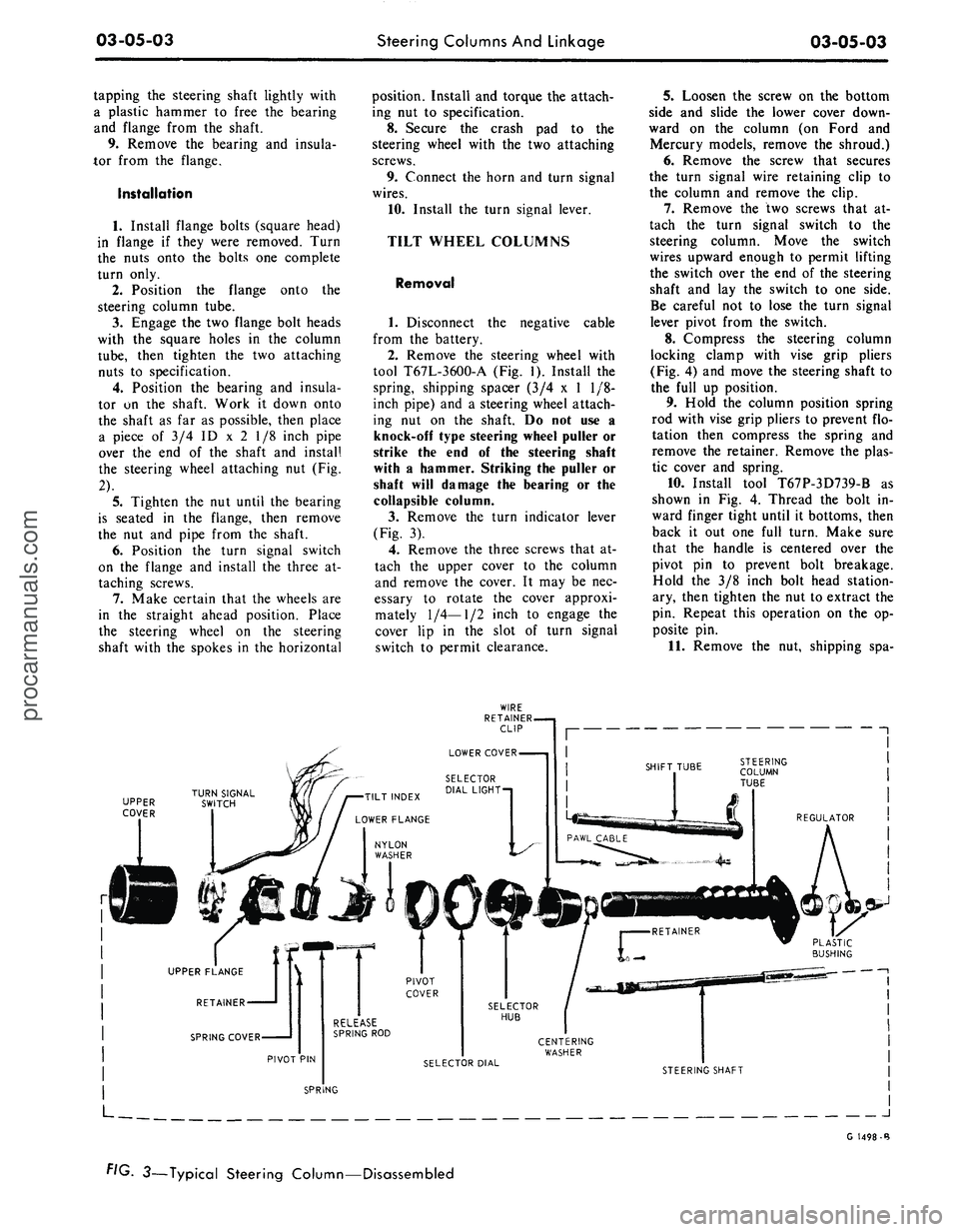
(Fig. 3).
4.
Remove the three screws that at-
tach the upper cover to the column
and remove the cover. It may be nec-
essary to rotate the cover approxi-
mately
1/4—1/2
inch to engage the
cover lip in the slot of turn signal
switch to permit clearance.
5.
Loosen the screw on the bottom
side and slide the lower cover down-
ward on the column (on Ford and
Mercury models, remove the shroud.)
6. Remove the screw that secures
the turn signal wire retaining clip to
the column and remove the clip.
7.
Remove the two screws that at-
tach the turn signal switch to the
steering column. Move the switch
wires upward enough to permit lifting
the switch over the end of the steering
shaft and lay the switch to one side.
Be careful not to lose the turn signal
lever pivot from the switch.
8. Compress the steering column
locking clamp with vise grip pliers
(Fig. 4) and move the steering shaft to
the full up position.
9. Hold the column position spring
rod with vise grip pliers to prevent flo-
tation then compress the spring and
remove the retainer. Remove the plas-
tic cover and spring.
10.
Install tool T67P-3D739-B as
shown in Fig. 4. Thread the bolt in-
ward finger tight until it bottoms, then
back it out one full turn. Make sure
that the handle is centered over the
pivot pin to prevent bolt breakage.
Hold the 3/8 inch bolt head station-
ary, then tighten the nut to extract the
pin. Repeat this operation on the op-
posite pin.
11.
Remove the nut, shipping spa-
UPPER
COVER
J
G 1498-B
FIG. 3—Typical Steering Column—Disassembledprocarmanuals.com
Page 118 of 413
03-05-05
Steering Columns And Linkage
03-05-05
TILT-AWAY STEERING
COLUMN REPAIRS
VACUUM RELEASE VALVE-
COUGAR AND MUSTANG
Removal
1.
Working from the underside of
the instrument panel disconnect the
hose from the valve.
2.
Disconnect the wire from the
connector on the valve and the con-
nector from the relay.
3.
Remove the bracket-
to-instrument panel attaching bolt and
let the bracket swing down.
4.
Remove the two screws that se-
cure the valve to the mounting bracket
and remove the valve.
Installation
1.
Secure the valve to the mounting
bracket with the two attaching screws.
2.
Position the bracket to the in-
strument panel and install the attach-
ing bolt.
3.
Connect the wire to the terminal
on the valve.
4.
Connect the hose from the vacu-
um motor to the horizontal connector
on the valve and the hose from the
reservoir to the vertical connector.
VACUUM RELEASE VALVE—
THUNDERBIRD
Removal
1.
Remove the lower finish panel.
2.
Disconnect the vacuum hose
from the vacuum release valve.
3.
Disconnect the vacuum release
valve electrical leads at the connector.
4.
Loosen the two attaching screws
holding the bracket to the dash. Lift
up the bracket to clear the screws and
swing it down below the panel.
5.
Remove the screws attaching the
valve to the panel and remove the
valve.
Installation
1.
Position the vacuum release
valve on the bracket.
2.
Install the two attaching screws
and swing the bracket up and over the
screws. Tighten the screws.
3.
Connect the electrical leads to
the wiring harness.
4.
Connect the hose from the vacu-
um dash panel junction block to the
connector on the vacuum release valve
that points downward and forward.
Connect the hose from the vacuum
motor to the other connector on the
release valve.
5.
Install the lower finish panel.
VACUUM MOTOR-
COUGAR AND MUSTANG
Removal
1.
Working from the underside of
the instrument panel, disconnect the
hose to the valve and the wires to the
relay and valve.
2.
Remove the bracket-
to-instrument panel attaching bolt and
swing the bracket downward.
3.
Remove the clevis pin that se-
cures the cable to the vacuum motor
rod.
4.
Disconnect the starter safety
switch wire at the connector.
5.
Remove the two motor-
to-bracket attaching screws and re-
move the motor, disconnecting the
hose to the solenoid.
Installation
1.
Position the motor on the
mounting bracket and the attaching
screws.
2.
Connect the control cable to the
vacuum motor rod with the clevis pin.
3.
Position the bracket to the in-
strument panel and install the attach-
ing bolt. Make all electrical and vacu-
um connections.
4.
Readjust the cable bracket to as-
sure full engagement of the locking
pawl when in driving position.
5.
Connect the hose to the vacuum
motor.
VACUUM MOTOR—
THUNDERBIRD
Removal
1.
Remove the lower finish panel.
2.
Disconnect the vacuum hose
from the solenoid valve. Disconnect
the electrical lead.
3.
Loosen the screws that attach
the bracket to the dash and lift the
bracket up; then, swing it down.
4.
Remove the clevis pin holding
the motor to the cable.
5.
Remove the two attaching
screws, then lift the motor from the
bracket.
C-CLAMP
PIVOT PIN
G 1462-A
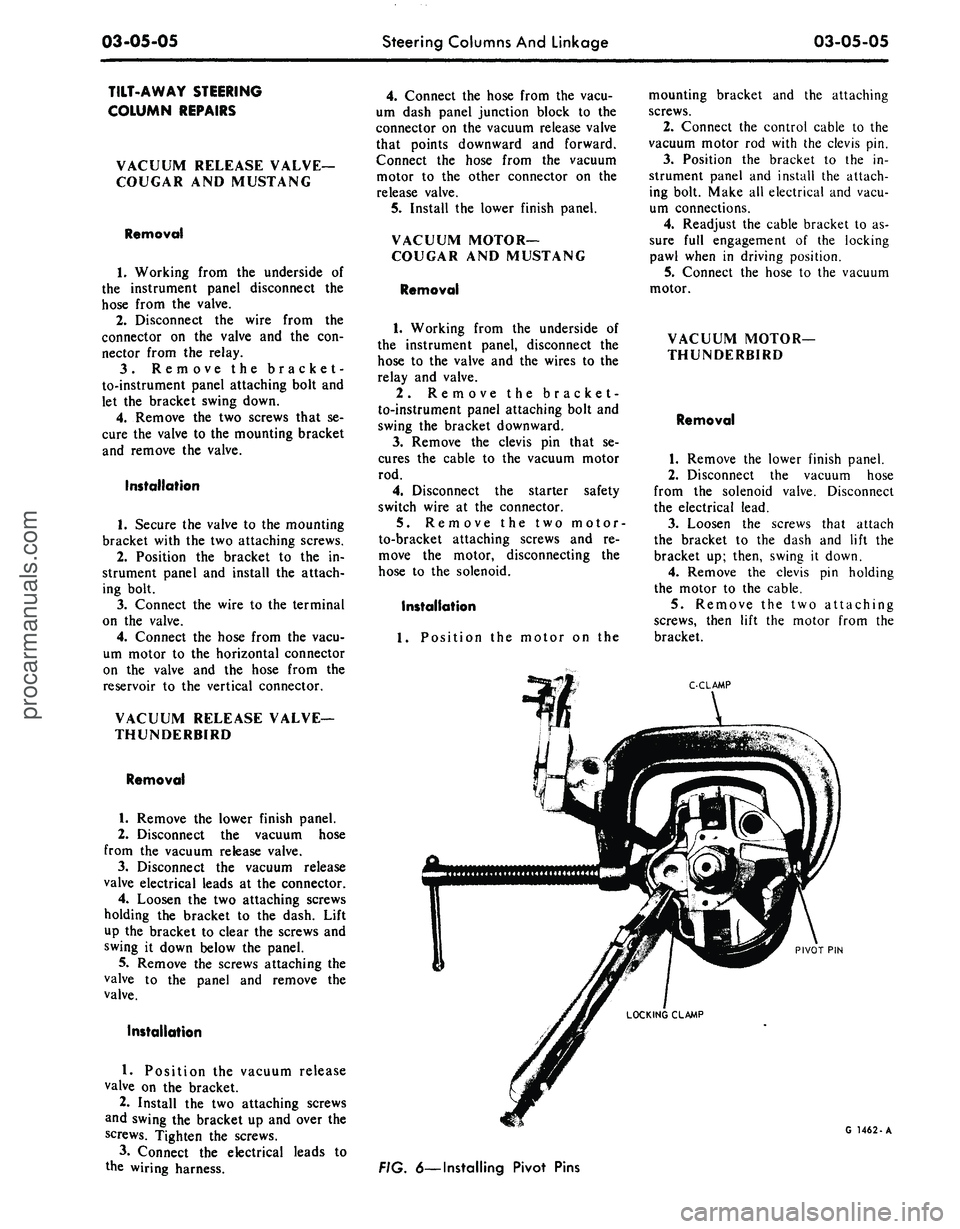
FIG. 6—Installing Pivot Pinsprocarmanuals.com
Page 121 of 413
03-05-08
Steering Columns And Linkage
03-05-08
tube.
In some instances the column
will shift into proper alignment when
the toe plate attaching nuts are loos-
ened. (Alignment is acceptable if a
.010 inch feeler blade can be passed
freely, completely around the area be-
tween the outer diameter of the steer-
ing shaft and the shift tube.) if the
misalignment condition can be attrib-
uted to this area, file or ream the dash
panel holes for greater clearance. If
the alignment is maintained after the
toe plate nuts and toe plate to column
clamp bolt and nut are torqued to the
8-12 ft-lb specification, no further ad-
justment is necessary.
4.
Remove instrument panel lower
trim panel. Vehicles equipped with a
combination radio stereo tape player
will require removal of the radio and
tape player assembly in order to gain
access to the upper R.H. steering col-
umn support bracket bolt.
5.
Loosen the seven bolts at the
steering column support bracket and
brake pedal support bracket.
6. Install a 3/16 inch diameter rod
spacer in the flex coupling to assure
proper clearance between upper and
lower steering shaft.
7.
Raise the vehicle, remove the
transmission splash shield, and visual-
ly align the column to center the
steering shaft in the column. Tighten
two toe plate attaching nuts sufficient-
ly to hold the column alignment (two
persons may be required for this oper-
ation).
8. Lower the vehicle.
9. Check the clearance between the
steering column support bracket and
the instrument panel bracket. It may
be necessary to add shims (Part Num-
ber MK-3054-A .060 inch thick, or
C3AZ-3054-A, .113 inch thick) be-
tween the support bracket and the in-
strument panel bracket to prevent
movement of the column when the
support bracket bolts are tightened.
10.
Loosen the two toe plate at-
taching nuts previously tightened. Re-
check steering column alignment. In
some instances it may be necessary to
enlarge the holes in the dash panel in
order to obtain proper column align-
ment.
11.
With the column properly al-
igned, torque the four toe plate at-
taching nuts to 4-9 ft-lbs.
12.
Torque the toe plate to steering
column clamp bolt to 3-5 ft-lbs.
13.
Recheck steering shaft to shift
tube alignment. A 0.10 inch feeler
blade should pass freely, completely
around the area between the outer di-
ameter of the steering shaft and shift-
er tube.
14.
Raise the vehicle.
15.
Adjust transmission shift link-
age.
16.
Install transmission splash
shield.
17.
Lower the vehicle.
18.
Install the radio stereo tape
player if so equipped.
19.
Install instrument panel lower
trim panel.
20.
Connect the battery.
REMOVAL AND INSTALLATION
STEERING COLUMN
FORD, MERCURY, METEOR
Removal
1.
Disconnect the battery cable
from the negative post.
2.
Disconnect the turn signal switch
wires at the connector.
3.
Disconnect the neutral start
switch and back-up light switch wires
from the switches.
4.
Disconnect the transmission con-
trol rod(s) from the lever(s) at the
lower end of the column.
5.
Remove the bolt that secures the
flex coupling to the steering gear.
6. Remove the nuts that secure the
column retainer and seal at the toe
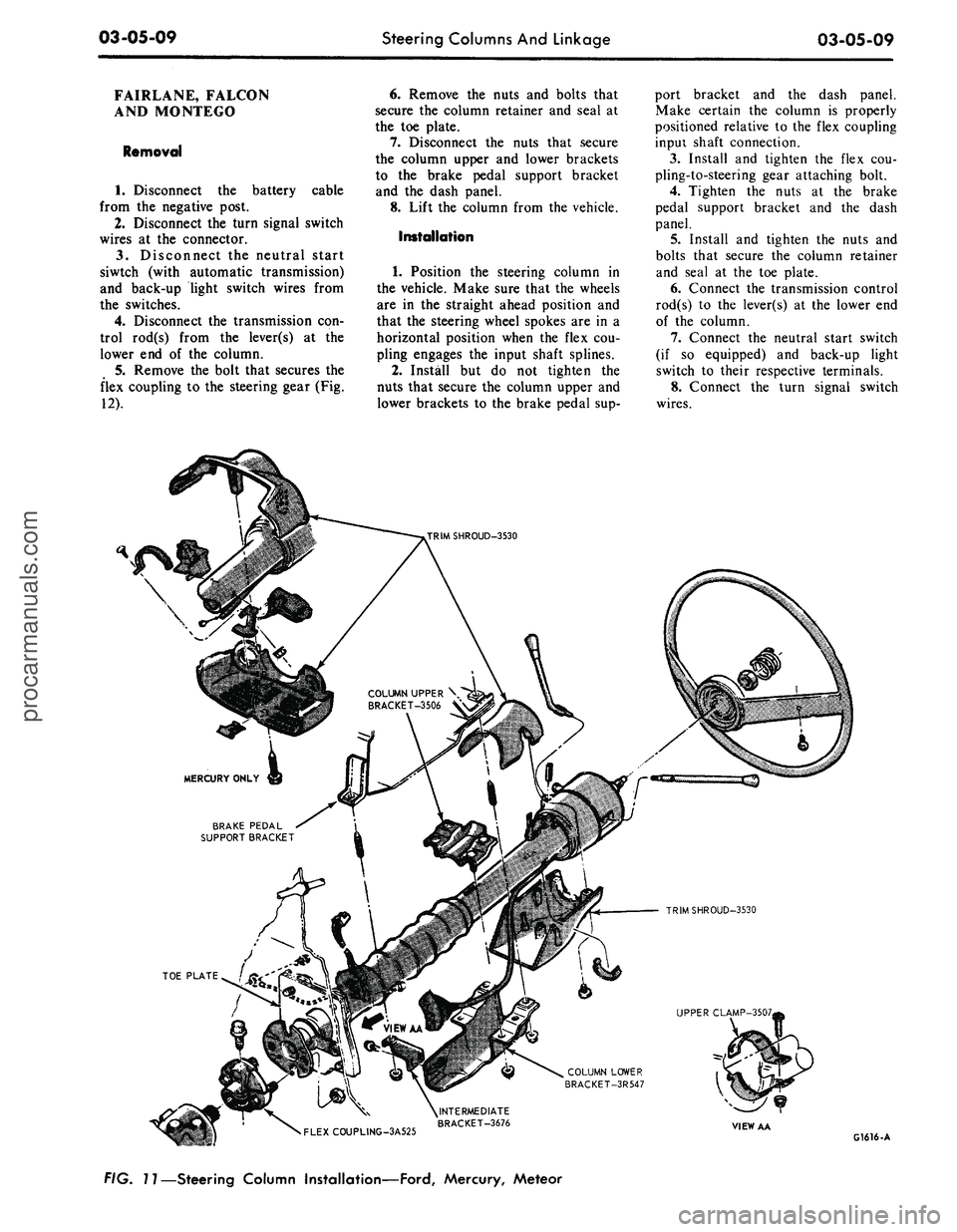
plate (Fig. 11).
7.
Ford, Meteor: Remove the two
screws that secure the lower trim
shroud to the upper trim shroud. Re-
move the two shrouds.
Mercury: Remove the two screws
that secure the lower trim shroud to
the upper trim shroud. Remove the
top shroud Disconnect the ignition
switch light bulb. Remove the ignition
and light switch bezels and spring clip
and remove the lower shroud. Discon-
nect the light switch electrical connec-
tor block.
8. Remove the two screws that se-
cure the intermediate bracket to the
column lower bracket.
9. While supporting the steering
column, remove the two nuts that se-
cure the column lower bracket to the
instrument panel. Remove the brack-
ets.
10.
Lift the steering column and
wheel from the vehicle.
Installation
1.
Position the steering column in
the vehicle. Index the block tooth on
the steering gear shaft with the corre-
sponding slot on the flex coupling. In-
stall and tighten the flex coupling-
to-steering gear attaching bolt.
2.
Place the column upper bracket
and column lower bracket in position
on the column and install but do not
tighten the four attaching nuts.
3.
Install and tighten the two nuts
that secure the column lower bracket
to the instrument panel. Make certain
the column is properly positioned rela-
tive to the flex coupling input shaft
connection.
4.
Install and tighten the screws
that secure the intermediate bracket to
the column lower bracket.
5.
Tighten the four attaching nuts
at the upper and lower brackets and
the two nuts at the upper bracket to
instrument panel. The dial pointer (if
so equipped) should be adjusted to
coincide with the selector lever.
6. Install and tighten the nuts and
bolts that secure the column retainer
and seal at the toe plate. Make sure
the steering shaft is centered in the
column before tightening the nuts.
7.
Ford, Meteor: Install and tighten
the two screws that secure the lower
trim shroud to the upper trim shroud.
Mercury: Connect the light switch
harness block. Install the ignition and
light switch bezels. Connect the igni-
tion switch light bulb. Install the top
shroud and the two screws that secure
the lower trim shroud to the upper
shroud.
8. Connect the transmission control
rod(s) to the lever(s) at the lower end
of the column.
9. Connect the neutral start switch
and back-up light switch to their re-
spective terminals.
10.
Connect the turn signal switch
wires.
11.
Connect the negative battery
cable to the battery.
12.
Check the operation of the
steering tilt mechanism if so equipped
and the switches.procarmanuals.com
Page 122 of 413
03-05-09
Steering Columns And Linkage
03-05-09
FAIRLANE, FALCON
AND MONTEGO
Removal
1.
Disconnect the battery cable
from the negative post.
2.
Disconnect the turn signal switch
wires at the connector.
3.
Disconnect the neutral start
siwtch (with automatic transmission)
and back-up light switch wires from
the switches.
4.
Disconnect the transmission con-
trol rod(s) from the lever(s) at the
lower end of the column.
5.
Remove the bolt that secures the
flex coupling to the steering gear (Fig.
12).
6. Remove the nuts and bolts that
secure the column retainer and seal at
the toe plate.
7.
Disconnect the nuts that secure
the column upper and lower brackets
to the brake pedal support bracket
and the dash panel.
8. Lift the column from the vehicle.
Installation
1.
Position the steering column in
the vehicle. Make sure that the wheels
are in the straight ahead position and
that the steering wheel spokes are in a
horizontal position when the flex cou-
pling engages the input shaft splines.
2.
Install but do not tighten the
nuts that secure the column upper and
lower brackets to the brake pedal sup-
port bracket and the dash panel.
Make certain the column is properly
positioned relative to the flex coupling
inpui shaft connection.
3.
Install and tighten the flex cou-
pling-to-steering gear attaching bolt.
4.
Tighten the nuts at the brake
pedal support bracket and the dash
panel.
5.
Install and tighten the nuts and
bolts that secure the column retainer
and seal at the toe plate.
6. Connect the transmission control
rod(s) to the lever(s) at the lower end
of the column.
7.
Connect the neutral start switch
(if so equipped) and back-up light
switch to their respective terminals.
8. Connect the turn signal switch
wires.
COLUMN UPPER \
BRACKET-3506 V
BRAKE PEDAL
SUPPORT BRACKET
TRIMSHROUD-3530
UPPER CLAMP-3507,
COLUMN LOWER
BRACKET-3R547
•
FLEXCOUPLING-3A525
^INTERMEDIATE
BRACKET-3676
VIEW AA
G1616-A
FIG. 11—Steering Column Installation—Ford, Mercury, Meteorprocarmanuals.com
Page 123 of 413
03-05-10
Steering Columns And Linkage
03-05-10
9. Connect the battery cable to the
negative post.
10.
Check the operation of the
switches.
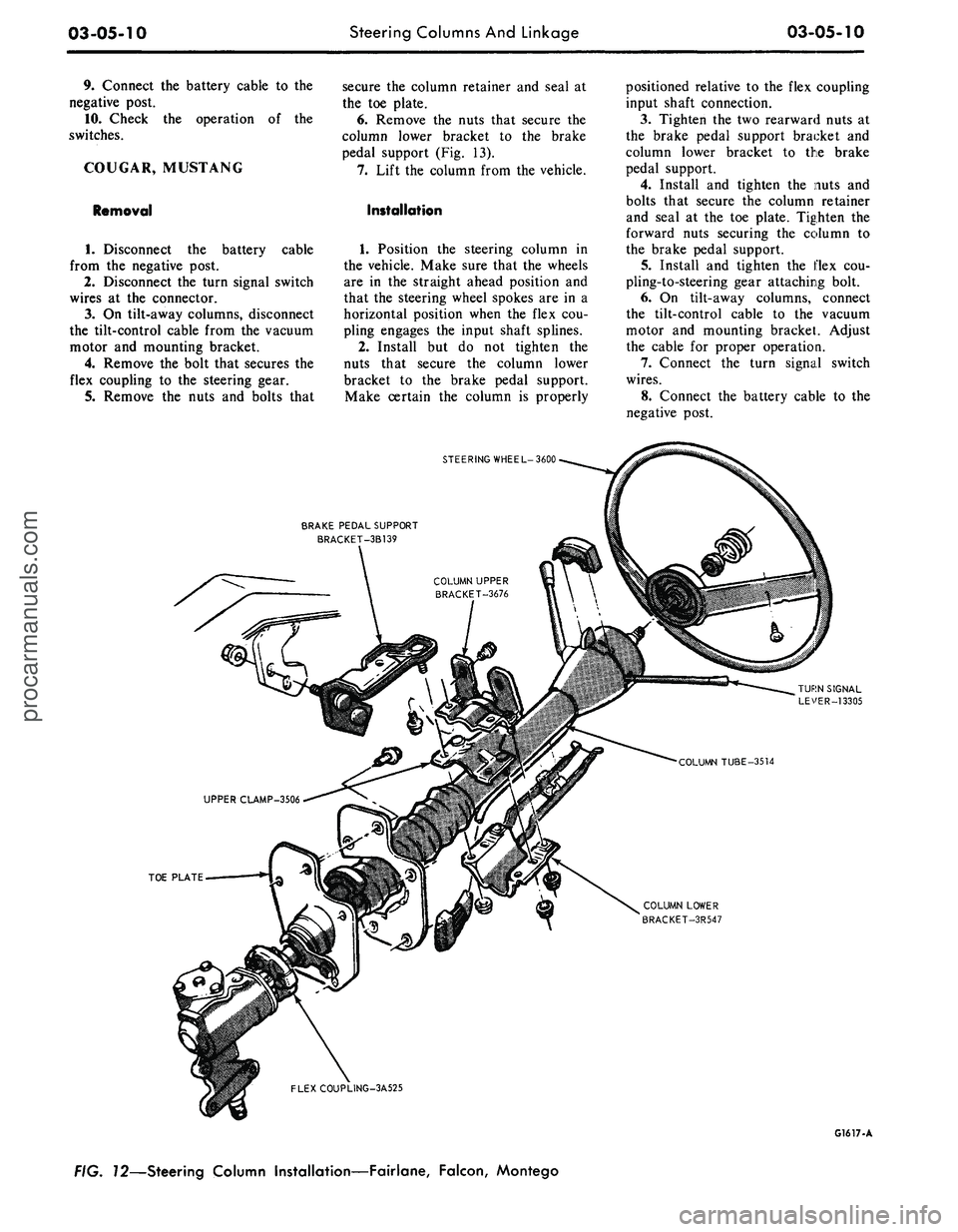
COUGAR, MUSTANG
Removal
cable
1.
Disconnect the battery
from the negative post.
2.
Disconnect the turn signal switch
wires at the connector.
3.
On tilt-away columns, disconnect
the tilt-control cable from the vacuum
motor and mounting bracket.
4.
Remove the bolt that secures the
flex coupling to the steering gear.
5.
Remove the nuts and bolts that
secure the column retainer and seal at
the toe plate.
6. Remove the nuts that secure the
column lower bracket to the brake
pedal support (Fig. 13).
7.
Lift the column from the vehicle.
Installation
1.
Position the steering column in
the vehicle. Make sure that the wheels
are in the straight ahead position and
that the steering wheel spokes are in a
horizontal position when the flex cou-
pling engages the input shaft splines.
2.
Install but do not tighten the
nuts that secure the column lower
bracket to the brake pedal support.
Make certain the column is properly
positioned relative to the flex coupling
input shaft connection.
3.
Tighten the two rearward nuts at
the brake pedal support bracket and
column lower bracket to the brake
pedal support.
4.
Install and tighten the nuts and
bolts that secure the column retainer
and seal at the toe plate. Tighten the
forward nuts securing the column to
the brake pedal support.
5.
Install and tighten the flex cou-
pling-to-steering gear attaching bolt.
6. On tilt-away columns, connect
the tilt-control cable to the vacuum
motor and mounting bracket. Adjust
the cable for proper operation.
7.
Connect the turn signal switch
wires.
8. Connect the battery cable to the
negative post.
STEERING WHEEL-3600
BRAKE PEDAL SUPPORT
BRACKET-3B139
TOE PLATE
COLUMN LOWER
BRACKET-3R547
FLEXCOUPLING-3A525
G1617-A
FIG. 72—Steering Column Installation—Fairlane, Falcon, Montegoprocarmanuals.com
Page 127 of 413
03-05-14
Steering Columns And Linkage
03-05-14
8. Connect the turn signal and
emergency flasher switch wires at the
multiple connectors. Connect the wires
to the neutral start switch. Adjust-
ments for the neutral start switch are
detailed in Group 7 of this manual.
9. Connect the tilt-column control
cable to the release cable retainer and
vacuum motor (if so equipped). To re-
move cable slack, loosen the bracket
attaching screw and pull it slightly
toward the column, then tighten the
screw. If difficulty in adjusting this
control is experienced, the retainer
slot may be filed to gain additional
travel.
10.
Install the instrument panel
steering column plate and cover and
the instrument panel lower outer fin-
ish panel.
11.
Connect the negative cable to
the battery.
12.
Start the engine and check the
operation of the steering column and
switches.
LINCOLN CONTINENTAL
Removal
1.
Disconnect the battery.
2.
Disconnect the rod from the
lever at the lower end of the selector
tube.
Loosen the clamp bolt that locks
the flexible coupling to the steering
shaft.
3.
Working from the underside of
the steering wheel spoke, remove the
two screws that secure the crash pad.
Remove the pad. Do not use a ham-
mer or knock-off type wheel puller.
Striking the puller or shaft may cause
damage to the bearings and/or col-
lapsible column. Remove the steering
wheel as shown in Fig. 15.
4.
Remove the instrument panel
steering column finish plate.
5.
Remove the four screws that at-
tach the lower retainer to the dash
panel.
6. Disconnect the turn signal switch
and emergency flasher wires at the
connectors. Disconnect the wires from
the neutral start switch.
7.
While supporting the steering
column, remove the bolts that attach
the lower clamp to the upper bracket
(Fig. 15). Lift the column from the ve-
hicle.
Installation
1.
Position the column in the vehi-
cle,
making sure that the steering
shaft engages the flex coupling.
2.
Install the column retainer-
to-dash panel attaching screws, but do
not tighten them.
3.
Install the lower clamp and the
attaching nuts. Tighten the nuts fing-
ertight.
4.
Move the lower flange as re-
quired to center the steering shaft in
the tube. Aligning procedures are de-
tailed in Part 3-1. Tighten the lower
flange attaching nuts when the shaft is
centered.
5.
Connect the shift rod to the shift
lever at the lower end of the column.
6. Install and tighten the flex cou-
pling attaching bolt.
7.
Tighten the instrument panel-
to-clamp attaching nuts.
8. Connect the turn signal and
emergency flasher switch wirss at the
multiple connectors. Connect the wires
to the neutral start switch. Adjust-
ments for the neutral start switch are
detailed in Group 7 of this manual.
9. Install the instrument panel
steering column finish plate.
10.
Install the steering wheel and
crash pad.
MAJOR REPAIR OPERATIONS
STEERING COLUMN
SHIFT TUBE REPLACEMENT
STATIONARY COLUMN
WITH STANDARD
TRANSMISSION
Removal
1.
Working from the underside of
the steering wheel spoke, remove the
two screws that secure the crash pad.
Remove the pad. (On Continental
Mark III models, pry out the crash
pad insert and remove the two screws
that secure the crash pad. Remove the
crash pad. On models equipped with
steering wheel mounted speed con-
trols,
refer to Group 16 for removal
instructions).
2.
Remove the steering wheel from
the steering shaft with tool T67L-
3600-A (Fig. 1). Then, remove the
tool from the steering wheel. Do not
use a knock-off type steering Wheel
puller or strike the end of the steering
shaft with a hammer. Striking the
puller or shaft will damage the bear-
ing or the collapsible column.
3.
Remove the steering column
from the vehicle.
4.
Remove the selector lever from
the hub (Fig. 16).
5.
Remove the bearing upper snap
ring. It may be necessary to pull the
turn signal switch out to remove the
snap ring.
6. Remove the screws that attach
the shift tube bearing, shift arms, and
shift tube to the lower end of the
steering column.
7.
Slip the shift tube and steering
shaft from the lower end of the steer-
ing column tube. The upper bearing
has a slight press fit on the steering
shaft.
8. Remove the C-washer from the
upper end of the steering shaft, and
pull the shift tube from the steering
shaft.
9. Remove the shift tube bearing
from the lower end of the tube
Installation
1.
Position the shift tube bearing
(Fig. 16) on the tube and insert the
steering shaft in the shift tube.
2.
Install the C-washer on the
upper end of the steering shaft.
3.
Insert the shift tube and steering
shaft into the steerint column tube
and install the three attaching screws
at the lower end of the steering col-
umn tube.
4.
Position the bearing and insula-
tor on the shaft if it was disturbed
during removal. Work it down onto
the shaft as far as possible, then place
a piece of 3/4 ID x 2 1/8 inch pipe
over the end of shaft and install the
steering wheel attaching nut (Fig. 2).
5.
Tighten the nut until the bearing
is seated in the flange, then remove
the nut and pipe from the shaft.
6. Position the turn signal switch
on the flange and install the three at-
taching screws. Install the upper snap
ring.
7.
Install the selector lever and the
turn signal lever in the column.
8. Adjust and install the neutral
start switch as detailed in Group 7.
9. Install the steering column in the
vehicle.procarmanuals.com