brake light FORD MUSTANG 2015 6.G User Guide
[x] Cancel search | Manufacturer: FORD, Model Year: 2015, Model line: MUSTANG, Model: FORD MUSTANG 2015 6.GPages: 441, PDF Size: 6.98 MB
Page 159 of 441
Disengaging the System
Press the brake pedal, press CNCL, or
press the clutch pedal (if equipped). The
last set speed displays in grey but will not
erase.
Overriding the System WARNING
Whenever the driver is overriding the
system by pressing the accelerator
pedal, the system will not
automatically apply the brakes to maintain
separation from any vehicle ahead. You can override the set speed and gap
distance by pressing the accelerator pedal.
When you override the system,
the green indicator light
illuminates and the lead vehicle
graphic does not show in the
information display.
The system will resume operation when
you release the accelerator pedal. The
vehicle speed will decrease to the set
speed, or a lower speed if following a
slower vehicle.
Changing the Set Speed
• Accelerate or brake to the desired
speed, then press and release
SET+.
• Press and hold SET+ or SET- until the
desired set speed shows on the
information display. The vehicle speed
will gradually change to the selected
speed.
• Press and release
SET+ or SET-. The
set speed will change in approximately
1 mph (2 km/h) increments.
The system may apply the brakes to slow
the vehicle to the new set speed. The set
speed will display continuously in the
information display while the system is
active. Resuming the Set Speed
Note:
Only use resume if you are aware of
the set speed and intend to return to it.
Press and release
RES. The vehicle will
return to the previously set speed. The set
speed will display continuously in the
information display while the system is
active.
Automatic Cancellation
The system is not functional at vehicle
speeds below 12 mph (20 km/h). An
audible alarm will sound and the
automatic braking releases if the vehicle
drops below this speed. The system will
cancel at low speeds if you switch off
electronic stability control.
Hilly Condition Usage
Note: An audible alarm will sound and the
system will shut down if it is applying brakes
for an extended period of time. This allows
the brakes to cool down. The system will
function normally again when the brakes
have cooled down.
You should select a lower gear position
when the system is active in situations
such as prolonged downhill driving on
steep grades, for example in mountainous
areas. The system needs additional engine
braking in these situations to reduce the
load on the vehicle ’s regular brake system
to prevent them from overheating.
Switching the System Off
Note: The set speed memory erases when
you switch off the system.
Press and release
OFF or turn off the
ignition.
156
Mustang (), enUSA, First Printing Cruise ControlE144529
Page 161 of 441
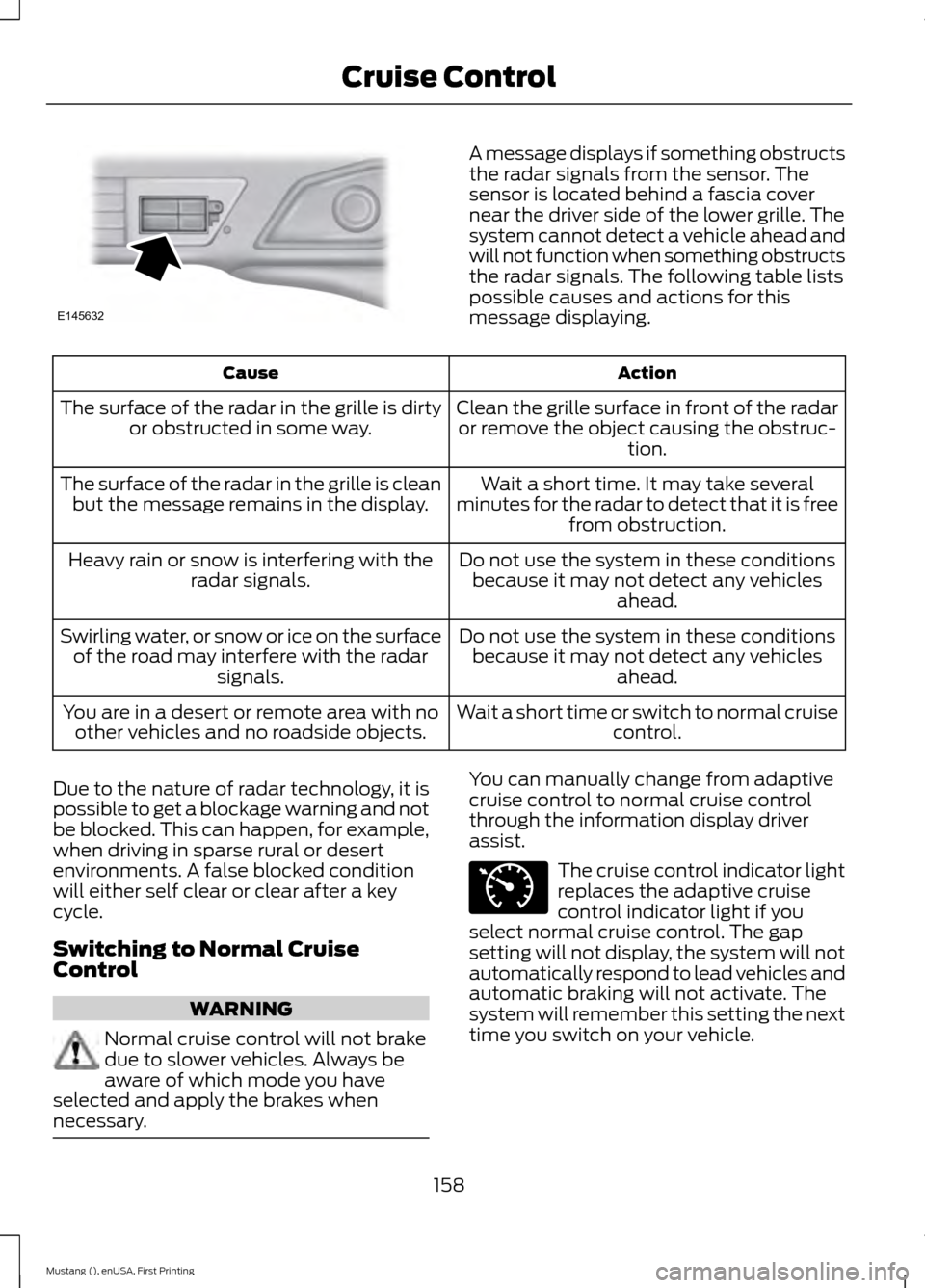
A message displays if something obstructs
the radar signals from the sensor. The
sensor is located behind a fascia cover
near the driver side of the lower grille. The
system cannot detect a vehicle ahead and
will not function when something obstructs
the radar signals. The following table lists
possible causes and actions for this
message displaying.
Action
Cause
Clean the grille surface in front of the radaror remove the object causing the obstruc- tion.
The surface of the radar in the grille is dirty
or obstructed in some way.
Wait a short time. It may take several
minutes for the radar to detect that it is free from obstruction.
The surface of the radar in the grille is clean
but the message remains in the display.
Do not use the system in these conditionsbecause it may not detect any vehicles ahead.
Heavy rain or snow is interfering with the
radar signals.
Do not use the system in these conditionsbecause it may not detect any vehicles ahead.
Swirling water, or snow or ice on the surface
of the road may interfere with the radar signals.
Wait a short time or switch to normal cruisecontrol.
You are in a desert or remote area with no
other vehicles and no roadside objects.
Due to the nature of radar technology, it is
possible to get a blockage warning and not
be blocked. This can happen, for example,
when driving in sparse rural or desert
environments. A false blocked condition
will either self clear or clear after a key
cycle.
Switching to Normal Cruise
Control WARNING
Normal cruise control will not brake
due to slower vehicles. Always be
aware of which mode you have
selected and apply the brakes when
necessary. You can manually change from adaptive
cruise control to normal cruise control
through the information display driver
assist.
The cruise control indicator light
replaces the adaptive cruise
control indicator light if you
select normal cruise control. The gap
setting will not display, the system will not
automatically respond to lead vehicles and
automatic braking will not activate. The
system will remember this setting the next
time you switch on your vehicle.
158
Mustang (), enUSA, First Printing Cruise ControlE145632 E71340
Page 167 of 441
Adaptive Learning
The electronic power steering system
adaptive learning helps correct road
irregularities and improves overall handling
and steering feel. It communicates with
the brake system to help operate
advanced stability control and accident
avoidance systems. Additionally, whenever
the battery is disconnected or a new
battery installed, you must drive your
vehicle a short distance before the system
relearns the strategy and reactivates all
systems.
COLLISION WARNING SYSTEM
(If Equipped)
PRINCIPLE OF OPERATION
WARNINGS
This system is designed to be a
supplementary driving aid. It is not
intended to replace the driver
’s
attention, and judgment, or the need to
apply the brakes. This system does NOT
activate the brakes automatically. Failure
to press the brake pedal to activate the
brakes may result in a collision. The collision warning system with
brake support cannot help prevent
all collisions. Do not rely on this
system to replace driver judgment and the
need to maintain distance and speed. Note:
The system does not detect, warn or
respond to potential collisions with vehicles
to the rear or sides of the vehicle.
Note: The collision warning system is active
at speeds above approximately 5 mph
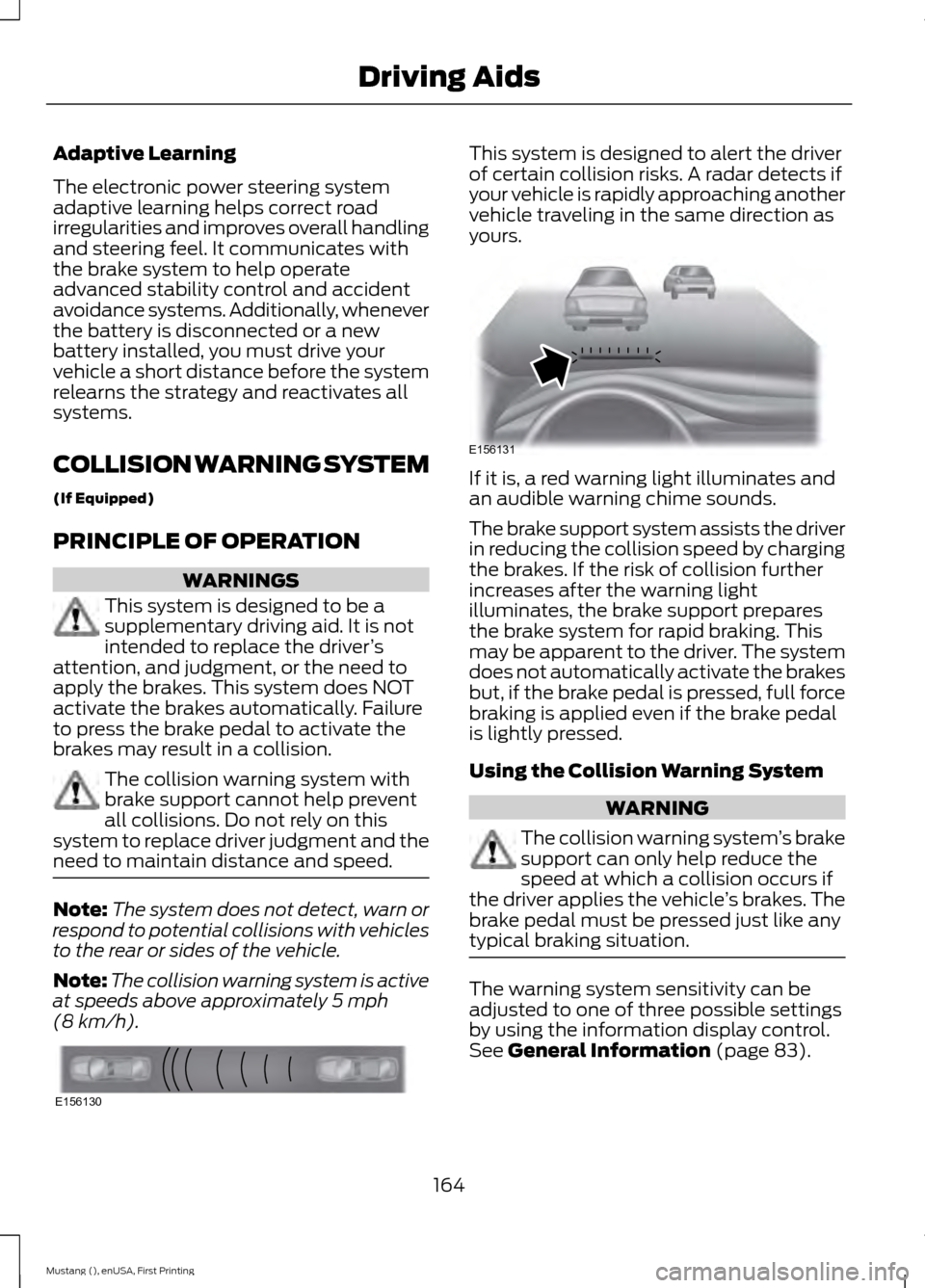
(8 km/h). This system is designed to alert the driver
of certain collision risks. A radar detects if
your vehicle is rapidly approaching another
vehicle traveling in the same direction as
yours.
If it is, a red warning light illuminates and
an audible warning chime sounds.
The brake support system assists the driver
in reducing the collision speed by charging
the brakes. If the risk of collision further
increases after the warning light
illuminates, the brake support prepares
the brake system for rapid braking. This
may be apparent to the driver. The system
does not automatically activate the brakes
but, if the brake pedal is pressed, full force
braking is applied even if the brake pedal
is lightly pressed.
Using the Collision Warning System
WARNING
The collision warning system
’s brake
support can only help reduce the
speed at which a collision occurs if
the driver applies the vehicle ’s brakes. The
brake pedal must be pressed just like any
typical braking situation. The warning system sensitivity can be
adjusted to one of three possible settings
by using the information display control.
See
General Information (page 83).
164
Mustang (), enUSA, First Printing Driving AidsE156130 E156131
Page 182 of 441
TOWING A TRAILER
WARNINGS
Do not exceed the GVWR or
the GAWR specified on the
certification label. Towing trailers beyond the
maximum recommended
gross trailer weight exceeds the
limit of your vehicle and could
result in engine damage,
transmission damage, structural
damage, loss of vehicle control,
vehicle rollover and personal
injury. Note:
There may be electrical
items such as fuses or relays that
can affect trailer towing operation.
See Fuses (page 202).
The load capacity of your vehicle
is designated by weight not
volume. You may not necessarily
be able to use all available space
when loading your vehicle or
trailer.
Towing a trailer places extra load
on the engine, transmission, axle,
brakes, tires, and suspension.
Inspect these components before,
during and after towing. Load Placement
To help minimize how trailer
movement affects the vehicle
when driving:
•
Load the heaviest items closest
to the trailer floor.
• Load the heaviest items in the
center of the left and right side
trailer tires.
• Load the heaviest items above
the trailer axles or just slightly
forward toward the trailer
tongue. Do not allow the final
trailer tongue weight to go
above or below 10-15% of the
loaded trailer weight.
• Select a tow bar with the
correct rise or drop. When both
the loaded vehicle and trailer
are connected, the trailer frame
should be level, or slightly
angled down toward the
vehicle, when viewed from the
side.
When driving with a trailer or
payload, a slight takeoff vibration
or shudder may be present due to
the increased payload weight.
Additional information regarding
proper trailer loading and setting
your vehicle up for towing is
located in the Load Carrying
chapter. See
Load Limit (page
168). You can also find the
information in the RV & Trailer
Towing Guide, available at an
authorized dealer.
179
Mustang (), enUSA, First Printing Towing
Page 184 of 441
ESSENTIAL TOWING CHECKS
Follow these guidelines for safe towing:
•
Do not tow a trailer until you drive your
vehicle at least 1000 miles (1600
kilometers).
• Consult your local motor vehicle laws
for towing a trailer.
• See the instructions included with
towing accessories for the proper
installation and adjustment
specifications.
• Service your vehicle more frequently if
you tow a trailer. See your scheduled
maintenance information.
• If you use a rental trailer, follow the
instructions the rental agency gives
you.
You can find information on load
specification terms found on the tire label
and Safety Compliance label as well as
instructions on calculating your vehicle's
load in the Load Carrying chapter. See
Load Limit (page 168).
Remember to account for the trailer
tongue weight as part of your vehicle load
when calculating the total vehicle weight.
Hitches
Do not use a hitch that either clamps onto
the bumper or attaches to the axle.
Distribute the trailer load so 10-15% of the
total trailer weight is on the tongue.
Safety Chains
Note: Never attach safety chains to the
bumper.
Always connect the safety chains to the
hook retainers of your vehicle hitch.
To connect the safety chains, cross them
under the trailer tongue and allow enough
slack for turning tight corners. Do not allow
the chains to drag on the ground. Trailer Brakes WARNING
Do not connect a trailer's hydraulic
brake system directly to your
vehicle's brake system. Your vehicle
may not have enough braking power and
your chances of having a collision greatly
increase. Electric brakes and manual, automatic or
surge-type trailer brakes are safe if you
install them properly and adjust them to
the manufacturer's specifications. The
trailer brakes must meet local and federal
regulations.
The rating for the tow vehicle's braking
system operation is at the gross vehicle
weight rating, not the gross combined
weight rating.
Trailer Lamps
WARNING
Never connect any trailer lamp wiring
to the vehicle's tail lamp wiring; this
may damage the electrical system
resulting in fire. Contact your authorized
dealer as soon as possible for assistance
in proper trailer tow wiring installation.
Additional electrical equipment may be
required. Trailer lamps are required on most towed
vehicles. Make sure all running lights, brake
lights, direction indicators and hazard lights
are working.
Before Towing a Trailer
Practice turning, stopping and backing up
to get the feel of your vehicle-trailer
combination before starting on a trip.
When turning, make wider turns so the
trailer wheels clear curbs and other
obstacles.
181
Mustang (), enUSA, First Printing Towing
Page 191 of 441
BREAKING-IN
You need to break in new tires for
approximately 300 miles (480
kilometers). During this time, your vehicle
may exhibit some unusual driving
characteristics.
Avoid driving too fast during the first 1000
miles (1600 kilometers). Vary your speed
frequently and change up through the
gears early. Do not labor the engine.
Do not tow during the first 1000 miles
(1600 kilometers).
ECONOMICAL DRIVING
Fuel economy is affected by several things
such as how you drive, the conditions you
drive under and how you maintain your
vehicle.
There are some things to keep in mind that
may improve your fuel economy:
•
Accelerate and slow down in a smooth,
moderate fashion.
• Drive at steady speeds.
• Anticipate stops; slowing down may
eliminate the need to stop.
• Combine errands and minimize
stop-and-go driving.
•When running errands, go to the
furthest destination first and then
work your way back home.
• Close the windows for high-speed
driving.
• Drive at reasonable speeds. (Traveling
at 65 mph/105 kph uses about 15%
less fuel than traveling at 75 mph/121
kph).
• Keep the tires properly inflated and use
only the recommended size. •
Use the recommended engine oil.
• Perform all regularly scheduled
maintenance.
There are also some things you may want
to avoid doing because they reduce your
fuel economy:
• Avoid sudden or hard accelerations.
• Avoid revving the engine before turning
off the car.
• Avoid long idle periods.
• Do not warm up your vehicle on cold
mornings.
• Reduce the use of air conditioning and
heat.
• Avoid using speed control in hilly
terrain.
• Do not rest your foot on the brake
pedal while driving.
• Avoid carrying unnecessary weight
(approximately 1 mpg [0.4
kilometers/liter] is lost for every 400
lbs [180 kilograms] of weight carried).
• Avoid adding particular accessories to
your vehicle (e.g. bug deflectors,
rollbars/light bars, running boards, ski
racks).
• Avoid driving with the wheels out of
alignment.
DRIVING THROUGH WATER WARNING
Do not drive through flowing or deep
water as you may lose control of your
vehicle.
Note:
Driving through standing water can
cause vehicle damage.
Note: Engine damage can occur if water
enters the air filter.
188
Mustang (), enUSA, First Printing Driving Hints
Page 192 of 441
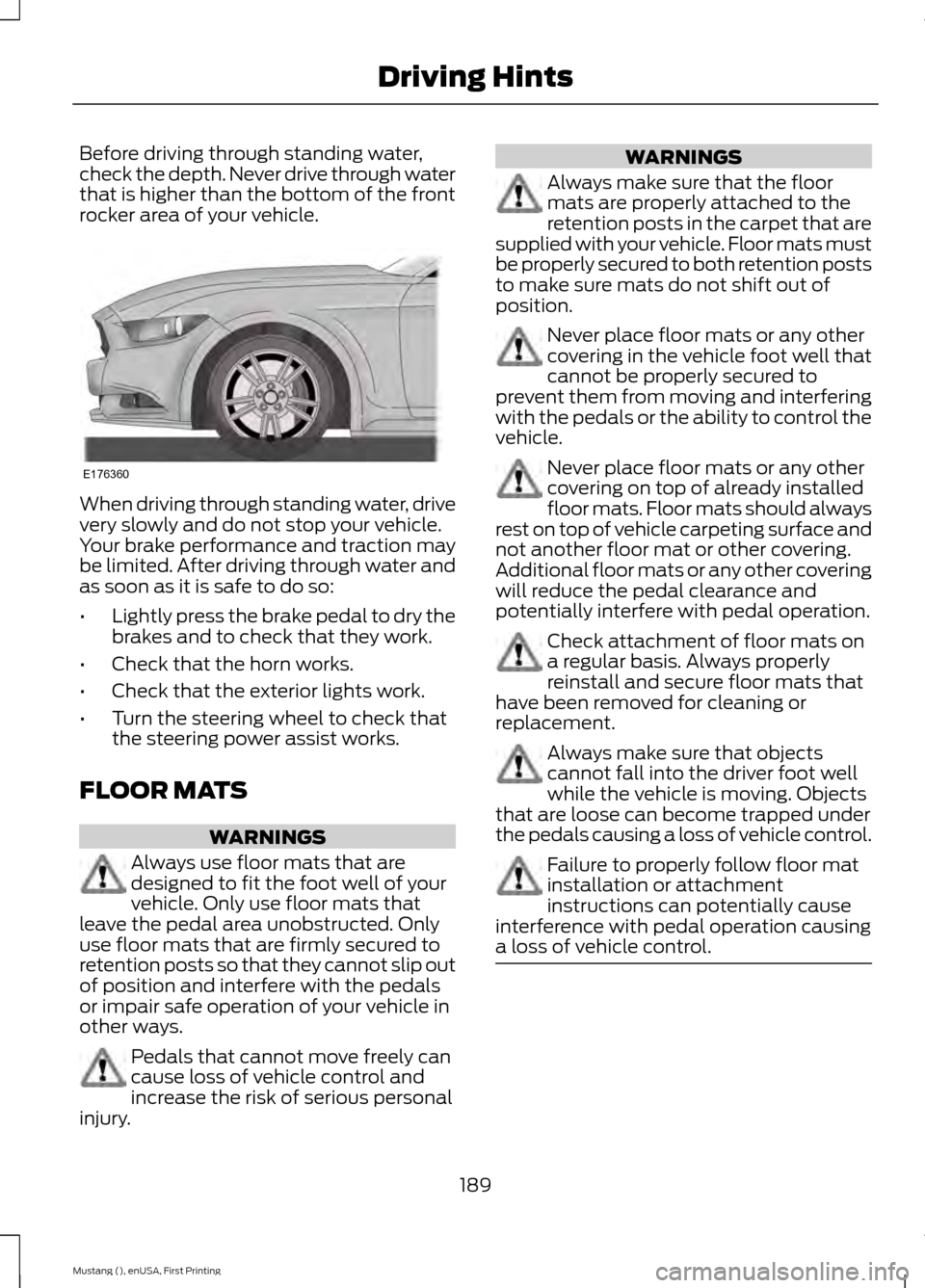
Before driving through standing water,
check the depth. Never drive through water
that is higher than the bottom of the front
rocker area of your vehicle.
When driving through standing water, drive
very slowly and do not stop your vehicle.
Your brake performance and traction may
be limited. After driving through water and
as soon as it is safe to do so:
•
Lightly press the brake pedal to dry the
brakes and to check that they work.
• Check that the horn works.
• Check that the exterior lights work.
• Turn the steering wheel to check that
the steering power assist works.
FLOOR MATS WARNINGS
Always use floor mats that are
designed to fit the foot well of your
vehicle. Only use floor mats that
leave the pedal area unobstructed. Only
use floor mats that are firmly secured to
retention posts so that they cannot slip out
of position and interfere with the pedals
or impair safe operation of your vehicle in
other ways. Pedals that cannot move freely can
cause loss of vehicle control and
increase the risk of serious personal
injury. WARNINGS
Always make sure that the floor
mats are properly attached to the
retention posts in the carpet that are
supplied with your vehicle. Floor mats must
be properly secured to both retention posts
to make sure mats do not shift out of
position. Never place floor mats or any other
covering in the vehicle foot well that
cannot be properly secured to
prevent them from moving and interfering
with the pedals or the ability to control the
vehicle. Never place floor mats or any other
covering on top of already installed
floor mats. Floor mats should always
rest on top of vehicle carpeting surface and
not another floor mat or other covering.
Additional floor mats or any other covering
will reduce the pedal clearance and
potentially interfere with pedal operation. Check attachment of floor mats on
a regular basis. Always properly
reinstall and secure floor mats that
have been removed for cleaning or
replacement. Always make sure that objects
cannot fall into the driver foot well
while the vehicle is moving. Objects
that are loose can become trapped under
the pedals causing a loss of vehicle control. Failure to properly follow floor mat
installation or attachment
instructions can potentially cause
interference with pedal operation causing
a loss of vehicle control. 189
Mustang (), enUSA, First Printing Driving HintsE176360
Page 220 of 441
Severe Climates
If you drive in extremely cold climates:
•
It may be necessary to have a Ford
authorized dealer increase the coolant
concentration above 50%.
• A coolant concentration of 60%
provides improved freeze point
protection. Engine coolant
concentrations above 60% decrease
the overheat protection characteristics
of the engine coolant and may cause
engine damage.
If you drive in extremely hot climates:
• It may be necessary to have a Ford
authorized dealer decrease the coolant
concentration to 40%.
• A coolant concentration of 40%
provides improved overheat protection.
Engine coolant concentrations below
40% will decrease the freeze and
corrosion protection characteristics of
the engine coolant and may cause
engine damage.
Vehicles driven year-round in non-extreme
climates should use prediluted engine
coolant for optimum cooling system and
engine protection.
What You Should Know About Fail-
Safe Cooling
If you deplete the engine coolant supply,
fail-safe cooling allows you to temporarily
drive your vehicle before you incur
incremental component damage. The
fail-safe distance depends on ambient
temperatures, vehicle load and terrain.
How Fail-Safe Cooling Works
If the engine begins to overheat, the engine
coolant temperature gauge will move to
the red (hot) area and: the coolant temperature
warning light will illuminate the service engine soon indicator
will illuminate.
If the engine reaches a preset
over-temperature condition, the engine
automatically switches to alternating
cylinder operation. Each disabled cylinder
acts as an air pump and cools the engine.
When this occurs, your vehicle will still
operate. However:
• The engine power will be limited.
• This will disable the air conditioning
system.
Continued operation increases the engine
temperature, causing the engine to
completely shut down. Your steering and
braking effort increases in this situation.
When the engine temperature cools, you
can re-start your engine. Take your vehicle
to an authorized dealer as soon as possible
to minimize engine damage.
When Fail-Safe Mode Is Activated WARNINGS
Fail-safe mode is for use during
emergencies only. Operate your
vehicle in fail-safe mode only as long
as necessary to bring your vehicle to rest
in a safe location and seek immediate
repairs. When in fail-safe mode, your
vehicle will have limited power, will not be
able to maintain high-speed operation, and
may completely shut down without
warning, potentially losing engine power,
power steering assist, and power brake
assist, which may increase the possibility
of a crash resulting in serious injury. Never remove the coolant reservoir
cap while the engine is running or hot.
217
Mustang (), enUSA, First Printing Maintenance
Page 228 of 441
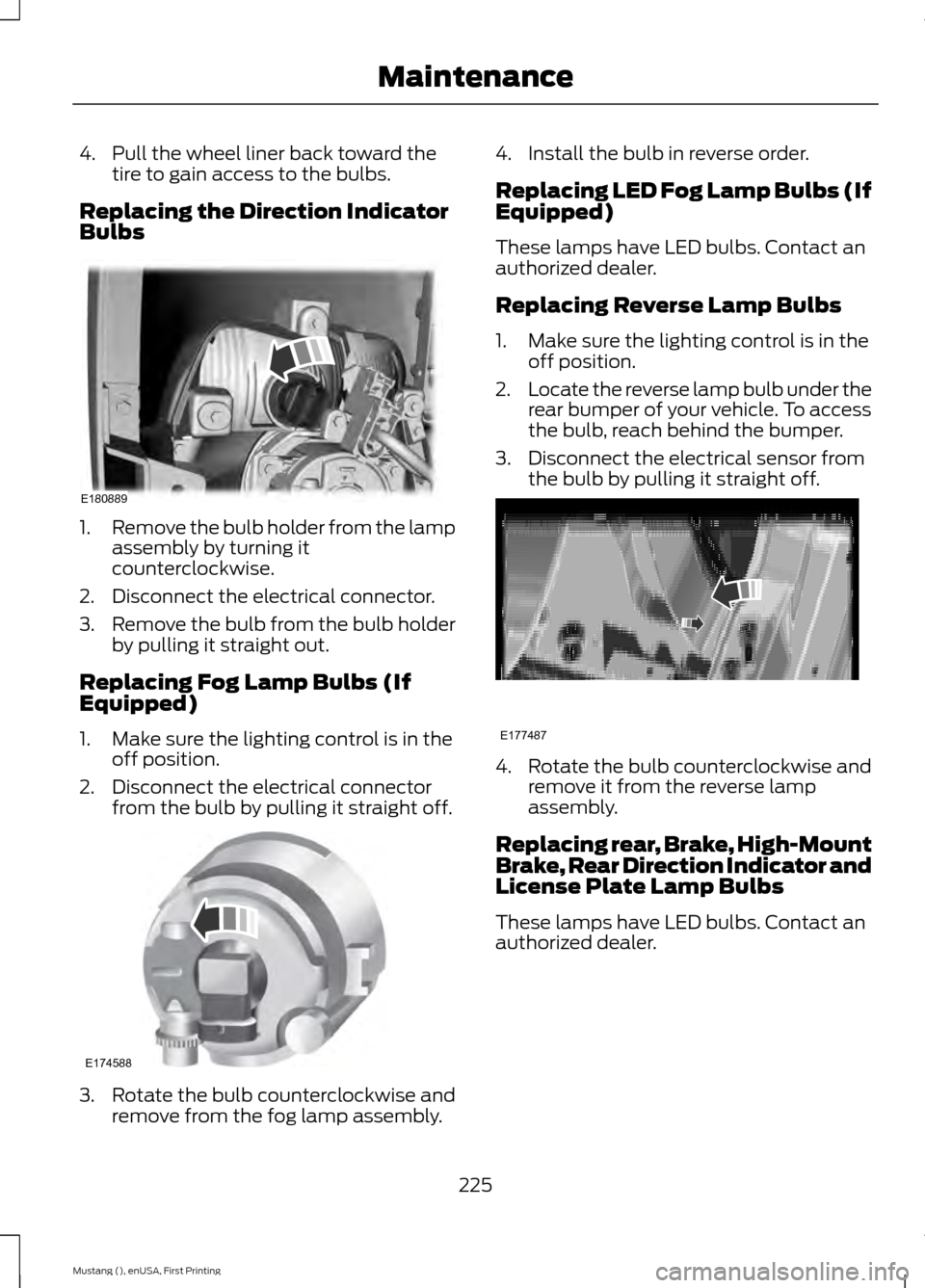
4. Pull the wheel liner back toward the
tire to gain access to the bulbs.
Replacing the Direction Indicator
Bulbs 1.
Remove the bulb holder from the lamp
assembly by turning it
counterclockwise.
2. Disconnect the electrical connector.
3. Remove the bulb from the bulb holder
by pulling it straight out.
Replacing Fog Lamp Bulbs (If
Equipped)
1. Make sure the lighting control is in the off position.
2. Disconnect the electrical connector from the bulb by pulling it straight off. 3. Rotate the bulb counterclockwise and
remove from the fog lamp assembly. 4. Install the bulb in reverse order.
Replacing LED Fog Lamp Bulbs (If
Equipped)
These lamps have LED bulbs. Contact an
authorized dealer.
Replacing Reverse Lamp Bulbs
1. Make sure the lighting control is in the
off position.
2. Locate the reverse lamp bulb under the
rear bumper of your vehicle. To access
the bulb, reach behind the bumper.
3. Disconnect the electrical sensor from the bulb by pulling it straight off. 4. Rotate the bulb counterclockwise and
remove it from the reverse lamp
assembly.
Replacing rear, Brake, High-Mount
Brake, Rear Direction Indicator and
License Plate Lamp Bulbs
These lamps have LED bulbs. Contact an
authorized dealer.
225
Mustang (), enUSA, First Printing MaintenanceE180889 E174588 E177487
Page 229 of 441
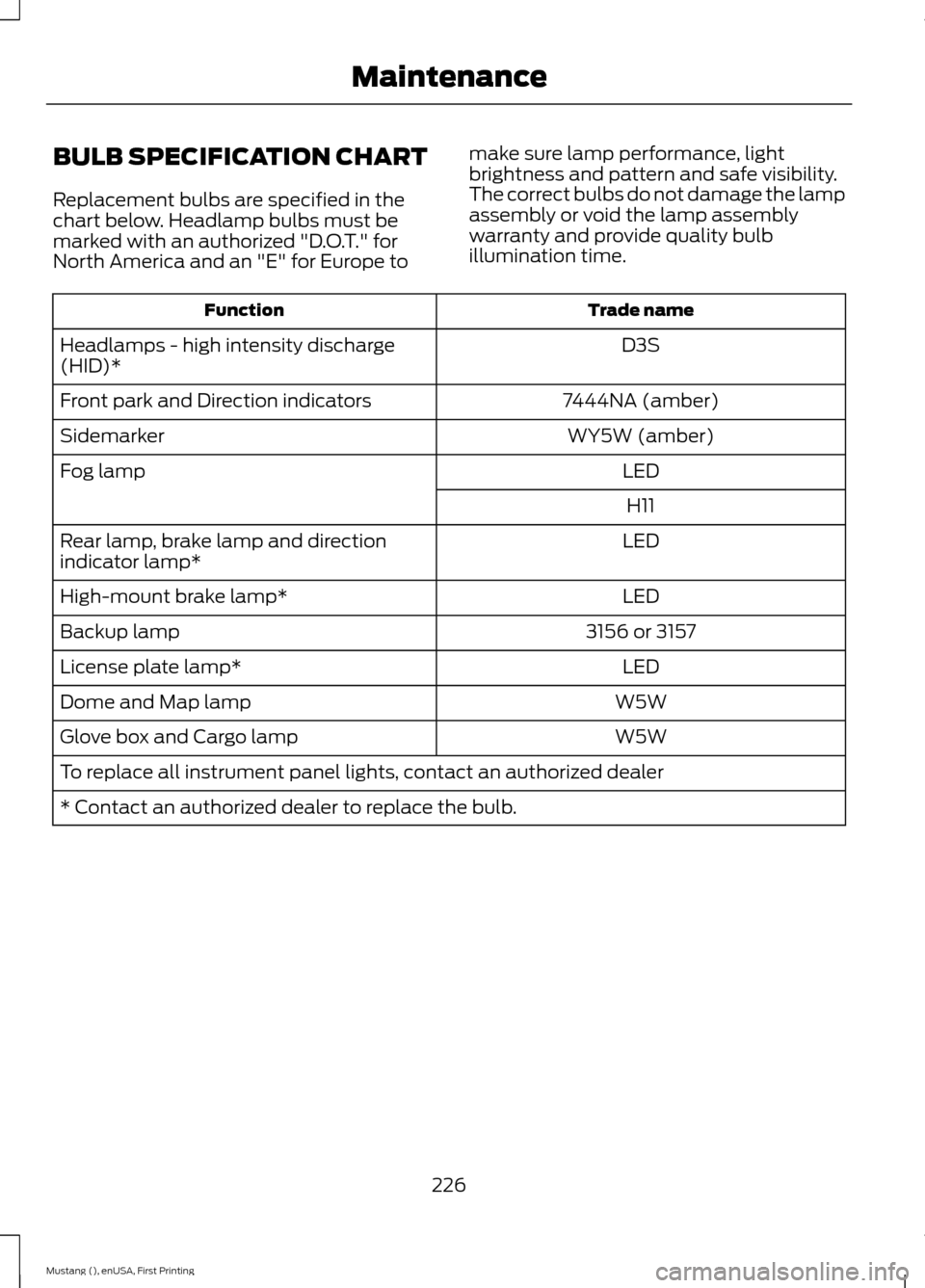
BULB SPECIFICATION CHART
Replacement bulbs are specified in the
chart below. Headlamp bulbs must be
marked with an authorized "D.O.T." for
North America and an "E" for Europe to
make sure lamp performance, light
brightness and pattern and safe visibility.
The correct bulbs do not damage the lamp
assembly or void the lamp assembly
warranty and provide quality bulb
illumination time. Trade name
Function
D3S
Headlamps - high intensity discharge
(HID)*
7444NA (amber)
Front park and Direction indicators
WY5W (amber)
Sidemarker
LED
Fog lamp
H11
LED
Rear lamp, brake lamp and direction
indicator lamp*
LED
High-mount brake lamp*
3156 or 3157
Backup lamp
LED
License plate lamp*
W5W
Dome and Map lamp
W5W
Glove box and Cargo lamp
To replace all instrument panel lights, contact an authorized dealer
* Contact an authorized dealer to replace the bulb.
226
Mustang (), enUSA, First Printing Maintenance