remote control FORD MUSTANG 2015 6.G User Guide
[x] Cancel search | Manufacturer: FORD, Model Year: 2015, Model line: MUSTANG, Model: FORD MUSTANG 2015 6.GPages: 441, PDF Size: 6.98 MB
Page 62 of 441
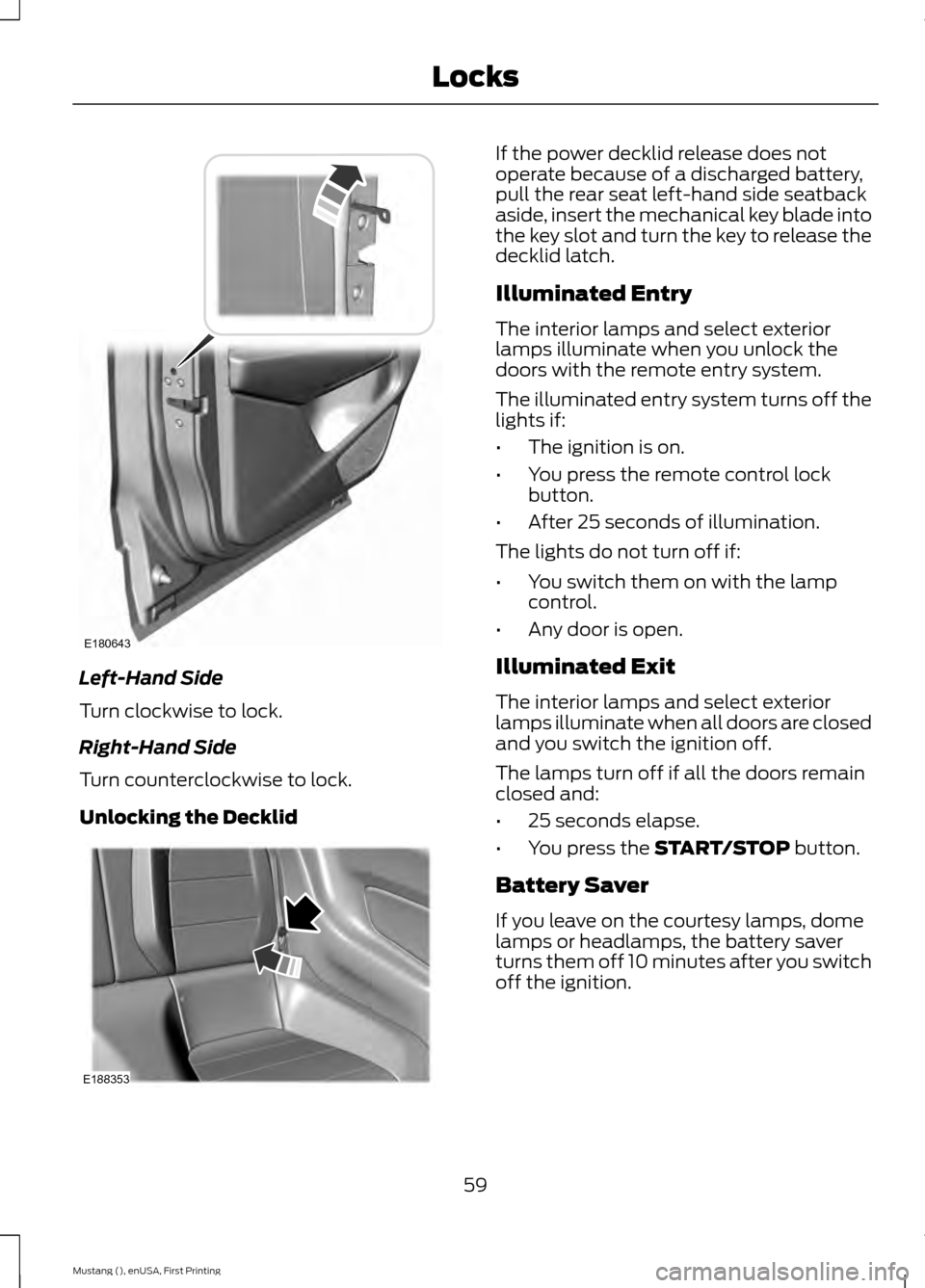
Left-Hand Side
Turn clockwise to lock.
Right-Hand Side
Turn counterclockwise to lock.
Unlocking the Decklid If the power decklid release does not
operate because of a discharged battery,
pull the rear seat left-hand side seatback
aside, insert the mechanical key blade into
the key slot and turn the key to release the
decklid latch.
Illuminated Entry
The interior lamps and select exterior
lamps illuminate when you unlock the
doors with the remote entry system.
The illuminated entry system turns off the
lights if:
•
The ignition is on.
• You press the remote control lock
button.
• After 25 seconds of illumination.
The lights do not turn off if:
• You switch them on with the lamp
control.
• Any door is open.
Illuminated Exit
The interior lamps and select exterior
lamps illuminate when all doors are closed
and you switch the ignition off.
The lamps turn off if all the doors remain
closed and:
• 25 seconds elapse.
• You press the START/STOP button.
Battery Saver
If you leave on the courtesy lamps, dome
lamps or headlamps, the battery saver
turns them off 10 minutes after you switch
off the ignition.
59
Mustang (), enUSA, First Printing LocksE180643 E188353
Page 63 of 441
Accessory Mode Battery Saver for
Intelligent Access Keys
If you leave your vehicle in the run ignition
state, it turns off once it detects a certain
amount of battery drain or after 45
minutes.
Luggage Compartment
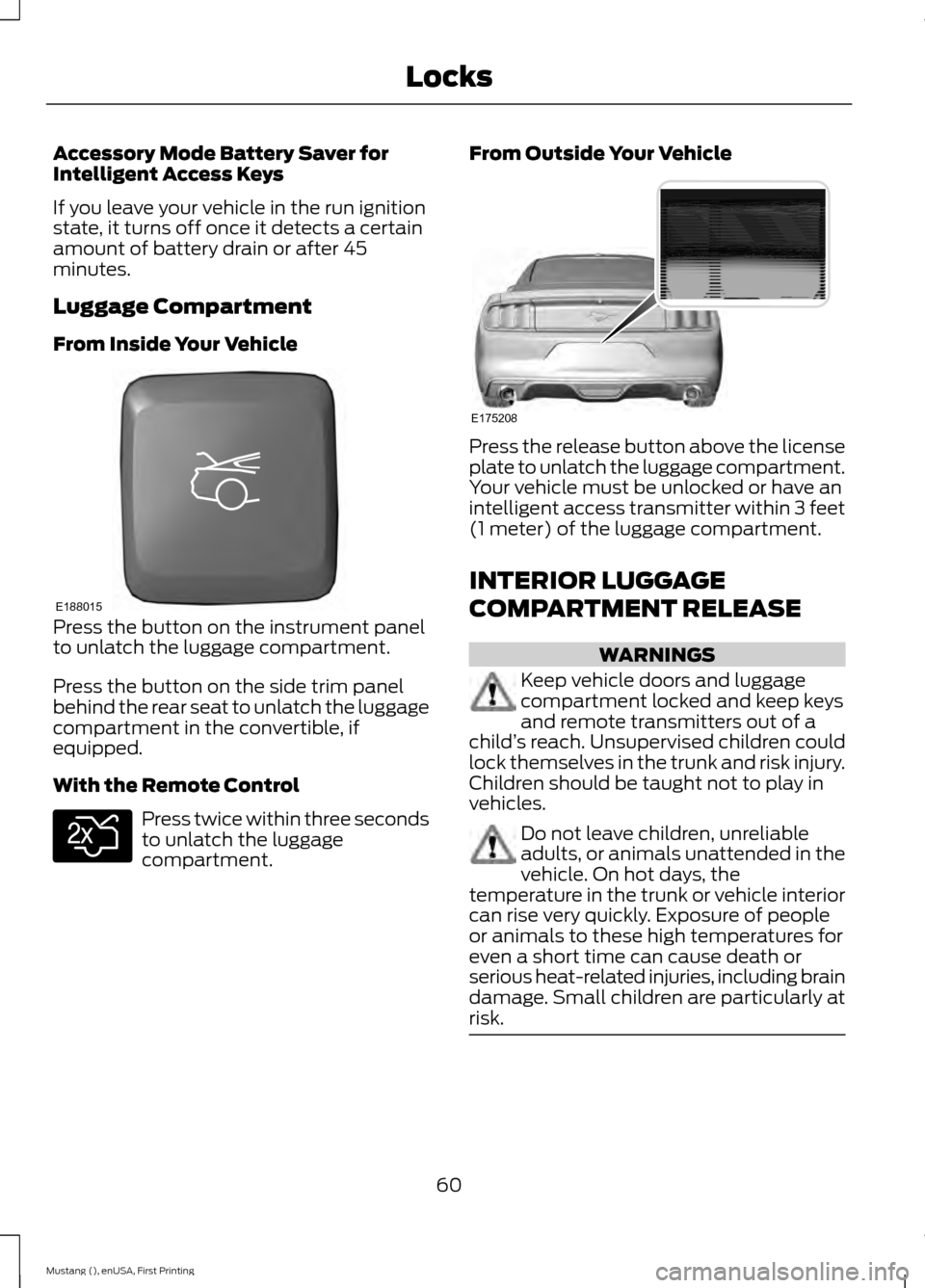
From Inside Your Vehicle
Press the button on the instrument panel
to unlatch the luggage compartment.
Press the button on the side trim panel
behind the rear seat to unlatch the luggage
compartment in the convertible, if
equipped.
With the Remote Control
Press twice within three seconds
to unlatch the luggage
compartment. From Outside Your Vehicle Press the release button above the license
plate to unlatch the luggage compartment.
Your vehicle must be unlocked or have an
intelligent access transmitter within 3 feet
(1 meter) of the luggage compartment.
INTERIOR LUGGAGE
COMPARTMENT RELEASE
WARNINGS
Keep vehicle doors and luggage
compartment locked and keep keys
and remote transmitters out of a
child ’s reach. Unsupervised children could
lock themselves in the trunk and risk injury.
Children should be taught not to play in
vehicles. Do not leave children, unreliable
adults, or animals unattended in the
vehicle. On hot days, the
temperature in the trunk or vehicle interior
can rise very quickly. Exposure of people
or animals to these high temperatures for
even a short time can cause death or
serious heat-related injuries, including brain
damage. Small children are particularly at
risk. 60
Mustang (), enUSA, First Printing LocksE188015 E138630 E175208
Page 65 of 441
PASSIVE ANTI-THEFT
SYSTEM
Note:
The system is not compatible with
non-Ford aftermarket remote start systems.
Use of these systems may result in vehicle
starting problems and a loss of security
protection.
Note: Metallic objects, electronic devices
or a second coded key on the same key
chain may cause vehicle starting problems
if they are too close to the key when starting
your vehicle. Prevent these objects from
touching the coded key while starting your
vehicle. Switch the ignition off, move all
objects on the key chain away from the
coded key and restart your vehicle if a
problem occurs.
Note: Do not leave a duplicate coded key
in your vehicle. Always take your keys and
lock all doors when leaving your vehicle.
SecuriLock
The system helps prevent your vehicle
from starting unless you use a coded key
programmed to your vehicle. Using the
wrong key may prevent your vehicle from
starting. A message may appear in the
information display.
If you are unable to start your vehicle with
a correctly coded key, it is not operating
properly. A message may appear in the
information display.
Automatic Arming
Your vehicle arms immediately after
switching the ignition off.
Automatic Disarming
Switching the ignition on with a coded key
disarms your vehicle. Replacement Keys
Note:
Your vehicle comes equipped with
two intelligent access keys.
The intelligent access key functions as a
programmed key that operates the driver
door lock and activates the intelligent
access with push button start system, as
well as a remote control.
If your programmed transmitters are lost
or stolen and you do not have an extra
coded key, you need to have your vehicle
towed to an authorized dealer. You need
to erase the key codes from your vehicle
and program new coded keys.
Store an extra programmed key away from
your vehicle in a safe place to help prevent
any inconveniences. See your authorized
dealer to purchase additional spare or
replacement keys.
Programming a Spare Intelligent
Access Key
Note: You can program a maximum of four
intelligent access keys to your vehicle.
You must have two previously
programmed intelligent access keys inside
your vehicle and the new unprogrammed
intelligent access keys readily accessible.
See an authorized dealer to have the spare
key programmed if two previously
programmed keys are not available.
Make sure that your vehicle is off before
beginning this procedure. Make sure that
you close all the doors before beginning
and that they remain closed throughout
the procedure. Perform all steps within 30
seconds of starting the sequence. Stop
and wait for at least one minute before
starting again if you perform any steps out
of sequence.
Read and understand the entire procedure
before you begin.
62
Mustang (), enUSA, First Printing Security
Page 66 of 441
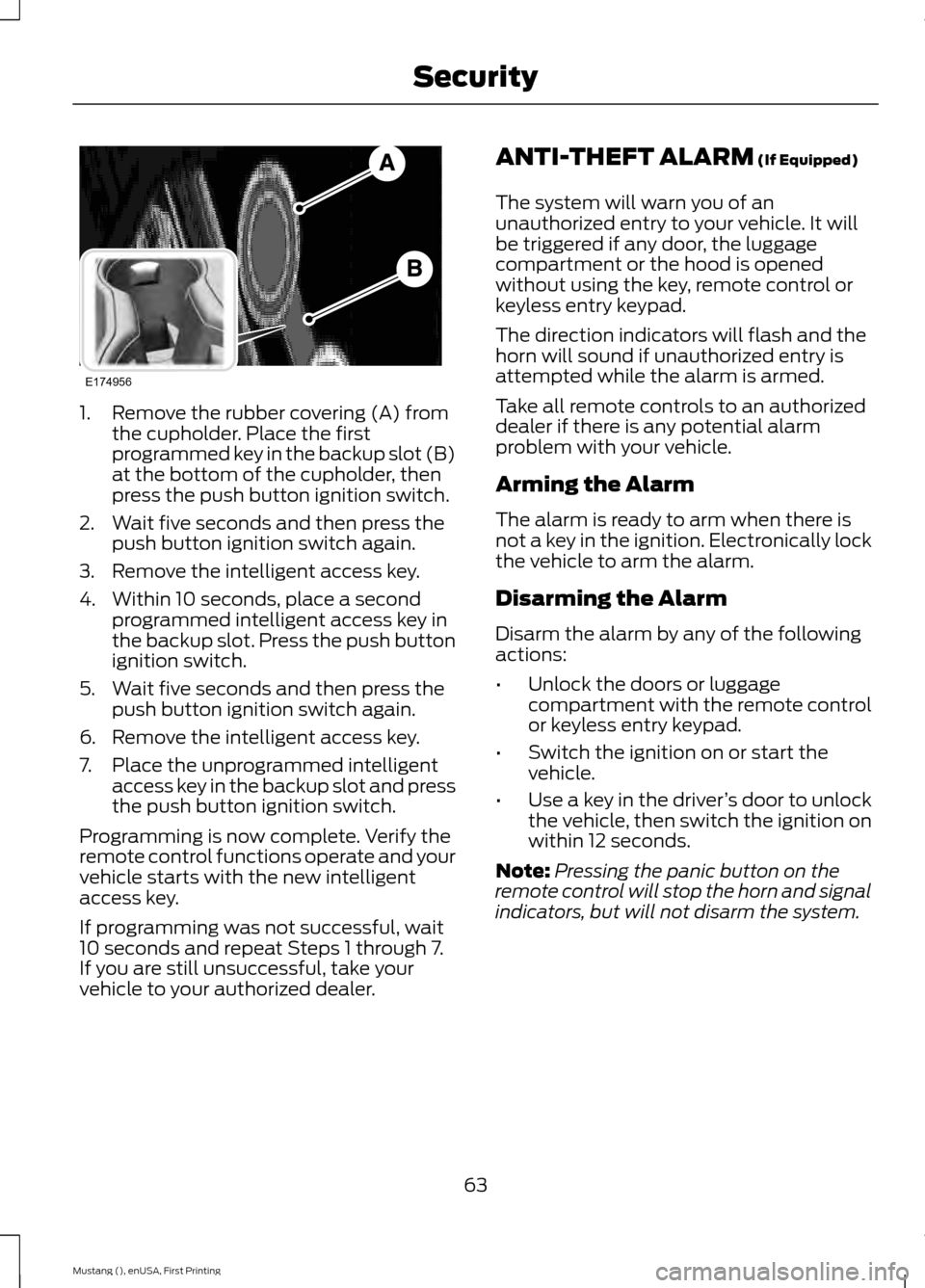
1. Remove the rubber covering (A) from
the cupholder. Place the first
programmed key in the backup slot (B)
at the bottom of the cupholder, then
press the push button ignition switch.
2. Wait five seconds and then press the push button ignition switch again.
3. Remove the intelligent access key.
4. Within 10 seconds, place a second programmed intelligent access key in
the backup slot. Press the push button
ignition switch.
5. Wait five seconds and then press the push button ignition switch again.
6. Remove the intelligent access key.
7. Place the unprogrammed intelligent access key in the backup slot and press
the push button ignition switch.
Programming is now complete. Verify the
remote control functions operate and your
vehicle starts with the new intelligent
access key.
If programming was not successful, wait
10 seconds and repeat Steps 1 through 7.
If you are still unsuccessful, take your
vehicle to your authorized dealer. ANTI-THEFT ALARM (If Equipped)
The system will warn you of an
unauthorized entry to your vehicle. It will
be triggered if any door, the luggage
compartment or the hood is opened
without using the key, remote control or
keyless entry keypad.
The direction indicators will flash and the
horn will sound if unauthorized entry is
attempted while the alarm is armed.
Take all remote controls to an authorized
dealer if there is any potential alarm
problem with your vehicle.
Arming the Alarm
The alarm is ready to arm when there is
not a key in the ignition. Electronically lock
the vehicle to arm the alarm.
Disarming the Alarm
Disarm the alarm by any of the following
actions:
• Unlock the doors or luggage
compartment with the remote control
or keyless entry keypad.
• Switch the ignition on or start the
vehicle.
• Use a key in the driver ’s door to unlock
the vehicle, then switch the ignition on
within 12 seconds.
Note: Pressing the panic button on the
remote control will stop the horn and signal
indicators, but will not disarm the system.
63
Mustang (), enUSA, First Printing SecurityE174956
Page 74 of 441
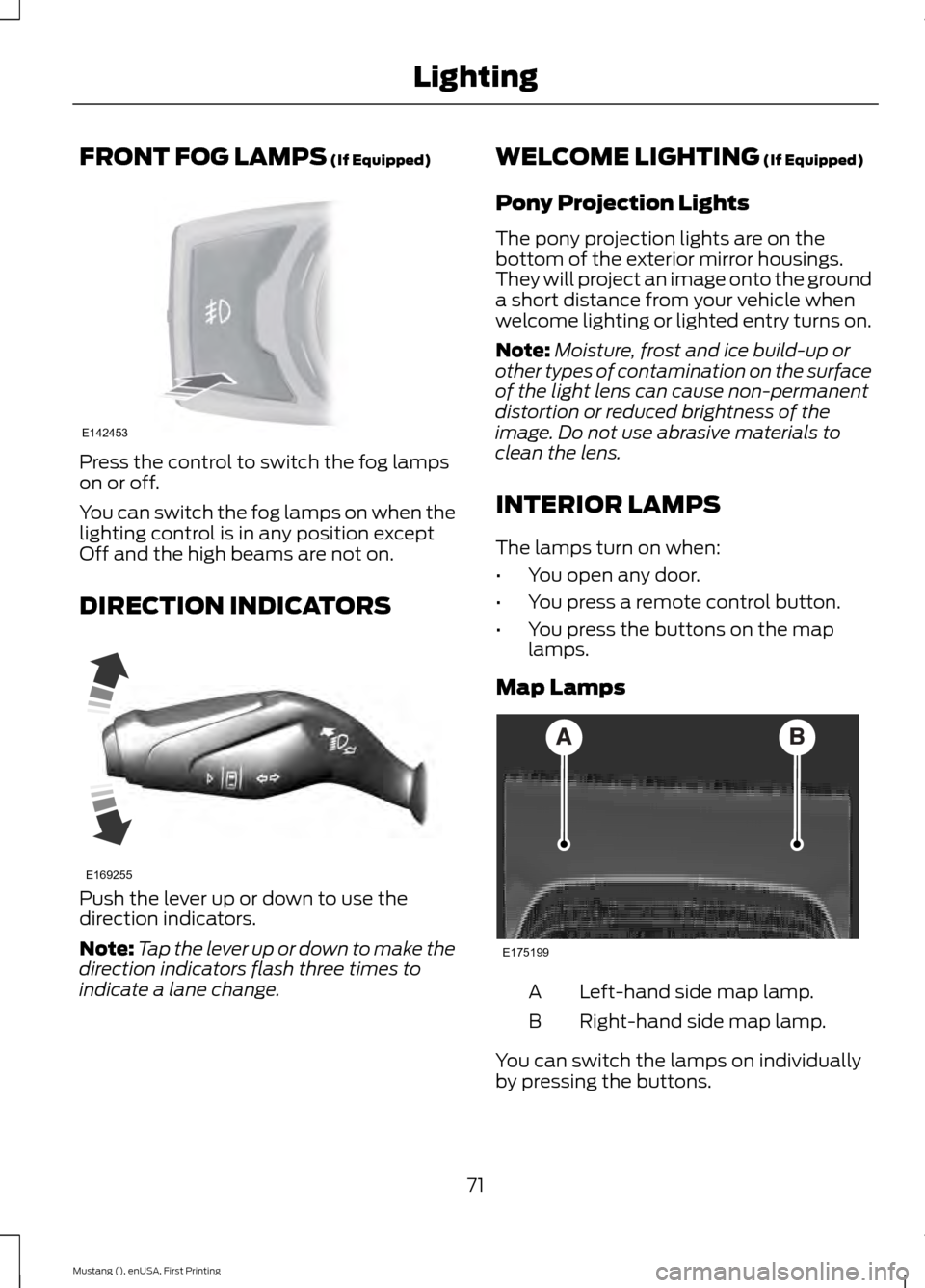
FRONT FOG LAMPS (If Equipped)
Press the control to switch the fog lamps
on or off.
You can switch the fog lamps on when the
lighting control is in any position except
Off and the high beams are not on.
DIRECTION INDICATORS
Push the lever up or down to use the
direction indicators.
Note:
Tap the lever up or down to make the
direction indicators flash three times to
indicate a lane change. WELCOME LIGHTING (If Equipped)
Pony Projection Lights
The pony projection lights are on the
bottom of the exterior mirror housings.
They will project an image onto the ground
a short distance from your vehicle when
welcome lighting or lighted entry turns on.
Note: Moisture, frost and ice build-up or
other types of contamination on the surface
of the light lens can cause non-permanent
distortion or reduced brightness of the
image. Do not use abrasive materials to
clean the lens.
INTERIOR LAMPS
The lamps turn on when:
• You open any door.
• You press a remote control button.
• You press the buttons on the map
lamps.
Map Lamps Left-hand side map lamp.
A
Right-hand side map lamp.
B
You can switch the lamps on individually
by pressing the buttons.
71
Mustang (), enUSA, First Printing LightingE142453 E169255 E175199
Page 76 of 441
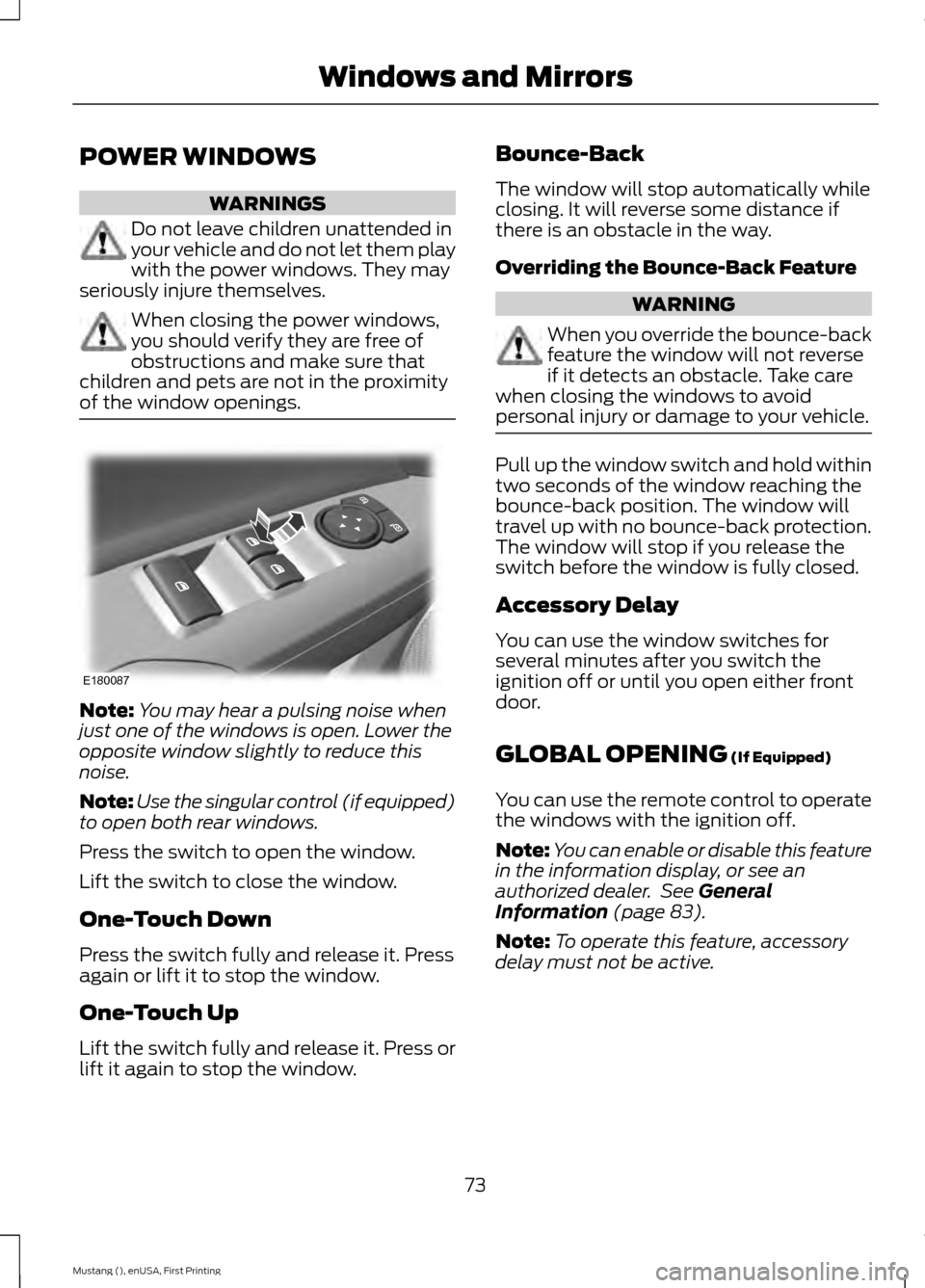
POWER WINDOWS
WARNINGS
Do not leave children unattended in
your vehicle and do not let them play
with the power windows. They may
seriously injure themselves. When closing the power windows,
you should verify they are free of
obstructions and make sure that
children and pets are not in the proximity
of the window openings. Note:
You may hear a pulsing noise when
just one of the windows is open. Lower the
opposite window slightly to reduce this
noise.
Note: Use the singular control (if equipped)
to open both rear windows.
Press the switch to open the window.
Lift the switch to close the window.
One-Touch Down
Press the switch fully and release it. Press
again or lift it to stop the window.
One-Touch Up
Lift the switch fully and release it. Press or
lift it again to stop the window. Bounce-Back
The window will stop automatically while
closing. It will reverse some distance if
there is an obstacle in the way.
Overriding the Bounce-Back Feature WARNING
When you override the bounce-back
feature the window will not reverse
if it detects an obstacle. Take care
when closing the windows to avoid
personal injury or damage to your vehicle. Pull up the window switch and hold within
two seconds of the window reaching the
bounce-back position. The window will
travel up with no bounce-back protection.
The window will stop if you release the
switch before the window is fully closed.
Accessory Delay
You can use the window switches for
several minutes after you switch the
ignition off or until you open either front
door.
GLOBAL OPENING (If Equipped)
You can use the remote control to operate
the windows with the ignition off.
Note: You can enable or disable this feature
in the information display, or see an
authorized dealer. See
General
Information (page 83).
Note: To operate this feature, accessory
delay must not be active.
73
Mustang (), enUSA, First Printing Windows and MirrorsE180087
Page 77 of 441
Opening the Windows
You can open the windows for a short time
after you unlock your vehicle with the
remote control. After you unlock your
vehicle, press and hold the remote control
unlock button to open the windows.
Release the button once movement starts.
Press the lock or unlock button to stop
movement.
EXTERIOR MIRRORS
Power Exterior Mirrors
WARNING
Do not adjust the mirrors when your
vehicle is moving.
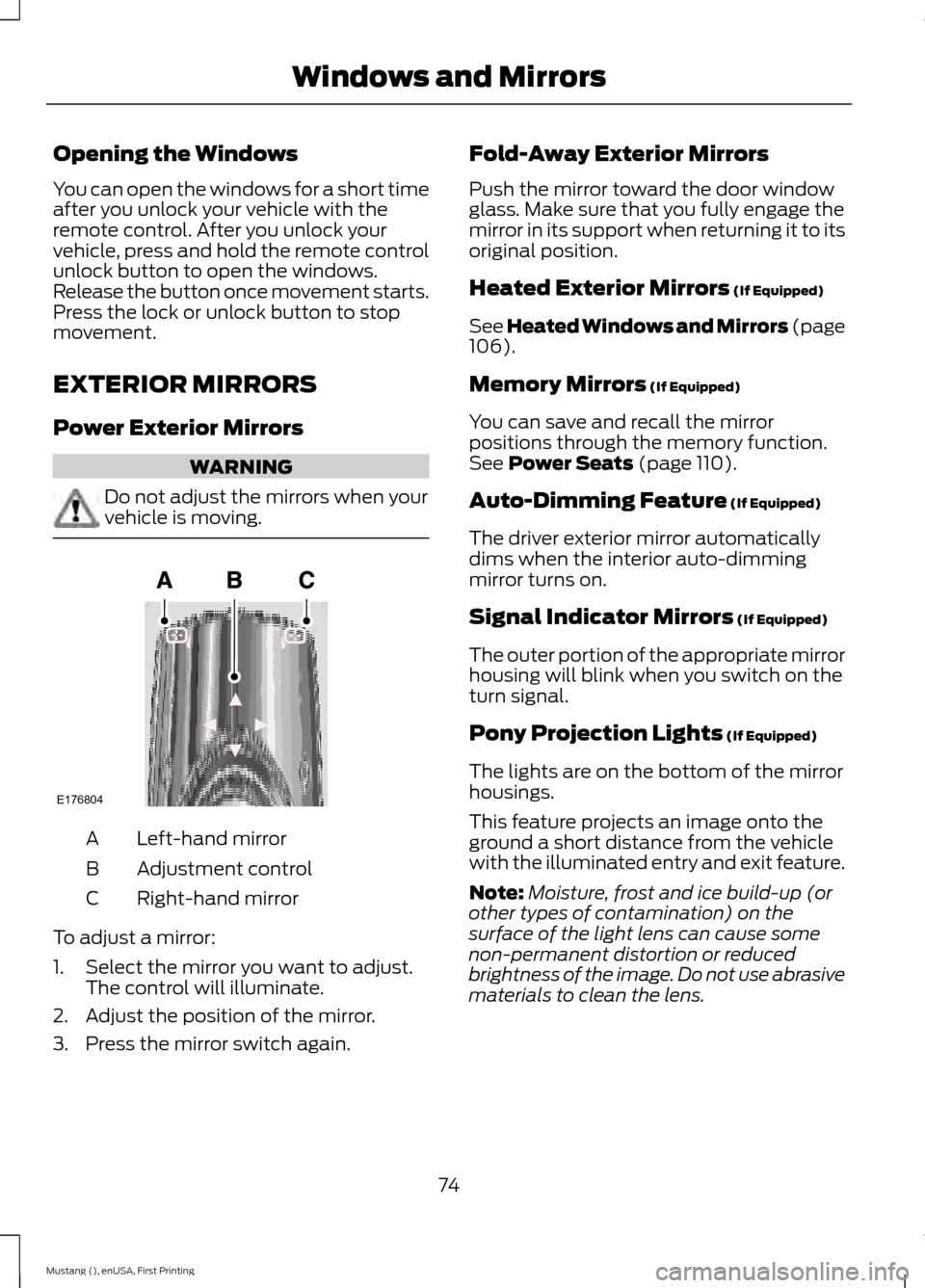
Left-hand mirror
A
Adjustment control
B
Right-hand mirror
C
To adjust a mirror:
1. Select the mirror you want to adjust. The control will illuminate.
2. Adjust the position of the mirror.
3. Press the mirror switch again. Fold-Away Exterior Mirrors
Push the mirror toward the door window
glass. Make sure that you fully engage the
mirror in its support when returning it to its
original position.
Heated Exterior Mirrors (If Equipped)
See Heated Windows and Mirrors (page
106
).
Memory Mirrors
(If Equipped)
You can save and recall the mirror
positions through the memory function.
See
Power Seats (page 110).
Auto-Dimming Feature
(If Equipped)
The driver exterior mirror automatically
dims when the interior auto-dimming
mirror turns on.
Signal Indicator Mirrors
(If Equipped)
The outer portion of the appropriate mirror
housing will blink when you switch on the
turn signal.
Pony Projection Lights
(If Equipped)
The lights are on the bottom of the mirror
housings.
This feature projects an image onto the
ground a short distance from the vehicle
with the illuminated entry and exit feature.
Note: Moisture, frost and ice build-up (or
other types of contamination) on the
surface of the light lens can cause some
non-permanent distortion or reduced
brightness of the image. Do not use abrasive
materials to clean the lens.
74
Mustang (), enUSA, First Printing Windows and MirrorsE176804
Page 92 of 441
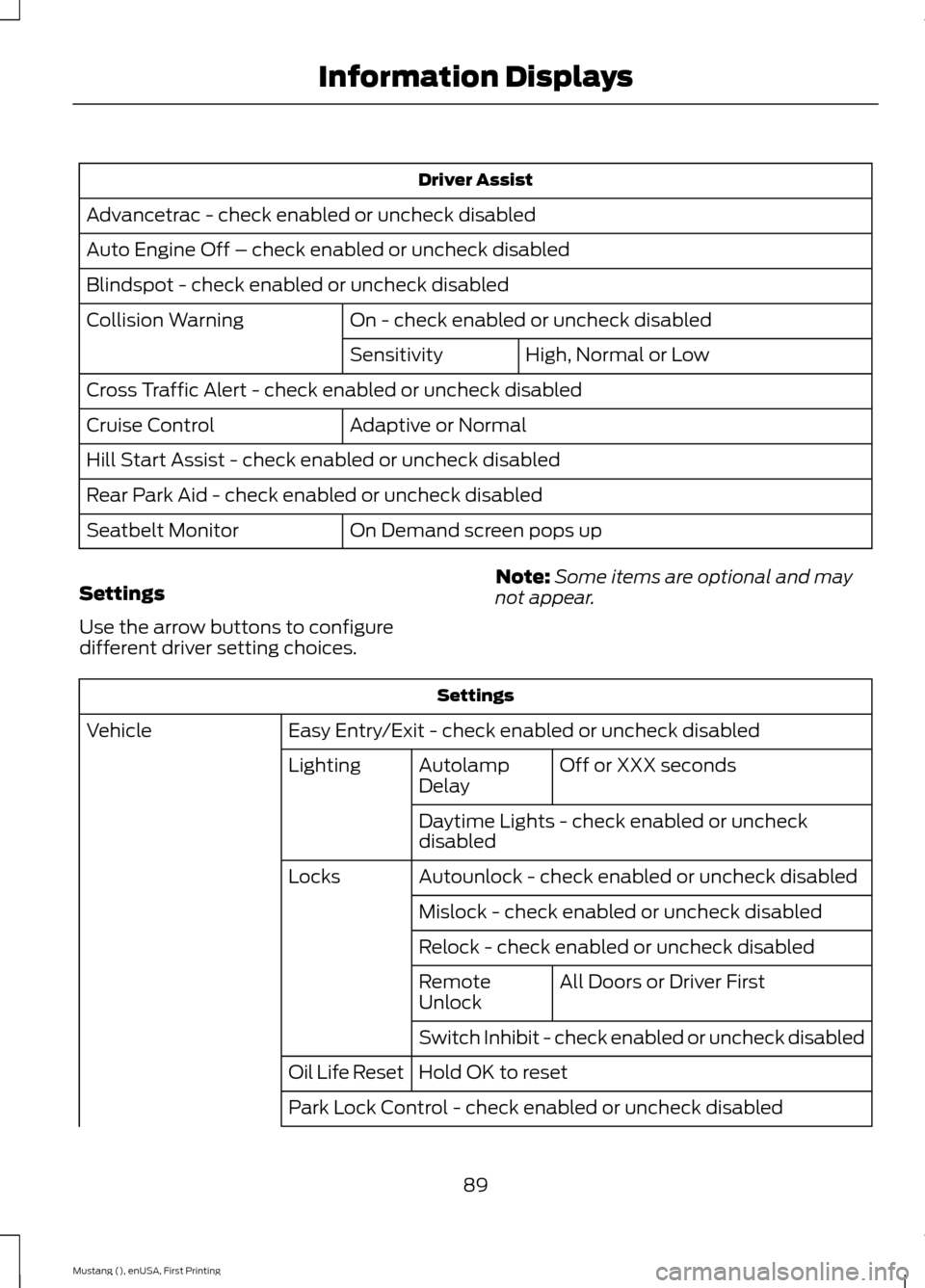
Driver Assist
Advancetrac - check enabled or uncheck disabled
Auto Engine Off – check enabled or uncheck disabled
Blindspot - check enabled or uncheck disabled On - check enabled or uncheck disabled
Collision Warning
High, Normal or Low
Sensitivity
Cross Traffic Alert - check enabled or uncheck disabled Adaptive or Normal
Cruise Control
Hill Start Assist - check enabled or uncheck disabled
Rear Park Aid - check enabled or uncheck disabled
On Demand screen pops up
Seatbelt Monitor
Settings
Use the arrow buttons to configure
different driver setting choices. Note:
Some items are optional and may
not appear. Settings
Easy Entry/Exit - check enabled or uncheck disabled
Vehicle
Off or XXX seconds
Autolamp
Delay
Lighting
Daytime Lights - check enabled or uncheck
disabled
Autounlock - check enabled or uncheck disabled
Locks
Mislock - check enabled or uncheck disabled
Relock - check enabled or uncheck disabled All Doors or Driver First
Remote
Unlock
Switch Inhibit - check enabled or uncheck disabled
Hold OK to reset
Oil Life Reset
Park Lock Control - check enabled or uncheck disabled
89
Mustang (), enUSA, First Printing Information Displays
Page 93 of 441
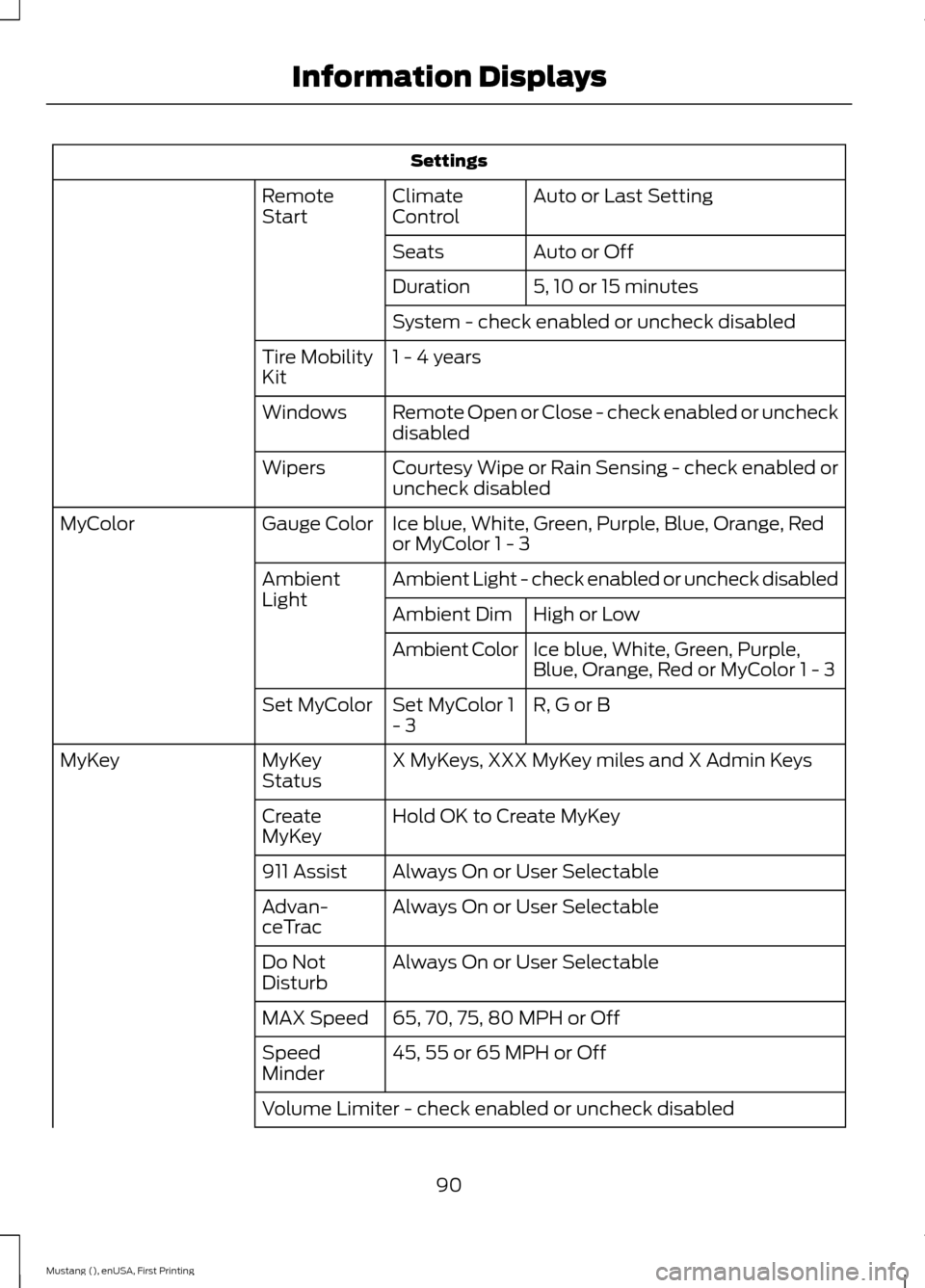
Settings
Auto or Last Setting
Climate
Control
Remote
Start
Auto or Off
Seats
5, 10 or 15 minutes
Duration
System - check enabled or uncheck disabled
1 - 4 years
Tire Mobility
Kit
Remote Open or Close - check enabled or uncheck
disabled
Windows
Courtesy Wipe or Rain Sensing - check enabled or
uncheck disabled
Wipers
Ice blue, White, Green, Purple, Blue, Orange, Red
or MyColor 1 - 3
Gauge Color
MyColor
Ambient Light - check enabled or uncheck disabled
Ambient
Light
High or Low
Ambient Dim
Ice blue, White, Green, Purple,
Blue, Orange, Red or MyColor 1 - 3
Ambient Color
R, G or B
Set MyColor 1
- 3
Set MyColor
X MyKeys, XXX MyKey miles and X Admin Keys
MyKey
Status
MyKey
Hold OK to Create MyKey
Create
MyKey
Always On or User Selectable
911 Assist
Always On or User Selectable
Advan-
ceTrac
Always On or User Selectable
Do Not
Disturb
65, 70, 75, 80 MPH or Off
MAX Speed
45, 55 or 65 MPH or Off
Speed
Minder
Volume Limiter - check enabled or uncheck disabled
90
Mustang (), enUSA, First Printing Information Displays
Page 100 of 441
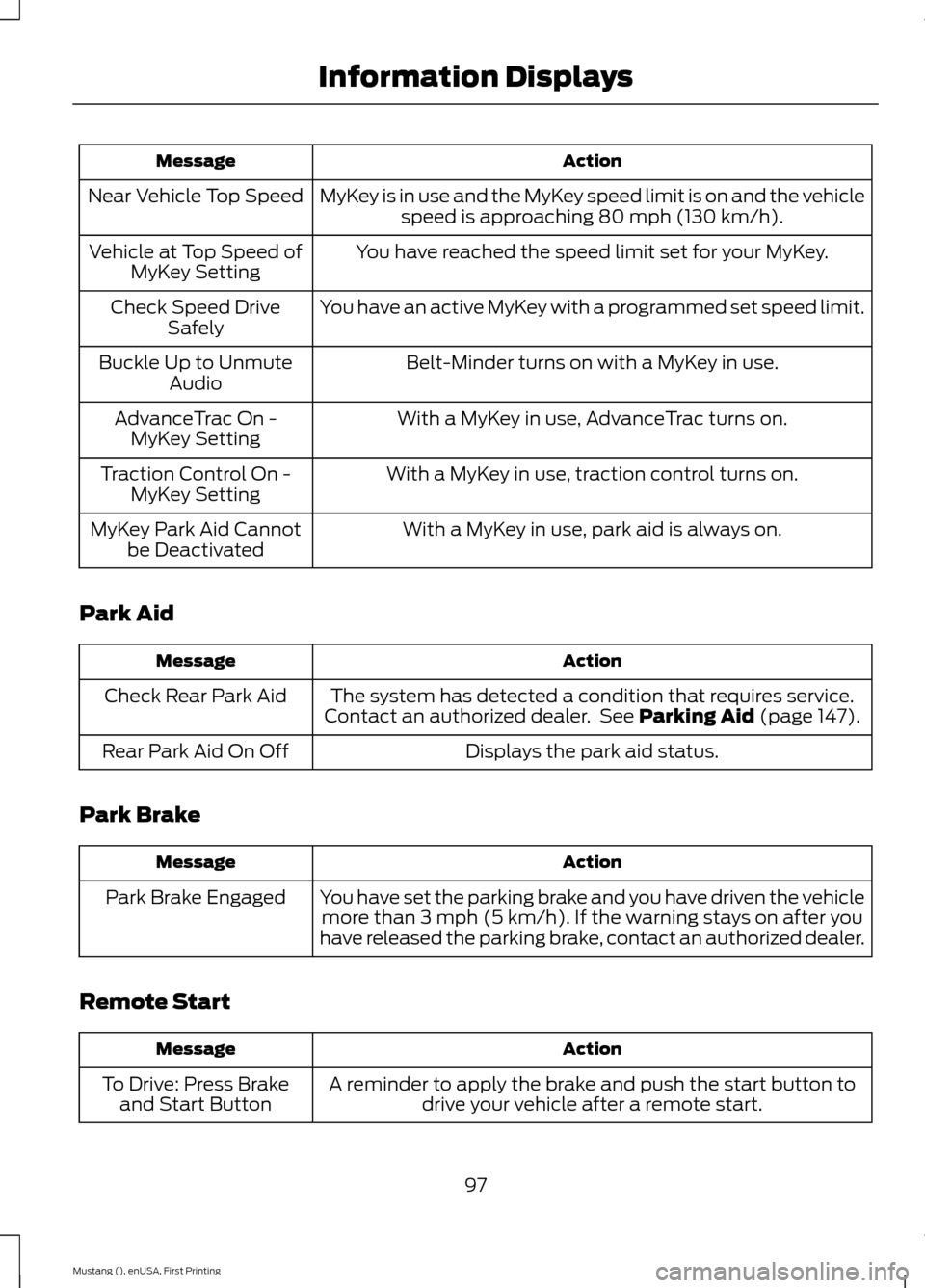
Action
Message
MyKey is in use and the MyKey speed limit is on and the vehiclespeed is approaching 80 mph (130 km/h).
Near Vehicle Top Speed
You have reached the speed limit set for your MyKey.
Vehicle at Top Speed of
MyKey Setting
You have an active MyKey with a programmed set speed limit.
Check Speed Drive
Safely
Belt-Minder turns on with a MyKey in use.
Buckle Up to Unmute
Audio
With a MyKey in use, AdvanceTrac turns on.
AdvanceTrac On -
MyKey Setting
With a MyKey in use, traction control turns on.
Traction Control On -
MyKey Setting
With a MyKey in use, park aid is always on.
MyKey Park Aid Cannot
be Deactivated
Park Aid Action
Message
The system has detected a condition that requires service.
Contact an authorized dealer. See Parking Aid (page 147).
Check Rear Park Aid
Displays the park aid status.
Rear Park Aid On Off
Park Brake Action
Message
You have set the parking brake and you have driven the vehiclemore than 3 mph (5 km/h). If the warning stays on after you
have released the parking brake, contact an authorized dealer.
Park Brake Engaged
Remote Start Action
Message
A reminder to apply the brake and push the start button todrive your vehicle after a remote start.
To Drive: Press Brake
and Start Button
97
Mustang (), enUSA, First Printing Information Displays