remote start FORD MUSTANG 2015 6.G User Guide
[x] Cancel search | Manufacturer: FORD, Model Year: 2015, Model line: MUSTANG, Model: FORD MUSTANG 2015 6.GPages: 441, PDF Size: 6.98 MB
Page 66 of 441
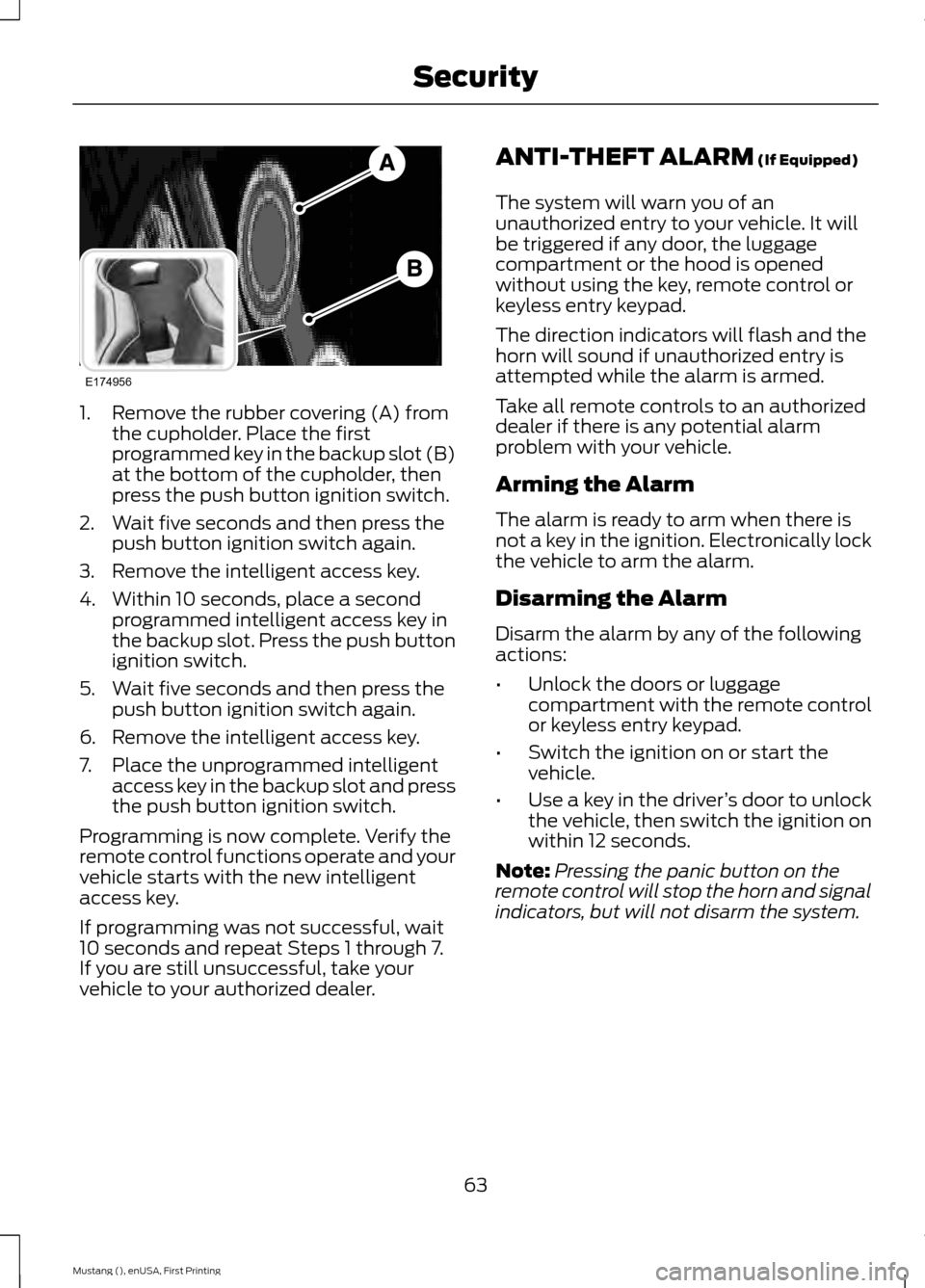
1. Remove the rubber covering (A) from
the cupholder. Place the first
programmed key in the backup slot (B)
at the bottom of the cupholder, then
press the push button ignition switch.
2. Wait five seconds and then press the push button ignition switch again.
3. Remove the intelligent access key.
4. Within 10 seconds, place a second programmed intelligent access key in
the backup slot. Press the push button
ignition switch.
5. Wait five seconds and then press the push button ignition switch again.
6. Remove the intelligent access key.
7. Place the unprogrammed intelligent access key in the backup slot and press
the push button ignition switch.
Programming is now complete. Verify the
remote control functions operate and your
vehicle starts with the new intelligent
access key.
If programming was not successful, wait
10 seconds and repeat Steps 1 through 7.
If you are still unsuccessful, take your
vehicle to your authorized dealer. ANTI-THEFT ALARM (If Equipped)
The system will warn you of an
unauthorized entry to your vehicle. It will
be triggered if any door, the luggage
compartment or the hood is opened
without using the key, remote control or
keyless entry keypad.
The direction indicators will flash and the
horn will sound if unauthorized entry is
attempted while the alarm is armed.
Take all remote controls to an authorized
dealer if there is any potential alarm
problem with your vehicle.
Arming the Alarm
The alarm is ready to arm when there is
not a key in the ignition. Electronically lock
the vehicle to arm the alarm.
Disarming the Alarm
Disarm the alarm by any of the following
actions:
• Unlock the doors or luggage
compartment with the remote control
or keyless entry keypad.
• Switch the ignition on or start the
vehicle.
• Use a key in the driver ’s door to unlock
the vehicle, then switch the ignition on
within 12 seconds.
Note: Pressing the panic button on the
remote control will stop the horn and signal
indicators, but will not disarm the system.
63
Mustang (), enUSA, First Printing SecurityE174956
Page 77 of 441
Opening the Windows
You can open the windows for a short time
after you unlock your vehicle with the
remote control. After you unlock your
vehicle, press and hold the remote control
unlock button to open the windows.
Release the button once movement starts.
Press the lock or unlock button to stop
movement.
EXTERIOR MIRRORS
Power Exterior Mirrors
WARNING
Do not adjust the mirrors when your
vehicle is moving.
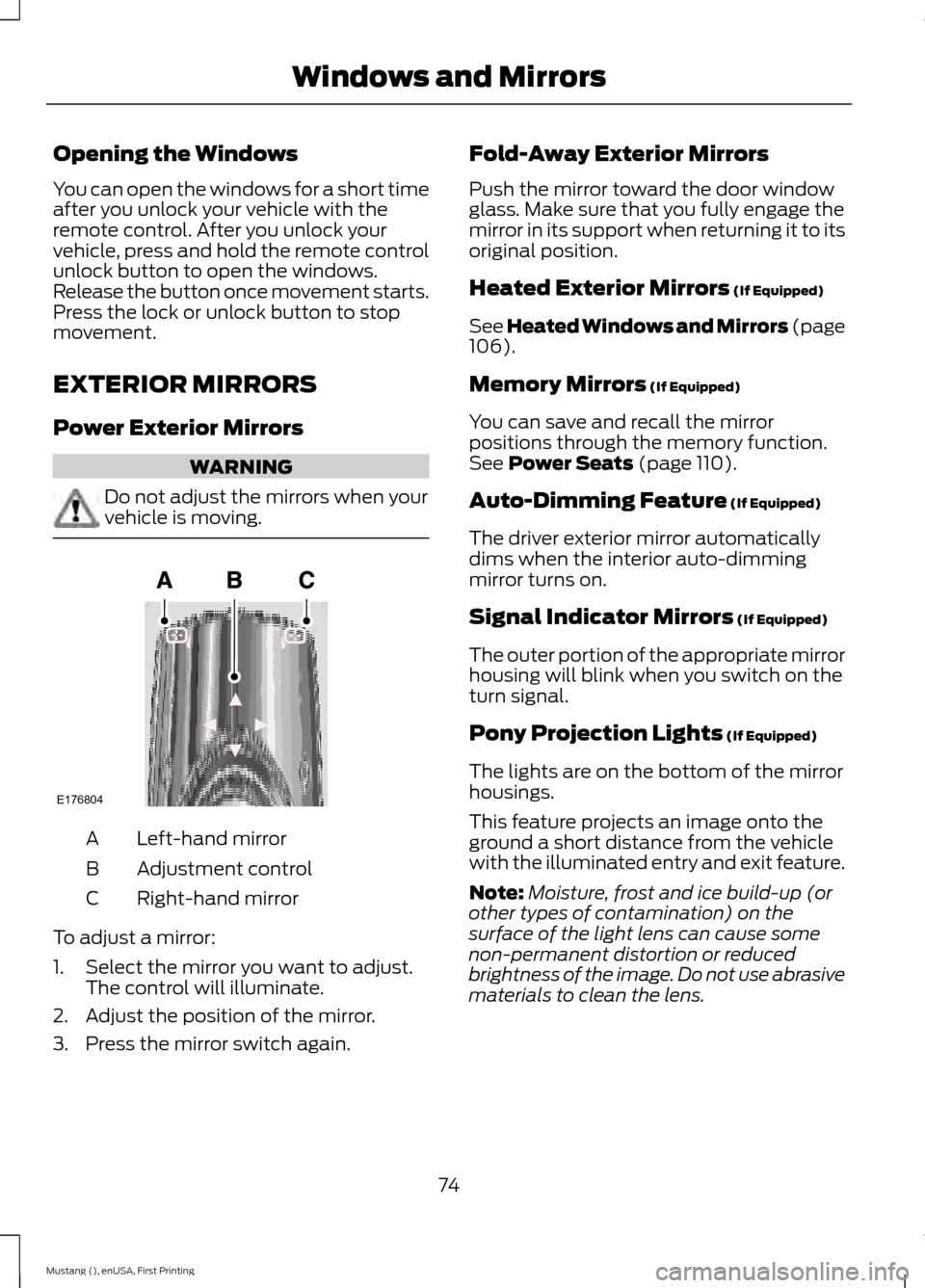
Left-hand mirror
A
Adjustment control
B
Right-hand mirror
C
To adjust a mirror:
1. Select the mirror you want to adjust. The control will illuminate.
2. Adjust the position of the mirror.
3. Press the mirror switch again. Fold-Away Exterior Mirrors
Push the mirror toward the door window
glass. Make sure that you fully engage the
mirror in its support when returning it to its
original position.
Heated Exterior Mirrors (If Equipped)
See Heated Windows and Mirrors (page
106
).
Memory Mirrors
(If Equipped)
You can save and recall the mirror
positions through the memory function.
See
Power Seats (page 110).
Auto-Dimming Feature
(If Equipped)
The driver exterior mirror automatically
dims when the interior auto-dimming
mirror turns on.
Signal Indicator Mirrors
(If Equipped)
The outer portion of the appropriate mirror
housing will blink when you switch on the
turn signal.
Pony Projection Lights
(If Equipped)
The lights are on the bottom of the mirror
housings.
This feature projects an image onto the
ground a short distance from the vehicle
with the illuminated entry and exit feature.
Note: Moisture, frost and ice build-up (or
other types of contamination) on the
surface of the light lens can cause some
non-permanent distortion or reduced
brightness of the image. Do not use abrasive
materials to clean the lens.
74
Mustang (), enUSA, First Printing Windows and MirrorsE176804
Page 92 of 441
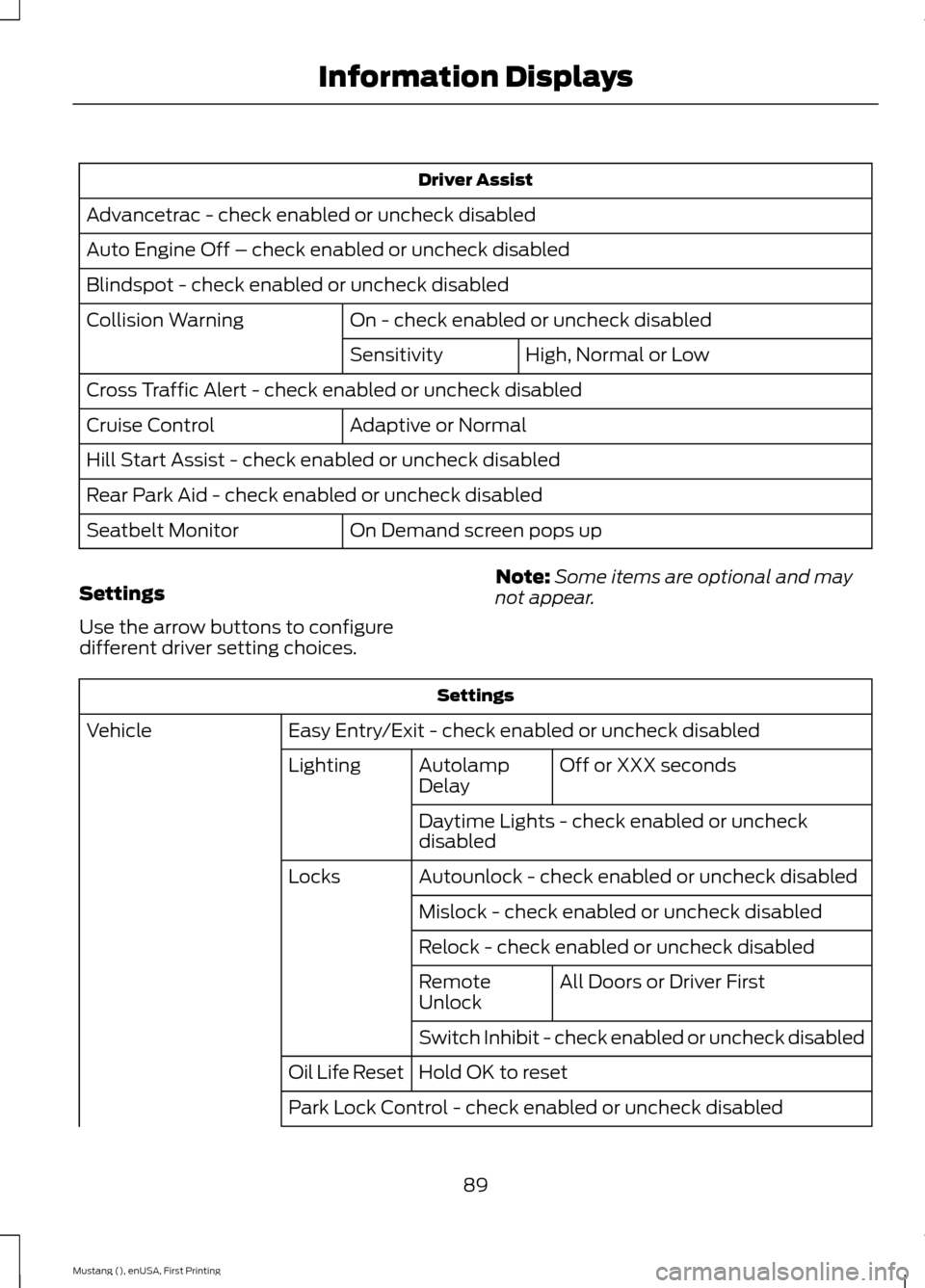
Driver Assist
Advancetrac - check enabled or uncheck disabled
Auto Engine Off – check enabled or uncheck disabled
Blindspot - check enabled or uncheck disabled On - check enabled or uncheck disabled
Collision Warning
High, Normal or Low
Sensitivity
Cross Traffic Alert - check enabled or uncheck disabled Adaptive or Normal
Cruise Control
Hill Start Assist - check enabled or uncheck disabled
Rear Park Aid - check enabled or uncheck disabled
On Demand screen pops up
Seatbelt Monitor
Settings
Use the arrow buttons to configure
different driver setting choices. Note:
Some items are optional and may
not appear. Settings
Easy Entry/Exit - check enabled or uncheck disabled
Vehicle
Off or XXX seconds
Autolamp
Delay
Lighting
Daytime Lights - check enabled or uncheck
disabled
Autounlock - check enabled or uncheck disabled
Locks
Mislock - check enabled or uncheck disabled
Relock - check enabled or uncheck disabled All Doors or Driver First
Remote
Unlock
Switch Inhibit - check enabled or uncheck disabled
Hold OK to reset
Oil Life Reset
Park Lock Control - check enabled or uncheck disabled
89
Mustang (), enUSA, First Printing Information Displays
Page 93 of 441
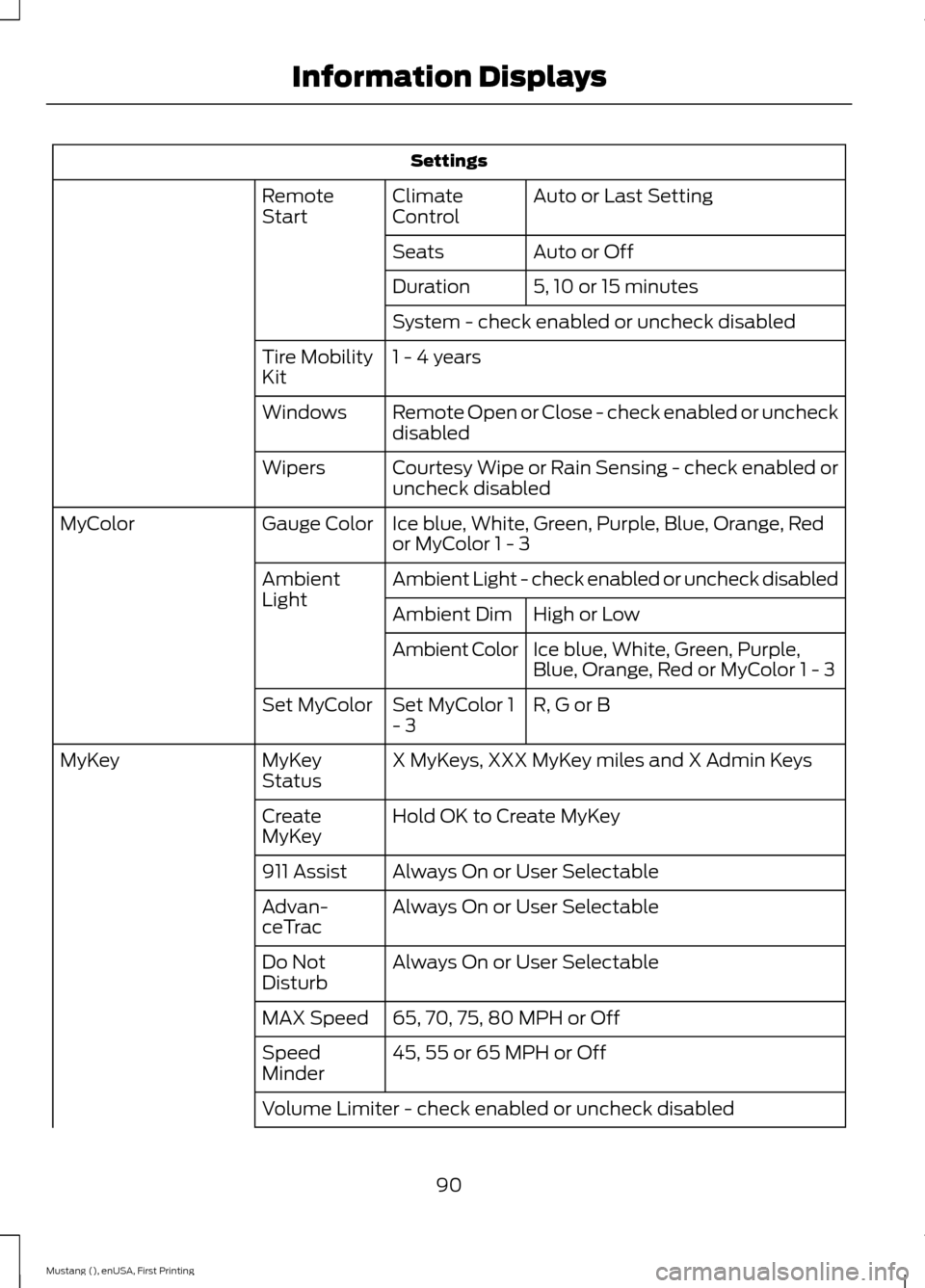
Settings
Auto or Last Setting
Climate
Control
Remote
Start
Auto or Off
Seats
5, 10 or 15 minutes
Duration
System - check enabled or uncheck disabled
1 - 4 years
Tire Mobility
Kit
Remote Open or Close - check enabled or uncheck
disabled
Windows
Courtesy Wipe or Rain Sensing - check enabled or
uncheck disabled
Wipers
Ice blue, White, Green, Purple, Blue, Orange, Red
or MyColor 1 - 3
Gauge Color
MyColor
Ambient Light - check enabled or uncheck disabled
Ambient
Light
High or Low
Ambient Dim
Ice blue, White, Green, Purple,
Blue, Orange, Red or MyColor 1 - 3
Ambient Color
R, G or B
Set MyColor 1
- 3
Set MyColor
X MyKeys, XXX MyKey miles and X Admin Keys
MyKey
Status
MyKey
Hold OK to Create MyKey
Create
MyKey
Always On or User Selectable
911 Assist
Always On or User Selectable
Advan-
ceTrac
Always On or User Selectable
Do Not
Disturb
65, 70, 75, 80 MPH or Off
MAX Speed
45, 55 or 65 MPH or Off
Speed
Minder
Volume Limiter - check enabled or uncheck disabled
90
Mustang (), enUSA, First Printing Information Displays
Page 100 of 441
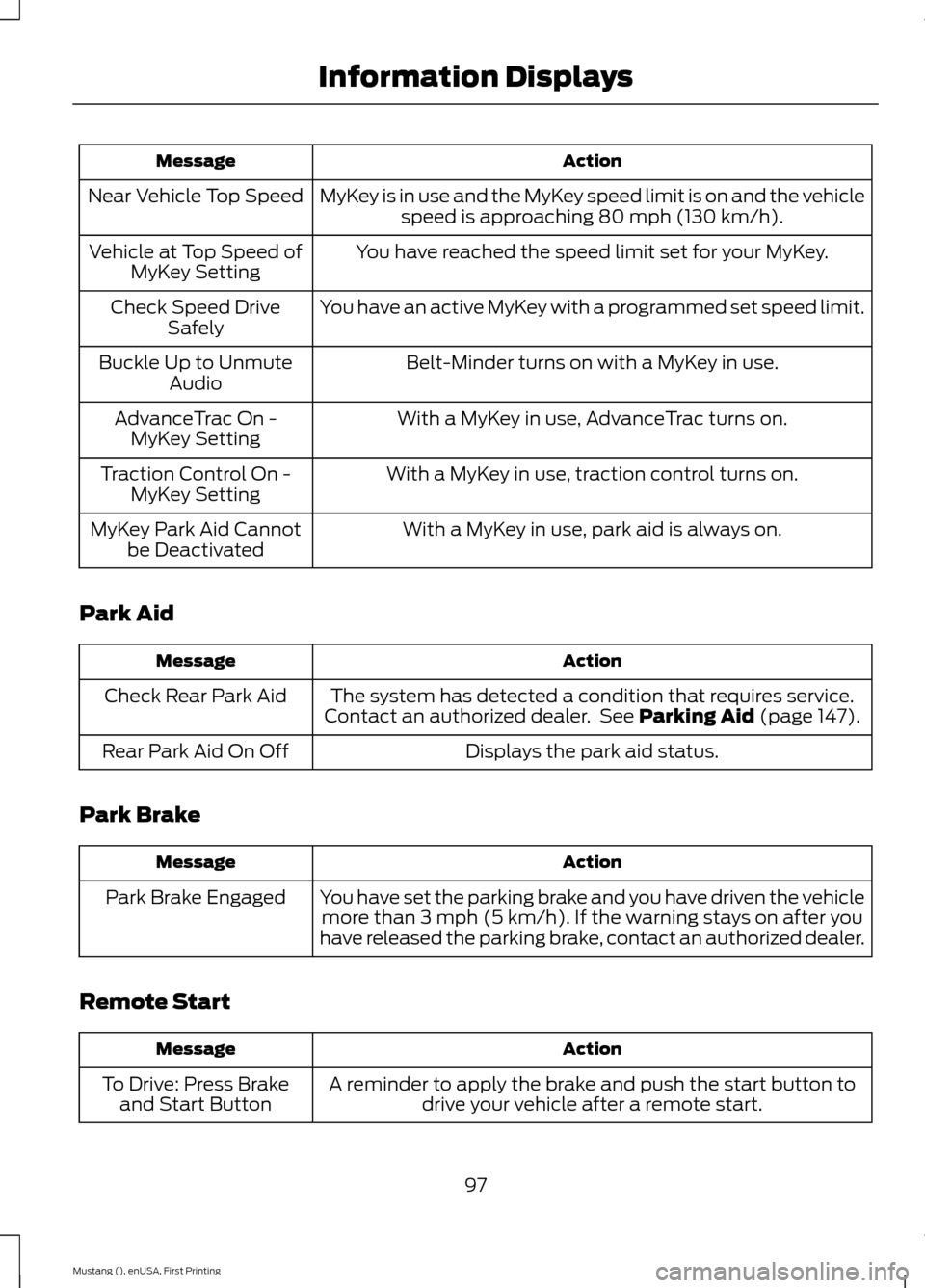
Action
Message
MyKey is in use and the MyKey speed limit is on and the vehiclespeed is approaching 80 mph (130 km/h).
Near Vehicle Top Speed
You have reached the speed limit set for your MyKey.
Vehicle at Top Speed of
MyKey Setting
You have an active MyKey with a programmed set speed limit.
Check Speed Drive
Safely
Belt-Minder turns on with a MyKey in use.
Buckle Up to Unmute
Audio
With a MyKey in use, AdvanceTrac turns on.
AdvanceTrac On -
MyKey Setting
With a MyKey in use, traction control turns on.
Traction Control On -
MyKey Setting
With a MyKey in use, park aid is always on.
MyKey Park Aid Cannot
be Deactivated
Park Aid Action
Message
The system has detected a condition that requires service.
Contact an authorized dealer. See Parking Aid (page 147).
Check Rear Park Aid
Displays the park aid status.
Rear Park Aid On Off
Park Brake Action
Message
You have set the parking brake and you have driven the vehiclemore than 3 mph (5 km/h). If the warning stays on after you
have released the parking brake, contact an authorized dealer.
Park Brake Engaged
Remote Start Action
Message
A reminder to apply the brake and push the start button todrive your vehicle after a remote start.
To Drive: Press Brake
and Start Button
97
Mustang (), enUSA, First Printing Information Displays
Page 110 of 441
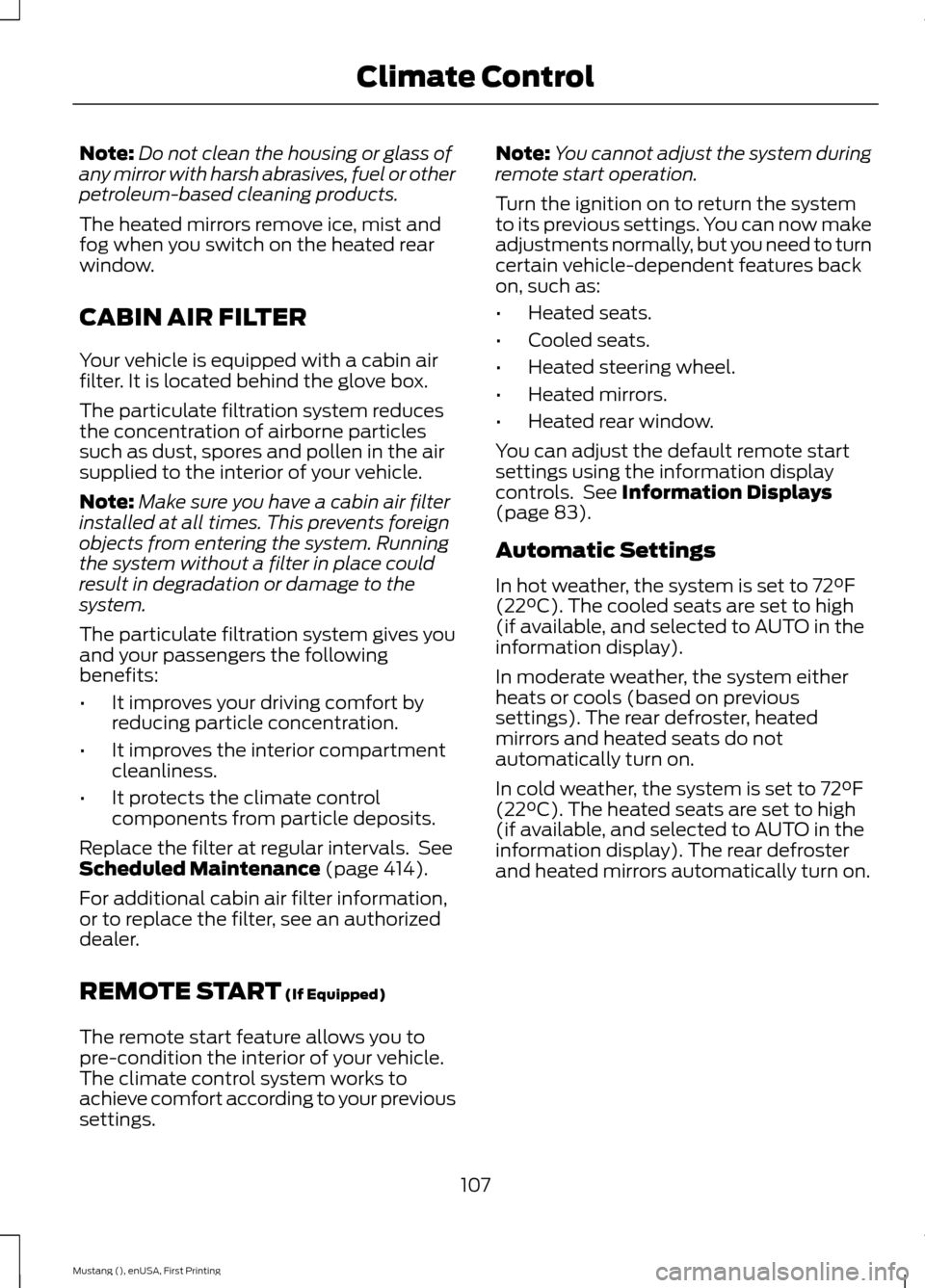
Note:
Do not clean the housing or glass of
any mirror with harsh abrasives, fuel or other
petroleum-based cleaning products.
The heated mirrors remove ice, mist and
fog when you switch on the heated rear
window.
CABIN AIR FILTER
Your vehicle is equipped with a cabin air
filter. It is located behind the glove box.
The particulate filtration system reduces
the concentration of airborne particles
such as dust, spores and pollen in the air
supplied to the interior of your vehicle.
Note: Make sure you have a cabin air filter
installed at all times. This prevents foreign
objects from entering the system. Running
the system without a filter in place could
result in degradation or damage to the
system.
The particulate filtration system gives you
and your passengers the following
benefits:
• It improves your driving comfort by
reducing particle concentration.
• It improves the interior compartment
cleanliness.
• It protects the climate control
components from particle deposits.
Replace the filter at regular intervals. See
Scheduled Maintenance (page 414).
For additional cabin air filter information,
or to replace the filter, see an authorized
dealer.
REMOTE START
(If Equipped)
The remote start feature allows you to
pre-condition the interior of your vehicle.
The climate control system works to
achieve comfort according to your previous
settings. Note:
You cannot adjust the system during
remote start operation.
Turn the ignition on to return the system
to its previous settings. You can now make
adjustments normally, but you need to turn
certain vehicle-dependent features back
on, such as:
• Heated seats.
• Cooled seats.
• Heated steering wheel.
• Heated mirrors.
• Heated rear window.
You can adjust the default remote start
settings using the information display
controls. See
Information Displays
(page 83).
Automatic Settings
In hot weather, the system is set to 72°F
(22°C). The cooled seats are set to high
(if available, and selected to AUTO in the
information display).
In moderate weather, the system either
heats or cools (based on previous
settings). The rear defroster, heated
mirrors and heated seats do not
automatically turn on.
In cold weather, the system is set to 72°F
(22°C). The heated seats are set to high
(if available, and selected to AUTO in the
information display). The rear defroster
and heated mirrors automatically turn on.
107
Mustang (), enUSA, First Printing Climate Control
Page 125 of 441
STEERING WHEEL LOCK (If
Equipped)
The steering wheel locks automatically
when you leave your vehicle and take the
intelligent access key with you. The
steering wheel unlocks automatically when
you enter your vehicle with the intelligent
access key.
Note: You may need to turn the steering
wheel left or right if the wheel does not
unlock completely. This may happen in
certain situations, such as parking your
vehicle on a steep grade.
STARTING A GASOLINE
ENGINE
When you start the engine, the idle speed
increases, this helps to warm up the
engine. If the engine idle speed does not
slow down automatically, have your
vehicle checked by an authorized dealer.
Note: You can crank the engine for a total
of 60 seconds (without the engine starting)
before the starting system temporarily
disables. The 60 seconds does not have to
be all at once. For example, if you crank the
engine three times for 20 seconds each
time, without the engine starting, you
reached the 60-second time limit. A
message appears in the information display
alerting you that you exceeded the cranking
time. You cannot attempt to start the engine
for at least 15 minutes. After 15 minutes, you
are limited to a 15-second engine cranking
time. You need to wait 60 minutes before
you can crank the engine for 60 seconds
again. Before starting the engine, check the
following:
•
Make sure all occupants have fastened
their safety belts.
• Make sure the headlamps and
electrical accessories are off.
• Make sure the parking brake is on.
• Move the transmission selector lever
to park (P) (automatic transmission)
or neutral (manual transmission)
Note: Do not touch the accelerator pedal.
Note: You must have your intelligent access
key in the vehicle in order to shift the
transmission out of position
P.
1. Fully press the brake pedal.
2. Press the button.
The system does not function if:
• The key frequencies are jammed.
• The key battery has no charge.
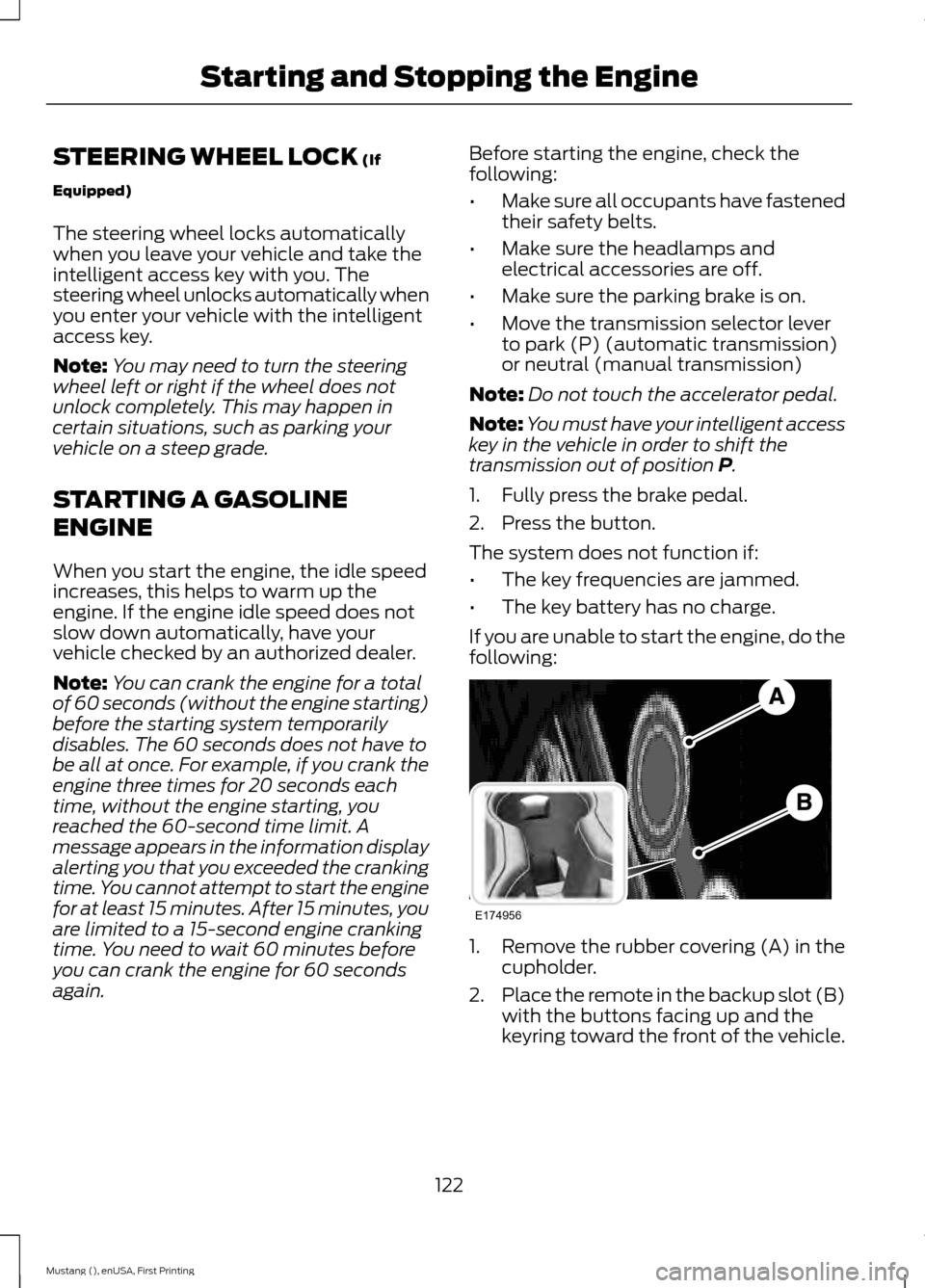
If you are unable to start the engine, do the
following: 1. Remove the rubber covering (A) in the
cupholder.
2. Place the remote in the backup slot (B)
with the buttons facing up and the
keyring toward the front of the vehicle.
122
Mustang (), enUSA, First Printing Starting and Stopping the EngineE174956
Page 195 of 441
Canadian roadside coverage and benefits
may differ from the U.S. coverage. If you
require more information, please refer to
the coverage section of your warranty
guide, call us in Canada at
1-800-665-2006, or visit our website at
www.ford.ca.
Sykes Assistance Services Corporation
administers the Roadside Assistance
program. You must receive covered
services in Canada or the continental
United States. Coverage extends to
vehicles that use public, non-seasonal,
annually traveled roadways. Roadside
Assistance coverage does not extend to
vehicles involved in cross-country driving,
logging, autocross and any other form of
off-road use. Well maintained roads and
surfaces help ensure safe travel for the
supplier, and allow their representatives
to perform service as per the standard
operating procedures.
In Remote Locations
If our supplier cannot take your vehicle by
road to the nearest authorized dealership,
transportation by rail or water may be
necessary. The program covers a tow to
the dock or rail terminal and also to the
dealership at the end of the trip.
For rail or water transportation, however,
contact your authorized dealer to confirm
if you are eligible for additional coverage
before you authorize or pay for the service.
Call the Ford Roadside Assistance at
1-800-665-2006 for additional
information.
HAZARD WARNING FLASHERS
Note:
The hazard warning flashers will
operate when the ignition is in any position
or if the key is not in the ignition. If used
when the engine is not running, the battery
will lose charge. As a result, there may be
insufficient power to restart your engine. The hazard flasher control is
located on the instrument panel
by the radio. Use it when your
vehicle is disabled and is creating a safety
hazard for other motorists.
• Press the flasher control and all front
and rear direction indicators flash.
• Press the flasher control again to turn
them off.
FUEL SHUTOFF WARNING
Failure to inspect and, if necessary,
repair fuel leaks after a collision may
increase the risk of fire and serious
injury. Ford Motor Company recommends
that the fuel system be inspected by an
authorized dealer after any collision. In the event of a moderate to severe
collision, this vehicle includes a fuel pump
shut-off feature that stops the flow of fuel
to the engine. Not every impact will cause
a shut-off.
192
Mustang (), enUSA, First Printing Roadside EmergenciesE142663
Page 198 of 441
2. Remove the jumper cable on the
negative (-) terminal of the booster
vehicle's battery.
3. Remove the jumper cable from the positive (+) terminal of the booster
vehicle's battery.
4. Remove the jumper cable from the positive (+) terminal of the disabled
vehicle's battery.
After the disabled vehicle has been started
and the jumper cables removed, allow it
to idle for several minutes so the battery
can recharge.
POST-CRASH ALERT SYSTEM
The system flashes the turn signal lamps
and sounds the horn (intermittently) in the
event of a serious impact that deploys an
airbag (front, side, side curtain or Safety
Canopy) or the safety belt pretensioners.
The horn and lamps will turn off when:
• You press the hazard control button.
• You press the panic button on the
remote entry transmitter (if equipped).
• Your vehicle runs out of power.
195
Mustang (), enUSA, First Printing Roadside Emergencies
Page 398 of 441
For a complete listing of the accessories
that are available for your vehicle, please
contact an authorized dealer or visit our
online store at www.Accessories.Ford.com
(United States only).
Ford Custom Accessories are available for
your vehicle through an authorized Ford
dealer. Ford Motor Company will repair or
replace any properly authorized
dealer-installed Ford Genuine Accessory
found to be defective in factory-supplied
materials or workmanship during the
warranty period, as well as any component
damaged by the defective accessories.
Ford Motor Company will warrant your
Ford Genuine Accessory through the
warranty that provides the greatest
benefit:
•
24 months, unlimited mileage.
• The remainder of your new vehicle
limited warranty.
Contact an authorized dealer for details
and a copy of the warranty.
Exterior style
• Rear spoilers.
• Splash guards.
• Wheels.
• Custom graphics*.
• Wheel center caps.
Interior style
• Floor mats.
• Sport pedals.
• Ambient lighting.
• Flexible visor storage system (tissue
dispenser, organizer, CD holder).
• Auto dimming interior mirror with
compass and temperature.
• Illuminated sill plates. •
Leather-trimmed interior seating*.
• Rear seat entertainment system*.
Lifestyle
• Ash cup (smoker's packages).
• Soft cargo organizers.
• Cargo net.
• Cargo area protector.
Peace of mind
• Remote start.
• Vehicle security systems.
• Wheel locks.
• Bumper mounted parking assist
system*.
• Full vehicle covers.
*Ford Licensed Accessory. The accessory
manufacturer designs, develops and
therefore warrants Ford Licensed
Accessories, and does not design or test
these accessories to Ford Motor Company
engineering requirements. Contact an
authorized Ford dealer for the
manufacturer's limited warranty details
and request a copy of the Ford Licensed
Accessories product limited warranty from
the accessory manufacturer.
395
Mustang (), enUSA, First Printing Accessories