ECO mode FORD MUSTANG 2015 6.G Owner's Guide
[x] Cancel search | Manufacturer: FORD, Model Year: 2015, Model line: MUSTANG, Model: FORD MUSTANG 2015 6.GPages: 441, PDF Size: 6.98 MB
Page 372 of 441
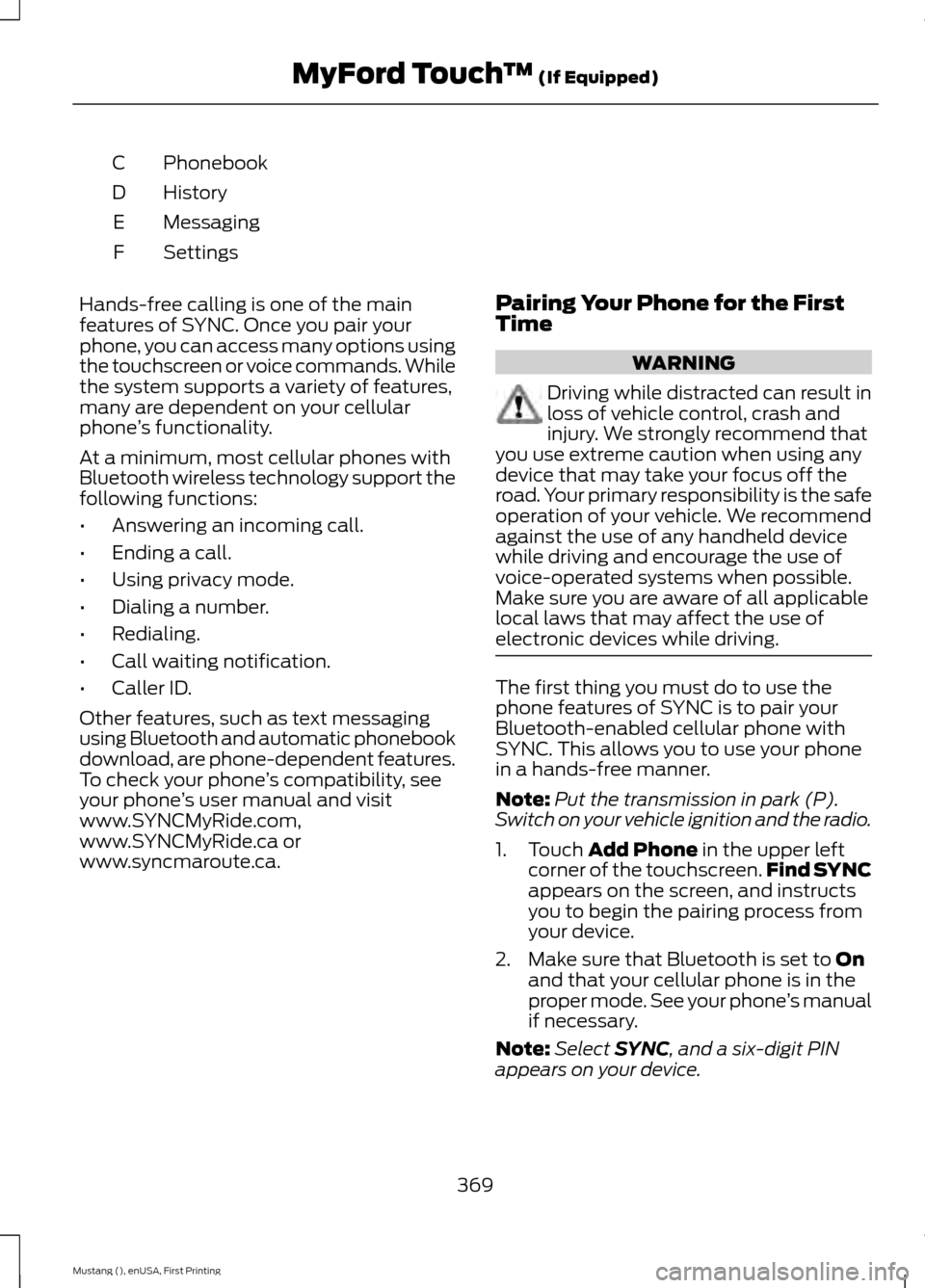
Phonebook
C
History
D
Messaging
E
Settings
F
Hands-free calling is one of the main
features of SYNC. Once you pair your
phone, you can access many options using
the touchscreen or voice commands. While
the system supports a variety of features,
many are dependent on your cellular
phone ’s functionality.
At a minimum, most cellular phones with
Bluetooth wireless technology support the
following functions:
• Answering an incoming call.
• Ending a call.
• Using privacy mode.
• Dialing a number.
• Redialing.
• Call waiting notification.
• Caller ID.
Other features, such as text messaging
using Bluetooth and automatic phonebook
download, are phone-dependent features.
To check your phone ’s compatibility, see
your phone ’s user manual and visit
www.SYNCMyRide.com,
www.SYNCMyRide.ca or
www.syncmaroute.ca. Pairing Your Phone for the First
Time WARNING
Driving while distracted can result in
loss of vehicle control, crash and
injury. We strongly recommend that
you use extreme caution when using any
device that may take your focus off the
road. Your primary responsibility is the safe
operation of your vehicle. We recommend
against the use of any handheld device
while driving and encourage the use of
voice-operated systems when possible.
Make sure you are aware of all applicable
local laws that may affect the use of
electronic devices while driving. The first thing you must do to use the
phone features of SYNC is to pair your
Bluetooth-enabled cellular phone with
SYNC. This allows you to use your phone
in a hands-free manner.
Note:
Put the transmission in park (P).
Switch on your vehicle ignition and the radio.
1. Touch Add Phone in the upper left
corner of the touchscreen. Find SYNC
appears on the screen, and instructs
you to begin the pairing process from
your device.
2. Make sure that Bluetooth is set to
On
and that your cellular phone is in the
proper mode. See your phone ’s manual
if necessary.
Note: Select
SYNC, and a six-digit PIN
appears on your device.
369
Mustang (), enUSA, First Printing MyFord Touch
™
(If Equipped)
Page 378 of 441
SYNC Services (If Equipped,
United States Only)
Note:
SYNC Services varies by trim level
and model year and may require a
subscription. Traffic alerts and turn-by-turn
directions available in select markets.
Message and data rates may apply. Ford
Motor Company reserves the right to change
or discontinue this product service at any
time without prior notification or incurring
any future obligation.
Note: SYNC Services requires activation
before use. Visit www.SYNCMyRide.com to
register and check your eligibility for
complimentary services. Standard phone
and message rates may apply. Subscription
may be required. You must also have the
active SYNC Services Bluetooth-enabled
cellular phone paired and connected to the
system in order to connect to, and use,
SYNC Services. See Phone (page 368).
Note: This feature does not function
properly if you have enabled caller ID
blocking on your cellular phone. Make sure
your cellular phone is not blocking caller ID
before using SYNC Services.
Note: The driver is ultimately responsible
for the safe operation of the vehicle, and
therefore, must evaluate whether it is safe
to follow the suggested directions. Any
navigation features provided are only an aid.
Make your driving decisions based on your
observations of local conditions and existing
traffic regulations. Do not follow the route
suggestions if doing so would result in an
unsafe or illegal maneuver, if you would be
placed in an unsafe situation, or if you would
be directed into an area that you consider
unsafe. Maps used by this system may be
inaccurate because of errors, changes in
roads, traffic conditions or driving
conditions. Note:
When you connect, the service uses
GPS technology and advanced vehicle
sensors to collect your vehicle's current
location, travel direction and speed to help
provide you with the directions, traffic
reports, or business searches you request.
Further, to provide the services you request,
for continuous improvement, the service
may collect and record call details and voice
communications. For more information, see
SYNC Services Terms and Conditions at
www.SYNCMyRide.com. If you do not want
Ford or its service providers to collect your
vehicle travel information or other
information identified in the Terms and
Conditions, do not subscribe or use the
service.
SYNC Services uses advanced vehicle
sensors, integrated GPS technology and
comprehensive map and traffic data, to
give you personalized traffic reports,
precise turn-by-turn directions, business
search, news, sports, weather and more.
For a complete list of services, or to learn
more, please visit www.SYNCMyRide.com.
Connecting to SYNC Services Using
Voice Commands 1. Press the voice button.
2. When prompted, say "Services". This
initiates an outgoing call to SYNC
Services using your paired and
connected Bluetooth-enabled cellular
phone.
3. Once you connect to the service, follow
the voice prompts to request the
desired service, such as "Traffic" or
"Directions". You can also say, "What
are my choices?" to receive a list of
available services from which to
choose.
4. Say, "Services" to return to the Services
main menu or for help, say, "Help".
375
Mustang (), enUSA, First Printing MyFord Touch
™
(If Equipped)E142599
Page 387 of 441
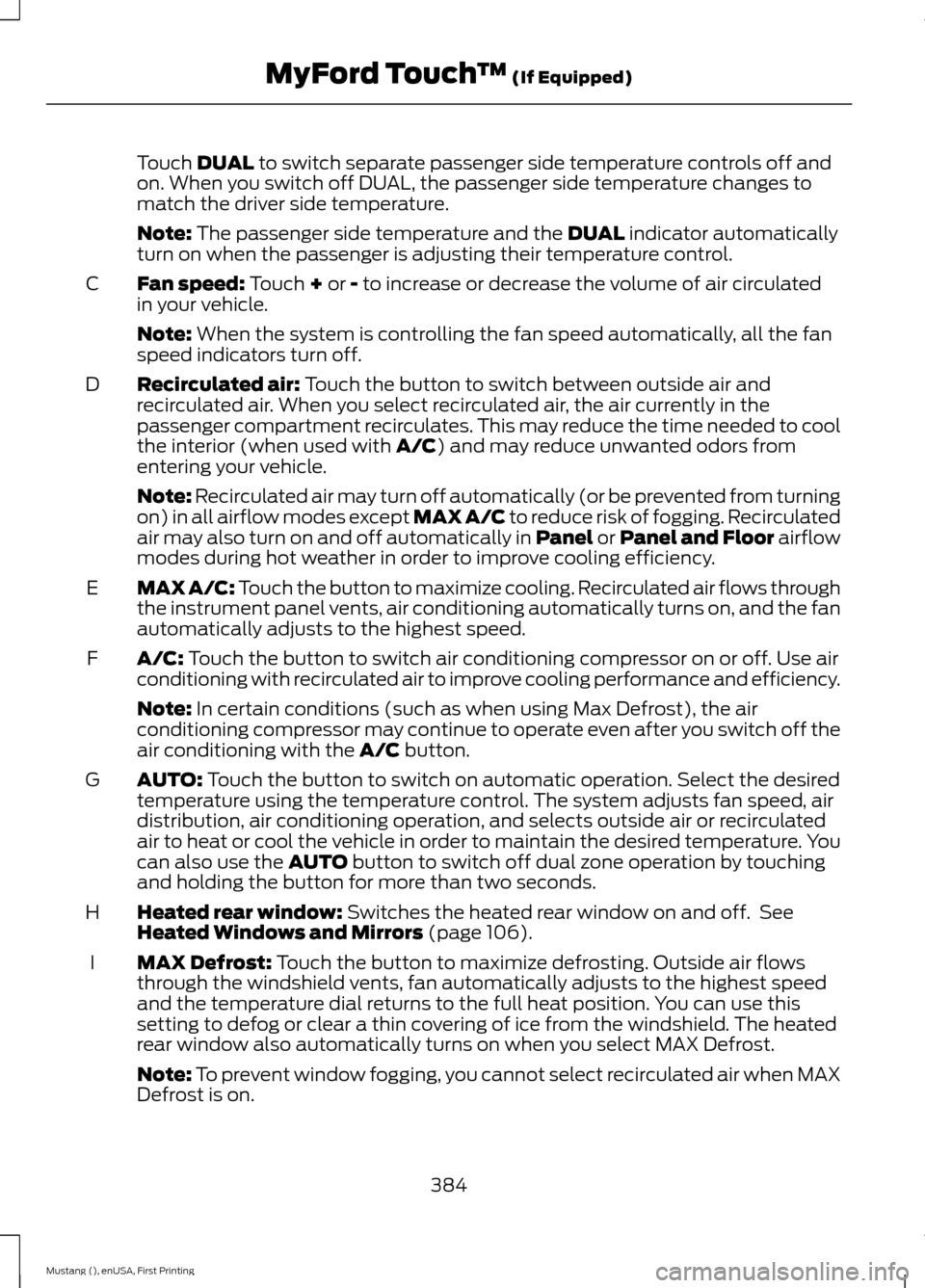
Touch DUAL to switch separate passenger side temperature controls off and
on. When you switch off DUAL, the passenger side temperature changes to
match the driver side temperature.
Note:
The passenger side temperature and the DUAL indicator automatically
turn on when the passenger is adjusting their temperature control.
Fan speed:
Touch + or - to increase or decrease the volume of air circulated
in your vehicle.
C
Note:
When the system is controlling the fan speed automatically, all the fan
speed indicators turn off.
Recirculated air:
Touch the button to switch between outside air and
recirculated air. When you select recirculated air, the air currently in the
passenger compartment recirculates. This may reduce the time needed to cool
the interior (when used with
A/C) and may reduce unwanted odors from
entering your vehicle.
D
Note:
Recirculated air may turn off automatically (or be prevented from turning
on) in all airflow modes except MAX A/C to reduce risk of fogging. Recirculated
air may also turn on and off automatically in Panel or Panel and Floor airflow
modes during hot weather in order to improve cooling efficiency.
MAX A/C: Touch the button to maximize cooling. Recirculated air flows through
the instrument panel vents, air conditioning automatically turns on, and the fan
automatically adjusts to the highest speed.
E
A/C:
Touch the button to switch air conditioning compressor on or off. Use air
conditioning with recirculated air to improve cooling performance and efficiency.
F
Note:
In certain conditions (such as when using Max Defrost), the air
conditioning compressor may continue to operate even after you switch off the
air conditioning with the
A/C button.
AUTO:
Touch the button to switch on automatic operation. Select the desired
temperature using the temperature control. The system adjusts fan speed, air
distribution, air conditioning operation, and selects outside air or recirculated
air to heat or cool the vehicle in order to maintain the desired temperature. You
can also use the
AUTO button to switch off dual zone operation by touching
and holding the button for more than two seconds.
G
Heated rear window:
Switches the heated rear window on and off. See
Heated Windows and Mirrors (page 106).
H
MAX Defrost:
Touch the button to maximize defrosting. Outside air flows
through the windshield vents, fan automatically adjusts to the highest speed
and the temperature dial returns to the full heat position. You can use this
setting to defog or clear a thin covering of ice from the windshield. The heated
rear window also automatically turns on when you select MAX Defrost.
I
Note:
To prevent window fogging, you cannot select recirculated air when MAX
Defrost is on.
384
Mustang (), enUSA, First Printing MyFord Touch
™
(If Equipped)
Page 393 of 441
Traffic Preferences
Avoid Traffic Problems
Choose how you want the system to
handle traffic problems along your route.
•
Automatic: Have the system reroute
you to avoid traffic incidents that
develop and impact the current route.
The system does not provide a traffic
alert notification.
• Manual:
Have the system always
provide a traffic alert notification for
traffic incidents along the planned
route. You have a choice to accept or
ignore the notification before making
the route deviation.
Traffic Alert Notification
Have the system display traffic alert
notifications.
Other traffic alert features allows you to
turn on certain, or all, traffic icons on the
map such as road work, incident, accidents
and closed roads. Scroll down to view all
the different types of alerts. Switch these
features
ON or OFF.
Avoid Areas
Choose areas which you want the system
to avoid when calculating a route for you.
Press
Add to program an entry. Once you
make a selection, the system tries to avoid
the area(s) if possible for all routes. To
delete a selection, choose the listing on
the screen. When the screen changes to
Avoid Areas Edit
, you can press Delete
at the bottom right of the screen.
Map Mode
Press the green bar in the upper right area
of the touchscreen to view map mode. Map
mode shows advanced viewing comprised
of both 2D city maps as well as 3D
landmarks (when available). 2D city maps show detailed outlines of
buildings, visible land use and land
elements and detailed railway
infrastructure for the most essential cities
around the globe. These maps also contain
features, such as town blocks, building
footprints and railways.
3D landmarks appear as clear, visible
objects that are typically recognizable and
have a certain tourist value. The 3D
landmarks appear in 3D map mode only.
Coverage varies and improves with
updated map releases.
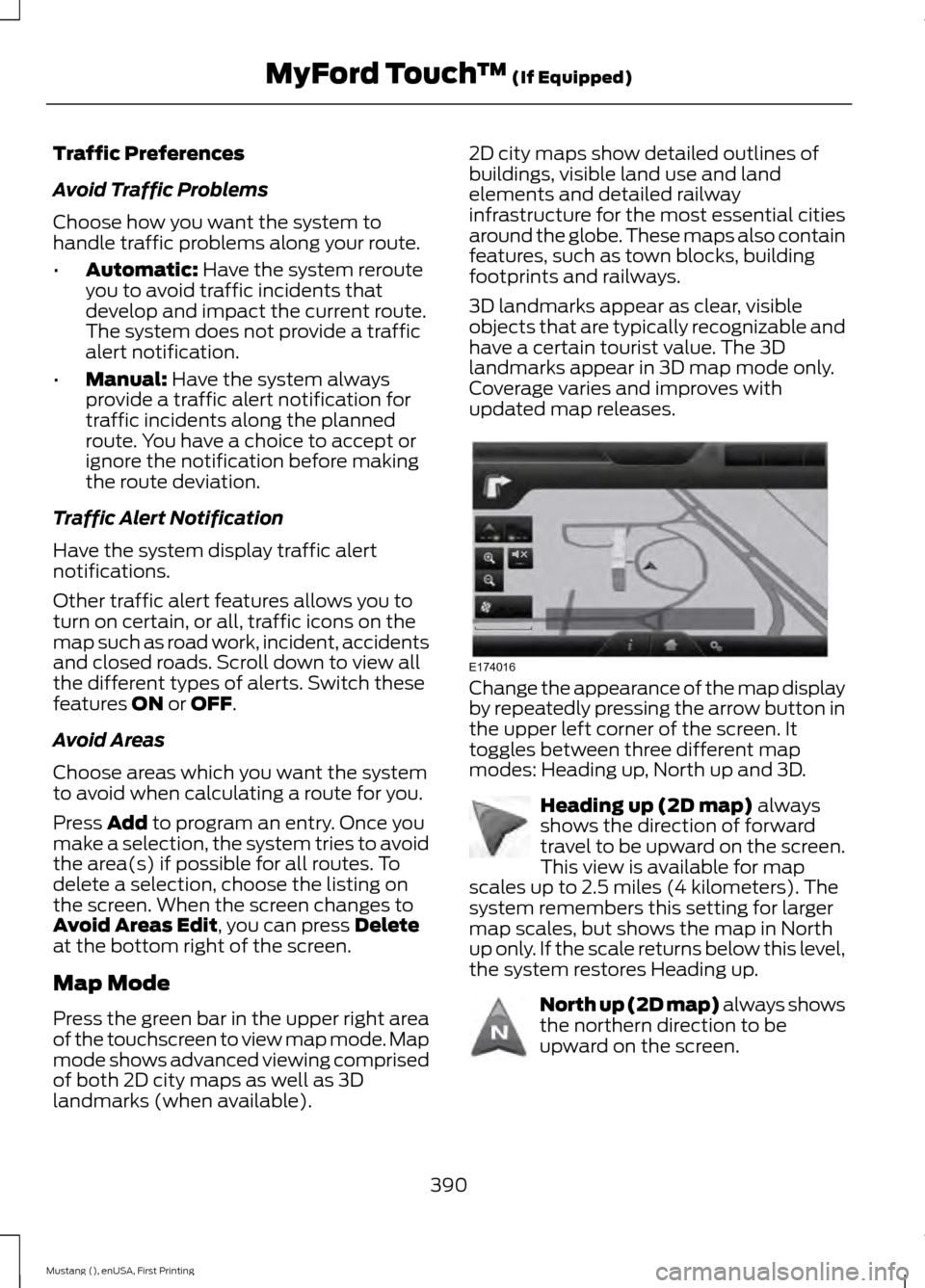
Change the appearance of the map display
by repeatedly pressing the arrow button in
the upper left corner of the screen. It
toggles between three different map
modes: Heading up, North up and 3D.
Heading up (2D map)
always
shows the direction of forward
travel to be upward on the screen.
This view is available for map
scales up to 2.5 miles (4 kilometers). The
system remembers this setting for larger
map scales, but shows the map in North
up only. If the scale returns below this level,
the system restores Heading up. North up (2D map) always shows
the northern direction to be
upward on the screen.
390
Mustang (), enUSA, First Printing MyFord Touch
™
(If Equipped)E174016 E142642 E142643
Page 421 of 441
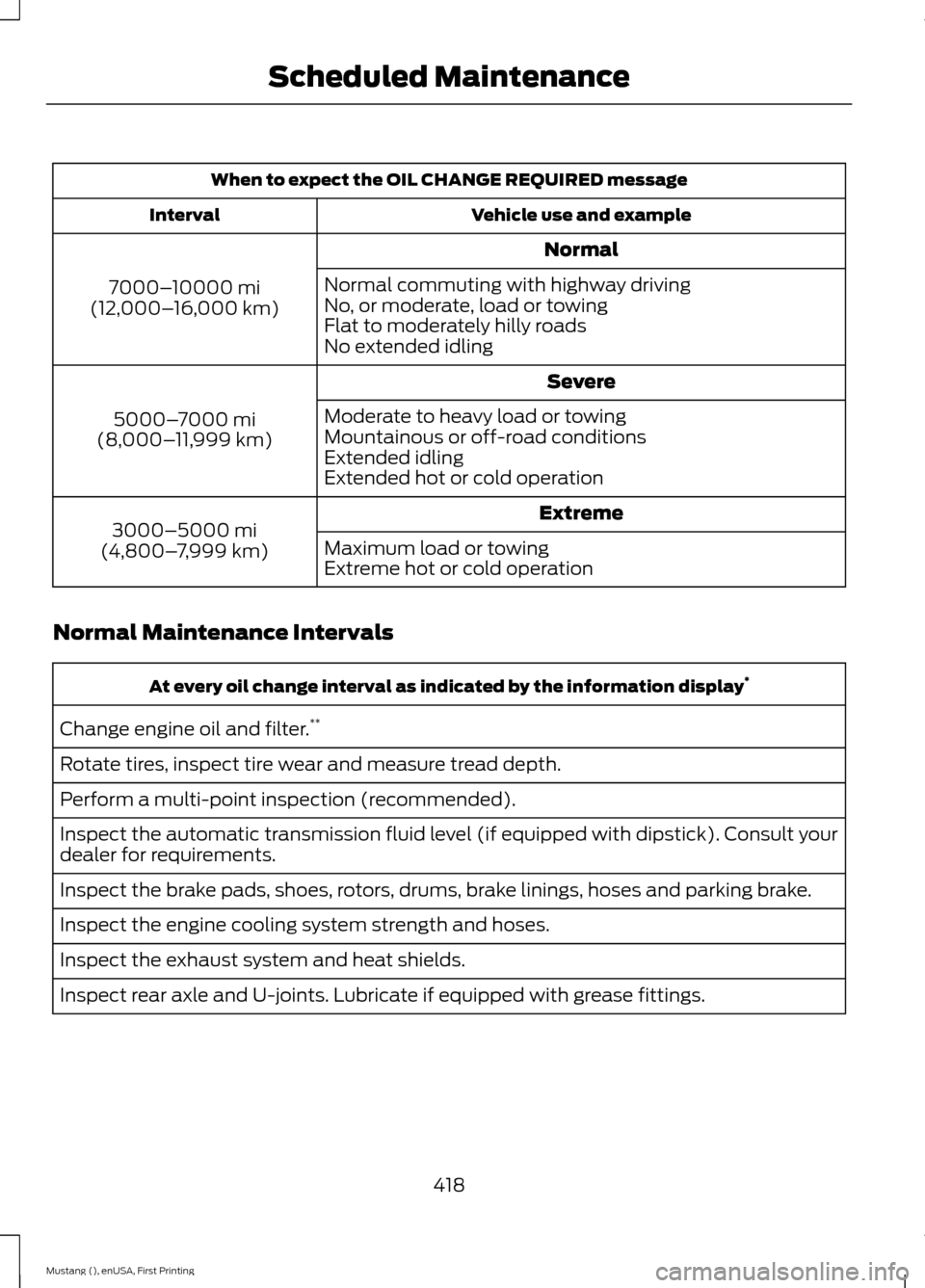
When to expect the OIL CHANGE REQUIRED message
Vehicle use and example
Interval
Normal
7000– 10000 mi
(12,000– 16,000 km) Normal commuting with highway driving
No, or moderate, load or towing
Flat to moderately hilly roads
No extended idling
Severe
5000– 7000 mi
(8,000– 11,999 km) Moderate to heavy load or towing
Mountainous or off-road conditions
Extended idling
Extended hot or cold operation
Extreme
3000–5000 mi
(4,800– 7,999 km) Maximum load or towing
Extreme hot or cold operation
Normal Maintenance Intervals At every oil change interval as indicated by the information display
*
Change engine oil and filter. **
Rotate tires, inspect tire wear and measure tread depth.
Perform a multi-point inspection (recommended).
Inspect the automatic transmission fluid level (if equipped with dipstick). Consult your
dealer for requirements.
Inspect the brake pads, shoes, rotors, drums, brake linings, hoses and parking brake.
Inspect the engine cooling system strength and hoses.
Inspect the exhaust system and heat shields.
Inspect rear axle and U-joints. Lubricate if equipped with grease fittings.
418
Mustang (), enUSA, First Printing Scheduled Maintenance
Page 434 of 441
Drive Control..................................................166
Selectable Drive Modes................................... 166
Selectable Steering............................................ 167
Driver and Passenger Airbags....................37 Children and Airbags........................................... 37
Proper Driver and Front Passenger Seating Adjustment........................................................ 37
Driver and Passenger Knee Airbags........42
Driving Aids
.....................................................159
Driving at High Speed................................265
Driving Hints
...................................................188
Driving Through Water...............................188
DRL See: Daytime Running Lamps......................... 70
E
Economical Driving......................................188
Emission Control System...........................131 On-Board Diagnostics (OBD-II).................... 132
Readiness for Inspection/Maintenance (I/M) Testing.................................................... 132
End User License Agreement..................397 SYNC End User License Agreement
(EULA).............................................................. 397
Engine Block Heater....................................124 Using the Engine Block Heater...................... 125
Engine Coolant Check
.................................215
Adding Engine Coolant..................................... 216
Checking the Engine Coolant......................... 215
Recycled Engine Coolant................................. 216
Severe Climates................................................... 217
What You Should Know About Fail-Safe Cooling............................................................... 217
Engine Immobilizer See: Passive Anti-Theft System..................... 62
Engine Oil Check
...........................................214
Adding Engine Oil............................................... 214
Engine Oil Dipstick.......................................214
Engine Specifications
.................................267
Drivebelt Routing................................................ 267Entertainment................................................351
AM/FM Radio...................................................... 353
Bluetooth Audio................................................. 366
Browsing Device Content................................ 351
CD........................................................................\
.... 362
Line In..................................................................... 367
SD Card Slot and USB Port........................... 363
Sirius® Satellite Radio (If Activated)........358
Supported Media Players, Formats and Metadata Information................................ 366
Essential Towing Checks
............................181
Before Towing a Trailer...................................... 181
Hitches..................................................................... 181
Launching or Retrieving a Boat or Personal Watercraft (PWC)......................................... 182
Safety Chains........................................................ 181
Trailer Brakes......................................................... 181
Trailer Lamps........................................................ 181
When Towing a Trailer...................................... 182
Event Data Recording See: Data Recording.............................................. 9
Export Unique Options..................................13
Extended Service Plan (ESP)..................412 SERVICE PLANS (CANADA ONLY).............413
SERVICE PLANS (U.S. Only).......................... 412
Exterior Mirrors
.................................................74
Auto-Dimming Feature...................................... 74
Blind Spot Monitor............................................... 75
Fold-Away Exterior Mirrors................................ 74
Heated Exterior Mirrors....................................... 74
Integrated Blind Spot Mirrors........................... 75
Memory Mirrors..................................................... 74
Pony Projection Lights........................................ 74
Power Exterior Mirrors......................................... 74
Signal Indicator Mirrors...................................... 74
F
Fastening the Safety Belts
.........................30
Safety Belt Extension Assembly..................... 32
Safety Belt Locking Modes................................ 31
Using Safety Belts During Pregnancy............31
Flat Tire Inflation See: Temporary Mobility Kit........................... 235
Floor Mats
.......................................................189
Fog Lamps - Front See: Front Fog Lamps.......................................... 71
431
Mustang (), enUSA, First Printing Index
Page 437 of 441
M
Maintenance..................................................210
General Information.......................................... 210
Manual Climate Control.............................101
Manual Seats..................................................110
Manual Transmission Fluid Check.........219
Manual Transmission
..................................134
Parking Your Vehicle.......................................... 135
Recommended Shift Speeds......................... 134
Reverse................................................................... 135
Using the Clutch.................................................. 134
Media Hub......................................................294
Memory Function
............................................111
Easy Entry and Exit Feature............................. 112
Linking a PreSet Position to your Remote Control or Intelligent Access Key
Fob........................................................................\
112
Saving a PreSet Position.................................... 111
Message Center See: Information Displays................................. 83
Mirrors See: Heated Windows and Mirrors..............106
See: Windows and Mirrors................................ 73
Mobile Communications Equipment.......13
Motorcraft Parts
..........................................268
MyFord Touch ™...........................................334
General Information......................................... 334
MyKey Troubleshooting
...............................54
MyKey ™............................................................50
Principle of Operation........................................ 50
N
Navigation
......................................................386
cityseekr................................................................ 388
Map Mode............................................................ 390
Navigation Map Updates................................ 392
Navigation Voice Commands....................... 393
Point of Interest (POI) Categories...............387
Quick-touch Buttons........................................ 392
Setting a Destination....................................... 386
Setting Your Navigation Preferences.........389
Normal Scheduled Maintenance............417 Intelligent Oil-Life Monitor®........................... 417
Normal Maintenance Intervals..................... 418O
Oil Check
See: Engine Oil Check....................................... 214
Opening and Closing the Hood
...............210
Opening the Convertible Top...................185 Using the Tonneau Caps................................. 186
Ordering Additional Owner's Literature.....................................................200
Obtaining a French Owner ’s Manual.........200
P
Parking Aid
.......................................................147
Rear Sensing System......................................... 147
Parking Aids
....................................................147
Parking Brake.................................................140
Passive Anti-Theft System.........................62 SecuriLock.............................................................. 62
PATS See: Passive Anti-Theft System..................... 62
Perchlorate.........................................................11
Personal Safety System ™
..........................35
How Does the Personal Safety System
Work?.................................................................. 35
Phone..............................................................368 Making Calls........................................................ 370
Pairing Subsequent Phones.......................... 370
Pairing Your Phone for the First Time.................................................................. 369
Phone Menu Options....................................... 370
Phone Settings.................................................... 372
Phone Voice Commands................................ 373
Receiving Calls.................................................... 370
Text Messaging.................................................... 371
Post-Crash Alert System...........................195
Power Door Locks See: Locking and Unlocking............................. 56
Power Seats
....................................................110
Power Lumbar........................................................ 111
Power Steering Fluid Check......................219
Power Windows
..............................................73
Accessory Delay.................................................... 73
Bounce-Back.......................................................... 73
One-Touch Down................................................. 73
One-Touch Up....................................................... 73
434
Mustang (), enUSA, First Printing Index