See FORD MUSTANG 2015 6.G Workshop Manual
[x] Cancel search | Manufacturer: FORD, Model Year: 2015, Model line: MUSTANG, Model: FORD MUSTANG 2015 6.GPages: 441, PDF Size: 6.98 MB
Page 99 of 441
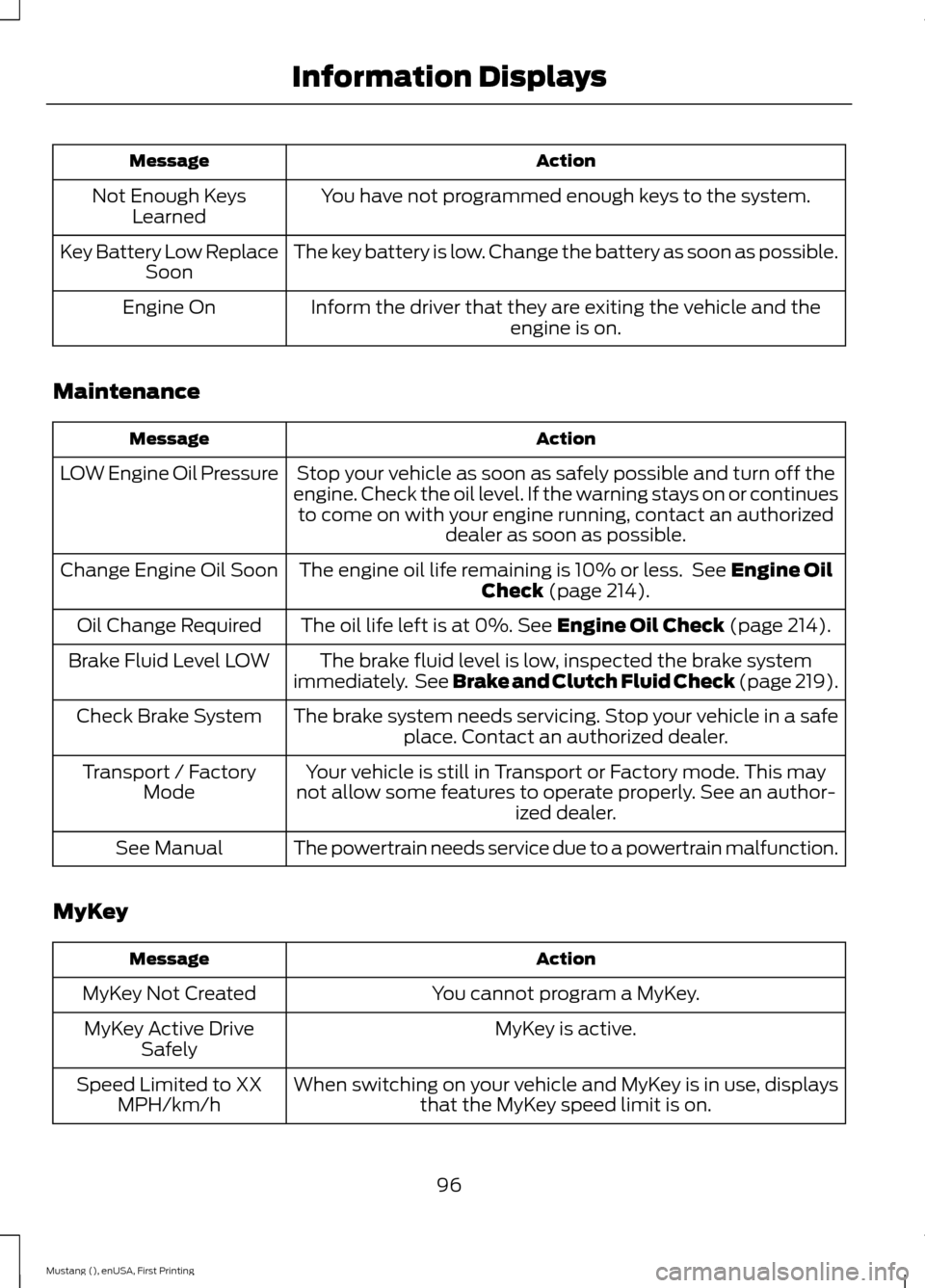
Action
Message
You have not programmed enough keys to the system.
Not Enough Keys
Learned
The key battery is low. Change the battery as soon as possible.
Key Battery Low Replace
Soon
Inform the driver that they are exiting the vehicle and the engine is on.
Engine On
Maintenance Action
Message
Stop your vehicle as soon as safely possible and turn off the
engine. Check the oil level. If the warning stays on or continues to come on with your engine running, contact an authorized dealer as soon as possible.
LOW Engine Oil Pressure
The engine oil life remaining is 10% or less. See Engine Oil
Check (page 214).
Change Engine Oil Soon
The oil life left is at 0%.
See Engine Oil Check (page 214).
Oil Change Required
The brake fluid level is low, inspected the brake system
immediately. See Brake and Clutch Fluid Check
(page 219).
Brake Fluid Level LOW
The brake system needs servicing. Stop your vehicle in a safeplace. Contact an authorized dealer.
Check Brake System
Your vehicle is still in Transport or Factory mode. This may
not allow some features to operate properly. See an author- ized dealer.
Transport / Factory
Mode
The powertrain needs service due to a powertrain malfunction.
See Manual
MyKey Action
Message
You cannot program a MyKey.
MyKey Not Created
MyKey is active.
MyKey Active Drive
Safely
When switching on your vehicle and MyKey is in use, displaysthat the MyKey speed limit is on.
Speed Limited to XX
MPH/km/h
96
Mustang (), enUSA, First Printing Information Displays
Page 100 of 441
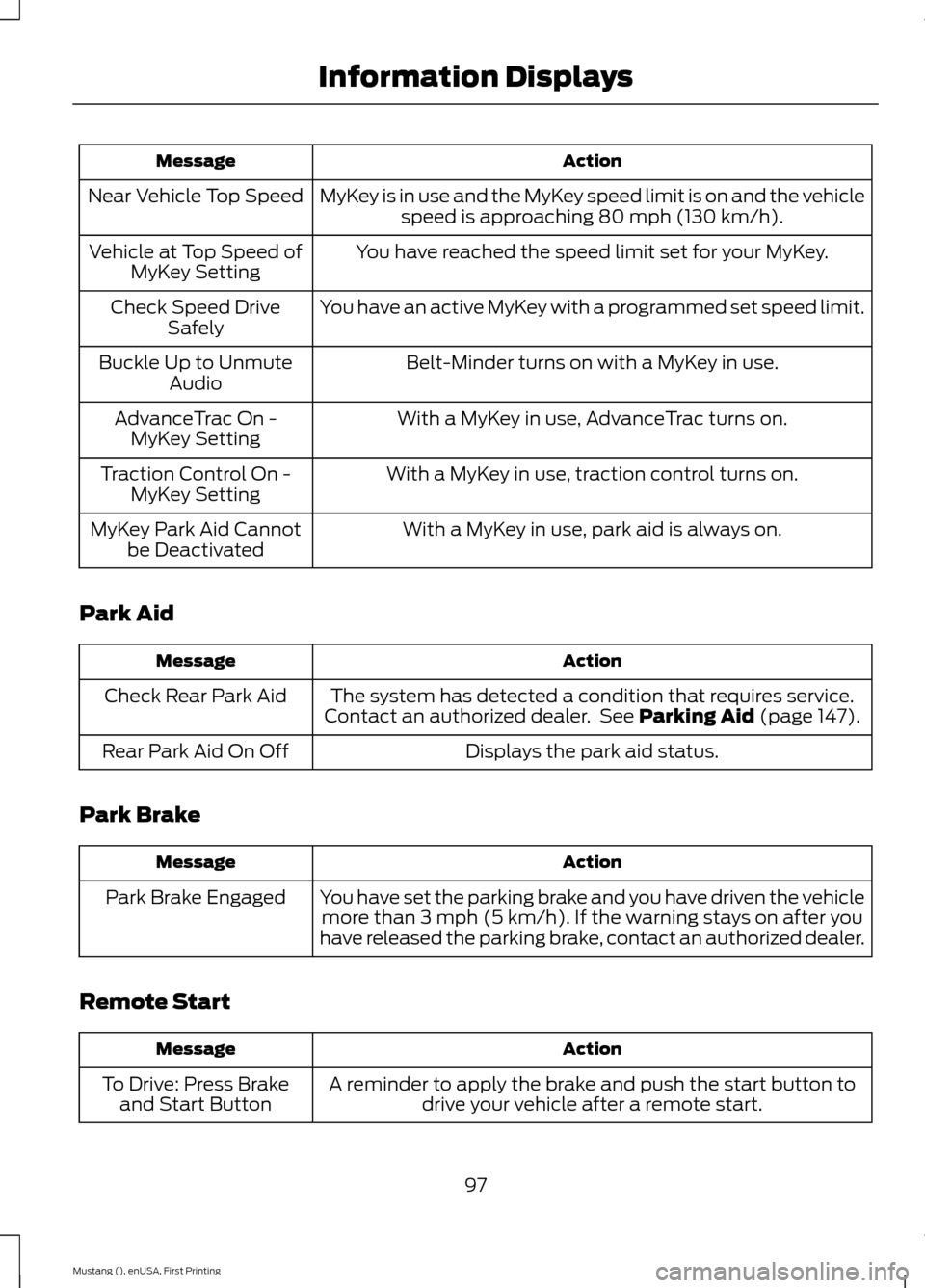
Action
Message
MyKey is in use and the MyKey speed limit is on and the vehiclespeed is approaching 80 mph (130 km/h).
Near Vehicle Top Speed
You have reached the speed limit set for your MyKey.
Vehicle at Top Speed of
MyKey Setting
You have an active MyKey with a programmed set speed limit.
Check Speed Drive
Safely
Belt-Minder turns on with a MyKey in use.
Buckle Up to Unmute
Audio
With a MyKey in use, AdvanceTrac turns on.
AdvanceTrac On -
MyKey Setting
With a MyKey in use, traction control turns on.
Traction Control On -
MyKey Setting
With a MyKey in use, park aid is always on.
MyKey Park Aid Cannot
be Deactivated
Park Aid Action
Message
The system has detected a condition that requires service.
Contact an authorized dealer. See Parking Aid (page 147).
Check Rear Park Aid
Displays the park aid status.
Rear Park Aid On Off
Park Brake Action
Message
You have set the parking brake and you have driven the vehiclemore than 3 mph (5 km/h). If the warning stays on after you
have released the parking brake, contact an authorized dealer.
Park Brake Engaged
Remote Start Action
Message
A reminder to apply the brake and push the start button todrive your vehicle after a remote start.
To Drive: Press Brake
and Start Button
97
Mustang (), enUSA, First Printing Information Displays
Page 101 of 441
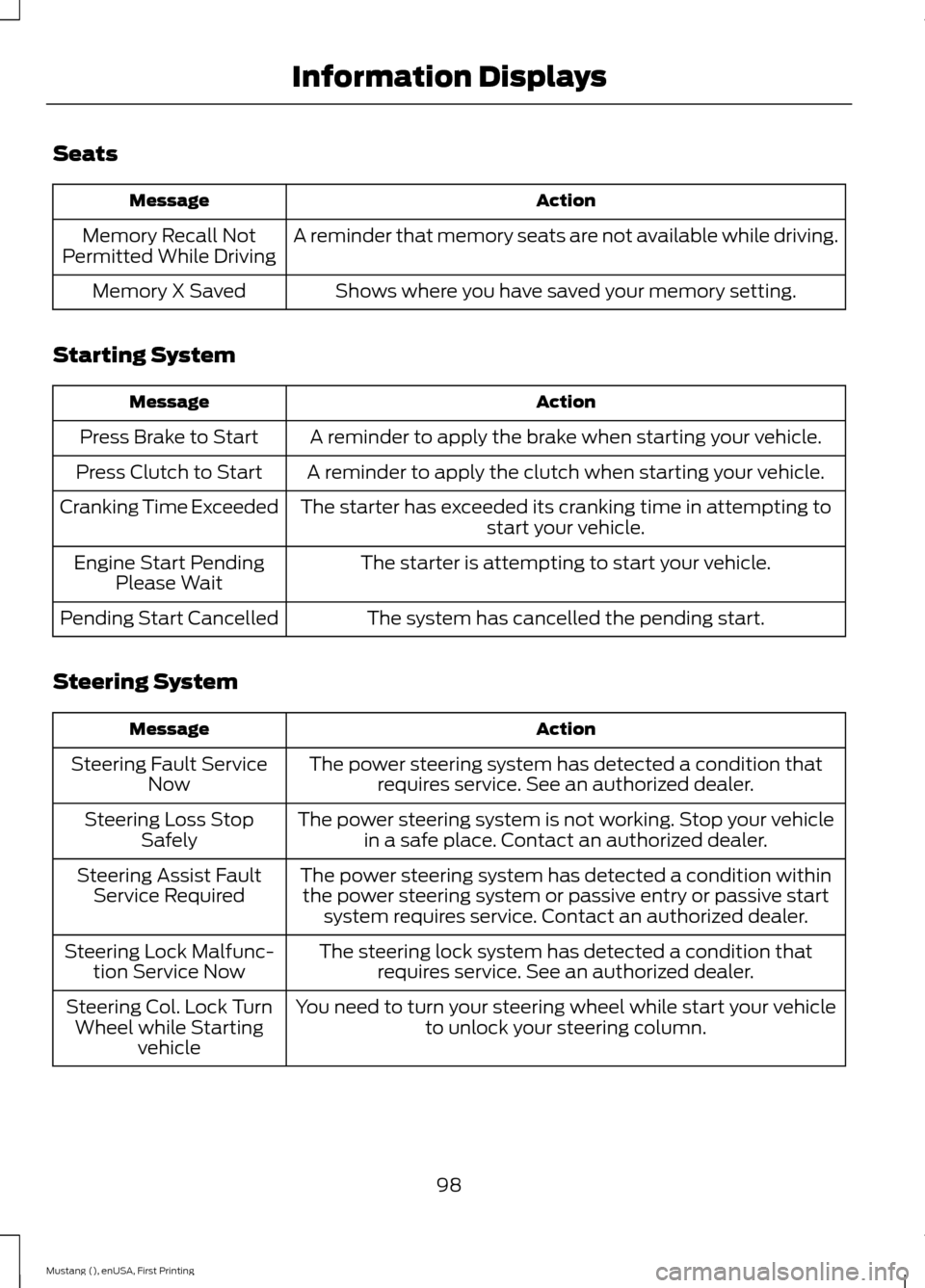
Seats
Action
Message
A reminder that memory seats are not available while driving.
Memory Recall Not
Permitted While Driving
Shows where you have saved your memory setting.
Memory X Saved
Starting System Action
Message
A reminder to apply the brake when starting your vehicle.
Press Brake to Start
A reminder to apply the clutch when starting your vehicle.
Press Clutch to Start
The starter has exceeded its cranking time in attempting tostart your vehicle.
Cranking Time Exceeded
The starter is attempting to start your vehicle.
Engine Start Pending
Please Wait
The system has cancelled the pending start.
Pending Start Cancelled
Steering System Action
Message
The power steering system has detected a condition thatrequires service. See an authorized dealer.
Steering Fault Service
Now
The power steering system is not working. Stop your vehiclein a safe place. Contact an authorized dealer.
Steering Loss Stop
Safely
The power steering system has detected a condition withinthe power steering system or passive entry or passive start system requires service. Contact an authorized dealer.
Steering Assist Fault
Service Required
The steering lock system has detected a condition thatrequires service. See an authorized dealer.
Steering Lock Malfunc-
tion Service Now
You need to turn your steering wheel while start your vehicleto unlock your steering column.
Steering Col. Lock Turn
Wheel while Starting vehicle
98
Mustang (), enUSA, First Printing Information Displays
Page 102 of 441
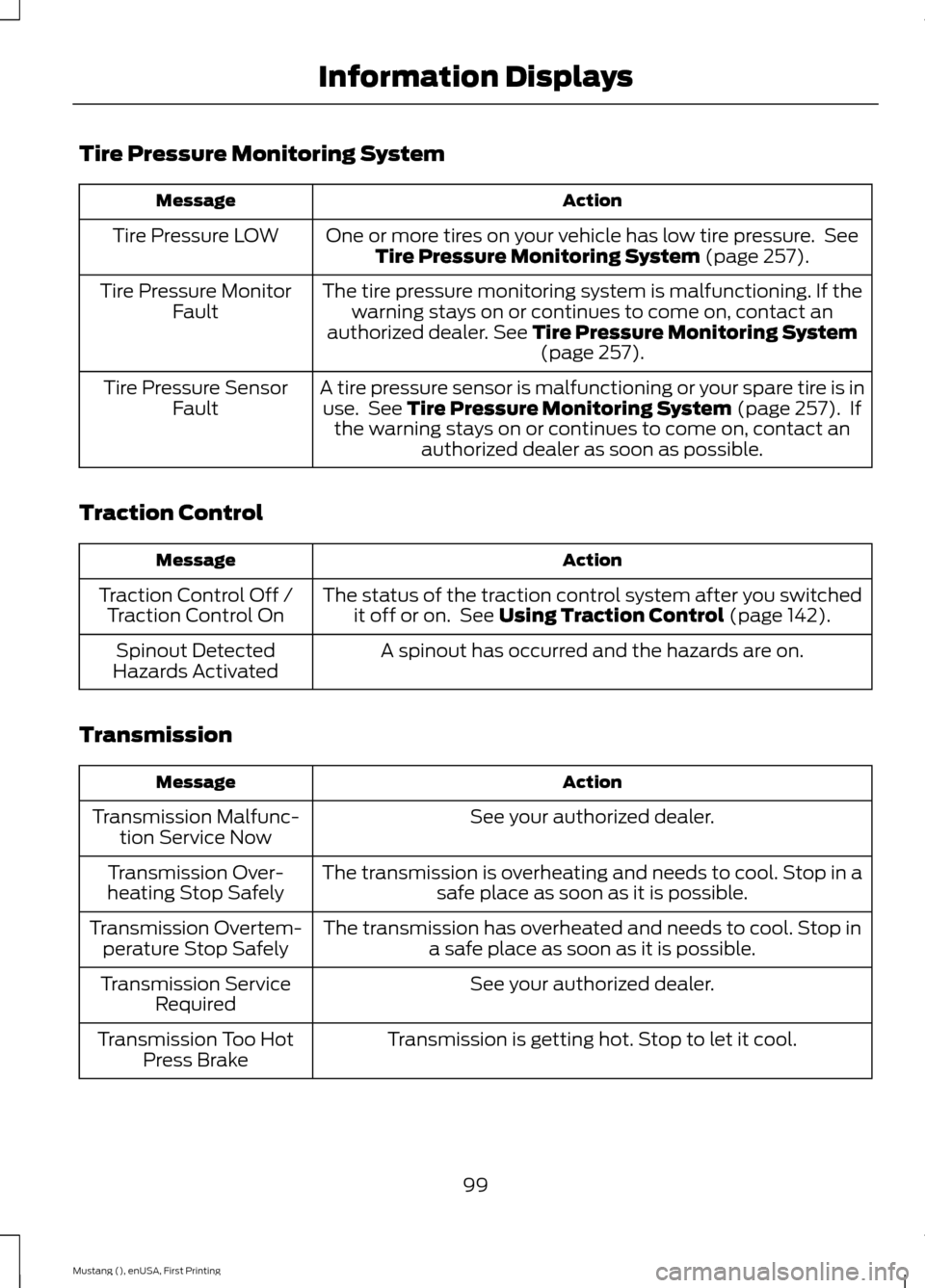
Tire Pressure Monitoring System
Action
Message
One or more tires on your vehicle has low tire pressure. SeeTire Pressure Monitoring System (page 257).
Tire Pressure LOW
The tire pressure monitoring system is malfunctioning. If thewarning stays on or continues to come on, contact an
authorized dealer.
See Tire Pressure Monitoring System (page 257).
Tire Pressure Monitor
Fault
A tire pressure sensor is malfunctioning or your spare tire is inuse. See
Tire Pressure Monitoring System (page 257). If
the warning stays on or continues to come on, contact an authorized dealer as soon as possible.
Tire Pressure Sensor
Fault
Traction Control Action
Message
The status of the traction control system after you switchedit off or on. See
Using Traction Control (page 142).
Traction Control Off /
Traction Control On
A spinout has occurred and the hazards are on.
Spinout Detected
Hazards Activated
Transmission Action
Message
See your authorized dealer.
Transmission Malfunc-
tion Service Now
The transmission is overheating and needs to cool. Stop in asafe place as soon as it is possible.
Transmission Over-
heating Stop Safely
The transmission has overheated and needs to cool. Stop ina safe place as soon as it is possible.
Transmission Overtem-
perature Stop Safely
See your authorized dealer.
Transmission Service
Required
Transmission is getting hot. Stop to let it cool.
Transmission Too Hot
Press Brake
99
Mustang (), enUSA, First Printing Information Displays
Page 103 of 441
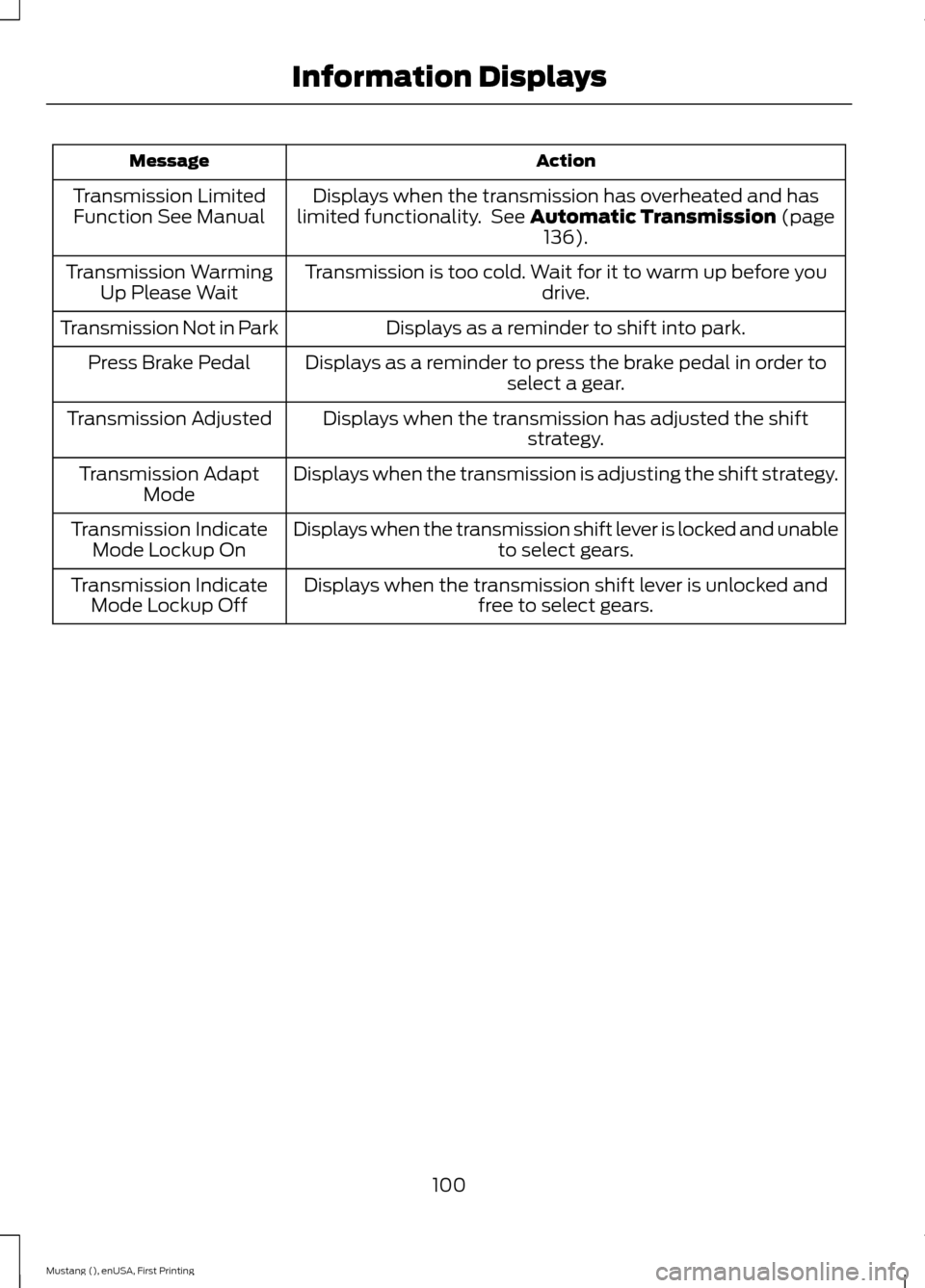
Action
Message
Displays when the transmission has overheated and has
limited functionality. See Automatic Transmission (page
136).
Transmission Limited
Function See Manual
Transmission is too cold. Wait for it to warm up before you drive.
Transmission Warming
Up Please Wait
Displays as a reminder to shift into park.
Transmission Not in Park
Displays as a reminder to press the brake pedal in order toselect a gear.
Press Brake Pedal
Displays when the transmission has adjusted the shiftstrategy.
Transmission Adjusted
Displays when the transmission is adjusting the shift strategy.
Transmission Adapt
Mode
Displays when the transmission shift lever is locked and unable to select gears.
Transmission Indicate
Mode Lockup On
Displays when the transmission shift lever is unlocked andfree to select gears.
Transmission Indicate
Mode Lockup Off
100
Mustang (), enUSA, First Printing Information Displays
Page 104 of 441
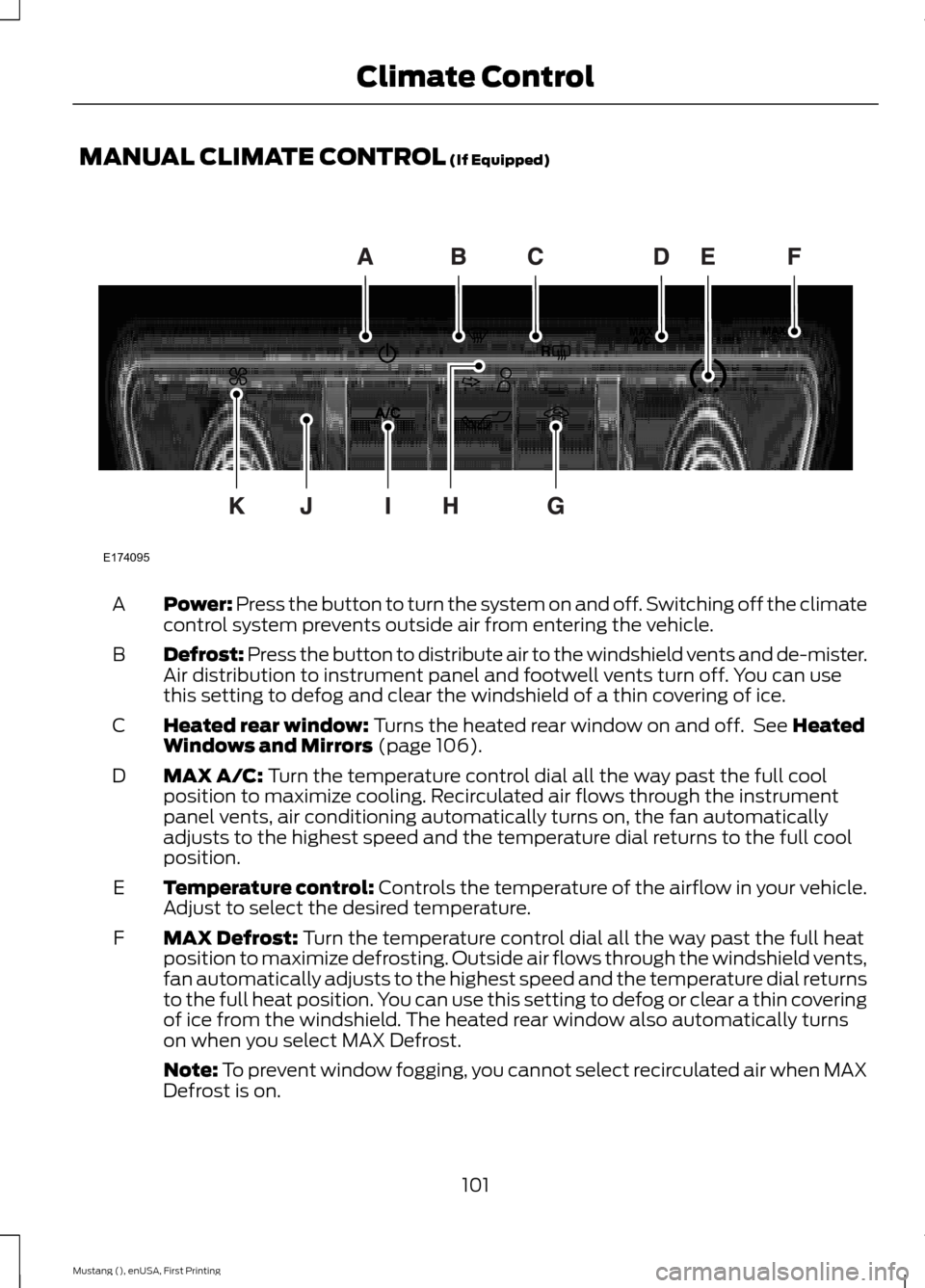
MANUAL CLIMATE CONTROL (If Equipped)
Power: Press the button to turn the system on and off. Switching off the climate
control system prevents outside air from entering the vehicle.
A
Defrost: Press the button to distribute air to the windshield vents and de-mister.
Air distribution to instrument panel and footwell vents turn off. You can use
this setting to defog and clear the windshield of a thin covering of ice.
B
Heated rear window:
Turns the heated rear window on and off. See Heated
Windows and Mirrors (page 106).
C
MAX A/C:
Turn the temperature control dial all the way past the full cool
position to maximize cooling. Recirculated air flows through the instrument
panel vents, air conditioning automatically turns on, the fan automatically
adjusts to the highest speed and the temperature dial returns to the full cool
position.
D
Temperature control:
Controls the temperature of the airflow in your vehicle.
Adjust to select the desired temperature.
E
MAX Defrost:
Turn the temperature control dial all the way past the full heat
position to maximize defrosting. Outside air flows through the windshield vents,
fan automatically adjusts to the highest speed and the temperature dial returns
to the full heat position. You can use this setting to defog or clear a thin covering
of ice from the windshield. The heated rear window also automatically turns
on when you select MAX Defrost.
F
Note:
To prevent window fogging, you cannot select recirculated air when MAX
Defrost is on.
101
Mustang (), enUSA, First Printing Climate ControlE174095
Page 106 of 441
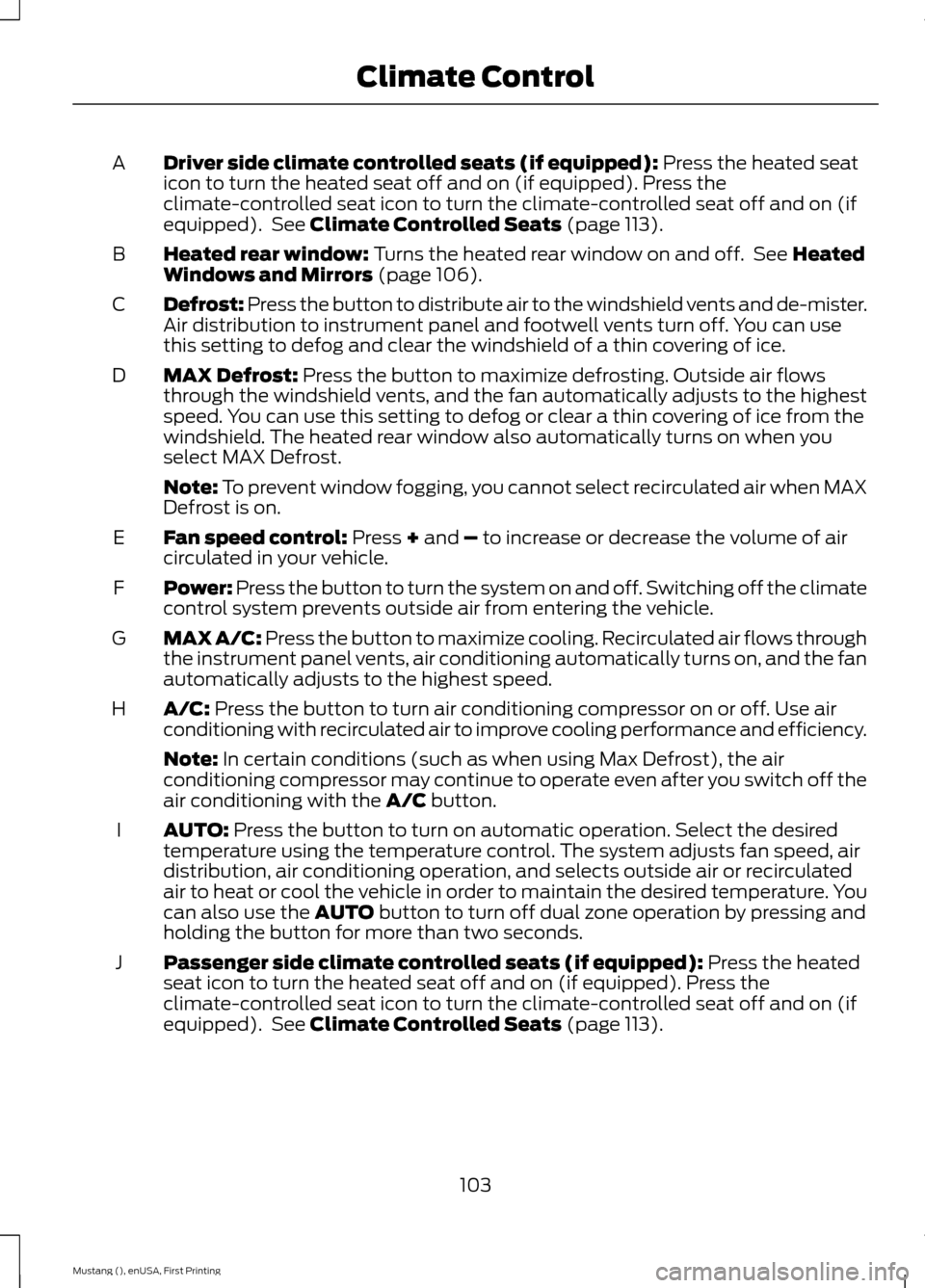
Driver side climate controlled seats (if equipped): Press the heated seat
icon to turn the heated seat off and on (if equipped). Press the
climate-controlled seat icon to turn the climate-controlled seat off and on (if
equipped). See
Climate Controlled Seats (page 113).
A
Heated rear window:
Turns the heated rear window on and off. See Heated
Windows and Mirrors (page 106).
B
Defrost: Press the button to distribute air to the windshield vents and de-mister.
Air distribution to instrument panel and footwell vents turn off. You can use
this setting to defog and clear the windshield of a thin covering of ice.
C
MAX Defrost:
Press the button to maximize defrosting. Outside air flows
through the windshield vents, and the fan automatically adjusts to the highest
speed. You can use this setting to defog or clear a thin covering of ice from the
windshield. The heated rear window also automatically turns on when you
select MAX Defrost.
D
Note:
To prevent window fogging, you cannot select recirculated air when MAX
Defrost is on.
Fan speed control:
Press + and – to increase or decrease the volume of air
circulated in your vehicle.
E
Power: Press the button to turn the system on and off. Switching off the climate
control system prevents outside air from entering the vehicle.
F
MAX A/C:
Press the button to maximize cooling. Recirculated air flows through
the instrument panel vents, air conditioning automatically turns on, and the fan
automatically adjusts to the highest speed.
G
A/C:
Press the button to turn air conditioning compressor on or off. Use air
conditioning with recirculated air to improve cooling performance and efficiency.
H
Note:
In certain conditions (such as when using Max Defrost), the air
conditioning compressor may continue to operate even after you switch off the
air conditioning with the
A/C button.
AUTO:
Press the button to turn on automatic operation. Select the desired
temperature using the temperature control. The system adjusts fan speed, air
distribution, air conditioning operation, and selects outside air or recirculated
air to heat or cool the vehicle in order to maintain the desired temperature. You
can also use the
AUTO button to turn off dual zone operation by pressing and
holding the button for more than two seconds.
I
Passenger side climate controlled seats (if equipped):
Press the heated
seat icon to turn the heated seat off and on (if equipped). Press the
climate-controlled seat icon to turn the climate-controlled seat off and on (if
equipped). See
Climate Controlled Seats (page 113).
J
103
Mustang (), enUSA, First Printing Climate Control
Page 110 of 441
Note:
Do not clean the housing or glass of
any mirror with harsh abrasives, fuel or other
petroleum-based cleaning products.
The heated mirrors remove ice, mist and
fog when you switch on the heated rear
window.
CABIN AIR FILTER
Your vehicle is equipped with a cabin air
filter. It is located behind the glove box.
The particulate filtration system reduces
the concentration of airborne particles
such as dust, spores and pollen in the air
supplied to the interior of your vehicle.
Note: Make sure you have a cabin air filter
installed at all times. This prevents foreign
objects from entering the system. Running
the system without a filter in place could
result in degradation or damage to the
system.
The particulate filtration system gives you
and your passengers the following
benefits:
• It improves your driving comfort by
reducing particle concentration.
• It improves the interior compartment
cleanliness.
• It protects the climate control
components from particle deposits.
Replace the filter at regular intervals. See
Scheduled Maintenance (page 414).
For additional cabin air filter information,
or to replace the filter, see an authorized
dealer.
REMOTE START
(If Equipped)
The remote start feature allows you to
pre-condition the interior of your vehicle.
The climate control system works to
achieve comfort according to your previous
settings. Note:
You cannot adjust the system during
remote start operation.
Turn the ignition on to return the system
to its previous settings. You can now make
adjustments normally, but you need to turn
certain vehicle-dependent features back
on, such as:
• Heated seats.
• Cooled seats.
• Heated steering wheel.
• Heated mirrors.
• Heated rear window.
You can adjust the default remote start
settings using the information display
controls. See
Information Displays
(page 83).
Automatic Settings
In hot weather, the system is set to 72°F
(22°C). The cooled seats are set to high
(if available, and selected to AUTO in the
information display).
In moderate weather, the system either
heats or cools (based on previous
settings). The rear defroster, heated
mirrors and heated seats do not
automatically turn on.
In cold weather, the system is set to 72°F
(22°C). The heated seats are set to high
(if available, and selected to AUTO in the
information display). The rear defroster
and heated mirrors automatically turn on.
107
Mustang (), enUSA, First Printing Climate Control
Page 115 of 441
Note:
A preset memory position can only
be recalled when the ignition is off, or when
the transmission is in park (P) or neutral (N)
if the ignition is on.
You can also recall a preset memory
position by:
• Pressing the unlock button on your
intelligent access key fob if it is linked
to a preset position.
• Unlocking the intelligent driver door
handle if a linked key fob is present.
• Entering a personal entry code on the
Securicode keypad. See Locks (page
56).
Note: Using a linked key fob to recall your
memory position when the ignition is off will
move the seat to the Easy Entry position.
Note: Pressing any seat or mirror
adjustment control (or any memory button)
during a memory recall cancels the
operation.
Seat recall movement will also stop if you
drive your vehicle.
Linking a PreSet Position to your
Remote Control or Intelligent
Access Key Fob
Your vehicle can save the preset memory
positions for up to three remote controls
or intelligent access (IA) keys.
1. With the ignition on, move the memory
positions to the desired positions.
2. Press and hold the desired preset button for about five seconds. A tone
will sound after about two seconds.
Continue holding until a second tone
is heard.
3. Within three seconds, press the lock button on the remote control you are
linking.
To unlink a remote control, follow the
same procedure – except in step 3, press
the unlock button on the remote control. Note:
If more than one linked remote
control or intelligent access key is in range,
the memory function will move to the
settings of the first key stored.
Easy Entry and Exit Feature
If you enable the easy entry and exit
feature, it automatically moves the driver
seat position rearward up to two inches
(five centimeters) when you switch the
ignition off.
The driver seat will return to the previous
position when you switch the ignition on.
You can enable or disable this feature in
the information display. See Information
Displays
(page 83).
REAR SEATS
Note: Your vehicle may have split
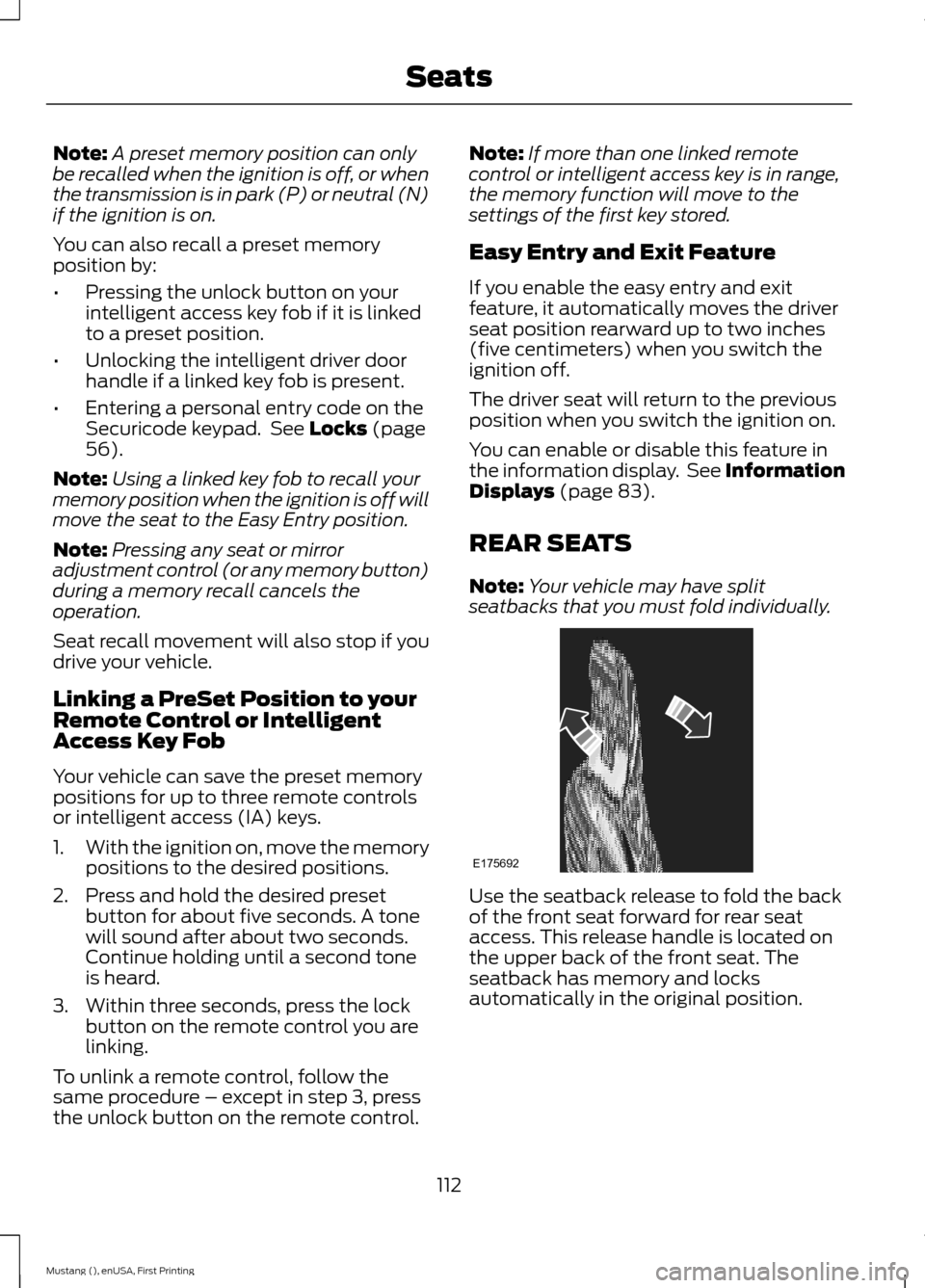
seatbacks that you must fold individually. Use the seatback release to fold the back
of the front seat forward for rear seat
access. This release handle is located on
the upper back of the front seat. The
seatback has memory and locks
automatically in the original position.
112
Mustang (), enUSA, First Printing SeatsE175692
Page 117 of 441
HomeLink Wireless Control
System (If Equipped)
WARNING
Do not use the system with any
garage door opener that does not
have the safety stop and reverse
feature as required by U.S. Federal Safety
Standards (this includes any garage door
opener manufactured before April 1, 1982).
A garage door opener which cannot detect
an object, signaling the door to stop and
reverse, does not meet current federal
safety standards. Using a garage door
opener without these features increases
the risk of serious injury or death. Note:
Make sure that the garage door and
security device are free from obstruction
when you are programming. Do not program
the system with the vehicle in the garage.
Note: Make sure you keep the original
remote control transmitter for use in other
vehicles as well as for future system
programming.
Note: We recommend that upon the sale
or lease termination of your vehicle, you
erase the programmed function buttons for
security reasons. See Erasing the Function
Button Codes
later in this section.
Note: You can program a maximum of
three devices. To change or replace any of
the three devices after initially programming
them, you must first erase the current
settings. See
Erasing the Function Button
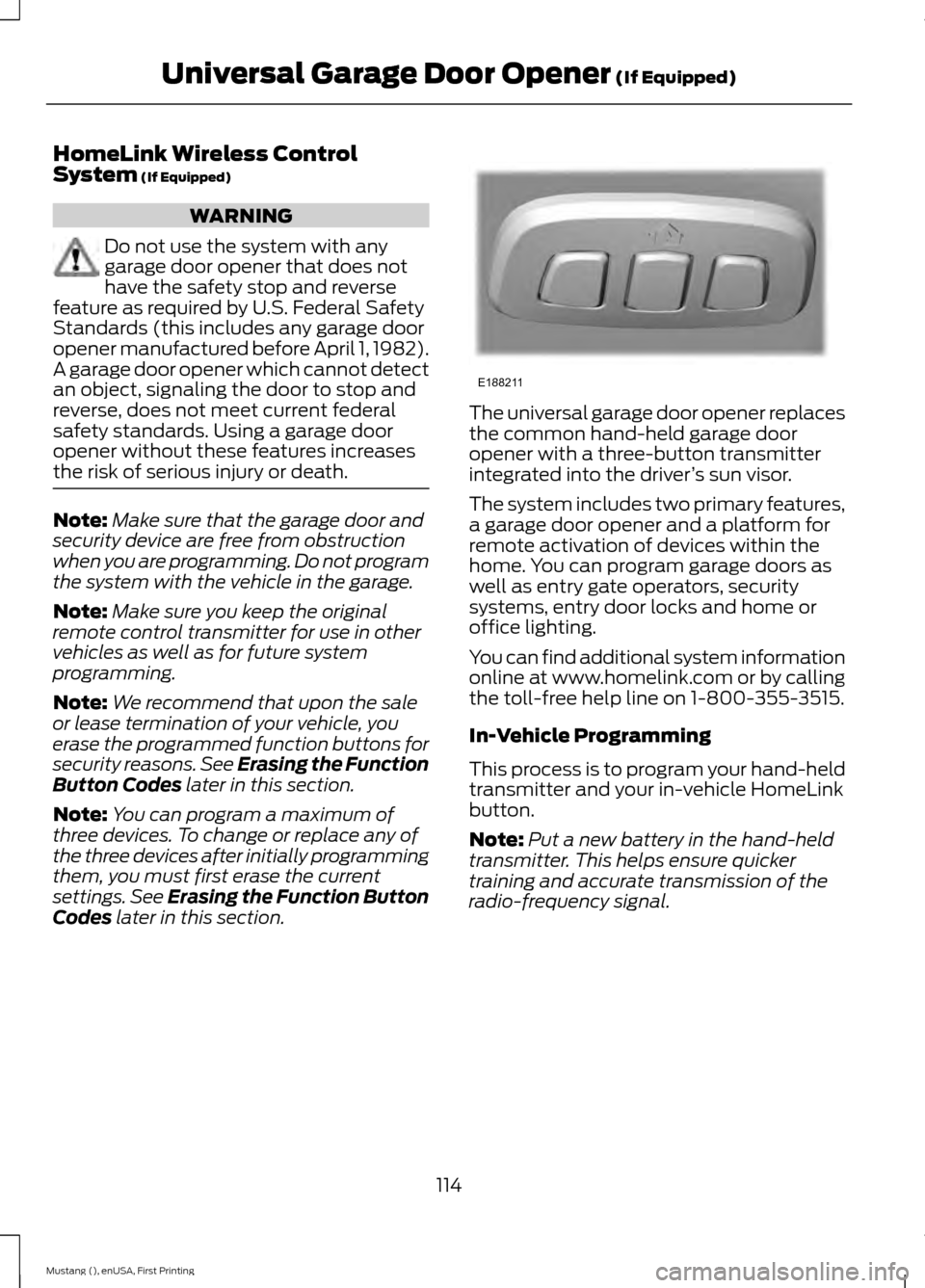
Codes later in this section. The universal garage door opener replaces
the common hand-held garage door
opener with a three-button transmitter
integrated into the driver
’s sun visor.
The system includes two primary features,
a garage door opener and a platform for
remote activation of devices within the
home. You can program garage doors as
well as entry gate operators, security
systems, entry door locks and home or
office lighting.
You can find additional system information
online at www.homelink.com or by calling
the toll-free help line on 1-800-355-3515.
In-Vehicle Programming
This process is to program your hand-held
transmitter and your in-vehicle HomeLink
button.
Note: Put a new battery in the hand-held
transmitter. This helps ensure quicker
training and accurate transmission of the
radio-frequency signal.
114
Mustang (), enUSA, First Printing Universal Garage Door Opener
(If Equipped)E188211