display FORD MUSTANG 2023 Repair Manual
[x] Cancel search | Manufacturer: FORD, Model Year: 2023, Model line: MUSTANG, Model: FORD MUSTANG 2023Pages: 535, PDF Size: 15.46 MB
Page 170 of 535
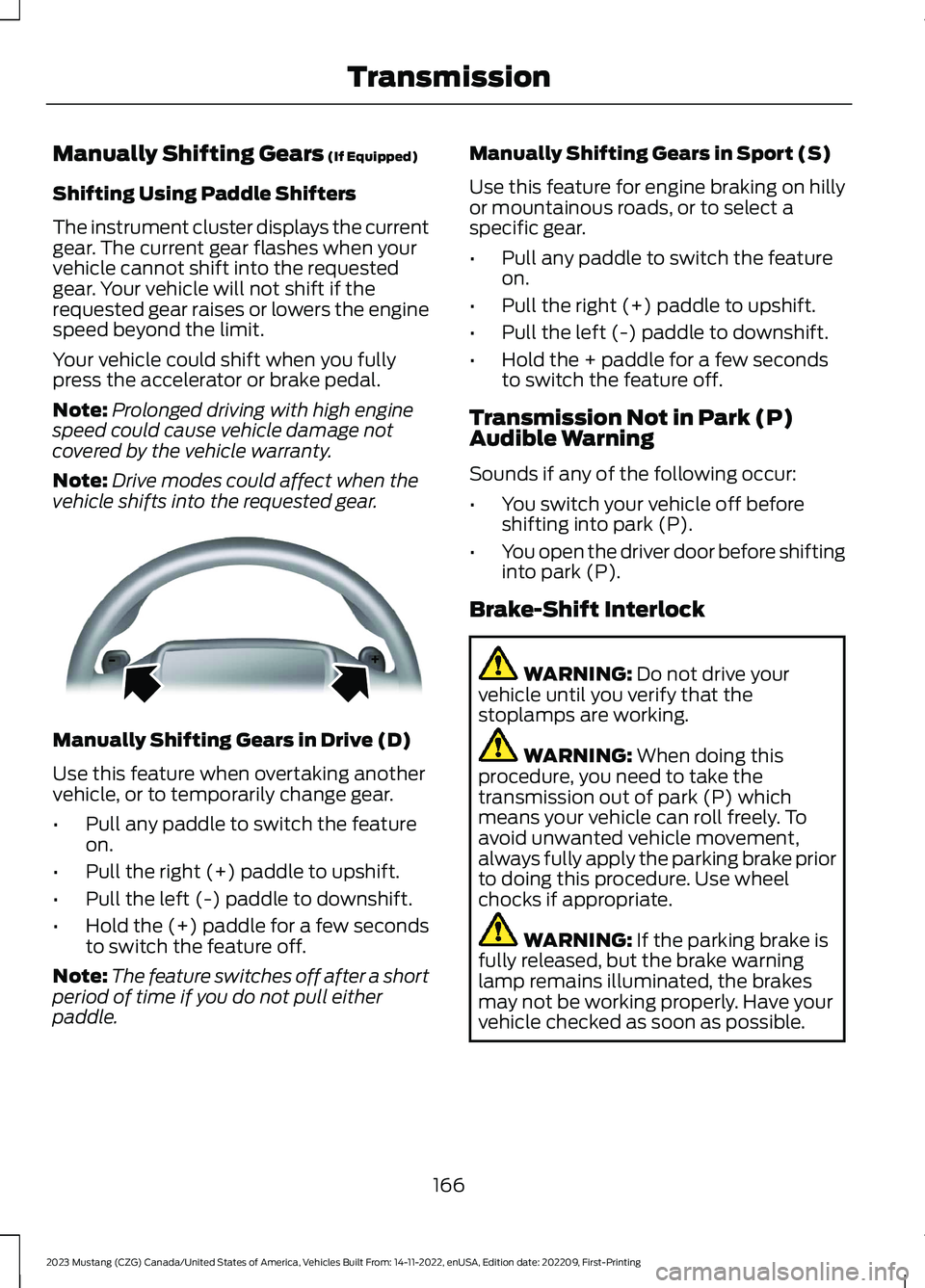
Manually Shifting Gears (If Equipped)
Shifting Using Paddle Shifters
The instrument cluster displays the currentgear. The current gear flashes when yourvehicle cannot shift into the requestedgear. Your vehicle will not shift if therequested gear raises or lowers the enginespeed beyond the limit.
Your vehicle could shift when you fullypress the accelerator or brake pedal.
Note:Prolonged driving with high enginespeed could cause vehicle damage notcovered by the vehicle warranty.
Note:Drive modes could affect when thevehicle shifts into the requested gear.
Manually Shifting Gears in Drive (D)
Use this feature when overtaking anothervehicle, or to temporarily change gear.
•Pull any paddle to switch the featureon.
•Pull the right (+) paddle to upshift.
•Pull the left (-) paddle to downshift.
•Hold the (+) paddle for a few secondsto switch the feature off.
Note:The feature switches off after a shortperiod of time if you do not pull eitherpaddle.
Manually Shifting Gears in Sport (S)
Use this feature for engine braking on hillyor mountainous roads, or to select aspecific gear.
•Pull any paddle to switch the featureon.
•Pull the right (+) paddle to upshift.
•Pull the left (-) paddle to downshift.
•Hold the + paddle for a few secondsto switch the feature off.
Transmission Not in Park (P)Audible Warning
Sounds if any of the following occur:
•You switch your vehicle off beforeshifting into park (P).
•You open the driver door before shiftinginto park (P).
Brake-Shift Interlock
WARNING: Do not drive yourvehicle until you verify that thestoplamps are working.
WARNING: When doing thisprocedure, you need to take thetransmission out of park (P) whichmeans your vehicle can roll freely. Toavoid unwanted vehicle movement,always fully apply the parking brake priorto doing this procedure. Use wheelchocks if appropriate.
WARNING: If the parking brake isfully released, but the brake warninglamp remains illuminated, the brakesmay not be working properly. Have yourvehicle checked as soon as possible.
166
2023 Mustang (CZG) Canada/United States of America, Vehicles Built From: 14-11-2022, enUSA, Edition date: 202209, First-PrintingTransmissionE144821
Page 177 of 535
HILL START ASSIST
WARNING: The system does notreplace the parking brake. When youleave your vehicle, always apply theparking brake and shift the transmissioninto park (P) for automatic transmissionor first gear for manual transmission.
WARNING: You must remain inyour vehicle when the system turns on.At all times, you are responsible forcontrolling your vehicle, supervising thesystem and intervening, if required.Failure to take care may result in the lossof control of your vehicle, seriouspersonal injury or death.
WARNING: The system will turnoff if a malfunction is apparent. Failureto take care may result in the loss ofcontrol of your vehicle, serious personalinjury or death.
The system makes it easier to pull awaywhen your vehicle is on a slope without theneed to use the parking brake.
When the system activates, your vehicleremains stationary on a slope for a fewseconds after you release the brake pedal.This allows you time to move your footfrom the brake to the accelerator pedal.The brakes release when the engine hasdeveloped sufficient torque to prevent yourvehicle from rolling down the slope. Thisis an advantage when pulling away on aslope, for example from a car park ramp,traffic lights or when reversing uphill intoa parking space.
The system activates on any slope thatcauses your vehicle to roll.
Note: There is no warning lamp to indicatethe system is either on or off.
Using Hill Start Assist
1.Press the brake pedal to bring yourvehicle to a complete standstill. Keepthe brake pedal pressed and shift intofirst gear when facing uphill or reverse(R) when facing downhill.
2.The system activates if the sensorsdetect that your vehicle is on a slope.
3.When you remove your foot from thebrake pedal, your vehicle remains onthe slope without rolling away for a fewseconds. This hold time increases if youare in the process of driving off.
4.Pull away in the normal manner.
Switching the System On and Off
Vehicles with Manual Transmission
You can switch this feature on or off in theinformation display. The systemremembers the last setting when you startyour vehicle.
Vehicles with Automatic Transmission
The system turns on when you switch theignition on and you cannot switch thesystem off.
173
2023 Mustang (CZG) Canada/United States of America, Vehicles Built From: 14-11-2022, enUSA, Edition date: 202209, First-PrintingBrakes
Page 181 of 535
Note:Do not use the Sport stability controlsetting on public roadways.
Some models could also come equippedwith a sport setting which allows the driverto reduce normal electronic stabilitycontrol system intervention and provide amore spirited driving experience. To entersport, toggle the stability control buttontwice rapidly. The message appears in theinformation display that the system is nowin sport.
For vehicles equipped with the selectabledrive mode feature, electronic stabilitycontrol sport mode is not available. Youcan utilize the performance orientedelectronic stability control mode byselecting track drive mode. In this mode,electronic stability control intervention isreduced and tuned specifically for trackuse only and is not for use on public roads.In all of the selectable drive modes, youcan disable traction control and electronicstability control with the electronic stabilitycontrol switch.
177
2023 Mustang (CZG) Canada/United States of America, Vehicles Built From: 14-11-2022, enUSA, Edition date: 202209, First-PrintingStability Control
Page 182 of 535
PRINCIPLE OF OPERATION
WARNING: To help avoid personalinjury, always use caution when inreverse (R) and when using the sensingsystem.
WARNING: The system may notdetect objects with surfaces that absorbreflection. Always drive with due careand attention. Failure to take care mayresult in a crash.
WARNING: Traffic control systems,fluorescent lamps, inclement weather,air brakes, external motors and fans mayaffect the correct operation of thesensing system. This may cause reducedperformance or false alerts.
WARNING: The system may notdetect small or moving objects,particularly those close to the ground.
WARNING: If damage occurs in theimmediate area surrounding the sensor,have your vehicle checked as soon aspossible.
WARNING: The parking aid systemcan only assist you to detect objectswhen your vehicle is moving at parkingspeeds. To help avoid personal injury youmust take care when using the parkingaid system.
WARNING: In cold and severeweather conditions the system may notfunction. Rain, snow and spray can alllimit sensor performance.
WARNING: The system may notfunction if the sensor is blocked.
Note:If your vehicle has MyKey™, thesensing system cannot be switched offwhen a MyKey™ is present. See What IsMyKey (page 63).
Note:Do not clean the sensors with sharpobjects.
Note:If your vehicle sustains damage tothe bumper or fascia and you leave itmisaligned or bent, the sensing zone couldbe altered causing inaccurate measurementof obstacles or false alerts.
Note:Add-on devices such as large trailerhitches, bike or surfboard racks, license platebrackets, or bumper covers installed aroundthe bumper or facia can block the normaldetection zone of the system causing falsealerts. Remove the add-on devices toprevent false alerts.
Note:When you connect a trailer to yourvehicle, the rear parking aid could detect thetrailer and therefore provide an alert. Disablethe rear parking aid when you connect atrailer to prevent the alert.
The sensing system warns you of obstacleswithin a certain range of your vehicle. Thesystem turns on when you switch theignition on.
You can switch the system off through theinformation display menu or from thepop-up message that appears once youshift the transmission into reverse (R). SeeGeneral Information (page 102). If yourvehicle has a parking aid button, you canswitch the system off by pressing thebutton. The system turns on when youswitch the ignition on.
If a fault is present in the system, a warningmessage appears in the informationdisplay. See Information Messages(page 112).
178
2023 Mustang (CZG) Canada/United States of America, Vehicles Built From: 14-11-2022, enUSA, Edition date: 202209, First-PrintingParking Aids
Page 183 of 535
REAR PARKING AID (IF EQUIPPED)
WARNING: The system may notdetect objects with surfaces that absorbreflection. Always drive with due careand attention. Failure to take care mayresult in a crash.
WARNING: The system may notdetect small or moving objects,particularly those close to the ground.
WARNING: To help avoid personalinjury, always use caution when inreverse (R) and when using the sensingsystem.
WARNING: The parking aid systemcan only assist you to detect objectswhen your vehicle is moving at parkingspeeds. To help avoid personal injury youmust take care when using the parkingaid system.
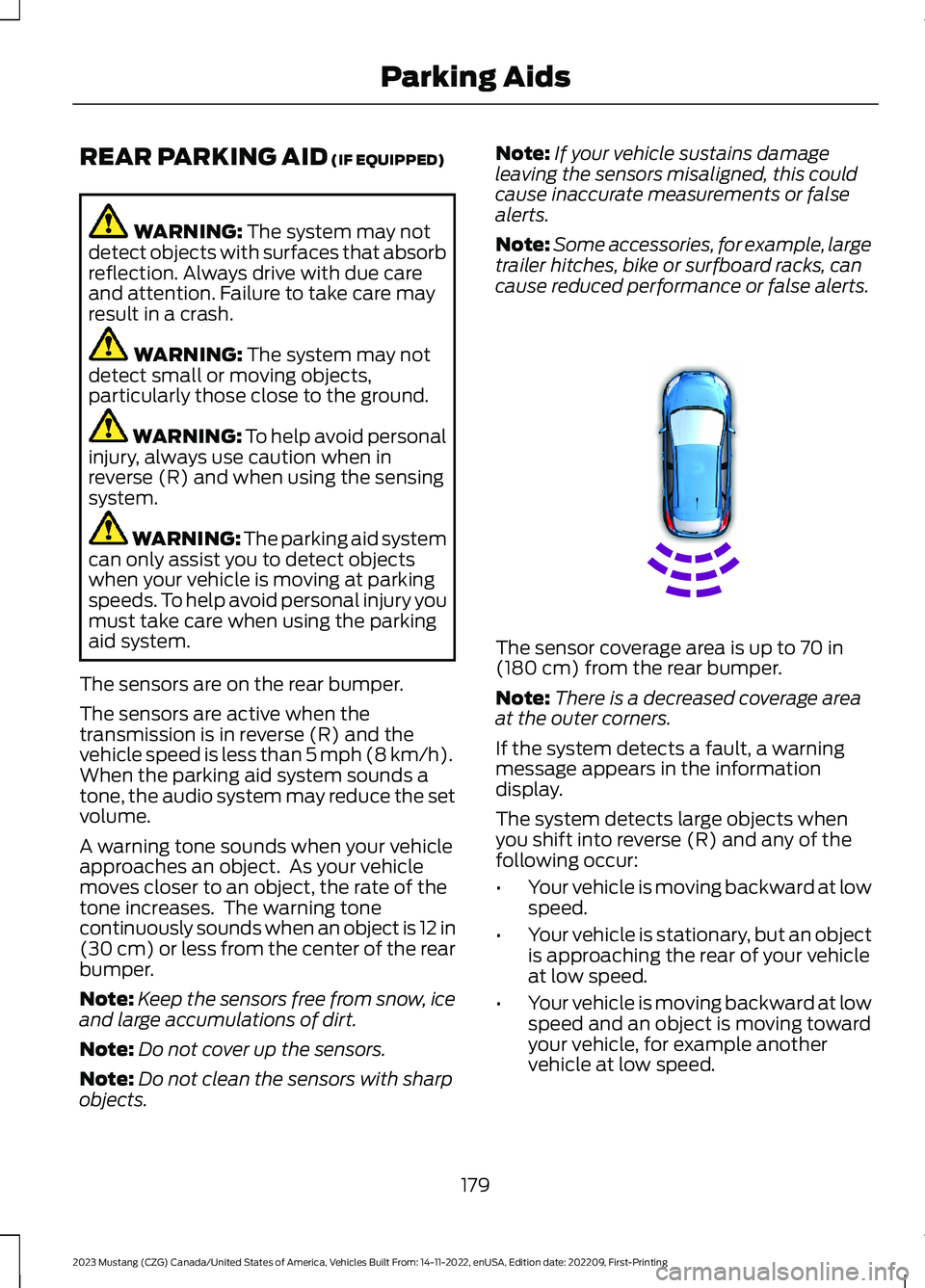
The sensors are on the rear bumper.
The sensors are active when thetransmission is in reverse (R) and thevehicle speed is less than 5 mph (8 km/h).When the parking aid system sounds atone, the audio system may reduce the setvolume.
A warning tone sounds when your vehicleapproaches an object. As your vehiclemoves closer to an object, the rate of thetone increases. The warning tonecontinuously sounds when an object is 12 in(30 cm) or less from the center of the rearbumper.
Note:Keep the sensors free from snow, iceand large accumulations of dirt.
Note:Do not cover up the sensors.
Note:Do not clean the sensors with sharpobjects.
Note:If your vehicle sustains damageleaving the sensors misaligned, this couldcause inaccurate measurements or falsealerts.
Note:Some accessories, for example, largetrailer hitches, bike or surfboard racks, cancause reduced performance or false alerts.
The sensor coverage area is up to 70 in(180 cm) from the rear bumper.
Note:There is a decreased coverage areaat the outer corners.
If the system detects a fault, a warningmessage appears in the informationdisplay.
The system detects large objects whenyou shift into reverse (R) and any of thefollowing occur:
•Your vehicle is moving backward at lowspeed.
•Your vehicle is stationary, but an objectis approaching the rear of your vehicleat low speed.
•Your vehicle is moving backward at lowspeed and an object is moving towardyour vehicle, for example anothervehicle at low speed.
179
2023 Mustang (CZG) Canada/United States of America, Vehicles Built From: 14-11-2022, enUSA, Edition date: 202209, First-PrintingParking AidsE130178
Page 184 of 535
If your vehicle remains stationary for twoseconds, the audible warning turns off. Ifyour vehicle moves backward, the tonesounds again.
Note:If the detected object is 12 in (30 cm)or less from the rear bumper, the audiblewarning does not turn off.
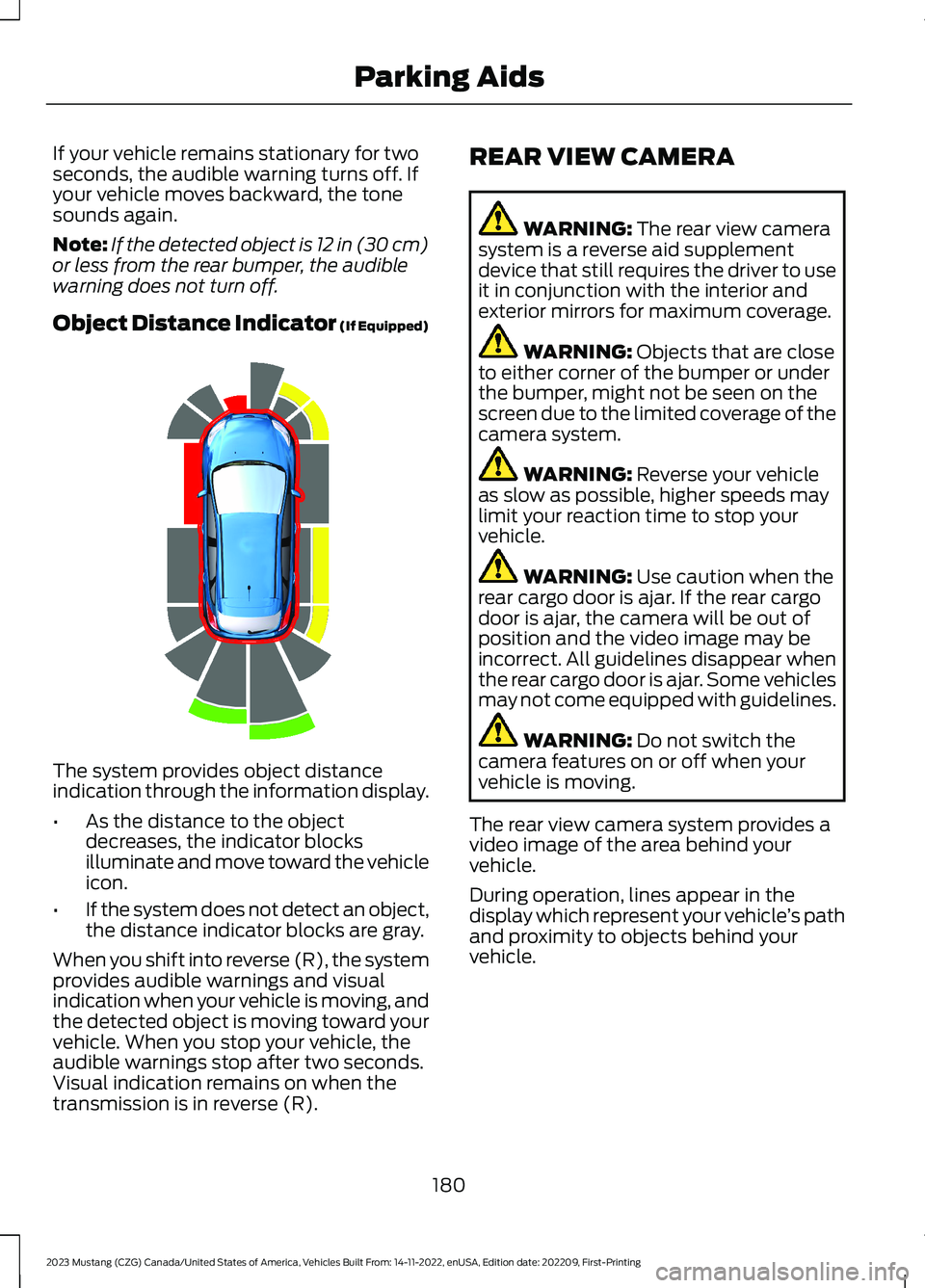
Object Distance Indicator (If Equipped)
The system provides object distanceindication through the information display.
•As the distance to the objectdecreases, the indicator blocksilluminate and move toward the vehicleicon.
•If the system does not detect an object,the distance indicator blocks are gray.
When you shift into reverse (R), the systemprovides audible warnings and visualindication when your vehicle is moving, andthe detected object is moving toward yourvehicle. When you stop your vehicle, theaudible warnings stop after two seconds.Visual indication remains on when thetransmission is in reverse (R).
REAR VIEW CAMERA
WARNING: The rear view camerasystem is a reverse aid supplementdevice that still requires the driver to useit in conjunction with the interior andexterior mirrors for maximum coverage.
WARNING: Objects that are closeto either corner of the bumper or underthe bumper, might not be seen on thescreen due to the limited coverage of thecamera system.
WARNING: Reverse your vehicleas slow as possible, higher speeds maylimit your reaction time to stop yourvehicle.
WARNING: Use caution when therear cargo door is ajar. If the rear cargodoor is ajar, the camera will be out ofposition and the video image may beincorrect. All guidelines disappear whenthe rear cargo door is ajar. Some vehiclesmay not come equipped with guidelines.
WARNING: Do not switch thecamera features on or off when yourvehicle is moving.
The rear view camera system provides avideo image of the area behind yourvehicle.
During operation, lines appear in thedisplay which represent your vehicle’s pathand proximity to objects behind yourvehicle.
180
2023 Mustang (CZG) Canada/United States of America, Vehicles Built From: 14-11-2022, enUSA, Edition date: 202209, First-PrintingParking AidsE190459
Page 185 of 535
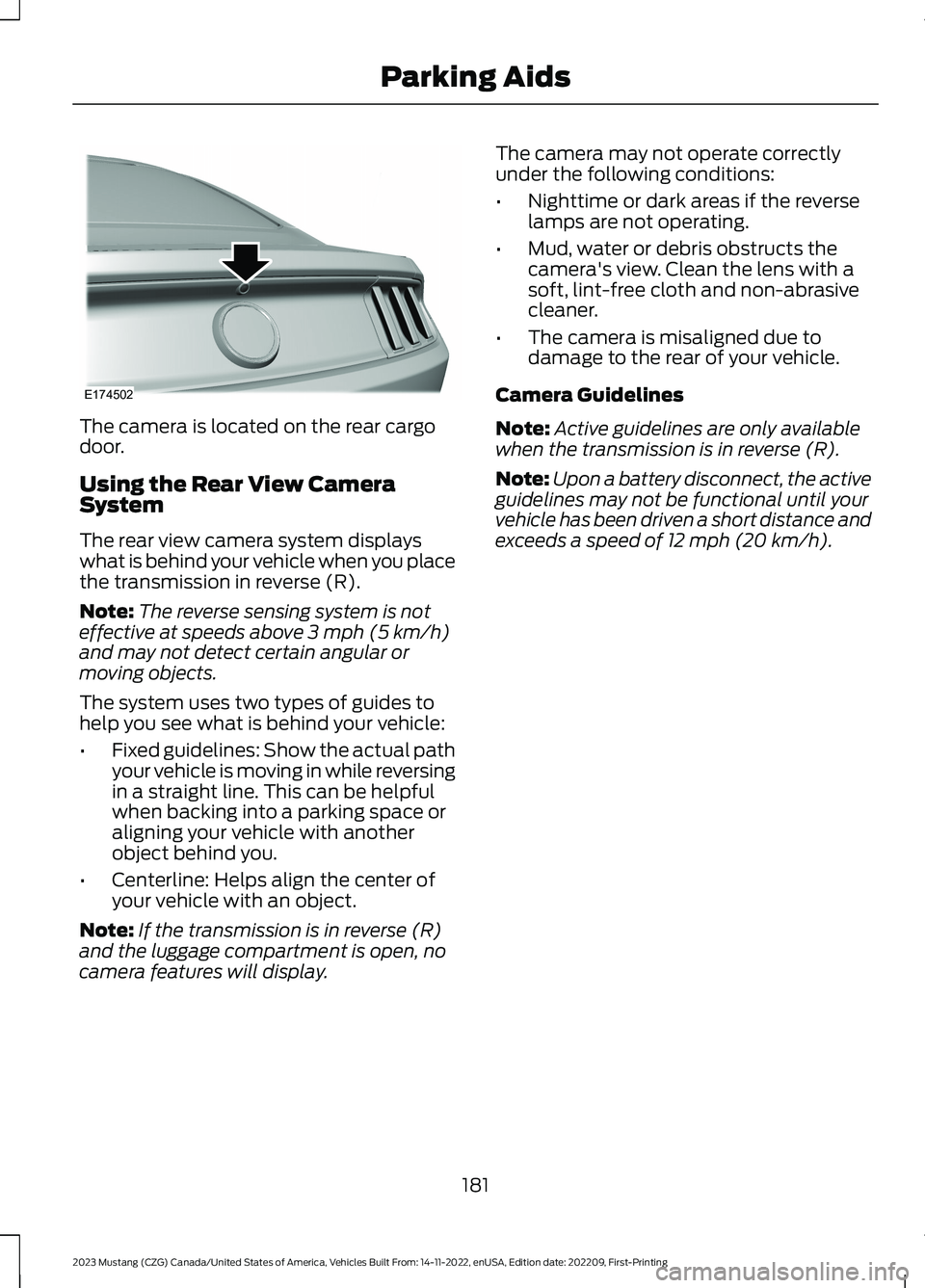
The camera is located on the rear cargodoor.
Using the Rear View CameraSystem
The rear view camera system displayswhat is behind your vehicle when you placethe transmission in reverse (R).
Note:The reverse sensing system is noteffective at speeds above 3 mph (5 km/h)and may not detect certain angular ormoving objects.
The system uses two types of guides tohelp you see what is behind your vehicle:
•Fixed guidelines: Show the actual pathyour vehicle is moving in while reversingin a straight line. This can be helpfulwhen backing into a parking space oraligning your vehicle with anotherobject behind you.
•Centerline: Helps align the center ofyour vehicle with an object.
Note:If the transmission is in reverse (R)and the luggage compartment is open, nocamera features will display.
The camera may not operate correctlyunder the following conditions:
•Nighttime or dark areas if the reverselamps are not operating.
•Mud, water or debris obstructs thecamera's view. Clean the lens with asoft, lint-free cloth and non-abrasivecleaner.
•The camera is misaligned due todamage to the rear of your vehicle.
Camera Guidelines
Note:Active guidelines are only availablewhen the transmission is in reverse (R).
Note:Upon a battery disconnect, the activeguidelines may not be functional until yourvehicle has been driven a short distance andexceeds a speed of 12 mph (20 km/h).
181
2023 Mustang (CZG) Canada/United States of America, Vehicles Built From: 14-11-2022, enUSA, Edition date: 202209, First-PrintingParking AidsE174502
Page 186 of 535
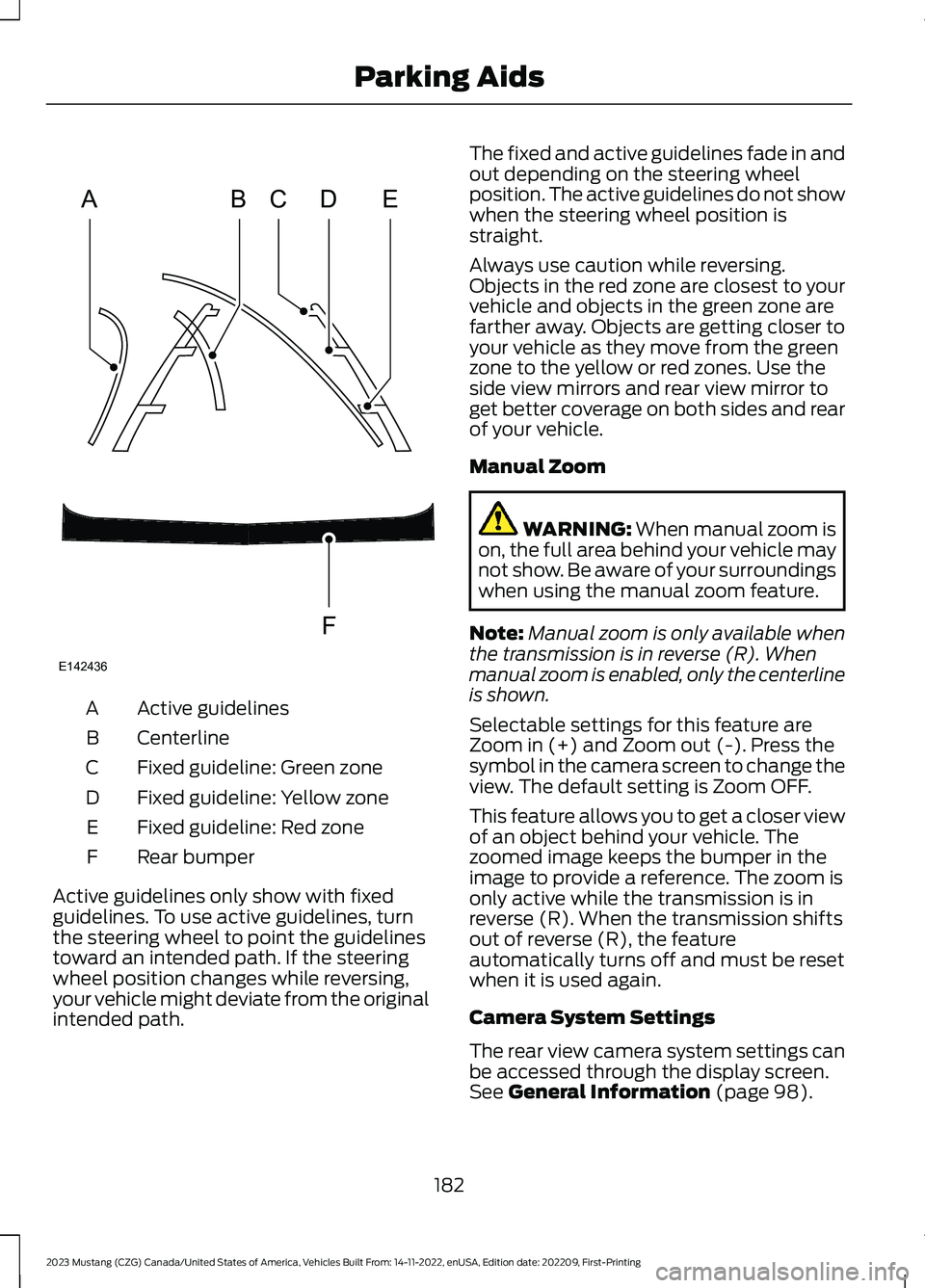
Active guidelinesA
CenterlineB
Fixed guideline: Green zoneC
Fixed guideline: Yellow zoneD
Fixed guideline: Red zoneE
Rear bumperF
Active guidelines only show with fixedguidelines. To use active guidelines, turnthe steering wheel to point the guidelinestoward an intended path. If the steeringwheel position changes while reversing,your vehicle might deviate from the originalintended path.
The fixed and active guidelines fade in andout depending on the steering wheelposition. The active guidelines do not showwhen the steering wheel position isstraight.
Always use caution while reversing.Objects in the red zone are closest to yourvehicle and objects in the green zone arefarther away. Objects are getting closer toyour vehicle as they move from the greenzone to the yellow or red zones. Use theside view mirrors and rear view mirror toget better coverage on both sides and rearof your vehicle.
Manual Zoom
WARNING: When manual zoom ison, the full area behind your vehicle maynot show. Be aware of your surroundingswhen using the manual zoom feature.
Note:Manual zoom is only available whenthe transmission is in reverse (R). Whenmanual zoom is enabled, only the centerlineis shown.
Selectable settings for this feature areZoom in (+) and Zoom out (-). Press thesymbol in the camera screen to change theview. The default setting is Zoom OFF.
This feature allows you to get a closer viewof an object behind your vehicle. Thezoomed image keeps the bumper in theimage to provide a reference. The zoom isonly active while the transmission is inreverse (R). When the transmission shiftsout of reverse (R), the featureautomatically turns off and must be resetwhen it is used again.
Camera System Settings
The rear view camera system settings canbe accessed through the display screen.See General Information (page 98).
182
2023 Mustang (CZG) Canada/United States of America, Vehicles Built From: 14-11-2022, enUSA, Edition date: 202209, First-PrintingParking AidsABCDFEE142436
Page 187 of 535
Enhanced Park Aids or Park Pilot
Selectable settings for this feature are ONand OFF.
The system uses red, yellow and greenhighlights that appear on top of the videoimage when any of the sensing systemsdetect an object.
Vehicles equipped with touchscreen
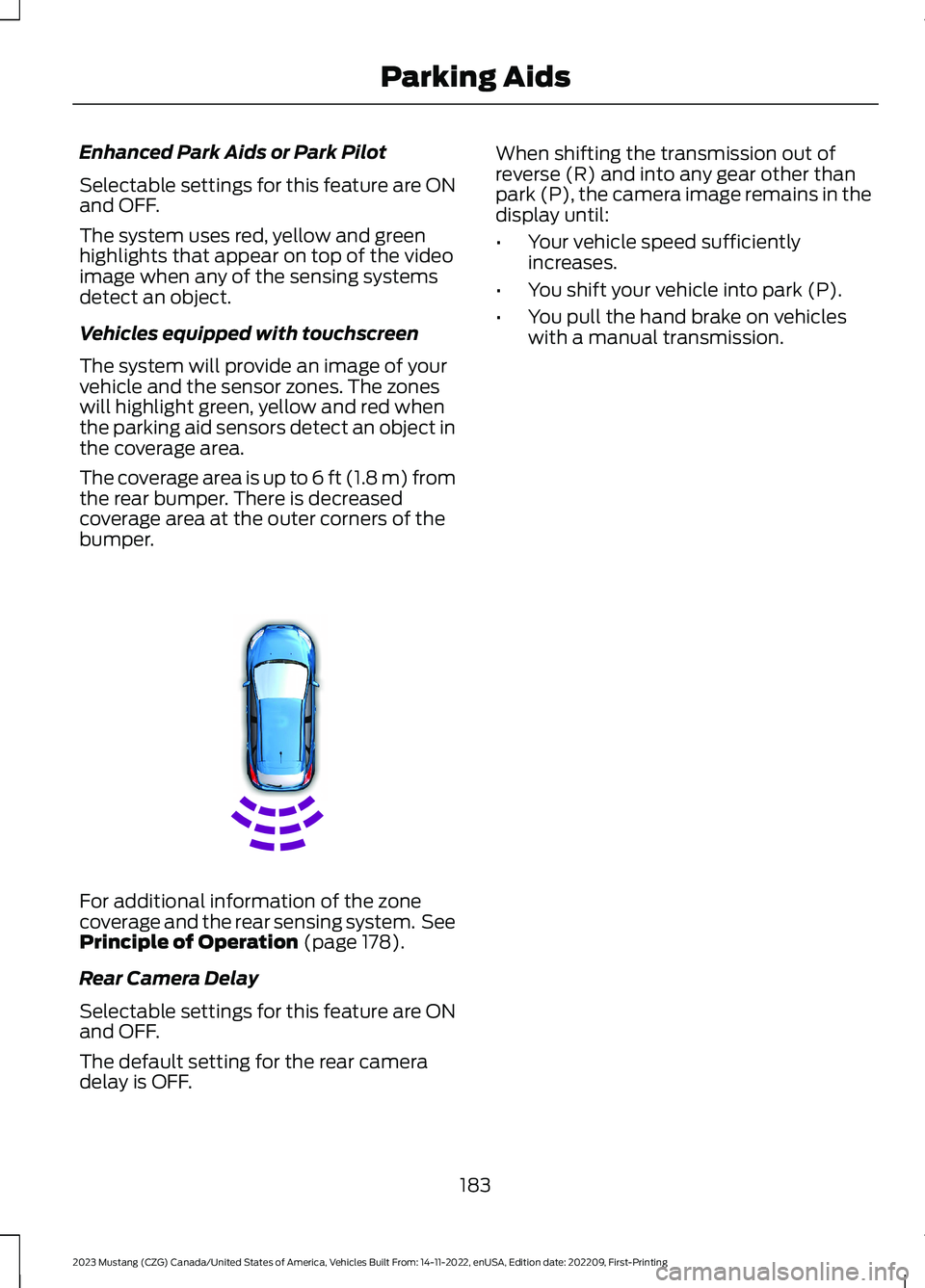
The system will provide an image of yourvehicle and the sensor zones. The zoneswill highlight green, yellow and red whenthe parking aid sensors detect an object inthe coverage area.
The coverage area is up to 6 ft (1.8 m) fromthe rear bumper. There is decreasedcoverage area at the outer corners of thebumper.
For additional information of the zonecoverage and the rear sensing system. SeePrinciple of Operation (page 178).
Rear Camera Delay
Selectable settings for this feature are ONand OFF.
The default setting for the rear cameradelay is OFF.
When shifting the transmission out ofreverse (R) and into any gear other thanpark (P), the camera image remains in thedisplay until:
•Your vehicle speed sufficientlyincreases.
•You shift your vehicle into park (P).
•You pull the hand brake on vehicleswith a manual transmission.
183
2023 Mustang (CZG) Canada/United States of America, Vehicles Built From: 14-11-2022, enUSA, Edition date: 202209, First-PrintingParking AidsE130178
Page 188 of 535
WHAT IS CRUISE CONTROL
Cruise control lets you maintain a setspeed without keeping your foot on theaccelerator pedal.
Requirements
Use cruise control when the vehicle speedis greater than 20 mph (30 km/h).
SWITCHING CRUISE CONTROL
ON AND OFF
WARNING: Do not use cruisecontrol on winding roads, in heavy trafficor when the road surface is slippery. Thiscould result in loss of vehicle control,serious injury or death.
The cruise controls are on the steeringwheel. See Cruise Control (page 76).
Switching Cruise Control On
Press the button.
Switching Cruise Control Off
Press the button when thesystem is in standby mode.
The system also turns off when you switchthe ignition off.
Note:The set speed erases when youswitch the system off.
SETTING THE CRUISE
CONTROL SPEED
WARNING: When you are goingdownhill, your vehicle speed couldincrease above the set speed. Thesystem does not apply the brakes.
Drive to the speed you prefer.
Press either button to set thecurrent speed.
Take your foot off the accelerator pedal.
Note:The indicator changes color in theinformation display.
Changing the Set Speed
Press and release the button toincrease the set speed in smallincrements.
Press and hold the button to accelerate.Release the button when you reach yourpreferred speed.
Press and release the button todecrease the set speed in smallincrements.
Press and hold the button to decelerate.Release the button when you reach yourpreferred speed.
Note: If you accelerate by pressing theaccelerator pedal, the set speed does notchange. When you release the acceleratorpedal, your vehicle returns to the speed thatyou previously set.
184
2023 Mustang (CZG) Canada/United States of America, Vehicles Built From: 14-11-2022, enUSA, Edition date: 202209, First-PrintingCruise ControlE265296 E265297 E246884 E246885 E246884 E246885