light GMC YUKON DENALI 2003 Repair Manual
[x] Cancel search | Manufacturer: GMC, Model Year: 2003, Model line: YUKON DENALI, Model: GMC YUKON DENALI 2003Pages: 447, PDF Size: 21.97 MB
Page 223 of 447
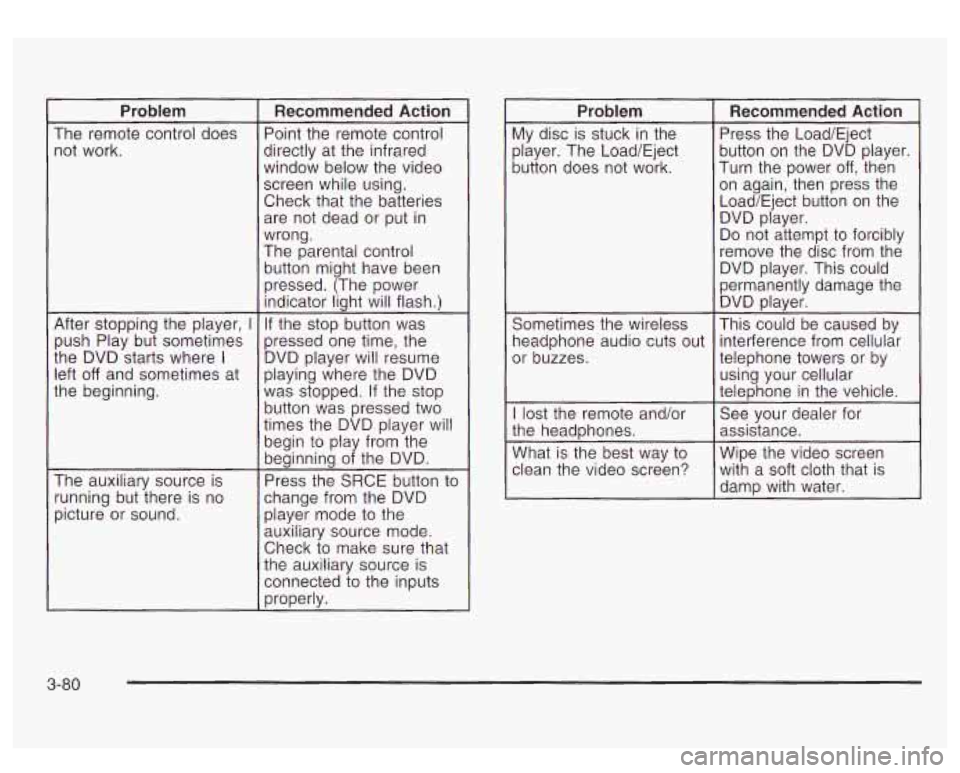
Problem
The remote control does not work.
After stopping the player,
I
push Play but sometimes
the DVD starts where
I
left off and sometimes at
the beginning.
The auxiliary source is
running but there is no
picture or sound.
Recommended Action
Point the remote control
directly at the infrared
window below the video
screen while using.
Check that the batteries are not dead or put in
wrong.
The parental control
button might have been
pressed. (The power indicator light will flash.)
If the stop button was
pressed one time, the
DVD player will resume
playing where the DVD
was stopped. If the stop
button was pressed two
times the DVD player will
begin to play from the
beginning of the DVD.
Press the SRCE button to
change from the DVD player mode
to the
auxiliary source mode.
Check to make sure that
the auxiliary source is
connected to the inputs
properly.
Problem
My disc is stuck in the
player. The Load/Eject
button does not work.
Sometimes the wireless
headphone audio cuts out
or buzzes.
I lost the remote and/or
the headphones.
What is the best way
to
clean the video screen?
Recommended Action
Press the Load/Eject
button on the DVD player.
Turn the power
off, then
on again, then press the
Load/Eject button on the DVD player.
Do not attempt
to forcibly
remove the disc from the
DVD player. This could
permanently damage the DVD player.
This could be caused by
interference from cellular
telephone towers or by
using your cellular
telephone in the vehicle.
See your dealer for
assistance.
Wipe the video screen with a soft cloth that
is
damp with water.
3-80
Page 226 of 447
CD Changer
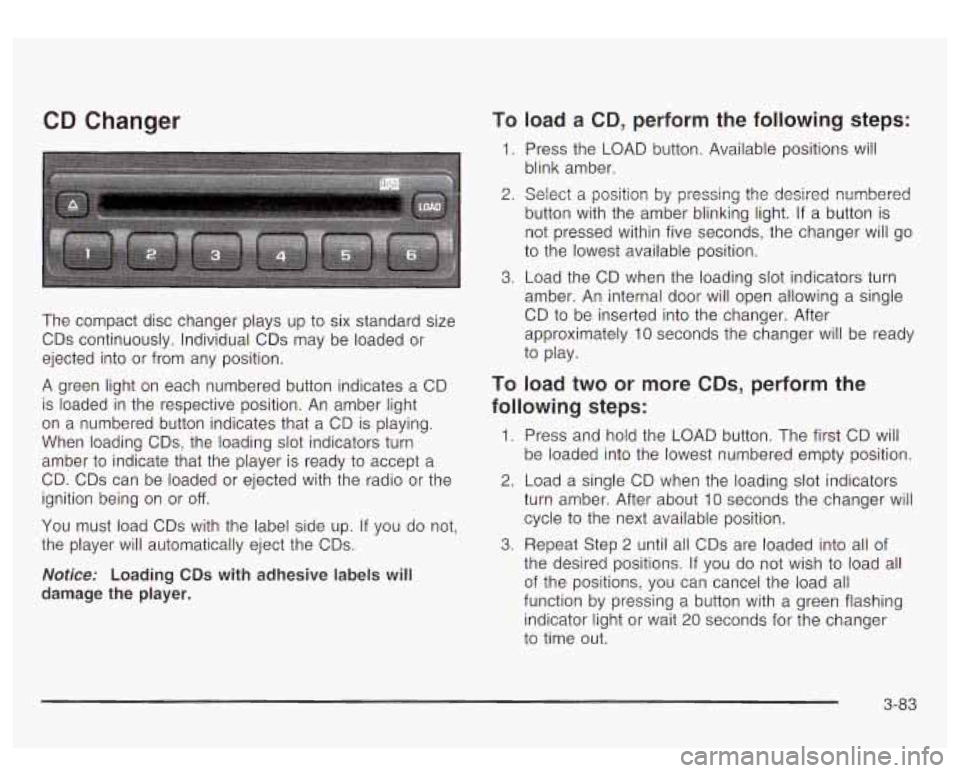
The compact disc changer plays up to six standard size
CDs continuously. Individual CDs may be loaded or
ejected into or from any position.
A green light on each numbered button indicates a CD
is loaded in the respective position. An amber light
on a numbered button indicates that a CD is playing.
When loading CDs, the loading slot indicators turn
amber to indicate that the player is ready
to accept a
CD. CDs can be loaded or ejected with the radio or the
ignition being on or
off.
You must load CDs with the label side up. If you do not,
the player will automatically eject the CDs.
Notice: Loading CDs with adhesive labels will
damage the player.
To load a CD, perform the following steps:
1. Press the LOAD button. Available positions Will
blink amber.
2. Select a position by pressing the desired numbered
button with the amber blinking light.
If a button is
not pressed within five seconds, the changer will go
to the lowest available position.
3. Load the CD when the loading slot indicators turn
amber. An internal door will open allowing a single
CD
to be inserted into the changer. After
approximately 10 seconds the changer will be ready
to play.
TO load two or more CDs, perform the
following steps:
1. Press and hold the LOAD button. The first CD will
be loaded into the lowest numbered empty position.
2. Load a single CD when the loading slot indicators
turn amber. After about 10 seconds the changer will
cycle to the next available position.
the desired positions.
If you do not wish to load all
of the positions, you can cancel the load all
function by pressing a button with a green flashing
indicator light or wait 20 seconds for the changer
to time out.
3. Repeat Step 2 until all CDs are loaded into all of
3-83
Page 227 of 447
To eject a single CD, perform the following
steps:
1. Press the eject button (upward pointing arrow).
The buttons with loaded CDs will blink amber.
2. Press one of the amber blinking buttons to select
the location of the CD you want to eject. The
changer will move to that location and eject the CD.
If you do not remove the CD from the player
CD Functions
1 PREV (Previous): Press this pushbutton to go to the
previous track
if the current track has been playing
for less than eight seconds. If pressed when the current
track has been playing for more than eight seconds,
it will go
to the beginning of the current track. If you hold
or press this pushbutton more than once, the player
will continue moving back through the CD.
within
10 seconds, it will be reloaded. If the eject
button is pressed and a numbered location button is not pressed within five seconds, the current or
last played CD will be ejected. 2 NEXT: Press this pushbutton to go to the next track.
If you hold this pushbutton or press it more than
once, the player will continue moving forward through
the CD.
To eject all CDs, press and hold the eject button.
There are two ways to play a CD. Perform
one of the following:
With the radio on, press the desired numberea
button with a green indicator light on the CD
changer.
changer will go
to its last played position.
Press the TAPE DISC button on the radio. The CD
3 REV (Reverse): Press and hold this pushbutton to
reverse quickly through a track. Release it to resume
playing.
4 FWD (Forward): Press and hold this pushbutton to
advance quickly through
a track. Release it to resume
playing.
5 0: Press this pushbutton to select a CD. The CD
number and track number will be displayed.
3-84
Page 228 of 447
6 RDM (Random): Press this button to hear the tracks
in random, rather than sequential, order. RDM ALL
will appear on the radio display, which will randomly play
all of the loaded CDs. Press and hold this button until
you hear a beep and the radio will display
HDM
ONE, which will randomly play the tracks on the current
CD. Press this button again to turn
off random play,
RDM OFF will appear on the radio display.
4 SEEK b : Press the right or the left SEEK arrow to
go to the next or to the previous track on the CD.
BAND: Press BAND to listen to the radio when a CD is
playing.
TAPE DISC: Press this button if you have a CD loaded
in the changer and the radio is turned on, to play a
CD. Press this button to switch between playing a tape
and the CD changer
if all are loaded.
Compact Disc Changer Errors
CHK CD (Check): If this message appears on the
display,
it could be for one of the following reasons:
0 You are driving on a very rough road. The CD
should play when the road gets smoother.
0 A CD is upside down.
It is dirty, scratched or wet.
9 It is very humid. If so, wait about an hour and try
0 The CD player is very hot.
again.
If any
error occurs repeatedly or if an error cannot be
corrected, contact your dealership.
Theft-Deterrent Feature
THEFTLOCK@ is designed to discourage theft of your
radio. The feature works automatically by learning
a portion of the Vehicle Identification Number (VIN). If
the radio is moved to a different vehicle, it will not
operate and LOCKED will be displayed.
When the radio and vehicle are turned off, the blinking
red light indicates that THEFTLOCK@ is armed.
With THEFTLOCK@ activated, your radio will not operate
if stolen.
3-85
Page 230 of 447
Understanding Radio Reception
AM
The range for most AM stations is greater than for FM,
especially at night. The longer range, however, can
cause stations to interfere with each other. AM can pick
up noise from things like storms and power lines. Try
reducing the treble to reduce this noise
if you ever get it.
FM Stereo
FM stereo will give you the best sound, but FM signals
will reach only about
10 to 40 miles (1 6 to 65 km).
Tall buildings or hills can interfere with FM signals,
causing the sound
to come and go.
XMTM Satellite Radio Service
XMTM Satellite Radio gives you digital radio reception
from coast to coast. Just as with FM, tall buildings
or hills can interfere with Satellite radio signals, causing
the sound to come and go. Your radio may display
NO SIGNAL to indicate interference.
Care of Your Cassette Tape Player
A tape player that is not cleaned regularly can cause
reduced sound quality, ruined cassettes or a damaged
mechanism. Cassette tapes should be stored in their
cases away from contaminants, direct sunlight and
extreme heat. If they aren’t, they may not operate
properly or may cause failure of the tape player.
Your tape player should be cleaned regularly after every
50 hours of use. Your radio may display
CLN to
indicate that you have used your tape player for
50 hours without resetting the tape clean timer.
If this
message appears on the display, your cassette
tape player needs to be cleaned. It
will still play tapes,
but you should clean it as soon as possible to
prevent damage
to your tapes and player. If you notice
a reduction in sound quality, try a known good
cassette
to see if the tape or the tape player is at fault.
If this other cassette has no improvement
in sound
quality, clean the tape player.
3-87
Page 231 of 447
For best results, use a scrubbing action, non-abrasive
cleaning cassette with pads which scrub the tape
head as the hubs of the cleaner cassette turn. The
recommended cleaning cassette is available through
your dealer
(GM Part No. 12344789).
The cut tape detection feature of your cassette tape
player may identify the cleaning cassette as a damaged
tape, in error. To prevent the cleaning cassette from
being ejected, use the following steps:
1.
2.
3.
4.
5.
Turn the ignition on.
Turn the radio
off.
Press and hold the CD TAPE button for five
seconds. The tape symbol on the display will flash
for two seconds.
Insert the scrubbing action cleaning cassette.
Eject the cleaning cassette after the manufacturer’s
recommended cleaning time.
After the cleaning cassette is ejected, the cut tape detection feature will be active again.
You may also choose a non-scrubbing action, wet-type
cleaner which uses a cassette with a fabric belt
to
clean the tape head. This type of cleaning cassette will
not eject on its own. A non-scrubbing action cleaner
may not clean as thoroughly as the scrubbing type
cleaner. The use of a non-scrubbing action, dry-type
cleaning cassette is not recommended. After
you clean the player, press and hold the EJECT
button for five seconds to reset the CLN indicator.
The radio will display
--- to show the indicator was reset.
Cassettes are subject
to wear and the sound quality
may degrade over time. Always make sure the cassette
tape is in good condition before you have your tape
player serviced.
Care of Your CDs and DVDs
Handle discs carefully. Store them in their original cases
or other protective cases and away from direct sunlight
and dust. If the surface of a disc is soiled, dampen
a clean, soft cloth in a mild, neutral detergent solution
and clean it, wiping from the center to the edge.
Be sure never
to touch the side without writing when
handling discs. Pick up discs by grasping the outer
edges or the edge of the hole and the outer edge.
Care of Your CD Changer
The use of CD lens cleaner discs is not advised, due to
the risk of contaminating the lens
of the CD optics
with lubricants internal
to the CD mechanism.
3-88
Page 232 of 447
Care of Your CD and DVD Player
The use of CD lens cleaner discs is not advised, due to
the risk of contaminating the lens of the CD optics
with iubricants internal to the
CD mechanism.
Cleaning the Video Screen
Pour some isopropyl or rubbing alcohol on a clean cloth
and gently wipe the video screen. Do not spray
directly onto the screen and do not press too hard or
too long on the video screen.
Fixed Mast Antenna
The fixed mast antenna can withstand most car washes
without being damaged.
If the mast should ever
become slightly bent, you can straighten it out by hand.
If the mast is badly bent, as it might be by vandals,
you should replace it. Check occasionally to be sure
the mast is still tightened
to the cowl. If tightening is required, tighten by hand,
then with a wrench one quarter turn.
XMTM Satellite Radio Antenna
System
Your XMTM Satellite Radio antenna is located on the
roof
of your vehicle. Keep this antenna clear of
snow and ice build up for clear radio reception.
The performance of your XMTM system may be affected
if your sunroof is open.
Loading items onto the roof of your vehicle can interfere
with the performance of your
XMiM system. Make
sure that the XMTM satellite antenna
is not obstructed.
3-89
Page 240 of 447
Anti-lock Brake System
Your vehicle has anti-lock brakes. ABS is an advanced
electronic braking system that will help prevent a
braking skid.
When you start your engine and begin to drive away,
your anti-lock brake system will check itself. You
may hear a momentary motor or clicking noise while
this test is going on. This is normal.
If there’s a problem with
the anti-lock brake system, this warning light
will
stay on. See Anti-Lock
Brake System Warning
Light
on page 3-35.
Along with ABS, your vehicle has a Dynamic Rear
Proportioning (DRP) system.
If there’s a DRP problem,
both the brake and ABS warning lights will come
on
accompanied by a IO-second chime. The lights
and chime will come
on each time the ignition is turned
on until the problem is repaired. See your dealer for
service. Let’s say
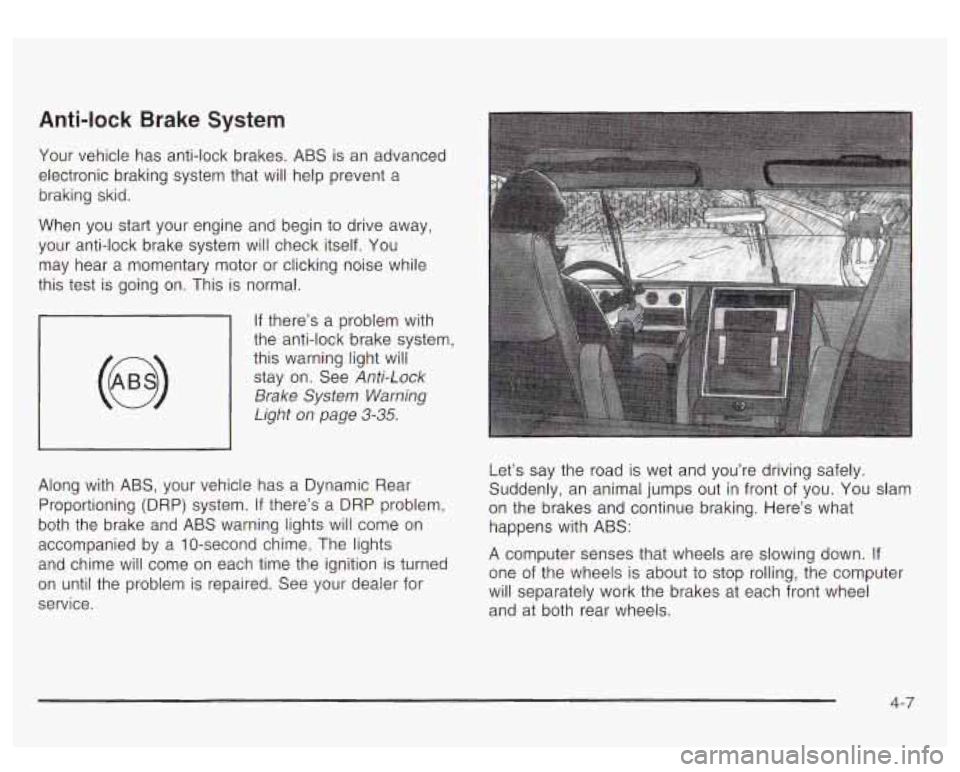
the road is wet and you’re driving safely.
Suddenly, an animal jumps out in front of you. You slam
on the brakes and continue braking. Here’s what
happens with ABS:
A computer senses that wheels are slowing down. If
one of the wheels is about to stop rolling, the computer
will separately work the brakes at each front wheel
and at both rear wheels.
4-7
Page 242 of 447

Stabilitrak@ System
Your vehicle is equipped with Stabilitrak@, which
combines antilock brake, traction and stability control
systems and helps the driver maintain directional control
of the vehicle in most driving conditions.
When you first start your vehicle and begin
to drive
away, the system performs several diagnostic checks
to
insure there are no problems. You may hear or feel
the system working. This is normal and does not mean
there is a problem with your vehicle. The system
should initialize before the vehicle reaches
20 m.p.h.
(32 km/h). In some cases, it may take approximately two
miles
of driving before the system initializes.
If the system fails
to turn on or activate, the STABILITY
SYS DISABLED or SERVICE STABILITY message
will be displayed.
If the vehicle has gone through heavy
acceleration or braking or multiple turns during the
first two miles of driving after starting your vehicle, the
STABILITY
SYS DISABLED message may appear.
If this is the case, your vehicle does not need servicing.
You will need
to turn the vehicle off and then restart
it
to initialize Stabilitrak@.
If either message appears on the Driver Information
Center (DIC), and your vehicle hasn’t gone through hard
acceleration, braking
or multiple turns in the first two
miles of driving, your vehicle should be taken in
for service. The STABILITY SYS ACTIVE message will appear
on
the Driver Information Center (DIC) only when the
system is both on and activated. You may also feel or
hear the system working; this is normal. For more
information on
the stability messages, see Driver
Information Center (DIC) on page 3-43.
Stabilitrak@and part of the
traction control system can
be turned
off or back on
by pressing the
Stabilitrak@button located
on the instrument
When the system is turned
off, the traction off light will
illuminate, and the STABILITY SYS DISABLED
message will appear on the DIC to warn the driver that
both the stability system and part of the traction
control system are disabled. Your vehicle will still have
brake-traction control when Stabilitrak@is
off, but will
not be able
to use the engine speed management
system. See “Traction Control Operation” next for more
information.
4-9
Page 243 of 447
When the Stabilitrak@system has been turned off you
may still hear system noises as a result of the
brake-traction control coming on.
It is recommended to leave the system on for normal
driving conditions, but it may be necessary
to turn
the system
off if your vehicle is stuck in sand, mud, ice
or snow, and you want
to “rock” your vehicle to
attempt to free it. It may also be necessary to turn off
the system when driving in extreme off-road conditions
where high wheel spin is required. See If
You Are
Stuck: In Sand, Mud, Ice or Snow on page
4-4 1.
Traction Control Operation
The traction control system is part of the
Stabilitrak@system. Traction control limits wheel spin by
reducing engine power
to the wheels (engine speed
management) and by applying brakes
to each individual
wheel (brake-traction control) as necessary.
The traction control system is enabled automatically
when you start your vehicle, and it will activate
and display the TRACTION ACTIVE message in the
Driver Information Center (DIC)
if it senses that any of
the wheels are spinning or beginning to lose traction
while driving. If you turn
off Stabilitrak@, only the
brake-traction control portion
of traction control will
work. The engine speed management will be disabled.
In this state, engine power is not reduced automatically
and the driven wheels can spin more freely. This
can cause the brake-traction control
to activate
constantly. For more information on the traction active
message, see Driver Information Center (DIC) on
page
3-43.
Notice: If the traction off light comes on due to
heavy braking and/or because the traction control
system has been continuously active, do not allow
the wheel@) of one axle to spin excessively.
If you
do, you may be causing damage to your transfer
case. This could lead to costly repairs not covered by
your warranty.
If the brake-traction control system activates constantly
or
if the brakes have heated up due to high speed
braking, the brake-traction control will be automatically
disabled. The system will come back on after the
brakes have cooled. This can take up
to two minutes ot
longer depending on brake usage.
Notice: Don’t allow the wheel(s) of one axle to spin
excessively when the traction
off, ABS and brake
lights are on and the
SERVICE STABILITY MESSAGE
is displayed. In this situation, damage to the transfer
case
is possible. This could lead to costly repairs not
covered by your warranty. You should immediately
reduce engine power until the lights and messages
are no longer displayed.
4-1 0