clutch GREAT WALL HOVER 2006 Service User Guide
[x] Cancel search | Manufacturer: GREAT WALL, Model Year: 2006, Model line: HOVER, Model: GREAT WALL HOVER 2006Pages: 425, PDF Size: 26.05 MB
Page 38 of 425
Clutch-8
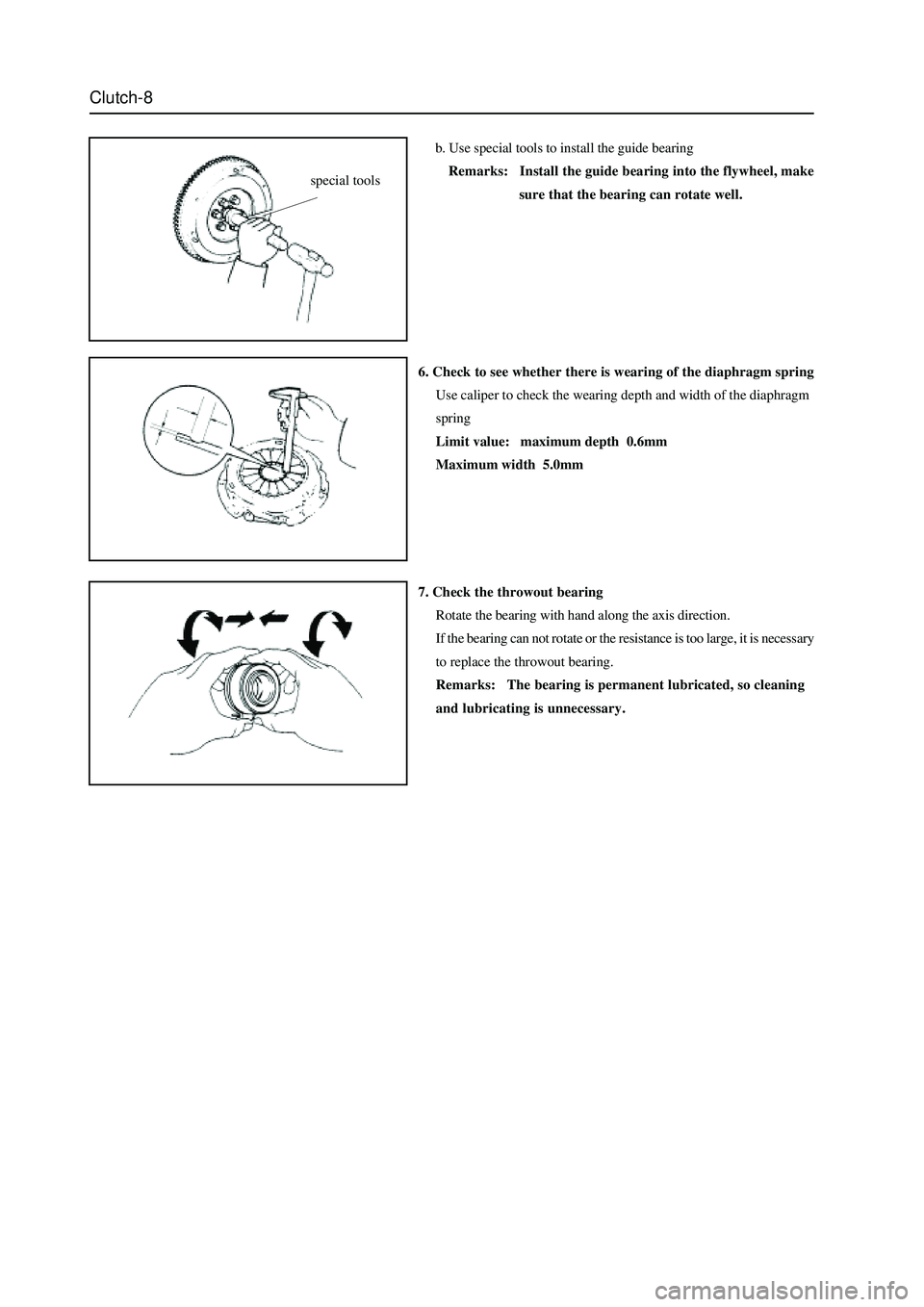
b. Use special tools to install the guide bearing
Remarks: Install the guide bearing into the flywheel, make
sure that the bearing can rotate well.
6. Check to see whether there is wearing of the diaphragm spring
Use caliper to check the wearing depth and width of the diaphragm
spring
Limit value: maximum depth 0.6mm
Maximum width 5.0mm
7. Check the throwout bearing
Rotate the bearing with hand along the axis direction.
If the bearing can not rotate or the resistance is too large, it is necessary
to replace the throwout bearing.
Remarks: The bearing is permanent lubricated, so cleaning
and lubricating is unnecessary.
special tools
Page 39 of 425
Clutch-9
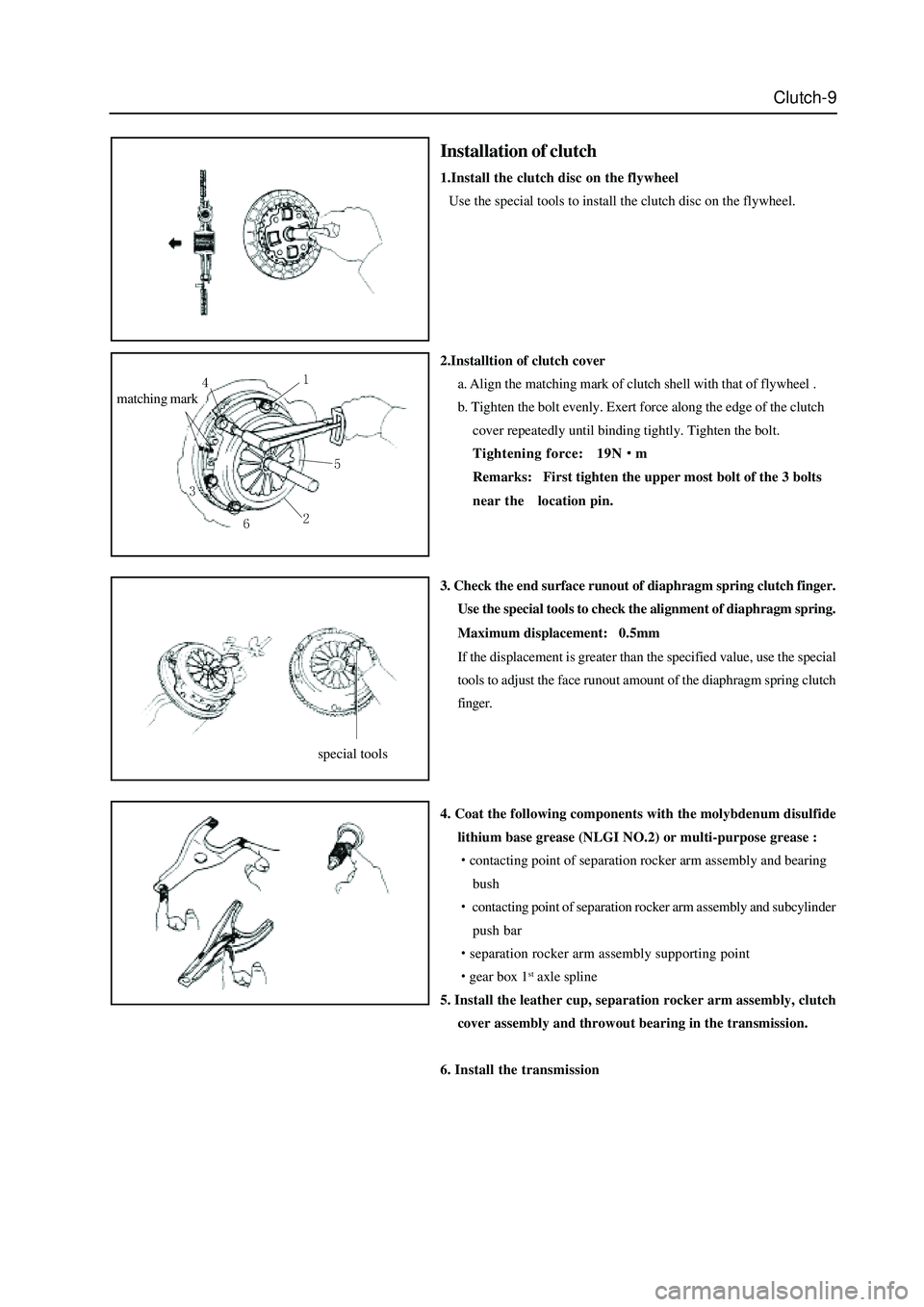
2.Installtion of clutch cover
a. Align the matching mark of clutch shell with that of flywheel .
b. Tighten the bolt evenly. Exert force along the edge of the clutch
cover repeatedly until binding tightly. Tighten the bolt.
Tightening force: 19N
m
Remarks: First tighten the upper most bolt of the 3 bolts
near thelocation pin.
3. Check the end surface runout of diaphragm spring clutch finger.
Use the special tools to check the alignment of diaphragm spring.
Maximum displacement: 0.5mm
If the displacement is greater than the specified value, use the special
tools to adjust the face runout amount of the diaphragm spring clutch
finger.
4. Coat the following components with the molybdenum disulfide
lithium base grease (NLGI NO.2) or multi-purpose grease :
contacting point of separation rocker arm assembly and bearing
bush
contacting point of separation rocker arm assembly and subcylinder
push bar
separation rocker arm assembly supporting point
gear box 1st axle spline
5. Install the leather cup, separation rocker arm assembly, clutch
cover assembly and throwout bearing in the transmission.
6. Install the transmission
matching mark
Installation of clutch
1.Install the clutch disc on the flywheel
Use the special tools to install the clutch disc on the flywheel.
special tools
Page 44 of 425
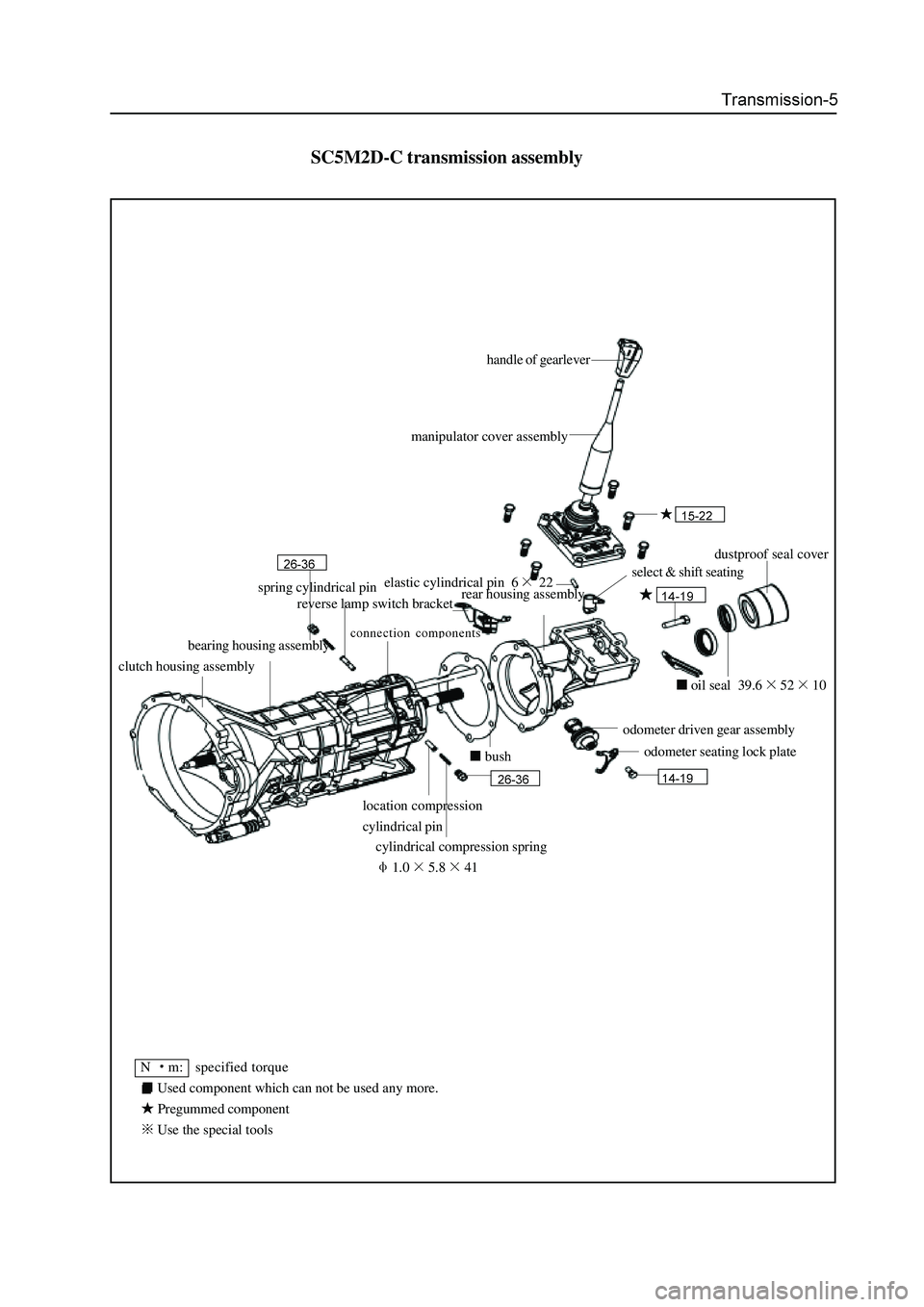
SC5M2D-C transmission assembly
handle of gearlever
dustproof seal cover
oil seal 39.65210
odometer driven gear assembly
odometer seating lock plate
cylindrical compression spring
1.05.841
bush
select & shift seating
N m: specified torque
Used component which can not be used any more.
Pregummed component
Use the special toolsmanipulator cover assembly
elastic cylindrical pin 6
22
rear housing assembly spring cylindrical pin
reverse lamp switch bracket
bearing housing assembly
clutch housing assembly
location compression
cylindrical pin
Page 47 of 425
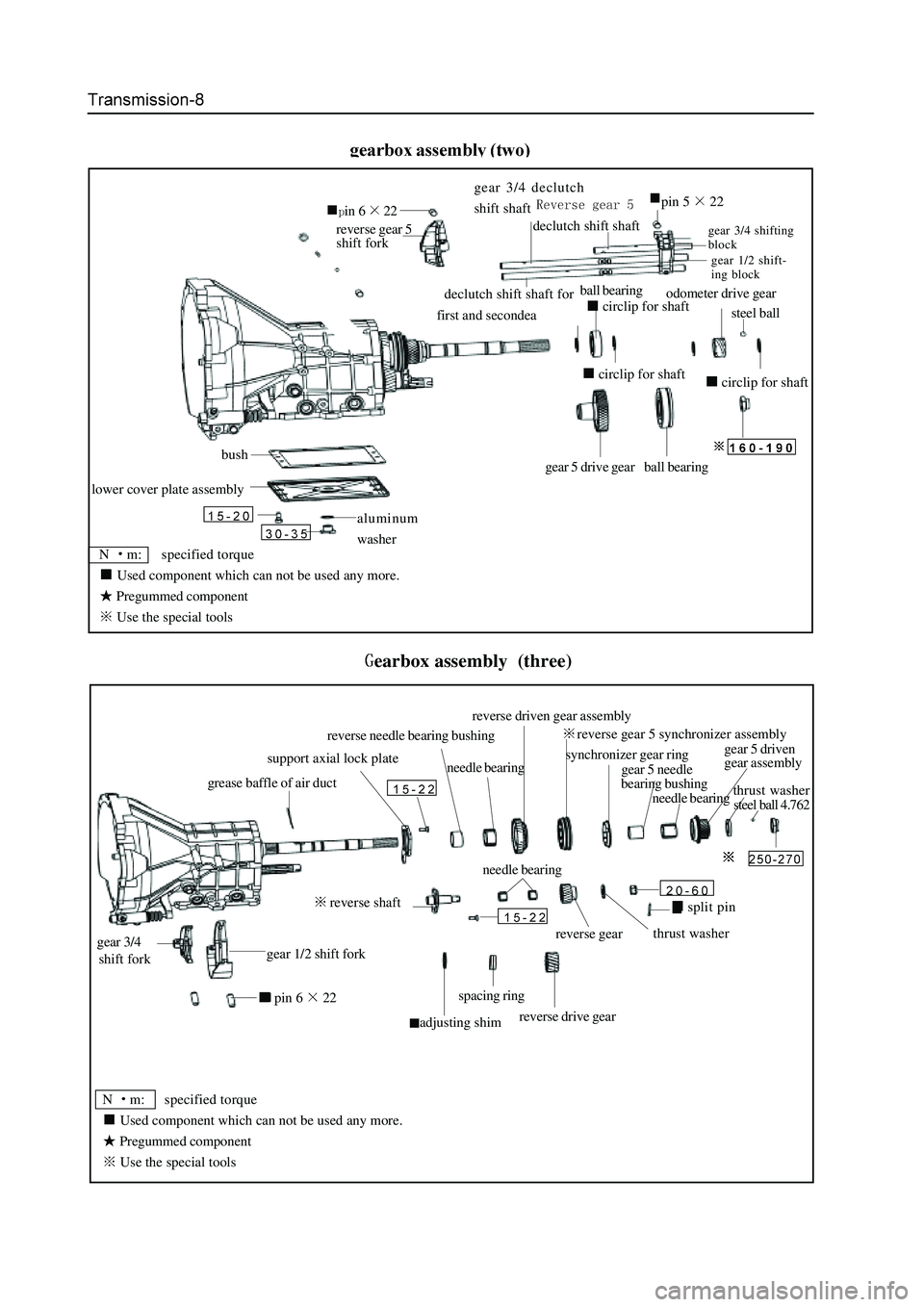
N m: specified torque
Used component which can not be used any more.
Pregummed component
Use the special tools
aluminum
washer
lower cover plate assembly
bushgear 5 drive gear ball bearing
circlip for shaft
steel ball
odometer drive gear
circlip for shaft
ball bearing
circlip for shaft
reverse gear 5
shift fork
in 622
declutch shift shaft for
first and secondea
gear 3/4 declutch
shift shaft
declutch shift shaft
pin 522
gear 1/2 shift-
ing block
gear 3/4 shifting
block
earbox assembly (three)
steel ball 4.762
pin 622
gear 1/2 shift fork
adjusting shim
spacing ring
reverse drive gear
reverse shaft
needle bearing
reverse gear thrust washer
split pin
grease baffle of air duct
support axial lock plate
reverse needle bearing bushing
needle bearing
thrust washer
gear 5 needle
bearing bushingsynchronizer gear ring
reverse gear 5 synchronizer assembly
N m: specified torque
Used component which can not be used any more.
Pregummed component
Use the special tools
gear 3/4
shift forkreverse driven gear assembly
needle bearinggear 5 driven
gear assembly
Page 51 of 425
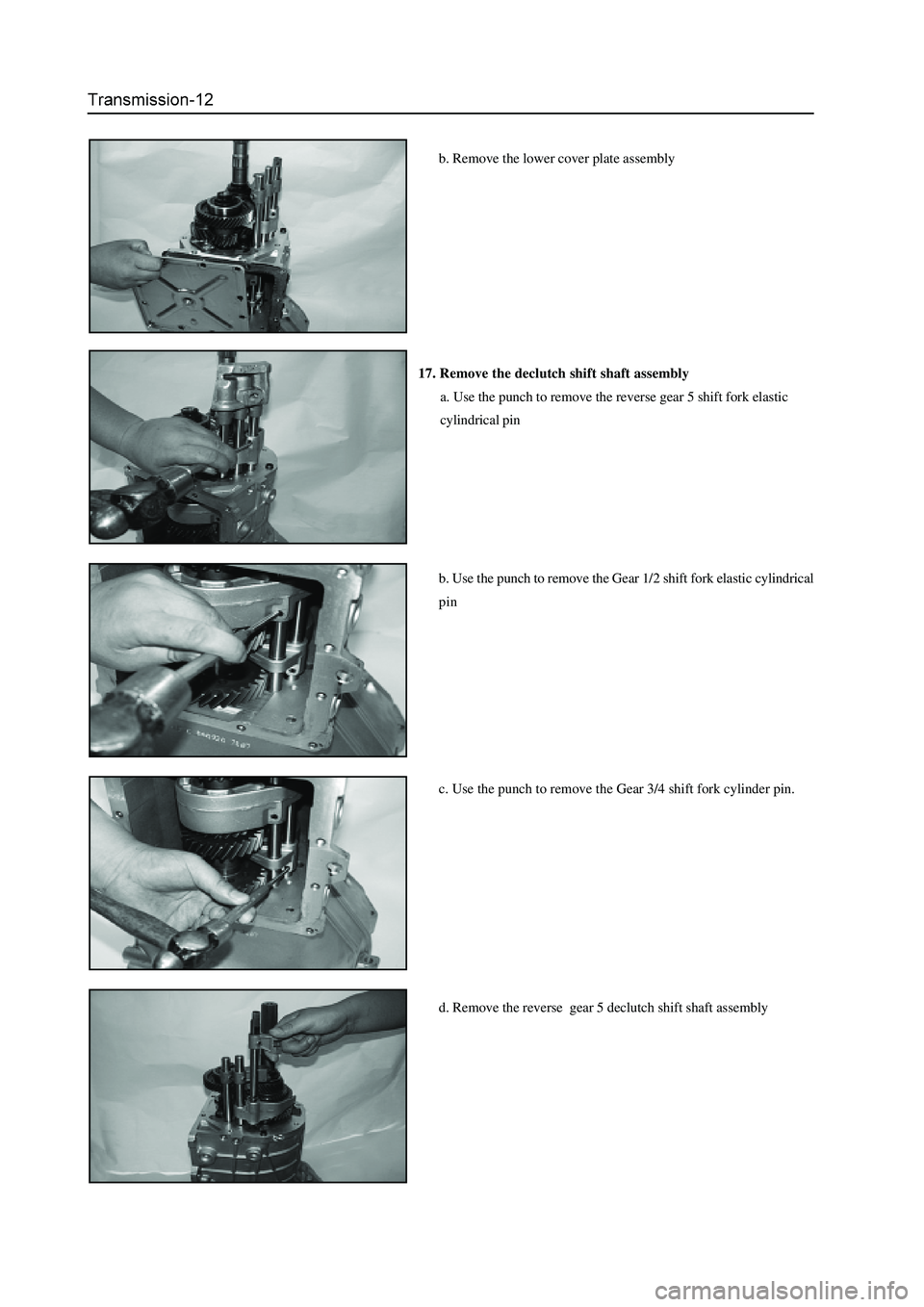
b. Remove the lower cover plate assembly
17. Remove the declutch shift shaft assembly
a. Use the punch to remove the reverse gear 5 shift fork elastic
cylindrical pin
b. Use the punch to remove the Gear 1/2 shift fork elastic cylindrical
pin
c. Use the punch to remove the Gear 3/4 shift fork cylinder pin.
d. Remove the reverse gear 5 declutch shift shaft assembly
Page 52 of 425
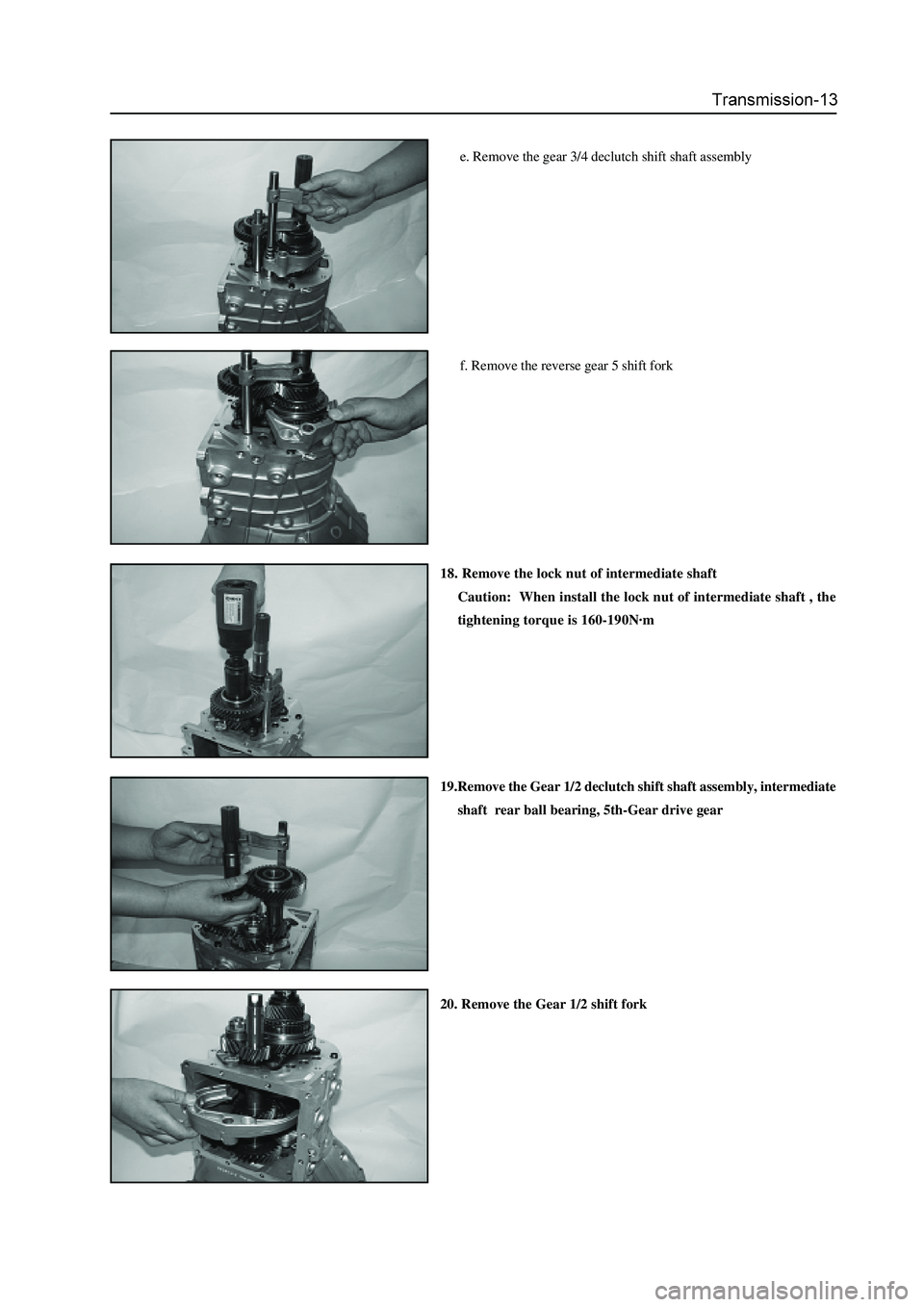
e. Remove the gear 3/4 declutch shift shaft assembly
f. Remove the reverse gear 5 shift fork
18. Remove the lock nut of intermediate shaft
Caution: When install the lock nut of intermediate shaft , the
tightening torque is 160-190N·m
19.Remove the Gear 1/2 declutch shift shaft assembly, intermediate
shaft rear ball bearing, 5th-Gear drive gear
20. Remove the Gear 1/2 shift fork
Page 57 of 425
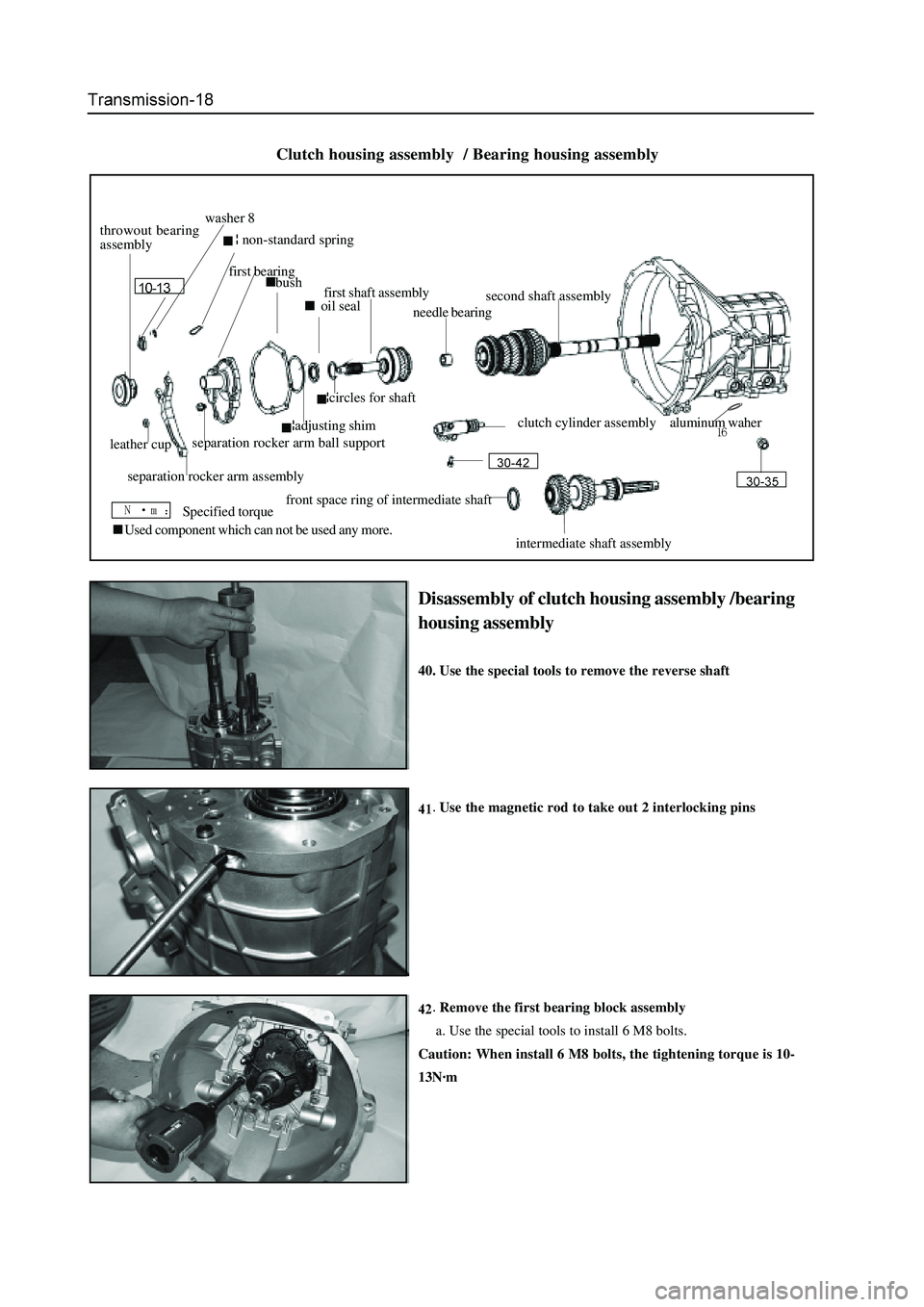
Disassembly of clutch housing assembly /bearing
housing assembly
40. Use the special tools to remove the reverse shaft
Use the magnetic rod to take out 2 interlocking pins
Remove the first bearing block assembly
a. Use the special tools to install 6 M8 bolts.
Caution: When install 6 M8 bolts, the tightening torque is 10-
13N·m
Clutch housing assembly / Bearing housing assembly
bush
oil seal
Used component which can not be used any more.
throwout bearing
assembly washer 8
¦ non-standard spring
first bearing
first shaft assembly
needle bearingsecond shaft assembly
¦circles for shaft
¦adjusting shim
leather cup
separation rocker arm assembly separation rocker arm ball supportclutch cylinder assembly
front space ring of intermediate shaft
intermediate shaft assembly aluminum waher
Specified torque
Page 63 of 425
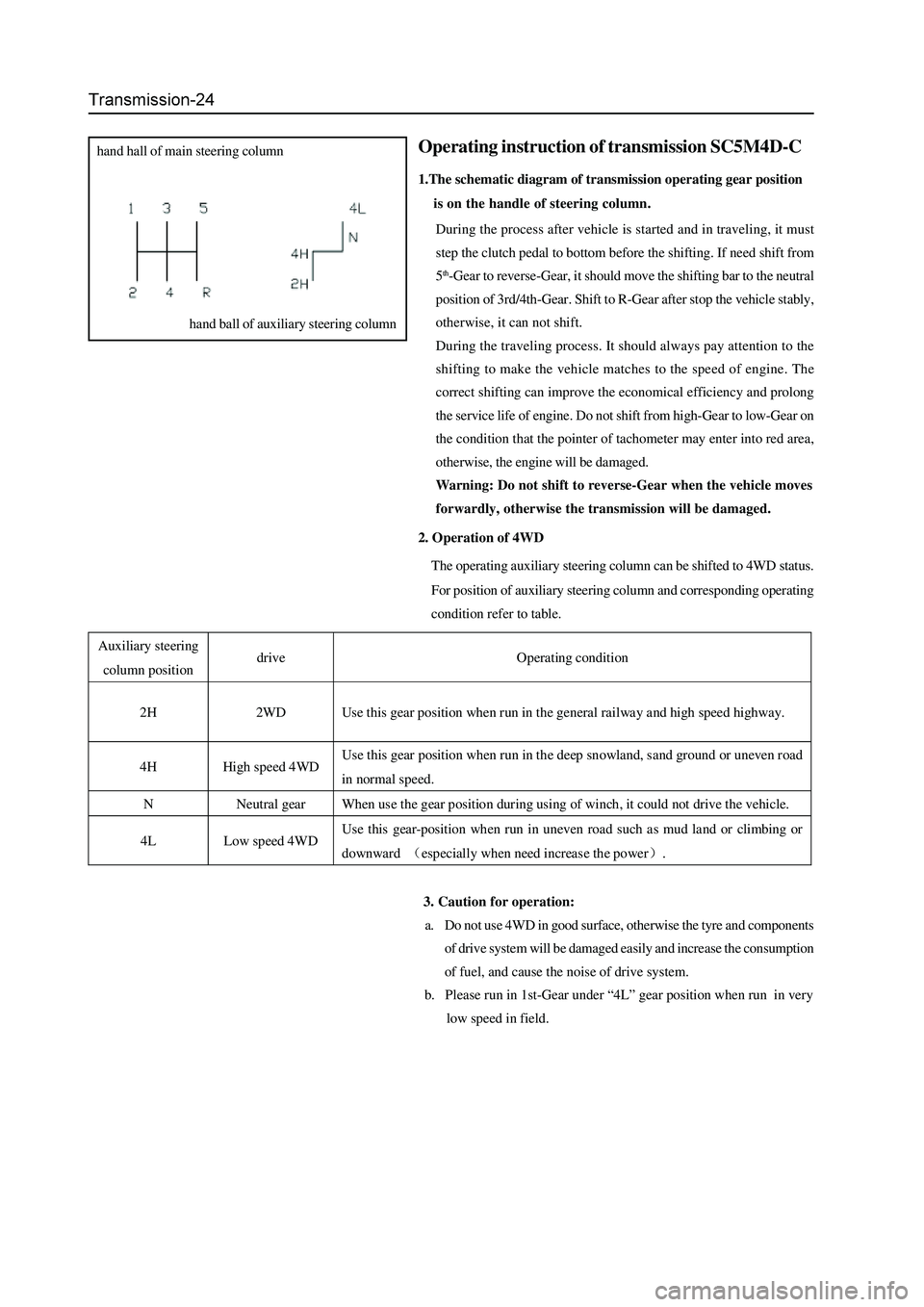
2. Operation of 4WD
The operating auxiliary steering column can be shifted to 4WD status.
For position of auxiliary steering column and corresponding operating
condition refer to table.
3. Caution for operation:
a. Do not use 4WD in good surface, otherwise the tyre and components
of drive system will be damaged easily and increase the consumption
of fuel, and cause the noise of drive system.
b. Please run in 1st-Gear under “4L” gear position when run in very
low speed in field.
Operating instruction of transmission SC5M4D-C
1.The schematic diagram of transmission operating gear position
is on the handle of steering column.
During the process after vehicle is started and in traveling, it must
step the clutch pedal to bottom before the shifting. If need shift from
5
th-Gear to reverse-Gear, it should move the shifting bar to the neutral
position of 3rd/4th-Gear. Shift to R-Gear after stop the vehicle stably,
otherwise, it can not shift.
During the traveling process. It should always pay attention to the
shifting to make the vehicle matches to the speed of engine. The
correct shifting can improve the economical efficiency and prolong
the service life of engine. Do not shift from high-Gear to low-Gear on
the condition that the pointer of tachometer may enter into red area,
otherwise, the engine will be damaged.
Warning: Do not shift to reverse-Gear when the vehicle moves
forwardly, otherwise the transmission will be damaged.
hand hall of main steering column
hand ball of auxiliary steering column
Auxiliary steering
column position drive Operating condition
2H 2WD Use this gear position when run in the general railway and high speed highway.
4H High speed 4WD Use this gear position when run in the deep snowland, sand ground or uneven road
in normal speed.
N Neutral gear When use the gear position during using of winch, it could not drive the vehicle.
4L Low speed 4WD Use this gear-position when run in uneven road such as mud land or climbing or
downward (especially when need increas e the power).
Page 68 of 425
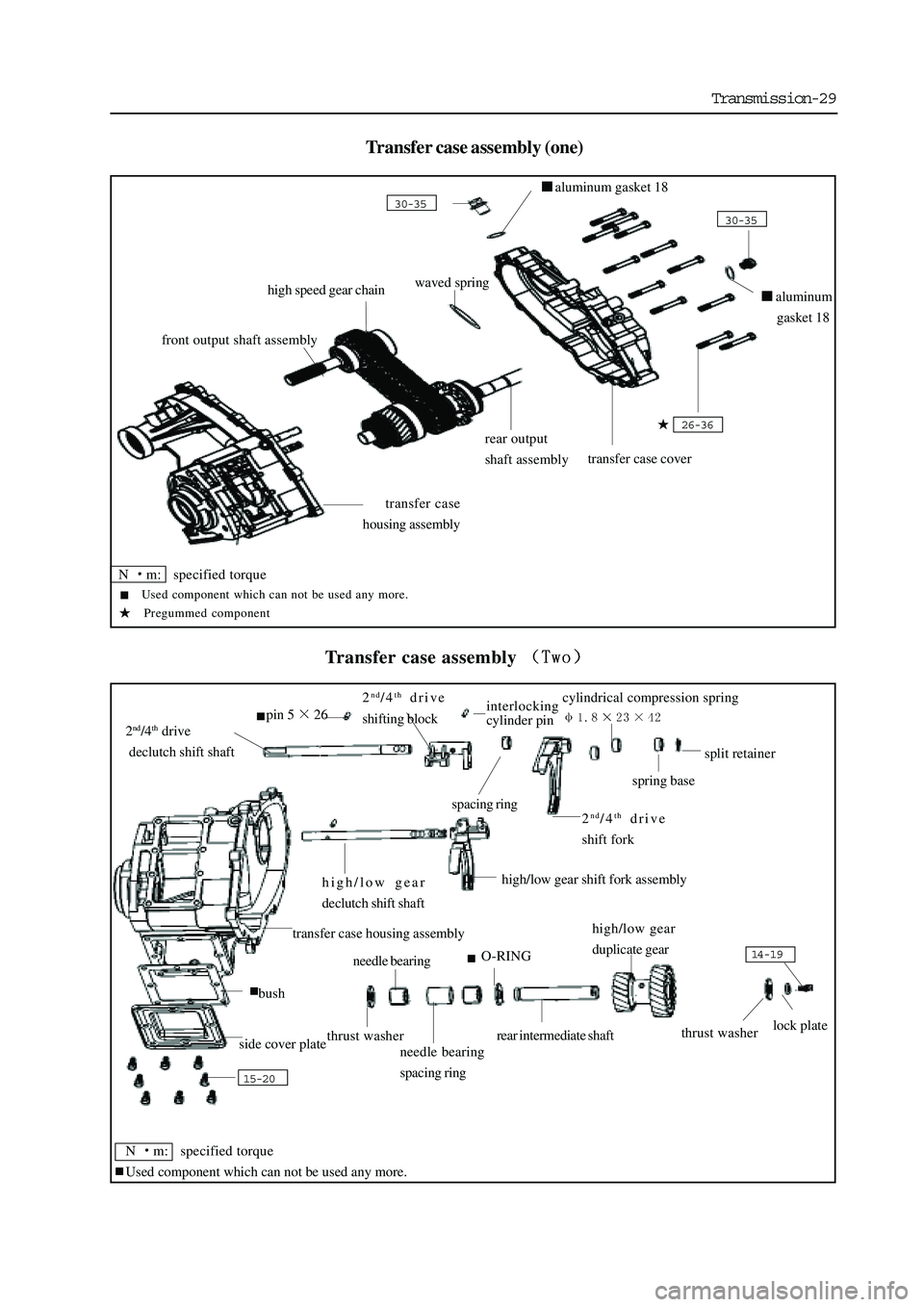
Transmission-29
Transfer case assembly (one)
Transfer case assembly
transfer case
housing assembly
rear output
shaft assembly
transfer case cover
26-36
30-35
aluminum gasket 18
30-35
waved springhigh speed gear chain
front output shaft assembly
15-20
side cover plate
bush
thrust washer
needle bearing
needle bearing
spacing ring
O-RING
rear intermediate shaft
high/low gear
duplicate gear
thrust washerlock plate
14-19
high/low gear
declutch shift shaft high/low gear shift fork assembly
2nd/4th drive
declutch shift shaft
pin 526
2nd/4th drive
shifting blockinterlocking
cylinder pin
spacing ring2nd/4th drive
shift fork
cylindrical compression spring
spring base
split retainer
aluminum
gasket 18
N
m: specified torque
Used component which can not be used any more.
Pregummed component
transfer case housing assembly
N
m: specified torque
Used component which can not be used any more.
Page 71 of 425
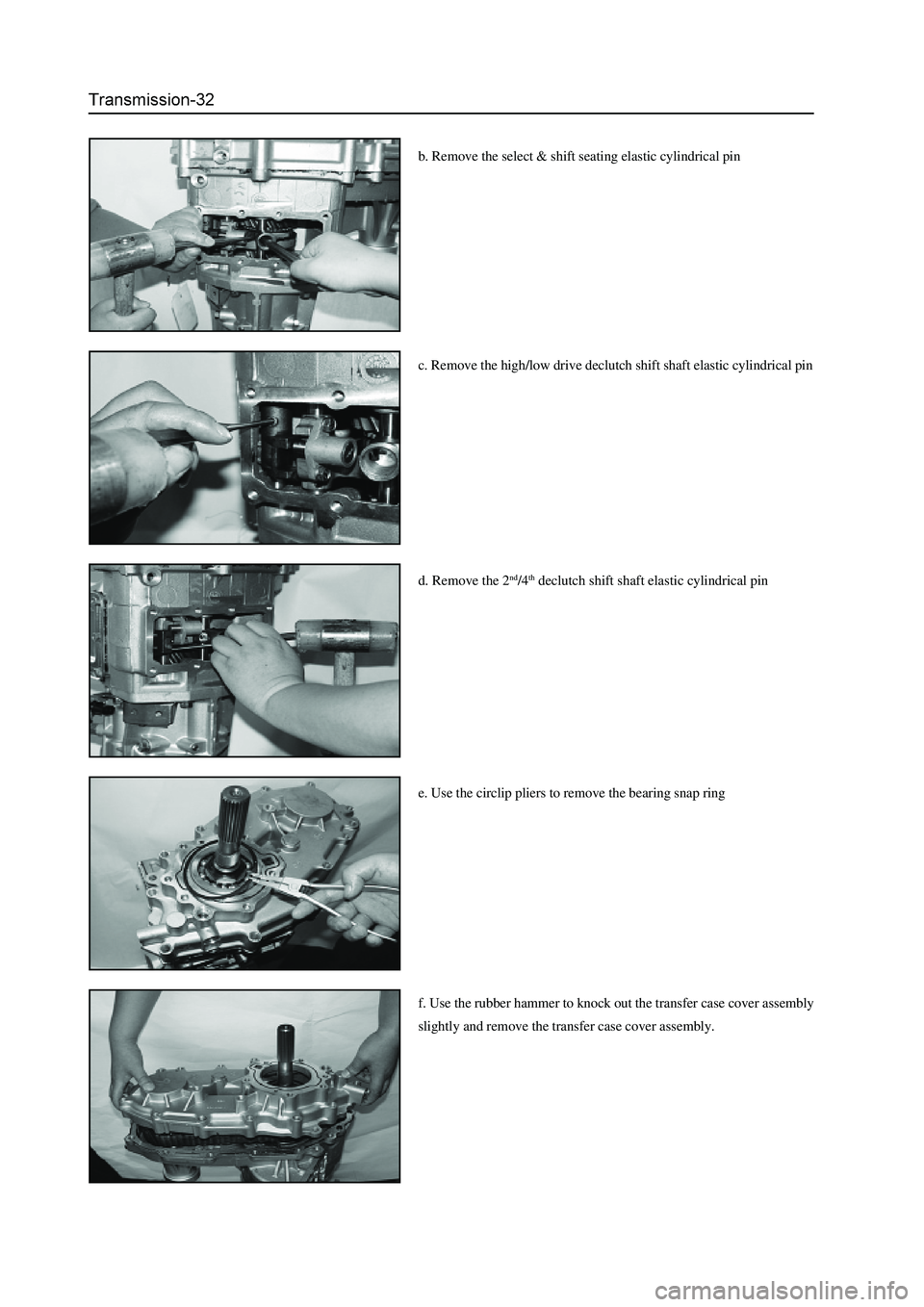
c. Remove the high/low drive declutch shift shaft elastic cylindrical pin
d. Remove the 2
nd/4th declutch shift shaft elastic cylindrical pin
e. Use the circlip pliers to remove the bearing snap ring
f. Use the rubber hammer to knock out the transfer case cover assembly
slightly and remove the transfer case cover assembly. b. Remove the select & shift seating elastic cylindrical pin