light HONDA ACCORD HYBRID 2014 9.G Workshop Manual
[x] Cancel search | Manufacturer: HONDA, Model Year: 2014, Model line: ACCORD HYBRID, Model: HONDA ACCORD HYBRID 2014 9.GPages: 561, PDF Size: 20.3 MB
Page 297 of 561
296
uuCustomized Featuresu
Features
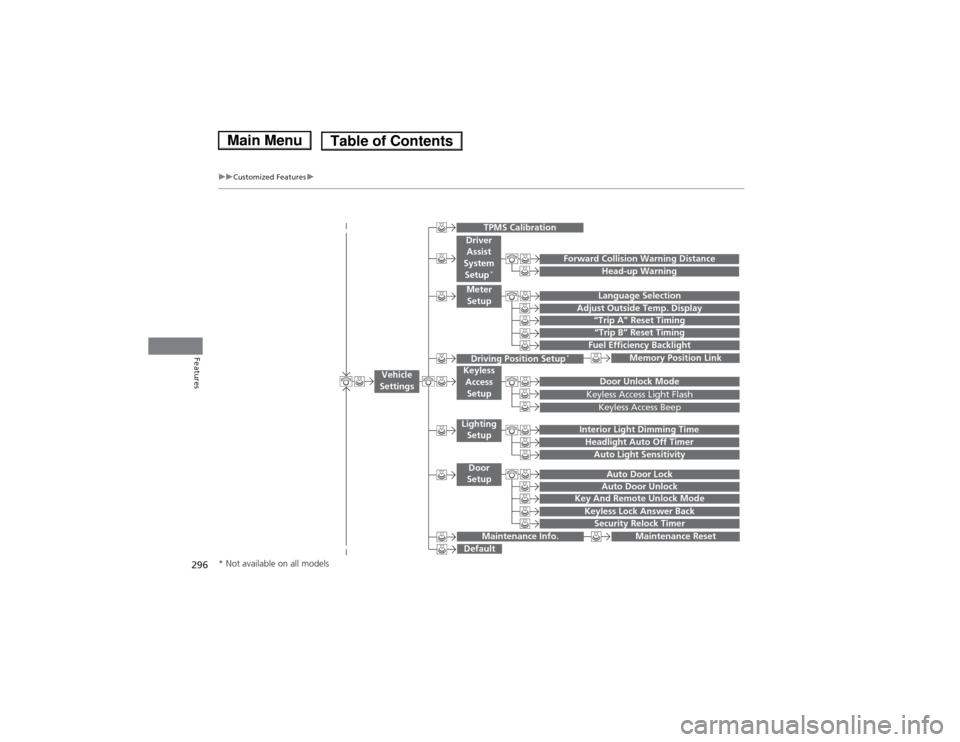
“Trip B” Reset Timing
Adjust Outside Temp. Display“Trip A” Reset Timing
Keyless Access Light Flash
Auto Light Sensitivity
Auto Door Lock
Auto Door Unlock
Fuel Efficiency Backlight
Forward Collision Warning Distance
Door Unlock Mode
Interior Light Dimming Time
Headlight Auto Off Timer
Memory Position Link
Language Selection
Key And Remote Unlock Mode
Keyless Lock Answer BackSecurity Relock Timer
Maintenance Reset
Default
Vehicle
Settings
Driver Assist
System Setup *
Meter
Setup
TPMS Calibration
Driving Position Setup *Keyless
Access
Setup
Lighting Setup
Door
Setup
Maintenance Info.
Keyless Access Beep
Head-up Warning
* Not available on all models
Main MenuTable of Contents
Page 303 of 561
302
uuCustomized Featuresu
Features
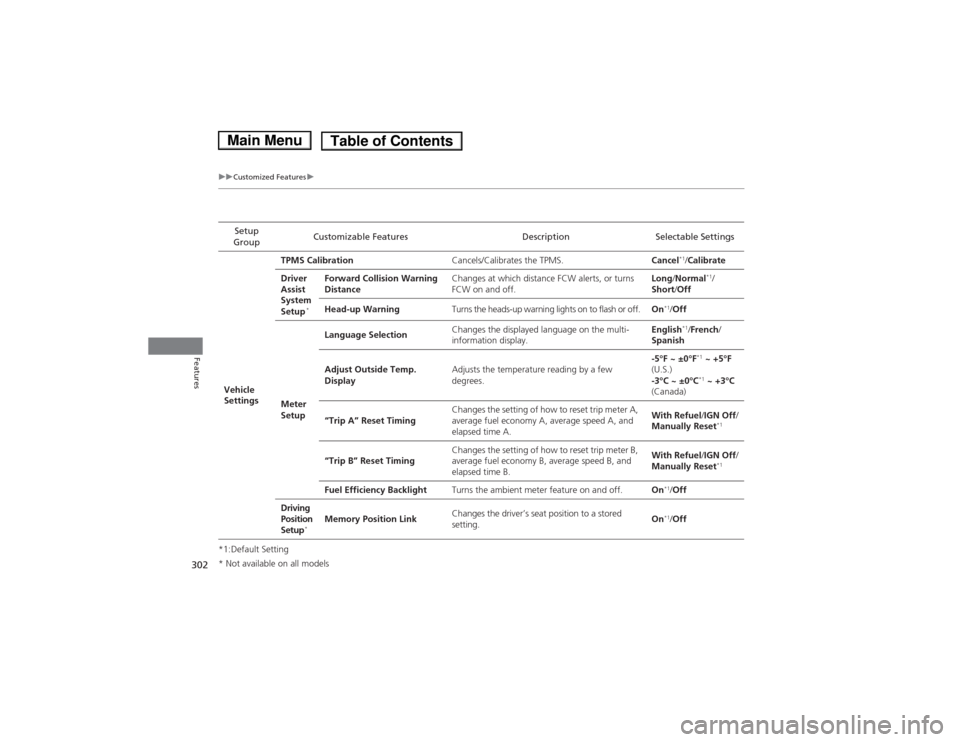
*1:Default SettingSetup
Group Customizable Features Description Selectable Settings
Vehicle
Settings TPMS Calibration
Cancels/Calibrates the TPMS. Cancel*1
/Calibrate
Driver
Assist
System
Setup *Forward Collision Warning
Distance
Changes at which distance FCW alerts, or turns
FCW on and off. Long
/Normal *1
/
Short /Off
Head-up Warning Turns the heads-up warning lights on to flash or off. On*1
/Off
Meter
Setup Language Selection
Changes the displayed language on the multi-
information display. English
*1
/French /
Spanish
Adjust Outside Temp.
Display Adjusts the temperature reading by a few degrees. -5°F ~ ±0°F
*1
~ +5°F
(U.S.)
-3°C ~ ±0°C *1
~ +3°C
(Canada)
“Trip A” Reset Timing Changes the setting of how to reset trip meter A,
average fuel economy A, average speed A, and
elapsed time A. With Refuel
/IGN Off /
Manually Reset *1
“Trip B” Reset Timing Changes the setting of how to reset trip meter B,
average fuel economy B, average speed B, and
elapsed time B. With Refuel
/IGN Off /
Manually Reset *1
Fuel Efficiency Backlight Turns the ambient meter feature on and off. On*1
/Off
Driving
Position
Setup *Memory Position Link
Changes the driver’s seat position to a stored setting.
On
*1
/Off
* Not available on all models
Main MenuTable of Contents
Page 304 of 561
303
uuCustomized Featuresu
Continued
Features
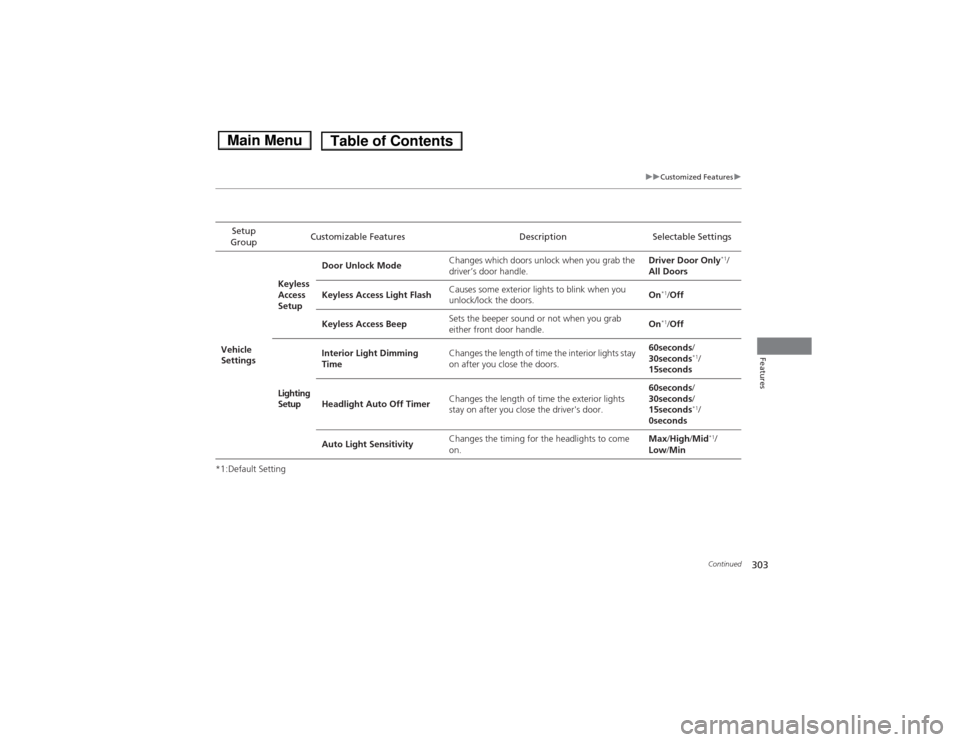
*1:Default SettingSetup
Group Customizable Features Description Selectable Settings
Vehicle
Settings Keyless
Access
Setup
Door Unlock Mode
Changes which doors unlock when you grab the
driver’s door handle. Driver Door Only
*1
/
All Doors
Keyless Access Light Flash Causes some exterior lights to blink when you
unlock/lock the doors.
On
*1
/Off
Keyless Access Beep Sets the beeper sound or not when you grab
either front door handle. On
*1
/Off
Lighting Setup Interior Light Dimming
Time
Changes the length of time the interior lights stay
on after you close the doors. 60seconds
/
30seconds *1
/
15seconds
Headlight Auto Off Timer Changes the length of time the exterior lights
stay on after you close the driver's door. 60seconds
/
30seconds /
15seconds *1
/
0seconds
Auto Light Sensitivity Changes the timing for the headlights to come on. Max
/High /Mid *1
/
Low /Min
Main MenuTable of Contents
Page 305 of 561
304
uuCustomized Featuresu
Features
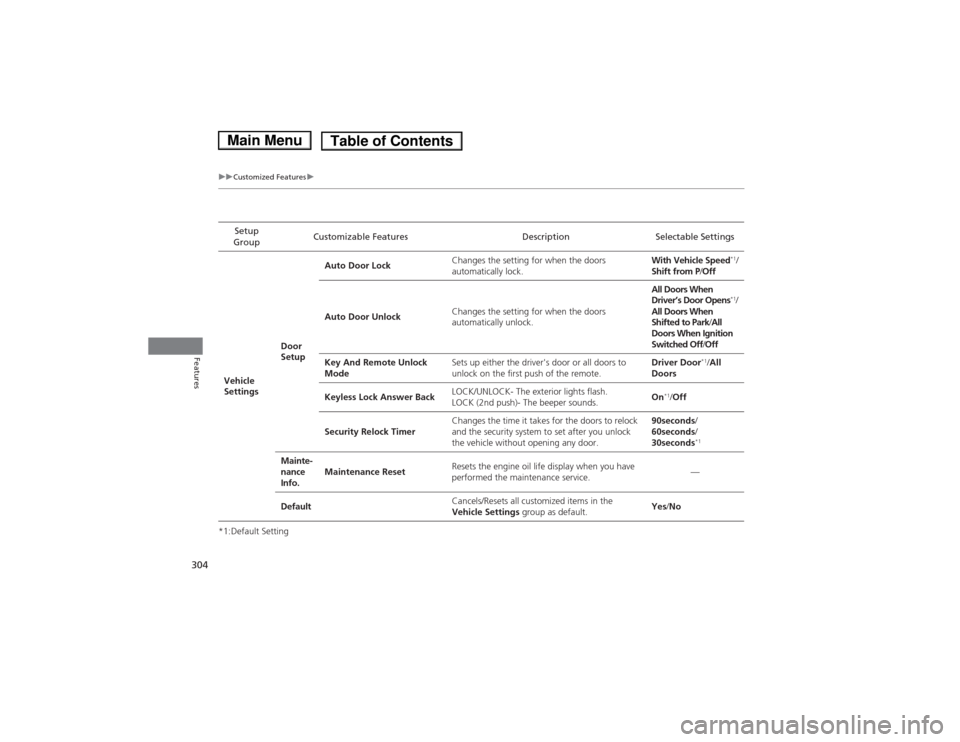
*1:Default SettingSetup
Group Customizable Features Description Selectable Settings
Vehicle
Settings Door
SetupAuto Door Lock
Changes the setting for when the doors
automatically lock. With Vehicle Speed
*1
/
Shift from P /Off
Auto Door Unlock Changes the setting for when the doors
automatically unlock. All Doors When
Driver’s Door Opens
*1
/
All Doors When
Shifted to Park /All
Doors When Ignition
Switched Off /Off
Key And Remote Unlock
Mode Sets up either the driver's door or all doors to
unlock on the first push of the remote. Driver Door
*1
/All
Doors
Keyless Lock Answer Back LOCK/UNLOCK- The exterior lights flash.
LOCK (2nd push)- The beeper sounds.
On
*1
/Off
Security Relock Timer Changes the time it takes for the doors to relock
and the security system to set after you unlock
the vehicle without opening any door. 90seconds
/
60seconds /
30seconds *1
Mainte-
nance
Info. Maintenance Reset
Resets the engine oil life display when you have
performed the maintenance service. —
Default Cancels/Resets all customized items in the
Vehicle Settings
group as default. Yes
/No
Main MenuTable of Contents
Page 313 of 561
312
uuCustomized Featuresu
Features
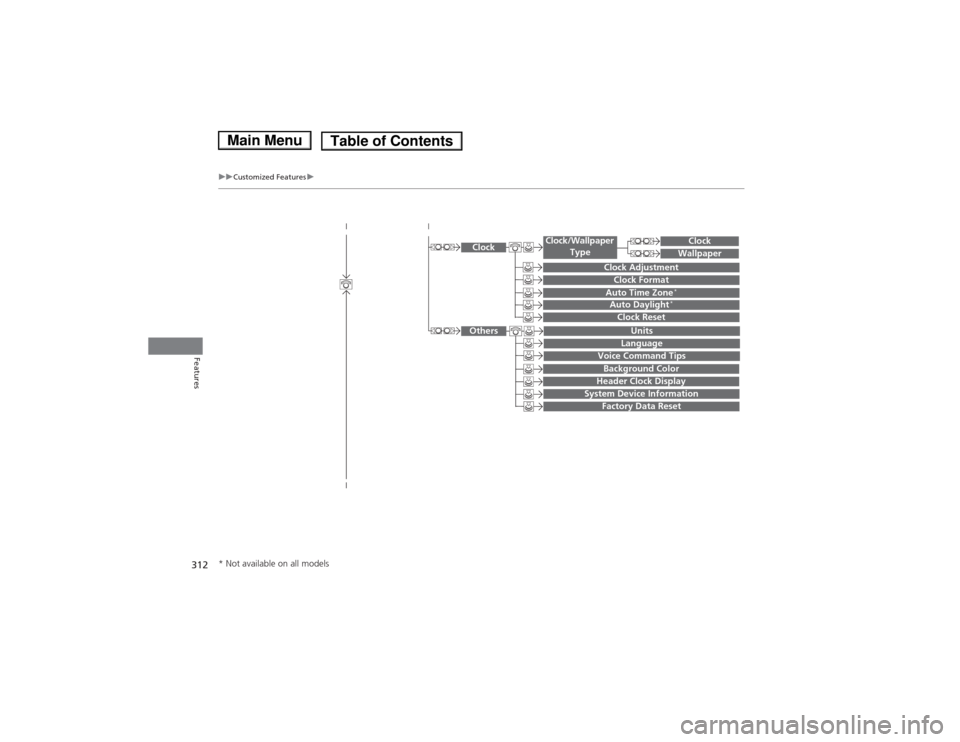
System Device Information
Factory Data Reset
Background Color
Header Clock Display
Clock Reset
Auto Time Zone*Auto Daylight*
Clock
Clock Adjustment
Clock Format
Clock
Units
Language
Voice Command Tips
Others
Wallpaper
Clock/Wallpaper
Type
* Not available on all models
Main MenuTable of Contents
Page 314 of 561
313
uuCustomized Featuresu
Continued
Features
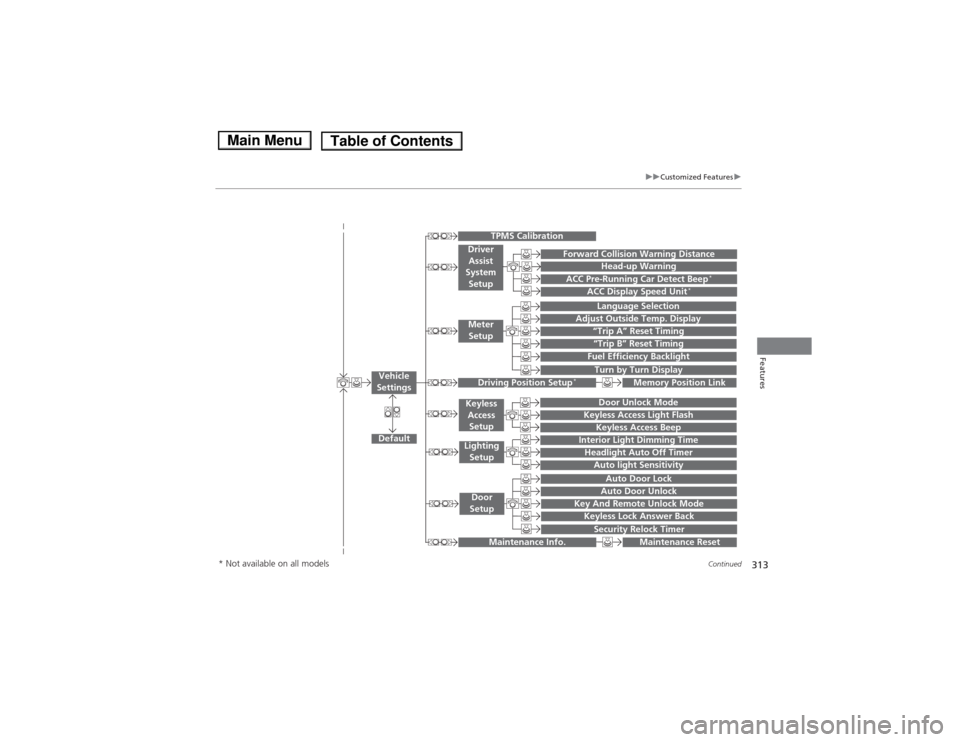
“Trip A” Reset Timing
“Trip B” Reset Timing
Fuel Efficiency Backlight
Language Selection
Adjust Outside Temp. Display
Forward Collision Warning Distance
ACC Pre-Running Car Detect Beep*
ACC Display Speed Unit*
Turn by Turn Display
Default
Memory Position Link
Door Unlock Mode
Keyless Access Light Flash
Interior Light Dimming Time
Headlight Auto Off Timer
Auto light Sensitivity
Key And Remote Unlock Mode
Keyless Lock Answer Back
Security Relock Timer
Auto Door Lock
Auto Door Unlock
Maintenance Reset
TPMS Calibration
Vehicle
Settings
Meter Setup
Driver Assist
System Setup
Driving Position Setup *
Keyless
Access
Setup
Lighting Setup
Door
Setup
Maintenance Info.
Keyless Access Beep
Head-up Warning
* Not available on all models
Main MenuTable of Contents
Page 317 of 561
316
uuCustomized Featuresu
Features
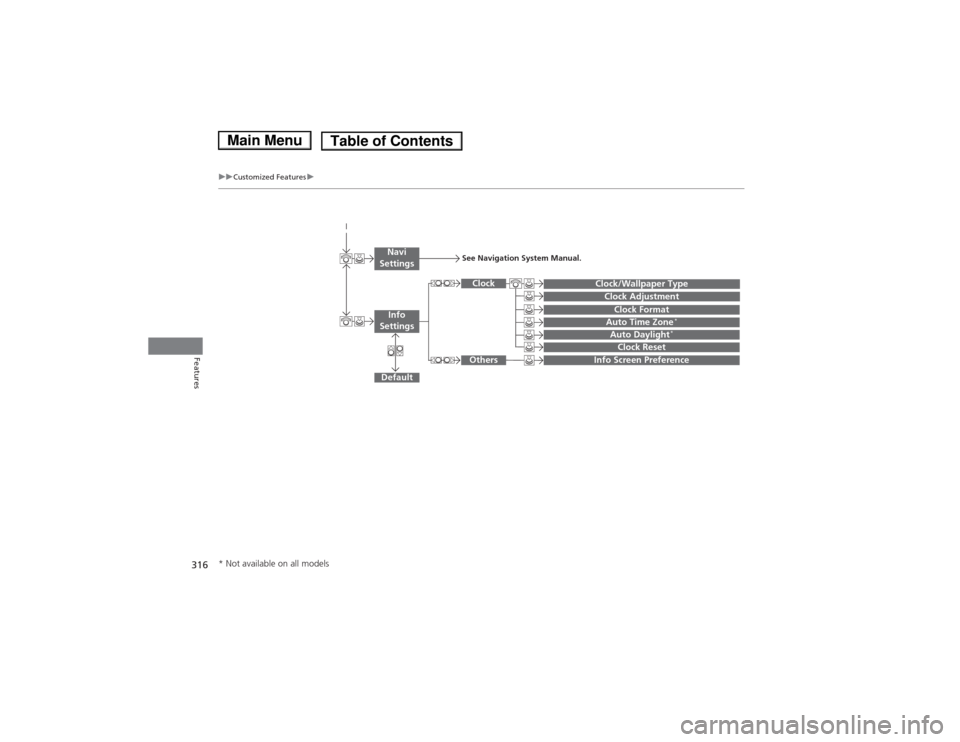
Auto Daylight*
Clock Reset
Info Screen Preference
Clock Format
Auto Time Zone *
Clock/Wallpaper Type
Clock Adjustment
Clock
Default
Others
Info
Settings
Navi
SettingsSee Navigation System Manual.
* Not available on all models
Main MenuTable of Contents
Page 320 of 561
319
uuCustomized Featuresu
Continued
Features
*1:Default SettingSetup
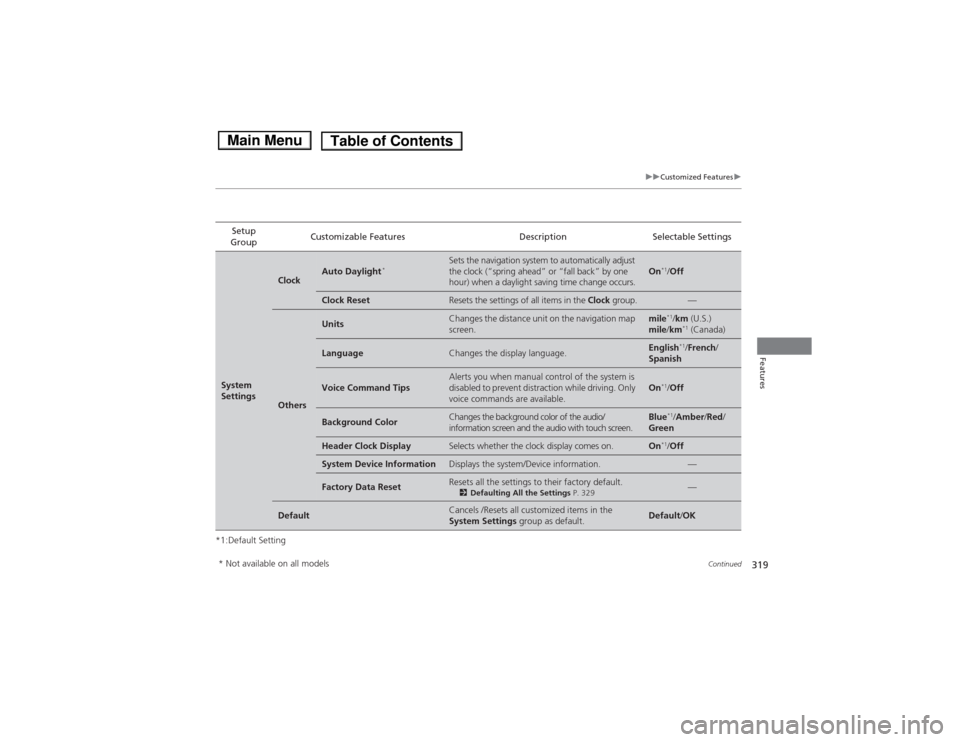
Group Customizable Features Description Selectable Settings
System
Settings
ClockAuto Daylight
*Sets the navigation syst
em to automatically adjust
the clock (“spring ahead” or “fall back” by one
hour) when a daylight saving time change occurs.On *1
/Off
Clock ResetResets the settings of all items in the Clock group.—
Others
UnitsChanges the distance unit on the navigation map
screen.mile*1
/km (U.S.)
mile /km *1
(Canada)
LanguageChanges the display language.English *1
/French /
Spanish
Voice Command TipsAlerts you when manual control of the system is
disabled to prevent distraction while driving. Only
voice commands are available.On *1
/Off
Background ColorChanges the background color of the audio/
information screen and the audio with touch screen.Blue *1
/Amber /Red /
Green
Header Clock DisplaySelects whether the clock display comes on.On *1
/Off
System Device InformationDisplays the system/Device information.—
Factory Data ResetResets all the settings to their factory default.
2Defaulting All the Settings P. 329—
DefaultCancels /Resets all customized items in the
System Settings group as default.Default/OK
* Not available on all models
Main MenuTable of Contents
Page 321 of 561
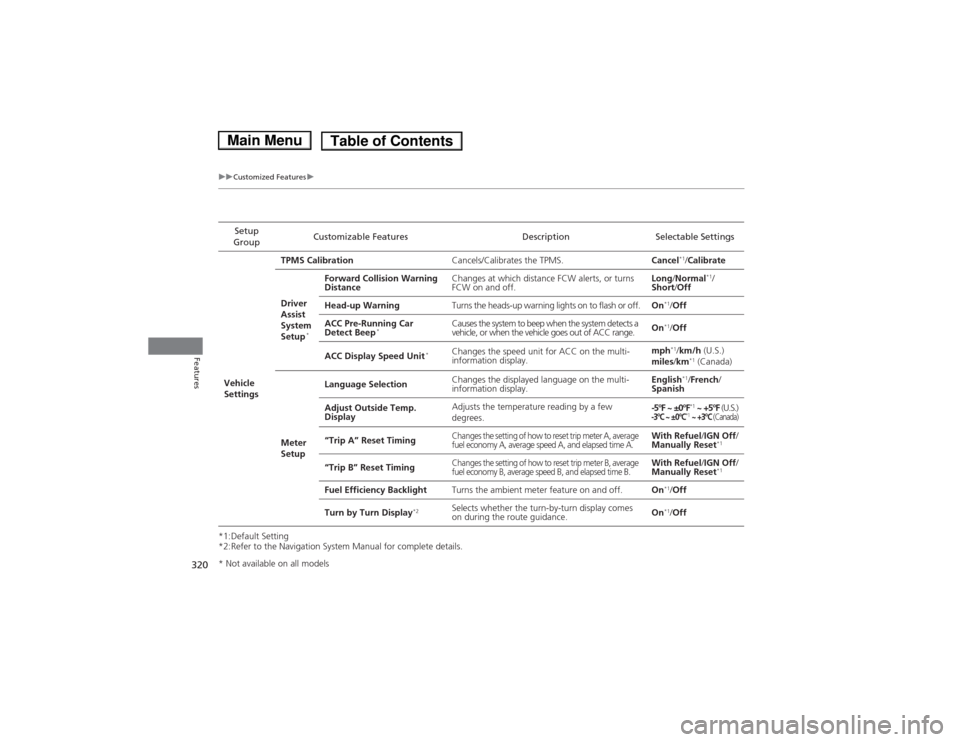
320
uuCustomized Featuresu
Features
*1:Default Setting
*2:Refer to the Navigation System Manual for complete details.Setup
Group Customizable Features Description Selectable Settings
Vehicle
Settings TPMS Calibration
Cancels/Calibrates the TPMS. Cancel*1
/Calibrate
Driver
Assist
System
Setup *Forward Collision Warning
Distance
Changes at which distance FCW alerts, or turns
FCW on and off. Long
/Normal *1
/
Short /Off
Head-up Warning Turns the heads-up warning lights on to flash or off. On*1
/Off
ACC Pre-Running Car
Detect Beep * Causes the system to beep when the system detects a
vehicle, or when the vehicle goes out of ACC range.
On
*1
/Off
ACC Display Speed Unit *
Changes the speed unit for ACC on the multi-
information display. mph
*1
/km/h (U.S.)
miles /km *1
(Canada)
Meter
Setup Language Selection
Changes the displayed language on the multi-
information display. English
*1
/French /
Spanish
Adjust Outside Temp.
Display Adjusts the temperature reading by a few degrees.
-5°F ~ ±0°F
*1
~ +5°F (U.S.)
-3°C ~ ±0°C*1 ~ +3°C (Canada)
“Trip A” Reset TimingChanges the setting of how to reset trip meter A, average
fuel economy A, average speed A, and elapsed time A.With Refuel /IGN Off /
Manually Reset *1
“Trip B” Reset Timing
Changes the setting of how to reset trip meter B, average
fuel economy B, average speed B, and elapsed time B.With Refuel /IGN Off /
Manually Reset *1
Fuel Efficiency Backlight Turns the ambient meter feature on and off. On*1
/Off
Turn by Turn Display *2
Selects whether the turn-by-turn display comes
on during the route guidance. On
*1
/Off
* Not available on all models
Main MenuTable of Contents
Page 322 of 561
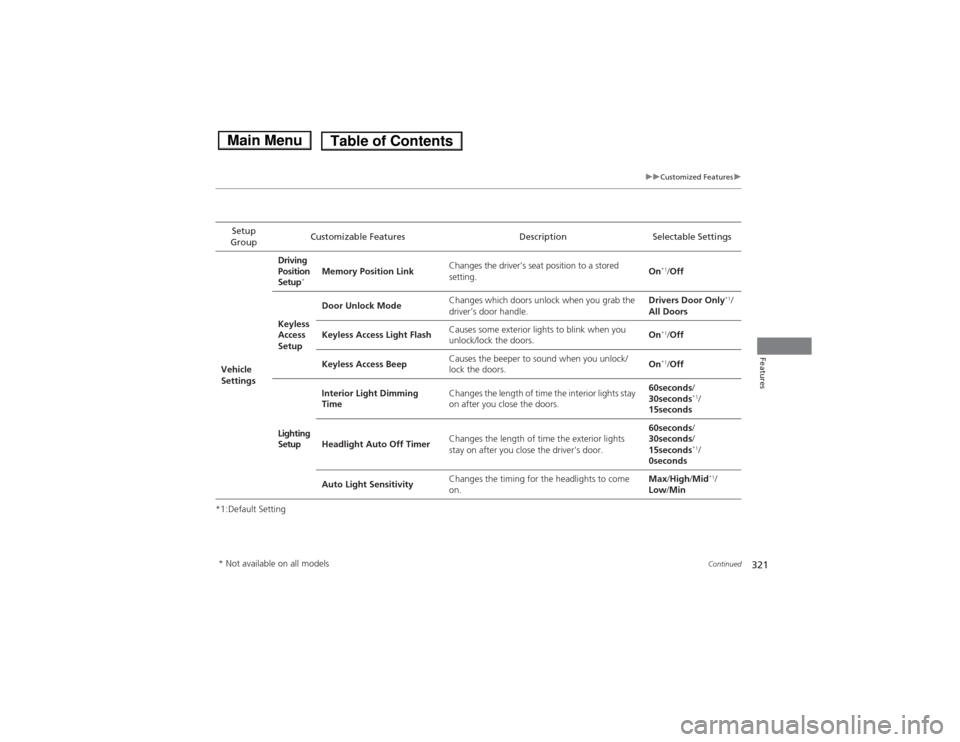
321
uuCustomized Featuresu
Continued
Features
*1:Default SettingSetup
Group Customizable Features Description Selectable Settings
Vehicle
Settings Driving
Position
Setup
*Memory Position Link
Changes the driver’s seat position to a stored setting. On
*1
/Off
Keyless
Access
Setup Door Unlock Mode
Changes which doors unlock when you grab the
driver’s door handle. Drivers Door Only
*1
/
All Doors
Keyless Access Light Flash Causes some exterior lights to blink when you
unlock/lock the doors. On
*1
/Off
Keyless Access Beep Causes the beeper to sound when you unlock/
lock the doors.
On
*1
/Off
Lighting Setup Interior Light Dimming
Time
Changes the length of time the interior lights stay
on after you close the doors. 60seconds
/
30seconds *1
/
15seconds
Headlight Auto Off Timer Changes the length of time the exterior lights
stay on after you close the driver's door. 60seconds
/
30seconds /
15seconds *1
/
0seconds
Auto Light Sensitivity Changes the timing for the headlights to come on. Max
/High /Mid *1
/
Low /Min
* Not available on all models
Main MenuTable of Contents