light HONDA ACCORD HYBRID 2014 9.G Repair Manual
[x] Cancel search | Manufacturer: HONDA, Model Year: 2014, Model line: ACCORD HYBRID, Model: HONDA ACCORD HYBRID 2014 9.GPages: 561, PDF Size: 20.3 MB
Page 323 of 561
322
uuCustomized Featuresu
Features
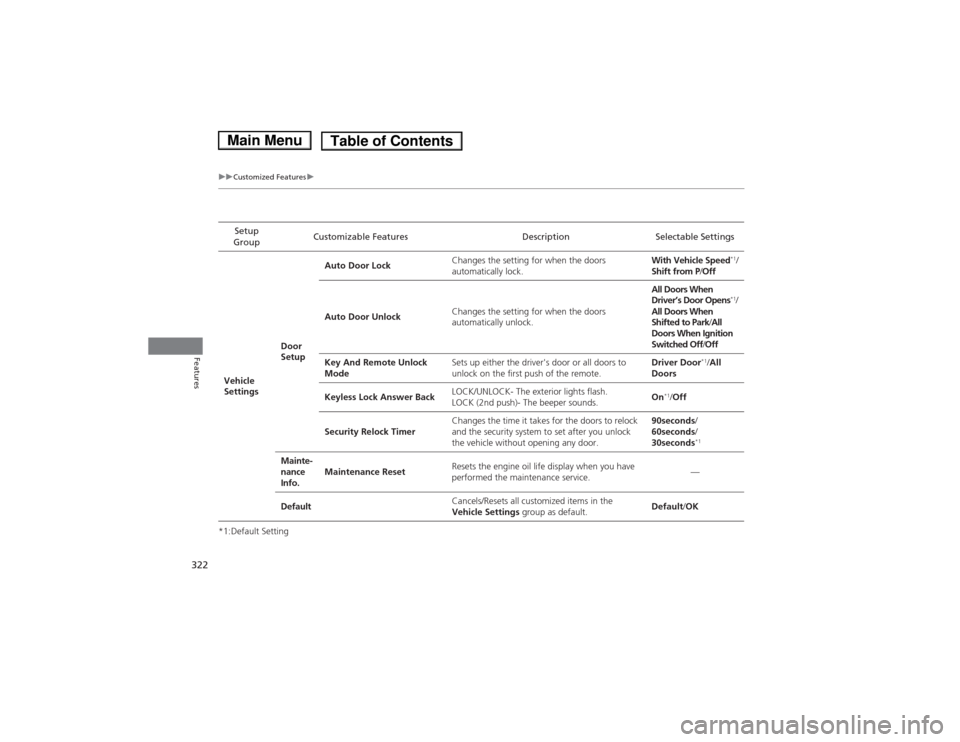
*1:Default SettingSetup
Group Customizable Features Description Selectable Settings
Vehicle
Settings Door
SetupAuto Door Lock
Changes the setting for when the doors
automatically lock. With Vehicle Speed
*1
/
Shift from P /Off
Auto Door Unlock Changes the setting for when the doors
automatically unlock. All Doors When
Driver’s Door Opens
*1
/
All Doors When
Shifted to Park /All
Doors When Ignition
Switched Off /Off
Key And Remote Unlock
Mode Sets up either the driver's door or all doors to
unlock on the first push of the remote. Driver Door
*1
/All
Doors
Keyless Lock Answer Back LOCK/UNLOCK- The exterior lights flash.
LOCK (2nd push)- The beeper sounds.
On
*1
/Off
Security Relock Timer Changes the time it takes for the doors to relock
and the security system to set after you unlock
the vehicle without opening any door. 90seconds
/
60seconds /
30seconds *1
Mainte-
nance
Info. Maintenance Reset
Resets the engine oil life display when you have
performed the maintenance service. —
Default Cancels/Resets all customized items in the
Vehicle Settings
group as default. Default
/OK
Main MenuTable of Contents
Page 328 of 561
327
uuCustomized Featuresu
Features
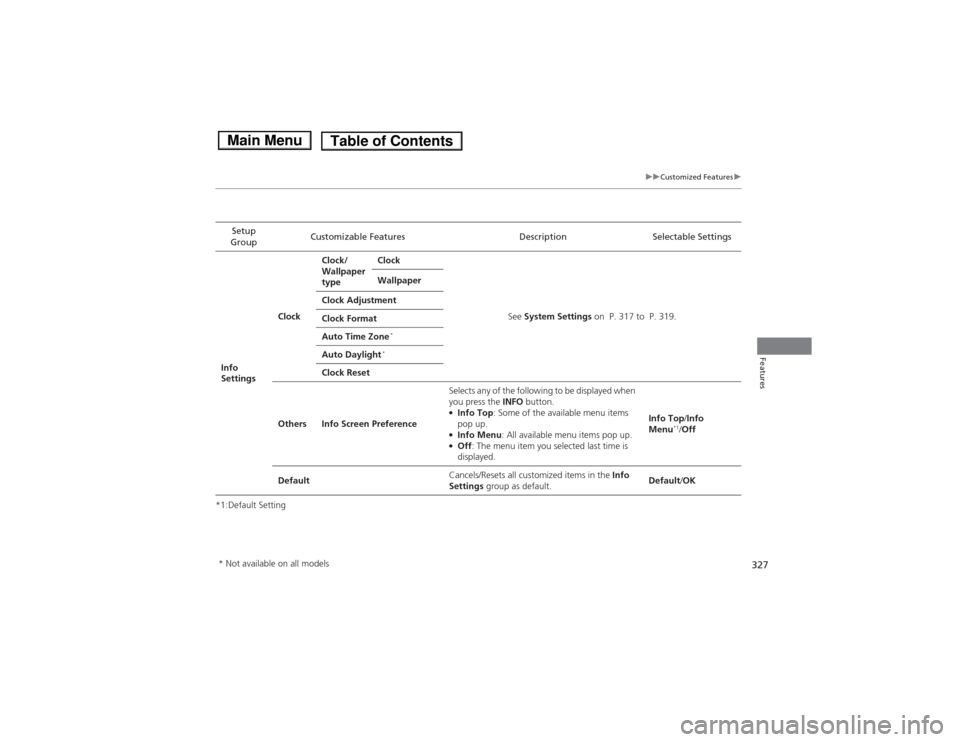
*1:Default SettingSetup
Group Customizable Features Description Selectable Settings
Info
Settings Clock
Clock/
Wallpaper
type
Clock
See System Settings on P. 317 to P. 319.
Wallpaper
Clock Adjustment
Clock Format
Auto Time Zone *
Auto Daylight *
Clock Reset
Others Info Screen Preference Selects any of the following to be displayed when
you press the
INFO button.
● Info Top : Some of the available menu items
pop up.
● Info Menu : All available menu items pop up.
● Off : The menu item you selected last time is
displayed. Info Top
/Info
Menu *1
/Off
Default Cancels/Resets all customized items in the
Info
Settings group as default. Default
/OK
* Not available on all models
Main MenuTable of Contents
Page 332 of 561
331
Continued
Features
HomeLink
® Universal Transceiver *
The HomeLink
® Universal Transceiver can be programmed to operate up to three
remote controlled devices around your home, such as garage doors, lighting, or
home security systems.
Refer to the safety information that comes with your garage door opener to test that
the safety features are functioning properly. If you do not have the safety
information, contact the manufacturer.
Before programming HomeLink, make sure that people and objects are out of the
way of the garage or gate to prevent potential injury or damage.
When programming a garage door opener, park just outside the garage door’s path.
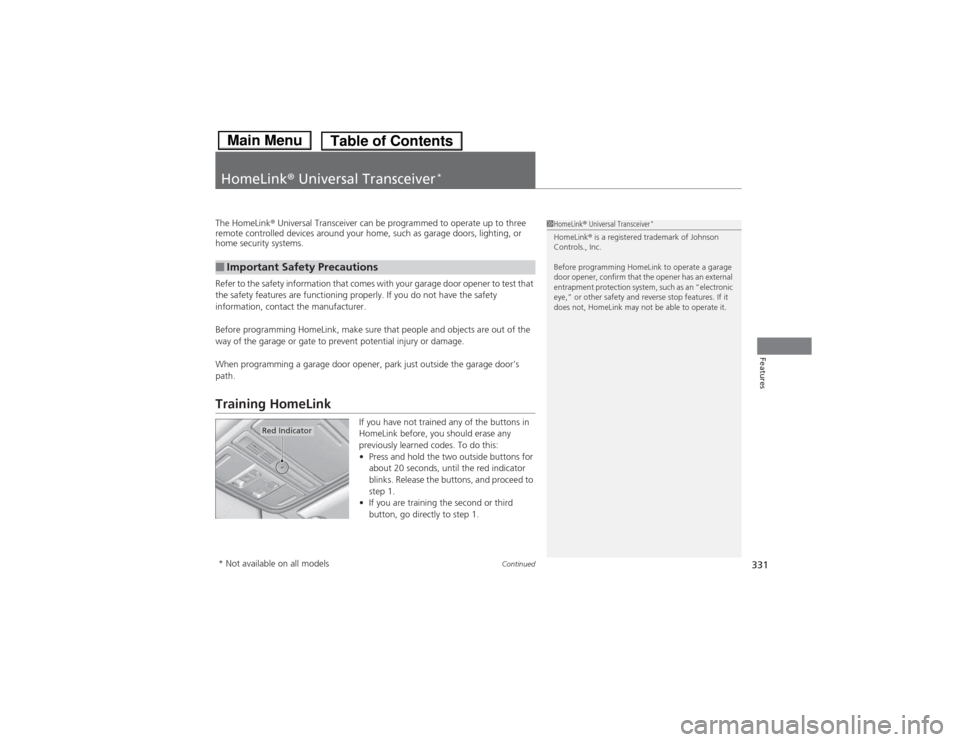
Training HomeLink
If you have not trained any of the buttons in
HomeLink before, you should erase any
previously learned codes. To do this: •Press and hold the two outside buttons for
about 20 seconds, until the red indicator
blinks. Release the buttons, and proceed to
step 1.
• If you are training the second or third
button, go directly to step 1.
■Important Safety Precautions
1HomeLink ® Universal Transceiver *
HomeLink ® is a registered trademark of Johnson
Controls., Inc.
Before programming HomeLink to operate a garage
door opener, confirm that the opener has an external
entrapment protection system, such as an “electronic
eye,” or other safety and reverse stop features. If it
does not, HomeLink may not be able to operate it.
Red Indicator
* Not available on all models
Main MenuTable of Contents
Page 411 of 561
410
Driving
Before Driving
Driving Preparation
Check the following items before you start driving. •Make sure there are no obstructions on the windows, door mirrors, exterior
lights, or other parts of the vehicle.
uRemove any frost, snow, or ice.uRemove any snow on the roof, as this can slip down and obstruct your field of
vision while driving. If frozen solid, remove ice once it has softened.
uWhen removing ice from around the wheels, be sure not to damage the wheel
or wheel components.
• Make sure the hood is securely closed.
uIf the hood opens while driving, your front view will be blocked.
• Make sure the tires are in good condition.
uCheck air pressure, check for damage and excessive wear.
2 Checking and Maintaining Tires P. 493
• Make sure there are no people or objects behind or around the vehicle.
uThere are blind spots from the inside.
■Exterior Checks1Exterior Checks
NOTICEWhen doors are frozen shut, use warm water around
the door edges to melt any ice. Do not try to force
them open, as this can damage the rubber trim
around the doors. When done, wipe dry to avoid further freezing.
Do not pour warm water into the key cylinder.
You will be unable to insert the key if the water
freezes in the hole.
Heat from the engine and exhaust can ignite
flammable materials left under the hood, causing a
fire. If you've parked your vehicle for an extended
period, inspect and remove any debris that may have
collected, such as dried grass and leaves that have
fallen or have been carried in for use as a nest by a small animal.
Also check under the hood for leftover flammable
materials after you or someone else has performed
maintenance on your vehicle.
Main MenuTable of Contents
Page 412 of 561
Continued411
uuBefore DrivinguDriving Preparation
Driving
•Store or secure all items on board properly.uCarrying too much cargo, or improp erly storing it, can affect your vehicle's
handling, stability, stopping distance, and tires, and make it unsafe. 2 Maximum Load Limit P. 413
• Do not pile items higher than the seat height.
uThey can block your view and may be thrown forward in the event of sudden
braking.
• Do not place anything in the front seat footwells. Make sure to secure the floor mat.
uAn object or unsecured floor mat can interfere with your brake and accelerator
pedal operation while driving.
• If you have any animals on board, do not let them move around in the vehicle.
uThey may interfere with driving and a crash could occur.
• Securely close and lock all doors and the trunk.
2 Locking/Unlocking the Doors from the Inside P. 118
• Adjust your seating position properly.
uAdjust the head restraint, too.
2 Adjusting the Seats P. 148
2 Adjusting the Head Restraints P. 151
• Adjust the mirrors and steering wheel properly for your driving.
uAdjust them while sitting in the proper driving position.
2 Adjusting the Mirrors P. 146
2 Adjusting the Steering Wheel P. 145
■Interior Checks1Interior Checks
The headlight aim is set by the factory, and does not
need to be adjusted. However, if you regularly carry
heavy items in the trunk, have the aiming readjusted
at a dealer or by a qualified technician.
Main MenuTable of Contents
Page 417 of 561
416
Driving
When Driving
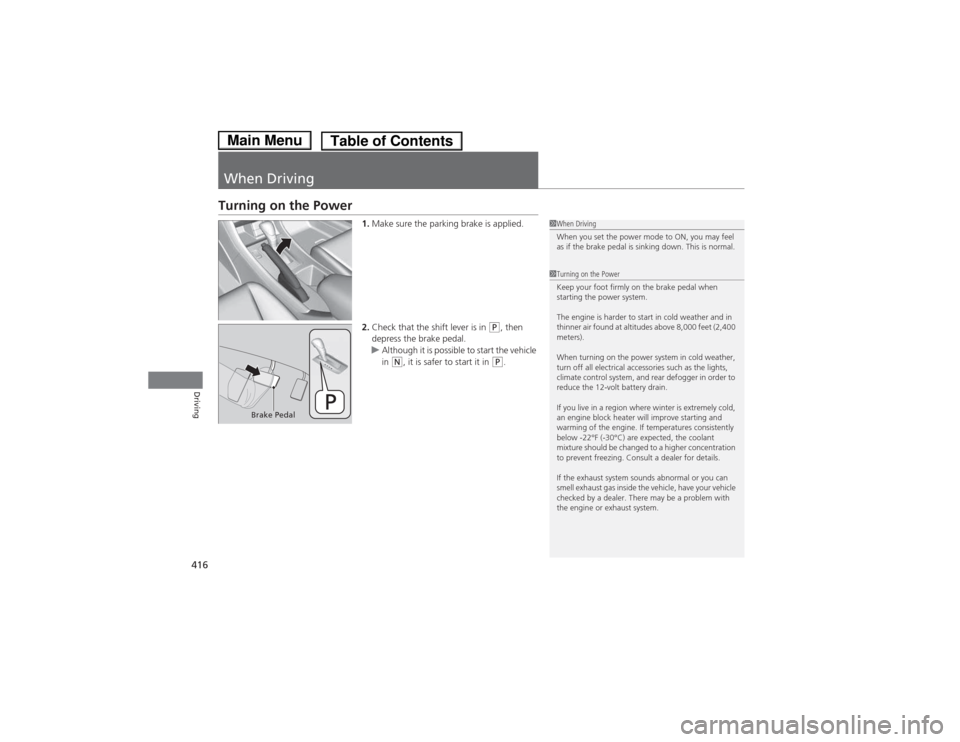
Turning on the Power1.Make sure the parking brake is applied.
2. Check that the shift lever is in
(P , then
depress the brake pedal.
uAlthough it is possible to start the vehicle
in (N , it is safer to start it in (P.
1When Driving
When you set the power mode to ON, you may feel
as if the brake pedal is sinking down. This is normal.
1Turning on the Power
Keep your foot firmly on the brake pedal when
starting the power system.
The engine is harder to start in cold weather and in
thinner air found at altitudes above 8,000 feet (2,400 meters).
When turning on the power system in cold weather,
turn off all electrical accessories such as the lights,
climate control system, and rear defogger in order to
reduce the 12-volt battery drain.
If you live in a region where winter is extremely cold,
an engine block heater will improve starting and
warming of the engine. If temperatures consistently
below -22°F (-30°C) are expected, the coolant
mixture should be changed to a higher concentration
to prevent freezing. Consult a dealer for details.
If the exhaust system sounds abnormal or you can
smell exhaust gas inside the vehicle, have your vehicle
checked by a dealer. There may be a problem with
the engine or exhaust system.
Brake Pedal
Main MenuTable of Contents
Page 431 of 561
uuWhen DrivinguAdaptive Cruise Control (ACC)*
430
Driving
■ There is no vehicle ahead
Your vehicle cruises at the set speed. ■ A vehicle ahead is within ACC range and going slower than the set speed
Your vehicle slows down, and maintains the same speed as the speed of the vehicle
ahead to maintain the set following distance. ■ A vehicle ahead is within ACC range and going at a steady speed
Your vehicle follows the vehicle ahead of it, keeping a constant distance, without
going beyond the set speed. ■ A vehicle ahead goes out of range
ACC accelerates your vehicle to the set speed, and then maintains it.■ When you depress the accelerator pedal
You can temporarily increase the vehicle speed. In this case, there is no audible or
visual alerts even if a vehicle is in ACC range.
ACC stays on unless you cancel it. Once you release the accelerator pedal, the
system resumes the set speed.1When in Operation
Limitations
Be aware that ACC has limitations. For example, it is
not designed to operate when a vehicle ahead of
yours is going slower than 13 mph (20 km/h) or is
parked. Smaller vehicles, such as motorcycles, may
also be difficult for the system to detect depending
on their size.
You must always be prepared to use the brake pedal
to maintain a safe distance with other vehicles.
ACC may momentarily apply brakes or sound an alert
if there is a vehicle or building adjacent to your
vehicle and: • You make a sudden turn or are driving on a narrow road.
• You abruptly move the steering wheel.
• Your vehicle is unusually positioned within your
lane (e.g., at a slight diagonal to the lane direction).
Main MenuTable of Contents
Page 437 of 561
uuWhen DrivinguForward Collision Warning (FCW)*
436
Driving
1Forward Collision Warning (FCW) *
Never apply a film or attach any objects to the
windshield that could obstruct the FCW camera's
field of vision.
Scratches, nicks, and other damage to the windshield
within the FCW camera's field of vision can cause the
system to operate abnormally. If this occurs, we
recommend that you replace the windshield with a
genuine Honda replacement windshield. Making
even minor repairs within the camera's field of vision
or installing an aftermarket replacement windshield
may also cause the system to operate abnormally.
After replacing the windshield, have a dealer
recalibrate the camera. Proper calibration of the FCW
camera is necessary for the system to operate properly.
Models without adaptive cruise control
1How the system works
The heads-up warning uses a lens located at the front
end of the dashboard.
Do not cover the lens or spill any liquid on it.
Lens
*2
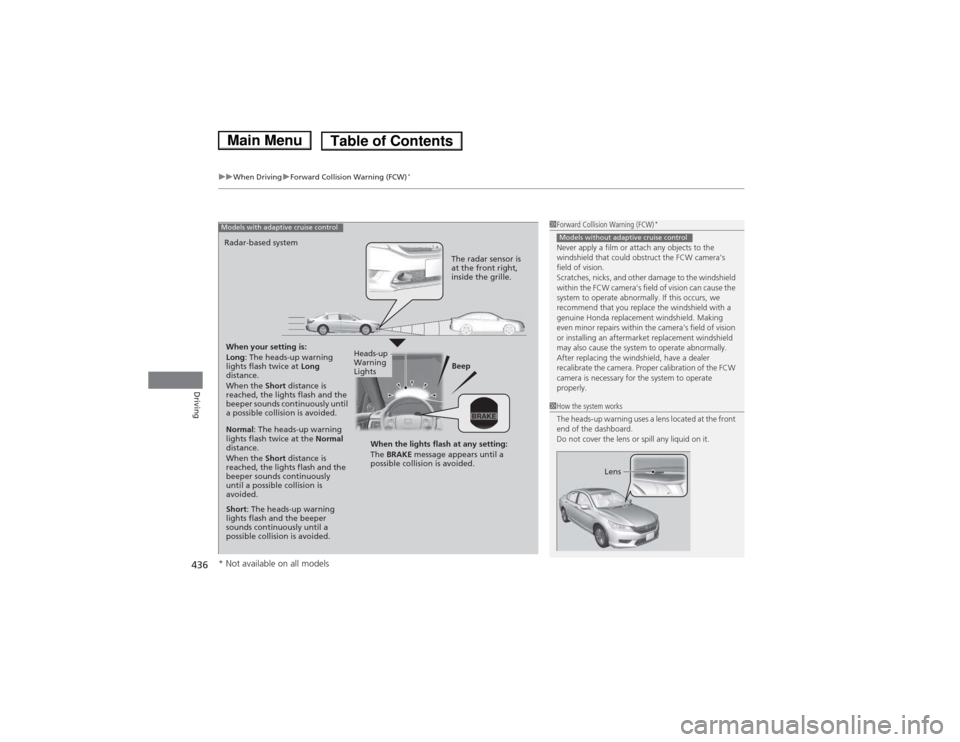
When your setting is:
Long : The heads-up warning
lights flash twice at Long
distance.When the Short distance is
reached, the lights flash and the
beeper sounds continuously until
a possible collision is avoided. Beep
Radar-based system
Models with adaptive cruise control
The radar sensor is
at the front right,
inside the grille.
Normal
: The heads-up warning
lights flash twice at the Normal
distance. When the Short distance is
reached, the lights flash and the
beeper sounds continuously
until a possible collision is
avoided.
Short : The heads-up warning
lights flash and the beeper
sounds continuously until a
possible collision is avoided. When the lights flash at any setting: The
BRAKE message appears until a
possible collision is avoided.
Heads-up
Warning
Lights
* Not available on all models
Main MenuTable of Contents
Page 438 of 561
Continued437
uuWhen DrivinguForward Collision Warning (FCW)*
Driving
■
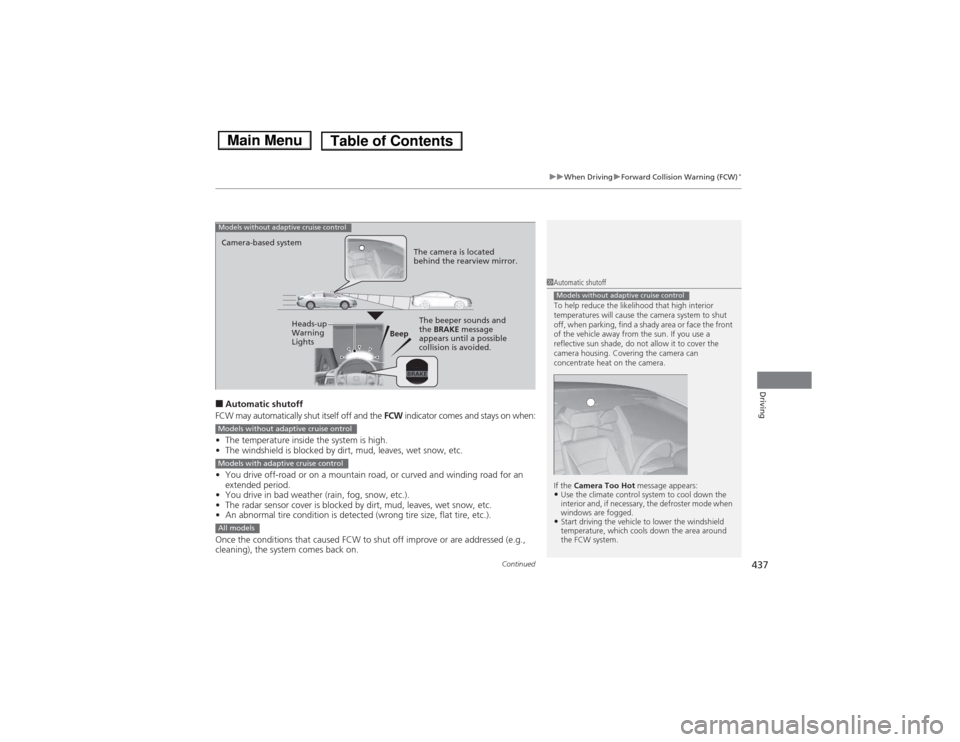
Automatic shutoff
FCW may automatically shut itself off and the FCW indicator comes and stays on when:
• The temperature inside the system is high.
• The windshield is blocked by di rt, mud, leaves, wet snow, etc.
• You drive off-road or on a mountain road, or curved and winding road for an
extended period.
• You drive in bad weather (rain, fog, snow, etc.).
• The radar sensor cover is blocked by dirt, mud, leaves, wet snow, etc.
• An abnormal tire condition is detec ted (wrong tire size, flat tire, etc.).
Once the conditions that caused FCW to shut off improve or are addressed (e.g.,
cleaning), the system comes back on.
1Automatic shutoff
To help reduce the likelihood that high interior
temperatures will cause the camera system to shut
off, when parking, find a shady area or face the front
of the vehicle away from the sun. If you use a
reflective sun shade, do not allow it to cover the
camera housing. Covering the camera can
concentrate heat on the camera.
If the Camera Too Hot message appears:
• Use the climate control system to cool down the
interior and, if necessary, the defroster mode when
windows are fogged.
• Start driving the vehicle to lower the windshield
temperature, which cools down the area around
the FCW system.
Models without adaptive cruise control
Beep
Camera-based system
Models without adaptive cruise control
The camera is located
behind the rearview mirror.
The beeper sounds and
the
BRAKE message
appears until a possible
collision is avoided.Heads-up
Warning
Lights
Models without adaptive cruise ontrol
Models with adaptive cruise control
All models
Main MenuTable of Contents
Page 439 of 561
438
uuWhen DrivinguForward Collision Warning (FCW)*
Driving
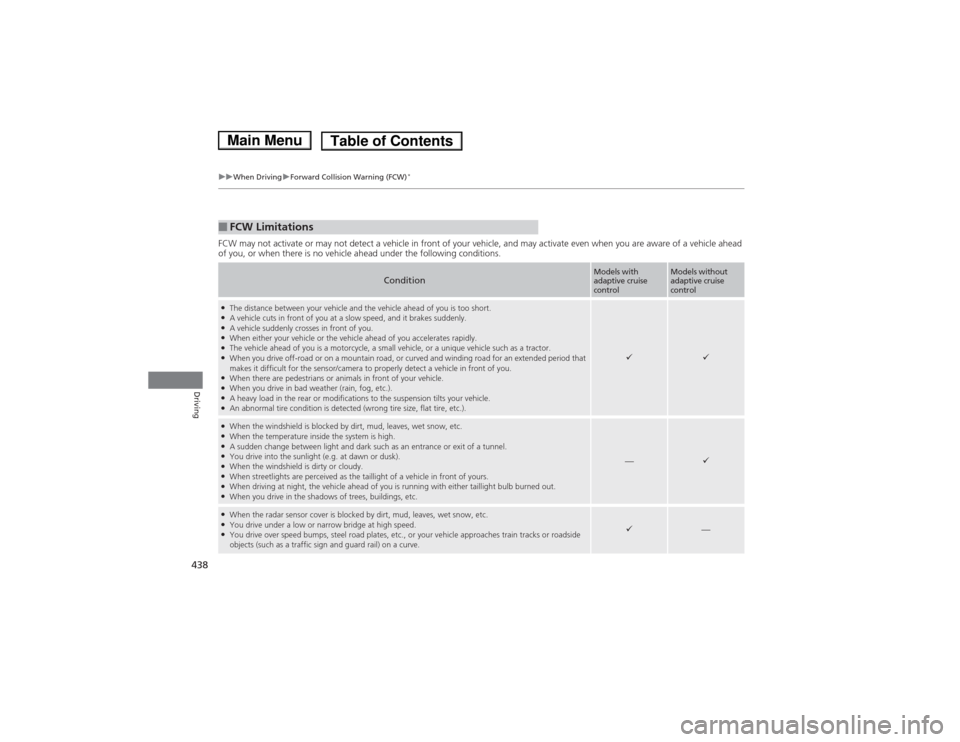
FCW may not activate or may not detect a vehicle in front of your vehicle, and may activate even when you are aware of a vehicl
e ahead
of you, or when there is no vehicle ahead under the following conditions.
■FCW Limitations
ConditionModels with adaptive cruise
controlModels without adaptive cruise
control
● The distance between your vehicle and the vehicle ahead of you is too short.
● A vehicle cuts in front of you at a slow speed, and it brakes suddenly.
● A vehicle suddenly crosses in front of you.
● When either your vehicle or the vehicle ahead of you accelerates rapidly.
● The vehicle ahead of you is a motorcycle, a small vehicle, or a unique vehicle such as a tractor.
● When you drive off-road or on a mountain road, or curved and winding road for an extended period that
makes it difficult for the sensor/camera to properly detect a vehicle in front of you.
● When there are pedestrians or animals in front of your vehicle.
● When you drive in bad weather (rain, fog, etc.).
● A heavy load in the rear or modifications to the suspension tilts your vehicle.
● An abnormal tire condition is detected (wrong tire size, flat tire, etc.).
●
When the windshield is blocked by dirt, mud, leaves, wet snow, etc.
● When the temperature inside the system is high.
● A sudden change between light and dark such as an entrance or exit of a tunnel.
● You drive into the sunlight (e.g. at dawn or dusk).
● When the windshield is dirty or cloudy.
● When streetlights are perceived as the taillight of a vehicle in front of yours.
● When driving at night, the vehicle ahead of you is running with either taillight bulb burned out.
● When you drive in the shadows of trees, buildings, etc.
—
●When the radar sensor cover is blocked by dirt, mud, leaves, wet snow, etc.
● You drive under a low or narrow bridge at high speed.
● You drive over speed bumps, steel road plates, etc., or your vehicle approaches train tracks or roadside
objects (such as a traffic sign and guard rail) on a curve.
—
Main MenuTable of Contents