display HONDA ACCORD HYBRID 2019 Owners Manual
[x] Cancel search | Manufacturer: HONDA, Model Year: 2019, Model line: ACCORD HYBRID, Model: HONDA ACCORD HYBRID 2019Pages: 727, PDF Size: 24.78 MB
Page 4 of 727
Contents
This owner’s manual should be considered a permanent part of the
vehicle and should remain with the vehicle when it is sold.
This owner’s manual covers all models of your vehicle. You may find
descriptions of equipment and features that are not on your
particular model.
Images throughout this owner’s ma nual (including the front cover)
represent features and equipment that are available on some, but
not all, models. Your particular mo del may not have some of these
features.
This owner’s manual is for vehicles sold in the United States and
Canada.
The information and specifications in cluded in this publication were
in effect at the time of approval for printing. Honda Motor Co., Ltd.
reserves the right, however, to discontinue or change specifications
or design at any time without notice and without incurring any
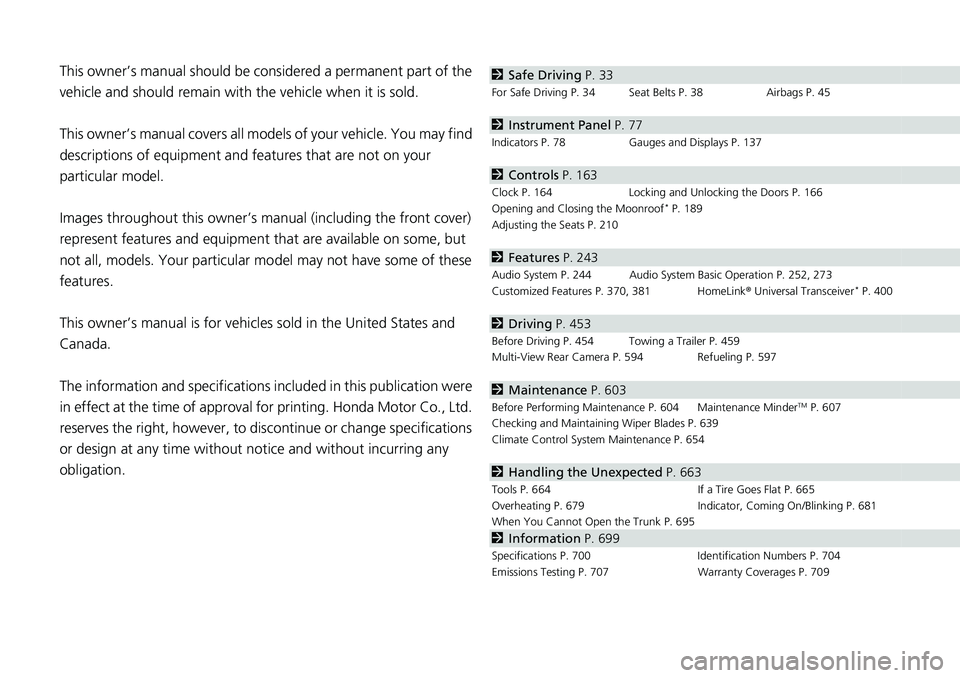
obligation. 2 Safe Driving P. 33For Safe Driving P. 34 Seat Belts P. 38 Airbags P. 45
2 Instrument Panel P. 77Indicators P. 78 Gauges and Displays P. 137
2 Controls P. 163 Clock P. 164 Locking and Unlocking the Doors P. 166
Opening and Closing the Moonroof *
P. 189
Adjusting the Seats P. 210
2 Features P. 243 Audio System P. 244 Audio System Basic Operation P. 252, 273
Customized Features P. 370, 381 HomeLink ® Universal Transceiver *
P. 400
2 Driving P. 453 Before Driving P. 454 Towing a Trailer P. 459
Multi-View Rear Camera P. 594 Refueling P. 597
2 Maintenance P. 603Before Performing Maintenance P. 604 Maintenance Minder TM
P. 607
Checking and Maintaining Wiper Blades P. 639
Climate Control System Maintenance P. 654
2 Handling the Unexpected P. 663Tools P. 664 If a Tire Goes Flat P. 665
Overheating P. 679 Indicator, Coming On/Blinking P. 681
When You Cannot Op en the Trunk P. 695
2 Information P. 699Specifications P. 700 Identi fication Numbers P. 704
Emissions Testing P. 707 Warranty Coverages P. 709
Page 6 of 727
4
Quick Reference Guide Quick Reference Guide
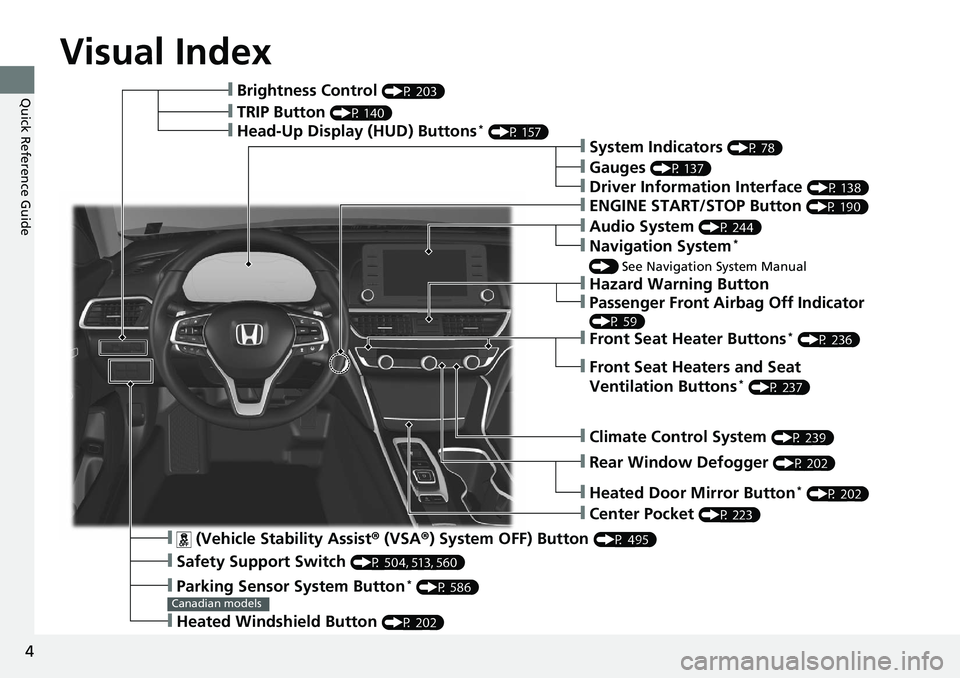
Visual Index
❙ (Vehicle Stability Assist ® (VSA ® ) System OFF) Button (P 495)
❙ Safety Support Switch (P 504, 513, 560)
❙ Parking Sensor System Button *
(P 586)
❙ Heated Windshield Button (P 202)Canadian models❙ Brightness Control (P 203)
❙ Head-Up Display (HUD) Buttons *
(P 157)
❙ System Indicators (P 78)
❙ Gauges (P 137)
❙ Driver Information Interface (P 138)
❙ ENGINE START/STOP Button (P 190)
❙ Climate Control System (P 239)
❙ Rear Window Defogger (P 202)
❙ Heated Door Mirror Button *
(P 202)
❙ Center Pocket (P 223)
❙ Hazard Warning Button❙ TRIP Button (P 140)
❙ Audio System (P 244)
❙ Navigation System *
() See Navigation System Manual
❙ Front Seat Heater Buttons *
(P 236)
❙ Front Seat Heaters and Seat
Ventilation Buttons *
(P 237)
❙ Passenger Front Airbag Off Indicator (P 59)
Page 11 of 727
9
Quick Reference Guide
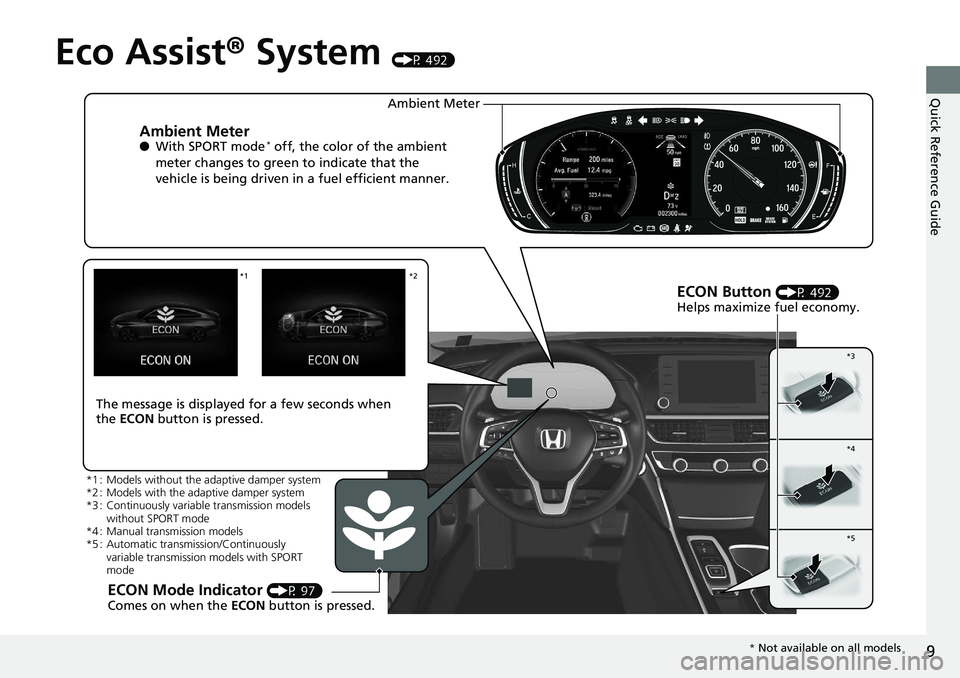
Eco Assist ® System (P 492)
Ambient Meter ● With SPORT mode *
off, the color of the ambient
meter changes to green to indicate that the
vehicle is being driven in a fuel efficient manner.
ECON Button (P 492)
Helps maximize fuel economy.
ECON Mode Indicator (P 97)
Comes on when the ECON button is pressed.The message is displayed for a few seconds when
the ECON button is pressed. Ambient Meter *2*1
*3
*4
*5
*1 : Models without the adaptive damper system
*2 : Models with the adaptive damper system
*3 : Continuously variable transmission models
without SPORT mode
*4 : Manual transmission models
*5 : Automatic transmission/Continuously
variable transmission models with SPORT
mode
* Not available on all models
Page 13 of 727
11
Quick Reference Guide
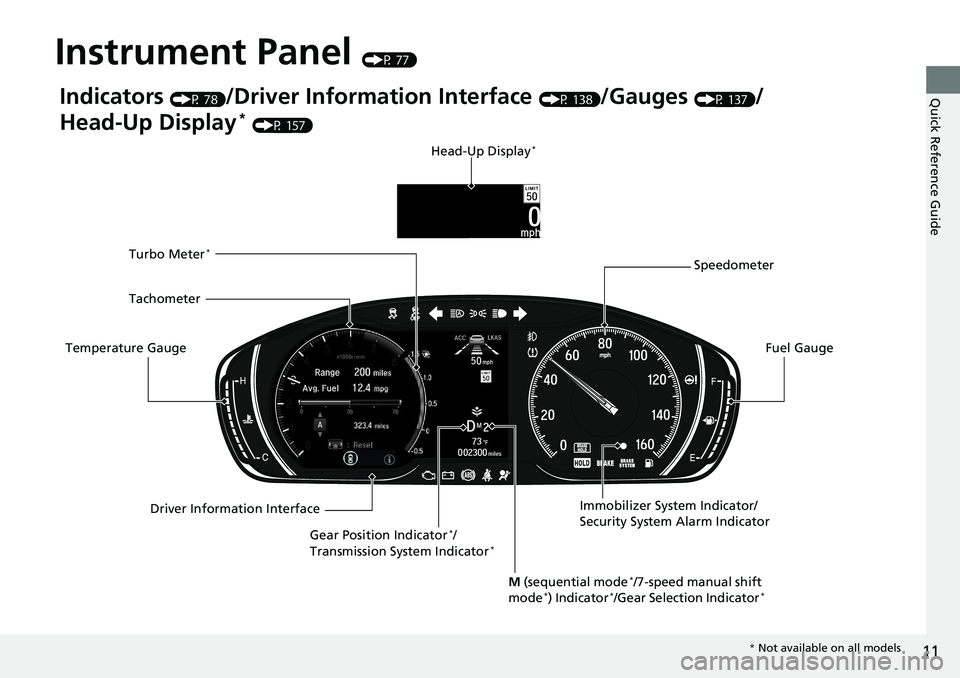
Instrument Panel (P 77)
Indicators (P 78)
/Driver Information Interface (P 138)
/Gauges (P 137)
/
Head-Up Display *
(P 157)
Speedometer
Fuel Gauge
Driver Information InterfaceTemperature Gauge Tachometer Head-Up Display *
Immobilizer System Indicator/
Security System Alarm Indicator
Gear Position Indicator *
/
Transmission System Indicator *Turbo Meter *
M (sequential mode *
/7-speed manual shift
mode *
) Indicator *
/Gear Selection Indicator *
* Not available on all models
Page 14 of 727
12
Quick Reference Guide Controls (P 163)
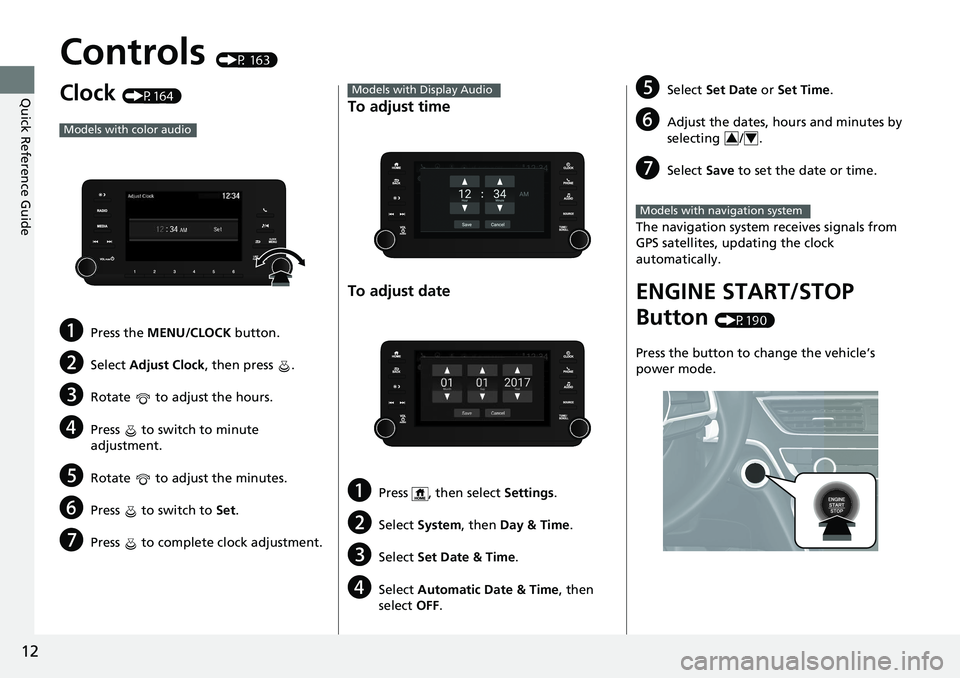
Clock (P164)
a Press the MENU/CLOCK button.
b Select Adjust Clock , then press .
c Rotate to adjust the hours.
d Press to switch to minute
adjustment.
e Rotate to adjust the minutes.
f Press to switch to Set .
g Press to complete clock adjustment.Models with color audio
To adjust time
To adjust date
a Press , then select Settings .
b Select System , then Day & Time .
c Select Set Date & Time .
d Select Automatic Date & Time , then
select OFF .Models with Display Audio
e Select Set Date or Set Time .
f Adjust the dates, hours and minutes by
selecting / .
g Select Save to set the date or time.
The navigation system receives signals from
GPS satellites, updating the clock
automatically.
ENGINE START/STOP
Button (P190)
Press the button to change the vehicle’s
power mode. 3 4
Models with navigation system
Page 18 of 727
16
Quick Reference Guide Features (P 243)
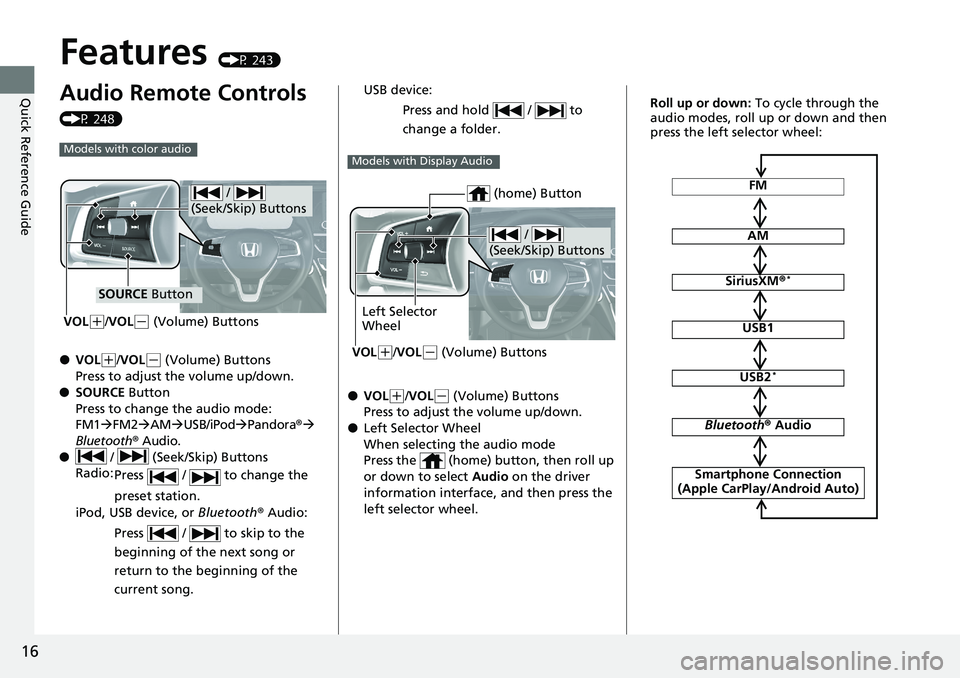
Audio Remote Controls (P 248)
● VOL ( +
/ VOL ( -
(Volume) Buttons
Press to adjust the volume up/down.
● SOURCE Button
Press to change the audio mode:
FM1 FM2 AM USB/iPod Pandora ®
Bluetooth ® Audio.
● / (Seek/Skip) Buttons
Radio:
Press / to change the
preset station.
iPod, USB device, or Bluetooth ® Audio:
Press / to skip to the
beginning of the next song or
return to the beginning of the
current song.Models with color audio
/
(Seek/Skip) Buttons
SOURCE Button
VOL ( +
/ VOL ( -
(Volume) Buttons
● VOL ( +
/ VOL ( -
(Volume) Buttons
Press to adjust the volume up/down.
● Left Selector Wheel
When selecting the audio mode
Press the (home) button, then roll up
or down to select Audio on the driver
information interface, and then press the
left selector wheel.USB device:
Press and hold / to
change a folder. Models with Display Audio
/
(Seek/Skip) Buttons
Left Selector
Wheel
VOL ( +
/ VOL ( -
(Volume) Buttons (home) Button FM
AM
SiriusXM ® *
USB1
USB2 *
Bluetooth ® Audio
Smartphone Connection
(Apple CarPlay/Android Auto)Roll up or down: To cycle through the
audio modes, roll up or down and then
press the left selector wheel:
Page 21 of 727
19
Quick Reference Guide
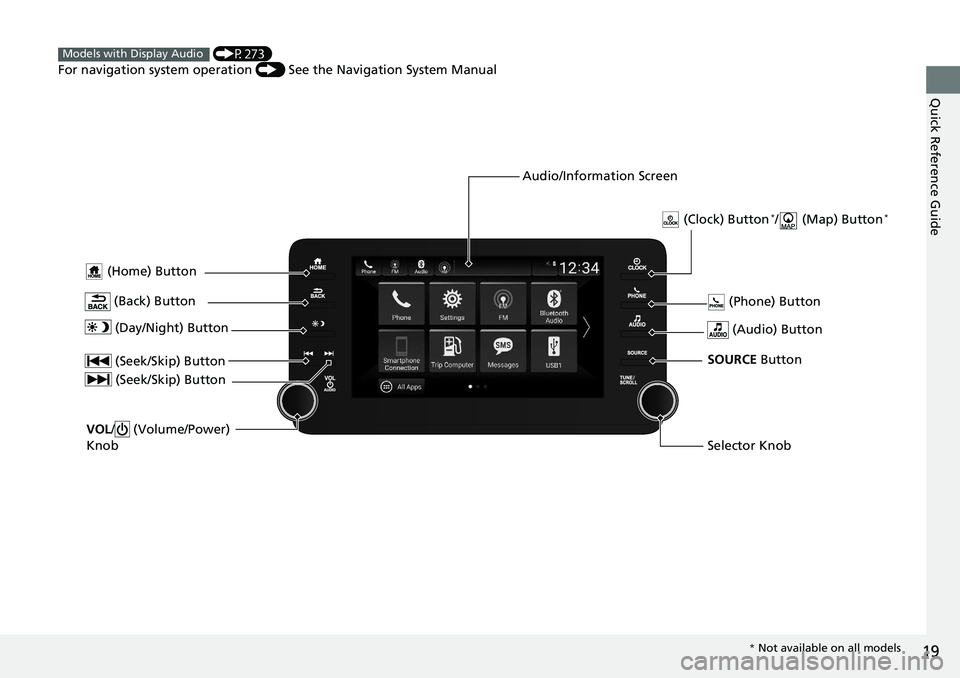
(Home) Button
(Audio) Button (Back) Button Audio/Information Screen (P273)
For navigation system operation () See the Navigation System ManualModels with Display Audio
(Phone) Button
(Day/Night) Button
(Seek/Skip) Button
(Seek/Skip) Button
VOL / (Volume/Power)
Knob
Selector KnobSOURCE Button (Clock) Button *
/ (Map) Button *
* Not available on all models
Page 25 of 727
23
Quick Reference Guide
M Indicator
Gear Selection
Indicator
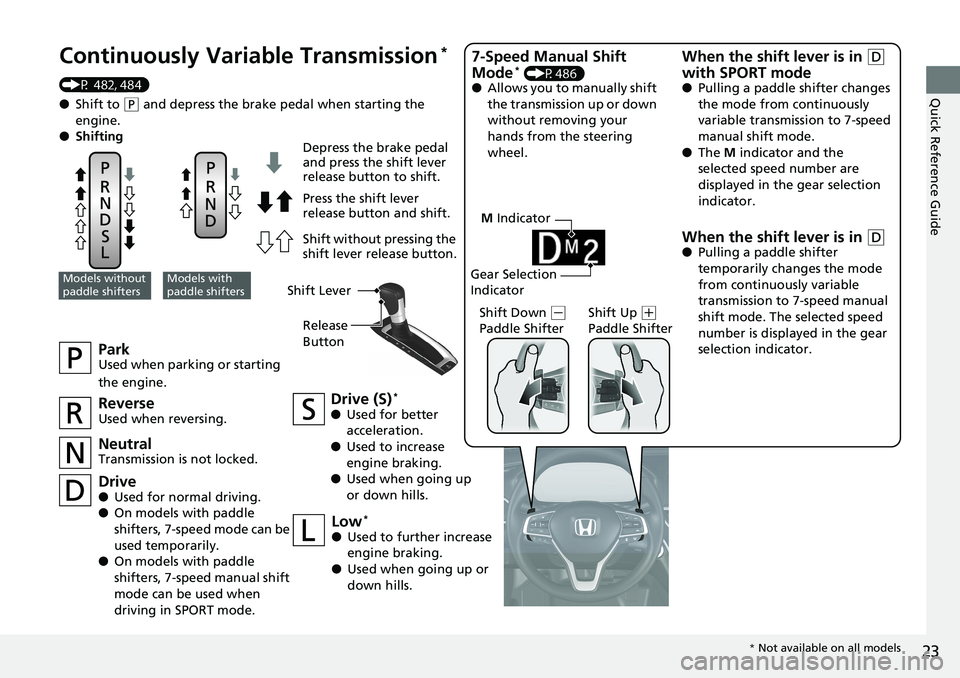
Continuously Variable Transmission *
(P 482, 484)
● Shift to ( P
and depress the brake pedal when starting the
engine.
● Shifting
Park Used when parking or starting
the engine.
Neutral Transmission is not locked. Drive (S) *
● Used for better
acceleration.
● Used to increase
engine braking.
● Used when going up
or down hills.Models without
paddle shifters Models with
paddle shifters Depress the brake pedal
and press the shift lever
release button to shift.
Press the shift lever
release button and shift.
Shift without pressing the
shift lever release button.
Reverse Used when reversing.
Drive ● Used for normal driving.
● On models with paddle
shifters, 7-speed mode can be
used temporarily.
● On models with paddle
shifters, 7-speed manual shift
mode can be used when
driving in SPORT mode. Low *
● Used to further increase
engine braking.
● Used when going up or
down hills. Shift Down ( -
Paddle Shifter Shift Up ( +
Paddle Shifter7-Speed Manual Shift
Mode *
(P486)
● Allows you to manually shift
the transmission up or down
without removing your
hands from the steering
wheel.
When the shift lever is in ( D
with SPORT mode ● Pulling a paddle shifter changes
the mode from continuously
variable transmission to 7-speed
manual shift mode.
● The M indicator and the
selected speed number are
displayed in the gear selection
indicator.
When the shift lever is in ( D● Pulling a paddle shifter
temporarily changes the mode
from continuously variable
transmission to 7-speed manual
shift mode. The selected speed
number is displayed in the gear
selection indicator.Shift Lever
Release
Button
* Not available on all models
Page 28 of 727
26
Quick Reference Guide Road Departure
Mitigation (RDM) System (P 558)
Alerts and helps to assist you when the
system detects a possibility of your vehicle
unintentionally crossing over detected lane
markings and/or leaving the roadway
altogether.
Traffic Sign Recognition
System (P562)
Reminds you of road sign information, such as
the current speed limit, your vehicle has just
passed through, showing it on the driver
information interface and the head-up
display *
.
Page 79 of 727
77Instrument Panel This chapter describes the buttons, indicators, and gauges that are used while driving.
Indicators ............................................ 78
Driver Information Interface Warning and
Information Messages .................... 105
Gauges and Displays
Gauges ............................................ 137
Driver Information Interface ............. 138
Head-Up Display *
............................ 157
* Not available on all models