after a collision HONDA CR-V 2021 Owner's Manual (in English)
[x] Cancel search | Manufacturer: HONDA, Model Year: 2021, Model line: CR-V, Model: HONDA CR-V 2021Pages: 690, PDF Size: 42.09 MB
Page 35 of 690
34
Quick Reference Guide
VSA® On and Off (P488)
●The Vehicle Stability AssistTM (VSA ®)
system helps stabilize the vehicle during
cornering, and helps maintain traction
while accelerating on loose or slippery
road surfaces.
●VSA ® comes on automatically every time
you turn on the power system.
●To partially disable VSA® functionality/
features, press and hold it until you hear
a beep.
Tire Pressure Monitoring
System (TPMS)
(P491)
●Detects a change in tire conditions and
overall dimensions due to decrease in tire
pressures.
●The TPMS is turned on automatically
every time you turn on the power system.
●A calibration procedure must be
performed when certain conditions arise.
CMBSTM On and Off
(P508)
●When a possible frontal collision is likely
unavoidable, the CMBSTM can help you to
reduce the vehicle sp eed and the severity
of the collision.
●The CMBSTM is turned on every time you
turn on the power system.
●To turn the CMBSTM on or off, press and
hold the button until you hear a beep.
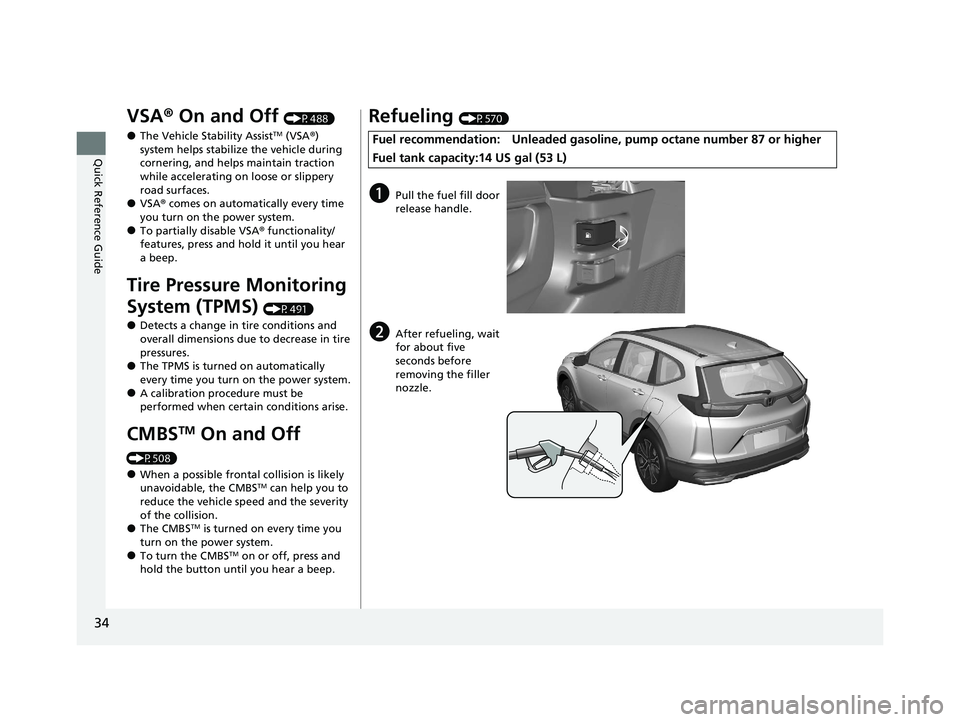
Refueling (P570)
Fuel recommendation: Unleaded gasoline , pump octane number 87 or higher
Fuel tank capacity:14 US gal (53 L)
aPull the fuel fill door
release handle.
bAfter refueling, wait
for about five
seconds before
removing the filler
nozzle.
21 CR-V HYBRID HMIN-31TPG6100.book 34 ページ 2020年9月14日 月曜日 午前11時36分
Page 56 of 690
55
uuSeat Belts uSeat Belt Inspection
Safe Driving
Seat Belt Inspection
Regularly check the condition of your seat belts as follows:
• Pull each belt out fully, and look for frays, cuts, burns, and wear.
• Check that the latch plates and buckle s work smoothly and the belts retract
easily.
u If a belt does not retract easily, cleani ng the belt may correct the problem. Only
use a mild soap and warm water. Do no t use bleach or cleaning solvents. Make
sure the belt is completely dry before allowing it to retract.
Any belt that is not in good condition or working properly will not provide proper
protection and should be replaced as soon as possible.
A belt that has been worn during a crash may not provide the same level of
protection in a subsequent crash. Have your seat belts inspected by a dealer after
any collision.1 Seat Belt Inspection
3WARNING
Not checking or maintaining seat belts can
result in serious injury or death if the seat
belts do not work properly when needed.
Check your seat belts regularly and have
any problem corrected as soon as possible.
21 CR-V HYBRID HMIN-31TPG6100.book 55 ページ 2020年9月14日 月曜日 午前11時36分
Page 60 of 690
59
uuAirbags uTypes of Airbags
Continued
Safe Driving
Types of Airbags
Your vehicle is equipped wi th three types of airbags:
• Front airbags: Airbags in front of the driver’s and front passenger’s seats.
• Side airbags: Airbags in the driver’s and front passenger’s seat-backs.
• Side curtain airbags: Airbags above the side windows.
Each is discussed in the following pages.
Front Airbags (SRS)
The front SRS airbags inflate in a moderate-to-severe frontal collision to help protect
the head and chest of the driver and/or front passenger.
SRS (Supplemental Restraint System) indica tes that the airbags are designed to
supplement seat belts, not replace them . Seat belts are the occupant’s primary
restraint system.
The front airbags are housed in the center of the steering wheel for the driver, and
in the dashboard for the front pass enger. Both airbags are marked SRS AIRBAG.
■Housing Locations
1Types of Airbags
The airbags can inflate whenever the power mode is
in ON.
After an airbag inflates in a crash, you may see a
small amount of smoke. This is from the combustion
process of the infl ator material and is not harmful.
People with respiratory pr oblems may experience
some temporary discomfort. If this occurs, get out of
the vehicle as soon as it is safe to do so.
1 Front Airbags (SRS)
During a frontal crash severe enough to cause one or
both front airbags to deploy, the airbags can inflate
at different rates, dependi ng on the severity of the
crash, whether or not the se at belts are latched, and/
or other factors. Frontal airbags are designed to
supplement the seat belts to help reduce the
likelihood of head and chest injuries in frontal
crashes.
21 CR-V HYBRID HMIN-31TPG6100.book 59 ページ 2020年9月14日 月曜日 午前11時36分
Page 91 of 690
90
Instrument Panel
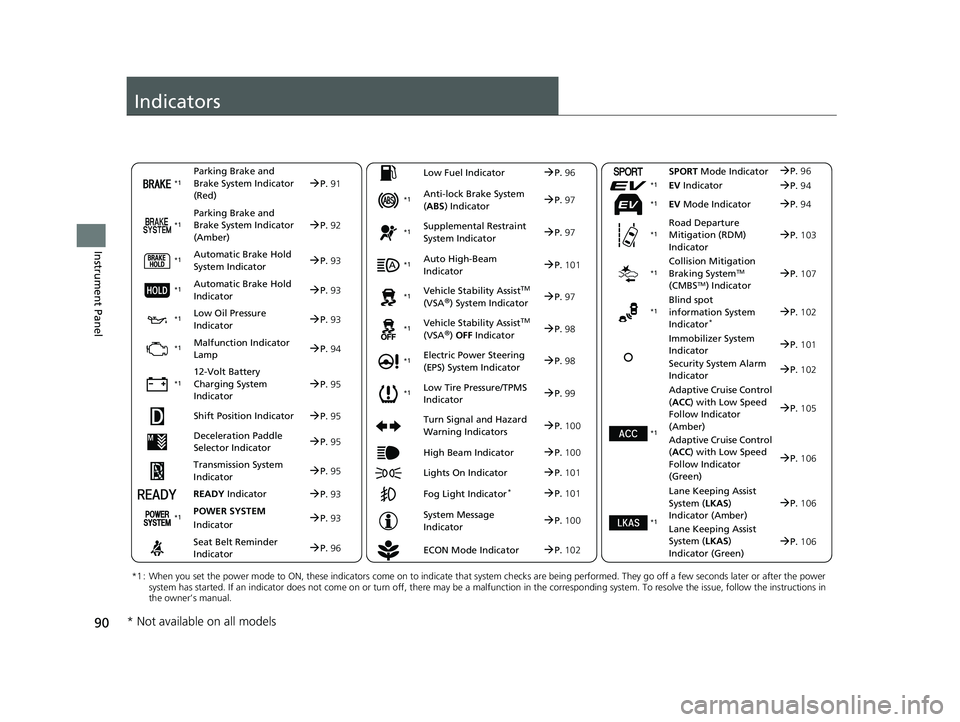
Indicators
Deceleration Paddle
Selector IndicatorP.95
Parking Brake and
Brake System Indicator
(Red)
Parking Brake and
Brake System Indicator
(Amber)
Automatic Brake Hold
System Indicator
Automatic Brake Hold
Indicator
*1 : When you set the power mode to ON, these indicators come on to indicate that system checks are being performed. They go off a few seconds later or after the power
system has started. If an indicator does not come on or turn off, there may be a malfunction in the corresponding system. To re solve the issue, follow the instructions in
the owner’s manual.
P. 91*1
Malfunction Indicator
Lamp
12-Volt Battery
Charging System
Indicator
Anti-lock Brake System
(ABS ) Indicator
Seat Belt Reminder
Indicator Low Fuel Indicator
Vehicle Stability AssistTM
(VSA®) System Indicator
Vehicle Stability Assist
TM
(VSA®) OFF Indicator
Supplemental Restraint
System Indicator
Auto High-Beam
Indicator
Electric Power Steering
(EPS) System Indicator
Turn Signal and Hazard
Warning Indicators
Lights On Indicator High Beam Indicator
Fog Light Indicator*
ECON Mode Indicator
System Message
Indicator
SPORT
Mode Indicator
Adaptive Cruise Control
( ACC ) with Low Speed
Follow Indicator
(Amber)
Lane Keeping Assist
System ( LKAS)
Indicator (Amber)
P. 92
P.93
P.93
P.94
P.95
*1
*1
*1 *1
*1
*1
Shift Position IndicatorP. 95
Transmission System
I
ndicatorP. 95
READY Indi
catorP.93
POWER SYSTEM
I
ndicatorP. 93
P.96
P.96
P.97
P.97
P.101
P.97
*1
*1
*1
*1
P.98
*1P.98
P.101
P.105
P.100
P.100
P.102
P.101
P.102
P.100
P.96
P.106
*1Adaptive Cruise Control
(ACC ) with Low Speed
Follow Indicator
(Green)
P. 106
Lane Keeping Assist
Sy
stem ( LKAS)
Indicator (Green)P. 106
*1
EV IndicatorP.94*1
EV Mode IndicatorP.94*1
*1
Immobilizer System
Indicator P.101
Security System Alarm
In
dicator
Low Oil Pressure
IndicatorP. 93*1
Road Departure
Mitigation (RDM)
IndicatorP.103*1
Collision Mitigation
Braking SystemTM
(CMBSTM) IndicatorP. 107*1
Blind spot
information System
Indicator
*P.102*1
Low Tire Pressure/TPMS
IndicatorP.99*1
* Not available on all models
21 CR-V HYBRID HMIN-31TPG6100.book 90 ページ 2020年9月14日 月曜日 午前11時36分
Page 108 of 690
107
uuIndicators u
Continued
Instrument Panel
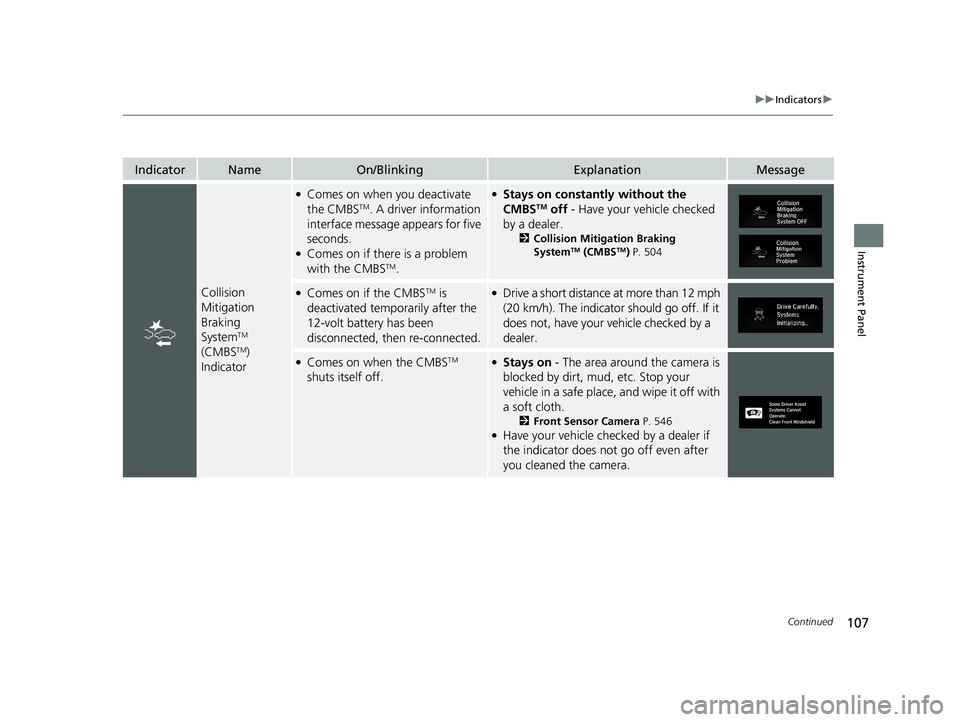
IndicatorNameOn/BlinkingExplanationMessage
Collision
Mitigation
Braking
System
TM
(CMBSTM)
Indicator
●Comes on when you deactivate
the CMBSTM. A driver information
interface message appears for five
seconds.
●Comes on if there is a problem
with the CMBSTM.
●Stays on constantly without the
CMBSTM off - Have your vehicle checked
by a dealer.
2 Collision Mitigation Braking
SystemTM (CMBSTM) P. 504
●Comes on if the CMBSTM is
deactivated temporarily after the
12-volt battery has been
disconnected, then re-connected.●Drive a short distance at more than 12 mph
(20 km/h). The indicator should go off. If it
does not, have your vehicle checked by a
dealer.
●Comes on when the CMBSTM
shuts itself off.●Stays on - The area around the camera is
blocked by dirt, mud, etc. Stop your
vehicle in a safe place, and wipe it off with
a soft cloth.
2 Front Sensor Camera P. 546●Have your vehicle checked by a dealer if
the indicator does not go off even after
you cleaned the camera.
21 CR-V HYBRID HMIN-31TPG6100.book 107 ページ 2020年9月14日 月曜日 午前11時36分
Page 109 of 690
108
uuIndicators u
Instrument Panel
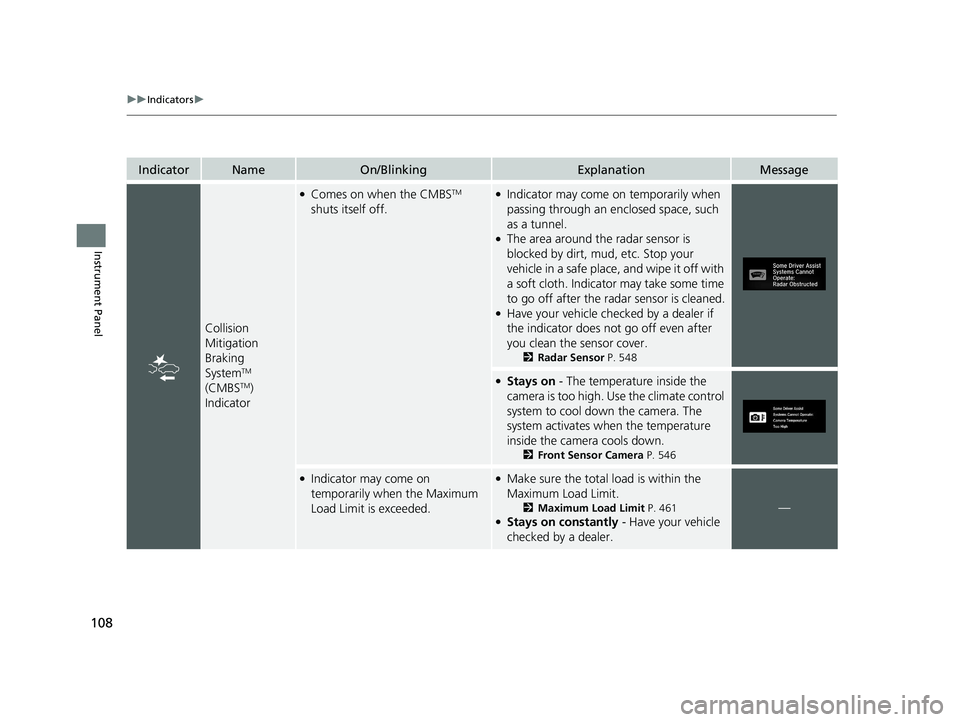
IndicatorNameOn/BlinkingExplanationMessage
Collision
Mitigation
Braking
System
TM
(CMBSTM)
Indicator
●Comes on when the CMBSTM
shuts itself off.●Indicator may come on temporarily when
passing through an enclosed space, such
as a tunnel.
●The area around the radar sensor is
blocked by dirt, mud, etc. Stop your
vehicle in a safe place, and wipe it off with
a soft cloth. Indicator may take some time
to go off after the radar sensor is cleaned.
●Have your vehicle checked by a dealer if
the indicator does not go off even after
you clean the sensor cover.
2 Radar Sensor P. 548
●Stays on - The temperature inside the
camera is too high. Use the climate control
system to cool down the camera. The
system activates when the temperature
inside the camera cools down.
2 Front Sensor Camera P. 546
●Indicator may come on
temporarily when the Maximum
Load Limit is exceeded.●Make sure the total load is within the
Maximum Load Limit.
2Maximum Load Limit P. 461●Stays on constantly - Have your vehicle
checked by a dealer.
—
21 CR-V HYBRID HMIN-31TPG6100.book 108 ページ 2020年9月14日 月曜日 午前11時36分
Page 488 of 690
487
uuWhen Driving uVehicle Stability AssistTM (VSA ®), aka Electronic Stability Control (ESC), System
Continued
Driving
Vehicle Stability AssistTM (VSA ®), aka Electronic
Stability Control (ESC), System
VSA ® helps to stabilize the vehicle during corn ering if the vehicle turns more or less
than what was intended. It also assists in maintaining traction on slippery surfaces.
It does so by regulating engine ou tput and selectively applying the brakes.
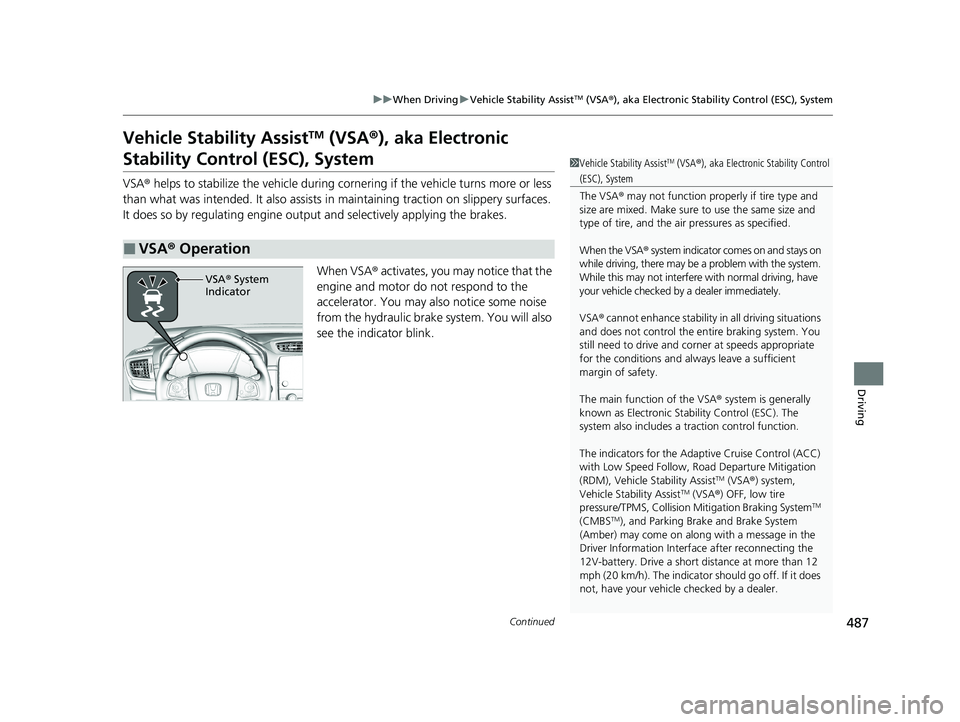
When VSA ® activates, you may notice that the
engine and motor do not respond to the
accelerator. You may also notice some noise
from the hydraulic brake system. You will also
see the indicator blink.
■VSA ® Operation
1 Vehicle Stability AssistTM (VSA® ), aka Electronic Stability Control
(ESC), System
The VSA ® may not function properl y if tire type and
size are mixed. Make sure to use the same size and
type of tire, and the air pressures as specified.
When the VSA ® system indicator comes on and stays on
while driving, there may be a problem with the system.
While this may not interfere with normal driving, have
your vehicle checked by a dealer immediately.
VSA ® cannot enhance stability in all driving situations
and does not control the entire braking system. You
still need to drive and corner at speeds appropriate
for the conditions and always leave a sufficient
margin of safety.
The main function of the VSA ® system is generally
known as Electronic Stability Control (ESC). The
system also includes a traction control function.
The indicators for the Adaptive Cruise Control (ACC)
with Low Speed Follow, Road Departure Mitigation
(RDM), Vehicle Stability Assist
TM (VSA ®) system,
Vehicle Stability AssistTM (VSA ®) OFF, low tire
pressure/TPMS, Collision Mitigation Braking SystemTM
(CMBSTM), and Parking Brake and Brake System
(Amber) may come on along with a message in the
Driver Information Interf ace after reconnecting the
12V-battery. Drive a short distance at more than 12
mph (20 km/h). The indicator should go off. If it does
not, have your vehicle checked by a dealer.
VSA® System
Indicator
21 CR-V HYBRID HMIN-31TPG6100.book 487 ページ 2020年9月14日 月曜日 午前11時36分
Page 493 of 690
uuWhen Driving uTire Pressure Monitoring System (TPMS)
492
Driving
You must start TPMS calibration every time you:
• Adjust the pressure in one or more tires.
• Rotate the tires.
• Replace one or more tires.
Before calibrating the TPMS:
• Set the cold tire pressu re in all four tires.
2Checking Tires P. 604
Make sure:
•The vehicle is at a complete stop.
• Change the shift position to
(P.
• The power mode is in ON.
■TPMS Calibration
1Tire Pressure Monitoring System (TPMS)
The indicators for the Adaptive Cruise Control (ACC)
with Low Speed Follow, Road Departure Mitigation
(RDM), Vehicle Stability Assist
TM (VSA ®) system,
Vehicle Stability AssistTM (VSA ®) OFF, low tire
pressure/TPMS, Collision Mitigation Braking SystemTM
(CMBSTM), and Parking Brake and Brake System
(Amber) may come on along with a message in the
Driver Information Interf ace after reconnecting the
12V-battery. Drive a short distance at more than 12
mph (20 km/h). The indicator should go off. If it does
not, have your vehicle checked by a dealer.
1TPMS Calibration
The calibration process requires approximately 30
minutes of cumulative driv ing at speeds between 30-
65 mph (48-105 km/h).
During this period, if the ignition is turned on and the
vehicle is not moved within 45 seconds, you may
notice the low tire pressure/TPMS indicator comes on
briefly. This is normal and indicates that the
calibration process is not yet complete.
If the tire chains are installed, remove them before
calibrating the TPMS.
If the low tire pressure/TPMS indicator comes on even
when the properly inflated specified regular tires are
installed, have your vehi cle checked by a dealer.
We recommend that the tires be replaced with the
same brand, model, and size as the originals. Ask a
dealer for details.
21 CR-V HYBRID HMIN-31TPG6100.book 492 ページ 2020年9月14日 月曜日 午前11時36分
Page 509 of 690
uuHonda Sensing ®u Collision Mitigation Braking SystemTM (CMBSTM)
508
Driving
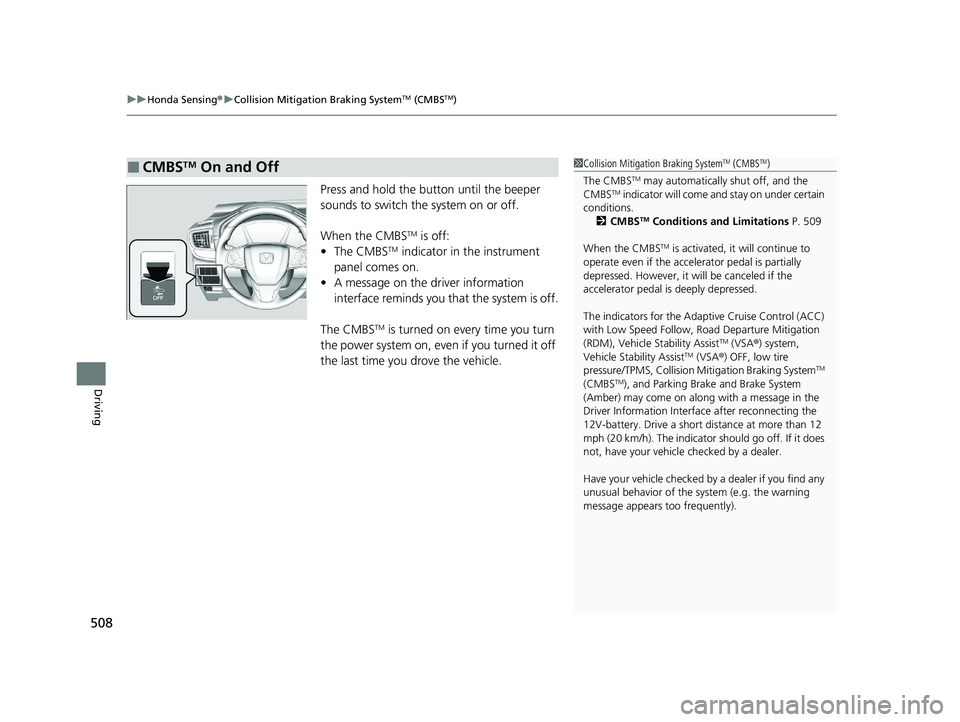
Press and hold the button until the beeper
sounds to switch the system on or off.
When the CMBS
TM is off:
• The CMBSTM indicator in the instrument
panel comes on.
• A message on the driver information
interface reminds you that the system is off.
The CMBS
TM is turned on every time you turn
the power system on, even if you turned it off
the last time you drove the vehicle.
■CMBSTM On and Off1 Collision Mitigation Braking SystemTM (CMBSTM)
The CMBS
TM may automatically shut off, and the
CMBSTM indicator will come and stay on under certain
conditions.
2 CMBS
TM Conditions and Limitations P. 509
When the CMBS
TM is activated, it will continue to
operate even if the accele rator pedal is partially
depressed. However, it w ill be canceled if the
accelerator pedal is deeply depressed.
The indicators for the Adaptive Cruise Control (ACC)
with Low Speed Follow, Road Departure Mitigation
(RDM), Vehicle Stability Assist
TM (VSA ®) system,
Vehicle Stability AssistTM (VSA ®) OFF, low tire
pressure/TPMS, Collision Mitigation Braking SystemTM
(CMBSTM), and Parking Brake and Brake System
(Amber) may come on along with a message in the
Driver Information Interf ace after reconnecting the
12V-battery. Drive a short distance at more than 12
mph (20 km/h). The indicator should go off. If it does
not, have your vehicle checked by a dealer.
Have your vehicle checked by a dealer if you find any
unusual behavior of the system (e.g. the warning
message appears too frequently).
21 CR-V HYBRID HMIN-31TPG6100.book 508 ページ 2020年9月14日 月曜日 午前11時36分
Page 518 of 690
Continued517
uuHonda Sensing ®u Adaptive Cruise Control (ACC) with Low Speed Follow
Driving
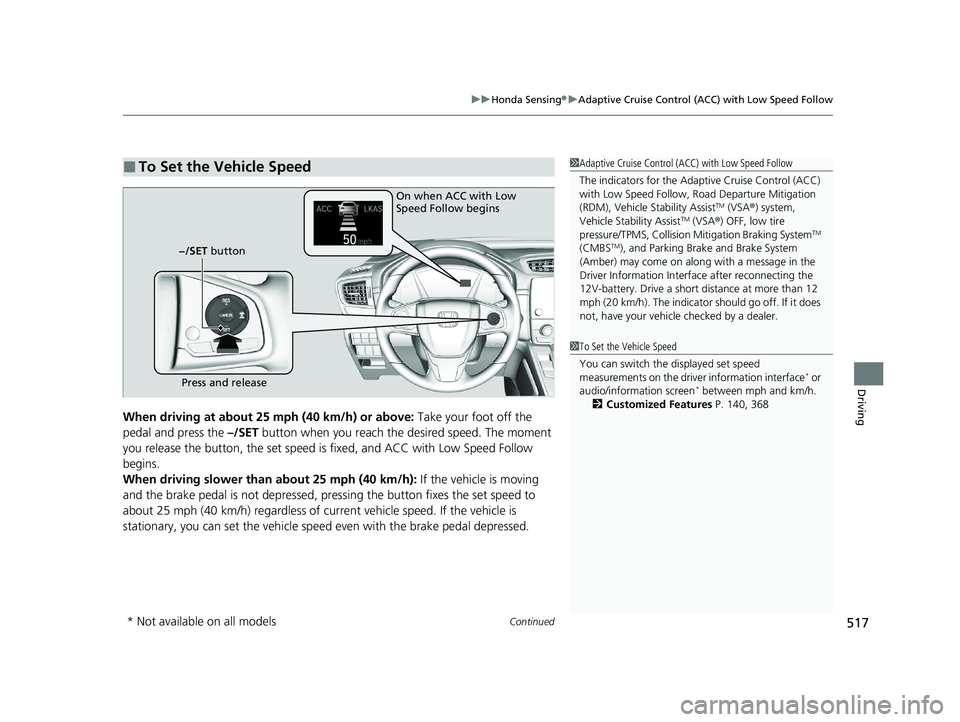
When driving at about 25 mph (40 km/h) or above: Take your foot off the
pedal and press the –/SET button when you reach the desired speed. The moment
you release the button, th e set speed is fixed, and ACC with Low Speed Follow
begins.
When driving slower than about 25 mph (40 km/h): If the vehicle is moving
and the brake pedal is not depressed, pressing the button fixes the set speed to
about 25 mph (40 km/h) regardless of current vehicle speed. If the vehicle is
stationary, you can set the vehicle speed even with the brake pedal depressed.
■To Set the Vehicle Speed1 Adaptive Cruise Control (ACC) with Low Speed Follow
The indicators for the Adaptive Cruise Control (ACC)
with Low Speed Follow, Road Departure Mitigation
(RDM), Vehicle Stability Assist
TM (VSA ®) system,
Vehicle Stability AssistTM (VSA ®) OFF, low tire
pressure/TPMS, Collision Mitigation Braking SystemTM
(CMBSTM), and Parking Brake and Brake System
(Amber) may come on along with a message in the
Driver Information Interf ace after reconnecting the
12V-battery. Drive a short distance at more than 12
mph (20 km/h). The indicator should go off. If it does
not, have your vehicle checked by a dealer.
On when ACC with Low
Speed Follow begins
Press and release
−/SET button
1
To Set the Vehicle Speed
You can switch the displayed set speed
measurements on the driv er information interface
* or
audio/information screen* between mph and km/h.
2 Customized Features P. 140, 368
* Not available on all models
21 CR-V HYBRID HMIN-31TPG6100.book 517 ページ 2020年9月14日 月曜日 午前11時36分