oil HONDA CR-Z 2011 1.G Owners Manual
[x] Cancel search | Manufacturer: HONDA, Model Year: 2011, Model line: CR-Z, Model: HONDA CR-Z 2011 1.GPages: 333, PDF Size: 9.97 MB
Page 15 of 333
Quick Reference Guide
14
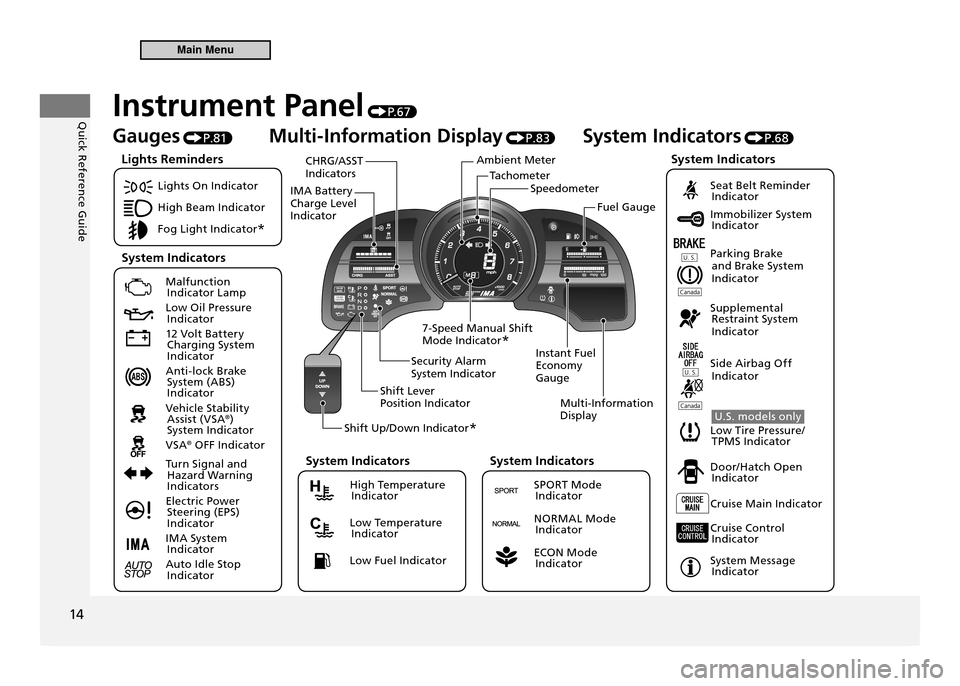
TachometerSpeedometer
Ambient Meter
IMA Battery Charge Level Indicator CHRG/ASST Indicators
Instant Fuel Economy GaugeMulti-Information Display
Security Alarm System Indicator
Shift Lever Position Indicator
Shift Up/Down Indicator *
7-Speed Manual Shift Mode Indicator
* Fuel Gauge
Instrument Panel
P. 6 7
Gauges P.81 Multi-Information Display
P.83 System Indicators
P.68
Lights On Indicator
High Beam Indicator
Fog Light Indicator *
Malfunction
Indicator Lamp
Low Oil Pressure Indicator
12 Volt Battery Charging System
Indicator
Anti-lock Brake System (ABS)
Indicator
Vehicle Stability Assist (VSA ®
)
System Indicator
VSA ®
OFF Indicator
Turn Signal and Hazard Warning
Indicators
Electric Power Steering (EPS)
Indicator
IMA System Indicator
Auto Idle Stop Indicator
Seat Belt Reminder Indicator
Immobilizer System Indicator
Parking Brake and Brake System
Indicator
Supplemental Restraint System
Indicator
Side Airbag Off Indicator
U.S. models only
Low Tire Pressure/ TPMS Indicator
Door/Hatch Open Indicator
Cruise Main Indicator
Cruise Control Indicator
System Message Indicator
Lights Reminders
System Indicators System Indicators
High Temperature
Indicator
Low Temperature Indicator
Low Fuel Indicator
System Indicators
SPORT Mode Indicator
NORMAL Mode Indicator
ECON Mode Indicator
System Indicators
Main Menu
Page 23 of 333
Quick Reference Guide
22
Maintenance P. 2 3 7
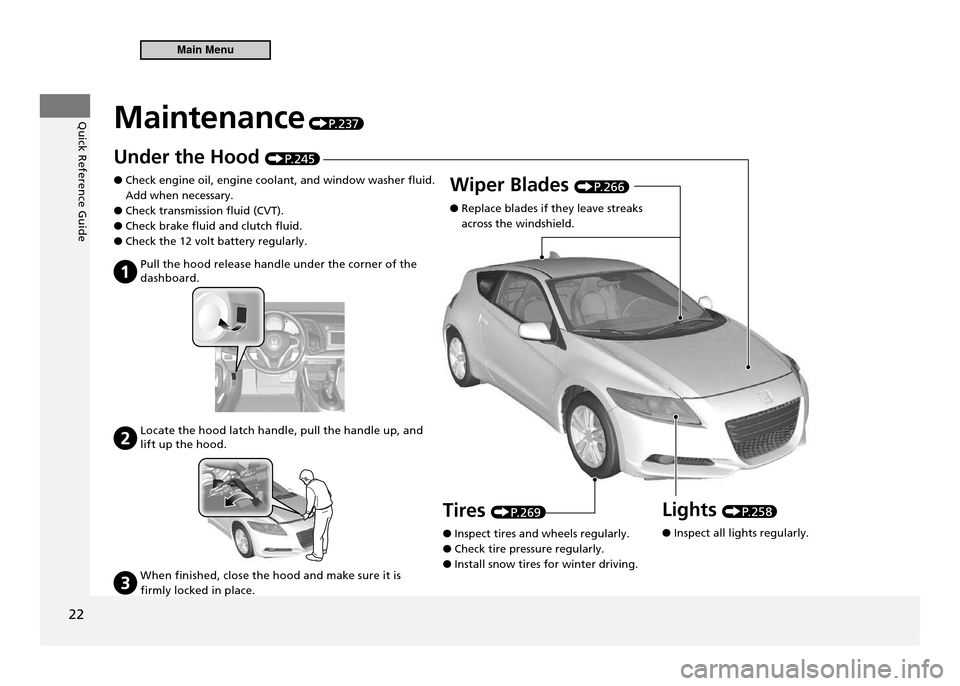
Under the Hood P. 2 4 5
Check engine oil, engine coolant, and window washer fluid.
●
Add when necessary. Check transmission fluid (CVT).
●
Check brake fluid and clutch fluid.
●
Check the 12 volt battery regularly.
●
Pull the hood release handle under the corner of the
dashboard.
Locate the hood latch handle, pull the handle up, and lift up the hood.
When finished, close the hood and make sure it is
firmly locked in place.
Wiper Blades P. 2 6 6
Replace blades if they leave streaks
●
across the windshield.
Lights
P. 2 5 8
Inspect all lights regularly.
●
Tires
P. 2 6 9
Inspect tires and wheels regularly.
●
Check tire pressure regularly.
●
Install snow tires for winter driving.
●
Main Menu
Page 65 of 333
64
Safe Driving
Exhaust Gas Hazard
Carbon Monoxide Gas The exhaust gas from this vehicle contains carbon monoxide. As long as you properly maintain your vehicle, carbon monoxide gas will not get into the interior.Have the Exhaust System Inspected for Leaks Whenever
■
The exhaust system is making an unusual noise.
●
The exhaust system may have been damaged.
●
The vehicle is raised for an oil change.
●
When you operate a vehicle with the hatch open, airflow can pull exhaust gas into the interior and create a hazardous condition. If you must drive with the hatch open, open both windows and set the climate control system as shown below. Select the fresh air mode.
1.
Select the
2.
mode.
Set the fan speed to high.
3.
Set the temperature control to a comfortable setting.
4. Adjust the climate control system in the same manner if you sit in your parked vehicle with the engine running.
Carbon Monoxide Gas
An enclosed area such as a garage can quickly ill up with carbon monoxide gas.Do not run the engine with the garage door closed.Even when the garage door is open, drive out of the garage immediately after starting the engine.
WARNING
Carbon monoxide gas is toxic. Breathing it can cause unconsciousness and even kill you. Avoid any enclosed areas or activities that expose you to carbon monoxide.
Main MenuTable of Contents
Page 69 of 333
68
Instrument Panel
Indicators
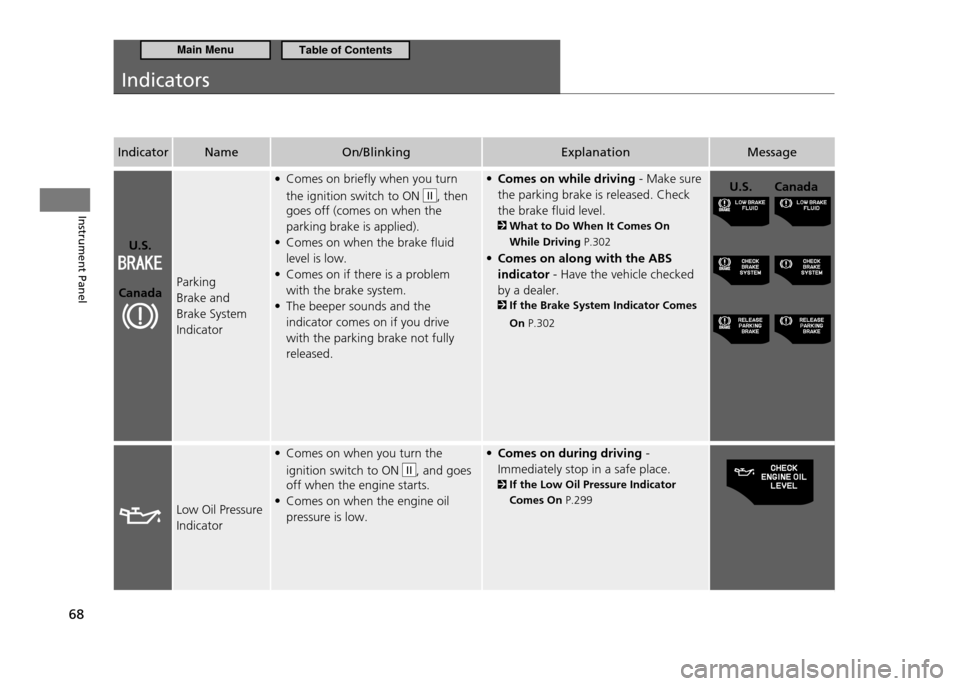
IndicatorName On/Blinking Explanation Message
U.S.
Canada Parking Brake and Brake System Indicator Comes on briefly when you turn
•
the ignition switch to ON
II, then
goes off (comes on when the parking brake is applied).Comes on when the brake fluid
•
level is low.Comes on if there is a problem
•
with the brake system.The beeper sounds and the
•
indicator comes on if you drive with the parking brake not fully released. Comes on while driving
• - Make sure
the parking brake is released. Check
the brake fluid level.
What to Do When It Comes On While Driving P.302
Comes on along with the ABS
•
indicator - Have the vehicle checked
by a dealer.
If the Brake System Indicator Comes
On P.302
U.S. Canada
Low Oil Pressure Indicator Comes on when you turn the
•
ignition switch to ON
II, and goes
off when the engine starts. Comes on when the engine oil
•
pressure is low. Comes on during driving
• -
Immediately stop in a safe place. If the Low Oil Pressure Indicator Comes On P.299
Main MenuTable of Contents
Page 84 of 333

83
Instrument Panel
Gauges and Multi-Information Display Multi-Information Display
Multi-Information Display
The multi-information display shows the odometer, trip meter, outside temperature, and other fuel economy information.It also displays important messages such as warnings and other helpful information.Switching the Display
■
Press the button or the SEL/RESET button to change the display.
Eco Guide feedback with Eco Drive Bar
OFF
HFL *
Customizable Setting Entry Engine Oil Life Power Flow
MonitorAverage Vehicle SpeedElapsed Time
Average Fuel Economy Records
Average Fuel Economy A
Range
SEL/RESET Button
(Information) Button Shown when
Bluetooth®
HandsFreeLink ®
is activated.
* Not available on all models
Main MenuTable of Contents
Page 90 of 333

89
Instrument Panel
Gauges and Multi-Information Display Multi-Information Display
Engine Oil Life
■
Shows the remaining oil life and Maintenance Minder ™
.
Maintenance Minder ™
P.241
Bluetooth
■®
HandsFreeLink ®
*
Shows your paired cell phone’s information.
Bluetooth ®
HandsFreeLink ®
P.173
* Not available on all models
Main MenuTable of Contents
Page 224 of 333
223
Driving
Parking Your Vehicle
When Stopped
Parking Your Vehicle
Do not park your vehicle near lammable objects, such as dry grass, oil, or timber.Heat from the exhaust can cause a ire.
When Stopped
Automatic transmission (CVT) model NOTICE
The following can damage the transmission: Depressing the accelerator and brake pedals
•
simultaneously. Holding the vehicle in place when facing uphill
•
by depressing the accelerator pedal. Moving the shift lever into
•
before the vehicle
stops completely.
Always use the parking brake when you park your vehicle.
1.
Make sure the parking brake is set firmly, or your vehicle may roll if parked on
2.
an incline.
Main MenuTable of Contents
Page 235 of 333
234
Driving
Fuel Economy
Improving Fuel Economy
Improving Fuel Economy
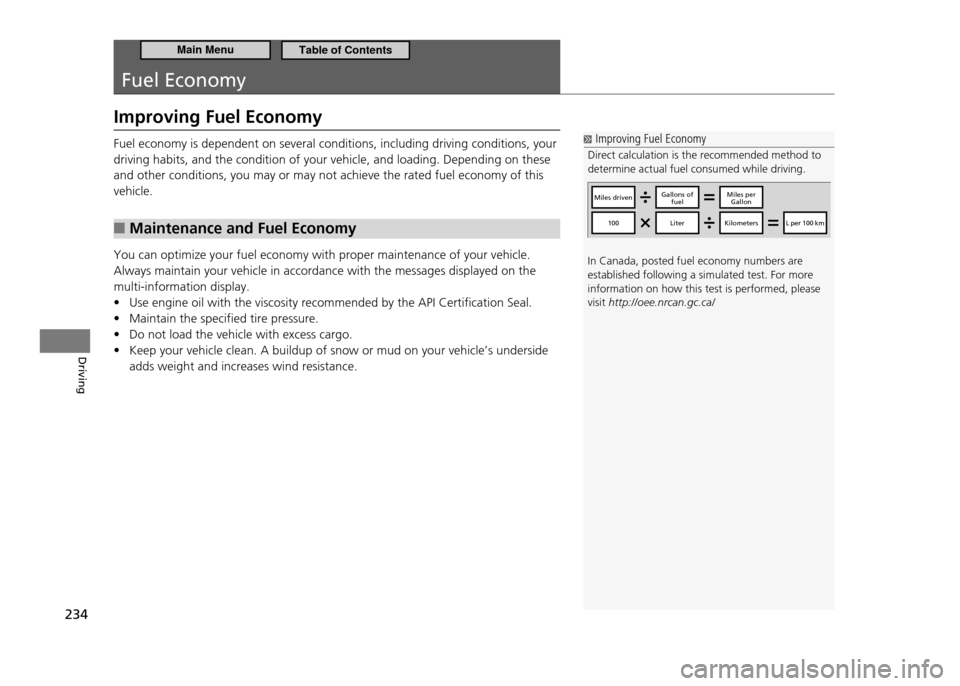
Direct calculation is the recommended method to determine actual fuel consumed while driving. In Canada, posted fuel economy numbers are established following a simulated test. For more information on how this test is performed, please visit http://oee.nrcan.gc.ca/
Miles drivenGallons of
fuelMiles per Gallon
100LiterKilometersL per 100 km
Fuel economy is dependent on several conditions, including driving conditions, your driving habits, and the condition of your vehicle, and loading. Depending on these and other conditions, you may or may not achieve the rated fuel economy of this vehicle.
Maintenance and Fuel Economy
■
You can optimize your fuel economy with proper maintenance of your vehicle. Always maintain your vehicle in accordance with the messages displayed on the multi-information display.
Use engine oil with the viscosity recommended by the API Certification Seal.
•
Maintain the specified tire pressure.
•
Do not load the vehicle with excess cargo.
•
Keep your vehicle clean. A buildup of snow or mud on your vehicle’s underside
•
adds weight and increases wind resistance.
Main MenuTable of Contents
Page 238 of 333
Maintenance
This chapter discusses basic maintenance.
237
Before Performing Maintenance
Inspection and Maintenance ................... 238
Safety When Performing Maintenance ... 239Parts and Fluids Used in Maintenance
Service .................................................. 240
Maintenance Minder ™
............................ 241
Maintenance Under the Hood Maintenance Items Under the Hood ....... 245
Opening the Hood ................................. 246
Recommended Engine Oil ...................... 247
Oil Check ............................................... 248
Adding Engine Oil .................................. 249
Changing the Engine Oil and Oil Filter .... 250 Engine Coolant ...................................... 252
Transmission Fluid .................................. 254
Brake/Clutch Fluid .................................. 256
Refilling Window Washer Fluid ............... 257
Replacing Light Bulbs ............................. 258
Checking and Maintaining Wiper Blades Checking Wiper Blades ........................... 266
Changing the Front Wiper Blade Rubber 266
Changing the Rear Wiper Blade Rubber .. 268
Checking and Maintaining Tires Checking Tires ........................................ 269
Tire and Loading Information Label ........ 270
Tire Labeling ........................................... 270 DOT Tire Quality Grading (U.S. Vehicles)
.272
Wear Indicators ...................................... 274
Tire Service Life ...................................... 274
Tire and Wheel Replacement .................. 275
Tire Rotation .......................................... 276
Winter Tires ............................................ 277
12 Volt Battery ........................................ 278
Remote Transmitter Care ....................... 279
Replacing the Battery ............................. 279
Climate Control System Maintenance ... 280
Cleaning ................................................... 281
Interior Care ........................................... 281
Exterior Care .......................................... 283
Main Menu
Page 239 of 333
238
Maintenance
Before Performing Maintenance
Inspection and Maintenance
For your safety, perform all listed inspections and maintenance to keep your vehicle
in good condition. If you become aware of any abnormality (noise, smell, insufficient brake fluid, oil residue on the ground, etc.), have your vehicle inspected by a dealer. (Note, however, that service at a dealer is not mandatory to keep your warranties in effect.) Refer to the separate maintenance booklet for detailed maintenance and inspection information.Types of Inspection and Maintenance
■
Daily Inspections
■
Perform inspections before long distance trips, when washing the vehicle, or when refueling.
Periodic Inspections
■
Check the automatic transmission fluid level monthly.
•
Automatic Transmission Fluid P.254
Check the brake fluid level monthly.
•
Brake/Clutch Fluid P.256
Check the tire pressure monthly. Examine the tread for wear and foreign objects.
•
Checking and Maintaining Tires P.269
Check the operation of the headlights, parking lights, taillights, high-mount
•
brake light, and license plate lights monthly.
Replacing Light Bulbs P.258
Check the condition of the wiper blades at least every six months.
•
Checking and Maintaining Wiper Blades P.266
Inspection and Maintenance
U.S. models only Maintenance, replacement, or repair of emissions control devices and systems may be done by any automotive repair establishment or individual using parts that are "certiied" to EPA standards. According to state and federal regulations, failure to perform maintenance on the items marked with # will not void your emissions warranties. However, all maintenance services should be performed in accordance with the intervals indicated by the multi-information display.
Maintenance Service Items P. 2 4 3
If you want to perform complex maintenance tasks that require more skills and tools, purchase the service manual.
Authorized Manuals P. 3 1 9
If you want to perform maintenance yourself, make sure that you have the necessary tools and skills irst.After performing maintenance, complete the records in the separate maintenance booklet.
Main MenuTable of Contents