high HONDA RIDGELINE 2022 User Guide
[x] Cancel search | Manufacturer: HONDA, Model Year: 2022, Model line: RIDGELINE, Model: HONDA RIDGELINE 2022Pages: 598, PDF Size: 12.42 MB
Page 61 of 598
59Continued
Safe Driving
Child Safety
Protecting Child Passengers
Each year, many children are injured or killed in vehicle crashes because they are
either unrestrained or not properly res trained. In fact, vehicle crashes are the
number one cause of death of children ages 12 and under.
To reduce the number of child deaths and injuries, every state, Canadian province
and territory requires that infants and child ren be properly restrained when they ride
in a vehicle.
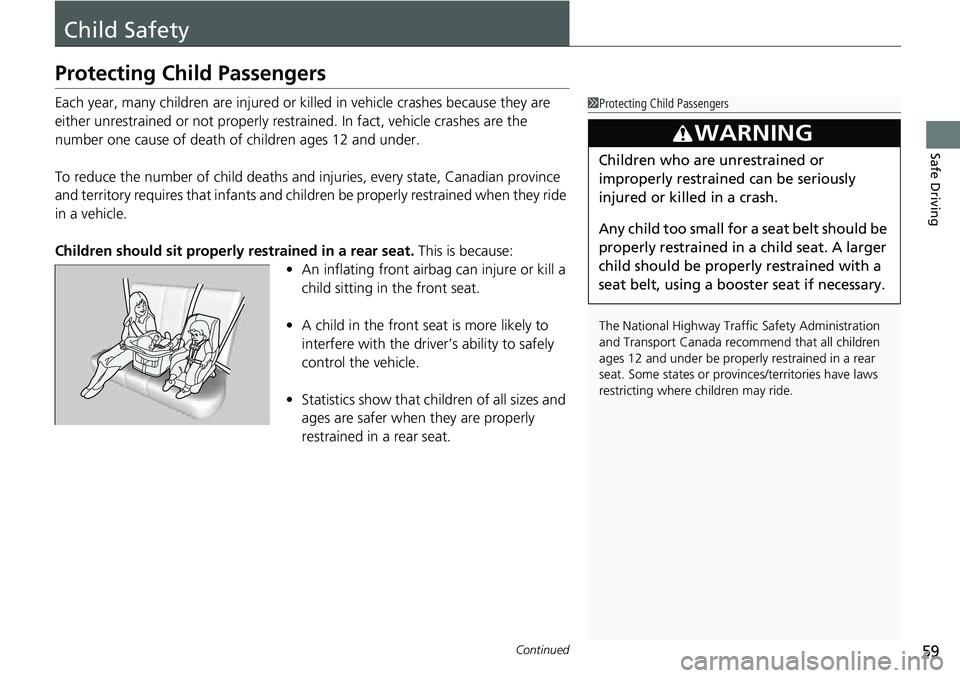
Children should sit properly restrained in a rear seat. This is because:
• An inflating front airbag can injure or kill a
child sitting in the front seat.
• A child in the front seat is more likely to
interfere with the driver’s ability to safely
control the vehicle.
• Statistics show that children of all sizes and
ages are safer when they are properly
restrained in a rear seat.1Protecting Child Passengers
The National Highway Traffic Safety Administration
and Transport Canada reco mmend that all children
ages 12 and under be properl y restrained in a rear
seat. Some states or provin ces/territories have laws
restricting where ch ildren may ride.
3WARNING
Children who are unrestrained or
improperly restrained can be seriously
injured or killed in a crash.
Any child too small for a seat belt should be
properly restrained in a child seat. A larger
child should be properly restrained with a
seat belt, using a booster seat if necessary.
Page 74 of 598
72
uuChild Safety uSafety of Larger Children
Safe Driving
Safety of Larger Children
The following pages give instructions on how to check proper seat belt fit, what kind
of booster seat to use if one is needed, and important precautions for a child who
must sit in front.
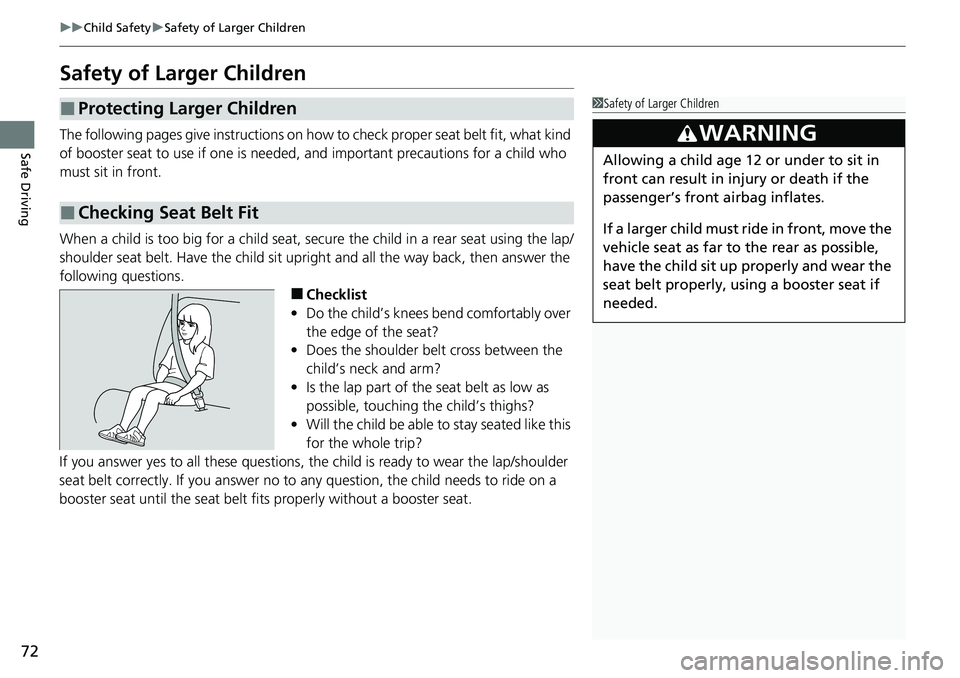
When a child is too big for a child seat, secure the child in a rear seat using the lap/
shoulder seat belt. Have the child sit upright and all the way back, then answer the
following questions.
■Checklist
• Do the child’s knees bend comfortably over
the edge of the seat?
• Does the shoulder belt cross between the
child’s neck and arm?
• Is the lap part of the seat belt as low as
possible, touching the child’s thighs?
• Will the child be able to stay seated like this
for the whole trip?
If you answer yes to all thes e questions, the child is read y to wear the lap/shoulder
seat belt correctly. If you answer no to any question, the child needs to ride on a
booster seat until the seat belt fits properly without a booster seat.
■Protecting Larger Children
■Checking Seat Belt Fit
1 Safety of Larger Children
3WARNING
Allowing a child age 12 or under to sit in
front can result in injury or death if the
passenger’s front airbag inflates.
If a larger child must ride in front, move the
vehicle seat as far to the rear as possible,
have the child sit up properly and wear the
seat belt properly, using a booster seat if
needed.
Page 75 of 598
73
uuChild Safety uSafety of Larger Children
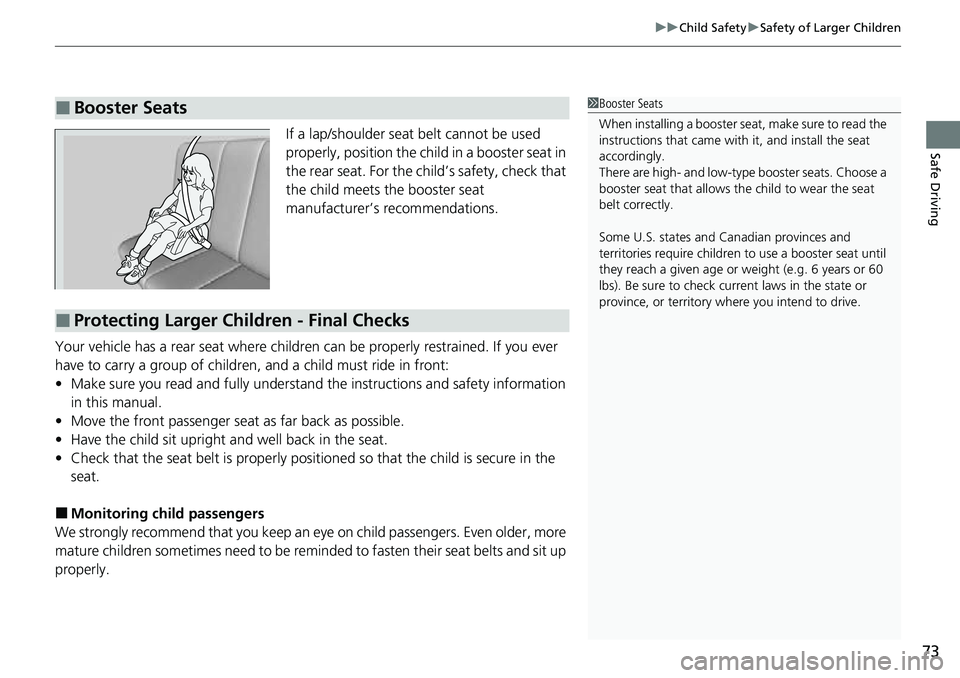
Safe DrivingIf a lap/shoulder seat belt cannot be used
properly, position the child in a booster seat in
the rear seat. For the child’s safety, check that
the child meets the booster seat
manufacturer’s recommendations.
Your vehicle has a rear seat where children can be properly restrained. If you ever
have to carry a group of children, and a child must ride in front:
• Make sure you read and fully understand the instructions and safety information
in this manual.
• Move the front passenger seat as far back as possible.
• Have the child sit upright and well back in the seat.
• Check that the seat belt is properly positi oned so that the child is secure in the
seat.
■Monitoring child passengers
We strongly recommend that you keep an eye on child passengers. Even older, more
mature children sometimes need to be remi nded to fasten their seat belts and sit up
properly.
■Booster Seats1 Booster Seats
When installing a booster seat , make sure to read the
instructions that came with it, and install the seat
accordingly.
There are high- and low-type booster seats. Choose a
booster seat that allows the child to wear the seat
belt correctly.
Some U.S. states and Canadian provinces and
territories require children to use a booster seat until
they reach a given age or weight (e.g. 6 years or 60
lbs). Be sure to check current laws in the state or
province, or territory where you intend to drive.
■Protecting Larger Children - Final Checks
Page 76 of 598
74
Safe Driving
Exhaust Gas Hazard
Carbon Monoxide Gas
The engine exhaust from this vehicle contains carbon monoxide, a colorless,
odorless, and highly toxic gas. As long as you properly maintain your vehicle, carbon
monoxide gas will not get into the interior.
■Have the exhaust system in spected for leaks whenever
• The exhaust system is m aking an unusual noise.
• The exhaust system may have been damaged.
• The vehicle is raised for an oil change.
1Carbon Monoxide Gas
An enclosed area such as a garage can quickly fill up
with carbon monoxide gas.
Do not run the engine with the garage door closed.
Even when the garage door is open, drive out of the
garage immediat ely after starting the engine.
3WARNING
Carbon monoxide gas is toxic.
Breathing it can cause unconsciousness and
even kill you.
Avoid any enclosed areas or activities that
expose you to carbon monoxide.
Page 87 of 598
85
uuIndicators u
Continued
Instrument Panel
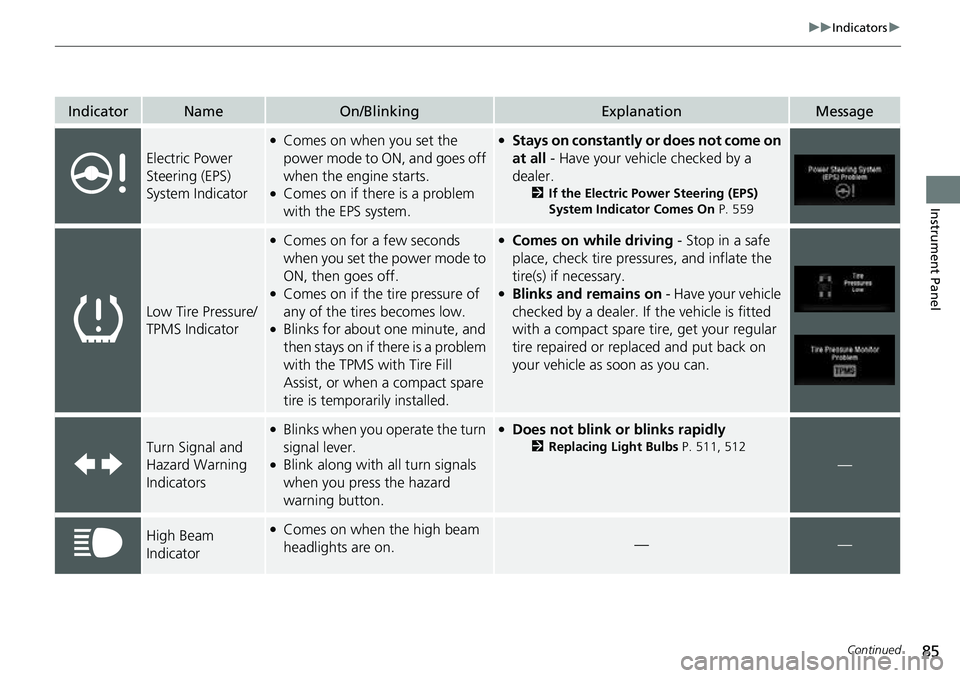
IndicatorNameOn/BlinkingExplanationMessage
Electric Power
Steering (EPS)
System Indicator
●Comes on when you set the
power mode to ON, and goes off
when the engine starts.
●Comes on if there is a problem
with the EPS system.
●Stays on constantly or does not come on
at all - Have your vehicle checked by a
dealer.
2 If the Electric Power Steering (EPS)
System Indicator Comes On P. 559
Low Tire Pressure/
TPMS Indicator
●Comes on for a few seconds
when you set the power mode to
ON, then goes off.
●Comes on if the tire pressure of
any of the tires becomes low.
●Blinks for about one minute, and
then stays on if there is a problem
with the TPMS with Tire Fill
Assist, or when a compact spare
tire is temporarily installed.
●Comes on while driving - Stop in a safe
place, check tire pressures, and inflate the
tire(s) if necessary.
●Blinks and remains on - Have your vehicle
checked by a dealer. If the vehicle is fitted
with a compact spare ti re, get your regular
tire repaired or replaced and put back on
your vehicle as soon as you can.
Turn Signal and
Hazard Warning
Indicators
●Blinks when you operate the turn
signal lever.
●Blink along with all turn signals
when you press the hazard
warning button.
●Does not blink or blinks rapidly
2 Replacing Light Bulbs P. 511, 512
—
High Beam
Indicator●Comes on when the high beam
headlights are on.——
Page 88 of 598
86
uuIndicators u
Instrument Panel
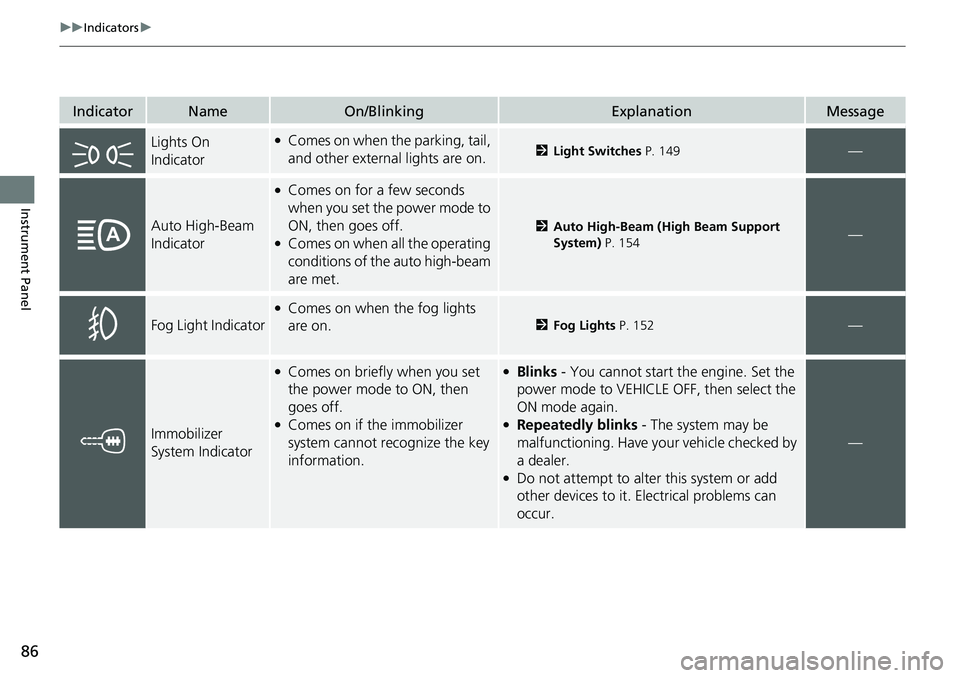
IndicatorNameOn/BlinkingExplanationMessage
Lights On
Indicator●Comes on when the parking, tail,
and other external lights are on.2Light Switches P. 149—
Auto High-Beam
Indicator
●Comes on for a few seconds
when you set the power mode to
ON, then goes off.
●Comes on when all the operating
conditions of the auto high-beam
are met.
2Auto High-Beam (High Beam Support
System) P. 154—
Fog Light Indicator
●Comes on when the fog lights
are on.
2Fog Lights P. 152—
Immobilizer
System Indicator
●Comes on briefly when you set
the power mode to ON, then
goes off.
●Comes on if the immobilizer
system cannot recognize the key
information.
●Blinks - You cannot start the engine. Set the
power mode to VEHICLE OFF, then select the
ON mode again.
●Repeatedly blinks - The system may be
malfunctioning. Have your vehicle checked by
a dealer.
●Do not attempt to alter this system or add
other devices to it. Electrical problems can
occur.
—
Page 90 of 598
88
uuIndicators u
Instrument Panel
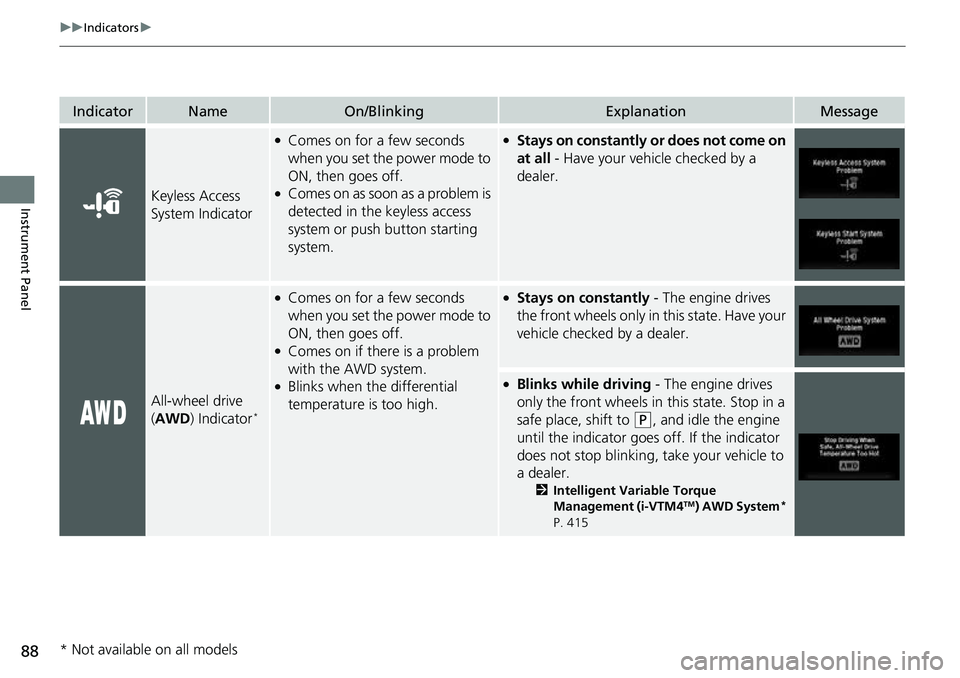
IndicatorNameOn/BlinkingExplanationMessage
Keyless Access
System Indicator
●Comes on for a few seconds
when you set the power mode to
ON, then goes off.
●Comes on as soon as a problem is
detected in the keyless access
system or push button starting
system.
●Stays on constantly or does not come on
at all - Have your vehicle checked by a
dealer.
All-wheel drive
( AWD ) Indicator*
●Comes on for a few seconds
when you set the power mode to
ON, then goes off.
●Comes on if there is a problem
with the AWD system.
●Blinks when the differential
temperature is too high.
●Stays on constantly - The engine drives
the front wheels only in this state. Have your
vehicle checked by a dealer.
●Blinks while driving - The engine drives
only the front wheels in this state. Stop in a
safe place, shift to
(P, and idle the engine
until the indicator goes off. If the indicator
does not stop blinking, take your vehicle to
a dealer.
2 Intelligent Variable Torque
Management (i-VTM4TM) AWD System*
P. 415
* Not available on all models
Page 92 of 598
90
uuIndicators u
Instrument Panel
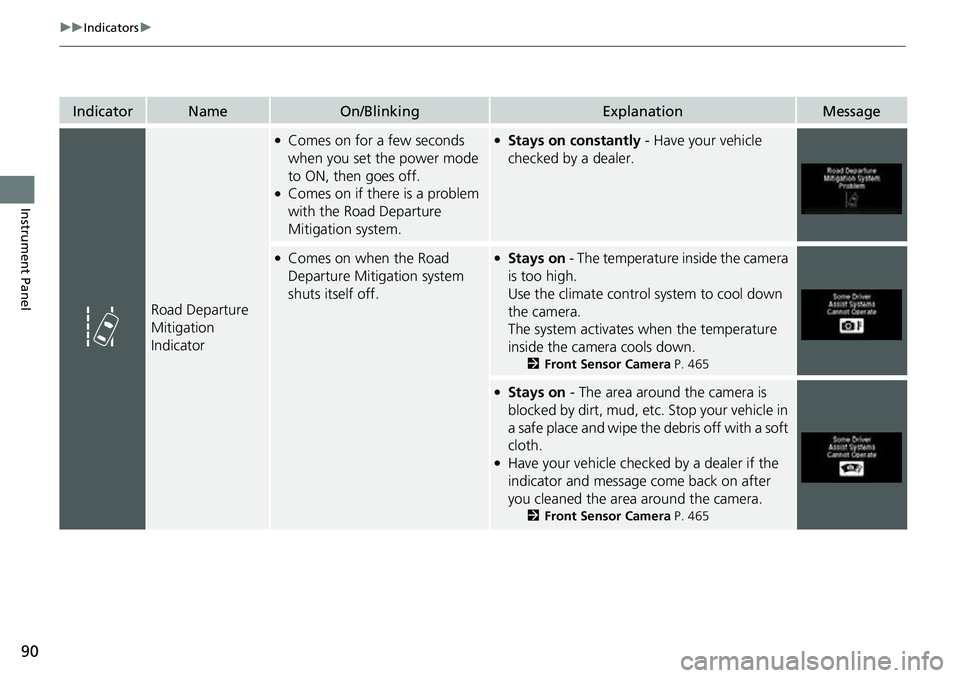
IndicatorNameOn/BlinkingExplanationMessage
Road Departure
Mitigation
Indicator
●Comes on for a few seconds
when you set the power mode
to ON, then goes off.
●Comes on if there is a problem
with the Road Departure
Mitigation system.
●Stays on constantly - Have your vehicle
checked by a dealer.
●Comes on when the Road
Departure Mitigation system
shuts itself off.●Stays on - The temperature inside the camera
is too high.
Use the climate control system to cool down
the camera.
The system activates when the temperature
inside the camera cools down.
2 Front Sensor Camera P. 465
●Stays on - The area around the camera is
blocked by dirt, mud, etc. Stop your vehicle in
a safe place and wipe the debris off with a soft
cloth.
●Have your vehicle checked by a dealer if the
indicator and message come back on after
you cleaned the area around the camera.
2 Front Sensor Camera P. 465
Page 96 of 598
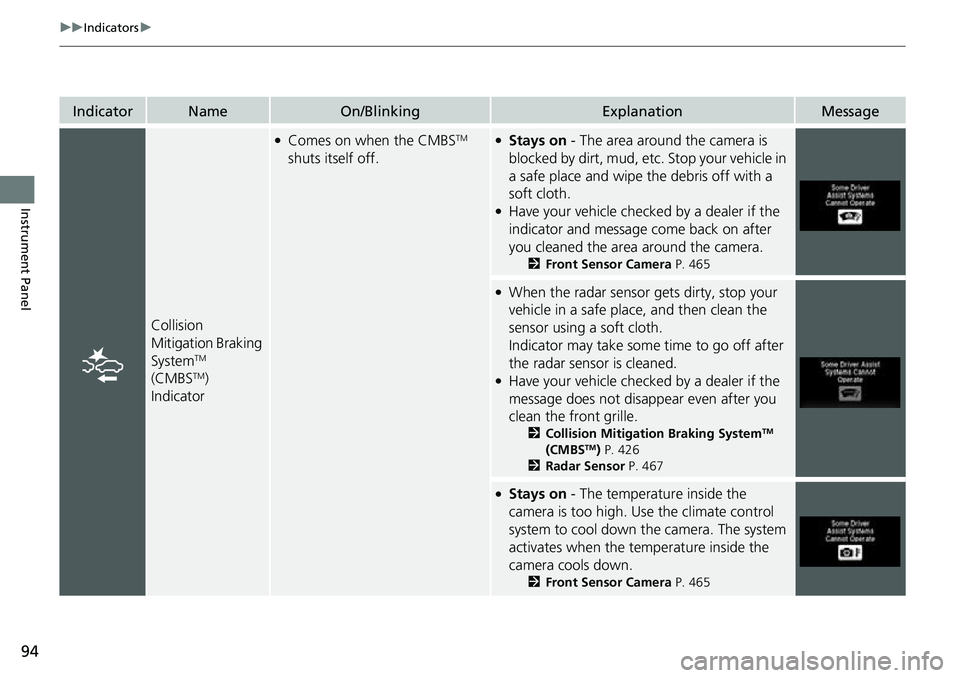
94
uuIndicators u
Instrument Panel
IndicatorNameOn/BlinkingExplanationMessage
Collision
Mitigation Braking
System
TM
(CMBSTM)
Indicator
●Comes on when the CMBSTM
shuts itself off.●Stays on - The area around the camera is
blocked by dirt, mud, etc. Stop your vehicle in
a safe place and wipe the debris off with a
soft cloth.
●Have your vehicle checked by a dealer if the
indicator and message come back on after
you cleaned the area around the camera.
2 Front Sensor Camera P. 465
●When the radar sensor gets dirty, stop your
vehicle in a safe place, and then clean the
sensor using a soft cloth.
Indicator may take some time to go off after
the radar sensor is cleaned.
●Have your vehicle checked by a dealer if the
message does not disappear even after you
clean the front grille.
2 Collision Mitigation Braking SystemTM
(CMBSTM) P. 426
2 Radar Sensor P. 467
●Stays on - The temperature inside the
camera is too high. Use the climate control
system to cool down the camera. The system
activates when the temperature inside the
camera cools down.
2 Front Sensor Camera P. 465
Page 98 of 598
96
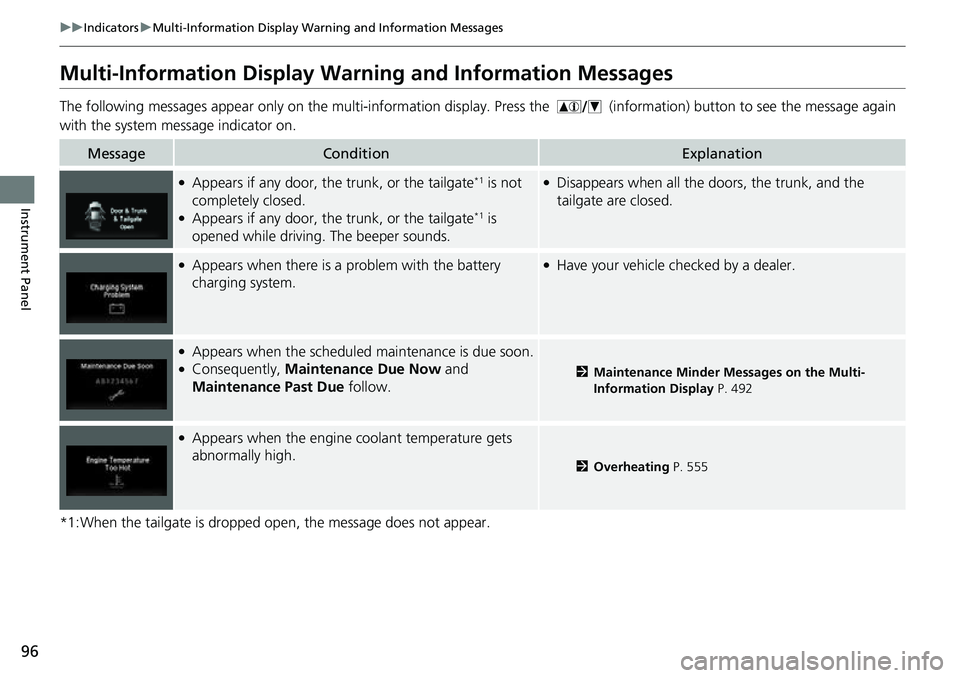
uuIndicators uMulti-Information Display Warn ing and Information Messages
Instrument Panel
Multi-Information Display Warn ing and Information Messages
The following messages appear only on the mu lti-information display. Press the (information) button to see the message again
with the system me ssage indicator on.
*1:When the tailgate is dropped open, the message does not appear.
MessageConditionExplanation
●Appears if any door, the trunk, or the tailgate*1 is not
completely closed.
●Appears if any door, the trunk, or the tailgate*1 is
opened while driving. The beeper sounds.
●Disappears when all the doors, the trunk, and the
tailgate are closed.
●Appears when there is a problem with the battery
charging system.●Have your vehicle ch ecked by a dealer.
●Appears when the scheduled maintenance is due soon.●Consequently, Maintenance Due Now and
Maintenance Past Due follow.2Maintenance Minder Messages on the Multi-
Information Display P. 492
●Appears when the engine coolant temperature gets
abnormally high.
2Overheating P. 555