high HONDA RIDGELINE 2022 Service Manual
[x] Cancel search | Manufacturer: HONDA, Model Year: 2022, Model line: RIDGELINE, Model: HONDA RIDGELINE 2022Pages: 598, PDF Size: 12.42 MB
Page 284 of 598
282
uuGeneral Information on the Audio System uCompatible iPod, iPhone, and USB Flash Drives
Features
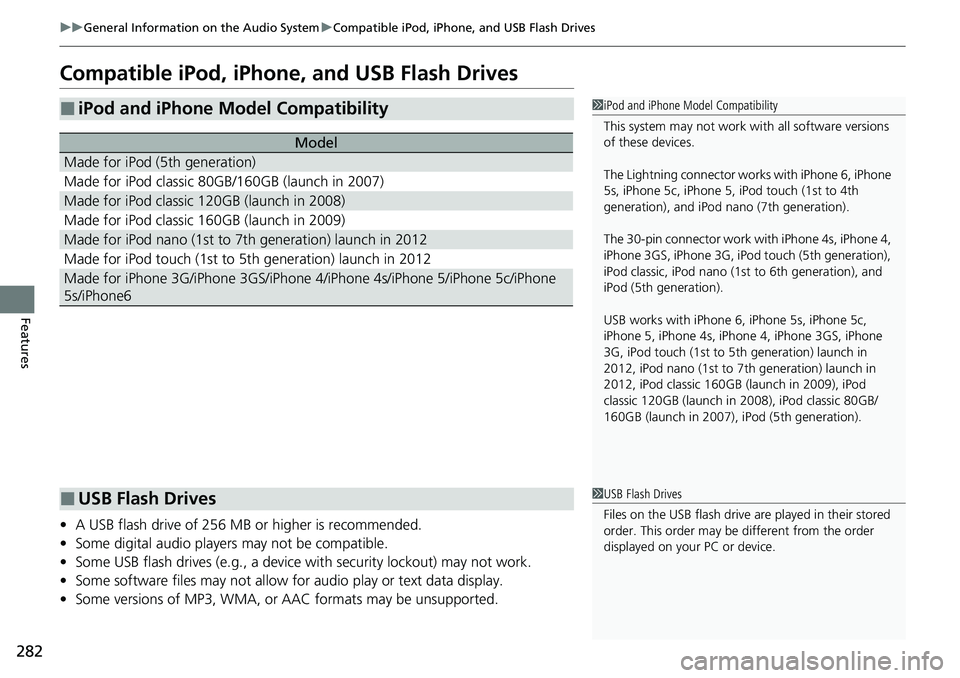
Compatible iPod, iPhone, and USB Flash Drives
• A USB flash drive of 256 MB or higher is recommended.
• Some digital audio players may not be compatible.
• Some USB flash drives (e.g., a device with security lockout) may not work.
• Some software files may not allow for audio play or text data display.
• Some versions of MP3, WMA, or AAC formats may be unsupported.
■iPod and iPhone Model Compatibility
Model
Made for iPod (5th generation)
Made for iPod classic 80GB/160GB (launch in 2007)
Made for iPod classic 120GB (launch in 2008)
Made for iPod classic 160GB (launch in 2009)
Made for iPod nano (1st to 7th generation) launch in 2012
Made for iPod touch (1st to 5th generation) launch in 2012
Made for iPhone 3G/iPhone 3GS/iPhone 4/iPhone 4s/iPhone 5/iPhone 5c/iPhone
5s/iPhone6
1 iPod and iPhone Model Compatibility
This system may not work with all software versions
of these devices.
The Lightning connector work s with iPhone 6, iPhone
5s, iPhone 5c, iPhone 5, iPod touch (1st to 4th
generation), and iPod na no (7th generation).
The 30-pin connector work wi th iPhone 4s, iPhone 4,
iPhone 3GS, iPhone 3G, iPod touch (5th generation),
iPod classic, iPod nano (1st to 6th generation), and
iPod (5th generation).
USB works with iPhone 6, iPhone 5s, iPhone 5c,
iPhone 5, iPhone 4s, iPhone 4, iPhone 3GS, iPhone
3G, iPod touch (1st to 5th generation) launch in
2012, iPod nano (1st to 7th generation) launch in
2012, iPod classic 160GB (launch in 2009), iPod
classic 120GB (launch in 2008), iPod classic 80GB/
160GB (launch in 2007), iPod (5th generation).
■USB Flash Drives1 USB Flash Drives
Files on the USB flash drive are played in their stored
order. This order may be different from the order
displayed on your PC or device.
Page 312 of 598
310
uuCustomized Features u
Features
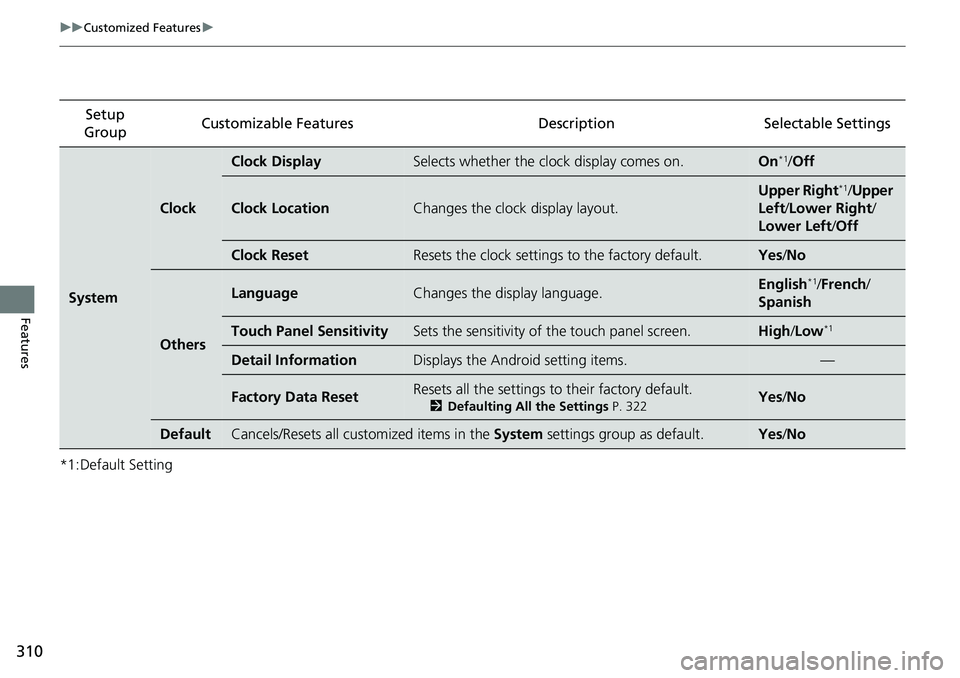
*1:Default SettingSetup
Group Customizable Features
Description Selectable Settings
System
Clock
Clock DisplaySelects whether the clock display comes on.On*1/Off
Clock LocationChanges the clock display layout.
Upper Right*1/Upper
Left /Lower Right /
Lower Left /Off
Clock ResetResets the clock settings to the factory default.Yes /No
Others
LanguageChanges the display language.English*1/French /
Spanish
Touch Panel SensitivitySets the sensitivity of the touch panel screen.High /Low*1
Detail InformationDisplays the Android setting items.—
Factory Data ResetResets all the settings to their factory default.
2 Defaulting All the Settings P. 322Yes/No
DefaultCancels/Resets all customized items in the System settings group as default.Yes/No
Page 314 of 598
312
uuCustomized Features u
Features
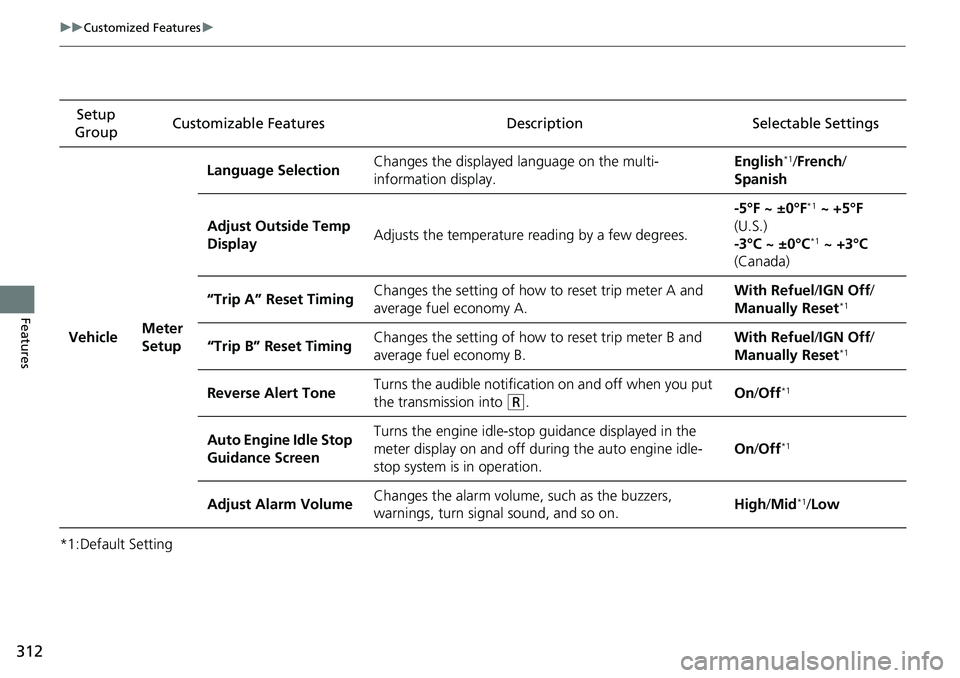
*1:Default SettingSetup
Group Customizable Features
Description Selectable Settings
Vehicle Meter
SetupLanguage Selection
Changes the displayed language on the multi-
information display. English
*1/
French /
Spanish
Adjust Outside Temp
Display Adjusts the temperature r
eading by a few degrees. -5°F ~ ±0°F
*1
~ +5°F
(U.S.)
-3°C ~ ±0°C
*1 ~ +3°C
(Canada)
“Trip A” Reset Timing Changes the setting of how to reset trip meter A and
average fuel economy A. With Refuel
/IGN Off /
Manually Reset
*1
“Trip B” Reset Timing Changes the setting of how
to reset trip meter B and
average fuel economy B. With Refuel
/IGN Off /
Manually Reset*1
Reverse Alert Tone Turns the audible notificati
on on and off when you put
the transmission into (R. On
/Off*1
Auto Engine Idle Stop
Guidance Screen Turns the engine idle-stop
guidance displayed in the
meter display on and off duri ng the auto engine idle-
stop system is in operation. On
/Off*1
Adjust Alarm Volume Changes the alarm volume, such as the buzzers,
warnings, turn signal sound, and so on. High
/Mid*1/Low
Page 316 of 598
314
uuCustomized Features u
Features
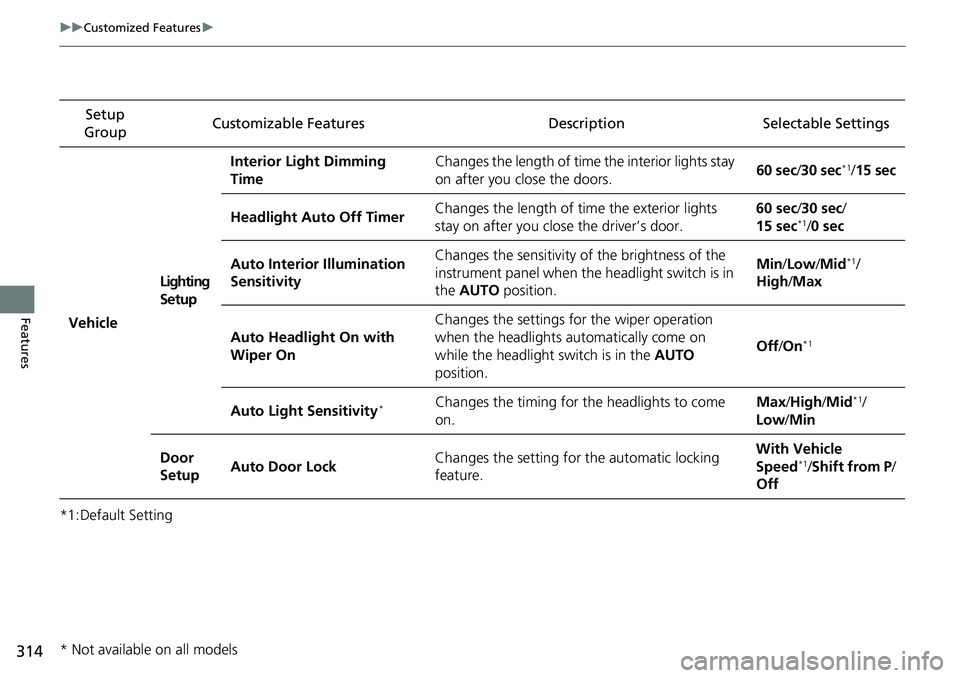
*1:Default SettingSetup
Group Customizable Features
Description Selectable Settings
VehicleLighting
SetupInterior Light Dimming
Time
Changes the length of time
the interior lights stay
on after you close the doors. 60 sec
/30 sec
*1/ 15 sec
Headlight Auto Off Timer Changes the length of time the exterior lights
stay on after you close the driver’s door. 60 sec
/30 sec/
15 sec
*1/ 0 sec
Auto Interior Illumination
Sensitivity Changes the sensitivity of the brightness of the
instrument panel when the headlight switch is in
the
AUTO position. Min/
Low/Mid
*1/
High /Max
Auto Headlight On with
Wiper On Changes the settings fo
r the wiper operation
when the headlights automatically come on
while the headlight switch is in the AUTO
position. Off
/On
*1
Auto Light Sensitivity*Changes the timing for the headlights to come
on. Max
/High /Mid*1/
Low /Min
Door
Setup Auto Door Lock Changes the setting for the automatic locking
feature. With Vehicle
Speed
*1/
Shift from P/
Off
* Not available on all models
Page 318 of 598
316
uuCustomized Features u
Features
*1:Default SettingSetup
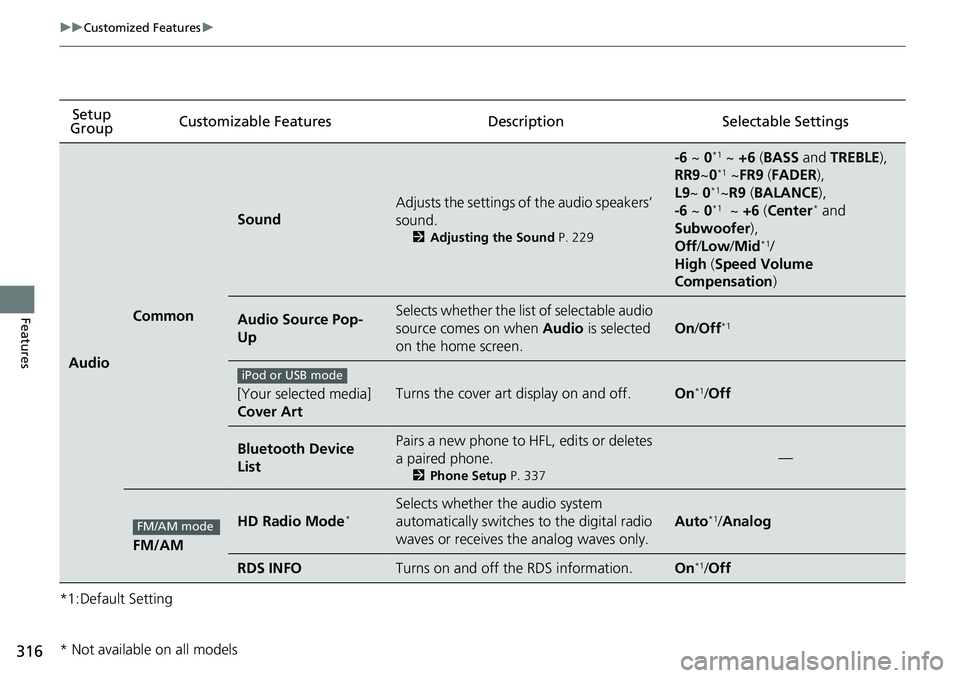
Group Customizable Features
DescriptionSelectable Settings
Audio
Common
Sound
Adjusts the settings of the audio speakers’
sound.
2Adjusting the Sound P. 229
-6 ~ 0*1 ~ +6 (BASS and TREBLE ),
RR9 ~0*1 ~FR9 (FADER ),
L9 ~ 0*1~R9 (BALANCE ),
-6 ~ 0*1 ~ +6 (Center* and
Subwoofer ),
Off /Low /Mid
*1/
High (Speed Volume
Compensation )
Audio Source Pop-
UpSelects whether the list of selectable audio
source comes on when Audio is selected
on the home screen.
On /Off*1
[Your selected media]
Cover ArtTurns the cover art display on and off.On*1/ Off
Bluetooth Device
ListPairs a new phone to HFL, edits or deletes
a paired phone.
2 Phone Setup P. 337
—
FM/AM
HD Radio Mode*Selects whether the audio system
automatically switches to the digital radio
waves or receives the analog waves only.
Auto*1/Analog
RDS INFOTurns on and off the RDS information.On*1/Off
iPod or USB mode
FM/AM mode
* Not available on all models
Page 365 of 598
363
Driving
This chapter discusses driving and refueling.
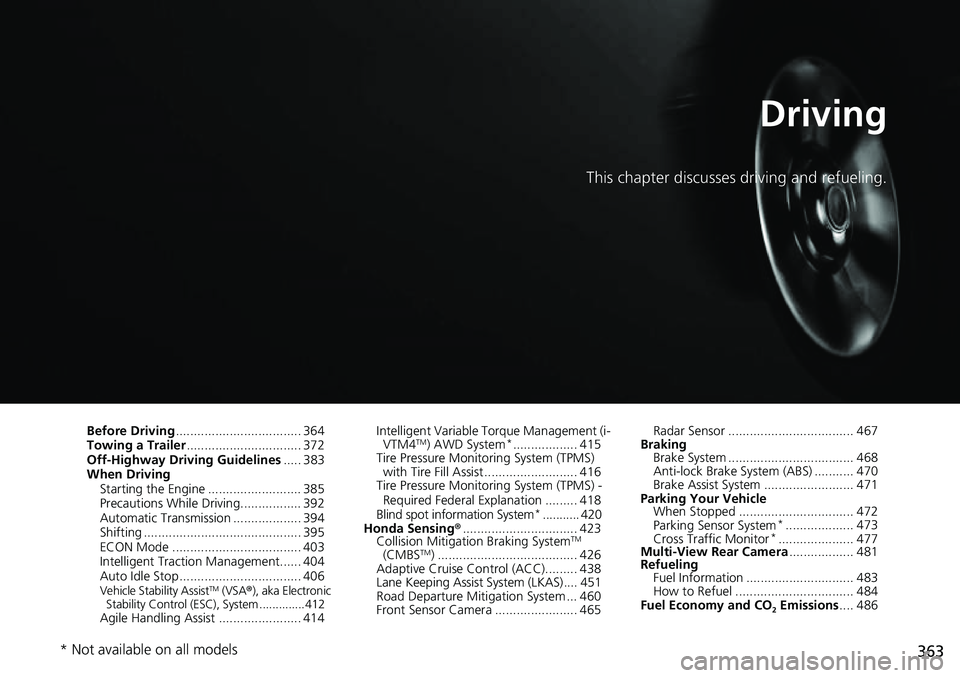
Before Driving................................... 364
Towing a Trailer ................................ 372
Off-Highway Driving Guidelines ..... 383
When Driving Starting the Engine .......................... 385
Precautions While Driving................. 392
Automatic Transmission ................... 394
Shifting ............................................ 395
ECON Mode .................................... 403
Intelligent Traction Management...... 404
Auto Idle Stop .................................. 406
Vehicle Stability AssistTM (VSA ®), aka Electronic
Stability Control (ESC), System ..............412
Agile Handling Assist ....................... 414 Intelligent Variable To
rque Management (i-
VTM4
TM) AWD System*.................. 415
Tire Pressure Monitoring System (TPMS) with Tire Fill Assist .......................... 416
Tire Pressure Monitoring System (TPMS) -
Required Federal Explanation ......... 418
Blind spot information System
*........... 420
Honda Sensing ®................................ 423
Collision Mitigati on Braking System
TM
(CMBSTM) ....................................... 426
Adaptive Cruise Control (ACC)......... 438
Lane Keeping Assist System (LKAS).... 451
Road Departure Mitigation System ... 460
Front Sensor Camera ....................... 465 Radar Sensor ................................... 467
Braking Brake System ................................... 468
Anti-lock Brake System (ABS) ........... 470
Brake Assist System ......................... 471
Parking Your Vehicle When Stopped ................................ 472
Parking Sensor System
*................... 473
Cross Traffic Monitor*..................... 477
Multi-View Rear Camera .................. 481
Refueling Fuel Information .............................. 483
How to Refuel ................................. 484
Fuel Economy and CO
2 Emissions .... 486
* Not available on all models
Page 367 of 598
Continued365
uuBefore Driving uDriving Preparation
Driving
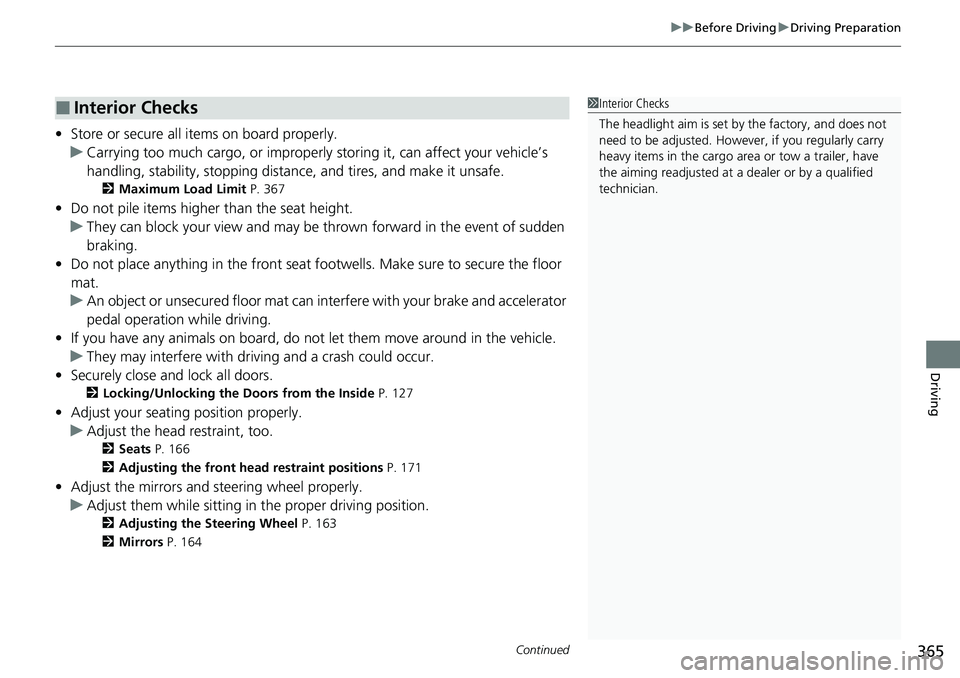
• Store or secure all items on board properly.
u Carrying too much cargo, or improperly storing it, can affect your vehicle’s
handling, stability, sto pping distance, and tires, and make it unsafe.
2Maximum Load Limit P. 367
•Do not pile items higher than the seat height.
u They can block your view and may be thrown forward in the event of sudden
braking.
• Do not place anything in the front seat footwells. Make sure to secure the floor
mat.
u An object or unsecured floor mat can in terfere with your brake and accelerator
pedal operation while driving.
• If you have any animals on board, do not let them move around in the vehicle.
u They may interfere with driving and a crash could occur.
• Securely close and lock all doors.
2Locking/Unlocking the Doors from the Inside P. 127
•Adjust your seating position properly.
u Adjust the head restraint, too.
2Seats P. 166
2 Adjusting the front head restraint positions P. 171
•Adjust the mirrors and steering wheel properly.
u Adjust them while sitting in the proper driving position.
2 Adjusting the Steering Wheel P. 163
2 Mirrors P. 164
■Interior Checks1Interior Checks
The headlight aim is set by the factory, and does not
need to be adjusted. Howeve r, if you regularly carry
heavy items in the cargo area or tow a trailer, have
the aiming readjusted at a dealer or by a qualified
technician.
Page 372 of 598
370
uuBefore Driving uCarrying Cargo
Driving
Carrying Cargo
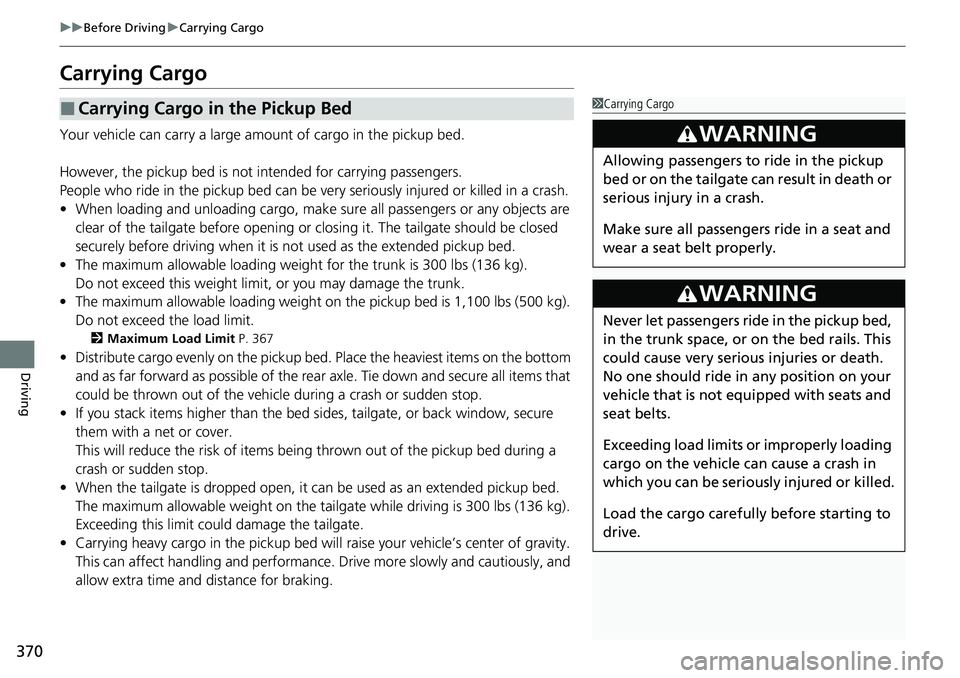
Your vehicle can carry a large amount of cargo in the pickup bed.
However, the pickup bed is not intended for carrying passengers.
People who ride in the pickup bed can be ve ry seriously injured or killed in a crash.
• When loading and unloading cargo, make sure all passengers or any objects are
clear of the tailgate before opening or closing it. The tailgate should be closed
securely before driving when it is not used as the extended pickup bed.
• The maximum allowable loading weight for the trunk is 300 lbs (136 kg).
Do not exceed this weight limi t, or you may damage the trunk.
• The maximum allowable loading weight on the pickup bed is 1,100 lbs (500 kg).
Do not exceed the load limit.
2 Maximum Load Limit P. 367
•Distribute cargo evenly on the pickup bed. Place the heaviest items on the bottom
and as far forward as possible of the rear axle. Tie down and secure all items that
could be thrown out of the vehicle during a crash or sudden stop.
• If you stack items higher than the bed si des, tailgate, or back window, secure
them with a net or cover.
This will reduce the risk of items being thrown out of the pickup bed during a
crash or sudden stop.
• When the tailgate is dropped open, it can be used as an extended pickup bed.
The maximum allowable weight on the tailgate while driving is 300 lbs (136 kg).
Exceeding this limit c ould damage the tailgate.
• Carrying heavy cargo in the pickup bed will raise your vehicle’s center of gravity.
This can affect handling and performance. Drive more slowly and cautiously, and
allow extra time and distance for braking.
■Carrying Cargo in the Pickup Bed1 Carrying Cargo
3WARNING
Allowing passengers to ride in the pickup
bed or on the tailgate can result in death or
serious injury in a crash.
Make sure all passengers ride in a seat and
wear a seat belt properly.
3WARNING
Never let passengers ride in the pickup bed,
in the trunk space, or on the bed rails. This
could cause very serious injuries or death.
No one should ride in any position on your
vehicle that is not eq uipped with seats and
seat belts.
Exceeding load limits or improperly loading
cargo on the vehicle can cause a crash in
which you can be seriously injured or killed.
Load the cargo carefully before starting to
drive.
Page 382 of 598
380
uuTowing a Trailer uTrailer Stability Assist
Driving
Trailer Stability Assist
Helps to stabilize the vehicle and tra iler when the trailer severely sways.
■How trailer stability assist works
When the vehicle and trailer become unstab le while driving, trailer stability assist
determines the cause. If the trailer oscillat ion is detected as the cause, and the
swaying increases, the system applies the brakes or controls engine output to reduce
vehicle speed.
Both the vehicle and trailer brake lights come on automatically if you brake to
reduce vehicle speed.
1 Trailer Stability Assist
Trailer stability assist is not a function that prevents
the vehicle and trailer from swaying. Avoid high
speeds, abrupt steering, improper trailer load, and
sudden braking to keep th e trailer from swaying.
When swayed too severely, the system becomes
ineffective, and you may lose control of your vehicle,
causing the trailer to ro ll over or get damaged.
2 Driving Safely with a Trailer P. 381
Trailer towing sway is caused by:
•Crosswinds
•Improper towbar down load
•Excessive speed
The VSA ® system indicator blinks during the trailer
stability assist operation. 2 VSA ® Operation P. 412
Page 383 of 598
381
uuTowing a Trailer uDriving Safely with a Trailer
Continued
Driving
Driving Safely with a Trailer
• Have the trailer properly servic ed and keep it in good condition.
• Make sure that all the weights and load in the vehicle and trailer are within limits.
2Towing Load Limits P. 372
•Securely attach the hitch, safety chains, and other necessary parts to the trailer.
• Securely store all the items in and on the tra iler so that they do not shift while
driving.
• Check if the lights and brakes on the trailer are working properly.
• Check the pressure of the trail er tires, including the spare.
• Turn off the Auto Idle Stop syst em using the Auto Idle Stop OFF button. The
trailer weight can affect your vehicle’s brake effectiveness if Auto Idle Stop is
activated on a hill wh ile towing a trailer.
• Drive slower than normal.
• Obey posted speed limits fo r vehicles with trailers.
• Use the
(D position when towing a trailer on level roads.
• Turn more slowly and with a wider turning arc than normal.
• Allow more time and distance for braking.
• Do not brake or turn suddenly.
■Things You Need To Know Before Towing a Trailer
■Towing Speeds and Gears
■Turning and Braking
1Driving Safely with a Trailer
Operating speed when towing a trailer must not
exceed 62 mph (100 km/h).
Parking
In addition to the normal precautions, place wheel
chocks at each of the trailer’s tires.
When towing a trailer, we recommend that you carry
a full-size spare wheel and tire for both your vehicle
and trailer. If you use the compact spare tire that
came with your vehicle, it could adversely affect
vehicle handling.
Remember to unhitch the tra iler before changing a
flat tire. Ask the trailer sales or rental agency where
and how to store the trailer’s spare tire.
1 Towing Speeds and Gears
When towing a fixed-sided trailer (e.g., camper), do
not exceed 55 mph (88 km/h).
At higher speeds, the trai ler may sway or affect
vehicle handling.