light HUMMER H3 2010 Owners Manual
[x] Cancel search | Manufacturer: HUMMER, Model Year: 2010, Model line: H3, Model: HUMMER H3 2010Pages: 410, PDF Size: 2.24 MB
Page 320 of 410

10-54 Vehicle Care
If the warning light comes on,
stop as soon as possible and
inflate the tires to the recommended
pressure shown on the tire loading
information label. SeeVehicle Load
Limits on page 9‑27.
At the same time, a Driver
Information Center (DIC) message
is displayed on the DIC display
screen. The low tire pressure
warning light and the DIC warning
message come on at each ignition
cycle until the tires are inflated to
the correct inflation pressure. For
additional information and details
about the DIC operation and
displays see Tire Messages
on
page 5‑25.
The low tire pressure warning light
may come on in cool weather when
the vehicle is first started, and then
turn off as you start to drive. This
could be an early indicator that the
air pressure in the tire(s) are getting
low and need to be inflated to the
proper pressure. A Tire and Loading Information
label, attached to the vehicle, shows
the size of the vehicle's original
equipment tires and the correct
inflation pressure for the vehicle's
tires when they are cold. See
Vehicle Load Limits
on page 9‑27,
for an example of the Tire and
Loading Information label and its
location on the vehicle. Also see
Tire Pressure on page 10‑51.
The vehicle's TPMS can warn you
about a low tire pressure condition
but it does not replace normal tire
maintenance. See Tire Inspection
on page 10‑57,Tire Rotationon
page 10‑57and Tires on
page 10‑44.
Notice: Liquid tire sealants could
damage the Tire Pressure Monitor
System (TPMS) sensors. Sensor
damage caused by using a tire
sealant is not covered by your
warranty. Do not use liquid tire
sealants.
TPMS Malfunction Light and
Message
The TPMS will not function properly
if one or more of the TPMS sensors
are missing or inoperable. When the
system detects a malfunction, the
low tire warning light flashes for
about one minute and then stays on
for the remainder of the ignition
cycle. A DIC warning message is
also displayed. The low tire warning
light and DIC warning message
come on at each ignition cycle until
the problem is corrected. Some of
the conditions that can cause the
malfunction light and DIC message
to come on are:
.One of the road tires has been
replaced with the spare tire.
The spare tire does not have
a TPMS sensor. The TPMS
malfunction light and DIC
message should go off once you
re‐install the road tire containing
the TPMS sensor.
Page 321 of 410

Vehicle Care 10-55
.The TPMS sensor matching
process was started but not
completed or not completed
successfully after rotating the
vehicle's tires. The DIC message
and TPMS malfunction light
should go off once the TPMS
sensor matching process is
performed successfully. See
“TPMS Sensor Matching
Process”later in this section.
.One or more TPMS sensors
are missing or damaged. The
DIC message and the TPMS
malfunction light should go
off when the TPMS sensors
are installed and the sensor
matching process is performed
successfully. See your
dealer/retailer for service.
.Replacement tires or wheels do
not match the vehicle's original
equipment tires or wheels. Tires
and wheels other than those
recommended for the vehicle
could prevent the TPMS from
functioning properly. See Buying
New Tires on page 10‑59.
.Operating electronic devices or
being near facilities using radio
wave frequencies similar to the
TPMS could cause the TPMS
sensors to malfunction.
If the TPMS is not functioning it
cannot detect or signal a low tire
condition. See your dealer/retailer
for service if the TPMS malfunction
light and DIC message comes on
and stays on.
TPMS Sensor Matching
Process
Each TPMS sensor has a unique
identification code. Any time you
replace one or more of the TPMS
sensors or rotate the vehicle's tires,
the identification codes need to
be matched to the new tire/wheel
position. The sensors are matched
to the tire/wheel positions in the
following order: driver side front tire,
passenger side front tire, passenger
side rear tire, and driver side rear
tire using a TPMS diagnostic tool.
See your dealer/retailer for service.
The TPMS sensors can also be
matched to each tire/wheel position
by increasing or decreasing the
tire's air pressure. If increasing the
tire's air pressure, do not exceed
the maximum inflation pressure
indicated on the tire's sidewall.
To let air-pressure out of a tire you
can use the pointed end of the valve
cap, a pencil-style air pressure
gauge, or a key.
Page 322 of 410

10-56 Vehicle Care
You have one minute to match
the first tire/wheel position, and
five minutes overall, to match all
four tire/wheel positions. If it takes
longer than one minute, to match
the first tire and wheel, or more than
five minutes to match all four tire
and wheel positions, the matching
process stops and you need to
start over.
The TPMS sensor matching
procedure is outlined below:
1. Set the parking brake.
2. Turn the ignition switch toON/RUN with the engine off.
3. Turn the exterior lamp switch from AUTO to OFF four times
within three seconds.
A double horn chirp will
sound and the TPMS low tire
warning light starts flashing.
The double horn chirp and
flashing TPMS warning light
indicates the TPMS matching
process has started. The TPMS warning light should continue
flashing throughout the matching
procedure. The LOW TIRE
message displays on the Driver
Information Center (DIC).
4. Start with the driver side front tire.
5. Remove the valve cap from the valve cap stem. Activate the
TPMS sensor by increasing or
decreasing the tire's air pressure
for 10 seconds, then stop and
listen for a single horn chirp. The
single horn chirp should sound
within 15 seconds, confirming
that the sensor identification
code has been matched to this
tire and wheel position. If you
do not hear the confirming
single horn chirp, turn the
ignition switch to LOCK and start
over beginning with Step 2.
6. Proceed to the passenger side front tire, and repeat the
procedure in Step 5. 7. Proceed to the passenger side
rear tire, and repeat the
procedure in Step 5.
8. Proceed to the driver side rear tire, and repeat the procedure in
Step 5.
9. After hearing the confirming horn chirp for the driver side rear tire,
check to see if the TPMS low tire
warning light and the DIC LOW
TIRE messages have turned off.
If yes, the TPMS sensors have
been relearned. Turn the ignition
switch to LOCK/OFF.
If the low tire warning light and
the SERV TPM message on the
DIC are on after completing
Step 5 for the driver side rear
tire, the sensor relearn process
has not been successful. Turn
the ignition switch to LOCK/OFF
and repeat the matching process
beginning with Step 2.
Page 327 of 410
Vehicle Care 10-61
Additionally, if your vehicle has
electronic systems such as anti‐lock
brakes, rollover airbags, traction
control, and electronic stability
control, the performance of these
systems can be affected.
{WARNING
If you add different sized
wheels, your vehicle may not
provide an acceptable level of
performance and safety if tires not
recommended for those wheels
are selected. You may increase
the chance that you will crash and
suffer serious injury. Only use
Hummer specific wheel and tire
systems developed for your
vehicle, and have them properly
installed by a GM certified
technician.
See Buying New Tires
on
page 10‑59and Accessories and
Modificationson page 10‑3for
additional information.
Uniform Tire Quality
Grading
Quality grades can be found
where applicable on the tire
sidewall between tread shoulder
and maximum section width. For
example:
Treadwear 200 Traction AA
Temperature A
The following information relates
to the system developed by the
United States National Highway
Traffic Safety Administration
(NHTSA), which grades tires
by treadwear, traction, and
temperature performance. This
applies only to vehicles sold in
the United States. The grades
are molded on the sidewalls
of most passenger car tires.
The Uniform Tire Quality
Grading (UTQG) system
does not apply to deep
tread, winter-type snow tires, space-saver, or temporary use
spare tires, tires with nominal
rim diameters of 10 to 12 inches
(25 to 30 cm), or to some
limited-production tires.
While the tires available on
Hummer light trucks may vary
with respect to these grades,
they must also conform to
federal safety requirements and
additional General Motors Tire
Performance Criteria (TPC)
standards.
All Passenger Car Tires Must
Conform to Federal Safety
Requirements In Addition To
These Grades.
Treadwear
The treadwear grade is a
comparative rating based
on the wear rate of the tire
when tested under controlled
conditions on a specified
government test course.
Page 348 of 410
10-82 Vehicle Care
Storing a Flat or Spare Tire
and Tools
{WARNING
Storing a jack, a tire, or other
equipment in the passenger
compartment of the vehicle could
cause injury. In a sudden stop or
collision, loose equipment could
strike someone. Store all these in
the proper place.
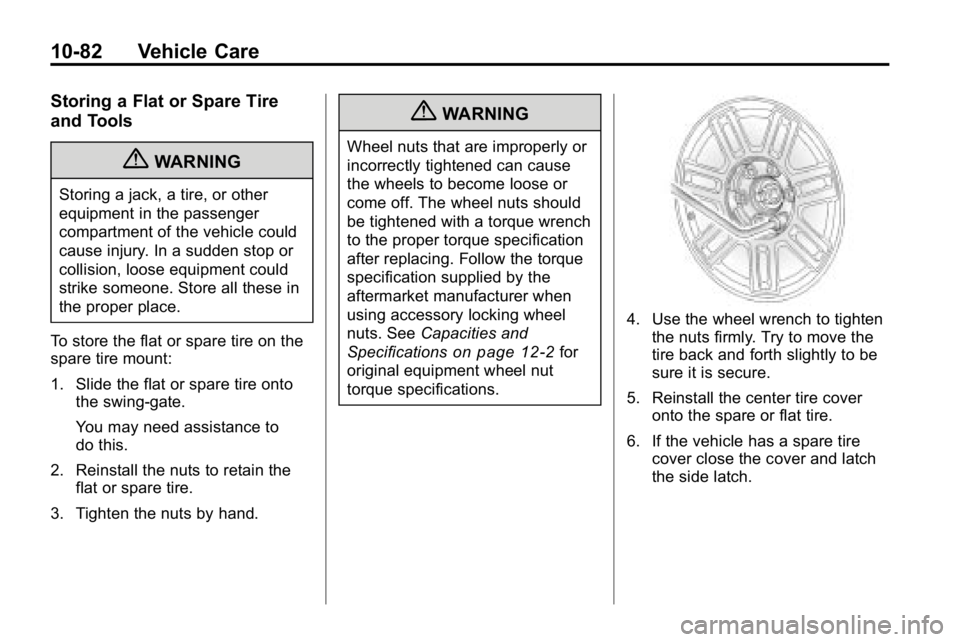
To store the flat or spare tire on the
spare tire mount:
1. Slide the flat or spare tire onto the swing-gate.
You may need assistance to
do this.
2. Reinstall the nuts to retain the flat or spare tire.
3. Tighten the nuts by hand.
{WARNING
Wheel nuts that are improperly or
incorrectly tightened can cause
the wheels to become loose or
come off. The wheel nuts should
be tightened with a torque wrench
to the proper torque specification
after replacing. Follow the torque
specification supplied by the
aftermarket manufacturer when
using accessory locking wheel
nuts. See Capacities and
Specifications
on page 12‑2for
original equipment wheel nut
torque specifications.
4. Use the wheel wrench to tighten the nuts firmly. Try to move the
tire back and forth slightly to be
sure it is secure.
5. Reinstall the center tire cover onto the spare or flat tire.
6. If the vehicle has a spare tire cover close the cover and latch
the side latch.
Page 352 of 410
10-86 Vehicle Care
After installing the spare tire on your
vehicle, you should stop as soon as
possible and make sure the spare is
correctly inflated.
The spare tire does not have a Tire
Pressure Monitor System sensor.
You may get a low pressure warning
light. SeeTire Pressure Monitor
Operation
on page 10‑53. Have the
damaged or flat road tire repaired or
replaced as soon as you can.
Do not mix tires and wheels of
different sizes, because they will
not fit. Keep your spare tire and its
wheel together.
Jump Starting
If the vehicle's battery has run
down, you may want to use another
vehicle and some jumper cables to
start your vehicle. Be sure to use
the following steps to do it safely.
{WARNING
Batteries can hurt you. They can
be dangerous because:
.They contain acid that can
burn you.
.They contain gas that can
explode or ignite.
.They contain enough
electricity to burn you.
If you do not follow these steps
exactly, some or all of these
things can hurt you. Notice:
Ignoring these steps
could result in costly damage to
the vehicle that would not be
covered by the warranty.
Trying to start the vehicle by
pushing or pulling it will not
work, and it could damage the
vehicle.
1. Check the other vehicle. It must
have a 12‐volt battery with a
negative ground system.
Notice: If the other vehicle's
system is not a 12-volt system
with a negative ground, both
vehicles can be damaged. Only
use vehicles with 12-volt systems
with negative grounds to jump
start your vehicle.
2. Get the vehicles close enough so the jumper cables can reach,
but be sure the vehicles are not
touching each other. If they
are, it could cause a ground
connection you do not want.
Page 353 of 410
Vehicle Care 10-87
You would not be able to start
your vehicle, and the bad
grounding could damage the
electrical systems.
To avoid the possibility of the
vehicles rolling, set the parking
brake firmly on both vehicles
involved in the jump start
procedure. Put an automatic
transmission in P (Park) or a
manual transmission in Neutral
before setting the parking brake.
If you have a four-wheel-drive
vehicle, be sure the transfer
case is not in Neutral.
Notice: If you leave the radio or
other accessories on during the
jump starting procedure, they
could be damaged. The repairs
would not be covered by the
warranty. Always turn off the
radio and other accessories
when jump starting the vehicle. 3. Turn off the ignition on both
vehicles. Unplug unnecessary
accessories plugged into the
cigarette lighter or the accessory
power outlets. Turn off the radio
and all lamps that are not
needed. This will avoid sparks
and help save both batteries.
And it could save the radio!
4. Open the hoods and locate the batteries on both vehicles. You
will use the positive (+) battery
terminal and the remote
negative (−) jump starting
terminal to jump start your
vehicle. To access the
positive (+) battery terminal,
open the terminal cover. See
Engine Compartment Overview
on page 10‑6for more
information on the terminal
locations.
{WARNING
Using a match near a battery can
cause battery gas to explode.
People have been hurt doing this,
and some have been blinded.
Use a flashlight if you need more
light.
Be sure the batteries have
enough water. You do not need
to add water to the ACDelco
®
battery (or batteries) installed in
your new vehicle. But if a battery
has filler caps, be sure the right
amount of fluid is there. If it is low,
add water to take care of that
first. If you do not, explosive gas
could be present.
Battery fluid contains acid that
can burn you. Do not get it on
you. If you accidentally get it in
your eyes or on your skin, flush
the place with water and get
medical help immediately.
Page 359 of 410
Vehicle Care 10-93
Washing the Vehicle
To preserve the vehicle's finish,
keep it clean by washing it often.
Do not wash the vehicle in direct
sunlight and use a car
washing soap.
Notice:Certain cleaners contain
chemicals that can damage the
emblems or nameplates on the
vehicle. Check the cleaning
product label. If it states that it
should not be used on plastic
parts, do not use it on the vehicle
or damage may occur and it
would not be covered by the
warranty.
Do not use cleaning agents that are
petroleum based or that contain
acid or abrasives, as they can
damage the paint, metal or plastic
on the vehicle. Approved cleaning
products can be obtained from your
dealer. Follow all manufacturer
directions regarding correct product
usage, necessary safety precautions and appropriate
disposal of any vehicle care
product.
Rinse the vehicle well, before
washing and after to remove all
cleaning agents completely. If they
are allowed to dry on the surface,
they could stain.
Dry the finish with a soft, clean
chamois or an all-cotton towel to
avoid surface scratches and water
spotting.
High pressure car washes could
cause water to enter the vehicle.
Avoid using high pressure washes
closer than 30 cm (12 inches) to the
surface of the vehicle. Use of power
washers exceeding 8,274 kPa
(1,200 psi) can result in damage or
removal of paint and decals.
Notice:
Conveyor systems on
some automatic car washes could
damage the vehicle. There may
not be enough clearance for the
undercarriage. Check with the car
wash manager before using the
automatic car wash.
Weatherstrips
Silicone grease on weatherstrips will
make them last longer, seal better,
and not stick or squeak. Apply
silicone grease with a clean cloth.
During very cold, damp weather
frequent application may be
required. See “Fluids and
Lubricants” in the Index of the
“Maintenance and Warranty and
Owner assistance Information”
manual.
Page 362 of 410
10-96 Vehicle Care
At least every spring, flush these
materials from the underbody with
plain water. Clean any areas where
mud and debris can collect. Dirt
packed in close areas of the frame
should be loosened before being
flushed. Your dealer or an
underbody car washing system
can do this.
Chemical Paint Spotting
Some weather and atmospheric
conditions can create a chemical
fallout. Airborne pollutants can fall
upon and attack painted surfaces on
the vehicle. This damage can take
two forms: blotchy, ring-shaped
discolorations, and small, irregular
dark spots etched into the paint
surface.
Interior Care
The vehicle's interior will continue
to look its best if it is cleaned often.
Dust and dirt can accumulate on the
upholstery and cause damage to
the carpet, fabric, leather, and
plastic surfaces. Stains should be
removed quickly as extreme heat
could cause them to set rapidly.
Lighter colored interiors may
require more frequent cleaning.
Newspapers and garments that can
transfer color to home furnishings
can also transfer color to the
vehicle's interior.
Remove dust from small buttons
and knobs with a small brush with
soft bristles.
Your dealer has products for
cleaning the vehicle's interior. When
cleaning the vehicle's interior, only
use cleaners specifically designed
for the surfaces that are being
cleaned. Permanent damage canresult from using cleaners on
surfaces for which they were not
intended. Apply the cleaner directly
to the cleaning cloth to prevent
over-spray. Remove any accidental
over-spray from other surfaces
immediately.
Notice:
Using abrasive cleaners
when cleaning glass surfaces on
the vehicle, could scratch the
glass and/or cause damage to
the rear window defogger. When
cleaning the glass on the vehicle,
use only a soft cloth and glass
cleaner.
Cleaners can contain solvents that
can become concentrated in the
vehicle's interior. Before using
cleaners, read and adhere to all
safety instructions on the label.
While cleaning the vehicle's interior,
maintain adequate ventilation by
opening the vehicle's doors and
windows.
Page 399 of 410

INDEX i-1
A
Accessories andModifications . . . . . . . . . . . . . . . . . 10-3
Accessory Power . . . . . . . . . . . . . . 9-35
Add-On Electrical Equipment . . . . . . . . . . . . . . . . . . . 9-81
Adding Equipment to the
Airbag-Equipped Vehicle . . . . . 3-40
Adjustments Lumbar, Front Seats . . . . . . . . . . . 3-4
Air Cleaner/Filter, Engine . . . . . 10-17
Air Vents . . . . . . . . . . . . . . . . . . . . . . . 8-4
Airbag System
Check . . . . . . . . . . . . . . . . . . . . . . . . 3-41
How Does an AirbagRestrain? . . . . . . . . . . . . . . . . . . . 3-32
Passenger Sensing System . . . . . . . . . . . . . . . . . . . . . . 3-35
What Makes an Airbag Inflate? . . . . . . . . . . . . . . . . . . . . . . 3-32 Airbag System (cont.)
What Will You See After
an Airbag Inflates? . . . . . . . . . . 3-33
When Should an Airbag
Inflate? . . . . . . . . . . . . . . . . . . . . . . 3-31
Where Are the Airbags? . . . . . . 3-29
Airbags Adding Equipment to theVehicle . . . . . . . . . . . . . . . . . . . . . . 3-40
Passenger Status Indicator . . . 5-11
Readiness Light . . . . . . . . . . . . . . 5-10
Servicing Airbag-Equipped Vehicles . . . . . . . . . . . . . . . . . . . . . 3-40
System Check . . . . . . . . . . . . . . . . 3-27
Alarm System Anti-Theft . . . . . . . . . . . . . . . . . . . . . . 2-9
AM-FM Radio . . . . . . . . . . . . . . . . . . . 7-5
Antenna Satellite Radio . . . . . . . . . . . . . . . . 7-10
Anti-Theft Alarm System . . . . . . . . . . . . . . . . . 2-9 Antilock Brake
System (ABS) . . . . . . . . . . . . . . . . 9-50
Warning Light . . . . . . . . . . . . . . . . . 5-15
Appearance Care Exterior . . . . . . . . . . . . . . . . . . . . . 10-92
Interior . . . . . . . . . . . . . . . . . . . . . . 10-96
Ashtrays . . . . . . . . . . . . . . . . . . . . . . . . 5-6
Audio Players . . . . . . . . . . . . . . . . . 7-10
CD . . . . . . . . . . . . . . . . . . . . . . . . . . . 7-10
Audio System Fixed Mast Antenna . . . . . . . . . . 7-10
Radio Reception . . . . . . . . . . . . . . . 7-9
Theft-Deterrent Feature . . . . . . . . 7-2
Automatic Door Locks . . . . . . . . . . . . . . . . . . . . 2-6
Headlamp System . . . . . . . . . . . . . 6-4
Automatic Transmission . . . . . . . 9-41 Fluid . . . . . . . . . . . . . . . . . . . . . . . . 10-12
Shiftlock Control SystemCheck . . . . . . . . . . . . . . . . . . . . . 10-30
Axle
Locking Front . . . . . . . . . . . . . . . . . 9-55
Axle, Front . . . . . . . . . . . . . . . . . . . . 10-29
Axle, Rear . . . . . . . . . . . . . . . . . . . . 10-29