door lock HYUNDAI COUPE 2012 User Guide
[x] Cancel search | Manufacturer: HYUNDAI, Model Year: 2012, Model line: COUPE, Model: HYUNDAI COUPE 2012Pages: 391, PDF Size: 6.88 MB
Page 91 of 391
Features of your vehicle
14
4
D030200ABH-EU
Theft-alarm stage
The alarm will be activated if any of the
following occurs while the system is
armed.
A door is opened without using the
transmitter (or smart key).
The trunk is opened without using the transmitter (or smart key).
The engine hood is opened.
The horn will sound and the hazard
warning lights will blink continuously for
approximately 30 seconds, and the alarm
will repeat once more unless the system
is disarmed. To turn off the system,
unlock the doors with the ignition key or
transmitter.
✽ ✽ NOTICE
If the trunk is opened by using the
transmitter (or smart key), the alarm
will not be activated, but doors, hood,
and ignition switch keep arming condi-
tion. Once the trunk is opened and then
closed, the trunk will be locked and
armed automatically.
D030400ABK-EE
Disarmed stage
The system will be disarmed when the
doors are unlocked with the transmitter
(or smart key).
After depressing the unlock button, the
hazard warning lights will blink and the
chime will sound twice to indicate that the
system is disarmed.
After depressing the unlock button, if any
door is not opened within 30 seconds,
the system will be rearmed.
✽ ✽NOTICE
• Avoid trying to start the engine while
the alarm is activated. The vehicle
starter motor is disabled during the
theft-alarm stage.
If the system is not disarmed with the
transmitter, insert the key into the
ignition switch, turn the ignition
switch to the ON position and wait for
30 seconds. Then the system will be
disarmed. (if equipped)
• If you lose your keys, consult your authorized HYUNDAI dealer.
CAUTION
Do not change, alter or adjust the
theft-alarm system because it couldcause the theft-alarm system to malfunction. The system shouldonly be serviced by an authorizedHYUNDAI dealer.
Malfunctions caused by improperalterations, adjustments or modifi-cations to the theft-alarm system are not covered by your vehiclemanufacturer warranty.
procarmanuals.com
Page 92 of 391
415
Features of your vehicle
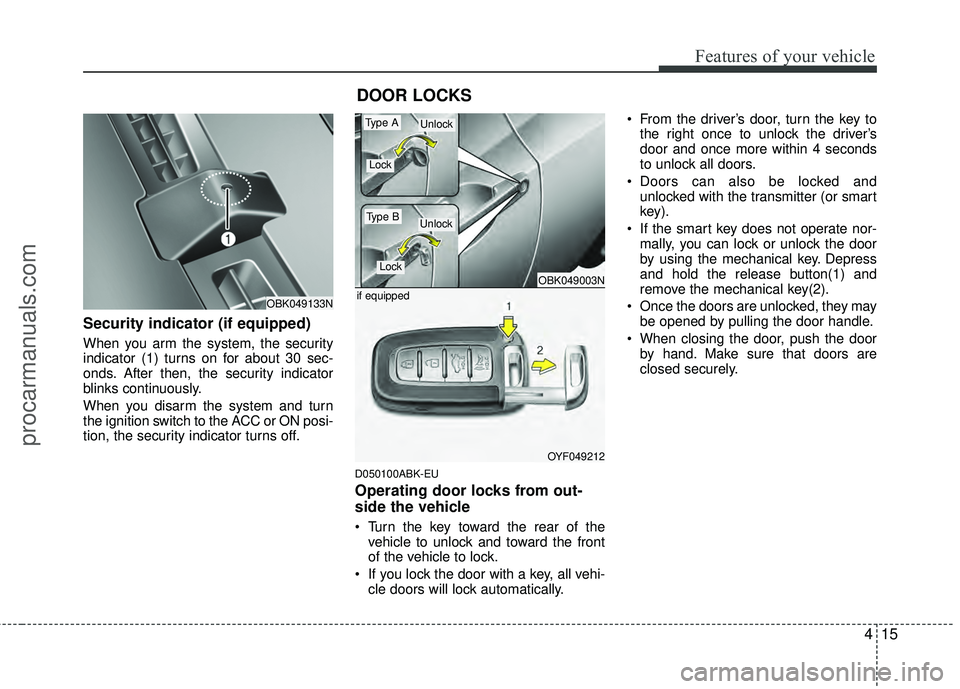
Security indicator (if equipped)
When you arm the system, the security
indicator (1) turns on for about 30 sec-
onds. After then, the security indicator
blinks continuously.
When you disarm the system and turn
the ignition switch to the ACC or ON posi-
tion, the security indicator turns off.
D050100ABK-EU
Operating door locks from out-
side the vehicle
Turn the key toward the rear of thevehicle to unlock and toward the front
of the vehicle to lock.
If you lock the door with a key, all vehi- cle doors will lock automatically. From the driver’s door, turn the key to
the right once to unlock the driver’s
door and once more within 4 seconds
to unlock all doors.
Doors can also be locked and unlocked with the transmitter (or smart
key).
If the smart key does not operate nor- mally, you can lock or unlock the door
by using the mechanical key. Depress
and hold the release button(1) and
remove the mechanical key(2).
Once the doors are unlocked, they may be opened by pulling the door handle.
When closing the door, push the door by hand. Make sure that doors are
closed securely.
DOOR LOCKS
OBK049133N
OBK049003N
OYF049212
if equipped
Type A
Type B
Lock
Lock
Unlock
Unlock
procarmanuals.com
Page 93 of 391
Features of your vehicle
16
4
✽
✽
NOTICE
• In cold and wet climates, door locks
and door mechanisms may not work
properly due to freezing conditions.
• If the door is locked/unlocked multi- ple times in rapid succession with
either the vehicle key or door lock
switch, the system may stop operating
temporarily in order to protect the
circuit and prevent damage to system
components.
• If you open the door when the window is closed completely, the window will
go down slightly. If you close the door
when the window is closed completely,
the window will go up slightly.
It is to reduce the airflow noise and
prevent water leakage by closing the
door completely. Mechanical noise
may be heard when you close and
open the door, but this condition is
normal.
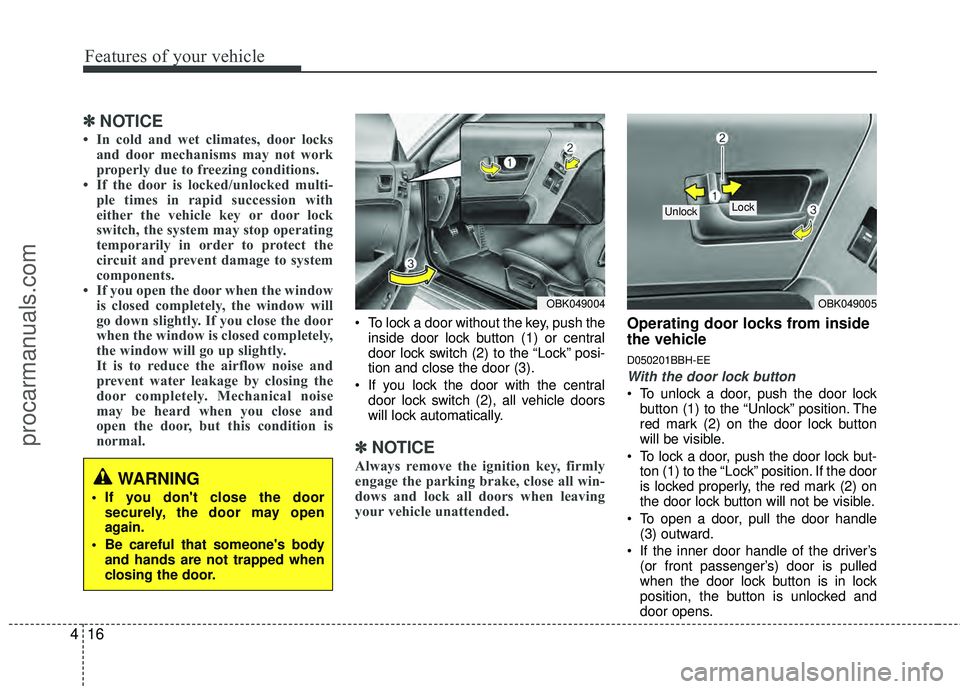
To lock a door without the key, push the
inside door lock button (1) or central
door lock switch (2 ) to the “Lock” posi-
tion and close the door (3).
If you lock the door with the central door lock switch (2), all vehicle doors
will lock automatically.
✽ ✽ NOTICE
Always remove the ignition key, firmly
engage the parking brake, close all win-
dows and lock all doors when leaving
your vehicle unattended.
Operating door locks from inside
the vehicle
D050201BBH-EE
With the door lock button
To unlock a door, push the door lock
button (1) to the “Unlock” position. The
red mark (2) on the door lock button
will be visible.
To lock a door, push the door lock but- ton (1) to the “Lock” position. If the door
is locked properly, the red mark (2) on
the door lock button will not be visible.
To open a door, pull the door handle (3) outward.
If the inner door handle of the driver’s (or front passenger’s) door is pulled
when the door lock button is in lock
position, the button is unlocked and
door opens.
OBK049005
Lock Unlock
OBK049004
WARNING
If you don't close the doorsecurely, the door may open
again.
Be careful that someone's body and hands are not trapped when
closing the door.
procarmanuals.com
Page 94 of 391
417
Features of your vehicle
Doors cannot be locked if the ignitionkey is in the ignition switch (or if the
smart key is in the vehicle) and any
door is open.
D050202ABK-EU
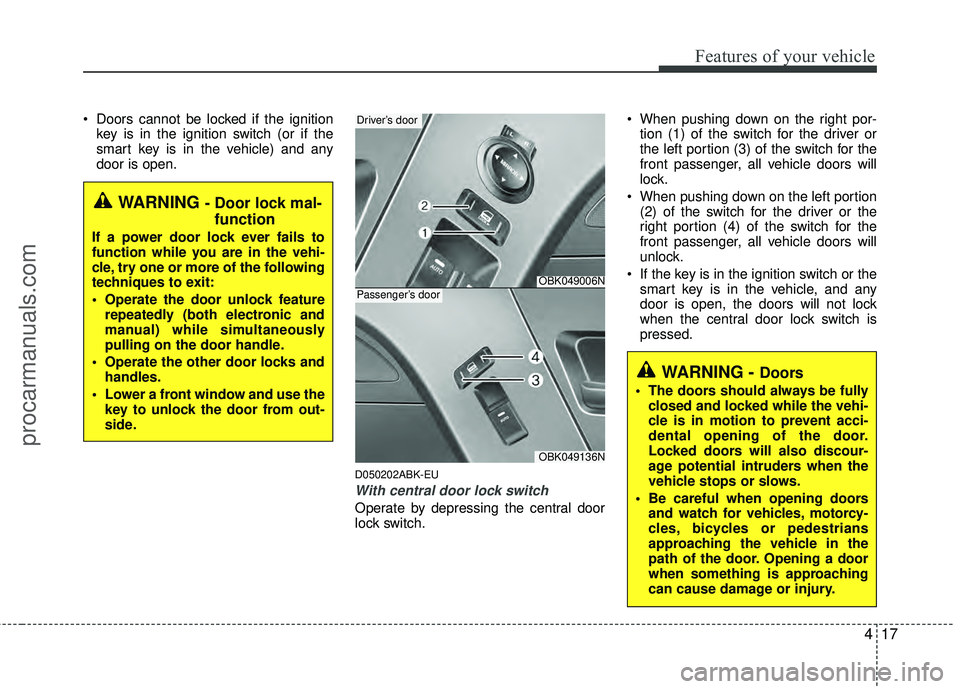
With central door lock switch
Operate by depressing the central door
lock switch. When pushing down on the right por-
tion (1) of the switch for the driver or
the left portion (3) of the switch for the
front passenger, all vehicle doors will
lock.
When pushing down on the left portion (2) of the switch for the driver or the
right portion (4) of the switch for the
front passenger, all vehicle doors will
unlock.
If the key is in the ignition switch or the smart key is in the vehicle, and any
door is open, the doors will not lock
when the central door lock switch is
pressed.
WARNING - Doors
The doors should always be fullyclosed and locked while the vehi-
cle is in motion to prevent acci-
dental opening of the door.
Locked doors will also discour-
age potential intruders when the
vehicle stops or slows.
Be careful when opening doors and watch for vehicles, motorcy-
cles, bicycles or pedestrians
approaching the vehicle in the
path of the door. Opening a door
when something is approaching
can cause damage or injury.
WARNING - Door lock mal-function
If a power door lock ever fails to
function while you are in the vehi-
cle, try one or more of the following
techniques to exit:
Operate the door unlock feature
repeatedly (both electronic and
manual) while simultaneously
pulling on the door handle.
Operate the other door locks and handles.
Lower a front window and use the key to unlock the door from out-
side.
OBK049006N
Driver’s door
OBK049136N
Passenger’s door
procarmanuals.com
Page 95 of 391
Features of your vehicle
18
4
D050400ABK-EU
Speed sensing door lock system
(if equipped)
Type A
All doors will be automatically locked
when the vehicle speed exceeds 24 mph.
Type B
All doors will be automatically locked
when the vehicle speed exceeds 9 mph.
And all doors will be automatically
unlocked after you turn the engine off or
when you remove the ignition key. (if
equipped)
✽ ✽
NOTICE
An authorized HYUNDAI dealer can
change the speed of the speed sensing
door lock system from approximately 12
mph to approximately 25 mph or dis-
able the system.
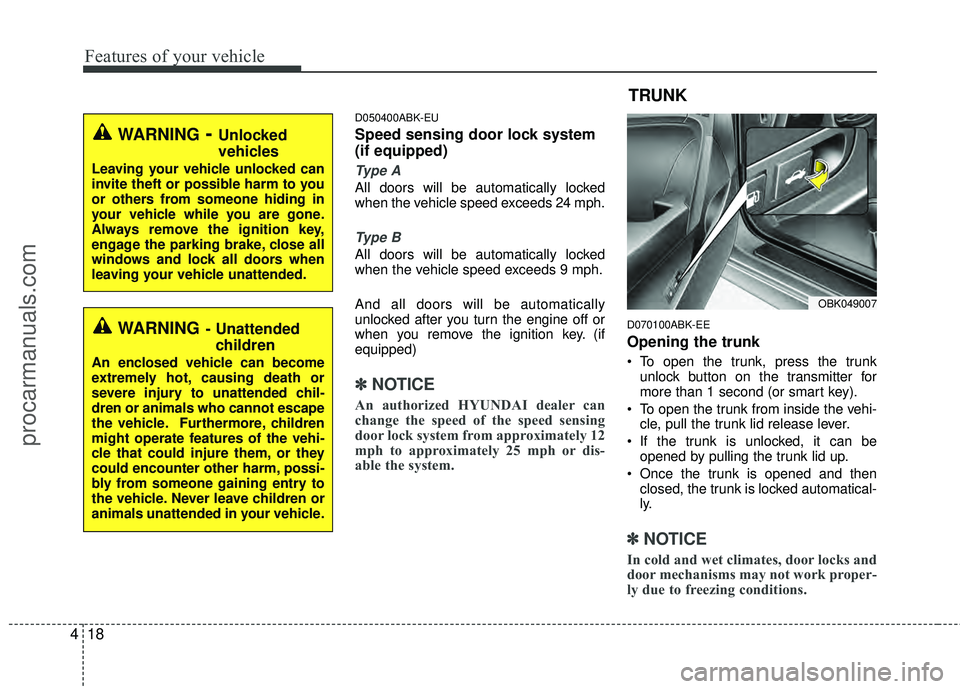
D070100ABK-EE
Opening the trunk
To open the trunk, press the trunk
unlock button on the transmitter for
more than 1 second (or smart key).
To open the trunk from inside the vehi- cle, pull the trunk lid release lever.
If the trunk is unlocked, it can be opened by pulling the trunk lid up.
Once the trunk is opened and then closed, the trunk is locked automatical-
ly.
✽ ✽ NOTICE
In cold and wet climates, door locks and
door mechanisms may not work proper-
ly due to freezing conditions.
OBK049007
TRUNK
WARNING- Unlocked
vehicles
Leaving your vehicle unlocked can
invite theft or possible harm to you
or others from someone hiding in
your vehicle while you are gone.
Always remove the ignition key,
engage the parking brake, close all
windows and lock all doors when
leaving your vehicle unattended.
WARNING- Unattended
children
An enclosed vehicle can become
extremely hot, causing death or
severe injury to unattended chil-
dren or animals who cannot escape
the vehicle. Furthermore, children
might operate features of the vehi-
cle that could injure them, or they
could encounter other harm, possi-
bly from someone gaining entry to
the vehicle. Never leave children or
animals unattended in your vehicle.
procarmanuals.com
Page 98 of 391
421
Features of your vehicle
D080100ABK
Power windows
The ignition switch must be in the ON
position for power windows to operate.
Each door has a power window switch
that controls the door's window. The
power windows can be operated for
approximately 30 seconds after the igni-
tion key is removed or turned to the ACC
or LOCK position. However, if the doors
open, the power windows cannot be
operated within the 30 second period
after ignition key is removed or turned to
the ACC or LOCK position.
✽ ✽NOTICE
While driving with the sunroof in an
open (or partially open) position, your
vehicle may demonstrate a wind buffet-
ing or pulsation noise. This noise is a
normal occurrence and can be reduced
or eliminated by slightly reducing the
size of the sunroof opening.
D080101AUN
Window opening and closing
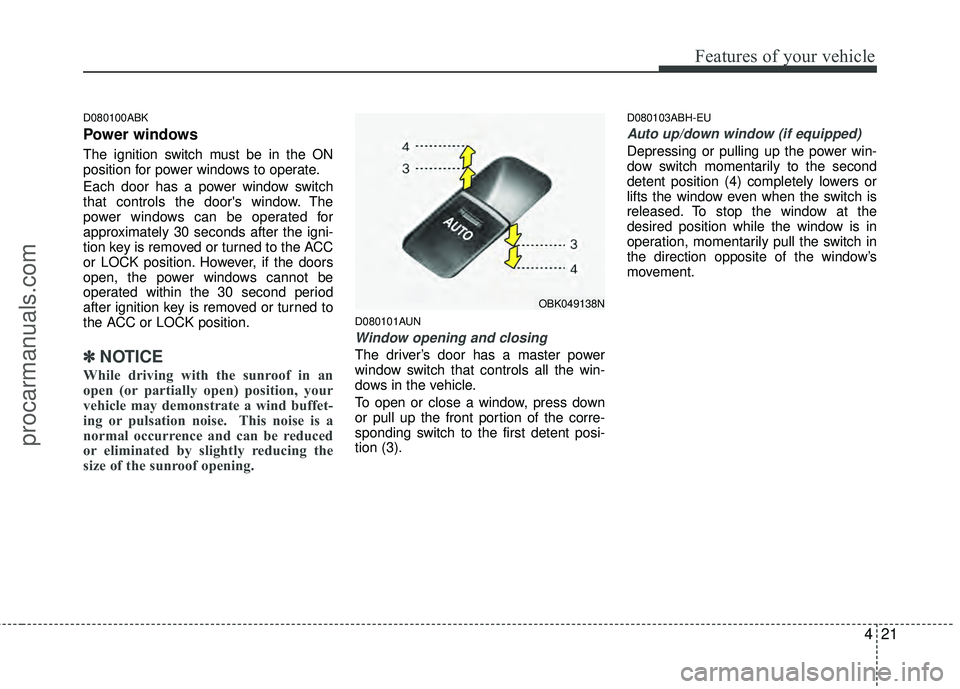
The driver’s door has a master power
window switch that controls all the win-
dows in the vehicle.
To open or close a window, press down
or pull up the front portion of the corre-
sponding switch to the first detent posi-
tion (3).
D080103ABH-EU
Auto up/down window (if equipped)
Depressing or pulling up the power win-
dow switch momentarily to the second
detent position (4) completely lowers or
lifts the window even when the switch is
released. To stop the window at the
desired position while the window is in
operation, momentarily pull the switch in
the direction opposite of the window’s
movement.
OBK049138N
procarmanuals.com
Page 100 of 391
423
Features of your vehicle
CAUTION
To prevent possible damage tothe power window system, do notopen or close two windows ormore at the same time. This willalso ensure the longevity of the fuse.
Never try to operate the main switch on the driver's door andthe individual door windowswitch in opposing directions atthe same time. If this is done, thewindow will stop and cannot beopened or closed.WARNING - Windows
NEVER leave the ignition key (or smart key) in the vehicle.
NEVER leave any child unattend- ed in the vehicle. Even very
young children may inadvertently
cause the vehicle to move, entan-
gle themselves in the windows,
or otherwise injure themselves or
others.
Always double check to make sure all arms, hands, head and
other obstructions are safely out
of the way before closing a win-
dow.
Do not allow children to play with the power windows. Keep the dri-
ver’s door power window lock
switch in the LOCK position
(depressed). Serious injury can
result from unintentional window
operation by the child.
Do not extend a face or arms out- side through the window opening
while driving.
procarmanuals.com
Page 102 of 391
425
Features of your vehicle
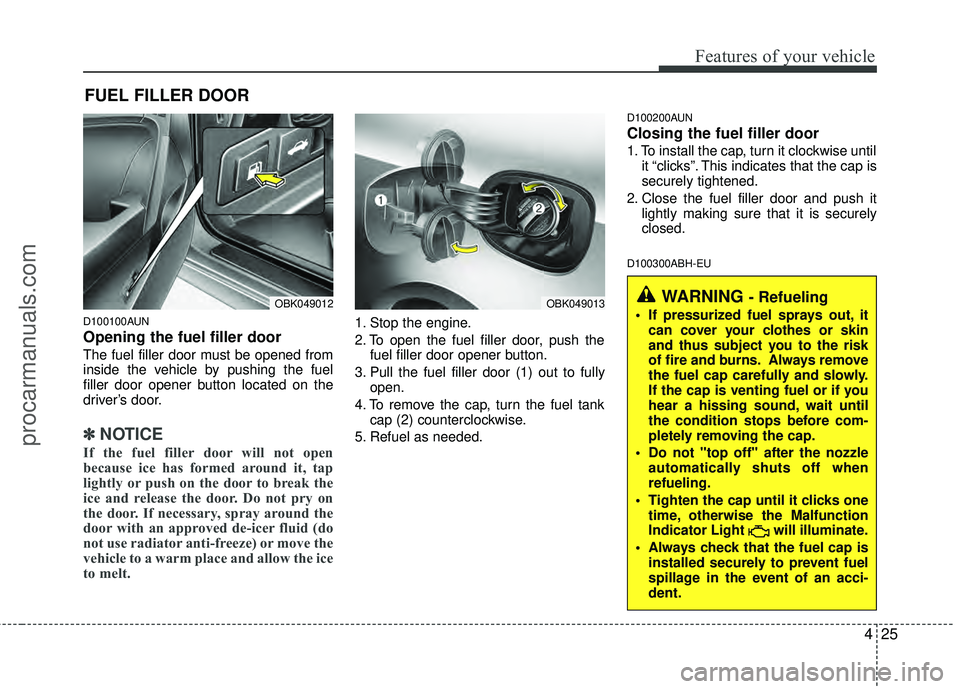
D100100AUN
Opening the fuel filler door
The fuel filler door must be opened from
inside the vehicle by pushing the fuel
filler door opener button located on the
driver’s door.
✽ ✽NOTICE
If the fuel filler door will not open
because ice has formed around it, tap
lightly or push on the door to break the
ice and release the door. Do not pry on
the door. If necessary, spray around the
door with an approved de-icer fluid (do
not use radiator anti-freeze) or move the
vehicle to a warm place and allow the ice
to melt.
1. Stop the engine.
2. To open the fuel filler door, push the
fuel filler door opener button.
3. Pull the fuel filler door (1) out to fully open.
4. To remove the cap, turn the fuel tank cap (2) counterclockwise.
5. Refuel as needed.
D100200AUN
Closing the fuel filler door
1. To install the cap, turn it clockwise until it “clicks”. This indicates that the cap is
securely tightened.
2. Close the fuel filler door and push it lightly making sure that it is securely
closed.
D100300ABH-EU
FUEL FILLER DOOR
WARNING - Refueling
If pressurized fuel sprays out, itcan cover your clothes or skin
and thus subject you to the risk
of fire and burns. Always remove
the fuel cap carefully and slowly.
If the cap is venting fuel or if you
hear a hissing sound, wait until
the condition stops before com-
pletely removing the cap.
Do not "top off" after the nozzle automatically shuts off when
refueling.
Tighten the cap until it clicks one time, otherwise the Malfunction
Indicator Light will illuminate.
Always check that the fuel cap is installed securely to prevent fuel
spillage in the event of an acci-
dent.OBK049012OBK049013
procarmanuals.com
Page 113 of 391
Features of your vehicle
36
4
To adjust the Zone setting:
1. Determine the desired Zone Number
based upon your current location on
the Zone Map.
2. Press and hold the button for more than 3 but less than 6 seconds, the
current Zone Number will appear on
the display.
3. Pressing and holding the button again will cause the numbers to incre-
ment (Note: they will repeat …13, 14,
15, 1, 2, …). Releasing the button
when the desired Zone Number
appears on the display will set the new
Zone.
4. Within about 5 seconds the compass will start displaying a compass head-
ing again.
There are some conditions that can
cause changes to the vehicle magnets,
such as installing a ski rack or a CB
antenna. Body repair work on the vehicle
can also cause changes to the vehicle's
magnetic field. In these situations, the
compass will need to be re-calibrated to
quickly correct for these changes. To re-
calibrate the compass: 1. Press and hold the button for more
than 6 seconds. When the compass
memory is cleared a "C" will appear in
the display.
2. To calibrate the compass, drive the vehicle in 2 complete circles at less
than 5 mph (8 km/h).
Integrated HomeLink
®Wireless Control
System
The HomeLink® Wireless Control
System provides a convenient way to
replace up to three hand-held radio-fre-
quency (RF) transmitters with a single
built-in device. This innovative feature will
learn the radio frequency codes of most
current transmitters to operate devices
such as gate operators, garage door
openers, entry door locks, security sys-
tems, even home lighting. Both standard
and rolling code-equipped transmitters
can be programmed by following the out-
lined procedures. Additional HomeLink
®
information can be found at: www.home-
link.com or by calling 1-800-355-3515. Retain the original transmitter of the RF
device you are programming for use in
other vehicles as well as for future
HomeLink
®programming. It is also sug-
gested that upon the sale of the vehicle,
the programmed HomeLink
®buttons be
erased for security purposes.
CAUTION
Before programming HomeLink®to
a garage door opener or gate oper- ator, make sure that people and objects are out of the way of thedevice to prevent potential harm ordamage. Do not use HomeLink
®
with any garage door opener thatlacks the safety stop and reverse features required by U.S. federalsafety standards (this includes any garage door opener model manu-factured before April 1, 1982). Agarage door that cannot detect anobject - signaling the door to stop and reverse - does not meet currentU.S. federal safety standards. Using a garage door opener without thesefeatures increases the risk of seri- ous injury or death.
procarmanuals.com
Page 115 of 391
Features of your vehicle
38
4
If there is difficulty locating the training
button, reference the device owner's
manual or please visit our Web site at
www.homelink.com.
2. Firmly press and release the "learn" or "smart" button (which activates the
"training light").
✽ ✽NOTICE
There are 30 seconds in which to initiate
step3.
3. Return to the vehicle and firmly press,
hold for two seconds and then release
the desired HomeLink
®button. Repeat
the "press/hold/release" sequence a
second time to complete the program-
ming. (Some devices may require you
to repeat this sequence a third time to
complete the programming.)
4. Press and hold the just-trained HomeLink
®button and observe the red
Status Indicator LED. If the indicator
light stays on constantly, programming
is complete and your device should
activate.
5. To program the remaining two HomeLink
®buttons, follow either steps
1 through 4 above for other Rolling
Code devices or steps 2 through 5 in
Standard Programming for standard
devices. Gate operator & Canadian program-
ming
During programming, your handheld
transmitter may automatically stop trans-
mitting. Continue to press the Integrated
HomeLink
®Wireless Control System but-
ton (note steps 2 through 4 in the
Standard Programming portion of this
document) while you press and re-press
("cycle") your handheld transmitter every
two seconds until the frequency signal
has been learned. The indicator light will
flash slowly and then rapidly after sever-
al seconds upon successful training.
Operating HomeLink
®
To operate, simply press and release the
programmed HomeLink®button.
Activation will now occur for the trained
device (i.e. garage door opener, gate
operator, security system, entry door
lock, home/office lighting, etc.). For con-
venience, the hand-held transmitter of
the device may also be used at any time. Reprogramming a single HomeLink
®
button
To program a new device to a previously
trained HomeLink
®button, follow these
steps:
1. Press and hold the desired HomeLink
®
button. Do NOT release until step 4
has been completed.
2. When the indicator light begins to flash slowly (after 20 seconds), position the
handheld transmitter 1 to 3 inches
away from the HomeLink
®surface.
3. Press and hold the handheld transmit- ter button. The HomeLink
®indicator
light will flash, first slowly and then rap-
idly.
4. When the indicator light begins to flash rapidly, release both buttons.
5. Press and hold the just-trained HomeLink
®button and observe the red
Status Indicator LED. If the indicator
light stays on constantly, programming
is complete and your new device
should activate.
procarmanuals.com