sensor Hyundai Ioniq Electric 2017 Owner's Guide
[x] Cancel search | Manufacturer: HYUNDAI, Model Year: 2017, Model line: Ioniq Electric, Model: Hyundai Ioniq Electric 2017Pages: 582, PDF Size: 37.73 MB
Page 260 of 582
3-91
Convenient features of your vehicle
3
Rear parking assist system (if equipped)
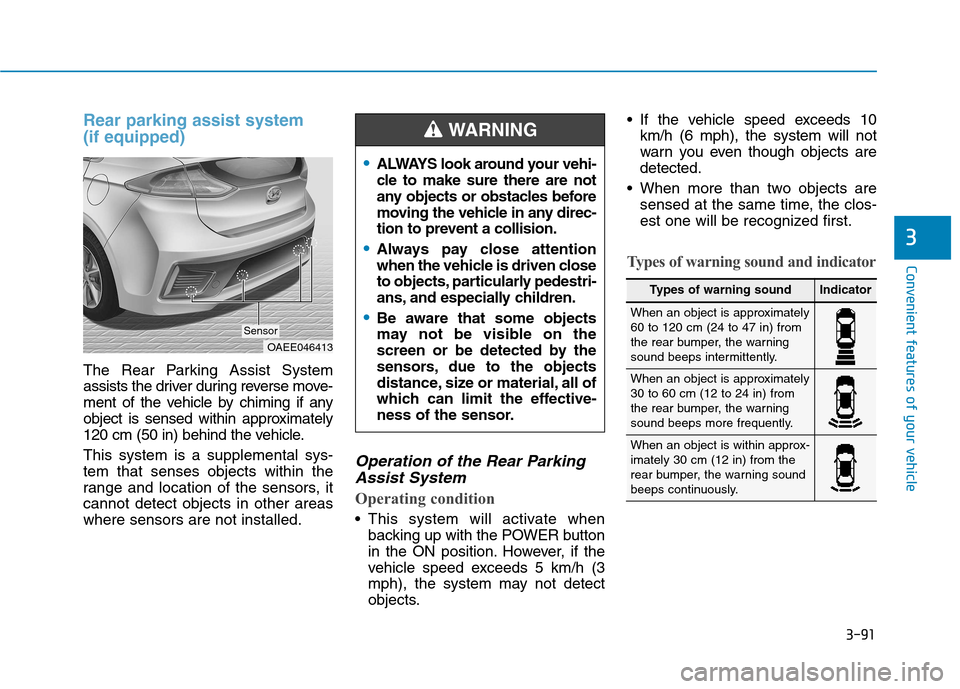
The Rear Parking Assist System
assists the driver during reverse move-
ment of the vehicle by chiming if any
object is sensed within approximately
120 cm (50 in) behind the vehicle. This system is a supplemental sys- tem that senses objects within the
range and location of the sensors, itcannot detect objects in other areaswhere sensors are not installed.
Operation of the Rear ParkingAssist System
Operating condition
This system will activate when backing up with the POWER button
in the ON position. However, if the
vehicle speed exceeds 5 km/h (3
mph), the system may not detect
objects. If the vehicle speed exceeds 10
km/h (6 mph), the system will not
warn you even though objects aredetected.
When more than two objects are sensed at the same time, the clos-
est one will be recognized first.
Types of warning sound and indicator
OAEE046413
Sensor
ALWAYS look around your vehi-
cle to make sure there are not
any objects or obstacles before
moving the vehicle in any direc-
tion to prevent a collision.
Always pay close attention
when the vehicle is driven close
to objects, particularly pedestri-
ans, and especially children.
Be aware that some objects
may not be visible on the
screen or be detected by the
sensors, due to the objects
distance, size or material, all of
which can limit the effective-
ness of the sensor.
WARNING
Types of warning soundIndicator
When an object is approximately 60 to 120 cm (24 to 47 in) from
the rear bumper, the warning
sound beeps intermittently.
When an object is approximately 30 to 60 cm (12 to 24 in) from
the rear bumper, the warning
sound beeps more frequently.
When an object is within approx- imately 30 cm (12 in) from the
rear bumper, the warning sound
beeps continuously.
Page 261 of 582
3-92
Convenient features of your vehicle
The indicator may differ from theillustration as objects or sensors
status. If the indicator blinks, we
recommend that you have your
vehicle checked by an author-
ized HYUNDAI dealer.
If the audible warning does not sound or if the buzzer sounds
intermittently when shifting into R
(Reverse) position, this may indi-cate a malfunction with the
Parking Assist System. If this
occurs, we recommend that you
have your vehicle checked by an
authorized HYUNDAI dealer as
soon as possible.
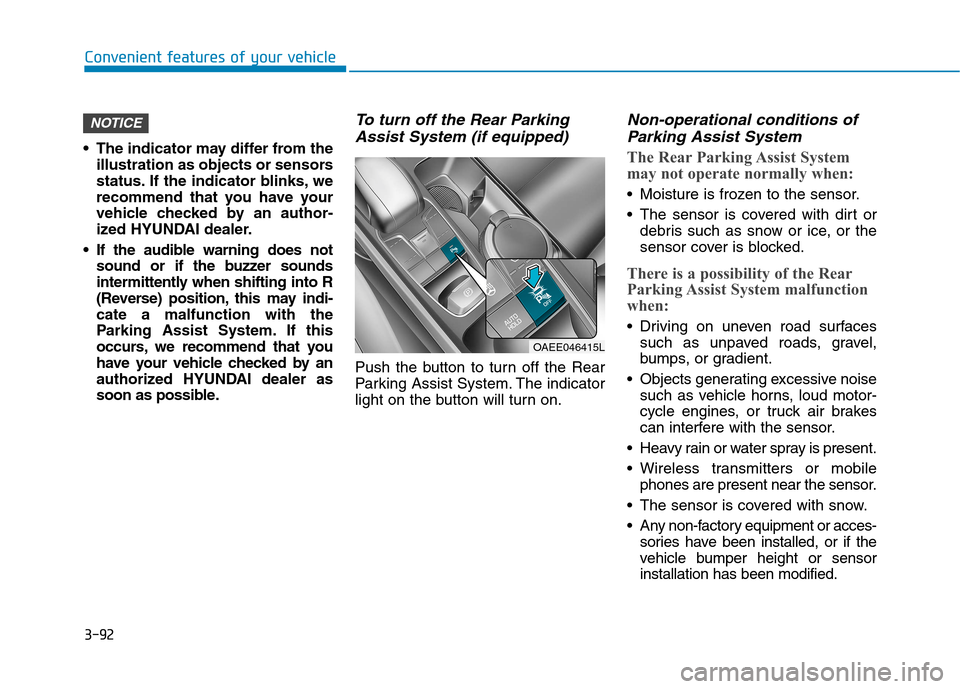
To turn off the Rear Parking
Assist System (if equipped)
Push the button to turn off the Rear
Parking Assist System. The indicator
light on the button will turn on.
Non-operational conditions ofParking Assist System
The Rear Parking Assist System
may not operate normally when:
Moisture is frozen to the sensor.
The sensor is covered with dirt or debris such as snow or ice, or the
sensor cover is blocked.
There is a possibility of the Rear
Parking Assist System malfunction
when:
Driving on uneven road surfacessuch as unpaved roads, gravel,
bumps, or gradient.
Objects generating excessive noise such as vehicle horns, loud motor-
cycle engines, or truck air brakes
can interfere with the sensor.
Heavy rain or water spray is present.
Wireless transmitters or mobile phones are present near the sensor.
The sensor is covered with snow.
Any non-factory equipment or acces- sories have been installed, or if the
vehicle bumper height or sensorinstallation has been modified.
NOTICE
OAEE046415L
Page 262 of 582
3-93
Convenient features of your vehicle
3
Detecting range may decrease when:
Outside air temperature is extreme-ly hot or cold.
Undetectable objects smaller than 1 m (40 inches) and narrower than
14 cm (6 inches) in diameter.
The following objects may not be
recognized by the sensor:
Sharp or slim objects such asropes, chains or small poles.
Objects, which tend to absorb sen- sor frequency such as clothes,
spongy material or snow.
Rear parking assist system pre-
cautions
The rear parking assist system may not operate consistently insome circumstances depending on
the speed of the vehicle and theshapes of the objects detected.
The rear parking assist system may malfunction if the vehicle bumperheight or sensor installation has
been modified or damaged. Any
non-factory installed equipment or
accessories may also interfere with
the sensor performance.
The sensor may not recognize objects less than 40 cm (15 in)
from the sensor, or it may sense an
incorrect distance. Use caution.
When the sensor is blocked with snow, dirt, debris, or ice, the rear
parking assist system may be inop-
erative until the snow or ice melts,
or the debris is removed. Use a
soft cloth to wipe debris away from
the sensor.
Do not push, scratch or strike the sensor with any hard objects that
could damage the surface of the
sensor. Sensor damage could occur. Do not spray the sensors or its sur-
rounding area directly with a high
pressure washer. Doing so may
cause the sensors to fail to operate
normally.
Your new vehicle warranty does
not cover any accidents or dam-
age to the vehicle or injuries toits occupants related to a Rear
Parking Assist System. Always
drive safely and cautiously.
WARNING
Page 263 of 582
3-94
Convenient features of your vehicle
Parking assist system (if equipped)
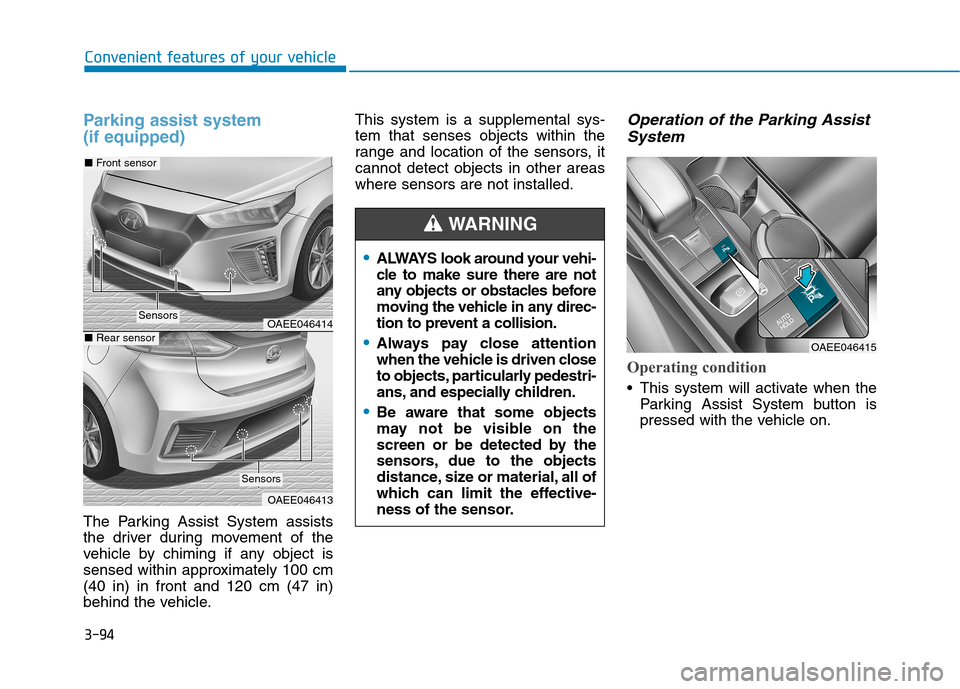
The Parking Assist System assists
the driver during movement of the
vehicle by chiming if any object is
sensed within approximately 100 cm(40 in) in front and 120 cm (47 in)
behind the vehicle.This system is a supplemental sys-tem that senses objects within the
range and location of the sensors, itcannot detect objects in other areaswhere sensors are not installed.
Operation of the Parking Assist
System
Operating condition
This system will activate when the Parking Assist System button is
pressed with the vehicle on.
OAEE046414
OAEE046413
■Front sensor
■Rear sensor
Sensors
Sensors
ALWAYS look around your vehi-
cle to make sure there are not
any objects or obstacles before
moving the vehicle in any direc-
tion to prevent a collision.
Always pay close attention
when the vehicle is driven close
to objects, particularly pedestri-
ans, and especially children.
Be aware that some objects
may not be visible on the
screen or be detected by the
sensors, due to the objects
distance, size or material, all of
which can limit the effective-
ness of the sensor.
WARNING
OAEE046415
Page 264 of 582
3-95
Convenient features of your vehicle
3
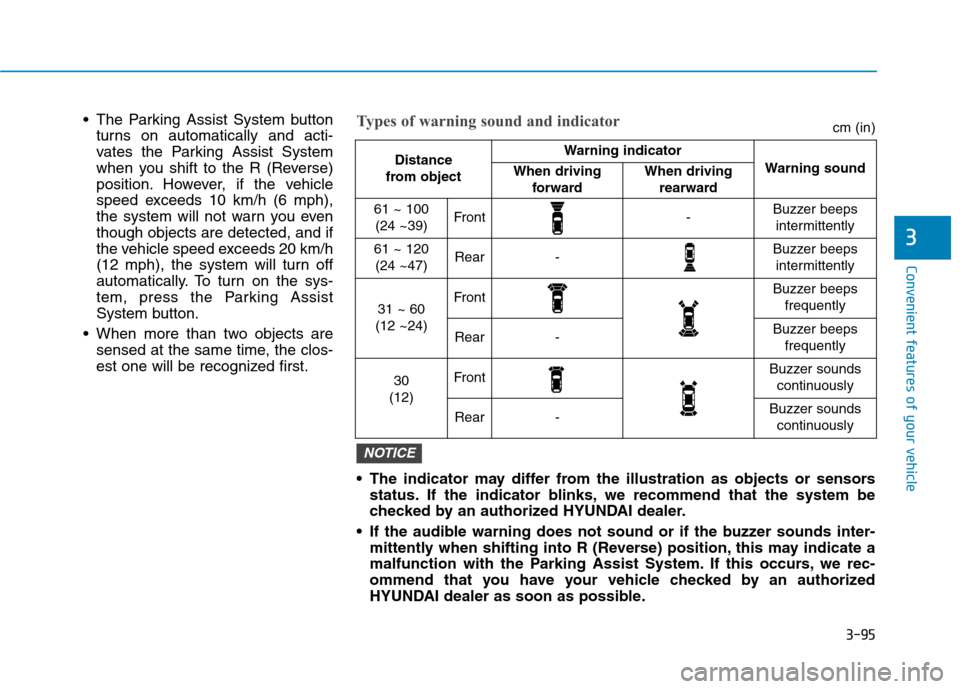
The Parking Assist System buttonturns on automatically and acti-
vates the Parking Assist System
when you shift to the R (Reverse)
position. However, if the vehicle
speed exceeds 10 km/h (6 mph),
the system will not warn you eventhough objects are detected, and if
the vehicle speed exceeds 20 km/h
(12 mph), the system will turn off
automatically. To turn on the sys-
tem, press the Parking Assist
System button.
When more than two objects are sensed at the same time, the clos-
est one will be recognized first.
Distance
from object Warning indicator
Warning soundWhen driving forwardWhen driving rearward
61 ~ 100(24 ~39)Front-Buzzer beeps intermittently
61 ~ 120(24 ~47)Rear-Buzzer beeps intermittently
31 ~ 60
(12 ~24)FrontBuzzer beeps frequently
Rear-Buzzer beeps frequently
30
(12)FrontBuzzer sounds continuously
Rear-Buzzer sounds continuously
The indicator may differ from the illustration as objects or sensors status. If the indicator blinks, we recommend that the system be
checked by an authorized HYUNDAI dealer.
If the audible warning does not sound or if the buzzer sounds inter- mittently when shifting into R (Reverse) position, this may indicate a
malfunction with the Parking Assist System. If this occurs, we rec-
ommend that you have your vehicle checked by an authorized
HYUNDAI dealer as soon as possible.
NOTICE
Types of warning sound and indicatorcm (in)
Page 265 of 582
3-96
Convenient features of your vehicle
Non-operational conditions ofParking Assist System
Parking Assist System may not
operate normally when:
Moisture is frozen to the sensor.
The sensor is covered with dirt or debris such as snow or ice, or the
sensor cover is blocked.
There is a possibility of Parking
Assist System malfunction when:
Driving on uneven road surfacessuch as unpaved roads, gravel,
bumps, or gradient.
Objects generating excessive noise such as vehicle horns, loud motor-
cycle engines, or truck air brakes
can interfere with the sensor.
Heavy rain or water spray is present.
Wireless transmitters or mobile phones are present near the sensor.
The sensor is covered with snow.
Any non-factory equipment or accessories have been installed, or
if the vehicle bumper height or sen-sor installation has been modified.
Detecting range may decrease when:
Outside air temperature isextremely hot or cold.
Undetectable objects smaller than 1 m and narrower than 14 cm in
diameter.
The following objects may not be
recognized by the sensor:
Sharp or slim objects such asropes, chains or small poles.
Objects, which tend to absorb sen- sor frequency such as clothes,
spongy material or snow.
Parking assist system precau-
tions
The parking assist system may not operate consistently in some cir-cumstances depending on the
speed of the vehicle and theshapes of the objects detected.
The parking assist system may mal- function if the vehicle bumper heightor sensor installation has been
modified or damaged. Any non-fac-
tory installed equipment or acces-
sories may also interfere with the
sensor performance. The sensor may not recognize
objects less than 40 cm (15 in)
from the sensor, or it may sense an
incorrect distance. Use caution.
When the sensor is blocked with snow, dirt, debris, or ice, the park-
ing assist system may be inopera-
tive until the snow or ice melts, or
the debris is removed. Use a soft
cloth to wipe debris away from the
sensor.
Do not push, scratch or strike the sensor with any hard objects that
could damage the surface of the
sensor. Sensor damage could occur.
Do not spray the sensors or its sur- rounding area directly with a high
pressure washer. Doing so may
cause the sensors to fail to operate
normally.
Your new vehicle warranty does
not cover any accidents or dam-
age to the vehicle or injuries toits occupants related to a
Parking Assist System. Always
drive safely and cautiously.
WARNING
Page 269 of 582
3-100
Convenient features of your vehicle
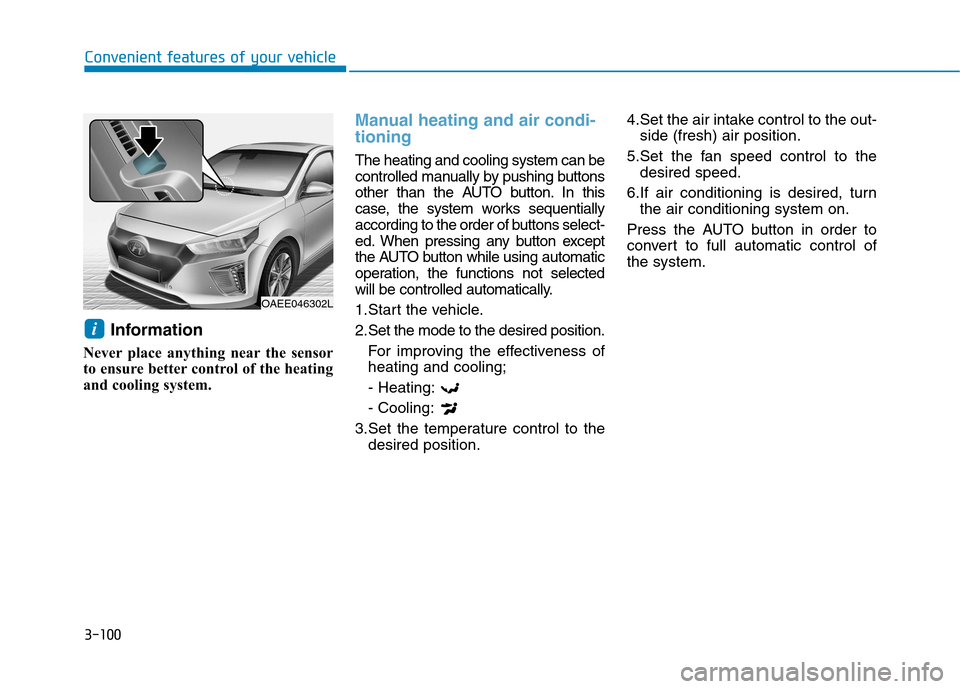
Information
Never place anything near the sensor
to ensure better control of the heating
and cooling system.
Manual heating and air condi- tioning
The heating and cooling system can be
controlled manually by pushing buttons
other than the AUTO button. In this
case, the system works sequentially
according to the order of buttons select-
ed. When pressing any button except
the AUTO button while using automatic
operation, the functions not selected
will be controlled automatically.
1.Start the vehicle.
2.Set the mode to the desired position. For improving the effectiveness of heating and cooling; - Heating:- Cooling:
3.Set the temperature control to the desired position. 4.Set the air intake control to the out-
side (fresh) air position.
5.Set the fan speed control to the desired speed.
6.If air conditioning is desired, turn the air conditioning system on.
Press the AUTO button in order to
convert to full automatic control ofthe system.
i
OAEE046302L
Page 284 of 582
3-115
Convenient features of your vehicle
3
When the Auto Defogging System is
canceled, ADS OFF symbol will blink3 times and the ADS OFF will be dis-
played on the climate control infor-mation screen.
When the Auto Defogging System is
reset, ADS OFF symbol will blink 6times without a signal.Information
When the air conditioning is turned on by Auto defogging system, if you
try to turn off the air conditioning, the
indicator will blink 3 times and the air
conditioning will not be turned off.
For efficiency, do not select recircu- lated air position while Auto defog-
ging system is operating.
Do not remove the sensor coverlocated on the upper end of thewindshield glass.
Damage to system parts could
occur and may not be covered by
your vehicle warranty.Sunroof inside air recirculation (if equipped)
If the sunroof opens while the heater
or Air Conditioning system operates,the outside (fresh) air will be select-
ed automatically for ventilating the
car. Then, if you select the recirculat-ed air position, the outside (fresh) airwill be selected automatically after 3
minutes.
If you close the sunroof, the intake
mode will be changed to the previous
selected mode.
NOTICE
i
CC LLIIMM AATTEE CC OO NNTTRR OO LL AA DDDDIITT IIOO NNAALL FF EE AA TTUU RREESS
Page 340 of 582
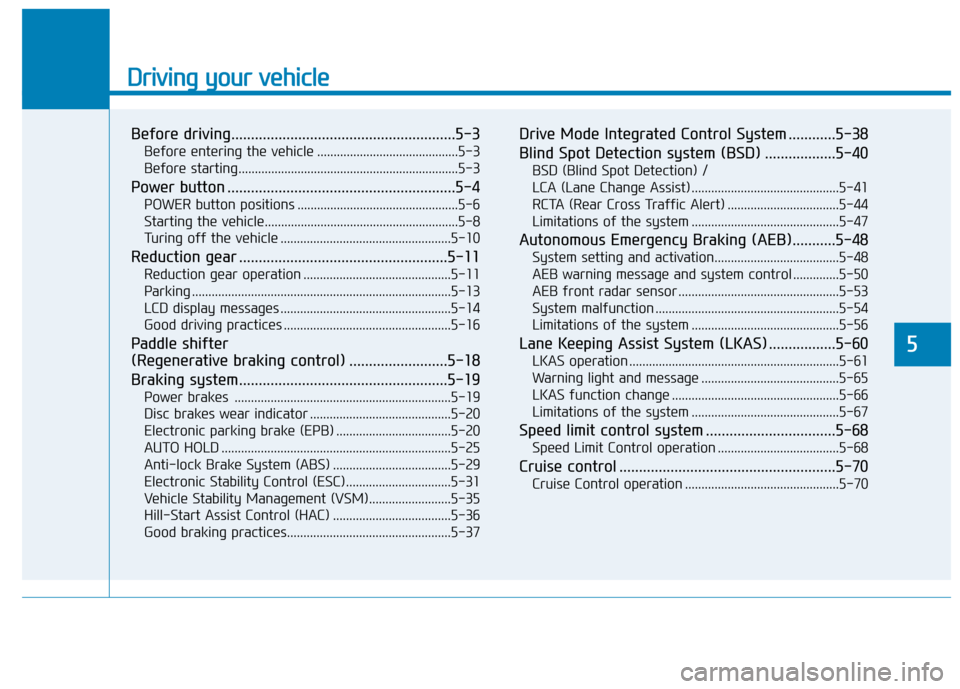
Driving your vehicle
Before driving.........................................................5-3Before entering the vehicle ...........................................5-3
Before starting...................................................................5-3
Power button ..........................................................5-4 POWER button positions .................................................5-6
Starting the vehicle...........................................................5-8
Turing off the vehicle ....................................................5-10
Reduction gear .....................................................5-11 Reduction gear operation .............................................5-11
Parking ...............................................................................5-13
LCD display messages ....................................................5-14
Good driving practices ...................................................5-16
Paddle shifter
(Regenerative braking control) .........................5-18
Braking system.....................................................5-19 Power brakes ..................................................................5-19
Disc brakes wear indicator ...........................................5-20
Electronic parking brake (EPB) ...................................5-20
AUTO HOLD ......................................................................5-25
Anti-lock Brake System (ABS) ....................................5-29
Electronic Stability Control (ESC)................................5-31
Vehicle Stability Management (VSM).........................5-35
Hill-Start Assist Control (HAC) ....................................5-36
Good braking practices..................................................5-37 Drive Mode Integrated Control System ............5-38
Blind Spot Detection system (BSD) ..................5-40
BSD (Blind Spot Detection) /
LCA (Lane Change Assist) .............................................5-41RCTA (Rear Cross Traffic Alert) ..................................5-44
Limitations of the system .............................................5-47
Autonomous Emergency Braking (AEB)...........5-48 System setting and activation......................................5-48
AEB warning message and system control ..............5-50
AEB front radar sensor .................................................5-53
System malfunction ........................................................5-54
Limitations of the system .............................................5-56
Lane Keeping Assist System (LKAS) .................5-60 LKAS operation ................................................................5-61
Warning light and message ..........................................5-65
LKAS function change ...................................................5-66
Limitations of the system .............................................5-67
Speed limit control system .................................5-68 Speed Limit Control operation .....................................5-68
Cruise control .......................................................5-70 Cruise Control operation ...............................................5-70
5
Page 341 of 582
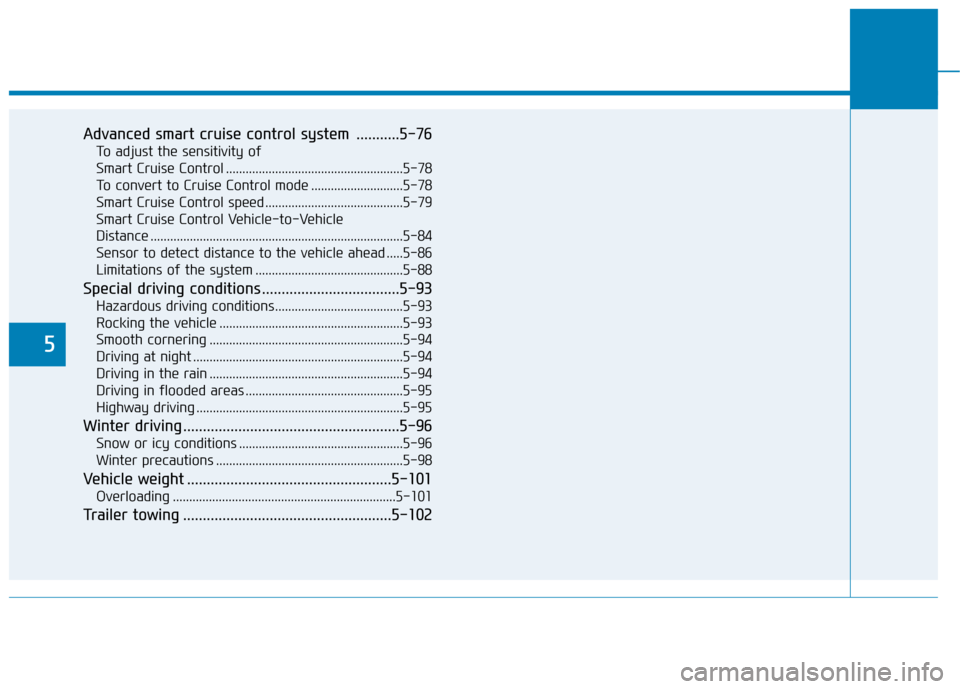
5
Advanced smart cruise control system ...........5-76To adjust the sensitivity of
Smart Cruise Control ......................................................5-78To convert to Cruise Control mode ............................5-78
Smart Cruise Control speed ..........................................5-79
Smart Cruise Control Vehicle-to-Vehicle
Distance .............................................................................5-84 Sensor to detect distance to the vehicle ahead .....5-86
Limitations of the system .............................................5-88
Special driving conditions ...................................5-93 Hazardous driving conditions.......................................5-93
Rocking the vehicle ........................................................5-93
Smooth cornering ...........................................................5-94
Driving at night ................................................................5-94
Driving in the rain ...........................................................5-94
Driving in flooded areas ................................................5-95
Highway driving ...............................................................5-95
Winter driving .......................................................5-96 Snow or icy conditions ..................................................5-96
Winter precautions .........................................................5-98
Vehicle weight ....................................................5-101 Overloading ....................................................................5-101
Trailer towing .....................................................5-102