sensor Hyundai Ioniq Electric 2017 User Guide
[x] Cancel search | Manufacturer: HYUNDAI, Model Year: 2017, Model line: Ioniq Electric, Model: Hyundai Ioniq Electric 2017Pages: 582, PDF Size: 37.73 MB
Page 162 of 582
2-64
Safety system of your vehicle
Why didn’t my air bag go off in a collision?
There are certain types of accidents
in which the air bag would not be
expected to provide additional protec-
tion. These include rear impacts, sec-
ond or third collisions in multiple
impact accidents, as well as low
speed impacts. Damage to the vehicle
indicates a collision energy absorp-tion, and is not an indicator of whether
or not an air bag should have inflated.
Air bag collision sensors
To reduce the risk of an air bag
deploying unexpectedly and
causing serious injury or death:
Do not hit or allow any objects to impact the locations where air
bags or sensors are installed.
Do not perform maintenance
on or around the air bag sen-
sors. If the location or angle of
the sensors is altered, the air
bags may deploy when they
should not or may not deploy
when they should.
Do not install bumper guards or
replace the bumper with a non-
genuine part. This may adverse-
ly affect the collision and air
bag deployment performance.(Continued)
WARNING
(Continued)
Place the POWER button to
the OFF position, when the
vehicle is being towed to pre-
vent inadvertent air bag
deployment.
We recommend that all air bag
repairs are conducted by an
authorized HYUNDAI dealer.
Page 163 of 582
2-65
Safety system of your vehicle
2
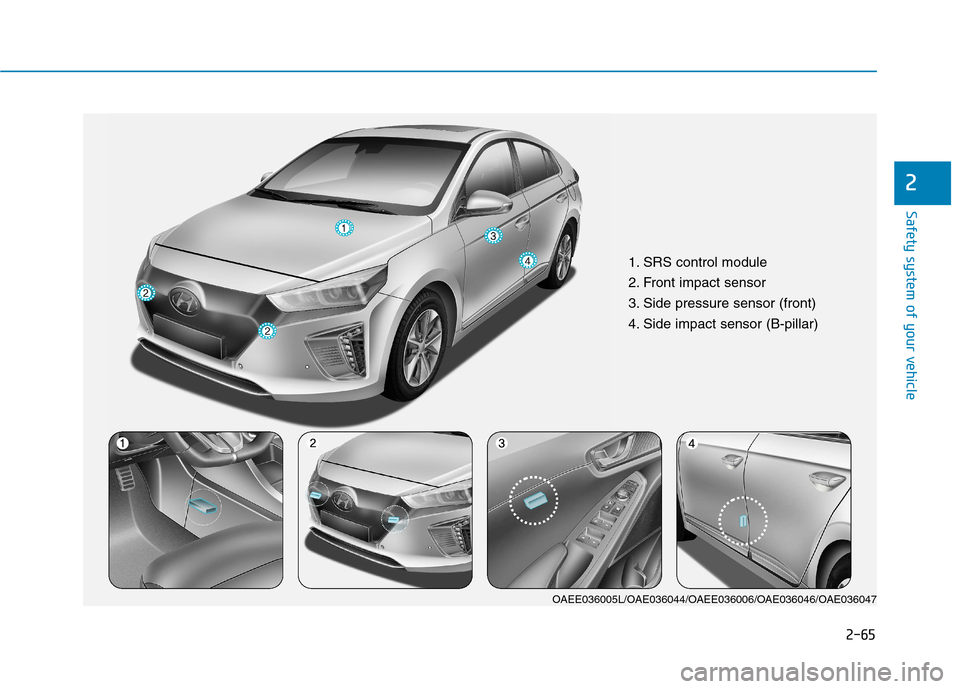
1. SRS control module
2. Front impact sensor
3. Side pressure sensor (front)
4. Side impact sensor (B-pillar)
OAEE036005L/OAE036044/OAEE036006/OAE036046/OAE036047
Page 164 of 582
2-66
Safety system of your vehicle
Air bag inflation conditions
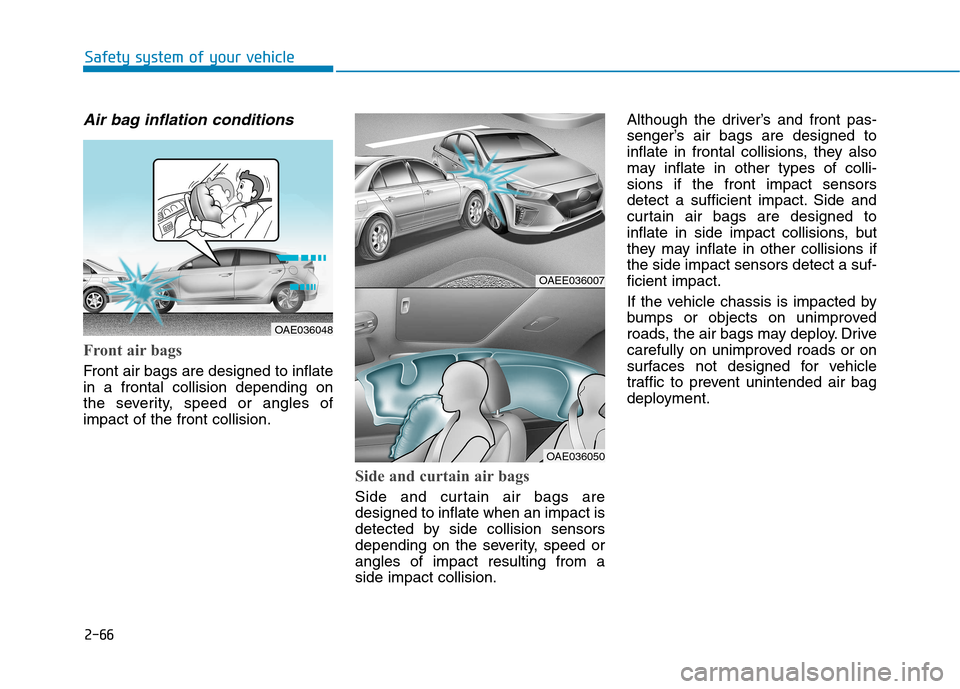
Front air bags
Front air bags are designed to inflate in a frontal collision depending on
the severity, speed or angles ofimpact of the front collision.
Side and curtain air bags
Side and curtain air bags are designed to inflate when an impact is
detected by side collision sensors
depending on the severity, speed orangles of impact resulting from aside impact collision.Although the driver’s and front pas-
senger’s air bags are designed to
inflate in frontal collisions, they also
may inflate in other types of colli-sions if the front impact sensors
detect a sufficient impact. Side and
curtain air bags are designed to
inflate in side impact collisions, but
they may inflate in other collisions ifthe side impact sensors detect a suf-ficient impact.
If the vehicle chassis is impacted by
bumps or objects on unimproved
roads, the air bags may deploy. Drive
carefully on unimproved roads or on
surfaces not designed for vehicle
traffic to prevent unintended air bag
deployment.
OAEE036007
OAE036050
OAE036048
Page 166 of 582
2-68
Safety system of your vehicle
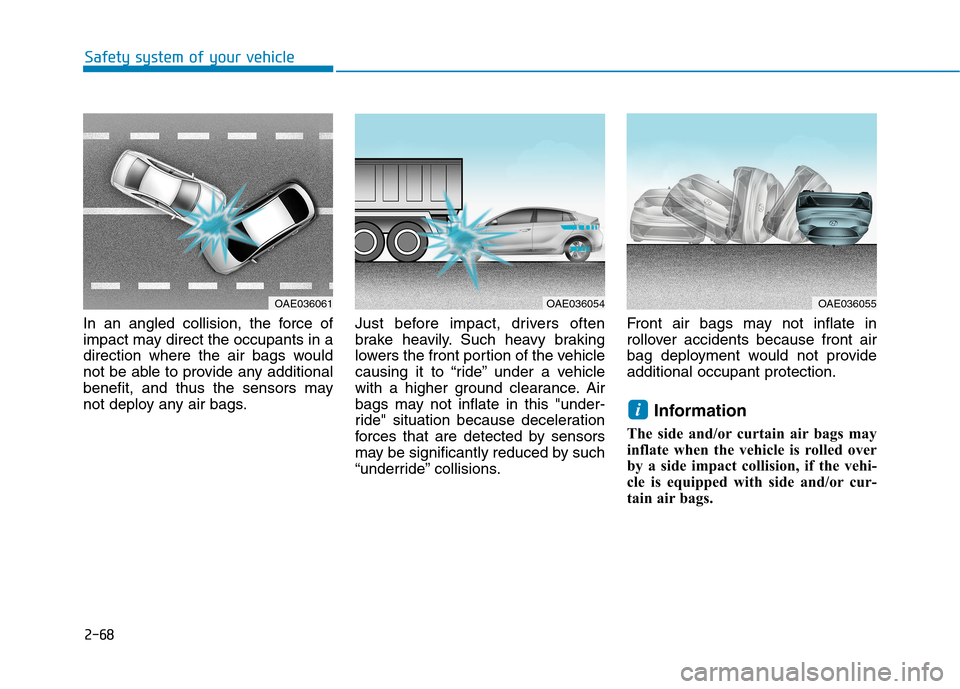
In an angled collision, the force of
impact may direct the occupants in a
direction where the air bags would
not be able to provide any additional
benefit, and thus the sensors may
not deploy any air bags.Just before impact, drivers often
brake heavily. Such heavy braking
lowers the front portion of the vehicle
causing it to “ride” under a vehicle
with a higher ground clearance. Air
bags may not inflate in this "under-
ride" situation because deceleration
forces that are detected by sensors
may be significantly reduced by such
“underride” collisions.Front air bags may not inflate in
rollover accidents because front air
bag deployment would not provideadditional occupant protection.
Information
The side and/or curtain air bags may
inflate when the vehicle is rolled over
by a side impact collision, if the vehi-
cle is equipped with side and/or cur-
tain air bags.
i
OAE036061OAE036054OAE036055
Page 187 of 582
3-18
Convenient features of your vehicle
When cleaning the mirror, use a
paper towel or similar material
dampened with glass cleaner. Do
not spray glass cleaner directly on
the mirror as that may cause the
liquid cleaner to enter the mirrorhousing.
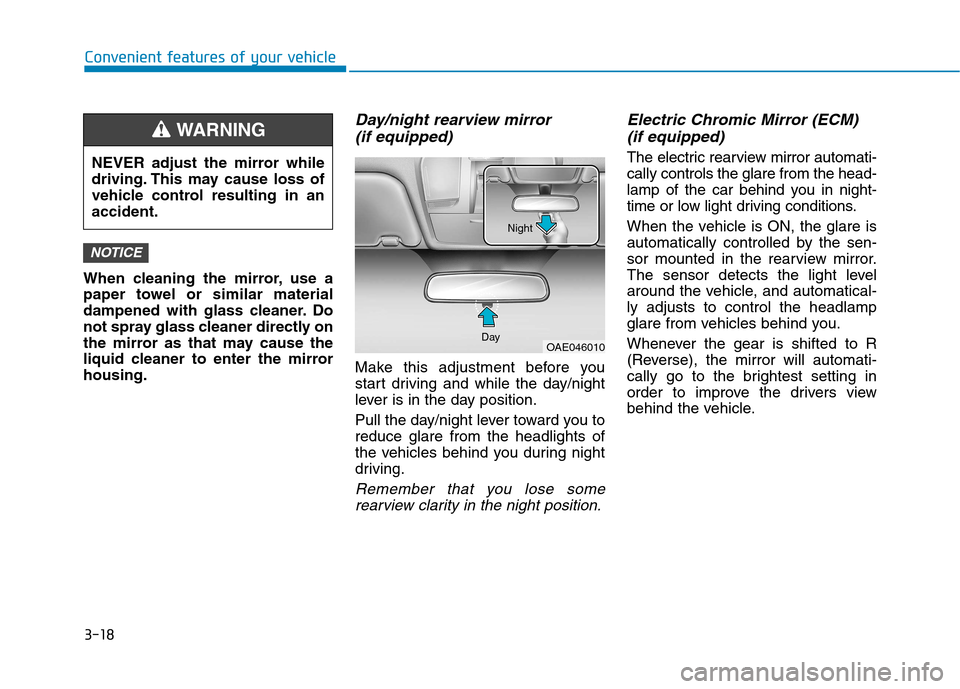
Day/night rearview mirror (if equipped)
Make this adjustment before you
start driving and while the day/night
lever is in the day position.
Pull the day/night lever toward you to reduce glare from the headlights of
the vehicles behind you during night
driving.
Remember that you lose somerearview clarity in the night position.
Electric Chromic Mirror (ECM)
(if equipped)
The electric rearview mirror automati-cally controls the glare from the head-
lamp of the car behind you in night-
time or low light driving conditions.
When the vehicle is ON, the glare is
automatically controlled by the sen-
sor mounted in the rearview mirror.
The sensor detects the light level
around the vehicle, and automatical-ly adjusts to control the headlamp
glare from vehicles behind you.
Whenever the gear is shifted to R
(Reverse), the mirror will automati-
cally go to the brightest setting in
order to improve the drivers view
behind the vehicle.
NOTICE
NEVER adjust the mirror while
driving. This may cause loss of
vehicle control resulting in anaccident.
WARNING
OAE046010
Day Night
Page 210 of 582
3-41
Convenient features of your vehicle
3
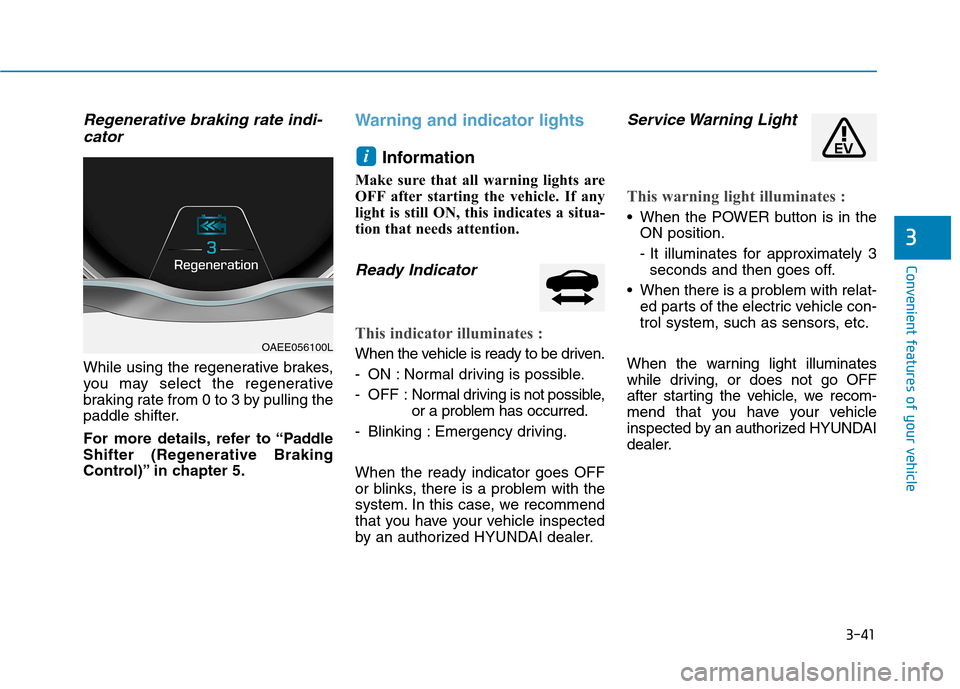
Regenerative braking rate indi-cator
While using the regenerative brakes,
you may select the regenerative
braking rate from 0 to 3 by pulling the
paddle shifter.
For more details, refer to “Paddle
Shifter (Regenerative Braking
Control)” in chapter 5.
Warning and indicator lights
Information
Make sure that all warning lights are
OFF after starting the vehicle. If any
light is still ON, this indicates a situa-
tion that needs attention.
Ready Indicator
This indicator illuminates :
When the vehicle is ready to be driven.
- ON : Normal driving is possible.
- OFF : Nor mal driving is not possible,
or a problem has occurred.
- Blinking : Emergency driving. When the ready indicator goes OFF
or blinks, there is a problem with the
system. In this case, we recommend
that you have your vehicle inspected
by an authorized HYUNDAI dealer.
Service Warning Light
This warning light illuminates :
When the POWER button is in the ON position.
- It illuminates for approximately 3seconds and then goes off.
When there is a problem with relat- ed parts of the electric vehicle con-
trol system, such as sensors, etc.
When the warning light illuminates
while driving, or does not go OFF
after starting the vehicle, we recom-
mend that you have your vehicle
inspected by an authorized HYUNDAI
dealer.
i
OAEE056100L
Page 221 of 582
3-52
Convenient features of your vehicle
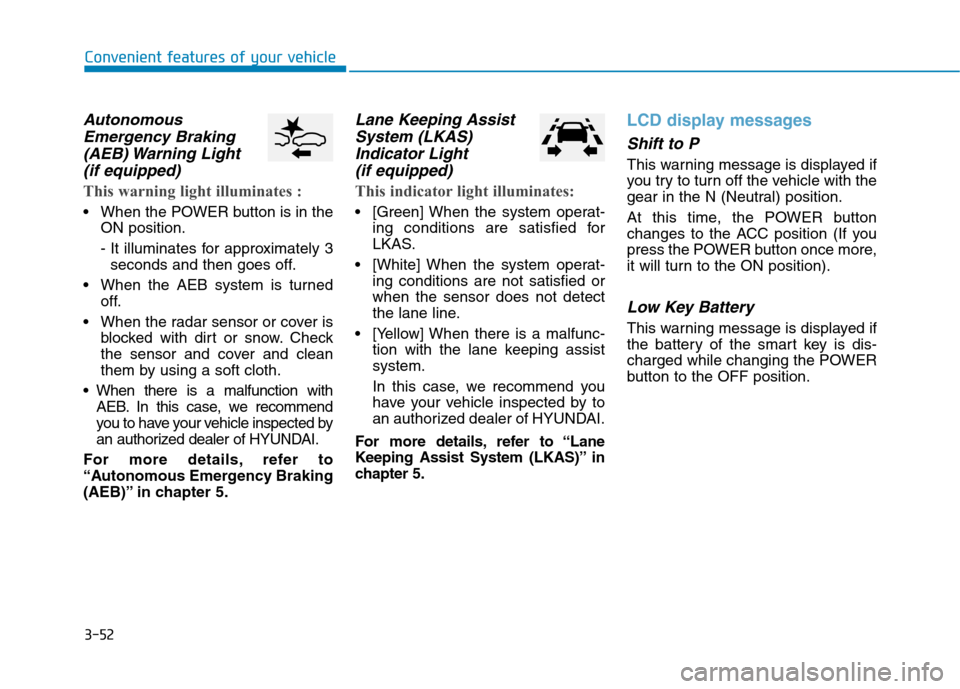
AutonomousEmergency Braking
(AEB) Warning Light (if equipped)
This warning light illuminates :
When the POWER button is in the ON position.
- It illuminates for approximately 3seconds and then goes off.
When the AEB system is turned off.
When the radar sensor or cover is blocked with dirt or snow. Check
the sensor and cover and clean
them by using a soft cloth.
When there is a malfunction with AEB. In this case, we recommend
you to have your vehicle inspected by
an authorized dealer of HYUNDAI.
For more details, refer to
“Autonomous Emergency Braking
(AEB)” in chapter 5.
Lane Keeping Assist System (LKAS)
Indicator Light (if equipped)
This indicator light illuminates:
[Green] When the system operat- ing conditions are satisfied for
LKAS.
[White] When the system operat- ing conditions are not satisfied orwhen the sensor does not detect
the lane line.
[Yellow] When there is a malfunc- tion with the lane keeping assistsystem.
In this case, we recommend you
have your vehicle inspected by to
an authorized dealer of HYUNDAI.
For more details, refer to “Lane
Keeping Assist System (LKAS)” in
chapter 5.
LCD display messages
Shift to P
This warning message is displayed if
you try to turn off the vehicle with the
gear in the N (Neutral) position.
At this time, the POWER button
changes to the ACC position (If you
press the POWER button once more,
it will turn to the ON position).
Low Key Battery
This warning message is displayed if
the battery of the smart key is dis-
charged while changing the POWER
button to the OFF position.
Page 246 of 582
3-77
Convenient features of your vehicle
3
Exterior lights
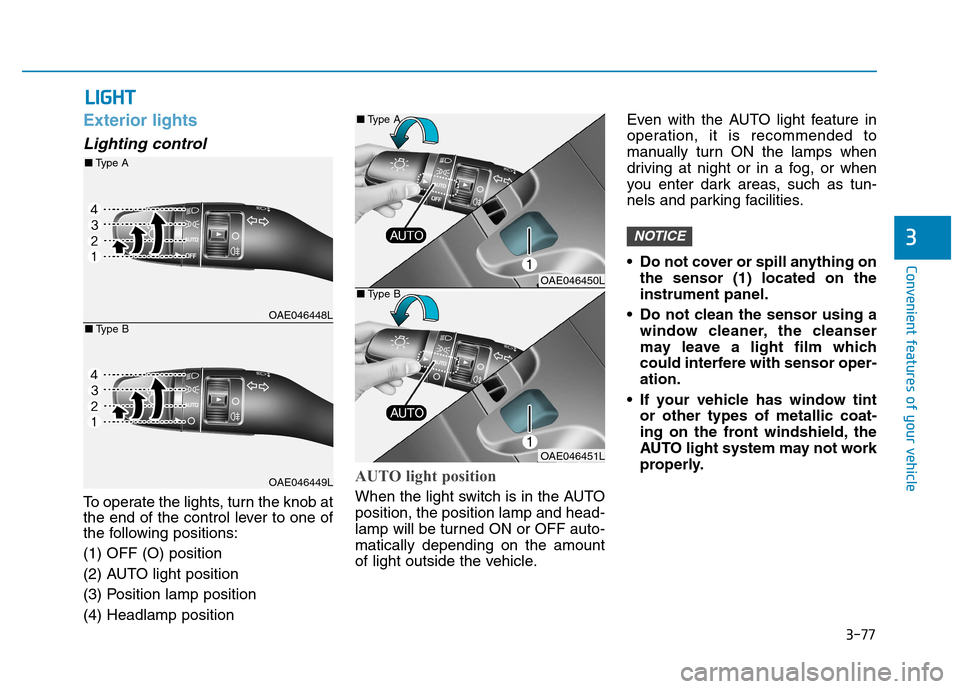
Lighting control
To operate the lights, turn the knob at
the end of the control lever to one of
the following positions: (1) OFF (O) position
(2) AUTO light position
(3) Position lamp position(4) Headlamp position
AUTO light position
When the light switch is in the AUTO position, the position lamp and head-
lamp will be turned ON or OFF auto-matically depending on the amount
of light outside the vehicle.Even with the AUTO light feature in
operation, it is recommended to
manually turn ON the lamps when
driving at night or in a fog, or when
you enter dark areas, such as tun-
nels and parking facilities.
• Do not cover or spill anything on
the sensor (1) located on the instrument panel.
Do not clean the sensor using a window cleaner, the cleanser
may leave a light film which
could interfere with sensor oper-ation.
If your vehicle has window tint or other types of metallic coat-
ing on the front windshield, the
AUTO light system may not work
properly.
NOTICE
LLIIGG HH TT
OAE046448L
OAE046449L
■Type A
■Type B
OAE046450L
OAE046451L
■
Type A
■ Type B
Page 256 of 582
3-87
Convenient features of your vehicle
3
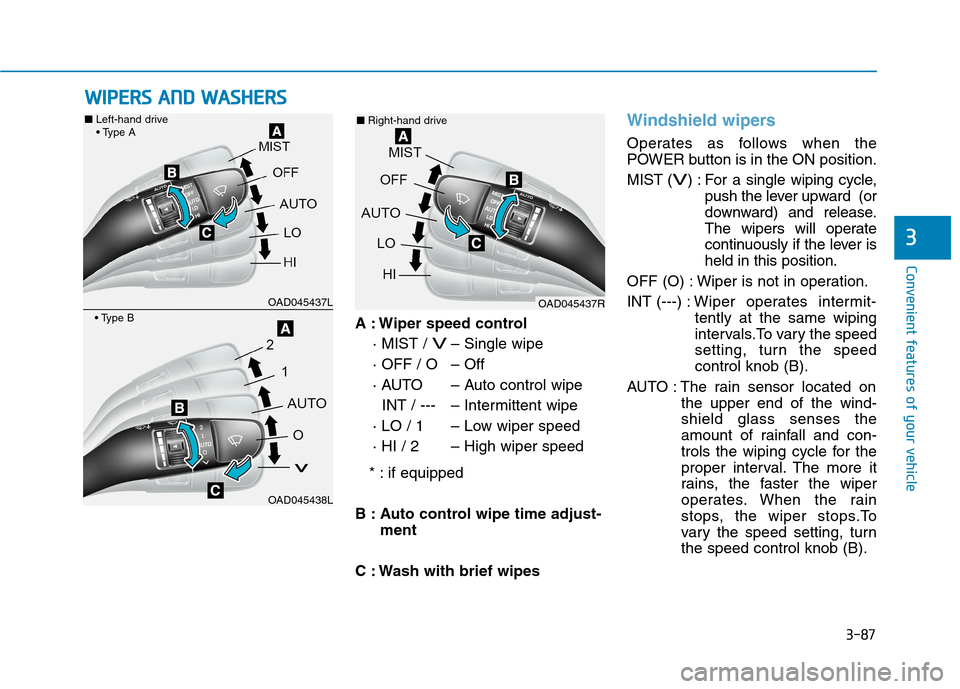
A : Wiper speed control· MIST /
V– Single wipe
· OFF / O – Off
· AUTO – Auto control wipe INT / --- – Intermittent wipe
· LO / 1 – Low wiper speed
· HI / 2 – High wiper speed
* : if equipped
B : Auto control wipe time adjust- ment
C : Wash with brief wipes
Windshield wipers
Operates as follows when the
POWER button is in the ON position. MIST (
V) : For a single wiping cycle, push the lever upward (or
downward) and release.
The wipers will operate
continuously if the lever isheld in this position.
OFF (O) : Wiper is not in operation. INT (---) : Wiper operates intermit-
tently at the same wiping
intervals.To vary the speed
setting, turn the speedcontrol knob (B).
AUTO : The rain sensor located on the upper end of the wind-shield glass senses the
amount of rainfall and con-
trols the wiping cycle for the
proper interval. The more it
rains, the faster the wiper
operates. When the rain
stops, the wiper stops.To
vary the speed setting, turnthe speed control knob (B).
WWIIPP EERR SS AA NN DD WW AASSHH EERR SS
OAD045437L
OAD045438L
■ Left-hand drive
OAD045437R
■
Right-hand drive
Page 257 of 582
3-88
Convenient features of your vehicle
LO (1) : The wiper runs at a lowerspeed.
HI (2) : The wiper runs at a higher
speed.
Information
If there is heavy accumulation of snow
or ice on the windshield, defrost the
windshield for about 10 minutes, or
until the snow and/or ice is removed
before using the windshield wipers to
ensure proper operation.
If you do not remove the snow and/or
ice before using the wiper and washer,
it may damage the wiper and washer
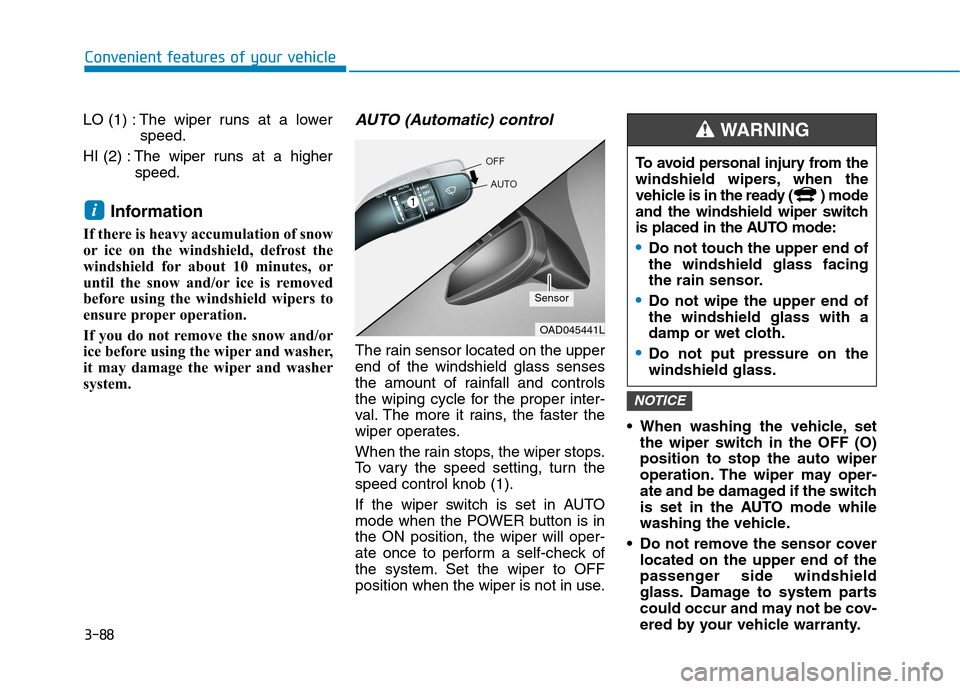
system.AUTO (Automatic) control
The rain sensor located on the upperend of the windshield glass senses
the amount of rainfall and controls
the wiping cycle for the proper inter-
val. The more it rains, the faster the
wiper operates.
When the rain stops, the wiper stops.
To vary the speed setting, turn thespeed control knob (1).
If the wiper switch is set in AUTO
mode when the POWER button is inthe ON position, the wiper will oper-
ate once to perform a self-check of
the system. Set the wiper to OFF
position when the wiper is not in use. When washing the vehicle, set
the wiper switch in the OFF (O)position to stop the auto wiper
operation. The wiper may oper-
ate and be damaged if the switch
is set in the AUTO mode while
washing the vehicle.
Do not remove the sensor cover located on the upper end of the
passenger side windshield
glass. Damage to system parts
could occur and may not be cov-
ered by your vehicle warranty.
NOTICE
i
OAD045441L
Sensor To avoid personal injury from the
windshield wipers, when the
vehicle is in the ready ( ) mode
and the windshield wiper switch
is placed in the AUTO mode:
Do not touch the upper end of the windshield glass facing
the rain sensor.
Do not wipe the upper end of the windshield glass with a
damp or wet cloth.
Do not put pressure on the windshield glass.
WARNING