lock Hyundai Kona EV 2019 Owner's Manual
[x] Cancel search | Manufacturer: HYUNDAI, Model Year: 2019, Model line: Kona EV, Model: Hyundai Kona EV 2019Pages: 540, PDF Size: 21.84 MB
Page 481 of 540
H18
Charging Connector
AUTO / LOCK Mode
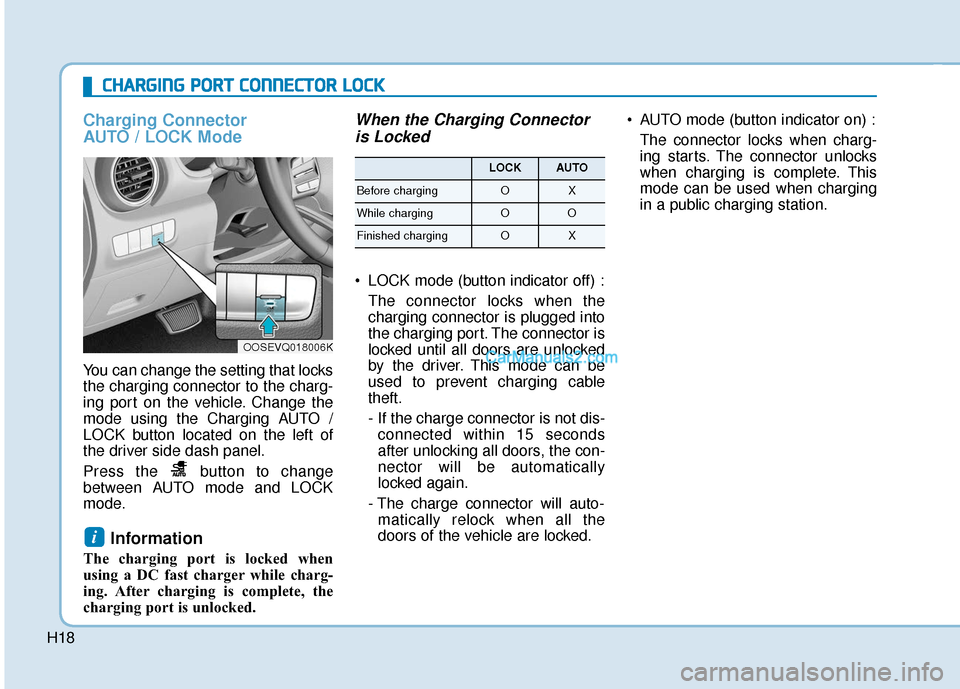
You can change the setting that locks
the charging connector to the charg-
ing port on the vehicle. Change the
mode using the Charging AUTO /
LOCK button located on the left of
the driver side dash panel.
Press the button to change
between AUTO mode and LOCK
mode.
Information
The charging port is locked when
using a DC fast charger while charg-
ing. After charging is complete, the
charging port is unlocked.
When the Charging Connectoris Locked
LOCK mode (button indicator off) :
The connector locks when the
charging connector is plugged into
the charging port. The connector is
locked until all doors are unlocked
by the driver. This mode can be
used to prevent charging cable
theft.
- If the charge connector is not dis-connected within 15 seconds
after unlocking all doors, the con-
nector will be automatically
locked again.
- The charge connector will auto- matically relock when all the
doors of the vehicle are locked. AUTO mode (button indicator on) :
The connector locks when charg-
ing starts. The connector unlocks
when charging is complete. This
mode can be used when charging
in a public charging station.
i
C
CH
H A
AR
RG
G I
IN
N G
G
P
P O
O R
RT
T
C
C O
O N
NN
NE
EC
CT
T O
O R
R
L
L O
O C
CK
K
OOSEVQ018006K
LOCKAUTO
Before chargingOX
While chargingOO
Finished chargingOX
Page 485 of 540
H22
Level 2 AC Charging (240V)
Actual charger image and charg-
ing method may vary in accor-
dance with the charging station
manufacturer.
How to Connect AC Charger
1. Depress the brake pedal andapply the electronic parking brake.
2. Shift to P (Park) and turn OFF the vehicle using the POWER button.
Information
If charging is initiated without the
gear in P (Park), charging will start
only after the gear is automatically
shifted to P (Park).
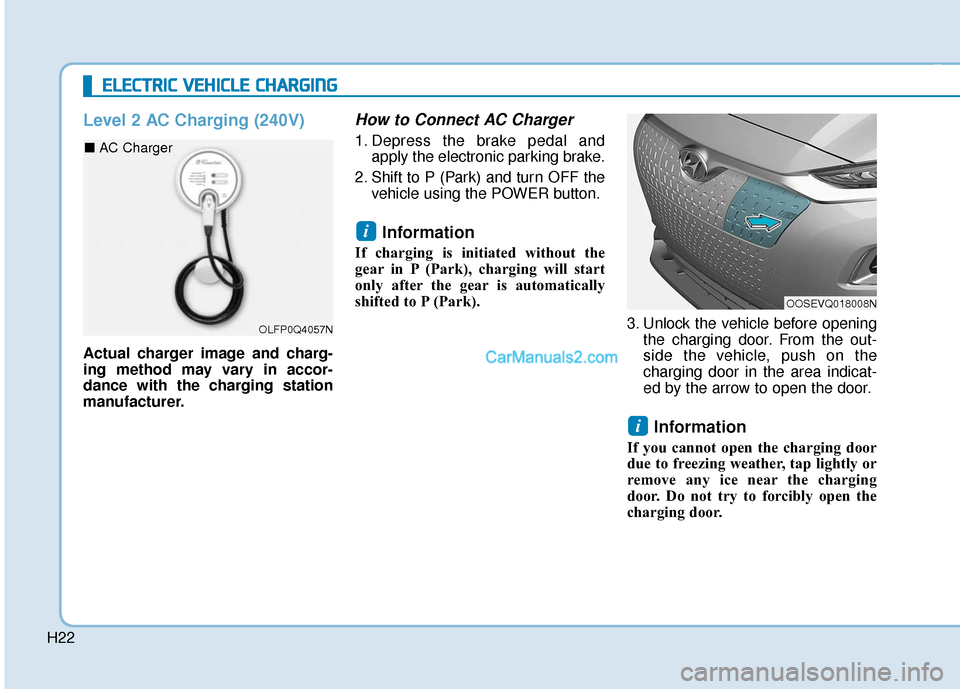
3. Unlock the vehicle before openingthe charging door. From the out-
side the vehicle, push on the
charging door in the area indicat-
ed by the arrow to open the door.
Information
If you cannot open the charging door
due to freezing weather, tap lightly or
remove any ice near the charging
door. Do not try to forcibly open the
charging door.
i
i
E EL
LE
E C
CT
T R
R I
IC
C
V
V E
EH
H I
IC
C L
LE
E
C
C H
H A
AR
RG
G I
IN
N G
G
OLFP0Q4057N
■ AC Charger
OOSEVQ018008N
Page 486 of 540
H23
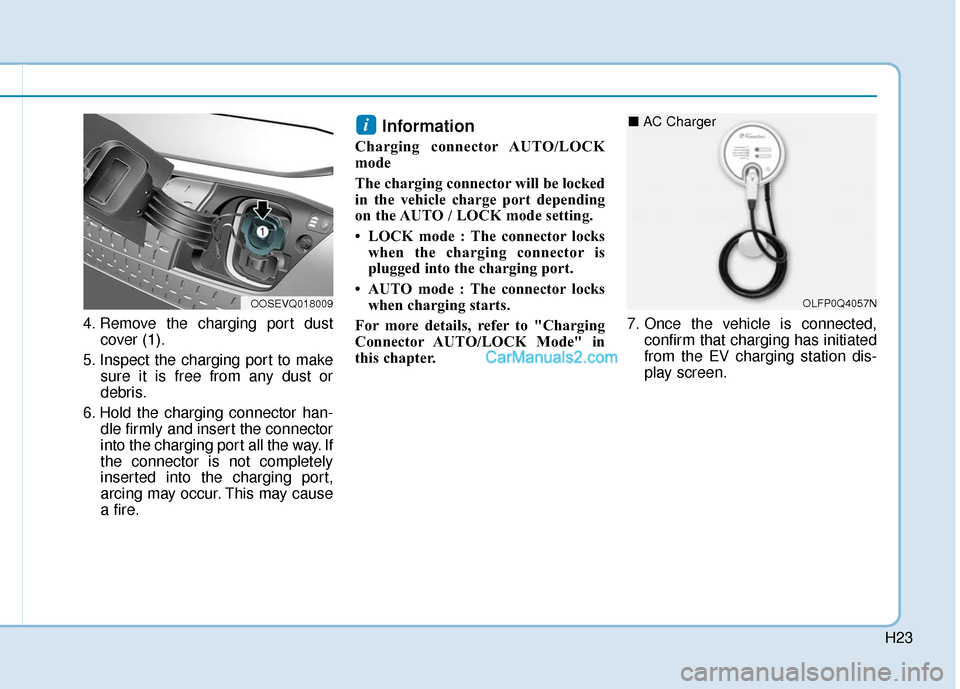
4. Remove the charging port dustcover (1).
5. Inspect the charging port to make sure it is free from any dust or
debris.
6. Hold the charging connector han- dle firmly and insert the connector
into the charging port all the way. If
the connector is not completely
inserted into the charging port,
arcing may occur. This may cause
a fire.
Information
Charging connector AUTO/LOCK
mode
The charging connector will be locked
in the vehicle charge port depending
on the AUTO / LOCK mode setting.
• LOCK mode : The connector lockswhen the charging connector is
plugged into the charging port.
• AUTO mode : The connector locks when charging starts.
For more details, refer to "Charging
Connector AUTO/LOCK Mode" in
this chapter. 7. Once the vehicle is connected,
confirm that charging has initiated
from the EV charging station dis-
play screen.
i
OOSEVQ018009OLFP0Q4057N
■ AC Charger
Page 489 of 540
H26
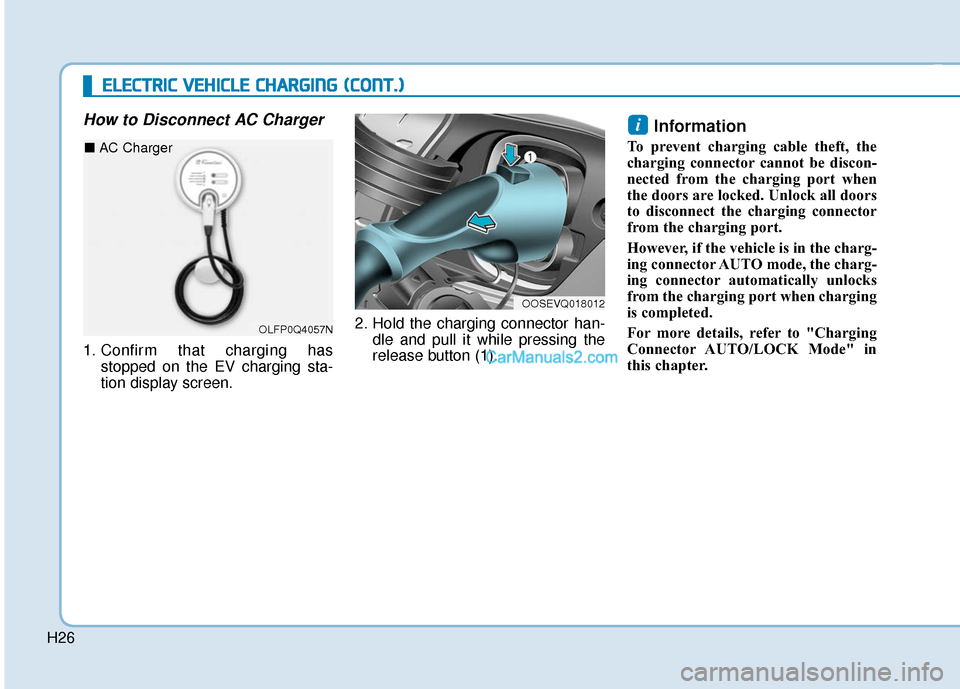
How to Disconnect AC Charger
1. Confirm that charging hasstopped on the EV charging sta-
tion display screen. 2. Hold the charging connector han-
dle and pull it while pressing the
release button (1).
Information
To prevent charging cable theft, the
charging connector cannot be discon-
nected from the charging port when
the doors are locked. Unlock all doors
to disconnect the charging connector
from the charging port.
However, if the vehicle is in the charg-
ing connector AUTO mode, the charg-
ing connector automatically unlocks
from the charging port when charging
is completed.
For more details, refer to "Charging
Connector AUTO/LOCK Mode" in
this chapter.
i
OOSEVQ018012
E
EL
LE
E C
CT
T R
R I
IC
C
V
V E
EH
H I
IC
C L
LE
E
C
C H
H A
AR
RG
G I
IN
N G
G
(
( C
C O
O N
NT
T.
.)
)
OLFP0Q4057N
■ AC Charger
Page 491 of 540
H28
DC Fast Charging
DC fast charging (also known as
Level 3 charging) provides high
power DC current directly to the EV
battery. DC charging stations are
capable of charging the EV battery to
80% in less than 75 minutes under
normal conditions.
While DC charging is very fast com-
pared to AC charging, prolonged and
continuous use of DC fast charging
may reduce the long term life of the
EV battery. Usage of a DC fast
charger should be minimized when
possible in order to help prolong the
life of the EV battery.Actual charger image and charg-
ing method may vary in accor-
dance with the charging station
manufacturer.
Information
If you use a DC charger when the
vehicle is already fully charged, some
DC chargers will send out an error
message. When the vehicle is fully
charged, do not charge the vehicle.
How to Connect DC Charger
1. Depress the brake pedal and
apply the electronic parking brake.
2. Shift to P (Park) and turn OFF the vehicle using the POWER button.
Information
If charging is initiated without the
gear in P (Park), charging will start
only after the gear is automatically
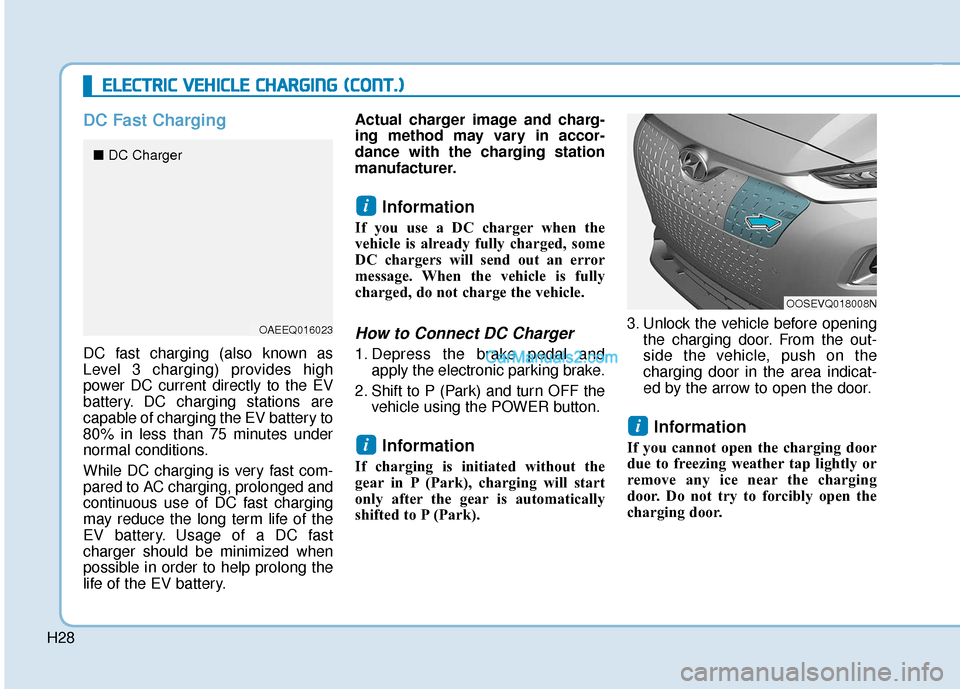
shifted to P (Park). 3. Unlock the vehicle before opening
the charging door. From the out-
side the vehicle, push on the
charging door in the area indicat-
ed by the arrow to open the door.
Information
If you cannot open the charging door
due to freezing weather tap lightly or
remove any ice near the charging
door. Do not try to forcibly open the
charging door.
i
i
i
E EL
LE
E C
CT
T R
R I
IC
C
V
V E
EH
H I
IC
C L
LE
E
C
C H
H A
AR
RG
G I
IN
N G
G
(
( C
C O
O N
NT
T.
.)
)
OOSEVQ018008N
OAEEQ016023
■ DC Charger
Page 497 of 540
H34
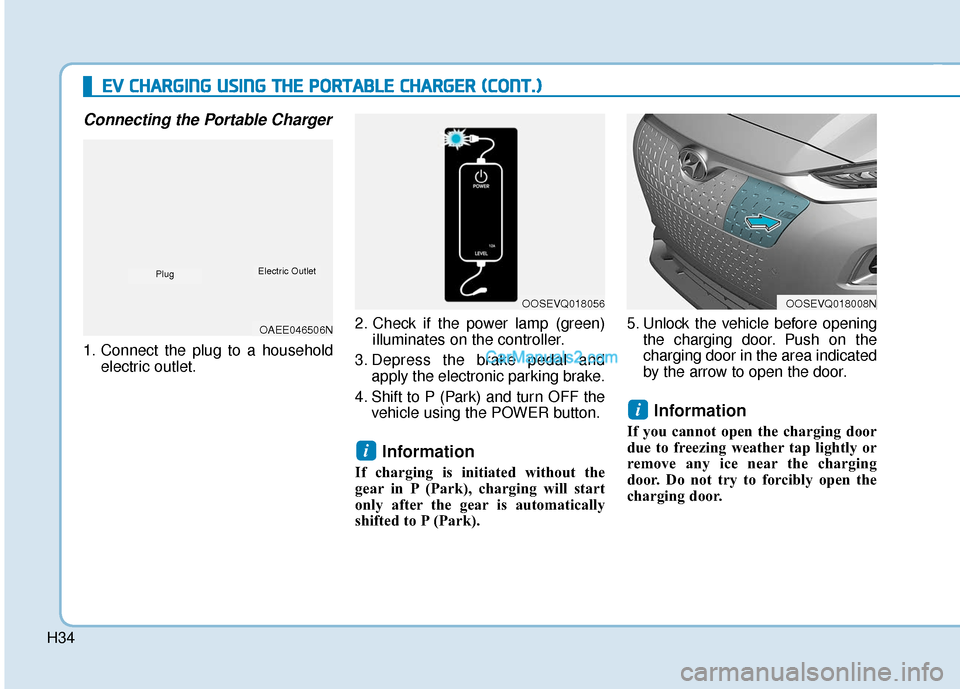
Connecting the Portable Charger
1. Connect the plug to a householdelectric outlet. 2. Check if the power lamp (green)
illuminates on the controller.
3. Depress the brake pedal and apply the electronic parking brake.
4. Shift to P (Park) and turn OFF the vehicle using the POWER button.
Information
If charging is initiated without the
gear in P (Park), charging will start
only after the gear is automatically
shifted to P (Park). 5. Unlock the vehicle before opening
the charging door. Push on the
charging door in the area indicated
by the arrow to open the door.
Information
If you cannot open the charging door
due to freezing weather tap lightly or
remove any ice near the charging
door. Do not try to forcibly open the
charging door.
i
i
E
EV
V
C
C H
H A
AR
RG
G I
IN
N G
G
U
U S
SI
IN
N G
G
T
T H
H E
E
P
P O
O R
RT
TA
A B
BL
LE
E
C
C H
H A
AR
RG
G E
ER
R
(
( C
C O
O N
NT
T.
.)
)
OOSEVQ018056OOSEVQ018008N
OAEE046506N
PlugElectric Outlet
Page 498 of 540
H35
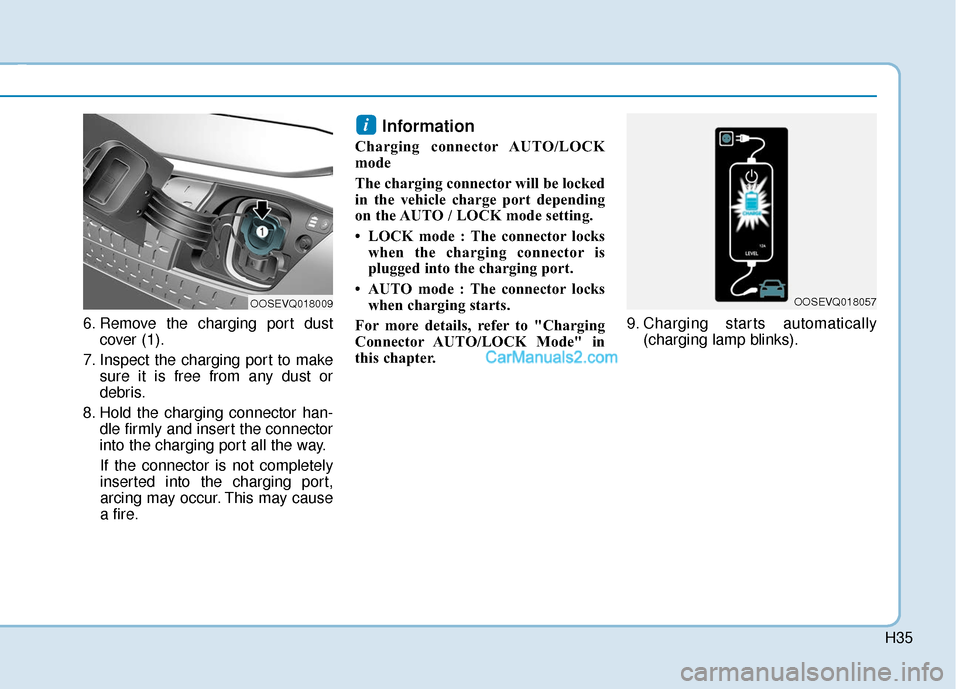
6. Remove the charging port dustcover (1).
7. Inspect the charging port to make sure it is free from any dust or
debris.
8. Hold the charging connector han- dle firmly and insert the connector
into the charging port all the way.
If the connector is not completely
inserted into the charging port,
arcing may occur. This may cause
a fire.
Information
Charging connector AUTO/LOCK
mode
The charging connector will be locked
in the vehicle charge port depending
on the AUTO / LOCK mode setting.
• LOCK mode : The connector locks when the charging connector is
plugged into the charging port.
• AUTO mode : The connector locks when charging starts.
For more details, refer to "Charging
Connector AUTO/LOCK Mode" in
this chapter. 9. Charging starts automatically
(charging lamp blinks).
i
OOSEVQ018009OOSEVQ018057
Page 504 of 540
H41
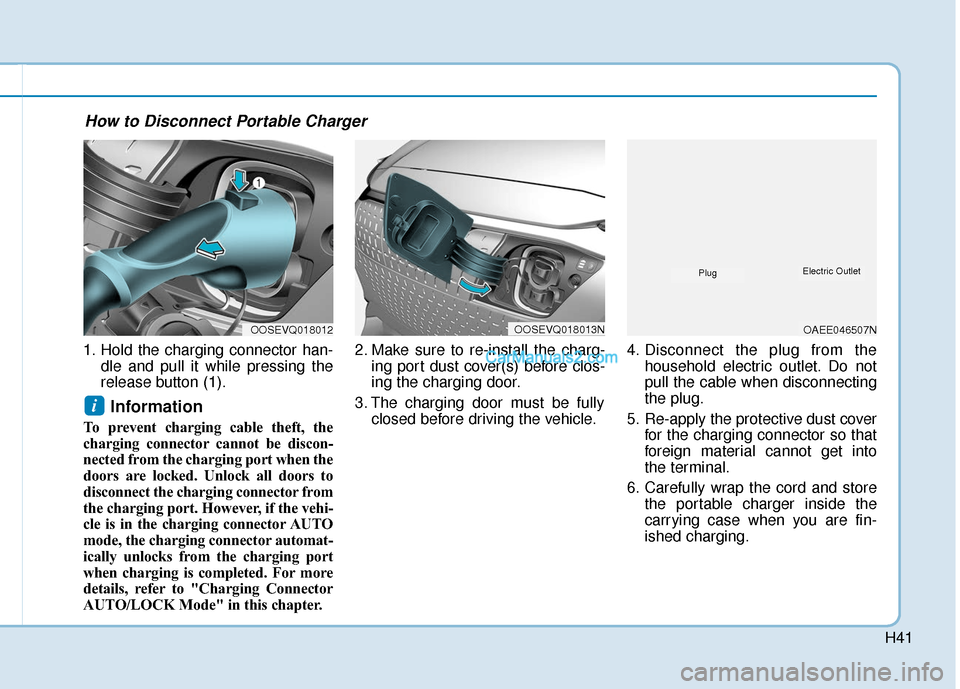
1. Hold the charging connector han-dle and pull it while pressing the
release button (1).
Information
To prevent charging cable theft, the
charging connector cannot be discon-
nected from the charging port when the
doors are locked. Unlock all doors to
disconnect the charging connector from
the charging port. However, if the vehi-
cle is in the charging connector AUTO
mode, the charging connector automat-
ically unlocks from the charging port
when charging is completed. For more
details, refer to "Charging Connector
AUTO/LOCK Mode" in this chapter. 2. Make sure to re-install the charg-
ing port dust cover(s) before clos-
ing the charging door.
3. The charging door must be fully closed before driving the vehicle. 4. Disconnect the plug from the
household electric outlet. Do not
pull the cable when disconnecting
the plug.
5. Re-apply the protective dust cover for the charging connector so that
foreign material cannot get into
the terminal.
6. Carefully wrap the cord and store the portable charger inside the
carrying case when you are fin-
ished charging.
i
OOSEVQ018012OOSEVQ018013NOAEE046507N
PlugElectric Outlet
How to Disconnect Portable Charger
Page 524 of 540
H61
If you cannot put out the fire
immediately, the high voltage
battery may explode. Evacuate
to a safe place and do not let
other people approach the site.
Contact the fire department and
notify them of an electric vehi-
cle fire.
If the vehicle is flooded with
water, immediately turn OFF
the vehicle and evacuate to a
safe place. Contact 911 or an
authorized HYUNDAI dealer.
WARNING
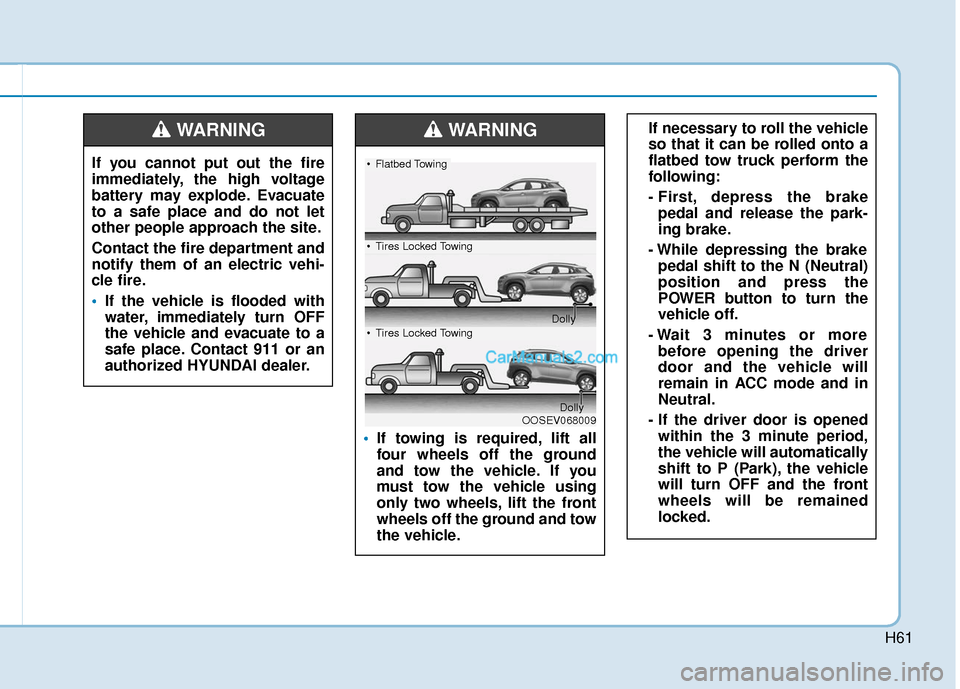
If towing is required, lift all
four wheels off the ground
and tow the vehicle. If you
must tow the vehicle using
only two wheels, lift the front
wheels off the ground and tow
the vehicle.
If necessary to roll the vehicle
so that it can be rolled onto a
flatbed tow truck perform the
following:
- First, depress the brake
pedal and release the park-
ing brake.
- While depressing the brake pedal shift to the N (Neutral)
position and press the
POWER button to turn the
vehicle off.
- Wait 3 minutes or more before opening the driver
door and the vehicle will
remain in ACC mode and in
Neutral.
- If the driver door is opened within the 3 minute period,
the vehicle will automatically
shift to P (Park), the vehicle
will turn OFF and the front
wheels will be remained
locked.WARNING
OOSEV068009
Flatbed Towing
Tires Locked Towing
Dolly
Tires Locked Towing
Dolly
Page 525 of 540
H62
Additional Precautions
When you paint or apply heat treat-ment to the vehicle as a result of
an accident, the performance of
the high voltage battery can be
reduced.
If heat treatment is required, contact
an authorized HYUNDAI dealer.
When you clean the motor com- partment, do not use high pressure
water to wash. This may cause an
electric shock due to a discharge in
high voltage electricity, or damage
the vehicle's electric system.
Do not use, remodel, or install non- genuine parts. This may damage
the electric power system.
Service Interlock Connector
In case of emergency, cut the service
interlock connector cable to isolate
the high voltage of the battery.
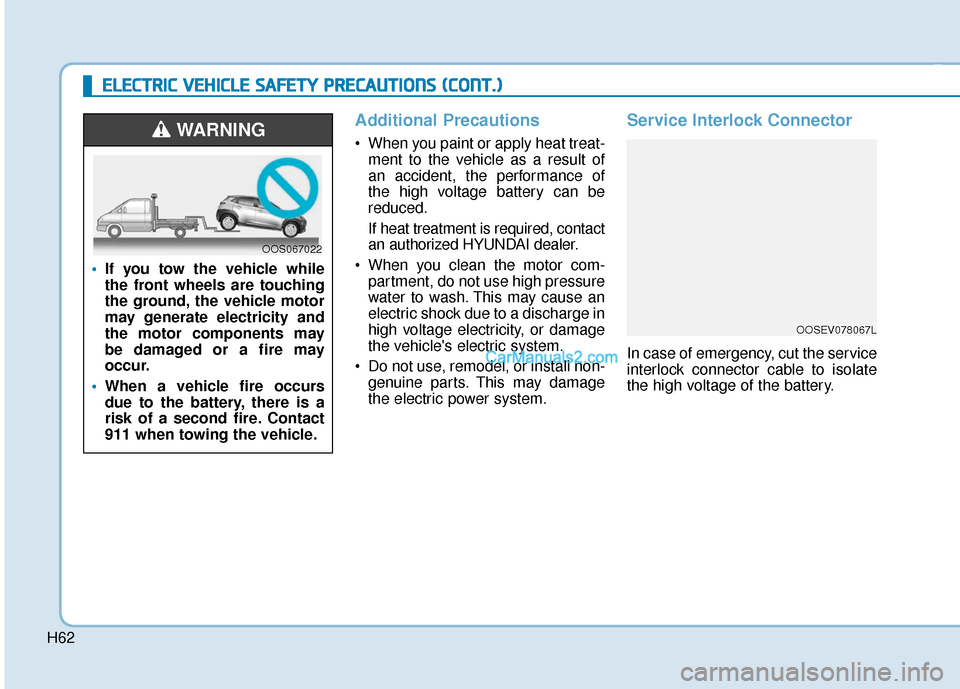
If you tow the vehicle while
the front wheels are touching
the ground, the vehicle motor
may generate electricity and
the motor components may
be damaged or a fire may
occur.
When a vehicle fire occurs
due to the battery, there is a
risk of a second fire. Contact
911 when towing the vehicle.
WARNING
OOS067022
E
EL
LE
E C
CT
T R
R I
IC
C
V
V E
EH
H I
IC
C L
LE
E
S
S A
A F
FE
E T
T Y
Y
P
P R
R E
EC
CA
A U
U T
TI
IO
O N
NS
S
(
( C
C O
O N
NT
T.
.)
)
OOSEV078067L