charging Hyundai Kona EV 2019 Workshop Manual
[x] Cancel search | Manufacturer: HYUNDAI, Model Year: 2019, Model line: Kona EV, Model: Hyundai Kona EV 2019Pages: 540, PDF Size: 21.84 MB
Page 485 of 540
H22
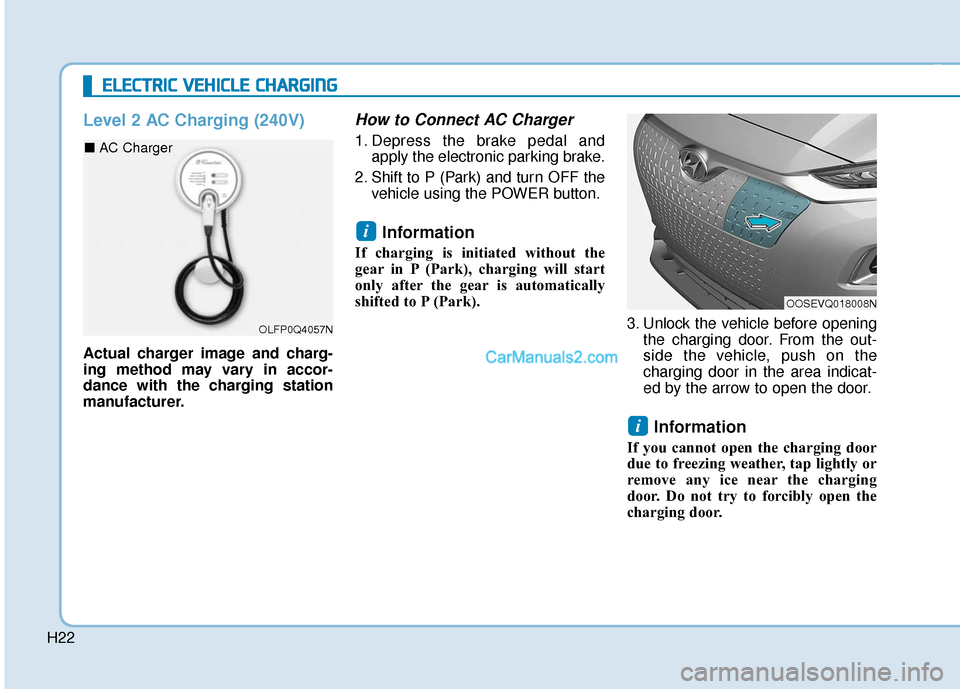
Level 2 AC Charging (240V)
Actual charger image and charg-
ing method may vary in accor-
dance with the charging station
manufacturer.
How to Connect AC Charger
1. Depress the brake pedal andapply the electronic parking brake.
2. Shift to P (Park) and turn OFF the vehicle using the POWER button.
Information
If charging is initiated without the
gear in P (Park), charging will start
only after the gear is automatically
shifted to P (Park).
3. Unlock the vehicle before openingthe charging door. From the out-
side the vehicle, push on the
charging door in the area indicat-
ed by the arrow to open the door.
Information
If you cannot open the charging door
due to freezing weather, tap lightly or
remove any ice near the charging
door. Do not try to forcibly open the
charging door.
i
i
E EL
LE
E C
CT
T R
R I
IC
C
V
V E
EH
H I
IC
C L
LE
E
C
C H
H A
AR
RG
G I
IN
N G
G
OLFP0Q4057N
■ AC Charger
OOSEVQ018008N
Page 486 of 540
H23
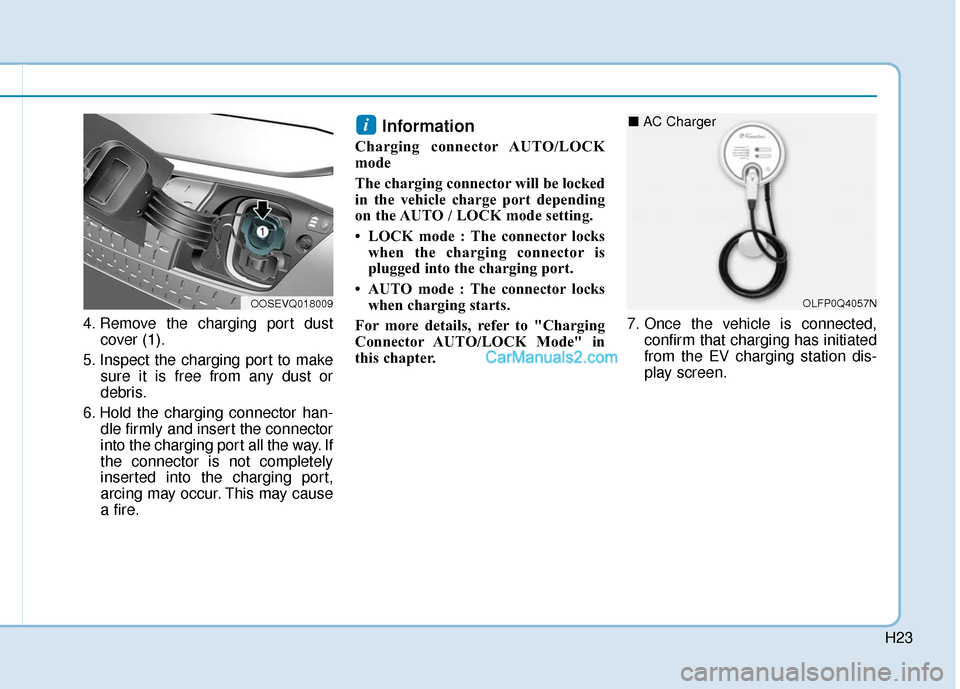
4. Remove the charging port dustcover (1).
5. Inspect the charging port to make sure it is free from any dust or
debris.
6. Hold the charging connector han- dle firmly and insert the connector
into the charging port all the way. If
the connector is not completely
inserted into the charging port,
arcing may occur. This may cause
a fire.
Information
Charging connector AUTO/LOCK
mode
The charging connector will be locked
in the vehicle charge port depending
on the AUTO / LOCK mode setting.
• LOCK mode : The connector lockswhen the charging connector is
plugged into the charging port.
• AUTO mode : The connector locks when charging starts.
For more details, refer to "Charging
Connector AUTO/LOCK Mode" in
this chapter. 7. Once the vehicle is connected,
confirm that charging has initiated
from the EV charging station dis-
play screen.
i
OOSEVQ018009OLFP0Q4057N
■ AC Charger
Page 487 of 540
H24
E
EL
LE
E C
CT
T R
R I
IC
C
V
V E
EH
H I
IC
C L
LE
E
C
C H
H A
AR
RG
G I
IN
N G
G
(
( C
C O
O N
NT
T.
.)
)
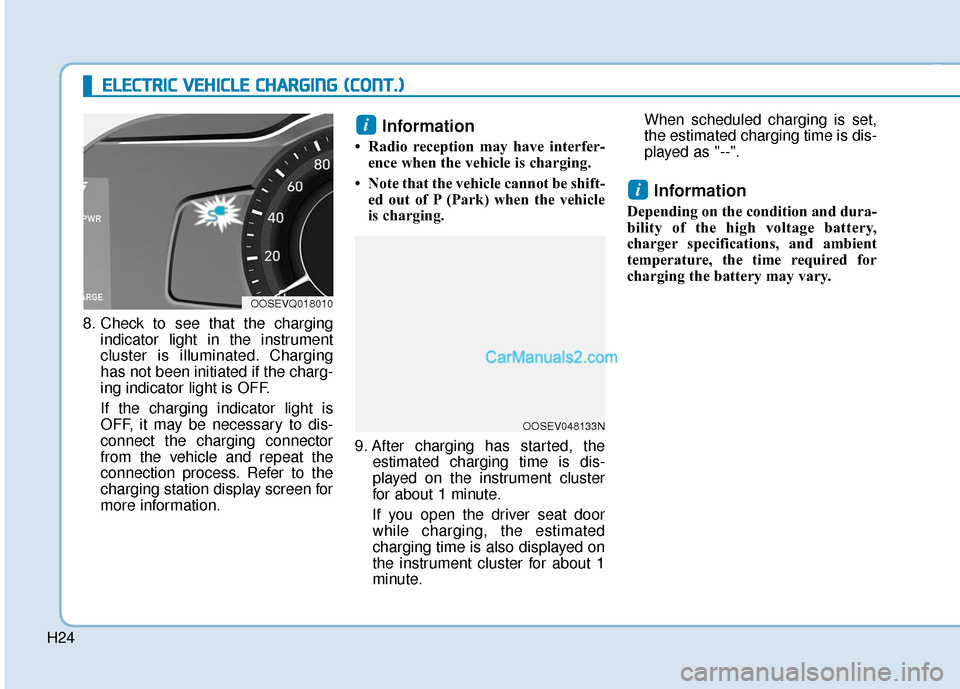
8. Check to see that the charging
indicator light in the instrument
cluster is illuminated. Charging
has not been initiated if the charg-
ing indicator light is OFF.
If the charging indicator light is
OFF, it may be necessary to dis-
connect the charging connector
from the vehicle and repeat the
connection process. Refer to the
charging station display screen for
more information.
Information
• Radio reception may have interfer-ence when the vehicle is charging.
• Note that the vehicle cannot be shift- ed out of P (Park) when the vehicle
is charging.
9. After charging has started, the estimated charging time is dis-
played on the instrument cluster
for about 1 minute.
If you open the driver seat door while charging, the estimated
charging time is also displayed on
the instrument cluster for about 1
minute. When scheduled charging is set,
the estimated charging time is dis-
played as "--".
Information
Depending on the condition and dura-
bility of the high voltage battery,
charger specifications, and ambient
temperature, the time required for
charging the battery may vary.
i
i
OOSEVQ018010
OOSEV048133N
Page 488 of 540
H25
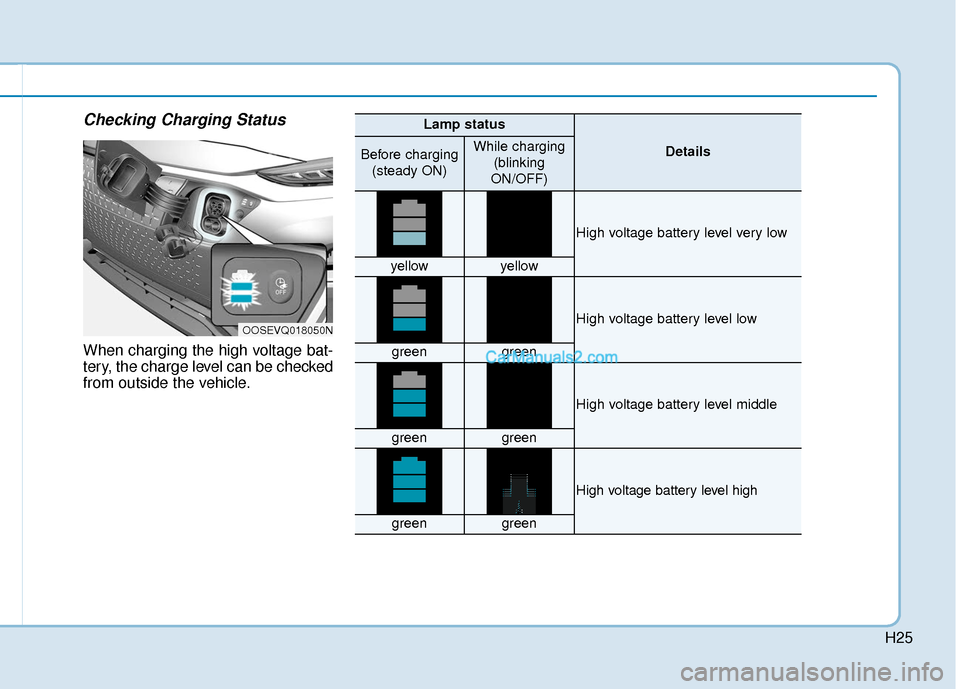
Checking Charging Status
When charging the high voltage bat-
tery, the charge level can be checked
from outside the vehicle.
OOSEVQ018050N
Lamp status
DetailsBefore charging(steady ON)While charging (blinking
ON/OFF)
High voltage battery level very low
yellowyellow
High voltage battery level low
greengreen
High voltage battery level middle
greengreen
High voltage battery level high
greengreen
Page 489 of 540
H26
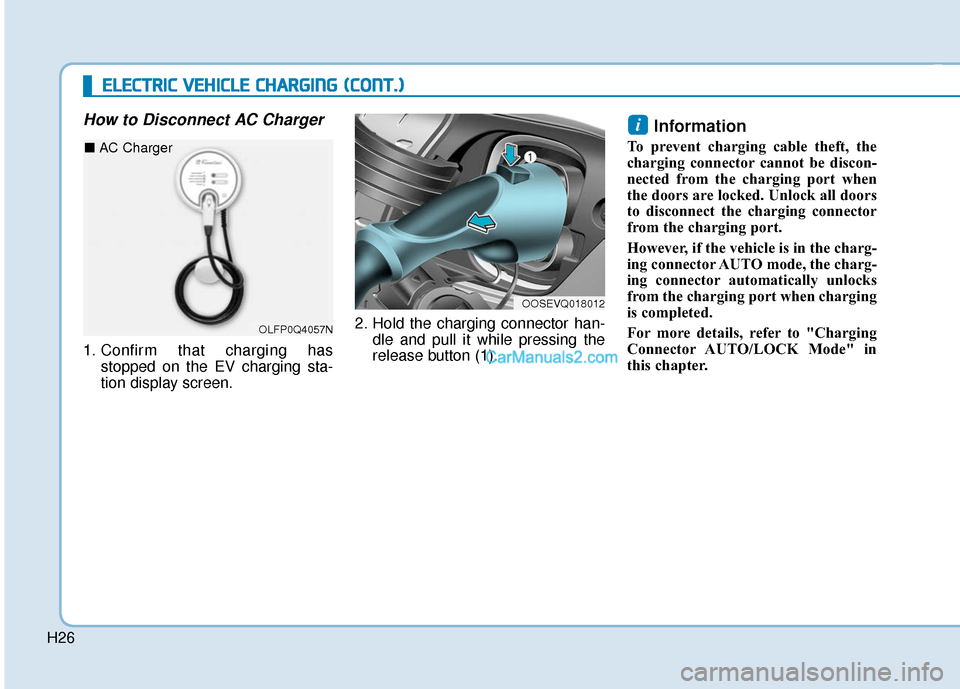
How to Disconnect AC Charger
1. Confirm that charging hasstopped on the EV charging sta-
tion display screen. 2. Hold the charging connector han-
dle and pull it while pressing the
release button (1).
Information
To prevent charging cable theft, the
charging connector cannot be discon-
nected from the charging port when
the doors are locked. Unlock all doors
to disconnect the charging connector
from the charging port.
However, if the vehicle is in the charg-
ing connector AUTO mode, the charg-
ing connector automatically unlocks
from the charging port when charging
is completed.
For more details, refer to "Charging
Connector AUTO/LOCK Mode" in
this chapter.
i
OOSEVQ018012
E
EL
LE
E C
CT
T R
R I
IC
C
V
V E
EH
H I
IC
C L
LE
E
C
C H
H A
AR
RG
G I
IN
N G
G
(
( C
C O
O N
NT
T.
.)
)
OLFP0Q4057N
■ AC Charger
Page 490 of 540
H27
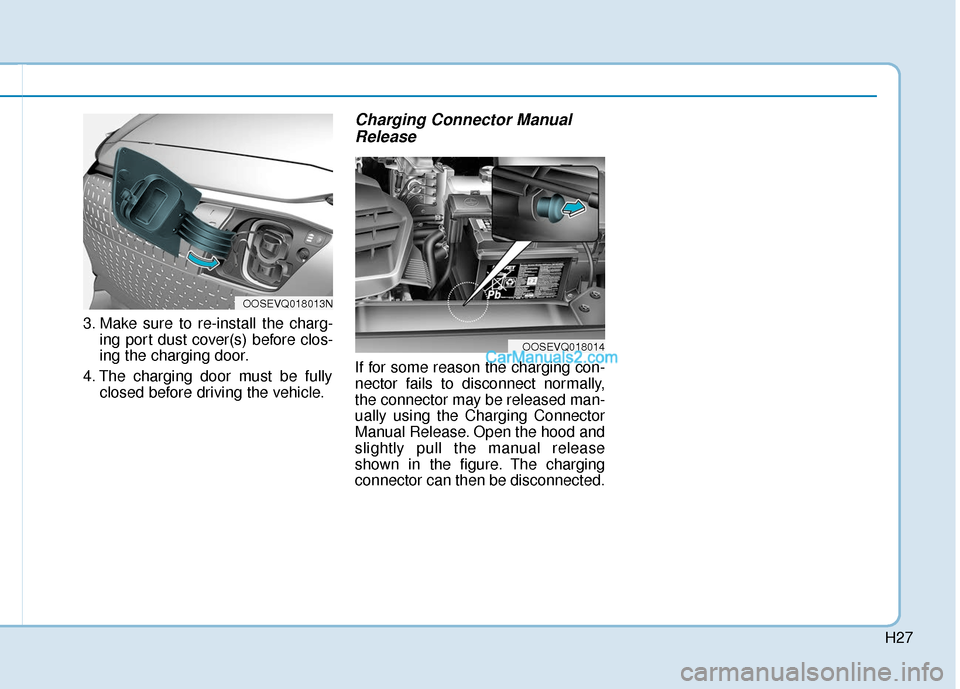
3. Make sure to re-install the charg-ing port dust cover(s) before clos-
ing the charging door.
4. The charging door must be fully closed before driving the vehicle.
Charging Connector ManualRelease
If for some reason the charging con-
nector fails to disconnect normally,
the connector may be released man-
ually using the Charging Connector
Manual Release. Open the hood and
slightly pull the manual release
shown in the figure. The charging
connector can then be disconnected.
OOSEVQ018013N
OOSEVQ018014
Page 491 of 540
H28
DC Fast Charging
DC fast charging (also known as
Level 3 charging) provides high
power DC current directly to the EV
battery. DC charging stations are
capable of charging the EV battery to
80% in less than 75 minutes under
normal conditions.
While DC charging is very fast com-
pared to AC charging, prolonged and
continuous use of DC fast charging
may reduce the long term life of the
EV battery. Usage of a DC fast
charger should be minimized when
possible in order to help prolong the
life of the EV battery.Actual charger image and charg-
ing method may vary in accor-
dance with the charging station
manufacturer.
Information
If you use a DC charger when the
vehicle is already fully charged, some
DC chargers will send out an error
message. When the vehicle is fully
charged, do not charge the vehicle.
How to Connect DC Charger
1. Depress the brake pedal and
apply the electronic parking brake.
2. Shift to P (Park) and turn OFF the vehicle using the POWER button.
Information
If charging is initiated without the
gear in P (Park), charging will start
only after the gear is automatically
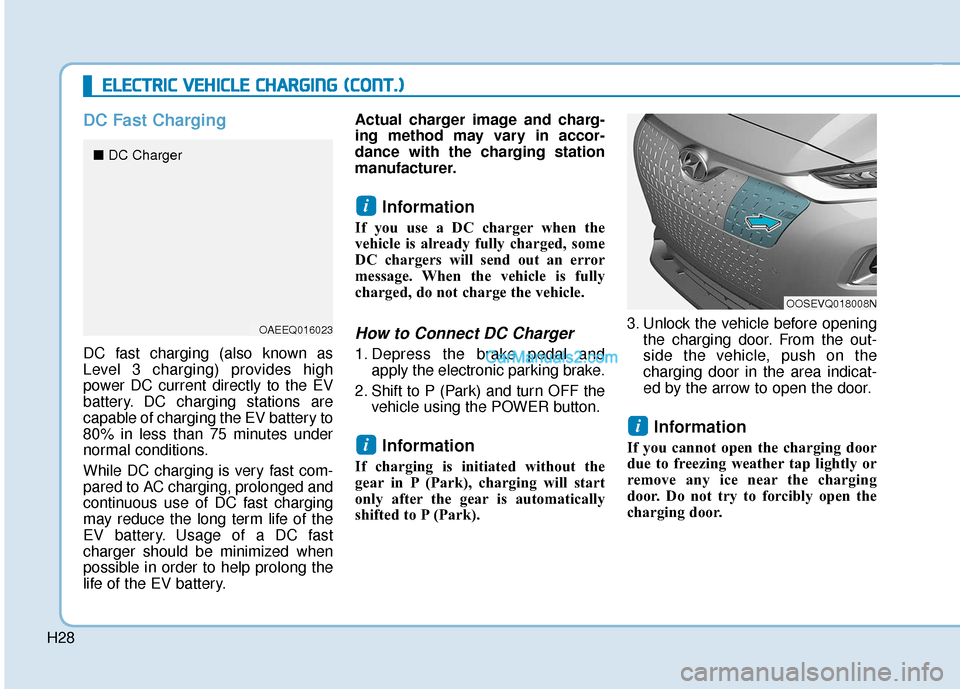
shifted to P (Park). 3. Unlock the vehicle before opening
the charging door. From the out-
side the vehicle, push on the
charging door in the area indicat-
ed by the arrow to open the door.
Information
If you cannot open the charging door
due to freezing weather tap lightly or
remove any ice near the charging
door. Do not try to forcibly open the
charging door.
i
i
i
E EL
LE
E C
CT
T R
R I
IC
C
V
V E
EH
H I
IC
C L
LE
E
C
C H
H A
AR
RG
G I
IN
N G
G
(
( C
C O
O N
NT
T.
.)
)
OOSEVQ018008N
OAEEQ016023
■ DC Charger
Page 492 of 540
H29
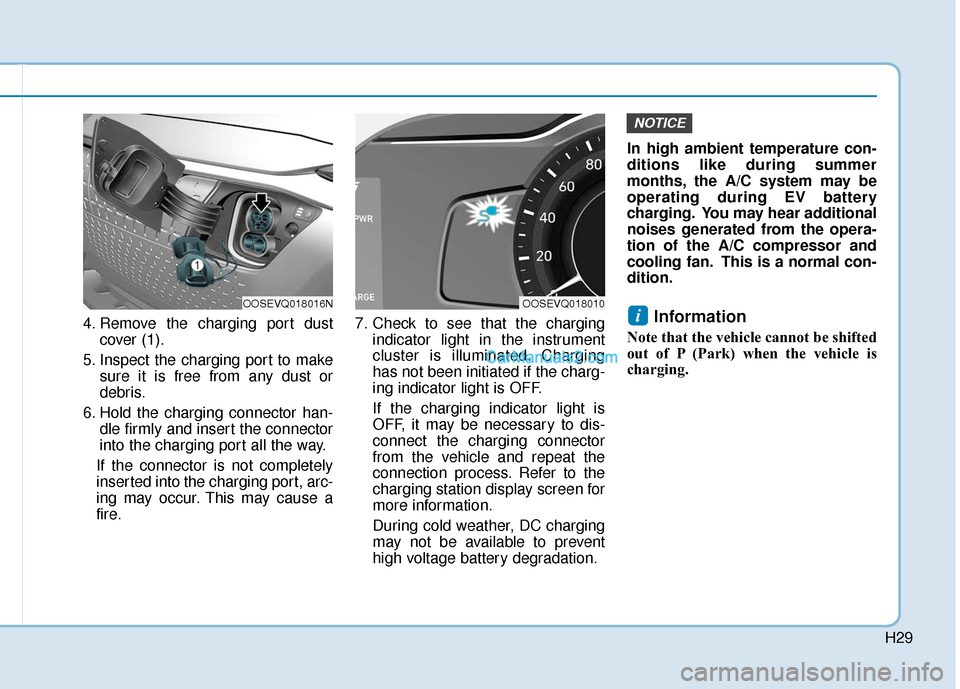
4. Remove the charging port dustcover (1).
5. Inspect the charging port to make sure it is free from any dust or
debris.
6. Hold the charging connector han- dle firmly and insert the connector
into the charging port all the way.
If the connector is not completely
inserted into the charging port, arc-
ing may occur. This may cause a
fire. 7. Check to see that the charging
indicator light in the instrument
cluster is illuminated. Charging
has not been initiated if the charg-
ing indicator light is OFF.
If the charging indicator light is
OFF, it may be necessary to dis-
connect the charging connector
from the vehicle and repeat the
connection process. Refer to the
charging station display screen for
more information.
During cold weather, DC charging
may not be available to prevent
high voltage battery degradation. In high ambient temperature con-
ditions like during summer
months, the A/C system may be
operating during EV battery
charging. You may hear additional
noises generated from the opera-
tion of the A/C compressor and
cooling fan. This is a normal con-
dition.Information
Note that the vehicle cannot be shifted
out of P (Park) when the vehicle is
charging.
i
NOTICE
OOSEVQ018016NOOSEVQ018010
Page 493 of 540
H30
E
EL
LE
E C
CT
T R
R I
IC
C
V
V E
EH
H I
IC
C L
LE
E
C
C H
H A
AR
RG
G I
IN
N G
G
(
( C
C O
O N
NT
T.
.)
)
8. After charging has started, the
estimated charging time is dis-
played on the instrument cluster
for about 1 minute.
If you open the driver seat door while charging, the estimated
charging time is also displayed on
the instrument cluster for about 1
minute.
Information
Depending on the condition and dura-
bility of the high voltage battery,
charger specifications, and ambient
temperature, the time required for
charging the battery may vary.
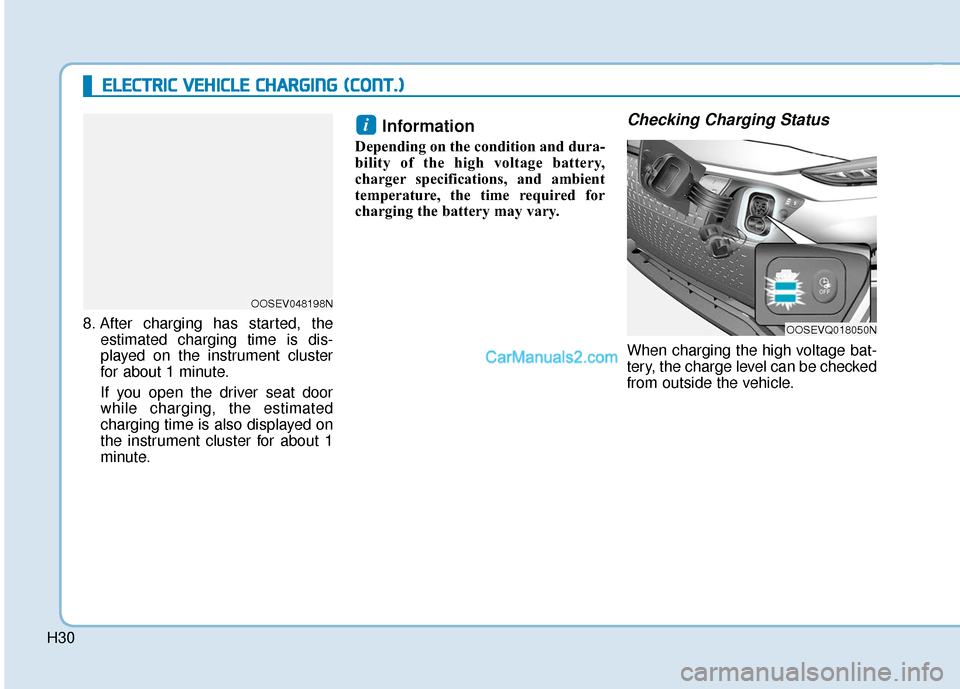
Checking Charging Status
When charging the high voltage bat-
tery, the charge level can be checked
from outside the vehicle.
i
OOSEVQ018050N
OOSEV048198N
Page 494 of 540
H31
How to Disconnect DC Charger
1. Refer to the instructions on the on-screen display of the DC charging
station before disconnecting the
charging connector from the vehi-
cle. Once charging is stopped,
remove the charging connector.
2. Make sure to re-install the charg- ing port dust cover(s) before clos-
ing the charging door.
3. The charging door must be fully closed before driving the vehicle.
OOSEVQ018013N
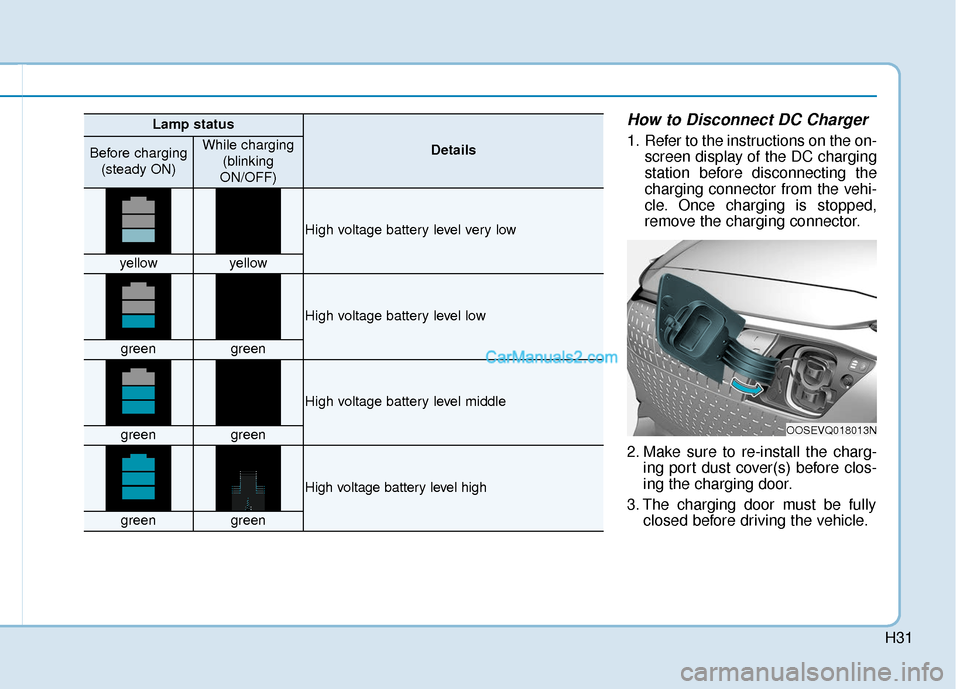
Lamp status
DetailsBefore charging
(steady ON)While charging (blinking
ON/OFF)
High voltage battery level very low
yellowyellow
High voltage battery level low
greengreen
High voltage battery level middle
greengreen
High voltage battery level high
greengreen