electric system HYUNDAI KONA EV 2021 Owners Manual
[x] Cancel search | Manufacturer: HYUNDAI, Model Year: 2021, Model line: KONA EV, Model: HYUNDAI KONA EV 2021Pages: 478, PDF Size: 32.83 MB
Page 25 of 478
2-10
To prevent damage to the seats:
Always stop adjusting the seats
when the seat has been adjust-
ed as far forward or rearward as
possible.
Do not adjust the seats longer
than necessary when the vehicle
is turned off. This may result in
unnecessary battery drain.
Do not operate two or more
seats at the same time. This may
result in an electrical malfunc-
tion.
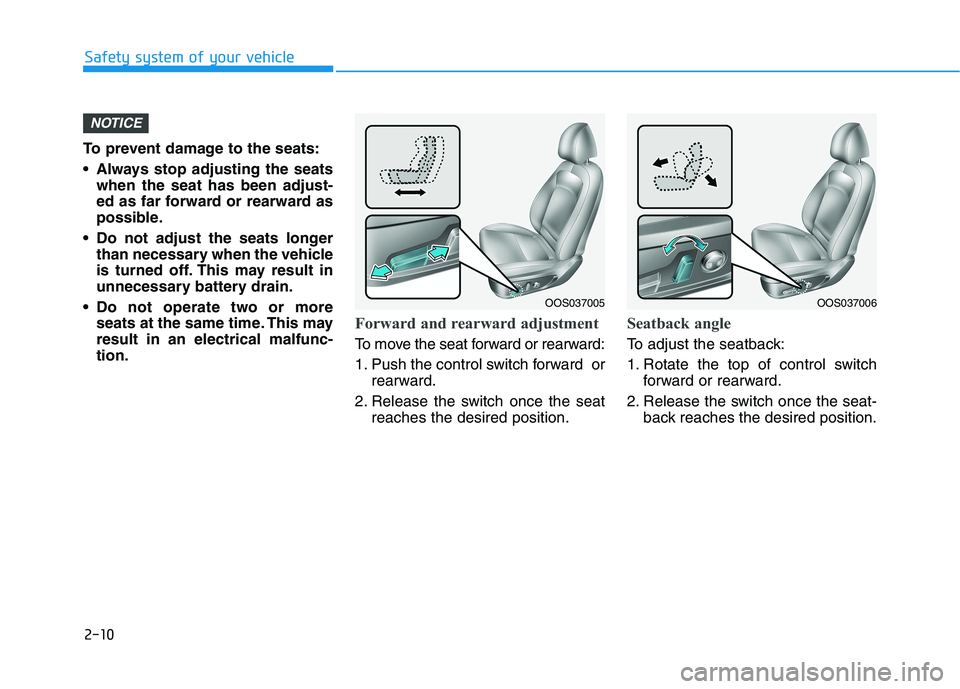
Forward and rearward adjustment
To move the seat forward or rearward:
1. Push the control switch forward or
rearward.
2. Release the switch once the seat
reaches the desired position.
Seatback angle
To adjust the seatback:
1. Rotate the top of control switch
forward or rearward.
2. Release the switch once the seat-
back reaches the desired position.
NOTICE
Safety system of your vehicle
OOS037006OOS037005
Page 74 of 478
2-59
Safety system of your vehicle
2
Always be sure that you and all vehi-
cle occupants are seated properly
and wearing the seat belt properly for
the most effective protection by the
air bag and the seat belt.
The OCS may not function properly if
the passenger takes actions which
can affect the classification system.
These include:
Failing to sit in an upright position.
Leaning against the door or center
console.
Sitting towards the sides of the
front of the seat.
Putting their legs on the dashboard
or resting them on other locations
which reduce the passenger
weight on the front seat.
Wearing the seat belt improperly.
Reclining the seatback.
Wearing a thick cloth like ski wear
or hip protection wear.
Putting an additional thick cushion
on the seat.
Putting electrical devices (e.g.
notebook, satellite radio) on the
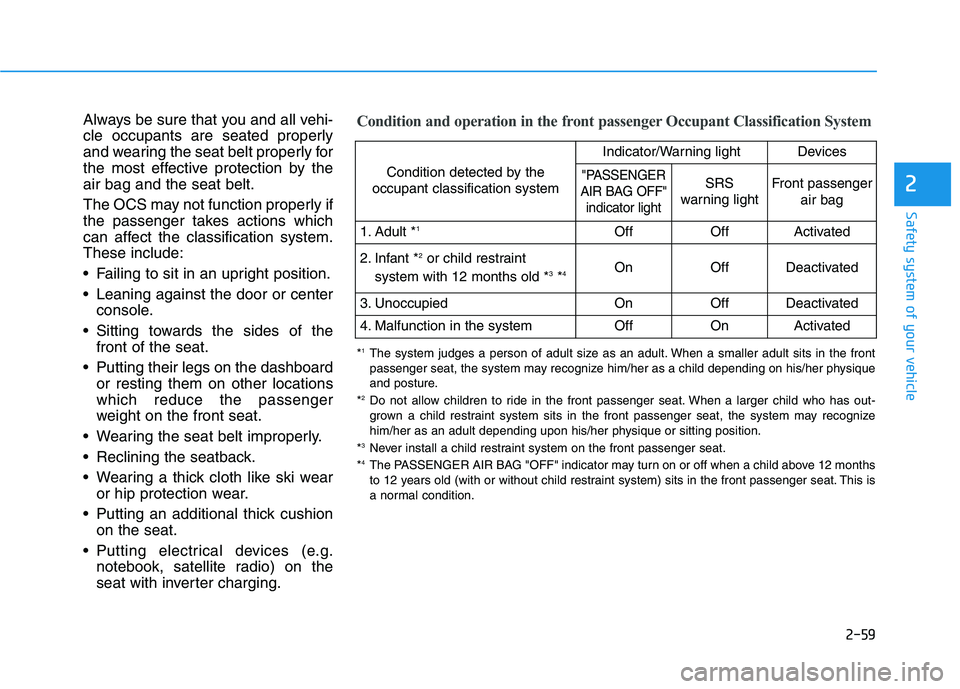
seat with inverter charging.Condition and operation in the front passenger Occupant Classification System
Condition detected by the
occupant classification system
Indicator/Warning lightDevices
"PASSENGER
AIR BAG OFF"
indicator lightSRS
warning lightFront passenger
air bag
1. Adult *1OffOffActivated
2. Infant *2or child restraint
system with 12 months old *3*4 OnOffDeactivated
3. Unoccupied OnOffDeactivated
4. Malfunction in the systemOffOnActivated
*1The system judges a person of adult size as an adult. When a smaller adult sits in the front
passenger seat, the system may recognize him/her as a child depending on his/her physique
and posture.
*
2Do not allow children to ride in the front passenger seat. When a larger child who has out-
grown a child restraint system sits in the front passenger seat, the system may recognize
him/her as an adult depending upon his/her physique or sitting position.
*
3Never install a child restraint system on the front passenger seat.
*4The PASSENGER AIR BAG "OFF" indicator may turn on or off when a child above 12 months
to 12 years old (with or without child restraint system) sits in the front passenger seat. This is
a normal condition.
Page 85 of 478
Convenient features of your vehicle
Accessing Your Vehicle .........................................3-3
Smart Key ..........................................................................3-3
Immobilizer System ..........................................................3-8
Door Locks ............................................................3-10
Operating Door Locks from Outside the Vehicle ..3-10
Operating Door Locks from Inside the Vehicle ......3-11
Automatic Door Lock and Unlock Features .............3-13
Child-Protector Rear Door Locks ...............................3-14
Theft-Alarm System ............................................3-15
Steering Wheel .....................................................3-16
Electric Power Steering (EPS) .....................................3-16
Tilt Steering / Telescopic Steering .............................3-17
Horn ....................................................................................3-18
Heated Steering Wheel ..................................................3-18
Mirrors ...................................................................3-19
Inside Rearview Mirror ..................................................3-19
Side View Mirrors ...........................................................3-29
Windows ................................................................3-32
Power Windows ...............................................................3-33
Sunroof..................................................................3-36
Sunroof Opening and Closing ......................................3-37
Sliding the Sunroof .........................................................3-37
Tilting the Sunroof .........................................................3-38
Sunshade ...........................................................................3-39
Resetting the Sunroof ...................................................3-39
Sunroof Open Warning ..................................................3-40
Exterior Features .................................................3-41
Hood ...................................................................................3-41
Liftgate ..............................................................................3-43
Charging Door ..................................................................3-45
Instrument Cluster ...............................................3-46
Instrument Cluster Control............................................3-47
Gauges and Meters ........................................................3-48
Warning and Indicator lights ........................................3-53
LCD Display Messages ..................................................3-65
LCD Display ...........................................................3-78
LCD Display Control ........................................................3-78
LCD Display Modes ........................................................3-79
Trip Computer .......................................................3-92
Head Up Display (HUD) .......................................3-96
Lighting..................................................................3-99
Exterior Lights .................................................................3-99
Smart Cornering Lamp.................................................3-106
Welcome System ...........................................................3-106
Interior Lights ................................................................3-107
Wipers and Washers ........................................3-110
Front Windshield Wipers ...........................................3-110
Front Windshield Washers ........................................3-112
Rear Window Wiper and Washer..............................3-113
3
Page 92 of 478
3-8
Convenient features of your vehicle
If you suspect your smart key might
have sustained some damage, or
you feel your smart key is not work-
ing correctly, contact an authorized
HYUNDAI dealer.
Information
An inappropriately disposed
battery can be harmful to the
environment and human
health. Dispose of the battery
according to your local law(s)
or regulations.
Immobilizer System
The immobilizer system protects your
vehicle from theft. If an improperly
coded key (or other device) is used,
the vehicle’s power system is disabled.
When the POWER button is placed in
the ON position, the immobilizer sys-
tem indicator should come on briefly,
then go off. If the indicator starts to
blink, the system does not recognize
the coding of the key.
Press the POWER button to the OFF
position, then press the POWER but-
ton to the ON position again.
In some circumstances, the vehicle
may not recognize your smart key if
another smart key device is nearby or
a metal object such as a key chain is
causing interference with the smart
key.
If this occurs, your vehicle may not
start. Remove any metal objects or
additional keys near the smart key
before attempting to start the vehicle
again.
If the system repeatedly does not
recognize the coding of the key, it is
recommended that you contact your
HYUNDAI dealer.Do not attempt to alter this system or
add other devices to it. Electrical
problems could result that may make
your vehicle inoperable.
iIn order to prevent theft of your
vehicle, do not leave spare keys
anywhere in your vehicle. Your
immobilizer password is a cus-
tomer unique password and
should be kept confidential.
WARNING
Page 93 of 478
3-9
Convenient features of your vehicle
The transponder in your key is an
important part of the immobilizer
system. It is designed to give
years of trouble-free service, how-
ever you should avoid exposure to
moisture, static electricity and
rough handling. Immobilizer sys-
tem malfunction could occur.
Information
This device complies with Part 15 of
the FCC rules.
Operation is subject to the following
three conditions:
1. This device may not cause harmful
interference.
2. This device must accept any inter-
ference received, including inter-
ference that may cause undesired
operation.
3. Changes or modifications not
expressly approved by the party
responsible for compliance could
void the user’s authority to operate
the device.
iNOTICE
3
Page 100 of 478
3-16
Convenient features of your vehicle
S ST
TE
EE
ER
RI
IN
NG
G
W
WH
HE
EE
EL
L
Electric Power Steering (EPS)
The system assists you with steering
the vehicle. If the vehicle is turned off
or if the power steering system
becomes inoperative, you may still
steer the vehicle, but it will require
increased steering effort.
Should you notice any change in the
effort required to steer during normal
vehicle operation, have the system
checked by an authorized HYUNDAI
dealer.
If the Electric Power Steering
System does not operate nor-
mally, the warning light ( ) will
illuminate on the instrument
cluster. You may steer the vehi-
cle, but it will require increased
steering efforts. Take your vehi-
cle to an authorized HYUNDAI
dealer and have the system
checked as soon as possible. If a malfunction is detected in
the electric power steering
(EPS) system, the power steer-
ing assist will be disabled. If this
occurs, the EPS warning light in
the cluster will either turn on or
blink. The steering effort when
turning may be increased. Have
your vehicle checked by an
authorized HYUNDAI dealer as
soon as possible.
Information
The following symptoms may occur
during normal vehicle operation:
• The steering effort may be high
immediately after placing the igni-
tion switch in the ON position.
This happens as the system per-
forms the EPS system diagnostics.
When the diagnostics are completed,
the steering wheel effort will return
to its normal condition.
• When the battery voltage is low, you
might have to put more steering
effort. However, it is a temporary
condition so that it will return to nor-
mal condition after charging the bat-
tery.• A click noise may be heard from the
EPS relay after the POWER button
is in the ON or OFF position.
• Motor noise may be heard when the
vehicle is at a stop or at a low driv-
ing speed.
• When you operate the steering
wheel in low temperatures, you
may hear a noise from the electric
power steering system. If the tem-
perature rises, the noise will disap-
pear. This is a normal condition.
i
NOTICE
Page 104 of 478
3-20
Convenient features of your vehicle
Electrochromic mirror (ECM) with
HomeLink®system, compass and
Blue Link®(if equipped)
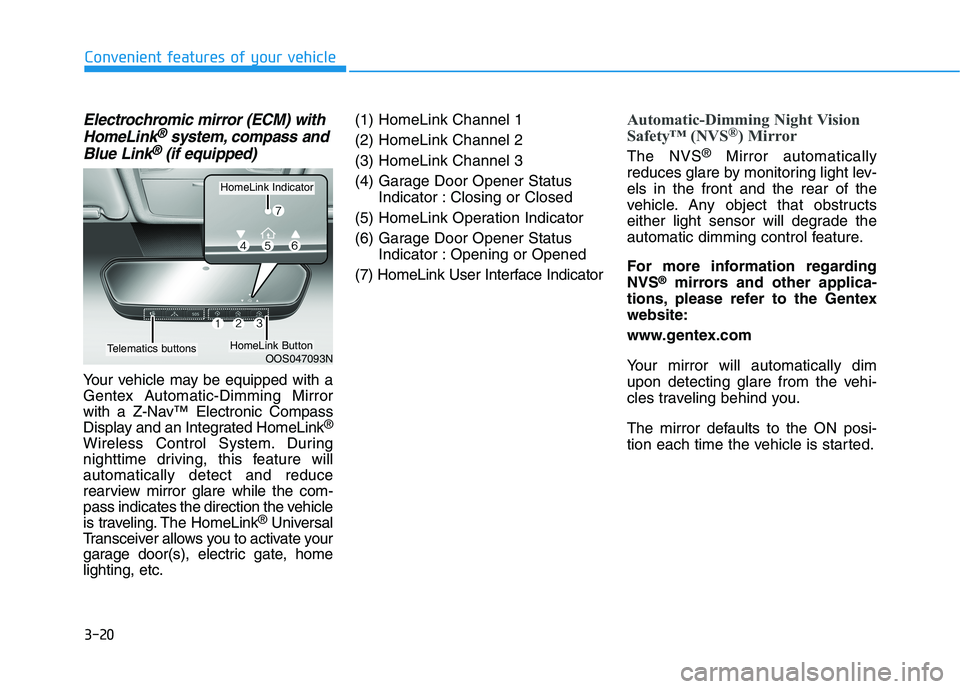
Your vehicle may be equipped with a
Gentex Automatic-Dimming Mirror
with a Z-Nav™ Electronic Compass
Display and an Integrated HomeLink
®
Wireless Control System. During
nighttime driving, this feature will
automatically detect and reduce
rearview mirror glare while the com-
pass indicates the direction the vehicle
is traveling. The HomeLink
®Universal
Transceiver allows you to activate your
garage door(s), electric gate, home
lighting, etc.(1) HomeLink Channel 1
(2) HomeLink Channel 2
(3) HomeLink Channel 3
(4) Garage Door Opener Status
Indicator : Closing or Closed
(5) HomeLink Operation Indicator
(6) Garage Door Opener Status
Indicator : Opening or Opened
(7) HomeLink User Interface Indicator
Automatic-Dimming Night Vision
Safety™ (NVS®) Mirror
The NVS®Mirror automatically
reduces glare by monitoring light lev-
els in the front and the rear of the
vehicle. Any object that obstructs
either light sensor will degrade the
automatic dimming control feature.
For more information regarding
NVS
®mirrors and other applica-
tions, please refer to the Gentex
website:
www.gentex.com
Your mirror will automatically dim
upon detecting glare from the vehi-
cles traveling behind you.
The mirror defaults to the ON posi-
tion each time the vehicle is started.
OOS047093N
HomeLink Indicator
HomeLink ButtonTelematics buttons
Page 120 of 478
3-36
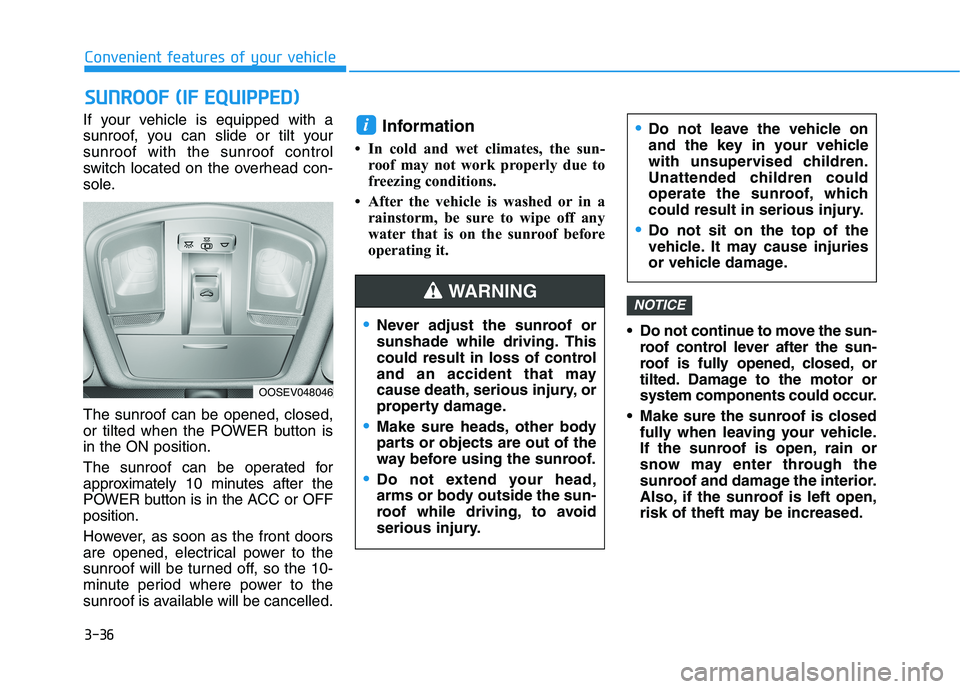
If your vehicle is equipped with a
sunroof, you can slide or tilt your
sunroof with the sunroof control
switch located on the overhead con-
sole.
The sunroof can be opened, closed,
or tilted when the POWER button is
in the ON position.
The sunroof can be operated for
approximately 10 minutes after the
POWER button is in the ACC or OFF
position.
However, as soon as the front doors
are opened, electrical power to the
sunroof will be turned off, so the 10-
minute period where power to the
sunroof is available will be cancelled.Information
• In cold and wet climates, the sun-
roof may not work properly due to
freezing conditions.
• After the vehicle is washed or in a
rainstorm, be sure to wipe off any
water that is on the sunroof before
operating it.
Do not continue to move the sun-
roof control lever after the sun-
roof is fully opened, closed, or
tilted. Damage to the motor or
system components could occur.
Make sure the sunroof is closed
fully when leaving your vehicle.
If the sunroof is open, rain or
snow may enter through the
sunroof and damage the interior.
Also, if the sunroof is left open,
risk of theft may be increased.
NOTICE
i
S SU
UN
NR
RO
OO
OF
F
(
(I
IF
F
E
EQ
QU
UI
IP
PP
PE
ED
D)
)
Convenient features of your vehicle
Never adjust the sunroof or
sunshade while driving. This
could result in loss of control
and an accident that may
cause death, serious injury, or
property damage.
Make sure heads, other body
parts or objects are out of the
way before using the sunroof.
Do not extend your head,
arms or body outside the sun-
roof while driving, to avoid
serious injury.
Do not leave the vehicle on
and the key in your vehicle
with unsupervised children.
Unattended children could
operate the sunroof, which
could result in serious injury.
Do not sit on the top of the
vehicle. It may cause injuries
or vehicle damage.
WARNING
OOSEV048046
Page 129 of 478
3-45
Convenient features of your vehicle
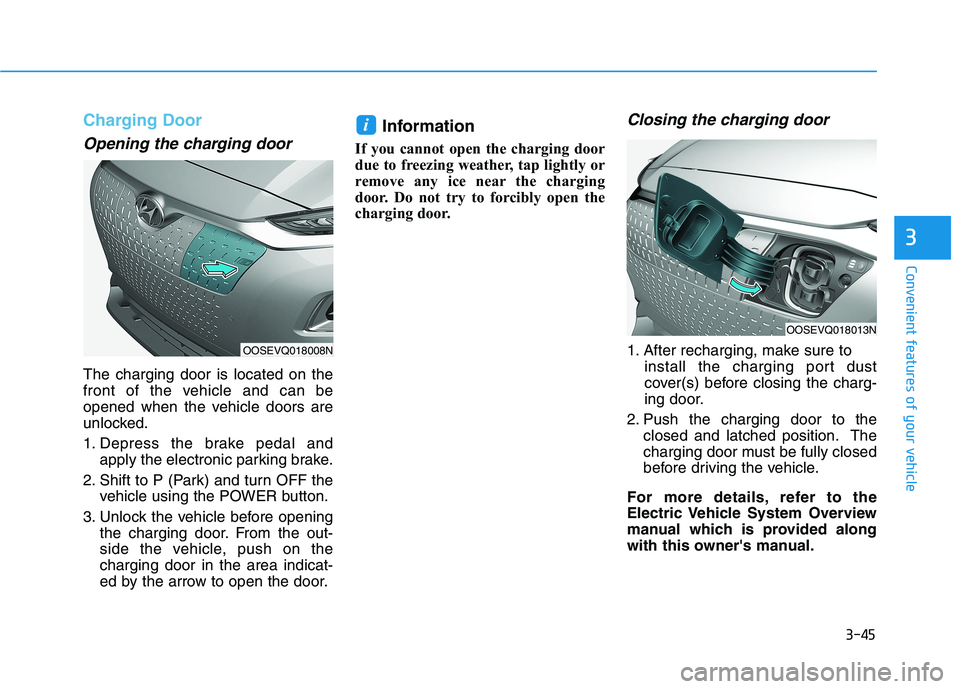
Charging Door
Opening the charging door
The charging door is located on the
front of the vehicle and can be
opened when the vehicle doors are
unlocked.
1. Depress the brake pedal and
apply the electronic parking brake.
2. Shift to P (Park) and turn OFF the
vehicle using the POWER button.
3. Unlock the vehicle before opening
the charging door. From the out-
side the vehicle, push on the
charging door in the area indicat-
ed by the arrow to open the door.
Information
If you cannot open the charging door
due to freezing weather, tap lightly or
remove any ice near the charging
door. Do not try to forcibly open the
charging door.
Closing the charging door
1. After recharging, make sure to
install the charging port dust
cover(s) before closing the charg-
ing door.
2. Push the charging door to the
closed and latched position. The
charging door must be fully closed
before driving the vehicle.
For more details, refer to the
Electric Vehicle System Overview
manual which is provided along
with this owner's manual.
i
3
OOSEVQ018008N
OOSEVQ018013N
Page 135 of 478
3-51
Convenient features of your vehicle
3
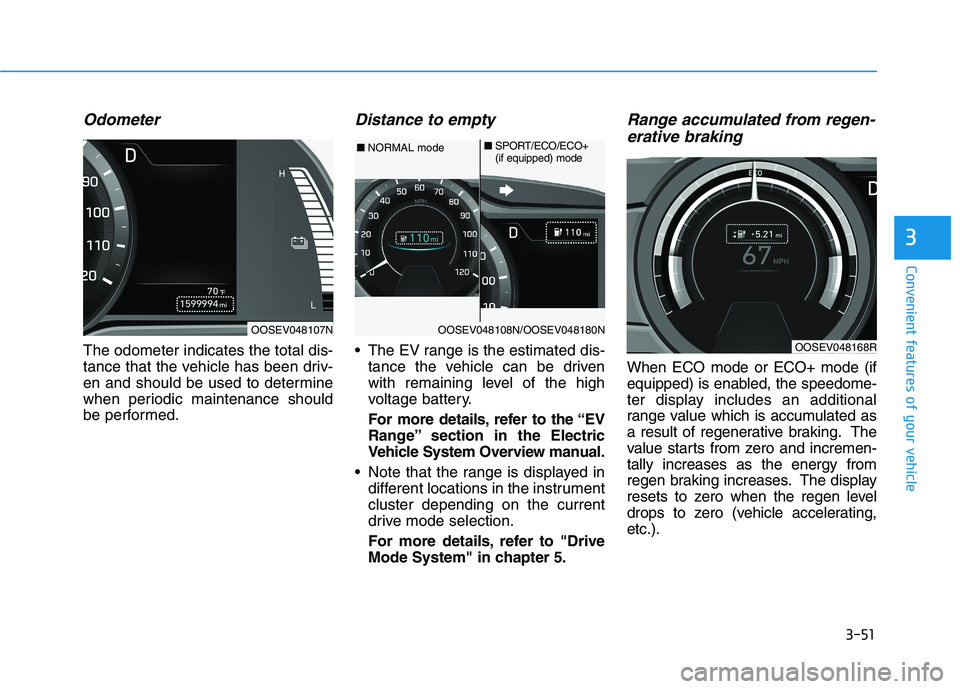
Odometer
The odometer indicates the total dis-
tance that the vehicle has been driv-
en and should be used to determine
when periodic maintenance should
be performed.
Distance to empty
The EV range is the estimated dis-
tance the vehicle can be driven
with remaining level of the high
voltage battery.
For more details, refer to the “EV
Range” section in the Electric
Vehicle System Overview manual.
Note that the range is displayed in
different locations in the instrument
cluster depending on the current
drive mode selection.
For more details, refer to "Drive
Mode System" in chapter 5.
Range accumulated from regen-
erative braking
When ECO mode or ECO+ mode (if
equipped) is enabled, the speedome-
ter display includes an additional
range value which is accumulated as
a result of regenerative braking. The
value starts from zero and incremen-
tally increases as the energy from
regen braking increases. The display
resets to zero when the regen level
drops to zero (vehicle accelerating,
etc.).
OOSEV048107NOOSEV048108N/OOSEV048180N
■NORMAL mode■SPORT/ECO/ECO+
(if equipped) mode
OOSEV048168R